What this post covers
"Digging into Apache httpd's Source" is a series that reads the source code of the Apache HTTP Server (usually called httpd, or just Apache) a little at a time, with help from AI, and writes up what is there. It follows the same method as the 27-post Digging into Spring's Source series. The difference is that this time the subject is not a Java framework but a web server written in C.
This is the first post, and it gets things ready before any deep reading starts. It tries to answer five questions.
- What is Apache httpd, how does it work, and what is it for? (a section for newcomers)
- Which version of the source is being read, and how is it different from the 2.4 most of us install?
- How do you get exactly the same source, and how do you build and run it?
- How is a codebase of about 350,000 lines split into folders, and where should you start?
- Which functions does one request pass through on its way to becoming a response?
If web servers or httpd are new to you, start with the "What is Apache httpd" section just below. Two pictures and a 3-minute hands-on run show what httpd does, and a quick look at the questions this series answers comes before the main part. After that, the post assumes someone who has installed and run httpd (edited httpd.conf, run apachectl restart) and is opening its source for the first time. C at the level of a university course is enough. Syntax that shows up a lot in large C programs, such as function pointers and macros, gets its own post: post 2.
| Item | Details |
|---|---|
| Project | Apache HTTP Server (apache/httpd) |
| Version | 2.5.1-dev (trunk) |
| Commit | e4af30fe6d (2026-10-24) |
| Language | C |
| Libraries read alongside | APR 1.7.2, APR-util 1.6.3 |
| Files this post mainly reads | include/ap_release.h, include/ap_mmn.h, buildconf, modules/http/http_core.c, modules/http/http_request.c |
Every line number and detail in these posts refers to that commit. In other versions the line numbers will differ, and some of the details may too. Since this post is the map for the whole series, it stays with the big picture and leaves the depth to the individual posts.
The series has 16 posts in all.
- How I Read It with AI, and the Map (this post)
- Before Reading a Server Written in C — Structs, Function Pointers, Macros
- The Big Picture — Core, APR, MPM, Modules and the Three Big Structs
- APR Memory Pools — Managing Memory Without free()
- main() and Startup — Why the Config Is Read Twice, and Restarts
- Modules and Hooks — How a Module Plugs into the Server
- The Config File and Directives — How One Line of httpd.conf Becomes a C Struct
- MPMs — How prefork, worker and event Share Out Connections
- Connections and Reading a Request — From a Socket to a request_rec
- Request Processing — From a URL to a File and a Handler
- Filters and Bucket Brigades — How a Response Flows Out
- Handlers and Static Files — How a File Becomes a Response
- Authentication and Authorization — How a Require Line Is Decided
- mod_proxy — Reverse Proxy and Load Balancer
- mod_ssl — Where TLS Plugs In
- Logging — Access Logs, Error Logs, and Wrapping Up the Series
What is Apache httpd — how it works and what it is for
Before opening the source, let's see what httpd actually does, with pictures and a hands-on run. If you have already configured and used httpd, you can skip to "Questions this series answers" at the end of this section.
In one sentence — a counter that takes order slips and hands out goods
A web server is a lot like the counter in a shop. A customer (the browser) hands over an order slip (an HTTP request) that says "/index.html, please". The counter reads the slip, checks whether this customer is allowed to have that item, fetches the item (a file) from the storeroom (the disk), puts a label on it (the response headers) and hands it over. If the item isn't in the storeroom, the counter may pass the order to a workshop in the back (an application server) and relay whatever comes back.
Apache httpd is a program that does this counter job. What sets it apart is that it is built from parts. The skeleton that reads the slip and runs through the steps in order (the core) is small. Jobs like "work out the file type", "block access" and "write a record" are each handled by a part called a module. You plug a part in or take it out with one LoadModule line in the configuration file. In the end, this whole series follows one story in the source: "from the moment a request comes in until the response goes out, which part steps in, when, and how?"
Why something like this is needed
Say you've written an HTML file. You can double-click it to open it on your own computer, but for other people to see it over the internet, something has to open a network port, wait, read each incoming request, find the right file and send it back following the rules of HTTP. Once you start writing that "something" yourself, the job grows quickly.
- When many customers arrive at once, you can't serve them one by one. You have to split the work across several processes and threads.
- You must not hand out just any file on the disk. You need to decide, folder by folder, who may see what.
- You have to say whether you're sending HTML or an image, or the browser won't display it properly.
- You need a record of who fetched what and when, or you can't track down problems.
- Sometimes you want one server to host several websites.
httpd already has all of this, and it lets you pick and combine these features with the configuration file alone, without changing any code. The hands-on run below shows these five things one by one.
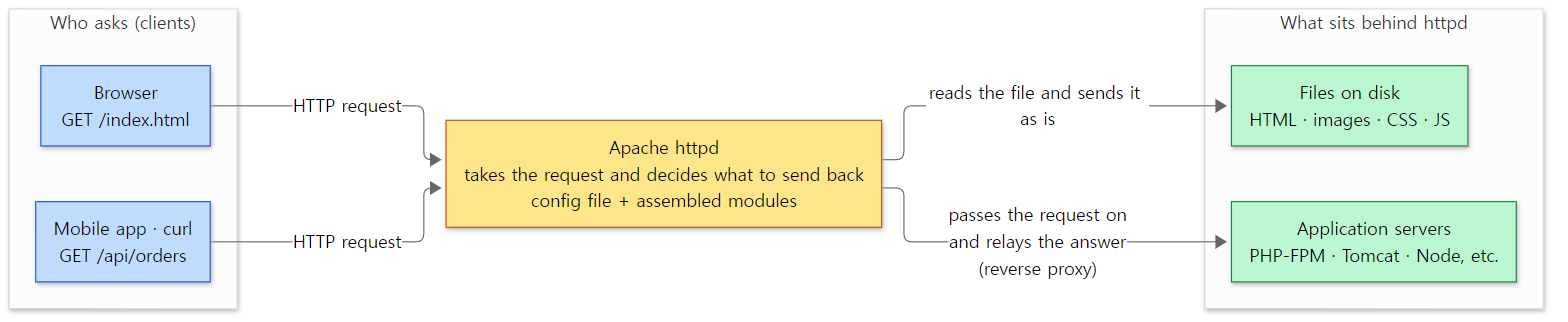 Where httpd sits. Clients only see httpd; they can't tell whether a file or another server is behind it.
How it works — in five words
Five words are enough to describe what makes httpd run. The hands-on run and the picture below show exactly these five.
- HTTP request and response — a few lines of text that the browser and the server exchange. The first line of a request is the request line (
GET / HTTP/1.1: what to do, which address, which version of HTTP). Below it come a few header lines in the formName: value(likeHost: blog.test), then an empty line. A response goes in the same order: a status line (HTTP/1.1 200 OK), headers, an empty line, and then the body (the file's content). - Configuration file — a plain text file usually called
httpd.conf. Each line is called a directive. It says which port to open (Listen), which folder to serve (DocumentRoot), and what to block (Require). - Module — a part loaded with
LoadModule. A module hooks its own functions into fixed steps of request processing, and does its work when its turn comes. Directives come in with modules too, so if you remove a module, the server no longer understands that module's directives (step 7 of the hands-on run). - MPM — a special module that decides how customers are taken in. The
eventMPM used here has one parent process start several child processes, and in each child several threads share the requests. - Virtual host — a way for one server and one port to serve several websites. httpd looks at the request's
Hostheader to choose which site it is.
Modules, hooks and MPMs come up again, in slightly more precise terms, in "Words to know first" just below.
A 3-minute hands-on — run two sites, then take one module out
Reading about it doesn't give you a feel for it, so let's run it. I used the httpd built for this series (the Docker image made in section 2). The directives in this configuration also exist under the same names in the 2.4 most people install, but I did not run it on 2.4. The example folder is ex/u01-first-look, and it does the following.
- Check the configuration file and start the server.
- Look at the running processes and threads.
- Fetch the front page of the
blog.testsite withcurl -v, seeing the request and response as raw text. - Send to the same address with only the
Hostheader changed toshop.test. - Ask for a file in a blocked folder (
/private/). - List the loaded modules (
httpd -M). - Delete only the line that loads
mod_dirfrom the configuration. - Delete both
mod_dirand its directive, and start the server again. - Look at the access log.
This is the configuration file (steps 7 and 8 use this file with the dir_module and DirectoryIndex lines removed).
ServerRoot /opt/httpd
ServerName localhost
Listen 8080
LoadModule mpm_event_module modules/mod_mpm_event.so
LoadModule unixd_module modules/mod_unixd.so
LoadModule authz_core_module modules/mod_authz_core.so
LoadModule mime_module modules/mod_mime.so
LoadModule log_config_module modules/mod_log_config.so
LoadModule dir_module modules/mod_dir.so
User daemon
Group daemon
PidFile /tmp/httpd.pid
ErrorLog /tmp/error_log
TypesConfig conf/mime.types
LogFormat "%h %l %u %t \"%r\" %>s %b \"%{Host}i\"" common_host
CustomLog /tmp/access_log common_host
DirectoryIndex index.html

<VirtualHost *:8080>
  ServerName blog.test
  DocumentRoot /tmp/www/blog
  <Directory /tmp/www/blog/private>
    Require all denied
  </Directory>
</VirtualHost>

<VirtualHost *:8080>
  ServerName shop.test
  DocumentRoot /tmp/www/shop
</VirtualHost>

<Directory /tmp/www>
  Require all granted
</Directory>
Reading from the top:
- Open port 8080 (
Listen). - Load six parts: the MPM (
mpm_event),unixd, which switches child processes to an ordinary user,authz_core, which decidesRequire,mime, which sets the file type,log_config, which writes the access log, anddir, which turns a folder address into itsindex.html. - Set the shape of the access log (
LogFormat) and where it goes (CustomLog). - Create two sites (
blog.test,shop.test) as virtual hosts, and makeblog.test'sprivatefolder off-limits to everyone (Require all denied). - Let anyone see what's under
/tmp/www(Require all granted).
Here are just the commands for steps 1–6 (output-tidying options such as curl -s are left out).
httpd -f /tmp/site.conf -t
httpd -f /tmp/site.conf -k start
ps -o pid,ppid,user,nlwp,args -C httpd
curl -v --resolve blog.test:8080:127.0.0.1 http://blog.test:8080/
curl -H 'Host: shop.test' http://127.0.0.1:8080/
curl -H 'Host: blog.test' http://127.0.0.1:8080/private/memo.txt
httpd -f /tmp/site.conf -M
--resolve is a curl option that sends the name blog.test to 127.0.0.1 (this machine) without asking DNS. Writing the header yourself with -H 'Host: …', as in step 4, gives the server exactly the same thing.
The output:
=== 1. check the config and start the server
Syntax OK
=== 2. processes and threads (event MPM)
    PID    PPID USER     NLWP COMMAND
     13       1 root        1 httpd -f /tmp/site.conf -k start
     15      13 daemon     27 httpd -f /tmp/site.conf -k start
     16      13 daemon     27 httpd -f /tmp/site.conf -k start
     17      13 daemon     27 httpd -f /tmp/site.conf -k start
=== 3. curl -v http://blog.test:8080/  (> = request we send, < = response we get)
> GET / HTTP/1.1
> Host: blog.test:8080
> User-Agent: curl/8.5.0
> Accept: */*
>
< HTTP/1.1 200 OK
< Accept-Ranges: bytes
< Content-Length: 25
< Content-Type: text/html
<
<h1>Hello from blog</h1>
=== 4. same address, other Host header -> other site (virtual host)
<h1>Hello from shop</h1>
=== 5. per-directory access control: /private/ is denied
blog.test/private/memo.txt -> 403
=== 6. which modules are loaded? (httpd -M)
Loaded Modules:
 core_module (static)
 so_module (static)
 http_module (static)
 mpm_event_module (shared)
 unixd_module (shared)
 authz_core_module (shared)
 mime_module (shared)
 log_config_module (shared)
 dir_module (shared)
=== 7. remove "LoadModule dir_module" only -> the DirectoryIndex line is not understood
AH00526: Syntax error on line 16 of /tmp/nodir-bad.conf:
Invalid command 'DirectoryIndex', perhaps misspelled or defined by a module not included in the server configuration
=== 8. remove both lines -> server runs, but "/" no longer finds index.html
blog.test/           -> 404
blog.test/index.html -> 200
=== 9. access_log: one line per request
127.0.0.1 - - [07/Nov/2026:07:22:48 +0000] "GET / HTTP/1.1" 200 25 "blog.test:8080"
127.0.0.1 - - [07/Nov/2026:07:22:48 +0000] "GET / HTTP/1.1" 200 25 "shop.test"
127.0.0.1 - - [07/Nov/2026:07:22:48 +0000] "GET /private/memo.txt HTTP/1.1" 403 239 "blog.test"
127.0.0.1 - - [07/Nov/2026:07:22:50 +0000] "GET / HTTP/1.1" 404 236 "blog.test"
127.0.0.1 - - [07/Nov/2026:07:22:50 +0000] "GET /index.html HTTP/1.1" 200 25 "blog.test"
(From the step 3 response headers I removed Date, Server, Last-Modified and ETag, which change on every run. The PIDs in step 2 and the times in step 9 also differ from run to run.)
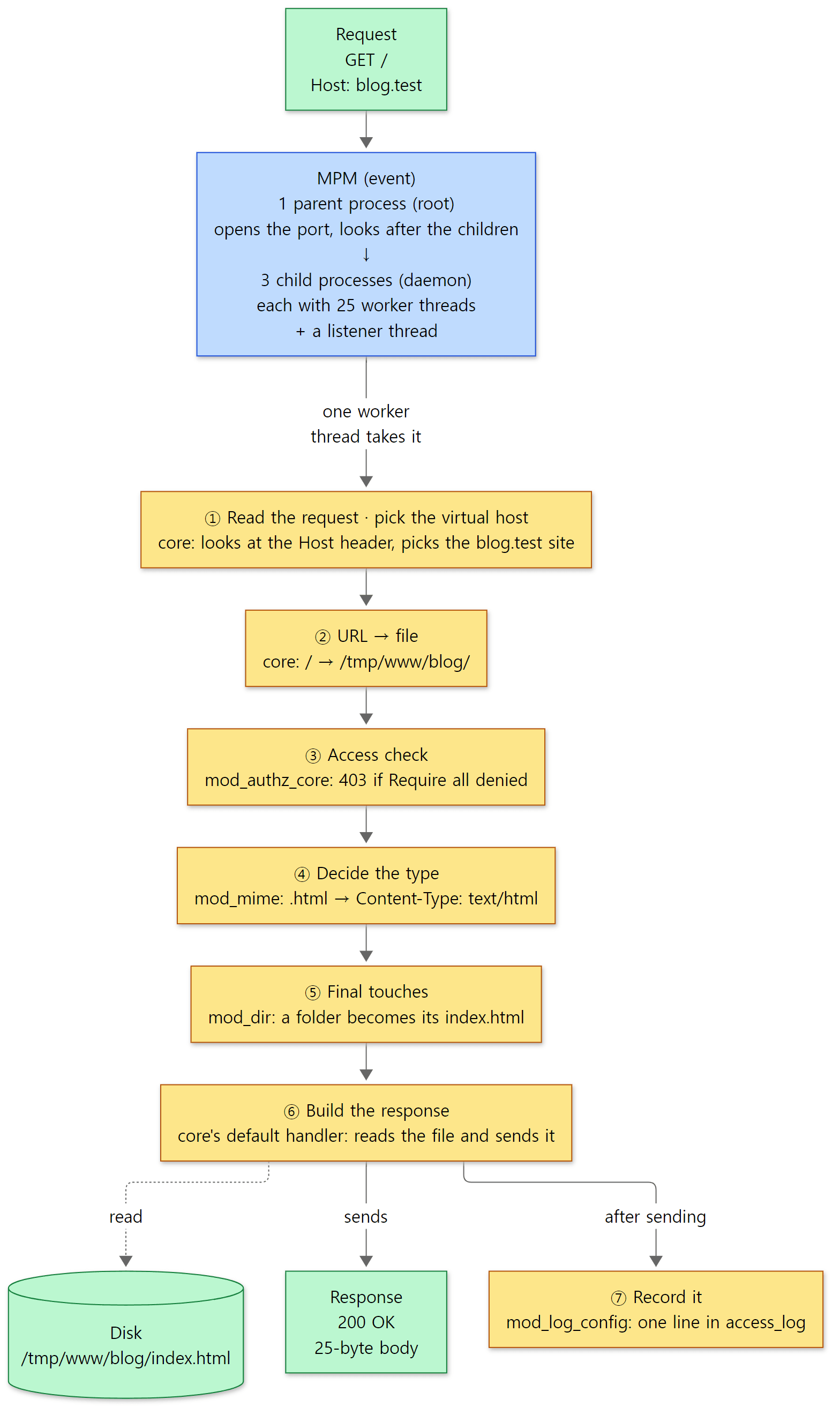 The road taken by the single request in step 3. The blue box is the MPM that takes customers in, the yellow boxes are the request-processing steps, and each box names the module that stepped in at that step. The same road drawn with function names is in section 4.
There are six things to notice in the output.
- A request and a response are just a few lines of text. The lines starting with
>in step 3 are the whole requestcurlsent: the request lineGET / HTTP/1.1, three headers, and an empty line at the end. The lines starting with<are the response's status line and headers, and what follows the empty line is the body.Content-Length: 25means the body is 25 bytes (<h1>Hello from blog</h1>plus one newline).Content-Type: text/htmlwas added bymod_mime, which saw.htmlin the file name and looked it up in theconf/mime.typestable.mod_mimehooks a function into the "decide the type" (type_checker) step (modules/http/mod_mime.c line 1088). - One parent process and three child processes are running. The parent (
root) only opens the port and looks after the children; the children (daemon) take the requests. There are three children because the event MPM's default number of children to start is 3 (server/mpm/event/mpm_default.h lines 33–35).NLWP(the number of threads in a process) is 27: in each child, 25 worker threads (the default — same file, lines 51–53), plus one listener thread that waits for connections (event.c lines 2855–2858), plus the process's original thread. There is one more thread whose job is to start the others, but it ends once it's done (event.c line 2891), so it isn't counted. The children run asdaemon, notroot, becausemod_unixdswitches the child's user as theUser daemonline says (modules/arch/unix/mod_unixd.c lines 177–182). How processes and threads share the work is the topic of post 8. - Same address, different
Hostheader, different site. Steps 3 and 4 both went to127.0.0.1:8080, but theHostdiffered, so anindex.htmlfrom a different folder came back. Right after reading all the request headers, the core looks atHostand picks the virtual host (server/protocol.c lines 705–709). How a request is read is covered in post 9. - Access can be blocked folder by folder. Step 5 is a
403(forbidden).Require all deniedis decided bymod_authz_core, which lets no one in unless the argument isgranted(modules/aaa/mod_authz_core.c lines 972–980). The core goes through the steps in this order — map the URL to a file (server/request.c line 283), check access (line 345), decide the type (line 431), apply final touches (line 435) — and at each step calls the module functions hooked there. ②–⑤ in the picture above follow this order. The full set of steps is in post 10, and howRequireis decided is in post 13. - httpd is built from parts. In step 6's list, the three marked
(static)are built into the executable itself, and the six marked(shared)were loaded by the sixLoadModulelines in the configuration (-Mis the same as-t -D DUMP_MODULES— server/main.c lines 673–677). In step 7, with onlymod_dirremoved, the server no longer understood the wordDirectoryIndexand refused to start at all. That's because directives come in with modules (server/config.c lines 1321–1327). Remove both, as in step 8, and the server starts, but now/gives404. Withoutmod_dir(modules/mappers/mod_dir.c lines 418–421), nothing turns the folder address intoindex.html, so the request reaches the core's default handler still pointing at a folder, and the default handler won't serve a folder; it returns404(server/core.c lines 5203–5207. In a separate run withLogLevel info, the error log showsAH00129: Attempt to serve directory: /tmp/www/blog/). This is what "one feature lives in one module" means. How modules hook into the steps is in post 6, how directives are tied to modules is in post 7, and the default handler is in post 12. - Every request leaves one line in the access log. The five lines in step 9 are the five requests above. In order they hold the client address (
%h), the time (%t), the request line (%r), the status code (%>s), the size of the body sent (%b) and theHostheader (%{Host}i) — exactly the shape written inLogFormat. Blocked (403) and not-found (404) requests are logged too; their sizes, 239 and 236, are the sizes of the error pages httpd generated. The line is written after the response has been sent, bymod_log_configin the "record it" step (log_transaction) (modules/loggers/mod_log_config.c line 1968). The details are in post 16.
Easy to get confused: the DirectoryIndex index.html line in the configuration above isn't actually needed. Without DirectoryIndex, mod_dir looks for index.html anyway (mod_dir.c lines 325–328; the default is in include/httpd.h line 224). I wrote it on purpose so step 7 could be shown. The 404 in step 8 happens because the module is missing, not the directive.
What it is used for
| Use | What it does | Related modules · in this series |
|---|---|---|
| Static web server | Reads HTML, images, CSS and JS files from disk and sends them as is | the core's default handler, mod_mime, mod_dir · blog.test in the hands-on run, post 12 |
| Front for applications | Sits in front of app servers such as PHP (PHP-FPM) or Java (Tomcat), passing requests on and relaying answers | mod_proxy_fcgi, mod_proxy_http, mod_proxy_ajp · post 14 |
| Reverse proxy · load balancer | Spreads requests across several servers behind it | mod_proxy_balancer · post 14 |
| HTTPS (TLS) | Holds the certificate and sets up and unwraps encrypted connections, so the app servers behind it don't need to know about encryption | mod_ssl · post 15 |
| Several sites on one server | Picks the site by the Host header, each with its own folder and settings |
virtual hosts · step 4 of the hands-on run, post 9 |
| Shared hosting | Site owners can't touch the server's configuration file, but can change some settings with a .htaccess file in their own folder |
AllowOverride · post 7 |
Only the name .htaccess is set by default (include/httpd.h line 141); httpd reads it only in folders where the server administrator allowed it with AllowOverride. Not allowing it is the default (server/core.c line 170).
There are also places where it doesn't fit. httpd is a program that takes requests and either serves files or passes them on to other servers; it is not where you write business code such as sign-ups or order processing. That work belongs to the application server behind it, and httpd stands in front. Also, other web servers are often used in the same spot (static files, reverse proxy). Compare with Digging into nginx's Source, which reads another web server written in C the same way, and you'll see the same job solved with a different structure. This series does not compare the two servers' performance.
Questions this series answers
Running the example raises questions. This series answers them one at a time from the source. If one question grabs you, feel free to start with that post.
| What you might wonder | Where the answer is |
|---|---|
| With no classes or interfaces, how does C let you plug parts in and out? | Post 2: Structs, function pointers, macros |
| What do the core, the MPM, modules and APR each do, and what structure holds one request? | Post 3: The overall map |
It uses memory for every request yet hardly ever calls free() — how? |
Post 4: APR memory pools |
What happens when you type httpd -k start? Why is the configuration read twice? |
Post 5: main() and startup |
| How do the modules in the example step into the request-processing steps, and who decides the order? | Post 6: Modules and hooks |
Why did removing a module make DirectoryIndex unreadable? When is .htaccess read? |
Post 7: Configuration files and directives |
| Who starts the three child processes and 27 threads, and how do they grow when customers pile up? | Post 8: MPM |
| How do a few lines of text arriving on a socket become a request, and how is the virtual host chosen? | Post 9: Connections and reading the request |
What steps does the URL / go through to become index.html on disk? |
Post 10: Request-processing steps |
| What path does the response body take to reach the socket? Where does compression step in? | Post 11: Filters and bucket brigades |
When serving one file, who adds Content-Length and ETag, and how is the file sent? |
Post 12: Handlers and static files |
How does the single line Require all denied become a 403? What about password checks? |
Post 13: Authentication and authorization |
| How are requests passed on to app servers behind httpd and spread across several of them? | Post 14: mod_proxy |
| Where in request processing does HTTPS encryption step in? | Post 15: mod_ssl |
| When, and by whom, is a line of the access log written? | Post 16: Logging |
The rest of this post is preparation for following these questions through the source: which version is read (section 1), how to get the same source and build it (section 2), the folder map (section 3), and "the big road one request travels" (section 4), which redraws the road in the picture above with function names. If you don't plan to build it yourself, you can skip section 2 without missing anything you need later.
Words to know first
The same handful of words keeps coming up when you read about httpd. Get these six straight first and the rest reads much more easily.
httpd is both the name of the Apache HTTP Server executable and the usual name for the project. It receives HTTP requests from browsers and sends back files, or responses from other servers. On some operating systems the package is called apache2, but it is the same program.
A module is a bundle of C code that adds a feature to httpd. The line LoadModule rewrite_module modules/mod_rewrite.so in a config file loads one module. Almost everything in httpd is a module; even the heart of the server, the core, is a module called core_module (post 3).
A hook is a spot the core leaves open, saying "any module with work to do at this moment, hang a function here." Modules hang their functions on hooks, and when the time comes the core calls the functions hanging there, one after another. Nearly every step of request processing is a hook (post 6).
An MPM (Multi-Processing Module) is the module that accepts connections and shares them out to processes and threads. prefork, worker and event are the well-known ones, and a line like LoadModule mpm_event_module … in httpd.conf is what picks the MPM (post 8).
APR (Apache Portable Runtime) is the C library httpd uses to hide the differences between operating systems. It lets the same functions handle memory pools, files, sockets and threads on Linux and on Windows alike. APR-util is its companion library, adding tools such as buckets and hashes. Both are separate projects that live outside the httpd repository (post 4).
trunk is the development line of the httpd repository: the branch where the next version is being built. trunk is what this series reads; the stable releases most of us install come from the 2.4.x branch. The next section looks at the difference.
1. Which version is being read — trunk and 2.4.x
The version is written in a header file
httpd's version is written down as numbers in include/ap_release.h.
#define AP_SERVER_MAJORVERSION_NUMBER 2
#define AP_SERVER_MINORVERSION_NUMBER 5
#define AP_SERVER_PATCHLEVEL_NUMBER   1
#define AP_SERVER_DEVBUILD_BOOLEAN    1

/* Synchronize the above with docs/manual/style/version.ent */

#if !AP_SERVER_DEVBUILD_BOOLEAN
#define AP_SERVER_ADD_STRING          ""
#else
#ifndef AP_SERVER_ADD_STRING
#define AP_SERVER_ADD_STRING          "-dev"
#endif
include/ap_release.h lines 44–56
For anyone reading a big C program for the first time, two things are worth explaining. #define NAME value is a macro: before compiling, replace NAME with value. #if … #else … #endif tells the compiler to include only one side of the code, depending on a condition. So the code above reads as "the version is 2.5.1, and if this is a development build (DEVBUILD is 1), add -dev to the end." That is why this version is called 2.5.1-dev.
How trunk differs from 2.4.x
httpd uses versions with an even second number (2.2, 2.4) as stable releases, and versions with an odd second number (2.5) as development releases preparing the next stable one. The repository's VERSIONING document says so (VERSIONING lines 29–32, lines 90–94). Here is what I found checking the repository directly.
| Branch / tag | Version in ap_release.h |
What it is |
|---|---|---|
trunk (commit e4af30fe6d) |
2.5.1-dev | The development line for the next version. What this series reads |
2.4.x branch (commit 08b8e61263, 2026-10-20) |
2.4.70-dev | The line where the stable release keeps being fixed |
tag 2.4.69 (2026-10-01) |
— | The most recent stable tag in this repository |
Listing the tags with git -C httpd tag -l '2.4.*' shows 2.4.69 as the latest, and the 2.4.x branch carries on from there towards 2.4.70. The httpd you install from a Linux distribution package is also from this 2.4 line.
Why read trunk, then? Because new features go into the development line first, and the ones that prove themselves get copied over to 2.4.x (a "backport") (the httpd-trunk.md file we will meet in section 5 also says most 2.4.x work is backported trunk work — I have not checked that against the source). trunk shows where the project is heading, and the big structure (modules, hooks, filters, MPMs) is the same on both branches. In exchange, this series says so whenever something a post states is different on 2.4.x. Even in this post alone, these differ:
- trunk's
server/mpm/has two extra MPM folders,motorzandsimple. The2.4.xbranch has neither. - The code that builds ETags (a response header that tells the client whether a file has changed) lives in
server/util_etag.con trunk, and inmodules/http/http_etag.con2.4.x. - trunk has 563
.c/.hfiles; the2.4.xbranch has 509 (counted the same way as in section 3 below).
The MMN — the number that checks a module fits the server
Alongside the version there is one more number worth knowing: the MMN (Module Magic Number). It sits near the end of include/ap_mmn.h.
#define MODULE_MAGIC_COOKIE 0x41503235UL /* "AP25" */

#ifndef MODULE_MAGIC_NUMBER_MAJOR
#define MODULE_MAGIC_NUMBER_MAJOR 20211221
#endif
#define MODULE_MAGIC_NUMBER_MINOR 35             /* 0...n */
include/ap_mmn.h lines 749–754
Modules are compiled separately and loaded as .so files. But if the shape of a server-side struct changes, a module compiled against the old server ends up reading memory in the wrong place. So when a change breaks compatibility, such as a change in a struct's size, MAJOR goes up; when it only adds a function or so, only MINOR goes up. A comment in the same file says that "no binary compatibility is possible across a change in the major version" (include/ap_mmn.h lines 24–27).
And it really is checked when a module is loaded.
    if (m->version != MODULE_MAGIC_NUMBER_MAJOR) {
        return apr_psprintf(p, "Module \"%s\" is not compatible with this "
                            "version of Apache (found %d, need %d). Please "
                            "contact the vendor for the correct version.",
                            m->name, m->version, MODULE_MAGIC_NUMBER_MAJOR);
    }
trunk's MAJOR is 20211221; the 2.4.x branch's is 20120211. In other words, a module compiled for 2.4 will not load into this trunk server. That is why every example module in this series is recompiled against the server built from the reference commit.
Asking the built server directly
httpd -V shows which version the server is and how it was built. Every example in this series was run with httpd 2.5.1-dev built unchanged from the reference commit (e4af30fe6d), inside a Docker container (Ubuntu 24.04). This is the output from that container (the Server built time differs from build to build).
Server version: Apache/2.5.1-dev (Unix)
Server built:   Oct 24 2026 11:41:11
Server's Module Magic Number: 20211221:35
Server loaded:  APR 1.7.2, APR-UTIL 1.6.3, PCRE 10.42 2022-12-11
Compiled using: APR 1.7.2, APR-UTIL 1.6.3, PCRE 10.42 2022-12-11
Architecture:   64-bit
Server MPM:     event
  threaded:     yes (fixed thread count)
    forked:     yes (variable process count)
Server compiled with....
 -D APR_HAS_SENDFILE
 -D APR_HAS_MMAP
 -D APR_HAVE_IPV6 (IPv4-mapped addresses enabled)
 -D APR_USE_PROC_PTHREAD_SERIALIZE
 -D APR_USE_PTHREAD_SERIALIZE
 -D APR_USE_SHMEM_MMAP_SHM
 -D APR_USE_SHMEM_MMAP_ANON
 -D SINGLE_LISTEN_UNSERIALIZED_ACCEPT
 -D APR_HAS_OTHER_CHILD
 -D AP_HAVE_RELIABLE_PIPED_LOGS
 -D DYNAMIC_MODULE_LIMIT=256
 -D HTTPD_ROOT="/opt/httpd"
 -D SUEXEC_BIN="/opt/httpd/bin/suexec"
 -D DEFAULT_PIDLOG="httpd.pid"
 -D DEFAULT_SCOREBOARD="apache_runtime_status"
 -D DEFAULT_ERRORLOG="logs/error_log"
 -D AP_TYPES_CONFIG_FILE="conf/mime.types"
 -D SERVER_CONFIG_FILE="conf/httpd.conf"
The numbers from the headers come straight out: version 2.5.1-dev, MMN 20211221:35 (MAJOR:MINOR), and the APR 1.7.2 and APR-util 1.6.3 it runs with. That APR is the Ubuntu 24.04 package (libapr1-dev 1.7.2-3.1ubuntu0.1, libaprutil1-dev 1.6.3-1.1ubuntu7.1). When the series reads APR code, it reads the upstream tags of the same versions (APR 1.7.2, APR-util 1.6.3). Just keep in mind that a distribution package may carry patches the distribution added.
Easy to get confused
2.5 is not a released version. "Installing httpd 2.5" is not a thing. 2.5.x is the development number attached to trunk, and that line will become the next stable release (the 2.6 series). What we install from packages is 2.4.x.
The version stays the same while the MMN MINOR keeps climbing. The name 2.5.1-dev has not changed for years, yet the comments in ap_mmn.h list every entry from 20211221.0 to 20211221.35 as (2.5.1-dev). "The 2.5.1-dev source" alone doesn't tell you which point in time you mean, so this series always gives the commit as well.
2. Getting the same source
This section is for readers who want to run the examples themselves. If you only plan to read, you can skip ahead to section 3 (the folder map).
Getting the source and pinning the commit
To open the line numbers in these posts yourself, you need the source at the same commit. With Git installed, do this:
- Clone the repository. The history is long, so it takes a little while.
- Check the reference commit out separately. I left the cloned folder (
httpd) alone and used git worktree to check out just the reference commit into another folder. A worktree lets one repository have different commits checked out into different folders at the same time. That way, even if yougit pullthe latest code into the original folder, the line numbers in the reference-commit folder don't move. - Make sure it worked. The long commit hash should be printed back.
git clone https://github.com/apache/httpd.git
cd httpd
git worktree add --detach ../httpd-e4af30fe6d e4af30fe6d846dfd4e2ce2666a9e0ea6e4425720
git -C ../httpd-e4af30fe6d rev-parse HEAD
If a worktree feels like too much, git checkout e4af30fe6d846dfd4e2ce2666a9e0ea6e4425720 sets the cloned folder itself to that commit. You'll see a note about a "detached HEAD"; it means you checked out a specific commit rather than a branch, and it's fine when you're only reading.
You can also just read on the web. This link opens the commit on GitHub with the same files, and every code link in this series points at that commit.
Building it in Docker
If you only want to read, you don't need to build anything. But this series actually runs every example it shows, so it needs an httpd built from the reference commit. Instead of building a C server directly on Windows, I built it for Linux inside a Docker container. This is the actual Dockerfile.
# Image for the "Digging into Apache httpd's Source" examples.
# Builds the source of reference commit e4af30fe6d (trunk, 2.5.1-dev) as is.
# The source is httpd-e4af30fe6d.tar.gz made with git archive (untouched original).
FROM ubuntu:24.04

RUN apt-get update && DEBIAN_FRONTEND=noninteractive apt-get install -y --no-install-recommends \
      build-essential autoconf automake libtool-bin python3 \
      libapr1-dev libaprutil1-dev libpcre2-dev libssl-dev libexpat1-dev zlib1g-dev \
      curl gdb strace procps ca-certificates \
    && rm -rf /var/lib/apt/lists/*

COPY httpd-e4af30fe6d.tar.gz /usr/src/
WORKDIR /usr/src
RUN tar xzf httpd-e4af30fe6d.tar.gz && cd httpd \
    && ./buildconf --with-apr=/usr/bin/apr-1-config \
    && ./configure --prefix=/opt/httpd \
         --with-apr=/usr/bin/apr-1-config --with-apr-util=/usr/bin/apu-1-config \
         --enable-mpms-shared=all --with-mpm=event \
         --enable-mods-shared=most --enable-ssl \
    && make -j"$(nproc)" && make install

ENV PATH=/opt/httpd/bin:$PATH
WORKDIR /work
CMD ["httpd", "-V"]
Here is what it does, step by step.
- Install the build tools and libraries. A C compiler (
build-essential);autoconf,automakeandlibtool, which generate the build scripts; and the libraries httpd depends on (APR, APR-util, the PCRE2 regex library, OpenSSL for TLS, and so on). Thecurl,gdb,straceandpson the last line are there so the examples can look inside the server. - Copy in the reference commit's source as an archive. It's the original, extracted from the repository with
git archive(see "Where I got stuck" below). - Generate the
configurescript with./buildconf. Source checked out from the repository has noconfigure. The repository's ownINSTALLdocument says that when building from the repository you must run./buildconffirst, and that you don't need to when building from a release tarball (the document says "Subversion" rather than git, because httpd's original repository is SVN — INSTALL lines 22–27). - Choose the build settings with
./configure. Install into/opt/httpd; build all the MPMs as shared modules (.so) witheventas the default; buildmostmodules as shared modules; and buildmod_ssltoo. makeandmake install.
The resulting image is called httpd-lab:e4af30fe6d. It installs 101 module files (/opt/httpd/modules/*.so), and httpd -l shows only three modules compiled right into the executable.
Compiled in modules:
  core.c
  mod_so.c
  http_core.c
They are the core (core.c), mod_so, which loads .so files, and http_core, which handles the HTTP protocol. Even the MPM is loaded separately with LoadModule. Post 3 looks at this structure in detail.
How the examples are run
Each post gets one example folder (like ex/u01-reading-plan) containing a run.sh, and a small script (run-example.sh) runs it inside the container. The heart of it is one line.
MSYS_NO_PATHCONV=1 docker run --rm -v "$(pwd -W 2>/dev/null || pwd)/$dir:/work" -w /work \
  httpd-lab:e4af30fe6d bash ./run.sh
It mounts the example folder at /work in the container, runs run.sh, and removes the container straight away (--rm). Every run starts from a clean server, so no example is affected by config or logs left behind by another. pwd -W is how Git Bash gives you the Windows path (D:/…), and the MSYS_NO_PATHCONV=1 in front stops Git Bash from rewriting arguments such as /work into Windows paths on its own.
Easy to get confused — three places I actually got stuck
These are places I really did get stuck while setting up the build environment.
① Source exported on Windows gets CRLF line endings. At first I exported the source with Git on Windows and put it in the container, and ./buildconf would not even start. Recreating the same situation in the container gives this message:
bash: line 1: ./buildconf: cannot execute: required file not found
The file is plainly there, yet it says "not found." The cause is the line endings. Git on this PC is set to core.autocrlf=true, so it converts line endings to the Windows style (CR+LF) when it writes files out. The first line of buildconf then becomes #!/bin/sh\r instead of #!/bin/sh, and Linux goes looking for a program called /bin/sh\r, which doesn't exist. Turning the conversion off when you export the archive fixes it.
git -c core.autocrlf=false archive --format=tar.gz --prefix=httpd/ \
    -o ../httpd-examples/httpd-e4af30fe6d.tar.gz e4af30fe6d
Without -c core.autocrlf=false, the buildconf in the archive has CRLF endings; with it, LF. If you are only reading the source, CRLF doesn't matter.
② You need automake. Passing APR's apr-1-config to buildconf ("APR-Config Mode") generates the build scripts from the installed APR, without APR's source, and buildconf's help text says this needs automake 1.12 or newer (buildconf lines 94–96). It was missing from my first package list, so I added it.
③ Pass only --with-apr to buildconf. configure gets both --with-apr and --with-apr-util, but buildconf gets only --with-apr. That's because buildconf's --with-apr-util takes the APR-util source folder, not an installed library, and the help text says it is ignored in APR-Config Mode (buildconf lines 72–76). It's confusing that options with the same name take different things in buildconf and configure.
3. The folder map — where are the 350,000 lines?
Top-level folders
At the reference commit, git tracks 5,721 files. Of those, 563 are C source (.c) and header (.h) files, totalling 349,140 lines (blank lines and comments included). Here are my own counts per top-level folder (files picked with git ls-files, lines counted with wc -l).
| Folder | What's in it | .c/.h files |
Lines |
|---|---|---|---|
server/ |
The core: main(), config reading, reading and processing requests, filters, logging, plus the MPMs in server/mpm/ |
76 | 63,294 |
modules/ |
Modules, in 26 subfolders by feature | 361 | 245,336 |
include/ |
Public headers modules use (httpd.h, http_config.h, etc.) |
43 | 17,050 |
os/ |
Per-operating-system pieces (unix, win32, etc.) |
19 | 2,767 |
support/ |
Tools used outside the server (ab, htpasswd, rotatelogs, apxs, etc.) |
26 | 14,173 |
test/ |
Test code and test tools | 35 | 6,303 |
docs/ |
The official manual's source and the default config files (docs/conf) |
3 | 217 |
srclib/ |
A slot for building APR in alongside; git has only Makefile.in here |
0 | 0 |
Of the 63,294 lines in server/, 20,954 are MPM code under server/mpm/. Here are the sizes of the files the series will spend the most time in.
| File | Lines | Covered in |
|---|---|---|
server/main.c |
914 | post 5 |
server/config.c |
2,564 | posts 6, 7 |
server/protocol.c |
2,575 | post 9 |
server/request.c |
2,621 | post 10 |
server/core.c |
6,225 | posts 3, 7, 12 |
server/mpm/event/event.c |
4,544 | post 8 |
Compared with the roughly 840,000 lines of main code I read for Spring, that's less than half. But 70% of it is in modules/. The server's skeleton is the 80,000-odd lines in server/ and include/; the rest is modules that plug into it.
How many modules are in modules/?
Counting the places in modules/' 26 subfolders that define a module struct (AP_DECLARE_MODULE(name) or module … name_module =) gives 150 (mod_autht_jwt.c defines its module twice under #if, so it counts once). The biggest few folders:
| Folder | Modules | Examples |
|---|---|---|
aaa/ |
24 | mod_auth_basic, mod_authz_core — authentication and authorization (post 13) |
proxy/ |
20 | mod_proxy, mod_proxy_http, mod_proxy_balancer (post 14) |
filters/ |
17 | mod_deflate, mod_include |
metadata/ |
12 | mod_headers, mod_env |
mappers/ |
9 | mod_rewrite, mod_alias, mod_dir |
cache/ |
9 | mod_cache, mod_cache_disk |
loggers/ |
7 | mod_log_config (post 16) |
generators/ |
7 | mod_autoindex, mod_status |
ssl/ |
2 | mod_ssl (post 15) |
http/ |
2 | http_core, mod_mime (posts 9, 12) |
On top of these come the core module in server/core.c and eight MPMs under server/mpm/ (event, worker, prefork, motorz, simple, winnt, netware, mpmt_os2). Apart from the first three, they are either trunk-only (motorz, simple) or for a specific operating system.
Seen as layers
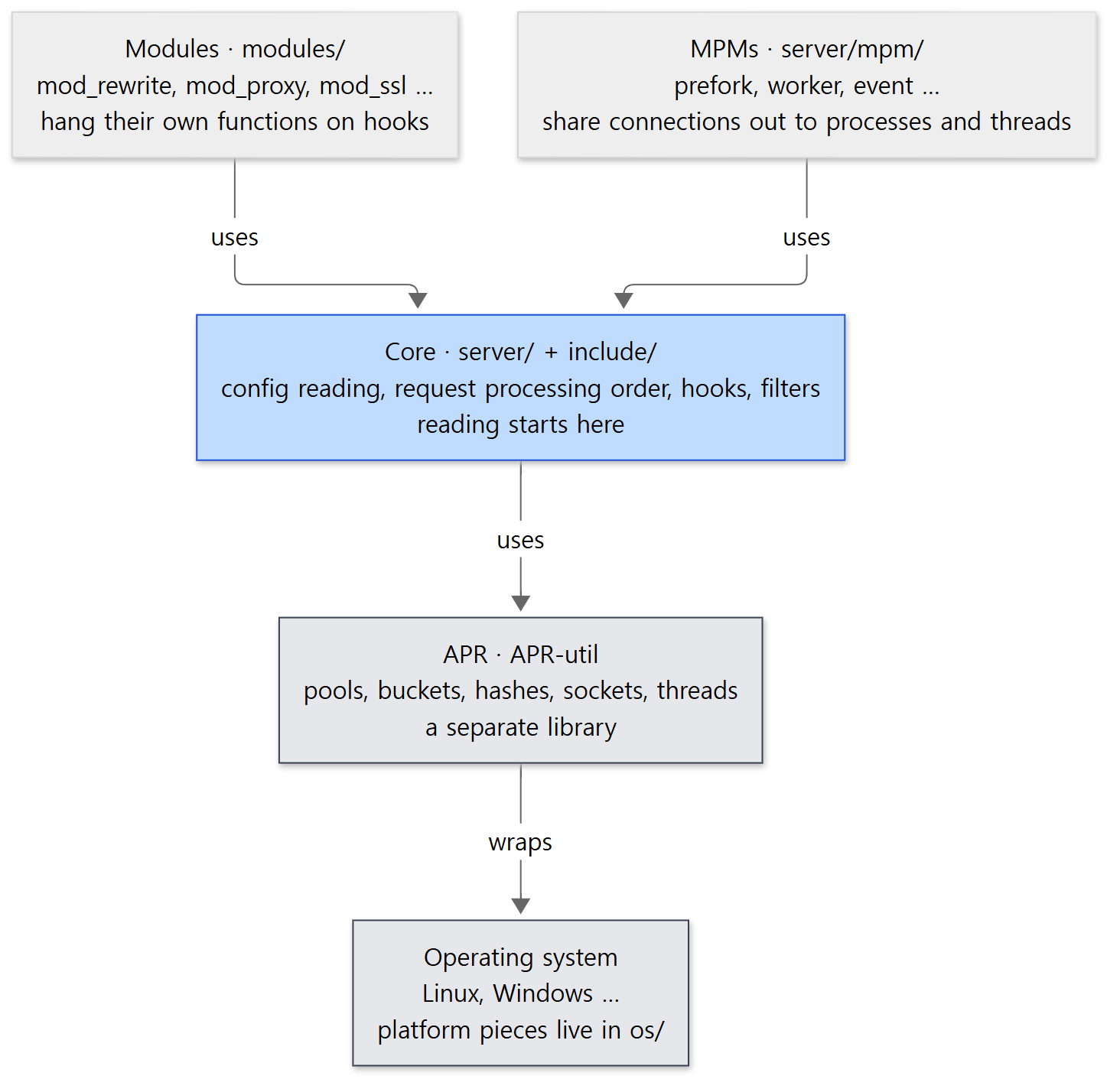 httpd's layers. An arrow means "the upper one uses code from the lower one." Reading starts at the blue box; the grey boxes (APR, the operating system) are looked up when needed.
This picture sets the reading order for the series. Modules work by using the hooks and structs the core opens up, so module code won't make sense until you know the core. So the series reads the core (server/, include/) first and pulls out APR wherever it gets stuck. The one exception is memory pools: they show up as an argument to almost every function, so post 4 covers them early.
Easy to get confused
APR is not in this repository. There's a folder called srclib/ that looks as if it should contain APR, but git has only Makefile.in there. It's merely a slot where you can drop APR's source to build it alongside. So to see the real code behind pools, buckets and the hook macros you have to get the APR and APR-util repositories separately; this series reads APR 1.7.2 (commit e905526629) and APR-util 1.6.3 (commit 28327eeca2).
modules/core/ is not the core. The name is misleading: the core module is in server/core.c. modules/core/ holds basic modules such as mod_so (loading .so files).
4. The big road one request travels
On one page
Posts 8 to 12, and post 16, follow the road one request travels, in order. Drawn on one page, the main road looks like this.
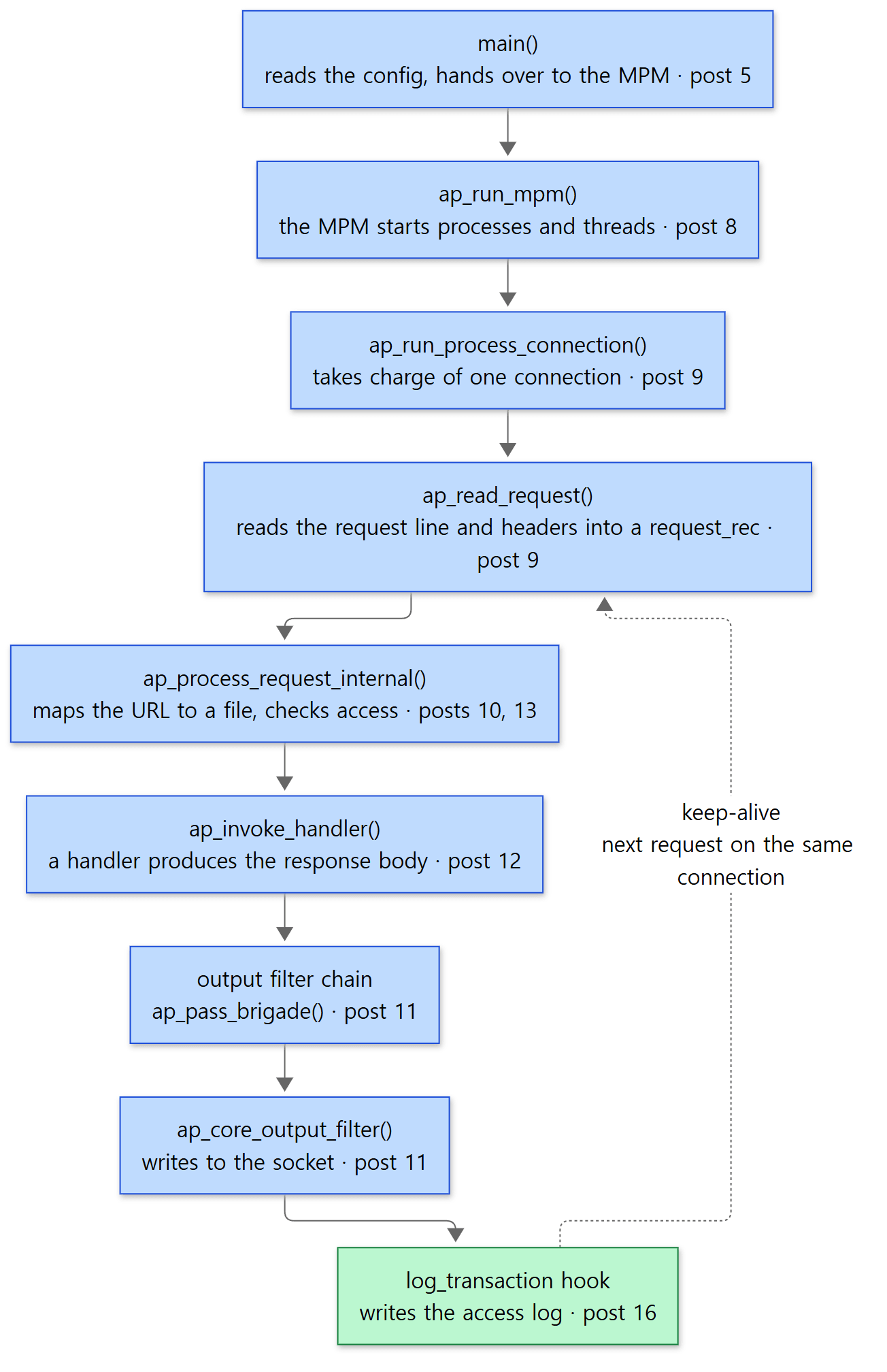 The big road of one request. Each box names the post that covers that step. The dotted line is the way back to the next request on a keep-alive connection.
Connecting it to what you've seen in config files:
| Step | What you've seen in config files | Covered in |
|---|---|---|
main() |
httpd -k start, httpd -t, Include |
post 5 |
ap_run_mpm() |
LoadModule mpm_event_module, MaxRequestWorkers, ThreadsPerChild |
post 8 |
| Connections and reading the request | Listen, KeepAlive, <VirtualHost> |
post 9 |
| Request processing phases | Alias, RewriteRule, <Directory>, Require |
posts 10, 13 |
| Handlers | SetHandler, DirectoryIndex, AddType |
post 12 |
| Output filters | AddOutputFilter, SetOutputFilter DEFLATE |
post 11 |
| Logging | LogFormat, CustomLog, ErrorLog |
post 16 |
A first look at one spot in the code
The heart of request processing is a few lines inside ap_process_async_request() in modules/http/http_request.c.
    access_status = ap_run_quick_handler(r, 0);  /* Not a look-up request */
    if (access_status == DECLINED) {
        access_status = ap_process_request_internal(r);
        if (access_status == OK) {
            access_status = ap_invoke_handler(r);
        }
    }
modules/http/http_request.c lines 447–453
r is a pointer to request_rec, the struct that holds everything about one request. First the "quick handlers" (quick_handler: modules such as a cache that skip the remaining steps and answer immediately) get a chance; if none of them takes the request (DECLINED), it goes through the request processing phases and then calls the handler. A function starting with ap_run_… means "call the module functions hanging on that hook," and those functions are generated by macros (post 6).
The connection side looks similar. The function that handles an HTTP connection is one the http_core module hung on the process_connection hook.
static int ap_process_http_connection(conn_rec *c)
{
    if (async_mpm && !c->clogging_input_filters) {
        return ap_process_http_async_connection(c);
    }
    else {
        return ap_process_http_sync_connection(c);
    }
}
modules/http/http_core.c lines 247–255
A function marked static can't be called by name from outside this file. The core can still call it because, when registering its hooks, the module handed over the function's address (a function pointer) (http_core.c line 358). This is the basic trick for building a plugin structure in C, and post 2 looks at it closely. With an asynchronous MPM such as event, the request takes the upper branch (ap_process_http_async_connection).
Example: does a request really take this road?
I checked the picture with a debugger (gdb). Starting the server as httpd -X makes it run as a single process without separate child processes (-X defines a name called DEBUG, and the event MPM sees it and switches to single-process mode — server/main.c lines 633–635, server/mpm/event/event.c lines 3980–3985). I ran that process inside gdb and requested /index.html once with curl. The example folder is ex/u01-reading-plan.
The first experiment stops in default_handler(), the default handler that serves static files, and prints the call stack (the list of who called the currently running function, in reverse).
gdb -q -batch -ex 'set pagination off' -ex 'break default_handler' -ex run -ex bt -ex kill \
    --args httpd -X -f /tmp/u01.conf
Breakpoint 1 at 0x8d8da
Thread 3 "httpd" hit Breakpoint 1, 0x000055e026d798da in default_handler ()
#0  0x000055e026d798da in default_handler ()
#1  0x000055e026d3f84d in ap_run_handler ()
#2  0x000055e026d403f9 in ap_invoke_handler ()
#3  0x000055e026d31e81 in ap_process_async_request ()
#4  0x000055e026d2add5 in ap_process_http_async_connection ()
#5  0x000055e026d2b003 in ap_process_http_connection ()
#6  0x000055e026d58c11 in ap_run_process_connection ()
#7  0x00007fb2d937a8b2 in process_socket () from /opt/httpd/modules/mod_mpm_event.so
#8  0x00007fb2d937ebc7 in worker_thread () from /opt/httpd/modules/mod_mpm_event.so
#9  0x000055e026d55ff9 in thread_start ()
#10 0x00007fb2d94d8b84 in ?? () from /lib/x86_64-linux-gnu/libc.so.6
#11 0x00007fb2d9565cc4 in clone () from /lib/x86_64-linux-gnu/libc.so.6
(The addresses differ from run to run.) Read it from the bottom up. A worker thread of the event MPM (worker_thread) takes one socket (process_socket) and calls the process_connection hook; through http_core's functions it reaches the ap_process_async_request() we just saw, then ap_invoke_handler() → the handler hook → default_handler(). The from …mod_mpm_event.so next to process_socket and worker_thread proves the MPM is a shared module outside the executable. This build has no debug info (-g), so no line numbers appear, but the function names are plenty.
A call stack only shows the functions that are open at that moment. Reading the request (ap_read_request()) and the processing phases (ap_process_request_internal()) have already finished and returned, so they aren't in the list. So the second experiment sets a breakpoint on every function on the big road, prints just the name at each stop, and carries on. The gdb command file trace.gdb repeats these six lines for each function.
break ap_read_request
commands
  silent
  printf ">> ap_read_request\n"
  continue
end
The result (consecutive calls to the same function are folded into one line with uniq -c, which puts the count in front):
curl: HTTP 200, 191 bytes
      1 >> main
      1 >> ap_run_mpm
      1 >> ap_run_process_connection
      1 >> ap_read_request
      1 >> ap_process_request_internal
      1 >> ap_invoke_handler
      1 >> default_handler
      2 >> ap_core_output_filter
      1 >> ap_run_log_transaction
      1 >> ap_run_process_connection
      1 >> ap_read_request
      1 >> ap_core_output_filter
Exactly the order in the picture. ap_core_output_filter(), which writes the response to the socket, is called twice, and then the log_transaction hook, which writes the access log, runs. The last three lines are the server going back in to read the next request on the same connection (the dotted line in the picture). curl sends only one request and closes the connection, so it ends there. Post 9 looks at how this part works in detail.
Easy to get confused
The log is not written the moment the handler finishes. In the result above, too, log_transaction ran after the output filters had written the whole response. In fact, one of the places that calls this hook is server/eor_bucket.c (lines 38–40). A marker bucket called EOR (End Of Request) is sent at the end of the response data, and when that bucket has gone out and is destroyed, the request's memory pool is cleaned up and the log hook gets called. Buckets are covered in post 11, logging in post 16.
default_handler() is the "default," so it stands at the very end of the line. The core hangs this function at the very back of the handler hook (APR_HOOK_REALLY_LAST) (server/core.c line 6171). Its turn comes only when no other module's handler has taken the request. The example above used a minimal config with no other handler modules loaded, so it came straight here.
5. How it's read — with AI, but checked against the source
The reading order
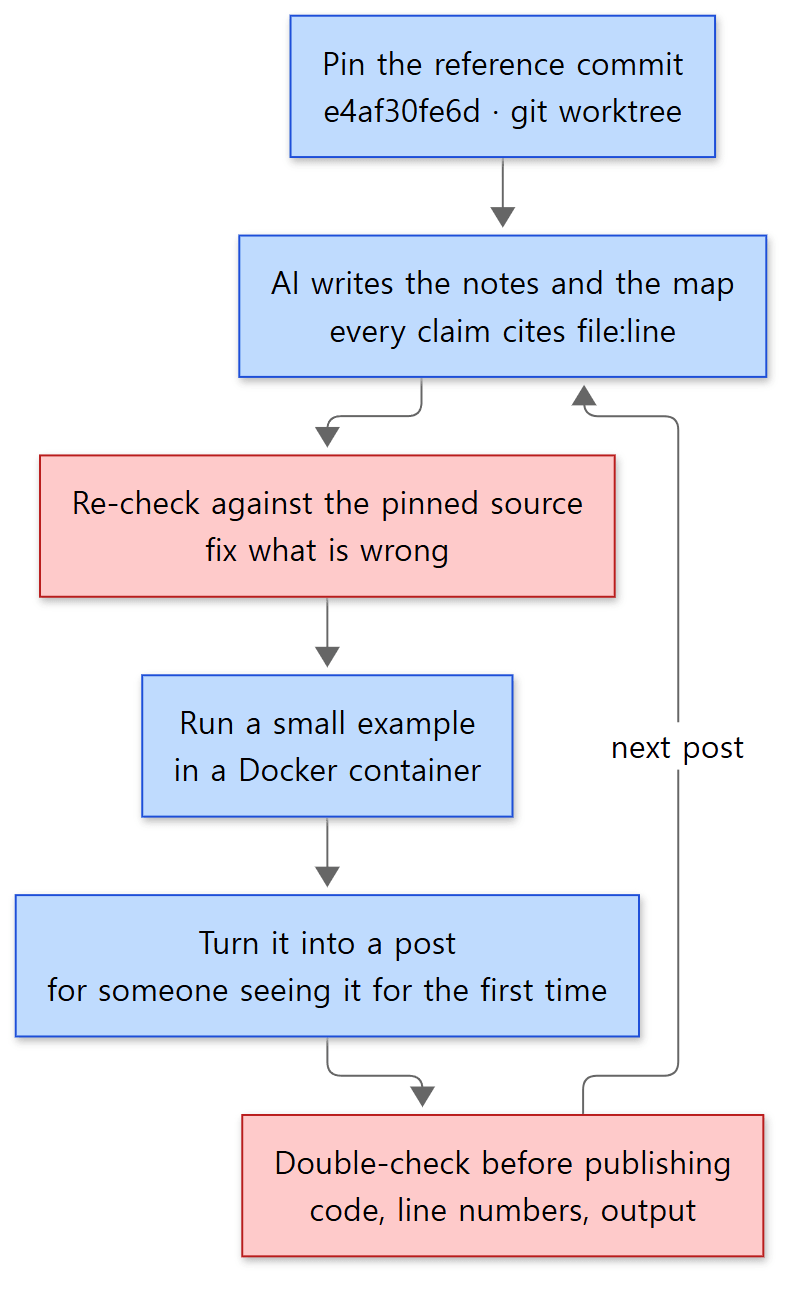 The order for reading and writing one post. Blue boxes are steps; red boxes are where mistakes in what the AI wrote get filtered out.
The principle is the same as in the Spring series. Don't read the whole thing at once; pick one question from the map and read deeply only the code needed to answer it. In this series, one question is one post.
- Pin the reference commit. That's the worktree from section 2. Line numbers must not move, or the evidence the AI cites can't be verified.
- AI writes the notes and the map. That's how the 16-post plan and each post's list of starting files were produced. Each post went to a separate AI task, all with the same instructions (what to read, in what format, with what kind of evidence).
- Re-check against the pinned source. The files listed in the instructions are only starting points; what goes into a post is only what was checked directly in the source. Code is copied straight from the file, and only line numbers found directly are given.
- Actually run the examples. As in section 4, a small example that confirms one claim in the post runs in the container, and its output goes in unchanged.
- Check once more before publishing. When a post is finished, a different AI task re-compares the code blocks, line numbers, claims and example output against the source from the start. A post that hasn't been through this check doesn't go up.
AI-written notes are checked, not trusted — an example inside the repository
As it happens, there's a good example right at the top of the httpd repository: a file called httpd-trunk.md. Its git history shows it was committed on 2026-06-08 under the name Jim Jagielski, with the message "As we think about trunk and 2.4.x, lets better document/list/assess the diffs between these 2 branches, using LLMs as an aid in this analysis". It's a genuinely useful note listing the modules, MPMs and directives that only trunk has. Even so, this series only uses it as a reference, and publishes only what has been checked against the source. Here's what comparing it actually showed.
| What the note says | What I found at the reference commit | Verdict |
|---|---|---|
mpm_motorz and mpm_simple are trunk-only MPMs |
Both are in trunk's server/mpm/; neither is on the 2.4.x branch |
Correct |
ap_set_etag() moved into the core, creating server/util_etag.c (2.4.x has modules/http/http_etag.c) |
Each file exists only on its own branch | Correct |
trunk MMN 20211221:31, 2.4.x is 2.4.68-dev |
The reference commit's MMN is 20211221:35; the 2.4.x branch is 2.4.70-dev |
Changed since the note was written (June) |
The bundled APR (1.7.x) is in srclib/ |
git's srclib/ has only Makefile.in |
Can't be confirmed from this repository |
The point isn't so much that the note is wrong, but that a note is tied to the moment it was written and to what its author (or AI) was looking at. June's numbers differ from October's source, and the note's header says it was written from an SVN working copy (r1935140) rather than git, so its "bundled APR" may refer to that; the repository alone can't tell you. So this series recounts even single numbers at the reference commit. Every file count, line count and module count in this post's tables was counted that way.
6. The series map
Four groups
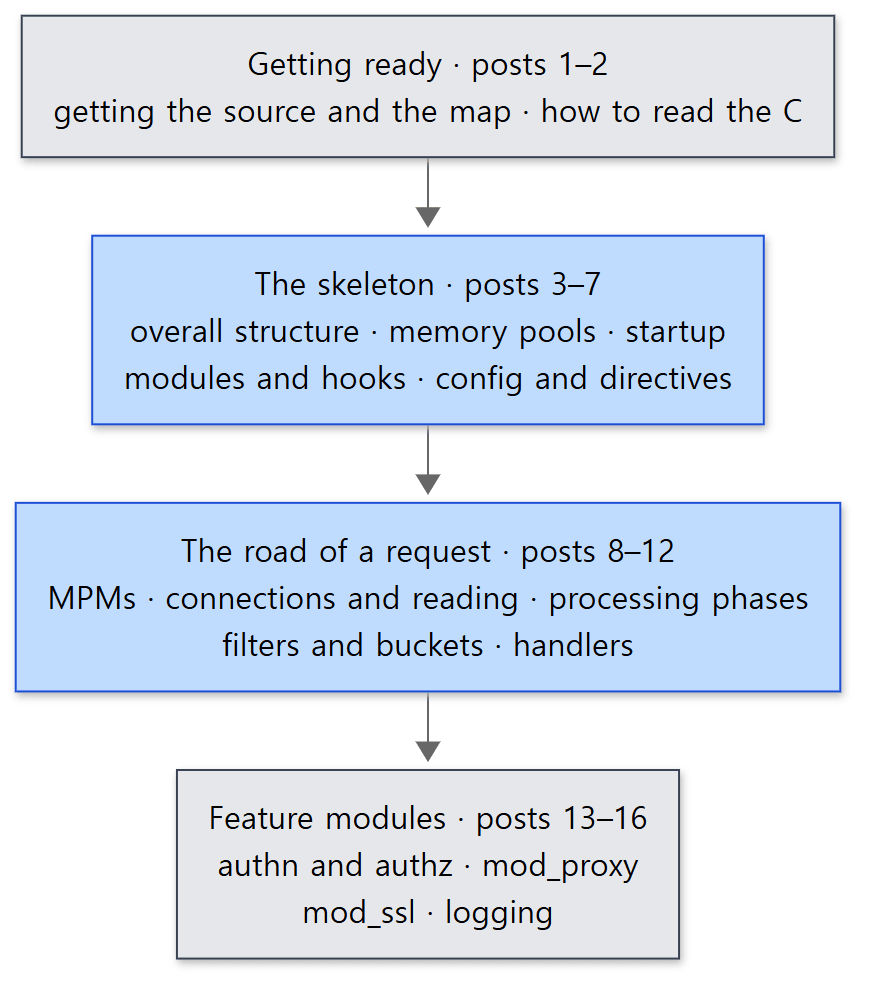 The four groups of the series. The blue boxes are the heart of the series; the grey boxes are the preparation before it and the features built on top of it.
| Group | Post | The question it answers |
|---|---|---|
| Getting ready | 1 | Which source, and how is it read (this post) |
| 2 | How do structs, function pointers and macros make a plugin structure? | |
| The skeleton | 3 | How are core, APR, MPMs and modules divided, and what are server_rec, conn_rec and request_rec? |
| 4 | How is memory managed without free()? |
|
| 5 | Why does main() read the config twice, and how do restarts work? |
|
| 6 | How do modules plug into hooks, and who decides the order? | |
| 7 | How does one line of httpd.conf become a C struct? |
|
| The road of a request | 8 | How do prefork, worker and event share out connections? |
| 9 | How does one socket become a request_rec? |
|
| 10 | Which phases does a URL go through to reach a file and a handler? | |
| 11 | How does a response flow out through filters and buckets? | |
| 12 | How does one static file become a response? | |
| Feature modules | 13 | How is a Require line decided? |
| 14 | How do the reverse proxy and load balancer work? | |
| 15 | Where does TLS plug in? | |
| 16 | How are access and error logs written? |
The reading order
Just read them in number order. The Spring series had topic groups (Phases) separate from its reading order, but this series was numbered from the start to follow the big road from section 4. There are three reasons.
- The skeleton comes first. Following the road of a request (posts 8–12), hooks, pools and config structs turn up on nearly every line. You need those three before that road makes sense.
- Feature modules come last.
mod_proxyandmod_sslare modules that sit on the road of a request as hooks and filters. Once you know the road, you can read them with a single question: "where on the road does this module plug in?" - APR doesn't get its own track. It's pulled out only where it's essential, like pools (post 4) and buckets (post 11).
What this post leaves out
- Windows builds.
os/win32/,server/mpm/winnt/, and Windows build files such asCMakeLists.txtand*.dspare not covered in this series. All the examples run in a Linux container. - HTTP/2.
modules/http2/(49.c/.hfiles, 23,192 lines) is a big subject of its own and isn't covered separately in this series. - Other large modules such as
modules/md/(automatic certificates, ACME),modules/lua/andmodules/dav/are also left out. - Tests. The Python tests in
test/(test/pyhttpd,test/modules) andtest/unitaren't read. - Trunk-only new features. The new modules and directives listed in
httpd-trunk.md(mod_proxy_beacon,mod_autht_jwt, etc.) are mentioned in the relevant post only where they touch the series' main road.
Summary
| Concept | One-line summary |
|---|---|
| The source | Apache HTTP Server 2.5.1-dev (trunk), commit e4af30fe6d (2026-10-24). 563 .c/.h files, about 350,000 lines |
| trunk and 2.4.x | trunk is the development line for the next version; the stable line is 2.4.x (latest tag 2.4.69). The big structure is the same; differences are pointed out in the posts |
| MMN | The number that decides whether a module fits a server. trunk is 20211221:35; 2.4.x's MAJOR is 20120211, so modules don't load across them |
| Getting the same source | git clone, then pin the commit with git worktree add --detach … e4af30fe6d… |
| Building | In Docker (Ubuntu 24.04): buildconf → configure → make. When exporting on Windows, use -c core.autocrlf=false |
| Folders | server/ (core, MPMs) → include/ (public headers) → modules/ (150 modules, 70% of the lines) |
| Layers | modules and MPMs → core → APR → operating system. Read the core first, APR when needed |
| The big road | main → MPM → connection → reading the request → processing phases → handler → output filters → logging |
| How it's read | pin the commit → AI notes → check against the source → run examples → write → double-check |
What's next
The next post is about C. Above, we briefly saw the core calling a static function through a function pointer. In C, with no classes and no interfaces, httpd built a structure into which 150 modules can be plugged in and out. The next post puts the foundations of that — the module struct, tables of function pointers, and hook functions stamped out by macros — side by side with Java (Spring). It covers not only the strengths but also the traps that come from it being C.
- Next post: Digging into Apache httpd's Source 2: Before Reading a Server Written in C — Structs, Function Pointers, Macros
- To jump to the big picture: Post 3: The Big Picture — Core, APR, MPM, Modules and the Three Big Structs
- To jump onto the road of a request: Post 10: Request Processing — From a URL to a File and a Handler
There's also an earlier series read the same way. Digging into Spring's Source, post 1 is where I began reading an 840,000-line Java framework with the same principles (map first, small units, AI analysis checked against the source). For the road that turns one request into a response, Spring's answer is a single class, DispatcherServlet, calling things in order (post 21); httpd's answer, as we saw above, is a core that opens a hook at every step and modules that hang functions on them. Putting the two side by side shows how different languages solve the same problem. After this series there is also Digging into nginx's Source 1, which reads another web server written in C the same way.