What this post covers
"Digging into nginx's Source" is a series in which I read the source code of nginx (pronounced "engine-x", a web server and reverse proxy) bit by bit with the help of AI. It follows the same approach as the series I finished earlier: Digging into Spring's Source (27 parts), Digging into Apache httpd's Source (16 parts) and Digging into Tomcat's Source (16 parts). httpd and nginx are both web servers written in C and solve the same problem, but they solve it quite differently. This series reads nginx while comparing those differences with the httpd series.
This is the first post, and it prepares the ground before we read code in depth. It answers five questions.
- What is nginx, how does it work, and what is it used for? (a section for first-timers)
- Which version of the source do we read, and how does it differ from the commonly used stable version?
- How do you get exactly the same source as this series, and how do you build and run it?
- How is the roughly 260,000-line source split into folders, and where should you start?
- Which functions does one request pass through before it goes out as a response?
If nginx is new to you, start with the "What is nginx" section right below. Two pictures and a 3-minute hands-on run show you what nginx does first, and a quick tour of the questions this series answers leads into the main part. From there on, I write for a programmer who has used nginx and is opening its source for the first time: someone who has written server {} and location {} blocks, set up a reverse proxy with proxy_pass and run nginx -s reload, and who knows C pointers, structs, function pointers and macros reasonably well. I write as if you are opening the nginx source for the first time.
| Item | Details |
|---|---|
| Target | nginx (nginx/nginx) |
| Version | nginx 1.31.9 (master, development version) |
| Commit | 9a7439fd79 (2026-10-23) |
| Language | C |
| Main files read in this post | src/core/nginx.h, auto/configure·auto/init·auto/modules, src/os/unix/ngx_process_cycle.c, src/http/ngx_http_core_module.c, src/http/ngx_http_request.c |
All line numbers and details in this post refer to this commit. Other versions have different line numbers, and some content may differ. Since this post is the map of the whole series, it covers only the big picture and leaves the details to the individual parts.
The series has 12 parts.
- How I Read It with AI, and the Map (this post)
- The Big Picture — Master and Workers, Modules, the Cycle and Config Contexts
- Memory Pools and Core Data Structures — ngx_pool_t, ngx_str_t, ngx_buf_t and ngx_chain_t
- Startup and Reading the Config — From main() to ngx_init_cycle
- Modules and Directives — How One Line of nginx.conf Becomes a Module's Config Struct
- Master and Workers — Processes, Signals and Zero-Downtime Reload
- The Event Loop — epoll, Timers, Posted Events and accept
- Reading an HTTP Request — From a Connection to ngx_http_request_t
- The 11 Phases and Finding the location — In What Order a Request Is Handled
- Filters and Static Files — How a Response Flows Out
- Upstream and Proxy — One Request Through the Reverse Proxy
- Load Balancing, Upstream Keepalive and the Stream Module — and Wrapping Up the Series
What is nginx — how it works and what it is for
Before we open the source, let's see what nginx does, with pictures and a hands-on run. If you have configured nginx before, you can skim "Questions this series answers" at the end of this section and move on.
In one sentence — the "gatekeeper and front desk" standing in front of your servers
nginx is the program that receives requests from the internet first, at the very front. Think of the front desk on the ground floor of an office building. When a visitor (a browser) arrives, the front desk greets them first. If all they need is a leaflet (a static file), the desk hands it over on the spot; if they need to see someone, the desk sends them to the right office inside (an app server). If several people can help, the desk takes turns so no one gets swamped, and if someone has stepped out, it sends the visitor to someone else.
A program that does the first job — handing out files — is called a web server. A program that does the second — passing a request on to a server behind it and returning that server's answer to the visitor — is called a reverse proxy. nginx does both. In the end, this whole series follows one story: "what path does a request take inside nginx before it leaves as a response, and how does nginx handle thousands of those at once with only a few processes?"
Why we need something like this
Imagine putting a single app server built with Spring or Node.js directly on the internet. It works fine at first, but soon things like this happen.
- The app handles even the file requests — images, CSS, JS. Serving a single file still costs one of the app's threads and some of its memory.
- When you grow to two app servers, someone has to decide which one each visitor goes to — and also stop sending visitors to one that has died.
- HTTPS certificates, rejecting oversized requests and compressing responses all have to be set up in every app separately.
- When thousands of slow visitors hold their connections open, that many of the app's threads are tied up.
Put nginx in front and nginx takes over these jobs. It serves files straight from disk, passes on only the requests meant for the app, spreads them over several app servers, and sets dead servers aside for a while. The app can focus on its own work (the business logic).
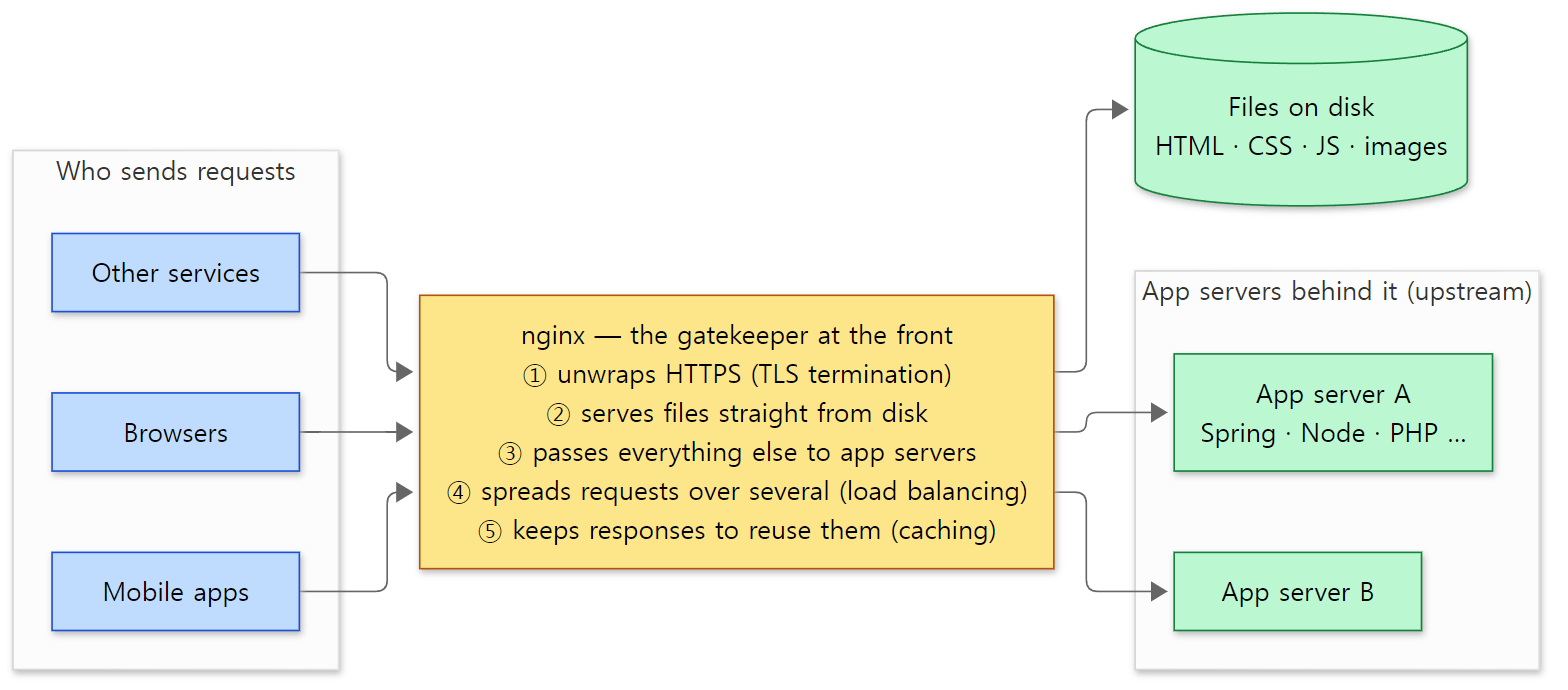 nginx in front. Visitors only know about nginx; they have no idea how many app servers sit behind it. In nginx, the servers behind it are called the upstream.
How it works — in five words
Five words are enough to understand what drives nginx. The hands-on run and the picture below show exactly these five.
- The configuration file (
nginx.conf) — everything nginx should do is written here. Inside blocks (areas wrapped in curly braces) such ashttp {}andserver {}, you write directives (one-line instructions) such aslisten 8080;. Without writing any code, this file alone turns nginx into a web server or a proxy. - server and location —
server {}decides "which port (and which domain) did this request come to?", and alocation {}inside it decides "what does the request's address look like?". You assign a job per address:location /serves files,location /app/passes requests to the app servers, and so on (Part 9). - upstream — the list of servers standing behind nginx. Write
proxy_pass http://app/;and nginx hands requests to the servers in that list, taking turns (round robin) unless told otherwise (Part 11, Part 12). - Master and workers — when you start nginx, several processes appear. One master process is the manager that reads the configuration, starts the workers and watches over them; the actual requests are taken by the worker processes.
worker_processessets how many workers there are (Part 6). - The event loop — one worker handles thousands of connections together on a single thread. It asks the operating system "does any connection have something to do?", briefly handles only those, and asks again, over and over. This is the biggest difference from designs that give each connection its own thread (Part 7).
A 3-minute hands-on — a web server, a reverse proxy and load balancing from 30 lines of config
Words alone don't make it click, so let's run it. I ran this with the nginx this series builds from the reference commit (the Docker image nginx-lab:9a7439fd79, made in section 2). It only uses configuration directives, so it should work the same way with a distribution's nginx (I did not run it that way). The example folder is ex/u01-first-look. The two app servers are stand-ins: Python's built-in small web server (python3 -m http.server) on ports 9001 and 9002. Port 9001 answers hello from app server A, and 9002 answers hello from app server B.
Here is the whole configuration file. (The comments are translated here; the file in the example folder has them in Korean.)
# Example written for this post (not part of the nginx source)
# Part 1 "What is nginx": static files + reverse proxy + load balancing in a few lines
worker_processes 2;
error_log /tmp/u01f/error.log notice;
pid /tmp/u01f/nginx.pid;

events {
    worker_connections 64;
}

http {
    access_log /tmp/u01f/access.log;

    # two app servers behind nginx — requests are handed out in turn
    upstream app {
        zone app 64k;            # lets both workers see "whose turn is next" together
        server 127.0.0.1:9001;
        server 127.0.0.1:9002;
    }

    server {
        listen 8080;

        # 1) web server: serve files from disk as they are
        location / {
            root /tmp/u01f/www;
        }

        # 2) reverse proxy + load balancing: requests to /app/ go to the app servers
        location /app/ {
            proxy_pass http://app/;
        }
    }
}
run.sh does the following.
- Start nginx and look at the processes with
ps. - Fetch
/index.htmlwithcurl. The file on disk should come back as is. - Fetch
/app/four times. App servers A and B should answer in turn. - Stop app server B (
kill) and fetch/app/four more times. - Look at what nginx wrote to
error.log.
The output:
=== 1. processes: one master, two workers
    PID    PPID CMD
     20       1 nginx: master process nginx -c /work/nginx.conf
     21      20 nginx: worker process
     22      20 nginx: worker process
=== 2. web server: a file from disk
HTTP/1.1 200 OK
Server: nginx/1.31.9
Content-Length: 33
hello from a static file on disk
=== 3. reverse proxy + load balancing: 4 requests to /app/
hello from app server A (port 9001)
hello from app server B (port 9002)
hello from app server A (port 9001)
hello from app server B (port 9002)
=== 4. app server B goes down: 4 more requests
HTTP 200  hello from app server A (port 9001)
HTTP 200  hello from app server A (port 9001)
HTTP 200  hello from app server A (port 9001)
HTTP 200  hello from app server A (port 9001)
=== 5. what nginx wrote in error.log (warn and above)
[error] connect() failed (111: Connection refused) while connecting to upstream, client: 127.0.0.1, server: , request: "GET /app/ HTTP/1.1", upstream: "http://127.0.0.1:9002/", host: "127.0.0.1:8080"
[warn] upstream server temporarily disabled while connecting to upstream, client: 127.0.0.1, server: , request: "GET /app/ HTTP/1.1", upstream: "http://127.0.0.1:9002/", host: "127.0.0.1:8080"
(In step 2, grep keeps only three of the response headers. In step 5, only warnings and above are taken from error.log, and the date, time, process number and connection number — which change on every run — are removed. The pids in step 1 may also differ between runs. Apart from those, two runs gave identical output.)
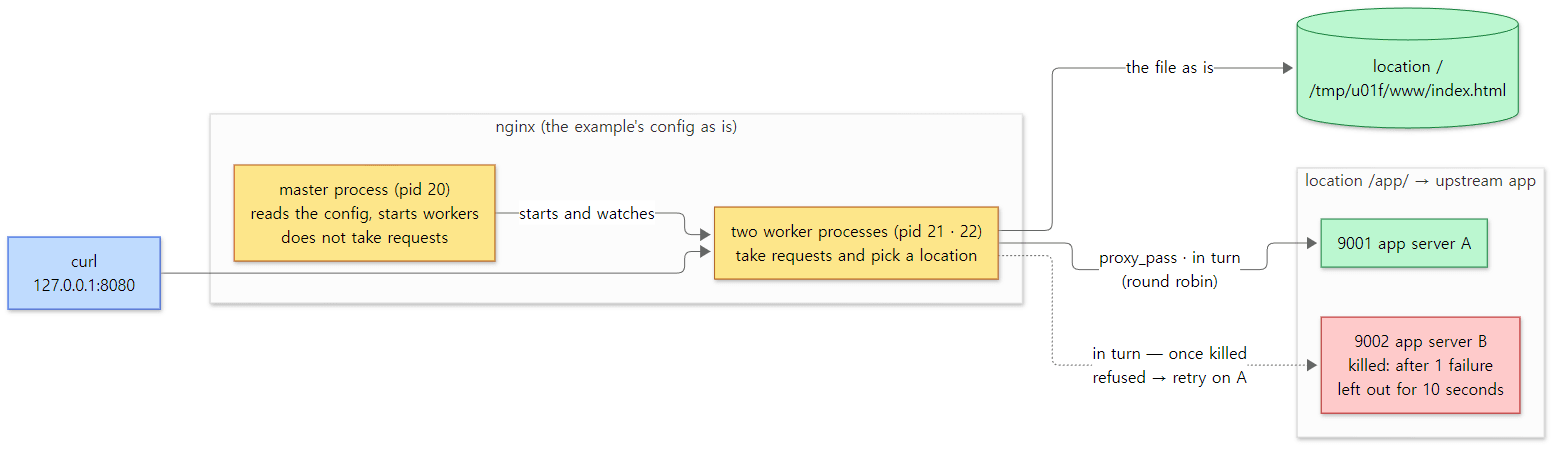 What the hands-on run showed, drawn as is. Yellow boxes are nginx's processes, green boxes are where responses were made, and the red box is the app server stopped in step 4.
Five things to notice in the output.
- There is one master and two workers. The workers'
PPID(parent process ID) is 20 — the master. The master starts workers in a loop, as many asworker_processessays (ngx_process_cycle.c lines 358–371). Leave that line out and you get one worker (nginx.c line 1196); writeautoand you get one per CPU (nginx.c lines 1637–1640). How the master starts workers, and hownginx -s reloadswaps them without dropping requests, is in Part 6. location /serves the file on disk as is. No app and no code — a singlerootline made a web server. Opening the file is the job ofngx_http_static_handler()inngx_http_static_module(ngx_http_static_module.c line 49). TheServer: nginx/1.31.9response header is there becauseserver_tokensdefaults toon(ngx_http_core_module.c lines 4048–4049, ngx_http_header_filter_module.c lines 459–462), and it is exactly theNGINX_VERstring we will see in section 1. The path a file takes out to the socket is followed in Part 10.- For
/app/, app servers A and B answer in turn. The visitor (curl) only ever talked to nginx's port 8080, yet the answers came from the two servers behind it. That is a reverse proxy, and splitting the requests between two servers is load balancing. If the upstream names no other method, nginx picks by round robin: it adds each server's weight to that server's score (current_weight), picks the server with the highest score, then subtracts the total from that server's score (ngx_http_upstream_round_robin.c lines 884–910). Both weights are 1, so you get A, B, A, B. The config'szone app 64k;line puts those scores in shared memory so both workers see them together (ngx_http_upstream_zone_module.c line 218). Without it, each worker keeps its own scores, and the order can get mixed up depending on which worker curl lands on (details in Part 12; this post does not show a run withoutzone). - Even with B down, every visitor gets a 200. By turn order, one of the four requests in step 4 should have gone to B. nginx tried to connect to B, was refused (the
[error]line in step 5), and sent the same request to A instead. That is becauseproxy_next_upstreamdefaults toerror timeout— "on a connection error or a timeout, try the next server" (ngx_http_proxy_module.c lines 3849–3853; the retry happens in ngx_http_upstream.c lines 4707–4768). The visitor never learns that B died. - A failed server is set aside for a while.
[warn] upstream server temporarily disabledis the sign. When nothing else is written on theserverline, the defaults aremax_fails=1andfail_timeout=10(seconds) (ngx_http_upstream.c lines 6546–6549), so after one failure nginx logs the warning (ngx_http_upstream_round_robin.c lines 1056–1070) and does not pick B for 10 seconds (lines 873–878). That is why the remaining requests went straight to A without bumping into B again. After 10 seconds nginx gives B one more try, and B must succeed to count as healthy again. Those rules are in Part 12.
What it is used for
| Use | What it does | In the config |
|---|---|---|
| Static file server | Serves files such as HTML, CSS, JS and images straight from disk. A site made only of pre-built pages, like this blog, needs nothing but nginx | root, index, sendfile (Part 10) |
| Reverse proxy | Stands in front of app servers (Spring, Node.js, Tomcat and so on), passes requests on and returns their answers. For apps that speak FastCGI, such as PHP, you use fastcgi_pass |
proxy_pass (Part 11), fastcgi_pass |
| Load balancing | Spreads requests over several copies of the same app server and sets dead ones aside. Besides round robin there are methods such as fewest connections (least_conn), pinning by the visitor's address (ip_hash) and any key you choose (hash) |
upstream {} (Part 12) |
| TLS termination | nginx decrypts HTTPS and talks plain HTTP to the apps behind it, so certificates are managed in one place only | ssl_certificate |
| Caching | Stores responses from the app servers on disk and serves the stored copy for the same request without calling the app | proxy_cache |
| Compression · rate limiting | Shrinks responses with gzip, and slows down or rejects a visitor who sends requests too often | gzip, limit_req |
| TCP · UDP proxy | Passes on and spreads non-HTTP connections too (databases, mail and so on) to the servers behind it | stream {} (Part 12) |
The hands-on run above exercised the first three. For TLS termination, caching, and compression and rate limiting, I only checked that the source defines those directives (the links in the table); I did not run them in this post.
There are also places where it does not fit. nginx carries requests and serves files; it is not where you write business logic such as sign-ups or order processing. The app servers behind it do that, and nginx stands in front of them. Also, what nginx does is decided by its configuration file, so if you want complex per-request decisions in code, it is better to make them in the app than to stretch the nginx config. And when you are developing alone with a single app server, it is fine to start without nginx.
Questions this series answers
Running the example raises questions. This series answers them one by one from the source. If a question grabs you, feel free to start with that part.
| What you might wonder | Where the answer is |
|---|---|
| How do the master, workers, modules and config blocks fit together? | Part 2: The Big Picture |
Why does nginx use memory pools instead of malloc() and free()? Why don't its strings end with \0? |
Part 3: Memory Pools and Core Data Structures |
When you type nginx -c nginx.conf, how is one config file read and turned into structs in memory? |
Part 4: Startup and Reading the Config, Part 5: Modules and Directives |
How does the master start workers, and how does nginx -s reload change the config without dropping requests? |
Part 6: Master and Workers |
| How does one worker take thousands of connections together on a single thread? | Part 7: The Event Loop |
| How are the bytes curl sent read and turned into one request? | Part 8: Reading an HTTP Request |
How does a request to /app/ find its way to location /app/? |
Part 9: The Phases and Finding the location |
How does index.html get from disk to the socket? |
Part 10: Filters and Static Files |
How does proxy_pass talk to the app server, and how does it stream the answer back to the visitor? |
Part 11: Upstream and Proxy |
| Who decides the order A, B, A, B, and when is a dead B used again? | Part 12: Load Balancing and Keepalive |
The rest of this post prepares us to follow these questions through the source: which version we read (section 1), how to get and build the source (section 2), the folder map (section 3), and which functions one request from the hands-on run actually passes through (section 4). If you don't plan to build it yourself, you can skip section 2 without missing anything you need later.
Terms to know first
The nginx source keeps throwing unfamiliar names at you. Get these seven down first and the rest of this post reads much more easily.
Mainline and stable are the two lines nginx releases from. Mainline is the development line where new features and fixes land first; stable is the line that picks only the proven fixes. An odd minor number (1.31) is mainline and an even one (1.30) is stable. This numbering convention comes from the official nginx documentation, not from anything I verified in the source — but in section 1 we will see that the repository's branches and tags are split exactly that way.
A module is a unit of functionality in nginx. HTTP handling, serving static files, proxy_pass, even receiving events through epoll — all of these are modules. Each module has one struct of type ngx_module_t, and nginx gets work done by walking an array of those structs. It resembles httpd's modules, but nginx compiles most modules straight into the executable at build time (section 2).
configure is a shell script you run before building. It inspects the machine's operating system, compiler and libraries, takes the list of modules you want, and generates the Makefile used by make plus a few C files. In the nginx repository this script lives in auto/configure, not at the top level (section 2).
Master process and worker processes. In ps you see nginx: master process and nginx: worker process. The master is the manager — it reads the configuration, starts workers and receives signals — while the workers actually handle requests. worker_processes is the number of workers. Details are in Part 6.
An event loop is a loop that endlessly repeats "ask the operating system which connections have something to do, handle only those, ask again." On Linux the asking is done with epoll (a Linux system call that watches thousands of sockets at once and reports only those with data ready). One nginx worker runs this loop on a single thread and handles thousands of connections together. The sockets are used in non-blocking mode (if there is no data, the call returns "nothing yet" immediately instead of waiting). See Part 7.
A phase is one of the 11 stages into which nginx divides the processing of an HTTP request — the stage where rewrite runs, the stage where allow/deny run, the stage that produces the response, and so on. Modules hang their functions on the stage they want. It plays a role similar to httpd's hooks. See Part 9.
A filter is one of the functions lined up along the path a response takes on its way out. A filter that builds the response headers, one that compresses with gzip, one that writes to the socket — each takes the response in turn. It resembles httpd's output filters. See Part 10.
1. Which version do we read — mainline 1.31.9 and stable 1.30.x
The version is written in a header file
nginx's version lives in src/core/nginx.h. The whole file is under 30 lines, and the first three definitions are the version.
#define nginx_version      1031009
#define NGINX_VERSION      "1.31.9"
#define NGINX_VER          "nginx/" NGINX_VERSION
NGINX_VERSION is the human-readable string, and NGINX_VER is the string you see in the Server: nginx/1.31.9 response header and in nginx -v. The lowercase nginx_version is 1.31.9 packed into an integer with fixed-width fields, 1 031 009. Because it is an integer, third-party modules can compare versions in the preprocessor, as in #if (nginx_version >= 1031000) (you cannot compare strings with #if).
1.31.9 has not been released yet
Yet git describe in the repository gives a different number.
$ git -C nginx-9a7439fd79 describe --tags
release-1.31.8-4-g9a7439fd7
This means "the nearest tag is release-1.31.8, and there are 4 more commits after it." Here are those four commits.
$ git log --oneline release-1.31.8..9a7439fd79
9a7439fd7 Core: made initgroups() failures fatal
148c75678 Proxy: use zero Content-Length while discarding request body.
807e53d99 Limit conn: fixed counter leak on memory allocation errors.
83f041908 Version bump
At the bottom, the commit right after the release is called "Version bump", and all it changes is two lines in src/core/nginx.h. As soon as 1.31.8 was released, the number was raised to the next version (1.31.9). This is no accident; it is a repository rule. A GitHub check that runs on every pull request enforces it.
        subj=$(git log --format=%s $(git describe --abbrev=0 --tags).. | tail -1)
        if ! expr "$subj" : 'Version bump' >/dev/null
        then
          echo "❌ No 'Version bump' commit immediately after release tag" | tee -a ${GITHUB_STEP_SUMMARY}
          exit 2
        fi
.github/workflows/check-version-bump.yaml lines 21–26
If the oldest commit after the last tag (tail -1) is not titled "Version bump", the check fails. So right after each release, NGINX_VERSION on the master branch points to "the next version to be released." What this series reads is the as-yet-unnamed 1.31.9 development version: the 1.31.8 release plus three more commits.
How mainline and stable differ
Checking directly in this repository:
| Branch / tag | Version | What it is |
|---|---|---|
master (commit 9a7439fd79, 2026-10-23) |
1.31.9 (development) | The mainline development line. What this series reads |
tag release-1.31.8 (2026-10-21) |
1.31.8 | The latest mainline release |
branch stable-1.30, tag release-1.30.6 (2026-10-02) |
1.30.6 | The latest stable release |
The stable-1.30 branch is a side branch split off from master. Asking git merge-base where the two lines were last identical gives release-1.29.8 (2026-04-07). They travelled together up to 1.29.8, then split: the side branch became 1.30.0 (2026-04-14) and master went on to 1.31.0 (2026-05-13). Since then, only some of the fixes that land on master are carried over to stable-1.30.
So quite a lot exists only in 1.31.x. The number of .c/.h files under src/ is 395 in 1.30.6 and 410 at the reference commit. For example, these files do not exist in 1.30.6:
src/http/modules/ngx_http_tunnel_module.csrc/http/modules/ngx_http_upstream_least_time_module.csrc/http/modules/ngx_http_json_module.c,src/core/ngx_json.csrc/http/ngx_http_priority.c
Conversely, some things that "sound new" are in 1.30.6 too: ngx_http_proxy_v2_module.c (proxying to a backend over HTTP/2) and ngx_http_upstream_sticky_module.c exist in both. Whenever something this series states differs in 1.30.x, I will say so. I will not, however, give 1.30.x line numbers.
Why read a development version at all? For the same reason the httpd series read trunk and the Tomcat series read main: fixes and new features land on the development line first, and the big structure (master and workers, the event loop, phases, filters, upstream) is the same in both.
Easy to get wrong
Some "defaults everybody knows" have changed in this version. These turned up while I checked defaults one by one in the source while preparing the series. Defaults are written in the functions that finish a module's configuration (*_init_conf, *_merge_*_conf).
ngx_conf_init_value(ecf->accept_mutex, 0);
src/event/ngx_event.c line 1339
    ngx_conf_merge_uint_value(conf->http_version, prev->http_version,
                              NGX_HTTP_VERSION_11);
src/http/modules/ngx_http_proxy_module.c lines 4071–4072
        if (kcf->max_cached == NGX_CONF_UNSET_UINT) {
            kcf->local = 1;
            kcf->max_cached = 32;
        }
src/http/modules/ngx_http_upstream_keepalive_module.c lines 552–555
accept_mutexis off by default. That has been true since commit46dd747c9(2016-07-15, "Events: the "accept_mutex" directive is turned off by default."); before that it was on. Keep this in mind when reading tuning articles from that era (Part 7).- The default
proxy_http_versionis 1.1. It was 1.0 for a long time and changed in commit6bb27a631("Proxy: enabled HTTP/1.1 by default for upstream connections.", commit date 2026-03-24) (Part 11). - Even without a
keepaliveline in anupstream {}block, nginx reuses up to 32 backend connections. That is commit4fbe4b627("Upstream: enabled keepalive by default for explicit upstreams.", 2026-03-24). In the code above,max_cached == NGX_CONF_UNSET_UINTmeans "the config file has nokeepalive" (Part 12).
git tag --contains shows that the last two first appeared in release-1.29.7, so they are in the 1.30.x stable line too. The common advice "to use upstream keepalive, write keepalive 16; and also add proxy_http_version 1.1; and proxy_set_header Connection "";" describes earlier versions. That is why this series always checks defaults in the source.
2. Getting and building the same source
This section is for readers who want to run the post's examples themselves. If you only plan to read, you can jump to section 3 (the folder map).
Getting the source and pinning the commit
To open the line numbers in this post yourself, you need the source at the same commit. With Git, do this:
- Clone the repository.
- Check out the reference commit separately. I left the cloned folder (
nginx) alone and used git worktree to check out only the reference commit into another folder (nginx-9a7439fd79). A worktree lets one repository have different commits checked out in different folders at the same time. That way, even if yougit pullthe latest source in the original folder, the line numbers in the reference-commit folder do not change. - Confirm it is right. The full commit hash should come back.
git clone https://github.com/nginx/nginx.git
cd nginx
git worktree add --detach ../nginx-9a7439fd79 9a7439fd79076de03c408de136ba1772347030c2
git -C ../nginx-9a7439fd79 rev-parse HEAD
If worktrees feel like too much, git checkout 9a7439fd79076de03c408de136ba1772347030c2 puts the cloned folder itself at that commit. To compare with stable, git show release-1.30.6:<path> prints a file without changing your checkout.
You can also just read on the web. This GitHub URL opens the commit, and every code link in this series points to the same commit.
One thing to watch for on Windows. If Git is set to core.autocrlf=true, checked-out files get Windows line endings (CR+LF). That does not matter if you only read the source, but if you take those files to Linux and run the shell script (auto/configure), the first line #!/bin/sh becomes #!/bin/sh\r and will not run. This actually bit me in the httpd series (the "where I got stuck" part of httpd Part 1). So this time I produced the archive with git -c core.autocrlf=false archive from the start, keeping the original line endings, and put that into Docker. The first line of auto/configure in that archive is #!/bin/sh\n (LF).
Building in Docker
If you only want to read, you do not need to build. But this series actually runs every example it shows, so it needs nginx built from the reference commit. A distribution package (apt install nginx) would differ in version and in which modules are included. So I built the reference commit as-is inside a Docker container. This is the actual Dockerfile:
# Image for the "Digging into nginx's Source" examples.
# Builds the source of reference commit 9a7439fd79 (master, nginx 1.31.9 development version) as-is.
# The source is nginx-9a7439fd79.tar.gz produced by git archive (LF line endings, untouched original).
FROM debian:bookworm

RUN apt-get update && DEBIAN_FRONTEND=noninteractive apt-get install -y --no-install-recommends \
      build-essential libpcre2-dev zlib1g-dev libssl-dev \
      curl ca-certificates openssl netcat-openbsd procps psmisc gdb strace python3 \
    && rm -rf /var/lib/apt/lists/*

COPY nginx-9a7439fd79.tar.gz /usr/src/
WORKDIR /usr/src
# -O0 -g: turn optimisation off so gdb shows functions and variables as written
# --with-debug: allow internal debug logging with error_log ... debug
RUN tar xzf nginx-9a7439fd79.tar.gz && cd nginx \
    && ./auto/configure \
         --prefix=/opt/nginx \
         --with-debug \
         --with-cc-opt='-O0 -g' \
         --with-threads \
         --with-file-aio \
         --with-http_ssl_module \
         --with-http_v2_module \
         --with-http_realip_module \
         --with-http_stub_status_module \
         --with-http_sub_module \
         --with-http_addition_module \
         --with-http_auth_request_module \
         --with-http_gzip_static_module \
         --with-stream \
         --with-stream_ssl_module \
         --with-stream_realip_module \
    && make -j"$(nproc)" \
    && make install \
    && cp objs/ngx_modules.c /opt/nginx/ngx_modules.c

ENV PATH=/opt/nginx/sbin:$PATH
WORKDIR /work
CMD ["nginx", "-V"]
Step by step, it does this:
- Installs build tools and libraries. A C compiler (
build-essential) and the three libraries nginx relies on: PCRE2 forlocation ~ regexandrewrite, zlib for gzip, and OpenSSL for TLS. The tools on the second line —curl,nc(netcat, for sending raw HTTP requests),gdb,straceandpython3(the backend for proxy examples) — are there so the examples can look inside the server. Unlike httpd, there is no shared runtime library like APR. nginx keeps its own memory pools, strings, hashes and the like insrc/core(Part 3). - Copies in the reference-commit source as an archive. That is the LF-line-ending original described above.
- Sets up the build with
./auto/configure. It takes the install location (--prefix) and the modules to include (--with-…).--with-debugenables the debug log, and--with-cc-opt='-O0 -g'turns off optimisation and adds debug information. Thanks to these two, the examples in this series can show the debug log and, with gdb, even source line numbers. makeandmake install. This createssbin/nginx,conf/,logs/andhtml/under/opt/nginx. Finally, it copies the module list fileobjs/ngx_modules.cthat configure generated, so we can look at it.
The resulting image is called nginx-lab:9a7439fd79.
What configure produces
Here is what configure does, in one picture:
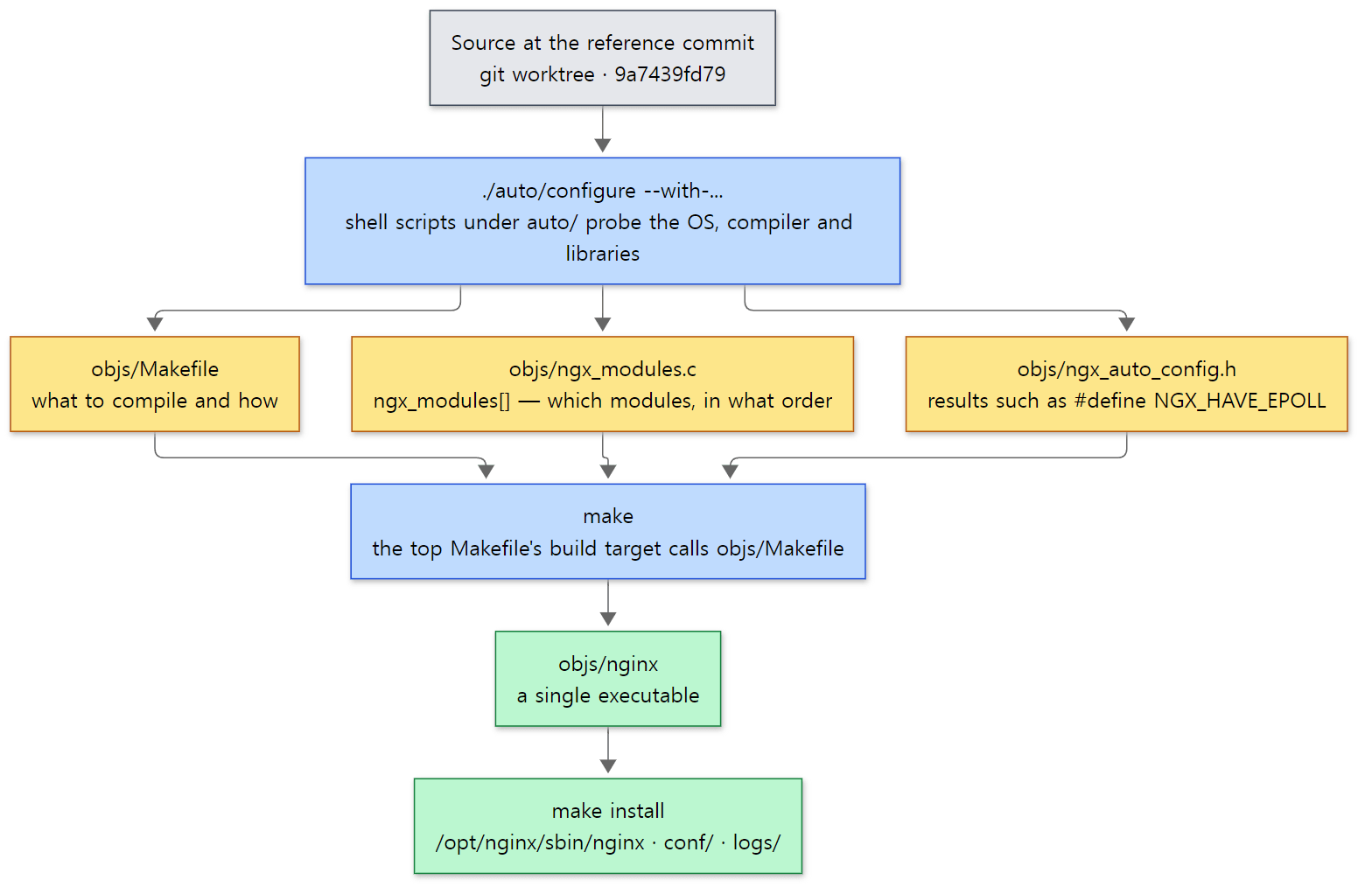 The three files configure generates (yellow) and make. The blue boxes are the commands we run.
auto/configure itself is a short shell script that hands most of the work to other scripts under auto/.
. auto/options
. auto/init
. auto/sources
# ...
. auto/modules
# ...
. auto/make
. auto/lib/make
. auto/install
auto/configure lines 10–109 (omissions marked # ...)
. is the shell command for "read and run that file in the current shell" (the same as source). auto/options turns the --with-… arguments into variables, auto/modules builds the list of modules to include, and auto/make writes the Makefile. The names of the outputs are gathered at the top of auto/init.
NGX_MAKEFILE=$NGX_OBJS/Makefile
NGX_MODULES_C=$NGX_OBJS/ngx_modules.c

NGX_AUTO_HEADERS_H=$NGX_OBJS/ngx_auto_headers.h
NGX_AUTO_CONFIG_H=$NGX_OBJS/ngx_auto_config.h
$NGX_OBJS defaults to objs. Of these, the one that will come up most in this series is objs/ngx_modules.c. The end of auto/modules generates it like this:
echo 'ngx_module_t *ngx_modules[] = {'        >> $NGX_MODULES_C

for mod in $modules
do
    echo "    &$mod,"                         >> $NGX_MODULES_C
done

cat << END                                    >> $NGX_MODULES_C
    NULL
};
A shell script writes out, as text, one C array listing the addresses of the module structs in order. At startup nginx walks this array and has each module create its configuration, and the order in which response filters line up is also decided by this array's order (Part 5, Part 10). Another output, objs/ngx_auto_config.h, records what configure found as macros such as #define NGX_HAVE_EPOLL 1. The #if (NGX_HAVE_EPOLL) checks throughout the source read these values. In our build this file contains 124 #defines.
How the examples are run
Each part has one example folder (such as ex/u01-reading-plan) with an nginx.conf and a run.sh, run inside the container by a small script (run-example.sh). The core is one line:
MSYS_NO_PATHCONV=1 docker run --rm --cap-add=SYS_PTRACE --security-opt seccomp=unconfined \
  -v "$(pwd -W 2>/dev/null || pwd)/$dir:/work" -w /work \
  nginx-lab:9a7439fd79 bash ./run.sh
It mounts the example folder at /work in the container, runs run.sh, and deletes the container straight away (--rm). Every run starts from a clean server, so nothing left over by an earlier example can interfere. --cap-add=SYS_PTRACE and seccomp=unconfined are the permissions that let gdb and strace attach to other processes inside the container. pwd -W is how Git Bash gets a Windows path (D:/…), and MSYS_NO_PATHCONV=1 stops Git Bash from rewriting arguments such as /work into Windows paths (the same approach as the httpd and Tomcat series).
Example: asking the built nginx directly
Every example in this series was run with nginx 1.31.9 built as-is from the reference commit (9a7439fd79), in a Docker container (Debian bookworm, --with-debug). The example folder for this post is ex/u01-reading-plan. First, nginx -V:
nginx version: nginx/1.31.9
built by gcc 12.2.0 (Debian 12.2.0-14+deb12u1)
built with OpenSSL 3.0.22 25 Aug 2026
TLS SNI support enabled
configure arguments: --prefix=/opt/nginx --with-debug --with-cc-opt='-O0 -g' --with-threads --with-file-aio --with-http_ssl_module --with-http_v2_module --with-http_realip_module --with-http_stub_status_module --with-http_sub_module --with-http_addition_module --with-http_auth_request_module --with-http_gzip_static_module --with-stream --with-stream_ssl_module --with-stream_realip_module
The first line is the NGINX_VER we saw in section 1. The last line hands back the configure arguments verbatim, because configure records that string as NGX_CONFIGURE in objs/ngx_auto_config.h (auto/configure line 19). When you wonder which modules an unfamiliar server's nginx was built with, nginx -V is the quickest answer.
Next is the ngx_modules[] array from objs/ngx_modules.c: the number of elements, the first six elements, and a count by module-name prefix (such as ngx_http_).
89
ngx_module_t *ngx_modules[] = {
    &ngx_core_module,
    &ngx_errlog_module,
    &ngx_conf_module,
    &ngx_openssl_module,
    &ngx_openssl_cache_module,
    &ngx_regex_module,
...
     58 ngx_http_
     21 ngx_stream_
      2 ngx_openssl_
      1 ngx_thread_
      1 ngx_regex_
      1 ngx_events_
      1 ngx_event_
      1 ngx_errlog_
      1 ngx_epoll_
      1 ngx_core_
      1 ngx_conf_
This build contains 89 modules: 58 HTTP modules and 21 stream modules. On the event side there are only ngx_events_module (the events {} block), ngx_event_core_module, and the one OS-specific method configure picked, ngx_epoll_module. The kqueue and select modules are in the repository, but they are not part of a Linux build. The kinds of modules and how this array is used at startup are covered in Part 2.
Easy to get wrong
There is no configure at the top of the repository. If you unpack a release archive from nginx.org (nginx-1.31.8.tar.gz), there is a ./configure at the top, but the git repository only has auto/configure. That is because the release target in misc/GNUmakefile, which builds the release archive, moves the file to the top.
mv $(TEMP)/$(NGINX)/auto/configure $(TEMP)/$(NGINX)
The same target moves docs/html and docs/man to the top and deletes docs/ and misc/. So when you follow build instructions online that say ./configure in a repository checkout, read it as ./auto/configure. The repository's README.md says the same (README.md lines 165–171).
make goes through the top-level Makefile to call objs/Makefile. configure also writes a short Makefile at the top, whose build: target is just $(MAKE) -f objs/Makefile (auto/install lines 199–208). The real compile rules (1,820 lines in our build) are in objs/Makefile. The executable is created at objs/nginx too.
3. Folder map — where the 260,000 lines live
Inside src/
Under src/ at the reference commit there are 410 C sources (.c) and headers (.h), 257,965 lines (including blank lines and comments). auto/, which holds the build scripts, has 65 files and 9,434 lines (8 of them are makefiles for Windows compilers; the rest are shell scripts). Counted by folder (files picked with find <folder> -maxdepth 1 -name '*.[ch]', lines counted with wc -l):
| Folder | Files | Lines | What | Parts |
|---|---|---|---|---|
src/core |
86 | 34,992 | nginx.c (main), the cycle, config parser, module table, pools, buffers and chains, strings, arrays, lists, hashes, rbtree, queues, connections, logging, shared memory, regex, resolver |
2–5 |
src/event |
17 | 16,521 | Event core (ngx_event.c), accept, connect, timers, posted events, OpenSSL integration, event pipe (proxy buffering), UDP |
7, 11 |
src/event/modules |
8 | 4,686 | epoll, kqueue, poll, select, devpoll, eventport, win32 — OS-specific event methods | 7 |
src/event/quic |
31 | 17,538 | QUIC (the layer below HTTP/3) — not enabled in this build | — |
src/http |
28 | 41,490 | HTTP core: ngx_http.c (http block and phase engine assembly), core module, request reading and parser, variables, scripts, upstream, basic filters |
8–11 |
src/http/modules |
63 | 71,259 | Other HTTP modules — static, index, proxy, fastcgi, rewrite, access, gzip, upstream load balancing … | 9–12 |
src/http/v2, src/http/v3 |
7 / 13 | 8,289 / 7,362 | HTTP/2, HTTP/3 | — |
src/stream |
33 | 25,812 | TCP/UDP proxy (stream {}) — structured like HTTP (phases, upstream) |
12 |
src/mail |
19 | 10,793 | Mail proxy (IMAP/POP3/SMTP) | — |
src/os/unix |
67 | 12,253 | Processes (master and workers), signals, channels, socket and file I/O, sendfile, shared memory | 6, 10 |
src/os/win32 |
34 | 5,389 | The Windows port | — |
The table adds up to 407 files and 256,510 lines. The remaining 3 files sit one folder deeper: src/http/modules/perl/ for generating responses in Perl (2 files, 1,248 lines), the QUIC eBPF helper src/event/quic/bpf/ (1 file, 207 lines), and src/misc/, which hooks up Google perftools (1 .c file, 126 lines). Add those three and you get exactly 410 files and 257,965 lines.
A few things stand out.
- HTTP is more than half. All of
src/http(core, modules, v2, v3, perl) is about 130,000 lines. This series also spends Parts 8 to 11 on HTTP. src/coreis 35,000 lines with a lot to do. Strings, hashes, trees and memory pools that another C program would take from the standard library or a shared library like APR, nginx wrote itself. That is why you need to know a little ofsrc/corefirst before the rest becomes readable (Part 3).- There is no test folder. That is different from the Tomcat repository, a quarter of which was tests. nginx's tests are said to live in a separate repository (
nginx-tests) written in Perl (I did not fetch it for this series).
Compared with the earlier series — httpd was about 350,000 lines of .c/.h, Tomcat about 740,000 lines of .java (about 500,000 in the main java/ tree alone) — nginx is the smallest of the three.
Seen as layers
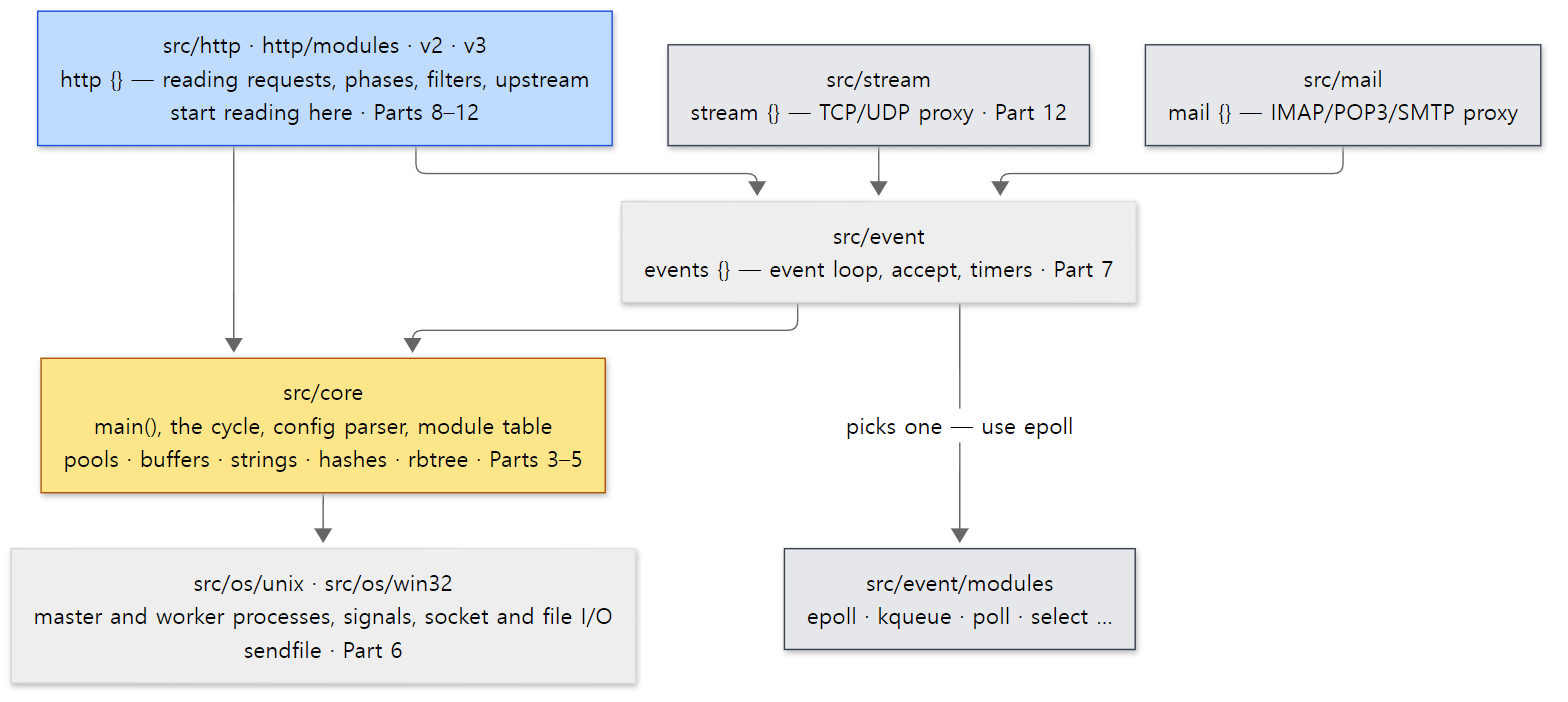 The layers of the nginx source. The blue box (HTTP) is the focus of this series, and the yellow box (core) is the floor everything stands on. The grey boxes get only a brief look in this series.
Two things in this picture are worth remembering.
First, config blocks are folders. events {} is src/event, http {} is src/http, stream {} is src/stream, and mail {} is src/mail. Top-level directives such as worker_processes, error_log and pid are handled by ngx_core_module in src/core/nginx.c. Open nginx.conf and ask "which folder is this block?" and you will almost always be right.
Second, HTTP and stream stand on the same floor. The TCP proxy stream {} is also split into phases and also picks backends through upstream. The event loop, connections, pools and module table are shared by both. What sits on this floor and how it fits together is the subject of Part 2.
4. The main path one request takes
In one picture
Parts 7 through 12 follow the path one request takes, in order. Drawn on one page, the main path looks like this:
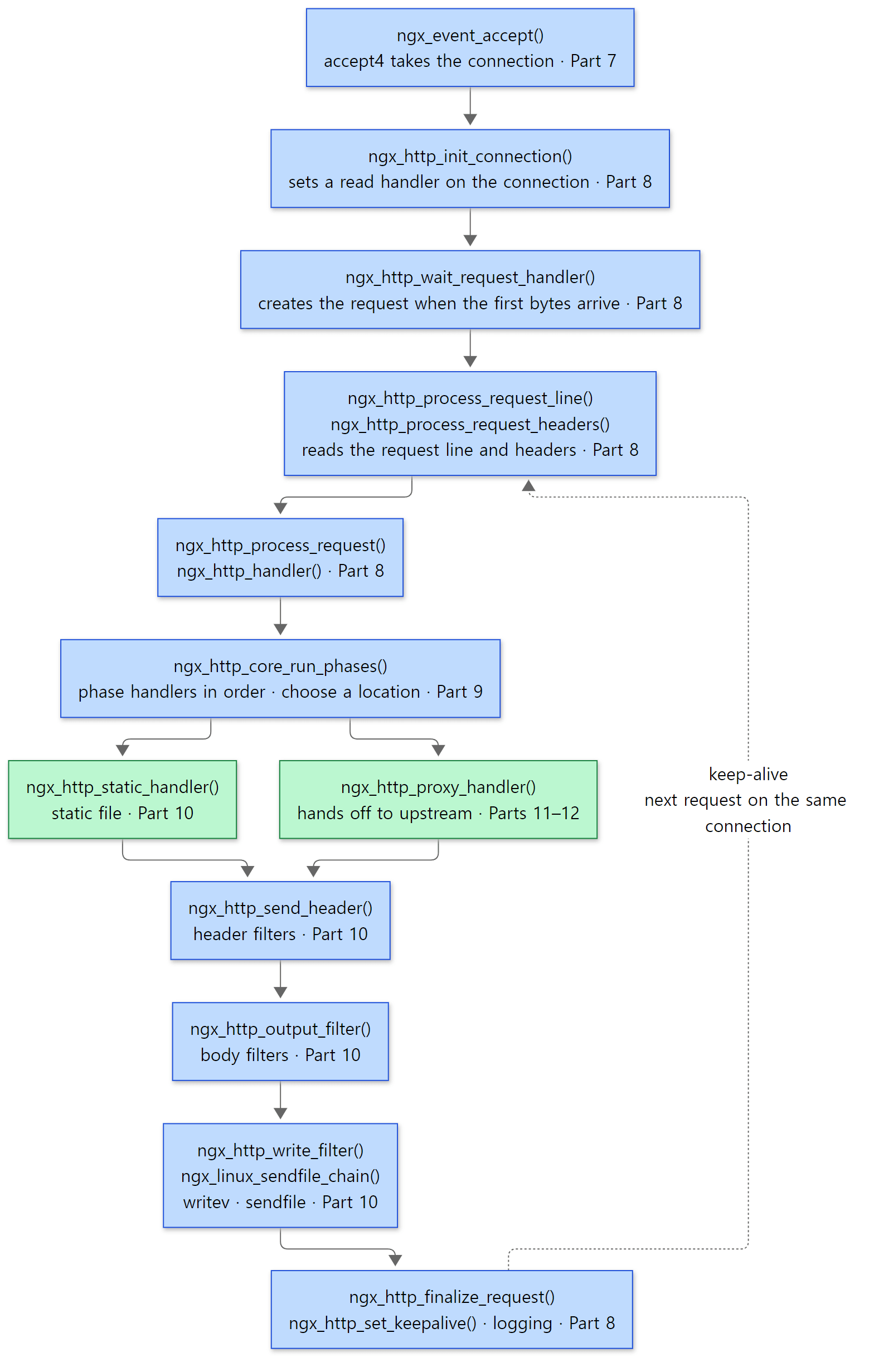 The main path of one request. Each box shows the part that covers that step. The green boxes are the content handlers that produce the body of the response, and the dotted line is the way back to the next request on a keep-alive connection.
Tied back to what you see in the config file:
| Step | What you see in the config | Part |
|---|---|---|
| Processes | worker_processes, user, nginx -s reload |
6 |
| Event loop · accept | events { worker_connections; use epoll; accept_mutex; }, listen … reuseport |
7 |
| Connection and reading the request | listen, server_name, client_header_buffer_size, keepalive_timeout |
8 |
| Phases · location | location, rewrite, allow/deny, try_files, return |
9 |
| Content · filters | root, index, sendfile, gzip, sub_filter, postpone_output |
10 |
| Upstream · proxy | proxy_pass, proxy_set_header, proxy_buffering, upstream {}, keepalive |
11, 12 |
A preview of two spots in the code
One: the worker's infinite loop. Once startup is done, a worker process spins in the for ( ;; ) inside this function until it dies.
    for ( ;; ) {

        if (ngx_exiting) {
            /* ... */
        }

        ngx_log_debug0(NGX_LOG_DEBUG_EVENT, cycle->log, 0, "worker cycle");

        ngx_process_events_and_timers(cycle);

        if (ngx_terminate) {
            /* ... */
        }

        if (ngx_quit) {
            /* ... */
        }

        if (ngx_reopen) {
            /* ... */
        }
    }
src/os/unix/ngx_process_cycle.c lines 740–778 (omissions marked /* ... */)
One trip round the loop does exactly one thing: call ngx_process_events_and_timers(). That function asks epoll which connections have something to do, calls their handlers, and processes timers that have expired. The remaining ifs check, once per iteration, the flags (global variables) set by signals from the master. nginx -s quit sets ngx_quit; nginx -s reopen, which reopens log files, sets ngx_reopen. The reason the signal handler only sets a flag and the loop does the actual work is that very little is safe to do inside a C signal handler (Part 6).
This is where the biggest difference between nginx and httpd/Tomcat shows. httpd's event MPM and Tomcat separate "threads that watch connections" from "worker threads that process requests." An nginx worker has no such split: the single thread running this loop both watches connections and processes requests. So nginx code must never wait long anywhere; wherever it would have to wait, it registers a handler — "call this function when data arrives" — and returns. Many of the functions in the picture above are exactly that: functions that set up the next step and return (Part 7).
Two: the phase engine. Once the request line and headers have been read, the request enters this short function.
void
ngx_http_core_run_phases(ngx_http_request_t *r)
{
    ngx_int_t                   rc;
    ngx_http_phase_handler_t   *ph;
    ngx_http_core_main_conf_t  *cmcf;

    cmcf = ngx_http_get_module_main_conf(r, ngx_http_core_module);

    ph = cmcf->phase_engine.handlers;

    while (ph[r->phase_handler].checker) {

        rc = ph[r->phase_handler].checker(r, &ph[r->phase_handler]);

        if (rc == NGX_OK) {
            return;
        }
    }
}
src/http/ngx_http_core_module.c lines 893–912
ph is a function-pointer array built in advance while the configuration was read. The handlers hooked on every phase except the LOG phase are flattened into one line (the LOG phase is covered under "Easy to get wrong" below), and each element holds a checker (a function that calls the handler according to that phase's rules and decides the next slot) and a handler (the module's function). r->phase_handler is "which slot of the array this request is at right now." When a checker returns NGX_OK, it means "stop here for now," so the loop exits; any other value means keep going from the updated r->phase_handler. Finding the location, rewrite, allow/deny, producing the response — all are slots in this array. How the array is built is covered in Part 9.
In httpd the same job was done by ap_process_request_internal() calling hooks in turn (httpd Part 10). Unlike httpd, which had a separate ap_run_… function per hook, nginx flattens every step into one array and walks it with one index. That makes "pause now and resume later" easy: all that has to survive is the index in the request struct. For nginx, which handles thousands of requests in turn on one thread, that property is essential.
Example 1: where is an idle worker?
I used gdb to check that the worker really waits inside the loop above. I started nginx with worker_processes 1;, attached gdb to the worker process while there were no requests, and printed the call stack (the list of currently running functions, each with its caller, in reverse order). The example config has two locations: a static location / and a proxy location /proxy/.
# Example written for this post (not part of the nginx source)
# Part 1: one static file and one proxy — a minimal config for watching the main path of a request
worker_processes 1;
error_log /tmp/u01/error.log info;
pid /tmp/u01/nginx.pid;

events {
    worker_connections 64;
}

http {
    access_log /tmp/u01/access.log;
    # sendfile defaults to off — turned on to watch static files go out via sendfile()
    sendfile on;

    server {
        listen 8080;
        root /tmp/u01/www;

        # static files: handled by ngx_http_static_module
        location / {
        }

        # reverse proxy: handled by ngx_http_proxy_module
        location /proxy/ {
            proxy_pass http://127.0.0.1:9000/;
        }
    }
}
First, the processes as seen by ps (pids differ on every run):
    PID    PPID USER     CMD
     27       1 root     nginx: master process nginx -c /work/nginx.conf
     28      27 nobody   nginx: worker process
The master runs as root and the worker as nobody. Without a user directive, nginx switches to the user chosen at configure time, which is nobody if --user was not given (auto/unix line 6). Here is gdb -batch -p 28 -ex bt on the worker (pid 28):
#0  0x00007f827a187ef3 in epoll_wait () from /lib/x86_64-linux-gnu/libc.so.6
#1  0x0000564734e07608 in ngx_epoll_process_events (cycle=0x5647362b4120, timer=18446744073709551615, flags=1) at src/event/modules/ngx_epoll_module.c:800
#2  0x0000564734df40b9 in ngx_process_events_and_timers (cycle=0x5647362b4120) at src/event/ngx_event.c:248
#3  0x0000564734e04a4c in ngx_worker_process_cycle (cycle=0x5647362b4120, data=0x0) at src/os/unix/ngx_process_cycle.c:751
#4  0x0000564734e01148 in ngx_spawn_process (cycle=0x5647362b4120, proc=0x564734e04956 <ngx_worker_process_cycle>, data=0x0, name=0x564734f25f0a "worker process", respawn=-3) at src/os/unix/ngx_process.c:199
#5  0x0000564734e03826 in ngx_start_worker_processes (cycle=0x5647362b4120, n=1, type=-3) at src/os/unix/ngx_process_cycle.c:366
#6  0x0000564734e02eef in ngx_master_process_cycle (cycle=0x5647362b4120) at src/os/unix/ngx_process_cycle.c:130
#7  0x0000564734db81c0 in main (argc=3, argv=0x7ffe74bc9088) at src/core/nginx.c:403
(Addresses differ on every run.) Read it from the bottom up. Because the build uses -O0 -g, every line number appears, and all of them match the reference-commit source.
main()(nginx.cline 403) callsngx_master_process_cycle(). Up to here, this is code that ran as the master.- The master
fork()s a worker viangx_start_worker_processes()→ngx_spawn_process(), and on the child sideproc(cycle, data)(line 199) callsngx_worker_process_cycle(). The master's functions are still at the bottom of the worker's stack becausefork()copies the parent's whole memory. The worker branches off at the very spot where the master calledfork()(Part 6). - The worker is at line 751 of the loop we saw,
ngx_process_events_and_timers(); its line 248 called the epoll module'sngx_epoll_process_events(), which at line 800 enteredepoll_wait()and is asleep there.
timer=18446744073709551615 is (ngx_msec_t) -1, that is, NGX_TIMER_INFINITE (src/event/ngx_event_timer.h line 17). No timers are pending, so it means "wait forever until something arrives." We will see when this value changes in the next example.
Example 2: the system calls of one request
This time I attached strace (a tool that prints every system call a process makes) to the idle worker and fetched a 25-byte index.html once with curl. Times and pids differ on every run, and I removed one error.log write that appeared right after strace attached.
28    02:49:53.924441 epoll_wait(8, [{events=EPOLLIN, data={u32=908820704, u64=94863851487456}}], 512, -1) = 1
28    02:49:54.263277 accept4(6, {sa_family=AF_INET, sin_port=htons(44508), sin_addr=inet_addr("127.0.0.1")}, [112 => 16], SOCK_NONBLOCK) = 3
28    02:49:54.333624 epoll_ctl(8, EPOLL_CTL_ADD, 3, {events=EPOLLIN|EPOLLRDHUP|EPOLLET, data={u32=908821185, u64=94863851487937}}) = 0
28    02:49:54.333909 epoll_wait(8, [{events=EPOLLIN, data={u32=908821185, u64=94863851487937}}], 512, 60000) = 1
28    02:49:54.334100 recvfrom(3, "GET /index.html HTTP/1.1\r\nHost: "..., 1024, 0, NULL, NULL) = 88
28    02:49:54.334925 openat(AT_FDCWD, "/tmp/u01/www/index.html", O_RDONLY|O_NONBLOCK) = 11
28    02:49:54.349431 newfstatat(11, "", {st_mode=S_IFREG|0644, st_size=25, ...}, AT_EMPTY_PATH) = 0
28    02:49:54.350193 writev(3, [{iov_base="HTTP/1.1 200 OK\r\nServer: nginx/1"..., iov_len=236}], 1) = 236
28    02:49:54.350472 sendfile(3, 11, [0] => [25], 25) = 25
28    02:49:54.351787 write(5, "127.0.0.1 - - [07/Nov/2026:02:49"..., 95) = 95
28    02:49:54.352029 close(11)         = 0
28    02:49:54.352628 setsockopt(3, SOL_TCP, TCP_NODELAY, [1], 4) = 0
28    02:49:54.353063 epoll_wait(8, [{events=EPOLLIN|EPOLLRDHUP, data={u32=908821185, u64=94863851487937}}], 512, 75000) = 1
28    02:49:54.353277 recvfrom(3, "", 1024, 0, NULL, NULL) = 0
28    02:49:54.353640 write(4, "2026/11/07 02:49:54 [info] 28#28"..., 82) = 82
28    02:49:54.353855 close(3)          = 0
28    02:49:54.354085 epoll_wait(8,  <detached ...>
The same flow as a picture:
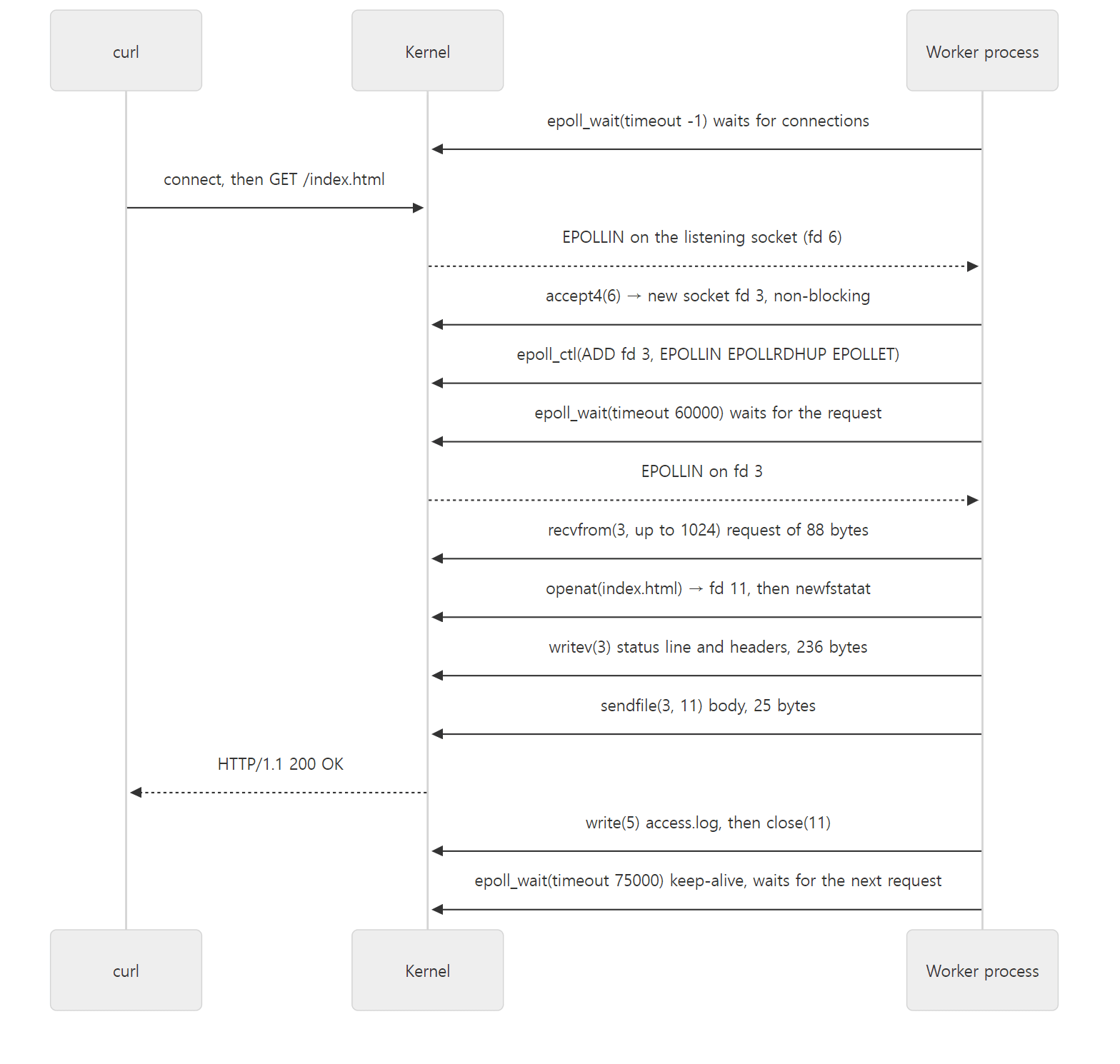 The system calls of one request. Everything happens in one worker process, on one thread.
These few lines contain several parts of the series. Each number ties back to a default in the config.
- The last argument of
epoll_wait(the timeout) changes three times.-1(forever) when idle,60000after accepting the connection, and75000after sending the response. 60,000 ms is the defaultclient_header_timeoutof 60 seconds, and 75,000 is the defaultkeepalive_timeoutof 75 seconds (src/http/ngx_http_core_module.c lines 3626–3627, lines 3988–3989). Each connection gets a timer, andepoll_waitwaits only until the nearest timer. The timers live in a red-black tree (a balanced binary tree where inserting, removing and finding the smallest value are all fast) (Part 7). accept4(…, SOCK_NONBLOCK)andEPOLLET. The accepted socket is non-blocking from the start, and it is registered with epoll as edge-triggered (EPOLLET— notify only once, when the state changes). So when nginx gets a notification, it has to read everything it can (Part 7).recvfrom(3, …, 1024, …). The first buffer for reading request headers is 1024 bytes — the defaultclient_header_buffer_sizeof 1k (same file, lines 3628–3629). Longer headers move intolarge_client_header_buffers(Part 8).writev, thensendfile. The headers (236 bytes) are in memory, so they go withwritev; the body is a file, so it goes withsendfile(a system call that sends file contents straight to a socket inside the kernel, without copying them into user memory). Removesendfile on;and the body is also read into memory withpreadand sent withwritev(Part 10).setsockopt(… TCP_NODELAY …). Turned on byngx_http_set_keepalive(), which switches a finished connection to keep-alive (src/http/ngx_http_request.c line 3546).- The final
recvfromreturning0means curl closed the connection. The worker logsclient 127.0.0.1 closed keepalive connection(at info level) to error.log, closes the socket, and goes back toepoll_wait.
Example 3: does it really pass through these functions?
A call stack only shows "the functions open at this moment," so seeing all the functions in the picture at once needs another approach. I used the same method as httpd Part 1: a gdb breakpoint on each function in the picture, which prints only the name each time it stops and then continues. The gdb command file repeats these six lines for each function:
break ngx_http_handler
commands
  silent
  printf ">> ngx_http_handler\n"
  continue
end
To make gdb's job easy, this time I started nginx with -g 'daemon off; master_process off;' — a single process, no master/worker split (master_process off is a setting meant for development and debugging). Then I requested one static file and one proxied path. When the same function is called several times in a row, uniq -c collapses it into one line prefixed with the count.
--- GET /index.html ---
curl: HTTP 200, 25 bytes
      1 >> ngx_event_accept
      1 >> ngx_http_init_connection
      1 >> ngx_http_wait_request_handler
      1 >> ngx_http_process_request_line
      1 >> ngx_http_process_request_headers
      1 >> ngx_http_process_request
      1 >> ngx_http_handler
      1 >> ngx_http_core_run_phases
      4 >> ngx_http_core_content_phase
      1 >> ngx_http_static_handler
      1 >> ngx_http_send_header
      1 >> ngx_http_header_filter
      1 >> ngx_http_write_filter
      1 >> ngx_http_output_filter
      1 >> ngx_http_copy_filter
      1 >> ngx_http_write_filter
      1 >> ngx_linux_sendfile_chain
      1 >> ngx_http_finalize_request
      1 >> ngx_http_set_keepalive
      1 >> ngx_http_log_handler
Exactly the order in the picture. A few points:
ngx_event_accept→ngx_http_init_connection. The event core knows nothing about HTTP. Each listening socket carries "the function to call when a connection is accepted" inls->handler(src/event/ngx_event_accept.c line 312), and sockets created bylisteninside anhttp {}block carryngx_http_init_connection(src/http/ngx_http.c line 1882). Astream {}socket would hold a stream-module function in the same place. The "two branches on the same floor" from the layer picture in section 3 split at this one function pointer.ngx_http_core_content_phaseis called 4 times. Four modules are lined up in the CONTENT phase, which produces the response —index,autoindex,gzip_static,static, in that order — and after the first three passed with "not my job" (NGX_DECLINED), the fourth,static, served the file. The modules register their handlers inngx_modules[]order (static → gzip_static → autoindex → index), but the phase engine lays out handlers in reverse, so the execution order is flipped (src/http/ngx_http.c line 551). The loop is insidengx_http_core_run_phases(), so that function itself shows up only once (Part 9).ngx_http_write_filterappears twice. The first is the end of the header filters.ngx_http_header_filter()builds the status line and headers in a buffer and passes it straight on withreturn ngx_http_write_filter(r, &out);(src/http/ngx_http_header_filter_module.c line 628). But nothing is written to the socket yet. If the amount collected is less thanpostpone_output(default 1460 bytes, ngx_http_core_module.c lines 3979–3980) and it is not the last buffer, it just holds on to it (src/http/ngx_http_write_filter_module.c lines 219–221). Only when the body arrives the second time, with the last buffer, doesngx_linux_sendfile_chain()send headers and body together. That is whywritevandsendfilewere right next to each other in Example 2 (Part 10).
The proxied request looks like this (the first seven lines are the same as above, so I cut them):
--- GET /proxy/backend.txt ---
curl: HTTP 200, 19 bytes
...
      1 >> ngx_http_core_run_phases
      1 >> ngx_http_core_content_phase
      1 >> ngx_http_proxy_handler
      1 >> ngx_http_upstream_init
      1 >> ngx_http_finalize_request
      1 >> ngx_linux_sendfile_chain
      1 >> ngx_http_send_header
      1 >> ngx_http_header_filter
      1 >> ngx_http_write_filter
      1 >> ngx_http_output_filter
      1 >> ngx_http_copy_filter
      1 >> ngx_http_write_filter
      1 >> ngx_http_output_filter
      1 >> ngx_http_copy_filter
      1 >> ngx_http_write_filter
      1 >> ngx_linux_sendfile_chain
      1 >> ngx_http_finalize_request
      1 >> ngx_http_set_keepalive
      1 >> ngx_http_log_handler
Unlike the static file, the content phase is called once and goes straight to ngx_http_proxy_handler. A location with proxy_pass gets its own location-specific content handler (clcf->handler = ngx_http_proxy_handler), and when one is present the content phase's checker calls only that, ignoring the other handlers lined up in the phase (src/http/ngx_http_core_module.c lines 1309–1313).
The next part is interesting. ngx_http_finalize_request shows up once even before the response is sent. That is because ngx_http_proxy_handler() only starts the backend connection and returns immediately with NGX_DONE ("not finished yet, but I have taken it on") (src/http/modules/ngx_http_proxy_module.c line 976). The ngx_linux_sendfile_chain after it is sending the request to the backend, not to the client. In a Linux build, this is the one function that sends a chain of buffers on any plain (non-TLS) TCP connection, whether it faces the client or the backend (src/os/unix/ngx_linux_init.c line 24). Only when the backend's response arrives does it go out to the client through the header and body filters. Meanwhile the worker is free to handle other connections. The waiting does not show in the output above, but the principle from the start of section 4 — "one thread never waits" — is at work here (Part 11).
Easy to get wrong
Logging happens when the request is freed, not in the phase engine. The last of the 11 phases is the LOG phase, yet in the results above ngx_http_log_handler ran after ngx_http_set_keepalive, not from ngx_http_core_run_phases. Following the source, ngx_http_set_keepalive() calls ngx_http_free_request() while cleaning up the request (src/http/ngx_http_request.c line 3422), and inside it ngx_http_log_request() runs the LOG phase handlers directly.
    log_handler = cmcf->phases[NGX_HTTP_LOG_PHASE].handlers.elts;
    n = cmcf->phases[NGX_HTTP_LOG_PHASE].handlers.nelts;

    for (i = 0; i < n; i++) {
        log_handler[i](r);
    }
src/http/ngx_http_request.c lines 4084–4089
It does not walk the ph[] array; it simply calls the phase's handler list from the front. In the strace from Example 2, too, the access.log write (write(5, …)) came after the whole response was sent and before close(11) closed the file. The order is: write the log just before destroying the request's memory pool closes the files it opened. It is the same shape as httpd Part 1, where the log_transaction hook ran after the response had been fully written.
sendfile defaults to off. That is why the example config sets sendfile on; explicitly (ngx_conf_merge_value(conf->sendfile, prev->sendfile, 0) at src/http/ngx_http_core_module.c line 3956). Distribution packages often ship an nginx.conf containing sendfile on;, so it is easy to think it is on by default — but that is a value in the config file, not nginx's default.
5. How to read — with AI, but verifying against the source
The reading order
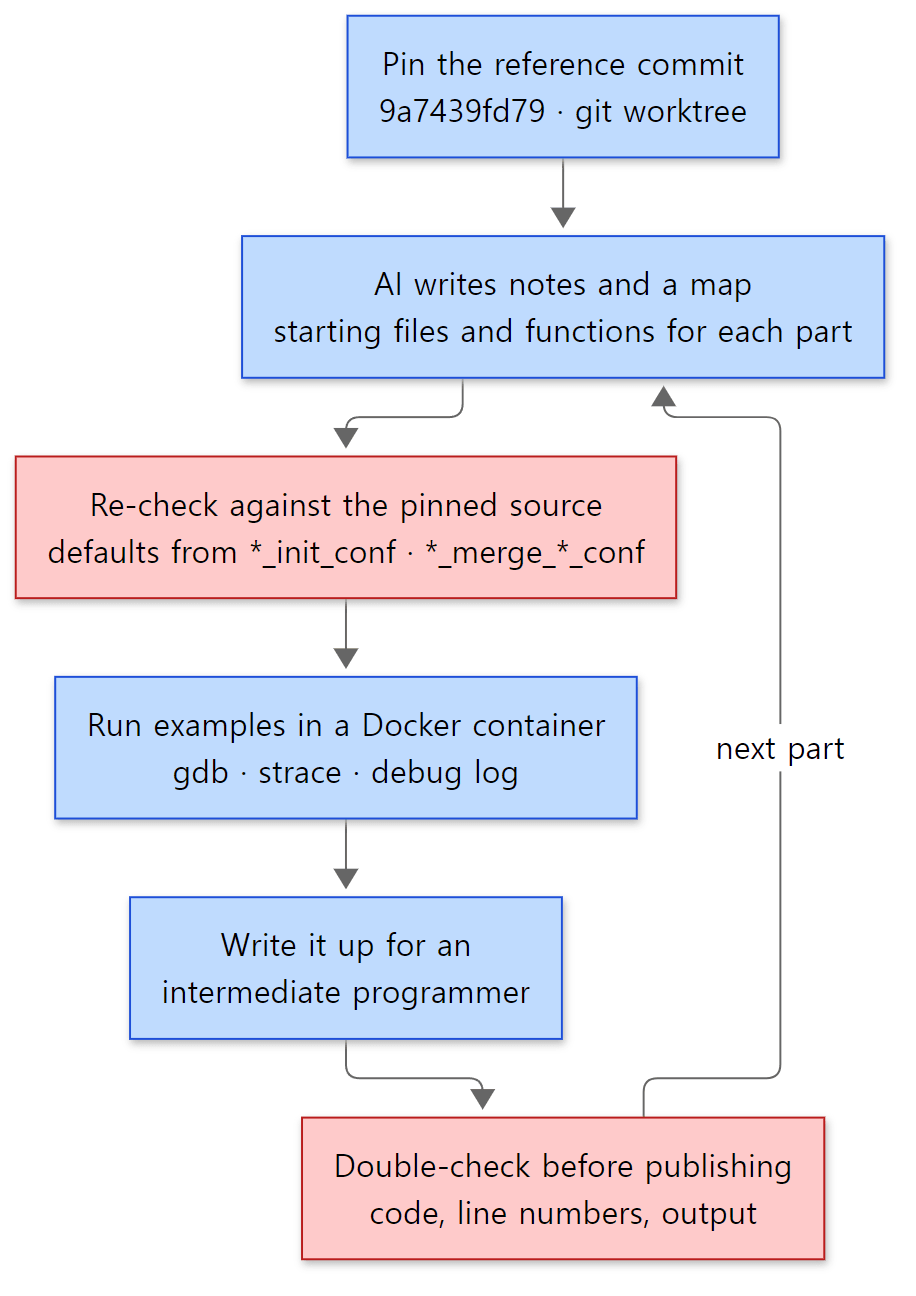 The order for reading and writing one part. Blue boxes are steps; red boxes are where mistakes in AI-written content get filtered out.
The principle is the same as in the three earlier series: do not read everything at once; pick one question from the map and read deeply only the code needed to answer it. In this series, one question is one post.
- Pin the reference commit. That is the worktree from section 2. Line numbers must not move, or you cannot verify the evidence the AI cites.
- AI writes notes and a map. The 12-part structure of the series and the list of starting files and functions for each part were made this way. Each part got the same brief (what to read, in what format, with what evidence) and was handed to one AI task.
- Re-check against the pinned source. The functions in the brief are literally just starting points; only what I verified in the source goes into a post. Code is copied straight from the files, and only line numbers I found myself are given. For nginx, I especially check defaults in the
*_init_conf/*_merge_*_conffunctions, because, as section 1 showed, some old knowledge no longer holds. - Actually run the examples. Like section 4, a small example that lets you see one claim with your own eyes is run in the container, and its output goes in unchanged. nginx's
--with-debugbuild prints the source'sngx_log_debug…lines verbatim, so you can jump from one log line straight to one source line. - Check once more before publishing. When a post is done, its code blocks, line numbers, claims and example output are compared again from the start against the source. Posts that have not passed this check are not published.
What this check caught in this post
Why step 3 is needed showed up even while writing this post.
89 modules or 90? The brief said "90 modules in this build." Counting the elements of the ngx_modules[] array gives 89. But my own first counting script also produced 90: I picked names starting with ngx_ within the array block, and that counted the ngx_module_ in the declaration line ngx_module_t *ngx_modules[] = { as one more. Counting only element lines (the ones with &) gave 89. Part 2's diagram also shows 89. Even a single number needs its counting method checked.
The folder table did not add up. The folder table in the brief summed to 407 files, but the total was 410. Only after finding the nested folders (perl/, quic/bpf/) and src/misc/, which was missing from the table, did the sums in section 3 match.
Where logging happens. When drawing the main path, people usually draw the 11 phases in order, write "the last one is the LOG phase," and stop. Without running the gdb trace, the fact that logging happens when the request is freed, not inside ngx_http_core_run_phases() (the "Easy to get wrong" in section 4), would never have made it into this post.
Guidance inside the repository
The Tomcat repository had a guidance file for automated tools such as AI (AGENTS.md) (Tomcat Part 1). Among the 544 files tracked by git in the nginx repository, there is no file with a name like that. Instead there are two human-written guides. One is the repository's README.md, which gives build instructions along with a link to the Development guide on nginx.org (README.md line 19). This series uses that guide only as a reference; what goes into a post is only what I verified in the reference-commit source. The other is the checks under .github/workflows/ we saw in section 1. Rules such as commit message format, whitespace and version bumps are written not as documents but as checks that run, so you can read how the repository operates just like source code.
6. The series map
Five groups
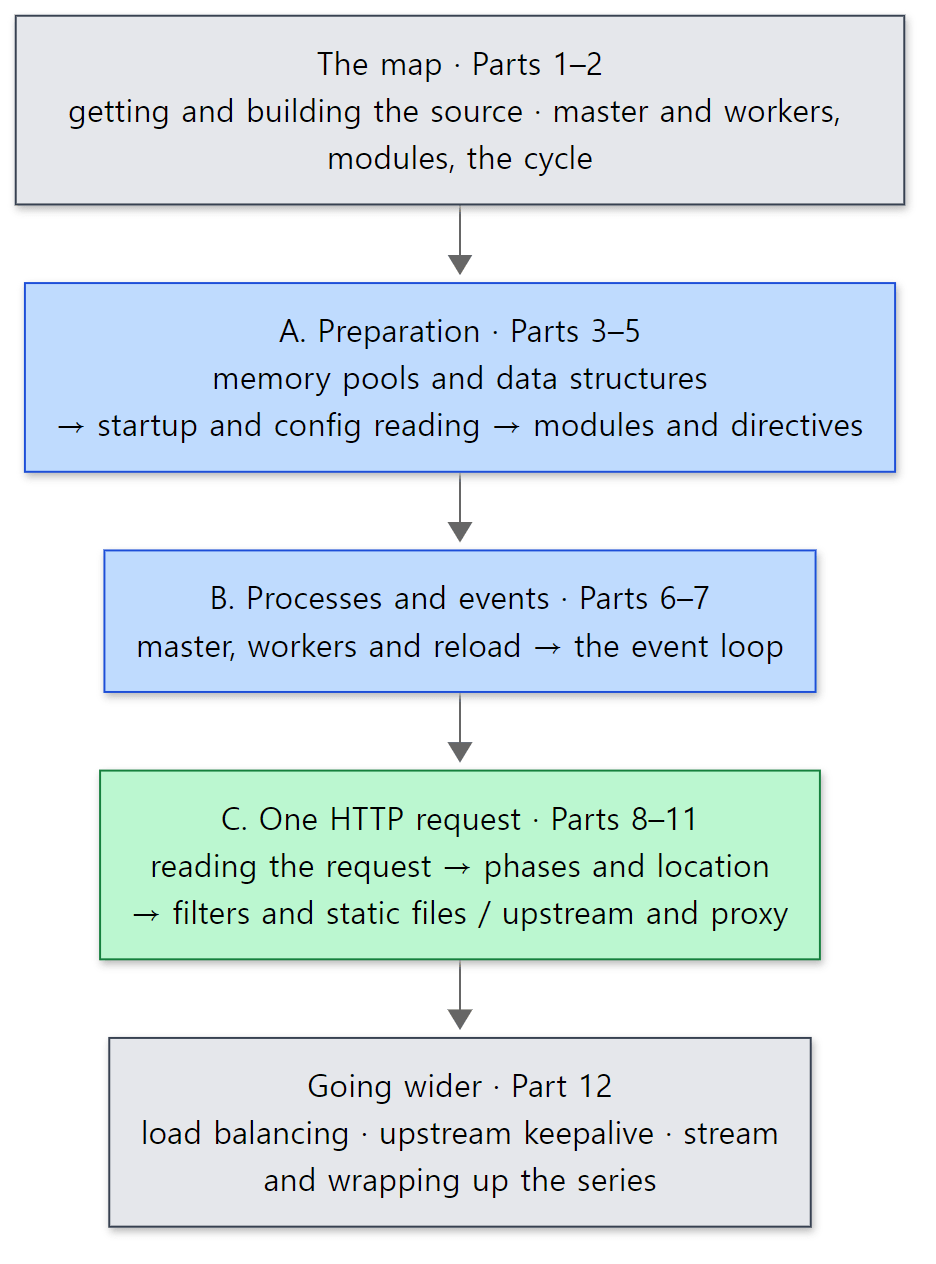 The five groups of the series. The green box (the path of one request) is the heart of the series, and the blue boxes are the groundwork you need first to read that path.
| Group | Part | Question it answers |
|---|---|---|
| The map | 1 | Which source do we read, and how? (this post) |
| 2 | How do master and workers, modules, the cycle and config contexts fit together? | |
| A. Preparation | 3 | How is memory borrowed and returned, and what do strings and buffers look like? |
| 4 | What happens between main() and building the cycle from the config file? |
|
| 5 | How does one line of nginx.conf become a module's config struct? | |
| B. Processes and events | 6 | How does the master start workers, and how is reload seamless? |
| 7 | How does one worker handle thousands of connections together? | |
| C. One HTTP request | 8 | How do bytes on a socket become an ngx_http_request_t? |
| 9 | In what order is a request handled, and how is the location chosen? | |
| 10 | Which filters does a response pass through, and how does it reach the socket? | |
| 11 | How does one proxy_pass request talk to the backend? |
|
| Going wider | 12 | How are backends chosen, how are connections reused, and what does the TCP proxy share? |
Here Part 12 gets its own "Going wider" group, but on the map in Part 2 it sits in zone C, as the box that follows upstream and proxy (Part 11). The map that Parts 3–12 point to at the top is the one in Part 2.
Reading order
Read them in numerical order. Like the earlier series, the numbering follows the main path from section 4, for three reasons.
- Groundwork first. Following the request path (Parts 8–11), you meet
ngx_pool_t(memory pools),ngx_buf_t/ngx_chain_t(buffer chains) and module config structs on every line. You need to know them first for the path to make sense. - The request path goes from outside in. It starts with processes (Part 6) and the event loop (Part 7), then goes reading the request (Part 8) → phases (Part 9) → the response (Part 10). It is the same order as reading the function list in Example 3 from top to bottom.
- The proxy comes last. Upstream sits on the request path as a content handler and uses the event loop, buffers and filters all at once. Once you know the whole path, you can see that "a connection to a backend is just one more connection in the same event loop."
What this post leaves out
- HTTP/2 and HTTP/3.
src/http/v2(8,289 lines),src/http/v3(7,362 lines) and the layer below,src/event/quic(17,538 lines), are not covered in this series. The example image was also built without QUIC. - The mail proxy.
src/mail(10,793 lines) is not covered. - TLS.
src/event/ngx_event_openssl.candngx_http_ssl_module.cappear in Part 8 only as "the place where the TLS handshake slots in before the request." - The Windows port.
src/os/win32(5,389 lines) and the Windows build targets inmisc/GNUmakefileare not covered. - Caching.
proxy_cacheand the cache manager process are mentioned by name only, in Part 6. - New modules in 1.31.x. Modules absent from 1.30.x, such as
ngx_http_tunnel_module.candngx_http_json_module.c, get a one-line mention where relevant.
Summary
| Concept | One-line summary |
|---|---|
| Source we read | nginx 1.31.9 (master, mainline development version), commit 9a7439fd79 (2026-10-23). 410 .c/.h files under src/, 257,965 lines |
| Version number | NGINX_VERSION in src/core/nginx.h. A "Version bump" commit right after each release raises it to the next number, so after a release master points to "the next version" |
| Mainline and stable | Odd minor (1.31) is mainline, even (1.30) is stable (stable-1.30 branch, latest 1.30.6). Modules such as tunnel and json exist only in 1.31.x |
| Changed defaults | accept_mutex off, proxy_http_version 1.1, keepalive on by default (32) for upstream {} — check defaults in *_init_conf / *_merge_*_conf |
| Getting the same source | git clone, then pin the commit with git worktree add --detach … 9a7439fd79…. Use LF line endings when taking it to Linux |
| Build | ./auto/configure --with-… → objs/Makefile, objs/ngx_modules.c, objs/ngx_auto_config.h → make → objs/nginx. This build has 89 modules |
| Folders | core (the floor) · event (event loop) · http (more than half) · stream · mail · os/unix. Config blocks are folders |
| Main path | ngx_event_accept → ngx_http_init_connection → reading the request → ngx_http_core_run_phases → content handler → header and body filters → ngx_http_write_filter → ngx_linux_sendfile_chain → finalize and log |
| One worker | One thread waits in epoll_wait inside for ( ;; ), handles only what happened, and when it would have to wait, registers a handler and returns |
| How to read | Pin the commit → AI notes → verify in the source (defaults included) → run examples (gdb, strace, debug log) → write → double-check |
What's next
The next post is the big-picture map. In this post we saw the master and worker processes in ps, saw the master's functions left at the bottom of the worker's call stack, and saw 89 modules lined up in ngx_modules[]. The next post draws one map of how master and workers divide the work, the kinds of modules (CORE, EVENT, HTTP, STREAM…) and the shapes of ngx_module_t and ngx_command_t, the ngx_cycle_t that holds everything about a running nginx, and how nginx.conf's main, events, http, server and location contexts are represented in the source. Parts 3 to 12 each zoom in on one box of that map.
- Next: Digging into nginx's Source 2: The Big Picture — Master and Workers, Modules, the Cycle and Config Contexts
- Straight to the event loop: Part 7: The Event Loop — epoll, Timers, Posted Events and accept
- Straight to request processing order: Part 9: The 11 Phases and Finding the location
There are earlier series read the same way. httpd Part 1 is where I started reading another C web server on the same principles. httpd hands connections out through a module called an MPM, using processes and threads (httpd Part 8); nginx does it with the few worker processes we saw here, each with one event loop. The Poller in Tomcat Part 1 (a thread watching many connections with one selector) also resembles an event loop, but Tomcat hands request processing to worker threads and nginx does not. Part 7 compares how that difference shows in the code.