What this post covers
This is the tenth post in the "Digging into nginx's Source" series. In Part 9 we followed a request through the 11 phases, watched it pick a location, and stopped where the last phase, CONTENT, calls a content handler (the function that produces the response body). This time we pick up from the moment that handler starts producing a response and ask what shape the response takes and who it passes through on its way to the socket.
On the map from Part 2, this post zooms into the Filters · static files box in C. One HTTP request.
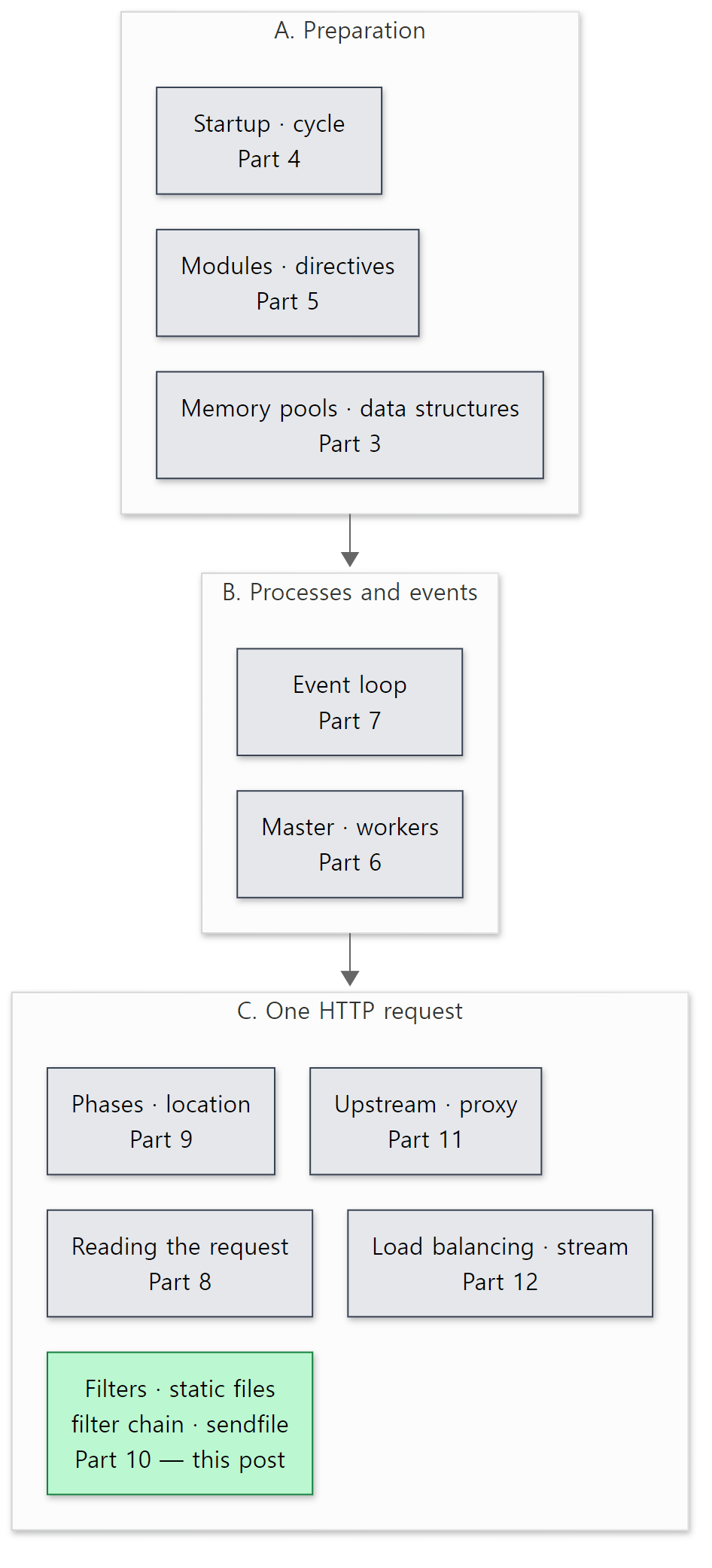 The green box on the Part 2 map is this post. Responses from the neighbouring upstream · proxy box (responses fetched from a backend) go through exactly the same filter chain — we get to that in Part 11.
There are four questions to answer.
- How does nginx turn one file under
root /var/www;into a response? When does it actually read the file? - Features that change the response, like
gzip on;andsub_filter, are built as filters. In what order do filters line up, and who decides that order? - Why does the same file sometimes come back with
Content-Lengthand sometimes withTransfer-Encoding: chunked? - Where in the source does
sendfile on;make a difference, and how do the system calls change when you flip it?
| Item | Details |
|---|---|
| Target | nginx |
| Version | nginx 1.31.9 (master, development line) |
| Commit | 9a7439fd79 (2026-10-23) |
| Main files | src/http/modules/ngx_http_static_module.c, src/http/ngx_http_core_module.c, src/http/ngx_http_header_filter_module.c, src/http/modules/ngx_http_chunked_filter_module.c, src/http/ngx_http_copy_filter_module.c, src/core/ngx_output_chain.c, src/http/ngx_http_write_filter_module.c, src/os/unix/ngx_linux_sendfile_chain.c, auto/modules |
All line numbers in this post refer to this commit. How to fetch the same commit and build the Docker image for the examples is in Part 1.
The response side has close to twenty filter modules alone, each doing its own job (compression, charset conversion, SSI …). This post sticks to the skeleton every response goes through — the static handler, how the filter chain is wired, and the header, chunked, copy and write filters plus sendfile that guard the end of the chain. What I left out is listed by name and location in "What this post leaves out" at the end.
Terms to know first
A content handler is a function that produces a response body. ngx_http_static_handler(), which serves files under root, ngx_http_proxy_handler() for proxy_pass, and ngx_http_stub_status_handler() for stub_status are all content handlers. The CONTENT phase from Part 9 is what calls them.
ngx_buf_t and ngx_chain_t. The buffer struct from Part 3, and the singly linked list that strings buffers together. An ngx_buf_t doesn't necessarily hold data; it records where the data is (pos–last in memory, or file_pos–file_last in a file). A response travels in such a chain from start to finish.
A filter is a function that takes the response, does something to it, and hands it to the next filter. nginx lines filters up in two rows. Header filters look at the response headers (r->headers_out) once; body filters are called every time a piece of the body chain (ngx_chain_t) comes through. Compression (gzip), string replacement (sub_filter), cutting Range requests and chunked encoding are all filters.
The filter chain is how filters are connected. nginx doesn't use a list or an array: each filter keeps one function pointer to "my next filter" in a static variable, and that is what links them. We look at this in section 3.
Chunked transfer encoding is what HTTP/1.1 uses when the response length isn't known up front. The body is split into chunks, each prefixed with its length in hexadecimal, and a zero-length chunk marks the end.
sendfile is a Linux system call that sends a file's contents to a socket inside the kernel, without copying them into user-space memory. Reading with read() and writing with write() copies the data twice (kernel → nginx memory → kernel); sendfile avoids that, which is why it's often called "zero-copy".
1. The big picture — the path of one response
Before diving into code, here's the whole path on one page. This is what really happens when a 100,000-byte static file goes out with sendfile on; (we confirm it with strace in Example 3 in section 6).
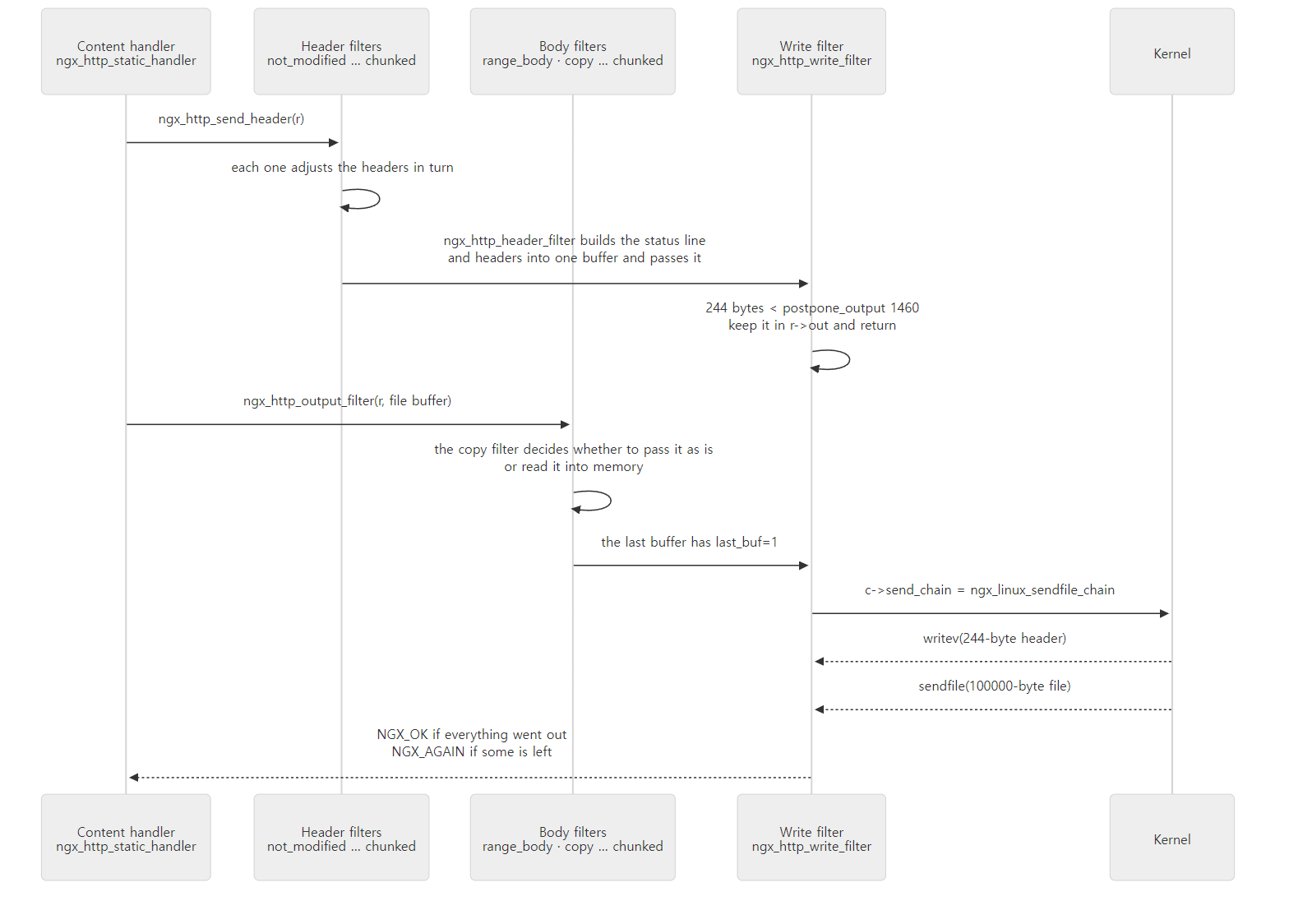 The content handler calls only two functions —
ngx_http_send_header() for the headers and ngx_http_output_filter() for the body. The filters do everything else.
Three things to take away from this picture:
- Headers and body start out separately. The handler sends the headers first and the body after. Each goes through its own row of filters.
- The two rows meet at the very end. The last header filter (
ngx_http_header_filter()) turns the headers into one buffer and hands it directly to the write filter, the last body filter. So headers leave through the same exit as the body. - The write filter may not send right away. A small header is held back and sent along with the body. If the socket is full, the write filter keeps what's left and sends it later.
Here's how this maps to things you know from nginx.conf:
| nginx.conf | Where it happens in the source |
|---|---|
root, index, try_files |
The content handler side — ngx_http_static_module.c, ngx_http_index_module.c, ngx_http_try_files_module.c (section 2) |
gzip, sub_filter, charset, add_header, ssi |
The middle of the header and body filter chains (section 3) |
chunked_transfer_encoding |
The chunked filter (section 4) |
output_buffers, directio, aio |
The copy filter and ngx_output_chain() (section 5) |
sendfile, sendfile_max_chunk, tcp_nopush, postpone_output, limit_rate |
The write filter and ngx_linux_sendfile_chain() (section 6) |
2. The static file handler — it records "where", not "what"
How a handler hooks into the CONTENT phase
ngx_http_static_module has no directives at all (the module directives slot in the module definition is NULL, lines 32–45). root is a core module directive; the static module merely pushes its handler onto the CONTENT phase array in its postconfiguration callback, which runs after the whole configuration has been read.
static ngx_int_t
ngx_http_static_init(ngx_conf_t *cf)
{
    ngx_http_handler_pt        *h;
    ngx_http_core_main_conf_t  *cmcf;

    cmcf = ngx_http_conf_get_module_main_conf(cf, ngx_http_core_module);

    h = ngx_array_push(&cmcf->phases[NGX_HTTP_CONTENT_PHASE].handlers);
    if (h == NULL) {
        return NGX_ERROR;
    }

    *h = ngx_http_static_handler;

    return NGX_OK;
}
src/http/modules/ngx_http_static_module.c lines 281–297
The index module (line 461 of ngx_http_index_module.c), autoindex and gzip_static push their handlers onto the same array. So when you request a directory like GET /, who goes first? When ngx_http_init_phase_handlers() from Part 9 flattens the per-phase arrays into the single ph[] array, it copies them in reverse.
        n += cmcf->phases[i].handlers.nelts;

        for (j = cmcf->phases[i].handlers.nelts - 1; j >= 0; j--) {
            ph->checker = checker;
            ph->handler = h[j];
            ph->next = n;
            ph++;
        }
src/http/ngx_http.c lines 549–556
postconfiguration is called in module order from ngx_modules.c (src/http/ngx_http.c lines 303–315), and in this build that order is static → gzip_static → autoindex → index (confirmed in Example 1 in section 3). They go into the array in that order and get reversed when flattened, so at request time the order is index → autoindex → gzip_static → static. A handler that isn't interested returns NGX_DECLINED to pass the request on — the static handler declines when the URI ends with / (lines 67–69), and the index handler declines when it does not (ngx_http_index_module.c lines 112–114). When the index handler finds index.html, it does an internal redirect to that URI (ngx_http_internal_redirect(), Part 9), running the request through the phases again from the start. You can see this path in the debug log in step 3 of Example 1 (section 3).
try_files hooks into the PRECONTENT phase just before CONTENT, not CONTENT itself (ngx_http_try_files_module.c line 411). It only checks whether files exist and rewrites the URI or redirects internally; the response body is still produced by the content handlers above.
Easy to get wrong: proxy_pass doesn't go through this array
Handlers you write inside a location — proxy_pass, fastcgi_pass, stub_status — don't go into the phase array. They're stored in the location config as clcf->handler. Once a request settles on that location, it's copied into r->content_handler (src/http/ngx_http_core_module.c line 1432), and the CONTENT phase checker calls it directly without looking at the array (lines 1309–1313). That's why, in a location with proxy_pass, the static handler is never called even if a file with the same name exists on disk. More in Part 11.
ngx_http_static_handler() — open the file, record only its location in a buffer
The handler body is about 230 lines. The first part turns the URI into a file path (ngx_http_map_uri_to_path() — joins root and the URI, line 78) and opens the file.
    if (ngx_open_cached_file(clcf->open_file_cache, &path, &of, r->pool)
        != NGX_OK)
    {
        switch (of.err) {
src/http/modules/ngx_http_static_module.c lines 103–106
ngx_open_cached_file() opens the file through the open-file cache you turn on with the open_file_cache directive. Without the cache (cache == NULL) it simply opens the file and fills of with the fstat results (src/core/ngx_open_file_cache.c line 159). On failure it looks at of.err and picks 404 (ENOENT), 403 (EACCES) or 500; for a directory it returns 301 with a Location that has a trailing / (lines 148–204). Past that point we have one regular file open. The rest is where this post really starts.
    r->headers_out.status = NGX_HTTP_OK;
    r->headers_out.content_length_n = of.size;
    r->headers_out.last_modified_time = of.mtime;

    /* ... */

    r->allow_ranges = 1;

    /* we need to allocate all before the header would be sent */

    b = ngx_calloc_buf(r->pool);
    /* ... */
    b->file = ngx_pcalloc(r->pool, sizeof(ngx_file_t));
    /* ... */

    rc = ngx_http_send_header(r);

    if (rc == NGX_ERROR || rc > NGX_OK || r->header_only) {
        return rc;
    }

    b->file_pos = 0;
    b->file_last = of.size;

    b->in_file = b->file_last ? 1 : 0;
    b->last_buf = (r == r->main) ? 1 : 0;
    b->last_in_chain = 1;
    b->sync = (b->last_buf || b->in_file) ? 0 : 1;

    b->file->fd = of.fd;
    b->file->name = path;
    b->file->log = log;
    b->file->directio = of.is_directio;

    out.buf = b;
    out.next = NULL;

    return ngx_http_output_filter(r, &out);
}
src/http/modules/ngx_http_static_module.c lines 229–278
Step by step:
- Fill in header values. Status 200,
content_length_nthat will becomeContent-Length,last_modified_timethat will becomeLast-Modified, and — in the elided part — the ETag andContent-Type(looked up by extension intypes {}). No strings are built yet; only fields ofr->headers_outare set.allow_ranges = 1marks "this response may be cut to fit aRangerequest", which the range filter checks. - Allocate the buffers up front. As the comment says, all memory is grabbed before sending the headers. If an allocation failed after the headers had gone out, there would be no way left to send the client an error response.
- Send the headers (
ngx_http_send_header()). For aHEADrequestr->header_onlyis set and we stop here. A 304 (conditional request) also getsheader_onlyset inside a header filter and returns here. - Write the file's location into the buffer.
in_file = 1,file_pos = 0,file_last = file size,file->fd. Not a single byte of the file has been read. For the main requestlast_buf = 1(this is the last buffer of the response). - Send the body (
ngx_http_output_filter()). The chain has one buffer, and the chain linkoutis a local variable of the handler.
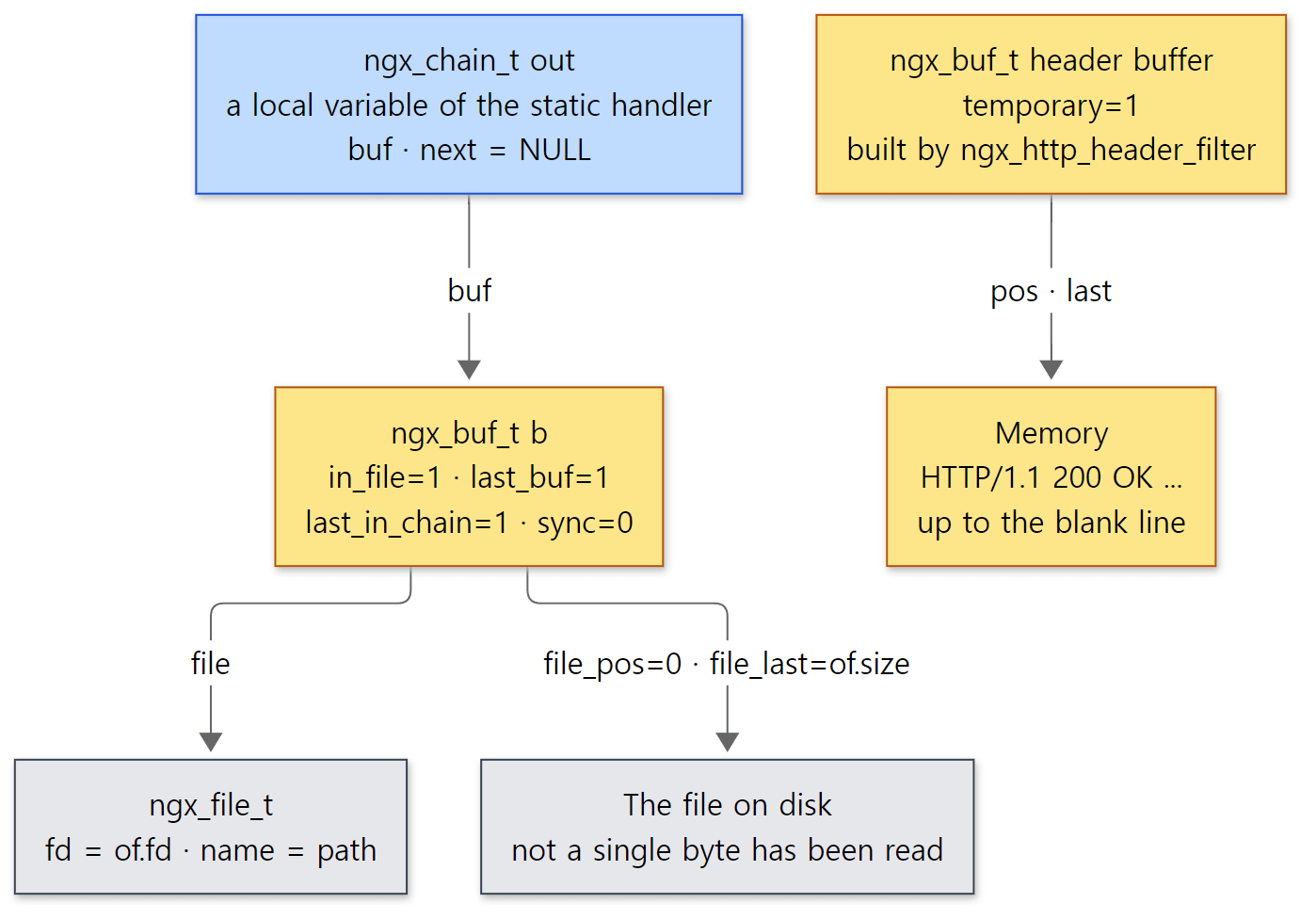 Yellow boxes are buffers (structs in memory); grey boxes are what those buffers point to. The body buffer points to a file, the header buffer to memory.
Easy to get wrong: is it OK to pass the local variable out?
out is a stack variable that disappears when the function returns. Yet if the socket is full, the rest has to be sent later. This works because no filter keeps the chain link it was handed. A filter that needs to hold on to data allocates its own link and copies only the buffer pointer. The write filter, for instance, allocates a link with ngx_alloc_chain_link(r->pool) and copies just cl->buf = ln->buf (src/http/ngx_http_write_filter_module.c lines 136–144). The buffer b itself comes from the request pool, so it lives until the request ends. It's a rule you have to follow when writing your own filter, too.
3. The filter chain — a linked list made of two function pointers
What a filter looks like, and the head of the chain
There are only two filter signatures.
typedef ngx_int_t (*ngx_http_output_header_filter_pt)(ngx_http_request_t *r);
typedef ngx_int_t (*ngx_http_output_body_filter_pt)
    (ngx_http_request_t *r, ngx_chain_t *chain);
src/http/ngx_http_core_module.h lines 535–537
A header filter takes just the request (the headers live in r->headers_out); a body filter takes the request and the chain to send this time. And there are global variables pointing at the front of each row.
ngx_http_output_header_filter_pt  ngx_http_top_header_filter;
ngx_http_output_header_filter_pt  ngx_http_top_early_hints_filter;
ngx_http_output_body_filter_pt    ngx_http_top_body_filter;
ngx_http_request_body_filter_pt   ngx_http_top_request_body_filter;
src/http/ngx_http.c lines 74–77
(early_hints is for 103 Early Hints responses and request_body is the chain for reading request bodies; neither is covered here.) The two functions a handler calls do little more than call these heads. ngx_http_send_header() checks that the headers aren't being sent twice and ends with return ngx_http_top_header_filter(r); (src/http/ngx_http_core_module.c lines 1903–1922), and ngx_http_output_filter() looks like this:
ngx_int_t
ngx_http_output_filter(ngx_http_request_t *r, ngx_chain_t *in)
{
    ngx_int_t          rc;
    ngx_connection_t  *c;

    c = r->connection;

    ngx_log_debug2(NGX_LOG_DEBUG_HTTP, c->log, 0,
                   "http output filter \"%V?%V\"", &r->uri, &r->args);

    rc = ngx_http_top_body_filter(r, in);

    if (rc == NGX_ERROR) {
        /* NGX_ERROR may be returned by any filter */
        c->error = 1;
    }

    return rc;
}
src/http/ngx_http_core_module.c lines 1956–1975
"Next" lives in a static variable in each file
So where is the "next" filter? Each filter module keeps two static variables at the top of its file. Here's the chunked filter:
static ngx_http_output_header_filter_pt  ngx_http_next_header_filter;
static ngx_http_output_body_filter_pt    ngx_http_next_body_filter;
src/http/modules/ngx_http_chunked_filter_module.c lines 55–56
Because they're static, every filter file can have variables with the same name and they're still separate variables. The module's postconfiguration callback then runs these two lines:
static ngx_int_t
ngx_http_chunked_filter_init(ngx_conf_t *cf)
{
    ngx_http_next_header_filter = ngx_http_top_header_filter;
    ngx_http_top_header_filter = ngx_http_chunked_header_filter;

    ngx_http_next_body_filter = ngx_http_top_body_filter;
    ngx_http_top_body_filter = ngx_http_chunked_body_filter;

    return NGX_OK;
}
src/http/modules/ngx_http_chunked_filter_module.c lines 333–343
"Remember whatever is at the front now as my next, then become the front." That's exactly a linked-list push front. The nodes happen to be functions instead of structs, and the next pointers are scattered across each file's static variables. A filter function does its work and then calls ngx_http_next_body_filter(r, out) to pass things on.
The two filters at the very end of the chains have nothing behind them, so they just take the head without a next. That's because they are initialized first.
static ngx_int_t
ngx_http_write_filter_init(ngx_conf_t *cf)
{
    ngx_http_top_body_filter = ngx_http_write_filter;

    return NGX_OK;
}
src/http/ngx_http_write_filter_module.c lines 365–371
ngx_http_header_filter_init(), the end of the header row, likewise takes the head with no next: ngx_http_top_header_filter = ngx_http_header_filter; (the same function also fills ngx_http_top_early_hints_filter, the head of the 103 Early Hints chain; src/http/ngx_http_header_filter_module.c lines 734–741).
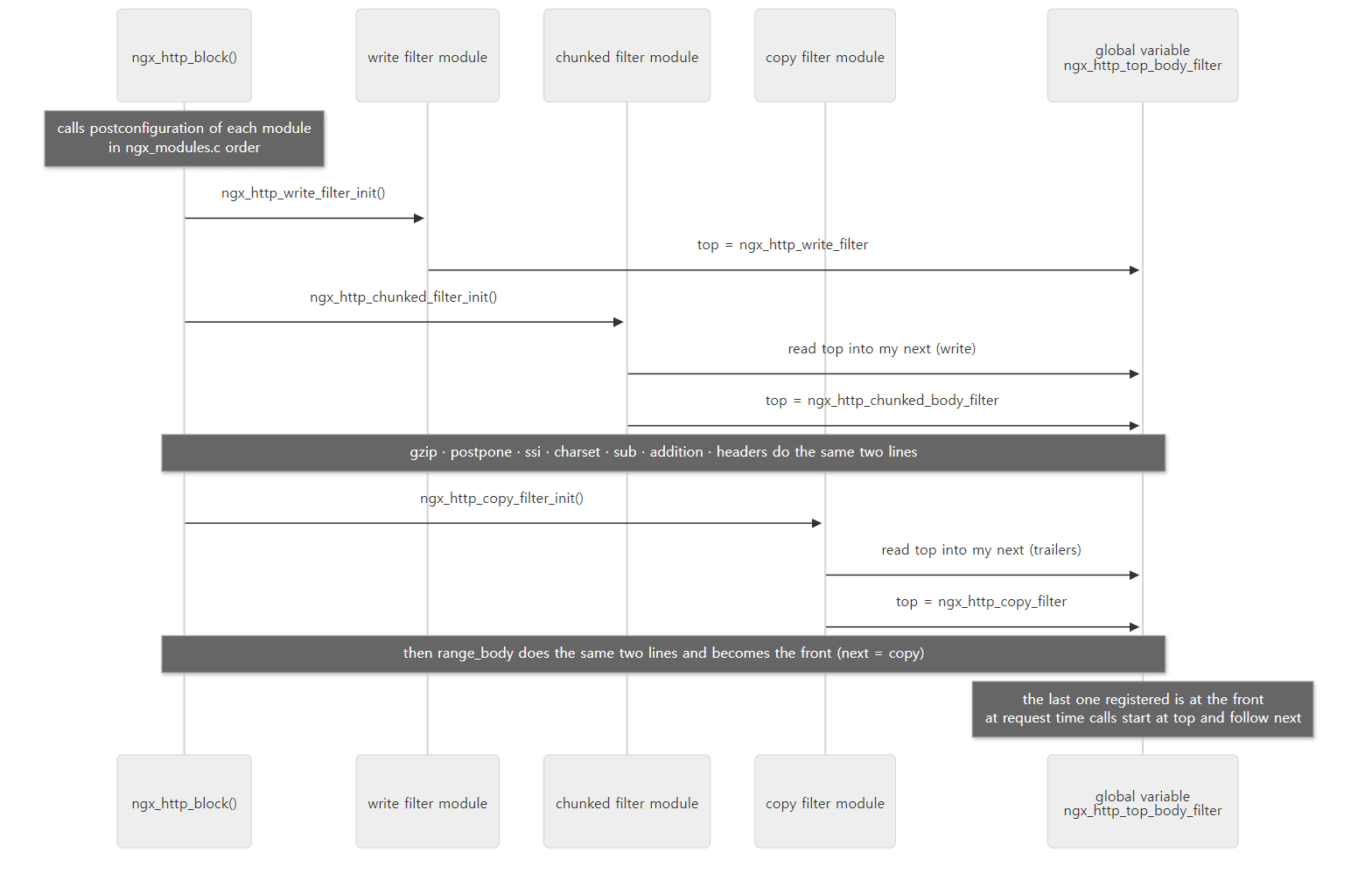 Only the body row is drawn. The header row is built the same way, inside the same
postconfiguration calls.
configure decides the order
Since postconfiguration runs in module array order, the chain order is the module array order reversed. That array is objs/ngx_modules.c, generated by configure, and the filter order is written out by hand in auto/modules under the comment # the filter order is important (auto/modules lines 145–166 — 21 entries from ngx_http_write_filter to ngx_http_slice_filter). In this list the top is the end of the chain (the socket side). A filter module you write yourself (the HTTP_AUX_FILTER kind added with configure's --add-module) lands between headers and copy in that list — the module array is concatenated as $HTTP_MODULES $HTTP_FILTER_MODULES $HTTP_AUX_FILTER_MODULES $HTTP_INIT_FILTER_MODULES (auto/modules lines 1499–1501), and copy, range_body and not_modified form the last group (HTTP_INIT_FILTER, from line 397).
Example 1: seeing the chain with ngx_modules.c and gdb
The examples in this post were run with nginx 1.31.9 built as-is from the reference commit (9a7439fd79) in a Docker container (Debian bookworm, --with-debug). ex/u10-filter-chain starts a single process with master_process off; daemon off; to make gdb easy.
# Example written for this post (not part of the nginx source)
# Run as a single process (master_process off) and inspect the filter chain and call path with gdb
master_process off;
daemon off;
worker_processes 1;
error_log /tmp/u10/error.log debug;
pid /tmp/u10/nginx.pid;

events {
    worker_connections 64;
}

http {
    access_log off;
    sendfile on;

    server {
        listen 8080;
        root /tmp/u10/www;
    }
}
First, the content handlers and filters pulled out of this build's module array:
=== 1. content handlers and filters in ngx_modules.c (init order) ===
113:    &ngx_http_static_module,
114:    &ngx_http_gzip_static_module,
115:    &ngx_http_autoindex_module,
116:    &ngx_http_index_module,
150:    &ngx_http_write_filter_module,
151:    &ngx_http_header_filter_module,
152:    &ngx_http_chunked_filter_module,
153:    &ngx_http_v2_filter_module,
154:    &ngx_http_range_header_filter_module,
155:    &ngx_http_gzip_filter_module,
156:    &ngx_http_postpone_filter_module,
157:    &ngx_http_ssi_filter_module,
158:    &ngx_http_charset_filter_module,
159:    &ngx_http_sub_filter_module,
160:    &ngx_http_addition_filter_module,
161:    &ngx_http_userid_filter_module,
162:    &ngx_http_headers_filter_module,
163:    &ngx_http_copy_filter_module,
164:    &ngx_http_range_body_filter_module,
165:    &ngx_http_not_modified_filter_module,
Compared with the auto/modules list, the modules not in this build (v3, xslt, image, gunzip, slice — not enabled in configure) are missing, but the order is the same. Next we start nginx under gdb, request the 100,000-byte file, and stop in ngx_linux_sendfile(), which calls sendfile(). At that point we print the chain heads and each file's static variable ngx_http_next_*_filter in turn (gdb reads a static variable with 'filename'::variable; the commands are in chain.gdb in the example folder).
=== header filter chain (top first) ===
$1 = (ngx_http_output_header_filter_pt) 0x55555564f534 <ngx_http_not_modified_header_filter>
$2 = (ngx_http_output_header_filter_pt) 0x55555564d05e <ngx_http_headers_filter>
$3 = (ngx_http_output_header_filter_pt) 0x55555564b862 <ngx_http_userid_filter>
$4 = (ngx_http_output_header_filter_pt) 0x55555564b2ab <ngx_http_addition_header_filter>
$5 = (ngx_http_output_header_filter_pt) 0x555555648f84 <ngx_http_sub_header_filter>
$6 = (ngx_http_output_header_filter_pt) 0x555555645a96 <ngx_http_charset_header_filter>
$7 = (ngx_http_output_header_filter_pt) 0x55555563f5e6 <ngx_http_ssi_header_filter>
$8 = (ngx_http_output_header_filter_pt) 0x55555563cd1b <ngx_http_gzip_header_filter>
$9 = (ngx_http_output_header_filter_pt) 0x55555563adba <ngx_http_range_header_filter>
$10 = (ngx_http_output_header_filter_pt) 0x5555556366ce <ngx_http_v2_header_filter>
$11 = (ngx_http_output_header_filter_pt) 0x5555556358a2 <ngx_http_chunked_header_filter>
$12 = (ngx_http_output_header_filter_pt) 0x555555633fa4 <ngx_http_header_filter>
=== body filter chain (top first) ===
$13 = (ngx_http_output_body_filter_pt) 0x55555563bf4e <ngx_http_range_body_filter>
$14 = (ngx_http_output_body_filter_pt) 0x55555564e9ab <ngx_http_copy_filter>
$15 = (ngx_http_output_body_filter_pt) 0x55555564d34e <ngx_http_trailers_filter>
$16 = (ngx_http_output_body_filter_pt) 0x55555564b46c <ngx_http_addition_body_filter>
$17 = (ngx_http_output_body_filter_pt) 0x5555556494fb <ngx_http_sub_body_filter>
$18 = (ngx_http_output_body_filter_pt) 0x5555556465c6 <ngx_http_charset_body_filter>
$19 = (ngx_http_output_body_filter_pt) 0x55555563f9c4 <ngx_http_ssi_body_filter>
$20 = (ngx_http_output_body_filter_pt) 0x55555563ed8c <ngx_http_postpone_filter>
$21 = (ngx_http_output_body_filter_pt) 0x55555563d05a <ngx_http_gzip_body_filter>
$22 = (ngx_http_output_body_filter_pt) 0x555555635a98 <ngx_http_chunked_body_filter>
$23 = (ngx_http_output_body_filter_pt) 0x555555632c15 <ngx_http_write_filter>
The function addresses came out the same on a rerun because gdb starts the program with address space randomization (ASLR) turned off, but they can differ in another environment. The order of the names is exactly what the source dictates. Here are the two rows as a table (in call order, top to bottom):
| Order | Header row | Body row | What it does |
|---|---|---|---|
| 1 | not_modified |
range_body |
Headers: turns the response into 304 based on If-Modified-Since / If-None-Match / Body: cuts to fit Range |
| 2 | headers |
copy |
Headers: add_header, expires / Body: decides whether to read the file into memory (section 5) |
| 3 | userid |
trailers |
Headers: the userid cookie / Body: add_trailer (the body-side function of the headers module) |
| 4 | addition |
addition |
add_before_body, add_after_body |
| 5 | sub |
sub |
sub_filter |
| 6 | charset |
charset |
charset / source_charset conversion |
| 7 | ssi |
ssi |
ssi on |
| 8 | gzip |
postpone |
Headers: decides whether to use gzip / Body: keeps subrequest output in order (later in this post) |
| 9 | range_header |
gzip |
Headers: parses Range and turns the response into 206 / Body: compression |
| 10 | v2 |
chunked |
Headers: HEADERS frame on an HTTP/2 connection / Body: chunked encoding |
| 11 | chunked |
write |
Headers: decides whether to use chunked / Body: holds data, then sends (section 6) |
| 12 | header |
— | Turns the status line and headers into a string (section 4) |
A bt at the same spot shows the trail of actually riding down the body row (compare it with the chain above):
=== call path at sendfile() ===
#0  ngx_linux_sendfile (c=0x5555557881d0, file=0x55555577e4b8, size=100000) at src/os/unix/ngx_linux_sendfile_chain.c:244
#1  0x00005555555cf541 in ngx_linux_sendfile_chain (c=0x5555557881d0, in=0x55555577e6d0, limit=2097152) at src/os/unix/ngx_linux_sendfile_chain.c:177
#2  0x0000555555633bc4 in ngx_http_write_filter (r=0x55555577d750, in=0x7fffffffe590) at src/http/ngx_http_write_filter_module.c:299
#3  0x0000555555635aea in ngx_http_chunked_body_filter (r=0x55555577d750, in=0x7fffffffe590) at src/http/modules/ngx_http_chunked_filter_module.c:117
#4  0x000055555563d0c6 in ngx_http_gzip_body_filter (r=0x55555577d750, in=0x7fffffffe590) at src/http/modules/ngx_http_gzip_filter_module.c:310
#5  0x000055555563eec7 in ngx_http_postpone_filter (r=0x55555577d750, in=0x7fffffffe590) at src/http/ngx_http_postpone_filter_module.c:91
#6  0x000055555563fa80 in ngx_http_ssi_body_filter (r=0x55555577d750, in=0x7fffffffe590) at src/http/modules/ngx_http_ssi_filter_module.c:440
#7  0x000055555564661d in ngx_http_charset_body_filter (r=0x55555577d750, in=0x7fffffffe590) at src/http/modules/ngx_http_charset_filter_module.c:557
#8  0x0000555555649546 in ngx_http_sub_body_filter (r=0x55555577d750, in=0x7fffffffe590) at src/http/modules/ngx_http_sub_filter_module.c:299
#9  0x000055555564b4ec in ngx_http_addition_body_filter (r=0x55555577d750, in=0x7fffffffe590) at src/http/modules/ngx_http_addition_filter_module.c:149
#10 0x000055555564d3ca in ngx_http_trailers_filter (r=0x55555577d750, in=0x7fffffffe590) at src/http/modules/ngx_http_headers_filter_module.c:295
#11 0x00005555555872da in ngx_output_chain (ctx=0x55555577e650, in=0x7fffffffe590) at src/core/ngx_output_chain.c:70
#12 0x000055555564ed3a in ngx_http_copy_filter (r=0x55555577d750, in=0x7fffffffe590) at src/http/ngx_http_copy_filter_module.c:174
#13 0x000055555563bfbc in ngx_http_range_body_filter (r=0x55555577d750, in=0x7fffffffe590) at src/http/modules/ngx_http_range_filter_module.c:666
#14 0x00005555555eed8d in ngx_http_output_filter (r=0x55555577d750, in=0x7fffffffe590) at src/http/ngx_http_core_module.c:1967
#15 0x000055555565dafc in ngx_http_static_handler (r=0x55555577d750) at src/http/modules/ngx_http_static_module.c:277
#16 0x00005555555ed698 in ngx_http_core_content_phase (r=0x55555577d750, ph=0x5555557a22f0) at src/http/ngx_http_core_module.c:1318
#17 0x00005555555ec448 in ngx_http_core_run_phases (r=0x55555577d750) at src/http/ngx_http_core_module.c:906
#18 0x00005555555ec3b5 in ngx_http_handler (r=0x55555577d750) at src/http/ngx_http_core_module.c:889
...
#23 0x00005555555cea51 in ngx_epoll_process_events (cycle=0x555555784120, timer=60000, flags=1) at src/event/modules/ngx_epoll_module.c:901
#24 0x00005555555bb0b9 in ngx_process_events_and_timers (cycle=0x555555784120) at src/event/ngx_event.c:248
#25 0x00005555555ca62b in ngx_single_process_cycle (cycle=0x555555784120) at src/os/unix/ngx_process_cycle.c:322
#26 0x000055555557f1b2 in main (argc=3, argv=0x7fffffffed38) at src/core/nginx.c:400
(Frames #19–#22 are the request-reading functions from Part 8, so I cut them. Under gdb the pointer values were the same on a rerun, but they will differ in another environment.) A few things stand out:
#15→#14: we enteredngx_http_output_filter()from the last line of the static handler (line 277). All of this happened inside a single event dispatch woken up by epoll (#23): the very call that finished reading the request also sent the response.sub,charset,ssiandgzipweren't enabled in this location, yet all of them were called. There's only one chain regardless of configuration, and each filter that has nothing to do — usually because the context it would have created during the header filter stage (ngx_http_get_module_ctx()) isn't there — just calls the next one right away. For example, line 299 in#8is thesubfilter'sif (ctx == NULL) { return ngx_http_next_body_filter(r, in); }(src/http/modules/ngx_http_sub_filter_module.c lines 296–300).#12→#11→#10: the copy filter doesn't call the next filter itself; it delegates tongx_output_chain(). Line 70 is the shortcut for "a single buffer that doesn't need copying" (section 5).- Line 299 in
#2is where the write filter callsc->send_chain(), which on Linux isngx_linux_sendfile_chain()(section 6).
Finally, I started the same config without gdb, sent GET /, and kept only the debug-log lines about content handlers and filters (an index.html was placed in the root).
=== 3. debug log: GET / ===
index page
*2 content phase: 14
*2 internal redirect: "/index.html?"
*2 content phase: 14
*2 content phase: 15
*2 content phase: 16
*2 content phase: 17
*2 http filename: "/tmp/u10/www/index.html"
*2 http static fd: 9
*2 http write filter: l:0 f:0 s:235
*2 http output filter "/index.html?"
*2 http copy filter: "/index.html?"
*2 http postpone filter "/index.html?" 00007FFE225518C0
*2 http write filter: l:1 f:0 s:246
*2 http copy filter: 0 "/index.html?"
(The pointer value differs on every run.) The order described in section 2 shows up as is. content phase: 14 is the index handler; since the URI ends with /, it finds index.html and does an internal redirect. In the second pass, 14 (index) declines, 15 (autoindex) and 16 (gzip_static) decline too, and 17 (static) opens the file. Then the header reaches the write filter first and is held (l:0 ... s:235), and the body goes through output → copy → postpone and leaves together with it at the write filter (l:1 ... s:246 — 235 bytes of header + 11 bytes of body). content phase: N is printed by the CONTENT phase checker (src/http/ngx_http_core_module.c lines 1315–1316).
Easy to get wrong: list order and call order are opposite
auto/modules and ngx_modules.c list the write filter at the top, but it is called last. Whatever is initialized first gets pushed to the end of the chain. When you see "filter order" mentioned, check which order is meant. Also, the header row and the body row are not the same — each module only joins the row it needs (not_modified only the header row, postpone and copy only the body row).
4. Header filters — status line and headers as a string, and what happens when the length is unknown
ngx_http_header_filter() — count the length first, build it in one go
ngx_http_header_filter(), the last header filter, is over 400 lines, but what it does is simple: it turns the fields of r->headers_out into an HTTP/1.x header string. The way it does it is very nginx: it goes through the same conditions twice. The first pass (lines 208–440) only adds up the number of bytes len; it then allocates the buffer once with ngx_create_temp_buf(r->pool, len) (line 442), and the second pass (lines 447–617) actually writes. The start of the status line is always "HTTP/1.1 ", even for an HTTP/1.0 request (line 448).
Memory from a pool can't be freed individually (Part 3), so growing and reallocating would be wasteful. Counting the length first is a common habit in pool-based C code. Text like "200 OK" comes from the ngx_http_status_lines[] table (from line 58), looked up by status code. The function ends like this:
    ngx_log_debug2(NGX_LOG_DEBUG_HTTP, c->log, 0,
                   "%*s", (size_t) (b->last - b->pos), b->pos);

    /* the end of HTTP header */
    *b->last++ = CR; *b->last++ = LF;

    r->header_size = b->last - b->pos;

    if (r->header_only) {
        b->last_buf = 1;
    }

    out.buf = b;
    out.next = NULL;

    return ngx_http_write_filter(r, &out);
}
src/http/ngx_http_header_filter_module.c lines 613–629
The last line is "where the two rows meet" from the section 1 diagram. The header buffer doesn't ride the body filter chain from the top; it calls the write filter by name. gzip and chunked have no business touching the header buffer. When there's no body, as with HEAD or 304, this buffer is also the last buffer (last_buf = 1).
Easy to get wrong: subrequests and HTTP/0.9 get no headers
At the top of the function (lines 176–188) it sets r->header_sent = 1 and then, for a subrequest (a small request nginx creates internally while handling a request — section 7; r != r->main) or an HTTP/0.9 request, returns NGX_OK without building anything. A subrequest's response has to become part of the main response's body, so it must not have headers of its own. And on an HTTP/2 connection we never get here — ngx_http_v2_header_filter(), right before it in the chain, builds a HEADERS frame and doesn't call the next filter. That's how one chain handles both HTTP/1.1 and HTTP/2.
The chunked header filter — when the length is unknown
The static handler put the file size into content_length_n. But when sub_filter changes characters in the body or gzip compresses it, the length changes. So these filters clear the length in their header filters (ngx_http_clear_content_length(r) — content_length_n = -1; sub at ngx_http_sub_filter_module.c lines 266–269, gzip at ngx_http_gzip_filter_module.c lines 289–291). The chunked header filter, later in the header row, looks at it:
    if (r->headers_out.content_length_n == -1
| r->expect_trailers)
    {
        clcf = ngx_http_get_module_loc_conf(r, ngx_http_core_module);

        if (r->http_version >= NGX_HTTP_VERSION_11
            && clcf->chunked_transfer_encoding)
        {
            if (r->expect_trailers) {
                ngx_http_clear_content_length(r);
            }

            r->chunked = 1;

            ctx = ngx_pcalloc(r->pool, sizeof(ngx_http_chunked_filter_ctx_t));
            if (ctx == NULL) {
                return NGX_ERROR;
            }

            ngx_http_set_ctx(r, ctx, ngx_http_chunked_filter_module);

        } else if (r->headers_out.content_length_n == -1) {
            r->keepalive = 0;
        }
    }
src/http/modules/ngx_http_chunked_filter_module.c lines 76–100
On HTTP/1.1 with chunked_transfer_encoding on (the default, ngx_http_core_module.c lines 4044–4045), it sets r->chunked = 1. Then ngx_http_header_filter() right after writes Transfer-Encoding: chunked (lines 557–560), and the chunked body filter wraps size lines and CRLFs around the buffer chain. If chunked can't be used because the request is HTTP/1.0, it sets keepalive = 0 and closes the connection to mark the end of the response.
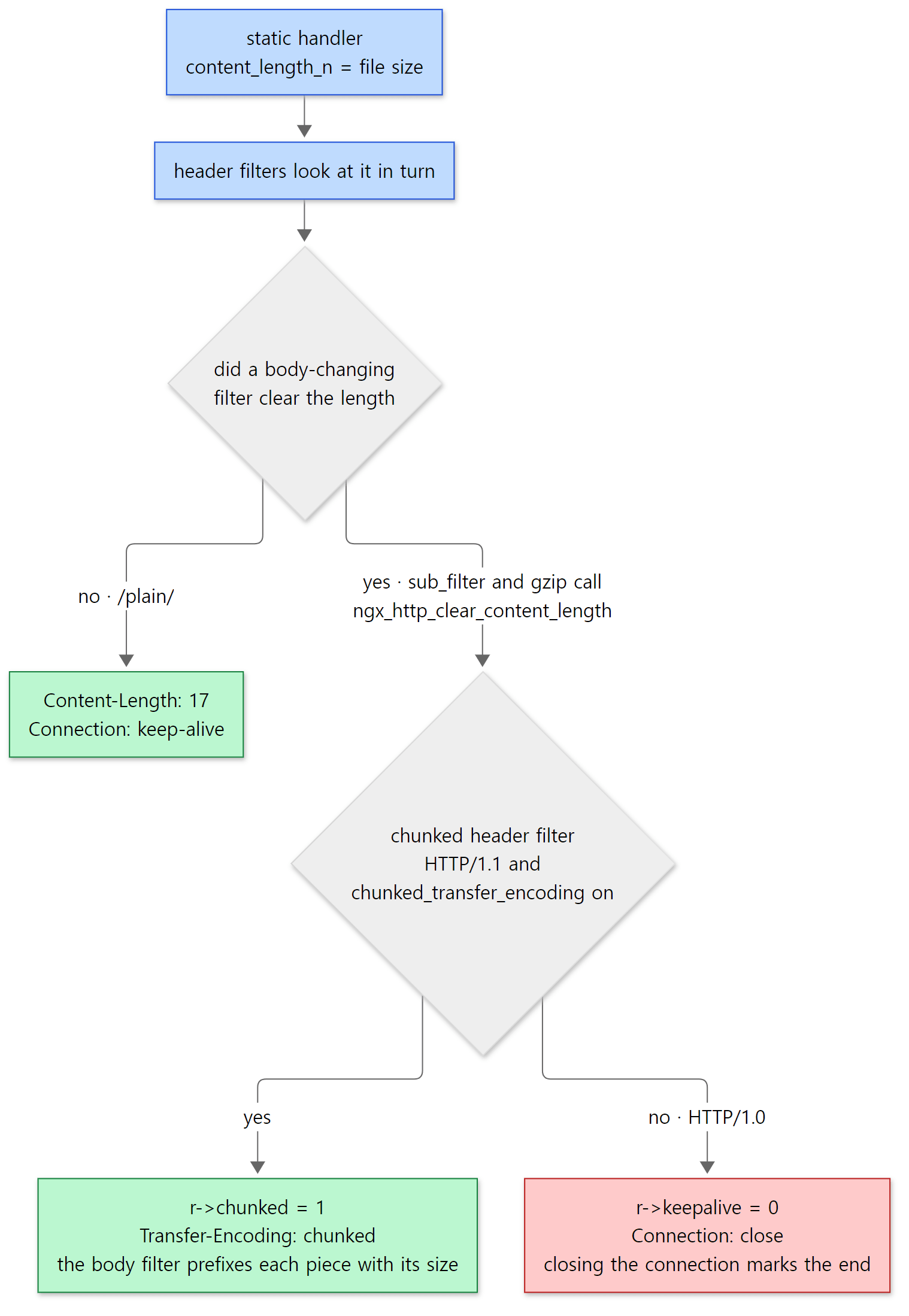 The red box is the case where the connection can't be reused. sub and gzip must come before chunked in the header row for this decision to work — one reason the order in section 3 matters.
The chunked body filter adds up the sizes of the incoming chain, puts a "%xO" CRLF (hex length) buffer at the front, and when it meets the last buffer (last_buf) appends CRLF "0" CRLF CRLF (ngx_http_chunked_filter_module.c lines 156–219). The body data itself isn't copied; only new links are created and slotted in before and after.
Example 2: filters that change the body change the headers
ex/u10-body-filters serves the same 17-byte file (hello from nginx plus a newline) from three locations. Only the server {} block is shown; beyond it there are just the same basic lines as in Example 1 (worker_processes 1;, pid, events {}, access_log off;), error_log ... debug; and, in http {}, root /tmp/u10/www; sendfile on; (this example runs nginx normally, without master_process off).
    server {
        listen 8080;

        # No filter changes the content -> Content-Length
        location /plain/ {
        }

        # sub_filter changes the body -> length unknown -> chunked
        location /sub/ {
            sub_filter 'nginx' 'NGINX';
            sub_filter_types text/plain;
        }

        # gzip compresses the body
        location /gz/ {
            gzip on;
            gzip_types text/plain;
            gzip_min_length 1;
        }
    }
run.sh fetches with curl and prints only the length-related headers (only step 2 is fetched in full with --raw, so the chunked encoding isn't decoded).
=== 1. GET /plain/a.txt ===
HTTP/1.1 200 OK
Content-Length: 17
Connection: keep-alive
=== 2. GET /sub/a.txt (raw, chunked not decoded) ===
HTTP/1.1 200 OK
Server: nginx/1.31.9
Date: Sat, 07 Nov 2026 03:13:27 GMT
Content-Type: text/plain
Transfer-Encoding: chunked
Connection: keep-alive

11
hello from NGINX

0

--- debug log ---
*2 http write filter: l:0 f:0 s:237
*2 http write filter: l:1 f:0 s:254
*2 sendfile: @0 17
*2 sendfile: 17 of 17 @0
*3 http write filter: l:0 f:0 s:156
*3 read: 10, 0000556D22E176D8, 17, 0
*3 http chunk: 11
*3 http chunk: 5
*3 http chunk: 1
*3 http write filter: l:1 f:0 s:184
*3 sendfile: @0 11
*3 sendfile: 11 of 11 @0
*3 sendfile: @16 1
*3 sendfile: 1 of 1 @16
=== 3. GET /sub/a.txt with HTTP/1.0 ===
HTTP/1.1 200 OK
Connection: close
=== 4. GET /gz/a.txt (Accept-Encoding: gzip) ===
HTTP/1.1 200 OK
Transfer-Encoding: chunked
Connection: keep-alive
Content-Encoding: gzip
hello from nginx
=== 5. GET /gz/a.txt (no Accept-Encoding) ===
HTTP/1.1 200 OK
Content-Length: 17
Connection: keep-alive
(The date, pointer values and connection numbers *N differ on every run. Timestamps and pids were trimmed from the debug log.)
/plain/— nobody cleared the length, so it'sContent-Length: 17.*2in the debug log is this request, and the 17-byte file went out withsendfile./sub/—Content-Lengthis gone andTransfer-Encoding: chunkedappears. The11before the body is 17 in hex (the length is still 17 bytes after the replacement), and the0at the end is the last chunk.http chunk: 11,5,1in the log are the sizes of the three buffers the chunked filter received, printed in decimal ("http chunk: %O", lines 129–130). The sub filter split the body into three buffers —hello from(11),NGINX(5) and the newline (1) — and the chunked filter sent all three as one chunk (11).- Fetching the same thing over HTTP/1.0 gives neither chunked nor
Content-Length, justConnection: close. This request didn't ask for keep-alive, sor->keepalivewas 0 from the start; even if it had asked, thekeepalive = 0in the code above would close the connection. gzipbehaves the same way:Content-Encoding: gzipis added and, with the length unknown, the response is chunked (decompressing it gives back the original text).Content-Encodingcomes afterConnectionbecause the gzip header filter puts it into ther->headers_out.headerslist, andngx_http_header_filter()writes the fixed headers first and the list afterwards (lines 587–611).- Without
Accept-Encoding, the gzip header filter moves on without creating a context and the response is the same as/plain/. It shows that even within one location, each filter decides per request whether to do anything.
Easy to get wrong: read into memory, yet sendfile shows up again
Look closely at step 2's log and something seems odd. To look at the characters, the sub filter needs the content in memory, so the file was read with read — 17 bytes (read: 10, ..., 17, 0). Yet on the way out we see sendfile: @0 11 and sendfile: @16 1. The unchanged first 11 bytes and last 1 byte were sent from the file again, with sendfile. The replaced NGINX 5 bytes are a memory buffer that isn't in the file, so they go the writev way along with chunked's size lines (I didn't include writev lines in this grep).
The source explains why. When the copy filter reads the file into memory with sendfile on, it records both the memory location and the file location in the new buffer (dst->in_file = 1; dst->file_pos = ..., src/core/ngx_output_chain.c lines 640–648). When the sub filter builds buffers for the unchanged stretches, it cuts and carries over that file location too (ngx_http_sub_filter_module.c lines 416–419), and the send function at the very end sends buffers with in_file set via sendfile (section 6). Being able to say "this data is in memory and in the file" at the same time is what ngx_buf_t's bit-flag design buys.
5. The copy filter and ngx_output_chain() — read the file into memory, or send it as is?
The static handler passed along a buffer holding only the file's location. But if a filter further down needs to look at the content (sub, gzip), or if sendfile is off, someone has to read the file. That job belongs to the copy filter, near the front of the body row (second). It has to be near the front so that every filter below it receives buffers that are "in memory when needed".
On its first call for a request, the copy filter creates an ngx_output_chain_ctx_t and copies settings into it.
        ctx->sendfile = c->sendfile;
        ctx->need_in_memory = r->main_filter_need_in_memory
| r->filter_need_in_memory;
        ctx->need_in_temp = r->filter_need_temporary;

        ctx->alignment = clcf->directio_alignment;

        ctx->pool = r->pool;
        ctx->bufs = conf->bufs;
        ctx->tag = (ngx_buf_tag_t) &ngx_http_copy_filter_module;

        ctx->output_filter = (ngx_output_chain_filter_pt)
                                  ngx_http_next_body_filter;
        ctx->filter_ctx = r;
src/http/ngx_http_copy_filter_module.c lines 116–129
ctx->sendfile— the connection'sc->sendfile. It's decided when the location is chosen, from thesendfiledirective and whether the OS supports it (NGX_IO_SENDFILE) (src/http/ngx_http_core_module.c lines 1370–1375).ctx->need_in_memory— thefilter_need_in_memory/main_filter_need_in_memoryset by the sub and gzip header filters in section 4. Because header filters run before the body, this value is already settled by the time the first body buffer reaches the copy filter.ctx->bufs— theoutput_buffersdirective. The default is 2 × 32KB (ngx_conf_merge_bufs_value(conf->bufs, prev->bufs, 2, 32768), line 419; it went from 1 buffer to 2 in 2015).ctx->output_filter— the next body filter.ngx_output_chain()lives insrc/coreand knows nothing about HTTP, so it receives the next filter as a function pointer like this (the upstream code uses the same function).
Asking for every buffer — can it go as is?
The key question in ngx_output_chain() is ngx_output_chain_as_is().
static ngx_inline ngx_int_t
ngx_output_chain_as_is(ngx_output_chain_ctx_t *ctx, ngx_buf_t *buf)
{
    ngx_uint_t  sendfile;

    if (ngx_buf_special(buf)) {
        return 1;
    }

    /* ... */

    sendfile = ctx->sendfile;

    /* ... */

    if (!sendfile) {

        if (!ngx_buf_in_memory(buf)) {
            return 0;
        }

        buf->in_file = 0;
    }

    if (ctx->need_in_memory && !ngx_buf_in_memory(buf)) {
        return 0;
    }

    if (ctx->need_in_temp && (buf->memory || buf->mmap)) {
        return 0;
    }

    return 1;
}
src/core/ngx_output_chain.c lines 249–306
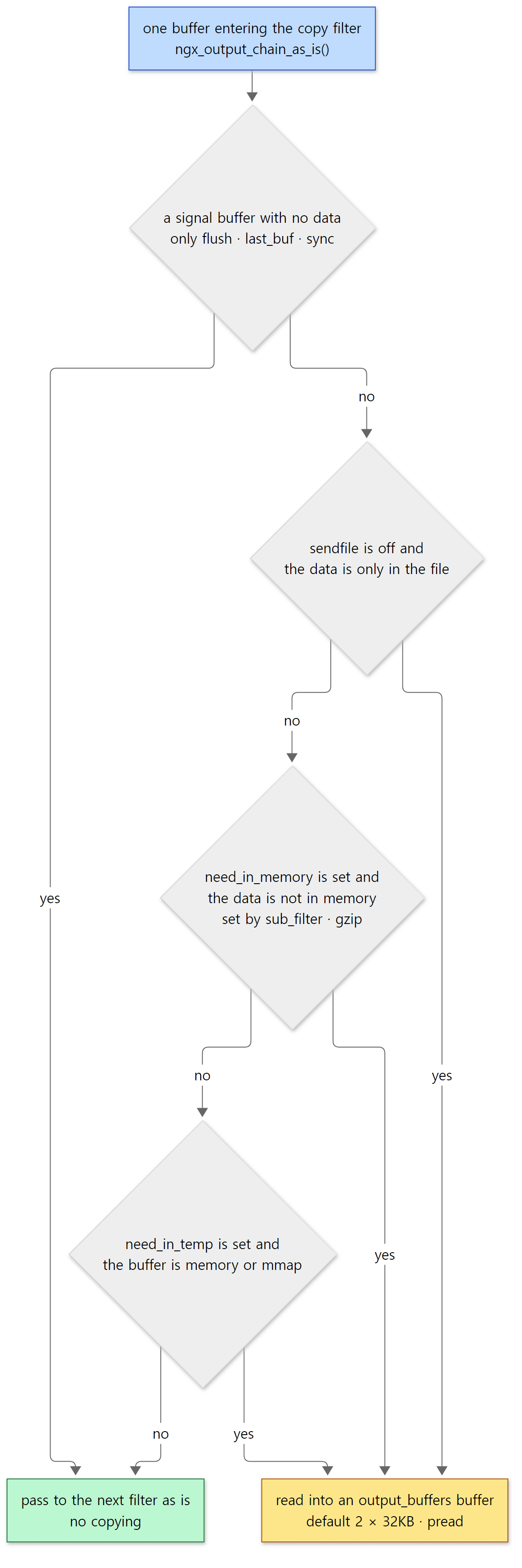 Green means "pass through without copying", yellow means "read into a buffer". The parts elided from the code are the thread-pool setup (
#if (NGX_THREADS)), the unused NGX_SENDFILE_LIMIT (disabled with #if 0 at lines 13–15 of the source), and the part that sets sendfile = 0 for directio files.
The common case — static file + sendfile on + no filter that looks at the content — reaches the final return 1. And when exactly one buffer comes in and nothing is queued, ngx_output_chain() calls the next filter right away through the shortcut at its top (lines 48–72, with the comment "the short path"). Line 70, which we saw in the bt of Example 1, is that shortcut.
When as_is returns 0, we go into the main loop (lines 86–245). Incoming buffers are queued in ctx->in; if there's an empty buffer (ctx->free) or fewer than bufs.num have been allocated, a buffer is obtained and ngx_output_chain_copy_buf() reads the file into it (reading is ngx_read_file() → pread). The filled buffer is passed to the next filter, and buffers the next filter has finished with come back to the free list through ngx_chain_update_chains() for reuse. It's a producer–consumer that alternates between two buffers, and if both are still busy (not yet out on the socket), it stops reading (lines 182–184). So no matter how large the file, the buffers used for this copy are capped at output_buffers (64KB by default).
If the last piece is smaller than a buffer, only that much is allocated (ngx_output_chain_get_buf(), lines 439–464). But if an empty buffer is already on the free list, that one is used first and nothing new is allocated — that's why, in the section 6 example, the last 1,696 bytes were read into the same address as the earlier 32KB buffer.
Easy to get wrong: placing a content-changing filter above copy
If you write a filter that looks at body content, it must sit below the copy filter in the chain (the later-called side), and its header filter must set r->filter_need_in_memory = 1. Only then does the copy filter read the file for you. As we saw in section 3, filters added with --add-module land between headers and copy, so this condition holds automatically. Ignore it and you'll receive in_file buffers and try to read pos–last from memory that isn't there.
6. The write filter and sendfile — hold it, send it in one go, inside the kernel
The write filter — is it time to send?
ngx_http_write_filter(), at the very end of the body row, is where the response is pushed out to the connection (where c->send_chain is called). (One exception: the interim response to Expect: 100-continue is written directly with c->send() at line 974 of ngx_http_request_body.c.) First it appends the incoming in to whatever was left unsent last time in r->out, counting sizes as it goes (lines 69–206). Then it decides whether to send now.
    ngx_log_debug3(NGX_LOG_DEBUG_HTTP, c->log, 0,
                   "http write filter: l:%ui f:%ui s:%O", last, flush, size);

    clcf = ngx_http_get_module_loc_conf(r, ngx_http_core_module);

    /*
     * avoid the output if there are no last buf, no flush point,
     * there are the incoming bufs and the size of all bufs
     * is smaller than "postpone_output" directive
     */

    if (!last && !flush && in && size < (off_t) clcf->postpone_output) {
        return NGX_OK;
    }
src/http/ngx_http_write_filter_module.c lines 208–221
http write filter: l:… f:… s:… in the debug log is this line. l is whether there's a last buffer (last_buf), f is whether to flush (the flush or recycled bit — buffers that will be reused need to be emptied quickly), and s is the number of bytes gathered. If neither applies and the total is below postpone_output (default 1460, ngx_http_core_module.c lines 3979–3980 — roughly the TCP payload of one Ethernet packet), it returns without sending. That's why the 244-byte header doesn't leave immediately but waits for the body: one big packet instead of several small ones.
Once it decides to send, it computes limit_rate (lines 258–292) and calls the connection's send_chain.
    sent = c->sent;

    ngx_log_debug1(NGX_LOG_DEBUG_HTTP, c->log, 0,
                   "http write filter limit %O", limit);

    chain = c->send_chain(c, r->out, limit);
src/http/ngx_http_write_filter_module.c lines 294–299
c->send_chain is set to ngx_send_chain (= ngx_io.send_chain) when the connection is accepted (src/event/ngx_event_accept.c line 214), and on Linux ngx_io is a table holding ngx_linux_sendfile_chain (src/os/unix/ngx_linux_init.c lines 16–30). On a TLS connection it switches to ngx_ssl_send_chain after the handshake. Here too, one function pointer hides the differences between operating systems and TLS.
send_chain returns the part of the chain it couldn't send. The write filter frees the links that went out, keeps the rest in r->out, marks c->buffered, and returns NGX_AGAIN (lines 338–349). When the handler is done and the request is being finalized (ngx_http_finalize_request()), a set c->buffered means the request isn't closed; instead the write event handler is switched to ngx_http_writer() (src/http/ngx_http_request.c lines 2889–2896). When the socket becomes writable again, epoll (Part 7) wakes it up and ngx_http_writer() calls ngx_http_output_filter(r, NULL) — running the chain once more with no new data — to push out what's left (line 3151). Meanwhile the worker doesn't wait; it serves other connections.
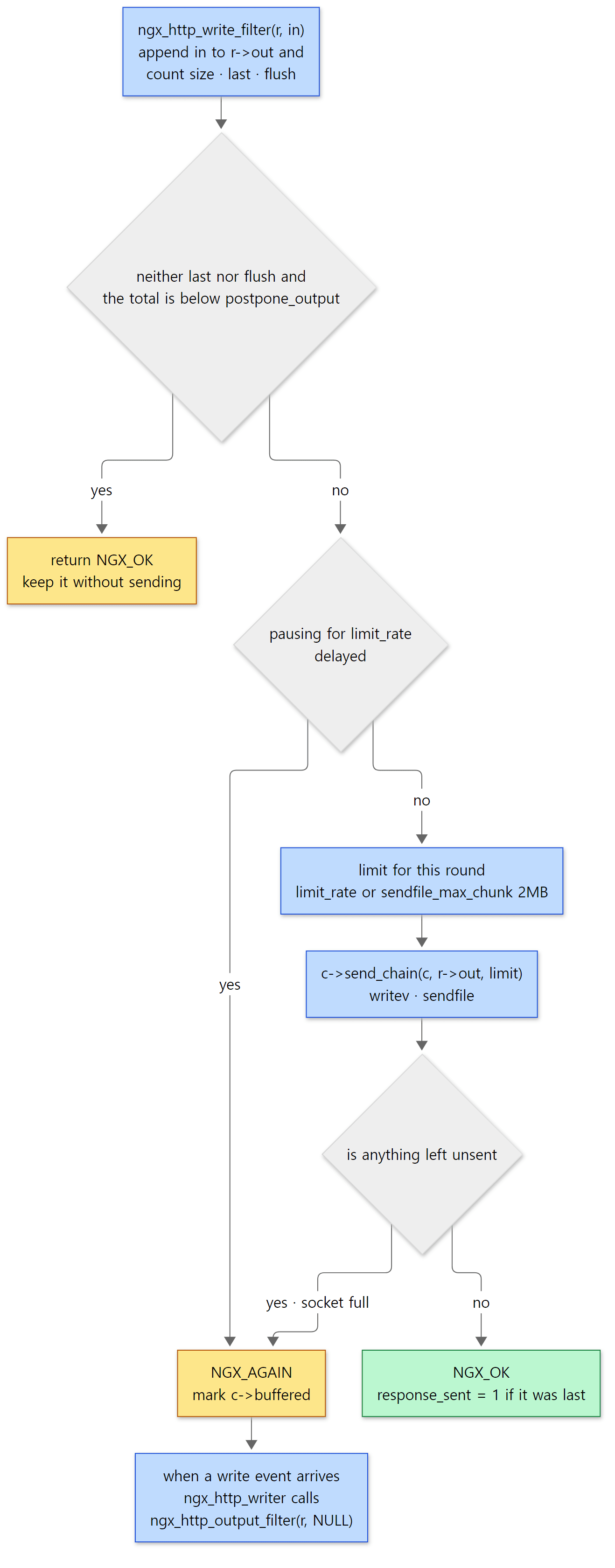 The two yellow boxes are the cases where unsent data is being held. In both, it's held in
r->out.
Without limit_rate, the limit is sendfile_max_chunk (default 2MB, lines 3957–3958 — changed from 0 (unlimited) to 2MB in 1.21.4 in 2021). It keeps one huge file from holding the worker for a long time in a single sendfile. If the limit is reached, data remains and the socket is still writable, the write event is put on ngx_posted_next_events so the next loop iteration continues right away without waiting for an event (lines 334–336; posted events are in Part 7).
ngx_linux_sendfile_chain() — memory goes by writev, files by sendfile
The send function walks the chain from the front, alternating between two things.
        /* create the iovec and coalesce the neighbouring bufs */

        cl = ngx_output_chain_to_iovec(&header, in, limit - send, c->log);

        /* ... */

        send += header.size;

        /* set TCP_CORK if there is a header before a file */

        if (c->tcp_nopush == NGX_TCP_NOPUSH_UNSET
            && header.count != 0
            && cl
            && cl->buf->in_file)
        {
            /* ... */
        }

        /* get the file buf */

        if (header.count == 0 && cl && cl->buf->in_file && send < limit) {
            file = cl->buf;

            /* coalesce the neighbouring file bufs */

            file_size = (size_t) ngx_chain_coalesce_file(&cl, limit - send);

            send += file_size;
            /* ... */
            n = ngx_linux_sendfile(c, file, file_size);

            /* ... */

        } else {
            n = ngx_writev(c, &header);

            /* ... */
        }
src/os/unix/ngx_linux_sendfile_chain.c lines 85–198
ngx_output_chain_to_iovec()gathers the memory buffers at the front of the chain into aniovecarray. It stops at the firstin_filebuffer (src/os/unix/ngx_writev_chain.c lines 127–129).writev()sends several scattered pieces of memory in a single system call.- If any memory buffers were gathered (
header.count != 0), they go out withwritev. - If there are none and the front is a file buffer, it gathers the contiguous ranges of the same file (
ngx_chain_coalesce_file()) and sends them withsendfile. - It loops until it hits the limit (
limit), runs out of data, or the socket fills up (NGX_AGAIN).
So a static file response becomes one header writev + one file sendfile. The TCP_CORK part in the middle only kicks in with tcp_nopush on; (with tcp_nopush at its default off, the connection is marked NGX_TCP_NOPUSH_DISABLED and the condition is false, ngx_http_core_module.c lines 1426–1428). When it's on, the socket is "corked" so TCP doesn't emit a half-filled packet between the header writev and the file sendfile.
Example 3: comparing sendfile on/off with strace
ex/u10-sendfile-strace serves one 100,000-byte file on three ports. Like Example 1, it runs a single process with master_process off; daemon off;, and has error_log ... debug; and root /tmp/u10/www;. The server blocks:
    server {
        listen 8080;
        sendfile on;
    }

    server {
        listen 8081;
        sendfile off;
    }

    # Limit to 40KB per second -> the write filter pauses on a timer between sends
    server {
        listen 8082;
        sendfile on;
        limit_rate 40k;
    }
I started nginx under strace -f -tt -s 20 -e trace=openat,pread64,writev,sendfile,setsockopt and, for each request, extracted the system calls and debug log lines in between. The number at the start of each strace line (15) is the pid strace prints; it, the fd numbers (socket 9, file 10) and the times differ between runs — on a rerun they were socket 10 and file 11. First, sendfile on:
=== 1. sendfile on (port 8080) ===
got 100000 bytes
15    03:13:27.797948 openat(AT_FDCWD, "/tmp/u10/www/big.bin", O_RDONLY|O_NONBLOCK) = 10
15    03:13:27.798600 writev(9, [{iov_base="HTTP/1.1 200 OK\r\nSer"..., iov_len=244}], 1) = 244
15    03:13:27.798856 sendfile(9, 10, [0] => [100000], 100000) = 100000
15    03:13:27.803233 setsockopt(9, SOL_TCP, TCP_NODELAY, [1], 4) = 0
--- debug log ---
*2 http static fd: 10
*2 http write filter: l:0 f:0 s:244
*2 http write filter: l:1 f:0 s:100244
*2 writev: 244 of 244
*2 sendfile: @0 100000
*2 sendfile: 100000 of 100000 @0
openat— the static handler opened the file (fd 10). It doesn't read it.http write filter: l:0 f:0 s:244— only the header buffer arrived and it's under 1460, so it was held. No system call happens at this moment.l:1 f:0 s:100244— the file buffer (last_buf) arrived and it's time to send. 244 + 100,000 bytes.- The header went out with
writev(9, ..., 244)and the whole file with a singlesendfile(9, 10, ..., 100000). The file contents never entered nginx's memory. - The final
setsockopt(TCP_NODELAY)is done byngx_http_set_keepalive()when the connection goes back to keep-alive after the response (src/http/ngx_http_request.c line 3546).
The same file with sendfile off looks like this:
=== 2. sendfile off (port 8081) ===
got 100000 bytes
15    03:13:28.435653 openat(AT_FDCWD, "/tmp/u10/www/big.bin", O_RDONLY|O_NONBLOCK) = 10
15    03:13:28.436817 pread64(10, "\372\371\275YUU\300Xf\222D\242\203\327\231\202\26~\226\303"..., 32768, 0) = 32768
15    03:13:28.437223 writev(9, [{iov_base="HTTP/1.1 200 OK\r\nSer"..., iov_len=244}, {iov_base="\372\371\275YUU\300Xf\222D\242\203\327\231\202\26~\226\303"..., iov_len=32768}], 2) = 33012
15    03:13:28.437644 pread64(10, "%\354\306\364\275r\371\223\215\357\224\321\371\365\377P\2475\370n"..., 32768, 32768) = 32768
15    03:13:28.437859 writev(9, [{iov_base="%\354\306\364\275r\371\223\215\357\224\321\371\365\377P\2475\370n"..., iov_len=32768}], 1) = 32768
15    03:13:28.438043 pread64(10, "\333\322\343\330)K O\354R\230\232'\344\261\234\367\265\225\341"..., 32768, 65536) = 32768
15    03:13:28.438257 writev(9, [{iov_base="\333\322\343\330)K O\354R\230\232'\344\261\234\367\265\225\341"..., iov_len=32768}], 1) = 32768
15    03:13:28.438416 pread64(10, "\326-\356\275v\243m\22\216\276\202\t\227v\200\350\t\335\\\361"..., 1696, 98304) = 1696
15    03:13:28.438585 writev(9, [{iov_base="\326-\356\275v\243m\22\216\276\202\t\227v\200\350\t\335\\\361"..., iov_len=1696}], 1) = 1696
15    03:13:28.440912 setsockopt(9, SOL_TCP, TCP_NODELAY, [1], 4) = 0
--- debug log ---
*3 http static fd: 10
*3 http write filter: l:0 f:0 s:244
*3 read: 10, 0000561603137340, 32768, 0
*3 http write filter: l:0 f:1 s:33012
*3 writev: 33012 of 33012
*3 read: 10, 0000561603137340, 32768, 32768
*3 http write filter: l:0 f:1 s:32768
*3 writev: 32768 of 32768
*3 read: 10, 0000561603137340, 32768, 65536
*3 http write filter: l:0 f:1 s:32768
*3 writev: 32768 of 32768
*3 read: 10, 0000561603137340, 1696, 98304
*3 http write filter: l:1 f:1 s:1696
*3 writev: 1696 of 1696
(The file was made from /dev/urandom, so its contents differ on every run, as do times and pointers.)
pread64(..., 32768, 0)— the copy filter read the file into a 32KBoutput_buffersbuffer. This is the case where section 5'sas_isreturned 0 (sendfileoff + data only in the file).- The
writevhas two iovecs — the held 244-byte header and the 32,768 bytes just read went out together. This is where holding the header pays off. - Now it's
f:1. The copy filter's buffers are reusable (recycled = 1, ngx_output_chain.c line 495), so the write filter empties them right away without waiting forpostpone_output. - The buffer address in the
read:lines is the same all four times. The same 32KB buffer was refilled as soon as it was emptied (up to two buffers are allowed, but the socket drained quickly enough that one was plenty). - The last read was just the remaining 1,696 bytes; that buffer inherited
last_bufand becamel:1.
Four read + writev pairs: the data travelled kernel → nginx memory → kernel. With sendfile on, it was one sendfile.
Easy to get wrong: the default for sendfile is off
The nginx.conf shipped with distributions almost always says sendfile on;. So does this repository's sample config (conf/nginx.conf line 27). It's easy to assume it's on by default, but the source default is off.
    ngx_conf_merge_value(conf->sendfile, prev->sendfile, 0);
    ngx_conf_merge_size_value(conf->sendfile_max_chunk,
                              prev->sendfile_max_chunk, 2 * 1024 * 1024);
src/http/ngx_http_core_module.c lines 3956–3958
If you write a config from scratch, sendfile stays off and files go out with pread + writev as in step 2 of Example 3. On a server that serves a lot of static files, it's worth checking that sendfile on; is actually written somewhere.
Example 3 (continued): limit_rate — the write filter pauses on a timer
Port 8082 has limit_rate 40k. The socket has room, but the write filter limits how much it sends on its own, and sets a timer while it pauses.
=== 3. limit_rate 40k (port 8082) ===
got 100000 bytes in 2.055803s
03:35:56 *4 http write filter limit 40960
03:35:56 *4 sendfile: 40960 of 40960 @0
03:35:56 *4 event timer add: 10: 1005:4919948
03:35:57 *4 http writer handler: "/big.bin?"
03:35:57 *4 http write filter limit 40716
03:35:57 *4 sendfile: 40960 of 40960 @40960
03:35:57 *4 event timer add: 10: 1000:4920973
03:35:58 *4 http writer handler: "/big.bin?"
03:35:58 *4 http write filter limit 40716
03:35:58 *4 sendfile: 18080 of 18080 @81920
03:35:58 *4 event timer add: 10: 441:4921430
(Times, timer keys and connection numbers differ on every run.)
- The first limit is
limit_rate × (elapsed seconds + 1) − bytes sent= 40,960 × 1 − 0 = 40,960 (lines 271–272). After the 244-byte header goes out withwritev, the file follows. - After sending, it sets a timer for
(bytes sent) × 1000 / limit_ratemilliseconds = 41,204 × 1000 / 40,960 ≈ 1005ms (lines 326–331). Whilec->write->delayed = 1, the write filter only returnsNGX_AGAIN. - When the timer expires a second later,
ngx_http_request_handler()clears bothdelayedandtimedout(src/http/ngx_http_request.c lines 2664–2667 — so this expiry isn't treated as a client timeout) and callsngx_http_writer()(http writer handler). The same calculation sends the next 40-odd thousand bytes. The third round of 18,080 bytes finishes it, and the response took 2 seconds.
Easy to get wrong: it sent more than the limit
The second limit is 40716, yet sendfile sent 40,960 bytes. The math isn't wrong: when ngx_chain_coalesce_file() cuts at the limit, it rounds the file position up to a page boundary (4096 bytes).
        if (size > limit - total) {
            size = limit - total;

            aligned = (cl->buf->file_pos + size + ngx_pagesize - 1)
                       & ~((off_t) ngx_pagesize - 1);

            if (aligned <= cl->buf->file_last) {
                size = aligned - cl->buf->file_pos;
            }

            total += size;
            break;
        }
src/core/ngx_buf.c lines 241–253
40,960 + 40,716 = 81,676, rounded up to a multiple of 4096 is 81,920, so 40,960 bytes go out. The first round is the same story: the remaining limit of 40,716 after the 244-byte header was rounded up to 40,960. It looks like a choice to send whole pages so the kernel's page cache is used cleanly (there's no comment stating the reason, so I haven't confirmed that from the source). In exchange, the next calculation subtracts the extra, so the average rate comes out right.
7. The postpone filter — keeping subrequest output in order
Finally, a quick look at the postpone filter, eighth in the body row. A subrequest is a small request nginx creates internally while handling a request. SSI's <!--# include virtual="/footer" -->, add_after_body and auth_request use subrequests. The main request and its subrequests write their output to the same connection; if the main request sent the later part of its body while a subrequest was still waiting on an upstream, the output would come out scrambled.
The postpone filter remembers which request's turn it is to write to the connection in c->data. Output from a request whose turn it isn't goes into that request's postponed list (ngx_http_postponed_request_t — a link holding either one request or one output chain, src/http/ngx_http_request.h lines 367–371) and is sent when its turn comes.
    if (r != c->data) {

        if (in) {
            if (ngx_http_postpone_filter_add(r, in) != NGX_OK) {
                return NGX_ERROR;
            }

            return NGX_OK;
        }

        /* ... */

        return NGX_OK;
    }

    if (r->postponed == NULL) {

        if (in || c->buffered) {
            return ngx_http_next_body_filter(r->main, in);
        }

        return NGX_OK;
    }
src/http/ngx_http_postpone_filter_module.c lines 69–95
An ordinary request without subrequests always has r == c->data and an empty postponed, so line 91 goes straight to the next filter. #5 ngx_http_postpone_filter ... :91 in Example 1's bt is exactly that line. Notice that the next filter is called with r->main, not r. Everything below postpone (gzip, chunked, write) treats output as belonging to the main request, so subrequest output also gathers in the main request's r->out and becomes chunks of the main response. It fits with subrequests not producing headers of their own (section 4).
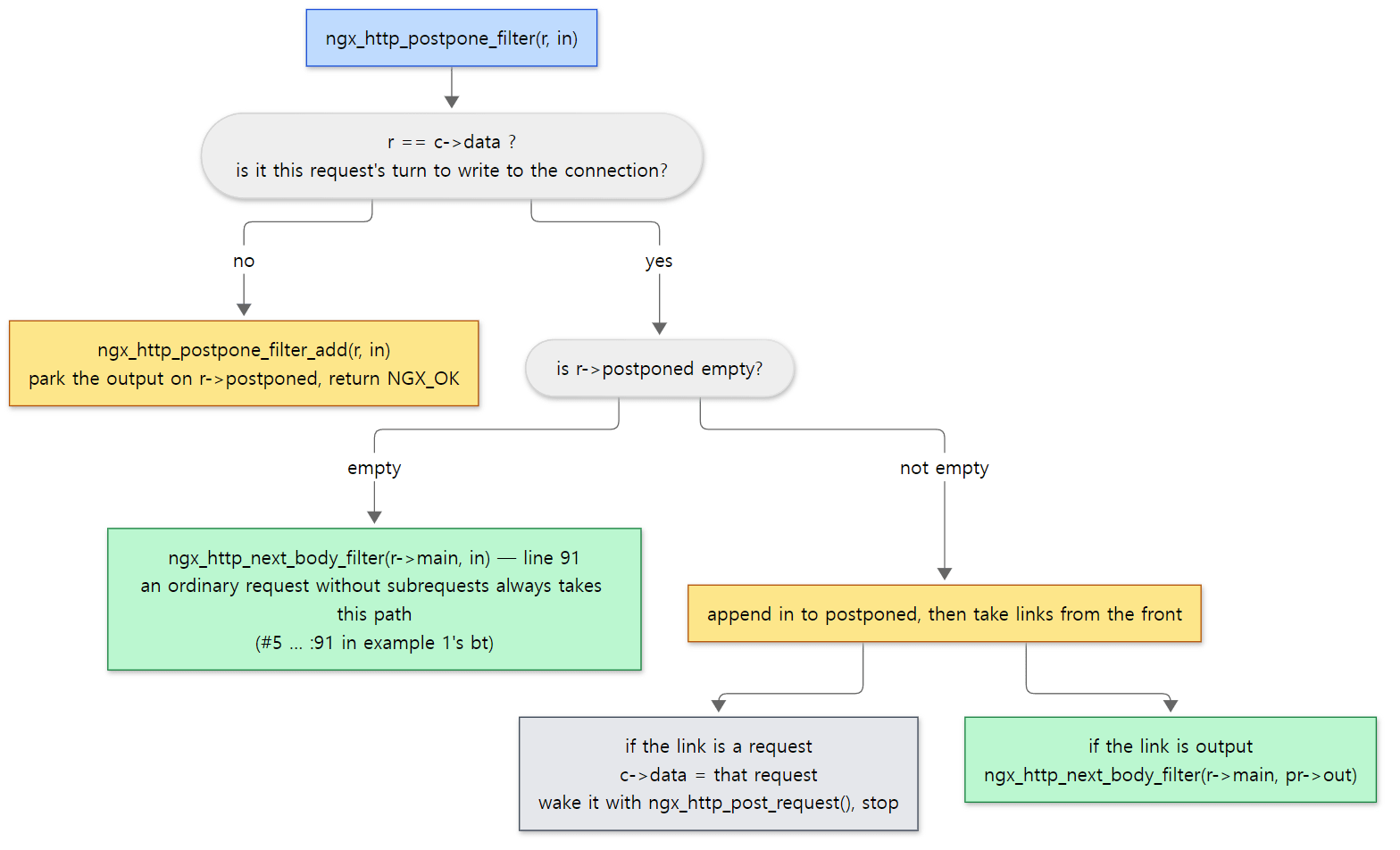 Lines 60–130 of ngx_http_postpone_filter_module.c drawn as forks. The next filter is always called with r->main.
What this post leaves out
Things I only name here to keep the main line clear:
Rangerequests and 206 —ngx_http_range_header_filter()andngx_http_range_body_filter()(src/http/modules/ngx_http_range_filter_module.c). A file buffer is cut by adjusting justfile_posandfile_last, so there's no copying here either.- 304 Not Modified —
ngx_http_not_modified_header_filter()(src/http/modules/ngx_http_not_modified_filter_module.c). Once the front of the header row changes the status to 304,ngx_http_header_filter()at the end setsheader_only(line 249) and the static handler returns without sending the file buffer (step 3 in section 2). - The gzip body filter's zlib stream and buffer management, and
gzip_static(a content handler that serves pre-compressed.gzfiles). - Thread pools and aio — with
aio threads,preadandsendfileare handed to a thread pool (ngx_http_copy_thread_handler(),ngx_linux_sendfile_thread()). This build was made with--with-threads --with-file-aio, but the examples didn't turn them on. directio— reading large files without the page cache. When it's on,sendfileisn't used (ngx_output_chain_as_is()lines 282–284).- The structure of the open-file cache
open_file_cache(src/core/ngx_open_file_cache.c— an rbtree and an LRU queue). - HTTP/2 and HTTP/3 responses —
ngx_http_v2_header_filter()builds a HEADERS frame, and the body becomes DATA frames through the stream'ssend_chain(src/http/v2/ngx_http_v2_filter_module.c). - Response trailers with
add_trailerandngx_http_chunked_create_trailers(), and 103 Early Hints (ngx_http_top_early_hints_filter).
Summary
| Concept | One-line summary |
|---|---|
| Content handler | The CONTENT phase array or r->content_handler. Its job is two calls: ngx_http_send_header() and ngx_http_output_filter() |
| Static handler | Opens the file and records only in_file, file_pos, file_last in an ngx_buf_t. Doesn't read the contents |
| Handler order | Reversed when the phase array is flattened: index → autoindex → gzip_static → static |
| Filter chain | The front is the global ngx_http_top_*_filter; "next" is each file's static ngx_http_next_*_filter. Push-front in postconfiguration |
| Filter order | auto/modules → ngx_modules.c init order, reversed. The write filter at the top of the list is called last |
| Header filter | Counts the length first, builds the headers in one buffer, then calls the write filter directly |
| chunked | Length cleared (-1) on HTTP/1.1 → Transfer-Encoding: chunked; on HTTP/1.0 → Connection: close |
| Copy filter | Asks "can this go as is?" for each buffer via ngx_output_chain(); if not, reads it into output_buffers |
| Write filter | Holds data in r->out until last, flush or postpone_output, then send_chain. Leftovers → NGX_AGAIN and ngx_http_writer() |
| sendfile | Memory buffers go by writev, file buffers by sendfile. The source default is off |
| Postpone filter | Keeps subrequest output in order. Calls the filters below with r->main |
What's next
We followed one static file, wrapped in a buffer, down the filter chain to the socket. The handler only built a buffer and handed it over; when to read, when to send and how to send were all decided at the end of the chain.
The next post looks at responses that come not from disk but from another server: how proxy_pass installs a content handler, the upstream callbacks that connect to a backend without blocking, send the request and parse the response headers, and ngx_event_pipe, which buffers the body it receives and feeds it into this post's filter chain — in Part 11: Upstream and Proxy — One Request Through the Reverse Proxy.
httpd solved the same problem like this. httpd's buckets also record "where the data is", and FILE buckets end up going out with sendfile — the same idea as ngx_buf_t (httpd Part 11). The difference is how filters are lined up. httpd gives each filter a type number (RESOURCE 10 … NETWORK 60) and inserts only the filters it needs per request with ap_add_output_filter(). In nginx, every request goes through one chain fixed at configure time, and filters with nothing to do step aside on their own. There's no cost for adding and removing filters, but changing the order means rebuilding. httpd's handler that turns a static file into a response (default_handler()) is in httpd Part 12.
- Part 1: How I Read It with AI, and the Map
- Part 3: Memory Pools and Core Data Structures — ngx_pool_t, ngx_str_t, ngx_buf_t and ngx_chain_t
- Part 5: Modules and Directives — How One Line of nginx.conf Becomes a Module's Config Struct
- Part 7: The Event Loop — epoll, Timers, Posted Events and accept
- Part 9: The 11 Phases and Finding the location — In What Order a Request Is Handled