What this post covers
"Digging into Tomcat's Source" is a series that reads the source code of Apache Tomcat (the server that runs Java web applications) a little at a time, with help from AI, and writes up what is there. It follows the same method as the two series already finished: Digging into Spring's Source (27 posts) and Digging into Apache httpd's Source (16 posts). Tomcat sits right between them. Spring MVC is a framework that runs on top of a servlet container such as Tomcat, and httpd is a web server written in C that does the same job as Tomcat (take an HTTP request, send back a response).
This is the first post, and it gets things ready before any deep reading starts. It tries to answer five questions.
- What is Tomcat, how does it work, and what is it for? (a section for newcomers)
- Which version of the source is being read? How is it different from the stable 11.0 most people use, and which Servlet spec version does it implement?
- How do you get exactly the same source, and how do you build and run it?
- How is a codebase of about 740,000 lines split into folders, and where should you start?
- Which classes does one request pass through on its way to your servlet?
If Tomcat is new to you, start with the "What is Tomcat" section right below. Two diagrams and a 3-minute hands-on run show what Tomcat does, and a short list shows what questions this series answers, before the main part begins. From there on, the reader I have in mind has downloaded and run Tomcat (dropped a WAR into webapps/, changed a port in server.xml, maybe used embedded Tomcat through Spring Boot) but has never opened its source. Java classes, interfaces and inheritance, knowing that threads exist, and having written a servlet or two is all you need.
| Item | Details |
|---|---|
| Project | Apache Tomcat (apache/tomcat) |
| Version | 12.0.0-M1 (main), which builds as 12.0.0-M1-dev |
| Commit | 17aa1769b0 (2026-10-23) |
| Language | Java (Java 21 or later) |
| Specs implemented | Servlet 6.2, JSP 4.1, EL 6.1, WebSocket 2.3 (all drafts — see section 1) |
| Files this post mainly reads | build.properties.default, build.xml, catalina/core/Constants.java, conf/server.xml, catalina/connector/CoyoteAdapter.java, tomcat/util/net/AbstractEndpoint.java |
Every line number and detail in these posts refers to that commit. In other versions the line numbers will differ, and some of the details may too. Since this post is the map for the whole series, it stays with the big picture and leaves the depth to the individual posts.
The series has 16 posts in all.
- How I Read It with AI, and the Map (this post)
- The Big Picture — Server, Service, Connector and the Four Containers
- Lifecycle and Startup — What Happens After catalina.sh start
- Class Loaders — Each Web App Sees Its Own Classes
- The Connector and the NIO Endpoint — Which Threads Take a Connection
- Reading an HTTP/1.1 Request — From Bytes to a coyote Request
- CoyoteAdapter and the Mapper — Which Servlet Gets the Request
- Pipelines and Valves — The Processing Chain on Every Container
- The Filter Chain and the Servlet Call — Until service() Runs
- Deploying a Web App — From a WAR to a Running Context
- Sessions — How JSESSIONID Is Made and Removed
- Async Servlets and Non-Blocking I/O — Letting Go of the Thread
- Jasper — How a JSP Becomes a Servlet
- Authentication and Realms — How security-constraint Is Enforced
- HTTP/2 and WebSocket — Protocols Reached by Upgrading
- Embedded Tomcat, JMX and Logging — and Wrapping Up the Series
What is Tomcat — how it works and what it is for
Before opening the source, let's see what Tomcat does, with pictures and a quick hands-on run. If you have already deployed web apps to Tomcat, you can just skim "Questions this series answers" at the end of this section and move on.
In one sentence — an "interpreter and concierge" between HTTP and your Java code
Tomcat is a server that turns incoming HTTP requests into Java objects and calls your code with them. What a browser sends is a few lines of text like GET /shop/hello?name=alice HTTP/1.1, but the Java code we write never reads that text directly. Tomcat accepts the connection, reads the text, builds an object called HttpServletRequest from it, picks which piece of code should handle the request, and calls its method. Whatever our code writes into the response object, Tomcat turns back into HTTP text and sends back. It is an interpreter, and also a concierge that shows each guest (request) to the right person (code).
A Java class that Tomcat calls this way is called a servlet, and a server that hosts and runs servlets is called a servlet container. This whole series is really the story of what happens inside Tomcat between a connection arriving and a request reaching a method in your servlet.
Why you would want this
Imagine building a web service in Java by hand. Without something like Tomcat, you would have to do all of this yourself:
- Open a port, accept connections, and spread hundreds of simultaneous connections over threads.
- Read bytes and parse the request line, the headers and the query string (
?name=alice), then write the response in HTTP format. - Send requests for
/shopand requests for/blogto different code. - HTTP doesn't remember anything between requests, so build a way (sessions) to recognize "the same visitor as before."
With Tomcat, Tomcat does all of that, and we only write servlets that say "when a request comes to this path, answer like this." The contract a servlet follows (its interfaces) is fixed by a standard called Jakarta Servlet, so the same web app can run on any other servlet container that follows the standard. Spring MVC runs on top of this too. The heart of Spring MVC, DispatcherServlet, is just one servlet: it extends HttpServlet through FrameworkServlet → HttpServletBean (HttpServletBean.java line 82, Spring Framework commit f447f3c310 — the base commit of the Spring series). The Spring series on this blog also ran its web examples with Tomcat placed inside the program (embedded Tomcat) (Spring part 20). It is widely said that a Spring Boot app starts with a single java -jar because it carries Tomcat inside it, but this series did not check that in Spring Boot's source (part 16).
 Where Tomcat sits. Yellow boxes are Tomcat, green boxes are the code we write. The front web servers are the same ones read in this blog's nginx and httpd series.
How it works — in five words
Five words are enough to describe how Tomcat works. The hands-on run and the diagram below show exactly these five.
- Servlet — a Java class that takes a request and produces a response. It usually extends
HttpServletand fills in methods likedoGet(). Tomcat creates the object, and Tomcat calls it. - Web app (called a Context inside Tomcat) — one bundle of servlets, settings and static files. Each one is identified by the first part of the address (the context path, e.g.
/shop), and one Tomcat can host many. Drop a folder or a WAR file (a web app packed into an archive) into thewebapps/folder, and its name becomes the path. - Connector — the part that opens a port, accepts connections, and reads and writes HTTP. For each request it hands the work to one thread from a thread pool (a set of worker threads made ahead of time).
- Request and response objects — the HTTP the connector read, turned into
HttpServletRequestandHttpServletResponseobjects. A servlet reads the request through object methods likereq.getParameter("name")and writes into the response object. - Session — server-side storage that ties together many requests from the same visitor. Tomcat makes a random ID for each visitor, sends it as a cookie named
JSESSIONID, and when that cookie comes back with the next request, it hands back the same session.
A 3-minute hands-on — one servlet, deployed as two web apps
Words alone don't make it click, so let's run it. I used the Tomcat built by this series (the Docker image made in section 2), but since it only uses javac, catalina.sh and curl, the same steps should work with the official download too (I did not run it with the official download). The example folder is ex/u01-first-look, and this is the only servlet.
// Servlet for the hands-on in part 1, "What is Tomcat" (not part of Tomcat's source)
import jakarta.servlet.annotation.WebServlet;
import jakarta.servlet.http.*;
import java.io.IOException;
import java.io.PrintWriter;

@WebServlet("/hello")
public class Hello extends HttpServlet {
    @Override
    protected void doGet(HttpServletRequest req, HttpServletResponse resp) throws IOException {
        HttpSession session = req.getSession();          // this visitor's session (created if missing)
        Integer n = (Integer) session.getAttribute("visits");
        n = (n == null) ? 1 : n + 1;
        session.setAttribute("visits", n);

        resp.setContentType("text/plain");
        PrintWriter out = resp.getWriter();
        out.println("app     : " + req.getContextPath());
        out.println("request : " + req.getMethod() + " " + req.getRequestURI()
                + "  name=" + req.getParameter("name"));
        out.println("thread  : " + Thread.currentThread().getName());
        out.println("session : " + session.getId() + "  visit #" + n);
    }
}
The single line @WebServlet("/hello") says "requests to /hello inside this web app are handled by this class" (it is registered with just this annotation, no web.xml settings file; where Tomcat looks for annotations is in part 10). Here is what run.sh does.
- Compile
Hello.javawithjavac. The classpath has only Tomcat'slib/servlet-api.jar. - Put the compiled
Hello.classin two places:webapps/shop/WEB-INF/classes/andwebapps/blog/WEB-INF/classes/. In effect, one class makes two web apps. - Start Tomcat with
catalina.sh startand check in the log which web apps Tomcat found. - Call
/shop/hellofor the first time, withcurl -ito see the response headers too. - Call it twice more, sending the received cookie back.
- Call
/blog/hellowith the same cookie jar. - Send five requests at the same time and see which threads handled them.
- Call a path that no web app owns (
/nothing/hello).
Here are just the key commands.
javac -d /tmp/build -cp $CATALINA_HOME/lib/servlet-api.jar Hello.java
for app in shop blog; do                      # put the same class into two web apps
  mkdir -p /tmp/base/webapps/$app/WEB-INF/classes
  cp /tmp/build/Hello.class /tmp/base/webapps/$app/WEB-INF/classes/
done
catalina.sh start

curl -si -c /tmp/jar 'http://127.0.0.1:8080/shop/hello?name=alice'   # keep the received cookie in /tmp/jar
curl -s  -b /tmp/jar 'http://127.0.0.1:8080/shop/hello?name=alice'   # send the kept cookie
The output:
=== 1. what Tomcat found in webapps/ (from logs/catalina.out)
Deploying web application directory [/tmp/base/webapps/blog]
Deploying web application directory [/tmp/base/webapps/shop]
=== 2. first visit to /shop/hello  (curl -i: response headers too)
HTTP/1.1 200
Set-Cookie: JSESSIONID=B1BF925D8048991331B2018E2B4FEA2D; Path=/shop; HttpOnly
Content-Type: text/plain;charset=UTF-8

app     : /shop
request : GET /shop/hello  name=alice
thread  : http-nio-8080-exec-2
session : B1BF925D8048991331B2018E2B4FEA2D  visit #1
=== 3. two more visits, sending the cookie back
app     : /shop
request : GET /shop/hello  name=alice
thread  : http-nio-8080-exec-4
session : B1BF925D8048991331B2018E2B4FEA2D  visit #2
app     : /shop
request : GET /shop/hello  name=alice
thread  : http-nio-8080-exec-5
session : B1BF925D8048991331B2018E2B4FEA2D  visit #3
=== 4. same class, other app: /blog/hello with the same cookie jar
app     : /blog
request : GET /blog/hello  name=alice
thread  : http-nio-8080-exec-6
session : 935E2B4A4886E2C0D1A180E81849687E  visit #1
=== 5. five requests at the same time: which threads ran them?
thread  : http-nio-8080-exec-1
thread  : http-nio-8080-exec-7
thread  : http-nio-8080-exec-8
thread  : http-nio-8080-exec-9
thread  : http-nio-8080-exec-10
=== 6. a path no app owns
404
(In step 2's response headers, the Date, Keep-Alive, Connection and Content-Length lines are removed. The session IDs and the numbers after exec- change on every run. Step 7 is sorted for readability. The output's === 1.–6. are steps 3–8 of the list above.)
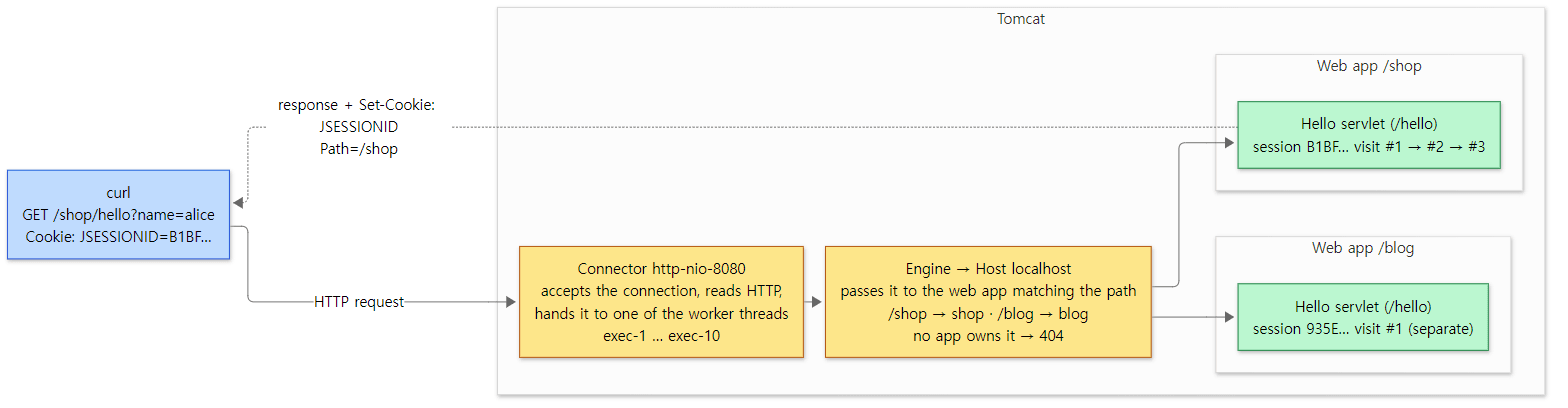 What the hands-on showed, drawn as is. Yellow boxes are what Tomcat does, green boxes are our servlets. How a web app is picked by path is covered in part 7.
There are five things to notice in the output.
- The folder name becomes the address. In output 1, Tomcat found the two folders under
webapps/and deployed each one as a web app: theshopfolder became/shop, andblogbecame/blog. The folder a Host looks in for web apps defaults towebapps(StandardHost.java line 85), and for each folder Tomcat makes a Context named after it and prints this log line (HostConfig.java lines 984–986, line 1037). How just dropping in a folder turns it into an app is in part 10. - HTTP text arrives at your method as Java objects. The servlet never touched a socket or a byte, yet
req.getContextPath()returned/shopandreq.getParameter("name")returnedalice. To the text the servlet wrote withprintln(), Tomcat added theHTTP/1.1 200status line and headers before sending it. TheOKyou may be used to seeing at the end of the status line is missing because Tomcat deliberately doesn't send the reason phrase (Http11OutputBuffer.java lines 372–374). How bytes become a request object is in part 6. - Each request is handled by one worker thread. Even back-to-back requests from the same visitor (same cookie) ran on different threads,
exec-2,exec-4andexec-5, and in step 7 the five simultaneous requests were split across five threads. A thread's name is the connector's name (http-nioplus the port, Http11NioProtocol.java lines 97–103, AbstractProtocol.java lines 659–685) followed by-exec-and a number (AbstractEndpoint.java line 1967). Tomcat keeps 10 ready at the start (line 1459) and grows to 200 by default when requests pile up (line 1499). That is why many threads can call one servlet object at the same time, and why you must not keep per-request values in a servlet's fields. Connections and threads are in part 5. - A session is carried by the
JSESSIONIDcookie. The first response'sSet-Cookie: JSESSIONID=B1BF…; Path=/shop; HttpOnlyis the session ID Tomcat made. The second and third requests, which sent the cookie back, got the same ID and becamevisit #2and#3. The cookie name defaults toJSESSIONID(SessionConfig.java line 28), and the ID is 16 random bytes written as 32 hexadecimal characters (SessionIdGeneratorBase.java lines 91–92, StandardSessionIdGenerator.java lines 44–61). Unless set otherwise, the cookie'sPathis the web app's path (SessionConfig.java lines 89–95), andHttpOnly(a flag that keeps the browser's JavaScript from reading the cookie) is on by default (StandardContext.java line 649). How sessions are made and removed is in part 11. - The two web apps don't mix. In step 6 we called
/blog/hellowith the same cookie jar, but the cookie'sPathwas/shop, so curl didn't send it, andblogmade a new session (935E…,visit #1). It's not only the cookie: the store that holds sessions (the Manager) is separate per web app too. When a web app (Context) starts and nothing else has been configured, it makes its ownStandardManager(StandardContext.java lines 4542–4566). Why the two web apps each load their own copy of the sameHello.classis covered with class loaders in part 4. A path no web app owns, like step 8, becomes a 404 at the Host stage (StandardHostValve.java lines 80–87).
What it is used for
| Use | What it does | Example |
|---|---|---|
| Java web app server | Runs web apps built with servlets and JSP, packed as WARs and dropped into webapps/. One server can host several apps, split by path |
/shop and /blog in the hands-on above |
| Running Spring MVC apps | A single servlet called DispatcherServlet takes requests and hands them to controllers. Tomcat just calls that servlet |
The web examples in the Spring series |
| A server inside your program (embedded Tomcat) | Instead of installing it separately, start it inside main() with new Tomcat() |
Part 16 |
| REST API servers | APIs that exchange JSON with no screens also run on servlets | A backend that a mobile app calls |
| Live connections | Keeps a connection open with WebSocket to exchange messages, and carries many requests over one connection with HTTP/2 | Part 15 |
There are also places where it doesn't fit. For a site that only serves static files like HTML and images, Tomcat can do it (a DefaultServlet that serves static files is registered in conf/web.xml), but there's no need for Java, so nginx or httpd is simpler. Also, of Jakarta EE, Tomcat implements only the web-side specs such as Servlet, JSP, EL, WebSocket and Authentication (Jakarta Authentication). The *-api.jar files in section 2's lib/ list (annotations, el, jaspic, jsp, servlet, websocket) are the APIs of those specs. An app that needs other Jakarta EE specs, like EJB or messaging (JMS), needs an application server that implements those as well.
Questions this series answers
Running the hands-on raises questions. This series answers them one by one from the source. If a question grabs you, feel free to start with that post.
| What you might wonder | Where the answer is |
|---|---|
| What's inside Tomcat, and in how many layers? Why are the connector and the container separate? | Part 2: The Big Picture |
When you type catalina.sh start, what gets built first, and in what order does it switch on? |
Part 3: Lifecycle and Startup |
The same Hello.class went into two apps, so why don't they mix? |
Part 4: Class Loaders |
Who makes the http-nio-8080-exec-N threads, and who accepts the connection? |
Part 5: The Connector and the NIO Endpoint |
How does the text GET /shop/hello?name=alice become a request object? |
Part 6: Reading an HTTP/1.1 Request |
How does /shop/hello find its way to Hello in the shop app? |
Part 7: CoyoteAdapter and the Mapper |
| Where do the access log and the gray error page step in along a request's way? | Part 8: Pipelines and Valves |
How do filters line up in front of a servlet, and who calls doGet()? |
Part 9: The Filter Chain and the Servlet Call |
We only dropped a folder into webapps/, so how did it become an app? Who reads @WebServlet? |
Part 10: Deploying a Web App |
How is JSESSIONID made, and when is it removed? |
Part 11: Sessions |
| How do you keep a slow request from holding on to a worker thread? | Part 12: Async Servlets and Non-Blocking I/O |
How does a .jsp file become a servlet? |
Part 13: Jasper |
| How are pages that require a login protected? | Part 14: Authentication and Realms |
| How does an HTTP/1.1 connection switch to HTTP/2 or WebSocket? | Part 15: HTTP/2 and WebSocket |
How do you start Tomcat inside main() instead of installing it separately? |
Part 16: Embedded Tomcat, JMX and Logging |
The rest of this post gets ready to follow these questions through the source. It looks at which version is read (section 1), how to get and build the source (section 2), the folder map (section 3), and which classes the request from the hands-on above actually passes through (section 4), then closes with how to read (section 5) and the series map (section 6). If you don't plan to build it yourself, you can skip section 2 without missing anything you need later.
Words to know first
Material about Tomcat keeps using a handful of names that look odd the first time. Pin down these six and the rest reads much more easily.
A servlet container is a server program that takes HTTP requests off the network and calls the service() method of the servlet objects you wrote. Tomcat is a servlet container. Creating a servlet (init()), calling it for every request, and cleaning it up when it is taken down (destroy()) are all the container's job.
Jakarta EE and jakarta.* are the names of the Java web standards such as Servlet and JSP. They used to be called Java EE, with packages like javax.servlet; when the standards moved to the Eclipse Foundation the packages became jakarta.servlet. The Tomcat in this series uses only jakarta.*. A standard is a specification (a spec document), and Tomcat is an implementation of that spec.
Catalina is the name of the part of Tomcat that acts as the servlet container. The <Engine>, <Host> and <Context> in server.xml become classes from this part. In the source it is the org.apache.catalina package, and the name survives in the start script, catalina.sh.
Coyote is the name of the network side, the connector. It reads bytes from a socket and turns them into an HTTP request, then writes the response back out as bytes. The <Connector port="8080" …> line in server.xml is what starts Coyote. Why Catalina and Coyote are kept apart is the topic of post 2.
Jasper is the engine that turns a JSP file into Java servlet source and compiles it. It is the org.apache.jasper package, covered in post 13.
main and 11.0.x are branch names in the Tomcat repository. main is the development line that builds the next release (12.x), while the stable releases we download come from branches such as 11.0.x. This series reads main. The next section looks at the difference.
1. Which version — main and 11.0.x
The version lives in a build settings file
Tomcat's version is written in build.properties.default at the top of the repository. Tomcat is built with Ant (an older build tool for Java projects; the steps are written in build.xml), and Ant reads the values in this file to put the version string together.
version.major=12
version.minor=0
version.build=0
version.patch=0
version.suffix=-M1
version.dev=-dev
build.properties.default lines 31–36
12.0.0 gets -M1 (Milestone 1, a preview released before the final version) and, because it is still in development, -dev. That is why the Tomcat built from the reference commit calls itself 12.0.0-M1-dev. The example below confirms this with version.sh.
How main differs from 11.0.x
Checked directly in this repository:
| Branch / tag | Version | What it is |
|---|---|---|
main (commit 17aa1769b0, 2026-10-23) |
12.0.0-M1-dev | The development line for the next major release. What this series reads |
11.0.x branch (commit 62983467e4, 2026-10-23) |
11.0.28-dev | The line where the stable release keeps getting fixed |
tag 11.0.27 (2026-10-06) |
— | The most recent 11.0 stable tag in this repository |
Listing the tags with git tag -l '11.0.*' | sort -V puts 11.0.27 last, and there is not a single 12.* tag yet. In other words, 12.0 has never been released. The repository also keeps older stable branches such as 10.1.x and 9.0.x.
Why read main at all? For the same reason the httpd series read trunk. Fixes and new features land on the development line first, and the big structure (connectors, containers, valves, the filter chain) is the same on both branches. In return, whenever something a post states is different on 11.0.x, the post says so. Comparing the lists of .java files under java/ on the two branches already shows these differences, just among the things this post touches:
- There is no NIO2 connector. 11.0.x has
Nio2Endpoint,Http11Nio2ProtocolandAjpNio2Protocol; main keeps only the NIO endpoint (NioEndpoint). The message of commit21f0936fe3(2025-05-15) is "Drop NIO2 connector from Tomcat 12". Connectors are covered in post 5. - More classes are gone.
RemoteAddrValveandRemoteAddrFilter(commit6eda98540a, "Remove the deprecated …"),JAASRealm(commite12e023930) andJDBCAccessLogValvedo not exist on main. A configuration that blocked IP addresses withRemoteAddrValvehas to move toRemoteCIDRValve. On 11.0.x,RemoteAddrValvecarries a@deprecatednote saying it will be removed in Tomcat 12 and to useRemoteCIDRValveinstead, andRemoteCIDRValveis still there on main. - EL gained operators.
org/apache/el/parser/AstElvis.javaandAstNullCoalescing.javaexist only on main. The?:(Elvis) operator was added to EL in commit1242677516("Add support for the Elvis operator"), and commitb037fcfec5corrected it and added the??(null coalescing) operator. - The number of
.javafiles is 2,984 on main and 2,986 on 11.0.x (whole repository, counted the same way as in section 3). What was removed and what was added nearly cancel out.
Java 21 is required
Which Java you build and run with is set in build.xml.
  <!-- Jakarta EE 12 platform requires Java 21+ -->
  <!-- Keep in sync with webapps/docs/tomcat-docs.xsl -->
  <property name="compile.release" value="21"/>
  <property name="min.java.version" value="21"/>
  <property name="build.java.version" value="21"/>
  <property name="release.java.version" value="25"/>
As the comment says, "the Jakarta EE 12 platform requires Java 21+", so the source is compiled against the Java 21 language and API (compile.release) and needs Java 21 or later to run (min.java.version). Lines 115–122 right below stop the build with "Java version 21 or newer is required" if the JDK doing the build is older than 21. On the 11.0.x branch the same three values are all 17. So 11.0 starts at Java 17, 12.0 at Java 21. (The 25 in release.java.version is the JDK used to make official releases. This series' examples were built with JDK 21.)
Which Servlet spec — two places give different numbers
Each Tomcat release line implements a fixed Servlet spec version. That is in build.xml too.
  <!-- Exact spec versions (for the manifests etc.) -->
  <property name="servlet.spec.version"    value="6.2" />
  <property name="servlet.revision"        value="DRAFT" />
  <property name="jsp.spec.version"        value="4.1" />
  <property name="jsp.revision"            value="DRAFT" />
  <property name="el.spec.version"         value="6.1" />
  <property name="el.revision"             value="DRAFT" />
  <property name="websocket.spec.version"  value="2.3" />
  <property name="websocket.revision"      value="DRAFT" />
  <property name="jaspic.spec.version"     value="3.2" />
  <property name="jaspic.revision"         value="DRAFT" />
  <property name="annotation.spec.version" value="3.1" />
  <property name="annotation.revision"     value="DRAFT" />
Servlet 6.2, JSP 4.1, EL 6.1, WebSocket 2.3, all marked DRAFT, meaning the Jakarta EE 12 specs are not final yet. On the 11.0.x branch the same spot says Servlet 6.1, JSP 4.0, EL 6.0, WebSocket 2.2, with an empty revision (final).
The servlet API source does contain methods that are new in 6.2. HttpServlet has doQuery() for HTTP's new QUERY method (HttpServlet.java line 294), and HttpServletResponse has sendEarlyHints() for sending a 103 response (HttpServletResponse.java line 224). Both carry @since Servlet 6.2 in their javadoc, and neither is in the same files on the 11.0.x branch.
But when a running web app asks the container which Servlet spec it implements (ServletContext.getMajorVersion() and getMinorVersion()), the answer is different. The two methods are implemented in ApplicationContext like this:
    @Override
    public int getMajorVersion() {
        return Constants.MAJOR_VERSION;
    }


    @Override
    public int getMinorVersion() {
        return Constants.MINOR_VERSION;
    }
java/org/apache/catalina/core/ApplicationContext.java lines 290–299
The constants they return live in Constants in the same package:
    /**
     * The major version of the Servlet specification implemented by this container.
     */
    public static final int MAJOR_VERSION = 6;

    /**
     * The minor version of the Servlet specification implemented by this container.
     */
    public static final int MINOR_VERSION = 1;
java/org/apache/catalina/core/Constants.java lines 30–38
6.1. The last version-related commit to this file is 9609c385cd ("Update version constant for Servlet 6.1"); no commit has bumped it to 6.2 yet. When the example below actually asks, it prints servlet spec: 6.1.
Easy to get confused
"Which Servlet version is Tomcat 12?" has two answers. The build settings (build.xml) and the API source (the @since Servlet 6.2 methods in jakarta.servlet, and version="6.2" in conf/web.xml) are heading for 6.2, yet the number the container reports about itself at run time (Constants.MINOR_VERSION) is still 6.1. It looks like the kind of mismatch you get in a development build while the spec is still a draft, and my guess is that it will be lined up before a final release (what the source can confirm is only "right now they differ"). This series will call it "a release that is in the middle of implementing Servlet 6.2 (draft)."
12.0.0-M1 is not a final release. "M1" means the first milestone (a preview), and this repository does not even have a 12.0.0-M1 tag yet. What people run in production is a stable 11.0.x (or older) release. The examples in post 20 of the Spring series also ran on a stable embedded Tomcat (tomcat-embed-core 11.0.15).
2. Getting the same source
This section is for readers who want to run the examples themselves. If you only want to read, feel free to skip to section 3 (the folder map).
Clone the source and pin the commit
To open the line numbers in these posts yourself, you need the source at the same commit. With Git, the steps are:
- Clone the repository. The history is long, so it takes a while.
- Check out the reference commit separately. I left the cloned folder (
tomcat) alone and used git worktree to put just the reference commit in another folder (tomcat-17aa1769b0). A worktree lets one repository have different commits checked out in different folders at the same time. That way, pulling the latest source into the original folder withgit pullnever changes the line numbers in the reference folder. - Check that it worked. You should see the full commit hash.
git clone https://github.com/apache/tomcat.git
cd tomcat
git worktree add --detach ../tomcat-17aa1769b0 17aa1769b0fa32713b7b36b10a33155b63a40bbc
git -C ../tomcat-17aa1769b0 rev-parse HEAD
If a worktree feels like too much, git checkout 17aa1769b0fa32713b7b36b10a33155b63a40bbc moves the cloned folder itself to that commit. Git will mention a "detached HEAD"; that only means you checked out a specific commit rather than a branch, and it is fine for reading. When you want to compare with 11.0.x, git show origin/11.0.x:<path> prints a file from that branch without touching your checkout.
You can also just read on the web. This link opens the commit on GitHub; you will see the same files, and every code link in this series points at that commit.
Building in Docker
If you only want to read, you do not need to build. But this series actually runs every example it shows, so it needs a Tomcat built from the reference commit. A downloaded stable release (11.0.x) would have different line numbers and even a different set of classes. So I built the reference commit as-is inside a Docker container. Here is the Dockerfile that is actually used. (Its comments are in Korean; they say: an image for the "Digging into Tomcat's Source" examples; it builds the reference commit 17aa1769b0 (main, 12.0.0-M1) with Ant, unchanged; the source is tomcat-17aa1769b0.tar.gz made with git archive (LF line endings, untouched original); and base.path is where the build puts the libraries it downloads, such as ecj and bnd.)
# "Tomcat 소스 파헤치기" 예제용 이미지.
# 기준 커밋 17aa1769b0 (main, 12.0.0-M1) 의 소스를 그대로 Ant 로 빌드한다.
# 소스는 git archive 로 뽑은 tomcat-17aa1769b0.tar.gz (LF 줄 끝, 손대지 않은 원본).
FROM eclipse-temurin:21-jdk

RUN apt-get update && DEBIAN_FRONTEND=noninteractive apt-get install -y --no-install-recommends \
      ant curl procps unzip \
    && rm -rf /var/lib/apt/lists/*

COPY tomcat-17aa1769b0.tar.gz /usr/src/
WORKDIR /usr/src
# base.path: 빌드가 내려받는 의존 라이브러리(ecj, bnd 등)를 둘 곳
RUN tar xzf tomcat-17aa1769b0.tar.gz && cd tomcat \
    && echo "base.path=/usr/src/tomcat-deps" > build.properties \
    && ant -q deploy \
    && cp -r output/build /opt/tomcat

ENV CATALINA_HOME=/opt/tomcat PATH=/opt/tomcat/bin:$PATH
WORKDIR /work
CMD ["version.sh"]
Step by step, it does this:
- Start from an image with JDK 21.
eclipse-temurin:21-jdkis the OpenJDK 21 image made by Eclipse Adoptium. As shown above, main needs Java 21 to build. - Install Ant and a few tools.
antis the build tool;curlandps(procps) are there so the examples can poke at the server.jstackandjcmd(thread dump tools) already come with the JDK. - Copy in the reference commit's source as an archive. It is the original, extracted from the repository with
git archive. The comment says "LF line endings" because of what happened in the httpd series: files checked out by Git on Windows (core.autocrlf=true) get CRLF line endings, and a shell script then refused to run on Linux, claiming the file did not exist (see "where I got stuck" in httpd post 1). So this time the archive was made without that conversion from the start. - Write
base.pathintobuild.properties. Tomcat's build downloads its dependencies from the internet while it builds, for example ecj (Eclipse's Java compiler, used for JSPs).base.pathis the folder they go into. The repository'sBUILDING.txtalso recommends always creating this file because the default value is awkward (BUILDING.txt lines 126–148). - Build with
ant deploy.deployis the default target inbuild.xml, and when it finishes, a ready-to-run Tomcat sits inoutput/build(BUILDING.txt lines 164–173). That gets copied to/opt/tomcat, which becomesCATALINA_HOME(the environment variable pointing at the folder Tomcat is installed in).
The resulting image is called tomcat-lab:17aa1769b0. /opt/tomcat ends up with the same layout you get from unpacking a downloaded release (bin/, conf/, lib/, webapps/ …).
How the examples are run
Each post has one example folder (like ex/u01-reading-plan) containing a run.sh, and a small script (run-example.sh) runs it inside a container. The heart of it is one line:
MSYS_NO_PATHCONV=1 docker run --rm -v "$(pwd -W 2>/dev/null || pwd)/$dir:/work" -w /work \
  tomcat-lab:17aa1769b0 bash ./run.sh
It mounts the example folder at /work in the container, runs run.sh, and deletes the container right away (--rm). Every run starts from a clean server, so web apps or logs left by an earlier example cannot interfere. pwd -W is how Git Bash gets a Windows path (D:/…), and MSYS_NO_PATHCONV=1 stops Git Bash from "helpfully" rewriting arguments like /work into Windows paths (the same approach as the httpd series).
Inside run.sh, the installation folder (CATALINA_HOME=/opt/tomcat) is left untouched. The script creates separate conf/, logs/ and webapps/ folders under /tmp/base and starts Tomcat with CATALINA_BASE=/tmp/base. CATALINA_HOME is where the program (jars and scripts) lives; CATALINA_BASE is where the configuration, web apps and logs live. Keeping them apart lets one installation run several instances. How the two values are used is in post 3.
Example: asking the built server directly
Every example in this series was run with Tomcat 12.0.0-M1-dev, built unchanged from the reference commit (17aa1769b0), in a Docker container (Eclipse Temurin JDK 21). The example folder is ex/u01-reading-plan. First, version.sh (the Server built time differs per build, and OS Version per machine):
Server version: Apache Tomcat/12.0.0-M1-dev
Server built:   Oct 24 2026 13:31:50 UTC
Server number:  12.0.0.0
OS Name:        Linux
OS Version:     5.15.146.1-microsoft-standard-WSL2
Architecture:   amd64
JVM Version:    21.0.12.1+1-LTS
JVM Vendor:     Eclipse Adoptium
APR loaded:     false

Third-party libraries:
  ecj-4.41.jar:                          3.46.100.v20260826-1225
  jakartaee-migration-1.0.13-shaded.jar: 1.0.13
The numbers read from build.properties.default come straight back. APR loaded: false means Tomcat Native (a C library that uses OpenSSL) is not loaded; every example in this series runs in pure Java. The last two lines are libraries the build downloaded and bundled. ecj compiles JSPs (post 13), and jakartaee-migration is the "Apache Tomcat Migration Tool for Jakarta EE" (the tool bin/migrate.sh calls), which converts old Java EE web apps written against javax.* to jakarta.*.
Next, the jars in the lib/ folder, with size in bytes and name:
35
    13731  annotations-api.jar
    60127  catalina-ant.jar
   132150  catalina-ha.jar
    67464  catalina-ssi.jar
    97889  catalina-storeconfig.jar
   368904  catalina-tribes.jar
  1769887  catalina.jar
  3384534  ecj-4.41.jar
    97854  el-api.jar
  1466818  jakartaee-migration-1.0.13-shaded.jar
   184793  jasper-el.jar
   551772  jasper.jar
    27816  jaspic-api.jar
    72851  jsp-api.jar
   445522  servlet-api.jar
    12039  tomcat-api.jar
     9200  tomcat-coyote-ffm.jar
   900823  tomcat-coyote.jar
   344745  tomcat-dbcp.jar
    70245  tomcat-i18n-cs.jar
    77508  tomcat-i18n-de.jar
   106939  tomcat-i18n-es.jar
   186025  tomcat-i18n-fr.jar
   211770  tomcat-i18n-ja.jar
   190389  tomcat-i18n-ko.jar
    52780  tomcat-i18n-pt-BR.jar
    71663  tomcat-i18n-ru.jar
   177889  tomcat-i18n-zh-CN.jar
   154827  tomcat-jdbc.jar
    16750  tomcat-jni.jar
   231698  tomcat-util-scan.jar
   214154  tomcat-util.jar
   260099  tomcat-websocket.jar
    14064  websocket-api.jar
    31767  websocket-client-api.jar
There are 35. The names alone point back to source folders: the *-api.jar files are the standard APIs under java/jakarta/, catalina.jar is Catalina, tomcat-coyote.jar is Coyote, and jasper.jar is Jasper. Jars and packages are not one-to-one, though. The packaging rules in build.xml put JNDI (org/apache/naming) into catalina.jar and leave clustering (ha, tribes) out (build.xml lines 493–502). And org/apache/tomcat/util/net, home of NioEndpoint, which accepts connections, goes into tomcat-coyote.jar, not tomcat-util.jar (build.xml lines 767–776). Good to know when you see a class name in a stack trace and wonder which jar it is in.
3. Folder map — where are the 740,000 lines?
Top-level folders
At the reference commit, git tracks 5,036 files. Of those, 2,984 are Java sources (.java), with 741,389 lines in total (blank lines and comments included). Counted per top-level folder (files picked with git ls-files, lines counted with wc -l):
| Folder | What's in it | .java files |
Lines |
|---|---|---|---|
java/ |
The server itself. Standard APIs (jakarta/) and the implementation (org/apache/) |
1,779 | 503,838 |
test/ |
Unit and integration tests | 1,019 | 192,251 |
modules/ |
Extra modules built separately (jdbc-pool, manager2, stuffed and others) |
116 | 38,012 |
webapps/ |
Web apps that ship with Tomcat (ROOT, docs, examples, manager, host-manager) |
70 | 7,288 |
conf/ |
Default configuration files (server.xml, web.xml, context.xml, tomcat-users.xml, catalina.properties, logging.properties and others, 9 in all) |
0 | 0 |
bin/ |
Scripts (catalina.sh, startup.sh, version.sh and others, each with a .bat twin) |
0 | 0 |
res/ |
Build resources (META-INF files to put inside jars, the Windows installer install-win, settings for checking tools and so on) |
0 | 0 |
conf/ and bin/ are exactly the folders you saw when you unpacked a release. The build copies them to output/build, compiles java/, and packages it into the jars in lib/. When reading the source you can treat java/ as everything. It is also striking that the tests come to 190,000 lines. When some behavior is confusing, finding the test with the matching name in test/ (for example TestCoyoteAdapter) often tells you what was intended.
Inside java/
Split by package, java/ looks like this:
| Package | What's in it | .java files |
Lines | Posts |
|---|---|---|---|---|
jakarta/* |
Standard APIs — servlet (117 files, 18,666 lines), el, websocket, security, annotation and others, 10 in all |
262 | 33,109 | 9, 12 |
org/apache/catalina |
Catalina, the servlet container | 611 | 205,367 | 2–4, 7–11, 14, 16 |
org/apache/coyote |
Coyote, the connectors — http11, http2, ajp |
92 | 30,746 | 5, 6, 15 |
org/apache/tomcat |
Shared tools — util (358 files, 107,414 lines), dbcp, websocket and others |
577 | 167,199 | 5, 6, 15, 16 |
org/apache/jasper |
Jasper, the JSP engine | 109 | 42,371 | 13 |
org/apache/el |
EL (${…} expressions) implementation |
82 | 16,690 | 13 |
org/apache/naming |
JNDI (java:comp/env name lookup) implementation |
32 | 4,739 | — |
org/apache/juli |
Logging (JULI, java.util.logging split up so each web app gets its own) |
14 | 3,617 | 16 |
Catalina is the biggest, but not all of its 200,000 lines are about handling requests. The clustering code that ties several servers together, catalina/tribes (30,578 lines) and catalina/ha (10,651 lines), is over 40,000 lines by itself. Inside org/apache/tomcat, the database connection pool tomcat/dbcp (39,906 lines) is Apache Commons DBCP and Pool (dbcp2, pool2) with their package names changed, so this series does not read it. Here are the sizes of the files this series will spend the most time in:
| File | Lines | Posts |
|---|---|---|
tomcat/util/net/AbstractEndpoint.java |
2,576 | 5 |
tomcat/util/net/NioEndpoint.java |
2,274 | 5 |
coyote/http11/Http11Processor.java |
1,452 | 6 |
catalina/connector/CoyoteAdapter.java |
1,323 | 7 |
catalina/mapper/Mapper.java |
1,882 | 7 |
catalina/core/StandardWrapperValve.java |
337 | 9 |
catalina/core/ApplicationFilterChain.java |
248 | 9 |
catalina/startup/ContextConfig.java |
3,032 | 10 |
catalina/core/StandardContext.java |
6,019 | 2, 10 |
The Spring code read in the first series was about 840,000 lines of main code alone (tests excluded), and httpd about 350,000 lines of .c and .h, so Tomcat lands in between. A quarter of Tomcat's 740,000 lines are tests, though; without them, the server itself (java/) is a little over 500,000.
Seen as layers
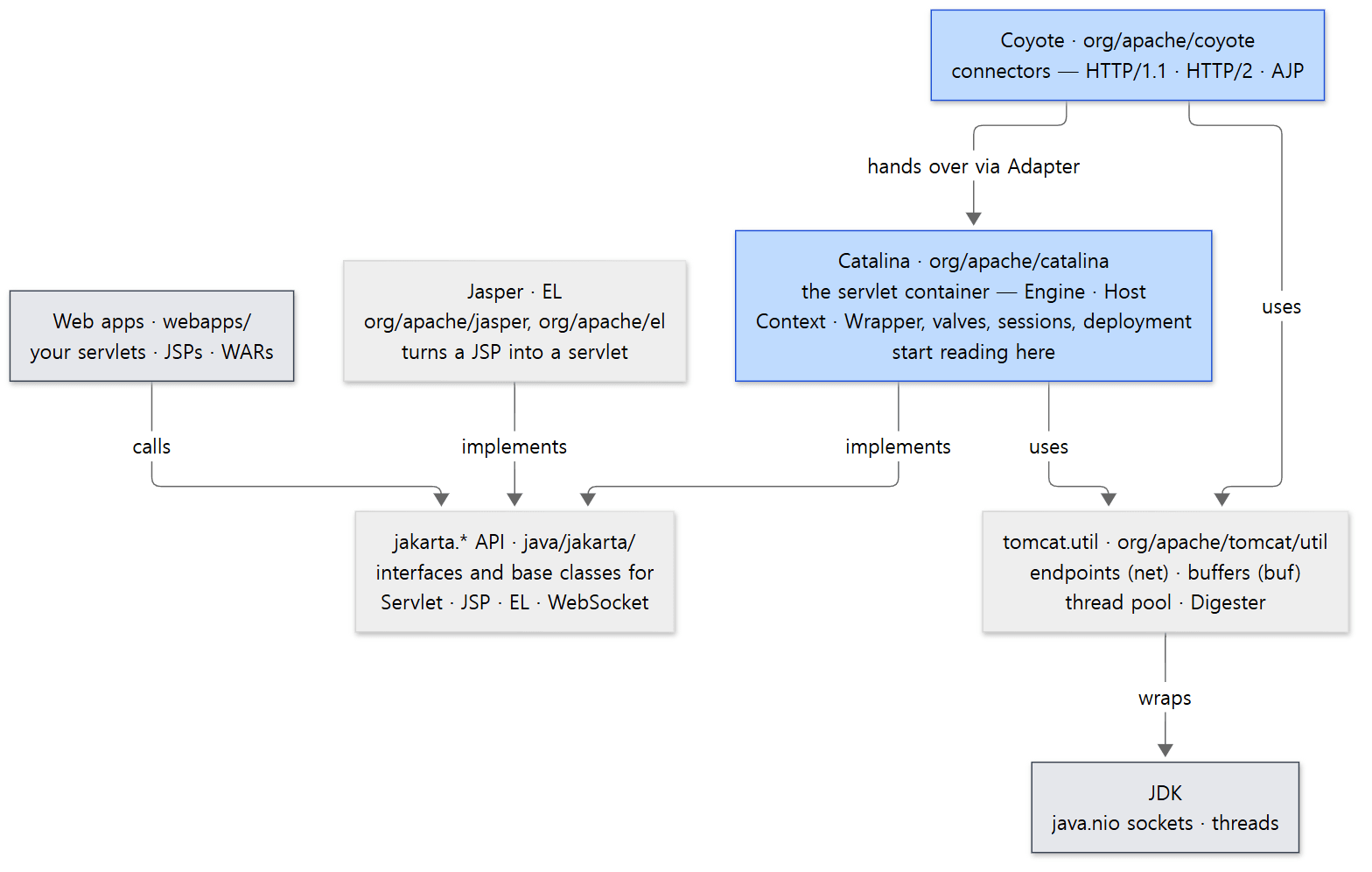 Tomcat's layers. Start reading in the blue boxes (Catalina, Coyote); the gray boxes (web apps, the JDK) are outside.
Two things from this picture are worth remembering.
First, web apps do not know Tomcat's classes. The servlet you wrote only sees interfaces such as jakarta.servlet.http.HttpServletRequest; the real object behind it (Catalina's RequestFacade) is supplied by Tomcat. That is why the same WAR runs on Tomcat and on Jetty. Why it is a RequestFacade rather than a Request is in post 7.
Second, Coyote and Catalina are joined by a single Adapter. Coyote (org.apache.coyote) knows nothing about servlets; it simply passes the request to the Adapter interface in its own package. The class implementing that interface is CoyoteAdapter on the Catalina side. Post 2 looks at this design in detail.
Easy to get confused
org/apache/tomcat/websocket and jakarta/websocket are different things. The first is Tomcat's WebSocket implementation; the second is the standard API. Servlets work the same way (jakarta/servlet ↔ org/apache/catalina). Remember: "starts with jakarta means the standard, starts with org/apache means Tomcat's implementation." The standard API's source sits in the Tomcat repository only because Tomcat builds and ships servlet-api.jar itself.
TOMCAT-NEXT.txt is empty. At the top of the repository there is a file titled "notes of things to consider for the next major Tomcat release (12.x)", so you would expect 12.0's plans in it. At the reference commit it holds only the license header and that one title line, with no items at all. The differences between main and 11.0.x have to be read straight from the source and the git history, as above.
4. The big road one request travels
Starting from the config file you know
Before going into the source, look at the familiar conf/server.xml. With the comments stripped, the skeleton is:
<Server port="8005" shutdown="SHUTDOWN">
<!-- ... -->
<Service name="Catalina">
<!-- ... -->
<Connector port="8080" protocol="HTTP/1.1"
connectionTimeout="20000"
redirectPort="8443" />
<!-- ... -->
<Engine name="Catalina" defaultHost="localhost">
<!-- ... -->
<Host name="localhost" appBase="webapps"
unpackWARs="true" autoDeploy="true">
<!-- ... -->
<Valve className="org.apache.catalina.valves.AccessLogValve" directory="logs"
prefix="localhost_access_log" suffix=".txt"
pattern="%h %l %u %t "%r" %s %b" />
</Host>
</Engine>
</Service>
</Server>
conf/server.xml lines 22–154 (omitted parts marked <!-- ... -->)
<Connector> is Coyote; everything from <Engine> inward is Catalina. Contexts (one per web app) and Wrappers (one per servlet) are not written here, but they are created at run time for each folder under webapps/ and each servlet inside it (a <Context> can be written by hand, but there is no server.xml element for a Wrapper at all). So the container has four layers: Engine → Host → Context → Wrapper. The four layers are in post 2, and how server.xml becomes objects is in post 3.
On one page
Posts 5 through 9 follow the road one request travels, in order. Drawn on one page, the main road looks like this:
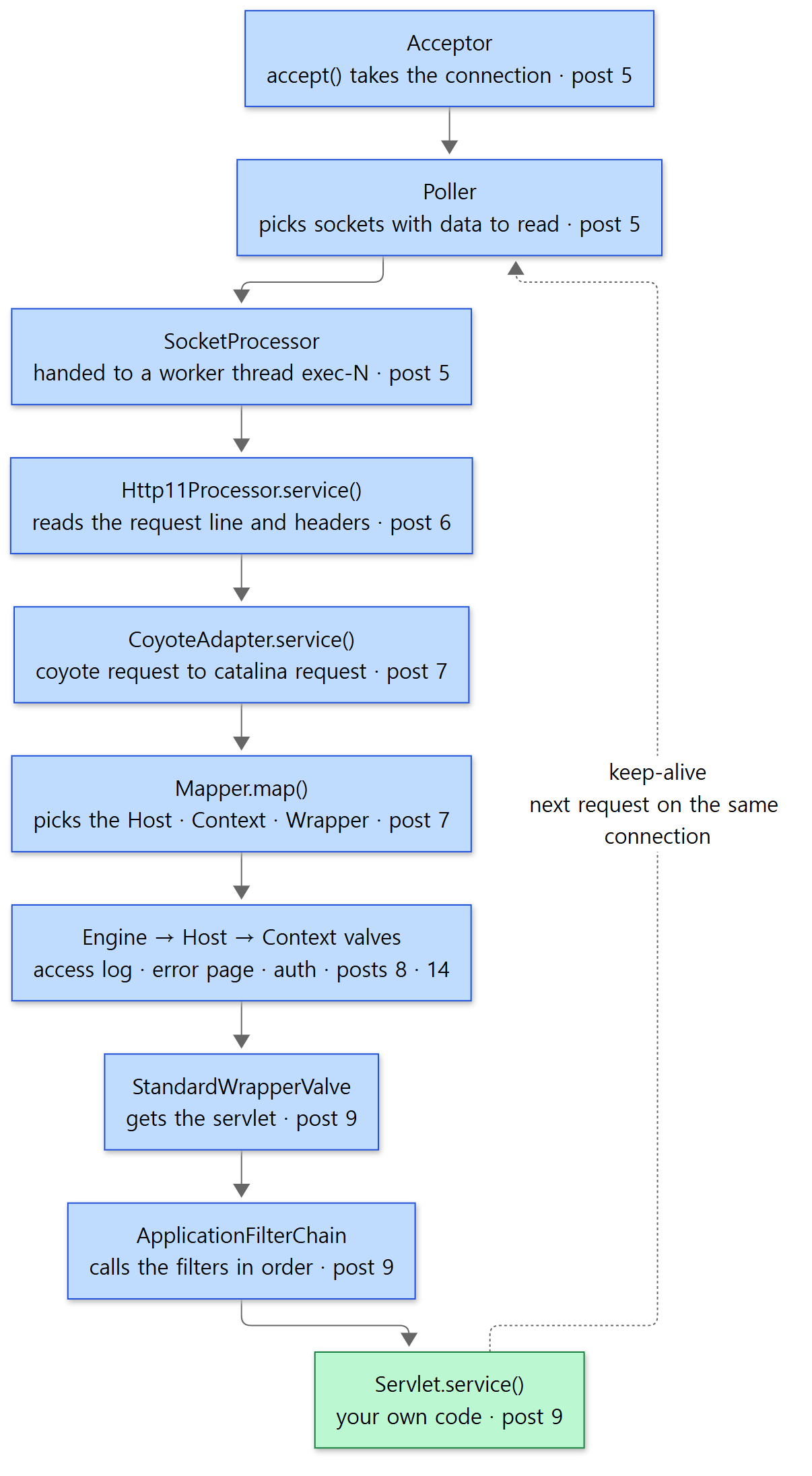 The main road of one request. Each box names the post that covers that step. The dotted line is the way back to the next request on a keep-alive connection.
Matched up with what you know from the config files:
| Step | What you saw in config files | Post |
|---|---|---|
| Acceptor · Poller · worker threads | <Connector port maxThreads maxConnections acceptCount>, <Executor> |
5 |
| Reading HTTP/1.1 | connectionTimeout, maxHttpHeaderSize, keepAliveTimeout |
6 |
| CoyoteAdapter · Mapper | <Host name>, <Context path>, <servlet-mapping> in web.xml |
7 |
| Valves | <Valve className="…AccessLogValve">, <Realm> |
8, 14 |
| Filter chain · servlet | <filter> and <servlet> in web.xml, @WebFilter and @WebServlet |
9 |
A sneak peek at two spots in the code
One: where a connection is handed to a worker thread. When the Poller notices "data has arrived on this socket", it calls AbstractEndpoint.processSocket().
            SocketProcessorBase<S> sc = null;
            if (processorCache != null) {
                sc = processorCache.pop();
            }
            if (sc == null) {
                sc = createSocketProcessor(socketWrapper, event);
            } else {
                sc.reset(socketWrapper, event);
            }
            Executor executor = getExecutor();
            if (dispatch && executor != null) {
                executor.execute(sc);
            } else {
                sc.run();
            }
java/org/apache/tomcat/util/net/AbstractEndpoint.java lines 2136–2150
It makes a unit of work (a SocketProcessor; a leftover one from the cache is reused if available) and hands it to the thread pool (executor). From then until the response is fully written, one worker thread from the pool owns this request, while the Poller thread goes straight back to watching other sockets. Post 5 covers this structure.
Two: where Coyote hands over to Catalina. The middle of CoyoteAdapter.service():
        try {
            // Parse and set Catalina and configuration specific
            // request parameters
            postParseSuccess = postParseRequest(req, request, res, response);
            if (postParseSuccess) {
                // check valves if we support async
                request.setAsyncSupported(connector.getService().getContainer().getPipeline().isAsyncSupported());
                // Calling the container
                connector.getService().getContainer().getPipeline().getFirst().invoke(request, response);
            }
java/org/apache/catalina/connector/CoyoteAdapter.java lines 339–348
req and res are the request and response Coyote built; request and response are the Catalina-side objects. First, postParseRequest() cleans up the URI and uses the Mapper to decide which Host, Context and servlet this request goes to (connector.getService().getMapper().map(…) on line 700 of the same file). Once that is settled, line 347 calls the first valve in the pipeline (a chain of valves lined up in order) of the top container, the Engine. From there, each valve calls the next one, and the last valve calls the pipeline of the container one layer in, all the way down to the Wrapper (post 8).
Example: does a request really take this road?
To check the picture, I printed the call stack (the list of currently running methods, from the innermost back out to whoever called them) from inside a servlet. The httpd series needed gdb for this; in Java, new Throwable().getStackTrace() is a single line. Here is the example servlet:
// An example written for this post (not part of Tomcat's source)
import jakarta.servlet.annotation.WebServlet;
import jakarta.servlet.http.HttpServlet;
import jakarta.servlet.http.HttpServletRequest;
import jakarta.servlet.http.HttpServletResponse;
import java.io.IOException;
import java.io.PrintWriter;

@WebServlet("/where")
public class WhereAmI extends HttpServlet {
    @Override
    protected void doGet(HttpServletRequest req, HttpServletResponse resp) throws IOException {
        resp.setContentType("text/plain");
        PrintWriter out = resp.getWriter();
        // The server name, and the Servlet spec version the container reports about itself
        out.println("server info : " + getServletContext().getServerInfo());
        out.println("servlet spec: " + getServletContext().getMajorVersion()
                + "." + getServletContext().getMinorVersion());
        // The thread handling this request
        out.println("thread      : " + Thread.currentThread().getName());
        // The call stack right now — top is this method, bottom is where the thread started
        out.println("stack (top = this method):");
        for (StackTraceElement e : new Throwable().getStackTrace()) {
            out.println("  at " + e.getClassName() + "." + e.getMethodName()
                    + "(" + e.getFileName() + ":" + e.getLineNumber() + ")");
        }
    }
}
run.sh compiles it with javac, with only servlet-api.jar on the classpath, drops it into /tmp/base/webapps/u01/WEB-INF/classes, starts Tomcat with catalina.sh start, and calls it with curl http://127.0.0.1:8080/u01/where. It is registered by the @WebServlet annotation alone, with no web.xml (where annotations are found is in post 10). The response:
server info : Apache Tomcat/12.0.0-M1-dev
servlet spec: 6.1
thread      : http-nio-8080-exec-2
stack (top = this method):
  at WhereAmI.doGet(WhereAmI.java:23)
  at jakarta.servlet.http.HttpServlet.service(HttpServlet.java:673)
  at jakarta.servlet.http.HttpServlet.service(HttpServlet.java:762)
  at org.apache.catalina.core.ApplicationFilterChain.doFilter(ApplicationFilterChain.java:132)
  at org.apache.tomcat.websocket.server.WsFilter.doFilter(WsFilter.java:59)
  at org.apache.catalina.core.ApplicationFilterChain.doFilter(ApplicationFilterChain.java:111)
  at org.apache.catalina.core.StandardWrapperValve.invoke(StandardWrapperValve.java:164)
  at org.apache.catalina.core.StandardContextValve.invoke(StandardContextValve.java:77)
  at org.apache.catalina.authenticator.AuthenticatorBase.invoke(AuthenticatorBase.java:540)
  at org.apache.catalina.core.StandardHostValve.invoke(StandardHostValve.java:115)
  at org.apache.catalina.valves.ErrorReportValve.invoke(ErrorReportValve.java:82)
  at org.apache.catalina.valves.AbstractAccessLogValve.invoke(AbstractAccessLogValve.java:777)
  at org.apache.catalina.core.StandardEngineValve.invoke(StandardEngineValve.java:71)
  at org.apache.catalina.connector.CoyoteAdapter.service(CoyoteAdapter.java:347)
  at org.apache.coyote.http11.Http11Processor.service(Http11Processor.java:404)
  at org.apache.coyote.AbstractProcessorLight.process(AbstractProcessorLight.java:71)
  at org.apache.coyote.AbstractProtocol$ConnectionHandler.process(AbstractProtocol.java:1317)
  at org.apache.tomcat.util.net.NioEndpoint$SocketProcessor.doRun(NioEndpoint.java:2218)
  at org.apache.tomcat.util.net.SocketProcessorBase.run(SocketProcessorBase.java:74)
  at org.apache.tomcat.util.threads.ThreadPoolExecutor.runWorker(ThreadPoolExecutor.java:968)
  at org.apache.tomcat.util.threads.ThreadPoolExecutor$Worker.run(ThreadPoolExecutor.java:481)
  at org.apache.tomcat.util.threads.TaskThread$WrappingRunnable.run(TaskThread.java:74)
  at java.lang.Thread.run(Thread.java:1583)
(The number at the end of the thread name differs from run to run.) The first two lines confirm the versions from section 1: the server is 12.0.0-M1-dev, and the Servlet spec the container reports is 6.1.
Read the stack from the bottom up. Every line number in parentheses was checked against the reference commit's source. For example, CoyoteAdapter.java:347 is the "Calling the container" line just shown above.
- A worker thread from the thread pool (
ThreadPoolExecutor→SocketProcessorBase.run()) is the starting point. It is not the JDK's pool but Tomcat's ownorg.apache.tomcat.util.threads.ThreadPoolExecutor(why Tomcat keeps its own is in post 5). - Coyote:
NioEndpoint$SocketProcessor.doRun()→AbstractProtocol$ConnectionHandler.process()→Http11Processor.service(). This is where the request line and headers are read (post 6). - The boundary:
CoyoteAdapter.service()crosses over into Catalina. - Valves: the Engine's
StandardEngineValve→ the Host'sAbstractAccessLogValve,ErrorReportValveandStandardHostValve→ the Context'sAuthenticatorBaseandStandardContextValve→ the Wrapper'sStandardWrapperValve. You can see it walk down the four container layers one by one. - Filter chain:
ApplicationFilterChain.doFilter()calls a filter (WsFilter), the filter calls back into the chain, and the chain finally reaches the servlet'sservice()(post 9). - The servlet:
HttpServlet.service()sees a GET and callsdoGet().
Finally, run.sh takes a thread dump with jcmd <pid> Thread.print and keeps only the threads whose names start with http-nio-8080:
"http-nio-8080-Acceptor"
"http-nio-8080-Poller"
"http-nio-8080-exec-1"
"http-nio-8080-exec-2"
"http-nio-8080-exec-3"
"http-nio-8080-exec-4"
"http-nio-8080-exec-5"
"http-nio-8080-exec-6"
"http-nio-8080-exec-7"
"http-nio-8080-exec-8"
"http-nio-8080-exec-9"
"http-nio-8080-exec-10"
The top three boxes of the picture show up as threads: one Acceptor that takes connections, one Poller that watches sockets, and worker threads exec-1 to exec-10. The names are given in the source like this: the Acceptor gets getName() + "-Acceptor" (AbstractEndpoint.java line 2331), the Poller getName() + "-Poller" (NioEndpoint.java line 542), and the worker threads getName() + "-exec-" followed by a number (AbstractEndpoint.java line 1967). There are 10 worker threads because the default minSpareThreads is 10 (AbstractEndpoint.java line 1459). Under load the pool grows up to the default maxThreads of 200 (line 1499).
Easy to get confused
The Mapper is not on the stack. In the picture the Mapper sits between CoyoteAdapter and the valves, but the stack above has no Mapper line at all. That is because a call stack shows only the methods that are open at this very moment. The Mapper is called inside postParseRequest(), writes down "this request goes to this servlet in this Context" (request.getMappingData()), and has already returned. The valves simply read what it wrote down (as StandardEngineValve does with request.getHost()). It is the same reason ap_read_request() was missing from the stack in httpd post 1.
Filters and valves show up that nobody added. The example web app has no filters and no login configuration, yet the stack shows WsFilter and AuthenticatorBase. Following the source shows that all three of the following were put in by Tomcat itself.
WsFilter:tomcat-websocket.jarregistersWsScias aServletContainerInitializer(an initializer class the container calls when a web app starts) (res/META-INF/tomcat-websocket.jar/services/jakarta.servlet.ServletContainerInitializer), and along the wayWsServerContaineradds this filter to every web app (WsServerContainer.java line 98). Its purpose is to catch WebSocket upgrade requests (post 15).AuthenticatorBase: when there is no login configuration,ContextConfigputs in a dummy one with authentication methodNONE(ContextConfig.java lines 342–345) and attaches the matchingNonLoginAuthenticatorvalve (a subclass ofAuthenticatorBase) to the Context. The comment says this is so thatHttpServletRequest.login()can be used (post 14).ErrorReportValve: it is not inserver.xml, butStandardHost.startInternal()adds it to the Host's pipeline (StandardHost.java lines 785–801). It is the valve behind Tomcat's familiar gray error page (post 8).AbstractAccessLogValve, on the other hand, is theAccessLogValvewritten inserver.xml.
One stack trace reveals things you could never tell from the config files alone. That is why every post in this series prints a stack or thread names.
5. How to read it — with AI, but checked against the source
The reading loop
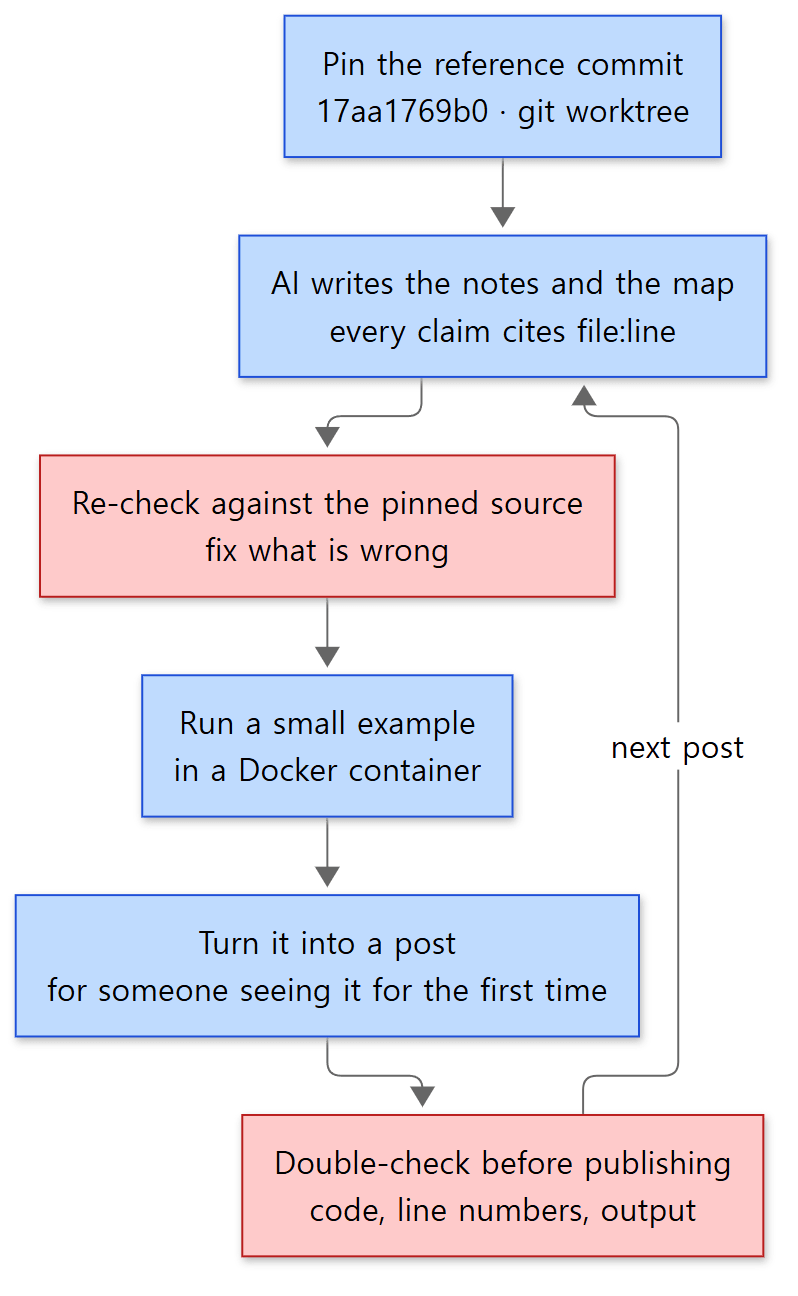 The order in which one post is read and written. Blue boxes are steps; red boxes are where mistakes in what the AI wrote get filtered out.
The principle is the same as in the Spring and httpd series. Do not read everything at once; pick one question from the map and read deeply only the code needed to answer it. In this series, one question is one post.
- Pin the reference commit. That is the worktree from section 2. Line numbers must not move, or the evidence an AI cites cannot be verified.
- AI writes the notes and the map. The layout of the 16 posts and the list of starting classes for each post were made this way. Each post was handed to its own AI task with the same instructions (what to read, in what format, with what evidence).
- Re-check against the reference commit's source. The classes named in the instructions are only starting points; what goes into a post is only what was confirmed directly in the source. Code is copied from the files as-is, and only line numbers found directly are written down.
- Actually run the examples. As in section 4, a small example that confirms one claim of the post is run in the container, and its output is shown as-is.
- Check once more before publishing. When a post is done, a separate AI task compares its code blocks, line numbers, stated facts and example output against the source from the beginning. A post that has not been through this check does not get published.
What the checking caught in this post
Why step 3 is needed showed up while writing this very post. The instructions said only, "Post 1: confirm the Servlet spec version by finding the constants that ServletContext's major/minor point to." Writing "Servlet 6.2" from build.xml alone, or "Servlet 6.1" from the constants alone, would each have been half right. Only after opening both places and asking a running server could it be written up as in the "Easy to get confused" part of section 1.
The same goes for WsFilter and AuthenticatorBase. People usually draw the request path as "valves → filters → servlet" and stop there. Without actually printing the stack, "a web app with no filters still has a filter in its chain" would never have made it into the post.
AI guidance inside the repository
At the top of the Tomcat repository there is a file called AGENTS.md. The git history shows it was committed on 2026-05-14 (11043b325a, "Add AGENTS.md + SECURITY.md linking the project's security model"), and its first paragraph reads:
This file is read by automated agents (security scanners, code analyzers, AI assistants) operating on this repository. It points them at the human-authored references they should consult before producing output.
It tells automated agents (security scanners, code analyzers, AI assistants) to consult human-written references before producing output, and its content is a link to the security model document (SECURITY.md). As more AI tools read the source and report "security issues", the project wrote down that they should first read what the project does and does not consider a problem. It is the same principle as this series: check what an AI wrote against a human-written baseline (here, the reference commit's source) before writing it down.
There is more AI-related material in res/llm/: two files, repomix.config.json5 (2025-06-25, commit 385b898bff, "Add basic config for building repository data") and repomix-full.config.json5 (the next day, commit 016413da69, "Add a config for java + testsuite"), which are settings for a tool called Repomix. As their comments say, running npx repomix gathers .java files (the first leaves out some packages under java/; the second also takes in the tests) into a single markdown file (output/repomix/repomix-tomcat.md). It looks meant for handing the whole source to an AI in one go. But these settings include "removeEmptyLines": true and "showLineNumbers": false. An AI that reads a file with blank lines removed and no line numbers cannot know the original file's line numbers. That is one more reason not to trust an AI's "line N" as-is, and to look it up again in the reference commit's file.
6. The series map
Four groups
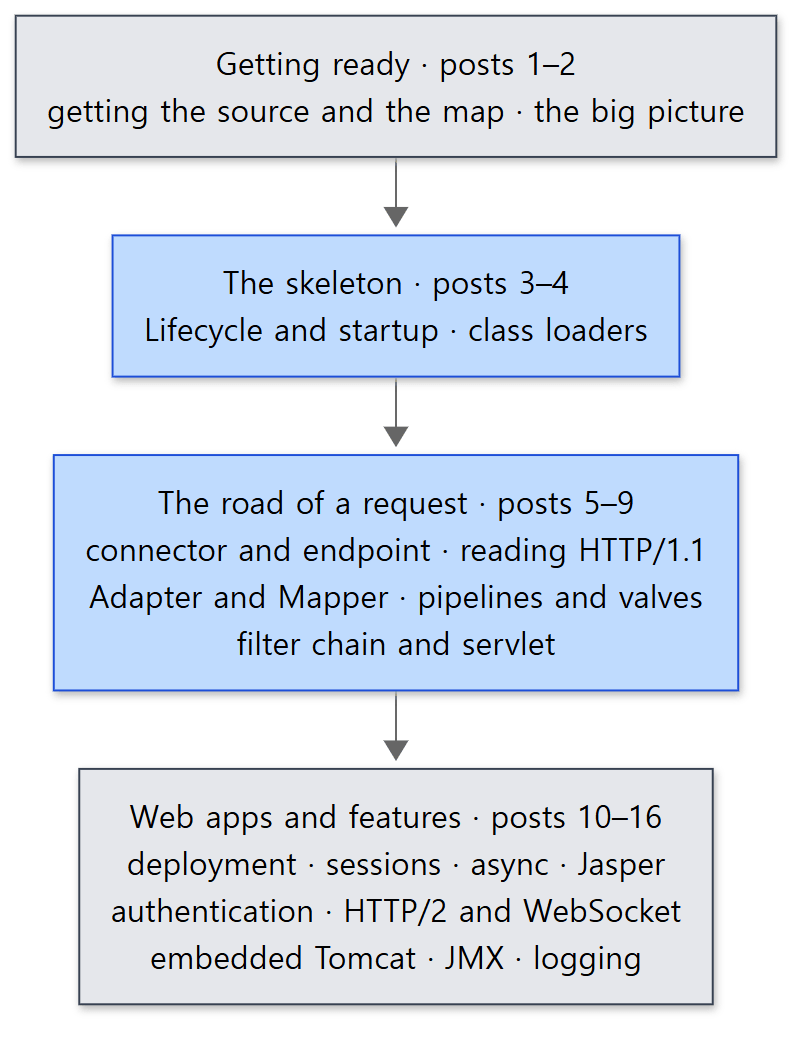 The four groups of the series. The blue boxes are the core of the series; the gray boxes are the preparation before it and the features built on top of it.
| Group | Post | The question it answers |
|---|---|---|
| Getting ready | 1 | Which source, and how to read it (this post) |
| 2 | Which classes do the elements of server.xml become, and why are Catalina and Coyote separate? |
|
| The skeleton | 3 | What starts, in what order, after catalina.sh start? |
| 4 | What do the class loaders that give each web app its own classes look like? | |
| The road of a request | 5 | Which thread takes a connection, and how is work split among worker threads? |
| 6 | How do bytes from a socket become a request object? | |
| 7 | Which Host, Context and servlet does a request go to? | |
| 8 | How does the chain of valves on each container work? | |
| 9 | Through the filter chain until service() is called |
|
| Web apps and features | 10 | How is a WAR deployed, and how is web.xml read? |
| 11 | How is a session ID made, and when are sessions removed? | |
| 12 | How does an async servlet let go of its thread? | |
| 13 | How does a JSP become a servlet? | |
| 14 | How is security-constraint enforced? |
|
| 15 | How do HTTP/2 and WebSocket get upgraded to? | |
| 16 | How are embedded Tomcat, JMX and logging put together? |
Reading order
Just read them in numerical order. Like the httpd series, this one was numbered from the start to follow the big road from section 4, for three reasons.
- The skeleton comes first. Along the road of a request (posts 5–9), the parent/child relationships between containers, the
Lifecycle(the order in which things start and stop), and the web app class loader keep coming up. You need those three first for the road to make sense. - The road of a request goes from the outside in. It starts at the socket (post 5) and ends at the servlet (post 9) — the same order as reading the stack trace above from the bottom up.
- Web apps and features come last. Deployment, sessions, authentication, JSP and WebSocket sit on top of the road as valves, filters and servlets. Once you know the road, each can be read with a single question: "where on the road does this feature plug in?"
What this post leaves out
- Clustering.
catalina/ha, which replicates sessions across several servers, and the communication layer under it,catalina/tribes(a bit over 40,000 lines together), are not covered in this series. - The AJP connector.
coyote/ajp(2,683 lines), which connects Tomcat to a front-end server such as httpd, is not covered. It is also off (commented out) by default inserver.xml. - Tomcat Native and FFM.
tomcat/jni, which uses OpenSSL (the APR inAPR loaded: false), andtomcat/util/net/openssl/panama, which calls OpenSSL through Java's FFM (foreign function) API, are left out. All the examples run on the JDK alone. - Database connection pools.
tomcat/dbcpandmodules/jdbc-poolare not read. - Management web apps and extra modules.
webapps/managerandhost-manager, andmanager2,stuffed,cxfandowbundermodules/, are not covered. - Tests. The 190,000 lines in
test/are only consulted when checking behavior. - Windows services. Running Tomcat as a service with
bin/service.bator Commons Daemon (daemon.sh) is not covered.
Summary
| Concept | One-line summary |
|---|---|
| Source being read | Apache Tomcat 12.0.0-M1 (main), commit 17aa1769b0 (2026-10-23). 2,984 .java files, about 740,000 lines (the server itself, java/, is about 500,000) |
| main and 11.0.x | main is the development line for the next major release (12); the stable line is 11.0.x (latest tag 11.0.27). main has dropped the NIO2 connector, among other things |
| Java | main needs Java 21 or later (build.xml); 11.0.x needs Java 17 or later |
| Servlet spec | build.xml and the API say Servlet 6.2 (draft); getMinorVersion() at run time still says 6.1 |
| Getting the same source | git clone, then pin the commit with git worktree add --detach … 17aa1769b0… |
| Build | In Docker (Temurin JDK 21), write base.path into build.properties and run ant deploy → output/build |
| Folders | java/jakarta (standard APIs) · org/apache/catalina (container) · coyote (connectors) · tomcat/util (shared tools) · jasper and el (JSP) |
| Main road | Acceptor → Poller → worker thread → Http11Processor → CoyoteAdapter → Mapper → valves → filter chain → servlet |
| How to read | Pin the commit → AI notes → check against the source → run examples → write → double-check |
What's next
The next post is the big picture. In this post we glanced at <Server>, <Service>, <Connector>, <Engine> and <Host> in server.xml, and saw the Engine → Host → Context → Wrapper valves being called in turn in the stack trace. The next post looks at which class each of those elements becomes (StandardServer, StandardService, Connector, StandardEngine …), how the four container layers form parents and children through a single Container interface, and why Catalina and Coyote are split apart with just one Adapter between them.
- Next post: Digging into Tomcat's Source 2: The Big Picture — Server, Service, Connector and the Four Containers
- To jump to the road of a request: Post 5: The Connector and the NIO Endpoint — Which Threads Take a Connection
- To jump to where your servlet gets called: Post 9: The Filter Chain and the Servlet Call — Until service() Runs
There are also earlier series read the same way. Post 1 of the httpd series started reading a web server written in C with the same principles. In httpd, taking connections and handing them to threads is the job of a module called the MPM (httpd post 8); in Tomcat it is the Acceptor, Poller and thread pool seen above. Post 5 compares how both arrived at the same answer: separate the threads that watch connections from the threads that process requests. Post 1 of the Spring series is the first post of the series on a framework that runs on top of Tomcat. In Spring MVC, the HttpServlet.service() spot at the top of the stack trace above is taken by DispatcherServlet (Spring post 21). In a sense, this series reads what lies underneath — the part Spring skips over with "the servlet container calls it."