What this post covers
This is the fifth post in the "Digging into Tomcat's Source" series. In part 2 we split Tomcat into Catalina (the servlet container) and Coyote (the connector); in part 3 we saw the order in which components are init()-ed and start()-ed after catalina.sh start; and in part 4 we looked at the class loader each web app gets. This time we go to Tomcat's front door: from the moment a browser connects to port 8080 until that connection reaches the thread that will call your servlet.
We want to answer four questions.
- What objects does
<Connector port="8080" protocol="HTTP/1.1">in server.xml turn into in the source? - What do the threads you see in
jstack—http-nio-8080-Acceptor,-Poller,-exec-1— each do? - Does a connection kept open with keep-alive hold on to a thread while it waits for the next request?
- Where in the code do
maxThreads,maxConnectionsandacceptCounttake effect, and what happens when they overflow?
| Item | Value |
|---|---|
| Project | Apache Tomcat |
| Version | 12.0.0-M1 (main) |
| Commit | 17aa1769b0 (2026-10-23) |
| Main classes read | catalina.connector.Connector, coyote.AbstractProtocol, coyote.http11.Http11NioProtocol, tomcat.util.net.NioEndpoint·AbstractEndpoint·Acceptor, tomcat.util.threads.ThreadPoolExecutor·TaskQueue·LimitLatch |
All line numbers in this post refer to this commit. Part 1 shows how to get the same commit and build the Docker image used for the examples.
NioEndpoint.java alone is 2,274 lines and AbstractEndpoint.java is 2,576. Many features live side by side in the same files: the TLS handshake, sendfile, asynchronous I/O and more. This post picks only the main path a newcomer can follow; whatever was left out is listed by name and location in "What this post leaves out" at the end.
Words to know first
A connector is the <Connector> element in server.xml, and also the name for the whole part that takes requests from the network and hands them to Catalina. In the source it is not one object but the three layers below. Why Catalina and Coyote are split, and the Adapter that joins them, were covered in part 2.
| Layer | Class | Job |
|---|---|---|
| The face Catalina sees | org.apache.catalina.connector.Connector |
The <Connector> of server.xml itself. Starts and stops the layers below along with the Lifecycle |
| Protocol handler | org.apache.coyote.http11.Http11NioProtocol |
Knows HTTP/1.1. Creates the processors that turn bytes into requests |
| Endpoint | org.apache.tomcat.util.net.NioEndpoint |
Knows nothing about protocols. Opens the socket, accepts connections and hands work to threads |
NIO (New I/O) is the java.nio package added in Java 1.4. With an old java.io socket, calling read() stops the thread until data arrives (blocking). An NIO socket channel can be put in non-blocking mode: if there is nothing to read, it returns 0 bytes right away instead of waiting.
A Selector is NIO's tool for "one thread watching many sockets". You register channels with it and call select(); it waits until some of the registered channels become ready to read or write, then returns that list. On Linux, epoll sits underneath — the same operating-system feature httpd's event MPM uses (httpd part 8).
Acceptor, Poller and worker threads are the three kinds of threads NioEndpoint creates. The Acceptor takes new connections (accept()), the Poller watches the accepted connections with a Selector and reports when data arrives, and a worker thread actually reads the request and calls all the way to the servlet. Their names are http-nio-8080-Acceptor, http-nio-8080-Poller and http-nio-8080-exec-N. How these three split the work is the heart of this post.
keep-alive: in HTTP/1.1 the server can leave the connection open after sending a response and take the next request on the same connection. Since it can't know when the next request will come, the server waits for a set time (keepAliveTimeout). "Who holds on to the connection while it waits?" was the central question of httpd part 8; section 4 of this post gives Tomcat's answer.
1. From one <Connector> line to three objects
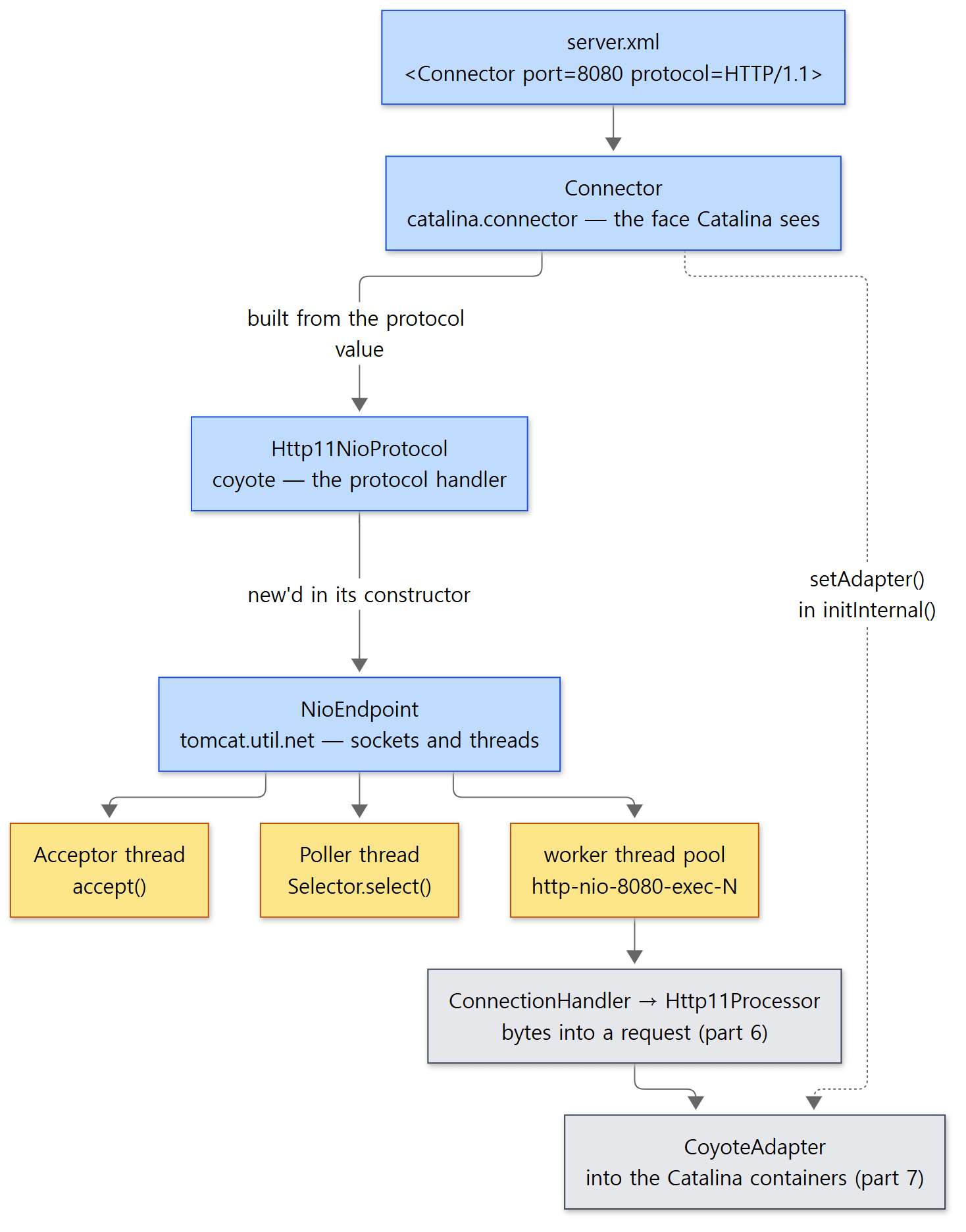 Blue boxes are objects that come from the configuration; yellow boxes are threads the endpoint creates. The grey boxes are for parts 6 and 7.
What class does protocol="HTTP/1.1" become?
As we saw in part 3, Catalina.load() reads server.xml with the Digester and builds objects. Three rules are attached to <Connector>.
        digester.addRule("Server/Service/Connector", new ConnectorCreateRule());
        digester.addSetProperties("Server/Service/Connector",
                new String[] { "executor", "sslImplementationName", "protocol" });
        digester.addSetNext("Server/Service/Connector", "addConnector", "org.apache.catalina.connector.Connector");
java/org/apache/catalina/startup/Catalina.java lines 542–545
ConnectorCreateRule takes the element's protocol attribute and calls new Connector(protocolName) (ConnectorCreateRule.java lines 63–64). The Connector constructor passes that string to ProtocolHandler.create() (Connector.java lines 101–120).
    static ProtocolHandler create(String protocol)
            throws ClassNotFoundException, InstantiationException, IllegalAccessException, IllegalArgumentException,
            InvocationTargetException, NoSuchMethodException, SecurityException {
        if (protocol == null || "HTTP/1.1".equals(protocol) ||
                org.apache.coyote.http11.Http11NioProtocol.class.getName().equals(protocol)) {
            return new org.apache.coyote.http11.Http11NioProtocol();
        } else if ("AJP/1.3".equals(protocol) ||
                org.apache.coyote.ajp.AjpNioProtocol.class.getName().equals(protocol)) {
            return new org.apache.coyote.ajp.AjpNioProtocol();
        } else {
            // Instantiate protocol handler
            Class<?> clazz = Class.forName(protocol);
            return (ProtocolHandler) clazz.getConstructor().newInstance();
        }
    }
java/org/apache/coyote/ProtocolHandler.java lines 250–264
"HTTP/1.1", or no protocol at all (null), becomes Http11NioProtocol. Any other value is treated as a class name and created by reflection. And the default constructor of Http11NioProtocol is the single line this(new NioEndpoint()) (Http11NioProtocol.java lines 36–38). So one <Connector protocol="HTTP/1.1"> becomes three objects: Connector → Http11NioProtocol → NioEndpoint. The class hierarchies are Http11NioProtocol → AbstractHttp11Protocol → AbstractProtocol (which implements ProtocolHandler), and NioEndpoint → AbstractNetworkChannelEndpoint → AbstractEndpoint.
The last line joining the two layers is in Connector.initInternal(). adapter = new CoyoteAdapter(this); followed by protocolHandler.setAdapter(adapter); plugs in the place the protocol handler hands a request to once it has read it (Connector.java lines 1300–1302). What CoyoteAdapter does next is the topic of part 7.
Only NIO is left on main
In the java/org/apache/tomcat/util/net/ folder, the only endpoint classes are AbstractEndpoint, AbstractNetworkChannelEndpoint and NioEndpoint. Compared with other branches (I checked the same folder on each branch with git ls-tree):
| Branch | Endpoints | HTTP/1.1 protocol classes |
|---|---|---|
| 9.0.x | NioEndpoint, Nio2Endpoint, AprEndpoint |
NIO, NIO2, APR |
| 10.1.x, 11.0.x | NioEndpoint, Nio2Endpoint |
Http11NioProtocol, Http11Nio2Protocol |
| main (12.0.0-M1) | NioEndpoint |
Http11NioProtocol |
APR (a connector that handled sockets through the Apache Portable Runtime, the C library httpd uses) was removed in 2021 by commit 314568fa45, "Remove APR/Native connector implementation.", which is on the branches from 10.1.x onward. NIO2 was removed on main by commit 21f0936fe3 (2025-05-15), "Drop NIO2 connector from Tomcat 12" (the same commit mentioned in part 1), and the 12.0.0-M1 section of the change log also says "Remove NIO2 connector." (webapps/docs/changelog.xml line 480). A configuration that used NIO2 on 11.0.x with protocol="org.apache.coyote.http11.Http11Nio2Protocol" will not find the class on 12. For reference, 11.0.x's Nio2Endpoint has no Poller thread; it hands the worker thread pool to the JDK's AsynchronousChannelGroup (checked in the 11.0.x source). This post covers only the NIO connector that remains on main.
ProtocolHandler.create() looks the same on 11.0.x. On both branches the default for "HTTP/1.1" is NIO.
Where does the thread name http-nio-8080 come from?
Http11NioProtocol decides the first part of the name.
    @Override
    protected String getNamePrefix() {
        if (isSSLEnabled()) {
            return "https-" + getSslImplementationShortName() + "-nio";
        } else {
            return "http-nio";
        }
    }
java/org/apache/coyote/http11/Http11NioProtocol.java lines 96–103
AbstractProtocol.getNameInternal() appends - and the port (and the address, if one was set) to make http-nio-8080 (lines 659–685), and init() passes that name to the endpoint (lines 960–961). The value is quoted for use in a JMX name, so one character is trimmed from each end before passing it on. The endpoint then appends -Acceptor, -Poller and -exec- to build the thread names (section 2). A connector with TLS turned on gets names like https-jsse-nio-8443-exec-1 (the value of getSslImplementationShortName() depends on the implementation).
Easy to get wrong: Connector has no setMaxThreads()
When you write maxThreads="5" in server.xml, the Digester's addSetProperties looks for setMaxThreads on Connector. There is no such method on Connector. In that case IntrospectionUtils.setProperty() takes its fallback path: "if there is no setXxx, call setProperty(name, value)" (IntrospectionUtils.java lines 215–216). Connector.setProperty() passes the name and value straight on to the protocol handler.
    public boolean setProperty(String name, String value) {
        if (protocolHandler == null) {
            return false;
        }
        return IntrospectionUtils.setProperty(protocolHandler, name, value);
    }
java/org/apache/catalina/connector/Connector.java lines 368–373
AbstractProtocol.setMaxThreads() in turn calls endpoint.setMaxThreads() (lines 340–342). maxConnections, acceptCount and keepAliveTimeout take the same route (lines 358, 430 and 489). In the end, most of the thread and connection attributes you write on <Connector> are fields of AbstractEndpoint. When you look for a default value, look in AbstractEndpoint, not Connector. On the other hand, this route doesn't catch typos: if a name is misspelled, no layer has a setter for it and the value simply isn't applied (I didn't follow where a warning might be logged).
2. Three kinds of threads: Acceptor, Poller and workers
The threads appear when the endpoint starts (Connector.startInternal() → protocolHandler.start() → endpoint.start()).
            // Create worker collection
            if (getExecutor() == null) {
                createExecutor();
            }

            initializeConnectionLatch();

            // Start poller thread
            poller = new Poller();
            Thread pollerThread = new Thread(poller, getName() + "-Poller");
            pollerThread.setPriority(pollerThreadPriority);
            pollerThread.setDaemon(true);
            pollerThread.start();

            startAcceptorThread();
java/org/apache/tomcat/util/net/NioEndpoint.java lines 533–547
The order mirrors the dependencies.
- It first creates the worker thread pool — its own pool, but only when no
Executorwas supplied from outside (createExecutor(), section 5). - It creates the connection limiter (
LimitLatch, section 6). - It starts one Poller thread.
polleris a single field and this method callsnew Poller()only once, so there is one Poller per connector. - Finally it starts one Acceptor thread. It can only start taking connections once the Poller and the pool that will receive them are ready.
startAcceptorThread()creates a thread namedgetName() + "-Acceptor"(AbstractEndpoint.javalines 2329–2337).
The listening socket itself is opened earlier, in bind() during the init() stage (bindOnInit defaults to true (AbstractEndpoint.java line 1317), lines 2242–2246). The Lifecycle's init and start from part 3 become "open the port" and "start the threads" here.
Example 1: thread names, and the call stack down to the servlet
To check that this is really what happens, I took a jstack of a Tomcat started with the default configuration, and deployed a servlet that returns the name and call stack of the thread handling the request.
This example was run in a Docker container (Eclipse Temurin JDK 21) with Tomcat 12.0.0-M1-dev built as-is from the reference commit (17aa1769b0). The example folder is ex/u05-endpoint, and the core of the servlet is:
// Example written for this post (not Tomcat source code)
// A servlet that returns the name and call stack of the thread handling the request.
@WebServlet("/u05/*")
public class ThreadInfo extends HttpServlet {

    @Override
    protected void doGet(HttpServletRequest req, HttpServletResponse resp) throws IOException {
        String path = req.getPathInfo();
        StringBuilder sb = new StringBuilder();
        if ("/slow".equals(path)) {
            // A deliberately slow request — this thread can do nothing else meanwhile
            long ms = Long.parseLong(req.getParameter("ms"));
            // ... Thread.sleep(ms) ...
        }
        sb.append("thread=").append(Thread.currentThread().getName()).append('\n');
        if ("/stack".equals(path)) {
            // Print this thread's call stack from the bottom (called first) up
            StackTraceElement[] frames = new Throwable().getStackTrace();
            // ... one "Class.method:line" per frame ...
        }
        // ... set the length (Content-Length) and write the body ...
    }
}
[Shortened from the example ex/u05-endpoint/ThreadInfo.java]
run.sh deploys this app as ROOT with server.xml unchanged, runs catalina.sh start, and prints the following.
=== 1. default connector: threads named after the endpoint ===
--- <Connector port="8080" ... >
http-nio-8080-Acceptor http-nio-8080-Poller http-nio-8080-exec-1 http-nio-8080-exec-2 http-nio-8080-exec-3 http-nio-8080-exec-4 http-nio-8080-exec-5 http-nio-8080-exec-6 http-nio-8080-exec-7 http-nio-8080-exec-8 http-nio-8080-exec-9 http-nio-8080-exec-10
--- Poller and one exec thread while idle
"http-nio-8080-Poller" #45 [94] daemon prio=5 os_prio=0 cpu=2.98ms elapsed=1.46s tid=0x00007fe20469f7b0 nid=94 runnable  [0x00007fe1865f4000]
	at sun.nio.ch.EPoll.wait(java.base@21.0.12.1/Native Method)
	at org.apache.tomcat.util.net.NioEndpoint$Poller.run(NioEndpoint.java:1093)
"http-nio-8080-exec-1" #35 [84] daemon prio=5 os_prio=0 cpu=187.21ms elapsed=1.88s tid=0x00007fe20468a620 nid=84 waiting on condition  [0x00007fe186ffe000]
	at jdk.internal.misc.Unsafe.park(java.base@21.0.12.1/Native Method)
	at org.apache.tomcat.util.threads.TaskQueue.take(TaskQueue.java:155)
	at org.apache.tomcat.util.threads.TaskQueue.take(TaskQueue.java:34)
	at org.apache.tomcat.util.threads.ThreadPoolExecutor.getTask(ThreadPoolExecutor.java:900)
	at org.apache.tomcat.util.threads.ThreadPoolExecutor.runWorker(ThreadPoolExecutor.java:947)
	at org.apache.tomcat.util.threads.ThreadPoolExecutor$Worker.run(ThreadPoolExecutor.java:481)
	at org.apache.tomcat.util.threads.TaskThread$WrappingRunnable.run(TaskThread.java:74)
Values such as #45, nid, tid, cpu and elapsed differ from run to run. For the Poller and the worker thread I kept only the top frame and the org.apache.tomcat frames of each jstack block. Three things to read here:
- The thread names carry the
http-nio-8080prefix, as we saw in section 1. There is one Acceptor and one Poller. - There are already 10 worker threads before any request.
minSpareThreadsdefaults to 10 (AbstractEndpoint.javaline 1459), and Tomcat's pool starts that many the moment it is created (section 5). - The Poller waits in
EPoll.wait, and the worker waits inTaskQueue.take(). The Poller is waiting for something to happen on a socket; the worker is waiting for work to arrive in the queue. What links the two is the subject of section 3.
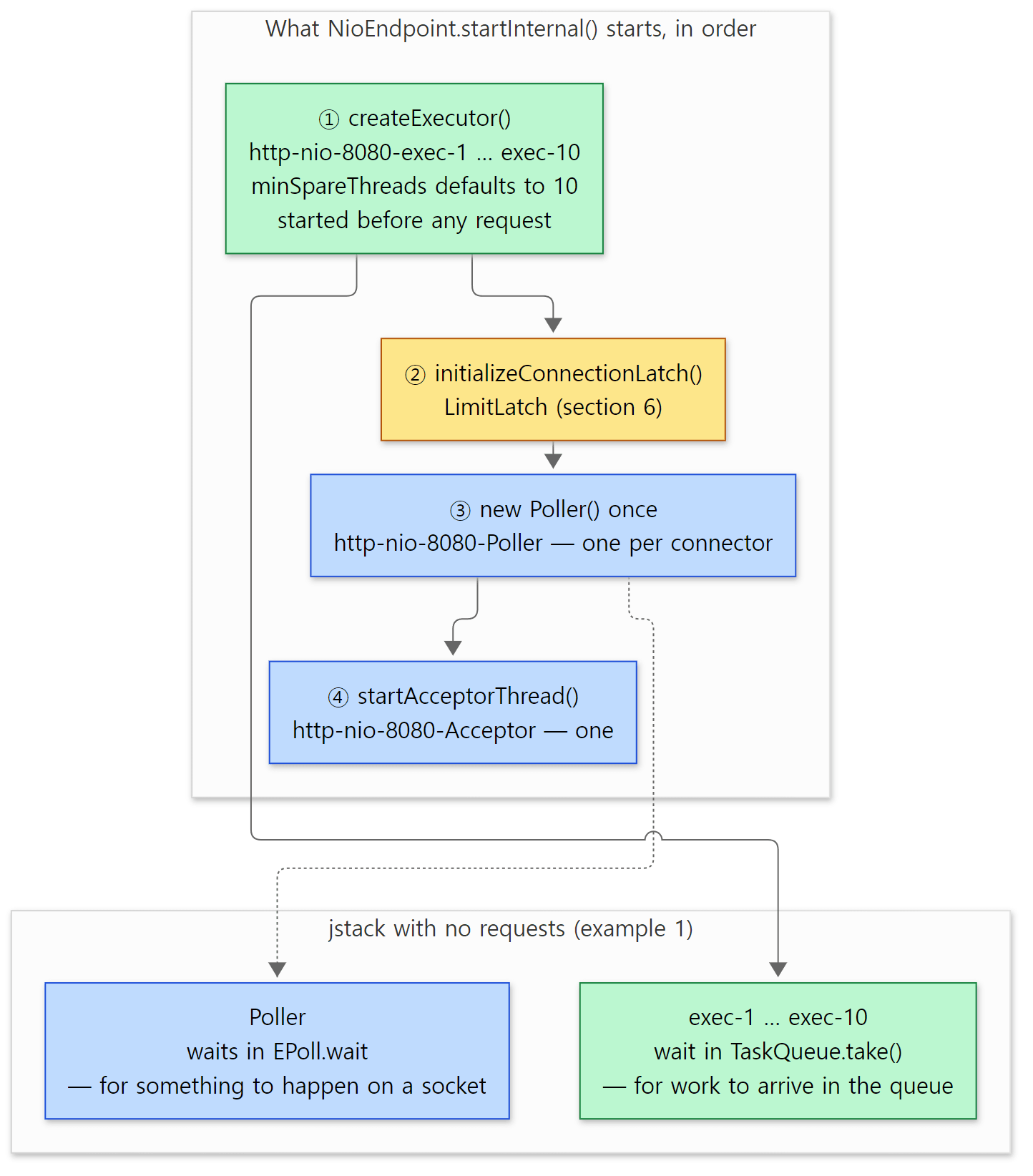 The order from the code above and the jstack output of example 1 in one picture. Section 3 is about what connects these two kinds of waiting.
Here is the call stack the servlet returned (the bottom was called first).
--- call stack of the servlet (bottom = first called)
thread=http-nio-8080-exec-2
  java.lang.Thread.run:1583
  org.apache.tomcat.util.threads.TaskThread$WrappingRunnable.run:74
  org.apache.tomcat.util.threads.ThreadPoolExecutor$Worker.run:481
  org.apache.tomcat.util.threads.ThreadPoolExecutor.runWorker:968
  org.apache.tomcat.util.net.SocketProcessorBase.run:74
  org.apache.tomcat.util.net.NioEndpoint$SocketProcessor.doRun:2218
  org.apache.coyote.AbstractProtocol$ConnectionHandler.process:1317
  org.apache.coyote.AbstractProcessorLight.process:71
  org.apache.coyote.http11.Http11Processor.service:404
  org.apache.catalina.connector.CoyoteAdapter.service:347
  org.apache.catalina.core.StandardEngineValve.invoke:71
  org.apache.catalina.valves.AbstractAccessLogValve.invoke:777
  org.apache.catalina.valves.ErrorReportValve.invoke:82
  org.apache.catalina.core.StandardHostValve.invoke:115
  org.apache.catalina.authenticator.AuthenticatorBase.invoke:540
  org.apache.catalina.core.StandardContextValve.invoke:77
  org.apache.catalina.core.StandardWrapperValve.invoke:164
  org.apache.catalina.core.ApplicationFilterChain.doFilter:111
  org.apache.tomcat.websocket.server.WsFilter.doFilter:59
  org.apache.catalina.core.ApplicationFilterChain.doFilter:132
  jakarta.servlet.http.HttpServlet.service:762
  jakarta.servlet.http.HttpServlet.service:673
  ThreadInfo.doGet:30
Which exec-N handles it differs from run to run. I confirmed that every line number matches the source at the reference commit. Read in three pieces, the stack is a map of the series.
TaskThreadtoNioEndpoint$SocketProcessor.doRun— the scope of this post. A worker thread from the pool took a unit of work calledSocketProcessoroff the queue and ran it.ConnectionHandler.processtoCoyoteAdapter.service— the protocol handler (Coyote). HowHttp11Processorreads bytes into a request is part 6;CoyoteAdapteris part 7.StandardEngineValvetodoGet— Catalina's containers. Valves are part 8 and the filter chain is part 9.WsFilteris the filter that WebSocket support (WsServerContainer) registers on the web app (WsServerContainer.javaline 98, part 15).
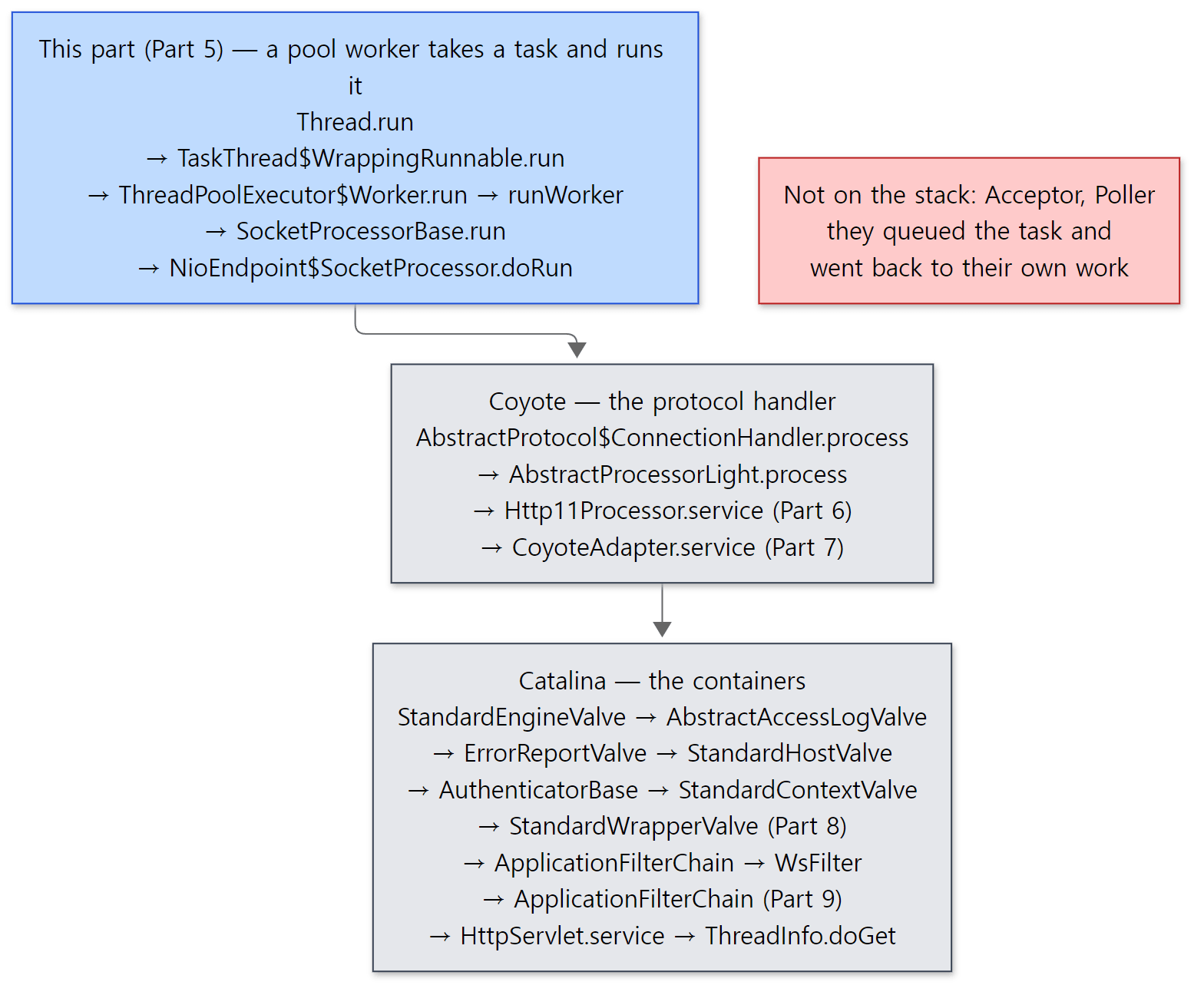 The stack from the output above, with the first-called frame at the top (the output puts it at the bottom). The part numbers in parentheses are where each piece is covered in detail.
Easy to get wrong: neither the Acceptor nor the Poller is on the stack
The request came in on a connection the Acceptor accepted, and it was processed because the Poller reported "data has arrived" — yet neither appears on the stack of the thread that called the servlet. Both are threads that create a unit of work (SocketProcessor), put it in a queue and go back to their own job, so they leave no trace on the stack of the worker thread that runs it. For the same reason, a slow servlet does not stop the Acceptor or the Poller.
3. The journey of one connection
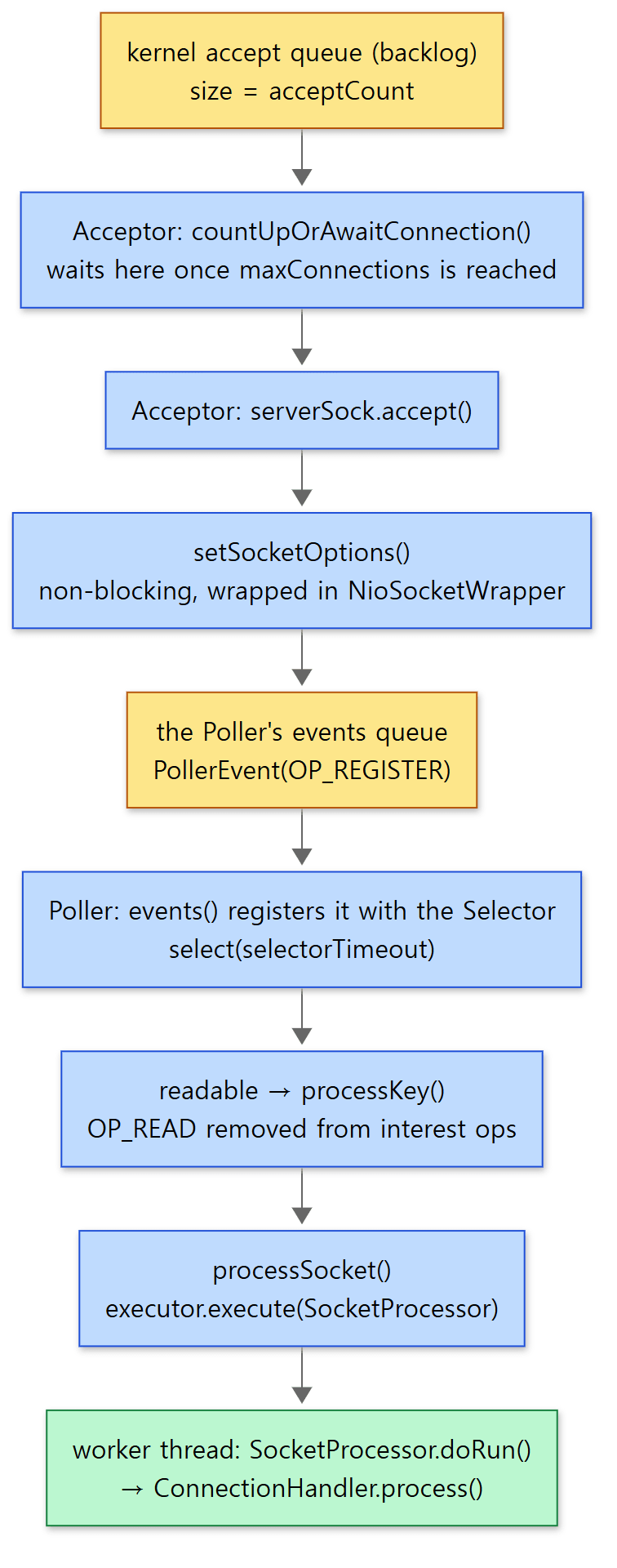 Yellow boxes are places where things wait (the accept queue, the event queue); blue boxes are the code doing the work in between.
1) Acceptor: reserve a slot and accept
                try {
                    // if we have reached max connections, wait
                    endpoint.countUpOrAwaitConnection();

                    // Endpoint might have been paused while waiting for latch
                    // If that is the case, don't accept new connections
                    if (endpoint.isPaused()) {
                        continue;
                    }

                    U socket;
                    try {
                        // Accept the next incoming connection from the server
                        // socket
                        socket = endpoint.serverSocketAccept();
                    } catch (Exception e) {
                        // ...
                    }
                    // Successful accept, reset the error delay
                    errorDelay = 0;

                    // Configure the socket
                    if (!stopCalled && !endpoint.isPaused()) {
                        // setSocketOptions() will hand the socket off to
                        // an appropriate processor if successful
                        if (!endpoint.setSocketOptions(socket)) {
                            endpoint.closeSocket(socket);
                        }
                    } else {
                        endpoint.destroySocket(socket);
                    }
java/org/apache/tomcat/util/net/Acceptor.java lines 131–170
Acceptor.run() repeats this block until stopCalled is set (line 92). Each pass does three things.
countUpOrAwaitConnection()— raises the connection count by one. If there are alreadymaxConnectionsconnections, it stops here until one closes (example 4 in section 6).serverSocketAccept()— callsaccept()on the listening socket. The listening socket was left in blocking mode (serverSock.configureBlocking(true),NioEndpoint.javaline 497), so it waits here if there is no new connection.setSocketOptions()— hands the accepted socket to the Poller. The Acceptor's job ends here and it goes straight back to step 1.
2) setSocketOptions(): make it non-blocking and pass it to the Poller
            NioSocketWrapper newWrapper = new NioSocketWrapper(channel, this);
            channel.reset(socket, newWrapper);
            connections.put(socket, newWrapper);
            socketWrapper = newWrapper;

            // Set socket properties
            // Disable blocking, polling will be used
            socket.configureBlocking(false);
            if (getUnixDomainSocketPath() == null) {
                socketProperties.setProperties(socket.socket());
            }

            socketWrapper.setReadTimeout(getConnectionTimeout());
            socketWrapper.setWriteTimeout(getConnectionTimeout());
            socketWrapper.setKeepAliveLeft(NioEndpoint.this.getMaxKeepAliveRequests());
            poller.register(socketWrapper);
            return true;
java/org/apache/tomcat/util/net/NioEndpoint.java lines 753–769
The connection socket is switched to non-blocking (line 760). From now on, whoever reads this socket doesn't stop even if there is nothing to read. The socket is wrapped in an NioSocketWrapper, Tomcat's record for one connection (read and write timeouts, the time of the last read, how many keep-alive requests remain, the processor currently attached). The last line, poller.register(), doesn't touch the Selector directly; it only puts an event called OP_REGISTER into the Poller's queue (events) (lines 1068–1072). Registering the channel with the Selector is done by the Poller thread itself — a design that keeps several threads from touching the Selector at once.
3) Poller: drain the queue, select, pass on the connections that woke up
            while (true) {

                boolean hasEvents = false;

                try {
                    if (!close) {
                        hasEvents = events();
                        if (wakeupCounter.getAndSet(-1) > 0) {
                            // If we are here, means we have other stuff to do
                            // Do a non-blocking select
                            keyCount = selector.selectNow();
                        } else {
                            keyCount = selector.select(selectorTimeout);
                        }
                        wakeupCounter.set(0);
                    }
                    // ...
                }
                // ...

                Iterator<SelectionKey> iterator = keyCount > 0 ? selector.selectedKeys().iterator() : null;
                // Walk through the collection of ready keys and dispatch
                // any active event.
                while (iterator != null && iterator.hasNext()) {
                    SelectionKey sk = iterator.next();
                    iterator.remove();
                    NioSocketWrapper socketWrapper = (NioSocketWrapper) sk.attachment();
                    // Attachment may be null if another thread has called
                    // cancelledKey()
                    if (socketWrapper != null) {
                        processKey(sk, socketWrapper);
                    }
                }

                // Process timeouts
                timeout(keyCount, hasEvents);
            }
java/org/apache/tomcat/util/net/NioEndpoint.java lines 1081–1134
One pass of the Poller has three steps.
events()— takes out thePollerEvents other threads have queued and applies them to the Selector. ForOP_REGISTERit registers the new channel withsc.register(getSelector(), SelectionKey.OP_READ, socketWrapper); for anything else it adds read or write to the interest ops ("what to watch on this channel") of a key that is already registered (lines 1009–1061).select()— waits up toselectorTimeout(default 1000 ms, line 316) until one of the watched channels is ready. Line 1093 is exactly where the Poller sat inEPoll.waitin example 1. When an event goes into the queue while the Poller is waiting here,addEvent()cuts the wait short withselector.wakeup()(lines 968–973;wakeupCountermakes it call this only while the Poller is insideselect()).processKey()andtimeout()— handle the ready channels and clean up connections whose time is up (section 4).
In processKey(), a channel that has become readable goes this way.
                            unreg(sk, socketWrapper, sk.readyOps());
                            boolean closeSocket = false;
                            // Read goes before write
                            if (sk.isReadable()) {
                                if (socketWrapper.readOperation != null) {
                                    if (!socketWrapper.readOperation.process()) {
                                        closeSocket = true;
                                    }
                                } else if (socketWrapper.readBlocking) {
                                    synchronized (socketWrapper.readLock) {
                                        socketWrapper.readBlocking = false;
                                        socketWrapper.readLock.notify();
                                    }
                                } else if (!processSocket(socketWrapper, SocketEvent.OPEN_READ, true)) {
                                    closeSocket = true;
                                }
                            }
java/org/apache/tomcat/util/net/NioEndpoint.java lines 1154–1170
The first line, unreg(), matters. It removes the ready interest (here, read) from the key. The source comment says this is "a must, so that we don't have multiple threads messing with the socket" (lines 1330–1333). Without it, the next select() would report the same socket as "readable" again while a worker thread is still reading it, and the same connection would get two units of work. Ordinary new data goes to processSocket(..., SocketEvent.OPEN_READ, true) in the last else if. The two branches above it (readOperation, readBlocking) are for when a worker thread is already waiting to read from this socket; instead of creating new work, they wake that thread.
4) processSocket(): create a unit of work and put it in the pool
    public boolean processSocket(SocketWrapperBase<S> socketWrapper, SocketEvent event, boolean dispatch) {
        try {
            if (socketWrapper == null) {
                return false;
            }
            SocketProcessorBase<S> sc = null;
            if (processorCache != null) {
                sc = processorCache.pop();
            }
            if (sc == null) {
                sc = createSocketProcessor(socketWrapper, event);
            } else {
                sc.reset(socketWrapper, event);
            }
            Executor executor = getExecutor();
            if (dispatch && executor != null) {
                executor.execute(sc);
            } else {
                sc.run();
            }
        // ...
java/org/apache/tomcat/util/net/AbstractEndpoint.java lines 2131–2150
A SocketProcessor is a Runnable that says "this happened on this connection (SocketEvent.OPEN_READ); deal with it". After use it goes back into processorCache to be reused (so a new object isn't created every time). The Poller hands it over with executor.execute(sc) and moves straight on to the next key. The key point is that the Poller does not read requests itself. There is only one Poller; if it stopped here to process a request, every connection would stop.
5) Worker thread: one at a time per socket
The SocketProcessorBase.run() that a worker thread takes off the queue and runs first grabs that socket's lock.
    @Override
    public final void run() {
        Lock lock = socketWrapper.getLock();
        lock.lock();
        try {
            // It is possible that processing may be triggered for read and
            // write at the same time. The lock above makes sure that processing
            // does not occur in parallel. The test below ensures that if the
            // first event to be processed results in the socket being closed,
            // the subsequent events are not processed.
            if (socketWrapper.isClosed()) {
                return;
            }
            doRun();
        } finally {
            lock.unlock();
        }
    }
java/org/apache/tomcat/util/net/SocketProcessorBase.java lines 61–78
Even if read and write events arrive at the same time, only one thread at a time processes a given connection. doRun() (on the NIO side, NioEndpoint.SocketProcessor.doRun(), lines 2169–2246) does the TLS handshake first if needed, and once that's done calls getHandler().process(socketWrapper, event) (line 2218 — the very line in example 1's stack). This handler is AbstractProtocol.ConnectionHandler, and from here on we are in the protocol handler's territory. ConnectionHandler.process() uses the processor already attached to this connection if there is one; otherwise it takes one from the recycled list or creates a new one (getProtocol().createProcessor(), lines 1299–1311) and calls processor.process() (line 1317). For HTTP/1.1 that processor is an Http11Processor.
Easy to get wrong: the Poller doesn't "read"
The name makes it easy to think the Poller reads data off the socket and passes it on, but the Poller only reports that "if you read this socket now, there is data". The actual read() is done by the worker thread inside Http11Processor (part 6). That's why, in example 1's stack, the same exec-2 both read the request line and called the servlet.
4. keep-alive — letting go of the thread between requests
After sending the response, the worker thread checks whether the next request is coming on that connection. Http11Processor.service() processes the requests of one connection in turn in a while loop, and reads the request line at the top of every pass (part 6 covers this in detail). From the second pass on, keptAlive is true.
                if (byteBuffer.position() >= byteBuffer.limit()) {
                    if (keptAlive) {
                        // Haven't read any request data yet so use the keep-alive
                        // timeout.
                        wrapper.setReadTimeout(keepAliveTimeout);
                    }
                    if (!fill(false)) {
                        return false;
                    }
                    // At least one byte of the request has been received.
                    // Switch to the socket timeout.
                    wrapper.setReadTimeout(connectionTimeout);
                }
java/org/apache/coyote/http11/Http11InputBuffer.java lines 335–347
Two things to notice. First, the read timeout while waiting for the next request is switched to keepAliveTimeout. Second, the false in fill(false) means "don't block". If there is nothing on the socket yet, it returns false without waiting. service() then leaves the loop and returns SocketState.OPEN ("the connection is open but between requests", Http11Processor.java lines 484–486), and ConnectionHandler reacts to that value like this.
                if (state == SocketState.LONG) {
                    // In the middle of processing a request/response. Keep the
                    // socket associated with the processor. Exact requirements
                    // depend on type of long poll
                    longPoll(wrapper, processor);
                    if (processor.isAsync()) {
                        getProtocol().addWaitingProcessor(processor);
                    }
                } else if (state == SocketState.OPEN) {
                    // In keep-alive but between requests. OK to recycle
                    // processor. Continue to poll for the next request.
                    release(processor);
                    processor = null;
                    wrapper.registerReadInterest();
java/org/apache/coyote/AbstractProtocol.java lines 1378–1391
The comment says it all: "In keep-alive but between requests. OK to recycle processor. Continue to poll for the next request." The processor (the Http11Processor object) is released, and registerReadInterest() queues an event asking the Poller to "watch this socket for reads again" (getPoller().add(this, SelectionKey.OP_READ), NioEndpoint.java lines 1897–1902). When process() returns, the worker thread goes back to the pool to wait for the next unit of work. No thread is attached to an idle keep-alive connection. All that remains is one Selector registration and one NioSocketWrapper object.
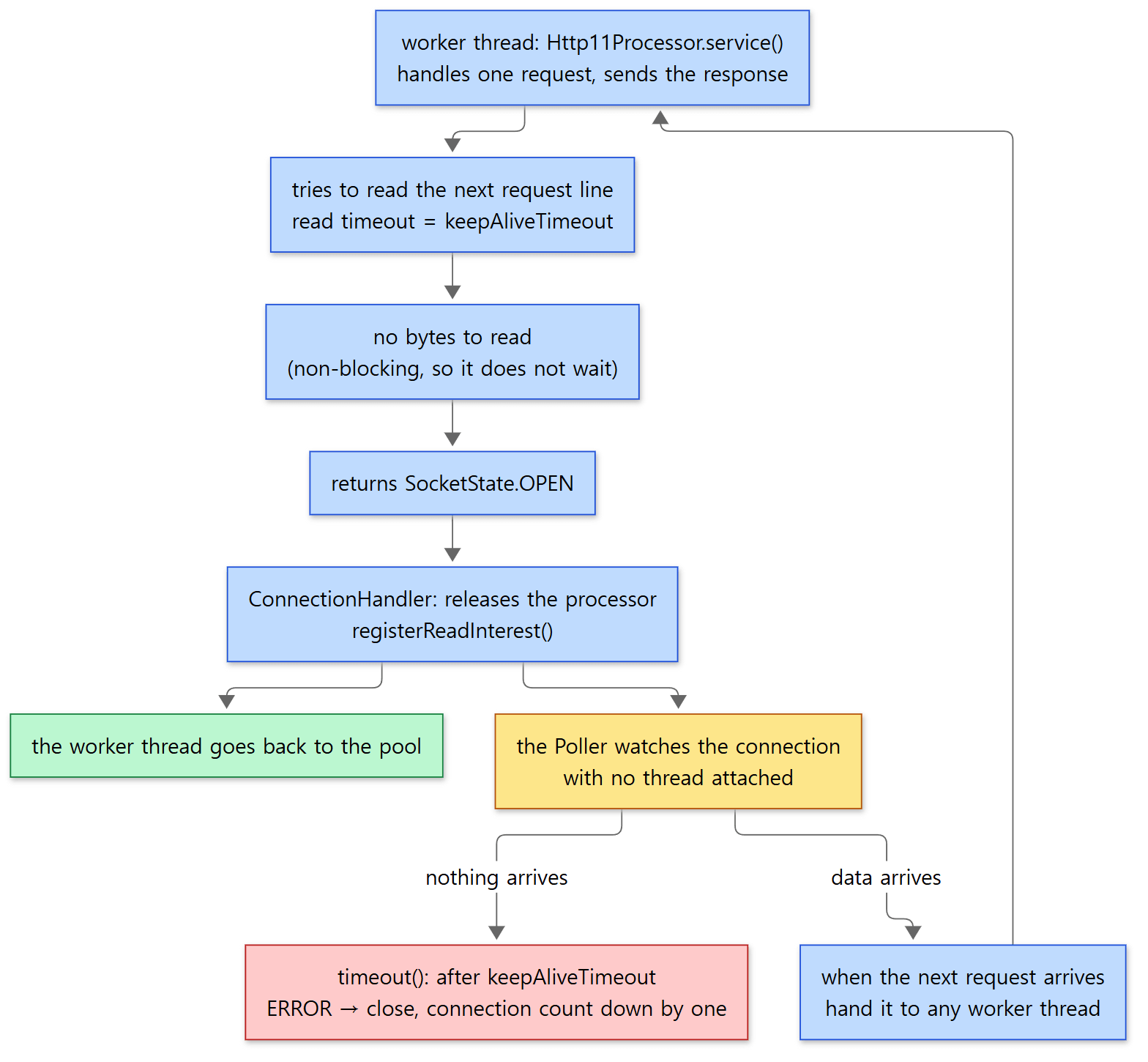 The green box is the point of this design: while waiting, the thread is back in the pool.
The Poller closes connections whose time is up
If the next request never comes, the Poller's timeout() cleans up. This method goes through every key registered with the Selector and, for connections waiting to read, checks whether now - time of last read exceeds the read timeout (here, keepAliveTimeout) (lines 1386–1392). If it does, it calls processSocket() with SocketEvent.ERROR (line 1414) so that a worker thread closes the connection. On close, SocketWrapperBase.close() lowers the connection count by one (countDownConnection(), SocketWrapperBase.java lines 661–675). In example 4 of section 6 we'll see this number release the Acceptor.
Going through every key is expensive when there are many connections, so it isn't done on every pass. It only happens when select() came back after timing out with nothing to do, or when timeoutInterval (default 1000 ms, SocketProperties.java line 173) has passed since the last check (comment and condition, lines 1355–1364). So a connection may close a little later than keepAliveTimeout.
Example 2: five keep-alive connections on two worker threads
I ran the same experiment as example 3 of httpd part 8. The connector gets maxThreads="2", and a small client that drives sockets directly (Client.java) opens 5 connections, sends one request on each, and then leaves them open and idle. In that state it sends one more request on a new connection, and finally sends another request on the first connection.
// Example written for this post (not Tomcat source code)
            case "keepalive" -> {
                // n connections: send one request each, then leave them open and idle
                for (int i = 1; i <= n; i++) {
                    Socket s = new Socket("127.0.0.1", 8080);
                    idle.add(s);
                    String r = get(s, "/u05/thread");
                    System.out.println(t() + " idle conn " + i + ": " + r);
                }
                // If idle connections held on to threads, this request would have to wait
                try (Socket s = new Socket("127.0.0.1", 8080)) {
                    String r = get(s, "/u05/thread");
                    System.out.println(t() + " new conn    : " + r);
                }
                // Once more on the first connection — same connection, possibly a different thread
                String r = get(idle.get(0), "/u05/thread");
                System.out.println(t() + " idle conn 1 again: " + r);
            }
[Shortened from the example ex/u05-endpoint/Client.java — get() sends GET … HTTP/1.1 and reads Content-Length bytes of response; t() is seconds since start]
=== 2. maxThreads=2: five idle keep-alive connections, then a new one ===
--- <Connector port="8080" ... maxThreads="2">
http-nio-8080-Acceptor http-nio-8080-Poller http-nio-8080-exec-1 http-nio-8080-exec-2
 0.02s idle conn 1: thread=http-nio-8080-exec-2
 0.05s idle conn 2: thread=http-nio-8080-exec-1
 0.06s idle conn 3: thread=http-nio-8080-exec-2
 0.06s idle conn 4: thread=http-nio-8080-exec-1
 0.07s idle conn 5: thread=http-nio-8080-exec-2
 0.08s new conn    : thread=http-nio-8080-exec-1
 0.09s idle conn 1 again: thread=http-nio-8080-exec-1
The times vary slightly from run to run.
- There really are only 2 worker threads.
minSpareThreads(default 10) is capped atmaxThreadsingetMinSpareThreads()(Math.min(...),AbstractEndpoint.javalines 1483–1485). - Two threads took five connections, and while those five stayed open the new connection was still served right away (within 0.01 s). The keep-alive time follows
connectionTimeout="20000"in server.xml (see "Easy to get wrong" below), so the five connections could have stayed open for 20 seconds — yet they held no threads at all. - The two requests on connection 1 were taken by different threads (
exec-2→exec-1). Connections and threads are not tied together. Between requests the connection goes back to the Poller, and when the next data arrives it goes to whichever thread is free.
When we ran the same experiment on httpd, the new request waited for the length of KeepAliveTimeout (5.7 s) under the worker MPM, which holds connections, and took 0.001 s under the event MPM (httpd part 8). Tomcat's NIO connector is on the event MPM's side.
Easy to get wrong
- If you don't set
keepAliveTimeout,connectionTimeoutis used. The field is anInteger, and when it isnullthe getter returnsgetConnectionTimeout()(AbstractEndpoint.javalines 1351–1364). The 8080 connector in the distribution's server.xml saysconnectionTimeout="20000"(conf/server.xmllines 70–72), so keep-alive is 20 seconds too. Without even that attribute, it becomes theDEFAULT_CONNECTION_TIMEOUTof 60000 ms that theAbstractHttp11Protocolconstructor sets (AbstractHttp11Protocol.javalines 78–81,http11/Constants.javaline 29). That is much longer than httpd's defaultKeepAliveTimeoutof 5 seconds.DEFAULT_CONNECTION_TIMEOUTon 11.0.x is also 60000. maxKeepAliveRequests(default 100) is the number of requests one connection may carry. The source comment even says "as in Apache HTTPD server" (line 1628). Each request lowers it by one withdecrementKeepAlive(), and when it reaches 0 the connection is closed after that request's response (Http11Processor.javalines 393–398).- httpd event's listener and Tomcat's Poller don't do the same job. The single listener thread of event watches the listening sockets and the waiting connections together in one pollset, and handles timeouts from the front of queues that group connections with the same wait time. Tomcat gives the listening socket to a separate Acceptor that does a blocking
accept(), and the Poller'stimeout()goes through every registered key.
5. The worker thread pool — how it differs from the JDK's
createExecutor(): naming and sizing
    public void createExecutor() {
        internalExecutor = true;
        if (getUseVirtualThreads()) {
            executor = new VirtualThreadExecutor(getName() + "-virt-");
        } else {
            TaskQueue taskqueue = new TaskQueue(maxQueueSize);
            TaskThreadFactory tf = new TaskThreadFactory(getName() + "-exec-", daemon, getThreadPriority());
            executor = new ThreadPoolExecutor(getMinSpareThreads(), getMaxThreads(), getThreadsMaxIdleTime(),
                    TimeUnit.MILLISECONDS, taskqueue, tf);
            taskqueue.setParent((ThreadPoolExecutor) executor);
        }
    }
java/org/apache/tomcat/util/net/AbstractEndpoint.java lines 1961–1972
- Names:
TaskThreadFactoryappends a number counting up from 1 to"http-nio-8080-exec-"(TaskThreadFactory.javalines 47–54). - Size: the core size (corePoolSize) is
minSpareThreads(default 10), the maximum ismaxThreads(default 200, line 1499), and the time a thread beyond the core size may sit idle before it goes away isthreadsMaxIdleTime(default 60000 ms, line 1564). On the<Executor>we will meet later, the attribute with the same meaning is calledmaxIdleTime. The queue sizemaxQueueSizedefaults toInteger.MAX_VALUE— effectively unbounded (line 1535). - Virtual threads: with
useVirtualThreads="true", instead of a pool it usesVirtualThreadExecutor, which creates one JDK 21 virtual thread per task (names start with…-virt-). The examples in this post don't use it.
The ThreadPoolExecutor here is not the one from java.util.concurrent but org.apache.tomcat.util.threads.ThreadPoolExecutor. The file header still says "Written by Doug Lea with assistance from members of JCP JSR-166", so it is the JDK's code copied and modified; it does not extend the JDK class but extends AbstractExecutorService directly (line 217). The same file on 11.0.x, 10.1.x and 9.0.x also says extends AbstractExecutorService. Of the changes, we look at two in this post.
First, it starts the core threads up front when it is created. The constructor ends by calling prestartAllCoreThreads() (line 1108). That method's comment explains that it "overrides the default policy of starting core threads only when new tasks are executed" (lines 1410–1415). That's why exec-1 through exec-10 existed before any request in example 1.
Second, it grows threads before it queues. That is TaskQueue's job.
TaskQueue: "don't queue if we can still add a thread"
When the JDK's ThreadPoolExecutor already has its core number of threads, it puts new work in the queue first and grows threads up to the maximum only when the queue is full. TaskQueue's class comment describes exactly this difference: a normal queue causes the executor to queue tasks first and create new threads only once the queue is full, whereas this queue refuses to queue a task while all existing threads are busy and the pool is below its maximum, so the executor creates a new thread instead (TaskQueue.java lines 28–33). With the queue effectively unbounded in Tomcat, the JDK approach would never see a full queue, and the pool would stay at 10 threads forever.
    @Override
    public boolean offer(Runnable o) {
        // we can't do any checks
        if (parent == null) {
            return super.offer(o);
        }
        // we are maxed out on threads, simply queue the object
        if (parent.getPoolSizeNoLock() == parent.getMaximumPoolSize()) {
            return super.offer(o);
        }
        // we have idle threads, just add it to the queue
        if (parent.getSubmittedCount() <= parent.getPoolSizeNoLock()) {
            return super.offer(o);
        }
        // if we have less threads than maximum force creation of a new thread
        if (parent.getPoolSizeNoLock() < parent.getMaximumPoolSize()) {
            return false;
        }
        // if we reached here, we need to add it to the queue
        return super.offer(o);
    }
java/org/apache/tomcat/util/threads/TaskQueue.java lines 92–112
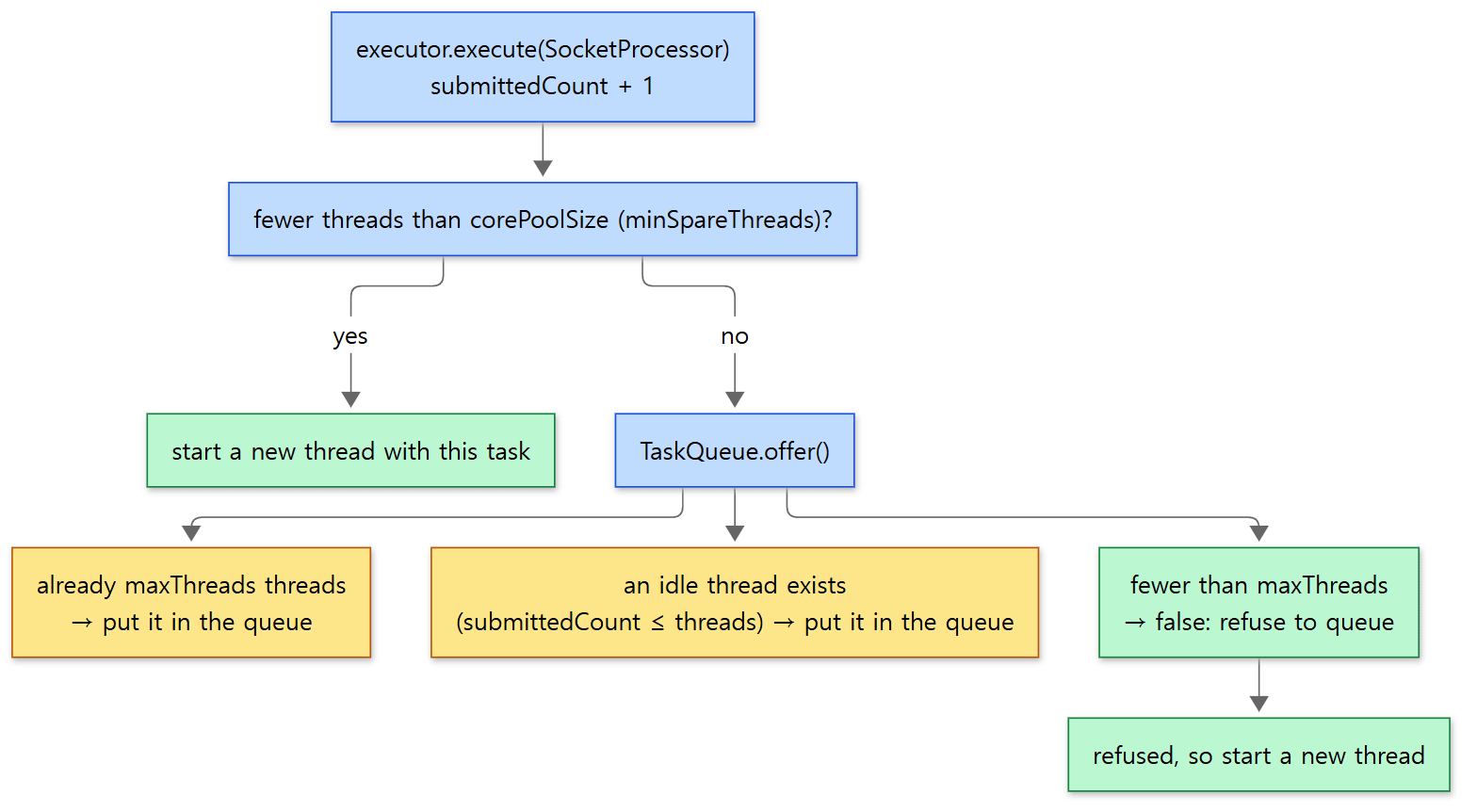 Yellow boxes are the cases where work queues up; green boxes are the cases where threads grow.
When offer() returns false, the executor grows the pool by the JDK's original rule — "if we cannot queue the task, try to add a new thread" (step 3 of executeInternal(), comment at lines 1167–1168). By changing only the queue's rule, the pool's behaviour is turned around. The submittedCount used to tell "is there an idle thread?" is a field the JDK doesn't have; execute() raises it by one (line 1119) and afterExecute() lowers it when the work is done (lines 1867–1873).
If, while trying to grow, another task fills the maximum first and the work is rejected (RejectedExecutionException), execute() catches it and forces the task into the queue with queue.force(command) (lines 1122–1131). The source comment explains that near the maximum pool size, concurrent calls to execute() can, because of TaskQueue, get some tasks rejected instead of queued, and this is the remedy.
Example 3: three slow requests on one worker thread
I started with maxThreads="1" and sent three requests taking 2 seconds each (/u05/slow?ms=2000) at the same time on separate connections.
=== 3. maxThreads=1: three slow requests (2000 ms each) at once ===
--- <Connector port="8080" ... maxThreads="1">
 2.04s request 3 done: thread=http-nio-8080-exec-1
 4.07s request 1 done: thread=http-nio-8080-exec-1
 6.09s request 2 done: thread=http-nio-8080-exec-1
All three were handled by exec-1 and finished 2 seconds apart. With the pool already at its maximum (one thread), they were queued by the first check in TaskQueue.offer() and taken out one at a time. All three connections were accepted at once (the Acceptor and the Poller never stop), so they just waited, without errors. Which request finishes first varies from run to run. Compared with example 2, what holds a thread is a request being executed, not an idle connection.
<Executor>: a pool shared by several connectors
server.xml contains a commented-out <Executor name="tomcatThreadPool" namePrefix="catalina-exec-" maxThreads="150" minSpareThreads="4"/> and an example connector that points to it with executor="tomcatThreadPool" (conf/server.xml lines 57–79). This element becomes org.apache.catalina.core.StandardThreadExecutor, whose startInternal() builds the same TaskQueue + Tomcat ThreadPoolExecutor combination as the endpoint (StandardThreadExecutor.java lines 121–131). Only the defaults differ — name prefix tomcat-exec-, minSpareThreads 25, maxThreads 200 (lines 62–77). Once ConnectorCreateRule sees the executor attribute, finds that pool in the service and plugs it in through the protocol handler's setExecutor() (lines 59–67), the endpoint skips creating its own pool at if (getExecutor() == null) in section 2.
Easy to get wrong: with an external pool, maxThreads reads as -1
AbstractEndpoint.getMaxThreads() returns the value only for its own pool (internalExecutor) and -1 otherwise (lines 1523–1529). Writing maxThreads on a connector that uses an <Executor> has no effect; the thread count has to be set on the <Executor>.
6. Four limits — where things wait and where they get stuck
Lining up what we've seen as "places where a request can wait" gives this.
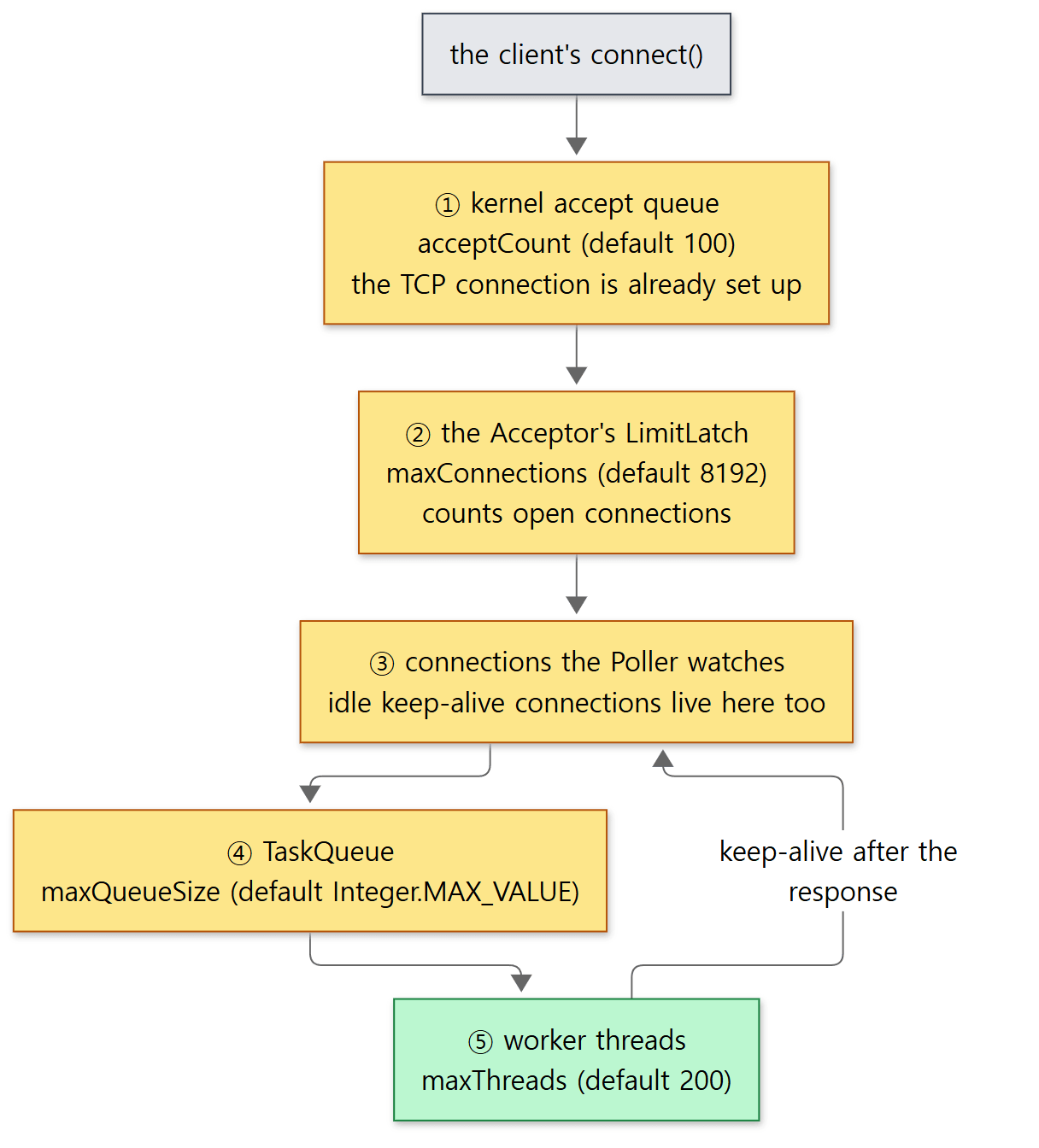 Yellow boxes are places to wait. The numbers are each attribute's default.
| Attribute | Default | Where it applies | When it overflows |
|---|---|---|---|
acceptCount |
100 (line 1290) | serverSock.bind(addr, getAcceptCount()) — the size of the OS queue |
Up to the operating system (outside Tomcat's code) |
maxConnections |
8192 (line 1027) | The Acceptor's countUpOrAwaitConnection() |
The Acceptor stops calling accept(); new connections pile up in the kernel queue |
maxThreads |
200 | Maximum size of the worker pool | Work piles up in the TaskQueue (example 3) |
keepAliveTimeout |
Same as connectionTimeout |
The Poller's timeout() |
Idle connections are closed and the connection count goes down |
acceptCount is the kernel's queue, not Tomcat's
            serverSock = ServerSocketChannel.open();
            socketProperties.setProperties(serverSock.socket());
            InetSocketAddress addr = new InetSocketAddress(getAddress(), getPortWithOffset());
            serverSock.bind(addr, getAcceptCount());
java/org/apache/tomcat/util/net/NioEndpoint.java lines 492–495
acceptCount is used only as the second argument to bind(), the backlog. The operating system sets up the client's TCP connection and keeps it in this queue, handing one over each time the application calls accept(). The field comment also calls it "acceptCount (backlog)" (lines 1286–1289). How a full queue treats new connections, and whether the value passed is used as-is, is the operating system's business; I did not check it for this post.
maxConnections is a LimitLatch that stops the Acceptor
When the endpoint starts, maxConnections becomes new LimitLatch(getMaxConnections()) (lines 2425–2433). LimitLatch is a "gate that lets only a set number through", built on the JDK's AbstractQueuedSynchronizer.
        @Override
        protected int tryAcquireShared(int ignored) {
            long newCount = count.incrementAndGet();
            if (!released && newCount > limit) {
                if (log.isDebugEnabled()) {
                    log.debug(sm.getString("limitLatch.exceeded", Long.valueOf(limit)));
                }
                // Limit exceeded
                count.decrementAndGet();
                return -1;
            } else {
                return 1;
            }
        }
java/org/apache/tomcat/util/threads/LimitLatch.java lines 44–57
It tries raising the count by one; if that exceeds the limit, it undoes it and returns -1 ("can't enter"). AbstractQueuedSynchronizer then puts the calling thread (the Acceptor) in its wait queue and parks it, waking it when someone lowers the count with countDown(). The count is lowered in SocketWrapperBase.close() when a connection closes (section 4), and when accept() fails (Acceptor.java line 148). With maxConnections="-1" no latch is created and connections aren't counted (lines 2426–2428).
Example 4: the third connection with maxConnections=2
I started with maxConnections="2" keepAliveTimeout="3000". Two connections are opened, each sends one request and is left idle, then a third connection is opened and sends a request. While the third connection waits, run.sh prints the Acceptor's stack.
=== 4. maxConnections=2 keepAliveTimeout=3000: two idle connections, then a new one ===
--- <Connector port="8080" ... maxConnections="2" keepAliveTimeout="3000">
 0.05s idle conn 1: thread=http-nio-8080-exec-2
 0.11s idle conn 2: thread=http-nio-8080-exec-3
 0.11s new conn connected (TCP handshake done)
--- Acceptor while the third connection waits
"http-nio-8080-Acceptor" #46 [551] daemon prio=5 os_prio=0 cpu=15.92ms elapsed=4.31s tid=0x00007f78506925d0 nid=551 waiting on condition  [0x00007f77d25f4000]
	at jdk.internal.misc.Unsafe.park(java.base@21.0.12.1/Native Method)
	at java.util.concurrent.locks.LockSupport.park(java.base@21.0.12.1/LockSupport.java:221)
	at java.util.concurrent.locks.AbstractQueuedSynchronizer.acquire(java.base@21.0.12.1/AbstractQueuedSynchronizer.java:788)
	at java.util.concurrent.locks.AbstractQueuedSynchronizer.acquireSharedInterruptibly(java.base@21.0.12.1/AbstractQueuedSynchronizer.java:1133)
	at org.apache.tomcat.util.threads.LimitLatch.countUpOrAwait(LimitLatch.java:133)
	at org.apache.tomcat.util.net.AbstractEndpoint.countUpOrAwaitConnection(AbstractEndpoint.java:2454)
	at org.apache.tomcat.util.net.Acceptor.run(Acceptor.java:133)
	at java.lang.Thread.runWith(java.base@21.0.12.1/Thread.java:1596)
	at java.lang.Thread.run(java.base@21.0.12.1/Thread.java:1583)
 3.12s new conn response: thread=http-nio-8080-exec-6
 3.14s idle conn 1 again: connection closed by server
 3.14s idle conn 2 again: connection closed by server
Times and thread numbers vary from run to run.
- The third connection's
connect()succeeded right away, at 0.11 s. The operating system set up the TCP connection and put it in the kernel queue (acceptCount). The client even sent its request. - But the Acceptor is asleep in
LimitLatch.countUpOrAwait(), not inaccept().Acceptor.java:133in the stack is theendpoint.countUpOrAwaitConnection();line we saw in section 3. With two connections already open, the gate is shut. - The response came at 3.12 s. After the 3-second
keepAliveTimeout, the Poller'stimeout()closed the two idle connections, the count went down, and the Acceptor woke up andaccept()-ed the third connection. The request that had already arrived was processed then. - Requesting again on the idle connections afterwards gives "connection closed by server" — the server really did close them.
Taken together with example 2, a keep-alive connection doesn't take a thread, but it does take a slot in maxConnections. For a service with many idle connections, the limit you hit may be maxConnections rather than maxThreads. httpd's event MPM has a similar device: when open connections pass a certain number, that child process briefly turns off its listening sockets (connections_above_limit(), httpd part 8). In Tomcat, the single Acceptor stopping in front of the latch does the same job.
Easy to get wrong
- The connection count can read one higher than reality. The Acceptor raises the count before
accept(), so until the limit is reachedgetConnectionCount()(the value shown on the ThreadPool MBean in JMX) is one (the number of acceptors) higher than the connections actually being served. The source comment says so (lines 1063–1065). Once the limit is reached, the difference disappears. In example 4, right after accepting the second connection the Acceptor tried to reserve a third slot by raising the count to 3, found it over the limit (2), rolled it back and started waiting (thetryAcquireShared()above). So while the gate is shut, the value is 2, the same as the real number of connections. acceptCountandmaxConnectionsare easy to mix up. The first is the size of the queue in which the operating system keeps "connections Tomcat hasn't accepted yet"; the second is the number of "connections Tomcat has accepted and is holding". In both cases, overflowing connections don't get a rejection response from Tomcat; they are simply left unaccepted.
What this post leaves out
- The TLS handshake (
SecureNioChannel, thehandshakebranch ofSocketProcessor.doRun()):NioEndpoint.javalines 2182–2230,java/org/apache/tomcat/util/net/SecureNioChannel.java - sendfile (letting the kernel send large static files directly):
Poller.processSendfile()fromNioEndpoint.javaline 1211 readBlocking/writeBlocking, which emulate blocking reads and writes through the Poller, andreadOperation/writeOperationfor asynchronous I/O:NioEndpoint.NioSocketWrapper(from line 1446). Async servlets are covered in part 12unlockAccept(), which wakes the Acceptor when the connector stops, andpause():AbstractEndpoint.javaline 2011, line 2343- Listening on a Unix domain socket (
unixDomainSocketPath):NioEndpoint.javalines 394–498 threadRenewalDelay, with which the pool replaces its threads after a web app is stopped (TaskQueue.take(),stopCurrentThreadIfNeeded()):TaskQueue.javalines 127–156- The AJP connector (
AjpNioProtocol):java/org/apache/coyote/ajp/
Summary
| Concept | One-line summary |
|---|---|
<Connector protocol="HTTP/1.1"> |
Three objects: Connector → Http11NioProtocol → NioEndpoint. Most thread and connection attributes reach AbstractEndpoint via setProperty() |
| Endpoints on main | NIO only. APR went from 10.1.x on, NIO2 in 12.0.0-M1 |
| Acceptor (1) | Reserves a maxConnections slot, does a blocking accept(), makes the socket non-blocking and queues it for the Poller |
| Poller (1) | Applies queued events to the Selector and select()s; removes the ready interest from the connection and hands a SocketProcessor to the pool. Also cleans up timeouts |
Worker threads exec-N |
SocketProcessor → ConnectionHandler → Http11Processor → CoyoteAdapter → servlet |
| keep-alive | Between requests, SocketState.OPEN returns the thread to the pool and the Poller watches. Any thread may take the next request |
keepAliveTimeout |
Defaults to connectionTimeout (20 s in server.xml, 60 s without the attribute). Closed by the Poller's timeout() |
Tomcat ThreadPoolExecutor |
The JDK's code, copied and modified. Starts the core threads up front and, through TaskQueue, grows threads before queuing |
maxThreads |
The pool's maximum size. Overflowing work waits in the TaskQueue |
maxConnections |
A LimitLatch. On overflow the Acceptor stops and new connections wait in the kernel queue. Keep-alive connections count too |
acceptCount |
The backlog of bind(). The size of the kernel queue |
What's next
We've followed the worker thread up to the point where it enters Http11Processor.service(). Next we watch that thread read bytes from the socket and turn GET /hello HTTP/1.1 and its headers into Coyote's Request object. The stars are parseRequestLine(), which section 4 only said "tries to read the request line", and MessageBytes, which puts off making strings as long as possible. It continues in part 6: Reading an HTTP/1.1 Request — From Bytes to a coyote Request.
Part 8 of the httpd series: MPMs is a C server's answer to the same question — "which thread takes a connection, and who holds on to a keep-alive connection?" httpd keeps several answers as swappable modules (prefork, worker, event); Tomcat has settled on NIO alone on main. Tomcat's NIO connector is on the same side as the event MPM, which detaches keep-alive connections from threads, but it runs in a single process and splits the thread that takes the listening socket (the Acceptor) from the thread that watches connections (the Poller). How to let go of a thread even during a request is covered in part 12: Async Servlets and Non-Blocking I/O.
The Kafka broker splits the same NIO shape into Acceptor, Processor and request-handler threads but has the Processor do the socket reads and writes (Kafka part 4), while nginx doesn't split watching from processing at all: one worker thread does both (nginx part 7).