What this post covers
This is the sixth post in the "Digging into Tomcat's Source" series. In Part 5 we saw the NIO endpoint's Acceptor take a connection, and the Poller notice "there is something to read" and hand a SocketProcessor to a worker thread (http-nio-8080-exec-N). This time we follow how that worker thread reads bytes from the socket and turns them into one HTTP request. Every value a servlet gets back from HttpServletRequest methods such as getMethod() or getHeader() is produced here.
There are four questions to answer.
- Who splits the bytes read from the socket into a request line and headers, and in what order?
- Why aren't the request line and headers turned into
Strings right away? (MessageBytes) - Where are bad requests and oversized headers caught, and why does a 400 response arrive with an HTML error page?
- When several requests arrive on one connection (keep-alive), where is the loop, and who decides on
chunkedwhen the response length is unknown?
| Item | Details |
|---|---|
| Target | Apache Tomcat |
| Version | 12.0.0-M1 (main, development build 12.0.0-M1-dev) |
| Commit | 17aa1769b0 (2026-10-23) |
| Classes read most | coyote/http11/Http11Processor, Http11InputBuffer, Http11OutputBuffer, tomcat/util/http/parser/HttpHeaderParser, coyote/Request, tomcat/util/buf/MessageBytes and ByteChunk, tomcat/util/http/MimeHeaders |
Every line number in this post refers to that commit. Part 1 explains how to get the source at the same commit and build the Docker image used for the examples.
Http11Processor.java is 1,452 lines and Http11InputBuffer.java is 864. Upgrades (HTTP/2, WebSocket), sendfile and async processing are all mixed into the same file, so it is easy to get lost the first time you open it. This post keeps only the main thread: "read one request, hand it to the container, finish the response, move on to the next request". What was left out is named, with its location, under "What this post leaves out" at the end.
Words to know first
Coyote is the name of the part of Tomcat that handles "the network and the protocol". Its package is org.apache.coyote, and the <Connector> in server.xml belongs here. The part that picks and calls servlets is Catalina (org.apache.catalina), and CoyoteAdapter connects the two. We looked at this split in Part 2.
A processor is the object that interprets and produces the HTTP messages going back and forth on one connection. Http11Processor handles HTTP/1.1, StreamProcessor HTTP/2 and AjpProcessor AJP. They are not created fresh for every connection; idle processors are kept and reused.
The coyote Request and the Catalina Request. There are two classes with the same name. org.apache.coyote.Request is a lightweight object holding the raw values read from the protocol (method, URI bytes, header list), and it does not implement the servlet API (HttpServletRequest). The one a servlet receives is org.apache.catalina.connector.Request, which wraps the coyote Request. This post looks at the first one: how the coyote Request is filled in. The second is covered in Part 7.
To commit a response is to send its status line and headers to the socket. Once committed, the status code and headers can no longer change. It is exactly the state you check with response.isCommitted() in a servlet.
Keep-alive and pipelining. By default HTTP/1.1 does not close the connection after a response; it waits for the next request (keep-alive). Sending several requests at once without waiting for each response is called pipelining. Either way, the server must know exactly "where this request ends" before it can read the next one.
Chunked transfer (Transfer-Encoding: chunked) is what you use when the total body length is unknown. The body is split into chunks, each sent as "length in hex + CR LF + data + CR LF", and a chunk of length 0 marks the end. When the length is known, the Content-Length header is used instead.
1. Where the processor is called from
First, let's confirm the path. I wrote an example servlet that grabs the call stack with new Throwable().getStackTrace() and prints only Tomcat's connector-side frames.
This example was run with Tomcat 12.0.0-M1-dev, built straight from the reference commit (17aa1769b0), in a Docker container (Eclipse Temurin JDK 21). The example folder is ex/u06-http11-processor, and its Echo servlet writes the request's method, URI, query, protocol, header names and the name of the thread that handled it into the body.
        // With stack=1, print only Tomcat's frames from the call stack that led to this servlet.
        if (req.getParameter("stack") != null) {
            for (StackTraceElement e : new Throwable().getStackTrace()) {
                String c = e.getClassName();
                if (c.startsWith("org.apache.coyote") || c.startsWith("org.apache.tomcat.util.net")
| c.equals("org.apache.catalina.connector.CoyoteAdapter")
| c.equals("org.apache.catalina.core.StandardEngineValve")) {
                    out.println("  at " + c.substring(c.lastIndexOf('.') + 1) + "." + e.getMethodName()
                            + ":" + e.getLineNumber());
                }
            }
        }
[Shortened from the example ex/u06-http11-processor/Echo.java]
=== 1. stack: from the servlet back to the processor ===
method=GET uri=/u06/echo query=stack=1 protocol=HTTP/1.1 headers=[Host, User-Agent, Accept] thread=http-nio-8080-exec-2
  at StandardEngineValve.invoke:71
  at CoyoteAdapter.service:347
  at Http11Processor.service:404
  at AbstractProcessorLight.process:71
  at AbstractProtocol$ConnectionHandler.process:1317
  at NioEndpoint$SocketProcessor.doRun:2218
  at SocketProcessorBase.run:74
The thread number (exec-2) changes from run to run. Read from the bottom up:
SocketProcessorBase.run()→NioEndpoint$SocketProcessor.doRun()— the unit of work from Part 5. Line 2218 calls the protocol's handler.AbstractProtocol$ConnectionHandler.process()— picks the processor for this connection and calls it (line 1317).AbstractProcessorLight.process()— if the socket event is "read" (OPEN_READ), callsservice()(lines 70–71).Http11Processor.service()— the star of this post. Line 404 callsCoyoteAdapter.service().CoyoteAdapter.service()→StandardEngineValve— from here on it is Catalina (Part 7, Part 8).
Step 2, picking a processor, looks like this.
                if (processor == null) {
                    processor = recycledProcessors.pop();
                    if (getLog().isTraceEnabled()) {
                        getLog().trace(sm.getString("abstractConnectionHandler.processorPop", processor));
                    }
                }
                if (processor == null) {
                    processor = getProtocol().createProcessor();
                    register(processor);
                    if (getLog().isTraceEnabled()) {
                        getLog().trace(sm.getString("abstractConnectionHandler.processorCreate", processor));
                    }
                }
java/org/apache/coyote/AbstractProtocol.java lines 1299–1311
It takes one from the pile of idle processors (recycledProcessors), and creates a new one if the pile is empty. For HTTP/1.1, createProcessor() is the single line new Http11Processor(this, adapter) (AbstractHttp11Protocol.java lines 1172–1174). The constructor creates the Http11InputBuffer that reads requests and the Http11OutputBuffer that writes responses, and registers the filters that will deal with bodies ahead of time.
        inputBuffer = new Http11InputBuffer(request, protocol.getMaxHttpRequestHeaderSize(), httpParser);
        request.setInputBuffer(inputBuffer);

        outputBuffer = new Http11OutputBuffer(response, protocol.getMaxHttpResponseHeaderSize());
        response.setOutputBuffer(outputBuffer);

        // Create and add the identity filters.
        inputBuffer.addFilter(new IdentityInputFilter(protocol.getMaxSwallowSize()));
        outputBuffer.addFilter(new IdentityOutputFilter());

        // Create and add the chunked filters.
        inputBuffer.addFilter(new ChunkedInputFilter(request, protocol.getMaxTrailerSize(),
                protocol.getAllowedTrailerHeadersInternal(), protocol.getMaxExtensionSize(),
                protocol.getMaxSwallowSize()));
        outputBuffer.addFilter(new ChunkedOutputFilter());
java/org/apache/coyote/http11/Http11Processor.java lines 171–185
request and response are the coyote Request and Response held by the parent class AbstractProcessor. One request object travels with one processor; at the end of each request it is emptied (recycle()) and reused. Filters come in two lists: the "registered" ones (the library) and "the ones actually used for this request" (active). Registration happens once in the constructor; choosing happens per request (sections 4 and 6).
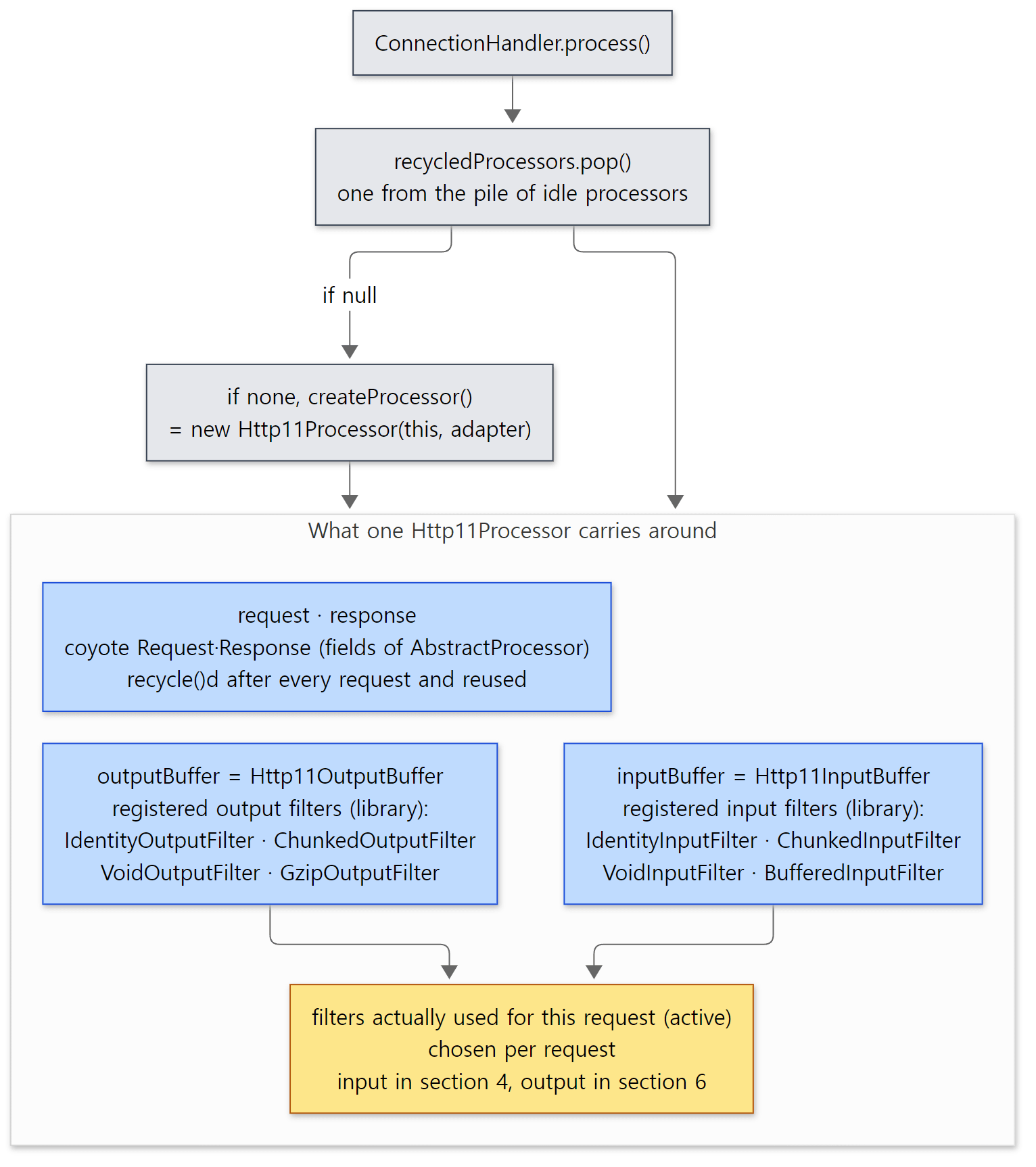 The code above shows only the identity and chunked filters. The Void, Buffered and Gzip filters are registered right after them in the same constructor (Http11Processor.java lines 187–196).
Easy to get wrong: it is not one processor per connection
A processor is attached to "the request currently being processed", not to the connection. Even while a keep-alive connection stays open, the processor goes back to the pile while waiting for the next request (section 6). So with 10,000 open connections but only 10 requests in progress, roughly 10 processors are enough.
2. The service() loop — the life of one request
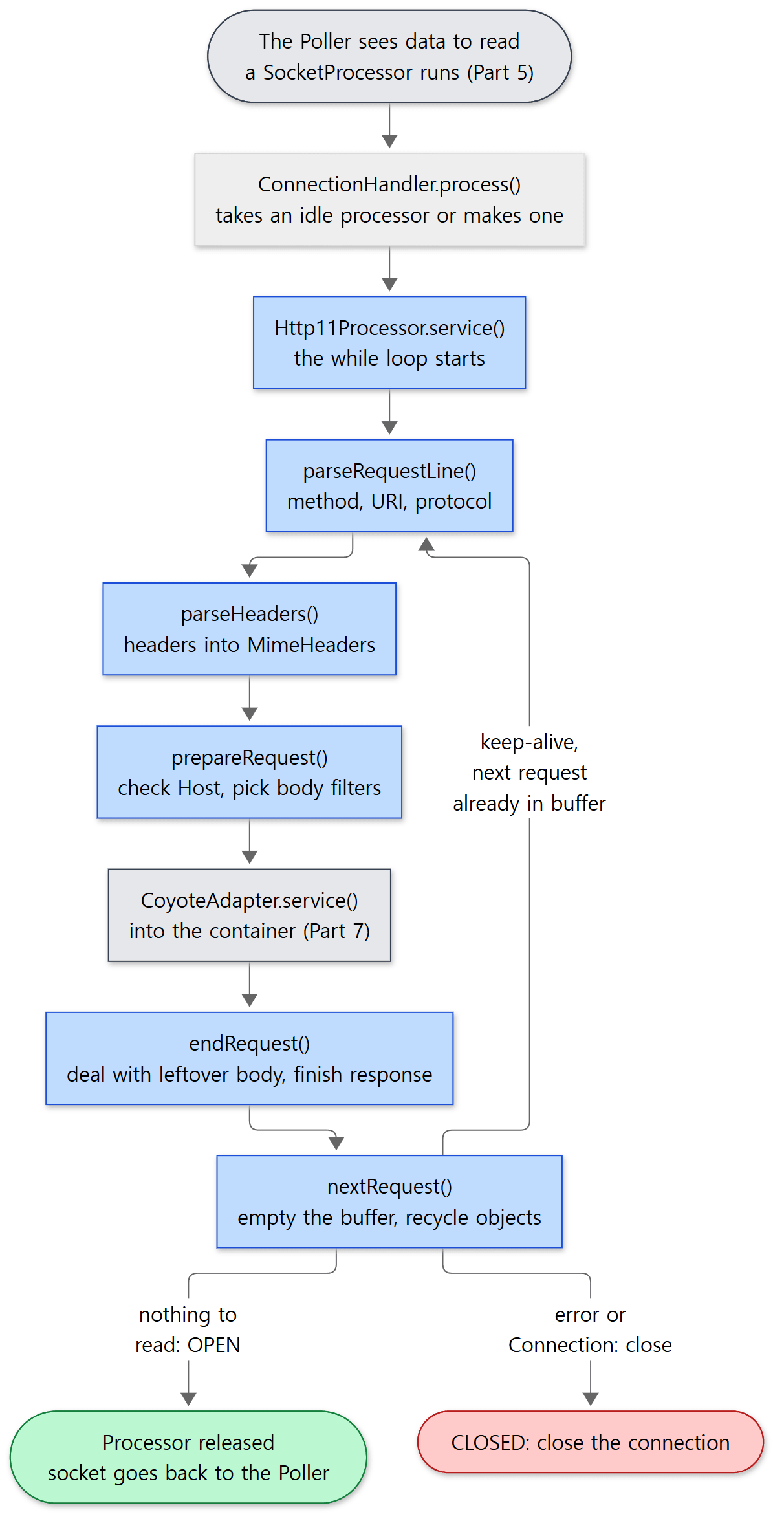 The blue boxes are what happens inside
Http11Processor. The grey ones are covered by the neighbouring posts.
Here is the first part of service().
    @Override
    public SocketState service(SocketWrapperBase<?> socketWrapper) throws IOException {
        RequestInfo rp = request.getRequestProcessor();
        rp.setStage(org.apache.coyote.Constants.STAGE_PARSE);

        // Setting up the I/O
        setSocketWrapper(socketWrapper);

        // Flags
        keepAlive = true;
        openSocket = false;
        readComplete = true;
        boolean keptAlive = false;
        SendfileState sendfileState = SendfileState.DONE;

        while (!getErrorState().isError() && keepAlive && !isAsync() && upgradeToken == null &&
                sendfileState == SendfileState.DONE && !protocol.isPaused()) {

            // Parsing the request header
            try {
                if (!inputBuffer.parseRequestLine(keptAlive, protocol.getConnectionTimeout(),
                        protocol.getKeepAliveTimeout())) {
                    if (inputBuffer.getParsingRequestLinePhase() == -1) {
                        return SocketState.UPGRADING;
                    } else if (handleIncompleteRequestLineRead()) {
                        break;
                    }
                }

                // Process the Protocol component of the request line
                // Need to know if this is an HTTP 0.9 request before trying to
                // parse headers.
                prepareRequestProtocol();

                if (protocol.isPaused()) {
                    // 503 - Service unavailable
                    response.setStatus(503);
                    setErrorState(ErrorState.CLOSE_CLEAN, null);
                } else {
                    keptAlive = true;
                    // Set this every time in case limit has been changed via JMX
                    request.getMimeHeaders().setLimit(protocol.getMaxHeaderCount());
                    if (!inputBuffer.parseHeaders()) {
                        // We've read part of the request, don't recycle it
                        // instead associate it with the socket
                        openSocket = true;
                        readComplete = false;
                        break;
                    }
java/org/apache/coyote/http11/Http11Processor.java lines 253–301
The while condition tells you what kind of loop this is. As long as there is no error, keep-alive is on, and we have not moved over to async or an upgrade, it keeps reading the next request. One trip round the loop is one request, in the order shown in the diagram above.
parseRequestLine()— splitsGET /u06/echo?n=1 HTTP/1.1into method, URI, query and protocol (section 3). Returnsfalseif not enough bytes have arrived.prepareRequestProtocol()— checks whether the protocol isHTTP/1.1orHTTP/1.0. Anything else is a 505 (section 3).parseHeaders()— reads the headers one line at a time intoMimeHeaders(section 4).- Upgrade check — with
Connection: upgradethe connection may switch to HTTP/2 (h2c) or WebSocket (lines 334–375, Part 15). prepareRequest()— checks theHostheader, looks forConnection: close, and picks the input filter that will read the body (section 4).getAdapter().service(request, response)— hands the finished coyoteRequestto Catalina (line 404). The servlet runs and the response is written.endRequest()— deals with body bytes the servlet didn't read, and sends the response out to the end (line 444, lines 1189–1230).nextRequest()— empties the input and output buffers and the request and response objects for the next request (lines 457–458).
The rp.setStage(...) calls throughout the loop record "which stage this request is in right now". The values live in coyote/Constants.java, from STAGE_NEW (0) to STAGE_ENDED (7) (lines 48–83). The letters shown per request on the manager app's server status page — P (parse and prepare), S (service), F (finishing), K (keep-alive), R (ready) — are these values translated (StatusTransformer.java lines 552–588).
Easy to get wrong: the comment still mentions HTTP/0.9, but main no longer supports it
The comment on lines 282–284 says "we need to know if this is an HTTP 0.9 request before parsing headers". But prepareRequestProtocol() at this commit (lines 600–620) has no branch for 0.9. On the 11.0.x branch, parseRequestLine() accepted a line that ended without a protocol as an empty protocol ("HTTP/0.9 style request"), and Http11Processor had an http09 flag that skipped header parsing. On main that code was removed and only the comment remains. Example 2b in section 3 shows that such a request really gets a 400.
3. Reading the request line — parseRequestLine()'s phase numbers
Http11InputBuffer.parseRequestLine() looks at the bytes one at a time, remembering "how far we got" in a single integer, parsingRequestLinePhase.
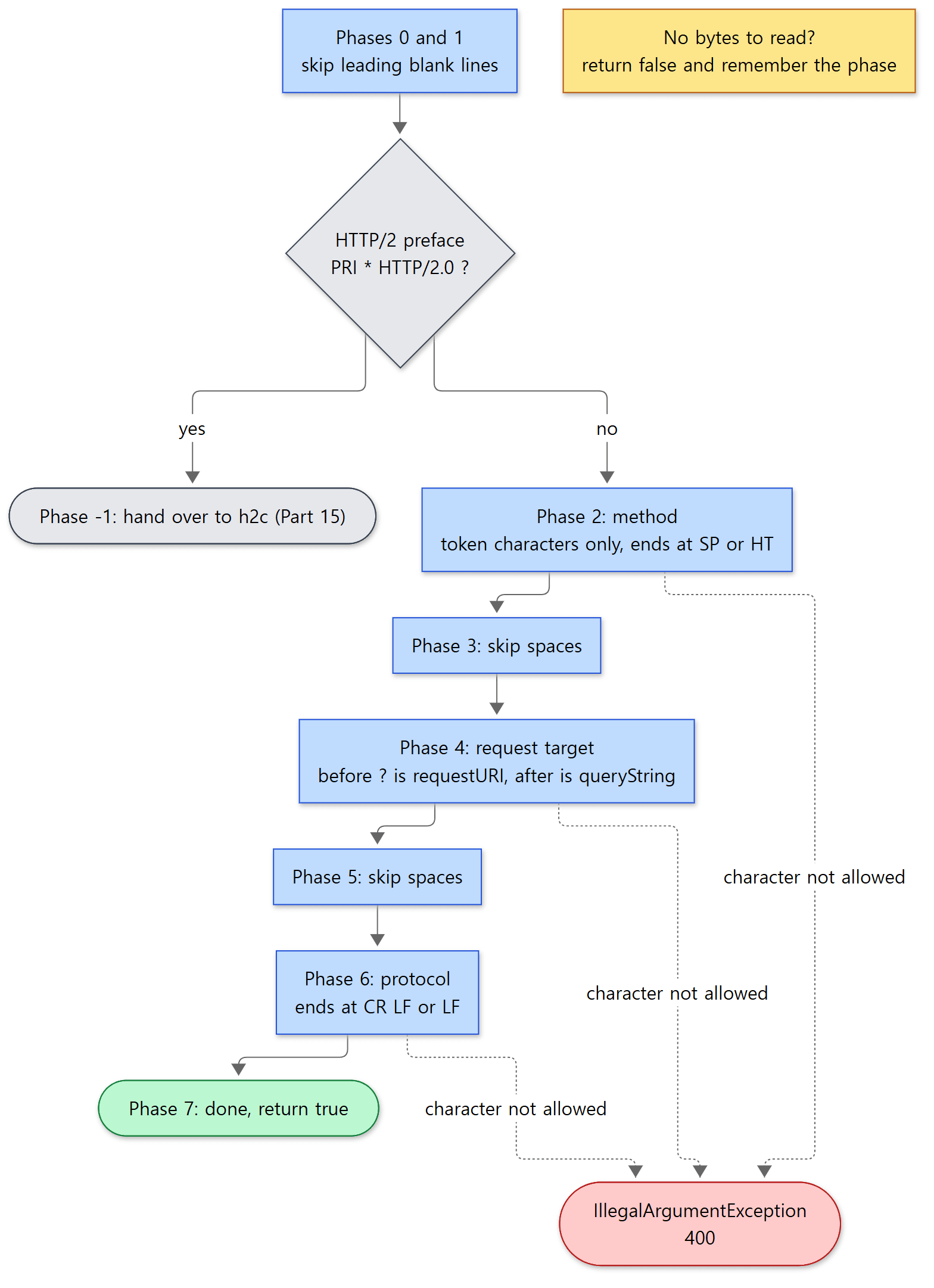 The phase number exists because of the yellow box. It is explained below.
| Phase | What it does | Source |
|---|---|---|
| 0, 1 | Skip blank lines (CR, LF) before the request. Record the start time on the first byte | lines 332–373 |
| -1 | If the connection starts with the HTTP/2 preface (PRI * HTTP/2.0), hand over to h2c |
lines 348–360 |
| 2 | Method. HTTP token characters only, ends at SP or HT | lines 374–402 |
| 3 | Skip spaces | lines 403–421 |
| 4 | Request target (URI). Split path and query at the first ? |
lines 422–474 |
| 5 | Skip spaces | lines 475–496 |
| 6 | Protocol. Ends at CR LF (or a lone LF) | lines 497–534 |
| 7 | Tidy up and return true |
lines 535–542 |
The end of phase 4 shows how values are stored.
            if (parsingRequestLineQPos >= 0) {
                request.queryString().setBytes(byteBuffer.array(), parsingRequestLineQPos + 1,
                        end - parsingRequestLineQPos - 1);
                request.requestURI().setBytes(byteBuffer.array(), parsingRequestLineStart,
                        parsingRequestLineQPos - parsingRequestLineStart);
            } else {
                request.requestURI().setBytes(byteBuffer.array(), parsingRequestLineStart,
                        end - parsingRequestLineStart);
            }
java/org/apache/coyote/http11/Http11InputBuffer.java lines 460–468
It does not make the URI into a String. It only passes requestURI() the byte array read from the socket (byteBuffer.array()), a start position and a length. This "remember only the position" object is MessageBytes, from section 5.
Why carry a phase number — reading without waiting
Every phase's loop starts with this shape.
                // Read new bytes if needed
                if (byteBuffer.position() >= byteBuffer.limit()) {
                    if (!fill(false)) {
                        return false;
                    }
                }
java/org/apache/coyote/http11/Http11InputBuffer.java lines 381–386
The false in fill(false) means "don't wait" (non-blocking). If the socket has no bytes right now, it reads 0 bytes and returns false, and parseRequestLine() returns false straight away too. Headers work the same way; fillHeaderBuffer() carries the comment "HTTP headers are always read using non-blocking IO" (lines 714–717).
The design is meant to keep the worker thread from sitting blocked, waiting for the rest when only half a request line has arrived. Instead it leaves, and when more bytes arrive the Poller will wake it again — so on the way back in it must know "the method is done and we were in the middle of the URI". That is the phase number, and it is also why the read positions (parsingRequestLineStart and friends) are fields. If some of the request line has already been read (phase 2 or higher), handleIncompleteRequestLineRead() sets readComplete = false (lines 544–562), and service() returns SocketState.LONG so that the processor stays attached to this socket (lines 484–489). In this case the processor is not returned to the pile, because the half-read request lives inside it.
Checking the protocol — 1.1, 1.0, otherwise 505
    private void prepareRequestProtocol() {

        MessageBytes protocolMB = request.protocol();
        if (protocolMB.equals(Constants.HTTP_11)) {
            http11 = true;
            protocolMB.setString(Constants.HTTP_11);
        } else if (protocolMB.equals(Constants.HTTP_10)) {
            http11 = false;
            keepAlive = false;
            protocolMB.setString(Constants.HTTP_10);
        } else {
            // Unsupported protocol
            http11 = false;
            // Send 505; Unsupported HTTP version
            response.setStatus(505);
            setErrorState(ErrorState.CLOSE_CLEAN, null);
            if (log.isDebugEnabled()) {
                log.debug(sm.getString("http11processor.request.unsupportedVersion", protocolMB));
            }
        }
    }
java/org/apache/coyote/http11/Http11Processor.java lines 600–620
It compares the bytes directly against a constant string, and if they match it stores the constant String with setString(). However many times getProtocol() is called later, no new string has to be made. For HTTP/1.0, keepAlive = false is set right here, because the default for HTTP/1.0 is "send one response and close".
Example 2: bad request lines
curl won't build a broken request for us, so raw requests are sent through bash's /dev/tcp (the container has no nc, so I used this approach). Here is a helper that prints the first line of the response and only the "Message" part of a 400 response's HTML body.
# Show only the status line and the "Message" part of the body made by ErrorReportValve
raw_err() {
  exec 3<>/dev/tcp/127.0.0.1/8080
  printf '%b' "$1" >&3
  out=$(timeout 3 cat <&3 | tr -d '\r')
  exec 3>&-
  echo "$out" | head -1
  echo "$out" | grep -o '<b>Message</b> [^<]*' | sed 's/<b>Message<\/b>/  message:/' || true
}

raw_err 'G@T /u06/echo HTTP/1.1\r\nHost: a\r\n\r\n'
raw_err 'GET /u06/echo\r\n\r\n'
raw_err 'GET /u06/echo HTTP/1.2\r\nHost: a\r\n\r\n'
--- 2a. invalid character in method
HTTP/1.1 400
  message: Invalid character found in method name [G@T ]. HTTP method names must be tokens
--- 2b. HTTP/0.9 style request (no protocol)
HTTP/1.1 400
  message: Invalid character found in the request target [/u06/echo0x0d0x0a0x0d0x0a...]. The valid characters are defined in RFC 7230 and RFC 3986
--- 2c. unknown version HTTP/1.2
HTTP/1.1 505
- 2a: in phase 2,
@is not a token character, so anIllegalArgumentExceptionwas thrown (lines 394–398). The message isiib.invalidmethodfromLocalStrings.properties. - 2b: a request that ends with CR LF and no protocol. While reading the URI in phase 4 it met a CR (
0x0d), which is not allowed in a request target, so 400 (lines 450–457). On 11.0.x this would have been accepted as an HTTP/0.9 request./is/escaped for HTML. - 2c: the request line is well formed, but
HTTP/1.2falls into the last branch ofprepareRequestProtocol(), so 505.
The status line ending right after the number, as in HTTP/1.1 400 , is not a mistake. Section 6 explains it.
Easy to get wrong: lenient about spaces and line endings
The httpd HttpProtocolOptions Strict we saw in httpd Part 9 answered 400 for two spaces in a row or a line ending in a lone LF. Tomcat's request-line parser is lenient in exactly those places. The comments in phases 3 and 5 say "Spec says single SP but also be tolerant of multiple SP and/or HT" (lines 404 and 476), and phase 6 accepts a lone LF as the end of the line ("LF is an optional line terminator", lines 519–522). In exchange it is strict about characters: only token characters in the method, and only the characters RFC 3986 allows in the URI (server.xml's relaxedPathChars and relaxedQueryChars can relax a few of them).
4. Reading headers — HttpHeaderParser and MimeHeaders
parseHeaders() hands headers to the parser one line at a time and checks the size as it goes.
    boolean parseHeaders() throws IOException {
        if (!parsingHeader) {
            throw new IllegalStateException(sm.getString("iib.parseheaders.ise.error"));
        }

        HeaderParseStatus status;

        do {
            status = httpHeaderParser.parseHeader();
            // Checking that headers plus request line size does not exceed its limit
            if (byteBuffer.position() > headerBufferSize) {
                throw new IllegalArgumentException(sm.getString("iib.requestheadertoolarge.error"));
            }
        } while (status == HeaderParseStatus.HAVE_MORE_HEADERS);
        if (status == HeaderParseStatus.DONE) {
            parsingHeader = false;
            end = byteBuffer.position();
            return true;
        } else {
            return false;
        }
    }
java/org/apache/coyote/http11/Http11InputBuffer.java lines 552–573
The actual parsing of a header line is done by HttpHeaderParser (tomcat/util/http/parser). Like the request line parser, it remembers "how far it got" (HEADER_START, HEADER_NAME, HEADER_VALUE …) and returns NEED_MORE_DATA when it runs out of bytes. There are three possible results.
| Return value | Meaning | What parseHeaders() does |
|---|---|---|
HAVE_MORE_HEADERS |
One header line is complete | Reads the next line |
DONE |
Met the blank line. End of headers | Stores the body start position in end and returns true |
NEED_MORE_DATA |
Not enough bytes | false. service() returns LONG (lines 295–301) |
Once a header name has been read (when the colon is reached), a slot is created in MimeHeaders on the spot.
            if (chr == COLON) {
                if (headerData.start == pos) {
                    // Zero length header name - not valid.
                    // skipLine() will handle the error
                    return skipLine();
                }
                headerParsePos = HeaderParsePosition.HEADER_VALUE_START;
                headerData.headerValue = headers.addValue(source.getHeaderByteBuffer().array(), headerData.start,
                        pos - headerData.start);
java/org/apache/tomcat/util/http/parser/HttpHeaderParser.java lines 139–147
The name, again, is remembered only as a position in the byte array. While reading the value to the end of the line, the parser tidies it up in place inside the buffer: it skips leading whitespace, replaces folded multi-line values (obs-fold) with a single space, and trims trailing whitespace (lines 177–197, 228–239, 258–263). When done, headerValue.setBytes(...) records a position in that same buffer (lines 268–269).
If a name contains a non-token character, a value contains a control character, or a line has no colon, skipLine() reads to the end of that line and then throws. It does so to put the offending line into the message.
        throw new IllegalArgumentException(sm.getString("httpHeaderParser.invalidHeader",
                HeaderUtil.toPrintableString(source.getHeaderByteBuffer().array(), headerData.lineStart,
                        headerData.lastSignificantChar - headerData.lineStart + 1)));
java/org/apache/tomcat/util/http/parser/HttpHeaderParser.java lines 306–308
MimeHeaders — one array, no hashing
MimeHeaders, which holds the headers, is not a HashMap but an array of MimeHeaderField. The class comment explains why: most servlets look at only a few headers and most headers have a single value, so building a hash would cost more (lines 58–60). Lookups start from the beginning and compare names case-insensitively.
    public MessageBytes getValue(String name) {
        for (int i = 0; i < count; i++) {
            if (headers[i].getName().equalsIgnoreCase(name)) {
                return headers[i].getValue();
            }
        }
        return null;
    }
java/org/apache/tomcat/util/http/MimeHeaders.java lines 365–372
The array's slots (MimeHeaderField) are not thrown away on recycle(); they are kept and reused for the next request (lines 113–118). "No GC is generated" is the goal stated at the top of the class comment (lines 34–35).
Two limits — size and count
server.xml <Connector> attribute |
Default | Defined in | When exceeded |
|---|---|---|---|
maxHttpHeaderSize |
8192 bytes | AbstractHttp11Protocol.java line 283 |
400 "Request header is too large" |
maxHttpRequestHeaderSize |
-1 (= follow maxHttpHeaderSize) |
lines 307–316 | Same as above |
maxHeaderCount |
100 | AbstractProtocol.java line 239 |
400 "More than the maximum allowed number of headers" |
The size limit counts the bytes of the request line and headers together. The check in parseHeaders() is commented "headers plus request line size", and it is also enforced before the buffer is even filled.
        if (parsingHeader) {
            if (byteBuffer.limit() >= headerBufferSize) {
                if (parsingRequestLine) {
                    // Avoid unknown protocol triggering an additional error
                    request.protocol().setString(Constants.HTTP_11);
                }
                throw new IllegalArgumentException(sm.getString("iib.requestheadertoolarge.error"));
            }
        } else {
            byteBuffer.limit(end).position(end);
        }
java/org/apache/coyote/http11/Http11InputBuffer.java lines 738–748
The count limit is checked when MimeHeaders creates a slot. The loop calls setLimit(protocol.getMaxHeaderCount()) again on every request so that a value changed through JMX takes effect from the next request (comment on lines 293–294).
    private MimeHeaderField createHeader() {
        if (limit > -1 && count >= limit) {
            throw new IllegalStateException(sm.getString("headers.maxCountFail", Integer.valueOf(limit)));
        }
java/org/apache/tomcat/util/http/MimeHeaders.java lines 280–283
Example 3: header limits and a broken header
--- 2e. header line without colon
HTTP/1.1 400
  message: The HTTP header line [Broken header] does not conform to RFC 9112. The request has been rejected.
=== 3. limits ===
--- 3a. one 9000-byte header (maxHttpHeaderSize default 8192)
HTTP/1.1 400
  message: Request header is too large
--- 3b. 101 headers + Host (maxHeaderCount default 100)
HTTP/1.1 400
  message: More than the maximum allowed number of headers, [100], were detected.
--- 3c. 98 headers + Host + Connection = 100
HTTP/1.1 200
--- 3d. 9000-byte request target
HTTP/1.1 400
  message: Request header is too large
- 2e: a single
Broken headerline with no colon makes the whole request a 400. - 3a, 3b: the default limits were exceeded. In 3b, which has 102 headers counting
Host, anIllegalStateExceptionwas thrown when creating the 101st header. This exception is also caught by the loop'scatch (Throwable t)from section 2 and turned into a 400 (section 6). - 3c: exactly 100 gets through. The comparison is
count >= limit, so the 100th slot can still be created. - 3d: a 9000-byte URI gets the same 400 with the same message.
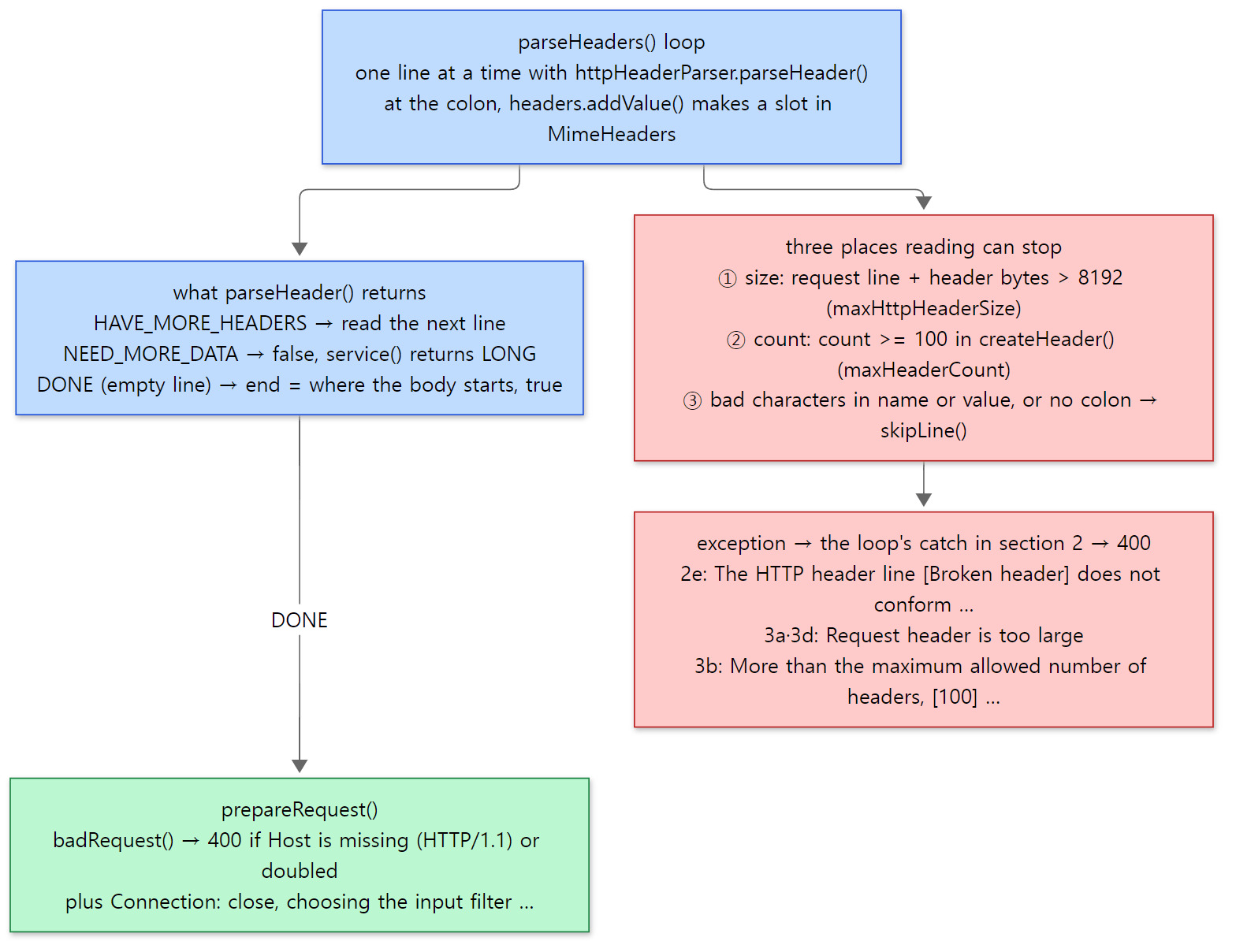 The messages in the red boxes are the real output of examples 2e, 3a, 3b and 3d. 3d is a long URI, not a header, yet it hits the same size limit.
Easy to get wrong: Tomcat has no 414
httpd has a separate limit for the request line (LimitRequestLine, 8190 bytes) and for a single header line (LimitRequestFieldSize), and a long request line got 414 (URI Too Long) (httpd Part 9, section 5). Tomcat's HTTP/1.1 connector measures the request line and headers against one limit, and going over it is a 400 whether the culprit is the URI or a header. That is what 3d shows. So when someone asks why "a long query string is blocked with a 400", the setting to look at is maxHttpHeaderSize (or maxHttpRequestHeaderSize). The name sounds like it is only about headers, but the request line counts too. The count limit of 100, on the other hand, matches httpd's LimitRequestFields default.
prepareRequest() — checks after the headers are read
Once the headers are in, prepareRequest() gets the request into a "usable" shape. The best-known part is the Host check.
        // Check host header
        MessageBytes hostValueMB = null;
        try {
            hostValueMB = headers.getUniqueValue("host");
        } catch (IllegalArgumentException iae) {
            // Multiple Host headers are not permitted
            badRequest("http11processor.request.multipleHosts");
        }
        if (http11 && hostValueMB == null) {
            badRequest("http11processor.request.noHostHeader");
        }
java/org/apache/coyote/http11/Http11Processor.java lines 666–676
An HTTP/1.1 request with no Host, or with two or more, gets a 400. Apart from that, prepareRequest() does the following.
- If the
Connectionheader containsclose,keepAlive = false(lines 634–644). - If the request line carries an absolute URI like
http://host/path, keep only the path, and check that its host matches theHostheader (lines 678–760). - Check the URI's characters once more (lines 762–769).
- Pick the input filter that will read the body (
prepareInputFilters(), lines 800–858).Transfer-Encoding: chunkedgetsChunkedInputFilter, aContent-LengthgetsIdentityInputFilter(a filter that reads exactly that many bytes), and with neither the request is taken to have no body and getsVoidInputFilter. Settling "where the body ends" here is what lets the next request's start be found even if the servlet doesn't read the whole body. - Take the server name and port out of the
Hostvalue (parseHost(), line 775).
badRequest() only sets the status to 400 and records the error state; it does not throw (lines 861–867). That is why the 400 for example 2d (HTTP/1.1 with no Host) had no "Message" line.
--- 2d. HTTP/1.1 without Host
HTTP/1.1 400
5. MessageBytes and ByteChunk — make the String only when needed
In sections 3 and 4, the URI, header names and header values were all stored with setBytes(array, start, length). The container for them is MessageBytes.
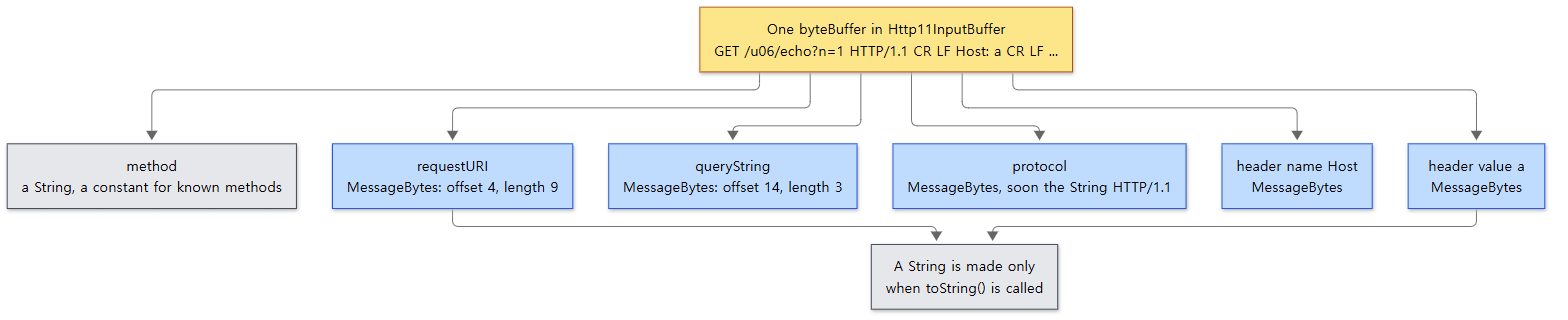 The blue boxes all point into the one yellow box. There are no copies.
The class comment sums it up.
/**
 * This class is used to represent a sub array of bytes in an HTTP message. It represents all request/response elements.
 * The byte/char conversions are delayed and cached. Everything is recyclable.
java/org/apache/tomcat/util/buf/MessageBytes.java lines 30–32
A MessageBytes is in one of four states: empty (T_NULL), a String (T_STR), part of a byte array (T_BYTES) or part of a char array (T_CHARS) (lines 51–63). To hold bytes, it just passes the position to the ByteChunk inside it.
    public void setBytes(byte[] b, int off, int len) {
        buff = b;
        start = off;
        end = start + len;
        isSet = true;
        hasHashCode = false;
    }
java/org/apache/tomcat/util/buf/ByteChunk.java lines 217–223
It does not copy the array; it records the reference (buff = b) and two numbers. The string is made when somebody calls toString().
    @Override
    public String toString() {
        switch (type) {
            case T_NULL:
            case T_STR:
                // No conversion required
                break;
            case T_BYTES:
                strValue = byteC.toString();
                break;
            case T_CHARS:
                strValue = charC.toString();
                break;
        }

        return strValue;
    }
java/org/apache/tomcat/util/buf/MessageBytes.java lines 197–213
Comparisons happen without strings too. ByteChunk.equals(String) compares the bytes against the String's characters one by one (lines 693–706). The case-insensitive equalsIgnoreCase(String) works the same way (lines 718–732). The protocolMB.equals("HTTP/1.1") from section 3 uses the first and the getValue("host") from section 4 uses the second, so neither creates a String at all. When converting bytes to characters with no charset set, ISO-8859-1 is used (ByteChunk.DEFAULT_CHARSET, ByteChunk.java line 114). Decoding %xx in the URI and converting it to UTF-8 is done on the Catalina side by CoyoteAdapter, after copying the original into decodedURI (Part 7).
Why go this far? One request has a method, a URI, a query, a protocol and dozens of headers, and a server receives thousands of requests per second. Turning all of those into Strings would mostly produce garbage nobody ever reads. Making strings only for the few values a servlet actually asks for cuts allocation and GC by that much. The method is the exception. At this commit the coyote Request holds the method as a String field (Request.java line 100), and for known methods like GET and POST it looks at the bytes and returns a constant made in advance (Method.bytesToString(), Request.java lines 395–403). On the 11.0.x branch the method was a MessageBytes too, and the method() that returned it was marked @Deprecated. On main that method has been removed.
Example 4: MessageBytes is a window, not a copy
A small program that uses MessageBytes directly. It was run with Tomcat's lib/*.jar on the classpath, using JDK 21's ability to run a source file directly.
        // Pretend this is a buffer read from the socket
        byte[] buf = "GET /hello HTTP/1.1\r\nHost: a\r\n\r\n".getBytes(StandardCharsets.ISO_8859_1);

        MessageBytes uri = MessageBytes.newInstance();
        uri.setBytes(buf, 4, 6);                 // remember only where "/hello" is
        System.out.println("type=" + uri.getType() + " (T_BYTES=" + MessageBytes.T_BYTES + ")");
        System.out.println("equals(\"/hello\")=" + uri.equals("/hello") + " string=" + uri.getString());

        System.out.println("toString()=" + uri.toString() + " type=" + uri.getType());

        // Changing the original buffer changes what MessageBytes sees — it is a window (view), not a copy
        buf[5] = 'j';
        System.out.println("after buf[5]='j': toString()=" + uri.toString());

        // toStringType() converts to a String and also switches the type to T_STR
        uri.toStringType();
        buf[5] = 'y';
        System.out.println("after toStringType(): type=" + uri.getType() + " toString()=" + uri.toString());
[Shortened from the example ex/u06-http11-processor/MbDemo.java]
=== 9. MessageBytes ===
type=2 (T_BYTES=2)
equals("/hello")=true string=null
toString()=/hello type=2
after buf[5]='j': toString()=/jello
after toStringType(): type=1 toString()=/jello
getHeader("host")=a size=1
equals("/hello")is true butgetString()isnull. No string was created during the comparison.- After changing one byte of the original array,
toString()returned/jello. While it isT_BYTES, it reads from the buffer again on every call (line 205). toStringType()converts to aStringand changes the state toT_STR(1) (lines 221–236). After that, changing the buffer no longer changes the value.- The last line is the result of adding a header to
MimeHeadersby byte position and looking it up with lower-casehost.
Easy to get wrong: once the request ends, the next request uses that buffer
The array a MessageBytes points to is the processor's one input buffer. When a request ends, nextRequest() empties the request object and moves any leftover bytes (a pipelined next request) to the front of the buffer.
    void nextRequest() {
        request.recycle();

        if (byteBuffer.position() > 0) {
            if (byteBuffer.remaining() > 0) {
                // Copy leftover bytes to the beginning of the buffer
                byteBuffer.compact();
                byteBuffer.flip();
            } else {
                // Reset position and limit to 0
                byteBuffer.position(0).limit(0);
            }
        }
java/org/apache/coyote/http11/Http11InputBuffer.java lines 281–293
The next request's bytes overwrite the same positions of the same array. It is exactly what happened in example 4 when we changed the buffer and the value changed. That is why emptying the request object is essential, and also one reason why holding on to a request object after the request has finished and reading values from it can show you the wrong values. The Catalina-side Request is recycled at the end of a request as well (the finally block in CoyoteAdapter.service(), CoyoteAdapter.java lines 423–427).
6. Errors, keep-alive, and the shape of the response
How a 400 becomes an HTML page
Every 400 response in examples 2 and 3 came with an HTML body. Who built that page for a request whose request line couldn't even be read properly? Start from the catch in service().
            } catch (Throwable t) {
                ExceptionUtils.handleThrowable(t);
                UserDataHelper.Mode logMode = userDataHelper.getNextMode();
                if (logMode != null) {
                    String message = sm.getString("http11processor.header.parse");
                    switch (logMode) {
                        case INFO_THEN_DEBUG:
                            message += sm.getString("http11processor.fallToDebug");
                            //$FALL-THROUGH$
                        case INFO:
                            log.info(message, t);
                            break;
                        case DEBUG:
                            log.debug(message, t);
                    }
                }
                // 400 - Bad Request
                response.setStatus(400);
                setErrorState(ErrorState.CLOSE_CLEAN, t);
            }
java/org/apache/coyote/http11/Http11Processor.java lines 312–331
Any exception (other than IOException) thrown while reading the request line or headers becomes a 400 here. The key is the ErrorState.CLOSE_CLEAN on the last line.
CLOSE_CLEAN(true, 1, true, true),
java/org/apache/coyote/ErrorState.java line 35
The four arguments are, in order, "is it an error", "severity", "may this request still do I/O" (ioAllowed) and "may the connection still do I/O" (lines 56–61). CLOSE_CLEAN means it is an error, but the response can still be sent cleanly — the connection just has to be closed afterwards (comment on lines 29–34). So even after the catch, the loop goes on to call prepareRequest() (lines 377–391) and getAdapter().service() (lines 401–436), both guarded by if (getErrorState().isIoAllowed()).
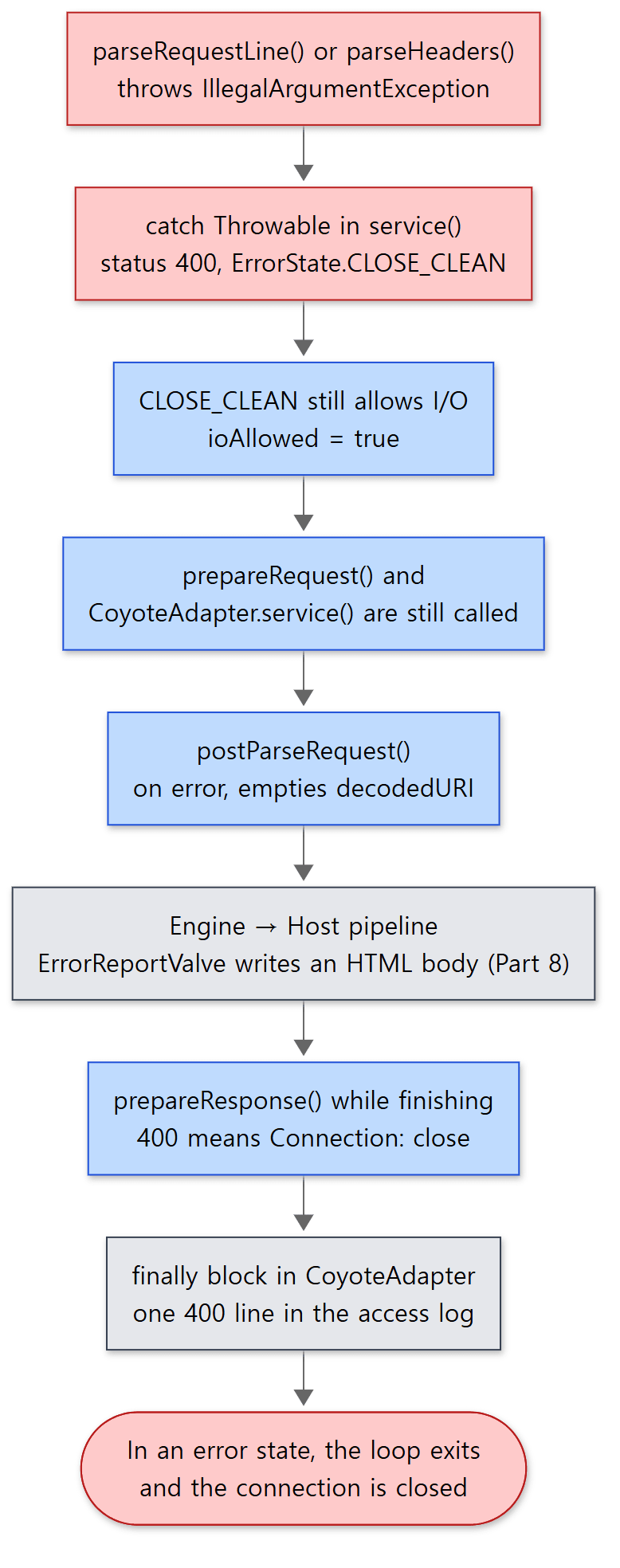 The red boxes are where the error starts and ends; the grey ones are covered by the neighbouring posts.
If the response is already an error, CoyoteAdapter.postParseRequest() says "this means the URI is invalid, so don't pass invalid data to the Mapper", empties decodedURI, and carries on with mapping (CoyoteAdapter.java lines 691–696). So the request travels the Engine → Host pipeline, and the ErrorReportValve that a Host gets by default (StandardHost.java line 146) writes the 400 page. Valves are covered in Part 8. Thanks to this path, even bad requests show up in the access log. Here is the example's access log (the leading address and timestamp were cut off).
"-" 400 1935
"GET - HTTP/1.1" 400 2063
"GET /u06/echo HTTP/1.2" 505 712
"GET /u06/echo HTTP/1.1" 400 769
"GET /u06/echo HTTP/1.1" 400 2148
"GET /u06/echo HTTP/1.1" 400 2085
"GET /u06/echo HTTP/1.1" 400 2150
"GET /u06/echo HTTP/1.1" 200 786
"GET - HTTP/1.1" 400 1908
From the top these are 2a, 2b, 2c, 2d, 2e, 3a, 3b, 3c and 3d. You can see how much of the request line (%r) was read. 2a failed at the method and has nothing, so "-"; 2b and 3d failed while reading the URI, so GET -; 2e, 3a and 3b failed in the headers and have a complete request line. The last number is the body size in bytes; the longer the message, the bigger the HTML. For 200 responses the size shifts by a byte or so between runs, depending on the length of the thread name printed in the body (exec-9, exec-10).
The error log (catalina.<date>.log) recorded only the first of these 400s.
24-Oct-2026 13:42:54.129 INFO [http-nio-8080-exec-4] org.apache.coyote.http11.Http11Processor.service Error parsing HTTP request header
 Note: further occurrences of HTTP request parsing errors will be logged at DEBUG level.
	java.lang.IllegalArgumentException: Invalid character found in method name [G@T ]. HTTP method names must be tokens
The time and thread number change from run to run. The default mode of UserDataHelper (INFO_THEN_DEBUG) logs the first one at INFO and then only at DEBUG for 24 hours (UserDataHelper.java line 33, lines 61–76). It keeps junk requests from outside from flooding the log. This bookkeeping is per processor object (userDataHelper is a field of AbstractProcessor, line 116). When requests arrive one after another as in this example, the same processor gets reused and only one line appears; if several processors hit a 400 at the same time, more INFO lines can appear.
Easy to get wrong: some status codes close the connection
Even if a servlet answers with sendError(400) or a 500, keep-alive ends.
    private static boolean statusDropsConnection(int status) {
        return status == 400 /* SC_BAD_REQUEST */ || status == 408 /* SC_REQUEST_TIMEOUT */ ||
                status == 411 /* SC_LENGTH_REQUIRED */ || status == 413 /* SC_REQUEST_ENTITY_TOO_LARGE */ ||
                status == 414 /* SC_REQUEST_URI_TOO_LONG */ || status == 500 /* SC_INTERNAL_SERVER_ERROR */ ||
                status == 503 /* SC_SERVICE_UNAVAILABLE */ || status == 501 /* SC_NOT_IMPLEMENTED */;
    }
java/org/apache/coyote/http11/Http11Processor.java lines 206–211
The method's comment says it "uses the same list of codes as Apache/httpd" (lines 202–205). If the status is on this list when the response headers are built, keepAlive = false and Connection: close is added (lines 989–996). After a 400 there is no trustworthy way to know where the next request begins in the bytes that follow, so cutting the connection is the safe choice.
Keep-alive — the loop only runs while the buffer has requests
Within each trip round the loop, just before calling the adapter, the request-count limit is counted down.
            int maxKeepAliveRequests = protocol.getMaxKeepAliveRequests();
            if (maxKeepAliveRequests == 1) {
                keepAlive = false;
            } else if (maxKeepAliveRequests > 0 && socketWrapper.decrementKeepAlive() <= 0) {
                keepAlive = false;
            }
java/org/apache/coyote/http11/Http11Processor.java lines 393–398
The default for maxKeepAliveRequests is 100, with the source comment "as in Apache HTTPD server" (AbstractEndpoint.java line 1628). The socket wrapper counts the remaining requests per connection, and when it hits 0 this response gets Connection: close.
When a trip ends with keepAlive still true, the loop goes back to parseRequestLine(). This time keptAlive is true, so it switches the socket read timeout to keepAliveTimeout (which equals connectionTimeout if not set, AbstractEndpoint.java lines 1358–1361) and tries fill(false) (lines 336–346). Here the path splits in two.
- If the next request's bytes are already there, it reads them and handles the request on the same thread.
- If nothing is there yet,
fill(false)isfalse, and since the phase is 0 or 1,handleIncompleteRequestLineRead()returnstrueand the loop exits.service()returnsSocketState.OPEN.
On OPEN, the ConnectionHandler releases the processor and hands the socket back to the Poller.
                } else if (state == SocketState.OPEN) {
                    // In keep-alive but between requests. OK to recycle
                    // processor. Continue to poll for the next request.
                    release(processor);
                    processor = null;
                    wrapper.registerReadInterest();
java/org/apache/coyote/AbstractProtocol.java lines 1386–1391
"In keep-alive but between requests." The worker thread does not wait for the next request; it goes back to the pool. When the next request arrives, the Poller notices it again and gives it to whichever worker thread is free.
Example 5: two requests sent together, and two sent 1 second apart
Two requests are sent on the same connection. Once with both requests glued together in a single printf (pipelining), and once with the second request sent 1 second after the first. Only the second request carries Connection: close, so the connection closes after its response, and length=1 is the example's option that makes the servlet set Content-Length up front. raw is a helper that sends the request the same way as raw_err and shows the first N lines of the response (minus the Date line).
raw 'GET /u06/echo?n=1&length=1 HTTP/1.1\r\nHost: a\r\n\r\nGET /u06/echo?n=2&length=1 HTTP/1.1\r\nHost: a\r\nConnection: close\r\n\r\n' 20

exec 3<>/dev/tcp/127.0.0.1/8080
printf 'GET /u06/echo?n=1&length=1 HTTP/1.1\r\nHost: a\r\n\r\n' >&3
sleep 1
printf 'GET /u06/echo?n=2&length=1 HTTP/1.1\r\nHost: a\r\nConnection: close\r\n\r\n' >&3
timeout 3 cat <&3 | tr -d '\r' | grep -E '^(HTTP|method)'
exec 3>&-
=== 4. keep-alive: two requests written at once on one connection ===
HTTP/1.1 200
Content-Type: text/plain;charset=UTF-8
Content-Length: 105

method=GET uri=/u06/echo query=n=1&length=1 protocol=HTTP/1.1 headers=[Host] thread=http-nio-8080-exec-3
HTTP/1.1 200
Content-Type: text/plain;charset=UTF-8
Content-Length: 117
Connection: close

method=GET uri=/u06/echo query=n=2&length=1 protocol=HTTP/1.1 headers=[Host, Connection] thread=http-nio-8080-exec-3
=== 5. keep-alive: second request sent 1s later ===
HTTP/1.1 200
method=GET uri=/u06/echo query=n=1&length=1 protocol=HTTP/1.1 headers=[Host] thread=http-nio-8080-exec-4
HTTP/1.1 200
method=GET uri=/u06/echo query=n=2&length=1 protocol=HTTP/1.1 headers=[Host, Connection] thread=http-nio-8080-exec-6
Thread numbers change from run to run. Here is what to read in this run.
- The two requests sent together were handled by the same thread (
exec-3). When the first request was read, the second request's bytes came into the buffer too, so the loop's second trip read them right away. - The request sent 1 second later was handled by a different thread (
exec-6). After the first request the loop exited withOPENand the thread went back to the pool; a second later another thread woken by the Poller took it. Which thread the pool hands out is not fixed, so the same number could come up sometimes. What is certain is that the first thread did not hold on to this connection for that second. - The first response has no
Connectionheader. In HTTP/1.1, keeping the connection is the default, so it isn't announced (lines 997–1000:Connection: keep-aliveis only added for HTTP/1.0).
Compared with httpd Part 9, Tomcat's NIO connector is closer to the event MPM than to prefork. prefork stayed tied to the connection, waiting until the next request came; event handed the thread back after handling one request. Even event, though, does not hand it back when input has already arrived (ap_run_input_pending()) — it goes straight on to the next request (server/mpm/event/event.c lines 1293–1295, a spot httpd Part 9 did not cover). Tomcat has the same shape: it keeps going with requests already in the buffer, and goes back when there are none. When a request finishes outside the service() loop, such as after async processing, there is also code that checks once more for leftover data before giving up the processor (AbstractProcessorLight.checkForPipelinedData(), lines 119–131).
The shape of the response — Content-Length or chunked
The response headers are built by prepareResponse() at the moment of commit. Here is the branch that settles the length.
        long contentLength = response.getContentLengthLong();
        boolean connectionClosePresent = isConnectionToken(headers, Constants.CLOSE);
        if (http11 && response.getTrailerFields() != null) {
            // If trailer fields are set, always use chunking
            outputBuffer.addActiveFilter(outputFilters[Constants.CHUNKED_FILTER]);
            contentDelimitation = true;
            headers.addValue(Constants.TRANSFERENCODING).setString(Constants.CHUNKED);
        } else if (contentLength != -1) {
            headers.setValue("Content-Length").setLong(contentLength);
            outputBuffer.addActiveFilter(outputFilters[Constants.IDENTITY_FILTER]);
            contentDelimitation = true;
        } else if (head) {
            /* ... */
        } else {
            // If the response code supports an entity body and we're on
            // HTTP 1.1 then we chunk unless we have a Connection: close header
            if (http11 && entityBody && !connectionClosePresent) {
                outputBuffer.addActiveFilter(outputFilters[Constants.CHUNKED_FILTER]);
                contentDelimitation = true;
                headers.addValue(Constants.TRANSFERENCODING).setString(Constants.CHUNKED);
            } else {
                outputBuffer.addActiveFilter(outputFilters[Constants.IDENTITY_FILTER]);
            }
        }
java/org/apache/coyote/http11/Http11Processor.java lines 924–952
If the length is known, Content-Length; if not, chunked on HTTP/1.1; and if even that is impossible (HTTP/1.0, or Connection: close on the response), send without a length and close the connection to mark the end. When there is no way to mark the end (contentDelimitation is false), keepAlive = false (lines 970–978).
Yet you often get a Content-Length without the servlet ever calling setContentLength(). That is because the Catalina-side output buffer fills it in when it closes.
        // Content length can be calculated if:
        // - the response has not been committed
        // AND
        // - the content length has not been explicitly set
        // AND
        // - some content has been written OR this is NOT a HEAD request
        if (!coyoteResponse.isCommitted() && coyoteResponse.getContentLengthLong() == -1 &&
                (bb.remaining() > 0 || !Method.HEAD.equals(coyoteResponse.getRequest().getMethod()))) {
            coyoteResponse.setContentLength(bb.remaining());
        }
java/org/apache/catalina/connector/OutputBuffer.java lines 224–233
If the response is still uncommitted when the servlet finishes — in other words, if the whole body fits in the response buffer (8KB by default, OutputBuffer.DEFAULT_BUFFER_SIZE on line 50) — then its size is the length.
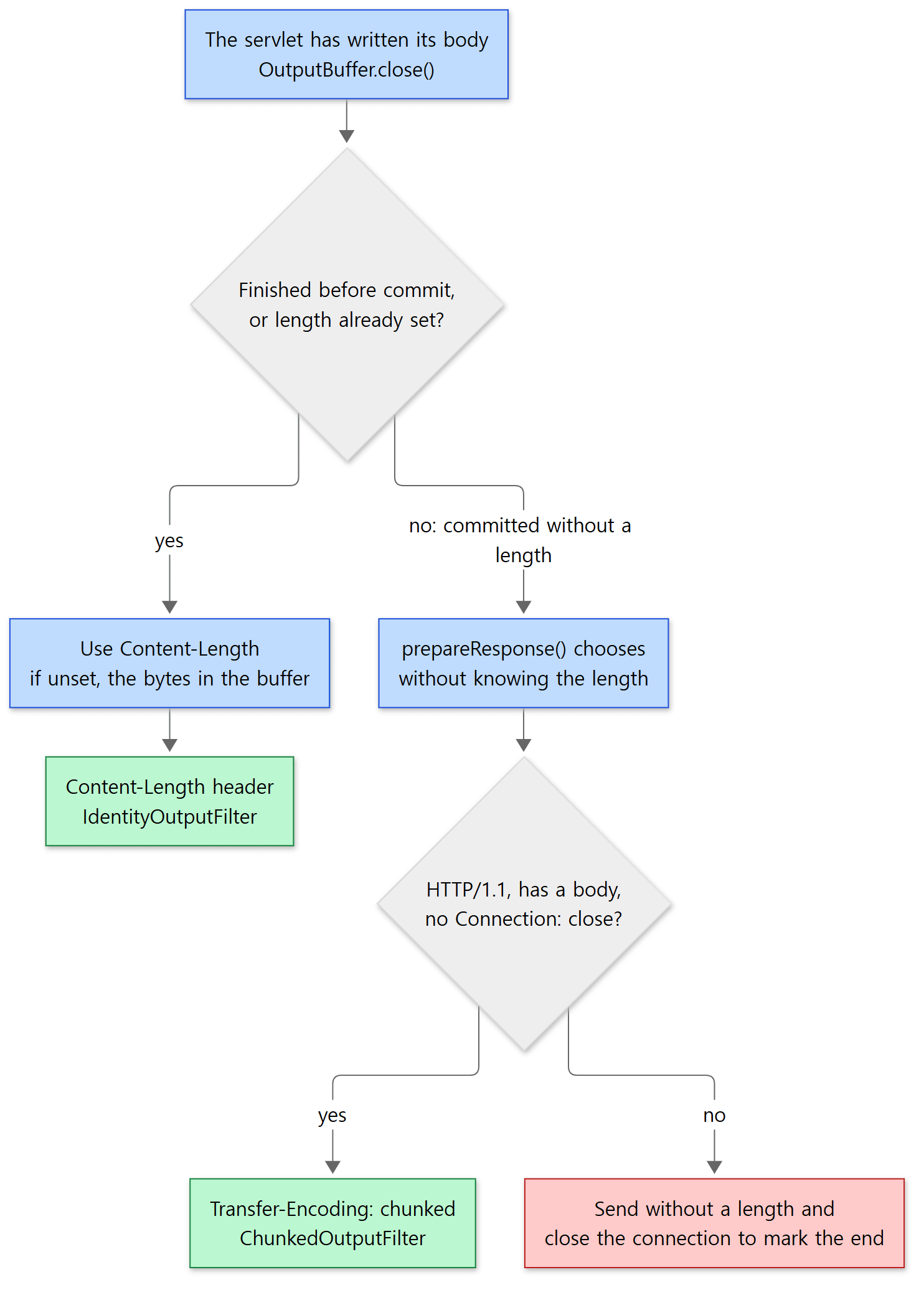 Green boxes are endings that can keep the connection; the red box is the one that must close it.
Example 6: one servlet, three response shapes
With flush=1, the example servlet writes the first line of the body, commits early with resp.flushBuffer(), and then writes one more line, after flush.
--- 6a. GET /u06/echo (no length)
HTTP/1.1 200
Content-Type: text/plain;charset=UTF-8
Content-Length: 109
Connection: close

method=GET uri=/u06/echo query=null protocol=HTTP/1.1 headers=[Host, Connection] thread=http-nio-8080-exec-7
--- 6c. GET /u06/echo?flush=1 (committed before the end)
HTTP/1.1 200
Content-Type: text/plain;charset=UTF-8
Transfer-Encoding: chunked
Connection: close

70
method=GET uri=/u06/echo query=flush=1 protocol=HTTP/1.1 headers=[Host, Connection] thread=http-nio-8080-exec-9

c
after flush

0

--- 6d. HTTP/1.0, flush=1
HTTP/1.1 200
Content-Type: text/plain;charset=UTF-8
Connection: close

method=GET uri=/u06/echo query=flush=1 protocol=HTTP/1.0 headers=[] thread=http-nio-8080-exec-10
after flush
(6b, where length=1 sets the length explicitly, looks just like 6a with Content-Length: 113, so it was left out. The Date line of each response was removed by the example. The length values vary slightly between runs with the thread name in the body.)
- 6a: the servlet didn't set a length, but all 109 bytes of the body were in the buffer, so
OutputBuffer.close()filled inContent-Length: 109. The request sentConnection: close, so the response carries it too. - 6c:
flushBuffer()committed without knowing the length. The request'sConnection: closeis not a response header, which is whatprepareResponse()looks at, so chunked was chosen; and becausekeepAlivewas already false at commit time,Connection: closewas added as well. The body has two chunks: the first line at70(hex, 112 bytes), theafter flushline atc(12 bytes), and the0that marks the end.ChunkedOutputFilter.doWrite()works out the chunk header in hex and writes it (ChunkedOutputFilter.javalines 83–115). - 6d: HTTP/1.0 has no chunked encoding, so the response went out without a length and the connection was closed. As seen in section 3, an HTTP/1.0 request already had
keepAlive = falsefromprepareRequestProtocol().
Easy to get wrong: the status line is always HTTP/1.1, and has no reason phrase
6d is an HTTP/1.0 request, yet the first line of the response is HTTP/1.1 200 . And no response has a reason phrase such as OK or Bad Request. Both are written plainly in Http11OutputBuffer.sendStatus().
    public void sendStatus(int status) {
        // Write protocol name
        write(Constants.HTTP_11_BYTES);
        headerBuffer.put(Constants.SP);
java/org/apache/coyote/http11/Http11OutputBuffer.java lines 350–353
        headerBuffer.put(Constants.SP);

        // The reason phrase is optional but the space before it is not. Skip
        // sending the reason phrase. Clients should ignore it (RFC 7230) and it
        // just wastes bytes.

        headerBuffer.put(Constants.CR).put(Constants.LF);
java/org/apache/coyote/http11/Http11OutputBuffer.java lines 370–376
There is only one protocol name, the constant HTTP/1.1, and the reason phrase is skipped as "bytes clients should ignore anyway". The space before it is required by the grammar, though, so it stays — which is why the status line ends in a space, as in HTTP/1.1 400 . The common codes 200, 400 and 404 use constants with the digits already turned into bytes (lines 356–368). The headers are collected in headerBuffer (size maxHttpResponseHeaderSize, 8192 bytes by default) and sent in one go at commit time (lines 317–342).
What this post leaves out
- HTTP/1.1 upgrade (
Connection: upgrade, h2c):Http11Processor.javalines 333–375 → Part 15 - The path taken when an async request ends (
dispatchEndRequest()): lines 1154–1170 → Part 12 Expect: 100-continueand the100response: lines 788–798, lines 1239–1256- The inside of the request body filters (
ChunkedInputFilter,IdentityInputFilter) andmaxSwallowSize, the limit on discarding unread body:coyote/http11/filters/, lines 580–597 - sendfile (letting the kernel send large static files directly): lines 1102–1114, lines 1406–1432
- gzip compression (the
compressionattribute,GzipOutputFilter) andrestrictedUserAgents: lines 650–663, lines 905–909 - Interpreting the
Hostvalue and checking SNI (parseHost(),checkSni()): lines 774–780 - The character tables (
HttpParser,relaxedPathChars):java/org/apache/tomcat/util/http/parser/HttpParser.java
Summary
| Concept | One-line summary |
|---|---|
ConnectionHandler.process() |
Takes an idle processor or makes one and calls process(). Between requests the processor is released |
Http11Processor.service() |
A loop of request line → protocol → headers → prepareRequest() → adapter → endRequest() → nextRequest() |
parseRequestLine() |
Reads without waiting, remembering its place with a phase number. Lenient about spaces, strict about characters |
| HTTP/0.9 | Not supported on main (11.0.x supports it). Only a comment is left |
HttpHeaderParser, MimeHeaders |
Each header line is tidied in place in the buffer and stored in an array. Lookups scan from the start, ignoring case |
maxHttpHeaderSize, maxHeaderCount |
8192 bytes for request line + headers, 100 headers. Exceeding either is a 400 (not a 414) |
MessageBytes, ByteChunk |
Remember only a position in a byte array, and make a String on toString(). After the request, the next request uses the buffer |
| 400 | CLOSE_CLEAN, so it reaches the adapter, ErrorReportValve writes HTML, it gets into the access log, and then the connection closes |
| Keep-alive | If the next request is in the buffer, the same thread carries on; if not, OPEN returns it and the Poller waits |
| Response length | Finished before commit: Content-Length. Committed early: chunked on HTTP/1.1, otherwise close the connection to mark the end |
What's next
This post stopped at getAdapter().service(request, response). The coyote Request still holds the URI as bytes with %xx not yet decoded, and nobody knows which web app's which servlet will get it. Part 7: CoyoteAdapter and the Mapper — Which Servlet Gets the Request wraps this request in Catalina's Request, decodes and normalizes the URI, and finds the servlet in Host → Context → Wrapper order. postParseRequest(), which we glimpsed in this post's 400 example, is at the centre of it.
If you'd like to compare with httpd, which does the same job in C, httpd Part 9 is the counterpart. httpd copies the request line and headers into strings in the request pool, hangs them on the request_rec (on trunk the HTTP1_REQUEST_IN filter reads them and ap_read_request() copies them over with apr_pstrdup()), and throws away the whole pool when the request ends. Tomcat keeps MessageBytes pointing into one buffer and recycles its objects. The way memory is saved differs, but the goal — less garbage per request — is the same. On limits, httpd measures the request line, each header line and the header count separately and uses 414, while Tomcat measures the request line and headers together.
- Part 5: The Connector and the NIO Endpoint — Which Threads Take a Connection
- Part 8: Pipelines and Valves — The Processing Chain on Every Container
- httpd Part 8: MPMs — How prefork, worker and event Share Out Connections
- httpd Part 9: Connections and Reading a Request — From a Socket to a request_rec