What this post covers
This is the seventh post in the "Digging into Tomcat's Source" series. In Part 6 we watched Http11Processor read bytes off a socket and turn the request line and headers into one org.apache.coyote.Request. At that point it is still just "an HTTP request": nobody has decided which web app, or which servlet in it, will handle it. This post follows the bridge the request crosses from the connector (Coyote) into the servlet container (Catalina), and how, while crossing it, Tomcat decides "which servlet does this request go to?"
There are four questions to answer.
- Where, and how, does a Coyote request become the Servlet API's
HttpServletRequest? - How is a messy URI such as
/app/x/../catalog;foo=bar/listcleaned up before it reaches a servlet, and why are some URIs stopped with a 400? - When several
url-patterns in web.xml overlap, which one wins, and where in the source is that rule? - Why is the request object a servlet receives a
RequestFacaderather thanorg.apache.catalina.connector.Request?
| Item | Details |
|---|---|
| Target | Apache Tomcat |
| Version | 12.0.0-M1 (main) |
| Commit | 17aa1769b0 (2026-10-23) |
| Classes read most | connector/CoyoteAdapter, mapper/Mapper, mapper/MapperListener, connector/Request, RequestFacade |
Every line number in this post refers to that commit. Part 1 explains how to get the source at the same commit and build the Docker image used for the examples.
CoyoteAdapter.java is about 1,300 lines and Mapper.java over 1,800. This post keeps only the main thread that someone seeing the code for the first time can follow. What was left out is named, with its location, under "What this post leaves out" at the end.
Words to know first
Coyote and Catalina are Tomcat's two big halves. Coyote is the connector side that deals with sockets and HTTP (org.apache.coyote, org.apache.tomcat.util.net); Catalina is the servlet container side that deals with web apps and servlets (org.apache.catalina). Why they are split, and the Adapter interface between them, were covered in Part 2. This post's main character, CoyoteAdapter, is the class on the Catalina side that implements that Adapter.
The four containers are <Engine> → <Host> → <Context> from server.xml, plus the Wrapper that wraps a single servlet. A <Host> is a virtual host such as localhost or shop.example.com, a <Context> is one web app mounted at a path such as /app, and a Wrapper is one <servlet> from web.xml (Part 2). "Mapping" a request means picking these three (Host, Context, Wrapper) for it.
The three pieces of a request URI. The Servlet API splits a request path into three pieces. If /app/catalog/items/42 is handled by a servlet mapped to /catalog/items/*, you get this.
| Method | Value | Meaning |
|---|---|---|
getContextPath() |
/app |
the path of the web app (Context) |
getServletPath() |
/catalog/items |
the part used to pick the servlet |
getPathInfo() |
/42 |
whatever is left after that (null if nothing) |
Half of this post is about where these three values come from.
The four shapes of url-pattern. The servlet spec sorts web.xml url-patterns into four kinds: an exact path like /catalog/list, a path prefix ending in /* like /catalog/*, an extension starting with *. like *.do, and the default servlet, which is just /. On top of those, the empty string "" is a special shape that means "the context root" and nothing else.
MessageBytes is the container Tomcat uses instead of String. It holds the received bytes as they are and turns them into characters only when needed (Part 6). In this post we follow just two of them: requestURI() (as received) and decodedURI() (decoded and cleaned up).
1. The bridge: CoyoteAdapter.service()
When a Connector initializes, it creates one CoyoteAdapter, passing itself in, and plugs it into the protocol handler.
        // Initialize adapter
        adapter = new CoyoteAdapter(this);
        protocolHandler.setAdapter(adapter);
java/org/apache/catalina/connector/Connector.java lines 1300–1302
Once Part 6's Http11Processor has read the request line and headers, it calls getAdapter().service(request, response) (Http11Processor.java line 404). The Coyote code has no idea what lies beyond; it knows only the Adapter interface. In other words, the connector and the container are joined by this one interface and nothing else. Here is the skeleton of the receiving side.
    public void service(org.apache.coyote.Request req, org.apache.coyote.Response res) throws Exception {

        Request request = (Request) req.getNote(ADAPTER_NOTES);
        Response response = (Response) res.getNote(ADAPTER_NOTES);

        if (request == null) {
            // Create objects
            request = connector.createRequest(req);
            response = connector.createResponse(res);

            // Link objects
            request.setResponse(response);
            response.setRequest(request);

            // Set as notes
            req.setNote(ADAPTER_NOTES, request);
            res.setNote(ADAPTER_NOTES, response);

        }
        // ...
        try {
            // Parse and set Catalina and configuration specific
            // request parameters
            postParseSuccess = postParseRequest(req, request, res, response);
            if (postParseSuccess) {
                // check valves if we support async
                request.setAsyncSupported(connector.getService().getContainer().getPipeline().isAsyncSupported());
                // Calling the container
                connector.getService().getContainer().getPipeline().getFirst().invoke(request, response);
            }
java/org/apache/catalina/connector/CoyoteAdapter.java lines 305–348
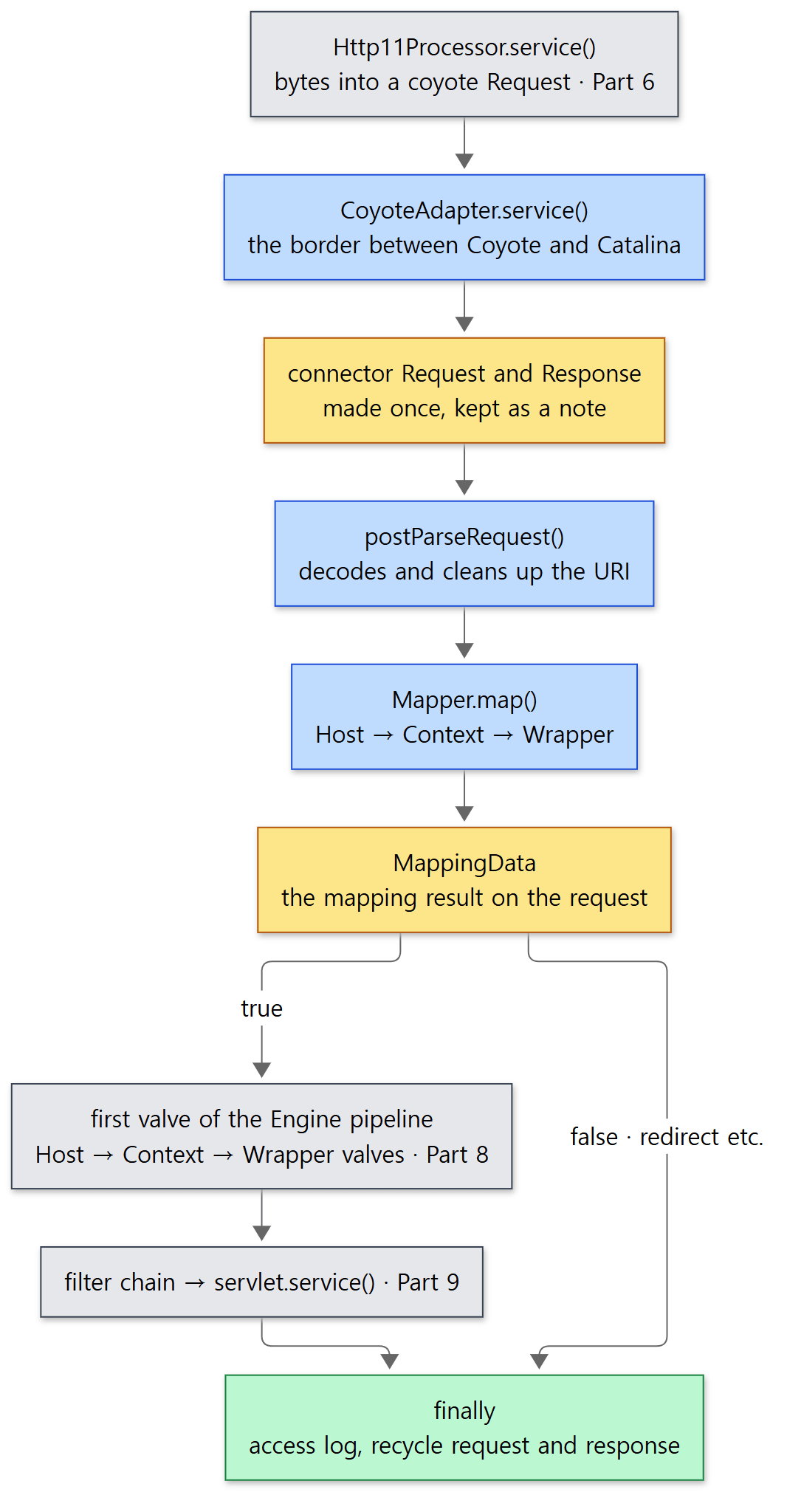 Blue boxes are what this post reads; grey boxes are covered in the posts before and after.
Three things can be read from it.
- The Catalina-side request object is not created per request. A coyote
Requesthas note slots that can hold any object, and theorg.apache.catalina.connector.Requestmade on the first pass is hung there. Processors, and the coyoteRequestinside each, are reused across connections (Part 5), so the Catalina-side object is reused along with them. That is why it must be cleared when a request ends (section 5). - Two classes named
Requestwork as a pair. The coyoteRequestis the raw material of the HTTP request (bytes, headers); the connectorRequestwraps it and implementsHttpServletRequest(Request.javalines 126–129 — the class comment reads "Wrapper object for the Coyote request"). - The request enters the container only if
postParseRequest()returnstrue. The entrance is the first valve of the pipeline of the Engine attached to the Service. Pipelines and valves are covered in Part 8.
When the request is done, the finally block writes the access log and clears both objects.
            req.getRequestProcessor().setWorkerThreadName(null);
            req.clearRequestThread();

            // Recycle the wrapper request and response
            if (!async) {
                updateWrapperErrorCount(request, response);
                request.recycle();
                response.recycle();
            }
java/org/apache/catalina/connector/CoyoteAdapter.java lines 419–427
An asynchronous request (async) is not finished yet, so it is not cleared. Async processing is covered in Part 12.
Example 1: the call stack seen from a servlet
To check that a request really travels this way, I printed a stack trace inside a servlet with new Throwable().printStackTrace(). This and the other examples in this post were run with Tomcat 12.0.0-M1-dev, built as-is from the reference commit (17aa1769b0), in a Docker container (Eclipse Temurin JDK 21). The example folder is ex/u07-mapping and the servlet is Keep.java (its code is in section 5). Only the at lines were taken from catalina.out.
Keep.doGet(Keep.java:23)
org.apache.catalina.core.ApplicationFilterChain.doFilter(ApplicationFilterChain.java:132)
org.apache.tomcat.websocket.server.WsFilter.doFilter(WsFilter.java:59)
org.apache.catalina.core.ApplicationFilterChain.doFilter(ApplicationFilterChain.java:111)
org.apache.catalina.core.StandardWrapperValve.invoke(StandardWrapperValve.java:164)
org.apache.catalina.core.StandardContextValve.invoke(StandardContextValve.java:77)
org.apache.catalina.authenticator.AuthenticatorBase.invoke(AuthenticatorBase.java:540)
org.apache.catalina.core.StandardHostValve.invoke(StandardHostValve.java:115)
org.apache.catalina.valves.ErrorReportValve.invoke(ErrorReportValve.java:82)
org.apache.catalina.valves.AbstractAccessLogValve.invoke(AbstractAccessLogValve.java:777)
org.apache.catalina.core.StandardEngineValve.invoke(StandardEngineValve.java:71)
org.apache.catalina.connector.CoyoteAdapter.service(CoyoteAdapter.java:347)
org.apache.coyote.http11.Http11Processor.service(Http11Processor.java:404)
org.apache.coyote.AbstractProcessorLight.process(AbstractProcessorLight.java:71)
org.apache.coyote.AbstractProtocol$ConnectionHandler.process(AbstractProtocol.java:1317)
org.apache.tomcat.util.net.NioEndpoint$SocketProcessor.doRun(NioEndpoint.java:2218)
org.apache.tomcat.util.net.SocketProcessorBase.run(SocketProcessorBase.java:74)
org.apache.tomcat.util.threads.ThreadPoolExecutor.runWorker(ThreadPoolExecutor.java:968)
org.apache.tomcat.util.threads.ThreadPoolExecutor$Worker.run(ThreadPoolExecutor.java:481)
org.apache.tomcat.util.threads.TaskThread$WrappingRunnable.run(TaskThread.java:74)
java.base/java.lang.Thread.run(Thread.java:1583)
(The two HttpServlet.service lines were filtered out with grep.) Reading from the bottom up: a worker thread (Part 5) → line 404 of Http11Processor.service() (Part 6) → line 347 of CoyoteAdapter.service(), the getFirst().invoke() we just saw → the Engine, Host, Context and Wrapper valves (Part 8) → the filter chain (Part 9) → the servlet. That one CoyoteAdapter line is the border between the Coyote packages and the Catalina packages.
Easy to get wrong: there is no Mapper in the stack
Mapping clearly happened, yet neither Mapper nor postParseRequest() appears in the stack. Both finished their work and returned before any valve was called. The result of mapping is written into the MappingData inside request, and the valves just read it. "Finding where to go" and "sending it there" are separate steps.
2. postParseRequest() — decoding and cleaning up the URI
postParseRequest() is, as the name says, "tidying up after parsing". It settles the scheme (http/https) and port, overrides them if a proxy setting (proxyName/proxyPort) exists, handles OPTIONS * and CONNECT separately, and then deals with the URI. This is the heart of it.
        MessageBytes decodedURI = req.decodedURI();

        // Filter CONNECT method
        if (Method.CONNECT.equals(req.getMethod())) {
            response.sendError(HttpServletResponse.SC_NOT_IMPLEMENTED, sm.getString("coyoteAdapter.connect"));
        } else {
            // No URI for CONNECT requests
            if (undecodedURI.getType() == MessageBytes.T_BYTES) {
                if (connector.getRejectSuspiciousURIs()) {
                    if (checkSuspiciousURIs(undecodedURI.getByteChunk())) {
                        response.sendError(400, sm.getString("coyoteAdapter.invalidURI"));
                    }
                }

                // Copy the raw URI to the decodedURI
                decodedURI.duplicate(undecodedURI);

                // Parse (and strip out) the path parameters
                parsePathParameters(req, request);

                // URI decoding
                // %xx decoding of the URL
                try {
                    req.getURLDecoder().convert(decodedURI.getByteChunk(),
                            connector.getEncodedSolidusHandlingInternal(),
                            connector.getEncodedReverseSolidusHandlingInternal());
                } catch (IOException ioe) {
                    response.sendError(400, sm.getString("coyoteAdapter.invalidURIWithMessage", ioe.getMessage()));
                }
                // Normalization
                if (normalize(req.decodedURI(), connector.getAllowBackslash())) {
                    // Character decoding
                    convertURI(decodedURI, request);
                    // URIEncoding values are limited to US-ASCII supersets.
                    // Therefore, it is not necessary to check that the URI remains
                    // normalized after character decoding
                } else {
                    response.sendError(400, sm.getString("coyoteAdapter.invalidURI"));
                }
java/org/apache/catalina/connector/CoyoteAdapter.java lines 617–655
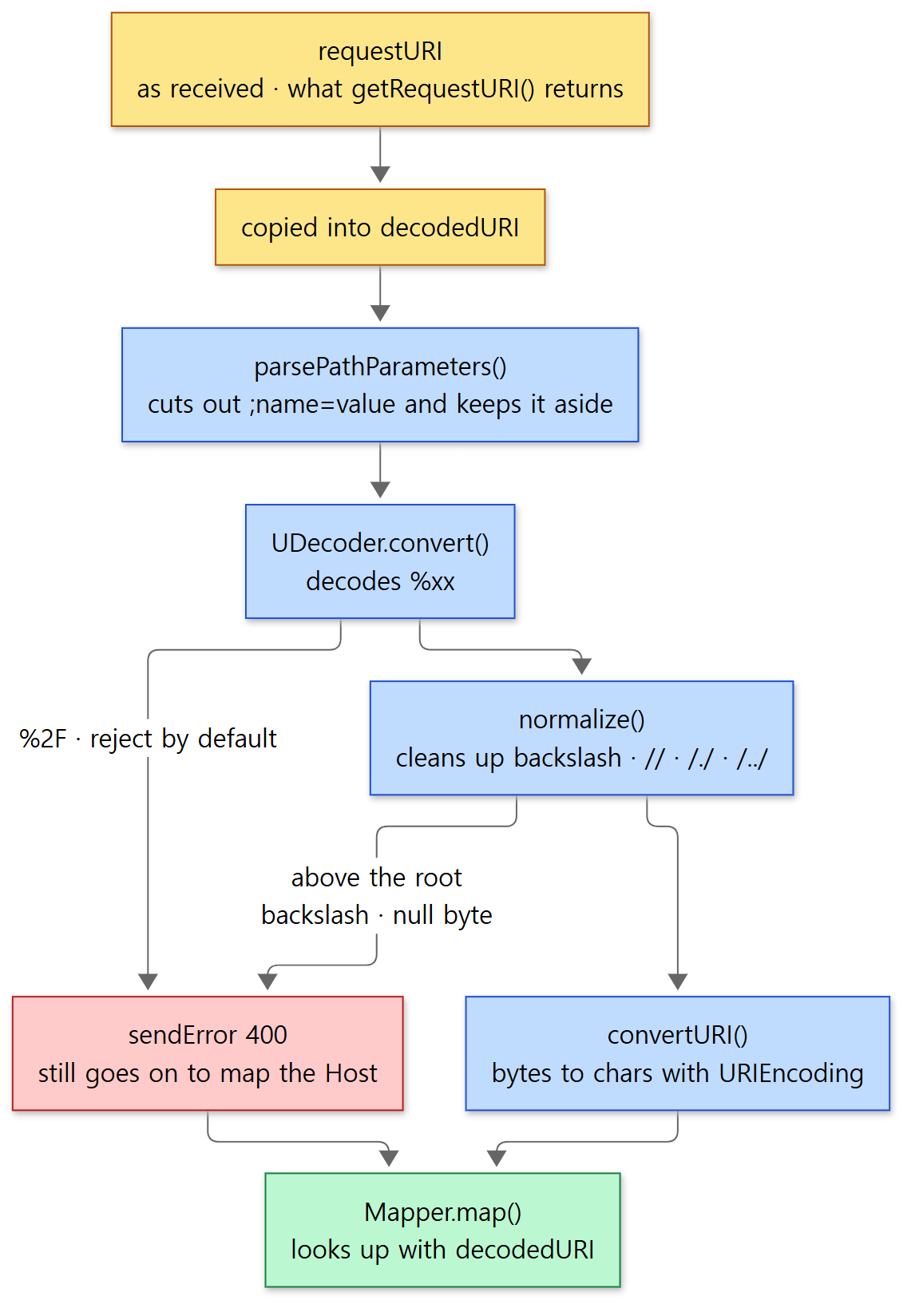 The two yellow boxes are the two URIs we follow through this whole post: one as received, one cleaned up.
In order:
- Copy. The received URI (
requestURI) is left alone; only the copy (decodedURI) is cleaned up. A servlet'sgetRequestURI()returns the former (Request.javalines 2118–2120). - Cut out path parameters. Something attached after a semicolon, like
;foo=barin/catalog;foo=bar/list, is called a path parameter.parsePathParameters()cuts it out of the URI and keeps thename=valueaside (lines 901–977). The;jsessionid=…that carries a session ID in the URL when cookies cannot be used has exactly this shape, which is why it is cut out here. The comment even says the session ID is the only thing it really cares about (line 895). - Decode
%xx.UDecoder.convert()undoes percent-encoding, turning%63intocand so on. A%2F(an encoded/), however, follows the connector'sencodedSolidusHandlingsetting, whose default isREJECT, so it throws (Connector.javaline 331). - Normalize.
normalize()turns\into/(only if allowed), squeezes//into/, and resolves/./and/../. If the path tries to climb above the root, it returnsfalse. - Turn into characters. Finally
convertURI()turns the bytes into characters using the connector'sURIEncoding(UTF-8 by default). The mapper looks things up with this string.
This is where UDecoder stops a %2F.
                int res = x2c(b1, b2);
                if (res == '/') {
                    switch (encodedSolidusHandling) {
                        case DECODE: {
                            buff[idx] = (byte) res;
                            break;
                        }
                        case REJECT: {
                            throw EXCEPTION_SLASH;
                        }
java/org/apache/tomcat/util/buf/UDecoder.java lines 141–150
And this is where normalize() stops a /../ that would go past the root.
        // Resolve occurrences of "/../" in the normalized path
        while (true) {
            index = uriBC.indexOf("/../", 0, 4, index);
            if (index < 0) {
                break;
            }
            // Prevent from going outside our context
            if (index == 0) {
                return false;
            }
java/org/apache/catalina/connector/CoyoteAdapter.java lines 1198–1207
Why this order
Decoding comes before normalizing. Only by turning %2e%2e into .. first and resolving /../ afterwards can a request that hides .. behind encoding be prevented from slipping past normalization and out of the web app. A %2F, on the other hand, would make "a / that separates path segments" indistinguishable from "a / that was inside a name" once decoded, so the default is to refuse it outright. And mapping and security checks (such as blocking WEB-INF) all use the cleaned-up decodedURI. Checking against the raw URI would let a request like /app/x/../WEB-INF/… dodge the check.
httpd did the same thing at the very start of ap_process_request_internal(). AllowEncodedSlashes, listed under "What this post leaves out" in httpd Part 10, sits in the same spot as Tomcat's encodedSolidusHandling.
Example 2: URIs that get cleaned up, URIs that get stopped
The Where servlet in ex/u07-mapping prints the name it was picked under, the path pieces, and the URI as received (the servlet code and web.xml are in section 4). Requests were sent with curl --path-as-is (an option that stops curl from removing .. itself). For 400s, only the message line was pulled out of Tomcat's error page.
----- GET /app/%63atalog/list
HTTP 200
servlet=exact match=EXACT pattern=/catalog/list servletPath=/catalog/list pathInfo=null
  requestURI=/app/%63atalog/list contextPath=/app sessionIdFromURL=-
----- GET /app/x/../catalog/./list
HTTP 200
servlet=exact match=EXACT pattern=/catalog/list servletPath=/catalog/list pathInfo=null
  requestURI=/app/x/../catalog/./list contextPath=/app sessionIdFromURL=-
----- GET /app//catalog//list
HTTP 200
servlet=exact match=EXACT pattern=/catalog/list servletPath=/catalog/list pathInfo=null
  requestURI=/app//catalog//list contextPath=/app sessionIdFromURL=-
----- GET /app/x/%2e%2e/catalog/list
HTTP 200
servlet=exact match=EXACT pattern=/catalog/list servletPath=/catalog/list pathInfo=null
  requestURI=/app/x/%2e%2e/catalog/list contextPath=/app sessionIdFromURL=-
----- GET /app/catalog;foo=bar/list
HTTP 200
servlet=exact match=EXACT pattern=/catalog/list servletPath=/catalog/list pathInfo=null
  requestURI=/app/catalog;foo=bar/list contextPath=/app sessionIdFromURL=-
----- GET /app/catalog/list;jsessionid=ABC123
HTTP 200
servlet=exact match=EXACT pattern=/catalog/list servletPath=/catalog/list pathInfo=null
  requestURI=/app/catalog/list;jsessionid=ABC123 contextPath=/app sessionIdFromURL=ABC123
----- GET /app/catalog%2Flist
HTTP 400
  message: Invalid URI: [The encoded slash character is not allowed]
----- GET /app/catalog%5Clist
HTTP 400
  message: Invalid URI
----- GET /../app/catalog/list
HTTP 400
  message: Invalid URI
- The first six all look different, yet every one reached the same servlet (
exact) with the sameservletPath. MeanwhilerequestURIis exactly as received. That is why a servlet comparing paths should usegetServletPath()/getPathInfo(), notgetRequestURI(). %2e%2ewas decoded to..and then normalized too, which proves decoding comes first.;jsessionid=ABC123was cut off the path and became the requested session ID. The code that fetches it withgetPathParameter()once mapping has found the Context is at lines 720–728. Sessions are covered in Part 11.- The three 400s carry different messages.
%2FgetsinvalidURIWithMessagewithUDecoder's exception message attached, while%5C(an encoded\) and/../get the plaininvalidURI.%5Cactually passes the decoding step (the default forencodedReverseSolidusHandlingisDECODE,Connector.javaline 325). It isnormalize()that sees the decoded\and refuses it, becauseallowBackslashdefaults tofalse(line 157).
Easy to get wrong: it keeps going after sending a 400
There is no return false after sendError(400, …). The code carries straight on to mapping. Instead, just before mapping, there is this.
        if (response.isError()) {
            // An error this early means the URI is invalid. Ensure invalid data
            // is not passed to the mapper. Note we still want the mapper to
            // find the correct host.
            decodedURI.recycle();
        }
java/org/apache/catalina/connector/CoyoteAdapter.java lines 691–696
Emptying the URI makes the mapper find only the Host. That way even an error response passes through the valves on that Host (the ErrorReportValve that builds the error page, and the access log). That is why the 400 responses in the example came with Tomcat's error page. The status has already been set to 400, so the valves further on pass it through under the rule "don't overwrite an existing error" (section 4).
3. The Mapper — where the Host, Context and Wrapper are picked
Once the URI is cleaned up, mapping begins.
        while (mapRequired) {
            // This will map the latest version by default
            connector.getService().getMapper().map(serverName, decodedURI, version, request.getMappingData());

            // If there is no context at this point, either this is a 404
            // because no ROOT context has been deployed or the URI was invalid
            // so no context could be mapped.
            if (request.getContext() == null) {
                // Allow processing to continue.
                // If present, the rewrite Valve may rewrite this to a valid
                // request.
                // The StandardEngineValve will handle the case of a missing
                // Host and the StandardHostValve the case of a missing Context.
                // If present, the error reporting valve will provide a response
                // body.
                return true;
            }
java/org/apache/catalina/connector/CoyoteAdapter.java lines 698–714
serverName is the value set from the Host header in Part 6 (the port is split off and kept separately; see AbstractProcessor.parseHost(), AbstractProcessor.java lines 330–388). There is one mapper per Service (a field of StandardService, StandardService.java line 103). It does not return a result; it writes into the MappingData attached to the request. request.getContext(), request.getWrapper(), getServletPath() and getPathInfo() are all methods that simply read fields of this MappingData (Request.java lines 630–632, lines 2063–2065, lines 2130–2132).
It is a while loop because of parallel deployment. If web apps of different versions, like app##1 and app##2, are deployed at the same path, the mapper first picks the newest version, and if the session ID in the request belongs to an older version, it maps again to that version (lines 745–780). This post goes no further into that.
What the mapper holds
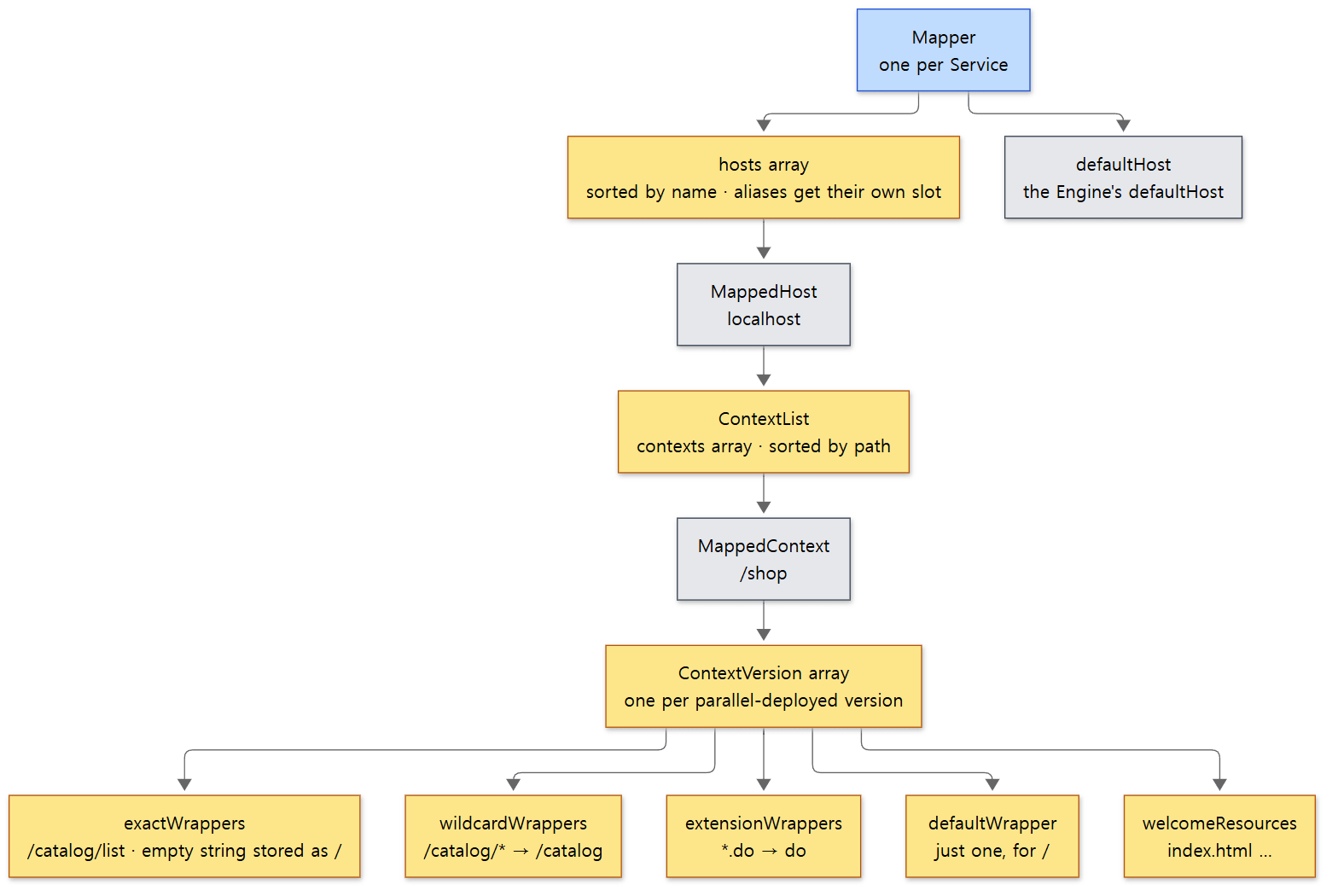 The yellow boxes are data the mapper keeps apart from the containers. Arrays looked up by name are kept sorted and searched with binary search.
The Mapper does not dig through the container objects (StandardHost, StandardContext …) directly. It keeps only what mapping needs, in arrays sorted by name, and searches them with binary search (find(), lines 1168–1206). This code runs on every request, so it has to be fast.
To change an array, it does not edit the existing one; it builds a new array one slot larger and swaps it in (insertMap(), lines 1488–1497). The hosts field is volatile (line 77), and the code that changes the arrays runs inside synchronized methods (addHost() and others) or synchronized blocks (addWrapper() and others). So the many threads handling requests read without locks, and only the rare writes, when web apps are deployed or removed, have to queue.
addWrapper() looks at the shape of a url-pattern to decide which of the four places it goes into.
            if (path.endsWith("/*")) {
                // Wildcard wrapper
                String name = path.substring(0, path.length() - 2);
                // ...
            } else if (path.startsWith("*.")) {
                // Extension wrapper
                String name = path.substring(2);
                // ...
            } else if (path.equals("/")) {
                // Default wrapper
                context.defaultWrapper = new MappedWrapper("", wrapper, jspWildCard, resourceOnly);
            } else {
                // Exact wrapper
                final String name;
                if (path.isEmpty()) {
                    // Special case for the Context Root mapping which is
                    // treated as an exact match
                    name = "/";
                } else {
                    name = path;
                }
                // ...
            }
java/org/apache/catalina/mapper/Mapper.java lines 488–529
/catalog/* is stored under the name /catalog, and *.do under the name do. The empty string "" goes on the exact-match side under the name /. The default servlet is a single slot, not an array, so each Context has only one servlet mapped to /.
Picking the Host
        // Virtual host mapping
        MappedHost[] hosts = this.hosts;
        MappedHost mappedHost = exactFindIgnoreCase(hosts, host);
        if (mappedHost == null) {
            // Note: Internally, the Mapper does not use the leading * on a
            // wildcard host. This is to allow this shortcut.
            int firstDot = host.indexOf('.');
            if (firstDot > -1) {
                int start = host.getStart();
                try {
                    host.setStart(firstDot + start);
                    mappedHost = exactFindIgnoreCase(hosts, host);
                } finally {
                    // Make absolutely sure this gets reset
                    host.setStart(start);
                }
            }
            if (mappedHost == null) {
                mappedHost = defaultHost;
                if (mappedHost == null) {
                    return;
                }
            }
        }
        mappingData.host = mappedHost.object;
java/org/apache/catalina/mapper/Mapper.java lines 749–773
- It looks for a Host whose name (or alias) matches exactly, ignoring case.
- If none, it drops everything before the first dot and tries once more.
a.example.orgis looked up as.example.org. The alias*.example.orgwas stored with its*removed, as.example.org(renameWildcardHost(), lines 1520–1526), so it matches here. That is the "shortcut" in the comment. - If that fails too, it goes to the Host named in server.xml's
<Engine defaultHost="localhost">.
Picking the Context — the longest path
        while (pos >= 0) {
            context = contexts[pos];
            if (uri.startsWith(context.name)) {
                int length = context.name.length();
                if (uri.getLength() == length) {
                    found = true;
                    break;
                } else if (uri.startsWithIgnoreCase("/", length)) {
                    found = true;
                    break;
                }
            }
            if (lastSlash == -1) {
                lastSlash = nthSlash(uri, contextList.nesting + 1);
            } else {
                lastSlash = lastSlash(uri);
            }
            uri.setEnd(lastSlash);
            pos = find(contexts, uri);
        }
java/org/apache/catalina/mapper/Mapper.java lines 794–813
find() returns the position of "the name that is equal or comes just before". If that Context's path matches the start of the URI and what follows is either the end or a /, we have it. Otherwise the URI is cut back to just before its last / and searched again. Because it shrinks from the end one piece at a time, when both /shop and /shop/admin exist, /shop/admin/users goes to the longer /shop/admin. If nothing is found by the end, it goes to the ROOT web app whose path is "" (lines 816–822). Unlike Host names, the path comparison (startsWith) is case-sensitive.
Example 3: picking the Host and the Context
Using embedded Tomcat (org.apache.catalina.startup.Tomcat, Part 16), I built two Hosts and four Contexts, then sent requests with curl, changing the Host header with -H "Host: …". The example folder is ex/u07-hosts.
// Example written for this post (not part of Tomcat's source)
// ... imports and the class Javadoc omitted ...

public class Hosts {

    /** Returns one line saying which Host and Context's servlet was called. */
    static class Who extends HttpServlet {
        // ... prints host=, context=, servletPath= (see the output) ...
    }

    static void addApp(Tomcat tomcat, Host host, String path) {
        // docBase is not used, so an empty temp folder will do
        Context ctx = tomcat.addContext(host, path, System.getProperty("java.io.tmpdir"));
        Tomcat.addServlet(ctx, "who", new Who());
        ctx.addServletMapping("/", "who");
    }

    public static void main(String[] args) throws Exception {
        Tomcat tomcat = new Tomcat();
        tomcat.setBaseDir("/tmp/embedded");
        tomcat.setPort(8080);
        tomcat.getConnector();               // creates the default HTTP connector

        Host localhost = tomcat.getHost();   // named "localhost", the Engine's default Host
        addApp(tomcat, localhost, "");
        addApp(tomcat, localhost, "/shop");
        addApp(tomcat, localhost, "/shop/admin");

        StandardHost shop = new StandardHost();
        shop.setName("shop.example.com");
        shop.addAlias("*.example.org");      // wildcard alias
        tomcat.getEngine().addChild(shop);
        addApp(tomcat, shop, "");

        tomcat.start();
        System.out.println("STARTED");
        tomcat.getServer().await();
    }
}
[Shortened from the example ex/u07-hosts/Hosts.java]
Host: localhost        /shop/admin/users    -> host=Tomcat/localhost context="/shop/admin" servletPath=/users
Host: localhost        /shop/cart           -> host=Tomcat/localhost context="/shop" servletPath=/cart
Host: localhost        /shopping            -> host=Tomcat/localhost context="" servletPath=/shopping
Host: localhost        /                    -> host=Tomcat/localhost context="" servletPath=/
Host: LOCALHOST        /shop/cart           -> host=Tomcat/localhost context="/shop" servletPath=/cart
Host: shop.example.com /cart                -> host=Tomcat/shop.example.com context="" servletPath=/cart
Host: a.example.org    /cart                -> host=Tomcat/shop.example.com context="" servletPath=/cart
Host: a.b.example.org  /cart                -> host=Tomcat/localhost context="" servletPath=/cart
Host: unknown.test     /shop/cart           -> host=Tomcat/localhost context="/shop" servletPath=/cart
host= shows ServletContext.getVirtualServerName(). That value is engine name/host name (ApplicationContext.java lines 1123–1128), so embedded Tomcat's Engine name, Tomcat/, comes first.
/shop/admin/userswent to the longer/shop/admin, not/shop./shoppingstarts with/shop, but what follows is not a/, so it is not/shop. It went to ROOT.LOCALHOSTignored case and went tolocalhost.a.example.orgreachedshop.example.comthrough the alias*.example.org, buta.b.example.orgdid not; it went to the default Host. The part before the first dot is dropped only once, so it looks for.b.example.org, and no such name exists. A wildcard alias only accepts subdomains one level deep.- The unknown Host
unknown.testwent to the default Host.
4. Picking the Wrapper — the order of the rules
Once the Context is found, the Wrapper (servlet) is picked using what is left of the URI after the context path. The comments in internalMapWrapper() number the rules.
        // Rule 1 -- Exact Match
        MappedWrapper[] exactWrappers = contextVersion.exactWrappers;
        internalMapExactWrapper(exactWrappers, path, mappingData);

        // Rule 2 -- Prefix Match
        boolean checkJspWelcomeFiles = false;
        MappedWrapper[] wildcardWrappers = contextVersion.wildcardWrappers;
        if (mappingData.wrapper == null) {
            internalMapWildcardWrapper(wildcardWrappers, contextVersion.nesting, path, mappingData);
            // ...
        }

        if (mappingData.wrapper == null && noServletPath &&
                contextVersion.object.getMapperContextRootRedirectEnabled()) {
            // The path is empty, redirect to "/"
            path.append('/');
            pathEnd = path.getEnd();
            mappingData.redirectPath.setChars(path.getBuffer(), pathStart, pathEnd - pathStart);
            path.setEnd(pathEnd - 1);
            return;
        }

        // Rule 3 -- Extension Match
        MappedWrapper[] extensionWrappers = contextVersion.extensionWrappers;
        if (mappingData.wrapper == null && !checkJspWelcomeFiles) {
            internalMapExtensionWrapper(extensionWrappers, path, mappingData, true);
        }
java/org/apache/catalina/mapper/Mapper.java lines 875–916
After that come // Rule 4 -- Welcome resources processing for servlets (line 918) and // Rule 7 -- Default servlet (line 990).
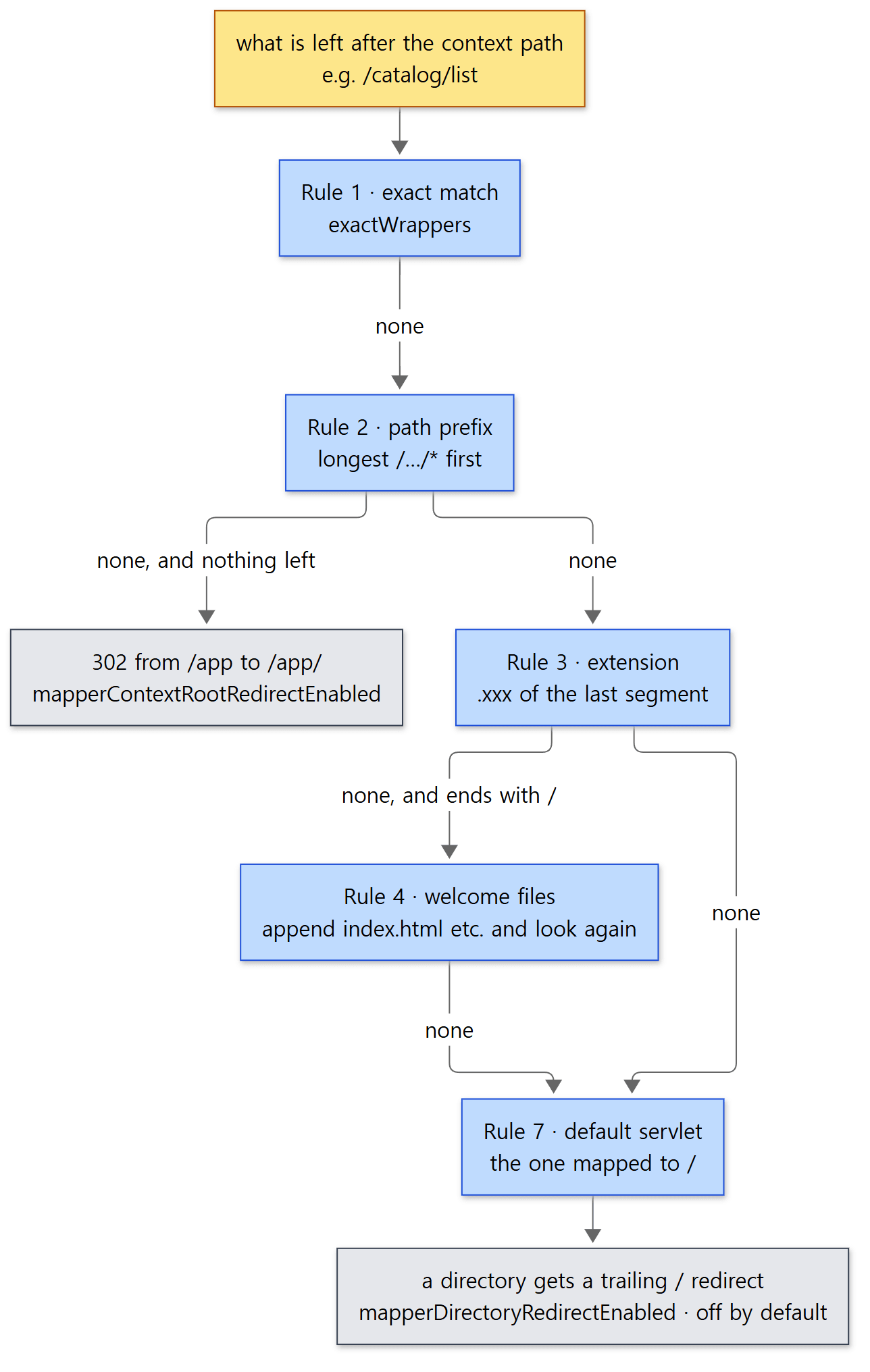 The two grey boxes are the paths that write a redirect address instead of picking a servlet.
- Rule 1 — exact match. One binary search in
exactWrappers. An empty path (the context root) is looked up under the name/(lines 1038–1059). - Rule 2 — path prefix. Same method as picking the Context: the end of the path is shortened one
/at a time, so the longest prefix wins (lines 1065–1107). Whatever is left after the prefix becomespathInfo. - Context root redirect. If nothing has been found so far and nothing follows the context path (
/app), it writes a redirect address telling the client to go to/app/instead of picking a servlet, and stops.StandardContext'smapperContextRootRedirectEnableddefaults totrue(StandardContext.javaline 787). - Rule 3 — extension. The part after the last
.in the segment after the last/is taken as the extension (lines 1118–1152). - Rule 4 — welcome files. If the path ends with
/, it appends names such asindex.html,index.htmandindex.jsp(the<welcome-file>entries inconf/web.xmllines 4752–4754) and searches again by exact match and prefix; if a real file with that name exists, it picks the extension servlet or the default servlet (lines 918–987). - Rule 7 — default servlet. If nothing matches, it is the servlet mapped to
/. Unless the web app says otherwise, that slot holds theDefaultServlet(the servlet that serves static files) registered inconf/web.xml(conf/web.xmllines 436–439).
If an address was written to redirectPath, postParseRequest() sends a redirect response and returns false. The request never enters the container (the valves).
        // Possible redirect
        MessageBytes redirectPathMB = request.getMappingData().redirectPath;
        if (!redirectPathMB.isNull()) {
            String redirectPath = URLEncoder.DEFAULT.encode(redirectPathMB.toString(), StandardCharsets.UTF_8);
            String query = request.getQueryString();
            // ...
            response.sendRedirect(redirectPath);
            request.getContext().logAccess(request, response, 0, true);
            return false;
        }
java/org/apache/catalina/connector/CoyoteAdapter.java lines 803–822
Example 4: the priority of six servlets
I registered the same class, Where, six times under different names and gave each name a different url-pattern. The servlet prints HttpServletMapping (the Servlet API that tells you "which pattern was this mapped by") and the path pieces.
// Example written for this post (not part of Tomcat's source)
// ... imports omitted ...

/**
 * In web.xml the servlet is registered several times under different names (one servlet, many registrations),
 * each name mapped with a different pattern. The response prints which name was picked and the path pieces
 * the Mapper decided on.
 */
public class Where extends HttpServlet {
    @Override
    protected void doGet(HttpServletRequest req, HttpServletResponse resp) throws IOException {
        HttpServletMapping m = req.getHttpServletMapping();
        resp.setContentType("text/plain");
        resp.getWriter().println("servlet=" + getServletName()
                + " match=" + m.getMappingMatch()
                + " pattern=" + m.getPattern()
                + " servletPath=" + req.getServletPath()
                + " pathInfo=" + req.getPathInfo());
        // print both to see how the request URI differs before and after decoding/normalizing
        resp.getWriter().println("  requestURI=" + req.getRequestURI()
                + " contextPath=" + req.getContextPath()
                + " sessionIdFromURL=" + (req.getRequestedSessionId() == null ? "-" : req.getRequestedSessionId()));
    }
}
[From the example ex/u07-mapping/Where.java, imports omitted]
  <servlet-mapping><servlet-name>exact</servlet-name><url-pattern>/catalog/list</url-pattern></servlet-mapping>
  <servlet-mapping><servlet-name>prefix</servlet-name><url-pattern>/catalog/*</url-pattern></servlet-mapping>
  <servlet-mapping><servlet-name>longerPrefix</servlet-name><url-pattern>/catalog/items/*</url-pattern></servlet-mapping>
  <servlet-mapping><servlet-name>extension</servlet-name><url-pattern>*.do</url-pattern></servlet-mapping>
  <!-- the empty string is a special pattern that means only "the context root (/app/)" -->
  <servlet-mapping><servlet-name>root</servlet-name><url-pattern></url-pattern></servlet-mapping>
  <!-- "/" is the default servlet's slot. Here this app's slash takes it instead of conf/web.xml's default servlet -->
  <servlet-mapping><servlet-name>slash</servlet-name><url-pattern>/</url-pattern></servlet-mapping>
[The <servlet-mapping> part of the example ex/u07-mapping/app/WEB-INF/web.xml]
Next to the app web app, for comparison, I also deployed a web app called plain with no web.xml, just one index.html.
----- GET /app/catalog/list
HTTP 200
servlet=exact match=EXACT pattern=/catalog/list servletPath=/catalog/list pathInfo=null
  requestURI=/app/catalog/list contextPath=/app sessionIdFromURL=-
----- GET /app/catalog/list/more
HTTP 200
servlet=prefix match=PATH pattern=/catalog/* servletPath=/catalog pathInfo=/list/more
  requestURI=/app/catalog/list/more contextPath=/app sessionIdFromURL=-
----- GET /app/catalog/items/42
HTTP 200
servlet=longerPrefix match=PATH pattern=/catalog/items/* servletPath=/catalog/items pathInfo=/42
  requestURI=/app/catalog/items/42 contextPath=/app sessionIdFromURL=-
----- GET /app/catalog/report.do
HTTP 200
servlet=prefix match=PATH pattern=/catalog/* servletPath=/catalog pathInfo=/report.do
  requestURI=/app/catalog/report.do contextPath=/app sessionIdFromURL=-
----- GET /app/shop/cart.do
HTTP 200
servlet=extension match=EXTENSION pattern=*.do servletPath=/shop/cart.do pathInfo=null
  requestURI=/app/shop/cart.do contextPath=/app sessionIdFromURL=-
----- GET /app/shop/cart
HTTP 200
servlet=slash match=DEFAULT pattern=/ servletPath=/shop/cart pathInfo=null
  requestURI=/app/shop/cart contextPath=/app sessionIdFromURL=-
----- GET /app/
HTTP 200
servlet=root match=CONTEXT_ROOT pattern= servletPath= pathInfo=/
  requestURI=/app/ contextPath=/app sessionIdFromURL=-
----- GET /app
HTTP 200
servlet=root match=CONTEXT_ROOT pattern= servletPath= pathInfo=/
  requestURI=/app contextPath=/app sessionIdFromURL=-
----- GET /plain
HTTP 302 -> http://127.0.0.1:8080/plain/
----- GET /plain/
HTTP 200
plain index
----- GET /APP/catalog/list
HTTP 404
/catalog/listwas won by the exact match (Rule 1). Add/list/moreto the same path and it is no longer an exact match, so it goes to the prefix (Rule 2)./catalog/items/42matches both/catalog/*and/catalog/items/*, and the longer one won./catalog/report.dowent to/catalog/*, not to*.do. Prefix (Rule 2) comes before extension (Rule 3). The order in which they are written in web.xml has nothing to do with it./shop/cart, which matches nothing, went to the default servlet (Rule 7),slash. In that caseservletPathis the whole path andpathInfoisnull./app/and/appboth went toroot, the empty-string pattern, with an emptyservletPathand apathInfoof/./plainwas sent to/plain/with a 302, and/plain/servedindex.htmlas a welcome file (Rule 4)./APPdiffers in case so no Context was found, and thisCATALINA_BASEhas no ROOT web app, hence the 404.
Easy to get wrong: /app, but no redirect
In plain, /plain got a 302, yet in app, /app simply returned 200. The redirect (step 3) only happens "when Rules 1 and 2 found nothing". app has the empty-string pattern, so Rule 1 found root and the redirect condition was never reached. The same /app request gives a different result depending on the web app's mappings.
Easy to get wrong: the rule numbers jump from 4 to 7
The source comments only have Rules 1, 2, 3, 4 (4a, 4b, 4c) and 7; there is no 5 or 6. The step after Rule 4, commented "Welcome file processing - take 2" (lines 964–968), sits in between. Don't read meaning into the numbers; just read the code in order.
After mapping: the valves check the result
Even if the mapper finds no Host, Context or Wrapper, postParseRequest() returns true (the first code block in section 3). Deciding on a 404 is the job of each container's basic valve. StandardEngineValve sends a 404 if there is no Host, and StandardHostValve if there is no Context (without overwriting an existing error; StandardEngineValve.java lines 57–65, StandardHostValve.java lines 81–88). StandardContextValve, which checks the Wrapper, looks at one more thing first.
        // Disallow any direct access to resources under WEB-INF or META-INF
        MessageBytes requestPathMB = request.getRequestPathMB();
        if ((requestPathMB.startsWithIgnoreCase("/META-INF/", 0)) || (requestPathMB.equalsIgnoreCase("/META-INF")) ||
                (requestPathMB.startsWithIgnoreCase("/WEB-INF/", 0)) || (requestPathMB.equalsIgnoreCase("/WEB-INF"))) {
            response.sendError(HttpServletResponse.SC_NOT_FOUND);
            return;
        }

        // Select the Wrapper to be used for this Request
        Wrapper wrapper = request.getWrapper();
        if (wrapper == null || wrapper.isUnavailable()) {
            response.sendError(HttpServletResponse.SC_NOT_FOUND);
            return;
        }
java/org/apache/catalina/core/StandardContextValve.java lines 56–69
As the comment says, a request heading straight under WEB-INF or META-INF ends with a 404 before any servlet is picked. The requestPath used for the check is the value the mapper wrote, that is, a value derived from the cleaned-up URI. I checked it in the same run as Example 2 (WEB-INF/secret.txt is a file that really exists).
----- GET /app/WEB-INF/secret.txt
HTTP 404
----- GET /app/x/../WEB-INF/secret.txt
HTTP 404
----- GET /app/WEB-INF;x=y/secret.txt
HTTP 404
Whether you slip in a .. or a path parameter, after cleanup it is always /WEB-INF/secret.txt, so it is blocked. That is why this check has to come after the mapper and after normalization. Pipelines and valves are covered in detail in Part 8.
5. What a servlet receives is a RequestFacade
What is the req that comes into a servlet's doGet(HttpServletRequest req, …)? StandardWrapperValve, which calls the filter chain, passes request.getRequest() (StandardWrapperValve.java line 164).
    public HttpServletRequest getRequest() {
        if (facade == null) {
            facade = new RequestFacade(this);
        }
        if (applicationRequest == null) {
            applicationRequest = facade;
        }
        return applicationRequest;
    }
java/org/apache/catalina/connector/Request.java lines 707–715
RequestFacade is a thin shell that holds one connector Request and forwards every method to it. A facade ("the front of a building") is a design that hides the inside and shows only the side meant to be seen.
    public RequestFacade(Request request) {
        this.request = request;
    }


    /**
     * Clear facade.
     */
    public void clear() {
        request = null;
    }
java/org/apache/catalina/connector/RequestFacade.java lines 66–76
The connector Request already implements HttpServletRequest, so why add another layer? The source shows two reasons.
- To hide the inside. The connector
Requesthas manypublicmethods only the container should use, such asgetMappingData(),setUserPrincipal()andgetContext(). Hand that object to a servlet as-is, and it could cast(Request) reqand change the mapping result or the authentication info. The facade exposes only the Servlet API methods and keeps the inner object in aprotectedfield (RequestFacade.javaline 58). - To protect an object that gets reused. As we saw in section 1, the connector
Requestis used again for the next request. If a servlet kept hold of it after its request ended, it would later be reading someone else's request. Sorecycle()cuts the facade loose and throws it away.
        if (getDiscardFacades()) {
            if (facade != null) {
                facade.clear();
                facade = null;
            }
java/org/apache/catalina/connector/Request.java lines 547–551
The connector's discardFacades defaults to true (Connector.java line 215). Every method of a cut-off facade first calls checkFacade(), which throws (lines 618–622). Buggy code blows up immediately instead of quietly reading another person's request.
Example 5: holding on to the request object
// Example written for this post (not part of Tomcat's source)
// ... imports omitted ...

/**
 * See what request object a servlet receives, and what happens if you keep hold of it after the request ends.
 *   /app/keep?step=1 : keeps the request object in a static field, prints its class name and the call stack
 *   /app/keep?step=2 : calls getRequestURI() on the object kept from the previous request
 */
public class Keep extends HttpServlet {
    // Don't do this: carrying the request object outside the request
    private static HttpServletRequest kept;

    @Override
    protected void doGet(HttpServletRequest req, HttpServletResponse resp) throws IOException {
        resp.setContentType("text/plain");
        if ("1".equals(req.getParameter("step"))) {
            kept = req;
            resp.getWriter().println("class=" + req.getClass().getName());
            // print to catalina.out which methods we passed through to reach this servlet
            new Throwable("stack at Keep.doGet").printStackTrace();
        } else {
            try {
                resp.getWriter().println("kept.getRequestURI()=" + kept.getRequestURI());
            } catch (IllegalStateException e) {
                resp.getWriter().println("IllegalStateException: " + e.getMessage());
            }
        }
    }
}
[From the example ex/u07-mapping/Keep.java, imports omitted]
----- GET /app/keep?step=1
HTTP 200
class=org.apache.catalina.connector.RequestFacade
----- GET /app/keep?step=2
HTTP 200
IllegalStateException: The request object has been recycled and is no longer associated with this facade
The servlet received a RequestFacade, and since it was cut loose when the first request ended, using the old object in the second request threw an exception. When you really need the request outside the request, as in asynchronous processing, use the way the Servlet API provides (AsyncContext) (Part 12).
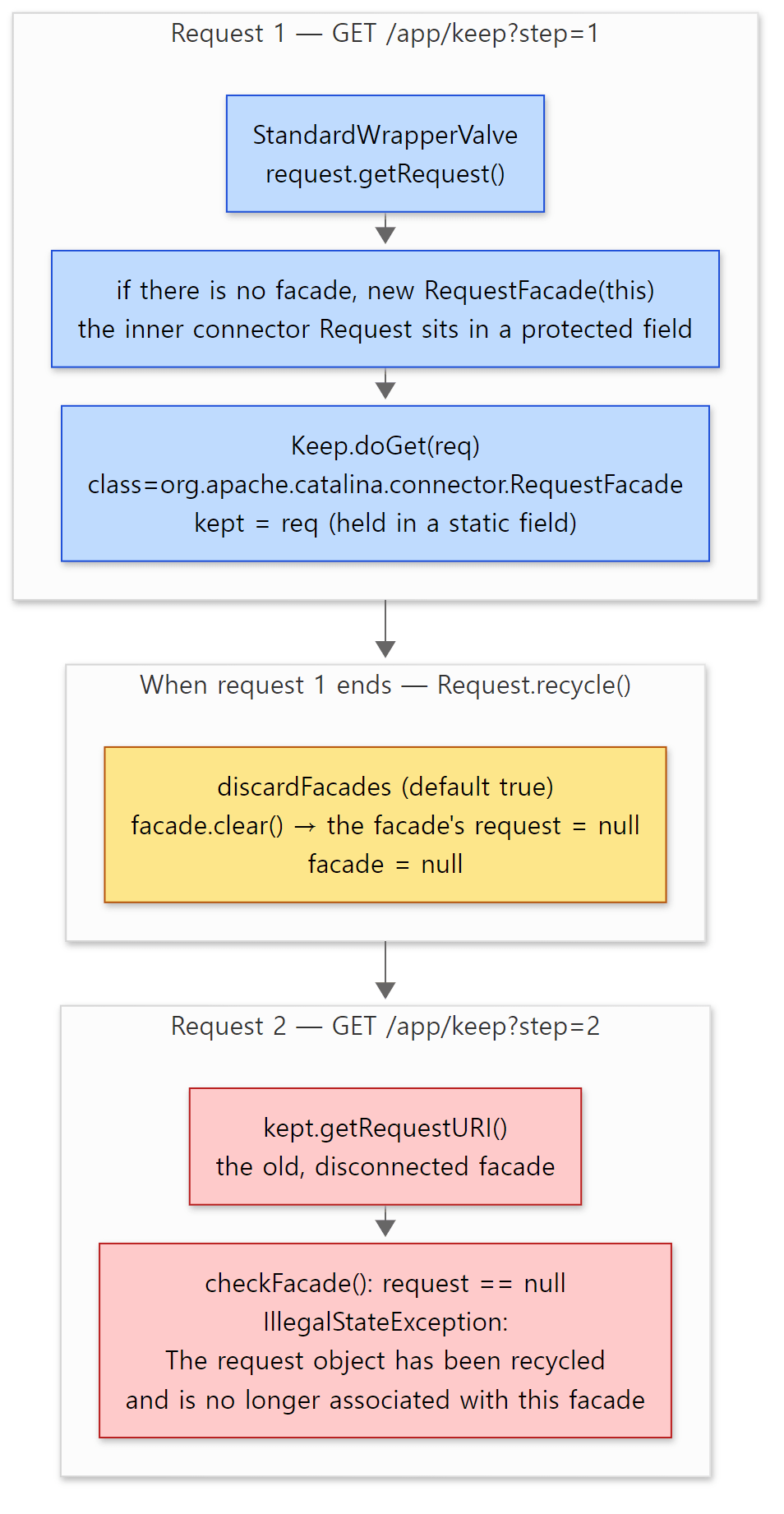 Blue boxes are inside request 1, the yellow box is when the request ends, and red boxes are request 2. The message is the real output of example 5.
Easy to get wrong: getContextPath()'s comment and code disagree
The comment on RequestFacade.getContextPath() says "Tomcat neither normalizes nor decodes the returned value. It will be identical to the part of the request URI provided by the user agent" (lines 341–351). But the Request.getContextPath() it calls looks like this.
    /**
     * {@inheritDoc}
     * <p>
     * Tomcat returns the canonical context path for the web application.
     */
    @Override
    public String getContextPath() {
        return getContext().getPath();
    }
java/org/apache/catalina/connector/Request.java lines 1970–1978
It returns the web app's canonical path. In the same run as Example 2, I sent /app with the a encoded as %61.
----- GET /%61pp/catalog/list
HTTP 200
servlet=exact match=EXACT pattern=/catalog/list servletPath=/catalog/list pathInfo=null
  requestURI=/%61pp/catalog/list contextPath=/app sessionIdFromURL=-
contextPath is /app. The actual behavior matches the comment on Request; the facade's comment is an outdated leftover. According to the git history, main changed the implementation after Servlet 6.2 relaxed the requirements for this method (commit 4e7f6c7572), and the facade comment was written before that (commit 511ffac20f). The 11.0.x branch's Request.getContextPath() still has the long implementation that cuts that part out of the request URI, so it looks like it would return /%61pp, but I did not run 11.0.x to check. When a comment and the code disagree, go with the code.
6. MapperListener — how the mapper gets filled
The mapper only holds arrays; it does not know the container tree. The one that copies changes in the tree into the mapper is MapperListener. The order in which a Service starts shows where it sits.
        // Start our defined Container first
        if (engine != null) {
            engine.start();
        }

        for (Executor executor : findExecutors()) {
            executor.start();
        }

        mapperListener.start();

        // Start our defined Connectors second
        for (Connector connector : findConnectors()) {
            // If it has already failed, don't try and start it
            if (connector.getState() != LifecycleState.FAILED) {
                connector.start();
            }
        }
java/org/apache/catalina/core/StandardService.java lines 431–448
MapperListener starts after the Engine (and the Hosts and web apps under it) have started, and before the connectors begin taking requests. So by the time the first request arrives, the mapper is already full. Startup order and the Lifecycle were covered in Part 3.
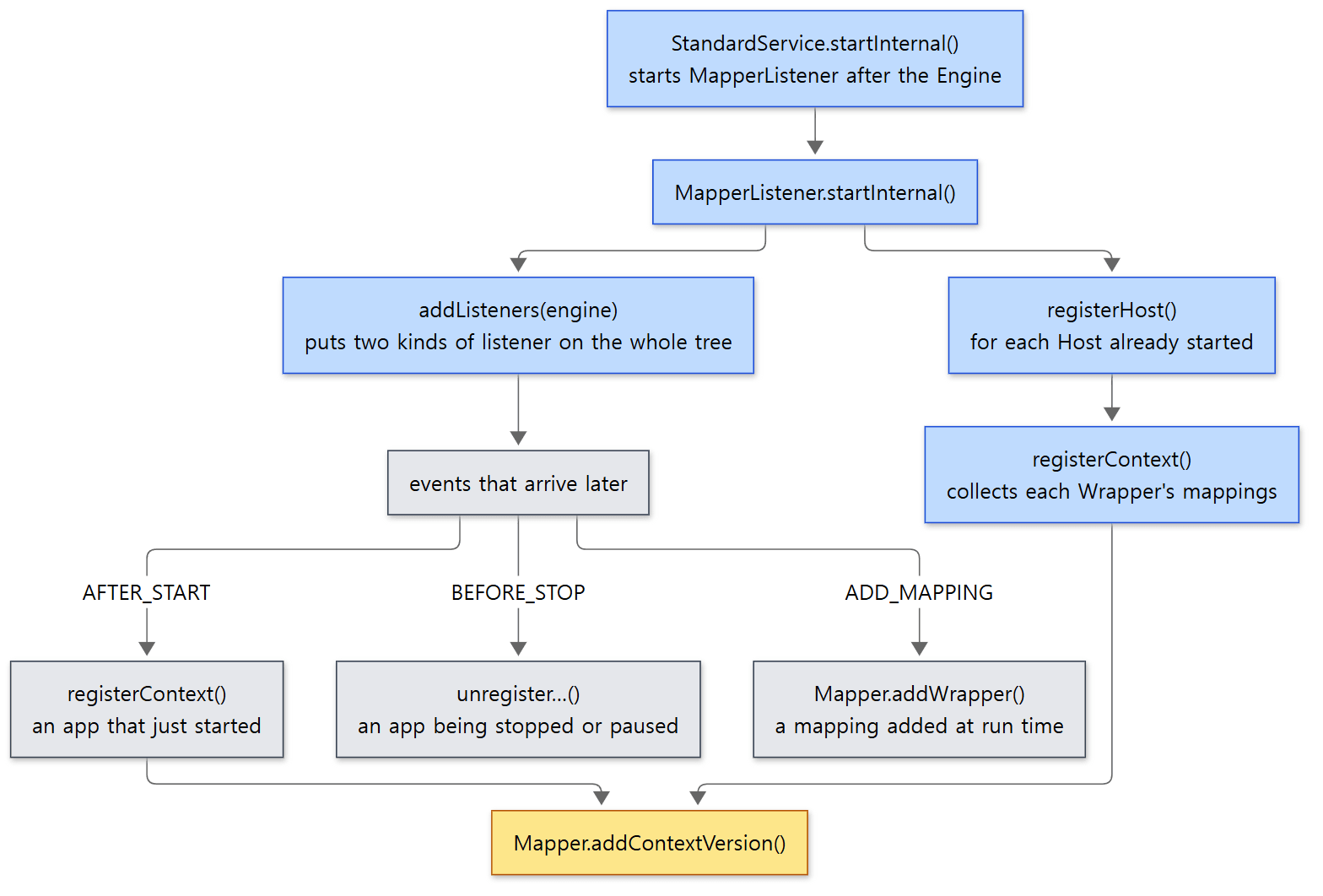 The grey boxes are what happens when web apps are deployed or removed while the server is running.
MapperListener.startInternal() does two things (lines 84–105).
- Register what exists now. For each Host not in the
NEWstate (in practice every started Host, since the Engine started first),registerHost()→ for each started Context in it,registerContext().registerContext()collects the url-patterns of each of the Context's Wrappers withfindMappings()and passes them all at once toMapper.addContextVersion()(lines 352–378). - Listen for what changes later.
addListeners()attaches itself to every container in the tree, from the Engine down to the Wrappers, both as a container listener (events such as a child being added or removed, or a mapping being added) and as a lifecycle listener (start and stop events) (lines 481–487).
Later, when a web app is deployed or taken down, lifecycle events arrive.
    public void lifecycleEvent(LifecycleEvent event) {
        if (event.getType().equals(AFTER_START_EVENT)) {
            Object obj = event.getSource();
            if (obj instanceof Wrapper w) {
                // Only if the Context has started. If it has not, then it will
                // have its own "after_start" event later.
                if (w.getParent().getState().isAvailable()) {
                    registerWrapper(w);
                }
            } else if (obj instanceof Context c) {
                // Only if the Host has started. If it has not, then it will
                // have its own "after_start" event later.
                if (c.getParent().getState().isAvailable()) {
                    registerContext(c);
                }
            } else if (obj instanceof Host) {
                registerHost((Host) obj);
            }
java/org/apache/catalina/mapper/MapperListener.java lines 445–462
It registers after startup has finished (AFTER_START) and removes before stopping (BEFORE_STOP) (lines 463–472). This order keeps requests from going to a web app that has not finished starting, and keeps new requests out of a web app that is stopping. The check that skips registration while the parent has not started is for the same reason: when the parent finishes starting, its children are registered along with it.
When a mapping is added to a Wrapper after the web app has already started, StandardWrapper.addMapping() fires a Wrapper.ADD_MAPPING_EVENT container event (StandardWrapper.java lines 553–554 — only when the parent Context is STARTED), and MapperListener picks it up and adds it right away with Mapper.addWrapper() (lines 170–184). Mappings added before startup need no event; registerContext() collects them all at once when startup finishes.
Easy to get wrong: a request to a web app that is reloading
While a web app is being reloaded (reloadable, Part 4), its Context is in a "paused" state, and instead of being removed from the mapper it is only marked as paused (pauseContextVersion() in unregisterContext(), lines 392–397). A request that arrives in the meantime, once mapped, sleeps for one second in postParseRequest() and maps again (lines 782–794). That is why requests during a reload only slow down for a moment instead of getting a 404 (I did not verify this behavior by running it).
What this post leaves out
- The loop that picks the version again from the session under parallel deployment (
app##1):CoyoteAdapter.javalines 745–780 - "Suspicious URIs", checked when
rejectSuspiciousURIs(off by default) is on:checkSuspiciousURIs(), lines 1246–1322 - Finding the session ID in cookies and the SSL session (
parseSessionCookiesId(),parseSessionSslId()): lines 985–1047, Part 11 - Refusing
TRACE, and authentication at the connector level (doConnectorAuthenticationAuthorization()): lines 824–890 - A 400 for a
QUERYrequest with noContent-Type(a check only in main, not in 11.0.x): lines 797–801 - JSP
jsp-property-groupwildcards and welcome files (Bugzilla 27664):Mapper.javalines 884–899 - Mapping inside a Context, used by
RequestDispatcher,map(Context, MessageBytes, MappingData): lines 721–728, Part 9 - How
RewriteValvemaps again withAdapter.prepare()after rewriting the URL:RewriteValve.javaline 649 asyncDispatch(), the way an async request comes back into the container: fromCoyoteAdapter.javaline 113, Part 12- The response-side facade,
ResponseFacade:java/org/apache/catalina/connector/ResponseFacade.java
Summary
| Concept | In one line |
|---|---|
CoyoteAdapter.service() |
The border between Coyote and Catalina. Takes out the connector Request and hands it to the Engine pipeline after postParseRequest() |
connector Request |
The HttpServletRequest implementation wrapping a coyote Request. Reused with the processor, recycle()d when a request ends |
postParseRequest() |
cut path parameters → decode %xx → normalize → bytes to characters → map |
| Two URIs | getRequestURI() is as received; mapping and security checks use the cleaned-up decodedURI |
%2F, \, /../ |
400 under the default settings. Even then it maps up to the Host so the error-page valve is passed |
Mapper |
One per Service. Sorted arrays and binary search; changes swap in a new array |
| Picking the Host | ignore case → drop before the first dot once (wildcard) → default Host |
| Picking the Context | the longest path, else ROOT. Paths are case-sensitive |
| Picking the Wrapper | exact → longest prefix → (root redirect) → extension → welcome files → default servlet |
MappingData |
The mapping result. getServletPath(), getPathInfo() and getContext() read from it |
RequestFacade |
Hides the inner methods; after recycling it is cut loose and throws IllegalStateException |
MapperListener |
Fills the mapper after the Engine starts and before the connectors do, then follows AFTER_START/BEFORE_STOP |
What's next
Once mapping is done, getFirst().invoke() sends the request into the Engine's pipeline. What StandardEngineValve → AbstractAccessLogValve → ErrorReportValve → StandardHostValve → AuthenticatorBase → StandardContextValve → StandardWrapperValve from Example 1's stack are, why they are chained like this, and where you can slot in a valve of your own, are covered in Part 8: Pipelines and Valves — The Processing Chain on Every Container.
We met the same problem in the earlier series. Where translate_name and map_to_storage in httpd Part 10 turn a URL into a path on disk and that path's settings, Tomcat's Mapper turns a URL into a Host, a Context and a servlet. Both normalize before mapping, and both map and check access against the cleaned-up path. Picking the Host is the same job as choosing the virtual host in httpd Part 9.
RequestMappingHandlerMapping in Spring Part 22 is a second mapper that picks again after Tomcat has picked the servlet. If you map DispatcherServlet to /, every request not caught by another servlet pattern reaches DispatcherServlet through Rule 7 (the default servlet) of Tomcat's mapper, and inside it Spring picks the @GetMapping method. Spring's shortcut, "look up the exact path in a map first, and try patterns only if that fails", also resembles the Rule 1 → Rule 2 order of Tomcat's mapper. The difference is that Tomcat's order is fixed by the servlet spec, while Spring gathers candidates and uses a comparator to pick "the most specific one".