What this post covers
This is the twelfth post in the "Digging into Tomcat's Source" series. Part 11 looked at sessions. Every request we have seen so far had the same shape: one request thread takes the request, carries it through the valves and the filter chain, calls the servlet's service(), and finishes the response when service() returns. From start to end, one thread holds on to one request.
This post looks at how to break that rule: asynchronous servlets (startAsync()) from Servlet 3.0 and non-blocking I/O (ReadListener, WriteListener) from Servlet 3.1. The source still carries that split in its comments (AbstractProcessor.action() has "Servlet 3.0 asynchronous support" and "Servlet 3.1 non-blocking I/O", line 575 and line 658). We want to answer four questions.
- After
startAsync()is called andservice()returns, the response is not finished yet. Where does the thread go, and who is holding the request? - How does a
complete()ordispatch()called from another thread find its way back to one of Tomcat's request threads? - If nobody ever finishes an async request, when is it cut off, and by whom?
- Who calls a
ReadListener'sonDataAvailable(), and when?
| Item | Details |
|---|---|
| Project | Apache Tomcat |
| Version | 12.0.0-M1 (main) |
| Commit | 17aa1769b0 (2026-10-23) |
| Main classes | core/AsyncContextImpl, coyote/AsyncStateMachine, coyote/AbstractProcessor·AbstractProcessorLight, coyote/AbstractProtocol, connector/CoyoteAdapter, connector/Request, coyote/Request |
All line numbers in this post refer to this commit. How to get the same source and build the Docker image for the examples is in Part 1.
Async processing contains a great deal of code that guards against race conditions (two threads touching the same request at almost the same moment). This post picks only the main path a first-time reader can follow. What was left out is listed, by name and location only, under "What this post leaves out" at the end.
Terms to know first
A container thread is a thread from the pool Tomcat creates for processing requests. These threads have names like http-nio-8080-exec-1, and the maxThreads you set on <Connector> in server.xml is the size of this pool. We met them in Part 5, together with the Acceptor that accepts connections and the Poller that watches sockets. Tomcat's source comments call these "container threads" and threads the application creates itself "non-container threads" (for example AsyncStateMachine.java lines 337–349).
An asynchronous servlet is a servlet that calls request.startAsync() inside service() to say "I will finish the response later". startAsync() returns an AsyncContext, which the application hands over to some other thread. When the work is done, that thread calls one of two methods.
complete()— finish the response right here.dispatch()— send this request back to a servlet on a container thread (the servlet is called once more).
A servlet has to declare up front that it uses async, for example with @WebServlet(asyncSupported = true) (in web.xml, <async-supported>true</async-supported>).
An ActionCode is a label Catalina (the servlet container) uses when it asks Coyote (the connector) to do something (Part 2 explained why the two are separate). Catalina does not call into Coyote's internals; it just passes a label, as in coyoteRequest.action(ActionCode.ASYNC_COMPLETE, null). The receiver is the processor (for HTTP/1.1, the Http11Processor from Part 6), and the actual switch lives in its parent, AbstractProcessor.action(). ActionCode is an enum, and its comment describes the values as "callbacks from the servlet container to the coyote connector" (coyote/ActionCode.java lines 19–26).
A SocketState is the value a processor returns after handling a socket, telling the caller "what to do with this connection now". This post needs only three of them.
| Value | Meaning |
|---|---|
OPEN |
One request is completely done. With keep-alive, wait for the next request |
LONG |
We are in the middle of a request. Return while keeping the processor attached to the socket |
ASYNC_END |
Async processing has just ended. Go round once more to finish up |
Non-blocking I/O means "if there is no data to read, don't wait; return right away". In a servlet, you register a listener with ServletInputStream.setReadListener(), and the container calls onDataAvailable() when data arrives. The writing side is WriteListener.onWritePossible(). Both can only be used in async mode.
1. Why let go of the thread
Say a request waits on an external API that takes 2 seconds. With a synchronous servlet, a container thread sleeps for those 2 seconds. It does nothing, but it takes up a slot in the pool, and once the pool is full, other requests wait in the queue. An asynchronous servlet gives the container thread back to the pool while it waits.
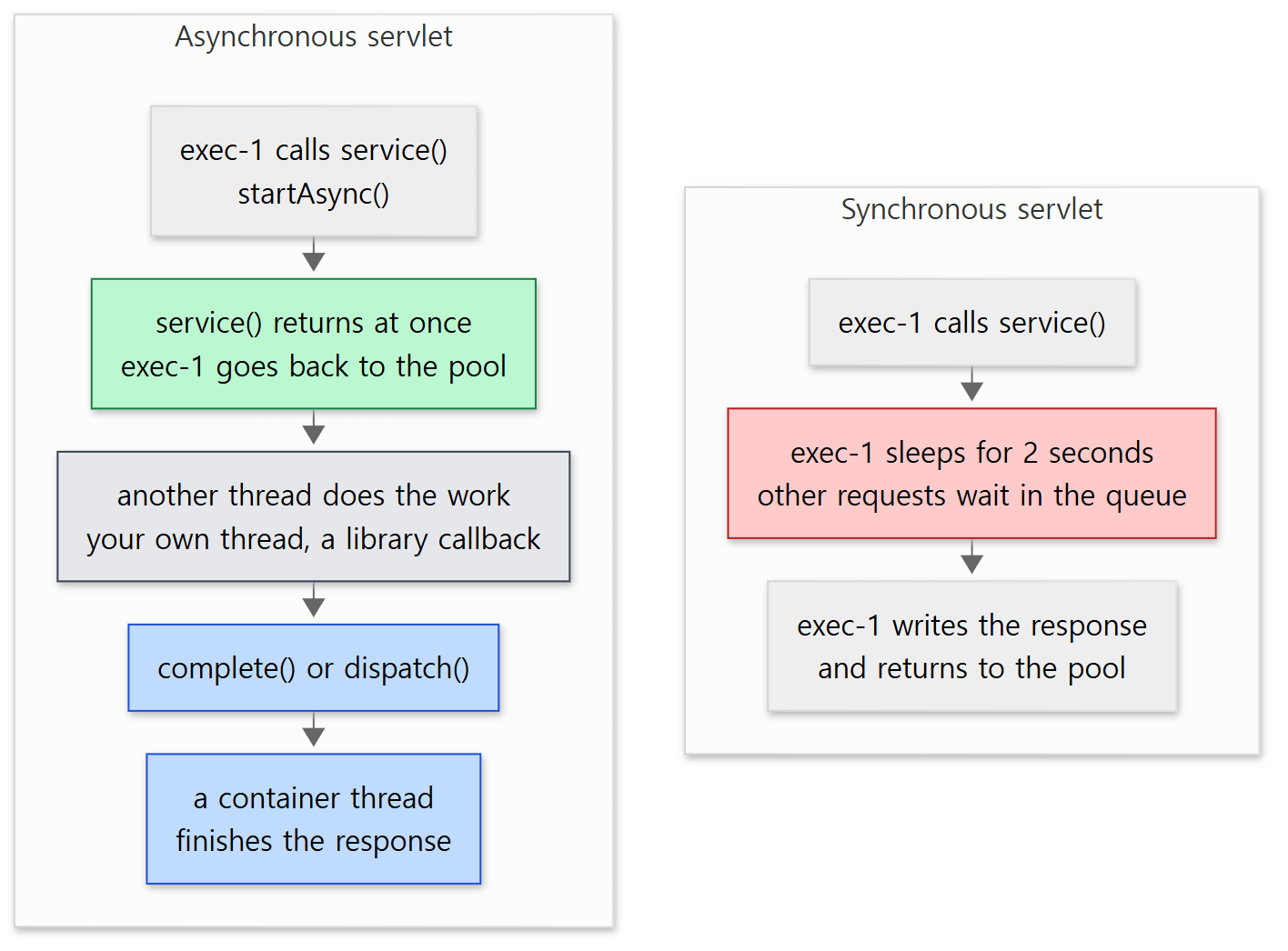 The red box is where the synchronous servlet wastes a thread; the green box is where the asynchronous servlet gives it back.
Example 1: sync vs. async with maxThreads="1"
I checked this with an extreme setting. I added maxThreads="1" to the 8080 connector in server.xml, so there is only one request thread, wrote a servlet that does 2 seconds of "work" in a synchronous and an asynchronous version, and sent three simultaneous requests to each.
// Example written for this post (not Tomcat source)
// The same 2-second job, once synchronous and once asynchronous. Three concurrent requests hit a maxThreads="1" connector.
public class SlowServlets {
    // ... now() returns "t=…ms", measured with a monotonic clock (nanoTime) from when this class was first used

    // Synchronous: the container thread sleeps for 2 seconds
    @WebServlet("/sync")
    public static class Sync extends HttpServlet {
        // ... doGet() does Thread.sleep(2000), then writes one line shaped like the Async one below
    }

    // Asynchronous: service() returns at once, and 2 seconds later a single scheduler thread finishes the response
    @WebServlet(urlPatterns = "/async", asyncSupported = true)
    public static class Async extends HttpServlet {
        private final ScheduledExecutorService scheduler =
                Executors.newSingleThreadScheduledExecutor(r -> new Thread(r, "my-scheduler"));

        @Override
        protected void doGet(HttpServletRequest req, HttpServletResponse resp) {
            String begin = now();
            String t = Thread.currentThread().getName();
            AsyncContext ac = req.startAsync();
            scheduler.schedule(() -> {
                try {
                    ac.getResponse().getWriter().println("async " + req.getParameter("n") + ": service() " + begin
                            + " on " + t + ", response " + now() + " on " + Thread.currentThread().getName());
                } catch (IOException e) {
                    e.printStackTrace();
                }
                ac.complete();
            }, 2, TimeUnit.SECONDS);
        }
        // ... destroy() shuts the scheduler down
    }
}
[Shortened from ex/u12-maxthreads/SlowServlets.java]
These examples were run with Tomcat 12.0.0-M1-dev built unchanged from the base commit (17aa1769b0), in a Docker container (Eclipse Temurin JDK 21). run.sh starts three curl processes in the background at the same time, and when they finish it uses jstack to list the threads whose names start with http-nio-8080.
    <Connector port="8080" protocol="HTTP/1.1" maxThreads="1"
===== 3 concurrent requests to /u12/sync =====
sync  2: service() t=    0ms on http-nio-8080-exec-1, response t= 2002ms on http-nio-8080-exec-1
sync  3: service() t= 2005ms on http-nio-8080-exec-1, response t= 4008ms on http-nio-8080-exec-1
sync  1: service() t= 4011ms on http-nio-8080-exec-1, response t= 6015ms on http-nio-8080-exec-1
===== 3 concurrent requests to /u12/async =====
async 2: service() t= 6073ms on http-nio-8080-exec-1, response t= 8079ms on my-scheduler
async 1: service() t= 6081ms on http-nio-8080-exec-1, response t= 8082ms on my-scheduler
async 3: service() t= 6083ms on http-nio-8080-exec-1, response t= 8083ms on my-scheduler
===== http-nio-8080 threads (jstack) =====
"http-nio-8080-Acceptor"
"http-nio-8080-exec-1"
"http-nio-8080-Poller"
The request order and the millisecond values change from run to run.
- Synchronous: the three requests use
exec-1one after another. The second request'sservice()starts only 2 seconds later, after the first one is done, and the third starts after 4 seconds. The last request got its response after 6 seconds. - Asynchronous: all three
service()calls ran a few milliseconds apart, one after another on the sameexec-1. Becauseservice()returned at once, the thread was free again almost immediately and could take the next request. What waited for 2 seconds was a scheduled task, not a thread, and all three responses were written bymy-schedulerafter 2 seconds.
The thread list shows only exec-1. For 2 seconds three async requests were "in progress" at the same time, yet no container thread was assigned to them during that time. So where were those requests during those 2 seconds? We follow that from Section 2 on.
Easy to get wrong: async does not make the work faster
Each async request still takes 2 seconds to answer. The only thing async changes is that no container thread is used while waiting. If, in the example above, the work had been handed to a thread pool that runs Thread.sleep(2000) instead of to my-scheduler, that pool would be in exactly the same position as the synchronous servlet's container threads. Async pays off when the waiting itself can happen without a thread (a timer, a callback from a non-blocking client, a notification from a message queue).
One more thing I ran into while building this example. At first I printed times with LocalTime.now() (the wall clock), but in this Docker environment the wall clock drifted, and the time difference around a Thread.sleep(2000) sometimes showed up as 1.2 seconds. Elapsed time should be measured with System.nanoTime() (a monotonic clock).
2. startAsync() — what gets set up
The HttpServletRequest a servlet receives is a connector.Request wrapped in a RequestFacade (Part 7). startAsync() is there.
    @Override
    public AsyncContext startAsync(ServletRequest request, ServletResponse response) {
        if (!isAsyncSupported()) {
            IllegalStateException ise = new IllegalStateException(sm.getString("request.asyncNotSupported"));
            log.warn(sm.getString("coyoteRequest.noAsync", StringUtils.join(getNonAsyncClassNames())), ise);
            throw ise;
        }

        if (asyncContext == null) {
            asyncContext = new AsyncContextImpl(this);
        }

        asyncContext.setStarted(getContext(), request, response,
                request == getRequest() && response == getResponse().getResponse());
        asyncContext.setTimeout(getConnector().getAsyncTimeout());

        return asyncContext;
    }
java/org/apache/catalina/connector/Request.java lines 1582–1599
It does three things.
- It checks that async is allowed. If not, it throws an
IllegalStateExceptionand logs a warning naming the classes that blocked it. - It creates an
AsyncContextImpland callssetStarted(). Only one is created per request; it is reused if async is started several times. - It sets the timeout to the connector's
asyncTimeout. This is<Connector asyncTimeout="...">inserver.xml, and the default is 30000 milliseconds (Connector.javaline 169). The application can change it withsetTimeout()(Section 5).
The first line of setStarted() tells Coyote that async has started.
        synchronized (asyncContextLock) {
            this.request.getCoyoteRequest().action(ActionCode.ASYNC_START, this);

            this.context = context;
            context.incrementInProgressAsyncCount();
            this.servletRequest = request;
            this.servletResponse = response;
            this.hasOriginalRequestAndResponse = originalRequestResponse;
            this.event = new AsyncEvent(this, request, response);
            // ... calls onStartAsync() on the AsyncListeners registered so far
        }
java/org/apache/catalina/core/AsyncContextImpl.java lines 407–430
In AbstractProcessor.action(), ASYNC_START leads to asyncStateMachine.asyncStart(...) (lines 576–579). This is where the main character of this post appears. The async state does not live in Catalina's AsyncContextImpl but in the AsyncStateMachine owned by the processor on the Coyote side. Most methods of AsyncContextImpl are a thin shell that hands the work to the state machine through action(). complete(), too, does one check() and sends ActionCode.ASYNC_COMPLETE, and that is all (lines 148–156).
isAsyncSupported() looks at the whole chain
The isAsyncSupported() in step 1 just reads one flag stored in the request, but that flag gets whittled down along the path the request has travelled.
CoyoteAdapter.service()checks the Engine's whole pipeline (line 345).StandardPipeline.isAsyncSupported()walks the valves one by one and returnsfalseif even one valve does not support async (lines 100–109).- The basic valves of Engine, Host and Context check the next container's pipeline the same way (for example
StandardHostValvelines 90–92). - Finally, the filter chain checks each filter, and once more just before calling the servlet.
            if (request.isAsyncSupported() && !servletSupportsAsync) {
                request.setAttribute(Globals.ASYNC_SUPPORTED_ATTR, Boolean.FALSE);
            }
java/org/apache/catalina/core/ApplicationFilterChain.java lines 128–130
Lines 108–110 do the same for filters. Once the flag becomes false, it never goes back to true. So if any one of the valves, filters or servlet on the request's path is not asyncSupported, startAsync() fails. The list of classes printed in the warning on failure is collected by getNonAsyncClassNames(), which walks the servlet, the filter chain, and the pipelines from the Wrapper up to the Engine once more (lines 1602–1624).
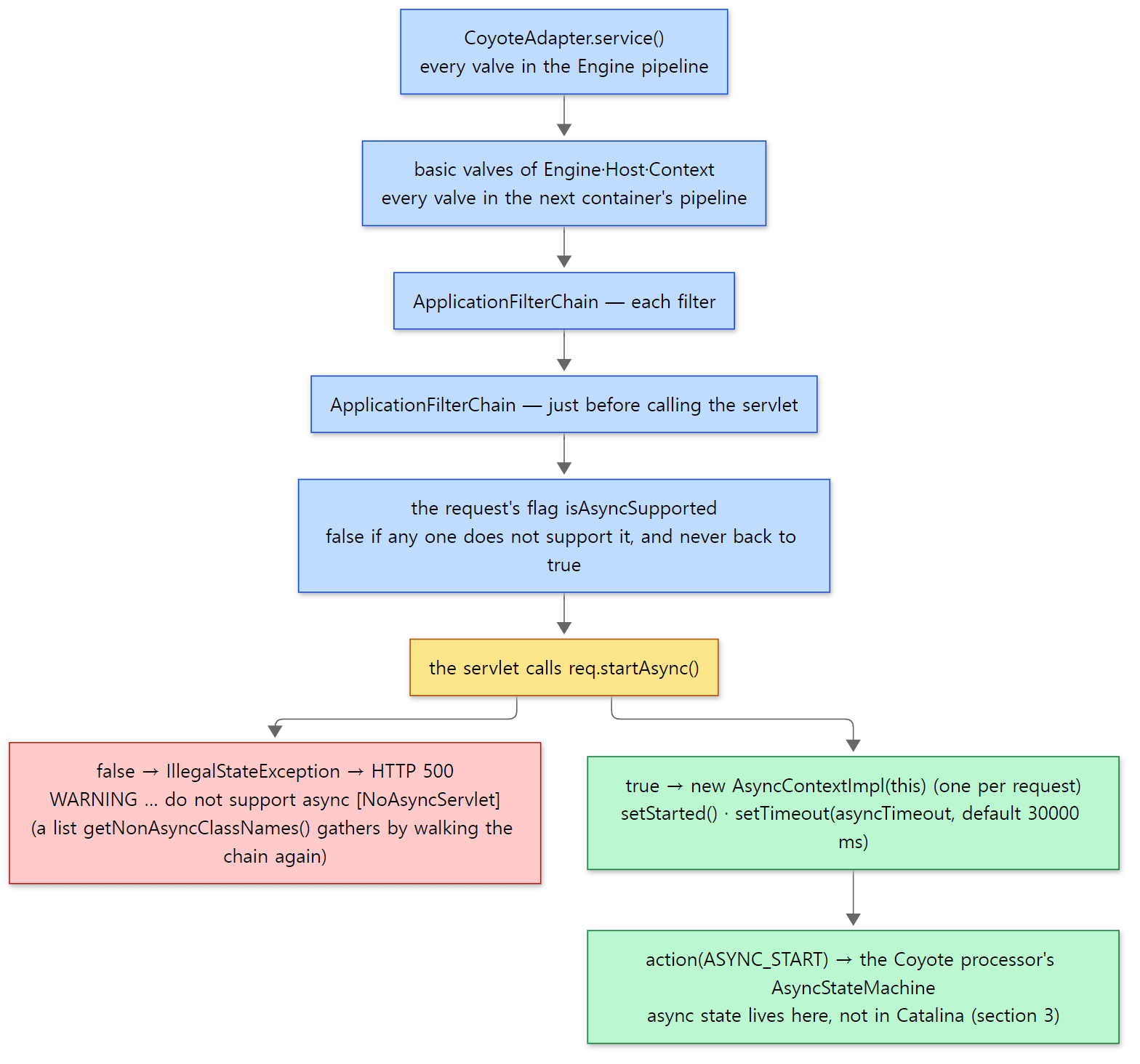 The red box is the real output from "Easy to get wrong" below; the green boxes are the two code snippets above.
Easy to get wrong: a servlet missing asyncSupported
I called startAsync() from a servlet that does not declare asyncSupported (/noasync in Example 2; the code is just @WebServlet("/noasync"), a line that prints req.isAsyncSupported(), and one req.startAsync() line).
===== curl http://127.0.0.1:8080/u12/noasync =====
HTTP 500
[http-nio-8080-exec-6] isAsyncSupported=false
24-Oct-2026 13:56:00.002 WARNING [http-nio-8080-exec-6] org.apache.catalina.connector.Request.startAsync Unable to start async because the following classes in the processing chain do not support async [NoAsyncServlet]
The time and thread number change from run to run. The response is 500, and the log names the blocking class as [NoAsyncServlet]. In real projects the common case is that the servlet has it switched on but one filter in front of it does not. Its class name then appears in this list, so start by reading the list. Spring MVC checks the same thing before starting async and says async support must be enabled "on a servlet and for all filters involved" (StandardServletAsyncWebRequest lines 141–145).
3. AsyncStateMachine — where the request lives after service() returns
Thirteen states
The states of AsyncStateMachine are gathered in one enum.
    private enum AsyncState {
        DISPATCHED(false, false, false, false),
        STARTING(true, true, false, false),
        STARTED(true, true, false, false),
        MUST_COMPLETE(true, true, true, false),
        COMPLETE_PENDING(true, true, false, false),
        COMPLETING(true, false, true, false),
        TIMING_OUT(true, true, false, false),
        MUST_DISPATCH(true, true, false, true),
        DISPATCH_PENDING(true, true, false, false),
        DISPATCHING(true, false, false, true),
        READ_WRITE_OP(true, true, false, false),
        MUST_ERROR(true, true, false, false),
        ERROR(true, true, false, false);
java/org/apache/coyote/AsyncStateMachine.java lines 131–144
The four values in parentheses are, in order, isAsync, isStarted, isCompleting and isDispatching (lines 146–156). request.isAsync(), for example, ends up reading the first value of the current state. Only DISPATCHED has false, so every state other than DISPATCHED means "async in progress". The name is confusing: DISPATCHED does not mean "a dispatch was done" but "handed to a container thread like an ordinary request", that is, the normal, non-async state.
What each state means and which transitions are allowed is drawn as one big diagram in the class's header comment (lines 30–124). Keeping only the paths this post follows:
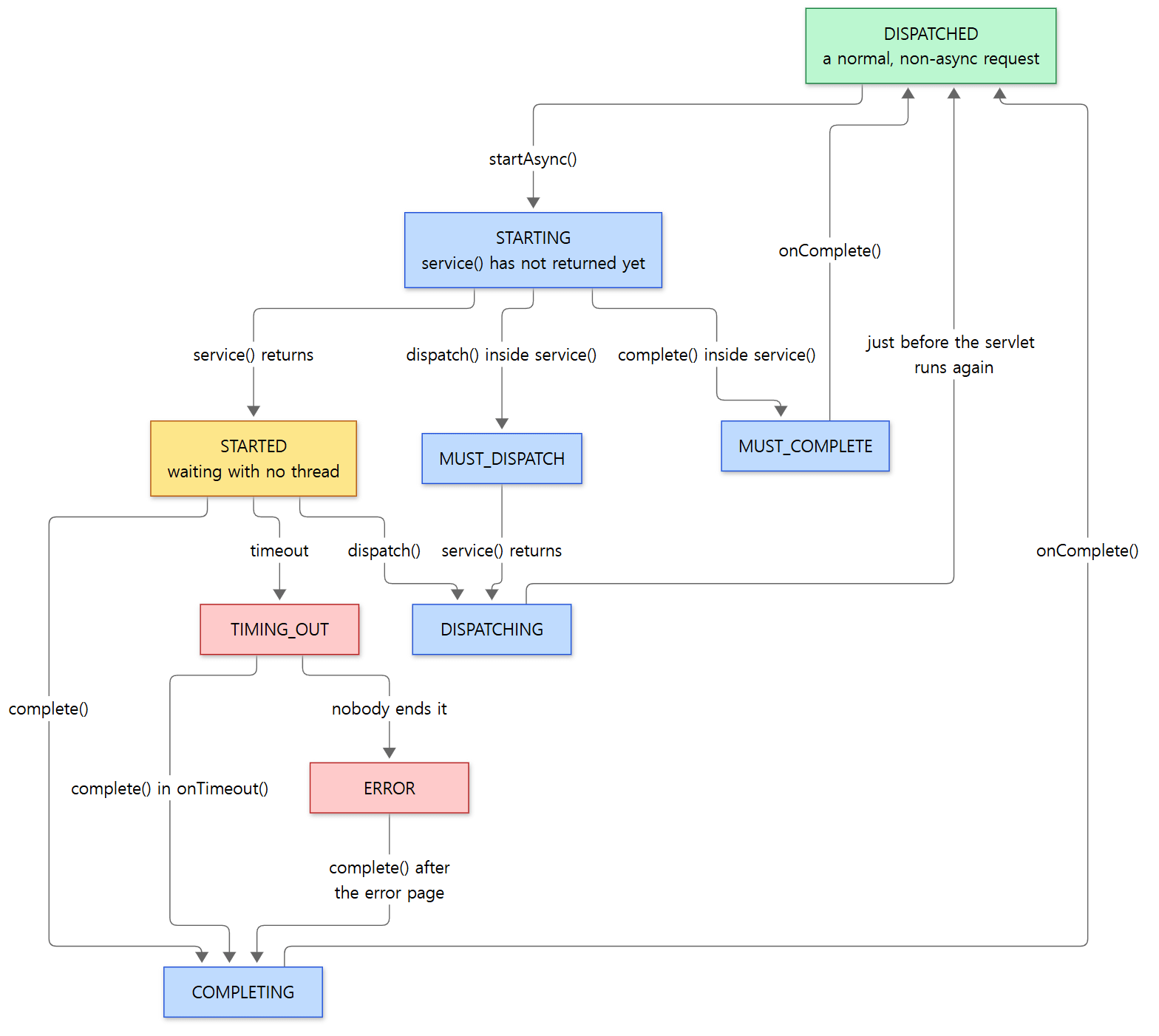 The yellow
STARTED is the "waiting with no thread" state. *_PENDING, READ_WRITE_OP and MUST_ERROR are left out of the diagram (Sections 4 and 6 cover them in text).
Why STARTING and STARTED are separate
The state startAsync() produces is not STARTED but STARTING.
    synchronized void asyncStart(AsyncContextCallback asyncCtxt) {
        if (state == AsyncState.DISPATCHED) {
            generation.incrementAndGet();
            updateState(AsyncState.STARTING);
            // Note: In this instance, caller is responsible for calling
            // asyncCtxt.incrementInProgressAsyncCount() as that allows simpler
            // error handling.
            this.asyncCtxt = asyncCtxt;
            lastAsyncStart = System.currentTimeMillis();
        } else {
            throw new IllegalStateException(sm.getString("asyncStateMachine.invalidAsyncState", "asyncStart()", state));
        }
    }
java/org/apache/coyote/AsyncStateMachine.java lines 241–253
STARTING means "async has started but service() has not returned yet". The distinction is needed because the container thread that called service() is still holding the request. If another thread called complete() and finished the response at that moment, the container thread coming back from service() would then touch a request that had already ended. So the state machine waits until service() returns before doing the real work (the *_PENDING states in Section 4).
lastAsyncStart is the time the Section 5 timeout measures from, and generation is a number that goes up by one every time async starts. The source comment says it exists to stop an event from an earlier async round being processed in the current round (lines 178–184).
When service() returns: STARTED and SocketState.LONG
When service() returns, CoyoteAdapter.service() checks whether the request is async.
            if (postParseSuccess) {
                // check valves if we support async
                request.setAsyncSupported(connector.getService().getContainer().getPipeline().isAsyncSupported());
                // Calling the container
                connector.getService().getContainer().getPipeline().getFirst().invoke(request, response);
            }
            if (request.isAsync()) {
                async = true;
                // ... (onAllDataRead() if a ReadListener has already read everything; error handling if an error occurred)
            } else {
                request.finishRequest();
                response.finishResponse();
            }
java/org/apache/catalina/connector/CoyoteAdapter.java lines 343–377
If it is async, finishResponse() is not called. In the finally block, when async is true, no access log entry is written and the request and response objects are not recycled either (line 394, lines 423–427). That makes sense: the response is not finished yet.
The request loop in Http11Processor.service(), which we saw in Part 6, has !isAsync() in its condition (line 268), so it leaves the loop once the request goes async and finally returns this:
        if (getErrorState().isError() || (protocol.isPaused() && !isAsync())) {
            return SocketState.CLOSED;
        } else if (isAsync()) {
            return SocketState.LONG;
java/org/apache/coyote/http11/Http11Processor.java lines 474–477
On receiving this, AbstractProcessorLight.process() calls asyncPostProcess() once if the request is async (we see the whole loop in Section 4). That state-machine method turns STARTING into STARTED.
    synchronized SocketState asyncPostProcess() throws IOException {
        if (state == AsyncState.COMPLETE_PENDING) {
            clearNonBlockingListeners();
            updateState(AsyncState.COMPLETING);
            return SocketState.ASYNC_END;
        } else if (state == AsyncState.DISPATCH_PENDING) {
            clearNonBlockingListeners();
            updateState(AsyncState.DISPATCHING);
            return SocketState.ASYNC_END;
        } else if (state == AsyncState.STARTING || state == AsyncState.READ_WRITE_OP) {
            updateState(AsyncState.STARTED);
            return SocketState.LONG;
        } else if (state == AsyncState.MUST_COMPLETE || state == AsyncState.COMPLETING) {
            if (processor.getErrorState().isIoAllowed() && processor.flushBufferedWrite()) {
                return SocketState.LONG;
            }
            asyncCtxt.fireOnComplete();
            updateState(AsyncState.DISPATCHED);
            asyncCtxt.decrementInProgressAsyncCount();
            return SocketState.ASYNC_END;
        // ... handles MUST_DISPATCH, DISPATCHING and STARTED; any other state throws IllegalStateException
java/org/apache/coyote/AsyncStateMachine.java lines 285–324
asyncPostProcess() is called right when "service() (or a listener call) has just returned", and it settles whatever piled up in the meantime. What matters in this section is the third branch: in STARTING, it switches to STARTED and returns LONG.
The connection handler gets LONG: keep it on the socket, put it on the waiting list
LONG travels up to AbstractProtocol.ConnectionHandler.process(), which sits between the endpoint and the processor we saw in Part 5.
                if (state == SocketState.LONG) {
                    // In the middle of processing a request/response. Keep the
                    // socket associated with the processor. Exact requirements
                    // depend on type of long poll
                    longPoll(wrapper, processor);
                    if (processor.isAsync()) {
                        getProtocol().addWaitingProcessor(processor);
                    }
                } else if (state == SocketState.OPEN) {
java/org/apache/coyote/AbstractProtocol.java lines 1378–1386
Two things happen.
- The processor stays attached to the socket. With
OPEN, the processor would have been recycled withrelease(processor)(line 1389).LONGdoes not do that; line 1428 attaches it withwrapper.setCurrentProcessor(processor). All the request's state (Request,Response, the state machine) lives inside this processor object. That is the answer to "who is holding the request": not a thread, but the processor object attached to the socket. - It is added to the
waitingProcessorsset. The timeout check in Section 5 walks this set.
longPoll() does nothing for an async processor.
        protected void longPoll(SocketWrapperBase<?> socket, Processor processor) {
            if (!processor.isAsync()) {
                // This is currently only used with HTTP
                // Either:
                // - this is an upgraded connection
                // - the request line/headers have not been completely
                // read
                socket.registerReadInterest();
            }
        }
java/org/apache/coyote/AbstractProtocol.java lines 1505–1514
While an async request is waiting, the socket is not even registered with the Poller for reading. This connection starts moving again not when the client sends something but when the application calls complete() or dispatch(). The container thread then returns from ConnectionHandler.process() and goes back to the pool.
Example 2: printing state changes and thread names
AsyncStateMachine.updateState() writes a trace log every time it changes state (lines 526–531). So adding one line to conf/logging.properties makes the transitions visible.
org.apache.coyote.AsyncStateMachine.level = FINEST
On top of that I deployed a servlet that prints thread names. It calls startAsync() in service(), and a thread I create myself, my-worker, writes the response and calls complete() one second later.
// Example written for this post (not Tomcat source)
@WebServlet(urlPatterns = "/async", asyncSupported = true)
public class AsyncServlet extends HttpServlet {

    static void say(String msg) {
        System.out.println("[" + Thread.currentThread().getName() + "] " + msg);
    }

    @Override
    protected void doGet(HttpServletRequest req, HttpServletResponse resp) throws IOException {
        // ... (what happens when we come back here through dispatch() — Section 4)
        say("service() start, dispatcherType=" + req.getDispatcherType());
        AsyncContext ac = req.startAsync();
        say("startAsync() returned, timeout=" + ac.getTimeout() + "ms");
        ac.addListener(new AsyncListener() {
            @Override public void onComplete(AsyncEvent e) { say("AsyncListener.onComplete()"); }
            // ... onTimeout and onError look the same; onStartAsync is empty
        });

        String mode = req.getParameter("mode");
        // Do the slow work on a thread we create ourselves, not on the container pool
        Thread worker = new Thread(() -> {
            try {
                say("worker: working for 1s ...");
                Thread.sleep(1000);
                if ("dispatch".equals(mode)) {
                    req.setAttribute("result", "42");
                    say("worker: calling dispatch()");
                    ac.dispatch();
                } else {
                    ac.getResponse().setContentType("text/plain");
                    ac.getResponse().getWriter().println("completed by " + Thread.currentThread().getName());
                    say("worker: calling complete()");
                    ac.complete();
                }
                say("worker: done");
            } catch (Exception e) {
                e.printStackTrace();
            }
        }, "my-worker");
        worker.start();
        say("service() end");
    }
}
[Shortened from ex/u12-async-threads/AsyncServlet.java]
run.sh picks out of catalina.out only the servlet's lines and the state machine's log lines; for the log lines it strips the date and class name and adds state:.
===== curl http://127.0.0.1:8080/u12/async?mode=complete =====
completed by my-worker
[http-nio-8080-exec-2] service() start, dispatcherType=REQUEST
[http-nio-8080-exec-2] state: Changing async state from [DISPATCHED] to [STARTING]
[http-nio-8080-exec-2] startAsync() returned, timeout=30000ms
[http-nio-8080-exec-2] service() end
[my-worker] worker: working for 1s ...
[http-nio-8080-exec-2] state: Changing async state from [STARTING] to [STARTED]
[my-worker] worker: calling complete()
[my-worker] state: Changing async state from [STARTED] to [COMPLETING]
[my-worker] worker: done
[http-nio-8080-exec-3] AsyncListener.onComplete()
[http-nio-8080-exec-3] state: Changing async state from [COMPLETING] to [DISPATCHED]
Thread numbers, and the order of my-worker and exec-2 lines that happen at the same moment, vary slightly between runs.
startAsync()isDISPATCHED → STARTING, and the timeout is the connector default,30000ms.STARTING → STARTEDis printed afterservice() end. That shows directly thatasyncPostProcess()makes the switch afterservice()has returned.my-workercallscomplete(), and the state becomesCOMPLETINGonmy-workertoo. ButonComplete()runs on a new container thread,exec-3, neitherexec-2normy-worker. That path is the subject of Section 4.
4. complete() and dispatch() — the way back to a container thread
asyncComplete(): change the state and ask to "run this again"
The complete() that my-worker called becomes ActionCode.ASYNC_COMPLETE and arrives at AbstractProcessor.action().
            case ASYNC_COMPLETE: {
                clearDispatches();
                if (asyncStateMachine.asyncComplete()) {
                    processSocketEvent(SocketEvent.OPEN_READ, true);
                }
                break;
            }
            case ASYNC_DISPATCH: {
                if (asyncStateMachine.asyncDispatch()) {
                    processSocketEvent(SocketEvent.OPEN_READ, true);
                }
                break;
            }
java/org/apache/coyote/AbstractProcessor.java lines 580–592
If the state machine returns true, processSocketEvent() asks the endpoint to process this socket again. The key is when asyncComplete() returns true.
    synchronized boolean asyncComplete() {
        Request request = processor.getRequest();
        if ((request == null || !request.isRequestThread()) &&
                (state == AsyncState.STARTING || state == AsyncState.READ_WRITE_OP)) {
            updateState(AsyncState.COMPLETE_PENDING);
            return false;
        }

        clearNonBlockingListeners();
        boolean triggerDispatch = false;
        if (state == AsyncState.STARTING || state == AsyncState.MUST_ERROR) {
            // Processing is on a container thread so no need to transfer
            // processing to a new container thread
            updateState(AsyncState.MUST_COMPLETE);
        } else if (state == AsyncState.STARTED) {
            updateState(AsyncState.COMPLETING);
            // A dispatch to a container thread is always required.
            // If on a non-container thread, need to get back onto a container
            // thread to complete the processing.
            // If on a container thread the current request/response are not the
            // request/response associated with the AsyncContext so need a new
            // container thread to process the different request/response.
            triggerDispatch = true;
        // ... READ_WRITE_OP, TIMING_OUT and ERROR only switch to COMPLETING and return false
java/org/apache/coyote/AsyncStateMachine.java lines 327–367
There are three cases.
When complete() is called |
State change | Asks to run again | Who finishes |
|---|---|---|---|
Before service() returns, on that same thread |
STARTING → MUST_COMPLETE |
No | asyncPostProcess() on the thread coming back from service() |
Before service() returns, on another thread |
STARTING → COMPLETE_PENDING |
No | Same. It switches COMPLETE_PENDING → COMPLETING and returns ASYNC_END |
After service() has returned (STARTED) |
STARTED → COMPLETING |
Yes | A container thread newly picked by the executor |
isRequestThread() compares thread IDs to see whether the current thread is the container thread processing this request (coyote/Request.java lines 1098–1112). In the first two rows a thread is still holding the request, so the state machine only changes the state and lets "that thread deal with it on the way out". Example 2 is the third row: while my-worker slept for a second, service() had already returned and the state was STARTED.
processSocketEvent(): put a socket job on the executor
processSocketEvent(OPEN_READ, true) goes through SocketWrapperBase.processSocket() to AbstractEndpoint.processSocket(), which we saw in Part 5. The second argument, dispatch, is true, so the work is not done on the current thread but handed to the executor (the container thread pool).
            Executor executor = getExecutor();
            if (dispatch && executor != null) {
                executor.execute(sc);
            } else {
                sc.run();
            }
java/org/apache/tomcat/util/net/AbstractEndpoint.java lines 2145–2150
The event is called OPEN_READ, which looks like "there is something to read on the socket", but here it just means "run this socket's processor again". No bytes have come in from the client. This is how a call from a non-container thread (my-worker) turns into work for a container thread (exec-3). my-worker only hands the work over and returns at once, printing worker: done.
On the new container thread: process() goes round twice
The SocketProcessor that exec-3 runs enters ConnectionHandler.process() again, takes out the processor that was attached to the socket (and removes it from waitingProcessors, line 1256), and calls process().
        do {
            // ... (if non-blocking dispatches are registered, handle them one by one; do nothing on DISCONNECT)
            } else if (isAsync() || isUpgrade() || state == SocketState.ASYNC_END) {
                state = dispatch(status);
                state = checkForPipelinedData(state, socketWrapper);
            } else if (status == SocketEvent.OPEN_WRITE) {
            // ... (OPEN_READ goes to service() — the normal request path from Part 6)
            if (isAsync() && state != SocketState.CLOSED) {
                state = asyncPostProcess();
                // ... (trace log)
            }
            // ...
        } while (state == SocketState.ASYNC_END || dispatches != null && state != SocketState.CLOSED);
java/org/apache/coyote/AbstractProcessorLight.java lines 52–103
Even for the same OPEN_READ, an async request goes to dispatch() instead of service() (the path that reads a new request line). dispatch() calls CoyoteAdapter.asyncDispatch() (AbstractProcessor.java line 292). From there it goes as in the diagram.
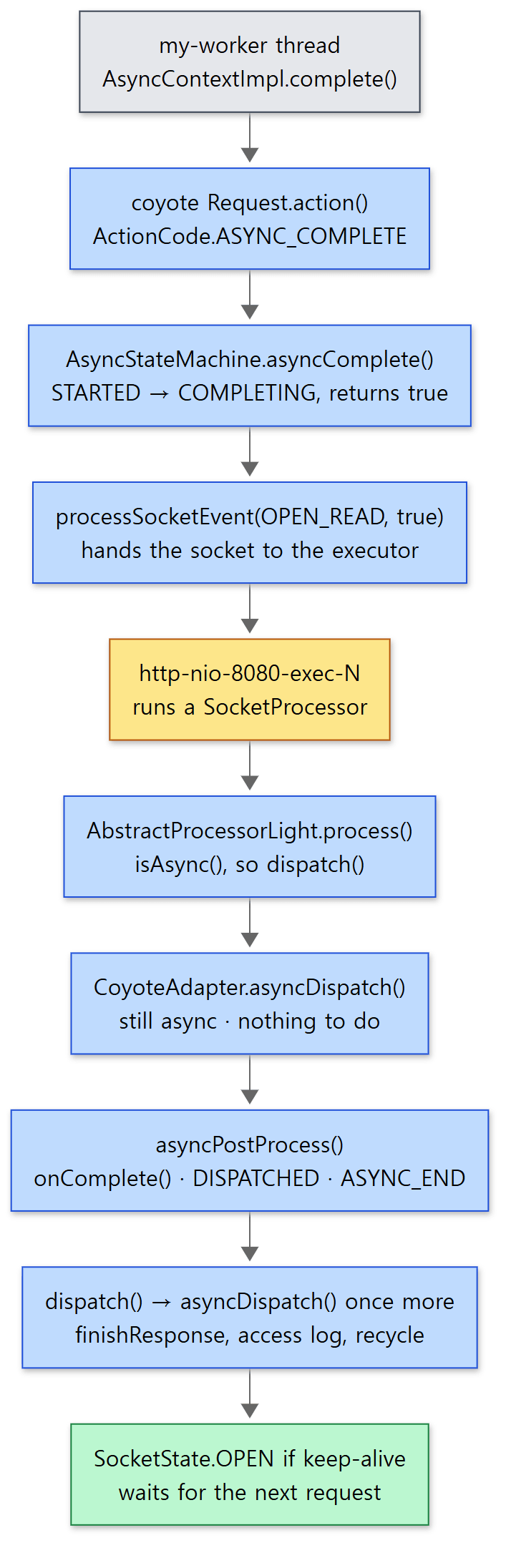 From the grey box down to the box that hands the socket to the executor, everything runs on the application's thread (
my-worker); everything from the yellow box down happens on the same container thread.
- First round: the state is
COMPLETING, soisAsync()is still true.asyncDispatch()finds no listener and no dispatch, and returns without doing much. The loop callsasyncPostProcess(), and itsCOMPLETINGbranch (the code above) callsonComplete(), switches the state back toDISPATCHEDand returnsASYNC_END. That matches Example 2, whereCOMPLETING → DISPATCHEDwas printed right afteronComplete(). - Second round: because of
ASYNC_END, the loop goes round once more. This timeisAsync()is false, so the end ofasyncDispatch()finishes the response.
            if (!request.isAsync()) {
                request.finishRequest();
                response.finishResponse();
            }
java/org/apache/catalina/connector/CoyoteAdapter.java lines 248–251
The finally block writes the access log and recycles the request and response (lines 278–298). It does here what CoyoteAdapter.service() would have done for a synchronous request. The processor returns OPEN via dispatchEndRequest() if keep-alive applies (Http11Processor.java lines 1155–1170), and the connection waits for its next request like any connection that has finished a normal request.
dispatch(): the same path, plus one more trip through the pipeline
dispatch() takes the same path with ASYNC_DISPATCH: STARTED → DISPATCHING, hand-off to the executor, and asyncDispatch() are all the same. The difference is that inside asyncDispatch() it takes this branch.
            if (request.isAsyncDispatching()) {
                connector.getService().getContainer().getPipeline().getFirst().invoke(request, response);
                if (response.isError()) {
                    Throwable t = (Throwable) request.getAttribute(RequestDispatcher.ERROR_EXCEPTION);
                    asyncConImpl.setErrorState(t, true);
                }
            }
java/org/apache/catalina/connector/CoyoteAdapter.java lines 240–246
It calls the Engine's pipeline again from the top. The request goes through the valves from Part 8 again and reaches the Wrapper's basic valve, which runs the AsyncContextImpl dispatch instead of the filter chain.
                    if (request.isAsyncDispatching()) {
                        request.getAsyncContextInternal().doInternalDispatch();
                    } else {
                        filterChain.doFilter(request.getRequest(), response.getResponse());
                    }
java/org/apache/catalina/core/StandardWrapperValve.java lines 161–165
doInternalDispatch() runs the AsyncRunnable created when dispatch() was called. It first sets the state back to DISPATCHED with ActionCode.ASYNC_DISPATCHED, then calls the target servlet through ApplicationDispatcher.dispatch() (AsyncContextImpl.java lines 716–728). ApplicationDispatcher.dispatch() wraps the request much like the forward in Part 9 and records the dispatcher type as DispatcherType.ASYNC (ApplicationDispatcher.java lines 419–444). If the servlet did not call startAsync() again by the time it returns, onComplete() is called (lines 453–459).
When Example 2's servlet is called again with DispatcherType.ASYNC, it prints only the stack frames of Tomcat classes (classes starting with org.apache.catalina. or org.apache.coyote., plus the servlet itself).
===== curl http://127.0.0.1:8080/u12/async?mode=dispatch =====
dispatched back, result=42
[http-nio-8080-exec-4] service() start, dispatcherType=REQUEST
[http-nio-8080-exec-4] state: Changing async state from [DISPATCHED] to [STARTING]
[http-nio-8080-exec-4] startAsync() returned, timeout=30000ms
[http-nio-8080-exec-4] service() end
[my-worker] worker: working for 1s ...
[http-nio-8080-exec-4] state: Changing async state from [STARTING] to [STARTED]
[my-worker] worker: calling dispatch()
[my-worker] state: Changing async state from [STARTED] to [DISPATCHING]
[my-worker] worker: done
[http-nio-8080-exec-5] state: Changing async state from [DISPATCHING] to [DISPATCHED]
[http-nio-8080-exec-5] service() again, dispatcherType=ASYNC
    at AsyncServlet.doGet:28
    at ApplicationFilterChain.doFilter:132
    at ApplicationDispatcher.invoke:512
    at ApplicationDispatcher.dispatch:443
    at AsyncContextImpl$AsyncRunnable.run:723
    at AsyncContextImpl.doInternalDispatch:456
    at StandardWrapperValve.invoke:162
    at StandardContextValve.invoke:77
    at AuthenticatorBase.invoke:540
    at StandardHostValve.invoke:115
    at ErrorReportValve.invoke:82
    at AbstractAccessLogValve.invoke:777
    at StandardEngineValve.invoke:71
    at CoyoteAdapter.asyncDispatch:241
    at AbstractProcessor.dispatch:292
    at AbstractProcessorLight.process:65
    at AbstractProtocol$ConnectionHandler.process:1317
[http-nio-8080-exec-5] AsyncListener.onComplete()
Frames from the jakarta.servlet package, such as HttpServlet.service(), and the org.apache.tomcat.util.net frames below ConnectionHandler.process() (the endpoint's SocketProcessor, the thread pool) are filtered out. Read from the bottom up, it is exactly the path of this section: ConnectionHandler.process() → the dispatch() on line 65 of AbstractProcessorLight.process() → the pipeline call on line 241 of CoyoteAdapter.asyncDispatch() → the Engine, Host and Context valves (the access log valve, the error report valve and the authenticator valve are passed again too) → doInternalDispatch() on line 162 of StandardWrapperValve → AsyncRunnable → ApplicationDispatcher → filter chain → servlet.
It is also worth noticing that DISPATCHING → DISPATCHED is printed before service() again. The state machine puts the request back into the non-async state just before calling the servlet again. That is why the servlet called again can call startAsync() once more (when chaining several async rounds). It did not, so onComplete() was called on the last line.
Easy to get wrong
- Calling
complete()does not finish the response on the spot. In Example 2,my-workercalledcomplete()and immediately printedworker: done, butonComplete()andfinishResponse()happened afterwards, on a different thread (exec-3). Do not assume on the line aftercomplete()that "the response has now reached the client". AsyncContext.start(Runnable)uses the container pool. If you useac.start(...)to avoid creating your own non-container thread, the state machine'sasyncRun()puts the work on the connector's thread pool viaprocessor.execute()(AsyncStateMachine.javalines 475–490,AsyncContextImpl.start()lines 307–318). Waiting for a long time in there eats intomaxThreadsexactly like the synchronous servlet in Section 1.dispatch()works only once per async round. A second call is anIllegalStateException(lines 267–269). How the no-argumentdispatch()builds the original path differs from the 11.0.x branch: 11.0.x takesgetRequestURI()and strips the context path, while main joinsgetServletPath()andgetPathInfo()and URL-encodes the result again (lines 221–252). Apart from that, theAsyncStateMachineandAbstractProcessorLightcovered in this post are identical in both branches.
5. Timeouts — when nobody finishes the request
Finishing an async request is the application's job. But if a bug skips complete(), the connection and the processor would be held forever. So Tomcat puts a timeout on every async request.
A check that runs once a second
The check is not a timer set per request. When the protocol handler starts, it schedules a single task on the utility executor (a separate thread pool Tomcat uses for housekeeping like this) that runs once a second.
                timeoutFuture = getUtilityExecutor().scheduleAtFixedRate(() -> {
                    long now = System.currentTimeMillis();
                    for (Processor processor : waitingProcessors) {
                        processor.timeoutAsync(now);
                    }
                }, 1, 1, TimeUnit.SECONDS);
java/org/apache/coyote/AbstractProtocol.java lines 1000–1005
It walks waitingProcessors, the set processors were added to on LONG in Section 3. The processor side decides like this:
    @Override
    public void timeoutAsync(long now) {
        if (now < 0) {
            doTimeoutAsync();
        } else {
            long asyncTimeout = getAsyncTimeout();
            if (asyncTimeout > 0) {
                long asyncStart = asyncStateMachine.getLastAsyncStart();
                if ((now - asyncStart) > asyncTimeout) {
                    doTimeoutAsync();
                }
            } else if (!asyncStateMachine.isAvailable()) {
                // Timeout the async process if the associated web application
                // is no longer running.
                doTimeoutAsync();
            }
        }
    }
java/org/apache/coyote/AbstractProcessor.java lines 753–770
asyncStartis thelastAsyncStartrecorded byasyncStart()in Section 3.- If
asyncTimeoutis 0 or less, there is no timeout; the request is cut off only if the web application has gone away.now < 0is used when the connector stops, to cut off every waiting processor (lines 1078–1082). doTimeoutAsync()callsprocessSocketEvent(SocketEvent.TIMEOUT, true), which, as in Section 4, puts a socket job on the executor (lines 773–783).
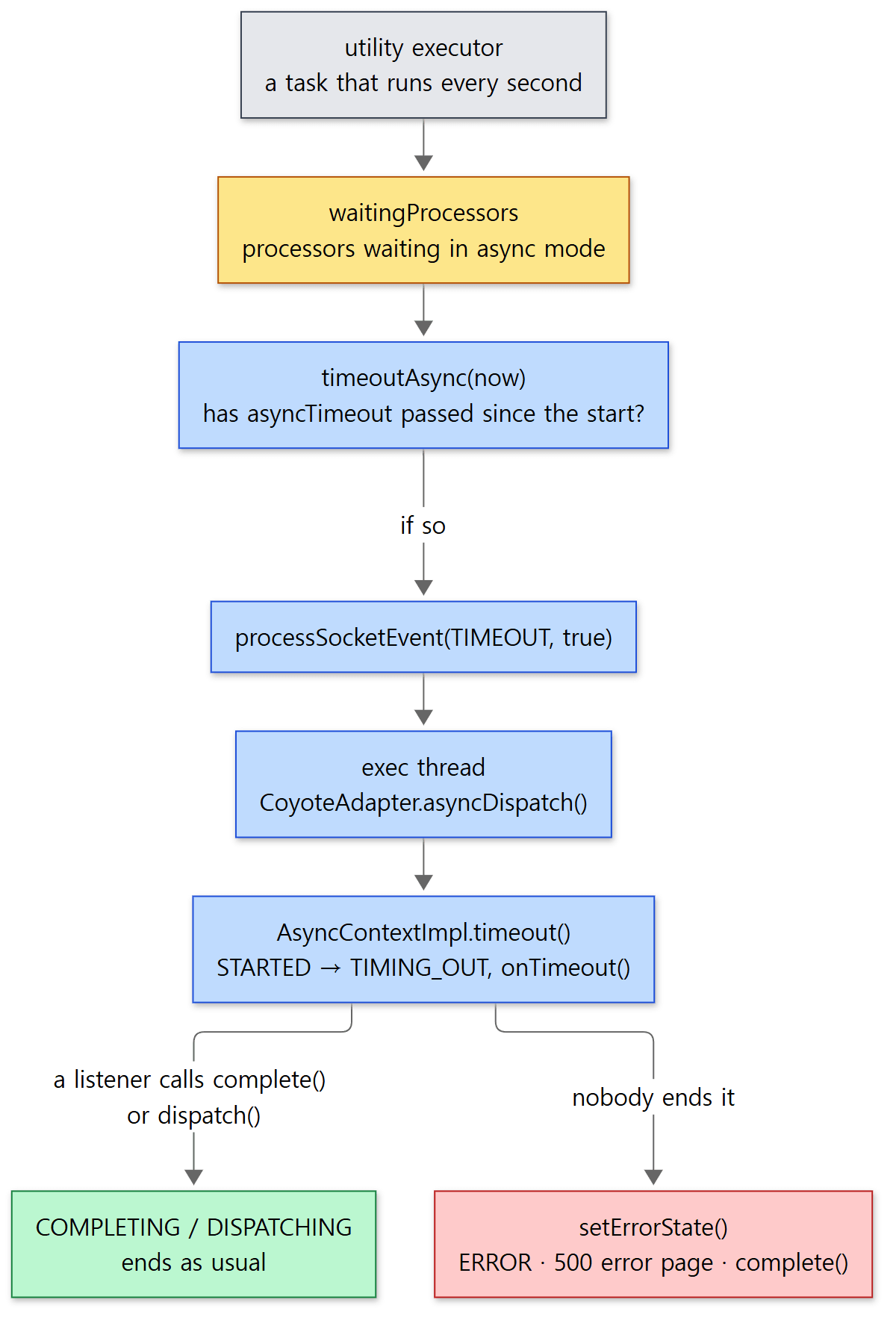 The yellow box is the set processors were added to in Section 3. Timeout handling, too, ends up on a container thread.
On the container thread: onTimeout(), and a 500 if nobody ends it
asyncDispatch(), on receiving the TIMEOUT event, takes this branch first.
            if (status == SocketEvent.TIMEOUT) {
                if (!asyncConImpl.timeout()) {
                    asyncConImpl.setErrorState(null, false);
                }
java/org/apache/catalina/connector/CoyoteAdapter.java lines 136–139
AsyncContextImpl.timeout() switches the state STARTED → TIMING_OUT with ASYNC_TIMEOUT, calls onTimeout() on each registered AsyncListener, and then asks whether the state is still TIMING_OUT.
        AtomicBoolean result = new AtomicBoolean();
        request.getCoyoteRequest().action(ActionCode.ASYNC_TIMEOUT, result);

        if (result.get()) {
            // ... (trace log)
            ClassLoader oldCL = context.bind(null);
            try {
                for (AsyncListenerWrapper listener : listeners) {
                    try {
                        listener.fireOnTimeout(event);
                    } catch (Throwable t) {
                        // ... (warning log)
                    }
                }
                request.getCoyoteRequest().action(ActionCode.ASYNC_IS_TIMINGOUT, result);
            } finally {
                context.unbind(oldCL);
            }
        }
        return !result.get();
java/org/apache/catalina/core/AsyncContextImpl.java lines 196–218
If a listener called complete() or dispatch() inside onTimeout(), the state is already COMPLETING or DISPATCHING, so the method returns true (handled). If nobody did and the state is still TIMING_OUT, it returns false, and asyncDispatch() calls setErrorState(null, false). That method moves the state to ERROR with ASYNC_ERROR, sets the response status to 500, lets the Host's basic valve produce the error page, and if the state is still ERROR after that, calls complete() itself.
        AtomicBoolean result = new AtomicBoolean();
        request.getCoyoteRequest().action(ActionCode.ASYNC_IS_ERROR, result);
        if (result.get()) {
            // No listener called dispatch() or complete(). This is an error.
            // SRV.2.3.3.3 (search for "error dispatch")
            // ... sets the response status to 500 (SC_INTERNAL_SERVER_ERROR),
            // ... and builds the error page through the Host's basic valve, StandardHostValve.throwable()

            request.getCoyoteRequest().action(ActionCode.ASYNC_IS_ERROR, result);
            if (result.get()) {
                // Still in the error state. The error page did not call
                // complete() or dispatch(). Complete the async processing.
                complete();
            }
java/org/apache/catalina/core/AsyncContextImpl.java lines 547–574
Example 3: a 2-second timeout
A servlet that sets setTimeout(2000) and never finishes its response. With ?handle=none, onTimeout() does nothing; with ?handle=complete, it writes a response and calls complete(). In both cases a worker thread is started that calls complete() late, after 4 seconds.
// Example written for this post (not Tomcat source)
@WebServlet(urlPatterns = "/timeout", asyncSupported = true)
public class TimeoutServlet extends HttpServlet {
    // ... say(start, msg) prints "[thread name] +elapsed ms message" (elapsed time measured with nanoTime)

    @Override
    protected void doGet(HttpServletRequest req, HttpServletResponse resp) throws IOException {
        long start = System.nanoTime();
        String handle = req.getParameter("handle");
        AsyncContext ac = req.startAsync();
        ac.setTimeout(2000);
        say(start, "startAsync(), setTimeout(2000)");
        ac.addListener(new AsyncListener() {
            @Override public void onTimeout(AsyncEvent e) throws IOException {
                say(start, "onTimeout()");
                if ("complete".equals(handle)) {
                    e.getAsyncContext().getResponse().setContentType("text/plain");
                    e.getAsyncContext().getResponse().getWriter().println("timed out, handled in onTimeout()");
                    e.getAsyncContext().complete();
                }
            }
            @Override public void onComplete(AsyncEvent e) { say(start, "onComplete()"); }
            // ... onError, onStartAsync
        });
        // A worker thread that forgot to finish the response, or whose work takes longer than the timeout
        new Thread(() -> {
            try {
                Thread.sleep(4000);
                say(start, "worker: late complete()");
                ac.complete();
            } catch (Exception e) {
                say(start, "worker: " + e);
            }
        }, "my-worker").start();
    }
}
[Shortened from ex/u12-async-timeout/TimeoutServlet.java]
===== curl http://127.0.0.1:8080/u12/timeout?handle=none =====
<title>HTTP Status 500 – Internal Server Error</title>
HTTP 500
[http-nio-8080-exec-2] state: Changing async state from [DISPATCHED] to [STARTING]
[http-nio-8080-exec-2] +4ms startAsync(), setTimeout(2000)
[http-nio-8080-exec-2] state: Changing async state from [STARTING] to [STARTED]
[http-nio-8080-exec-3] state: Changing async state from [STARTED] to [TIMING_OUT]
[http-nio-8080-exec-3] +2875ms onTimeout()
[http-nio-8080-exec-3] state: Starting to process call to asyncError()
[http-nio-8080-exec-3] state: Changing async state from [TIMING_OUT] to [ERROR]
[http-nio-8080-exec-3] state: Changing async state from [ERROR] to [COMPLETING]
[http-nio-8080-exec-3] +2880ms onComplete()
[http-nio-8080-exec-3] state: Changing async state from [COMPLETING] to [DISPATCHED]
[my-worker] +4015ms worker: late complete()
[my-worker] +4016ms worker: java.lang.IllegalStateException: The request associated with the AsyncContext has already completed processing.
===== curl http://127.0.0.1:8080/u12/timeout?handle=complete =====
timed out, handled in onTimeout()
HTTP 200
[http-nio-8080-exec-4] state: Changing async state from [DISPATCHED] to [STARTING]
[http-nio-8080-exec-4] +1ms startAsync(), setTimeout(2000)
[http-nio-8080-exec-4] state: Changing async state from [STARTING] to [STARTED]
[http-nio-8080-exec-5] state: Changing async state from [STARTED] to [TIMING_OUT]
[http-nio-8080-exec-5] +2961ms onTimeout()
[http-nio-8080-exec-5] state: Changing async state from [TIMING_OUT] to [COMPLETING]
[http-nio-8080-exec-5] +2962ms onComplete()
[http-nio-8080-exec-5] state: Changing async state from [COMPLETING] to [DISPATCHED]
[my-worker] +4002ms worker: late complete()
[my-worker] +4002ms worker: java.lang.IllegalStateException: The request associated with the AsyncContext has already completed processing.
The millisecond values and thread numbers vary from run to run.
handle=none:TIMING_OUT → ERROR → COMPLETING → DISPATCHED. This is exactly thesetErrorState()path we just read, and the client got Tomcat's default error page (HTTP Status 500).Starting to process call to asyncError()is the trace log written by the state machine'sasyncError()(line 445).handle=complete: thecomplete()insideonTimeout()producesTIMING_OUT → COMPLETINGwithout passing throughERROR, and the response is200.- In both cases
onTimeout()was called on a new container thread (exec-3,exec-5). The utility thread that ran the timeout check does not call it directly.
Easy to get wrong
- The 2-second timeout fired at 2.9 seconds. The check runs once a second and the condition is "has it passed" (
>), so in practice a request is cut off up to about a second later than the configured value. Both runs landed between 2 and 3 seconds. Don't use the timeout as a precise timer. complete()after a timeout throws.my-worker, waking up after 4 seconds, got anIllegalStateException("the request has already completed processing") fromcomplete(). Once the request ends, theAsyncContextImplis recycled, and later calls are stopped bycheck()(lines 658–673). Either handle this exception in the worker, or cancel the work inonTimeout().setTimeout(0)or a negative value means "forever". That comes from theasyncTimeout > 0condition above. TheServletHttpHandlerAdapterthat runs Spring WebFlux on a servlet container is a case in point: it callsasyncContext.setTimeout(-1)right afterstartAsync()(ServletHttpHandlerAdapterlines 163–164). The responsibility for cutting requests off then lies entirely with the application.
6. Non-blocking I/O — ReadListener and WriteListener
The async servlet was a way to "finish the response later". But even while building the response there are places where a thread gets stuck. InputStream.read() on the request body blocks (the thread stops and waits) until data arrives. When a slow client uploads a large file, a container thread is tied up the whole time. Servlet 3.1 non-blocking I/O turns reading and writing themselves into events.
setReadListener(): right away if there is data, register if not
The implementation of ServletInputStream is CoyoteInputStream, and setReadListener() goes through InputBuffer to Coyote's Request (CoyoteInputStream.java lines 127–130, InputBuffer.java lines 245–247).
        AtomicBoolean result = new AtomicBoolean(false);
        action(ActionCode.ASYNC_IS_ASYNC, result);
        if (!result.get()) {
            throw new IllegalStateException(sm.getString("request.notAsync"));
        }

        this.listener = listener;

        // The container is responsible for the first call to
        // listener.onDataAvailable(). If isReady() returns true, the container
        // needs to call listener.onDataAvailable() from a new thread. If
        // isReady() returns false, the socket will be registered for read and
        // the container will call listener.onDataAvailable() once data arrives.
        // Must call isFinished() first as a call to isReady() if the request
        // has been finished will register the socket for read interest and that
        // is not required.
        if (!isFinished() && isReady()) {
            // ... (sets flags that prevent duplicate registrations)
            action(ActionCode.DISPATCH_READ, null);
            if (!isRequestThread()) {
                // Not on a container thread so need to execute the dispatch
                action(ActionCode.DISPATCH_EXECUTE, null);
            }
        }
java/org/apache/coyote/Request.java lines 216–246
- Outside async mode this throws. That is why
startAsync()has to come first. - The container makes the first
onDataAvailable()call. If there is data to read right now,DISPATCH_READnotes on the processor that "one read event should be handled" (addDispatch,AbstractProcessor.javalines 674–677), and theprocess()loop from Section 4 picks it up. If there is nothing to read,isReady()registers the socket with the Poller for reading viaNB_READ_INTEREST→registerReadInterest()(Request.isReady()lines 254–277,AbstractProcessor.isReadyForRead()lines 987–997).
In Section 3 we saw that longPoll() does not register an async processor with the Poller. With non-blocking reads, the listener side registers instead, only when needed. As a result, when data arrives, the Poller creates an OPEN_READ event as usual and hands it to the executor. This time it is an OPEN_READ with real bytes to read.
When data arrives: asyncOperation() and onDataAvailable()
When the container thread enters process() → dispatch() as in Section 4, the beginning of dispatch() recognises this case.
        } else if (status == SocketEvent.OPEN_READ && request.getReadListener() != null) {
            if (!dispatchNonBlockingRead()) {
                // The notification raced with async completion on another
                // thread. Nothing to notify; returning LONG lets
                // asyncPostProcess() complete the cycle as usual.
                if (getLog().isTraceEnabled()) {
                    getLog().trace(sm.getString("abstractProcessor.lateReadNotification",
                            request.requestURI()));
                }
                return SocketState.LONG;
            }
java/org/apache/coyote/AbstractProcessor.java lines 257–267
dispatchNonBlockingRead() calls the state machine's asyncOperation() (lines 742–744). In STARTED, that switches to READ_WRITE_OP and returns true (lines 261–279). Then CoyoteAdapter.asyncDispatch() calls the listener.
                } else if (readListener != null && status == SocketEvent.OPEN_READ) {
                    Context context = request.getContext();
                    ClassLoader oldCL = null;
                    try {
                        oldCL = context.bind(null);
                        // If data is being read on a non-container thread a
                        // dispatch with status OPEN_READ will be used to get
                        // execution back on a container thread for the
                        // onAllDataRead() event. Therefore, make sure
                        // onDataAvailable() is not called in this case.
                        if (!request.isFinished()) {
                            req.onDataAvailable();
                        }
                        if (request.isFinished() && req.sendAllDataReadEvent()) {
                            readListener.onAllDataRead();
                        }
java/org/apache/catalina/connector/CoyoteAdapter.java lines 195–210
context.bind(null) switches the thread's context class loader to the web application's while the listener runs (Part 4). If the whole body has been read, onAllDataRead() is called next on the same thread. sendAllDataReadEvent() is a flag that makes sure this event is sent only once (coyote/Request.java lines 306–308). When the listener returns, asyncPostProcess() switches READ_WRITE_OP back to STARTED and returns LONG (the third branch from Section 3). The connection is once again "waiting with no thread".
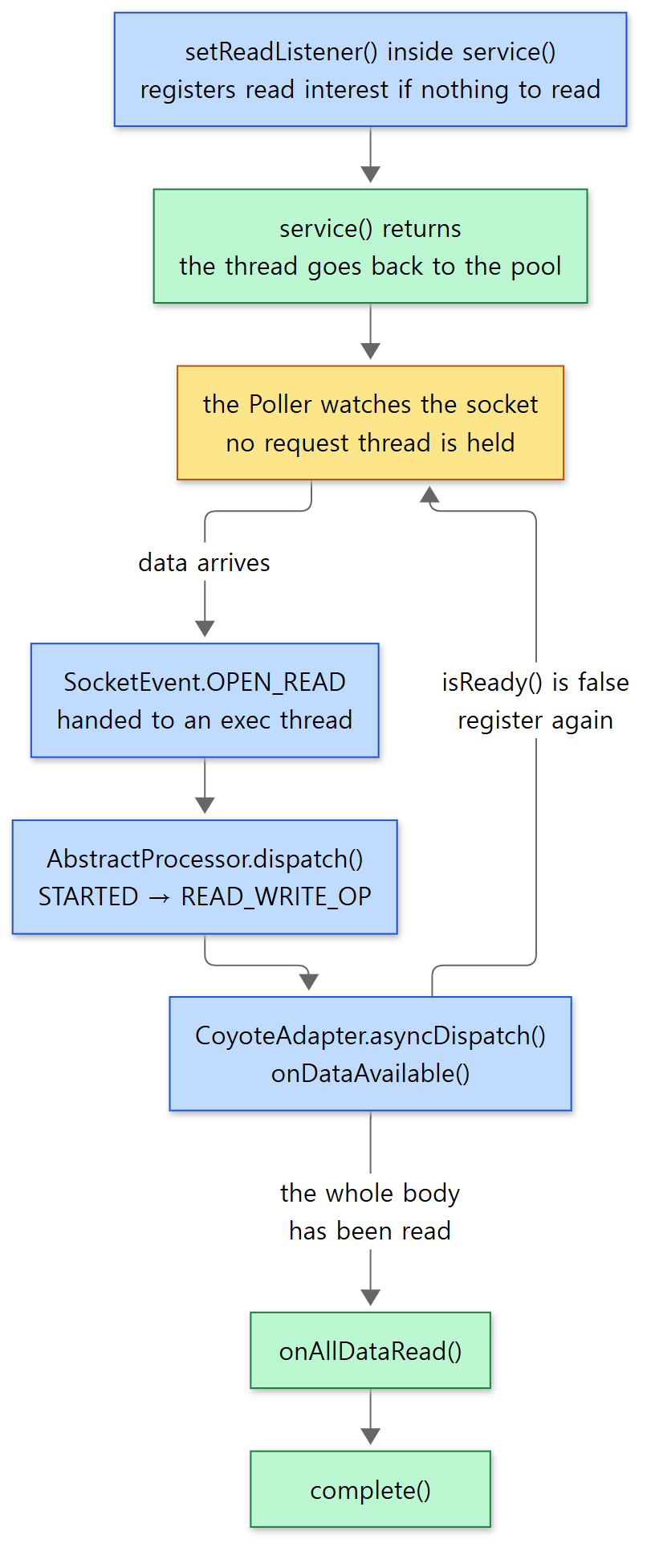 While waiting in the yellow box, no container thread is assigned to this request.
Example 4: a client that sends 5 bytes a second
A client (written directly with JDK sockets) that sends a 15-byte body in 5-byte pieces one second apart, and a servlet that reads it with a ReadListener.
// Example written for this post (not Tomcat source)
@WebServlet(urlPatterns = "/upload", asyncSupported = true)
public class UploadServlet extends HttpServlet {
    // ... say(msg) prints "[thread name] message"

    @Override
    protected void doPost(HttpServletRequest req, HttpServletResponse resp) throws IOException {
        AsyncContext ac = req.startAsync();
        ServletInputStream in = req.getInputStream();
        in.setReadListener(new ReadListener() {
            private final byte[] buf = new byte[1024];
            private int total = 0;

            @Override
            public void onDataAvailable() throws IOException {
                // Let go as soon as isReady() returns false — the container calls us again when more data arrives
                while (in.isReady()) {
                    int n = in.read(buf);
                    if (n == -1) {
                        break;
                    }
                    total += n;
                    say("onDataAvailable(): read " + n + " bytes [" + new String(buf, 0, n) + "]");
                }
                say("onDataAvailable(): isReady()=false, returning");
            }

            @Override
            public void onAllDataRead() throws IOException {
                say("onAllDataRead(): total " + total + " bytes");
                ac.getResponse().setContentType("text/plain");
                ac.getResponse().getWriter().println("read " + total + " bytes");
                ac.complete();
            }

            // ... onError() logs and calls complete()
        });
        say("doPost() end (listener set)");
    }
}
[Shortened from ex/u12-nonblocking-read/UploadServlet.java]
===== slow POST /u12/upload (15 bytes, 5 bytes per second) =====
client: sending aaaaa
client: sending bbbbb
client: sending ccccc
client: HTTP/1.1 200
client: body = read 15 bytes
----- server side (catalina.out) -----
[http-nio-8080-exec-2] doPost() end (listener set)
[http-nio-8080-exec-3] onDataAvailable(): read 5 bytes [aaaaa]
[http-nio-8080-exec-3] onDataAvailable(): isReady()=false, returning
[http-nio-8080-exec-4] onDataAvailable(): read 5 bytes [bbbbb]
[http-nio-8080-exec-4] onDataAvailable(): isReady()=false, returning
[http-nio-8080-exec-5] onDataAvailable(): read 5 bytes [ccccc]
[http-nio-8080-exec-5] onDataAvailable(): isReady()=false, returning
[http-nio-8080-exec-5] onAllDataRead(): total 15 bytes
Thread numbers vary from run to run.
doPost()registered the listener with only the headers received and returned at once. At that point not a single byte of the body had arrived, so even the firstonDataAvailable()was called only after data came in.- Each time a piece arrived, a different container thread (
exec-3,-4,-5) calledonDataAvailable(). During the one-second gaps between pieces, no thread was waiting for this request. Doing the same with a blockingread()would have tied one thread up for 3 seconds. isReady()isfalseeven after the last piece is read. When the body has ended,InputBuffer.isReady()returnsfalse(lines 282–291), andasyncDispatch()on the same thread (exec-5) went on to callonAllDataRead(). The twoifs in the code above ran one after the other.
The writing side: WriteListener
Writing has the same shape. CoyoteOutputStream.setWriteListener() goes to Coyote's Response.setWriteListener() (CoyoteOutputStream.java lines 198–201), which schedules the first onWritePossible() with DISPATCH_WRITE if writing is possible right now (coyote/Response.java lines 851–873). When earlier output has not all gone out to the socket yet, isReady() returns false and registers write interest (Http11OutputBuffer.isReady() lines 521–527), and once writing is possible again, an OPEN_WRITE event makes asyncDispatch() call onWritePossible() (CoyoteAdapter.java lines 167–175). I did not run a separate write example for this post.
Easy to get wrong
- When
isReady()isfalse, you must return. The momentisReady()returnsfalse, Tomcat has registered "call me again when more data arrives". Callingread()anyway instead of waiting throws anIllegalStateException(checkNonBlockingRead(),CoyoteInputStream.javalines 133–137). That is why thewhile (in.isReady())shape in the example is the standard pattern. - Listeners only make sense inside async. Calling
setReadListener()withoutstartAsync()throws anIllegalStateException, andcomplete()ordispatch()makes the state machine clear the listeners (clearNonBlockingListeners(), lines 520–523). - Register listeners on the original thread. If you register on a non-container thread, the work has to be handed off separately with
DISPATCH_EXECUTEas in the code above, and the comment onexecuteDispatches()notes that this case even has to care about the order of socket locking (lines 1026–1054). Spring's servlet adapter also registers its listeners in the constructor, with the comment "Tomcat expects ReadListener registration on initial thread" (ServletServerHttpRequestlines 105–108,ServletServerHttpResponselines 88–89).
What this post leaves out
- I/O errors during async processing (
SocketEvent.ERROR) andonError():CoyoteAdapter.javalines 140–161,AsyncStateMachine.asyncError()lines 440–472 MUST_ERROR(an I/O error on another thread before the servlet returns) and its transitions:AsyncStateMachine.javalines 60–65- The generation check that filters out timeout events arriving late (
checkAsyncTimeoutGeneration()):AbstractProtocol.javalines 1244–1252,AbstractProcessor.javalines 786–789 flushBufferedWrite(), which pushes out remaining output when an async response could not be fully written:AsyncStateMachine.javalines 297–300incrementInProgressAsyncCount(), which counts in-flight async requests when a web application is stopped:AsyncContextImpl.javalines 585–602- Async and non-blocking I/O on HTTP/2 streams (
coyote/http2/StreamProcessor): covered together with upgrades in Part 15 - The virtual-thread executor (
useVirtualThreads):AbstractEndpoint.javalines 1963–1964
Summary
| Concept | In one line |
|---|---|
| Async servlet | Call startAsync() in service() and return; the container thread goes back to the pool. The response is finished later with complete() or dispatch() |
asyncSupported |
If even one valve, filter or servlet in the chain lacks it, startAsync() throws IllegalStateException. The log names the blocking classes |
AsyncContextImpl |
The shell the application uses. Most calls are passed on to Coyote as ActionCodes |
AsyncStateMachine |
One state machine per processor. Only DISPATCHED is non-async |
STARTING → STARTED |
Switched by asyncPostProcess() after service() returns, which then returns SocketState.LONG |
LONG |
Keeps the processor attached to the socket and adds it to waitingProcessors. The request is held by this object, not by a thread |
complete()·dispatch() |
In STARTED, processSocketEvent(OPEN_READ, true) hands off to the executor, and a new container thread finishes up |
The servlet called again after dispatch() |
asyncDispatch() calls the Engine pipeline again, and the Wrapper valve calls the servlet with DispatcherType.ASYNC via doInternalDispatch() |
| Timeout | The connector's asyncTimeout (30 seconds by default). Checked once a second, so up to about a second late. If nobody ends it, a 500 error page |
ReadListener |
With nothing to read, register with the Poller and return. When data arrives a container thread calls onDataAvailable(), and onAllDataRead() once everything is read |
What's next
We have now followed the request all the way from a servlet to a response, both synchronously and asynchronously. The next post turns to code that doesn't write servlets directly. A .jsp file is turned into Java source the first time it is requested, then compiled into a servlet. Part 13: Jasper — How a JSP Becomes a Servlet follows it from JspServlet to the .java file that appears in the work/ folder.
Two posts in the earlier series dealt with something similar. The event MPM in httpd Part 8 detaches keep-alive connections from worker threads and lets a dedicated thread watch them. The idea, "don't keep a thread attached to a connection that is just waiting", is the same, and this post's waitingProcessors and SocketState.LONG correspond to the event MPM's connection states and queues. The difference is that the event MPM does this between requests, while an async servlet does it in the middle of a request, at the application's request.
Spring Part 24's WebFlux also runs on Tomcat. The ServletHttpHandlerAdapter it uses there calls startAsync() for every request and switches the timeout off (Section 5), and it reads the request body and writes the response body with this post's ReadListener and WriteListener (Section 6). In other words, the reactive streams idea of "tell me when data arrives" is implemented inside Tomcat by this post's Poller and state machine. Spring MVC's DeferredResult and Callable return values, too, have WebAsyncManager call startAsync() through StandardServletAsyncWebRequest (StandardServletAsyncWebRequest line 158), and once the result is ready they send the request through the DispatcherServlet once more with dispatch() (line 169). That is the dispatch() path from Section 4, used as is.
- Part 5: The Connector and the NIO Endpoint — Which Threads Take a Connection
- Part 6: Reading an HTTP/1.1 Request — From Bytes to a coyote Request
- Part 8: Pipelines and Valves — The Processing Chain on Every Container
- Part 9: The Filter Chain and the Servlet Call — Until service() Runs
- Part 15: HTTP/2 and WebSocket — Protocols Reached by Upgrading