What this post covers
This is the thirteenth post in the "Digging into Tomcat's Source" series (the previous one is Part 12: Async Servlets and Non-Blocking I/O). In Part 9 we went from the end of the valve chain, through the filter chain, to the moment a servlet's service() is called. That servlet was a class we wrote and compiled ourselves. Yet a .jsp file produces a response even though nobody ever compiled it. This time we follow what Tomcat's JSP engine, Jasper, does in between.
There are four questions to answer.
- Which servlet receives a
.jsprequest, and how is each JSP file managed inside it? - What steps turn a JSP file into a
.javafile and then a.classfile? Where do those files end up? - What do a JSP's
<% %>,<%= %>and${ }turn into in Java code? - When you edit a JSP, when is it recompiled, and based on what? What is different in production?
| Item | Details |
|---|---|
| Target | Apache Tomcat |
| Version | 12.0.0-M1 (main, development build 12.0.0-M1-dev) |
| Commit | 17aa1769b0 (2026-10-23) |
| Classes read most | jasper/servlet/JspServlet, jasper/servlet/JspServletWrapper, jasper/JspCompilationContext, jasper/compiler/Compiler·Parser·Generator·JDTCompiler·JspRuntimeContext |
Every line number in this post refers to that commit. Part 1 explains how to get the source at the same commit and build the Docker image used for the examples. The Jasper files quoted here are identical in the stable 11.0.x branch (I compared the files). The only differences are the code style and one default Java version in JDTCompiler, which I point out in that section.
org/apache/jasper is a package of 109 files and more than 40,000 lines (the table in Part 1), and Generator, which writes the Java code, is 4,235 lines on its own. This post keeps only the main thread that someone seeing it for the first time can follow. Things left out — tag libraries, tag files, JSP documents in XML syntax — are named, with their locations, under "What this post leaves out" at the end.
Terms to know first
A JSP (Jakarta Server Pages) is a file with Java code mixed into text such as HTML. You write Java statements inside <% ... %> and a Java expression to print inside <%= ... %>. The browser never sees the Java code, only the result of running it. The specification calls one JSP file a translation unit and says it is to be run by translating it into a servlet class. In Tomcat, Jasper does that translation.
Two places disagree on which JSP spec version this is. At this commit build.xml declares JSP 4.1 (a draft) (Part 1), but the constant inside Jasper, org.apache.jasper.Constants.SPEC_VERSION, is "4.0" (Constants.java line 29). The X-Powered-By header that generated code adds does not even use that constant; it writes the literal text "JSP/4.0" (Generator.java lines 799–801). Turning xpoweredBy on in the example image and requesting a JSP returned X-Powered-By: JSP/4.0. It is the same pattern as the Servlet spec, where build.xml says 6.2 but ServletContext answers 6.1; Part 1 covers that in its section "Which Servlet spec — two places give different numbers".
A directive looks like <%@ ... %>. Instead of producing output, it tells the translator "how to translate this page". <%@ page contentType="..." %> sets the response's Content-Type, and <%@ include file="..." %> means "paste the contents of another file here at translation time".
EL (Expression Language) is a short expression written inside ${ }, as in ${param.who}. It is a small language for pulling out request parameters and attributes without Java syntax; in Tomcat it is implemented in the org.apache.el package. It looks similar to Spring's SpEL (#{...}), which we covered in Spring Part 15.
ecj (Eclipse Compiler for Java) is the Java compiler made by Eclipse. Unlike javac, it is easy to call as a library, so Tomcat ships it as lib/ecj-4.41.jar (see the lib listing in Part 1) and compiles JSPs inside the same JVM.
The work directory is a scratch directory Tomcat gives each web app. By default it is $CATALINA_BASE/work/<engine name>/<host name>/<app name>, and Jasper puts the generated .java and .class files there. The servlet specification says the container must tell the app about this directory through the jakarta.servlet.context.tempdir attribute (ServletContext.TEMPDIR).
A Wrapper is the container that looks after one servlet definition (Part 2). The rules for picking a Wrapper from the request URL — exact match, path prefix, extension, default — were covered in Part 7. JSPs are picked by the extension rule.
1. One servlet for every JSP: JspServlet
It is already in conf/web.xml
You have probably never written anything in your app's web.xml to make JSPs work. That is because Tomcat's global conf/web.xml already registers a servlet for every web app (as we saw in Part 10, this file is merged in before each app's own web.xml).
    <servlet>
        <servlet-name>jsp</servlet-name>
        <servlet-class>org.apache.jasper.servlet.JspServlet</servlet-class>
        <init-param>
            <param-name>fork</param-name>
            <param-value>false</param-value>
        </init-param>
        <init-param>
            <param-name>xpoweredBy</param-name>
            <param-value>false</param-value>
        </init-param>
        <load-on-startup>3</load-on-startup>
    </servlet>
    <servlet-mapping>
        <servlet-name>jsp</servlet-name>
        <url-pattern>*.jsp</url-pattern>
        <url-pattern>*.jspx</url-pattern>
    </servlet-mapping>
One servlet named jsp receives both *.jsp and *.jspx. Even if an app has 100 JSPs, Tomcat's container hierarchy contains just this single jsp Wrapper for them. The comment above it (lines 137–266) lists the init parameters this servlet accepts, with defaults; that is where you will find development, checkInterval and modificationTestInterval, which we meet in section 4.
If an app declares its own servlet with the same name jsp in its web.xml, it replaces the global one. When a child named jsp is added, StandardContext.addChild() removes the old one and hands its mappings (*.jsp, *.jspx) over to the new one (StandardContext.java lines 2834–2855). That is how you change JSP settings for one app only.
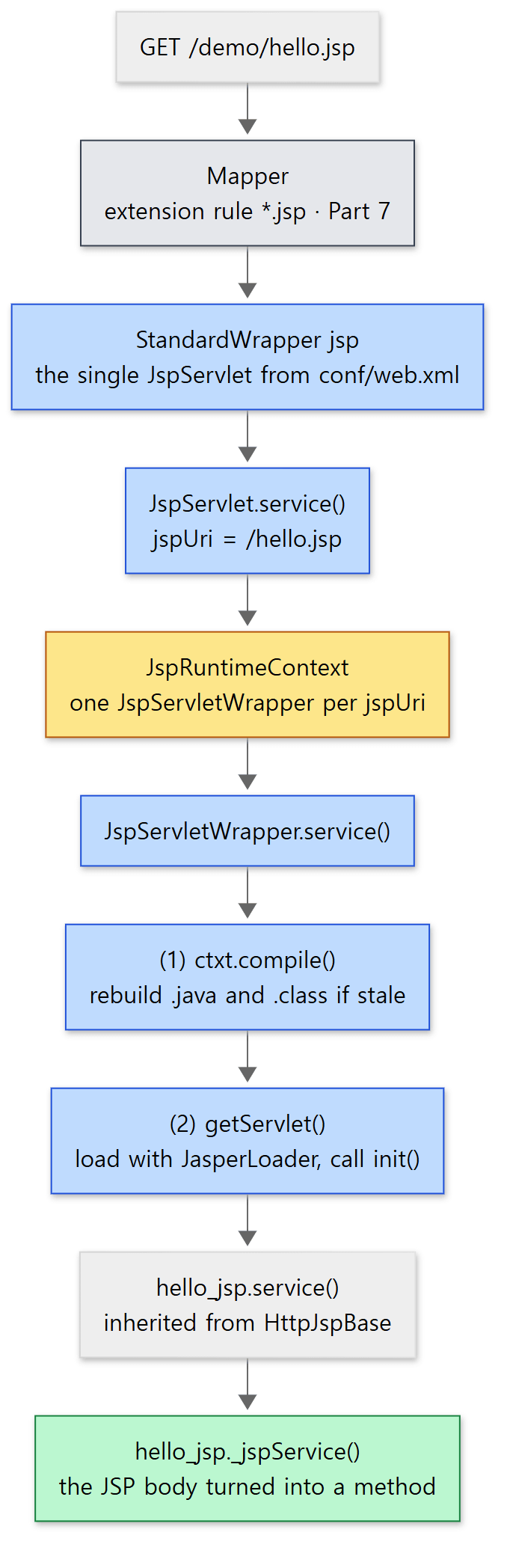 The blue boxes are Jasper's path. The yellow box is where the per-JSP objects are kept.
JspServlet.service() — work out the JSP path and hand it on
JspServlet.service() does not do much. It works out which JSP was requested (from the jakarta.servlet.include.servlet_path attribute if it was called through include, otherwise from getServletPath() and getPathInfo(), lines 247–298) and passes it to serviceJspFile().
    private void serviceJspFile(HttpServletRequest request, HttpServletResponse response, String jspUri,
            boolean precompile) throws ServletException, IOException {

        JspServletWrapper wrapper = rctxt.getWrapper(jspUri);
        if (wrapper == null) {
            synchronized (this) {
                wrapper = rctxt.getWrapper(jspUri);
                if (wrapper == null) {
                    // Check if the requested JSP page exists, to avoid
                    // creating unnecessary directories and files.
                    if (null == context.getResource(jspUri)) {
                        handleMissingResource(request, response, jspUri);
                        return;
                    }
                    wrapper = new JspServletWrapper(config, options, jspUri, rctxt);
                    rctxt.addWrapper(jspUri, wrapper);
                }
            }
        }

        try {
            wrapper.service(request, response, precompile);
        } catch (FileNotFoundException fnfe) {
            handleMissingResource(request, response, jspUri);
        }

    }
java/org/apache/jasper/servlet/JspServlet.java lines 318–344
rctxt is the app's single JspRuntimeContext, created in init() (line 105). It holds a jspUri → JspServletWrapper map (a ConcurrentHashMap, JspRuntimeContext.java line 135). For a JSP it has not seen before, it creates a JspServletWrapper and puts it in the map. The name is easy to confuse: this is not Tomcat's container StandardWrapper but an object Jasper creates for each JSP file. It holds that JSP's compile state, the loaded class and the servlet instance.
Looking at getWrapper() once without a lock, and again inside synchronized only when nothing was found, is "double-checked locking". Requests after the wrapper exists pass without a lock, and even if the first few requests arrive at once, only one wrapper is created. If the file does not exist, no wrapper is created and a 404 is sent (handleMissingResource(), lines 347–366).
JspServletWrapper.service() — (1) compile, (2) load, (3) call
Now the work for a single JSP. The source comments even number the steps.
            /*
             * (1) Compile
             */
            if (options.getDevelopment() || mustCompile) {
                synchronized (this) {
                    if (options.getDevelopment() || mustCompile) {
                        // The following sets reload to true, if necessary
                        ctxt.compile();
                        mustCompile = false;
                    }
                }
            } else {
                if (compileException != null) {
                    // Throw cached compilation exception
                    throw compileException;
                }
            }

            /*
             * (2) (Re)load servlet class file
             */
            servlet = getServlet();
java/org/apache/jasper/servlet/JspServletWrapper.java lines 433–454
- Compile —
ctxtis this JSP'sJspCompilationContext.compile()rebuilds the.javaand.class"if they are stale" (section 2). Keepoptions.getDevelopment()in the condition in mind. In development mode (the default) every request enters this branch; otherwise only the first request, whilemustCompileistrue, does. That is the subject of section 4. - Load —
getServlet()creates a new instance and callsinit(config)when the class has not been loaded yet or must be reloaded (reload) (lines 183–213). The class is loaded with theJasperLoaderreturned byctxt.getJspLoader()(line 195).JasperLoaderis a small class loader created per JSP: it loads classes in theorg.apache.jsppackage itself and hands everything else to its parent, the web app class loader (Part 4) (JasperLoader.javalines 89–99). - Call —
servlet.service(request, response)(line 501). Thisservletis an instance of the class translated from the JSP (hello_jsp).
The block numbered (3) in between (lines 476–496) records usage so that JSPs unused for a while can be unloaded when maxLoadedJsps or jspIdleTimeout is turned on; with the defaults (both -1) it is skipped.
Every generated class extends HttpJspBase. This abstract class makes the servlet's init(), service() and destroy() final and forwards them to JSP-side methods.
    @Override
    public final void init(ServletConfig config) throws ServletException {
        super.init(config);
        jspInit();
        _jspInit();
    }
    // ...
    @Override
    public final void service(HttpServletRequest request, HttpServletResponse response)
            throws ServletException, IOException {
        _jspService(request, response);
    }
java/org/apache/jasper/runtime/HttpJspBase.java lines 46–68
The JSP body becomes a single method, _jspService() (section 3). That is why a JSP is not split into doGet() and doPost().
Example 1: a call stack printed from inside a JSP
To confirm that requests really take this path, I printed the stack from inside a JSP. This example was run with Tomcat 12.0.0-M1-dev built unchanged from the reference commit (17aa1769b0), in a Docker container (Eclipse Temurin JDK 21). The example folder is ex/u13-jasper-jsp/; it puts the JSP files under app/ into $CATALINA_BASE/webapps/demo, starts Tomcat and makes requests with curl.
<%-- This example was written for this post (it is not Tomcat's source) --%>
<%@ page contentType="text/plain; charset=UTF-8" trimDirectiveWhitespaces="true" %>
<%
    // Print the call stack of the thread running this line, up to StandardWrapperValve
    for (StackTraceElement e : new Throwable().getStackTrace()) {
        out.println("at " + e.getClassName() + "." + e.getMethodName());
        if (e.getClassName().endsWith("StandardWrapperValve")) {
            break;
        }
    }
%>
[Example ex/u13-jasper-jsp/app/stack.jsp]
trimDirectiveWhitespaces="true" is a page directive attribute that removes the blank lines directive lines would otherwise leave in the output.
===== stack.jsp =====
at org.apache.jsp.stack_jsp._jspService
at org.apache.jasper.runtime.HttpJspBase.service
at jakarta.servlet.http.HttpServlet.service
at org.apache.jasper.servlet.JspServletWrapper.service
at org.apache.jasper.servlet.JspServlet.serviceJspFile
at org.apache.jasper.servlet.JspServlet.service
at jakarta.servlet.http.HttpServlet.service
at org.apache.catalina.core.ApplicationFilterChain.doFilter
at org.apache.tomcat.websocket.server.WsFilter.doFilter
at org.apache.catalina.core.ApplicationFilterChain.doFilter
at org.apache.catalina.core.StandardWrapperValve.invoke
Reading from the bottom up: StandardWrapperValve from Part 9 → the filter chain (with one WsFilter, added by WebSocket support, Part 15) → JspServlet → JspServletWrapper → HttpJspBase.service() → stack_jsp._jspService(). HttpServlet.service appears twice because the version taking a ServletRequest calls the version taking an HttpServletRequest (both JspServlet and HttpJspBase override the latter).
Easy to get wrong: filters sit in front of JspServlet, not the JSP
As the stack shows, the servlet Tomcat knows about is JspServlet; stack_jsp is an object that JspServletWrapper calls directly. Since stack_jsp is not registered as a container Wrapper, a filter mapped by servlet name (<servlet-name>) must target the name jsp to apply. Filters mapped by URL pattern apply to *.jsp requests as usual.
2. From a JSP to .java and .class
JspCompilationContext.compile() — only when stale
The JspCompilationContext created together with the JspServletWrapper (JspServletWrapper.java line 111) knows "where, under what name and with what tool to compile this JSP". This is the skeleton of compile().
    public void compile() throws JasperException, FileNotFoundException {
        createCompiler();
        if (jspCompiler.isOutDated()) {
            if (isRemoved()) {
                throw new FileNotFoundException(jspUri);
            }
            try {
                jspCompiler.removeGeneratedFiles();
                jspLoader = null;
                jspCompiler.compile();
                jsw.setCompilationException(null);
            } catch (JasperException ex) {
                // Cache compilation exception
                jsw.setCompilationException(ex);
                // ...
                throw ex;
            // ...
            } finally {
                jsw.setReload(true);
            }
        }
    }
java/org/apache/jasper/JspCompilationContext.java lines 726–757
Only when isOutDated() is true does it delete the old files (removeGeneratedFiles()), throw away jspLoader, and compile again. Afterwards, success or failure, it sets reload to true, so getServlet() on the very next line loads the new class with a new JasperLoader. A compile error is remembered in compileException; outside development mode the same exception keeps being thrown without recompiling (lines 444–449 of the code in section 1).
createCompiler() picks the compiler. If there is no compiler init parameter, it tries JDTCompiler (ecj) first and falls back to AntCompiler, which uses Ant's javac task, only if that class cannot be found (lines 237–262).
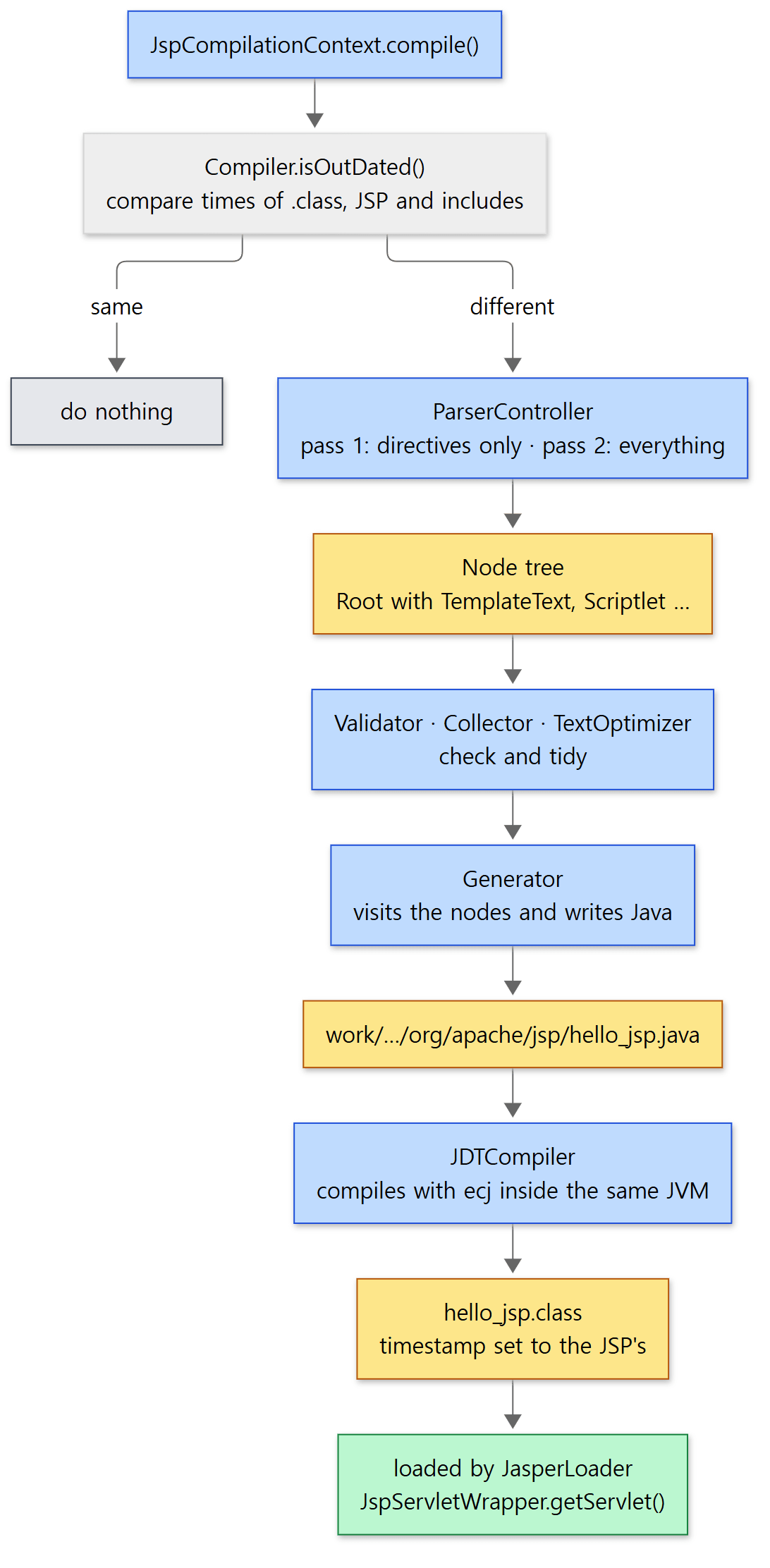 Blue boxes are steps, yellow boxes are what they produce.
Compiler.generateJava() — read twice, tidy, write
jspCompiler.compile() is a method of the abstract class Compiler; it makes the .java with generateJava() and then the .class with generateClass(). Here is the middle of generateJava().
            // Parse the file
            ParserController parserCtl = new ParserController(ctxt, this);

            // Pass 1 - the directives
            Node.Nodes directives = parserCtl.parseDirectives(ctxt.getJspFile());
            Validator.validateDirectives(this, directives);

            // Pass 2 - the whole translation unit
            pageNodes = parserCtl.parse(ctxt.getJspFile());
java/org/apache/jasper/compiler/Compiler.java lines 222–230
The same file is read twice. The comment just above (lines 213–220) explains why, quite candidly. A setting such as isELIgnored (whether to ignore EL) may appear in any file of the translation unit — even in a file included near the end — and its value decides whether ${ is read as EL or as plain text. So pass 1 skims only the directives to settle the settings, and pass 2 reads everything (the comment even includes an "Arghh!").
Next come the steps that check and tidy the node tree (lines 247–276): Validator.validateExDirectives() (attribute checks), Collector.collect() (gathering page information), compiling tag files, ScriptingVariabler, tag plugins, TextOptimizer.concatenate() (merging adjacent text nodes) and ELFunctionMapper.map(). Finally Generator.generate() writes the .java (lines 279–281).
The path of the .java comes from getServletJavaFileName(): output directory + class name + ".java" (lines 590–592), where the output directory is the scratch directory plus the package path (lines 830–852). Without a scratchdir init parameter, the scratch directory is the app's ServletContext.TEMPDIR attribute, i.e. the work directory (EmbeddedServletOptions.java lines 693–698). That attribute is set by StandardContext.postWorkDirectory() to work/<engine>/<host>/<app> (StandardContext.java lines 5463–5467, line 5491). The package is the default org.apache.jsp (EmbeddedServletOptions.java line 214) followed by the folder path of the JSP (getServletPackageName(), lines 536–552). So /admin/list.jsp ends up in the package org.apache.jsp.admin.
Making the class name
The class name is the JSP file name turned into a Java identifier.
            int iSep = jspUri.lastIndexOf('/') + 1;
            className = JspUtil.makeJavaIdentifier(jspUri.substring(iSep));
java/org/apache/jasper/JspCompilationContext.java lines 404–405
    private static String makeJavaIdentifier(String identifier, boolean periodToUnderscore) {
        StringBuilder modifiedIdentifier = new StringBuilder(identifier.length());
        if (!Character.isJavaIdentifierStart(identifier.charAt(0))) {
            modifiedIdentifier.append('_');
        }
        for (int i = 0; i < identifier.length(); i++) {
            char ch = identifier.charAt(i);
            if (Character.isJavaIdentifierPart(ch) && (ch != '_' || !periodToUnderscore)) {
                modifiedIdentifier.append(ch);
            } else if (ch == '.' && periodToUnderscore) {
                modifiedIdentifier.append('_');
            } else {
                modifiedIdentifier.append(mangleChar(ch));
            }
        }
        // ...
java/org/apache/jasper/compiler/JspUtil.java lines 862–876
A dot (.) becomes an underscore (_), so hello.jsp becomes hello_jsp. But an underscore that was already there is not kept; mangleChar() replaces it. Otherwise a_b.jsp and a.b.jsp would both become a_b_jsp and collide.
Example 2: what appears in the work directory after the first request
This is the example's hello.jsp. It has one each of a scriptlet, an expression, EL and an include directive.
<%-- This example was written for this post (it is not Tomcat's source) --%>
<%@ page contentType="text/plain; charset=UTF-8" trimDirectiveWhitespaces="true" %>
<%@ include file="/WEB-INF/header.jspf" %>
<%! private int hits = 0; %>
<% hits++; String who = request.getParameter("who"); %>
hello, <%= who %> (v1)
hits=<%= hits %>
EL: ${param.who} / ${1 + 2}
[Example ex/u13-jasper-jsp/app/hello.jsp]
/WEB-INF/header.jspf holds a single line, [header v1]. After starting Tomcat, run.sh lists the work directory with find before and after the first JSP request, and requests the same URL twice to see how long each takes.
===== work dir before the first JSP request =====
/tmp/base/work/Catalina/localhost/demo
===== 1st request (compiles) / 2nd request =====
1st: 200 in 3.332047s
2nd: 200 in 0.010880s
===== work dir after the request =====
/tmp/base/work/Catalina/localhost/demo
/tmp/base/work/Catalina/localhost/demo/org
/tmp/base/work/Catalina/localhost/demo/org/apache
/tmp/base/work/Catalina/localhost/demo/org/apache/jsp
/tmp/base/work/Catalina/localhost/demo/org/apache/jsp/hello_jsp.class
/tmp/base/work/Catalina/localhost/demo/org/apache/jsp/hello_jsp.java
- Right after startup the work directory (
work/Catalina/localhost/demo) is empty. A JSP is translated when it is first requested.JspServletitself is loaded early because ofload-on-startup, but all it does then is read its settings and create theJspRuntimeContext. - The first request took 3.3 seconds and the second 0.01 seconds (times differ on every run; over several runs of this example the first request took 1.7 to 3.3 seconds). Parsing, code generation, ecj compilation and class loading all happened inside the first request.
- Both
org/apache/jsp/hello_jsp.javaand.classwere left behind. The.javastays becausekeepgenerateddefaults totrue(EmbeddedServletOptions.javaline 59); withfalse,JDTCompilerdeletes it after compiling (JDTCompiler.javalines 543–548).
Requesting the example's my_page.jsp (a JSP that prints its own class name) shows the underscore rule.
===== my_page.jsp =====

class=org.apache.jsp.my_005fpage_jsp
my_005fpage_jsp.class
my_005fpage_jsp.java
The underscore (_, Unicode 005f) became _005f. Worth knowing when you look for a JSP's generated files in the work directory. (The first blank line is the newline left by the comment line at the top of the JSP.)
3. The node tree and Generator — what does <% %> become?
Parser — picking a node type from the first few characters
In pass 2, the Parser is what actually turns text into nodes. Parser.parse() keeps calling parseElements() while input remains, attaching nodes under Node.Root (lines 124–126). parseElements() picks a branch by looking only at the first few characters at the current position.
        start = reader.mark();
        if (reader.matches("<%--")) {
            parseComment(parent);
        } else if (reader.matches("<%@")) {
            parseDirective(parent);
        } else if (reader.matches("<jsp:directive.")) {
            parseXMLDirective(parent);
        } else if (reader.matches("<%!")) {
            parseDeclaration(parent);
        } else if (reader.matches("<jsp:declaration")) {
            parseXMLDeclaration(parent);
        } else if (reader.matches("<%=")) {
            parseExpression(parent);
        } else if (reader.matches("<jsp:expression")) {
            parseXMLExpression(parent);
        } else if (reader.matches("<%")) {
            parseScriptlet(parent);
        } else if (reader.matches("<jsp:scriptlet")) {
            parseXMLScriptlet(parent);
        } else if (reader.matches("<jsp:text")) {
            parseXMLTemplateText(parent);
        } else if (!pageInfo.isELIgnored() && reader.matches("${")) {
            parseELExpression(parent, '$');
        } else if (!pageInfo.isELIgnored() && !pageInfo.isDeferredSyntaxAllowedAsLiteral() && reader.matches("#{")) {
            parseELExpression(parent, '#');
        } else if (reader.matches("<jsp:")) {
            parseStandardAction(parent);
        } else if (!parseCustomTag(parent)) {
            checkUnbalancedEndTag();
            parseTemplateText(parent);
        }
java/org/apache/jasper/compiler/Parser.java lines 1280–1310
The order matters. <% is checked only after <%--, <%@, <%! and <%=; reverse it and <%= would be read as a scriptlet too. ${ is EL only while the isELIgnored setting mentioned above is off. Anything else is template text (TemplateText, characters to be written out as they are); parseTemplateText() collects characters until the next < or ${ (lines 1148–1196).
<%@ include %> does not stop at a single node. parseIncludeDirective() creates an IncludeDirective node, and processIncludeDirective() reads the included file right there and attaches it under that node (lines 352–358). Every time a file is read, ParserController.doParse() records it and its modification time as a "dependency" (addDependant(), ParserController.java line 221). The change detection in section 4 uses this record.
Generator — a few lines of Java per node
Generator.generate() writes the head of the class (package, imports, class declaration, fields and the beginning of _jspService(), via generatePreamble()), walks the node tree once with a GenerateVisitor writing code for each node, then writes the tail (catch, finally) (lines 3459–3465). A visitor is a design in which you write one visit() method per node type, and walking the tree calls the method matching each node's type. Here are the visit() methods for three node types.
        @Override
        public void visit(Node.Expression n) throws JasperException {
            n.setBeginJavaLine(out.getJavaLine());
            out.printin("out.print(");
            out.printMultiLn(n.getText());
            out.println(");");
            n.setEndJavaLine(out.getJavaLine());
        }

        @Override
        public void visit(Node.Scriptlet n) throws JasperException {
            n.setBeginJavaLine(out.getJavaLine());
            out.printMultiLn(n.getText());
            out.println();
            n.setEndJavaLine(out.getJavaLine());
        }

        @Override
        public void visit(Node.ELExpression n) throws JasperException {
            n.setBeginJavaLine(out.getJavaLine());
            out.printil("out.write(" + elInterpreter.interpreterCall(ctxt, this.isTagFile,
                    n.getType() + "{" + n.getText() + "}", String.class, n.getEL().getMapName()) + ");");
            n.setEndJavaLine(out.getJavaLine());
        }
java/org/apache/jasper/compiler/Generator.java lines 1034–1057
- An expression (
<%= who %>) becomesout.print( who );. The text written in the JSP is pasted as is inside the parentheses. - A scriptlet (
<% ... %>) is copied over as is, without any wrapping. - EL (
${param.who}) becomes a runtime call with the expression passed as a string. In other words, EL is not turned into Java at compile time (section 5).
Notice that all three methods call setBeginJavaLine() and setEndJavaLine() around their work. For every node they record which lines of the .java the JSP's lines became. This record is used to turn a compile error back into "line N of the JSP" (Example 3), and an SMAP (a JSR-45 source map) built from the same record is also put into the .class so that debuggers can find JSP lines.
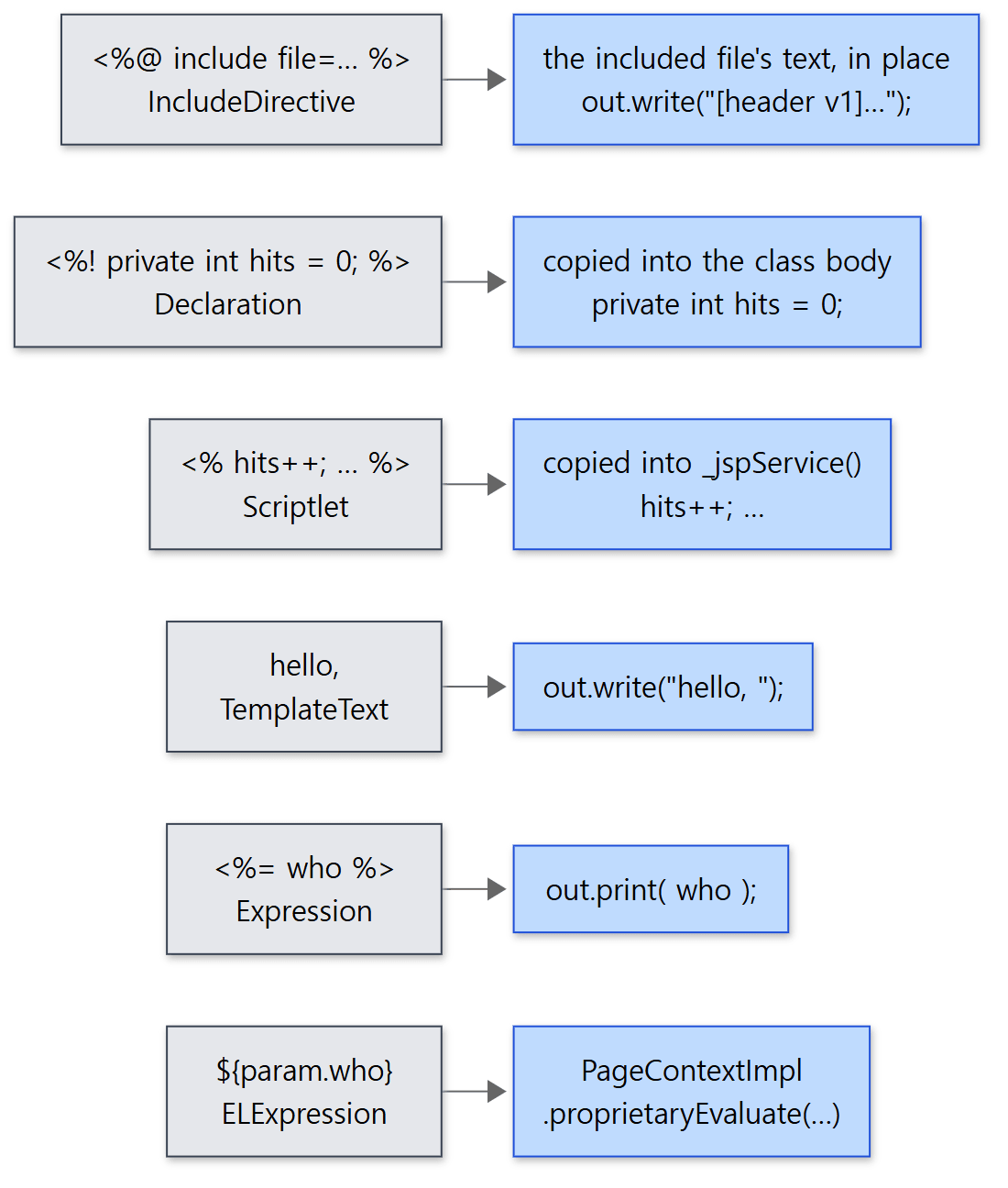 On the left, JSP fragments and their node types; on the right, the generated code, taken from the example's real generated file (the header is
v1, from the first generated version).
Example 2 continued: the generated hello_jsp.java
I opened the file left in the work directory. This is not Tomcat's source; it is a file Jasper generated. It is the version regenerated after the edits to (v2) and [header v2] in section 4's experiments, and the line numbers are those of the generated file.
/*
 * Generated by the Jasper component of Apache Tomcat
 * Version: Apache Tomcat/12.0.0-M1-dev
 * Generated at: 2026-10-24 13:48:47 UTC
 * Note: The last modified time of this file was set to
 *       the last modified time of the source file after
 *       generation to assist with modification tracking.
 */
package org.apache.jsp;

import jakarta.servlet.*;
import jakarta.servlet.http.*;
import jakarta.servlet.jsp.*;

public final class hello_jsp extends org.apache.jasper.runtime.HttpJspBase
    implements org.apache.jasper.runtime.JspSourceDependent,
                 org.apache.jasper.runtime.JspSourceImports,
                 org.apache.jasper.runtime.JspSourceDirectives {

 private int hits = 0;
  private static final jakarta.servlet.jsp.JspFactory _jspxFactory =
          jakarta.servlet.jsp.JspFactory.getDefaultFactory();

  private static java.util.Map<java.lang.String,java.lang.Long> _jspx_dependants;

  static {
    _jspx_dependants = new java.util.LinkedHashMap<java.lang.String,java.lang.Long>(1);
    _jspx_dependants.put("/WEB-INF/header.jspf", Long.valueOf(1792849718611L));
  }
  // ... (lines 31–89: import sets, methods returning the EL factory and InstanceManager, empty _jspInit()/_jspDestroy())
[Generated file work/Catalina/localhost/demo/org/apache/jsp/hello_jsp.java lines 1–29]
- The class extends
HttpJspBase, is namedhello_jsp, and lives in the packageorg.apache.jsp(section 2). <%! private int hits = 0; %>became a class field (line 20). Declarations go into the class body, outside_jspService()(generateDeclarations(), fromGenerator.javaline 187)._jspx_dependantshard-codes the included file/WEB-INF/header.jspftogether with that file's modification time (in milliseconds). The class implementsJspSourceDependentand returns this map fromgetDependants(); section 4's change detection uses it. The time value differs on every run.
Here is the body of _jspService().
  public void _jspService(final jakarta.servlet.http.HttpServletRequest request, final jakarta.servlet.http.HttpServletResponse response)
      throws java.io.IOException, jakarta.servlet.ServletException {

    if (!jakarta.servlet.DispatcherType.ERROR.equals(request.getDispatcherType())) {
      final java.lang.String _jspx_method = request.getMethod();
      if ("OPTIONS".equals(_jspx_method)) {
        response.setHeader("Allow","GET, HEAD, POST, OPTIONS");
        return;
      }
      if (!"GET".equals(_jspx_method) && !"POST".equals(_jspx_method) && !"HEAD".equals(_jspx_method)) {
        response.setHeader("Allow","GET, HEAD, POST, OPTIONS");
        response.sendError(HttpServletResponse.SC_METHOD_NOT_ALLOWED, "JSPs only permit GET, POST or HEAD. Jasper also permits OPTIONS");
        return;
      }
    }

    final jakarta.servlet.jsp.PageContext pageContext;
    jakarta.servlet.http.HttpSession session = null;
    final jakarta.servlet.ServletContext application;
    final jakarta.servlet.ServletConfig config;
    jakarta.servlet.jsp.JspWriter out = null;
    final java.lang.Object page = this;
    jakarta.servlet.jsp.JspWriter _jspx_out = null;
    jakarta.servlet.jsp.PageContext _jspx_page_context = null;


    try {
      response.setContentType("text/plain; charset=UTF-8");
      pageContext = _jspxFactory.getPageContext(this, request, response,
      			null, true, 8192, true);
      _jspx_page_context = pageContext;
      application = pageContext.getServletContext();
      config = pageContext.getServletConfig();
      session = pageContext.getSession();
      out = pageContext.getOut();
      _jspx_out = out;

      out.write("[header v2]\n");
 hits++; String who = request.getParameter("who");
      out.write("\n");
      out.write("hello, ");
      out.print( who );
      out.write(" (v2)\n");
      out.write("hits=");
      out.print( hits );
      out.write("\n");
      out.write("EL: ");
      out.write((java.lang.String) org.apache.jasper.runtime.PageContextImpl.proprietaryEvaluate("${param.who}", java.lang.String.class, (jakarta.servlet.jsp.PageContext)_jspx_page_context, null));
      out.write(' ');
      out.write('/');
      out.write(' ');
      out.write((java.lang.String) org.apache.jasper.runtime.PageContextImpl.proprietaryEvaluate("${1 + 2}", java.lang.String.class, (jakarta.servlet.jsp.PageContext)_jspx_page_context, null));
    } catch (java.lang.Throwable t) {
      // ... (on an exception, clear the buffer and hand it to an error page via pageContext.handlePageException(t))
    } finally {
      _jspxFactory.releasePageContext(_jspx_page_context);
    }
  }
}
[Generated file hello_jsp.java lines 90–160, with lines 143–155 shortened]
This code is written line by line by Generator.generatePreamble() (lines 690–821). Five things to read here.
- A method check comes first. A JSP accepts only
GET,POSTandHEAD; it answersOPTIONSwith just anAllowheader, and everything else gets 405 (Generator.javalines 739–761). Requests dispatched to an error page (ERROR) pass whatever their original method. - A JSP's "implicit objects" are these local variables.
request,response,session,application,config,out,pageandpageContext, which you use in a JSP without declaring them, are just this method's parameters and local variables. Scriptlets are pasted into this method, so those names are in scope. - The contents of the
includedirective are there as text (out.write("[header v2]\n")).header.jspfwas not compiled separately; it was pasted in at translation time, so even if you edit only the included file,hello_jspmust be retranslated before the change shows (section 4). - Short text is written one
charat a time. Template text of three characters or fewer, like" / ", becomes one line per character such asout.write(' ')(the "Special case small text strings" invisit(Node.TemplateText), lines 1825–1841). - The values in
getPageContext(…, null, true, 8192, true)come from thepagedirective: error page (none), session use (defaulttrue), buffer size (8 KB) and auto flush (lines 803–809).session = pageContext.getSession()(line 123) is there because the default issession="true". With<%@ page session="false" %>in a JSP that does not need a session, this line and thesessionvariable are not generated (lines 766–768 and 815–817). With the default,getPageContext()callsrequest.getSession()(PageContextImpl.javalines 128–129), so merely opening a JSP creates a session. How a session is created is covered in Part 11.
Easy to get wrong: a <%! %> field is shared by every request
hits is a class field, and JspServletWrapper.getServlet() creates one instance and keeps using it (theServlet, JspServletWrapper.java line 208). That is why the number in the example output, such as hits=3, goes up with every request. If several threads request at once, hits++ can overwrite each other's updates — exactly the same trap as a servlet field. Values that must be separate per request belong in local variables inside <% %>. Conversely, when the JSP is recompiled it becomes a new instance of a new class, so hits starts again from 1. Section 4's examples use this to confirm a recompile.
4. ecj compilation and change detection
JDTCompiler — asking and answering in memory
After making the .java, Compiler.compile() calls generateClass(), which is implemented in JDTCompiler. It hands ecj's Compiler three things: the source to compile (an ICompilationUnit — a class that reads the .java file and returns it as char[], lines 91–161), an environment that finds referenced classes (an INameEnvironment — it looks up jakarta.servlet.* and the app's own classes through this JSP's JasperLoader, that is, via its parent, the app's class loader (line 86, and from line 163)), and a receiver for the results (an ICompilerRequestor).
        final ICompilerRequestor requestor = result -> {
            try {
                if (result.hasProblems()) {
                    IProblem[] problems = result.getProblems();
                    for (IProblem problem : problems) {
                        if (problem.isError()) {
                            String name = new String(problem.getOriginatingFileName());
                            try {
                                problemList.add(ErrorDispatcher.createJavacError(name, pageNodes,
                                        new StringBuilder(problem.getMessage()), problem.getSourceLineNumber(), ctxt));
                            } catch (JasperException e) {
                                log.error(Localizer.getMessage("jsp.error.compilation.jdtProblemError"), e);
                            }
                        }
                    }
                }
                if (problemList.isEmpty()) {
                    ClassFile[] classFiles = result.getClassFiles();
                    for (ClassFile classFile : classFiles) {
                        // ... (build the path outputDir/org/apache/jsp/hello_jsp.class from the package name)
                        byte[] bytes = classFile.getBytes();
                        classFileName.append(".class");
                        try (FileOutputStream fout = new FileOutputStream(classFileName.toString());
                                BufferedOutputStream bos = new BufferedOutputStream(fout)) {
                            bos.write(bytes);
                        }
                    }
                }
            } catch (IOException ioe) {
                log.error(Localizer.getMessage("jsp.error.compilation.jdt"), ioe);
            }
        };
java/org/apache/jasper/compiler/JDTCompiler.java lines 467–505, with lines 486–493 shortened
If there are errors, no .class is written, and for each error ErrorDispatcher.createJavacError() maps the .java line number back to the JSP line number, searching the nodes' beginJavaLine/endJavaLine records from section 3 in reverse. The actual compilation is two lines further down, new Compiler(env, policy, cOptions, requestor, problemFactory) and compiler.compile(compilationUnits) (lines 533–534). No separate process is started; it all happens inside Tomcat's JVM.
The Java version to compile for is set by the compilerSourceVM/compilerTargetVM parameters, and at this commit the default is 21 (EmbeddedServletOptions.java lines 122 and 127). In the 11.0.x branch it is 17. That branch's JDTCompiler lists the versions in a chain of if/else if and writes the requestor as an anonymous class; main switched to switch expressions and a lambda, but does the same work.
Example 3: compile errors are reported in JSP line numbers
I put a deliberate type error on line 4 of broken.jsp.
<%-- This example was written for this post (it is not Tomcat's source) --%>
<%@ page contentType="text/plain; charset=UTF-8" %>
line 3 is fine
<% int count = "not a number"; %>
[Example ex/u13-jasper-jsp/app/broken.jsp]
The response is a 500. Here is part of the error page HTML with the tags stripped and HTML entities (< and so on) turned back into characters.
===== broken.jsp =====
HTTP 500
Exception
org.apache.jasper.JasperException: org.apache.jasper.JasperException: Unable to compile class for JSP:
An error occurred at line: [4] in the jsp file: [/broken.jsp]
Type mismatch: cannot convert from String to int
1: <%-- 이 글을 위해 쓴 예제입니다 (Tomcat 의 소스가 아닙니다) --%>
2: <%@ page contentType="text/plain; charset=UTF-8" %>
3: line 3 is fine
4: <% int count = "not a number"; %>
broken_jsp.java
(Line 1 of the source shown is the Korean comment in the actual example file, meaning "This example was written for this post (it is not Tomcat's source)".)
Type mismatch: cannot convert from String to intis ecj's own message (javacwords it differently).- The location, however, is line 4 of the JSP file, not a line of the
.java, and a few lines of the JSP source are attached (displaySourceFragmentdefaults totrue). This is thanks to the line mapping recorded on the nodes in section 3. - The last line is the output of
ls: the work directory has onlybroken_jsp.java, no.class, because the requestor does not write a.classwhen there are errors. - The error page shows the exception details because Part 8's
ErrorReportValveshows them by default. In production this is usually turned off.
isOutDated() — which times are compared?
Now for "when is it recompiled?". After compiling, Compiler.compile() sets the modification time of the .java and .class files to the JSP file's modification time.
            final Long jspLastModified = ctxt.getLastModified(ctxt.getJspFile());
            Map<String,SmapStratum> smaps = generateJava();
            File javaFile = new File(ctxt.getServletJavaFileName());
            if (!javaFile.setLastModified(jspLastModified.longValue())) {
                throw new JasperException(Localizer.getMessage("jsp.error.setLastModified", javaFile));
            }
            if (compileClass) {
                generateClass(smaps);
                // Fix for bugzilla 41606
                // Set JspServletWrapper.servletClassLastModifiedTime after successful compile
                File targetFile = new File(ctxt.getClassFileName());
                if (targetFile.exists()) {
                    if (!targetFile.setLastModified(jspLastModified.longValue())) {
                        throw new JasperException(Localizer.getMessage("jsp.error.setLastModified", targetFile));
                    }
java/org/apache/jasper/compiler/Compiler.java lines 402–416
This is what the generated file's header comment, "The last modified time of this file was set to the last modified time of the source file", was talking about. With that in place, isOutDated() only needs to check whether the two times are the same.
    public boolean isOutDated(boolean checkClass) {

        if (jsw != null && (ctxt.getOptions().getModificationTestInterval() > 0)) {

            if (jsw.getLastModificationTest() + (ctxt.getOptions().getModificationTestInterval() * 1000L) > System
                    .currentTimeMillis()) {
                return false;
            }
            jsw.setLastModificationTest(System.currentTimeMillis());
        }
        // ...
        if (!targetFile.exists()) {
            return true;
        }
        long targetLastModified = targetFile.lastModified();
        // ...
        Long jspRealLastModified = ctxt.getLastModified(ctxt.getJspFile());
        if (jspRealLastModified.longValue() < 0) {
            // Something went wrong - assume modification
            return true;
        }

        if (targetLastModified != jspRealLastModified.longValue()) {
            // ...
            return true;
        }
java/org/apache/jasper/compiler/Compiler.java lines 461–501
modificationTestInterval(default 4 seconds) — if 4 seconds have not passed since the last check, it answers "not stale" without even looking at the files. This keeps busy traffic from hitting the disk on every request.- If the
.classdoes not exist, it is stale (the first request). - If the
.classtime differs from the JSP time, it is stale. The test is "different" (!=), not "newer" (<). So even if you restore an older backup of a JSP and its time goes backwards, it is recompiled. - If they still match, it takes
jsw.getDependants()— the generated class's_jspx_dependantsmap — and compares each included file's time against the record too (lines 503–581). Any difference means stale.
The defaults are development=true (EmbeddedServletOptions.java line 49), checkInterval=0 (line 85) and modificationTestInterval=4 (line 157).
Example 4: when does an edit show up? (development mode)
Continuing from Example 2, I changed (v1) to (v2) in hello.jsp with sed and requested it right away. Then I requested it once a second and measured how long it took for (v2) to appear.
===== edited hello.jsp to v2, request right away =====
[header v1]

hello, tomcat (v1)
hits=3
EL: tomcat / 3
===== mtime: jsp / java / class =====
2026-10-24 13:48:32.844223831 +0000 /tmp/base/webapps/demo/hello.jsp
2026-10-24 13:48:25.593000000 +0000 /tmp/base/work/Catalina/localhost/demo/org/apache/jsp/hello_jsp.java
2026-10-24 13:48:25.593000000 +0000 /tmp/base/work/Catalina/localhost/demo/org/apache/jsp/hello_jsp.class
===== polling until v2 shows up =====
"(v2)" visible after about 6 seconds
[header v1]

hello, tomcat (v2)
hits=2
EL: tomcat / 3
2026-10-24 13:48:32.844223831 +0000 /tmp/base/webapps/demo/hello.jsp
2026-10-24 13:48:32.844000000 +0000 /tmp/base/work/Catalina/localhost/demo/org/apache/jsp/hello_jsp.java
2026-10-24 13:48:32.844000000 +0000 /tmp/base/work/Catalina/localhost/demo/org/apache/jsp/hello_jsp.class
- The request right after the edit still shows
(v1). Less than 4 seconds had passed since the check during the first request, soisOutDated()did not look at the files.hits=3means the same instance served its third request. - Meanwhile the
.javaand.classcarry the original JSP's time (13:48:25.593), and only the edited JSP is at13:48:32(these times differ on every run). Because the times no longer match, the next check judges it stale. - About 6 seconds later
(v2)appeared, and the.java/.classtimes were then set to the new JSP's time (13:48:32.844). The sub-millisecond part is cut off because Java'ssetLastModified()works in milliseconds. hits=2. The polling request was 1 and this one is 2. The newJasperLoaderloaded a new instance of a new class, so the field counts from the start again.
Next I left hello.jsp alone and edited only the included file header.jspf.
===== edited only header.jspf, polling =====
"header v2" visible after about 9 seconds
[header v2]

hello, tomcat (v2)
hits=2
EL: tomcat / 3
Even though hello.jsp's time did not change, [header v2] appeared and hits restarted. The time recorded for header.jspf in _jspx_dependants no longer matched the real one, so all of hello_jsp was retranslated. The generated file shown earlier is the one rebuilt at this point, which is why it contains [header v2].
Easy to get wrong: "a few seconds later" is not fixed
The time until an edit showed up varied from run to run. Over four runs of the same example, hello.jsp took 2 to 6 seconds and header.jspf 5 to 9 seconds, and in the very first run a request made 5 seconds after editing header.jspf still returned the old content. As far as I checked, there are two clocks. One is modificationTestInterval (4 seconds) above. The other is Tomcat's static resource cache. Jasper gets the times of the JSP and its included files through ServletContext.getResource(), these resources go through the app's resource cache (CachedResource), and a cache entry does not look at the disk again for 5 seconds by default (ttl = 5000, webresources/Cache.java line 53; CachedResource.java lines 145–149). Depending on how the two clocks line up, it can take a few seconds longer. If you save a JSP during development and "nothing changes", wait a few seconds and request it again.
Production mode: development=false and checkInterval
Development mode calls compile() on every request and looks at the disk every 4 seconds. To remove that cost in production, set development to false. Then, in the code from section 1, compile() is entered only once, on the first request while mustCompile is true. After that, the only way an edited JSP gets noticed is the background check, which is on only when checkInterval is greater than 0.
        // If this web application context is running from a
        // directory, start the background compilation thread
        String appBase = context.getRealPath("/");
        if (!options.getDevelopment() && appBase != null && options.getCheckInterval() > 0) {
            lastCompileCheck = System.currentTimeMillis();
        }
java/org/apache/jasper/compiler/JspRuntimeContext.java lines 99–104
lastCompileCheck defaults to -1 (line 127), and checkCompile() does nothing while it is negative (lines 305–308). When enabled, once checkInterval seconds have passed it calls ctxt.compile() on every registered JSP, collects the ones that need reloading, and reloads them with getServlet() (lines 309–361).
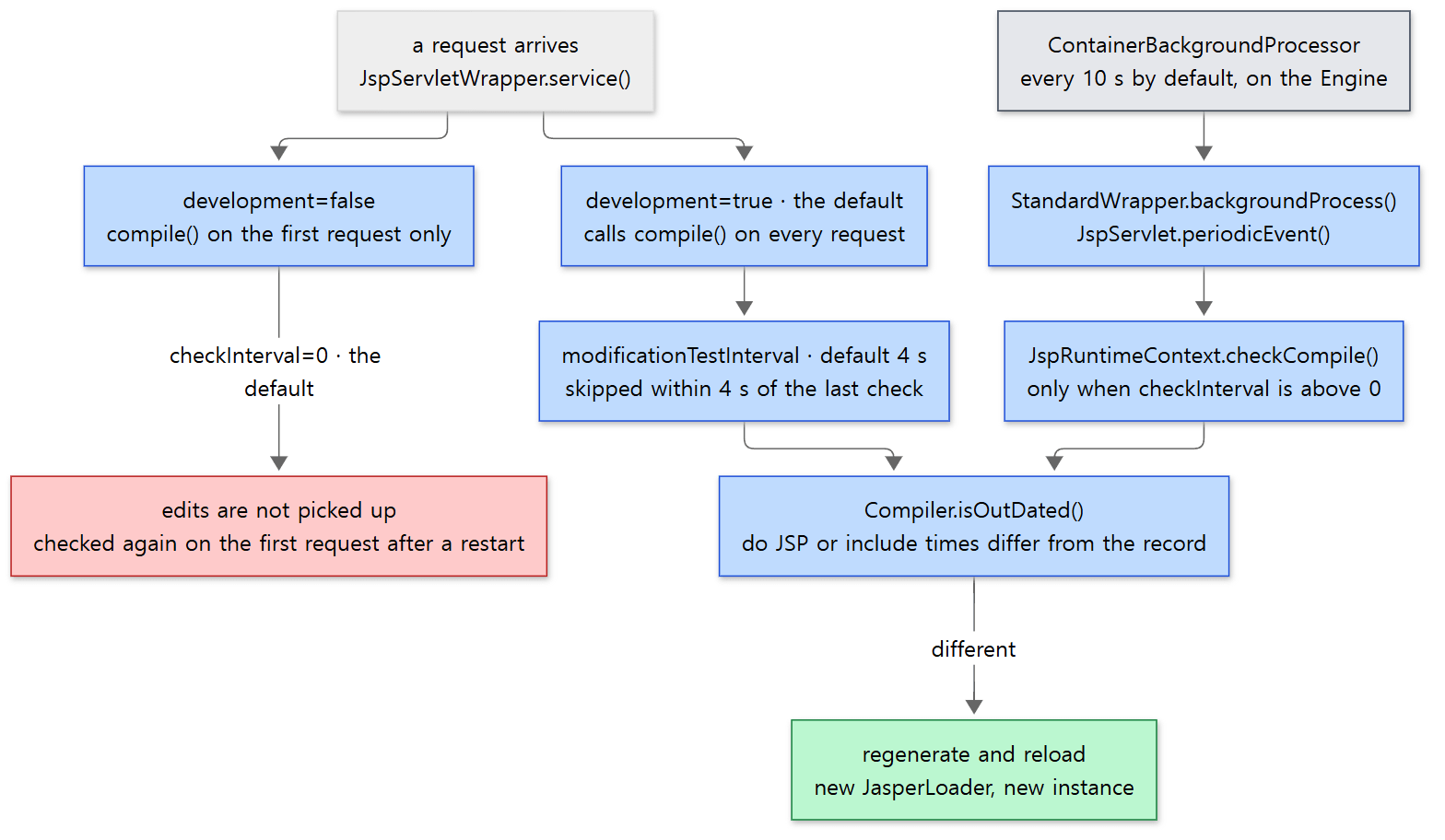 The red box is production mode's default behaviour. The grey box at the top right is a thread run by the container, not by Jasper.
Easy to get wrong: the "background compilation thread" is not Jasper's thread
The comment in the code above says it "starts the background compilation thread", but all the code does is write a time into lastCompileCheck. Jasper creates no thread of its own. checkCompile() is called by JspServlet.periodicEvent() (JspServlet.java lines 310–314), which in turn is called by the Tomcat container's StandardWrapper.backgroundProcess().
    @Override
    public synchronized void backgroundProcess() {
        super.backgroundProcess();

        if (!getState().isAvailable()) {
            return;
        }

        if (getServlet() instanceof PeriodicEventListener) {
            ((PeriodicEventListener) getServlet()).periodicEvent();
        }
    }
java/org/apache/catalina/core/StandardWrapper.java lines 480–491
This method is called by the background thread attached to the Engine (ContainerBackgroundProcessor) as it walks down Host → Context → Wrapper (ContainerBase.java lines 1179–1185). It is the same thread that does Part 10's auto-deployment and Part 11's session expiry. Its period is the Engine's backgroundProcessorDelay, 10 seconds by default (StandardEngine.java line 62). So even with checkInterval=2, the check does not actually run more often than once every 10 seconds.
Example 5: editing in production mode
In the same container I stopped Tomcat, added development=false to the jsp servlet in the copied conf/web.xml, and started it again. hello.jsp is still the (v2) version from Example 4, and the work directory is untouched.
===== restart with development=false =====
2026-10-24 13:48:47.288893163 +0000 (ctime) /tmp/base/work/Catalina/localhost/demo/org/apache/jsp/hello_jsp.class
[header v2]

hello, tomcat (v2)
hits=1
EL: tomcat / 3
2026-10-24 13:48:47.288893163 +0000 (ctime) /tmp/base/work/Catalina/localhost/demo/org/apache/jsp/hello_jsp.class
===== edited hello.jsp to v3, 6 seconds later (development=false) =====
[header v2]

hello, tomcat (v2)
hits=2
EL: tomcat / 3
- The
.classfile's ctime (when the file contents last changed — the mtime is useless here because Jasper sets it to the JSP's time) is the same before and after the restart. The first request after the restart did entercompile(), butisOutDated()saw matching times and loaded the.classbuilt during the previous run. The work directory is a cache that survives restarts.hits=1simply reflects the new JVM. - After editing to
(v3)and waiting 6 seconds, it is still(v2). In production mode withcheckInterval=0, an edited JSP is not picked up until the next restart.
I stopped it again, added checkInterval=2, started it, edited to (v4), and requested once a second.
===== restart with development=false, checkInterval=2 =====
[header v2]

hello, tomcat (v3)
hits=1
EL: tomcat / 3
"(v4)" visible after about 6 seconds
[header v2]

hello, tomcat (v4)
hits=2
EL: tomcat / 3
The first request after the restart showed (v3), because the first request's compile() noticed the changed time. (v4) then appeared about 6 seconds later, recompiled not by a request but by the background check. Across runs of the example it was between 5 and 9 seconds, and as shown above it can take up to a little over 10 seconds.
Easy to get wrong: only the JSP and its included files are compared
isOutDated() looks only at the JSP itself and the files listed in _jspx_dependants (files pasted in with a static include, tag files, TLDs and the like). Another JSP called with <jsp:include> (an action that includes at run time) is not a dependency but a separate JSP translated on its own, so editing it recompiles only that JSP. Also, changing only a Java class the JSP uses (a class in WEB-INF/classes) is not a signal that the JSP is stale. I did not run an example for this case.
5. A taste of EL — interpreted at run time, with a cache
In section 3, ${param.who} was not turned into Java code but into a call to PageContextImpl.proprietaryEvaluate() that passes the string "${param.who}". That method builds the expression through the standard EL API and computes its value.
    public static Object proprietaryEvaluate(final String expression, final Class<?> expectedType,
            final PageContext pageContext, final ProtectedFunctionMapper functionMap) throws ELException {
        final ExpressionFactory exprFactory =
                jspf.getJspApplicationContext(pageContext.getServletContext()).getExpressionFactory();
        ELContext ctx = pageContext.getELContext();
        // ...
        ValueExpression ve = exprFactory.createValueExpression(ctx, expression, expectedType);
        return ve.getValue(ctx);
    }
java/org/apache/jasper/runtime/PageContextImpl.java lines 625–639, with lines 630–636 shortened
Parsing the string again on every request would be slow. Tomcat's EL implementation (org.apache.el) caches the parse result, keyed by the string.
        Node n = expressionCache.get(expr);
        if (n == null) {
            ELParser parser = parserCache.pop();
            try {
                if (parser == null) {
                    parser = new ELParser(new StringReader(expr));
                } else {
                    parser.ReInit(new StringReader(expr));
                }
                n = parser.CompositeExpression();
java/org/apache/el/lang/ExpressionBuilder.java lines 105–114
expressionCache is a ConcurrentCache of 5,000 entries by default (size set by the system property org.apache.el.ExpressionBuilder.CACHE_SIZE, lines 52–60); the parsed tree is put in on line 141. Parser objects are pooled in parserCache and reused too. The parser ELParser is not hand-written; it is generated by the JavaCC parser generator from the grammar file ELParser.jjt (the top of the file says "Generated By:JJTree&JavaCC: Do not edit this line"). The parse result is a tree of node classes whose names start with Ast, such as AstPlus and AstValue (46 of them in org/apache/el/parser), and each node computes its value with getValue().
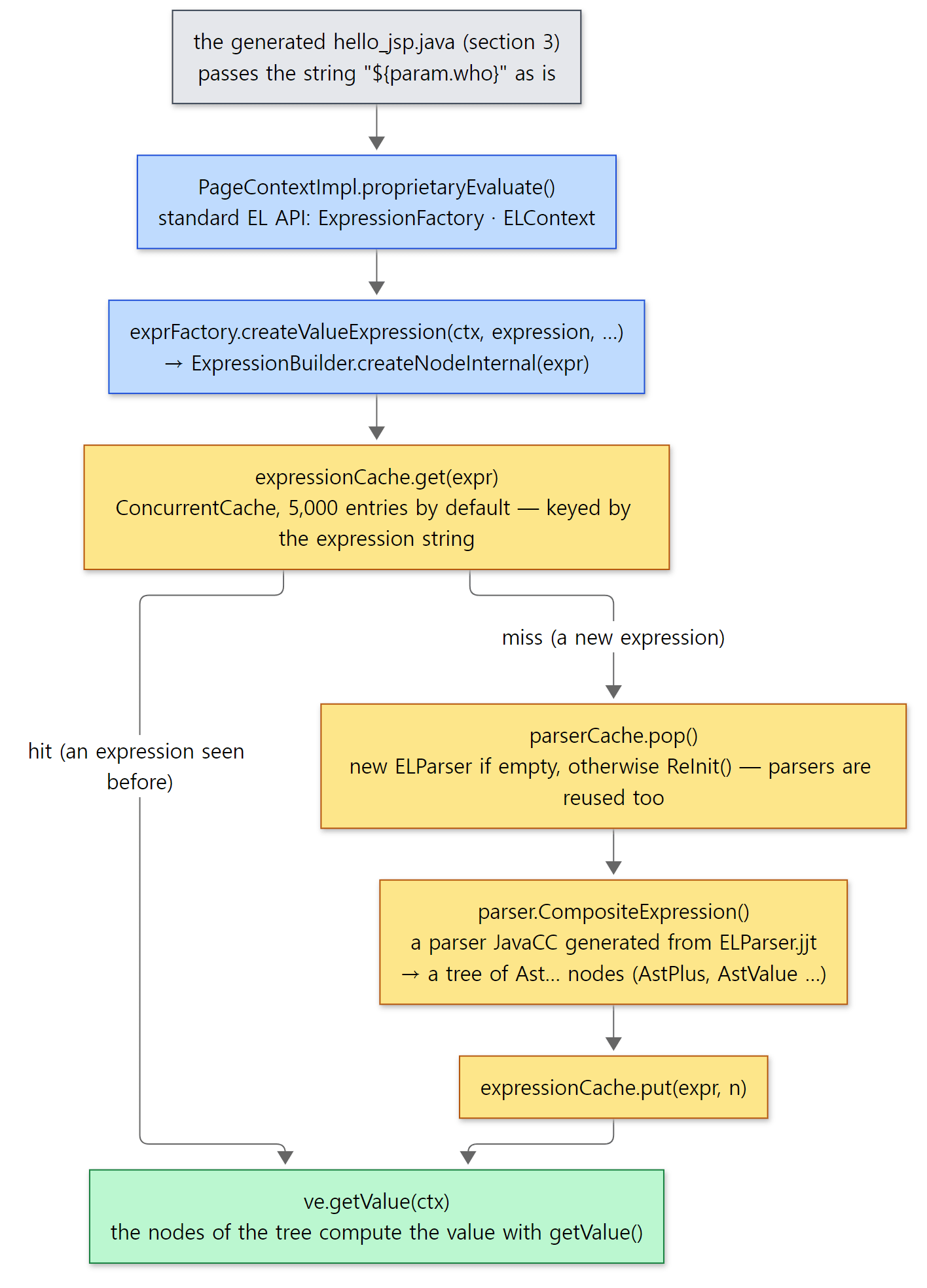 The two code snippets above, joined. The yellow boxes are where the two caches (expression trees and parsers) are used.
To sum up: the JSP side is translated once into Java bytecode, while EL is interpreted at run time, with the parse result cached. Spring's SpEL also interprets by default and offers a separate mode that compiles to bytecode when needed (Spring Part 15).
What this post leaves out
- Tag libraries and TLD discovery (
JasperInitializeris called as an SCI and runsTldScanner):servlet/JasperInitializer.javalines 62–112,servlet/TldScanner.java,compiler/TldCache.java— SCIs themselves are in Part 10 - Code generation for custom tags and tag handler pooling (
enablePooling):visit(Node.CustomTag)inGenerator.java,runtime/TagHandlerPool.java - Tag files (
.tag) and their compilation:compiler/TagFileProcessor.java,JspServletWrapper.loadTagFile()(lines 268–301) - JSP documents in XML syntax (
.jspx):compiler/JspDocumentParser.java; the syntax is decided inParserController.determineSyntaxAndEncoding() - Page encoding detection (BOM,
pageEncoding):compiler/EncodingDetector.java,ParserController.javafrom line 280 - Precompiling: the
?jsp_precompilerequest (JspServlet.preCompile(), lines 202–243) andJspC, which translates at build time (jasper/JspC.java) - Where web.xml's
<jsp-file>is turned intoJspServletplus ajspFileparameter:startup/ContextConfig.javalines 1801–1818 - Unloading JSPs unused for a while (
maxLoadedJsps,jspIdleTimeout):JspRuntimeContext.checkUnload()(from line 471) - Putting the SMAP into the
.class:compiler/SmapUtil.java
Summary
| Concept | One-line summary |
|---|---|
JspServlet |
A single jsp servlet in the global conf/web.xml receives every *.jsp and *.jspx |
JspRuntimeContext |
One per app. The jspUri → JspServletWrapper map and the background check |
JspServletWrapper |
One per JSP file. (1) compile (2) load (3) service() |
JspCompilationContext |
Knows this JSP's package, class name, output directory and compiler. Compiles only when isOutDated() |
| Reading twice | Pass 1 directives only, pass 2 everything, because isELIgnored changes how parsing works |
Parser → Node |
Picks Comment, Directive, Declaration, Expression, Scriptlet, EL or TemplateText from the first few characters |
Generator |
A few lines of Java per node. Expressions become out.print(), scriptlets are copied, EL becomes a runtime call |
| The generated class | org.apache.jsp.hello_jsp extends HttpJspBase; the body is a single _jspService() |
JDTCompiler |
Compiles with ecj inside the same JVM. Errors are mapped to JSP lines through the nodes' line records |
| Work directory | work/<engine>/<host>/<app>/org/apache/jsp/. Survives restarts and is reused |
| Change detection | The .class time is set to the JSP's; if they "differ" it recompiles. Included files are checked too |
development=true (default) |
Checks on every request, but at most every modificationTestInterval (4 s) |
development=false |
Checks only on the first request. If checkInterval is above 0, a background thread (10-second period by default) checks |
| EL | Passed as a string and interpreted at run time. Parse results are cached (5,000 entries) |
What's next
We have seen how a JSP becomes a servlet. With that, this series has covered the whole path a request takes to reach a servlet; what remains are features built on top of that path. The next post follows how a web.xml <security-constraint> is enforced: the valve in charge of authentication (AuthenticatorBase) and the Realm that knows users and roles. It continues in Part 14: Authentication and Realms — How security-constraint Is Enforced.
If you have used JSPs with Spring MVC, you have already walked the first part of this post. In Spring Part 23, InternalResourceViewResolver turns the view name "hello" into /WEB-INF/views/hello.jsp and only forwards to it; from there on, the HTML is written by the servlet container's JSP engine. That JSP engine is this post's JspServlet. The forward goes through the Mapper again, reaches JspServlet through the *.jsp mapping (the forward path is in Part 9), and section 1 of this post starts from there. That is also why the body was empty in that post's MockMvc test: the mock environment has no such engine.
- Part 7: CoyoteAdapter and the Mapper — Which Servlet Gets the Request
- Part 9: The Filter Chain and the Servlet Call — Until service() Runs
- Part 10: Deploying a Web App — From a WAR to a Running Context
- Part 4: Class Loaders — Each Web App Sees Its Own Classes
- Spring Part 15: SpEL — How an Expression Is Parsed and Evaluated