What this post covers
This is the fourteenth post in the "Digging into Tomcat's Source" series. In part 13 we watched a JSP turn into a servlet. This time we go to the place that decides, before a request reaches any servlet, whether this person may come in at all.
You may have written something like this in web.xml:
  <security-constraint>
    <web-resource-collection>
      <web-resource-name>staff area</web-resource-name>
      <url-pattern>/staff/*</url-pattern>
    </web-resource-collection>
    <auth-constraint>
      <role-name>staff</role-name>
    </auth-constraint>
  </security-constraint>

  <login-config>
    <auth-method>BASIC</auth-method>
    <realm-name>u14 lab</realm-name>
  </login-config>
Add <user username="alice" password="secret" roles="staff"/> to conf/tomcat-users.xml, and the browser asks for a user name and password; log in as alice and the page shows up. You did not touch a single line of servlet code. We follow where and how this configuration is enforced in the source. There are four questions:
- Who reads
<login-config>and plugs in the code that actually does the checking, and where on the request path? - In what order is a single request checked — where do finding constraints, authentication and role checks happen, and where do 401 and 403 part ways?
- When several constraints overlap on one URL, like
/staff/*and/staff/notice, which one applies? - How do server.xml's
<Realm>,tomcat-users.xmland password hashing (CredentialHandler) fit together, and how do BASIC and FORM "log in" differently?
| Item | Value |
|---|---|
| Target | Apache Tomcat |
| Version | 12.0.0-M1 (main) |
| Commit | 17aa1769b0 (2026-10-23) |
| Main classes | startup/ContextConfig, authenticator/AuthenticatorBase·BasicAuthenticator·FormAuthenticator, realm/RealmBase·UserDatabaseRealm·LockOutRealm·MessageDigestCredentialHandler |
Every line number in this post refers to this commit. How to check out the same commit and build the Docker image for the examples is in part 1.
The authenticator package (including its jaspic subpackage) and the realm package alone hold more than thirty Java files (DIGEST, client certificates, SPNEGO, JASPIC, single sign-on, LDAP, databases …). So that a first-time reader can follow along, this post sticks to the most common combination, BASIC/FORM + tomcat-users.xml, and only the main path. What I left out is listed by name and location in "Going deeper" at the end.
Terms to know first
Authentication is checking "who are you?", and authorization is deciding "may this person do this?". How httpd splits these two into separate modules is in httpd part 13. In Tomcat, the Authenticator handles authentication and the Realm makes the authorization decision (strictly speaking the Realm does a bit of both; we will see this in sections 3 and 5).
A valve is one link in the processing chain (the pipeline) attached to each container — Engine, Host, Context, Wrapper. A valve does its work in invoke(request, response) and then either hands over to the next valve with getNext().invoke(...) or finishes the response without passing it on. We saw pipelines and valves in part 8. The star of this post, the Authenticator valve, is one such valve.
A Realm is Tomcat's wrapper around "the place where user information lives". Give it a user name and password, and if they match it returns a user object and tells you which roles that user has. One line <Realm className="…"> in server.xml becomes one Realm object. If users live in a file you use UserDatabaseRealm or MemoryRealm; in a database, DataSourceRealm; in LDAP, JNDIRealm.
A Principal is the Java object that stands for "a user who passed authentication" (java.security.Principal). Tomcat uses GenericPrincipal, which holds a name and a list of roles. The values your servlet gets from request.getRemoteUser() and request.isUserInRole("staff") come from here.
A security-constraint is the web.xml element that says "protect these URLs this way". It has three parts:
| Child element | Meaning | Where it lives in the source |
|---|---|---|
<web-resource-collection> |
Which URL patterns and HTTP methods it applies to | SecurityCollection |
<auth-constraint> |
Which roles may come in | SecurityConstraint.authRoles |
<user-data-constraint> |
Whether to accept HTTPS only (CONFIDENTIAL) |
SecurityConstraint.userConstraint |
How web.xml turns into these objects (ContextConfig, WebXml) was covered in part 10.
1. Who plugs in the Authenticator valve?
web.xml only says "authenticate with BASIC"; it never names a class. The bridge is ContextConfig.authenticatorConfig(). It is called once when a web app starts, after web.xml has been fully read (configureStart(), lines 1055–1058).
        LoginConfig loginConfig = context.getLoginConfig();
        if (loginConfig == null) {
            // Need an authenticator to support HttpServletRequest.login()
            loginConfig = DUMMY_LOGIN_CONFIG;
            context.setLoginConfig(loginConfig);
        }

        // Has an authenticator been configured already?
        if (context.getAuthenticator() != null) {
            return;
        }

        // Has a Realm been configured for us to authenticate against?
        if (context.getRealm() == null) {
            log.error(sm.getString("contextConfig.missingRealm"));
            ok = false;
            return;
        }
        // ...
            // Identify the class name of the Valve we should configure
            String authenticatorName = authenticators.getProperty(loginConfig.getAuthMethod());
        // ...
        if (authenticator != null) {
            Pipeline pipeline = context.getPipeline();
            if (pipeline != null) {
                pipeline.addValve(authenticator);
java/org/apache/catalina/startup/ContextConfig.java lines 341–398
It does three things.
-
It looks up the valve class by the
<auth-method>name. The name-to-class pairs live in a small file calledAuthenticators.properties(read at lines 154–166).<auth-method>Valve class BASICBasicAuthenticatorFORMFormAuthenticatorDIGESTDigestAuthenticatorCLIENT-CERTSSLAuthenticatorSPNEGOSpnegoAuthenticatorNONENonLoginAuthenticatorjava/org/apache/catalina/startup/Authenticators.properties lines 16–21
-
It adds that valve to the Context's pipeline (
pipeline.addValve()). As we saw in part 8,addValve()inserts in front of the basic valve (StandardContextValve), so the Authenticator runs beforeStandardContextValve. -
It adds a valve even when there is no
<login-config>at all. It substitutes a dummy configuration namedNONE(DUMMY_LOGIN_CONFIG, line 145), soNonLoginAuthenticatorgoes in. The comment gives the reason: servlet code must be able to callHttpServletRequest.login(). So practically every Tomcat web app has an Authenticator valve.
Note also that the web app fails to start if there is no Realm (ok = false). What about embedded Tomcat, which does not use the default server.xml? context.getRealm() is ContainerBase.getRealm(), which asks the parent container if this container has no Realm (lines 479–494). It goes up Context → Host → Engine, and at the top StandardEngine.getRealm() creates a NullRealm, which lets nobody in, if nothing was configured (lines 92–100). The parent/child chain of containers was covered in part 2.
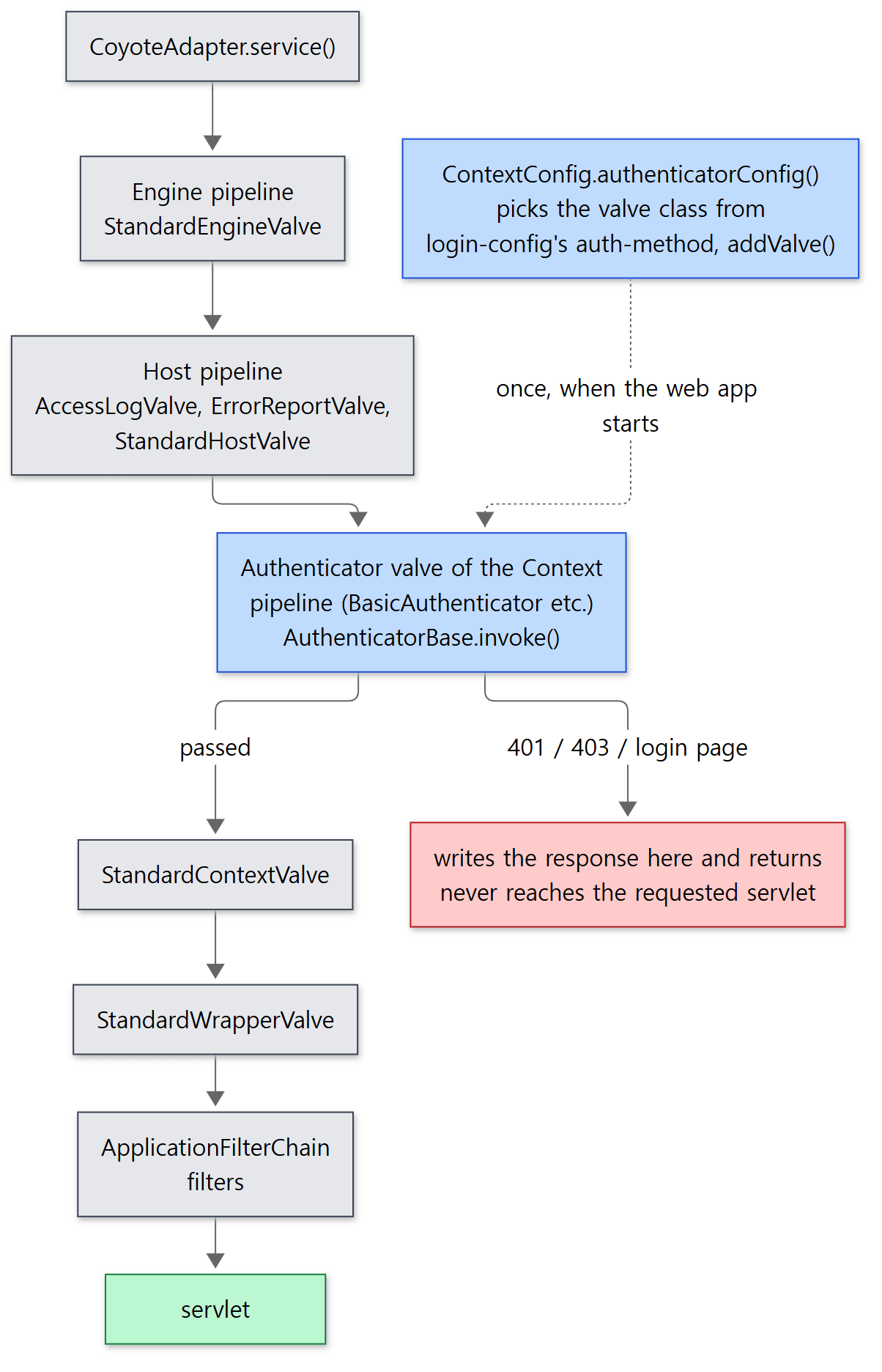 The two blue boxes are the stars of this post. The dotted line happens once when the web app starts, not on every request.
Example 1: the call stack seen from a servlet
I checked that it really sits there. Inside a servlet I took the call stack with new Throwable().getStackTrace() and printed only the valves and the filter chain, from the outside in. web.xml is the one at the top of this post, and there are two users: alice (role staff) and bob (no roles).
I ran this example with Tomcat 12.0.0-M1-dev built unchanged from the reference commit (17aa1769b0), in a Docker container (Eclipse Temurin JDK 21). The example folder is ex/u14-basic.
// An example written for this post (not part of Tomcat's source)
// Prints who the request was authenticated as. With ?stack it also
// prints the Tomcat valves this request went through, picked from the call stack.
// ... imports omitted ...
public class WhoAmI extends HttpServlet {
    @Override
    protected void doGet(HttpServletRequest req, HttpServletResponse resp) throws IOException {
        resp.setContentType("text/plain");
        PrintWriter out = resp.getWriter();
        out.println("uri=" + req.getRequestURI()
                + " user=" + req.getRemoteUser()
                + " authType=" + req.getAuthType()
                + " inRole(staff)=" + req.isUserInRole("staff"));
        if (req.getParameter("stack") != null) {
            // From the bottom (outside) of the stack to the top (inside), only valves and the filter chain
            StackTraceElement[] st = new Throwable().getStackTrace();
            for (int i = st.length - 1; i >= 0; i--) {
                String c = st[i].getClassName();
                if (c.startsWith("org.apache.catalina.core.Standard")
| c.startsWith("org.apache.catalina.authenticator")
| c.startsWith("org.apache.catalina.valves")
| c.equals("org.apache.catalina.connector.CoyoteAdapter")
| c.equals("org.apache.catalina.core.ApplicationFilterChain")
| c.equals(getClass().getName())) {
                    out.println("  at " + c + "." + st[i].getMethodName()
                            + "(" + st[i].getFileName() + ":" + st[i].getLineNumber() + ")");
                }
            }
        }
    }
}
The result of curl -u alice:secret "http://127.0.0.1:8080/basic/staff/hello?stack":
### 7. call stack seen from the servlet (alice)
uri=/basic/staff/hello user=alice authType=BASIC inRole(staff)=true
  at org.apache.catalina.connector.CoyoteAdapter.service(CoyoteAdapter.java:347)
  at org.apache.catalina.core.StandardEngineValve.invoke(StandardEngineValve.java:71)
  at org.apache.catalina.valves.AbstractAccessLogValve.invoke(AbstractAccessLogValve.java:777)
  at org.apache.catalina.valves.ErrorReportValve.invoke(ErrorReportValve.java:82)
  at org.apache.catalina.core.StandardHostValve.invoke(StandardHostValve.java:115)
  at org.apache.catalina.authenticator.AuthenticatorBase.invoke(AuthenticatorBase.java:659)
  at org.apache.catalina.core.StandardContextValve.invoke(StandardContextValve.java:77)
  at org.apache.catalina.core.StandardWrapperValve.invoke(StandardWrapperValve.java:164)
  at org.apache.catalina.core.ApplicationFilterChain.doFilter(ApplicationFilterChain.java:111)
  at org.apache.catalina.core.ApplicationFilterChain.doFilter(ApplicationFilterChain.java:132)
  at WhoAmI.doGet(WhoAmI.java:21)
From the line where StandardHostValve calls the first valve of the Context pipeline (StandardHostValve.java line 115) we go straight into AuthenticatorBase.invoke(), and from its line 659 (getNext().invoke(), calling the next valve because the checks passed) on to StandardContextValve. The filter chain (ApplicationFilterChain) is much further in.
Easy to confuse: the stack does not show BasicAuthenticator
The object in the pipeline is a BasicAuthenticator, yet the stack says AuthenticatorBase.invoke. invoke() exists only in the parent class AuthenticatorBase; BasicAuthenticator implements only doAuthenticate(), which is called from inside it (section 2). A stack trace prints the class that declares the method, not the class of the object.
Easy to confuse: the container's security check runs before every filter
Because the Authenticator is a valve, it sits outside the servlet filters. A request blocked by web.xml's security-constraint gets its 401/403 without passing through a single filter. Conversely, security built as a filter, like Spring Security, runs only after the container check has passed. If you use both, keep this order in mind. The servlet filter chain was covered in part 9, and the filter story on the Spring side in Spring part 20. (Neither series read Spring Security's source.)
2. AuthenticatorBase.invoke() — the order of checks
Now we step inside the valve. invoke() is lines 498–664 of AuthenticatorBase. Leaving out JASPIC (a standard API for plugging in external authentication modules) and CORS preflight handling, the order is simple.
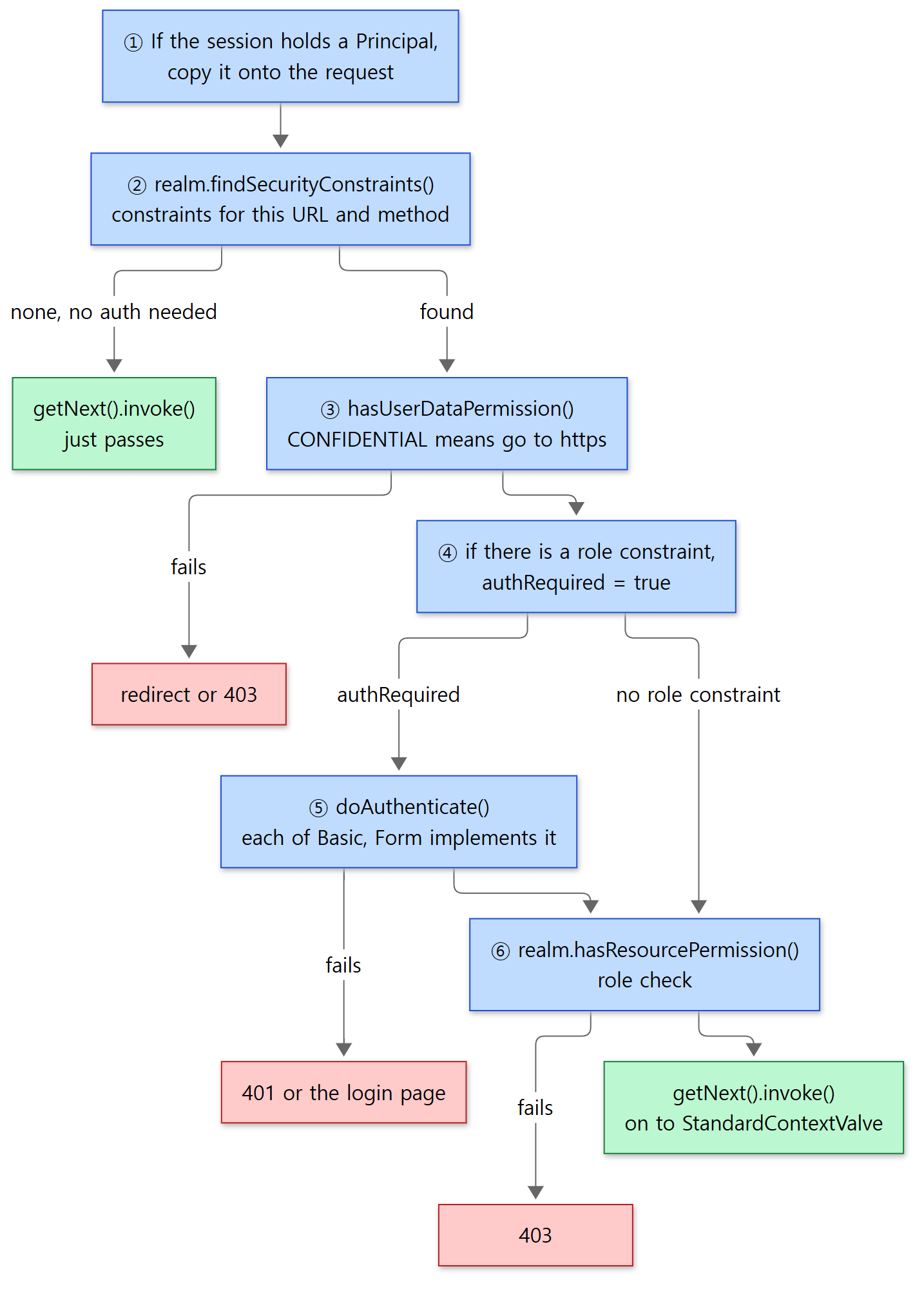 The blue boxes are the checks, in order. When a red box is reached, the valve writes the response and returns without calling the next valve.
The first part looks like this:
        boolean authRequired = isContinuationRequired(request);

        Realm realm = this.context.getRealm();
        // Is this request URI subject to a security constraint?
        SecurityConstraint[] constraints = realm.findSecurityConstraints(request, this.context);

        JaspicContextState jaspicContextState = getJaspicContextState();

        // Will be non-null if JASPIC is configured for this context
        if (jaspicContextState != null) {
            authRequired = true;
        }

        if (constraints == null && !context.getPreemptiveAuthentication() && !authRequired) {
            if (log.isTraceEnabled()) {
                log.trace("Not subject to any constraint");
            }
            getNext().invoke(request, response);
            return;
        }
java/org/apache/catalina/authenticator/AuthenticatorBase.java lines 523–542
- It copies over login information left in the session (lines 504–521). If an earlier login stored a Principal in the session (the
cacheattribute,trueby default, line 164), this request gets that user too. This is why a FORM login works without a password from the second request on (section 7). - It finds the constraints on this URL. Notice that it asks the Realm to do it (
realm.findSecurityConstraints()); we look at this in section 3. If there is no constraint and no other reason to require authentication (such as a FORM login in progress,isContinuationRequired()), it passes straight to the next valve. Unprotected URLs end here. - If there are constraints, it turns off caching (
disableCaching(), lines 667–679). Unless the method is POST it addsCache-Control: privateto the response, so a proxy in between does not store a protected page and serve it to someone else. You can see this in the output of example 2. - It checks the transport guarantee (
<user-data-constraint>) (checkUserDataConstraints()→realm.hasUserDataPermission()). If the constraint saysCONFIDENTIALand the request came over HTTP, it redirects to the connector'sredirectPort, or answers 403 if there is no such port (RealmBase.javalines 1012–1059).
Next comes the part that decides whether authentication is needed:
        // Since authenticate modifies the response on failure,
        // we have to check for allow-from-all first.
        boolean hasAuthConstraint = false;
        if (constraints != null) {
            hasAuthConstraint = true;
            for (int i = 0; i < constraints.length && hasAuthConstraint; i++) {
                if (constraints[i].getAllRoles() || constraints[i].getAuthenticatedUsers()) {
                    // NO-OP - hasAuthConstraint remains true
                } else if (!constraints[i].getAuthConstraint()) {
                    hasAuthConstraint = false;
                } else {
                    String[] roles = constraints[i].findAuthRoles();
                    if (roles == null || roles.length == 0) {
                        hasAuthConstraint = false;
                    }
                }
            }
        }

        if (!authRequired && hasAuthConstraint) {
            authRequired = true;
        }
java/org/apache/catalina/authenticator/AuthenticatorBase.java lines 554–575
The comment explains the order: "authentication modifies the response on failure (it writes a 401), so we have to check for allow-from-all first." Authentication is required only when every matching constraint has a role condition. If even one constraint without an <auth-constraint> is mixed in, authentication is skipped.
- It authenticates. If
authRequired, it callsdoAuthenticateExtended()→doAuthenticate()(lines 596–609). This is the abstract method thatBasicAuthenticatorandFormAuthenticatoreach implement (line 835). On failure it just returns, noting that "the Authenticator already set the response" (lines 625–634). - It checks roles.
        if (constraints != null) {
            if (log.isTraceEnabled()) {
                log.trace("Calling accessControl()");
            }
            if (!realm.hasResourcePermission(request, response, constraints, this.context)) {
                if (log.isDebugEnabled()) {
                    log.debug(sm.getString("authenticator.userPermissionFail",
                            request.getUserPrincipal() == null ? "" : request.getUserPrincipal().getName()));
                }
                /*
                 * ASSERT: AccessControl method has already set the appropriate HTTP status code, so we do not have to
                 * do anything special
                 */
                return;
            }
        }

        // Any and all specified constraints have been satisfied
        if (log.isTraceEnabled()) {
            log.trace("Successfully passed all security constraints");
        }
        getNext().invoke(request, response);
java/org/apache/catalina/authenticator/AuthenticatorBase.java lines 638–659
Here too the Realm decides (realm.hasResourcePermission(), section 5). The last line, 659, is exactly the line in example 1's stack.
Why finding constraints and checking roles live in the Realm
It looks odd at first that the Realm, "the place where user information lives", also searches URL patterns. What the source confirms is that these are methods defined on the Realm interface — findSecurityConstraints(), hasResourcePermission(), hasRole() and hasUserDataPermission() are all in Realm (Realm.java line 152, line 167, line 181, line 196). So the Authenticator only knows "how to receive credentials", while "what is protected and who may enter" can be changed by swapping the Realm. In practice almost every Realm simply inherits the implementation in RealmBase.
3. findSecurityConstraints() — which constraints apply to this URL?
RealmBase.findSecurityConstraints() (lines 543–773) is a 230-line method in which the same kind of loop appears four times. It scans all of the web app's constraints four times, matching patterns a different way each time.
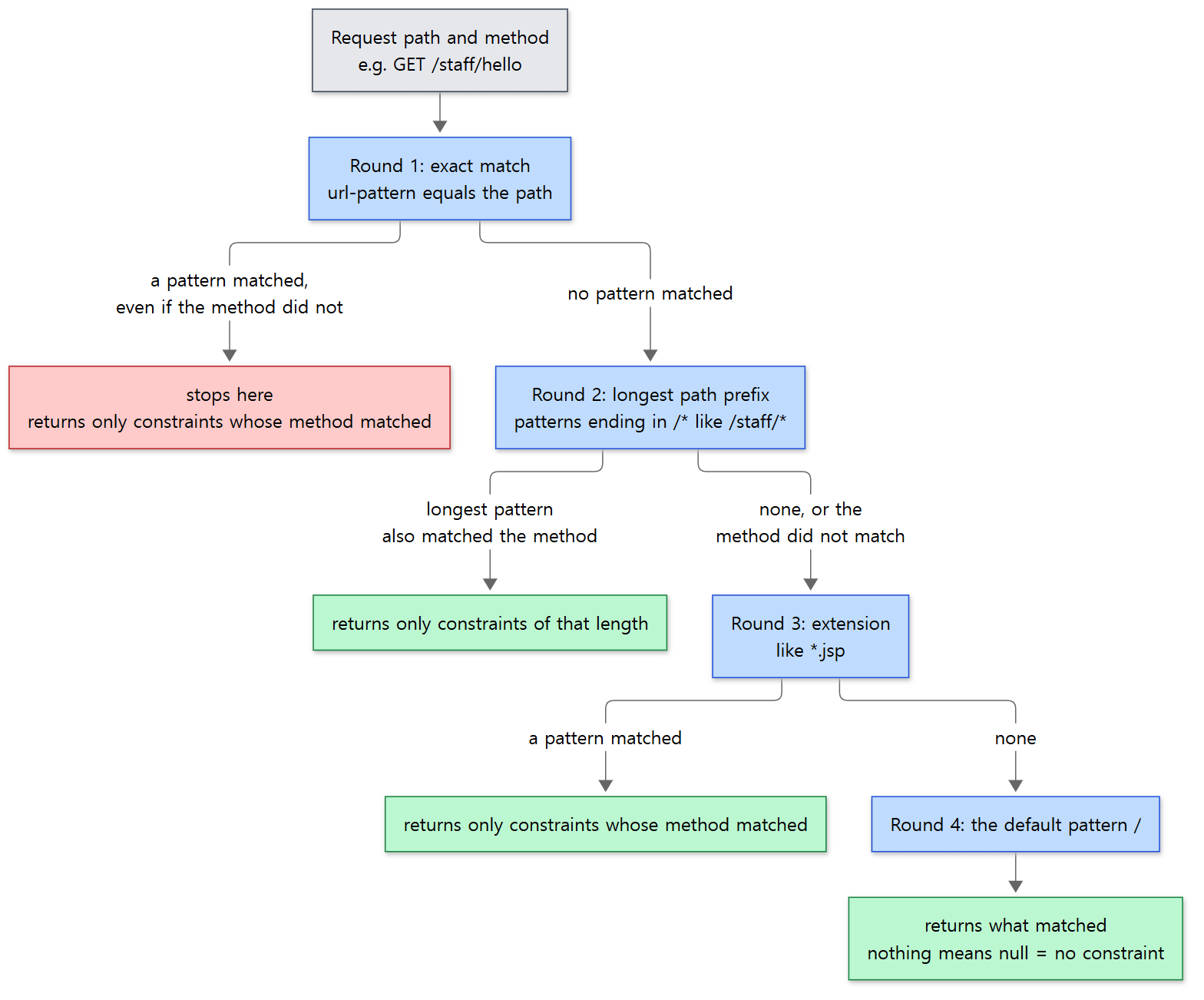 The red box is the trap we actually step on in "Easy to confuse" below.
The order is the same as the servlet mapping rules from part 7 — exact match → longest path prefix → extension → default (/). The difference is that mapping picks one servlet, whereas here all constraints matching at the same round are collected. Here is just the first round:
                for (String pattern : patterns) {
                    // Exact match including special case for the context root.
                    if (uri.equals(pattern) || pattern.isEmpty() && uri.equals("/")) {
                        found = true;
                        if (securityCollection.findMethod(method)) {
                            if (results == null) {
                                results = new ArrayList<>();
                            }
                            results.add(constraints[i]);
                        }
                    }
                }
            }
        }

        if (found) {
            return resultsToArray(results);
        }
java/org/apache/catalina/realm/RealmBase.java lines 590–607
found = true is set when the pattern matches, but only constraints whose method also matches go into the result list. And if found, it returns right away. The prefix search one round later (lines 609–672) is a little different: when a longer pattern appears it empties what it has collected (lines 652–658), and it sets found only when the method matched too (lines 659–665). If the result list is empty at the end, resultsToArray() returns null (lines 778–783), and invoke() reads that null as "no constraint".
Example 2: overlapping constraints
The web.xml in ex/u14-basic adds two more constraints to the /staff/* one from the top of the post.
  <!-- but /staff/notice is an exact-match pattern with no auth-constraint -->
  <security-constraint>
    <web-resource-collection>
      <web-resource-name>notice</web-resource-name>
      <url-pattern>/staff/notice</url-pattern>
    </web-resource-collection>
  </security-constraint>

  <!-- /staff/report is an exact-match pattern, applied to POST only -->
  <security-constraint>
    <web-resource-collection>
      <web-resource-name>report (POST only)</web-resource-name>
      <url-pattern>/staff/report</url-pattern>
      <http-method>POST</http-method>
    </web-resource-collection>
    <auth-constraint>
      <role-name>staff</role-name>
    </auth-constraint>
  </security-constraint>
run.sh sends requests with curl and prints the status line, a few headers and the first lines of the body (lines starting with | are body). These requests carry no user name or password.
### 5. /staff/notice, no credentials (exact pattern, no auth-constraint)
HTTP/1.1 200
Cache-Control: private
 uri=/basic/staff/notice user=null authType=null inRole(staff)=false
### 5b. GET /staff/report, no credentials (exact pattern for POST only)
SEVERE [main] org.apache.tomcat.util.descriptor.web.SecurityConstraint.findUncoveredHttpMethods For security constraints with URL pattern [/staff/report] only the HTTP methods [POST] are covered. All other methods are uncovered.
HTTP/1.1 200
 uri=/basic/staff/report user=null authType=null inRole(staff)=false
### 5c. POST /staff/report, no credentials
HTTP/1.1 401
WWW-Authenticate: Basic realm="u14 lab", charset=UTF-8
- 5.
/staff/noticealso matches/staff/*, but thenoticeconstraint was caught first in round 1 (exact match) and the search ended there. That constraint has no role condition, so it is 200 without authentication. A constraint was found, soCache-Control: privatewas added (step 3 in section 2). - 5b. For a GET to
/staff/report, the pattern matched in round 1 (found = true), but the method was not POST, so the result list stayed empty. The search still ended there, so the/staff/*protection does not apply and the answer is 200. There is noCache-Controleither — the constraints werenull. - 5c. A POST to the same URL hits the constraint and gets 401. Because it is a POST, no
Cache-Controlwas added (!Method.POST.equals(...)indisableCaching(), line 669).
Easy to confuse: constraints are not "merged" — the more specific pattern wins
Having protected /staff/*, it is tempting to think everything under it is protected. In fact, if any constraint with an exactly matching pattern exists under it, /staff/* is not considered at all. If that constraint covers only some methods, as in 5b, the other methods get no protection whatsoever.
Tomcat knows about this danger. The SEVERE line above 5b was printed when the web app started: SecurityConstraint.findUncoveredHttpMethods(), called by StandardContext, warns that "this pattern covers only POST, and the other methods are uncovered" (StandardContext.java lines 4704–4710). If you set denyUncoveredHttpMethods="true" on the Context, Tomcat adds constraints that deny the uncovered methods for you (the same method passes the result of findUncoveredHttpMethods() to addConstraint()). I did not run that setting to see it in action.
4. Authentication — BasicAuthenticator.doAuthenticate()
BASIC authentication is the simplest scheme HTTP defines. The server sends 401 with a WWW-Authenticate: Basic realm="…" header; the browser asks for a user name and password, Base64-encodes name:password, and sends it again in an Authorization: Basic … header. Base64 is not encryption, so in real use BASIC belongs only on HTTPS. The implementation in BasicAuthenticator is under fifty lines.
    @Override
    protected boolean doAuthenticate(Request request, HttpServletResponse response) throws IOException {

        if (checkForCachedAuthentication(request, response, true)) {
            return true;
        }

        // Validate any credentials already included with this request
        MessageBytes authorization = request.getCoyoteRequest().getMimeHeaders().getValue("authorization");

        if (authorization != null) {
            authorization.toBytes();
            ByteChunk authorizationBC = authorization.getByteChunk();
            BasicCredentials credentials;
            try {
                credentials = new BasicCredentials(authorizationBC, charset);
                String username = credentials.getUsername();
                String password = credentials.getPassword();

                Principal principal = context.getRealm().authenticate(username, password);
                if (principal != null) {
                    register(request, response, principal, HttpServletRequest.BASIC_AUTH, username, password);
                    return true;
                }
            } catch (IllegalArgumentException iae) {
                if (log.isDebugEnabled()) {
                    log.debug(sm.getString("basicAuthenticator.invalidAuthorization"), iae);
                }
            }
        }

        // the request could not be authenticated, so reissue the challenge
        StringBuilder value = new StringBuilder(16);
        value.append("Basic realm=\"");
        value.append(getRealmName(context));
        value.append('\"');
        if (charsetString != null && !charsetString.isEmpty()) {
            value.append(", charset=");
            value.append(charsetString);
        }
        response.setHeader(AUTH_HEADER_NAME, value.toString());
        response.sendError(HttpServletResponse.SC_UNAUTHORIZED);
        return false;

    }
java/org/apache/catalina/authenticator/BasicAuthenticator.java lines 83–127
- It checks whether there is already an authenticated user (
checkForCachedAuthentication()). If step 1 of section 2 copied a Principal from the session onto the request, it passes right here. - It takes out the
Authorizationheader. It uses theMimeHeadersandMessageBytesfrom part 6 as they are — the header is not turned into a String; Base64 is decoded straight from the bytes (ByteChunk) (BasicCredentials, lines 147–254). - It hands the user name and password to the Realm (
context.getRealm().authenticate(username, password)). The Authenticator does not know whether the password is right; we see that in section 6. - If it matches,
register()records the user on this request and it returnstrue. - If there is no header, the format is wrong, or the Realm returns
null, it addsWWW-Authenticateand sends 401.charset=UTF-8appears because thecharsetfield defaults to UTF-8 (lines 48–49).
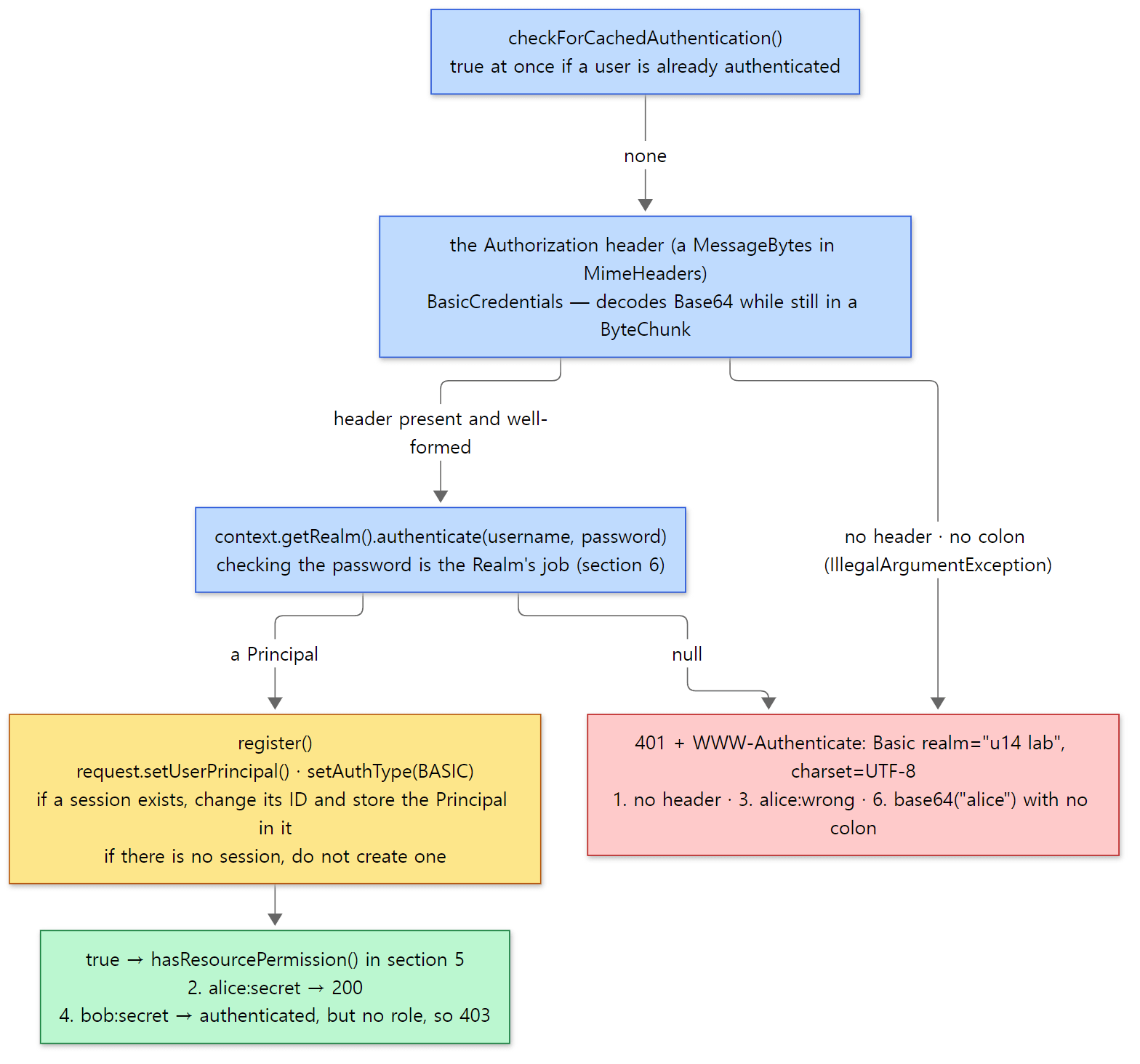 Steps 1–5 above, matched to the numbers in example 3. The header in the red box and the result of each number are the real output of example 3 below.
register() — where the authentication result is recorded
        // Cache the authentication information in our request
        request.setAuthType(authType);
        request.setUserPrincipal(principal);

        if (sendAuthInfoResponseHeaders &&
                Boolean.TRUE.equals(request.getAttribute(Globals.REQUEST_FORWARDED_ATTRIBUTE))) {
            response.setHeader("remote-user", request.getRemoteUser());
            response.setHeader("auth-type", request.getAuthType());
        }

        Session session = request.getSessionInternal(false);

        if (session != null) {
            // If the principal is null then this is a logout. No need to change
            // the session ID. See BZ 59043.
            if (getChangeSessionIdOnAuthentication() && principal != null) {
                String newSessionId = changeSessionID(request, session);
                // If the current session ID is being tracked, update it.
                if (session.getNote(Constants.SESSION_ID_NOTE) != null) {
                    session.setNote(Constants.SESSION_ID_NOTE, newSessionId);
                }
            }
        } else if (alwaysUseSession) {
            session = request.getSessionInternal(true);
        }

        // Cache the authentication information in our session, if any
        if (session != null && cache) {
            session.setAuthType(authType);
            session.setPrincipal(principal);
        }
java/org/apache/catalina/authenticator/AuthenticatorBase.java lines 1164–1194
- It records the user and the authentication type on this request. Your servlet's
getRemoteUser()andgetAuthType()return the values written here. - If a session already exists, it changes the session ID (
changeSessionIdOnAuthentication,trueby default, line 169). This defends against session fixation, where an attacker plants a session ID before login and keeps using it after login. How session IDs are created was covered in part 11. - If there is no session, it does not create one (
alwaysUseSessiondefaults tofalse, line 159). So a BASIC web app that does not use sessions decodes theAuthorizationheader and asks the Realm again on every request. The browser sends the header each time, so the user never notices.
Example 3: 401, 200, 403
In ex/u14-basic I replaced conf/tomcat-users.xml with the following and requested /staff/hello.
<?xml version="1.0" encoding="UTF-8"?>
<tomcat-users xmlns="http://tomcat.apache.org/xml" version="1.0">
  <role rolename="staff"/>
  <user username="alice" password="secret" roles="staff"/>
  <user username="bob" password="secret"/>
</tomcat-users>
### 1. no credentials
HTTP/1.1 401
Cache-Control: private
WWW-Authenticate: Basic realm="u14 lab", charset=UTF-8
### 2. alice:secret (role staff)
HTTP/1.1 200
Cache-Control: private
 uri=/basic/staff/hello user=alice authType=BASIC inRole(staff)=true
### 3. alice:wrong
HTTP/1.1 401
Cache-Control: private
WWW-Authenticate: Basic realm="u14 lab", charset=UTF-8
### 4. bob:secret (no roles)
HTTP/1.1 403
Cache-Control: private
### 6. Authorization: Basic base64("alice") - no colon
HTTP/1.1 401
Cache-Control: private
WWW-Authenticate: Basic realm="u14 lab", charset=UTF-8
There is no reason phrase (like "Unauthorized") at the end of the status line because Tomcat does not send one (Http11OutputBuffer.java lines 372–374). The bodies of the 401 and 403 responses (Tomcat's HTML error page) are filtered out of the output.
- 1 and 3 are the 401 from the end of
doAuthenticate(). Missing credentials and wrong credentials get the same response. - 2 passed both authentication and the role check.
- 4: bob's password is right, but he lacks the
staffrole. Authentication passed and the role check in section 5 produced 403. - 6 sends only
alicein Base64, with no colon. We look at it below.
The access log after shutdown (%u is the user name) tells the same story. bob got 403, but he is logged as an authenticated user.
### access log: %u (user), request, status
- "GET /basic/staff/hello HTTP/1.1" 401
alice "GET /basic/staff/hello HTTP/1.1" 200
- "GET /basic/staff/hello HTTP/1.1" 401
bob "GET /basic/staff/hello HTTP/1.1" 403
- "GET /basic/staff/notice HTTP/1.1" 200
- "GET /basic/staff/report HTTP/1.1" 200
Different from 11.0.x: BASIC without a password is rejected
Request 6 is Authorization: Basic YWxpY2U= (just alice, no colon). At the reference commit, BasicCredentials.parseCredentials() throws if there is no colon, and doAuthenticate() catches it and ends with 401.
            // Null password is not allowed according to RFC 7617
            if (colon < 0) {
                throw new IllegalArgumentException(sm.getString("basicAuthenticator.noColon"));
            } else if (colon == 0) {
                throw new IllegalArgumentException(sm.getString("basicAuthenticator.emptyUsername"));
            } else {
java/org/apache/catalina/authenticator/BasicAuthenticator.java lines 244–249
In the 11.0.x branch, the same spot carries the comment "Tomcat allows a null password" and code that, without a colon, treats the whole value as the user name and leaves the password null. The reference commit's change log (the 12.0.0-M1 section of webapps/docs/changelog.xml) also says it now rejects BASIC authorization with no password, to comply with RFC 7617. In 11.0.x, RealmBase.authenticate() returns null right away when the password is null (section 6), so the result there would presumably be a 401 anyway, but I did not run it on 11.0.x.
5. Authorization — hasResourcePermission()
Once authentication passes (or isn't needed), RealmBase.hasResourcePermission() decides on roles. The loop in the middle is the core.
            if (constraint.getAuthenticatedUsers() && principal != null) {
                if (log.isTraceEnabled()) {
                    log.trace("Passing all authenticated users");
                }
                status = true;
            } else if (roles.length == 0 && !constraint.getAllRoles() && !constraint.getAuthenticatedUsers()) {
                if (constraint.getAuthConstraint()) {
                    if (log.isTraceEnabled()) {
                        log.trace("No roles");
                    }
                    status = false; // No listed roles means no access at all
                    denyfromall = true;
                    break;
                }

                if (log.isTraceEnabled()) {
                    log.trace("Passing all access");
                }
                status = true;
            } else if (principal == null) {
                if (log.isTraceEnabled()) {
                    log.trace("  No user authenticated, cannot grant access");
                }
            } else {
                for (String role : roles) {
                    if (hasRole(request.getWrapper(), principal, role)) {
                        status = true;
                        if (log.isTraceEnabled()) {
                            log.trace("Role found:  " + role);
                        }
                    } else if (log.isTraceEnabled()) {
                        log.trace("No role found:  " + role);
                    }
                }
            }
        }
java/org/apache/catalina/realm/RealmBase.java lines 815–850
If status is false after the loop, it calls response.sendError(HttpServletResponse.SC_FORBIDDEN, …) — 403 (lines 884–888). With several constraints, passing just one sets status to true. But a constraint that says "nobody may enter" ends things right there via denyfromall.
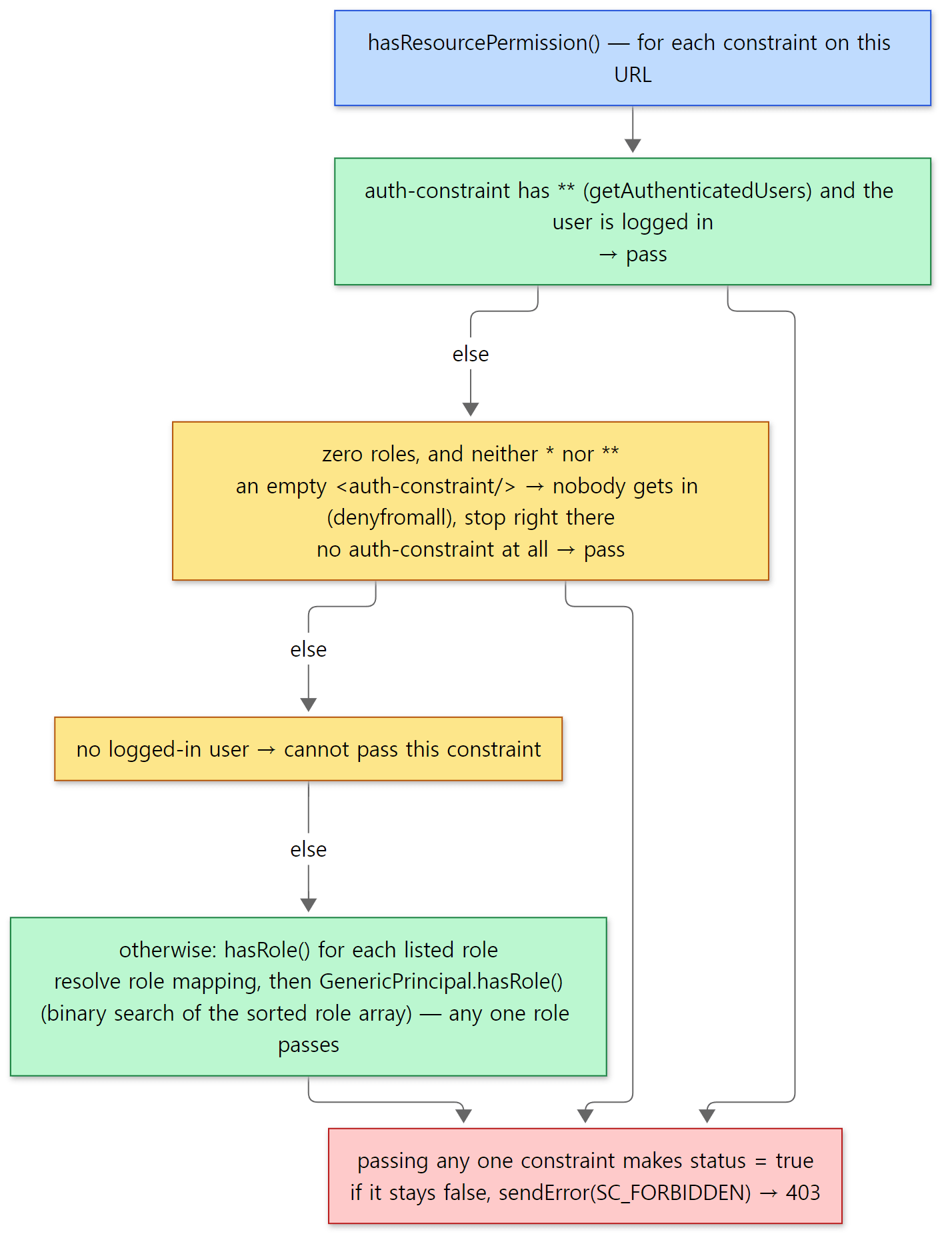 The if–else chain of the loop above, top to bottom. Match each of the five rows in the table below to one of these four branches.
Here is how the outcome depends on how you write <auth-constraint> in web.xml. While web.xml is read, SecurityConstraint.addAuthRole() turns * and ** into flags instead of role names (SecurityConstraint.java lines 248–268).
| auth-constraint in web.xml | In the source | Result |
|---|---|---|
| absent | getAuthConstraint() is false |
everyone passes (no authentication required) |
<auth-constraint/> (empty, no roles) |
getAuthConstraint() is true, zero roles |
nobody may enter (denyfromall, 403) |
<role-name>staff</role-name> |
staff in findAuthRoles() |
authenticate, then decide with hasRole() |
<role-name>*</role-name> |
getAllRoles() |
any of the roles listed in web.xml's <security-role> (adjustable with allRolesMode) |
<role-name>**</role-name> |
getAuthenticatedUsers() |
any authenticated user |
An empty <auth-constraint/> becomes "a constraint with zero roles" because the web.xml rule calls setAuthConstraint(true) whenever it meets the element, and adds roles separately for each <role-name> (WebRuleSet.java lines 274–275). In that case hasAuthConstraint from section 2 is false, so it goes straight to 403 without authentication (I checked the second row of this table in the source only).
hasRole(), which checks one role, first resolves the Context's role mapping (role-name aliases that PropertiesRoleMappingListener loads from a properties file) (lines 901–910), then asks GenericPrincipal.hasRole(). That method does a binary search over the role array, which the constructor sorted (GenericPrincipal.java lines 202–210). Your servlet's request.isUserInRole() first resolves web.xml's <security-role-ref> (an alias that links the role name in servlet code to the real role name) and then ends up calling realm.hasRole() (Request.java lines 2229–2270).
Easy to confuse: refusing an authenticated user is 403 — httpd uses 401
In example 3, bob had the right password but no role, and got 403. In the same situation httpd sends 401 by default, so the browser shows the login prompt again (you have to turn on AuthzSendForbiddenOnFailure to get 403; see httpd part 13). Tomcat says "we know who you are, and you may not" with 403. Whenever hasResourcePermission() fails it sends SC_FORBIDDEN; there is no switch like httpd's AuthzSendForbiddenOnFailure in this method.
6. Realms — where user information comes from
Now for the inside of context.getRealm().authenticate(username, password). In the default server.xml, two layers of Realm hang under the Engine.
      <!-- Use the LockOutRealm to prevent attempts to guess user passwords
           via a brute-force attack -->
      <Realm className="org.apache.catalina.realm.LockOutRealm">
        <!-- This Realm uses the UserDatabase configured in the global JNDI
             resources under the key "UserDatabase".  Any edits
             that are performed against this UserDatabase are immediately
             available for use by the Realm.  -->
        <Realm className="org.apache.catalina.realm.UserDatabaseRealm"
               resourceName="UserDatabase"/>
      </Realm>
resourceName="UserDatabase" is the name of a resource defined in <GlobalNamingResources> near the top of the same file, and that resource is a MemoryUserDatabase that reads pathname="conf/tomcat-users.xml" (lines 39–48).
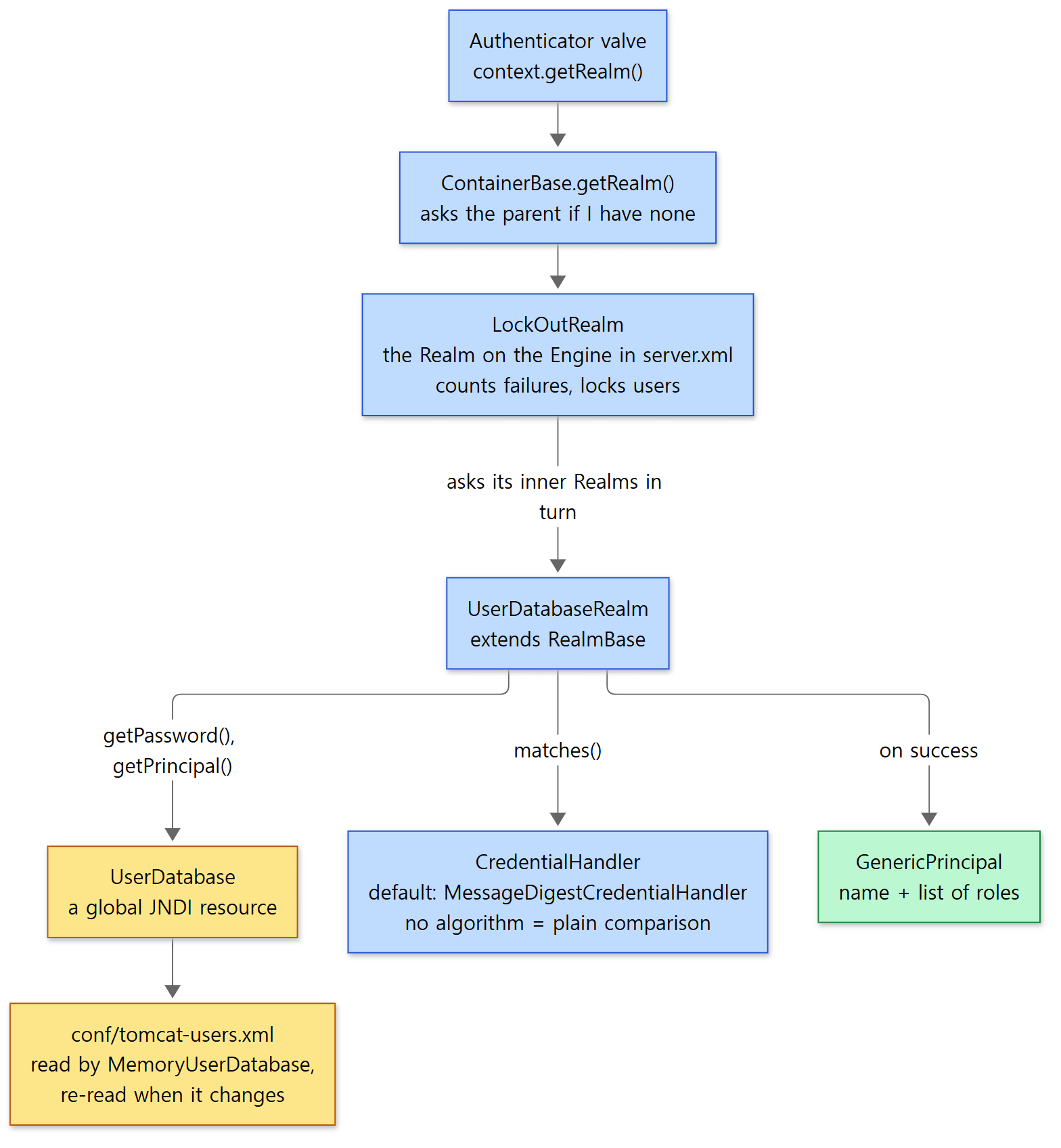 The yellow boxes are where user information actually lives. The blue boxes are the layers that wrap and choose it.
RealmBase.authenticate() — a three-step template
UserDatabaseRealm does not implement authenticate() itself. It uses the template in its parent RealmBase.
    @Override
    public Principal authenticate(String username, String credentials) {
        // No user or no credentials
        // Can't possibly authenticate, don't bother doing anything.
        if (username == null || credentials == null) {
            if (containerLog.isTraceEnabled()) {
                containerLog.trace(sm.getString("realmBase.authenticateFailure", username));
            }
            return null;
        }

        // Look up the user's credentials
        String serverCredentials = getPassword(username);

        if (serverCredentials == null) {
            // User was not found
            // Waste a bit of time as not to reveal that the user does not exist.
            getCredentialHandler().mutate(credentials);

            if (containerLog.isTraceEnabled()) {
                containerLog.trace(sm.getString("realmBase.authenticateFailure", username));
            }
            return null;
        }

        boolean validated = getCredentialHandler().matches(credentials, serverCredentials);

        if (validated) {
            if (containerLog.isTraceEnabled()) {
                containerLog.trace(sm.getString("realmBase.authenticateSuccess", username));
            }
            return getPrincipal(username);
        } else {
            if (containerLog.isTraceEnabled()) {
                containerLog.trace(sm.getString("realmBase.authenticateFailure", username));
            }
            return null;
        }
    }
java/org/apache/catalina/realm/RealmBase.java lines 375–413
getPassword(username)— fetches the stored password (or hash). It is abstract, so each Realm implements it (line 1209).UserDatabaseRealmfinds the user in theUserDatabaseand returns the password (UserDatabaseRealm.javalines 156–170).getCredentialHandler().matches(input, stored value)— the comparison is done not by the Realm but by the CredentialHandler. We look at it below.getPrincipal(username)— on a match, builds the user object (also abstract, line 1237).
Thanks to this split, a new Realm only has to write "how to find the password and roles for a user name". The line that computes a hash with mutate() even when the user does not exist (line 392) is there, the comment says, so that the response time does not reveal "this user name does not exist".
UserDatabaseRealm and MemoryRealm
Both read a file in the tomcat-users.xml format, but they read it at different times.
UserDatabaseRealm (default server.xml) |
MemoryRealm |
|
|---|---|---|
| User information | asks the global JNDI resource UserDatabase |
reads the file at start-up into its own HashMap |
| When the file changes | MemoryUserDatabase.backgroundProcess() checks the modification time and re-reads it (watchSource defaults to true) |
needs a restart |
| Role check | UserDatabasePrincipal.hasRole() asks the database each time |
the role list it was given when created |
| Source | UserDatabaseRealm.java lines 200–216, MemoryUserDatabase.java lines 631–661 |
MemoryRealm.java lines 165–188, and from line 232 |
backgroundProcess() is called by the same background thread that handled session expiry in part 11, because a container's backgroundProcess() calls its Realm's backgroundProcess() (ContainerBase.java line 942). I did not measure how long it takes for an edited file to be re-read.
LockOutRealm — locking after repeated failures
The outer LockOutRealm extends CombinedRealm. CombinedRealm asks its inner Realms in turn and uses the first successful result (CombinedRealm.java lines 238–260). LockOutRealm filters that result once more.
    private Principal filterLockedAccounts(String username, Principal authenticatedUser) {
        // Register all failed authentications
        if (authenticatedUser == null && isAvailable()) {
            registerAuthFailure(username);
        }

        if (isLocked(username)) {
            // If the user is currently locked, authentication will always fail
            log.warn(sm.getString("lockOutRealm.authLockedUser", username));
            return null;
        }

        if (authenticatedUser != null) {
            registerAuthSuccess(username);
        }

        return authenticatedUser;
    }
java/org/apache/catalina/realm/LockOutRealm.java lines 186–203
The defaults are a lock of 300 seconds (lockOutTime) after 5 failures (failureCount) (lines 56 and 62). Continuing example 3, I sent a wrong password for bob five times, then the right one.
### 8. bob fails 5 times, then the right password
401 401 401 401 401
HTTP/1.1 401
Cache-Control: private
WWW-Authenticate: Basic realm="u14 lab", charset=UTF-8
WARNING [http-nio-8080-exec-5] org.apache.catalina.realm.LockOutRealm.filterLockedAccounts An attempt was made to authenticate the locked user [bob]
WARNING [http-nio-8080-exec-6] org.apache.catalina.realm.LockOutRealm.filterLockedAccounts An attempt was made to authenticate the locked user [bob]
(The thread name numbers differ on every run.) Even with the right password it is 401. bob, who got 403 in example 3, is now stopped at the authentication step. The warning appears twice: once on the fifth failure, which locks the account as soon as it is recorded, and once on the sixth request with the right password. While locked, the response does not tell you whether the password was right.
CredentialHandler — the side that compares passwords
If you do not give the Realm a <CredentialHandler>, it creates a MessageDigestCredentialHandler at start-up (RealmBase.java lines 1092–1095). Its algorithm defaults to null (MessageDigestCredentialHandler.java line 72), and then the comparison is:
    @Override
    public boolean matches(String inputCredentials, String storedCredentials) {
        if (inputCredentials == null || storedCredentials == null) {
            return false;
        }

        if (getAlgorithm() == null) {
            // No digests, compare directly
            return ConstantTime.equals(inputCredentials, storedCredentials, false);
        } else {
java/org/apache/catalina/realm/MessageDigestCredentialHandler.java lines 133–142
In other words, with the default settings, tomcat-users.xml passwords are compared as plain text. Using ConstantTime.equals() instead of String.equals() is meant to keep the elapsed time from revealing how many leading characters matched (that is the intent the name states; I did not time it).
With an algorithm, it chooses how to compare by the shape of the stored value: LDAP-style values starting with {MD5}, {SHA} or {SSHA}, the salt$iterations$hash form containing $, and otherwise a hex hash (lines 143–197). For the salt$iterations$hash form, DigestCredentialHandlerBase.matchesSaltIterationsEncoded() takes the salt and iteration count out of the stored value, hashes the input the same way and compares (DigestCredentialHandlerBase.java lines 171–224). A salt is a few random bytes mixed in so that the same password gives a different hash for each user.
Example 4: hashed passwords and a web-app-only Realm
ex/u14-credential puts a Realm used only by this web app in its META-INF/context.xml.
<?xml version="1.0" encoding="UTF-8"?>
<!-- A Realm used only by this web app. It is used instead of the Engine's LockOutRealm -->
<Context>
  <Realm className="org.apache.catalina.realm.MemoryRealm" pathname="/tmp/hashed-users.xml">
    <CredentialHandler className="org.apache.catalina.realm.MessageDigestCredentialHandler"
                       algorithm="SHA-256"/>
  </Realm>
</Context>
I made the hash to store with bin/digest.sh, which ships with Tomcat (it runs RealmBase.main(), from line 1344). I ran it twice with the same password.
### 1. digest.sh -a SHA-256 secret (twice)
secret:87494592f864df84ba1022684f2fe77c0ef1e749db4a0b7776bd1d3fba5b679a$1$3582612e77e2096b89873788efca15efc7ff5cc2d49513efec6a1fb0ef3e8dee
secret:4aae7e11b533ab57e91bf2f51fb4ab84ed754bfcfe812a4ed4c4cd8bf79c9a6b$1$b61ec840348dabc7d30be6c3de8a792a3389fde07983479f7c33b66a05b192ca
The values differ on every run. The shape is 32-byte salt (64 hex characters)$1 iteration$SHA-256 hash, and because the salt is random every time, so is the hash (default salt length DEFAULT_SALT_LENGTH = 32, DigestCredentialHandlerBase.java line 48; assembled at lines 122–159). I put one such value into /tmp/hashed-users.xml as carol's password. alice exists only in the Engine's conf/tomcat-users.xml.
### 3. carol:secret
uri=/hashed/staff/hello user=carol authType=BASIC inRole(staff)=true
HTTP 200
### 4. carol:<the stored hash string itself>
HTTP 401
### 5. alice:secret (exists only in conf/tomcat-users.xml)
HTTP 401
- 3. Sending the plain
secret, the CredentialHandler hashes it with the stored salt, compares, and lets carol in. - 4. Sending the stored hash string itself as the password fails. Even if the file leaks, that string cannot be used to log in.
- 5. alice, who lives in the Engine's Realm, gets 401 in this web app.
ContainerBase.getRealm()does not ask the parent when it has its own Realm (section 1), so the Context's Realm replaces the Engine's. The two are not combined.
Different from 11.0.x: salt order, and JAASRealm is gone
- The default of
MessageDigestCredentialHandler'sdigestInRfc3112Orderistrueat the reference commit andfalsein 11.0.x (line 73). It decides whether a salt is mixed in as "password, then salt" (the RFC 3112 order) or the other way around (lines 212–217). It seems worth checking this attribute when moving salted hashes made on 11.0.x over to 12 (I did not try such a move). - The reference commit's
realmpackage has noJAASRealm,JAASCallbackHandlerorJAASMemoryLoginModule. 11.0.x has them, and the reference commit's change log says "Remove JAASRealm."
7. FORM authentication — a login page and a saved request
With BASIC you log in through a prompt made by the browser, but most websites use a login page of their own. That is the servlet standard's FORM authentication, and it has three rules: the login form POSTs to j_security_check, and the field names are j_username and j_password (Constants.java lines 42–52). Three requests go back and forth, tied together by the session.
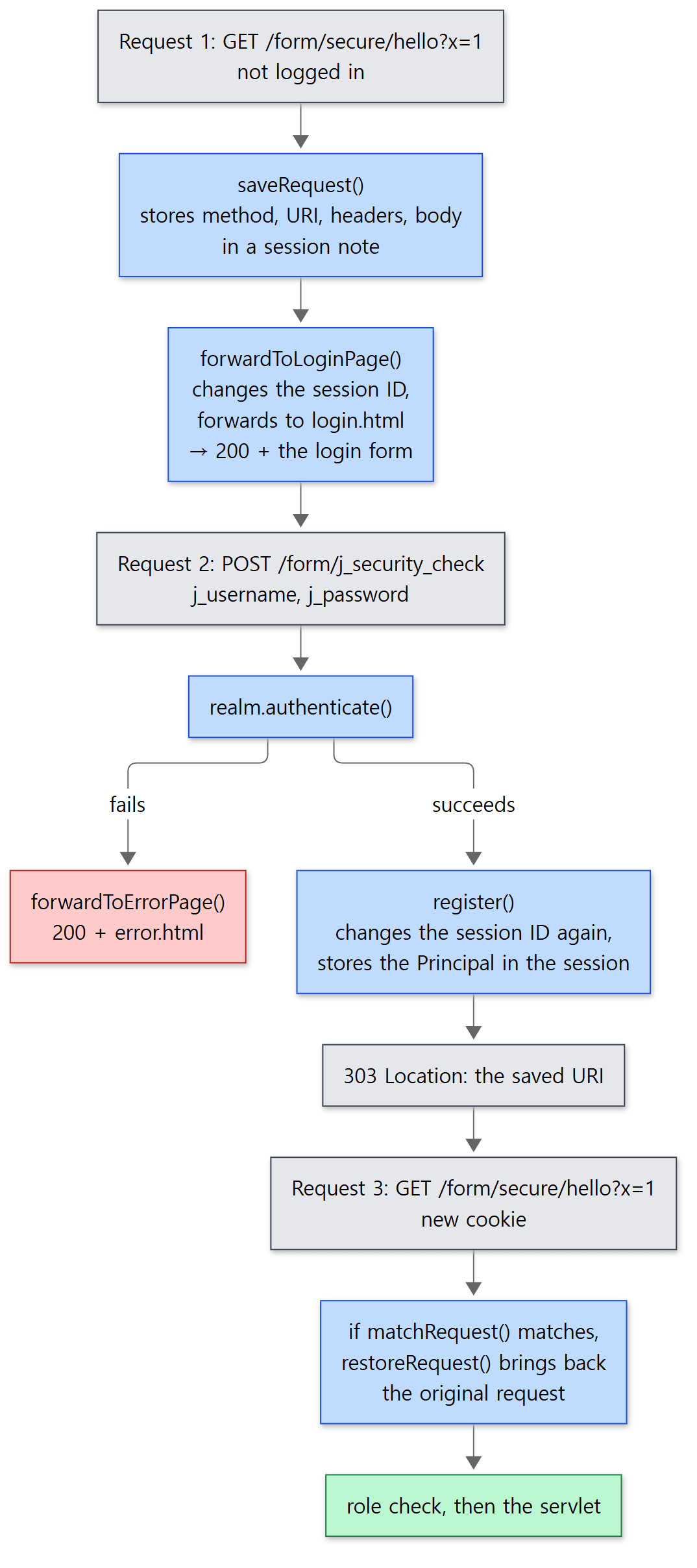 The grey boxes are the requests and responses going between the browser and the server.
FormAuthenticator implements doAuthenticateExtended() (lines 153–344) instead of doAuthenticate(). Here is the part that decides "did this come from the login form?":
        // Is this the action request from the login page?
        boolean loginAction = requestURI.startsWith(contextPath) && requestURI.endsWith(Constants.FORM_ACTION);
        if (loginAction && !Method.POST.equals(request.getMethod())) {
            response.sendError(HttpServletResponse.SC_BAD_REQUEST);
            return AuthenticationResult.FAILED;
        }

        LoginConfig config = context.getLoginConfig();

        // No -- Save this request and redirect to the form login page
        if (!loginAction) {
            // ...
            session = request.getSessionInternal(true);
            if (log.isTraceEnabled()) {
                log.trace("Save request in session '" + session.getIdInternal() + "'");
            }
            try {
                saveRequest(request, session);
            } catch (IOException ioe) {
                log.debug(sm.getString("authenticator.requestBodyTooBig"), ioe);
                response.sendError(HttpServletResponse.SC_FORBIDDEN, sm.getString("authenticator.requestBodyTooBig"));
                return AuthenticationResult.FAILED;
            }
            forwardToLoginPage(request, response, config);
            return AuthenticationResult.FAILED;
        }
java/org/apache/catalina/authenticator/FormAuthenticator.java lines 216–254
- Request 1 (before login, a protected URL): it creates a session and saves the whole original request in it (
saveRequest(), lines 679–753 — method, URI, query, headers, cookies, locales, and even the body). Then it forwards to the login page. A forward is a hand-off inside the server, not a redirect, so the browser's address bar keeps the original URL. The return value isFAILED, soinvoke()ends here and the original servlet is not called. - Request 2 (
j_security_check): it takes outj_usernameandj_passwordand asksrealm.authenticate()(lines 263–268). If they are wrong it forwards to the error page (forwardToErrorPage()). If right,register()stores the Principal in the session, and it redirects to the saved URL — 303 on HTTP/1.1, otherwise 302 (lines 336–341). - Request 3 (the original URL again): when
matchRequest()confirms that "the session holds a saved request, there is a logged-in user, the session ID is the expected one, and the URI is the same" (lines 524–558),restoreRequest()swaps the current request's method, headers and body for the saved ones (lines 572–668). So if you were in the middle of a POST before logging in, even that POST body is brought back and delivered to the servlet.
Of the three values of AuthenticationResult, PASSED_CONSTRAINTS_NEED_REFRESH exists because of this swap. If the restored request's method differs from the current request's (GET), different constraints may apply, so invoke() looks them up again (lines 599–608; lines 663–667 of restoreRequest()).
Example 5: the three requests of a FORM login
ex/u14-form is a web app that protects /secure/* with the staff role and has <auth-method>FORM</auth-method>, the login page /login.html and the error page /error.html. I used curl's cookie jar (-b/-c) to send and receive cookies like a browser.
### 1. GET /secure/hello?x=1 (not logged in)
HTTP/1.1 200
Set-Cookie: JSESSIONID=2406F68DD9A3AE7DDC96CE916C146808; Path=/form; HttpOnly
 <form method="post" action="j_security_check">LOGIN PAGE
### 2. POST j_security_check alice:wrong
HTTP/1.1 200
 LOGIN FAILED - try again
### 3. POST j_security_check alice:secret
HTTP/1.1 303
Set-Cookie: JSESSIONID=CDA15AC5D78E8BDCE8A07E9DE2844BD8; Path=/form; HttpOnly
Location: /form/secure/hello?x=1
### 4. follow the redirect with the new cookie
HTTP/1.1 200
 uri=/form/secure/hello user=alice authType=FORM inRole(staff)=true
### 5. next request, same cookie
HTTP/1.1 200
 uri=/form/secure/other user=alice authType=FORM inRole(staff)=true
Session IDs differ on every run.
- The protected URL returned 200 and the login form — not 401. The session cookie appeared for the first time.
- A wrong password returned the error page with 200. Monitoring that only looks at status codes cannot tell that a login failed.
- The right password returned 303 with the saved original URL (including the
?x=1query). The session ID in the cookie changed — the session fixation defense inregister()from section 4. - Going to the original URL with the new cookie reached the servlet as alice (
restoreRequest()). - Another URL also passes without a password, because step 1 of section 2 copied the session's Principal onto the request.
Easy to confuse: the session ID actually changes twice
forwardToLoginPage() also changes the session ID right before showing the login page (lines 431–441). In request 1 the session is created and its ID changes immediately, yet the output has only one Set-Cookie. That is because Response.addSessionCookieInternal() overwrites the value of an existing Set-Cookie header with the same cookie name instead of adding another (Response.java lines 917–945). The new ID is also written to a session note (SESSION_ID_NOTE) and used in request 2 to check "is this POST from the same session that received the login page?" (lines 281–291).
What happens if you come back with the old cookie from before login? Here is what I ran next.
### 6. GET j_security_check, logged-in cookie
HTTP/1.1 404
### 7. GET j_security_check, no cookie
HTTP 400
### 8. old cookie from step 1 after login
<form method="post" action="j_security_check">LOGIN PAGE
HTTP 200
- 8. The cookie from request 1 holds an ID that has since been changed, so the server has no such session. You get the login form like a first-time visitor.
- 7. A GET to
j_security_checkwithout a cookie is 400, as lines 216–221 say. - 6. But the same GET with a logged-in cookie gave 404, not 400. I expected 400 at first and was wrong. The reason is the order inside
doAuthenticateExtended(): before line 216 looks at whether this is a login form request,checkForCachedAuthentication()at line 208 sees "an already logged-in user" and lets it through. After that, no servlet handles the URLj_security_check, so the default servlet answers 404.
Going deeper
- Other authentication schemes:
DigestAuthenticator,SSLAuthenticator(CLIENT-CERT, client certificates),SpnegoAuthenticator(Kerberos) —java/org/apache/catalina/authenticator/ - JASPIC (Jakarta Authentication): the
jaspicContextStatebranches ininvoke()(lines 529–534, lines 610–623) and theauthenticator/jaspic/package - The
SingleSignOnvalve that shares a login across web apps (commented out in the default server.xml):authenticator/SingleSignOn.java, lines 1196–1259 ofregister() preemptiveAuthentication, which authenticates whenever anAuthorizationheader arrives even without a constraint, andallowCorsPreflight, which lets CORS preflight requests through without authentication:AuthenticatorBase.javalines 577–587, 711–760HttpServletRequest.login()andlogout()called from servlet code:AuthenticatorBase.login()andlogout()(from line 1286)- The
@ServletSecurityannotation andServletRegistration.Dynamic.setServletSecurity():core/ApplicationServletRegistration.javaline 156 - Database and LDAP Realms:
realm/DataSourceRealm.java,realm/JNDIRealm.java.NestedCredentialHandlerfor mixing several hash formats, andSecretKeyCredentialHandler, which uses PBKDF2 - The transport guarantee (
CONFIDENTIAL) and the HTTPS redirect:RealmBase.hasUserDataPermission()(lines 986–1061). TLS configuration itself is not on this series' list
Summary
| Concept | One-line summary |
|---|---|
ContextConfig.authenticatorConfig() |
Looks up the valve class for the <auth-method> name in Authenticators.properties and adds it to the Context pipeline. Adds one as NONE even without a login-config |
| Authenticator valve | In the Context pipeline, in front of StandardContextValve. Checks before any filter |
AuthenticatorBase.invoke() |
Copy the session's Principal → find constraints → disable caching, transport guarantee → (if role-constrained) authenticate → check roles → next valve |
findSecurityConstraints() |
Exact match → longest prefix → extension → /. A match in an earlier round stops the search. Constraints are not merged |
BasicAuthenticator |
Decodes the Authorization header and asks the Realm; on failure WWW-Authenticate + 401. Version 12 rejects a header without a password |
register() |
Records the Principal on the request (and on the session, if there is one) and changes the session ID |
hasResourcePermission() |
The role decision. 403 on failure. An empty <auth-constraint/> denies everyone, ** admits any authenticated user |
| Realm | getRealm() asks the parent if this container has none. The default is the Engine's LockOutRealm ⊃ UserDatabaseRealm → tomcat-users.xml |
RealmBase.authenticate() |
A template of getPassword() → CredentialHandler.matches() → getPrincipal() |
CredentialHandler |
Plain comparison by default. With an algorithm, compares forms such as salt$iterations$hash. Made with digest.sh |
FormAuthenticator |
Saves the original request in the session → forwards to the login page → j_security_check → 303 → restores the saved request |
What's next
This post covered the last gate an HTTP/1.1 request passes on its way to a servlet. The next post is about switching to an entirely different protocol on the same connection. We will see how an HTTP/1.1 connection becomes HTTP/2 or WebSocket through a single Upgrade header, and afterwards how (or whether) it passes through the valves and the filter chain we saw here. It continues in Part 15: HTTP/2 and WebSocket — Protocols Reached by Upgrading.
Compared with httpd: in httpd part 13, httpd connects "the module that receives credentials" (mod_auth_basic) and "the module that holds user information" (mod_authn_file) through named providers; in Tomcat the Authenticator valve and the Realm are the same pair. But httpd builds the Require lines into a tree and decides with AND/OR, while Tomcat picks constraints by URL pattern and then looks at the role list. Refusing an authenticated user is also different: 401 by default in httpd, 403 in Tomcat (section 5).
- Part 7: CoyoteAdapter and the Mapper — Which Servlet Gets the Request — URL pattern precedence
- Part 8: Pipelines and Valves — The Processing Chain on Every Container
- Part 10: Deploying a Web App — From a WAR to a Running Context
- Part 11: Sessions — How JSESSIONID Is Made and Removed
- httpd part 13: Authentication and Authorization — How a Require Line Is Decided