What this post covers
This is the fourth post in the "Digging into Tomcat's Source" series. In Part 3 we saw what happens after catalina.sh start: Bootstrap calls Catalina, server.xml becomes objects, and each parent starts its children in turn. Back then we only said "Bootstrap creates class loaders and calls Catalina through reflection" and moved on. This post opens that part up.
Put two WARs in the webapps folder and they don't get in each other's way — even if they use different versions of the same library, or each defines its own class with the very same name. There is only one JVM, so how can that work? We will answer four questions.
- How many class loaders does Tomcat create, and in what shape? Where in the source does
common.loaderinconf/catalina.propertiesend up? - Why and how does a web app's class loader turn around Java's default rule of "ask the parent first"? And which classes can a web app still not override?
- What does
<Loader delegate="true"/>change? - When
reloadable="true"reloads classes, what happens to the old class loader, and why do you see "memory leak" warnings?
| Item | Details |
|---|---|
| Target | Apache Tomcat |
| Version | 12.0.0-M1 (main) |
| Commit | 17aa1769b0 (2026-10-23) |
| Main classes read | startup/Bootstrap, startup/ClassLoaderFactory, loader/WebappLoader, loader/WebappClassLoaderBase, loader/ParallelWebappClassLoader, core/StandardContext |
Every line number in this post refers to that commit. Part 1 explains how to get the source at the same commit and build the Docker image used for the examples.
WebappClassLoaderBase.java alone is over 2,500 lines, and a little over a quarter of it (lines 1472–2118, starting at clearReferences(), about 650 lines) is code that fights memory leaks. This post picks only the main thread that a first-time reader can follow. What it skips is listed by name and location in "What this post leaves out" at the end.
I compared the central files of this post between the reference commit and the stable 11.0.x branch (origin/11.0.x from the same day). Bootstrap, WebappLoader, ParallelWebappClassLoader, catalina.properties and JreMemoryLeakPreventionListener are identical down to the character on both branches, and in WebappClassLoaderBase the methods loadClass(), filter(), stop() and clearReferences() are the same. The differences are things like three PrivilegedAction classes for the SecurityManager that remain in 11.0.x, which have nothing to do with this post.
Words to know first
A class loader is "an object that takes a class name, finds the bytes of the .class file and loads them into the JVM". It is an ordinary object extending Java's java.lang.ClassLoader, and one JVM can contain many of them. Its most important property is this: the JVM tells classes apart by "name + the loader that defined it". So even if two classes are both named demo.Greeting, they are different classes when different loaders defined them. That is exactly why Tomcat creates one loader per web app.
Parent delegation is the default rule Java class loaders follow. Every loader has one parent, and when looking for a class it asks the parent first, searching itself only if the parent cannot find it. That way most classes are loaded just once, high up in the chain. The JDK provides three loaders by default.
| Loader | What it handles | getName() |
|---|---|---|
| bootstrap | the core of the JDK, such as java.lang.String. It is not a Java object, so it shows up as null |
none |
| platform | the other JDK modules, such as java.sql |
platform |
| system (app) | the jars given with java -classpath |
app |
The common, server and shared loaders are three loaders Tomcat builds from catalina.properties. We look at them in section 1.
A web app class loader is a loader created once per web app (Context). It reads that app's WEB-INF/classes and WEB-INF/lib/*.jar. The shared code lives in WebappClassLoaderBase, and the class actually instantiated is its child ParallelWebappClassLoader. The manager that creates and throws away this loader is WebappLoader — the object behind the <Loader> element in server.xml and context.xml.
The thread context class loader (TCCL) is a loader you can attach to each thread, meaning "the loader of the place this thread is currently working for". You get it with Thread.currentThread().getContextClassLoader(). Libraries such as JDBC drivers or XML parsers use it when they need to find a "user class" by name. While a request is being processed, Tomcat sets it to that web app's loader.
Lifecycle is the init → start → stop → destroy state machine from Part 3 (Part 3). The web app loader has these states too. In section 5 we see what a "stopped loader" refuses.
1. The three loaders Bootstrap creates — common, server, shared
Three lines in catalina.properties
conf/catalina.properties has one line per loader listing the paths that loader reads.
common.loader="${catalina.base}/lib","${catalina.base}/lib/*.jar","${catalina.home}/lib","${catalina.home}/lib/*.jar"
# ...
server.loader=
# ...
shared.loader=
conf/catalina.properties lines 33–70
By default only common.loader has a value; server.loader and shared.loader are empty. $CATALINA_HOME is where Tomcat is installed, and $CATALINA_BASE is where the configuration, logs and webapps live (they differ when you run several instances from one installation). So the common loader reads the lib/ directories of both places and every jar inside them. That is where Tomcat itself lives: servlet-api.jar, catalina.jar, tomcat-coyote.jar, jasper.jar and so on.
initClassLoaders() — if it's empty, just use the parent
    private void initClassLoaders() {
        try {
            commonLoader = createClassLoader("common", null);
            if (commonLoader == null) {
                // no config file, default to this loader - we might be in a 'single' env.
                commonLoader = this.getClass().getClassLoader();
            }
            catalinaLoader = createClassLoader("server", commonLoader);
            sharedLoader = createClassLoader("shared", commonLoader);
        } catch (Throwable t) {
            handleThrowable(t);
            log.error("Class loader creation threw exception", t);
            System.exit(1);
        }
    }
java/org/apache/catalina/startup/Bootstrap.java lines 142–156
The server loader (its field is called catalinaLoader) and the shared loader are created with common as their parent. But the function that creates them starts like this.
    private ClassLoader createClassLoader(String name, ClassLoader parent) throws Exception {

        String value = CatalinaProperties.getProperty(name + ".loader");
        if ((value == null) || (value.isEmpty())) {
            return parent;
        }
        // ... resolve values like "${catalina.base}" and sort each path into URL, JAR, directory or "*.jar" ...
        return ClassLoaderFactory.createClassLoader(repositories, parent);
    }
java/org/apache/catalina/startup/Bootstrap.java lines 159–196
If the setting is empty, it does not create a new loader and simply returns the parent (lines 162–164). With the default settings server.loader and shared.loader are empty, so the three variables commonLoader, catalinaLoader and sharedLoader all point to the same object. Three names, but only one actual loader.
When a value is present, the loader created is a plain JDK URLClassLoader. ClassLoaderFactory turns the paths into a URL array and ends with new URLClassLoader(array) (when the parent is null) or new URLClassLoader(array, parent) (ClassLoaderFactory.java lines 227–231). A URLClassLoader created without a parent gets the system loader as its parent, per the JDK's rules. So the common loader's parent is the system loader.
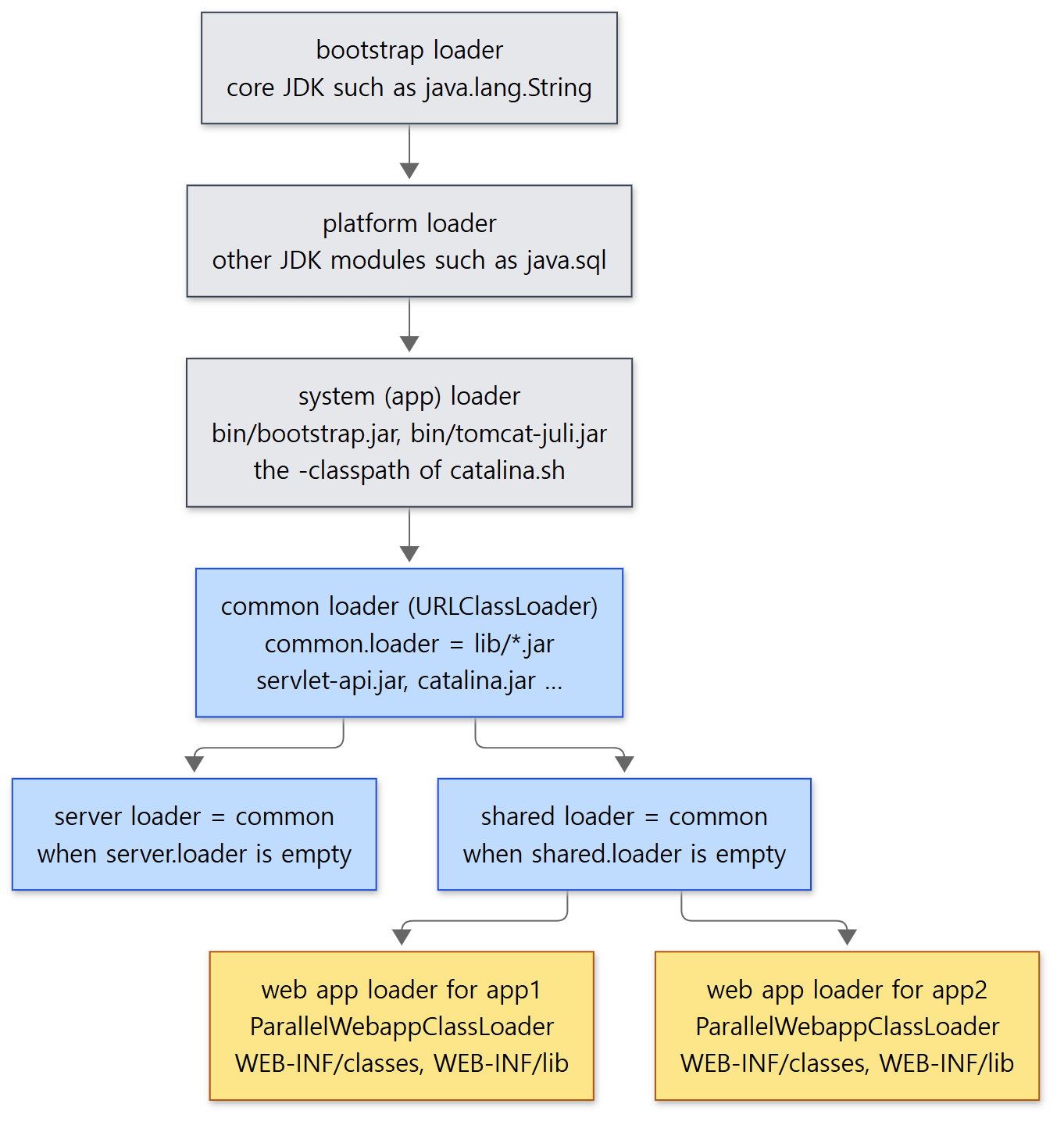 Gray boxes are loaders decided by the JDK and
catalina.sh, blue boxes are loaders Tomcat's Bootstrap creates, and yellow boxes are created per web app.
Unless setenv.sh adds to CLASSPATH, the only things on the system loader are the two jars catalina.sh passes with -classpath. The script first wipes any user-defined value with CLASSPATH= (bin/catalina.sh line 150) and then adds bin/bootstrap.jar and bin/tomcat-juli.jar (line 214, lines 225–231). Tomcat's main jar, catalina.jar, is not on that path.
Bootstrap.init() — Catalina is loaded by the server loader
        initClassLoaders();

        Thread.currentThread().setContextClassLoader(catalinaLoader);

        // ...
        Class<?> startupClass = catalinaLoader.loadClass("org.apache.catalina.startup.Catalina");
        Object startupInstance = startupClass.getConstructor().newInstance();

        // ...
        String methodName = "setParentClassLoader";
        Class<?>[] paramTypes = new Class[1];
        paramTypes[0] = Class.forName("java.lang.ClassLoader");
        Object[] paramValues = new Object[1];
        paramValues[0] = sharedLoader;
        Method method = startupInstance.getClass().getMethod(methodName, paramTypes);
        method.invoke(startupInstance, paramValues);
java/org/apache/catalina/startup/Bootstrap.java lines 253–274
Here you can see why Part 3 said "calls Catalina through reflection". Bootstrap itself lives in the system loader (bootstrap.jar), while Catalina lives in the server loader below it (catalina.jar). A class on the parent side cannot refer by name, in code, to a class in a child loader. If Bootstrap were compiled using the Catalina type directly, at run time the system loader would try to find Catalina and fail. So it fetches the class with loadClass() and calls it with getMethod() and invoke().
The last line matters for this post. It hands the shared loader to Catalina as its "parent class loader". That later becomes the parent of every web app loader (section 2).
The comment at the top of the Bootstrap class states the purpose of this design: "to keep the Catalina internal classes (and any other classes they depend on, such as an XML parser) out of the system class path and therefore not visible to application level classes" (lines 37–43).
Easy to get wrong: with default settings, web apps can see Tomcat's internal classes too
Going by that comment, you'd expect a web app not to see org.apache.catalina.*. But with the default settings the server and shared loaders are the same common loader, so catalina.jar sits right there in the web app loader's parent chain. In Example 1 below, when the web app looks up org.apache.catalina.core.StandardContext by name, it is found in the same common loader as HttpServlet. To really hide it from web apps you have to give server.loader its own paths so the server loader splits off. This series only ran the default settings.
2. When, and with which parent, is a web app loader created?
How the shared loader reaches the web app
Catalina keeps the shared loader it received in a field (Catalina.java lines 337–339), and adds one rule to the Digester that reads server.xml.
        // When the 'engine' is found, set the parentClassLoader.
        digester.addRule("Server/Service/Engine", new SetParentClassLoaderRule(parentClassLoader));
java/org/apache/catalina/startup/Catalina.java lines 596–597
When it meets <Engine> in server.xml, it calls setParentClassLoader(shared) on that StandardEngine (lines 1193–1201). Host and Context get nothing of their own. Instead, whoever asks walks up through its parents.
    @Override
    public ClassLoader getParentClassLoader() {
        if (parentClassLoader != null) {
            return parentClassLoader;
        }
        if (parent != null) {
            return parent.getParentClassLoader();
        }
        return ClassLoader.getSystemClassLoader();
    }
java/org/apache/catalina/core/ContainerBase.java lines 451–460
If it has no value of its own it asks its parent container, and if there's nothing all the way up, it's the system loader. Going Context → Host → Engine, it gets the shared loader held by the Engine. StandardContext overrides this once more.
    @Override
    public ClassLoader getParentClassLoader() {
        if (parentClassLoader != null) {
            return parentClassLoader;
        }
        if (getPrivileged()) {
            return this.getClass().getClassLoader();
        } else if (parent != null) {
            return parent.getParentClassLoader();
        }
        return ClassLoader.getSystemClassLoader();
    }
java/org/apache/catalina/core/StandardContext.java lines 2217–2228
A web app with privileged="true" (such as the manager app that ships with Tomcat) uses, instead of shared, the loader that loaded StandardContext itself — the server loader. It's a path for apps that need to work with Tomcat's internals.
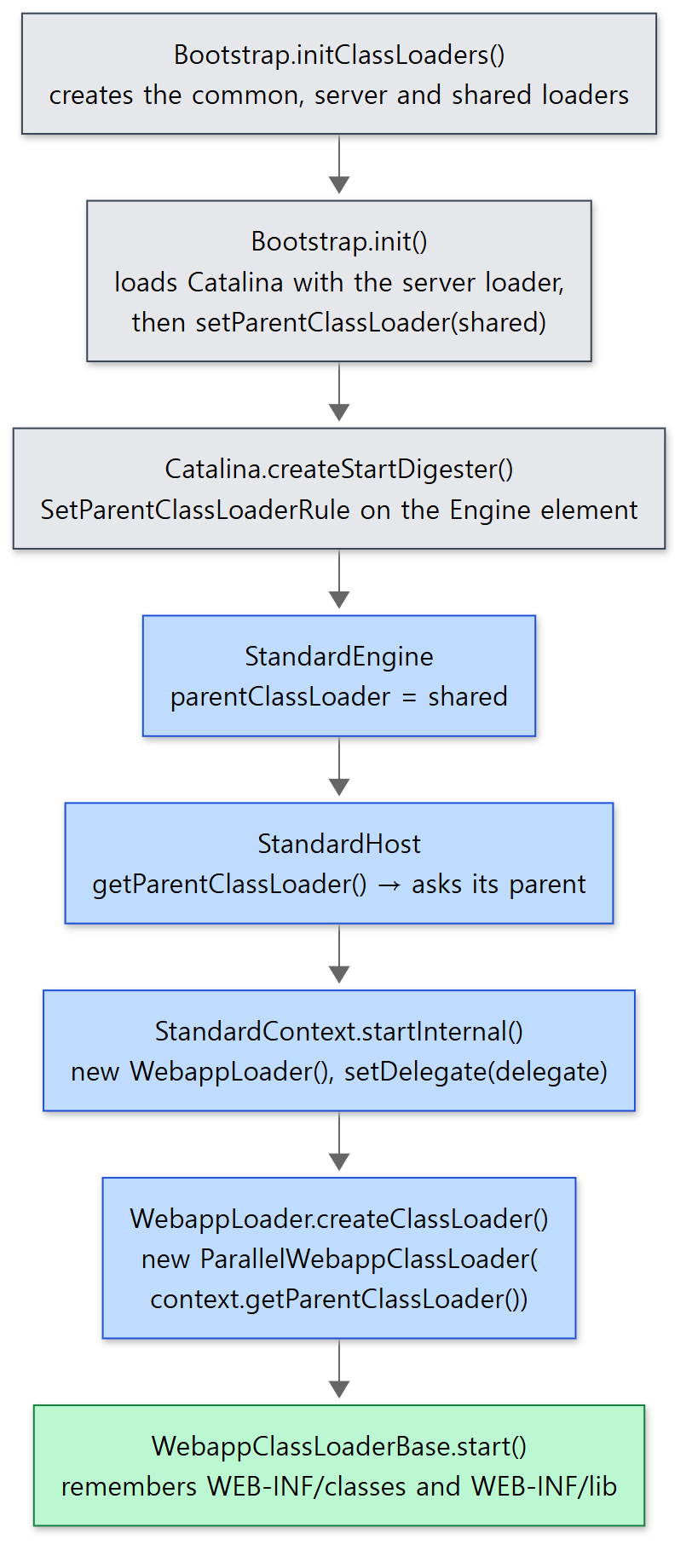 Gray is what
Bootstrap and Catalina do once at startup, blue is the container side (Engine, Host, Context) and WebappLoader, and green is the web app loader once it is ready.
StandardContext creates the WebappLoader
When a web app starts, StandardContext.startInternal() prepares the resources (the app's files) and then takes care of the loader.
        if (getLoader() == null) {
            WebappLoader webappLoader = new WebappLoader();
            webappLoader.setDelegate(getDelegate());
            setLoader(webappLoader);
        }
java/org/apache/catalina/core/StandardContext.java lines 4432–4436
If you wrote a <Loader> in context.xml, the Digester has already created a WebappLoader and set it (ContextRuleSet.java lines 103–105), so this if is skipped. Otherwise a default WebappLoader is created here and given the value of <Context delegate="...">. A little later loader.start() is called (lines 4474–4477), and WebappLoader.startInternal() creates the real class loader.
    private WebappClassLoaderBase createClassLoader() throws Exception {

        if (classLoader != null) {
            return classLoader;
        }

        if (ParallelWebappClassLoader.class.getName().equals(loaderClass)) {
            return new ParallelWebappClassLoader(context.getParentClassLoader());
        }

        Class<?> clazz = Class.forName(loaderClass);

        ClassLoader parentClassLoader = context.getParentClassLoader();

        Class<?>[] argTypes = { ClassLoader.class };
        Object[] args = { parentClassLoader };
        Constructor<?> constr = clazz.getConstructor(argTypes);

        return (WebappClassLoaderBase) constr.newInstance(args);
    }
java/org/apache/catalina/loader/WebappLoader.java lines 419–438
The default value of loaderClass is ParallelWebappClassLoader (line 98). For the default it calls new directly with no reflection; only when you name another class with <Loader loaderClass="..."> does it use reflection. Either way, the parent is the context.getParentClassLoader() we just saw.
After creating it, the loader gets the resources and delegate, and is started (lines 333–342). The loader's start() remembers the WEB-INF/classes directory and the jars in WEB-INF/lib as a list, and notes each jar's modification time (WebappClassLoaderBase.java lines 1386–1405). Those modification times are used for reloading in section 5.
What is "parallel" about it?
ParallelWebappClassLoader is a 73-line class. It really does just one thing: call registerAsParallelCapable() in a static block (ParallelWebappClassLoader.java lines 32–38). For a loader registered this way, the JDK's getClassLoadingLock(name) returns a different lock object for each class name. The loadClass() we'll see in section 3 synchronizes on that lock (line 1134), so several request threads can load different classes at the same time. Its sibling in the same package, WebappClassLoader, overrides getClassLoadingLock() to always return this, so there is one lock per loader (WebappClassLoader.java lines 60–66). Apart from this difference, both use the same WebappClassLoaderBase.
3. loadClass() — the order that turns parent delegation around
Why turn it around?
What happens if you follow Java's default "parent first" rule? Say a web app puts version 2.0 of some library in WEB-INF/lib, while $CATALINA_HOME/lib has version 1.0. The parent (common) finds it first and hands back 1.0. The web app can't use the jar it shipped. So the servlet specification recommends that a web app loader look at its own classes first, and Tomcat makes that the default. The comment on the delegate field says "the default, false, is the behavior called for by the servlet specification" (WebappClassLoaderBase.java lines 206–212).
But letting a web app override anything at all would be a problem. If a web app shipped its own java.lang.String, or its own jakarta.servlet.http.HttpServlet, the types would no longer match the objects Tomcat hands it. loadClass() solves both demands through ordering.
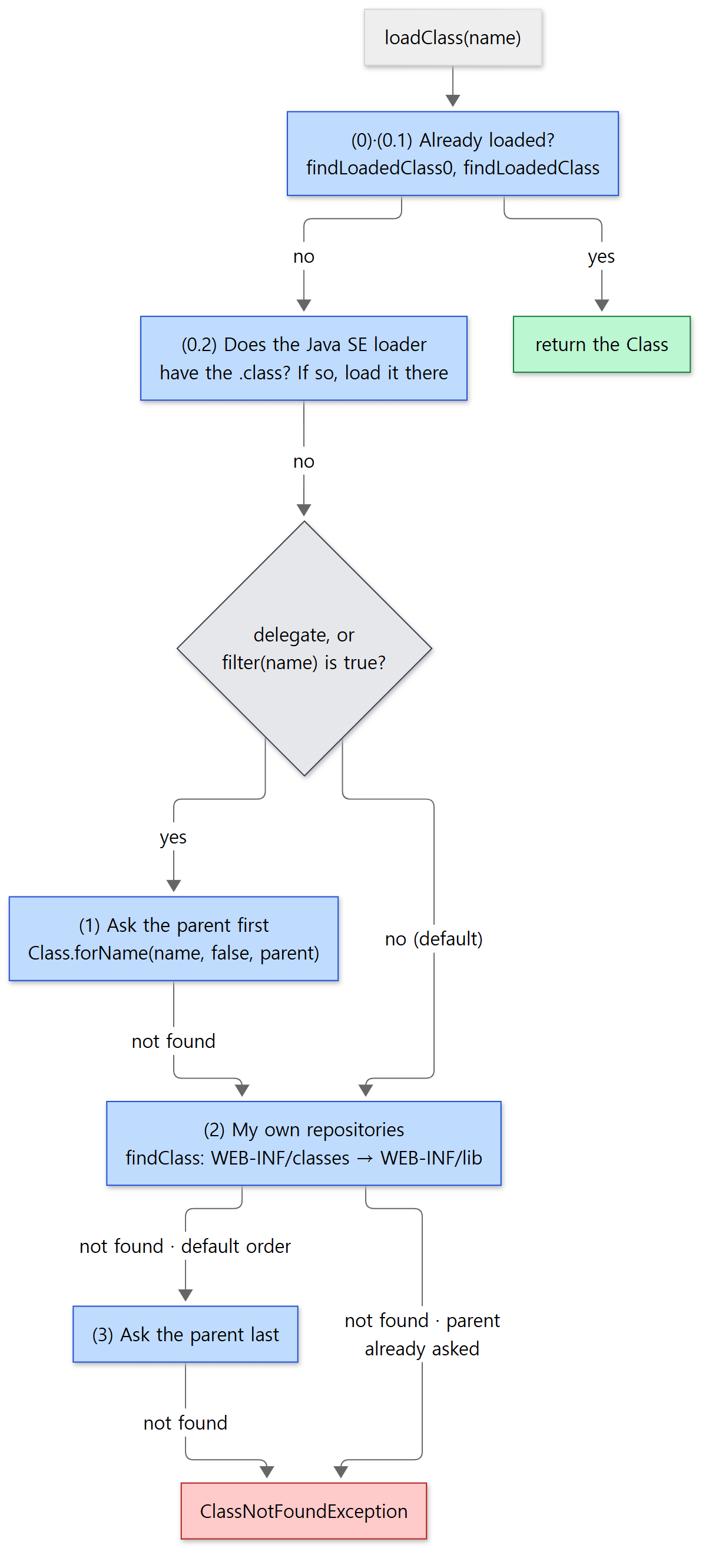 The numbers (0) to (3) are the numbers written in the source comments.
(0)·(0.1) Already loaded?
findLoadedClass0() looks for classes this loader defined itself and stored in its resourceEntries map (lines 2325–2334), and findLoadedClass() looks for classes the JVM remembers under this loader (lines 1143–1165). But there's one more line before them: checkStateForClassLoading(name) (line 1141) — if the loader has been stopped, it refuses right here. Example 2 in section 5 shows how early this line bites.
(0.2) Java SE classes cannot be overridden
            String resourceName = binaryNameToPath(name, false);

            ClassLoader javaseLoader = getJavaseClassLoader();
            boolean tryLoadingFromJavaseLoader;
            try {
                // ... (comment explaining why getResource is used) ...
                URL url = javaseLoader.getResource(resourceName);
                tryLoadingFromJavaseLoader = url != null;
            } catch (Throwable t) {
                // ...
                tryLoadingFromJavaseLoader = true;
            }

            if (tryLoadingFromJavaseLoader) {
                try {
                    clazz = javaseLoader.loadClass(name);
                    // ... resolve and return clazz ...
java/org/apache/catalina/loader/WebappClassLoaderBase.java lines 1171–1198
Whatever delegate says, it asks the JDK side first of all. The source comment says this is "to prevent the webapp from overriding Java SE classes. This implements SRV.10.7.2" (lines 1167–1170). It checks for the .class file with getResource() rather than calling loadClass() right away so as not to create an expensive ClassNotFoundException for every missing class (the comment on lines 1176–1184).
So what is this javaseLoader? The constructor decides.
        ClassLoader j = String.class.getClassLoader();
        if (j == null) {
            j = getSystemClassLoader();
            while (j.getParent() != null) {
                j = j.getParent();
            }
        }
        this.javaseClassLoader = j;
java/org/apache/catalina/loader/WebappClassLoaderBase.java lines 179–186
String's loader is bootstrap, so it is null. The code therefore starts at the system loader and climbs until the parent is null. On JDK 9 and later, the top is the platform loader. The platform loader uses bootstrap as its own parent, so asking it covers every JDK class handled by both bootstrap and platform. In Example 1 we confirm this by seeing java.sql.Driver come from the platform loader.
(1)–(3) Two orders, picked by delegate and filter()
            boolean delegateLoad = delegate || filter(name, true);

            // (1) Delegate to our parent if requested
            if (delegateLoad) {
                // ...
                    clazz = Class.forName(name, false, parent);
                // ...
            }

            // (2) Search local repositories
            // ...
                clazz = findClass(name);
            // ...

            // (3) Delegate to parent unconditionally
            if (!delegateLoad) {
                // ...
                    clazz = Class.forName(name, false, parent);
                // ...
            }
java/org/apache/catalina/loader/WebappClassLoaderBase.java lines 1210–1271
The single value delegateLoad splits the two orders.
delegateLoad |
Order | When |
|---|---|---|
false (default) |
my repositories → parent | the web app's own classes, libraries the web app ships |
true |
parent → my repositories | delegate="true", or names picked by filter() |
With delegate="true", every class follows Java's normal rule. filter() is a list that says "for these names, parent first" regardless of delegate.
        if (name.startsWith("jakarta")) {
            /* 7 == length("jakarta") */
            if (name.length() == 7) {
                return false;
            }
            ch = name.charAt(7);
            if (isClassName && ch == '.') {
                /* 8 == length("jakarta.") */
                if (name.startsWith("servlet.jsp.jstl.", 8)) {
                    return false;
                }
                if (name.startsWith("annotation.", 8) || name.startsWith("el.", 8) || name.startsWith("servlet.", 8) ||
                        name.startsWith("websocket.", 8) || name.startsWith("security.auth.message.", 8)) {
                    return true;
                }
java/org/apache/catalina/loader/WebappClassLoaderBase.java lines 2352–2366
The names for which filter() returns true fall into three groups (lines 2345–2431).
- The Jakarta APIs Tomcat implements:
jakarta.annotation.,jakarta.el.,jakarta.servlet.,jakarta.websocket.,jakarta.security.auth.message..jakarta.servlet.jsp.jstl.is excluded, though: Tomcat doesn't provide JSTL, so web apps have to ship it as a jar. - The old WebSocket names:
javax.websocket. - Tomcat itself: under
org.apache., the packagesel.,catalina.,jasper.,juli.,tomcat.,naming.andcoyote..org.apache.tomcat.jdbc.(the Tomcat JDBC connection pool) is excluded so web apps can ship their own.
This list is needed because these are "types that must match". Tomcat passes the servlet an object implementing the common loader's HttpServletRequest. If a web app accidentally put servlet-api.jar in WEB-INF/lib and that copy were used first, the web app's HttpServletRequest and Tomcat's HttpServletRequest would be different types that merely share a name, and you would get a ClassCastException or LinkageError. With parent first, common's copy is used even if the jar is in the web app.
findClass() — WEB-INF/classes before WEB-INF/lib
findClass() in step (2) ends up looking for the bytes with resources.getClassLoaderResource(path) (lines 2137–2146). That is a method of StandardRoot, which manages the web app's files, and it searches with /WEB-INF/classes prepended to the path (StandardRoot.java lines 237–239). The jars in WEB-INF/lib are registered separately as "jars mounted at /WEB-INF/classes" (lines 635–643). The search order is the order of the list of resource sets.
    {
        allResources.add(preResources);
        allResources.add(mainResources);
        allResources.add(classResources);
        allResources.add(jarResources);
        allResources.add(postResources);
    }
java/org/apache/catalina/webresources/StandardRoot.java lines 93–99
mainResources (the web app folder itself, with the real WEB-INF/classes inside) comes before classResources (the jars in WEB-INF/lib), and the first match is returned immediately (lines 289–300). So if the same class is in both, the one in WEB-INF/classes wins. I confirmed this order only in the source; I did not run an example for it.
Example 1: two web apps, same name, different classes
I put the same servlet demo.WhoServlet into two web apps (app1, app2) and prepared these three classes.
| Class | WEB-INF/classes of app1 |
WEB-INF/classes of app2 |
$CATALINA_BASE/lib/demo-shared.jar |
|---|---|---|---|
demo.Greeting |
"hello from app1's Greeting" | "HELLO FROM APP2'S …" (different content) | none |
demo.Shared |
present | present | present (different content) |
jakarta.servlet.Extra |
present | present | none (not in servlet-api.jar either) |
Only app2 has <Loader delegate="true"/>, via META-INF/context.xml. The servlet looks up classes by name, prints the loader that defined each class, and follows the parent chain from its own loader to the top.
// Example written for this post (not Tomcat source)
// ... package, imports and the class comment omitted ...
@WebServlet("/who")
public class WhoServlet extends HttpServlet {

    // Make a loader human-readable: class name + getName() + object id (differs per run)
    static String describe(ClassLoader cl) {
        if (cl == null) {
            return "bootstrap (null)";
        }
        String name = cl.getName() == null ? "" : " name=" + cl.getName();
        return cl.getClass().getSimpleName() + name + " @" + Integer.toHexString(System.identityHashCode(cl));
    }

    // Look a class up by name and print the loader that defined it (this web app's loader does the lookup)
    static String origin(String className) {
        try {
            Class<?> c = Class.forName(className, false, WhoServlet.class.getClassLoader());
            return describe(c.getClassLoader());
        } catch (ClassNotFoundException e) {
            return "not found";
        }
    }

    @Override
    protected void doGet(HttpServletRequest req, HttpServletResponse resp) throws IOException {
        // ... prepare out (the response Writer) and mine (= WhoServlet's loader),
        //     then print Greeting.message() and Shared.where() ...

        // 1) Start at this web app's loader and follow the parents to the end
        // ... print describe(cl) for cl = cl.getParent() until it is null ...

        // 2) The loader that actually defined each class
        // ... print origin(name) for each of the eight class names ...

        // 3) The context class loader of the thread handling the request
        ClassLoader tccl = Thread.currentThread().getContextClassLoader();
        out.println("TCCL == webapp loader : " + (tccl == mine));
    }
}
[Shortened from the example ex/u04-classloaders/src/both/WhoServlet.java]
This example was run with Tomcat 12.0.0-M1-dev built unchanged from the reference commit (17aa1769b0), in a Docker container (Eclipse Temurin JDK 21). run.sh compiles the classes with javac, puts them under CATALINA_BASE=/tmp/base, runs catalina.sh start and then curls the two addresses. The hex number after @ is the per-object number (System.identityHashCode), so it differs on every run. The same number means the same loader object.
===== curl http://127.0.0.1:8080/app1/who =====
context            : /app1
Greeting.message() : hello from app1's Greeting
Shared.where()     : copy in WEB-INF/classes (webapp loader)
-- parent chain --
  [0] ParallelWebappClassLoader @4bf48f6
  [1] URLClassLoader @61e4705b
  [2] AppClassLoader name=app @764c12b6
  [3] PlatformClassLoader name=platform @60410cd
  [4] bootstrap (null)
-- who defined it --
  demo.Greeting                              ParallelWebappClassLoader @4bf48f6
  demo.Shared                                ParallelWebappClassLoader @4bf48f6
  jakarta.servlet.Extra                      ParallelWebappClassLoader @4bf48f6
  jakarta.servlet.http.HttpServlet           URLClassLoader @61e4705b
  org.apache.catalina.core.StandardContext   URLClassLoader @61e4705b
  org.apache.catalina.startup.Bootstrap      AppClassLoader name=app @764c12b6
  java.lang.String                           bootstrap (null)
  java.sql.Driver                            PlatformClassLoader name=platform @60410cd
TCCL == webapp loader : true
===== curl http://127.0.0.1:8080/app2/who =====
context            : /app2
Greeting.message() : HELLO FROM APP2'S GREETING (a different class)
Shared.where()     : copy in $CATALINA_BASE/lib (common loader)
-- parent chain --
  [0] ParallelWebappClassLoader @5066d65f
  [1] URLClassLoader @61e4705b
  [2] AppClassLoader name=app @764c12b6
  [3] PlatformClassLoader name=platform @60410cd
  [4] bootstrap (null)
-- who defined it --
  demo.Greeting                              ParallelWebappClassLoader @5066d65f
  demo.Shared                                URLClassLoader @61e4705b
  jakarta.servlet.Extra                      ParallelWebappClassLoader @5066d65f
  jakarta.servlet.http.HttpServlet           URLClassLoader @61e4705b
  org.apache.catalina.core.StandardContext   URLClassLoader @61e4705b
  org.apache.catalina.startup.Bootstrap      AppClassLoader name=app @764c12b6
  java.lang.String                           bootstrap (null)
  java.sql.Driver                            PlatformClassLoader name=platform @60410cd
TCCL == webapp loader : true
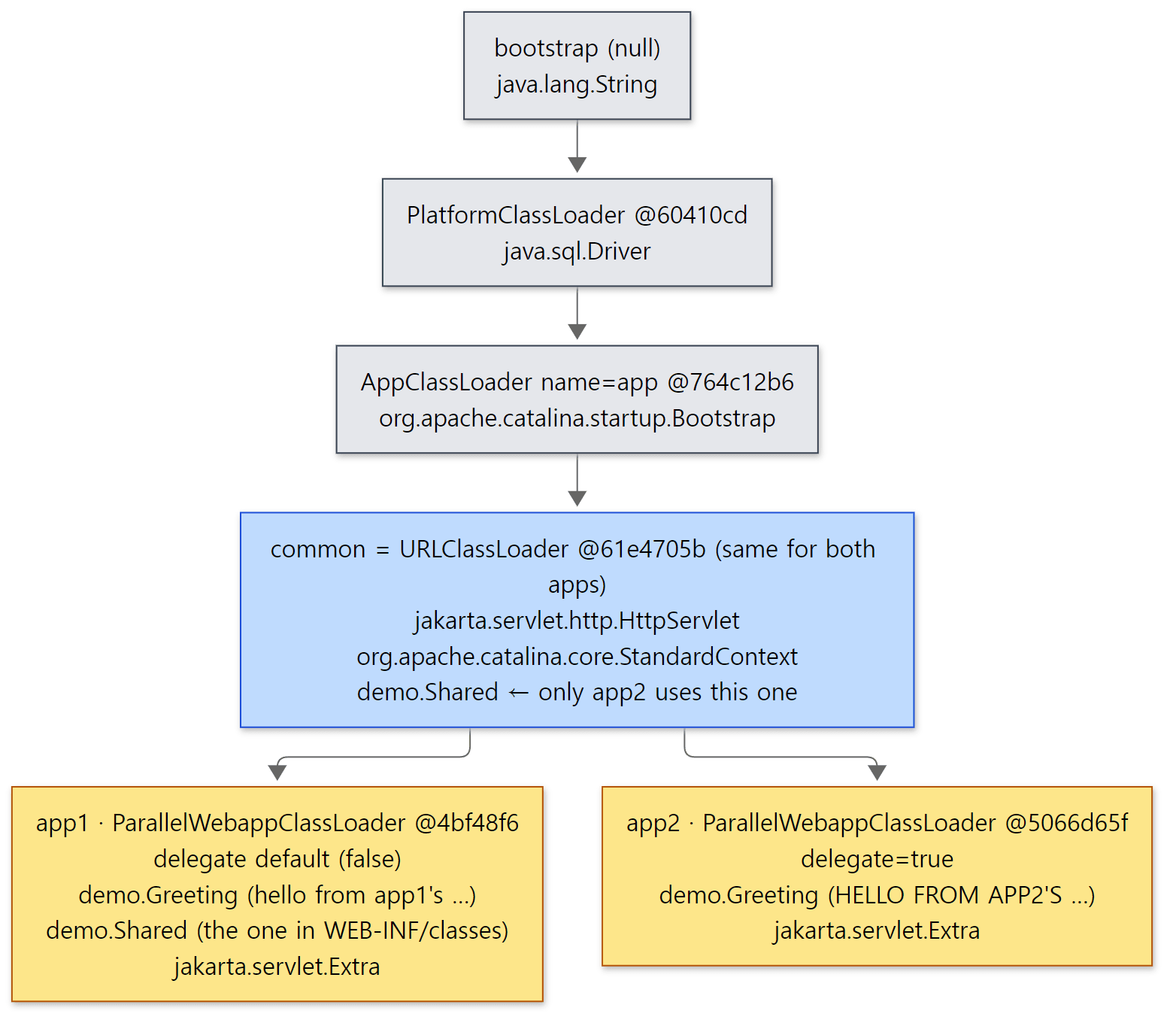 The two "who defined it" blocks of the output above, placed on the loader chain. The
@ numbers come from this run and change when you run it again.
There are five things to read here.
- The parent chain matches the diagram in section 1. The web app loaders (
@4bf48f6,@5066d65f) differ per app, and their parentURLClassLoader @61e4705bis the same for both apps. That is the common loader, and since server and shared are not separate, it appears as a single link in the chain. Above it come system (app), platform and bootstrap. demo.Greetinghas the same name but different content. Each was defined by its own loader, so to the JVM they are different classes. That's the "each web app sees its own classes" in the title.demo.Sharedis split bydelegate. app1, on the default, uses its own copy fromWEB-INF/classes; app2, withdelegate="true", uses the parent's (common's) copy. app2'sWEB-INF/classesalso hasShared, but it is never used because the parent found it first.Greeting, on the other hand, which the parent doesn't have, comes from app2's own copy even in app2 (not found in (1), so it goes on to (2)).- Tomcat's internal classes are found from the web app too.
StandardContextcomes from the same common loader asHttpServlet(the "Easy to get wrong" in section 1).Bootstrapis inbin/bootstrap.jar, so it's the system loader. - The request thread's context class loader is the web app loader.
StandardHostValveswitches it withcontext.bind(...)before handing the request to the Context and switches it back afterwards (StandardHostValve.javaline 99, line 167). Valves are covered in Part 8.
Easy to get wrong: filter() means "parent first", not "forbidden"
The class comment of WebappClassLoaderBase says servlet API classes are "never loaded from the webapp repositories" (lines 84–89). But the code of loadClass(), when filter() is true, (1) asks the parent first and, if that fails, (2) goes to its own repositories. The example's jakarta.servlet.Extra starts with jakarta.servlet., so filter() is true — but the common loader has no such class, so in the end the web app loader defined it. Only "names the parent already has" are blocked. A web app shipping servlet-api.jar doesn't cause a disaster because every class in that jar already exists in the parent.
4. When do you use delegate?
There are two places to set delegate. <Context delegate="true"> is a field of StandardContext and, as we saw in section 2, is passed on when the WebappLoader is created. <Loader delegate="true"/> goes straight into the WebappLoader. Either way it ends up as a field of the web app loader via classLoader.setDelegate(this.delegate) (WebappLoader.java line 335).
delegate uses the same ordering not only for classes but also for resources. getResource(), getResources() and getResourceAsStream() all choose their order with delegate || filter(name, false) (line 903, line 956, line 984). So for configuration files looked up by name, such as log4j2.xml or META-INF/services/..., delegate decides whether the web app's copy or the one in lib/ is found first. I checked this part only in the source.
In short, it's this choice.
| Situation | Value to pick |
|---|---|
| Each web app should use its own version of a library (the usual case) | delegate="false" (default) |
Keep a common library in lib/ and have it win over a copy of the same jar that slipped into a web app |
delegate="true" |
Easy to get wrong: some names go to the parent first even with delegate="false"
Turning delegate off doesn't let a web app override everything. Java SE classes already go to the parent in (0.2), and filter() names in (1). Conversely, even with delegate="true", (0.2) still comes first. All delegate changes is the order for the remaining classes.
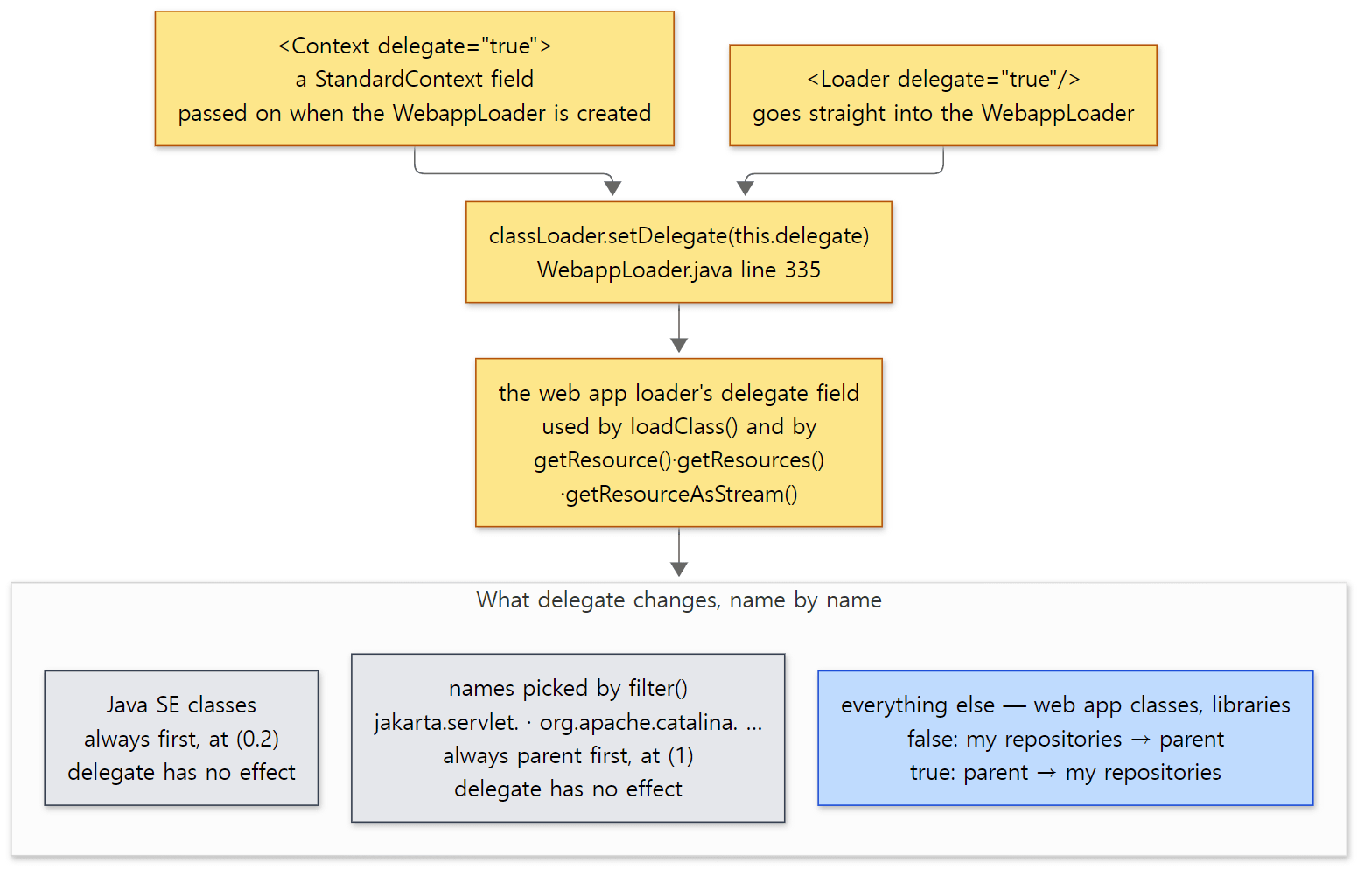 Yellow boxes are the path from setting to field, gray boxes are names that delegate does not change, and the blue box is the part delegate actually changes.
5. Reloading and leaks — what it means to throw a loader away
Who watches reloadable?
With <Context reloadable="true">, Tomcat periodically checks whether the web app's class files have changed. The clock is the container background processing we saw in Part 3. StandardEngine sets backgroundProcessorDelay = 10 in its constructor (StandardEngine.java line 62) and schedules a task every 10 seconds on the Server's utility thread pool (Catalina-utility-N) (ContainerBase.java lines 1090–1092). That task walks down from the Engine through the children calling backgroundProcess() (lines 1164–1185), and when it gets to a Context it reaches WebappLoader.backgroundProcess().
    @Override
    public void backgroundProcess() {
        Context context = getContext();
        if (context != null) {
            if (context.getReloadable() && modified()) {
                Thread currentThread = Thread.currentThread();
                ClassLoader originalTccl = currentThread.getContextClassLoader();
                try {
                    currentThread.setContextClassLoader(WebappLoader.class.getClassLoader());
                    context.reload();
                } finally {
                    currentThread.setContextClassLoader(originalTccl);
                }
            }
        }
    }
java/org/apache/catalina/loader/WebappLoader.java lines 229–244
modified() checks two things (WebappClassLoaderBase.java lines 592–640): for each class already loaded (resourceEntries), whether the file's modification time differs from when it was loaded; and whether jars in WEB-INF/lib were added, changed or removed. Changing a class file that has never been loaded is not a reason to reload.
Note that right before reload() the context class loader is switched to the loader that loaded WebappLoader (Tomcat's side). The background task sets the context class loader to the web app loader while it processes a Context (ContainerBase.java line 1177), so calling reload() as is would start the new web app while still holding the loader that is about to be thrown away.
StandardContext.reload() itself is short: setPaused(true) so requests are held for a moment, stop(), start(), setPaused(false) (StandardContext.java lines 3393–3425). There is no special code to "reload classes". It just throws the whole loader away and makes a new one. There is no way to change an already-defined class inside the JVM, so using the new class requires a new loader.
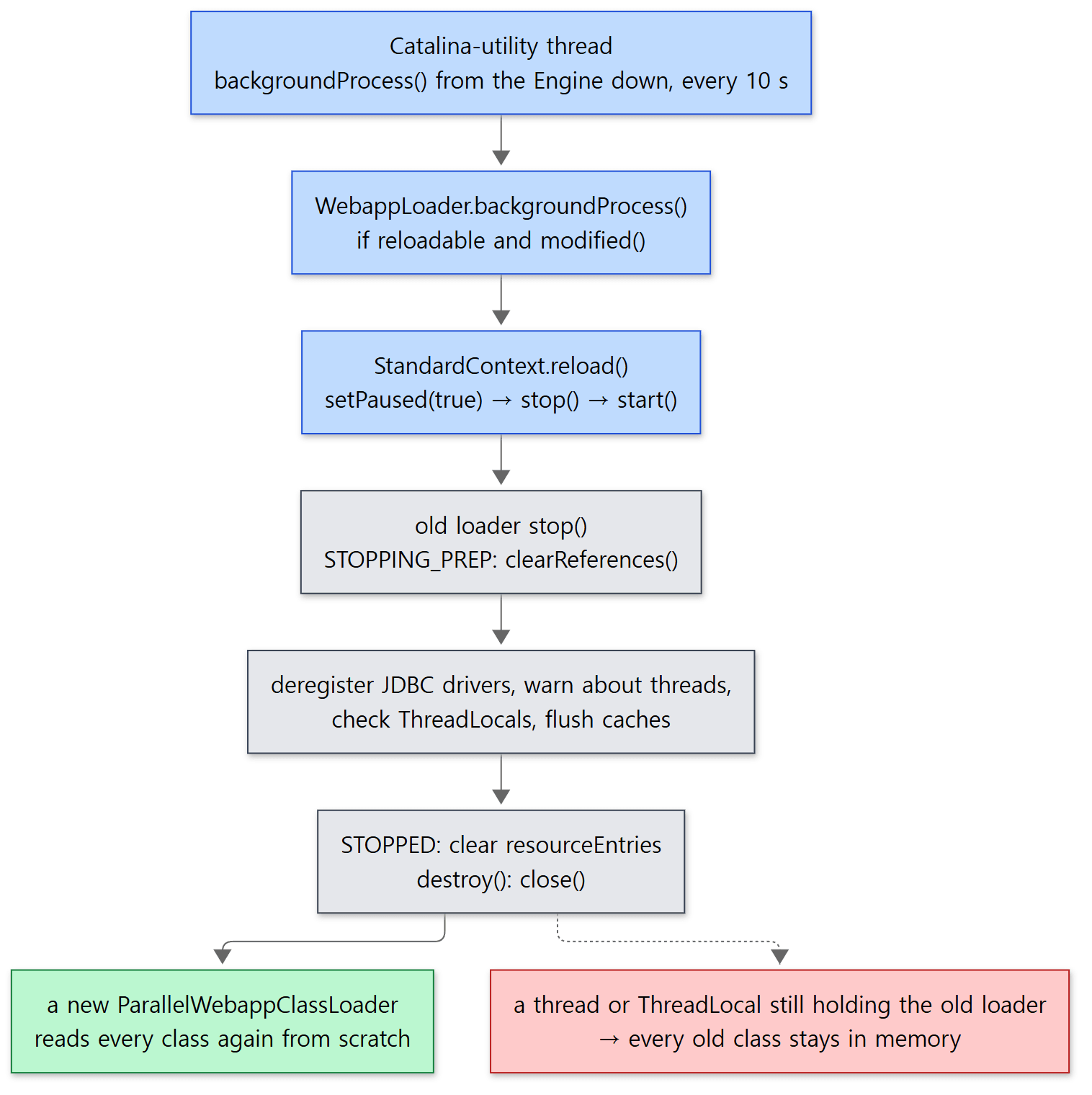 The red box is what the "memory leak" warning is talking about.
The order in which the old loader is stopped
    @Override
    public void stop() throws LifecycleException {

        state = LifecycleState.STOPPING_PREP;

        // Clearing references should be done before setting started to
        // false, due to possible side effects
        clearReferences();

        state = LifecycleState.STOPPING;

        resourceEntries.clear();
        notFoundClassResources.clear();
        jarModificationTimes.clear();
        resources = null;

        permissionList.clear();
        loaderPC.clear();

        state = LifecycleState.STOPPED;
    }
java/org/apache/catalina/loader/WebappClassLoaderBase.java lines 1408–1428
STOPPING_PREP is still a "usable" state (the first argument true on LifecycleState.java line 51). During it, clearReferences() can still load the classes it needs for cleanup through this loader. From STOPPING on the loader is no longer usable, and the list of loaded classes is cleared. WebappLoader.stopInternal() then calls destroy(), which closes the jar files with URLClassLoader.close(), and sets its own classLoader field to null (WebappLoader.java lines 387–410).
Why "leaks" happen
Even after Tomcat throws a loader away, the loader object only really leaves memory when nobody points to it any more (when the garbage collector reclaims it). And a loader points to every class it defined, while each class points back to its loader. So if even one object of the old web app is still alive somewhere, its class → the loader → every class that loader loaded all stay behind together. That's why the memory holding class metadata (Metaspace) fills up after several reloads.
The usual culprits are long-lived things outside the web app: threads the web app started and never stopped (the thread's context class loader and the code it runs point to the old loader), values put into a ThreadLocal of the request thread pool and never removed, JDBC drivers left registered with the JDK's DriverManager, and so on. clearReferences() hunts for exactly these, one by one (lines 1472–1519).
| Order | What it does | Default |
|---|---|---|
| 1 | Deregister JDBC drivers the web app registered and left behind (clearReferencesJdbc) |
always |
| 2 | Find threads whose context class loader is this loader and warn (clearReferencesThreads). Stopping them only when clearReferencesStopThreads is on |
warn only |
| 3 | Check thread ThreadLocals for objects from this loader and warn |
on |
| 4 | Clean up RMI targets | on |
| 5 | Flush caches such as IntrospectionUtils and java.beans.Introspector |
always |
The defaults are fields of StandardContext (lines 684–719) and are copied into the loader when the web app starts (lines 4481–4489). Forcibly stopping threads is off by default (line 693, clearReferencesStopThreads = false). Cutting off somebody else's thread is risky, so the default is to warn only.
The heart of the thread check is one line: find threads where thread.getContextClassLoader() == this (lines 1580–1581). A new thread inherits the context class loader of the thread that created it, so threads created by web app code usually match this condition.
Example 2: reloading a web app that leaves a thread behind
I made a web app leaky with reloadable="true". Its servlet starts a thread named leaky-worker at startup (loadOnStartup = 1) and never stops it. Every second, that thread asks the loader that created it for demo.Version again. The response shows Version.text() and the loader that defined that class.
// Example written for this post (not Tomcat source)
// ... package, imports and the class comment omitted ...
@WebServlet(urlPatterns = "/v", loadOnStartup = 1)
public class LeakyServlet extends HttpServlet {

    @Override
    public void init() {
        ClassLoader myLoader = LeakyServlet.class.getClassLoader();
        String loaderId = Integer.toHexString(System.identityHashCode(myLoader));
        Thread t = new Thread(() -> {
            while (true) {
                try {
                    Thread.sleep(1000);
                    // Ask the loader that created us for the class again, every second
                    myLoader.loadClass("demo.Version");
                } catch (InterruptedException e) {
                    return;
                } catch (ClassNotFoundException e) {
                    System.out.println("[leaky-worker] loader @" + loaderId + " refused: " + e.getMessage());
                    return;
                }
            }
        }, "leaky-worker");
        t.setDaemon(true);
        t.start();   // A new thread inherits the creating thread's context class loader (= this web app's loader)
    }
    // ... doGet prints Version.text() and the loader that defined Version ...
}
[Shortened from the example ex/u04-reload-leak/src/LeakyServlet.java]
run.sh starts Tomcat and makes one request, overwrites WEB-INF/classes/demo/Version.class with the file compiled from v2, then requests once a second until the response contains v2. After that it picks only the relevant lines out of catalina.out (long stack traces are shortened to ...). The timestamps, loader numbers, the N in Catalina-utility-N and the number of seconds differ from run to run.
===== before: curl /leaky/v =====
Version v1  loaded by ParallelWebappClassLoader @4a00d9cf
===== replace WEB-INF/classes/demo/Version.class with v2 =====
===== after (~8s): curl /leaky/v =====
Version v2  loaded by ParallelWebappClassLoader @40241b1c
===== log lines =====
24-Oct-2026 13:43:19.908 INFO [Catalina-utility-1] org.apache.catalina.core.StandardContext.reload Reloading Context with name [/leaky] has started
24-Oct-2026 13:43:19.935 WARNING [Catalina-utility-1] org.apache.catalina.loader.WebappClassLoaderBase.clearReferencesThreads The web application [leaky] appears to have started a thread named [leaky-worker] but has failed to stop it. This is very likely to create a memory leak. Stack trace of thread: ...
24-Oct-2026 13:43:20.181 INFO [Catalina-utility-1] org.apache.catalina.core.StandardContext.reload Reloading Context with name [/leaky] is completed
24-Oct-2026 13:43:20.860 INFO [leaky-worker] org.apache.catalina.loader.WebappClassLoaderBase.checkStateForResourceLoading Illegal access: this web application instance has been stopped already. Could not load [demo.Version]. ...
24-Oct-2026 13:43:20.864 INFO [leaky-worker] org.apache.catalina.loader.WebappClassLoaderBase.checkStateForResourceLoading Illegal access: this web application instance has been stopped already. Could not load [java.io.PrintStream]. ...
Exception in thread "leaky-worker" java.lang.NoClassDefFoundError: java/io/PrintStream
Caused by: java.lang.ClassNotFoundException: Illegal access: this web application instance has been stopped already. Could not load [java.io.PrintStream]. ...
===== threads named leaky-worker (jstack) =====
1
- The loader number in the response changed.
@4a00d9cf→@40241b1c. The class wasn't re-read; the loader is new. It took a few seconds after the file changed for the response to change because we were waiting for the 10-second background task. - The reload was done by the
Catalina-utility-1thread, not a request thread. clearReferencesThreadsfoundleaky-workerand warned, but didn't stop it. That's the default.- A stopped loader refuses. After the reload finished, when the old thread asked the old loader for
demo.Version,Illegal access: this web application instance has been stopped alreadywas logged. This message is logged and thrown bycheckStateForResourceLoading()(lines 1306–1314). As the message itself says, it is also meant "to attempt to terminate the thread". - The final
1is theleaky-workerstarted by the new web app. The servlet'sinit(), started with the new loader, started the thread again, and the old thread died for the reason below.
Where I got stuck: a stopped loader can't even load java.io.PrintStream
When I wrote the example, the output I expected was a single line: [leaky-worker] loader @... refused: .... After all, I had the catch (ClassNotFoundException e) block call System.out.println. But that line was never printed. Instead I got Could not load [java.io.PrintStream] and a NoClassDefFoundError.
The reason is the ordering. When the catch block first tried to use PrintStream, the JVM asked the loader that defined the class containing that code (a lambda body is compiled into a method inside LeakyServlet) — that is, the stopped old loader — for java.io.PrintStream. loadClass() checks the state at line 1141, before the Java SE step (0.2) from section 3, so it refuses even java.* classes. The catch block therefore threw again, and the thread died. In other words, code from a stopped web app cannot newly use any class it hasn't used before — not even a JDK class. If a leftover thread dies with a strange NoClassDefFoundError after a reload, this case is worth suspecting.
JreMemoryLeakPreventionListener — preventing it from the server side
If clearReferences() is the side that cleans up when a web app stops, JreMemoryLeakPreventionListener, which is in the default server.xml (conf/server.xml line 32), is the side that prevents it in advance when the server starts. The class comment explains it like this: some JDK code, when first called, pins the context class loader of that moment in a singleton, and if that first call happens during a web app request, the web app loader is pinned forever. So Tomcat calls that code first, at startup (when there are no web apps yet) (JreMemoryLeakPreventionListener.java lines 34–45).
On the Server's before_init event (the Lifecycle events from Part 3), it does two things by default (lines 181–242). It calls DriverManager.getDrivers() first so the JDBC drivers in lib/ are loaded on Tomcat's side (driverManagerProtection, default true), and it turns off caching for jar: URL connections so jar files don't get locked (urlCacheProtection, default true). ImageIO (appContextProtection) and seed generation for SecureRandom (initSeedGenerator) are off by default (lines 62 and 160).
What this post leaves out
ClassFileTransformer, which rewrites class bytes, andInstrumentableClassLoader(addTransformer,copyWithoutTransformers):WebappClassLoaderBase.javalines 535–585, lines 2194–2213jakartaConverter, which converts an old web app written againstjavax.*tojakarta.*while loading it:WebappLoader.javalines 337–340notFoundClassResources, the cache of classes that were not found:WebappClassLoaderBase.javaline 319, line 716- The trick of deregistering JDBC drivers under the web app loader's name (
JdbcLeakPrevention):WebappClassLoaderBase.javalines 1522–1571 - The details of the
ThreadLocalleak check: lines 1824–1936, andcore/ThreadLocalLeakPreventionListener, which renews request threads (conf/server.xmlline 34) WebResourceRoot/StandardRoot, which bundle the web app's files, and<PreResources>/<PostResources>:java/org/apache/catalina/webresources/- JULI's
ClassLoaderLogManager, which gives each web app its own logging configuration: covered in Part 16 - Loaders in embedded Tomcat (
startup/Tomcat): there is noBootstrap, so no common or shared loader is created. If nobody sets a parent,getParentClassLoader()from section 2 falls back to the system loader. Covered in Part 16
Recap
| Concept | One-line summary |
|---|---|
| common, server, shared | Built by Bootstrap from catalina.properties. An empty value means "use the parent", so by default all three are the same URLClassLoader |
Bootstrap.init() |
Loads Catalina through the server loader with reflection and hands it the shared loader as the parent |
| Finding the parent | Only the Engine is given shared; Host and Context ask upwards via getParentClassLoader(). privileged apps get the server loader |
WebappLoader |
One per Context. Creates, stops and throws away the ParallelWebappClassLoader |
ParallelWebappClassLoader |
The (default) web app loader, registered to use a separate lock per class name |
loadClass() order |
already loaded → Java SE loader → (if parent first) parent → my repositories → (otherwise) parent |
filter() |
Parent first for APIs Tomcat provides (jakarta.servlet. etc.) and its internals (org.apache.catalina. etc.). Ordering, not prohibition |
delegate |
true means parent first for every class and resource. The default false is the servlet spec's behavior |
| Reload | Checks modified() every 10 seconds; if changed, stops and starts the Context, creating a new loader |
clearReferences() |
Finds drivers, threads, ThreadLocals and caches holding the old loader, and cleans up or warns. Forcibly stopping threads is off by default |
| Stopped loader | The state check comes first, so it refuses even java.* classes |
What's next
Up to here we've covered "what Tomcat looks like and how it starts". From the next post on, we follow a single request. The first gate is the socket. In Part 5: The Connector and the NIO Endpoint — Which Threads Take a Connection we see how the Connector opens a port and how the Acceptor and Poller threads take a connection and hand it to an http-nio-8080-exec-N worker thread. That's where the thread from Example 1 — the one whose context class loader was the web app loader — comes from.
Compared with httpd, the difference is striking. httpd's modules are loaded together into one process with LoadModule (httpd Part 6), and there is no isolation of the kind where two modules each use their own function with the same name. To change configuration, the whole server does a graceful restart (httpd Part 5). Thanks to the JVM's "name + loader" rule, Tomcat swaps out just one web app inside a single process. The price is that, unlike httpd's memory pools, which give memory back the moment the pool is destroyed (httpd Part 4), a Tomcat loader never comes back while anyone at all still holds it. The warnings in section 5 of this post are that price. Spring keeping its reflection caches in a "map that may be emptied" (ConcurrentReferenceHashMap) is a way of avoiding the same problem (Spring Part 16).