What this post covers
This is the second post in "Digging into Tomcat's Source". In Part 1 we fetched and built the source and unfolded a map of the folders and of the main road a single request travels. This post is the big-picture map you spread out before reading the code line by line.
If you have used Tomcat, you have probably opened conf/server.xml and changed the port in <Connector port="8080">. But what are the <Server>, <Service>, <Engine> and <Host> written in that file, as far as the source is concerned? Using that configuration file as a bridge, this post answers these questions:
- Which class does each server.xml element become, and who creates those objects and links them together?
- What are the "four containers" — Engine, Host, Context and Wrapper — and how does the source enforce their parent–child relationships?
- Why are the side that accepts connections (Coyote) and the side that calls servlets (Catalina) separated, and what does the
Adapterthat joins them look like? - Where do the servlet API (
jakarta.*), its implementation, and Jasper, EL, JULI and Naming sit in the repository and in the jars?
| Item | Details |
|---|---|
| Target | Apache Tomcat |
| Version | 12.0.0-M1 (main) |
| Commit | 17aa1769b0 (2026-10-23) |
| Main classes | startup/Catalina, core/StandardServer·StandardService, Container, core/ContainerBase·StandardEngine, connector/Connector·CoyoteAdapter, coyote/Adapter·ProtocolHandler |
All line numbers in this post refer to this commit. Part 1 shows how to get the same commit and build the Docker image used for the examples. Paths start at the repository root, like java/org/apache/catalina/; when the text uses a short form such as core/StandardEngine, it means under org/apache/catalina/.
Since this post draws a map, it follows only the main lines. Each section points ahead to the post that reads that concept in detail ("we'll see this in Part N").
Terms to know first
A servlet container is a program that holds servlets (the classes you write by extending HttpServlet and filling in doGet()) and, when an HTTP request arrives, picks the right servlet and calls it. Creating the servlet (init()), calling it (service()) and cleaning it up (destroy()) is the container's job. That is exactly what Tomcat is.
Catalina is the name of the servlet-container part inside Tomcat. It is the package org.apache.catalina, and the same name shows up in catalina.sh, catalina.out and CATALINA_HOME.
Coyote is the name of the connector part. It reads bytes from a socket, interprets them as an HTTP request, and writes the response back out as bytes. Its package is org.apache.coyote. It does not know about servlets (Section 4).
Container has two meanings in this post. Broadly, it is the whole "servlet container" above; narrowly, it is the interface org.apache.catalina.Container. Engine, Host, Context and Wrapper all implement that interface, which is why we call them "the four containers." When this post writes it in code style, Container, it means the narrow sense.
Lifecycle is an interface with four methods: init(), start(), stop() and destroy(). Every component in this post, from Server down to Wrapper, implements it, and when a parent is start()ed its children are started in turn. How the states change is the subject of Part 3.
A pipeline and its valves form the processing chain attached to each container. When a request enters a container it passes through that container's valves in order, and the basic valve at the very end hands it to the next container. A <Valve> in server.xml plugs in here. We look at this closely in Part 8.
1. One server.xml is one tree of objects
The default server.xml
Strip the comments from the repository's conf/server.xml and the skeleton looks like this.
<Server port="8005" shutdown="SHUTDOWN">
<Listener className="org.apache.catalina.startup.VersionLoggerListener" />
<!-- ... (a few listeners) -->
<GlobalNamingResources>
<Resource name="UserDatabase" auth="Container"
type="org.apache.catalina.UserDatabase"
description="User database that can be updated and saved"
factory="org.apache.catalina.users.MemoryUserDatabaseFactory"
pathname="conf/tomcat-users.xml" />
</GlobalNamingResources>
<!-- ... -->
<Service name="Catalina">
<!-- ... -->
<Connector port="8080" protocol="HTTP/1.1"
connectionTimeout="20000"
redirectPort="8443" />
<!-- ... -->
<Engine name="Catalina" defaultHost="localhost">
<!-- ... -->
<Realm className="org.apache.catalina.realm.LockOutRealm">
<!-- ... -->
</Realm>
<Host name="localhost" appBase="webapps"
unpackWARs="true" autoDeploy="true">
<!-- ... -->
<Valve className="org.apache.catalina.valves.AccessLogValve" directory="logs"
prefix="localhost_access_log" suffix=".txt"
pattern="%h %l %u %t "%r" %s %b" />
</Host>
</Engine>
</Service>
</Server>
The elements are nested layer inside layer: one Server holds a Service, the Service holds a Connector and an Engine, the Engine holds a Host. That nesting becomes, one for one, the parent–child relationship between Java objects.
The rules that turn XML into objects: Catalina.createStartDigester()
When you run catalina.sh start, it is eventually the org.apache.catalina.startup.Catalina class that reads server.xml (how we get there is covered in Part 3). The reader is Digester, Tomcat's own XML-to-object converter, and the conversion rules are gathered in this one method.
        digester.addObjectCreate("Server", "org.apache.catalina.core.StandardServer", "className");
        digester.addSetProperties("Server");
        digester.addSetNext("Server", "setServer", "org.apache.catalina.Server");
        // ...
        digester.addObjectCreate("Server/Service", "org.apache.catalina.core.StandardService", "className");
        digester.addSetProperties("Server/Service");
        digester.addSetNext("Server/Service", "addService", "org.apache.catalina.Service");
        // ...
        digester.addRule("Server/Service/Connector", new ConnectorCreateRule());
        digester.addSetProperties("Server/Service/Connector",
                new String[] { "executor", "sslImplementationName", "protocol" });
        digester.addSetNext("Server/Service/Connector", "addConnector", "org.apache.catalina.connector.Connector");
        // ...
        // Add RuleSets for nested elements
        digester.addRuleSet(new NamingRuleSet("Server/GlobalNamingResources/"));
        digester.addRuleSet(new EngineRuleSet("Server/Service/"));
        digester.addRuleSet(new HostRuleSet("Server/Service/Engine/"));
        digester.addRuleSet(new ContextRuleSet("Server/Service/Engine/Host/"));
java/org/apache/catalina/startup/Catalina.java lines 513–592
Each element gets three rules.
addObjectCreate(path, default class, "className")— when the XML reader meets the start tag at that path (Server/Service), it creates an object. If the element has aclassNameattribute it uses that class, otherwise the default class.addSetProperties(path)— each attribute of the element goes into the setter of the same name.<Server port="8005">becomessetPort(8005).addSetNext(path, method name, type)— at the end tag, the object just created is passed to that method of the object of the enclosing element. The Service goes into the Server'saddService(), the Connector into the Service'saddConnector().
Engine, Host and Context get the same treatment through separate bundles of rules (RuleSets). Host's has the same three lines plus a few more.
        digester.addObjectCreate(prefix + "Host", "org.apache.catalina.core.StandardHost", "className");
        digester.addSetProperties(prefix + "Host");
        digester.addRule(prefix + "Host", new CopyParentClassLoaderRule());
        digester.addRule(prefix + "Host",
                new LifecycleListenerRule("org.apache.catalina.startup.HostConfig", "hostConfigClass"));
        digester.addSetNext(prefix + "Host", "addChild", "org.apache.catalina.Container");
java/org/apache/catalina/startup/HostRuleSet.java lines 61–66
Note the line that attaches a listener called HostConfig to every Host. Later, this listener looks at the webapps/ folder and deploys the web apps (see "Easy to confuse" below and Part 10).
Put the rules in a table and server.xml lines up with the source row by row.
| server.xml element | Object created (default class) | Method on the enclosing object | Where the rule is |
|---|---|---|---|
<Server> |
core/StandardServer |
Catalina.setServer() |
Catalina.java lines 513–515 |
<Service> |
core/StandardService |
Server.addService() |
Catalina.java lines 526–528 |
<Connector> |
connector/Connector |
Service.addConnector() |
Catalina.java lines 542–545, ConnectorCreateRule |
<Engine> |
core/StandardEngine |
Service.setContainer() |
EngineRuleSet.java lines 61–65 |
<Host> |
core/StandardHost |
Engine.addChild() |
HostRuleSet.java lines 61–66 |
<Context> (only if written) |
core/StandardContext |
Host.addChild() |
ContextRuleSet.java lines 84–94 |
<Valve> |
the class given in className |
that container's addValve() |
each RuleSet |
Only <Connector> uses ConnectorCreateRule instead of addObjectCreate, because it has to read the protocol attribute first and create the object with new Connector(protocolName) (ConnectorCreateRule.java lines 63–64). We look inside that constructor in Section 4. How Digester itself (tomcat/util/digester) runs the rules is covered in Part 3.
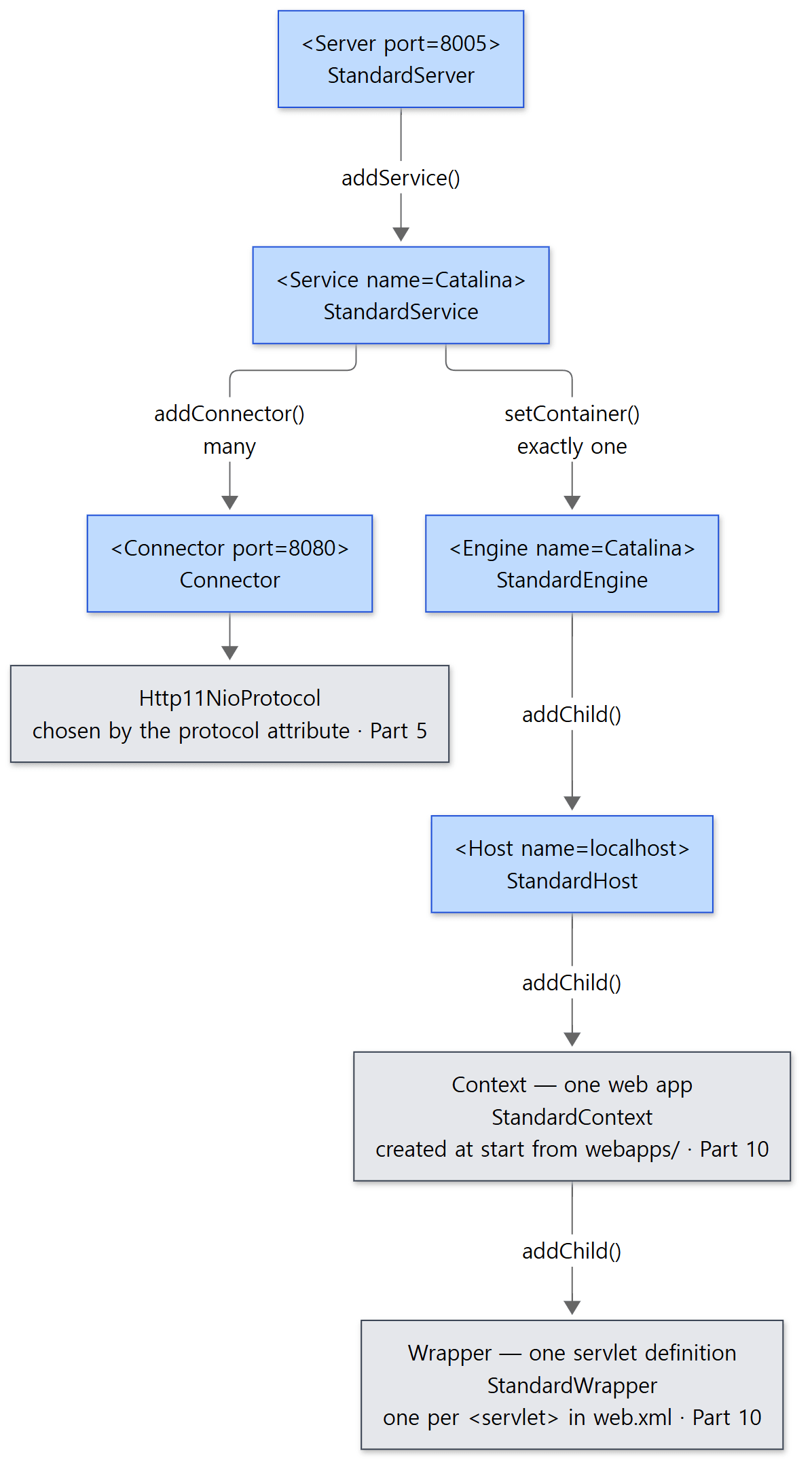 Blue boxes are elements written in server.xml; gray boxes are created outside server.xml.
Example 1: the tree right after reading server.xml, and right after starting
To check that this tree really appears, I read the default server.xml with the same Catalina class that catalina.sh uses and printed the tree. load() reads server.xml and goes as far as init(); start() starts the server. Only two web apps, ROOT and docs, were deployed.
All examples in this post were run in a Docker container (Eclipse Temurin JDK 21) with Tomcat 12.0.0-M1-dev built unchanged from the reference commit (17aa1769b0). Everything is in a single script, ex/u02-architecture/run.sh, and the ### lines in the output are headings the script prints.
// Example written for this post (not part of Tomcat's source)
// Reads conf/server.xml with the same Catalina class catalina.sh uses to build the object tree,
// and prints the tree before start (right after load) and after start (right after start).
// ... (imports omitted)
public class ServerXmlTree {

    public static void main(String[] args) throws Exception {
        Catalina catalina = new Catalina();
        catalina.setAwait(false);          // don't wait on the shutdown port
        catalina.setUseShutdownHook(false);

        catalina.load();                   // server.xml -> objects, then init()
        System.out.println("=== after load() (server.xml parsed, not started) ===");
        print(catalina.getServer(), false);

        catalina.start();                  // start(): this is when webapps/ gets deployed
        System.out.println("=== after start() ===");
        print(catalina.getServer(), true);

        catalina.stop();
    }
    // ... print(): prints Server → Service → Connector·Engine → Host → Context → Wrapper in order
}
### 1. server.xml -> objects (Catalina.load / start)
=== after load() (server.xml parsed, not started) ===
Server   org.apache.catalina.core.StandardServer port=8005
  Service   org.apache.catalina.core.StandardService name=Catalina
    Connector   org.apache.catalina.connector.Connector port=8080
      protocolHandler = org.apache.coyote.http11.Http11NioProtocol
      adapter         = org.apache.catalina.connector.CoyoteAdapter
    Engine   org.apache.catalina.core.StandardEngine name=Catalina parent=null
      Host   org.apache.catalina.core.StandardHost name=localhost contexts=0
=== after start() ===
Server   org.apache.catalina.core.StandardServer port=8005
  Service   org.apache.catalina.core.StandardService name=Catalina
    Connector   org.apache.catalina.connector.Connector port=8080
      protocolHandler = org.apache.coyote.http11.Http11NioProtocol
      adapter         = org.apache.catalina.connector.CoyoteAdapter
    Engine   org.apache.catalina.core.StandardEngine name=Catalina parent=null
      Host   org.apache.catalina.core.StandardHost name=localhost contexts=2
        Context   org.apache.catalina.core.StandardContext path='' wrappers=2
          Wrapper   org.apache.catalina.core.StandardWrapper name=default
          Wrapper   org.apache.catalina.core.StandardWrapper name=jsp
        Context   org.apache.catalina.core.StandardContext path='/docs' wrappers=2
- The default classes from the table appear exactly.
<Connector protocol="HTTP/1.1">becameHttp11NioProtocol. - Right after
load(), aCoyoteAdapteris already plugged into the connector, because the connector'sinit()plugs it in (Section 4). - Right after
load(), the Host has zero children (Contexts); afterstart(), it has two.
Easy to confuse: server.xml has neither Context nor Wrapper
The default server.xml has no <Context>. Contexts are created when the Host starts: the HostConfig listener attached to the Host scans the webapps/ folder. On a START_EVENT, HostConfig calls start() (HostConfig.java line 286), which calls deployApps() (line 1665). That is why Example 1 showed zero Contexts right after load(). You can write a <Context> in server.xml (that is why ContextRuleSet exists), but usually contexts come from folders like this or from conf/Catalina/localhost/*.xml.
Wrappers are created one level further in. When a Context starts, ContextConfig reads web.xml, creates one Wrapper per <servlet>, and attaches it to the Context.
        for (ServletDef servlet : webxml.getServlets().values()) {
            Wrapper wrapper = context.createWrapper();
            // ...
            context.addChild(wrapper);
java/org/apache/catalina/startup/ContextConfig.java lines 1544–1592
The ROOT web app's WEB-INF/web.xml defines no <servlet> at all, yet it has two Wrappers (default and jsp). That is because both are defined in conf/web.xml, which is merged into every web app. How web.xml files are merged is covered in Part 10.
Easy to confuse: className lets you swap the class
Thanks to the third argument of addObjectCreate, "className", writing <Host className="com.example.MyHost"> creates some other class instead of StandardHost. That is why the source always handles components through interfaces such as Host and Engine; the classes starting with Standard are just "the default implementation." <Realm className=…> and <Valve className=…> in server.xml must spell out a class name because, under the same rule, their default class is null ("must be specified") (EngineRuleSet.java lines 76–77).
2. Server and Service — two boxes that are not containers
The comment at the top of server.xml warns us first:
A "Server" is not itself a "Container", so you may not define subcomponents such as "Valves" at this level.
(conf/server.xml lines 18–19) The comment above Service (lines 51–52) says the same. Server and Service do not implement Container; they implement only Lifecycle (public interface Server extends Lifecycle, Server.java line 38). So they have no pipeline and no valves. They are not boxes that process requests; they are boxes that hold components together.
Server: one Tomcat
The description of the Server interface says it represents "the entire Catalina servlet container," holds one or more Services, and listens on the port given by the port attribute for a shutdown command (Server.java lines 25–37). The default of 8005 lives in a StandardServer field (private int port = 8005;, StandardServer.java line 119). The implementation, StandardServer, holds exactly that.
    /**
     * The set of Services associated with this Server.
     */
    private Service[] services = new Service[0];
    // ...
    /**
     * The shutdown command string we are looking for.
     */
    private String shutdown = "SHUTDOWN";
java/org/apache/catalina/core/StandardServer.java lines 136–148
This is the mechanism that shuts Tomcat down when catalina.sh stop sends the word SHUTDOWN to port 8005. How StandardServer.await() guards that port is covered in Part 3. The <GlobalNamingResources> (global JNDI resources) in server.xml also attach to the Server (Section 5).
Service: many connectors + one engine
The description of Service says in one sentence why this box exists.
A Service is a group of one or more Connectors that share a single Container to process their incoming requests. This arrangement allows, for example, a non-SSL and SSL connector to share the same population of web apps.
(Service.java lines 22–29) For two connectors, 8080 (HTTP) and 8443 (HTTPS), to serve the same web apps, they must share one engine. The Service is what bundles "two or more and one" together. StandardService's fields have exactly that shape.
    /**
     * The set of Connectors associated with this Service.
     */
    protected Connector[] connectors = new Connector[0];
    // ...
    /**
     * The list of executors held by the service.
     */
    protected final ArrayList<Executor> executors = new ArrayList<>();
    // ...
    private Engine engine = null;
    // ...
    /**
     * Mapper.
     */
    protected final Mapper mapper = new Mapper();


    /**
     * Mapper listener.
     */
    protected final MapperListener mapperListener = new MapperListener(this);
java/org/apache/catalina/core/StandardService.java lines 84–109
| Field | What it is | Details |
|---|---|---|
connectors |
an array — there can be many connectors | Section 4, Part 5 |
executors |
<Executor> in server.xml (a thread pool connectors can share) |
Part 5 |
engine |
a single field — there is only one engine | Section 3 |
mapper, mapperListener |
the table that picks Host, Context and Wrapper from the URL, and the listener that keeps that table in sync with the container tree | Part 7 |
It helps to remember that the Mapper lives in the Service, not in the Engine. When a connector receives a request, it uses "my Service's Mapper" to pick the destination and hands the request to "my Service's Engine" (CoyoteAdapter in Section 4).
Easy to confuse: the Engine's parent is not the Service
The Service gets its Engine through setContainer(engine), and at that moment tells the Engine about itself with engine.setService(this) (StandardService.java lines 150–158). But this is not the parent–child relationship that getParent() follows. Service is not a Container, so Container.getParent() cannot return it. In fact, an Engine's getParent() is always null (parent=null in Example 1, and Section 3). To find the Service from a container, you climb to the Engine and call getService(). Container has a helper that does exactly that.
    static Service getService(Container container) {
        while (container != null && !(container instanceof Engine)) {
            container = container.getParent();
        }
        if (container == null) {
            return null;
        }
        return ((Engine) container).getService();
    }
java/org/apache/catalina/Container.java lines 307–315
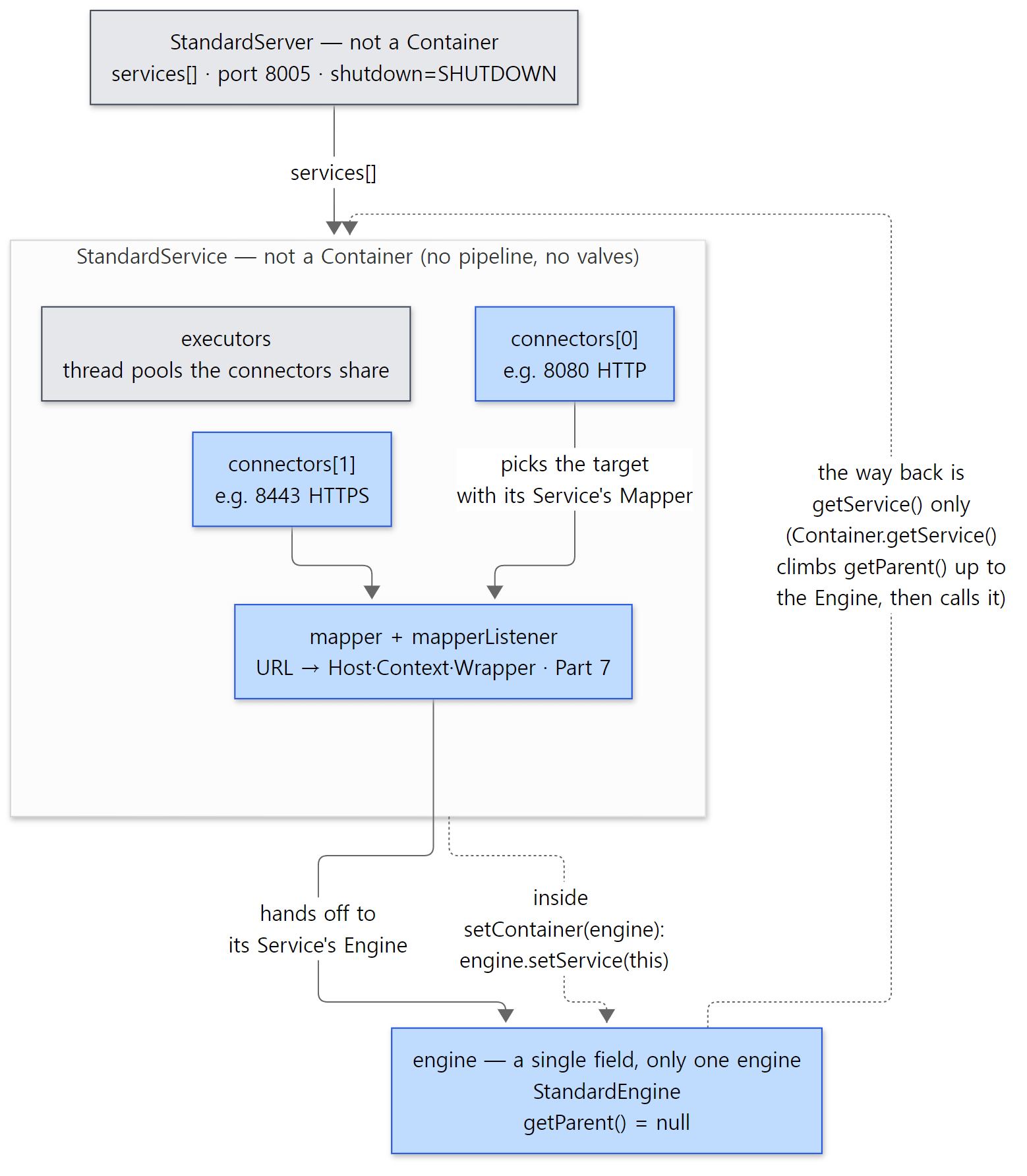 The two field lists above and
Container.getService() in one picture. Solid arrows are the path a request takes; dotted arrows are how the Service and the Engine know each other. 8080 and 8443 are the example from the Service javadoc.
3. The four containers: Engine, Host, Context, Wrapper
The four levels, as the Container interface describes them
The description of the Container interface lists the four levels itself.
- Engine - Representation of the entire Catalina servlet engine, most likely containing one or more subcontainers that are either Host or Context implementations, or other custom groups.
- Host - Representation of a virtual host containing a number of Contexts.
- Context - Representation of a single ServletContext, which will typically contain one or more Wrappers for the supported servlets.
- Wrapper - Representation of an individual servlet definition.
(Container.java lines 36–41) Linking them to the configuration files, here is a summary.
| Level | Default implementation | What one of them represents | Where it comes from | Children |
|---|---|---|---|---|
| Engine | StandardEngine |
the whole servlet engine; one per Service | server.xml <Engine> |
Host |
| Host | StandardHost |
one virtual host (localhost, www.example.com) |
server.xml <Host> |
Context |
| Context | StandardContext |
one web app = one ServletContext (/, /docs) |
webapps/, conf/Catalina/localhost/*.xml, (rarely) server.xml |
Wrapper |
| Wrapper | StandardWrapper |
one servlet definition (one <servlet> in web.xml) |
web.xml, @WebServlet |
none |
A Host is the same idea as httpd's <VirtualHost>. In httpd, each virtual host got its own server_rec (httpd Part 3). In Tomcat it is one Host object.
The shared skeleton: parent, children, pipeline
Of the methods Container requires from all four levels, these are the ones we need for the map.
public interface Container extends Lifecycle {
    // ...
    Pipeline getPipeline();
    // ...
    String getName();
    // ...
    Container getParent();
    // ...
    void setParent(Container container);
    // ...
    void addChild(Container child);
    // ...
    Container findChild(String name);
    // ...
    Container[] findChildren();
java/org/apache/catalina/Container.java lines 64–377
One parent (getParent), many children found by name (findChild), and one pipeline (getPipeline). Because all four levels share this shape, the request-processing code also has a single shape: "run my pipeline, and at the end call my child's pipeline" (Section 6).
The class that actually implements this shared part is the abstract class ContainerBase. All four Standard… classes extend it. Here is addChild(), which attaches a child.
    @Override
    public void addChild(Container child) {
        // ...
        childrenLock.writeLock().lock();
        try {
            if (children.get(child.getName()) != null) {
                throw new IllegalArgumentException(sm.getString("containerBase.child.notUnique", child.getName()));
            }
            child.setParent(this); // May throw IAE
            children.put(child.getName(), child);
        } finally {
            childrenLock.writeLock().unlock();
        }

        fireContainerEvent(ADD_CHILD_EVENT, child);

        // Start child
        // Don't do this inside sync block - start can be a slow process and
        // locking the children object can cause problems elsewhere
        try {
            if ((getState().isAvailable() || LifecycleState.STARTING_PREP.equals(getState())) && startChildren) {
                child.start();
            }
        } catch (LifecycleException e) {
            throw new IllegalStateException(sm.getString("containerBase.child.start"), e);
        }
    }
java/org/apache/catalina/core/ContainerBase.java lines 559–588
- Children go into a
HashMapkeyed by name (children, line 135). A duplicate name is rejected. A Host's name islocalhost, a Context's name is its path (/docs), a Wrapper's name is the servlet name. - It calls the child's
setParent(this), laying the road back up. - If the parent is already running, the child is
start()ed immediately. This line is why a WAR you drop in while Tomcat is running comes to life right away (Part 10).
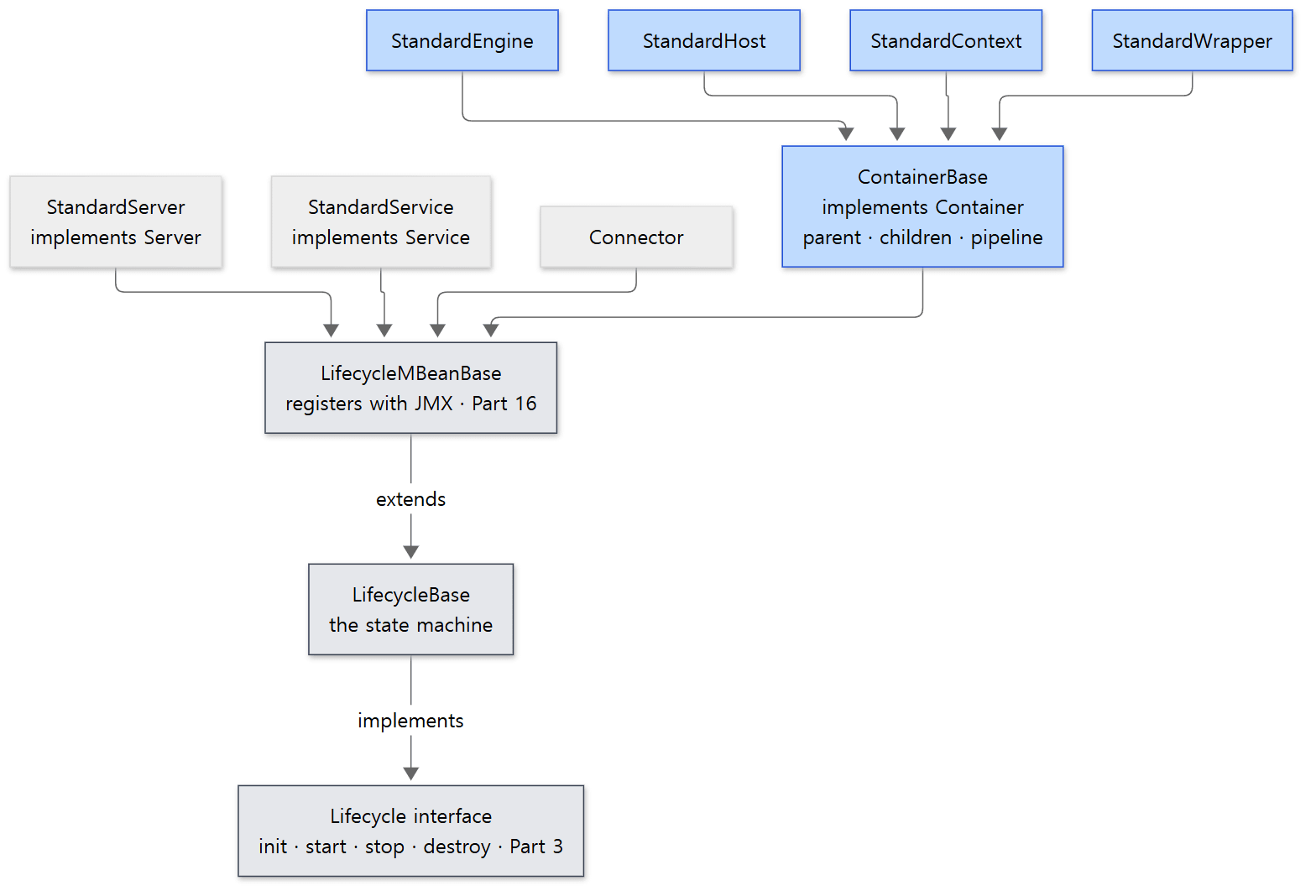 Blue boxes are the four containers and their common parent. Server, Service and Connector share the same lifecycle root but are not
Containers.
The relationships in the picture are exactly the class declarations in the source: public abstract class ContainerBase extends LifecycleMBeanBase implements Container (ContainerBase.java line 119), public class StandardEngine extends ContainerBase implements Engine (StandardEngine.java line 49), public final class StandardServer extends LifecycleMBeanBase implements Server (StandardServer.java line 67), and public class Connector extends LifecycleMBeanBase (Connector.java line 56). The "MBean" in LifecycleMBeanBase means the object registers itself with JMX, Java's remote-management facility (Part 16).
Who enforces the order of the levels?
The Container interface itself does not enforce "only Hosts under an Engine." Each implementation's addChild() and setParent() do.
    public void addChild(Container child) {

        if (!(child instanceof Host)) {
            throw new IllegalArgumentException(sm.getString("standardEngine.notHost"));
        }
        super.addChild(child);

    }
    // ...
    @Override
    public void setParent(Container container) {

        throw new IllegalArgumentException(sm.getString("standardEngine.notParent"));

    }
java/org/apache/catalina/core/StandardEngine.java lines 159–180
| Check | Where | If violated |
|---|---|---|
| An Engine's children must be Hosts | StandardEngine.addChild() line 161 |
IllegalArgumentException |
| An Engine cannot have a parent | StandardEngine.setParent() line 178 |
IllegalArgumentException |
| A Host's children must be Contexts | StandardHost.addChild() line 670 |
IllegalArgumentException |
| A Context's children must be Wrappers | StandardContext.addChild() line 2830 |
IllegalArgumentException |
| A Wrapper's parent must be a Context | StandardWrapper.setParent() line 337 |
IllegalArgumentException |
| A Wrapper cannot have children | StandardWrapper.addChild() line 525 |
IllegalStateException |
Example 2: building the tree with embedded Tomcat and climbing getParent()
I built the tree with embedded Tomcat (org.apache.catalina.startup.Tomcat) — the way Spring Boot does it, starting Tomcat from code without a server.xml. The Tomcat class creates a StandardServer and a StandardService the first time getServer() is called (Tomcat.java lines 626–647), and getEngine() and getHost() create and attach a StandardEngine and StandardHost when needed (lines 591–619). Code does what Digester did with server.xml. We tour the whole embedded API in Part 16.
        Tomcat tomcat = new Tomcat();
        tomcat.setBaseDir("/tmp/emb");
        tomcat.setPort(8080);
        tomcat.getConnector();                           // makes it create the connector

        Context ctx = tomcat.addContext("/app", null);   // one Context under the Host
        Wrapper wrapper = Tomcat.addServlet(ctx, "stack", new StackServlet()); // one Wrapper under the Context
        ctx.addServletMapping("/stack", "stack");    // 11.0.x also had addServletMappingDecoded

        System.out.println("=== 1. getParent() chain from the Wrapper ===");
        Container c = wrapper;
        while (c != null) {
            System.out.println(c.getClass().getSimpleName() + "  name='" + c.getName() + "'");
            c = c.getParent();
        }
        Engine engine = tomcat.getEngine();
        System.out.println("Engine.getService() = " + engine.getService().getClass().getSimpleName()
                + "  name='" + engine.getService().getName() + "'");
        System.out.println("Service.getServer() = " + engine.getService().getServer().getClass().getSimpleName());

        System.out.println("=== 2. adding a child in the wrong place ===");
        try {
            engine.addChild(new StandardContext());
        } catch (RuntimeException e) {
            System.out.println("engine.addChild(Context)  -> " + e.getClass().getSimpleName() + ": " + e.getMessage());
        }
        // ... wrapper.addChild(new StandardContext()) and engine.setParent(tomcat.getHost()) look the same
This is the first half of main() in ex/u02-architecture/EmbeddedTree.java.
### 2. embedded Tomcat
=== 1. getParent() chain from the Wrapper ===
ExistingStandardWrapper  name='stack'
StandardContext  name='/app'
StandardHost  name='localhost'
StandardEngine  name='Tomcat'
Engine.getService() = StandardService  name='Tomcat'
Service.getServer() = StandardServer
=== 2. adding a child in the wrong place ===
engine.addChild(Context)  -> IllegalArgumentException: Child of an Engine must be a Host
wrapper.addChild(Context) -> IllegalStateException: Wrapper container may not have child containers
engine.setParent(Host)    -> IllegalArgumentException: Engine cannot have a parent Container
- Following
getParent()from the Wrapper goes Context → Host → Engine and stops there (the Engine's parent isnull). You reach the Service and the Server throughgetService()andgetServer(). - The bottom box's class is
ExistingStandardWrapper, notStandardWrapper. When you pass a servlet object toTomcat.addServlet(), it uses this subclass ofStandardWrapperthat wraps an already-created object (Tomcat.java lines 399–406). Servlets registered through web.xml are plainStandardWrappers, as in Example 1. - Putting a child in the wrong place throws exactly the exceptions in the table.
Easy to confuse
Wrapper's description and its implementation disagree about the exception. The interface says that adding a child to a Wrapper means "theaddChild()method should throw anIllegalArgumentException" (Wrapper.java lines 37–38), butStandardWrapperthrowsIllegalStateException(StandardWrapper.java lines 523–527). Example 2's output also showsIllegalStateException. If you write code that catches it, go by the implementation.- A Wrapper is not the servlet object but the servlet's "definition." It holds the servlet class name, init parameters and
load-on-startup, and when a request comes it hands out the servlet object throughallocate()(Wrapper.java line 197). When the servlet object is created andinit()is called is covered in Part 9. - Most checks live on the parent's side.
StandardHostdoes not overridesetParent(), so the Host itself does not stop you from attaching it somewhere other than an Engine. The rule "a Host goes under an Engine" is enforced byStandardEngine.addChild(). The Wrapper is the exception: it also checks on its own side (setParent()) that its parent is a Context.
4. Catalina and Coyote — why they are split, and how the Adapter joins them
What each one does
They live in the same Tomcat, but their jobs differ.
- Coyote (
org.apache.coyote,tomcat-coyote.jar) deals with bytes. It accepts sockets (Part 5), reads the request line and headers to fill an object calledorg.apache.coyote.Request(Part 6), and writes the response out as bytes. Each protocol — HTTP/1.1, AJP, HTTP/2 — has its own implementation. - Catalina (
org.apache.catalina,catalina.jar) deals with the servlet specification. It builds theHttpServletRequest, picks which web app and which servlet, and calls the servlet through valves and filters.
The seam between them is server.xml's <Connector>. Connector is a Catalina class (org.apache.catalina.connector), but its constructor creates and holds one Coyote protocol handler (ProtocolHandler).
    public Connector(String protocol) {
        configuredProtocol = protocol;
        ProtocolHandler p = null;
        Exception ex = null;
        try {
            p = ProtocolHandler.create(protocol);
        } catch (Exception e) {
            ex = e;
        }
        protocolHandlerCreationException = ex;
        if (p != null) {
            protocolHandler = p;
            protocolHandlerClassName = protocolHandler.getClass().getName();
        } else {
            protocolHandler = null;
            protocolHandlerClassName = protocol;
        }
        // ...
    }
java/org/apache/catalina/connector/Connector.java lines 101–120
The place that turns the text of the protocol attribute into a class is ProtocolHandler.create(), on the Coyote side.
    static ProtocolHandler create(String protocol)
            throws ClassNotFoundException, InstantiationException, IllegalAccessException, IllegalArgumentException,
            InvocationTargetException, NoSuchMethodException, SecurityException {
        if (protocol == null || "HTTP/1.1".equals(protocol) ||
                org.apache.coyote.http11.Http11NioProtocol.class.getName().equals(protocol)) {
            return new org.apache.coyote.http11.Http11NioProtocol();
        } else if ("AJP/1.3".equals(protocol) ||
                org.apache.coyote.ajp.AjpNioProtocol.class.getName().equals(protocol)) {
            return new org.apache.coyote.ajp.AjpNioProtocol();
        } else {
            // Instantiate protocol handler
            Class<?> clazz = Class.forName(protocol);
            return (ProtocolHandler) clazz.getConstructor().newInstance();
        }
    }
java/org/apache/coyote/ProtocolHandler.java lines 250–264
"HTTP/1.1" (or nothing) gives the NIO-based Http11NioProtocol (NIO is Java's non-blocking I/O API), "AJP/1.3" gives AjpNioProtocol (AJP is a binary protocol a front-end web server such as httpd uses to pass requests to Tomcat), and anything else is treated as a class name and created by reflection (the Java feature that finds a class from its name as a string and creates an object of it). This method looks the same on the 11.0.x branch. Http11NioProtocol's constructor in turn creates the endpoint that handles sockets, with new NioEndpoint() (Http11NioProtocol.java lines 36–38). The endpoint's threads are the subject of Part 5.
One bridge: Adapter
Once Coyote has read a whole request, whom does it hand it to? Coyote does not know Catalina's classes by name. Instead, it defines one interface in its own package.
/**
 * Adapter. This represents the entry point in a coyote-based servlet container.
 *
 * @see ProtocolHandler
 */
public interface Adapter {

    /**
     * Call the service method, and notify all listeners.
     *
     * @param req The request object
     * @param res The response object
     // ...
     */
    void service(Request req, Response res) throws Exception;
    // ...
java/org/apache/coyote/Adapter.java lines 21–44
The description calls it "the entry point in a coyote-based servlet container." The Request and Response that service() receives are the ones from org.apache.coyote — Coyote's own request objects, unrelated to the servlet specification. There are five more methods, such as asyncDispatch() for async processing and log() for logging (up to line 98).
The class that implements this interface is CoyoteAdapter on the Catalina side (public class CoyoteAdapter implements Adapter, CoyoteAdapter.java line 63), and it is plugged in by Connector.initInternal().
        // Initialize adapter
        adapter = new CoyoteAdapter(this);
        protocolHandler.setAdapter(adapter);
java/org/apache/catalina/connector/Connector.java lines 1300–1302
That is why Example 1 already showed adapter = …CoyoteAdapter right after load(): load() goes as far as init(). From then on, once the HTTP/1.1 processor has read the request headers, it calls getAdapter().service(request, response) (Http11Processor.java line 404). All Coyote knows is one interface, Adapter; what actually runs is Catalina's CoyoteAdapter.
The other side of the bridge: CoyoteAdapter.service()
Let's look at just the beginning of what happens after the request crosses the bridge.
    public void service(org.apache.coyote.Request req, org.apache.coyote.Response res) throws Exception {

        Request request = (Request) req.getNote(ADAPTER_NOTES);
        Response response = (Response) res.getNote(ADAPTER_NOTES);

        if (request == null) {
            // Create objects
            request = connector.createRequest(req);
            response = connector.createResponse(res);

            // Link objects
            request.setResponse(response);
            response.setRequest(request);

            // Set as notes
            req.setNote(ADAPTER_NOTES, request);
            res.setNote(ADAPTER_NOTES, response);

        }
        // ...
        try {
            // Parse and set Catalina and configuration specific
            // request parameters
            postParseSuccess = postParseRequest(req, request, res, response);
            if (postParseSuccess) {
                // check valves if we support async
                request.setAsyncSupported(connector.getService().getContainer().getPipeline().isAsyncSupported());
                // Calling the container
                connector.getService().getContainer().getPipeline().getFirst().invoke(request, response);
            }
java/org/apache/catalina/connector/CoyoteAdapter.java lines 305–348
- It takes Catalina's request object from a note attached to Coyote's request (
req). If there is none, it creates one withconnector.createRequest()and attaches it as a note; the next request reuses the same object (recycling is covered in Part 7). postParseRequest()decodes and normalizes the URI, then uses the Service's Mapper from Section 2 to pick the Host, Context and Wrapper and write them on the request (connector.getService().getMapper().map(…)at CoyoteAdapter.java line 700). This is the subject of Part 7.- It calls the first valve in the pipeline of
connector.getService().getContainer()— my Service's Engine. From here on we are in the world of the four containers (Section 6).
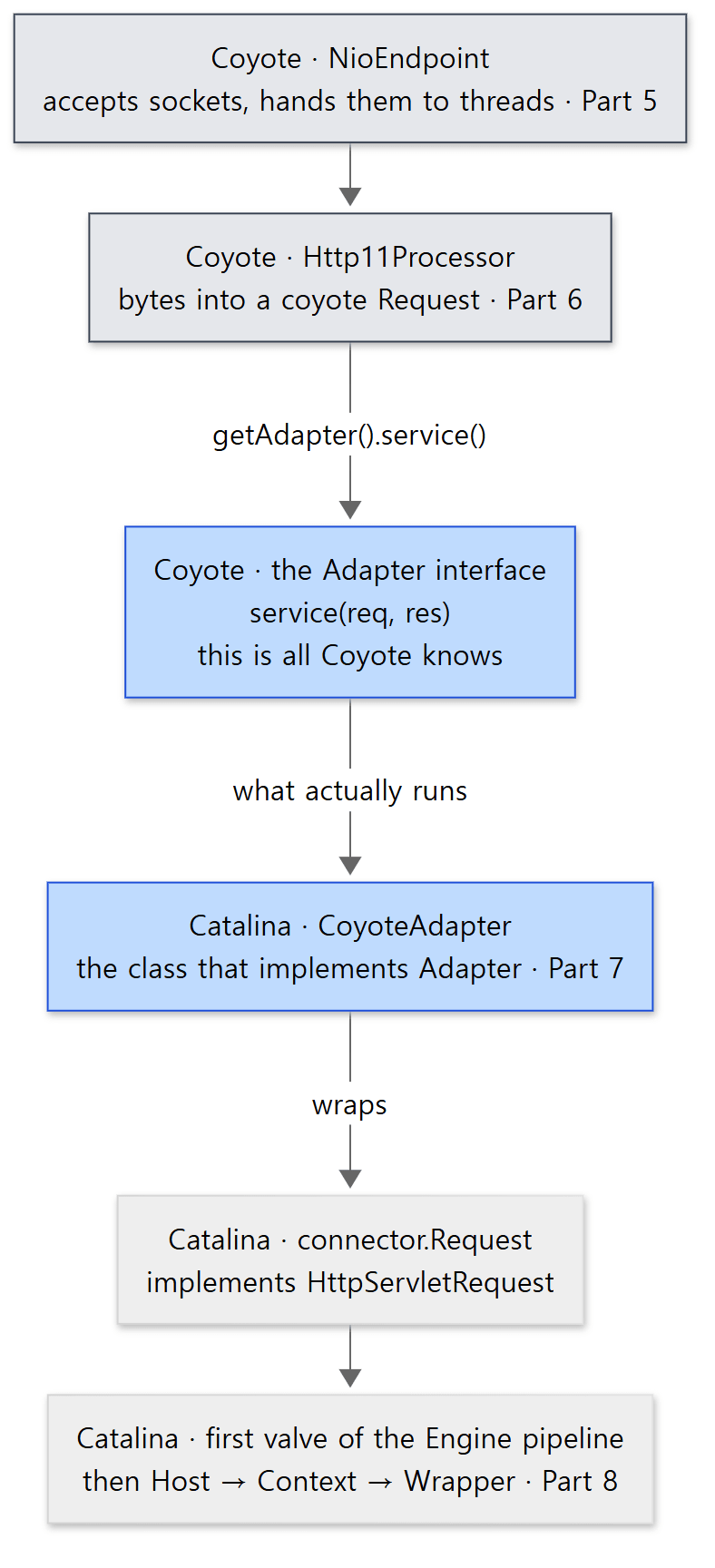 The two gray boxes and the first blue box at the top are Coyote; the bottom three are Catalina. They meet at a single method,
Adapter.service().
Example 3: counting the direction of dependencies
To check whether "Coyote doesn't know Catalina" is really true, I counted, in the reference commit's source inside the example container (/usr/src/tomcat/java), how many files in each package import another package.
for pair in coyote:catalina tomcat:catalina jasper:catalina el:catalina juli:catalina naming:catalina \
            catalina:coyote catalina:jasper catalina:naming; do
  from=${pair%%:*}; to=${pair##*:}
  n=$(grep -rl "^import org\.apache\.$to\." org/apache/$from --include=*.java | wc -l)
  printf '  org.apache.%-9s -> org.apache.%-9s %4d\n' "$from" "$to" "$n"
done
n=$(grep -rl "^import jakarta\.servlet\." org/apache/coyote --include=*.java | wc -l)
printf '  org.apache.%-9s -> %-20s %4d\n' coyote jakarta.servlet "$n"
### 0b. who imports whom (number of .java files with such an import, in /usr/src/tomcat/java)
  org.apache.coyote    -> org.apache.catalina     0
  org.apache.tomcat    -> org.apache.catalina     0
  org.apache.jasper    -> org.apache.catalina     0
  org.apache.el        -> org.apache.catalina     0
  org.apache.juli      -> org.apache.catalina     0
  org.apache.naming    -> org.apache.catalina     0
  org.apache.catalina  -> org.apache.coyote      24
  org.apache.catalina  -> org.apache.jasper       0
  org.apache.catalina  -> org.apache.naming       6
  org.apache.coyote    -> jakarta.servlet        20
The arrows point one way only. Catalina uses Coyote (24 files), but neither Coyote nor the shared toolbox org.apache.tomcat imports Catalina. The only road from Coyote to Catalina is the one object plugged in backwards through the Adapter interface. On the 11.0.x branch, too, no file under coyote or jasper imports org.apache.catalina.
You can see the payoff of this split in the source. A new protocol only needs one more ProtocolHandler implementation on the Coyote side (the ajp/, http11/ and http2/ folders sit side by side), and Catalina receives a request with one call to Adapter.service() no matter which protocol it came in on. Conversely, changing Catalina's valves or sessions never requires another look at Coyote. The historical reasons Tomcat was originally split this way cannot be confirmed from the source, so I leave them out.
We saw the same idea in Spring. WebFlux's HttpHandler does not know any particular server; an adapter, one per server, wraps the server's request in Spring types and passes it on (Spring Part 24). That is the same spot CoyoteAdapter occupies when it wraps a Coyote request as a servlet request. In httpd, the MPM that accepts connections and the core and modules that process requests were joined by hooks (httpd Part 3).
Easy to confuse: there are two Requests
When you meet a class called Request in the source, check the package first.
| Class | Declaration | What it is |
|---|---|---|
org.apache.coyote.Request |
public final class Request (coyote/Request.java line 55) |
the raw request Coyote read from the bytes; it does not implement any servlet interface |
org.apache.catalina.connector.Request |
public class Request implements HttpServletRequest (connector/Request.java line 129) |
the servlet request that wraps the one above; the Host, Context and Wrapper chosen by the Mapper are written here too |
In CoyoteAdapter.service(), the parameter req is the first and the local variable request is the second. What actually reaches the servlet is a RequestFacade that wraps this one more time; why it is wrapped again is covered in Part 7. Response comes in the same two flavors.
Easy to confuse: Coyote does use a bit of the servlet API
As the last line of the output shows, 20 files in Coyote do import jakarta.servlet. What they use is a handful of interfaces such as ReadListener and WriteListener (non-blocking I/O), HttpUpgradeHandler and WebConnection (protocol upgrade), and ServletConnection. Async I/O and upgrades in the servlet specification have to reach deep into the connector (Part 12, Part 15). "Coyote doesn't know Catalina" is true, but "Coyote doesn't know the servlet API" is not quite.
Easy to confuse: the Mapper, not the Engine, picks the Host
The comment above <Engine> in server.xml says the Engine "analyzes the HTTP headers included with the request, and passes them on to the appropriate Host" (lines 106–109). As a description of behavior that is fine, but in the source the job of choosing the Host was already done by the Mapper in step 2. The Engine's basic valve just takes the Host written on the request.
    public void invoke(Request request, Response response) throws IOException, ServletException {

        // Select the Host to be used for this Request
        Host host = request.getHost();
        if (host == null) {
            // No Host found for this request (unknown server name or no default host defined)
            // Don't overwrite an existing error
            if (!response.isError()) {
                response.sendError(404);
            }
            return;
        }
        if (request.isAsyncSupported()) {
            request.setAsyncSupported(host.getPipeline().isAsyncSupported());
        }

        // Ask this Host to process this request
        host.getPipeline().getFirst().invoke(request, response);
    }
java/org/apache/catalina/core/StandardEngineValve.java lines 54–72
request.getHost() is a one-line method that returns mappingData.host, filled in by the Mapper (connector/Request.java lines 675–677). The Host valve taking the Context, and the Context valve taking the Wrapper, work the same way (Section 6).
5. The jakarta API and its implementation, and where Jasper, EL, JULI and Naming sit
The repository's java/ folder
java/ splits into two big parts. java/jakarta/ is the specification (the interfaces and base classes of Jakarta EE specifications such as Servlet, EL and WebSocket), and java/org/apache/ is Tomcat's implementation. I counted the .java files at the reference commit myself.
| Folder | .java files |
What | Details |
|---|---|---|---|
jakarta/servlet |
117 | Servlet specification (HttpServlet, Filter, ServletContext …) |
|
jakarta/el |
41 | EL specification (ExpressionFactory …) |
|
jakarta/websocket |
33 | WebSocket specification | Part 15 |
org/apache/catalina |
611 | the servlet container | most of this series |
org/apache/coyote |
92 | the connector | Parts 5 and 6 |
org/apache/tomcat |
577 | shared tools (util/net, util/buf, util/threads, util/digester …) and the WebSocket implementation |
several parts |
org/apache/jasper |
109 | the JSP engine | Part 13 |
org/apache/el |
82 | the EL implementation | Part 13 |
org/apache/naming |
32 | the JNDI implementation | this post |
org/apache/juli |
14 | logging | Part 16 |
Under jakarta/ there are also smaller folders such as annotation, security, transaction and mail. The full folder map is in Part 1.
Example 4: what's inside the built jars?
In an installation's lib/ and bin/, these packages are split across jars. In the example container's $CATALINA_HOME, I printed the packages inside each jar (cut at three levels so the output stays short).
### 0. jars in $CATALINA_HOME/lib and bin: top-level packages inside each
catalina.jar       org/apache/catalina org/apache/naming
tomcat-coyote.jar  org/apache/coyote org/apache/tomcat
tomcat-util.jar    org/apache/tomcat
servlet-api.jar    jakarta/servlet jakarta/servlet/annotation jakarta/servlet/descriptor jakarta/servlet/http
jasper.jar         org/apache/jasper
jasper-el.jar      org/apache/el
el-api.jar         jakarta/el
tomcat-juli.jar    org/apache/juli
org/apache/tomcat/util/* is split across jars:
  tomcat-coyote.jar  bcel http log modeler net
  tomcat-util.jar    buf collections compat concurrent file json res security threads
  tomcat-util-scan.jar descriptor digester scan
where is org/apache/naming ?
  catalina.jar: 34 classes
- The specification (
jakarta.*) and the implementation are in different jars. That is why you only needservlet-api.jaron the classpath to compile a web app (as in the examples'javac -cp $CATALINA_HOME/lib/servlet-api.jar). - Only
tomcat-juli.jaris inbin/rather thanlib/. Whencatalina.shstarts the JVM, it putsbin/bootstrap.jarand this jar on the classpath (bin/catalina.sh lines 214–230), because even the very first class to run,Bootstrap, logs through JULI (Bootstrap.java line 52). Which class loader loads the jars inlib/is covered in Part 4.
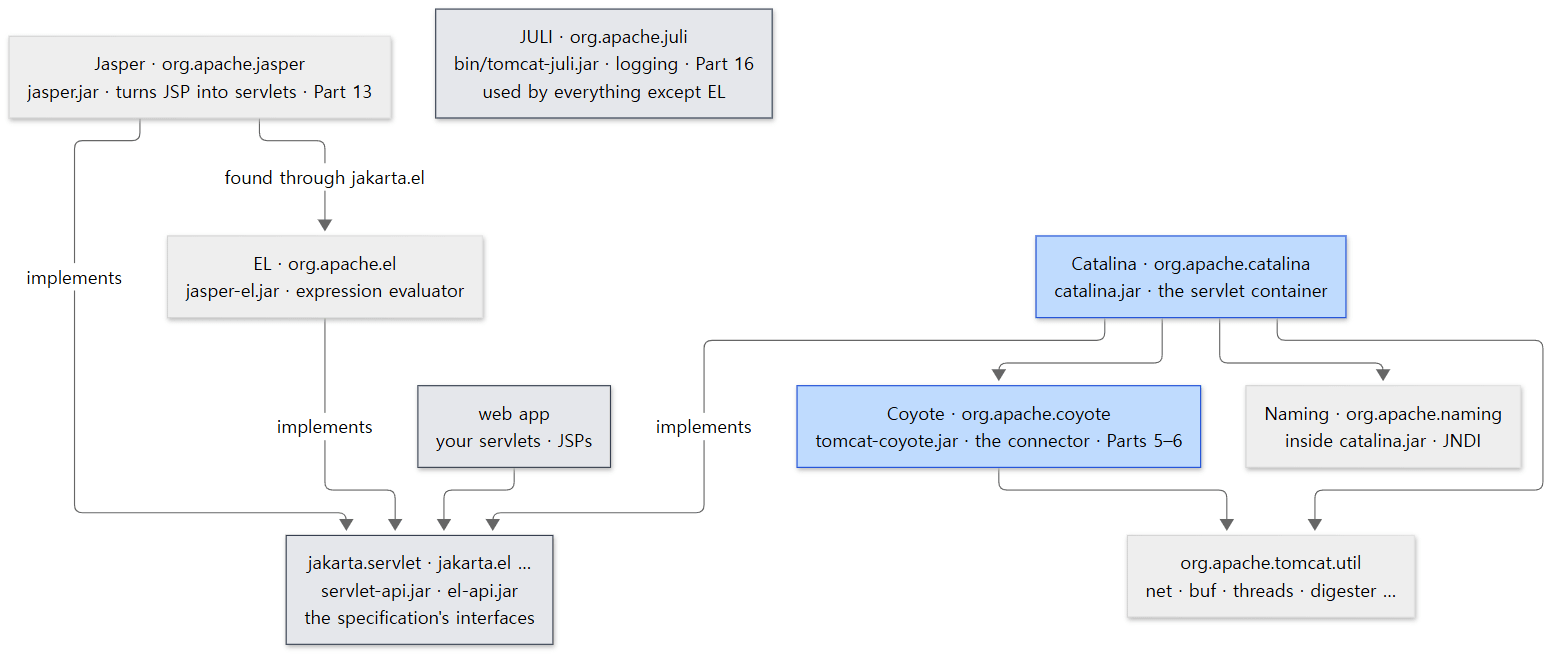 Arrows mean "uses" or "implements." No arrow points into Catalina (Example 3).
Jasper: "just a servlet" that turns JSP into servlets
Jasper is the JSP engine: it turns JSP files into Java servlet source, compiles them and runs them. Yet it is not wired into Catalina in any special way. It is simply registered as one servlet in conf/web.xml, which is merged into every web app.
    <servlet>
        <servlet-name>jsp</servlet-name>
        <servlet-class>org.apache.jasper.servlet.JspServlet</servlet-class>
        <!-- ... -->
        <load-on-startup>3</load-on-startup>
    </servlet>
Further down the same file, *.jsp and *.jspx are mapped to this servlet (lines 441–445). The Wrapper named jsp in the ROOT web app in Example 1 is this servlet. As Example 3's output shows, Catalina does not import org.apache.jasper; it knows the class name only as a string (JSP_SERVLET_CLASS = "org.apache.jasper.servlet.JspServlet", core/Constants.java line 43). So from the container's point of view, Jasper is just "a servlet inside one Wrapper," and Catalina's source never references Jasper's classes directly. How a JSP becomes a servlet is covered in Part 13.
EL: an implementation found by the specification's ExpressionFactory
EL (Expression Language) is the language that evaluates expressions like ${user.name} in a JSP. Jasper does not call the EL implementation class directly; it calls the specification's jakarta.el.ExpressionFactory.newInstance() (jasper/compiler/PageInfo.java line 77). That method's description lists the order in which it looks for an implementation.
- services API (META-INF/services/jakarta.el.ExpressionFactory)
- $JRE_HOME/lib/el.properties - key jakarta.el.ExpressionFactory
- jakarta.el.ExpressionFactory
- Platform default implementation - org.apache.el.ExpressionFactoryImpl
(java/jakarta/el/ExpressionFactory.java lines 61–68) Unless you configure something else, the last one — org.apache.el.ExpressionFactoryImpl, Tomcat's implementation in jasper-el.jar — is used. We get only a taste of EL in Part 13. It sounds like Spring's SpEL, but it is a different language (Spring Part 15).
JULI: the logging everyone uses
JULI is Tomcat's logging package (org.apache.juli). The repository's logging documentation describes JULI as a renamed fork of Apache Commons Logging that is hard-coded to use the JDK's java.util.logging (webapps/docs/logging.xml lines 38–40). Its key component is ClassLoaderLogManager, which extends the JDK's LogManager so that each class loader — that is, each web app — can have its own logging configuration (ClassLoaderLogManager.java lines 39–44). The private static final Log log = LogFactory.getLog(…) lines all over the source are JULI's. Container.getLogger() also returns a JULI Log (import org.apache.juli.logging.Log;, Container.java line 26 and line 104). At the reference commit, the number of files importing org.apache.juli was 205 in catalina, 73 in tomcat, 27 in coyote, 19 in jasper and 5 in naming, and none in el. We look at it in Part 16.
Naming: the JNDI implementation that provides java:comp/env
Naming (org.apache.naming) is Tomcat's implementation of JNDI, Java's "look up resources by name" API. It is what lets a web app find a database connection pool by name, as in new InitialContext().lookup("java:comp/env/jdbc/MyDB"). As Example 4 shows, it has no jar of its own; it lives inside catalina.jar.
server.xml's <GlobalNamingResources> becomes a NamingResourcesImpl object attached to the Server (Catalina.java lines 517–520), and StandardServer's constructor attaches a NamingContextListener to itself when naming is enabled.
        if (isUseNaming()) {
            namingContextListener = new NamingContextListener();
            addLifecycleListener(namingContextListener);
        } else {
            namingContextListener = null;
        }
java/org/apache/catalina/core/StandardServer.java lines 85–90
isUseNaming() looks at the system property catalina.useNaming (lines 851–859). Embedded Tomcat sets that property to "false" in getServer() (Tomcat.java line 632), which is why JNDI is off by default in embedded Tomcat. This series does not cover Naming separately.
Easy to confuse: org.apache.tomcat.util is spread over three jars
As Example 4 shows, util/net, which handles sockets, is in tomcat-coyote.jar; the thread pool in util/threads is in tomcat-util.jar; and util/digester, which reads server.xml, is in tomcat-util-scan.jar. There is one source folder, but the jars are split by purpose. When Part 1's picture or this post's picture draws "tomcat.util" as one box, it is going by the source folder.
6. One big picture: a request moving into the containers, outside to inside
Now let's string the pieces together. Having crossed the bridge in Section 4, a request moves into ever-inner boxes: Engine → Host → Context → Wrapper.
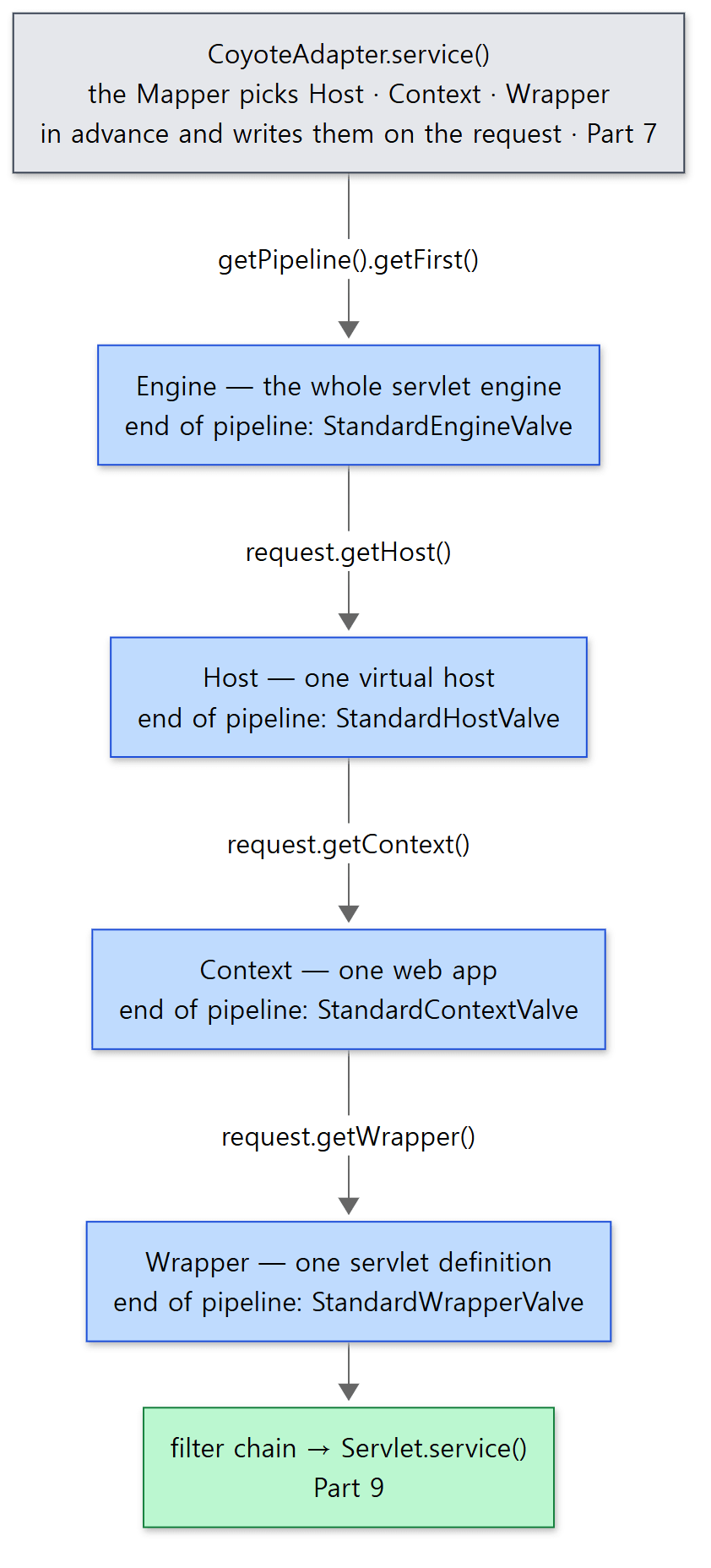 Each blue box is one container's pipeline, with its basic valve at the end. The method on each arrow is how that basic valve takes out the next container.
Example 5: printing the call stack inside a servlet
To see whether requests really arrive in this order, I put one servlet on the embedded Tomcat from Example 2 and printed the call stack inside doGet().
    // A servlet that prints its call stack
    public static class StackServlet extends HttpServlet {
        @Override
        protected void doGet(HttpServletRequest req, HttpServletResponse resp) throws IOException {
            StringBuilder sb = new StringBuilder();
            StackTraceElement[] frames = new Throwable().getStackTrace();
            for (int i = 0; i < frames.length; i++) {
                StackTraceElement f = frames[i];
                sb.append(String.format("#%-2d %s.%s%n", i, f.getClassName(), f.getMethodName()));
            }
            sb.append("thread = ").append(Thread.currentThread().getName()).append('\n');
            resp.setContentType("text/plain");
            resp.getWriter().print(sb);
        }
    }
=== 3. call stack inside the servlet (GET /app/stack) ===
#0  EmbeddedTree$StackServlet.doGet
#1  jakarta.servlet.http.HttpServlet.service
#2  jakarta.servlet.http.HttpServlet.service
#3  org.apache.catalina.core.ApplicationFilterChain.doFilter
#4  org.apache.catalina.core.StandardWrapperValve.invoke
#5  org.apache.catalina.core.StandardContextValve.invoke
#6  org.apache.catalina.authenticator.AuthenticatorBase.invoke
#7  org.apache.catalina.core.StandardHostValve.invoke
#8  org.apache.catalina.valves.ErrorReportValve.invoke
#9  org.apache.catalina.core.StandardEngineValve.invoke
#10 org.apache.catalina.connector.CoyoteAdapter.service
#11 org.apache.coyote.http11.Http11Processor.service
#12 org.apache.coyote.AbstractProcessorLight.process
#13 org.apache.coyote.AbstractProtocol$ConnectionHandler.process
#14 org.apache.tomcat.util.net.NioEndpoint$SocketProcessor.doRun
#15 org.apache.tomcat.util.net.SocketProcessorBase.run
#16 org.apache.tomcat.util.threads.ThreadPoolExecutor.runWorker
#17 org.apache.tomcat.util.threads.ThreadPoolExecutor$Worker.run
#18 org.apache.tomcat.util.threads.TaskThread$WrappingRunnable.run
#19 java.lang.Thread.run
thread = http-nio-8080-exec-1
The number at the end of the thread name (exec-1) varies from run to run (another run printed exec-2). Read from the bottom up, and this post's map lines up exactly.
| Frames | Layer | This post | Details |
|---|---|---|---|
| #14–#19 | tomcat.util endpoint and thread pool (http-nio-8080-exec-N) |
Section 4 | Part 5 |
| #11–#13 | Coyote: protocol handler and HTTP/1.1 processor | Section 4 | Part 6 |
| #10 | the bridge: CoyoteAdapter.service() |
Section 4 | Part 7 |
| #9 | the Engine's basic valve | Sections 3 and 6 | Part 8 |
| #7–#8 | the Host's pipeline: ErrorReportValve → basic valve |
Section 6 | Part 8 |
| #5–#6 | the Context's pipeline: authentication valve → basic valve | Section 6 | Part 8, Part 14 |
| #4 | the Wrapper's basic valve | Section 6 | Part 9 |
| #0–#3 | the filter chain and my servlet | Part 9 |
Easy to confuse: valves show up even though I added none
The example adds no <Valve> at all, yet ErrorReportValve (#8) and AuthenticatorBase (#6) appear in the stack. The first is the error-page valve that StandardHost attaches by default when it starts (startInternal()). The class it attaches is the errorReportValveClass property, whose default is "org.apache.catalina.valves.ErrorReportValve" (StandardHost.java line 146; it is attached at lines 786–800). The second comes from embedded Tomcat: it hangs a FixContextListener on every Context made by addContext() (Tomcat.java line 680), and that listener attaches a NonLoginAuthenticator to a Context that has no login configuration (lines 1133–1135). The stack prints the class name AuthenticatorBase because invoke() is defined in that superclass. When each valve gets attached is covered in Part 8 and Part 14.
Easy to confuse: example code for 11.0.x may not compile on main
When I first wrote Example 2, I mapped the servlet with ctx.addServletMappingDecoded("/stack", "stack") and got a cannot find symbol compile error. Context on the 11.0.x branch has addServletMappingDecoded(), but at the reference commit (main) only addServletMapping() remains (Context.java lines 914 and 928). You will run into this difference when moving embedded-Tomcat code written for Tomcat 11.0.x — like the example in this blog's Spring Part 25 — onto main.
What this post leaves out
Things left out to keep the map on one page:
- How Digester runs its rules (the rule stack,
SetNextRule).java/org/apache/tomcat/util/digester/— Part 3 - How
Bootstrapbuilds the class loaders and callsCatalinathrough reflection.java/org/apache/catalina/startup/Bootstrap.java— Part 3, Part 4 - The components attached to containers:
Loader(class loader),Manager(sessions),Realm(authentication),WebResourceRoot(files). The description inContainer.javalines 49–62 — Part 4, Part 11, Part 14 ContainerBase's background thread (backgroundProcess(), session expiry, reload checks).core/ContainerBase.java- Attributes such as the Engine's
defaultHost, the Host's<Alias>, andEngine.jvmRoute.core/StandardEngine.java,core/StandardHost.java - Clustering (
org/apache/catalina/ha,tribes) and the<Cluster>rules (Catalina.addClusterRuleSet(), lines 607–632) storeconfig(writing a running object tree back out as server.xml).java/org/apache/catalina/storeconfig/- The WebSocket implementation (
org/apache/tomcat/websocket) — Part 15
Summary
| Concept | One-line summary |
|---|---|
| server.xml → objects | Following the rules in Catalina.createStartDigester(), each element becomes an object (addObjectCreate), gets its attributes, and is attached to the enclosing object with addService, addConnector, setContainer or addChild |
| Server | One Tomcat (StandardServer). Holds an array of Services and the shutdown port (8005). Not a Container |
| Service | Many connectors + one Engine + a Mapper (StandardService). Not a Container |
| The four containers | Engine (whole engine) ⊃ Host (virtual host) ⊃ Context (web app) ⊃ Wrapper (servlet definition). All extend ContainerBase |
| Parent and child | ContainerBase.addChild() stores children by name and calls setParent(). Each addChild()/setParent() checks the order of levels. The Engine's parent is null |
| Where Contexts and Wrappers come from | Contexts from webapps/ via HostConfig; Wrappers from web.xml via ContextConfig. Both at start time |
| Coyote | The connector. Bytes ↔ org.apache.coyote.Request. The protocol attribute picks the ProtocolHandler. Does not import Catalina |
Adapter |
An interface defined by Coyote. Connector.initInternal() plugs in a CoyoteAdapter, and the processor calls it with getAdapter().service() |
CoyoteAdapter |
Wraps the coyote request as an HttpServletRequest, picks the destination with the Mapper, and calls the first valve of the Engine pipeline |
| jakarta vs. implementation | Specification in java/jakarta (servlet-api.jar etc.), implementation in java/org/apache (catalina.jar etc.) |
| Jasper and EL | One JspServlet registered in conf/web.xml. The EL implementation is found by ExpressionFactory.newInstance() |
| JULI and Naming | JULI is the logging in bin/tomcat-juli.jar. Naming is the JNDI implementation inside catalina.jar, off by default in embedded Tomcat |
What's next
Let's fold the map and start reading from the root that every box on it shares. The next post is about what happens after you type catalina.sh start: the road by which Bootstrap builds class loaders and calls Catalina, how Digester — whose rules we only glanced at here — actually reads server.xml, and the Lifecycle state machine through which init() and start() spread from Server down to Wrapper, parent to child, checked with an example that prints the order of events through a listener.
Digging into Tomcat's Source 3: Lifecycle and Startup — What Happens After catalina.sh start
The two series I finished earlier also spread out a big-picture map at this point. In httpd Part 3, httpd was a core that defines hooks with the MPM and modules hanging functions on them, and the three structs server_rec, conn_rec and request_rec pointed at each other. Tomcat does the same job with a parent–child tree of Java objects and interfaces: a virtual host is a Host object rather than a server_rec, and Coyote stands where the MPM accepted connections. Compare it with the map in Spring Part 2 and one more spot comes into view: Spring MVC's DispatcherServlet is, in this post's tree, the servlet inside one Wrapper. DispatcherServlet takes the #0 position in Example 5, and Spring's world unfolds from there (Spring Part 21). In Spring Part 20, we started embedded Tomcat ourselves and watched Spring's root context being stored in Tomcat's ServletContext — that is, in one Context.