What this post covers
This is the sixteenth and final post in the "Digging into Tomcat's Source" series. Part 15 followed an HTTP/1.1 connection as it upgrades and switches over to HTTP/2 or WebSocket. Until now we have followed the inside of a Tomcat started with catalina.sh start. This time we look at three things on the outside: how to start Tomcat inside your own program (embedded Tomcat), the window for looking into a running Tomcat from outside (JMX), and the logs that Tomcat and web apps leave behind (JULI). In "Wrapping up the series" at the end we look back over all 16 posts.
There are four questions to answer.
- Which server.xml elements does the single line
new Tomcat()build for you, and which does it not? - How do
addContext()andaddWebapp()differ? - Who registers names like
Catalina:type=Serverthat you see in tools such as jconsole, when, and what happens when you read one of their attributes? - Why do two web apps in the same JVM not mix up their settings even when they use loggers with the same name?
| Item | Details |
|---|---|
| Subject | Apache Tomcat |
| Version | 12.0.0-M1 (main) |
| Commit | 17aa1769b0 (2026-10-23) |
| Main classes read | startup/Tomcat, util/LifecycleMBeanBase, tomcat/util/modeler/Registry·BaseModelMBean, juli/ClassLoaderLogManager |
All line numbers in this post refer to this commit. How to get the source at that commit and build the Docker image for the examples is in Part 1.
Each of the three topics is big enough for a post of its own. This post only picks the main line that a first-time reader can follow — "where it starts and where it goes". What was left out is listed by name and location in "What this post leaves out" at the end.
Words to know first
Embedded Tomcat means not installing Tomcat separately and starting it with catalina.sh, but creating it as an object and starting it inside your own program's main(). You put Tomcat's jars on the class path like any library and call new Tomcat(). A web application built with Spring Boot starting from a single java -jar is said to work this way too (as noted at the end of section 2, I did not check this in Spring Boot's source). The Spring series on this blog also ran its web examples on embedded Tomcat 11.0.15 (tomcat-embed-core): Spring Part 20 put a root context on it, and Spring Part 25 a DispatcherServlet.
Server, Service, Engine, Host, Context, Wrapper are server.xml elements, and also the classes behind them. From the outside in: the whole server → the unit that ties connectors to an engine → the four containers that take requests (engine, virtual host, web app, a single servlet). We saw them in Part 2. The Lifecycle these objects go through — init() → start() → stop() → destroy() — was in Part 3.
JMX (Java Management Extensions) is the Java standard for looking at and operating on objects inside a running JVM from the outside. An object registered so it can be looked at is an MBean (Managed Bean), and every MBean has a name of the form domain:key=value,key=value (an ObjectName). The place that holds the MBeans is the MBeanServer, and tools that come with the JDK such as jconsole or VisualVM attach to it to read and change attributes and to invoke operations.
JULI is the logging module Tomcat uses, in java/org/apache/juli. It uses the JDK's java.util.logging (JUL for short) as is, but swaps its LogManager (the manager that creates loggers and reads the configuration file) for Tomcat's own. Three JUL words are enough: a Logger is a named place to write records to (Logger.getLogger("demo")), a Level is an importance such as FINE < INFO < WARNING, and a Handler is the object that actually writes records to a file or the console.
A class loader is the object that finds class files and loads them into the JVM. Tomcat gives each web app its own class loader (Part 4). And while a request is being processed, it switches the thread's context class loader (the "class loader that counts right now", one attached to every thread) to that web app's loader (StandardHostValve line 99). JULI in section 4 relies on this one fact.
1. Embedded Tomcat — server.xml in code
When you start Tomcat with catalina.sh start, Catalina reads server.xml with the Digester and builds the objects from StandardServer down to StandardContext (Part 3). Embedded Tomcat has no server.xml, so a single class, java/org/apache/catalina/startup/Tomcat.java, does that job with methods instead. The comment at the top of the class introduces it like this.
Minimal tomcat starter for embedding/unit tests.
(Tomcat.java lines 88–134) The comment goes on to say that the most common and stable way is server.xml-based, through Bootstrap, and that this class is for applications that embed Tomcat.
Built one piece at a time, when needed
What sets the Tomcat class apart is that it builds things lazily. new Tomcat() does almost nothing (lines 175–177); methods such as getServer(), getEngine() and getHost() create and plug in their object the first time they are called, if it does not exist yet. The outermost one, getServer(), looks like this.
    public Server getServer() {

        if (server != null) {
            return server;
        }

        System.setProperty("catalina.useNaming", "false");

        server = new StandardServer();

        initBaseDir();

        // Set configuration source
        ConfigFileLoader.setSource(new CatalinaBaseConfigurationSource(new File(basedir), null));

        server.setPort(-1);

        Service service = new StandardService();
        service.setName("Tomcat");
        server.addService(service);
        return server;
    }
java/org/apache/catalina/startup/Tomcat.java lines 626–647
This matches the two outer elements of server.xml, <Server port="8005" shutdown="SHUTDOWN"> and <Service name="Catalina">. There are two differences.
- The shutdown port is
-1.catalina.sh stopstops the server by sending the wordSHUTDOWNto port 8005 (Part 3). When the port is-1,StandardServer.await()does not open a socket; it just wakes up every 10 seconds to check a "stop now" flag (StandardServer.javalines 512–533). Embedded Tomcat is stopped by our program callingtomcat.stop(), so it needs no shutdown port. - The name is
Tomcat, notCatalina. The service name, and the engine name we will see in a moment, are bothTomcat. This name shows up as is in the JMX names of section 3 and the logger names of section 4.
initBaseDir() decides the folder that the working folders (such as work/, where compiled JSPs go) are based on. If you did not set it with setBaseDir(), it uses the system property catalina.base, then catalina.home, and if neither is set, tomcat.<port> under the folder the program was started from (lines 826–837).
The engine and host follow the same pattern. getEngine() creates a StandardEngine, names it Tomcat, sets its default host to localhost, and attaches the in-memory user list (SimpleRealm) returned by createDefaultRealm() (lines 608–619, lines 796–820). Users added with addUser()·addRole() go into this Realm. Realms were in Part 14. getHost() creates one StandardHost named localhost and attaches it to the engine (lines 591–601).
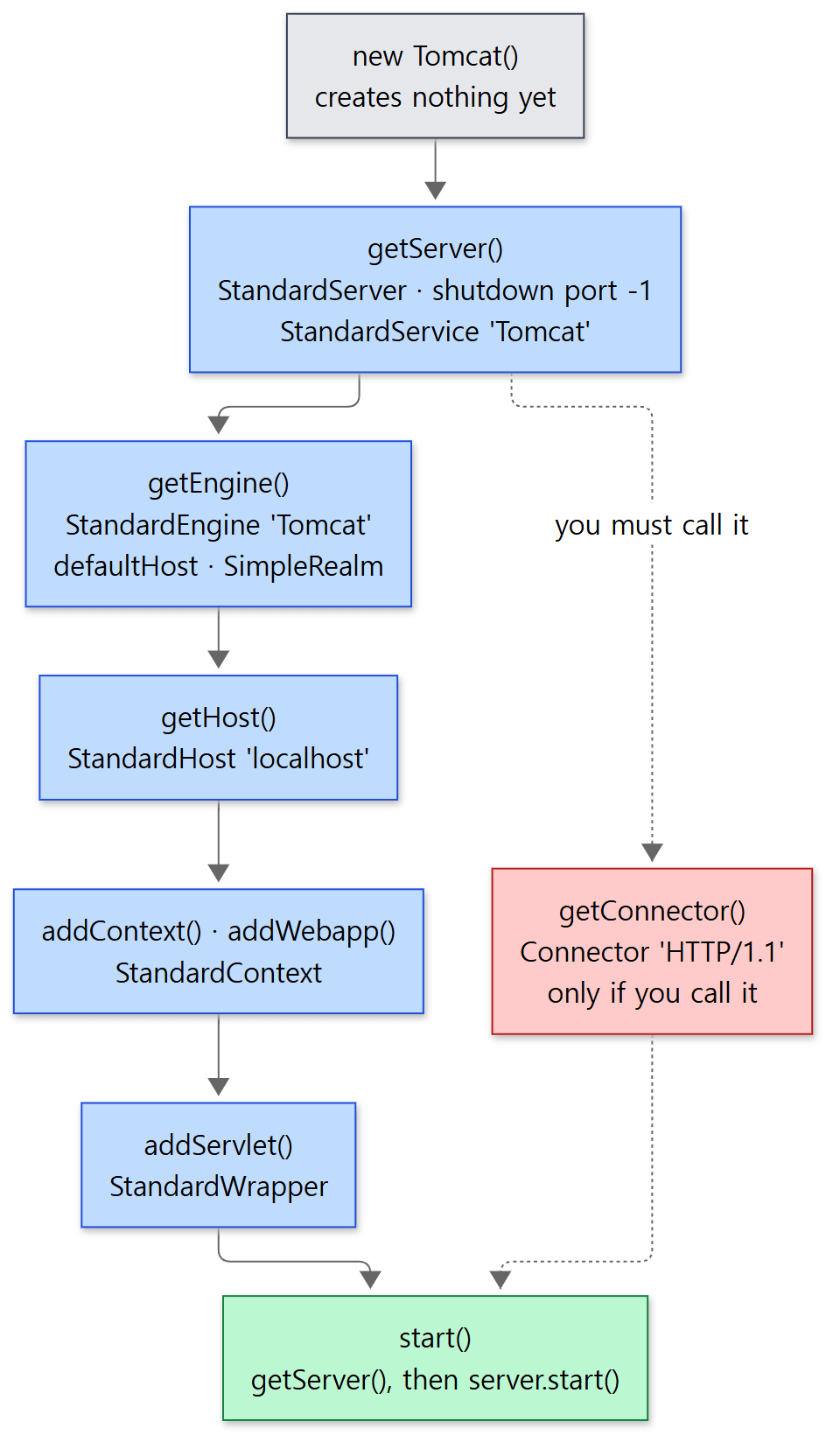 The blue boxes are created automatically when you call a box below them. Only the red one, the connector, has to be asked for separately.
Easy to get wrong: the connector is not created for you
In the diagram only the connector is red. Looking at start() shows why.
    public void start() throws LifecycleException {
        getServer();
        server.start();
    }
java/org/apache/catalina/startup/Tomcat.java lines 466–469
It creates and starts the server, and does nothing about a connector. A connector is only created when getConnector() is called.
    public Connector getConnector() {
        Service service = getService();
        if (service.findConnectors().length > 0) {
            return service.findConnectors()[0];
        }
        // The same as in standard Tomcat configuration.
        // This creates a NIO HTTP connector.
        Connector connector = new Connector("HTTP/1.1");
        connector.setPort(port);
        service.addConnector(connector);
        return connector;
    }
java/org/apache/catalina/startup/Tomcat.java lines 525–536
The name says "get", but what it does is "create if missing". So if you start() without ever calling getConnector(), the whole servlet container is up but no port is opened. There is no error either, because a service without connectors breaks no rule. The example in Spring Part 25 lowered the thread count with tomcat.getConnector().setProperty("maxThreads", "1"); that line was also, as it happens, what created the connector. This behaves the same on the 11.0.x branch (Tomcat.java does not differ by a single character between the two branches).
Which protocol handler new Connector("HTTP/1.1") picks, and the Acceptor, Poller and worker threads inside it, were in Part 5.
addContext() and addWebapp()
There are two ways to attach a web app (a Context). The names are similar, but what they do is quite different.
    public Context addContext(Host host, String contextPath, String contextName, String dir) {
        silence(host, contextName);
        Context ctx = createContext(host, contextPath);
        ctx.setName(contextName);
        ctx.setPath(contextPath);
        ctx.setDocBase(dir);
        ctx.addLifecycleListener(new FixContextListener());

        if (host == null) {
            getHost().addChild(ctx);
        } else {
            host.addChild(ctx);
        }
        return ctx;
    }
java/org/apache/catalina/startup/Tomcat.java lines 674–688
The only listener addContext() attaches is FixContextListener. As we saw in Part 10, for an ordinary web app a listener called ContextConfig reads web.xml and scans annotations on CONFIGURE_START_EVENT, then marks "configuration done" (configured = true). Without that mark, StandardContext fails to start (StandardContext.java lines 4576–4579). FixContextListener takes that spot and just sets the mark, without reading web.xml.
        @Override
        public void lifecycleEvent(LifecycleEvent event) {
            try {
                Context context = (Context) event.getLifecycle();
                if (event.getType().equals(Lifecycle.CONFIGURE_START_EVENT)) {
                    context.setConfigured(true);

                    // Process annotations
                    WebAnnotationSet.loadApplicationAnnotations(context);
                    // ...
                }
            } catch (ClassCastException e) {
                // Ignore
            }
        }
java/org/apache/catalina/startup/Tomcat.java lines 1121–1141
The elided part is a few lines that, for @ServletSecurity to work, add an empty login configuration and a NonLoginAuthenticator valve if there is none. loadApplicationAnnotations() here processes annotations such as @Resource on servlet, filter and listener classes that are already registered; it does not search jars for @WebServlet classes the way ContextConfig in Part 10 does. So a web app made with addContext() has only the servlets you attached in code. There is no DefaultServlet serving static files under /, and no JSP.
addWebapp() is the opposite.
    public Context addWebapp(Host host, String contextPath, String docBase, LifecycleListener config) {

        silence(host, contextPath);

        Context ctx = createContext(host, contextPath);
        ctx.setPath(contextPath);
        ctx.setDocBase(docBase);

        if (addDefaultWebXmlToWebapp) {
            ctx.addLifecycleListener(getDefaultWebXmlListener());
        }

        ctx.setConfigFile(getWebappConfigFile(docBase, contextPath));

        ctx.addLifecycleListener(config);

        if (addDefaultWebXmlToWebapp && (config instanceof ContextConfig)) {
            // prevent it from looking ( if it finds one - it'll have dup error )
            ((ContextConfig) config).setDefaultWebXml(noDefaultWebXmlPath());
        }

        if (host == null) {
            getHost().addChild(ctx);
        } else {
            host.addChild(ctx);
        }

        return ctx;
    }
java/org/apache/catalina/startup/Tomcat.java lines 736–764
The three-argument addWebapp() creates the host's configClass (by default ContextConfig) by reflection and passes it to this method (lines 705–717). So WEB-INF/web.xml, web fragments, ServletContainerInitializers and even META-INF/context.xml are handled exactly as for an app dropped into webapps/. There is one difference: it does not read $CATALINA_BASE/conf/web.xml (the shared defaults laid under every web app). Instead, DefaultWebXmlListener calls initWebappDefaults() just before start (BEFORE_START_EVENT) to put the same content in from code (lines 1156–1161).
    public static void initWebappDefaults(Context ctx) {
        // Default servlet
        Wrapper servlet = addServlet(ctx, "default", "org.apache.catalina.servlets.DefaultServlet");
        servlet.setLoadOnStartup(1);
        servlet.setOverridable(true);

        // JSP servlet (by class name - to avoid loading all deps)
        servlet = addServlet(ctx, "jsp", "org.apache.jasper.servlet.JspServlet");
        servlet.addInitParameter("fork", "false");
        servlet.setLoadOnStartup(3);
        servlet.setOverridable(true);

        // Servlet mappings
        ctx.addServletMapping("/", "default");
        ctx.addServletMapping("*.jsp", "jsp");
        ctx.addServletMapping("*.jspx", "jsp");
        // ...
    }
java/org/apache/catalina/startup/Tomcat.java lines 1056–1087
The elided part sets a 30-minute session timeout, the MIME types read from MimeTypeMappings.properties, and the welcome files (index.html, index.htm, index.jsp). The default and jsp servlets you know from conf/web.xml are here. How the JSP servlet takes a .jsp request and compiles it was in Part 13.
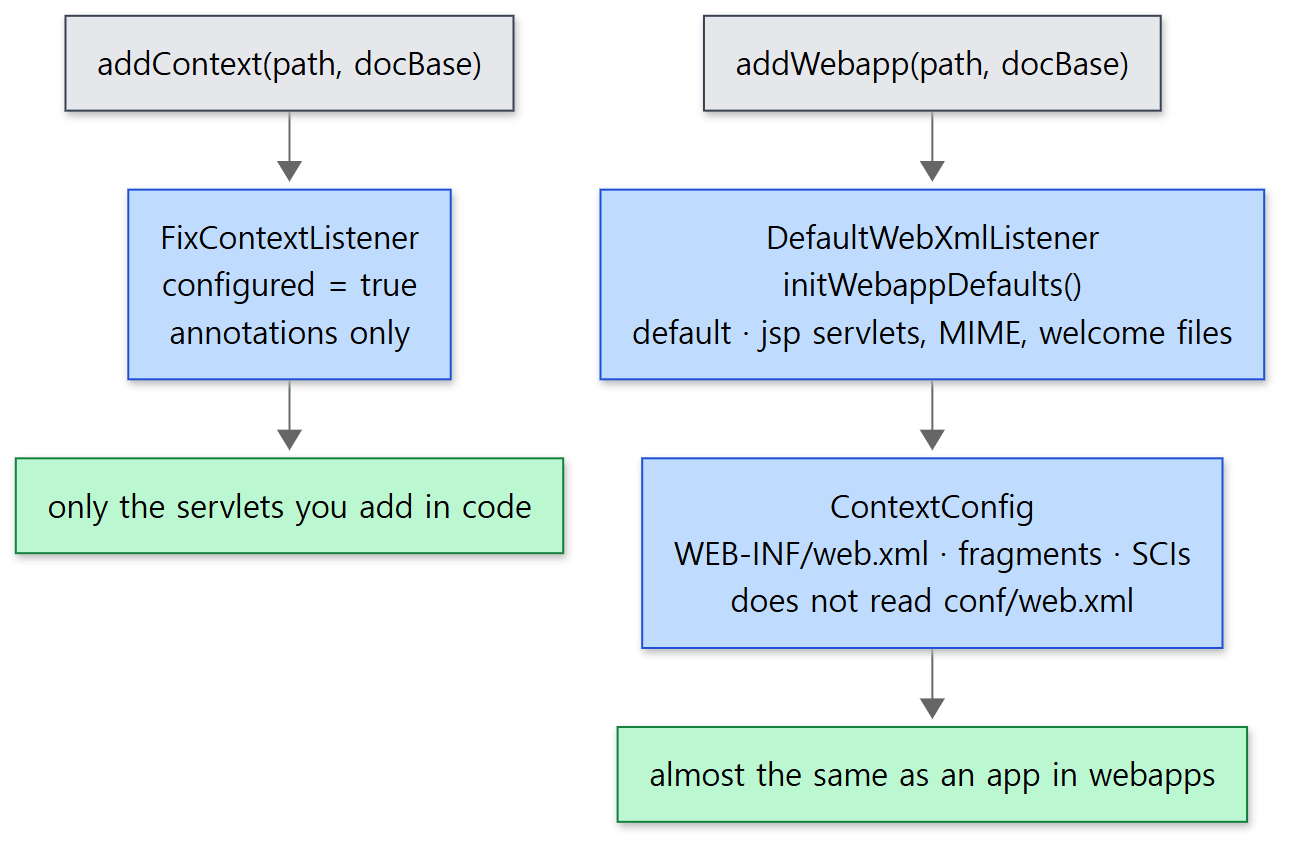 addContext() makes an empty container; addWebapp() makes something almost the same as an app dropped into webapps/.
addServlet(), which attaches a servlet, also comes in two kinds. Given a class name, an ordinary StandardWrapper creates that class later; given a servlet object you already made, ExistingStandardWrapper wraps that object as is (lines 363–406). The latter calls init() only the first time and keeps handing back that same object (lines 1193–1199). This is the route for passing in a servlet your program has already built, like Spring's DispatcherServlet. The ordinary route that creates a servlet instance and calls init() was in Part 9.
Example 1: what embedded Tomcat builds for you, and what it does not
I checked all of this in one program. It puts one servlet into an empty web app with addContext(), mounts one empty folder with addWebapp(), and calls start() without getConnector(). It prints the objects that were created, sends a request, then calls getConnector() and sends the request again.
This example was run with Tomcat 12.0.0-M1-dev built unchanged from the reference commit (17aa1769b0), in a Docker container (Eclipse Temurin JDK 21). It was started without catalina.sh, with java -cp "$CATALINA_HOME/lib/*:$CATALINA_HOME/bin/*" EmbeddedExample.java (ex/u16-embedded).
// Example written for this post (not Tomcat's source)
// ... imports, a servlet Hello that writes one line, get() that sends a request, children() that lists child names, the println calls for the divider lines (== …) — omitted ...
Tomcat tomcat = new Tomcat();
tomcat.setBaseDir("/tmp/emb");   // folders such as work/ are created under this

// 1) addContext: attach a servlet directly in code (web.xml is not read)
Context plain = tomcat.addContext("", Files.createTempDirectory("doc").toString());
Tomcat.addServlet(plain, "hello", new Hello());
plain.addServletMapping("/hello", "hello");   // 11.0.x's addServletMappingDecoded is gone on main

// 2) addWebapp: mount one empty folder as a web app (defaults like conf/web.xml are added)
Context webapp = tomcat.addWebapp("/app", Files.createTempDirectory("app").toString());

// start without calling getConnector()
tomcat.start();
// ... print the server, service, engine, host and web apps ...

System.out.println("connectors: " + service.findConnectors().length);
System.out.println("GET /hello -> " + get("http://127.0.0.1:8080/hello"));

tomcat.getConnector();   // Connector("HTTP/1.1") is created now, and since the service is already started it starts right away
// ... print the connector and GET /hello again ...
== what Tomcat created for us
server  : StandardServer, shutdown port=-1
service : Tomcat
engine  : Tomcat, defaultHost=localhost, realm=org.apache.catalina.startup.Tomcat$SimpleRealm
host    : localhost, appBase=/tmp/emb/webapps
contexts: "", "/app"
  ""   servlets: hello
  /app servlets: default, jsp
== before getConnector()
connectors: 0
GET /hello -> failed: ConnectException
== after getConnector()
connectors: 1, protocol=org.apache.coyote.http11.Http11NioProtocol, state=STARTED
GET /hello -> 200 hello from Apache Tomcat/12.0.0-M1-dev
== stderr: the 'Starting' lines
INFO: Starting Servlet engine: [Apache Tomcat/12.0.0-M1-dev]
INFO: Starting ProtocolHandler ["http-nio-8080"]
== files under the base dir
/tmp/emb
/tmp/emb/work
/tmp/emb/work/Tomcat
/tmp/emb/work/Tomcat/localhost
/tmp/emb/work/Tomcat/localhost/app
/tmp/emb/work/Tomcat/localhost/ROOT
- The first five lines are the blue boxes in the diagram. Shutdown port
-1, the nameTomcat, andSimpleRealmare exactly as in the source. - The servlet lists. The web app made with
addContext()has only thehellowe attached;/app, made withaddWebapp(), hasdefaultandjspeven though we attached nothing. - The connector. Before
getConnector()there are 0 connectors and the request is refused at the connection stage (ConnectException). After the call an NIO connector exists, goes straight toSTARTED, and the request gets through. That is because when you add a connector to a service that has already started, the service starts the connector on the spot (StandardService.javalines 233–239). The log line saying the protocol handler started (Starting ProtocolHandler) appears once, at that point. - The folders. The folder names under
work/are engine name (Tomcat) / host name / web app name. The root web app ("") becomesROOT.
Easy to get wrong: code written for 11.0.x does not compile on main
When I first wrote this example I used addServletMappingDecoded("/hello", "hello"), like the example in Spring Part 25, and got a compile error (cannot find symbol). In the Context interface on the 11.0.x branch this method is still there, marked @Deprecated with a comment saying it will be removed in Tomcat 12. On main (12.0.0-M1) it really has been removed, leaving only addServletMapping() (Context.java lines 906–928). Embedded Tomcat calls Tomcat's internal API directly, so it feels changes like this head-on whenever the version changes.
2. Outside embedded Tomcat — Tomcat.main() and Catalina
The Tomcat class also has a main(). It is a route that reads the standard configuration files as they are.
        Tomcat tomcat = new Tomcat();
        // Create a Catalina instance and let it parse the configuration files
        // It will also set a shutdown hook to stop the Server when needed
        // Use the default configuration source
        tomcat.init(null, catalinaArguments);
java/org/apache/catalina/startup/Tomcat.java lines 1299–1303
init(source, …) creates a Catalina, calls load(), and takes over the server that comes out of it (lines 434–447). In other words, reading server.xml and building from code arrive at the same objects (StandardServer …). A Tomcat started with catalina.sh and an embedded Tomcat are not different products; they are just different ways of assembling the same parts. Of the arguments main() accepts, --no-jmx calls Registry.disableRegistry(), which we will see in the next section (lines 1289–1290).
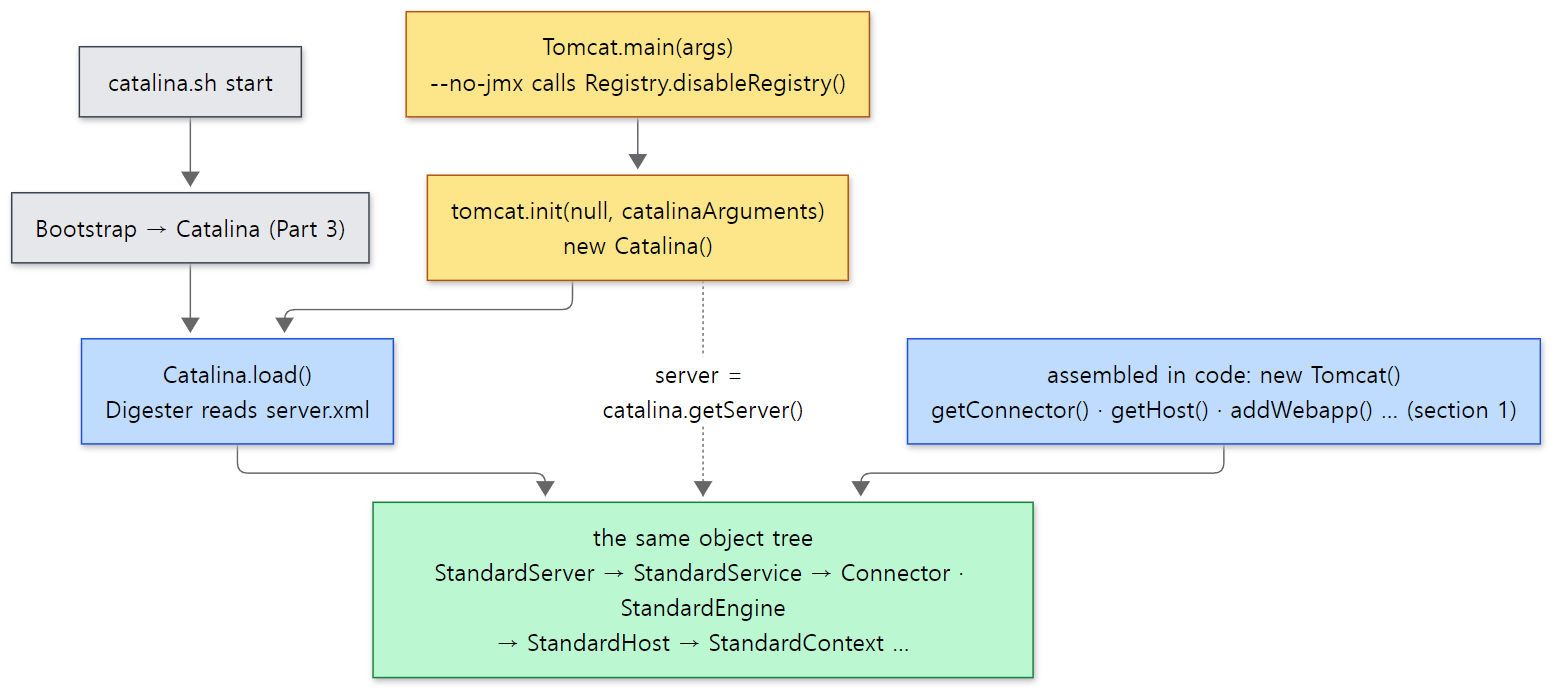 Whether you read server.xml or assemble in code, the parts built are the same. The yellow boxes are this section's
Tomcat.main() path.
Spring Boot is also said to start its embedded Tomcat through this Tomcat class. However, this series did not read Spring Boot's source to confirm that.
3. JMX — one MBean per component
If you attach a JMX tool such as jconsole to Tomcat, you see a long list of names like Catalina:type=Server and Catalina:type=Connector,port=8080. That is because the server, service, connectors, hosts, web apps and valves each sit there as an MBean. Who registered them, and when?
They register themselves in init()
The answer is in the Lifecycle of Part 3. StandardServer, StandardService, Connector, ContainerBase (the parent of the four containers) and ValveBase (the parent of valves) all extend LifecycleMBeanBase. At this commit 15 classes extend it directly (I counted by searching for extends LifecycleMBeanBase). The initInternal() that init() calls does the MBean registration here.
    @Override
    protected void initInternal() throws LifecycleException {
        // If oname is not null then registration has already happened via
        // preRegister().
        if (oname == null) {
            oname = register(this, getObjectNameKeyProperties());
        }
    }
java/org/apache/catalina/util/LifecycleMBeanBase.java lines 50–57
    protected final ObjectName register(Object obj, String objectNameKeyProperties) {

        // Construct an object name with the right domain
        StringBuilder name = new StringBuilder(getDomain());
        name.append(':');
        name.append(objectNameKeyProperties);

        ObjectName on = null;

        try {
            on = new ObjectName(name.toString());
            Registry.getRegistry(null).registerComponent(obj, on, null);
        } catch (Exception e) {
            log.warn(sm.getString("lifecycleMBeanBase.registerFail", obj, name), e);
        }

        return on;
    }
java/org/apache/catalina/util/LifecycleMBeanBase.java lines 120–137
The ObjectName is domain:key properties glued together. Where the two pieces come from is the interesting part.
- The key properties are decided per class by
getObjectNameKeyProperties().StandardServergivestype=Server(lines 1031–1033),StandardContextgivesj2eeType=WebModule,name=//host/path,…(lines 5564–5567), andConnectorgivestype=Connector,port=<port>. - The domain is the engine's name.
StandardEngine.getDomainInternal()returns its own name (lines 319–321), the service uses its engine's name (StandardService.javalines 591–598), and containers follow their parent's domain (ContainerBase.javalines 1002–1010). You seeCatalina:in jconsole because of<Engine name="Catalina">in server.xml; in embedded Tomcat, which names its engineTomcat, it becomesTomcat:.
Registry — finding the descriptor and building the MBean
Registry, in java/org/apache/tomcat/util/modeler, is the gateway through which Tomcat uses JMX. There is only one per JVM (lines 137–146), and it does not create its own MBeanServer: if one already exists it uses that, otherwise the JDK's platform MBeanServer (ManagementFactory.getPlatformMBeanServer()) (lines 447–466). That is why, when you attach jconsole to the JVM, Tomcat's MBeans appear next to the JDK's own, such as java.lang:type=Memory.
The core of registerComponent(), which does the registering, is this.
        try {
            if (type == null) {
                type = bean.getClass().getName();
            }

            ManagedBean managed = findManagedBean(null, bean.getClass(), type);

            if (managed == null) {
                throw new IllegalStateException(sm.getString("registry.noTypeMetadata", type));
            }

            // The real mbean is created and registered
            DynamicMBean mbean = managed.createMBean(bean);

            if (getMBeanServer().isRegistered(oname)) {
                if (log.isDebugEnabled()) {
                    log.debug(sm.getString("registry.unregisterExisting", oname));
                }
                getMBeanServer().unregisterMBean(oname);
            }

            getMBeanServer().registerMBean(mbean, oname);
java/org/apache/tomcat/util/modeler/Registry.java lines 652–673
What gets registered is not the StandardServer object itself. It finds a descriptor called ManagedBean, and registers a stand-in object (DynamicMBean) built from that descriptor. In standard JMX you would usually write a separate interface such as ServerMBean for the class to implement; Tomcat instead writes, per class, "the list of attributes and operations to show to the outside" in XML. That XML is mbeans-descriptors.xml, and there are 25 of them under java/ at this commit. The descriptor for StandardServer starts like this.
  <mbean name="StandardServer"
         description="Standard Server Component"
         domain="Catalina"
         group="Server"
         type="org.apache.catalina.core.StandardServer">
java/org/apache/catalina/core/mbeans-descriptors.xml lines 1304–1308
Below it come lines such as <attribute name="serverInfo" … writeable="false"/> and <operation name="await" …/>. How is the descriptor found? findManagedBean() first looks among descriptors already read, by class name; if it is not there, findDescriptor() starts at the class's package and walks up one level at a time, reading package/mbeans-descriptors.xml.
        String pkg = type;
        while (pkg.indexOf('.') > 0) {
            int lastComp = pkg.lastIndexOf('.');
            if (lastComp <= 0) {
                return;
            }
            pkg = pkg.substring(0, lastComp);
            if (searchedPaths.get(pkg) != null) {
                return;
            }
            loadDescriptors(pkg, classLoader);
        }
java/org/apache/tomcat/util/modeler/Registry.java lines 738–749
For org.apache.catalina.core.StandardServer the order is org/apache/catalina/core/mbeans-descriptors.xml, then org/apache/catalina/mbeans-descriptors.xml, and so on. A package that has been searched is noted in searchedPaths and not read again. Turning the XML into objects is once again the job of the Digester that read server.xml in Part 3 (MbeansDescriptorsDigesterSource, loadDescriptors() lines 687–717). If there is still no descriptor, it inspects the class by reflection and builds one on the spot, treating getters and setters as attributes (lines 507–523).
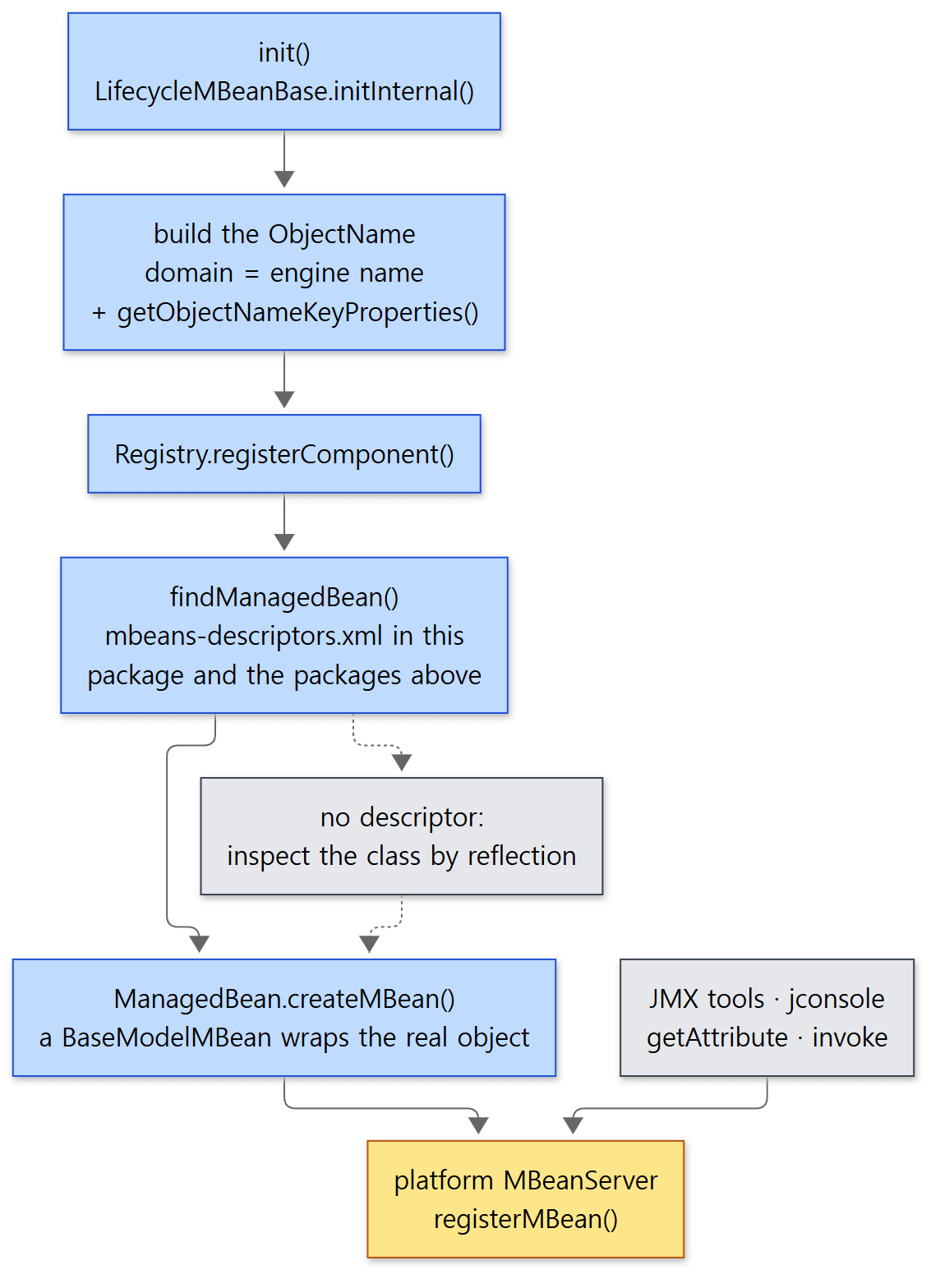 The yellow box is the single MBeanServer in the JVM. Tomcat's MBeans are registered in the same place as the JDK's.
Reading an attribute — calling the real object's getter by reflection
The stand-in object built from a descriptor is a BaseModelMBean. When you read serverInfo in jconsole, the MBeanServer calls this object's getAttribute("serverInfo"), which looks up the getter name (getServerInfo) in the descriptor and calls it on the real object by reflection.
        Method m = managedBean.getGetter(name, this, resource);
        Object result;
        try {
            Class<?> declaring = m.getDeclaringClass();
            // workaround for catalina weird mbeans - the declaring class is BaseModelMBean.
            // but this is the catalina class.
            if (declaring.isAssignableFrom(this.getClass())) {
                result = m.invoke(this, NO_ARGS_PARAM);
            } else {
                result = m.invoke(resource, NO_ARGS_PARAM);
            }
java/org/apache/tomcat/util/modeler/BaseModelMBean.java lines 164–174
resource is the wrapped real object. The getter is looked up on the stand-in first because a descriptor's className can name a subclass of BaseModelMBean that answers in place of the real object (ManagedBean.java lines 504–522). The web app's ContextMBean is such a class, and the connector's ConnectorMBean goes further and overrides getAttribute() itself, reading attributes the connector does not have from the protocol handler (Part 5) (ConnectorMBean.java lines 43–67). Writing (setAttribute) and invoking operations (invoke) reach the real object's methods the same way. So when you change a value over JMX, what changes is not a copy but the object inside the running Tomcat.
Easy to get wrong: not every MBean comes from LifecycleMBeanBase
The familiar type=ThreadPool,name="http-nio-8080" you see in jconsole is not a Lifecycle component; the endpoint from Part 5 registers it directly in its init(). The word "ThreadPool" in the name is, as the source comment says, a "historical name".
        if (this.domain != null) {
            // Register endpoint (as ThreadPool - historical name)
            oname = new ObjectName(domain + ":type=ThreadPool,name=\"" + getName() + "\"");
            Registry.getRegistry(null).registerComponent(this, oname, null);
java/org/apache/tomcat/util/net/AbstractEndpoint.java lines 2247–2250
Example 2: reading, changing and invoking embedded Tomcat's MBeans
Inside the same process, I took the platform MBeanServer and did in code what jconsole does (ex/u16-jmx). The environment is the same as in Example 1.
// Example written for this post (not Tomcat's source)
// ... imports, get() that sends a request with a 3-second limit and returns the status code, the println calls for the divider lines (== …) — omitted ...
Tomcat tomcat = new Tomcat();
tomcat.setBaseDir("/tmp/jmx");
tomcat.getConnector();
Context ctx = tomcat.addContext("/demo", Files.createTempDirectory("doc").toString());
tomcat.start();

// Tomcat's Registry does not create its own; it uses the JVM's platform MBeanServer
MBeanServer mbs = ManagementFactory.getPlatformMBeanServer();
// ... print the list of domains and a few names in the Tomcat domain ...

ObjectName server = new ObjectName("Tomcat:type=Server");
ObjectName connector = new ObjectName("Tomcat:type=Connector,port=8080");
ObjectName webModule = new ObjectName("Tomcat:j2eeType=WebModule,name=//localhost/demo,"
        + "J2EEApplication=none,J2EEServer=none");

System.out.println("Server.serverInfo   = " + mbs.getAttribute(server, "serverInfo"));
// ... stateName, maxThreads, the class of the connector MBean ...

System.out.println("ctx.getSessionTimeout() before = " + ctx.getSessionTimeout());
mbs.setAttribute(webModule, new Attribute("sessionTimeout", 5));
System.out.println("ctx.getSessionTimeout() after  = " + ctx.getSessionTimeout());

try {
    mbs.getAttribute(server, "catalinaBase");   // StandardServer has getCatalinaBase(), but it is not in the descriptor
} catch (Exception e) {
    System.out.println(e.getClass().getSimpleName() + ": " + e.getMessage());
}

System.out.println("GET /demo/ -> " + get("http://127.0.0.1:8080/demo/"));
mbs.invoke(connector, "stop", null, null);
// ... print stateName and GET again, then count the names after tomcat.stop() and tomcat.destroy() ...
== domains
[JMImplementation, Tomcat, com.sun.management, java.lang, java.nio, java.util.logging, jdk.management.jfr]
== a few names in the Tomcat domain
total: 27
  Tomcat:j2eeType=WebModule,name=//localhost/demo,J2EEApplication=none,J2EEServer=none
  Tomcat:type=Connector,port=8080
  Tomcat:type=Engine
  Tomcat:type=Host,host=localhost
  Tomcat:type=Server
  Tomcat:type=Service
  Tomcat:type=ThreadPool,name="http-nio-8080"
== read attributes through JMX
Server.serverInfo   = Apache Tomcat/12.0.0-M1-dev
Server.stateName    = STARTED
Connector.maxThreads = 200
MBean class of the connector: org.apache.catalina.mbeans.ConnectorMBean
== write an attribute through JMX
ctx.getSessionTimeout() before = 30
ctx.getSessionTimeout() after  = 5
== an attribute that is not in mbeans-descriptors.xml
AttributeNotFoundException: Cannot find attribute [catalinaBase] on resource [StandardServer[-1]]
== invoke an operation through JMX
GET /demo/ -> 404
Connector.stateName = STOPPED
GET /demo/ -> failed: HttpTimeoutException
== after destroy
names in the Tomcat domain: 0
- The domain is
Tomcat.Tomcatsits next to the JDK's domains (java.langand so on), and there is noCatalina. You can see directly that the engine name becomes the domain. Even with a single web app without a single servlet, there are 27 MBeans. - Reading.
serverInfois the result of callingStandardServer.getServerInfo(). The stand-in class for the connector isConnectorMBean, as written in the descriptor'sclassName(connector/mbeans-descriptors.xmllines 29–34). - Writing. Setting
sessionTimeoutto 5 over JMX changed the value in thectxobject our Java code was holding, from 30 to 5. They are the same object. - An attribute not in the descriptor.
StandardServerhas agetCatalinaBase()method (line 736), butStandardServer's descriptor has nocatalinaBase, so it is invisible over JMX. The exception text is thrown byManagedBean.getGetter()(lines 498–502). TheStandardEnginedescriptor in the same file does havecatalinaBase(line 921). What is visible from outside is decided by the descriptor, not by the class. - Invoking an operation. Invoking the connector's
stopoperation turned its state toSTOPPED. But the next request ended not in a refusal (ConnectException) but in a timeout, caught by the 3-second limit. We look at this in the "Easy to get wrong" below. - After destroy.
destroyInternal()unregisters (LifecycleMBeanBase.javalines 60–63), so theTomcatdomain is empty.
Easy to get wrong: stopping the connector leaves the port open
At first this example had no time limit on its last request, and the program never finished. jstack showed the main thread stuck in HttpClient.send() waiting for a response. The cause is the endpoint's bindOnInit setting. It defaults to true, and as the source comment says, in that case the port is opened in init() and closed in destroy() (AbstractEndpoint.java lines 1312–1317). The endpoint's stop() closes the port only if it was opened in start() (lines 2367–2373). With the default settings it only stops the threads that accept and process connections, and leaves the listening socket open. So the operating system accepts the connection and queues it, but there is no Tomcat thread to take it off the queue, and the client waits forever. That is why the example's get() has a 3-second limit. It is also why you should not assume that stopping a connector over JMX "closed the port". To open and close the port along with start()/stop(), give the connector bindOnInit="false" (I did not rerun the example with that setting).
Turning JMX off
JMX registration has a cost: it reads descriptor XML and builds a stand-in object for every component. Registry.disableRegistry(), if no Registry has been created yet, puts a NoDescriptorRegistry in its place (lines 153–159). That class's registerComponent() does nothing (NoDescriptorRegistry.java lines 138–140). If you call it after a Registry already exists, it only logs a warning and cannot turn JMX off. So it has to be called before you create the Tomcat objects.
4. JULI — a separate logging configuration per web app
JUL's LogManager is one per JVM, and the default implementation reads just one configuration file. That is a problem in Tomcat, which runs several web apps. If web app A sets the level of the com.example logger to FINE, web app B, which uses the same name, is affected too. When a web app is undeployed and deployed again, no reference holding on to the old web app's class loader may be left behind either (the class loader leaks of Part 4). The source comment in ClassLoaderLogManager says that this is why the table below is a WeakHashMap (lines 83–87).
JULI's answer is a separate logger name table per class loader.
Swapping in the LogManager
When catalina.sh starts the JVM, it adds two system properties.
# Set juli LogManager config file if it is present and an override has not been issued
if [ -z "$CATALINA_LOGGING_CONFIG" ]; then
  if [ -r "$CATALINA_BASE"/conf/logging.properties ]; then
    CATALINA_LOGGING_CONFIG="-Djava.util.logging.config.file=$CATALINA_BASE/conf/logging.properties"
  else
    # Bugzilla 45585
    CATALINA_LOGGING_CONFIG="-Dnop"
  fi
fi

if [ -z "$LOGGING_MANAGER" ]; then
  LOGGING_MANAGER="-Djava.util.logging.manager=org.apache.juli.ClassLoaderLogManager"
fi
java.util.logging.manager is a property defined by the JDK that names the class to use instead of LogManager. From now on, when you call Logger.getLogger(), ClassLoaderLogManager answers behind it. Put the other way round: in embedded Tomcat, JULI's LogManager is not used unless you set this property yourself. That is why the log in Example 1 went to standard error in the JDK's default (two-line) format rather than the one-line format of conf/logging.properties.
Most of Tomcat's own code does not call JUL directly; it gets loggers through org.apache.juli.logging.LogFactory.getLog(). This LogFactory is Apache Commons Logging's, modified and moved inside Tomcat (the class comment calls it a "modified LogFactory"), and if ServiceLoader finds no other implementation, it uses DirectJDKLog, which hands over to JUL (LogFactory.java lines 81–95, lines 120–130). In the end, Tomcat's logs and a web app's JUL logs both pass through the same ClassLoaderLogManager.
The key is the thread's context class loader
ClassLoaderLogManager keeps a table keyed by class loader.
protected final Map<ClassLoader,ClassLoaderLogInfo> classLoaderLoggers = new WeakHashMap<>(); // Guarded by this
java/org/apache/juli/ClassLoaderLogManager.java line 87
One ClassLoaderLogInfo holds that class loader's logger name table, its handler list and its settings (Properties). Because it is a WeakHashMap, when a web app is undeployed and its class loader is thrown away, its slot can disappear with it. Which slot to look in when finding a logger is decided by this method.
    static ClassLoader getClassLoader() {
        ClassLoader result = Thread.currentThread().getContextClassLoader();
        if (result == null) {
            result = ClassLoaderLogManager.class.getClassLoader();
        }
        return result;
    }
java/org/apache/juli/ClassLoaderLogManager.java lines 782–788
As we saw in "Words to know first", while a request is being processed the thread's context class loader is that web app's loader. So when web app A's servlet calls Logger.getLogger("demo"), the lookup happens in A's slot, and when B's servlet calls it, in B's slot. Same name, different logger objects (getLogger(), lines 252–255).
Each slot looks for its own configuration file
The first time a class loader's slot is needed, readConfiguration(ClassLoader) looks for that loader's configuration.
    protected synchronized void readConfiguration(ClassLoader classLoader) throws IOException {

        InputStream is = null;
        // Special case for URL classloaders which are used in containers:
        // only look in the local repositories to avoid redefining loggers 20 times
        if (classLoader instanceof URLClassLoader) {
            URL logConfig = ((URLClassLoader) classLoader).findResource("logging.properties");

            if (null != logConfig) {
                // ...
                is = classLoader.getResourceAsStream("logging.properties");
            } else {
                // ...
            }
        }
        // ...
        Logger localRootLogger = new RootLogger();
        if (is == null) {
            // Retrieve the root logger of the parent classloader instead
            ClassLoader current = classLoader.getParent();
            ClassLoaderLogInfo info = null;
            while (current != null && info == null) {
                info = getClassLoaderInfo(current);
                current = current.getParent();
            }
            if (info != null) {
                localRootLogger.setParent(info.rootNode.logger);
            }
        }
        ClassLoaderLogInfo info = new ClassLoaderLogInfo(new LogNode(null, localRootLogger));
        classLoaderLoggers.put(classLoader, info);
java/org/apache/juli/ClassLoaderLogManager.java lines 572–629
- A web app loader looks for
logging.propertiesonly in its own repositories. The web app class loaderWebappClassLoaderBaseextendsURLClassLoader(lines 105–106), so it enters the firstif, and itsfindResource()looks only inside the web app (WEB-INF/classesand so on) without asking the parent. SoWEB-INF/classes/logging.propertiesis that web app's own configuration file. - For the system class loader, the elided part reads the file named by the
java.util.logging.config.fileproperty — theconf/logging.propertiesthatcatalina.shpassed in (lines 593–613). - If there is no configuration file, this slot's root logger is attached to the root logger of the parent class loader's slot, and records flow on to the parent's handlers.
A slot without configuration also borrows its properties from the parent. findProperty() looks at the parent class loaders' settings in turn only when its own slot's settings are completely empty (lines 304–330). That means a web app with any configuration file of its own does not look at the parent's settings at all.
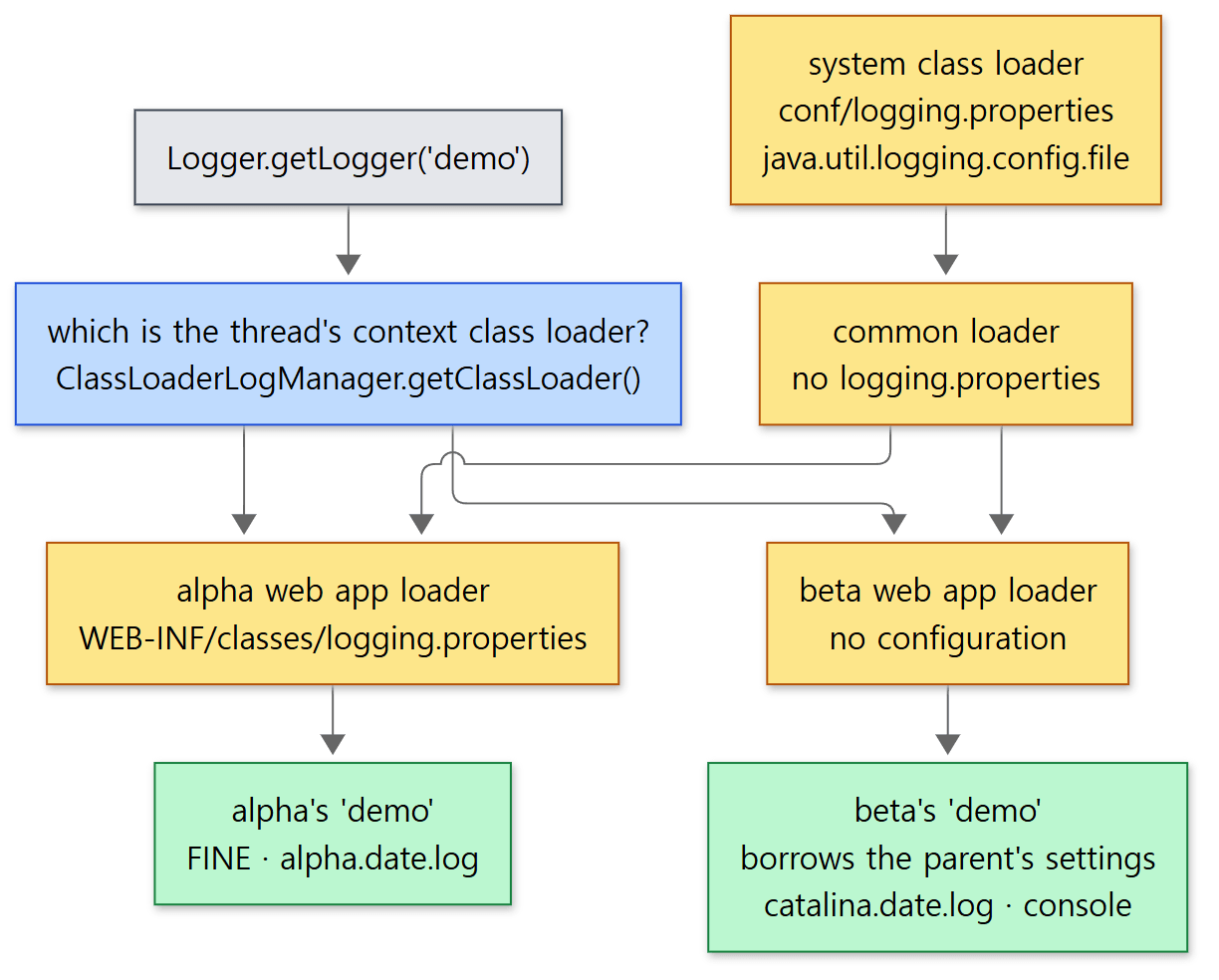 Each yellow box is a slot in the
classLoaderLoggers table. Every slot has its own logger name table.
How to read conf/logging.properties
The first line of conf/logging.properties looks strange the first time you see it.
handlers = 1catalina.org.apache.juli.AsyncFileHandler, 2localhost.org.apache.juli.AsyncFileHandler, 3manager.org.apache.juli.AsyncFileHandler, 4host-manager.org.apache.juli.AsyncFileHandler, java.util.logging.ConsoleHandler

.handlers = 1catalina.org.apache.juli.AsyncFileHandler, java.util.logging.ConsoleHandler
conf/logging.properties lines 16–18
In standard JUL, a handler class can appear only once in the configuration file, because the configuration keys are the class name. JULI lets you create several copies of the same class (AsyncFileHandler) by adding a prefix that starts with a digit. This is where the prefix is stripped off.
                // Parse and remove a prefix (prefix start with a digit, such as
                // "10WebappFooHandler.")
                if (Character.isDigit(handlerClassName.charAt(0))) {
                    int pos = handlerClassName.indexOf('.');
                    if (pos >= 0) {
                        prefix = handlerClassName.substring(0, pos + 1);
                        handlerClassName = handlerClassName.substring(pos + 1);
                    }
                }
java/org/apache/juli/ClassLoaderLogManager.java lines 683–691
In 1catalina.org.apache.juli.AsyncFileHandler, 1catalina. is the prefix and the rest is the class name. When the handler reads its own settings, getProperty() looks for the prefixed key first (1catalina.org.apache.juli.AsyncFileHandler.prefix = catalina.) (lines 282–294). That is how four handlers of the same class write to different files starting with catalina., localhost., manager. and host-manager. — the files you always see in the logs/ folder.
handlers means "all the handlers to create in this slot", and .handlers means "those of them to attach to the root logger". If there is no .handlers line, every handler created is attached to the root logger (ClassLoaderLogManager.java lines 699–701). The rest are attached to specific loggers.
org.apache.catalina.core.ContainerBase.[Catalina].[localhost].level = INFO
org.apache.catalina.core.ContainerBase.[Catalina].[localhost].handlers = 2localhost.org.apache.juli.AsyncFileHandler
conf/logging.properties lines 59–60
This odd logger name is a container's logger name. ContainerBase.getLogName() wraps the names from itself up through its parents in square brackets and joins them.
    public String getLogName() {

        if (logName != null) {
            return logName;
        }
        String loggerName = null;
        Container current = this;
        while (current != null) {
            String name = current.getName();
            if ((name == null) || (name.isEmpty())) {
                name = "/";
            } else if (name.startsWith("##")) {
                name = "/" + name;
            }
            loggerName = "[" + name + "]" + ((loggerName != null) ? ("." + loggerName) : "");
            current = current.getParent();
        }
        logName = ContainerBase.class.getName() + "." + loggerName;
        return logName;

    }
java/org/apache/catalina/core/ContainerBase.java lines 293–313
The logger of web app /beta is org.apache.catalina.core.ContainerBase.[Catalina].[localhost].[/beta]. ServletContext.log(), called from a servlet, writes to this logger with info() (ApplicationContext.java lines 540–542). JUL logger names split into parent and child at the dots, so this logger's parent is the …[Catalina].[localhost] logger configured above. That is why ServletContext.log() goes to localhost.<date>.log. Since the engine name is part of the logger name, you can also tell that these configuration lines do not match in embedded Tomcat, whose engine is named Tomcat. The Tomcat class from section 1 also creates a logger with this kind of name for each web app and sets its level (silence() and getLoggerName(), lines 909–966).
In a web app's logging.properties you can insert that web app's name with ${classloader.webappName}. When resolving ${…}, if the context class loader implements WebappProperties (web app loaders do), the web app, host and service names are checked first.
    private String replaceWebApplicationProperties(String propName) {
        ClassLoader cl = getClassLoader();
        if (cl instanceof WebappProperties wProps) {
            return switch (propName) {
                case "classloader.webappName" -> wProps.getWebappName();
                case "classloader.hostName" -> wProps.getHostName();
                case "classloader.serviceName" -> wProps.getServiceName();
                case null, default -> null;
            };
        } else {
            return null;
        }
    }
java/org/apache/juli/ClassLoaderLogManager.java lines 758–770
getWebappName() returns the web app's base name (getBaseName()) (WebappClassLoaderBase.java lines 359–365, lines 2444–2446). For /alpha it is alpha. This switch expression is main's syntax; the 11.0.x branch does the same with if/else.
Example 3: same logger name, two web apps
This time I started Tomcat with catalina.sh start (ex/u16-juli). I deployed the same servlet into web apps alpha and beta, and put a WEB-INF/classes/logging.properties only in alpha. In both web apps the servlet gets a logger with the same name via Logger.getLogger("demo"), writes one FINE and one INFO line, and also writes one line with ServletContext.log(). The environment is the same as in Example 1.
# alpha's own logging configuration (WEB-INF/classes/logging.properties)
handlers = org.apache.juli.FileHandler
org.apache.juli.FileHandler.level = FINE
org.apache.juli.FileHandler.directory = ${catalina.base}/logs
org.apache.juli.FileHandler.prefix = ${classloader.webappName}.
demo.level = FINE
// Example written for this post (not Tomcat's source)
// Deploy the same servlet into two web apps and see whether the logger named "demo" is separate per web app.
// ... imports omitted ...
@WebServlet("/log")
public class LogServlet extends HttpServlet {
    @Override
    protected void doGet(HttpServletRequest req, HttpServletResponse resp) throws IOException {
        String app = req.getContextPath();
        Logger log = Logger.getLogger("demo");          // both web apps use the same name
        log.fine("FINE from " + app);
        log.info("INFO from " + app);
        getServletContext().log("ServletContext.log from " + app);

        resp.setContentType("text/plain");
        resp.getWriter().println(app + ": manager=" + LogManager.getLogManager().getClass().getName()
                + ", logger@" + Integer.toHexString(System.identityHashCode(log))
                + ", level=" + log.getLevel() + ", handlers=" + log.getParent().getHandlers().length
                + " on its parent");
    }
}
run.sh sends a request to each web app in turn, stops Tomcat, and then pulls out the lines containing from / from every file in the logs/ folder.
== responses
/alpha: manager=org.apache.juli.ClassLoaderLogManager, logger@400bc275, level=FINE, handlers=1 on its parent
/beta: manager=org.apache.juli.ClassLoaderLogManager, logger@3afc2cef, level=null, handlers=2 on its parent
== log files
alpha.<date>.log
catalina.<date>.log
catalina.out
localhost.<date>.log
localhost_access_log.<date>.txt
== alpha.<date>.log
24-Oct-2026 13:56:01.811 FINE [http-nio-8080-exec-2] LogServlet.doGet FINE from /alpha
24-Oct-2026 13:56:01.816 INFO [http-nio-8080-exec-2] LogServlet.doGet INFO from /alpha
24-Oct-2026 13:56:01.817 INFO [http-nio-8080-exec-2] org.apache.catalina.core.ApplicationContext.log ServletContext.log from /alpha
== catalina.<date>.log
24-Oct-2026 13:56:01.886 INFO [http-nio-8080-exec-3] LogServlet.doGet INFO from /beta
== catalina.out
24-Oct-2026 13:56:01.886 INFO [http-nio-8080-exec-3] LogServlet.doGet INFO from /beta
== localhost.<date>.log
24-Oct-2026 13:56:01.887 INFO [http-nio-8080-exec-3] org.apache.catalina.core.ApplicationContext.log ServletContext.log from /beta
run.sh replaced the dates in the log file names with <date>. The times, the value after logger@, and the number after exec- differ on every run.
- Same name, different loggers. The
logger@values in the two responses differ. TheLogManagerisClassLoaderLogManagerin both. - alpha. Thanks to
demo.level = FINEin its own configuration, even theFINEline was kept, and${classloader.webappName}resolved toalpha, producingalpha.<date>.log. Its root logger has just one handler (FileHandler) and is not attached to a parent, so not a single line went tocatalina.out.ServletContext.log()also had no…[/alpha]logger settings in alpha's slot, so it flowed up to the root and into the same file. - beta. With no configuration,
demo's level isnull(follow the parent), so theFINEline was dropped by the root's defaultINFOlevel. And it borrowed.handlersfrom the parent's settings and attached the same two handlers (the1catalinafile handler and the console). That is why theINFOline appears once each incatalina.<date>.logandcatalina.out.ServletContext.log()followed the[Catalina].[localhost]settings we saw above tolocalhost.<date>.log.
Easy to get wrong: a configuration file of your own cuts you off from the parent's
The moment alpha has a logging.properties, nothing written in conf/logging.properties applies to alpha any more. As we saw, findProperty() looks at the parent only when its own slot's settings are empty. In the output above, that is why alpha's ServletContext.log() did not go to localhost.<date>.log. You cannot use a web app's logging.properties to "change just one level and keep everything else from conf/logging.properties". You have to write every handler and level that web app needs into that file.
What this post leaves out
Tomcat.enableNaming()and JNDI — embedded Tomcat turns JNDI off by default (catalina.useNaming=false). The method that turns it on isTomcat.javalines 1005–1029; the implementation is injava/org/apache/naming.Tomcat.addWebapp(String, URL)— a method that fetches a WAR from a URL, copies it into the appBase and deploys it. Lines 250–292.- Remote JMX and the JMX proxy servlet — the settings for attaching from another machine (
com.sun.management.jmxremote.*) are a JDK feature. The manager web app'sJMXProxyServletisjava/org/apache/catalina/manager/JMXProxyServlet.java. - The
mbeans/package —MBeanFactory(operations for creating new connectors and web apps over JMX) andGlobalResourcesLifecycleListener.java/org/apache/catalina/mbeans. - JULI's formatters and handlers —
OneLineFormatter,JsonFormatter,FileHandlerwhich switches files by date, andAsyncFileHandlerwhich writes from a separate thread.java/org/apache/juli. ClassLoaderLogManager.reconfigure()·refreshLoggers(), new on main — public methods that re-read one class loader's logging configuration at run time. They are not on the 11.0.x branch, and nothing inside Tomcat calls them at this commit. Lines 364–481.- Access logs —
AccessLogValvedoes not use JULI; it writes to its own file. We saw it in Part 8.
Recap
| Concept | In one line |
|---|---|
The Tomcat class |
Instead of server.xml, methods build Server → Service → Engine → Host → Context one at a time, when needed |
getConnector() |
Despite the name, "create if missing". If you never call it, no port opens and no error appears |
addContext() / addWebapp() |
An empty container (no web.xml) / almost the same as an app in webapps/ (defaults in code instead of conf/web.xml) |
Tomcat.init(source) |
Reads server.xml through Catalina.load() and builds the same objects. Both routes reach the same parts |
LifecycleMBeanBase |
Registers its own MBean in init() and unregisters it in destroy(). The domain is the engine name |
Registry · mbeans-descriptors.xml |
Builds stand-in objects from per-package descriptors and puts them on the platform MBeanServer |
BaseModelMBean |
Connects JMX reads, writes and invocations to the real object's methods by reflection |
ClassLoaderLogManager |
Keeps logger name tables and settings separate, keyed by the thread's context class loader |
WEB-INF/classes/logging.properties |
That web app's own logging configuration. Once it exists, the parent's settings are not looked at at all |
| Digit-prefixed handlers | A prefix such as 1catalina. lets you create several copies of the same handler class |
Wrapping up the series
With this post, all 16 parts from the map in Part 1 are written. Here is the whole series.
| Part | Post | In one line |
|---|---|---|
| 1 | How I Read It with AI, and the Map | Fixed a reference commit, built it in Docker, and laid out a folder map and a reading order |
| 2 | The Big Picture — Server, Service, Connector and the Four Containers | server.xml elements are classes, and an adapter joins the connector (Coyote) to the containers (Catalina) |
| 3 | Lifecycle and Startup — What Happens After catalina.sh start | The Digester turns server.xml into objects, and parents init and start their children |
| 4 | Class Loaders — Each Web App Sees Its Own Classes | The web app loader turns parent-first delegation around (except for things like the JDK and the Servlet API) and looks at the web app's classes first |
| 5 | The Connector and the NIO Endpoint — Which Threads Take a Connection | The Acceptor takes it, the Poller watches it, and then it is handed to a worker thread |
| 6 | Reading an HTTP/1.1 Request — From Bytes to a coyote Request | The request line and headers are read as positions in a buffer and turned into strings late |
| 7 | CoyoteAdapter and the Mapper — Which Servlet Gets the Request | The URI is normalized and host → web app → servlet are chosen in a fixed rule order |
| 8 | Pipelines and Valves — The Processing Chain on Every Container | Every container has a valve chain, and the basic valve at the end hands over to the next container |
| 9 | The Filter Chain and the Servlet Call — Until service() Runs | The filters matching the request are put in a chain and called in turn, with the servlet called at the very end |
| 10 | Deploying a Web App — From a WAR to a Running Context | HostConfig finds web apps and ContextConfig merges web.xml and annotations |
| 11 | Sessions — How JSESSIONID Is Made and Removed | The manager creates sessions and a background task removes expired ones |
| 12 | Async Servlets and Non-Blocking I/O — Letting Go of the Thread | A state machine detaches the request from its thread and later sends it back to a container thread |
| 13 | Jasper — How a JSP Becomes a Servlet | A JSP is turned into .java, compiled, and loaded as a servlet |
| 14 | Authentication and Realms — How security-constraint Is Enforced | The authenticator valve asks the Realm whether the address is protected, then checks the user and roles |
| 15 | HTTP/2 and WebSocket — Protocols Reached by Upgrading | The HTTP/1.1 processor accepts an upgrade request and hands the connection to another processor (ALPN h2 is HTTP/2 from the start) |
| 16 | Embedded Tomcat, JMX and Logging — and Wrapping Up the Series (this post) | The same parts are assembled in code, each part puts up an MBean, and logging settings are split per class loader |
The path of one request, one more time
Part 1 drew the main road a single request travels, from the Acceptor to Servlet.service(). Here it is drawn again, this time with the startup and deployment that come before it and this post's JULI and JMX added. Each box shows the parts that covered it.
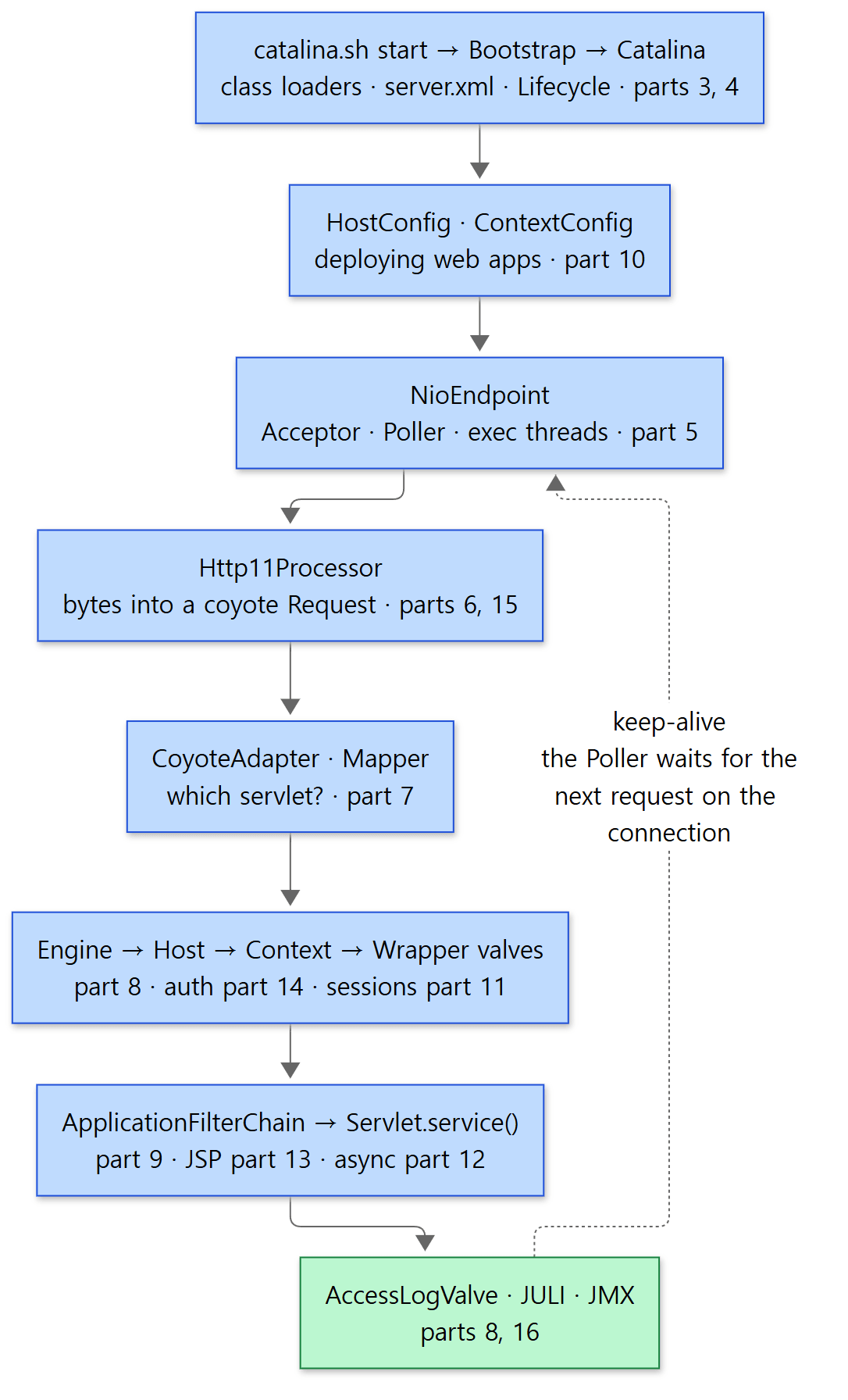 This post was the bottom box.
Bootstrap, started by catalina.sh start, sets up the class loaders (Part 4), calls Catalina to turn server.xml into objects, and then parents start their children in turn (Part 3). Along the way HostConfig finds the web apps and ContextConfig merges their web.xml (Part 10). When a connection arrives, the Acceptor takes it, the Poller watches it and hands it to a worker thread (Part 5), and Http11Processor reads the request (Part 6). CoyoteAdapter turns Coyote's request into Catalina's and picks the servlet with the Mapper (Part 7), and the request passes through the valves of the engine, host, web app and servlet in turn (Part 8), meeting authentication (Part 14) and sessions (Part 11) on the way. The last valve builds the filter chain and calls the servlet's service() (Part 9). That servlet might be a JSP (Part 13), an async servlet that lets go of its thread (Part 12), or it might switch the whole connection to another protocol (Part 15). And all of these parts are exposed to the outside as MBeans, while logs are kept separately per web app (this post).
Across the 16 parts, three things kept coming back. The Lifecycle was not just the startup order; it was also the foothold for MBean registration (this post) and for web app deployment (Part 10). The mapping "one element in a configuration file = one class" held in server.xml, in mbeans-descriptors.xml, and in the methods of embedded Tomcat alike. The class loader was the wall that keeps web apps apart, and that wall divides not only classes (Part 4) but also logging settings (this post). Knowing these three, you can guess where to start reading even a Tomcat component you have never seen.
Compared with the Spring and httpd series
This blog has already read Digging into Spring's Source (27 parts) and Digging into Apache httpd's Source (16 parts). Tomcat stands between the two.
- As a web server, it resembles httpd. The idea of separating the threads that accept connections from the threads that process requests is the same as httpd's MPMs in Part 8, and the pipeline with valves on every container is, like httpd's hooks in Part 6, a device for "plugging other people's code into predefined places". But what httpd does with tables of function pointers and
void *, Tomcat does with interfaces and inheritance. Logging is the same story: in httpd Part 16 log levels were split per module with one array slot each, and in this post JULI splits them per web app with one class-loader slot each. - As a servlet container, it is Spring's floor. To Tomcat, Spring's
DispatcherServlet(Spring Part 21) is just one servlet called at the end of Part 9's filter chain, and the route by which Spring hangs its root context on the servlet context (Spring Part 20) starts from theServletContainerInitializercall we saw in Tomcat Part 10. It is the same thing seen from above and from below. - All three handle lifetimes differently. httpd uses memory pools, Spring has its container manage bean lifecycles, and Tomcat uses the
Lifecyclestate machine to deal with "when to create and when to clean up". The MBeans in this post being registered ininit()and unregistered indestroy()is a result of following that state machine.
What this blog reads next
After Spring, Apache httpd and Tomcat, this blog's open-source reading went on to the nginx → MariaDB → Gradle → Kafka series. As the very next read, I recommend Digging into nginx's Source 1: another web server, but one where a single worker thread both watches the connections and processes the requests.