What this post covers
"Digging into Gradle's Source" is a series that reads the source code of the Gradle build tool a little at a time, with help from AI, and writes up what is there. It follows the same method as the series already finished: Digging into Spring's Source (27 posts), Digging into Apache httpd's Source (16 posts) and Digging into Tomcat's Source (16 posts). The series right before this one is Digging into MariaDB's Source.
The earlier series read "the road a server takes to handle a request". This time we read the tool that builds those servers. The Spring Framework repository is built with Gradle, and so is this blog (with the Kotlin DSL). The blog's build.gradle.kts applies the kotlin("jvm") plugin and has a tasks.register<JavaExec>("preview") that starts a local preview server, and ./gradlew test runs before every post goes up. What happens behind those everyday commands is the question this series asks.
This is the first post, and it gets things ready before any deep reading starts. It tries to answer five questions.
- What is Gradle, how does it work, and what is it for? (a section for newcomers)
- Which version of the source is being read, and how is it different from the Gradle we download and use?
- How do you get exactly the same source, and how do you build and run it — and what builds Gradle itself?
- How is a codebase of about a million lines divided up, and where should you start?
- Which classes does a single
gradle buildpass through before it reaches the task action you wrote?
If Gradle is new to you, start with the "What is Gradle" section right below. Two diagrams and a 3-minute hands-on run show what Gradle does, and a short list shows what questions this series answers, before the main part begins. From there on, the reader I have in mind is a developer who has used Gradle on real projects and is opening its source for the first time: you have edited build.gradle(.kts), applied plugins with plugins { java }, added dependencies with implementation("…"), and maybe written a task with tasks.register("…") { doLast { … } }. You know Java or Kotlin well, but you have never opened Gradle's source.
| Item | Details |
|---|---|
| Project | Gradle Build Tool (gradle/gradle) |
| Version | 9.10.0 development build (master branch) |
| Commit | 07ecbf9ead (2026-10-24) |
| Language | Java, Kotlin (build-script engines: Kotlin and Groovy) |
| What builds it | Wrapper Gradle 9.9.0-milestone-2, JDK 25 |
| Files this post mainly reads | version.txt, CONTRIBUTING.md, settings.gradle.kts, launcher/GradleMain.java, launcher/cli/BuildActionsFactory.java, launcher/daemon/server/DaemonServices.java, execution/plan/DefaultPlanExecutor.java |
Every line number and detail in these posts refers to that commit. Gradle reworks its internals often, so in other versions not only the line numbers but sometimes even the class names differ (section 6 gives examples). Since this post is the map for the whole series, it stays with the big picture and leaves the depth to the individual posts.
The series has 12 posts in all.
- How I Read It with AI, and the Map (this post)
- The Big Picture — Client and Daemon, Service Scopes, and the Three Build Phases
- From the gradle Command to the Daemon — the Launcher, the Wrapper and the Daemon Protocol
- The Service Registry — the DI Container Inside Gradle
- The Build Lifecycle — Where Initialization, Configuration and Execution Split
- Projects and Build Scripts — How build.gradle.kts Gets Run
- Applying Plugins — From the plugins {} Block to apply()
- Tasks and Lazy Configuration — DefaultTask, TaskContainer and Provider
- The Task Graph and the Execution Plan — What, in What Order, How Many at Once
- The Execution Engine and Incremental Builds — How UP-TO-DATE Is Decided
- The Build Cache and the Configuration Cache — Two Ways to Reuse Work
- Dependency Resolution — From One implementation Line to Jar Files, and Wrapping Up the Series
What is Gradle — how it works and what it is for
Before opening the source, let's see what Gradle does, with diagrams and a hands-on run. If you have used Gradle already, you can just look at "Questions this series answers" at the end of this section and move on.
In one sentence — a "foreman" that reads a job list, works in order, and redoes only what changed
Gradle is the foreman of your build. To ship a program you have to do things like "compile the source", "run the tests" and "pack the result into a jar", in the right order. In Gradle each of these jobs is called a task. The foreman reads the job list (the build script), works out what has to come before what, puts the jobs in order, and skips any job whose inputs have not changed since last time. If you did not touch a single source file since yesterday's compile, there is no reason to compile again today.
This whole series is, in the end, about following in the source how the foreman reads the job list, how it decides the order, and how it knows a job can be skipped.
Why you need something like this
With one Java file, javac Hello.java is all it takes. As a project grows, doing it by hand gets hard.
- There are hundreds of source files, and you have to compile, test and pack them in the same order every time. Miss one step and an old build goes out.
- To use other people's libraries (logging, JSON, testing tools …) you have to download the right version of each jar and put it on the classpath. If that library needs yet another library, you have to find that too.
- If you change one file and redo everything from scratch, you wait a long time.
- It works on your machine but not on a teammate's, or not on the CI server (a server that builds and tests automatically on every commit).
With Gradle you write these jobs down once, in a file called build.gradle.kts. After that, anyone gets the same build, in the same order, with one line: ./gradlew build. One implementation("…") line is enough for Gradle to fetch a library, and tasks that have not changed are skipped.
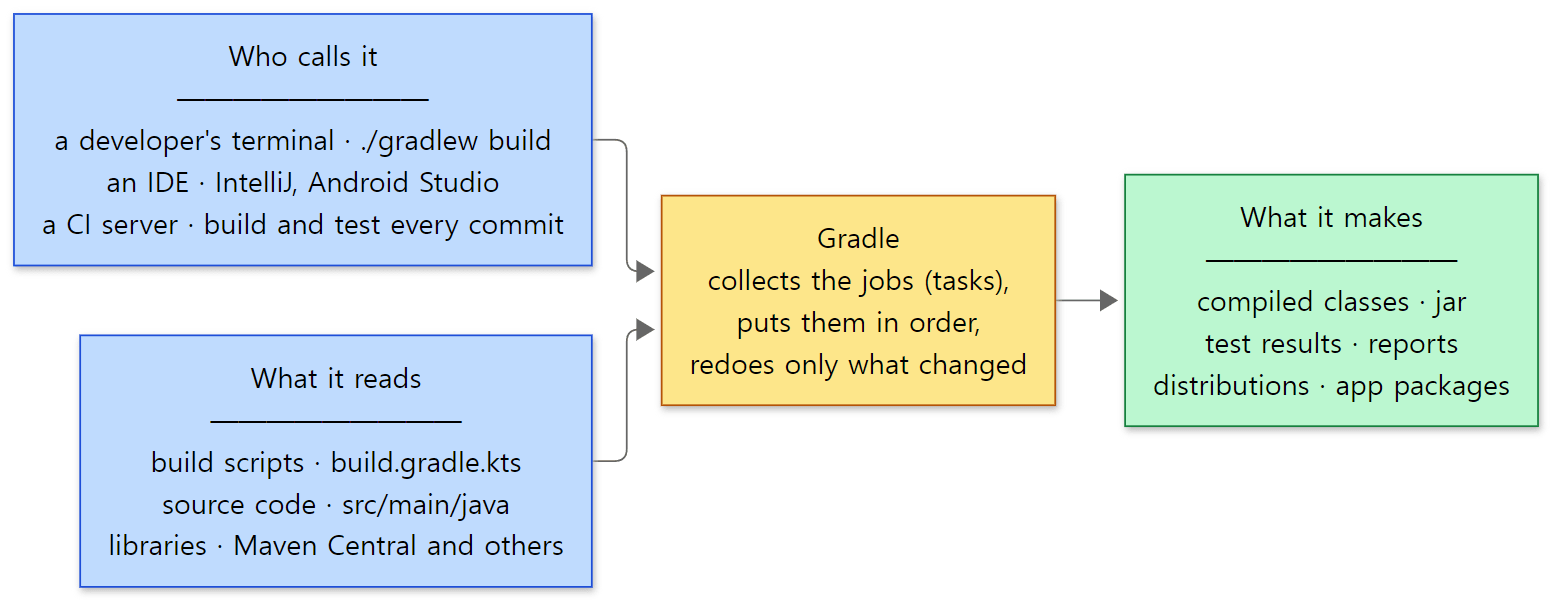 Where Gradle sits. A person, an IDE or a CI server all get the same build from the same build script.
How it works — in four words
Four words are enough to explain what makes Gradle tick. The hands-on run and the diagram below show exactly these four.
- Task — one job. It has a name, such as
compileJava(compile),test(run tests) orjar(pack), and when it runs it executes its task action (the code that actually does the work). - Dependency (
dependsOn) — a promise that "that task must be finished before this one". Gradle starts from the task you asked for and follows these promises to collect every task that is needed. The result is called the task graph. A task you did not ask for, and that nothing depends on, stays out of the graph. - Two phases — configuration and execution — Gradle first runs the build script from top to bottom to learn which tasks exist and how they connect (the configuration phase), and then runs the task actions in the order of the task graph (the execution phase). The body of the build script runs in the configuration phase; the code inside
doLast { … }runs in the execution phase. - Inputs and outputs — each task can declare what it reads (inputs) and what it makes (outputs). Gradle remembers the inputs and outputs from the last run, and if both are unchanged it does not run the task; it prints
UP-TO-DATE(already current) and moves on.
On top of this come plugins. A plugin is a ready-made bundle of common tasks. One line, plugins { java }, gives you compileJava, test, jar, build and more, already wired together.
A 3-minute hands-on — wire three tasks together and run them twice
Words alone don't make it click, so let's run it. I ran it with the Gradle this series builds (the Docker image made in section 3), but it uses nothing special, so a downloaded Gradle should give the same steps (I did not run it with a release build). The example folder is ex/u01-first-look, and this is the whole build script.
// An example written for this post (not part of Gradle's source)
// A tiny build with three tasks chained by dependsOn: greet → shout → hello
println("[configuration] running build.gradle.kts")   // printed during configuration

val who = providers.gradleProperty("who").orElse("world")  // can be changed with -Pwho=…

// 1) Write a greeting to a file — input: who, output: greeting.txt
val greet = tasks.register("greet") {
    val out = layout.buildDirectory.file("greeting.txt")
    inputs.property("who", who)
    outputs.file(out)
    doLast {
        out.get().asFile.writeText("Hello, ${who.get()}!\n")
        println("greet: wrote greeting.txt")
    }
}

// 2) Upper-case the file greet wrote — input: greeting.txt, output: shout.txt
val shout = tasks.register("shout") {
    dependsOn(greet)
    val src = layout.buildDirectory.file("greeting.txt")
    val out = layout.buildDirectory.file("shout.txt")
    inputs.file(src)
    outputs.file(out)
    doLast {
        out.get().asFile.writeText(src.get().asFile.readText().uppercase())
        println("shout: wrote shout.txt")
    }
}

// 3) Print the result — it declares no outputs, so it runs every time
tasks.register("hello") {
    dependsOn(shout)
    val src = layout.buildDirectory.file("shout.txt")
    doLast { print("hello: " + src.get().asFile.readText()) }
}

// 4) A task nobody asks for — it is registered but never enters the execution plan
tasks.register("unused") { doLast { println("unused: this never runs") } }
tasks.register("name") { … } registers a task, inputs and outputs declare its inputs and outputs, and doLast { … } holds the task action. Here is what the run does.
- Ask for
hellowith--dry-run, which shows only what would run, and in what order. - Run
hellofor the first time. - Run it again without changing anything.
- Change the input
whotoGradleand run it. - In a different project, write only the line
plugins { java }and look at the tasks it creates. - Put one Java file in that project, build the
jarand run it.
Steps 1–4 are gradle hello --dry-run, gradle hello, gradle hello and gradle hello -Pwho=Gradle (all with --offline --console=plain), and step 5 keeps seven lines from the output of gradle tasks --all. Here is the output.
=== 1. dry run: the plan for 'hello' (nothing is executed)

Welcome to Gradle 9.10.0-20261107025045+0000!

Starting a Gradle Daemon (subsequent builds will be faster)
Shared read-only dependency cache is an incubating feature.

> Configure project :
[configuration] running build.gradle.kts
:greet SKIPPED
:shout SKIPPED
:hello SKIPPED

BUILD SUCCESSFUL in 15s
=== 2. first run

> Configure project :
[configuration] running build.gradle.kts

> Task :greet
greet: wrote greeting.txt

> Task :shout
shout: wrote shout.txt

> Task :hello
hello: HELLO, WORLD!

BUILD SUCCESSFUL in 1s
3 actionable tasks: 3 executed
=== 3. second run, nothing changed

> Configure project :
[configuration] running build.gradle.kts

> Task :greet UP-TO-DATE
> Task :shout UP-TO-DATE

> Task :hello
hello: HELLO, WORLD!

BUILD SUCCESSFUL in 1s
3 actionable tasks: 1 executed, 2 up-to-date
=== 4. change an input (-Pwho=Gradle)

> Configure project :
[configuration] running build.gradle.kts

> Task :greet
greet: wrote greeting.txt

> Task :shout
shout: wrote shout.txt

> Task :hello
hello: HELLO, GRADLE!

BUILD SUCCESSFUL in 981ms
3 actionable tasks: 3 executed
=== 5. one line 'plugins { java }' adds these tasks (excerpt of 'gradle tasks --all')
build - Assembles and tests this project.
classes - Assembles main classes.
clean - Deletes the build directory.
jar - Assembles a jar archive containing the classes of the 'main' feature.
test - Runs the test suite.
compileJava - Compiles main Java source.
processResources - Processes main resources.
=== 6. build the jar and run it
> Task :compileJava
> Task :processResources NO-SOURCE
> Task :classes
> Task :jar

BUILD SUCCESSFUL in 1s
2 actionable tasks: 2 executed
Hello from a jar built by Gradle
(Every run ends with the line "Consider enabling configuration cache to speed up this build: …", which is the same each time, so I removed it. The time in BUILD SUCCESSFUL in … changes from run to run. "Shared read-only dependency cache is an incubating feature." appears because this series' Docker image uses a pre-downloaded library cache (section 3).)
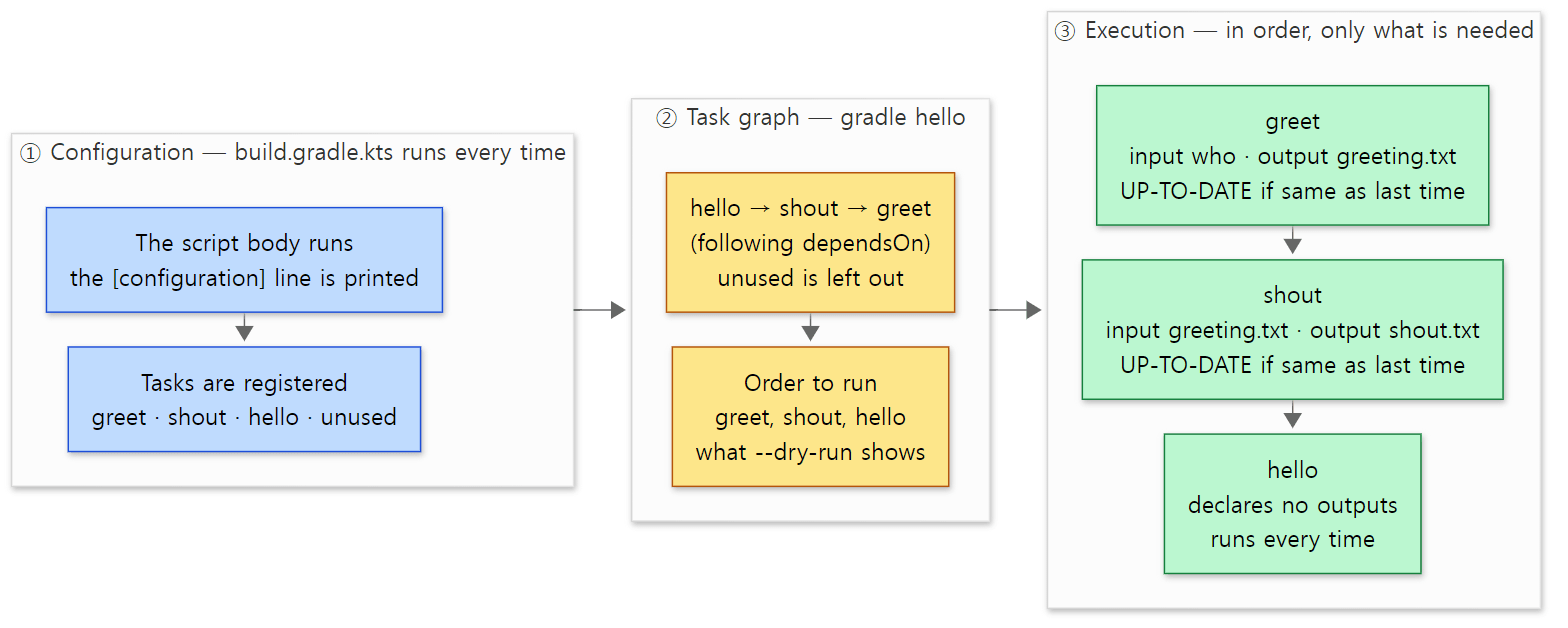 What the hands-on run showed, drawn as a picture. Blue is the configuration phase, yellow is the task graph, and green is the execution phase.
There are five things to notice in the output.
- It makes a plan before running anything. In step 1,
--dry-runran no tasks at all and printed:greet,:shoutand:helloin order. We asked only forhello, but followingdependsOngathered all three, and a task comes after the tasks it depends on. The registered-onlyunusedis not in the list. With--dry-run, Gradle prints each task in the execution plan withSKIPPEDafter its name and stops there (DefaultBuildWorkExecutor.java lines 106–117). How the plan is made is covered in Part 9. - The build script always runs first. The
[configuration]line was printed in all four runs, and always before any> Taskline. You can see from the order of the output that the script body belongs to configuration and the inside ofdoLastbelongs to execution. Where in the source the two phases split is the topic of Part 5. - If nothing changed, it skips. In step 3,
greetandshoutwere passed over asUP-TO-DATE, and the last line changed to3 actionable tasks: 1 executed, 2 up-to-date. One step of the execution engine ends withUP_TO_DATEwithout calling the task action when there are no changes since last time and no other reason to rerun (SkipUpToDateStep.java lines 49–58). Buthelloran every time. A task that declares no outputs is always rerun, for the reason "Task has not declared any outputs despite executing actions." (DefaultTaskExecutionMode.java line 32). How Gradle finds out what changed is covered in Part 10. - When an input changes, everything after it reruns. In step 4,
-Pwho=Gradlechangedgreet's input, sogreetran again; that changed the contents ofgreeting.txt, soshout, which takes that file as input, ran again too. Gradle does not track "who changed what". Each task just compares its own inputs and outputs with last time. - One plugin line creates tasks. The step 5 project has a build script of just
plugins { java }, yet it gotcompileJava,processResources,classes,jar,test,buildandclean. In step 6, asking only forjarrancompileJava→processResources→classes→jarin order and produced a jar file; the last line is the result of running a class in that jar withjava -cp(processResourceswas skipped asNO-SOURCEbecause there are no resource files). Thejavaplugin first appliesJavaBasePluginunderneath it (JavaPlugin.java lines 272–273), which registerscompileJavawith the very sametasks.registerwe used (JavaBasePlugin.java lines 237–242).buildis an empty task that justdependsOnassembleandcheck(LifecycleBasePlugin.java lines 116–120). Part 7 follows how a plugin gets applied.
What it is for
| Use | What it does | Example |
|---|---|---|
| Building JVM languages | Compiles Java, Kotlin, Groovy and Scala source, runs the tests and packs jars | plugins { java }, this blog's kotlin("jvm") |
| Building Android apps | Android Studio projects are Gradle builds, with an Android plugin on top | ./gradlew assembleDebug |
| Managing dependencies | Fetches the libraries you need and the libraries they need, and picks one version when versions clash | one implementation("…") line |
| Automating tests and packaging | Chains tests, static checks, building distributions (zip, tgz) and publishing to a repository into tasks that one command runs | ./gradlew build on a CI server |
| Large multi-project builds | Ties tens or hundreds of modules into one build and rebuilds only the modules that changed | Gradle's own repository (233 subprojects, section 4), Kafka, Spring Framework |
Gradle's own README also introduces it as a tool for building, testing and deploying applications in Java, Kotlin, Scala, Android, Groovy, C++ and Swift (README.md line 26). C, C++ and Swift builds live in platforms/native, but this series does not cover them (see the table in section 4).
There are also places where it does not fit. For a script or practice code of one or two files, running it directly with java Hello.java is faster; Gradle spends time on its first start bringing up a JVM and the daemon (see "Terms to know first" below). In the hands-on run above, the first command took 15 seconds and the later ones about 1 second. Also, Gradle writes build rules as code (Kotlin or Groovy), so in a project with simple rules that freedom mostly adds more to read. The JVM world also has another build tool, Maven, but this series does not compare the two; it reads only Gradle.
Questions this series answers
Running the example makes you curious about things. This series answers those questions one by one from the source. If a question catches your eye, feel free to start with that part.
| What you might wonder | Where the answer is |
|---|---|
Is the gradle you typed in the terminal really the process that does the build? What big pieces is the whole thing made of? |
Part 2: The Big Picture |
| 15 seconds for the first command, 1 second after that — what is the daemon in "Starting a Gradle Daemon", and how does the client find it? | Part 3: The Launcher, the Wrapper and the Daemon Protocol |
Where do layout and providers, which the build script just uses, come from? |
Part 4: The Service Registry |
Why is the [configuration] line printed every time, before any task? |
Part 5: The Build Lifecycle |
build.gradle.kts is a Kotlin file — who compiles it, and how is it run? |
Part 6: Projects and Build Scripts |
How does one line, plugins { java }, create seven tasks? |
Part 7: Applying Plugins |
Is the object for unused, which was only registered with tasks.register, ever even created? |
Part 8: Tasks and Lazy Configuration |
How does the order come out of dependsOn, and can unrelated tasks run at the same time? |
Part 9: The Task Graph and the Execution Plan |
What does UP-TO-DATE compare with what? Where is the record kept? |
Part 10: The Execution Engine and Incremental Builds |
| Can you reuse results someone else built? Can the configuration phase, which runs every time, be skipped? | Part 11: The Build Cache and the Configuration Cache |
How does one implementation("…") line become jar files on your machine? |
Part 12: Dependency Resolution |
The rest of this post is the preparation for following these questions in the source: which version is read (section 1), how to get and build the source (sections 2 and 3), the folder map (section 4), and which classes one gradle build actually passes through (section 5). If you have no plans to build it yourself, you can skip sections 2 and 3 without missing anything you need later.
Terms to know first
Here are six words you have probably heard while using Gradle without knowing what they are in the source.
The daemon is a long-lived JVM process that actually does the build. The process that starts when you type gradle in a terminal (we call it the client) does not build anything. It finds or starts a daemon, asks it over a socket to "run these tasks", and prints the log the daemon sends back. The Starting a Gradle Daemon (subsequent builds will be faster) line on your first build is that daemon. Why the work is split this way is touched on in section 5 and covered in part 3.
The wrapper is the gradlew script plus gradle/wrapper/gradle-wrapper.properties checked into a project. It downloads the Gradle version written there, unpacks it into ~/.gradle/wrapper/dists, and builds with it. So whatever Gradle is installed on your machine, the project builds with the version it chose. This blog uses 9.5.1; the Gradle repository itself uses 9.9.0-milestone-2.
A build operation is a named unit of record that Gradle attaches to each piece of work inside a build. "Read settings", "configure project", "run task :hello" — each of these is recorded when it starts and finishes, and they nest as parents and children to form a tree. The console's progress display, Build Scan and the IDE's build window are all drawn from these records. The examples in section 5 dump that tree to a file.
Platform, module and subproject are three levels used to divide the Gradle repository. A subproject is one subproject of a Gradle multi-project build in the usual sense (one folder such as platforms/core-runtime/launcher, one jar). Subprojects are grouped by purpose into architecture modules (core-runtime and so on), and modules are grouped further into platforms (core, jvm and so on). Section 4 shows the map.
The task graph and execution plan mean "the tasks this build will run, and their order". When you type gradle build, collecting everything build depends on — check, assemble, jar, compileJava … — and ordering it gives you the execution plan, and each task in it is called a node. See part 9.
A task action is the code that actually runs when a task executes: a block added with doLast { … }, or the @TaskAction method of a custom task class. Code in the body of a build script runs in the configuration phase; task actions run in the execution phase. The examples in section 5 make that difference visible with two call stacks.
1. Which version is read — the 9.10.0 development build
The version comes from a one-line file
The Gradle repository's version is written in version.txt at the top. This one line is the whole file (there is not even a trailing newline).
9.10.0
But 9.10.0 has never been released. Ask git for the nearest tag and it says:
$ git describe --tags
v9.9.0-M2-631-g07ecbf9ead1
That means "631 commits after the v9.9.0-M2 tag (the second milestone of 9.9.0, a preview released before the final version), at commit 07ecbf9ead1". The base commit's message is Merge release into master (20261024) (#39583). Gradle keeps a release branch for preparing a release and a master branch for the next version, and regularly merges fixes from release into master. This commit is one of those merges, and the series reads the master line that is preparing 9.10.0, the version after 9.9.0.
Why master and not a release (say 9.8.x)? For the same reason the Tomcat series read main and the httpd series read trunk: fixes and new structure land on the development line first, and every code link in the posts opens on GitHub as is. The catch is that Gradle renames internal classes often, so class names from older articles online are frequently missing from this commit. This series always starts by checking "does that class exist in this commit?" (section 6).
Gradle is built with Gradle
The Gradle repository is itself a very large Gradle multi-project build. There is a gradlew and a settings.gradle.kts at the top, and the wrapper settings say:
distributionUrl=https\://services.gradle.org/distributions/gradle-9.9.0-milestone-2-bin.zip
gradle/wrapper/gradle-wrapper.properties line 4
So 9.9.0-milestone-2 builds the 9.10.0 source. The previous Gradle makes the next one, much like a compiler that compiles itself.
The JDK the daemon runs on is chosen by gradle-daemon-jvm.properties in the same folder.
toolchainVersion=25
gradle/gradle-daemon-jvm.properties line 12
As its first-line comment says, the :updateDaemonJvm task generated this file, and it means "start this build's daemon on JDK 25" (the series does not go deep into this feature; part 3 only briefly notes that these criteria are checked when choosing a daemon). CONTRIBUTING.md also says you need "Adoptium JDK version 25", and that this exact version is required to use the remote build cache (CONTRIBUTING.md line 65).
The repository's build rules (how each module is compiled, how jars are packed, how distributions are made) live in three build-logic* folders. settings.gradle.kts pulls them in as included builds (bringing in a whole other build to use the plugins inside it).
includeBuild("build-logic-commons")
includeBuild("build-logic")
settings.gradle.kts lines 23–24
The third, build-logic-settings, comes in through pluginManagement { includeBuild("build-logic-settings") } on line 12. What we would do with buildSrc or convention plugins in our own projects, the Gradle repository does with these three builds (589 Kotlin, Java and Groovy files in total, about 64,000 lines). When reading Gradle's source, remember that build-logic*/ is not Gradle itself but "the plugins that build the Gradle repository". That keeps a lot of confusion away.
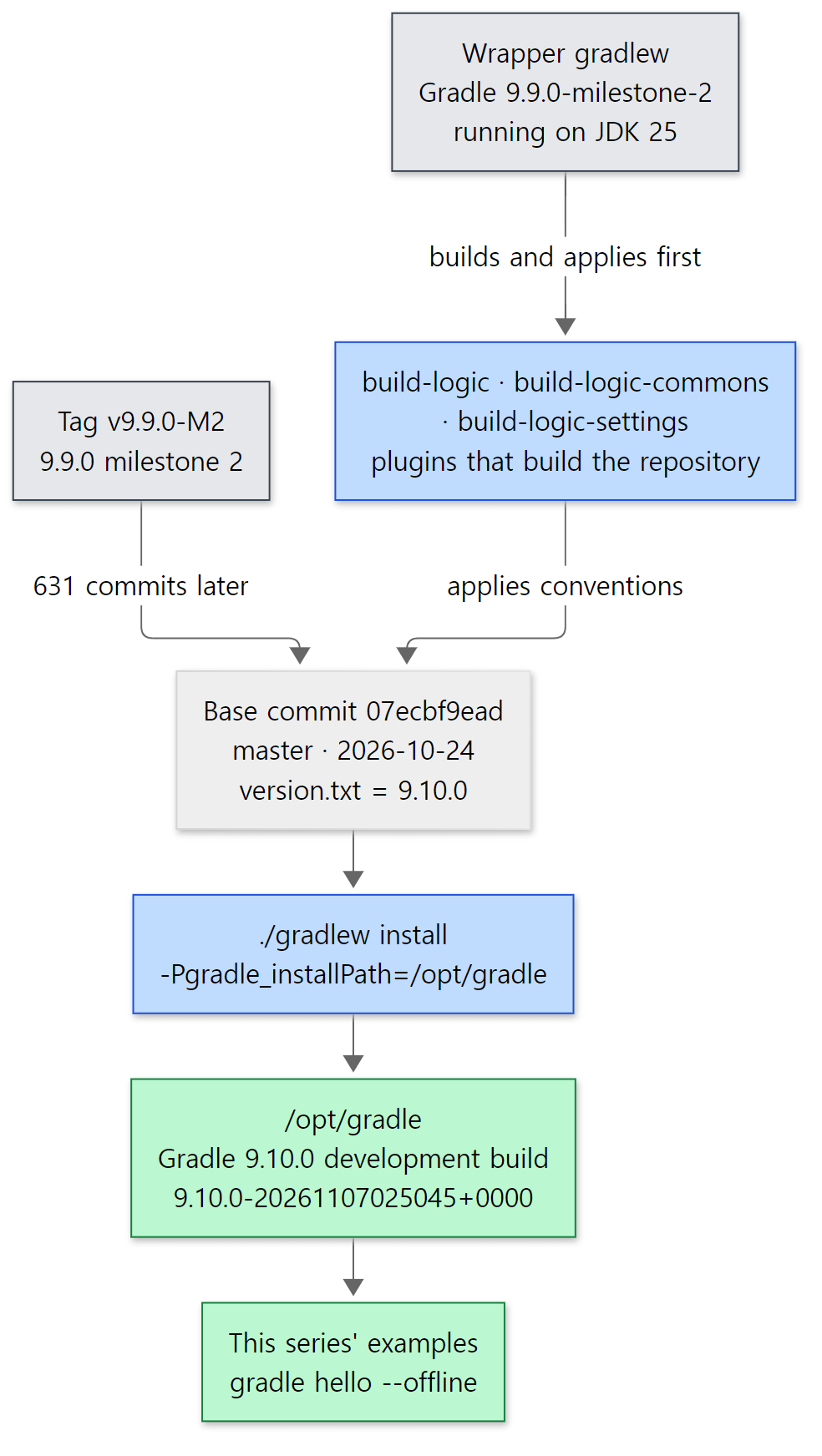 Gradle being built with Gradle. Grey is what comes from outside, blue is the build process, green is the result.
Easy to get confused
Three versions show up together. When this series says "Gradle version", it can mean one of three things, which is confusing at first.
| What | Version | Where it is written |
|---|---|---|
| The source this series reads | 9.10.0 development build (9.10.0-20261107025045+0000) |
version.txt; building it appends the build time |
| The Gradle that builds that source | 9.9.0-milestone-2 | gradle-wrapper.properties in the Gradle repository |
| The Gradle that builds this blog | 9.5.1 | gradle-wrapper.properties in the blog repository |
The blog's ./gradlew test runs on 9.5.1, so its code and line numbers differ from what this series reads. Every example in the posts was run with the 9.10.0 development build made from the base commit.
2. Getting the same source
This section and section 3 are for readers who want to run the examples themselves. If you only want to read, feel free to skip to section 4 (the folder map).
Cloning and pinning the commit
To open the line numbers yourself you need the source at the same commit. With Git, do this:
- Clone the repository. The history is long and there are close to 30,000 files, so it takes a while.
- Check out the base commit separately. I left the cloned folder (
gradle) alone and used git worktree to put only the base commit into another folder (gradle-07ecbf9ead). A worktree lets one repository have different commits checked out in different folders at the same time. Even if yougit pullnewer code into the original folder, the line numbers in the base-commit folder stay put. - Check it worked. The full commit hash should come back.
git clone https://github.com/gradle/gradle.git
cd gradle
git -c core.longpaths=true worktree add --detach ../gradle-07ecbf9ead 07ecbf9ead10aaeb060ca3e2dcba1f738815c083
git -C ../gradle-07ecbf9ead rev-parse HEAD
If a worktree feels like too much, git checkout 07ecbf9ead10aaeb060ca3e2dcba1f738815c083 in the cloned folder works too. You can also just read it on the web: this commit on GitHub shows the same files, and every code link in this series points at it.
Easy to get confused — Windows trips over path length
The -c core.longpaths=true in that command is there because of something that actually happened. On Windows, creating the worktree failed the first time because some files could not be written. Windows has long limited paths to 260 characters (MAX_PATH), and Git for Windows only creates files with longer paths when core.longpaths is on. The longest path in the Gradle repository is 255 characters inside the repository alone:
platforms/documentation/docs/src/snippets/how-to/dependency-management/dependency-management/dependency-management/managingTransitiveDependencies-dependencyAlignmentWithPlatform/kotlin/buildSrc/src/main/kotlin/myproject.java-library-conventions.gradle.kts
Put D:\openSource\gradle-07ecbf9ead\ (32 characters) in front of it and you are over 260. There are 5 paths longer than 230 characters, and all of them are examples in the user manual (docs/src/snippets). To avoid changing configuration files, I added git -c core.longpaths=true … to each command (turning it on for the repository with git config core.longpaths true works too). macOS and Linux do not have this problem.
With this many files, grep -r is slow as well. This series searches with git grep (which only looks at files git tracks and uses its index), and checks whether a class exists by file name first, as in git ls-files '*/DefaultBuildLifecycleController.java'.
3. Building Gradle and running it
The way the repository recommends — install
If you only want to read, you do not need to build. But this series runs every example it shows, so it needs a Gradle built from the base commit. A downloaded release would have different line numbers in its stack traces, and different classes.
CONTRIBUTING.md describes how to try out a modified Gradle like this:
#### Install Gradle locally

and try out a change in behavior manually.
- Install: `./gradlew install -Pgradle_installPath=/any/path`
- Use: `/any/path/bin/gradle taskName`.

It's also a good idea to run `./gradlew sanityCheck` before submitting your change because this will help catch code style issues.

> **NOTE:** Do **NOT** run `gradle build` on the local development environment,
> even if you have Gradle or Develocity build caching enabled for the project.
> The Gradle Build Tool repository is massive, and it will take ages to build on
> a local machine without necessary parallelization and caching.
The warning not to run gradle build stands out. In our own projects we type it out of habit, but in the Gradle repository build means running every module's tests (integration tests included), which a personal machine will not finish. The install task used instead is defined in a build-logic plugin:
tasks.register<Sync>("install") {
    description = "Installs the minimal distribution"
    group = "build"
    from(tasks.named("binInstallation", Sync::class.java).map { it.destinationDir })
    into(installDirectory)
}
build-logic/packaging/src/main/kotlin/gradlebuild.install.gradle.kts lines 22–27
It is the same tasks.register we use. A Sync task (a copy that makes the target folder match the source exactly) just moves the minimal distribution (binInstallation) into installDirectory; the heavy lifting is done by the compile and jar tasks that binInstallation depends on. installDirectory is the value you pass with -Pgradle_installPath=… (GRADLE_INSTALL_PATH = "gradle_installPath" on line 102 of BuildParams.kt; without it the build stops with "You can't install without setting the gradle_installPath property.").
Without .git, the commit id has to be supplied
To build inside Docker, I extracted the repository with git archive (which writes the files of one commit into a .tar.gz). That leaves no .git folder. But a Gradle distribution records which commit it was built from — that is the Revision: line of gradle --version. Following where that value comes from:
val Project.buildCommitId: Provider<String>
    get() = environmentVariable(BUILD_COMMIT_ID)
        .orElse(gradleProperty(BUILD_PROMOTION_COMMIT_ID))
        .orElse(environmentVariable(BUILD_VCS_NUMBER))
        .orElse(currentGitCommitViaFileSystemQuery())
build-logic-commons/basics/src/main/kotlin/gradlebuild/basics/BuildParams.kt lines 233–237
It looks at the BUILD_COMMIT_ID environment variable (the constant on line 88) first, then two CI values, and finally runs git rev-parse HEAD. That last step does this when git fails:
        return execOutput.result.zip(execOutput.standardOutput.asText) { result, outputText ->
            if (result.exitValue == 0) outputText.trim()
            else "<unknown>" // It's a source distribution, we don't know.
        }
The createBuildReceipt task of the base-services module (this.commitId = project.buildCommitId, base-services/build.gradle.kts line 78) writes this value into a file called build-receipt.properties inside the jar, and at run time DefaultGradleVersion reads that file's commitId and shows it as Revision. So to keep the real commit id while building without .git, I passed BUILD_COMMIT_ID as an environment variable. Without it, Revision would have said <unknown> (that is what the source says would happen; I did not build it that way to check).
Building in Docker
Here is the actual Dockerfile. It has three stages (a multi-stage build). The comments are in Korean, as in the file itself; a summary follows.
# syntax=docker/dockerfile:1
# "Gradle 소스 파헤치기" 예제용 이미지.
# 기준 커밋 07ecbf9ead (master, version.txt = 9.10.0) 의 소스를 그대로 빌드해 /opt/gradle 에 설치한다.
# 소스는 git archive 로 뽑은 gradle-07ecbf9ead.tar.gz (LF 줄 끝, 손대지 않은 원본).
#
#   docker build -t gradle-lab:07ecbf9ead .        (12 CPU 기준 수십 분, 네트워크 필요)

# ---- 1단계: Gradle 빌드 (저장소가 요구하는 JDK 25 — gradle/gradle-daemon-jvm.properties 의 toolchainVersion=25) ----
FROM eclipse-temurin:25-jdk AS build
RUN apt-get update && DEBIAN_FRONTEND=noninteractive apt-get install -y --no-install-recommends git unzip \
    && rm -rf /var/lib/apt/lists/*
COPY gradle-07ecbf9ead.tar.gz /usr/src/
WORKDIR /usr/src
# .git 이 없으므로 커밋 id 를 환경 변수로 준다 (build-logic-commons/basics/.../BuildParams.kt 의 buildCommitId).
# install = 최소 배포판(bin)을 gradle_installPath 에 설치하는 태스크 (build-logic/packaging/.../gradlebuild.install.gradle.kts).
RUN --mount=type=cache,target=/root/.gradle \
    tar xzf gradle-07ecbf9ead.tar.gz && cd gradle \
    && BUILD_COMMIT_ID=07ecbf9ead10aaeb060ca3e2dcba1f738815c083 \
       ./gradlew --no-daemon --console=plain install -Pgradle_installPath=/opt/gradle \
    && rm -rf /usr/src/gradle

# ---- 2단계: 예제가 쓸 의존 라이브러리를 미리 받아 읽기 전용 캐시로 만든다 ----
FROM eclipse-temurin:25-jdk AS warm
COPY --from=build /opt/gradle /opt/gradle
COPY warmup /usr/src/warmup
RUN cd /usr/src/warmup \
    && GRADLE_USER_HOME=/tmp/gh /opt/gradle/bin/gradle --no-daemon --console=plain warmup \
    && mkdir -p /opt/gradle-ro-cache && cp -r /tmp/gh/caches/modules-2 /opt/gradle-ro-cache/ \
    && rm -f /opt/gradle-ro-cache/modules-2/*.lock /opt/gradle-ro-cache/modules-2/gc.properties

# ---- 3단계: 예제 실행 이미지 ----
FROM eclipse-temurin:25-jdk
RUN apt-get update && DEBIAN_FRONTEND=noninteractive apt-get install -y --no-install-recommends procps unzip tree \
    && rm -rf /var/lib/apt/lists/*
COPY --from=build /opt/gradle /opt/gradle
COPY --from=warm /opt/gradle-ro-cache /opt/gradle-ro-cache
# GRADLE_RO_DEP_CACHE: Gradle 의 읽기 전용 의존성 캐시. 여기 있는 라이브러리는 네트워크 없이(--offline) 쓸 수 있다.
ENV GRADLE_HOME=/opt/gradle PATH=/opt/gradle/bin:$PATH GRADLE_RO_DEP_CACHE=/opt/gradle-ro-cache
WORKDIR /work
CMD ["gradle", "--version"]
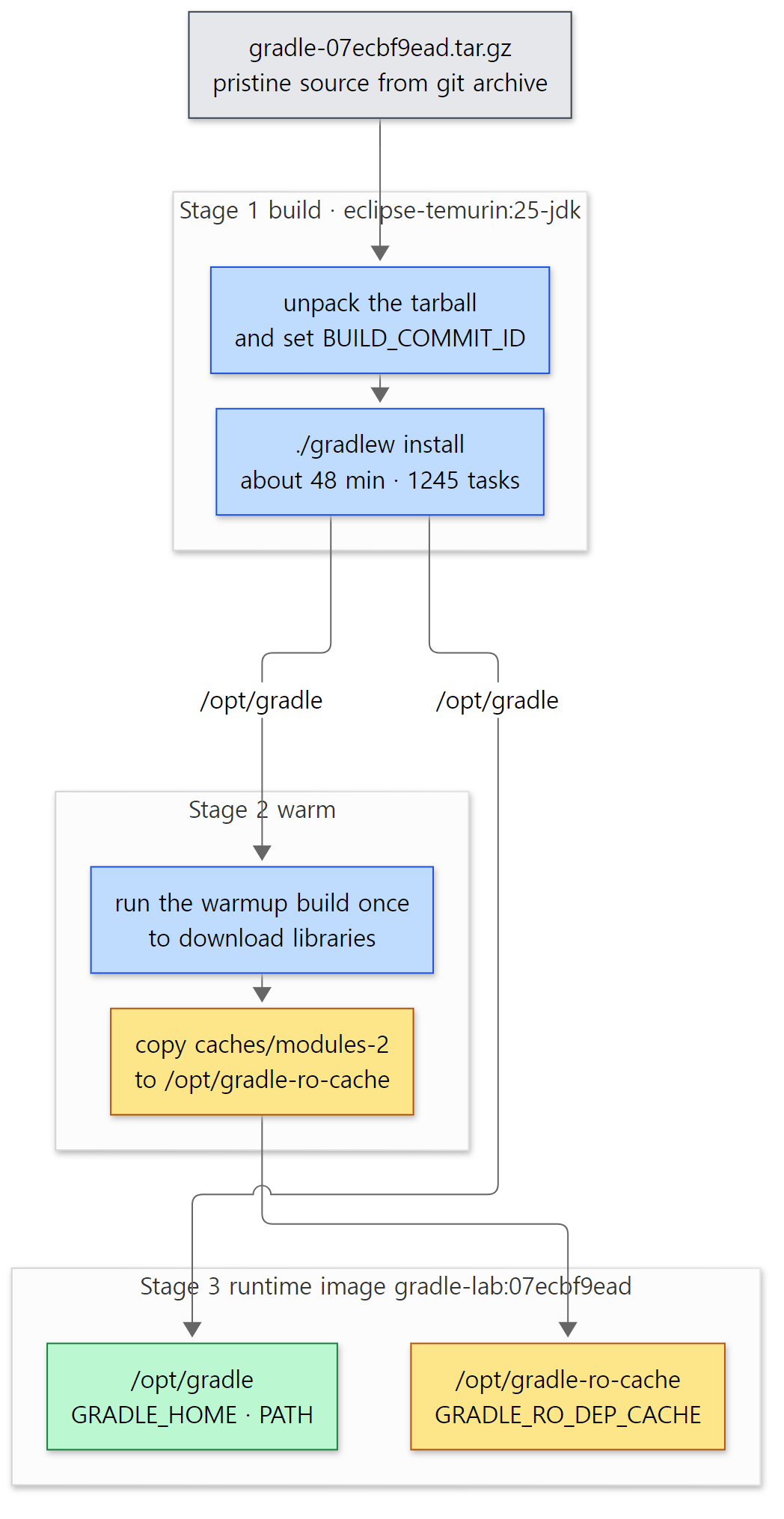 The three stages of the Dockerfile. Yellow boxes are stored things such as the dependency cache; the green box is the Gradle left in the final image.
Step by step:
- Start from a JDK 25 image.
eclipse-temurin:25-jdkis the OpenJDK 25 image built by Eclipse Adoptium. As section 1 showed, the repository requires JDK 25. - Put the source in as an archive. The "LF line endings" comment comes from something that happened in httpd part 1: when files checked out on Windows get CRLF line endings, shell scripts (
gradlew) refuse to run on Linux. The Gradle repository has* text eol=lfin.gitattributes, so it checks out with LF even on Windows, but extracting withgit archiveremoves the worry altogether. - Run
installthrough the wrapper../gradlewdownloads 9.9.0-milestone-2, which builds 9.10.0 and installs it into/opt/gradle. There is no reason to keep a daemon around, hence--no-daemon;--console=plainkeeps the log free of progress bars.--mount=type=cacheis a Docker build cache that lets a rebuild reuse what was already downloaded. - Download the example libraries ahead of time. Stage 2 runs a small build (
warmup) once with the freshly built Gradle to download libraries such as Guava, commons-text and JUnit plus thekotlin-dslplugin, then copies the resulting dependency cache (caches/modules-2) to/opt/gradle-ro-cache. - Put only the results into the runtime image. Stage 3 leaves out the sources and caches used for building and copies only
/opt/gradleand the read-only cache. Gradle readsGRADLE_RO_DEP_CACHEas "use this as a dependency cache too, but never write to it", so these libraries are found even when examples run with--offline(no network). This cache comes back in part 12.
The last lines of the real build log were:
BUILD SUCCESSFUL in 47m 47s
1245 actionable tasks: 1131 executed, 114 from cache
It took about 48 minutes on 12 CPUs, and 114 of the 1245 tasks were fetched from the remote build cache (a server run by the Gradle team that hands out results other people already built) — that is FROM-CACHE. How "fetching results" works is the topic of part 11.
Easy to get confused — stage 2 failed once when the image was first built
The first time the image was built, the 48-minute stage 1 finished and then stage 2 stopped with this:
* What went wrong:
Execution failed for task ':test'.
> There are test sources present and no filters are applied, but the test task did not discover any tests to execute. This is likely due to a misconfiguration. Please check your test configuration. If this is not a misconfiguration, this error can be disabled by setting the 'failOnNoDiscoveredTests' property to false.
The cause: the warmup build had JUnit 5 tests but was missing tasks.test { useJUnitPlatform() }. If test sources exist but no tests are discovered, the task fails, and JUnit 5 tests are only discovered when the JUnit Platform is turned on. Adding that one line fixed it, and luckily Docker had cached stage 1, so it did not have to rebuild. Every test example in this series includes useJUnitPlatform().
How the examples are run
Each post has one folder (such as ex/u01-reading-plan) with a run.sh, run inside a container by a small script (run-example.sh). The core is one line:
MSYS_NO_PATHCONV=1 docker run --rm -v "$(pwd -W 2>/dev/null || pwd)/$dir:/work:ro" -w /work \
  gradle-lab:07ecbf9ead bash ./run.sh
The example folder is mounted at /work in the container read-only (:ro), and run.sh copies the project inside it to /tmp before building, so no build/ or .gradle/ appears in the host folder. The container is removed when it finishes (--rm). That means the Gradle user home (~/.gradle) is fresh every time: the first build always starts a new daemon and compiles the build scripts from scratch, and to show "the second build" the same run.sh runs twice. pwd -W and MSYS_NO_PATHCONV=1 deal with Windows paths in Git Bash, as in the earlier series.
Example: asking the freshly built Gradle
This example was run in a Docker container (Eclipse Temurin JDK 25) with the Gradle 9.10.0 development build made directly from the base commit (07ecbf9ead). The same goes for every example in the series. The example folder is ex/u01-reading-plan; first, gradle --version:
Welcome to Gradle 9.10.0-20261107025045+0000!


------------------------------------------------------------
Gradle 9.10.0-20261107025045+0000
------------------------------------------------------------

Build time:    2026-11-07 02:50:45 UTC
Revision:      07ecbf9ead10aaeb060ca3e2dcba1f738815c083

Kotlin:        2.4.21
Groovy:        4.0.33
Ant:           Apache Ant(TM) version 1.10.17 compiled on April 6 2026
Launcher JVM:  25.0.5 (Eclipse Adoptium 25.0.5+8-LTS)
Daemon JVM:    /opt/java/openjdk (no Daemon JVM specified, using current Java home)
OS:            Linux 5.15.146.1-microsoft-standard-WSL2 amd64
Four things to read:
-20261107025045+0000after the version is the build time, attached because this is a development build. It is the same moment asBuild timejust below. A release would print just9.10.0.Revisionis the base commit — the result of passingBUILD_COMMIT_IDabove.Kotlin: 2.4.21andGroovy: 4.0.33are the Kotlin and Groovy bundled in the Gradle distribution: the Kotlin compiler that compilesbuild.gradle.ktsand the Groovy that runsbuild.gradle. They are separate from the Kotlin your project picks withkotlin("jvm") version "…".Launcher JVMandDaemon JVMare listed separately — these are the client and the daemon from "Terms to know first". The JVM that started the client and the JVM that will run the daemon can differ. Here no daemon JVM was specified, so it says it will use the currentJAVA_HOME.
4. The folder map — where the million lines live
Platforms and modules
Two places at the top of the Gradle repository hold source code. Most of it is in 11 folders under platforms/; the three old core subprojects are under subprojects/. This division is not just in folder names — it is written as code in settings.gradle.kts, because the repository's build-logic defines a small DSL with platform(…), module(…) and uses(…). For example, the platform that handles plugins is declared like this:
// Extensibility Platform
platform("extensibility") {
    uses(core)
    uses(jvm)
    subproject("plugin-use")
    subproject("plugin-development")
    subproject("unit-test-fixtures")
    subproject("test-kit")
}
settings.gradle.kts lines 290–298
It says "the extensibility platform uses the core and jvm platforms, and is made of four subprojects". subproject("plugin-use") is the platforms/extensibility/plugin-use/ folder. Where we would write include(":app") in our own settings.gradle.kts, the Gradle repository groups its includes by platform like this. The diagram in architecture/platforms.md is generated from these declarations too (the top of the file says "generated diagram").
Here are the sizes I counted for each platform. The subproject count is the number of folders directly below with a build.gradle.kts; files and lines are the .java, .kt and .groovy files under src/main/, selected with git ls-files and counted with wc -l (comments and license headers included).
| Platform / folder | What it does | Subprojects | Files | Lines | Covered in |
|---|---|---|---|---|---|
platforms/core-runtime |
Processes and the foundations inside them — client, daemon, service registry, logging, build operations | 61 | 1,737 | 151,488 | parts 2–5 |
platforms/core-configuration |
The side that describes the build — the model, Provider/Property, Kotlin DSL, configuration cache |
43 | 1,697 | 184,545 | parts 6–8, 11 |
platforms/core-execution |
The side that runs work efficiently — execution engine, build cache, VFS, workers | 25 | 753 | 59,996 | parts 9–11 |
subprojects/ |
core, core-api, composite-builds — the heart of projects, tasks and the lifecycle |
3 | 1,598 | 146,778 | parts 2, 5–10 |
platforms/software |
Building software in general — dependency management, publishing, the testing base | 34 | 2,150 | 210,897 | part 12 |
platforms/jvm |
JVM languages — the java plugin, compiling, running tests, toolchains |
35 | 695 | 72,834 | part 7 |
platforms/extensibility |
Plugins — handling plugins {}, plugin development |
4 | 106 | 11,504 | part 7 |
platforms/native |
Building C, C++ and Swift | 7 | 798 | 54,660 | — |
platforms/ide |
IDE integration — the Tooling API | 7 | 970 | 70,529 | part 3 (briefly) |
platforms/enterprise |
Develocity (Build Scan) integration | 5 | 166 | 9,301 | — |
platforms/observability |
Problem reporting (Problems API) | 5 | 164 | 12,178 | — |
platforms/documentation |
The user manual and its samples | 4 | 563 | 12,157 | — |
| Total | 233 | 11,397 | 996,867 |
That is about a million lines of main code. Code outside src/main (tests, test fixtures and so on) comes to 6,931 files and about 1.18 million lines — more than the main code. The whole repository has 29,461 files tracked by git. Compared with earlier series — the Spring Framework's main code was about 840,000 lines, Tomcat about 500,000 — this is the biggest source this blog has read. But the places we will spend time in are the three core platforms and subprojects/.
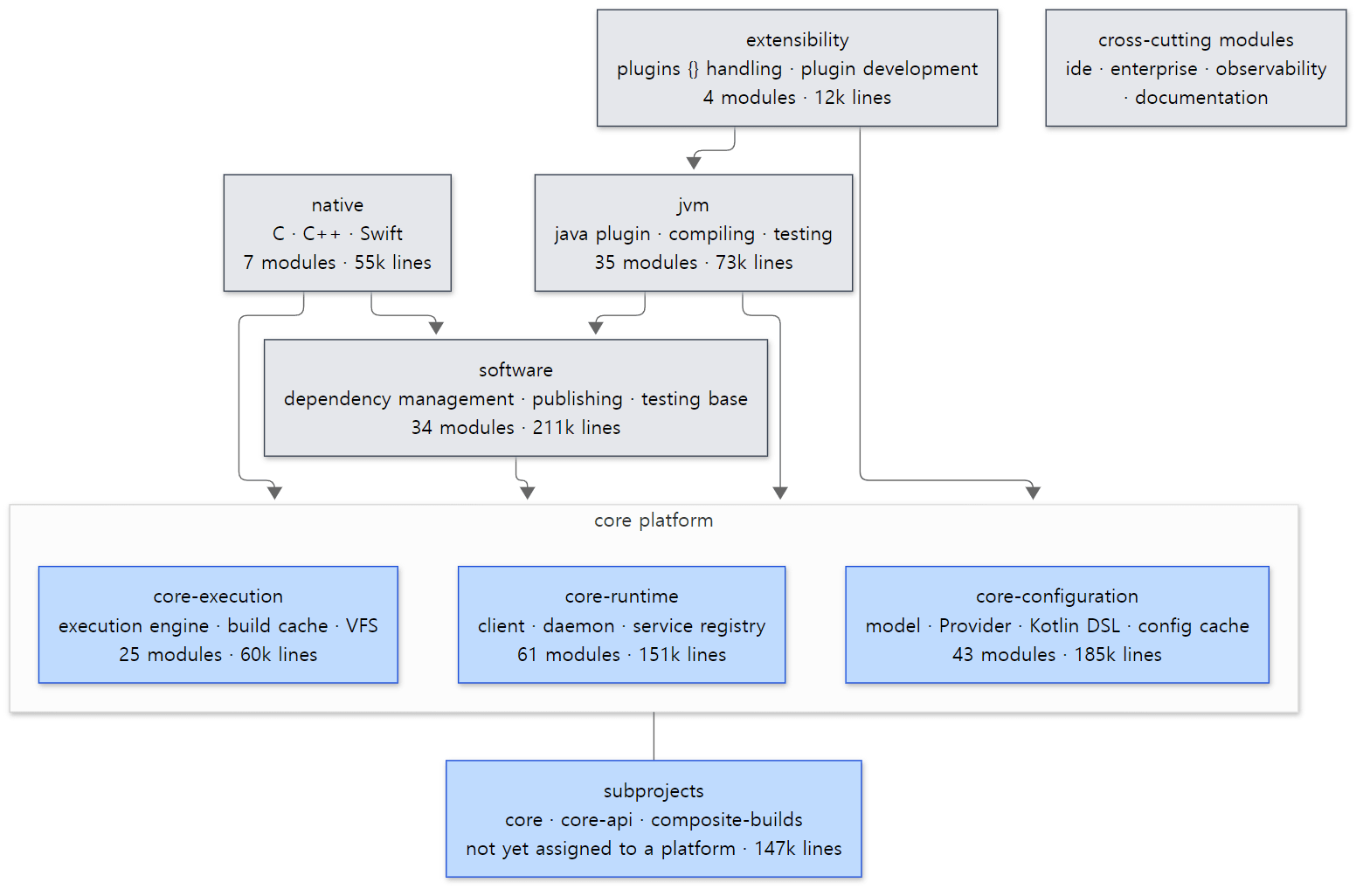 Gradle's platform map. Arrows are the
uses(…) in settings.gradle.kts. Blue boxes are where this series mostly reads; grey boxes are the platforms stacked on top.
There is one thing to remember from this picture: dependencies only point downward. The jvm platform, home of the java plugin, knows about core, but core knows nothing about Java. In the words of architecture/platforms.md, the core platform is "a general-purpose automation platform" that is "agnostic to what exactly the purpose of the work is". It only defines tasks, orders them and runs them fast; "this task compiles Java" is added by a platform above, through plugins. That is why parts 1–11 can explain how gradle build runs while reading almost nothing but core.
Files this series will live in
Here are the sizes of the files we will open most often. Many are shorter than you might expect.
| File | Lines | Covered in |
|---|---|---|
platforms/core-runtime/client-services/…/launcher/daemon/client/DaemonClient.java |
316 | part 3 |
platforms/core-runtime/service-registry-impl/…/internal/service/DefaultServiceRegistry.java |
1,495 | part 4 |
subprojects/core/…/internal/build/DefaultBuildLifecycleController.java |
428 | part 5 |
subprojects/core/…/api/internal/project/DefaultProject.java |
1,602 | part 6 |
platforms/core-configuration/kotlin-dsl/…/kotlin/dsl/execution/Interpreter.kt |
672 | part 6 |
subprojects/core/…/api/internal/tasks/DefaultTaskContainer.java |
914 | part 8 |
subprojects/core/…/execution/plan/DefaultExecutionPlan.java |
468 | part 9 |
subprojects/core/…/execution/plan/DefaultPlanExecutor.java |
772 | part 9 |
subprojects/core/…/api/internal/tasks/execution/DefaultTaskNodeExecutor.java |
392 | part 10 |
subprojects/core/…/internal/service/scopes/ExecutionBuildServices.java |
223 | part 10 |
platforms/core-configuration/configuration-cache/…/internal/cc/impl/DefaultConfigurationCache.kt |
758 | part 11 |
platforms/software/dependency-management/…/api/internal/artifacts/configurations/DefaultConfiguration.java |
1,948 | part 12 |
(… is src/main/java/org/gradle; for Kotlin files it is src/main/kotlin/org/gradle.)
Easy to get confused
subprojects/core is not "the core platform". The names match, but settings.gradle.kts lists core, composite-builds and core-api under unassigned { … } — subprojects not yet assigned to any platform (settings.gradle.kts lines 30–35). Think of it as a big chunk that predates the platform structure and is being moved into platforms bit by bit. In fact the classes we will see most in this series — DefaultProject, DefaultTaskContainer, DefaultBuildLifecycleController — still live in subprojects/core (1,002 files, 96,944 lines).
One package is spread over many folders. Classes in the org.gradle.launcher package, for example, are split across gradle-cli-main, gradle-cli, client-services, launcher, daemon-server and other subprojects. Instead of guessing the folder from the package name, git ls-files '*/ClassName.java' is faster.
5. The main road of one gradle build
In one picture
Let's start from what you see while writing build scripts. Type gradle build and (1) after a moment something about a daemon appears, (2) settings.gradle.kts and build.gradle.kts run (a println there prints before any task), and (3) tasks such as > Task :compileJava run one by one, some of them skipped as UP-TO-DATE or FROM-CACHE. Drawing where those three chunks are in the source gives this:
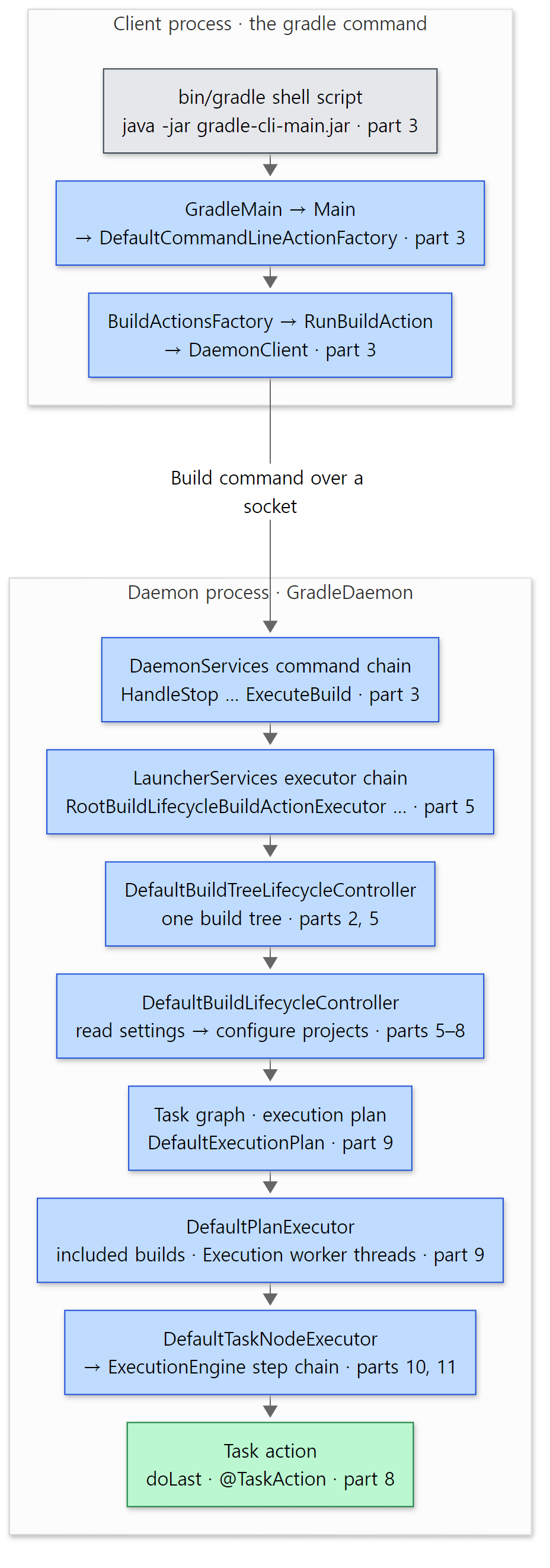 The main road of one
gradle build. The upper frame is the client process, the lower one the daemon process. Each box notes the part that covers it.
Matching it to what you know from build scripts:
| Stage | What you have used | Covered in |
|---|---|---|
| Client · finding a daemon | gradlew, --no-daemon, gradle --status, org.gradle.jvmargs |
part 3 |
| Service injection | @Inject constructors on tasks, ObjectFactory |
part 4 |
| Lifecycle | initialization → configuration → execution, init scripts, gradle.projectsEvaluated |
part 5 |
| Build scripts · plugins | build.gradle.kts, plugins { java }, buildSrc |
parts 6, 7 |
| Registering tasks | tasks.register, Property<String>, @Input/@OutputFile |
part 8 |
| Task graph · workers | dependsOn, mustRunAfter, --parallel, --max-workers |
part 9 |
| Execution engine | UP-TO-DATE, FROM-CACHE, --build-cache, --configuration-cache |
parts 10, 11 |
| Dependencies | implementation(…), dependencyInsight |
part 12 |
Why have a daemon at all
The first thing you notice on the main road is that there are two processes. Gradle does not build in a fresh JVM each time; it hands the build to a long-lived daemon JVM. The reason shows up in the example output below: the same build took 35 seconds the first time and 2 seconds the second. The first run pays for everything — starting a JVM, loading thousands of Gradle classes, compiling build.gradle.kts with the Kotlin compiler, and waiting for the JIT compiler to warm up. With the daemon still alive, the second build does not pay again. The compiled scripts, the file-system state (the VFS — part 10) and in-memory caches carry over to the next build.
It resembles a server program. Just as httpd and Tomcat do not start a process per request but keep one process taking requests, the Gradle daemon is a server that keeps taking "build requests". But as architecture/README.md says, each daemon runs one request at a time. If the daemon is busy, the client looks for another daemon or starts a new one (part 3).
A preview of three places in the code
One: the client's entry point. The bin/gradle shell script ends up running java … -jar lib/gradle-gradle-cli-main-9.10.0.jar (line 213 of the installed script). That jar's main class is GradleMain (mainClassName = "org.gradle.launcher.GradleMain" in gradle-cli-main/build.gradle.kts).
public class GradleMain {
    public static void main(String[] args) throws Exception {
        ProcessBootstrap.run(GradleMain.class.getName(), "gradle-gradle-cli", "org.gradle.launcher.Main", args);
    }
}
platforms/core-runtime/gradle-cli-main/src/main/java/org/gradle/launcher/GradleMain.java lines 24–28
Just one line. ProcessBootstrap builds a new class loader from the jars the gradle-gradle-cli module needs, then finds and calls org.gradle.launcher.Main inside it. The jar you start is kept small and the rest is loaded through a class loader. Main turns the command line into one "action" and runs it.
    @Override
    protected void doAction(String[] args, ExecutionListener listener) {
        createActionFactory().convert(Arrays.asList(args)).execute(listener);
    }
platforms/core-runtime/gradle-cli/src/main/java/org/gradle/launcher/Main.java lines 33–36
--version becomes "print the version", --help becomes help, and task names become "build". For a build, BuildActionsFactory picks where to build:
        if (daemonParameters.isEnabled()) {
            return Actions.toAction(runBuildWithDaemon(startParameter, daemonParameters, requestContext, buildLayoutConfiguration));
        }
        if (canUseCurrentProcess(daemonParameters, requestContext)) {
            return Actions.toAction(runBuildInProcess(startParameter, daemonParameters));
        }

        return Actions.toAction(runBuildInSingleUseDaemon(startParameter, daemonParameters, requestContext, buildLayoutConfiguration));
Three branches. With the daemon enabled (the default), hand it to a daemon. With --no-daemon, build right here if the current JVM fits the requirements, and otherwise start a daemon used for this one build only (a single-use daemon). The last line shows that --no-daemon does not mean "never start a daemon process". The conditions are in part 3.
Two: the command chain on the daemon side. A request arriving at the daemon passes, in order, through the command chain built by DaemonServices.
        return ImmutableList.of(
            new HandleStop(listenerManager),
            new HandleInvalidateVirtualFileSystem(userHomeServiceRegistry),
            new HandleCancel(),
            new HandleReportStatus(),
            new CleanUpVirtualFileSystemAfterBuild(executorFactory, userHomeServiceRegistry),
            new ReturnResult(),
            new StartBuildOrRespondWithBusy(daemonDiagnostics), // from this point down, the daemon is 'busy'
            new EstablishBuildEnvironment(processEnvironment),
            new LogToClient(loggingManager, daemonDiagnostics), // from this point down, logging is sent back to the client
            new ApplyClientEnvironmentVariables(processEnvironment),
            new LogAndCheckHealth(healthStats, healthCheck, runningStats),
            new ForwardClientInput(inputReader, eventDispatch),
            new RequestStopIfSingleUsedDaemon(),
            new ResetDeprecationLogger(),
            new WatchForDisconnection(),
            new ExecuteBuild(buildActionExecuter, runningStats)
        );
There are 16 of them. Each command does its job and then calls the next (execution.proceed()), or stops right there if the request is its to handle. gradle --stop ends at HandleStop at the front, status queries such as gradle --status end at HandleReportStatus, and only build requests go all the way down to ExecuteBuild. The two comments are helpful: from StartBuildOrRespondWithBusy down, the daemon is "busy", and from LogToClient down, log output is sent to the client's screen. It has the same shape as the valve chain in Tomcat part 8 or Spring MVC's interceptor chain. This series meets chains like this again and again — the executor chain inside the daemon (part 5) and the execution engine's step chain (part 10).
Three: the threads that run tasks. Once the execution plan is settled, DefaultPlanExecutor.process() hands tasks to worker threads. There is a surprising line here:
        maybeStartWorkers(queue, executor);

        // Run the work from the source from this thread as well, given that it will be blocked waiting for that work to complete anyway
        WorkerLease currentWorkerLease = workerLeaseService.getCurrentWorkerLease();
        MergedQueues thisPlanOnly = new MergedQueues(coordinationService, true);
        thisPlanOnly.add(planDetails);
        new ExecutorWorker(thisPlanOnly, currentWorkerLease, cancellationToken, coordinationService, workerLeaseService, stats).run();
subprojects/core/src/main/java/org/gradle/execution/plan/DefaultPlanExecutor.java lines 112–118
maybeStartWorkers() starts one fewer Execution worker thread than the maximum worker count (lines 184–190 of the same file), and the thread that called process() also joins in as a worker. As the comment says, it "will be blocked waiting for that work to complete anyway", so it is not left idle. Which thread that is turns out to be a surprise — see "Easy to get confused" after example 3 below.
Example 1: the first lines where the daemon starts
The project is taken from ex/smoke as is: a custom task with one input (@Input) and one output (@OutputFile).
// Example written for this post (not part of Gradle's source)
// A small custom task with one input and one output
abstract class Hello : DefaultTask() {
    @get:Input
    abstract val greeting: Property<String>

    @get:OutputFile
    abstract val outputFile: RegularFileProperty

    @TaskAction
    fun run() {
        val text = "${greeting.get()} from ${javaClass.name}"
        outputFile.get().asFile.writeText(text + "\n")
        println(text)
    }
}

tasks.register<Hello>("hello") {
    greeting = "Hello, Gradle"
    outputFile = layout.buildDirectory.file("hello.txt")
}
run.sh runs it once with gradle hello --offline --console=plain --info and prints the first 25 lines of output. Two long lines are trimmed (marked …).
Initialized native services in: /root/.gradle/native
Initialized jansi services in: /root/.gradle/native
Removing 0 daemon stop events from registry
Starting a Gradle Daemon (subsequent builds will be faster)
Starting process 'Gradle build daemon'. Working directory: /root/.gradle/daemon/9.10.0-20261107025045+0000 Command: /opt/java/openjdk/bin/java --add-opens=java.base/java.lang=ALL-UNNAMED … -XX:MaxMetaspaceSize=384m -XX:+HeapDumpOnOutOfMemoryError -Xms256m -Xmx512m -Dfile.encoding=UTF-8 -Duser.country=US -Duser.language=en -Duser.variant -cp /opt/gradle/lib/gradle-daemon-main-9.10.0.jar -javaagent:/opt/gradle/lib/agents/gradle-instrumentation-agent-9.10.0.jar org.gradle.launcher.daemon.bootstrap.GradleDaemon 9.10.0-20261107025045+0000
Successfully started process 'Gradle build daemon'
An attempt to start the daemon took 3.219 secs.
The client will now receive all logging from the daemon (pid: 86). The daemon log file: /root/.gradle/daemon/9.10.0-20261107025045+0000/daemon-86.out.log
Starting build in new daemon [memory: 512 MiB]
Shared read-only dependency cache is an incubating feature.
The read-only dependency cache is enabled
The GRADLE_RO_DEP_CACHE environment variable was set to /opt/gradle-ro-cache
Using 12 worker leases.
Operational build model parameters: {cachingModelBuilding=false, configurationCache=false, …, vintage=true}
Received JVM installation metadata from '/opt/java/openjdk': {JAVA_HOME=/opt/java/openjdk, JAVA_VERSION=25.0.5, …}
Watching the file system is configured to be enabled if available
Not watching /tmp/p since the file system is not supported
File system watching is active
Starting Build
Caching disabled for Kotlin DSL script compilation (Settings/TopLevel/stage1) because:
  Build cache is disabled
Settings evaluated using settings file '/tmp/p/settings.gradle.kts'.
Projects loaded. Root project using build file '/tmp/p/build.gradle.kts'.
Included projects: [root project 'smoke']
(The daemon pid and the time taken to start the daemon differ on every run.) The moment the road crosses from the upper frame of the picture to the lower one is printed right there.
- Lines 1–7 come from the client. There is no usable daemon (of course — the user home is brand new), so it says
Starting a Gradle Daemonand prints the whole command line used to start one. The daemon runsorg.gradle.launcher.daemon.bootstrap.GradleDaemonfrom thegradle-daemon-mainjar as its main class, with a 512 MB heap (-Xmx512m). That default is the value you change withorg.gradle.jvmargsingradle.properties. - From line 8, "The client will now receive all logging from the daemon", the log comes from the daemon. That line itself is the first one
LogToClient, seen above, prints as it starts sending logs to the client (LogToClient.java line 60). It also tells you where the daemon's own log file is (~/.gradle/daemon/<version>/daemon-<pid>.out.log). Shared read-only dependency cache is an incubating feature.appears because ofGRADLE_RO_DEP_CACHEfrom section 3. It warns that the read-only dependency cache is still "incubating" (an experimental, not-yet-final feature).Using 12 worker leases.is the maximum number of things this build can run at once. Without--max-workersthe default is the CPU count (Runtime.getRuntime().availableProcessors()), and this machine has 12 CPUs. See part 9.Settings evaluated …andProjects loaded …are the build's initialization phase. The configuration phase and> Task :hellofollow, and it ended like this:
> Task :hello
Hello, Gradle from Build_gradle$Hello_Decorated

BUILD SUCCESSFUL in 35s
1 actionable task: 1 executed
Notice the name Build_gradle$Hello_Decorated. The class we wrote is Hello; because it lives in a build script it becomes Build_gradle$Hello, and Gradle generated a subclass that fills in the abstract properties and appended _Decorated. It is similar to Spring generating proxy classes with CGLIB (Spring part 10), and part 4 covers it.
The result of running it again right away in the same run.sh:
> Task :hello UP-TO-DATE

BUILD SUCCESSFUL in 2s
1 actionable task: 1 up-to-date
Consider enabling configuration cache to speed up this build: https://docs.gradle.org/9.10.0-20261107025045+0000/userguide/configuration_cache_enabling.html
35 seconds became 2 (the times vary a little from run to run; a later run took 34 seconds and 1 second). This time there is nothing about starting a daemon — the same daemon took the request. The inputs and outputs match last time, so the task was skipped as UP-TO-DATE too (part 10). The last line suggests turning on the configuration cache (part 11).
Example 2: reading the main road's names from the build-operation tree
Gradle has an internal option to dump build operations to a file — the SYSPROP constant of BuildOperationTrace.
public static final String SYSPROP = "org.gradle.internal.operations.trace";
According to the javadoc in the same file (lines 95–115), passing -Dorg.gradle.internal.operations.trace=<path> writes events in time order to <path>-log.txt, and adding -Dorg.gradle.internal.operations.trace.tree=true also writes tree-shaped -tree.json and -tree.txt files. I deleted the output file and ran once more with both options:
rm -f build/hello.txt
gradle hello --offline --console=plain \
  -Dorg.gradle.internal.operations.trace=/tmp/trace \
  -Dorg.gradle.internal.operations.trace.tree=true
When the build finishes it prints Build operation trace: /tmp/trace-log.txt and writing tree to /tmp/trace-tree.json, and three files appear in /tmp: trace-log.txt, trace-tree.json and trace-tree.txt. Each line of trace-tree.txt has JSON details and a duration after the operation name, so run.sh keeps just the names, down to four levels deep.
Run build
  Build started for file system watching
  Load build
    Evaluate settings
      Apply settings file 'settings.gradle.kts' to settings 'p'
      Finalize build cache configuration
  Configure build
    Load projects
    Notify projectsLoaded listeners
    Configure project :
      Notify beforeEvaluate listeners of :
      Apply plugin org.gradle.help-tasks to root project 'smoke'
      Apply plugin org.gradle.software-reporting-tasks to root project 'smoke'
      Apply plugin org.gradle.build-init to root project 'smoke'
      Apply plugin org.gradle.wrapper to root project 'smoke'
      Register task :updateDaemonJvm
      Register task :javaToolchains
      Register task :prepareKotlinBuildScriptModel
      Apply build file 'build.gradle.kts' to root project 'smoke'
      Notify afterEvaluate listeners of :
    Notify projectsEvaluated listeners
  Calculate build tree task graph
    Calculate task graph
      Realize task :hello
    Notify task graph whenReady listeners
  Run main tasks
    Run tasks
      Resolve mutations for task :hello
      Task :hello
  Finish root build tree
  Build finished for file system watching
  Develocity plugin build finished
Deleting unused version-specific caches in /tmp/p/.gradle
The lower half of the daemon frame in the main-road picture appears by name: Load build (initialization — reading settings), Configure build (configuration — running each project's build script), Calculate build tree task graph (building the task graph) and Run main tasks (execution). The "three phases: initialization, configuration, execution" you learned are, in the source, operations with these names. Which class does what in each phase is the topic of part 2 and part 5.
A few lines are worth pointing out now.
- Four plugins are applied under
Configure project :. The build script has noplugins {}at all, yethelp-tasks(tasks such asgradle tasksandgradle help),build-init(gradle init) andwrapper(gradle wrapper) were applied to the root project. The default tasks we always use come from here (part 7). Realize task :helloshows up while building the task graph. A task registered withtasks.registeris only registered at first and turned into an object at the moment it is needed (realized), and in this build that moment was "whenhellowas added to the graph". Put it next to theRegister task …lines in the configuration phase and lazy configuration becomes visible (part 8).Deleting unused version-specific cachessits outside the top-levelRun build. It is cleanup after the build, so it runs outside the build-operation tree.
Example 3: two call stacks — configuration phase and execution phase
The tree shows "what happened, in what order", but not "which class called what". So, as in Tomcat part 1, I printed call stacks — once in the build-script body (configuration phase) and once in a task action (execution phase).
// Example written for this post (not part of Gradle's source)
// 1) Configuration phase: the call stack at the moment the build-script body runs
println("[configure] thread: ${Thread.currentThread().name}")
for (e in Throwable().stackTrace) {
    println("[configure]   at ${e.className}.${e.methodName}(${e.fileName}:${e.lineNumber})")
}

// 2) Execution phase: print the call stack inside a task action — top is this action, bottom is where the thread started
tasks.register("where") {
    doLast {
        println("[execute] thread: ${Thread.currentThread().name}")
        for (e in Throwable().stackTrace) {
            println("[execute]   at ${e.className}.${e.methodName}(${e.fileName}:${e.lineNumber})")
        }
    }
}
Run with gradle where --offline --console=plain -q, the configuration-phase stack is 206 frames and the execution-phase stack 130 frames. Both are far too long, so only the meaningful lines are kept (... marks what was cut, and the [configure]/[execute] prefixes are removed). First the configuration phase — the build script at the top, the start of the thread at the bottom.
thread: Daemon worker
  at Build_gradle.<init>(build.gradle.kts:4)
  ...
  at org.gradle.kotlin.dsl.execution.Interpreter.eval(Interpreter.kt:234)
  at org.gradle.kotlin.dsl.provider.StandardKotlinScriptEvaluator.evaluate(KotlinScriptEvaluator.kt:141)
  ...
  at org.gradle.configuration.project.BuildScriptProcessor.execute(BuildScriptProcessor.java:46)
  ...
  at org.gradle.configuration.project.ConfigureActionsProjectEvaluator.evaluate(ConfigureActionsProjectEvaluator.java:35)
  ...
  at org.gradle.configuration.project.LifecycleProjectEvaluator.evaluate(LifecycleProjectEvaluator.java:72)
  at org.gradle.api.internal.project.DefaultProject.evaluateUnchecked(DefaultProject.java:789)
  ...
  at org.gradle.configuration.DefaultProjectsPreparer.prepareProjects(DefaultProjectsPreparer.java:52)
  ...
  at org.gradle.initialization.VintageBuildModelController.prepareToScheduleTasks(VintageBuildModelController.java:70)
  at org.gradle.internal.build.DefaultBuildLifecycleController.lambda$prepareToScheduleTasks$0(DefaultBuildLifecycleController.java:184)
  ...
  at org.gradle.internal.buildtree.DefaultBuildTreeWorkPreparer.scheduleRequestedTasks(DefaultBuildTreeWorkPreparer.java:35)
  ...
  at org.gradle.internal.buildtree.DefaultBuildTreeLifecycleController.scheduleAndRunTasks(DefaultBuildTreeLifecycleController.java:74)
  at org.gradle.tooling.internal.provider.ExecuteBuildActionRunner.run(ExecuteBuildActionRunner.java:31)
  at org.gradle.launcher.exec.ChainingBuildActionRunner.run(ChainingBuildActionRunner.java:35)
  at org.gradle.internal.buildtree.ProblemReportingBuildActionRunner.run(ProblemReportingBuildActionRunner.java:55)
  at org.gradle.launcher.exec.BuildOutcomeReportingBuildActionRunner.run(BuildOutcomeReportingBuildActionRunner.java:83)
  at org.gradle.tooling.internal.provider.FileSystemWatchingBuildActionRunner.run(FileSystemWatchingBuildActionRunner.java:118)
  at org.gradle.launcher.exec.BuildCompletionNotifyingBuildActionRunner.run(BuildCompletionNotifyingBuildActionRunner.java:64)
  at org.gradle.launcher.exec.RootBuildLifecycleBuildActionExecutor.lambda$execute$0(RootBuildLifecycleBuildActionExecutor.java:100)
  ...
  at org.gradle.internal.session.BuildSessionState.run(BuildSessionState.java:73)
  ...
  at org.gradle.launcher.daemon.server.exec.ExecuteBuild.doBuild(ExecuteBuild.java:70)
  ...
  at org.gradle.launcher.daemon.server.exec.LogToClient.doBuild(LogToClient.java:63)
  ...
  at org.gradle.launcher.daemon.server.exec.EstablishBuildEnvironment.doBuild(EstablishBuildEnvironment.java:74)
  ...
  at org.gradle.launcher.daemon.server.exec.StartBuildOrRespondWithBusy$1.run(StartBuildOrRespondWithBusy.java:52)
  at org.gradle.launcher.daemon.server.DaemonStateCoordinator.lambda$runCommand$0(DaemonStateCoordinator.java:321)
  ...
  at java.lang.Thread.run(Thread.java:1474)
Read bottom-up and the daemon frame of the main-road picture is all there.
- The daemon's command chain:
StartBuildOrRespondWithBusy→EstablishBuildEnvironment→LogToClient→ … →ExecuteBuild. All of the last 10 entries of the 16-entry list above are on the stack (part 3). - The build session and the executor chain: through
BuildSessionState.run()toRootBuildLifecycleBuildActionExecutor→BuildCompletionNotifying…→FileSystemWatching…→BuildOutcomeReporting…→ProblemReporting…→Chaining…→ExecuteBuildActionRunner. These six layers are wrapped together inLauncherServices, and why in this order is in part 5. - The build-tree and build lifecycles:
DefaultBuildTreeLifecycleController.scheduleAndRunTasks()→DefaultBuildLifecycleController.prepareToScheduleTasks()→VintageBuildModelController. As the names suggest, projects get configured "while preparing to schedule tasks" (part 5). - The project evaluator chain:
DefaultProject.evaluateUnchecked()→LifecycleProjectEvaluator→ConfigureActionsProjectEvaluator→BuildScriptProcessor(part 6). - The Kotlin DSL:
StandardKotlinScriptEvaluator→Interpreter.eval()→ the constructor of the compiled script classBuild_gradle. The top line,Build_gradle.<init>, shows that the build-script body is compiled into a class constructor and runs as one (part 6).
Next, the execution phase.
thread: Execution worker Thread 6
  at Build_gradle$$$result$1$1.execute(build.gradle.kts:12)
  at Build_gradle$$$result$1$1.execute(build.gradle.kts:10)
  at org.gradle.api.internal.AbstractTask$TaskActionWrapper.execute(AbstractTask.java:864)
  ...
  at org.gradle.api.internal.tasks.execution.TaskExecution.execute(TaskExecution.java:185)
  ...
  at org.gradle.internal.execution.steps.ExecuteStep.execute(ExecuteStep.java:134)
  ...
  at org.gradle.internal.execution.steps.BuildCacheStep.execute(BuildCacheStep.java:74)
  ...
  at org.gradle.internal.execution.steps.SkipUpToDateStep.execute(SkipUpToDateStep.java:53)
  ...
  at org.gradle.internal.execution.steps.IdentifyStep.execute(IdentifyStep.java:56)
  ...
  at org.gradle.internal.execution.impl.DefaultExecutionEngine$1.execute(DefaultExecutionEngine.java:68)
  ...
  at org.gradle.api.internal.tasks.execution.DefaultTaskNodeExecutor.execute(DefaultTaskNodeExecutor.java:133)
  at org.gradle.execution.plan.LocalTaskNode.execute(LocalTaskNode.java:229)
  ...
  at org.gradle.execution.plan.DefaultPlanExecutor$ExecutorWorker.run(DefaultPlanExecutor.java:392)
  ...
  at java.lang.Thread.run(Thread.java:1474)
(The number at the end of the thread name differs between runs; in another run of the same example it was just Execution worker.)
At the bottom of this stack there is no daemon command chain and no lifecycle class. That is because it is a different thread. DefaultPlanExecutor's ExecutorWorker picks a node (LocalTaskNode) from the execution plan and passes it to DefaultTaskNodeExecutor, which calls DefaultExecutionEngine, and the step chain begins. From IdentifyStep to ExecuteStep, 27 different class names ending in …Step appear in this stack (including the common parents MutableStep and AbstractResolveCachingStateStep). Among them, SkipUpToDateStep decides UP-TO-DATE and BuildCacheStep decides FROM-CACHE (part 10, part 11). Only after all those steps do we reach our doLast block at the top (line 10 is doLast {, line 12 is the for line).
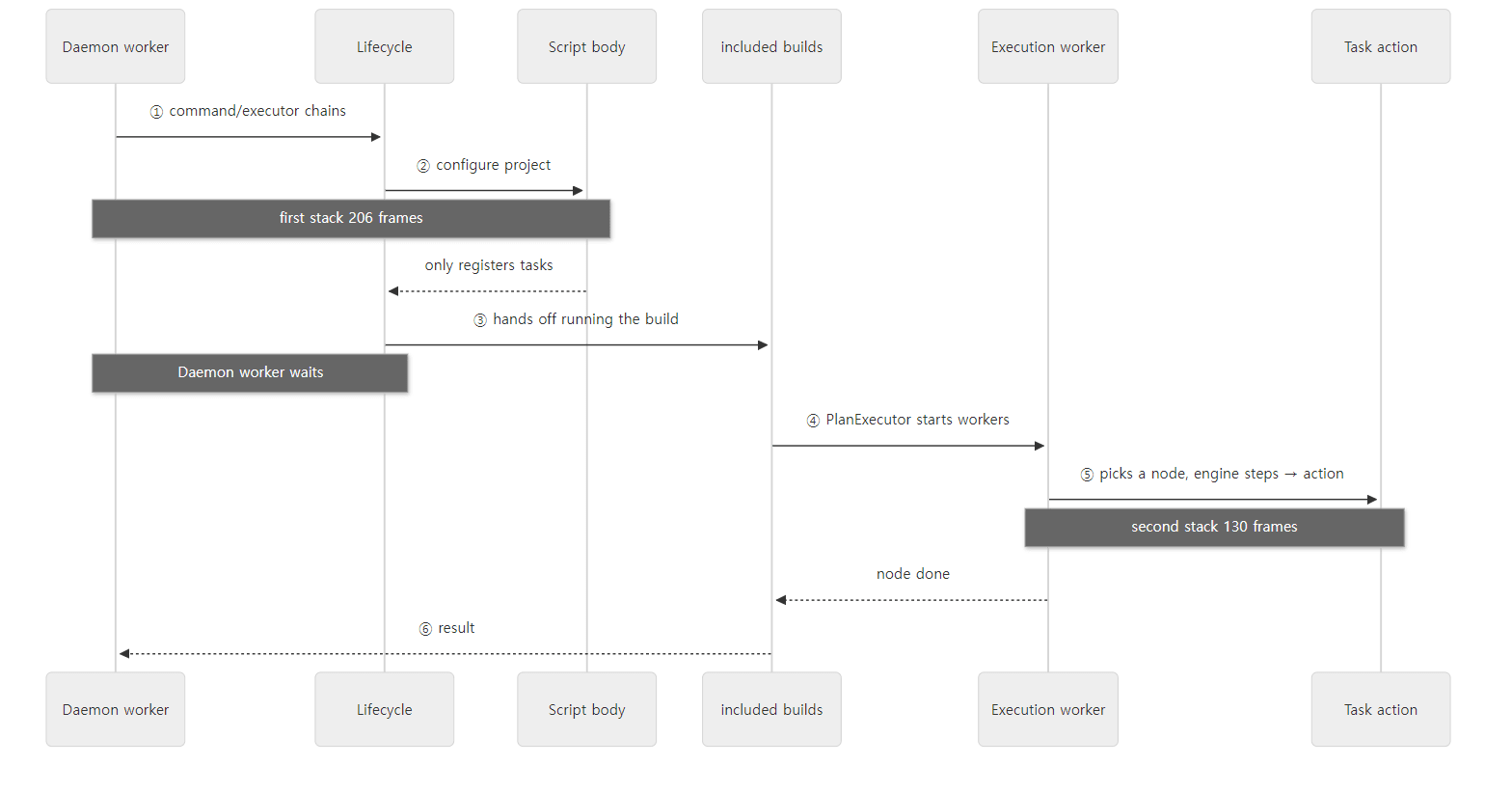 How the two stacks relate. The configuration phase ran on the daemon's
Daemon worker thread; in this run the task action ran on an Execution worker thread. During the execution phase, Daemon worker only waits.
Easy to get confused
The front half of the command chain is missing from the stack. Of the 16 commands, the stack only shows from StartBuildOrRespondWithBusy on. HandleStop and HandleCancel must have been called first, so why are they missing? Because StartBuildOrRespondWithBusy wraps the rest of the chain in a Runnable and hands it to another thread:
            Runnable command = new Runnable() {
                @Override
                public void run() {
                    LOGGER.info("Daemon is about to start building {}. Dispatching build started information...", build);
                    execution.getConnection().buildStarted(new BuildStarted(diagnostics));
                    execution.proceed();
                }
            };

            stateCoordinator.runCommand(command, execution.toString());
DaemonStateCoordinator.runCommand() runs it on an executor named "Daemon worker" (DaemonStateCoordinator.java line 74). That is why the configuration-phase stack's thread is called Daemon worker, and the earlier commands stay on the stack of the other thread that accepted the connection. It is the same lesson as the Mapper missing from the stack in Tomcat part 1: a call stack only shows the methods currently open on this thread.
Task actions do not always run on an Execution worker. As the DefaultPlanExecutor lines 112–118 above showed, the thread that called process() also joins as a worker. But that thread is not the Daemon worker that ran the configuration phase. DefaultBuildController runs each build's execution on an executor named included builds (executorFactory.create("included builds"), DefaultIncludedBuildTaskGraph.java line 96), and a plain single build with no included builds takes this path too. Meanwhile Daemon worker waits for all builds to finish (DefaultBuildControllers.java lines 105–123). So on this path (running tasks from the command line without the configuration cache), task actions run on an Execution worker or on the included builds thread; in this run an Execution worker simply picked up where first. If all you know is "tasks run on a worker thread pool", the thread names will confuse you. The worker threads get their name from executorFactory.create("Execution worker") (DefaultPlanExecutor.java line 90). Part 9 shows the included builds thread actually running tasks, along with the threads as seen in jstack.
A big chunk of each stack is DefaultBuildOperationRunner. Most of what was cut as ... above is groups of 6–7 lines of DefaultBuildOperationRunner.run()/call()/execute(). Every stage wraps its work in a build operation (the tree in example 2 is the result), which makes the stacks thick. When reading a stack, skip these groups and look at the classes above and below them.
6. How to read it — with AI, but checking against the source
The reading loop
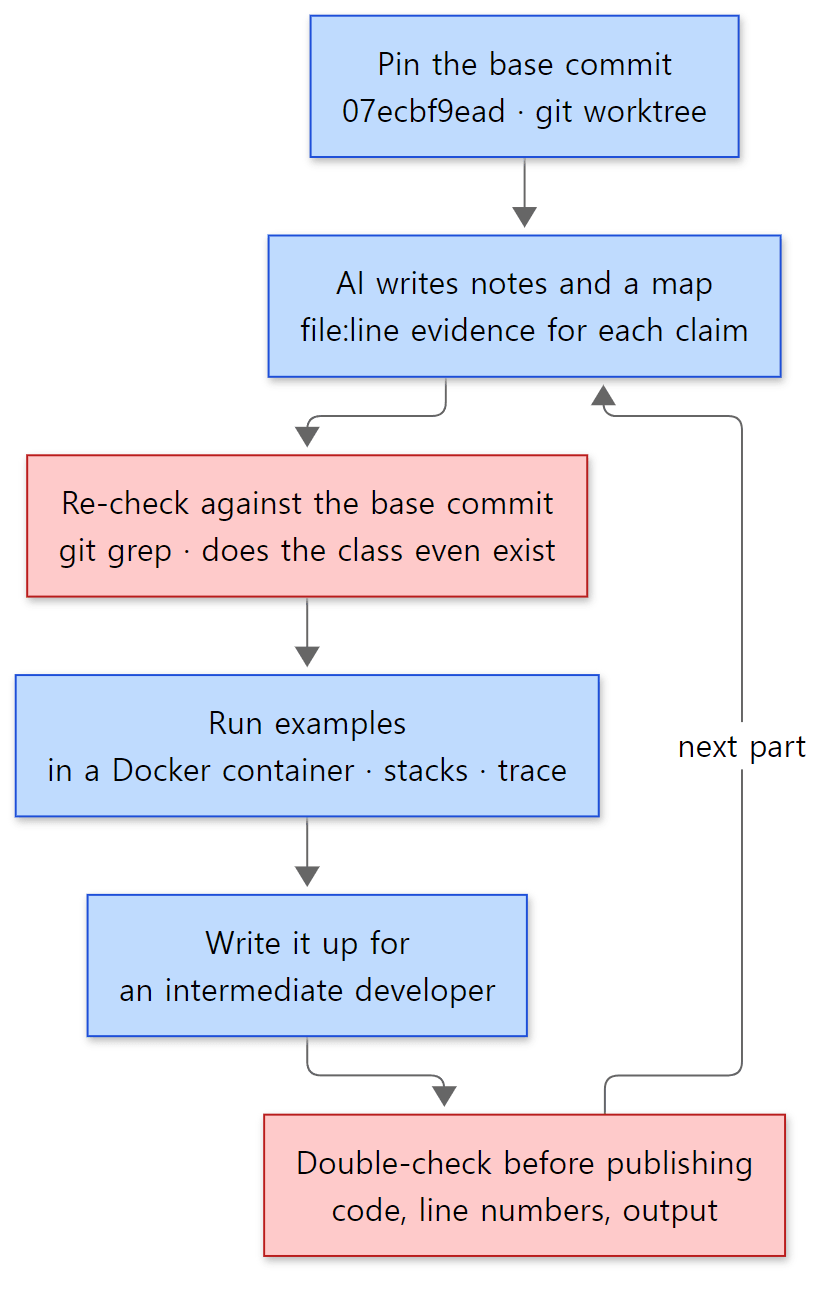 The order for reading and writing one part. Blue boxes are steps; red boxes are where mistakes in AI-written content get filtered out.
The principle is the same as in the earlier series: don't read everything at once; pick one question from the map and read deeply only the code needed to answer it. In this series, one question is one post.
- Pin the base commit. That is the worktree from section 2. Line numbers must not move, or the evidence AI gives cannot be verified.
- AI writes notes and a map. The 12-part outline and the list of starting classes for each part were made this way. Each part was handed to one AI job with the same brief (what to read, in what format, with what evidence).
- Re-check against the base commit's source. With Gradle especially, start with whether the class even exists in this commit. Classes in the brief are only starting points; what goes into a post is only what was confirmed in the source. Code is copied straight from the files, and only line numbers found directly are written down.
- Actually run the examples. As in section 5, small examples that make one claim visible run in a container and their output is shown as is.
- Check once more before publishing. When a post is done, its code blocks, line numbers, stated facts and example output are compared against the source from the top. A post that has not been through this check does not go up.
What to be extra careful about with Gradle — old names
Search online for "Gradle internals" and names such as DefaultGradleLauncher, ExecuteActionsTaskExecuter and DefaultSettingsLoader come up often. AI brings them up too, from the articles it learned from. But look for them in the base commit and none of the three exists:
$ git -c core.longpaths=true ls-files '*/DefaultGradleLauncher.java' '*/ExecuteActionsTaskExecuter.java' '*/DefaultSettingsLoader.java'
$
Nothing comes back. Their jobs are now done by DefaultBuildLifecycleController and VintageBuildModelController, by DefaultTaskNodeExecutor with TaskExecution, and by DefaultSettingsPreparer, respectively — the very names that appeared in the stacks of section 5. When AI names a class, check first with git ls-files that it exists. If it does not, be suspicious of the whole explanation.
What the checking caught in this post
Step 3 proved its worth while writing this very post.
- There is more than one
Main.java. The brief just saidMainfor one box on the main road, butgit ls-files '*/Main.java'returns 32 files, 31 of which are user-manual samples (docs/src/snippets/…). The client'sMainis the singleplatforms/core-runtime/gradle-cli/src/main/java/org/gradle/launcher/Main.java, and you only become sure of that by followingProcessBootstrap.run(…, "org.gradle.launcher.Main", …)inGradleMain. - "Tasks run on worker threads" is only half right. It is an easy thing to write from notes alone. I saw the thread name in the stack, opened
DefaultPlanExecutorand found the "this thread as well" comment. At first I guessed that thread wasDaemon workerand wrote that; only while writing part 9, after taking a jstack thread dump, did I learn that the thread callingprocess()is theincluded buildsthread, and fixed it. Explanations with a guess mixed in only get filtered out by checking again against runs and the source. - The command chain has 16 entries but only some showed in the stack. I ran the example thinking "it's a chain, so it will all be on the stack", and that led me to the spot where the thread changes (
StartBuildOrRespondWithBusy).
AI guidance inside the repository
The Gradle repository has three AI-related files at the top. By the date each first entered git history: AI_POLICY.md on 2026-03-27 (commit 073f7e5b901, "add new AI policy to root"), and AGENTS.md and CLAUDE.md on 2026-07-01 (commit 783c1ba6c01, "Add code review guide and gradle-code-review skill"). CLAUDE.md is three lines that just say "Always read and follow AGENTS.md for any work in this repository", and AGENTS.md points AI coding agents to the human-written contribution guides first (CONTRIBUTING.md and the guidelines for error messages, javadoc, nullability and testing).
AI_POLICY.md is the policy on AI-assisted contributions. Its first expectation reads:
Understand the content you submit, PRs as well as issues, and be able to explain it. Our goal is for humans to use AI tools intentionally and with full control, rather than merely serving as proxies for AI agents. If you cannot explain the reason for something, we will assume you do not understand it, and the PR or issue will likely be closed.
It is the same thing this series tries to hold itself to for its posts. Classes and explanations AI finds are not copied over as they are; only what can be explained with the source and actual run results gets written.
7. The series map
Five groups
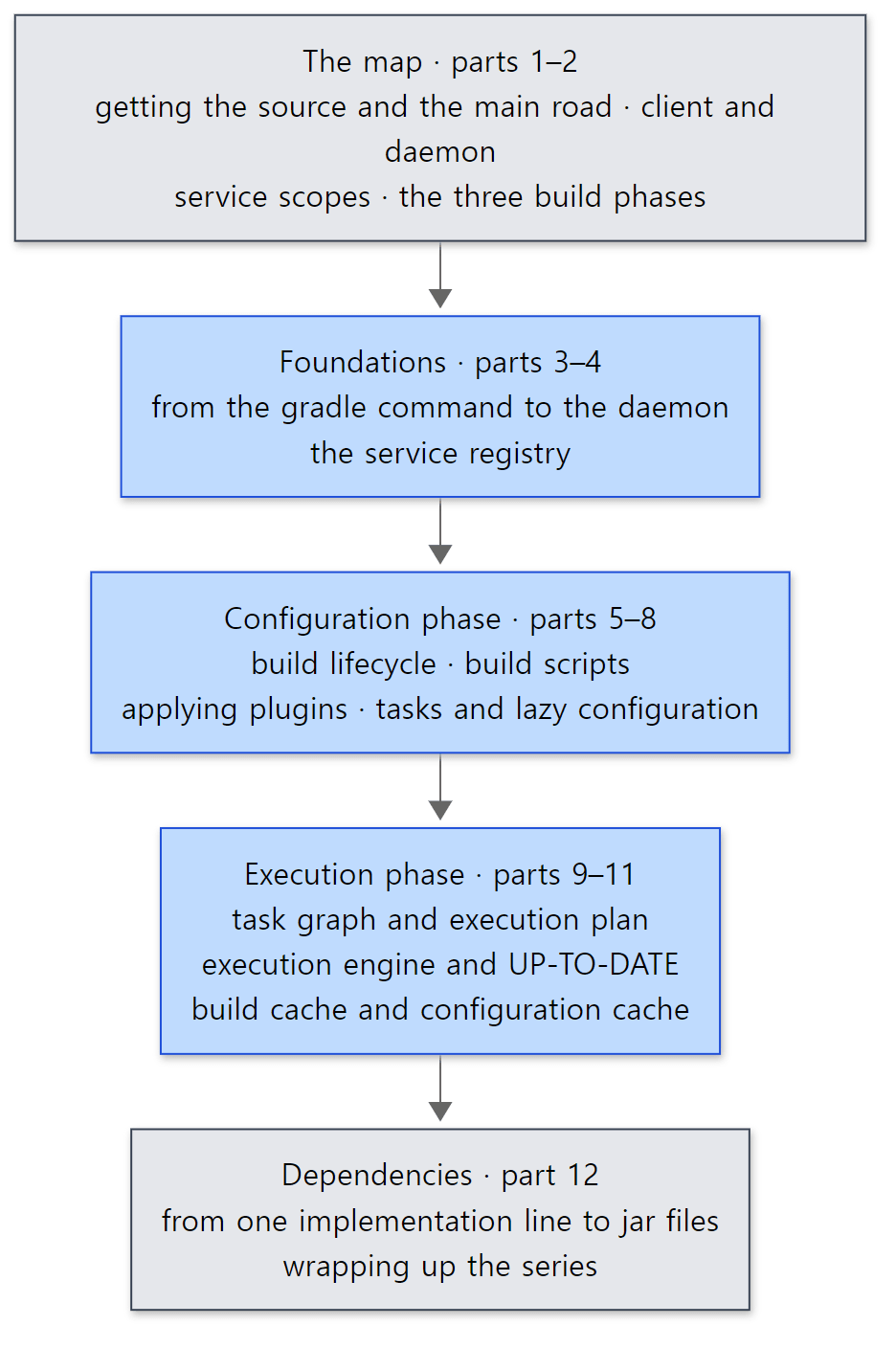 The five groups of the series. Blue boxes are the core of the series; grey boxes are the map in front and the final post.
| Group | Part | Question it answers |
|---|---|---|
| The map | 1 | What source is read, and how (this post) |
| 2 | How many processes are there, what layers do build state and services form, and which classes are the three phases? | |
| Foundations | 3 | How does the gradle command find or start a daemon, and what does it send? |
| 4 | What does Gradle's internal DI container look like, and who makes the _Decorated classes? |
|
| Configuration phase | 5 | Where do initialization, configuration and execution split, and in what order does state change? |
| 6 | How is build.gradle.kts compiled and run? |
|
| 7 | How does an id in plugins {} become a plugin class whose apply() gets called? |
|
| 8 | Why are register and Provider lazy, and what does that buy? |
|
| Execution phase | 9 | How is the execution plan decided, and how many tasks run at once, on which threads? |
| 10 | What does UP-TO-DATE compare? |
|
| 11 | How are task results and configuration results stored and reused? | |
| Dependencies | 12 | How does one implementation(…) line become a list of jar files? |
Reading order
Read them in order. Part 1 shows the main road and part 2 the "layers" it passes through (process → session → build tree → build → project); from part 3 on, each post goes back to part 2's map and says "this time we zoom in here". The daemon and the service registry (parts 3, 4) show up in every post, so they come first; the configuration phase (parts 5–8) and execution phase (parts 9–11) follow the build-operation tree of section 5 from top to bottom — the order a build actually runs. Dependency resolution spans both configuration and execution, so it comes last.
What this post leaves out
- The Tooling API and IDE integration.
platforms/ide/tooling-api, which IntelliJ uses to import Gradle projects, is covered in part 3 only as far as "the IDE connects to the same daemon". - The native platform. Building C, C++ and Swift (
platforms/native, about 55,000 lines) is not covered. - Develocity and Build Scan.
platforms/enterpriseis not covered, and the examples never use--scan(it sends data to an outside service).Develocity plugin build finishedin the build-operation tree is a trace of this integration. - Problem reporting (the Problems API),
platforms/observability, only comes up by name when looking at the configuration cache's problem report (part 11). - The build of the Gradle repository itself.
build-logic*/,packaging/andtesting/(the test infrastructure, 973 code files) were looked at in section 3 only as far as needed. - The road when the configuration cache is on. The main road in section 5 is the default path without the configuration cache (
vintage=trueinOperational build model parameters). Using the cache creates another road that skips the configuration phase entirely, covered in part 11.
Summary
| Concept | One-line summary |
|---|---|
| Source read | Gradle 9.10.0 development build (master), commit 07ecbf9ead (2026-10-24), 631 commits after v9.9.0-M2 |
| Version number | One line in version.txt (9.10.0); a development build gets the build time appended: 9.10.0-20261107025045+0000 |
| What builds Gradle | Wrapper 9.9.0-milestone-2, JDK 25, rules in the build-logic* included builds |
| Getting the same source | git clone, then pin the commit with git -c core.longpaths=true worktree add --detach … (mind long paths on Windows) |
| Building | ./gradlew install -Pgradle_installPath=… (never gradle build); BUILD_COMMIT_ID when there is no .git |
| Folders | 11 under platforms/ + subprojects/{core,core-api,composite-builds}, 233 subprojects, about a million lines of main code; the three core platforms are the center |
| Main road | GradleMain → RunBuildAction → DaemonClient → (socket) → command chain → ExecuteBuild → executor chain → build-tree and build lifecycles → execution plan → DefaultPlanExecutor → DefaultTaskNodeExecutor → step chain → task action |
| Two threads | The configuration phase on Daemon worker, task actions on Execution worker (or included builds). Daemon worker waits during the execution phase |
| How to read | Pin the commit → AI notes → check the source, starting with whether the class exists → run examples → write → double-check |
What's next
The next post is the full map. Here we followed the main road in a single line and met the client and the daemon, Daemon worker and Execution worker, and names such as Load build, Configure build and Run main tasks. The next post looks at the layers that road passes through: the four kinds of process Gradle uses (the CLI client, the daemon, the Tooling API client and worker processes), the hierarchy of state from build process → build session → build tree → build → project with its matching service scopes, and which states of DefaultBuildLifecycleController the three phases — initialization, configuration and execution — correspond to. It draws them as one map and marks where parts 3–12 zoom in.
- Next: Digging into Gradle's Source 2: The Big Picture — Client and Daemon, Service Scopes, and the Three Build Phases
- Straight to the daemon: Part 3: From the gradle Command to the Daemon — the Launcher, the Wrapper and the Daemon Protocol
- Curious about
UP-TO-DATE: Part 10: The Execution Engine and Incremental Builds — How UP-TO-DATE Is Decided
There are earlier series read the same way. Digging into Spring's Source part 1 opens the series that has the most in common with this one: Gradle's service registry is a DI container chained as parents and children, like Spring's IoC container (Spring part 3, part 4), and the build's lifecycle states can be compared with the steps of refresh() (Spring part 7). Digging into Tomcat's Source part 1 followed the road where one server process takes requests and hands them to threads. The Gradle daemon is also a server that takes "build requests", and the command chain in section 5 has the same shape as the valve chain in Tomcat part 8. Digging into httpd's Source part 1 started reading a server written in C on the same principles. And the series right before this one, Digging into MariaDB's Source, reads a database server the same way.