What this post covers
This is the fifth post in the "Digging into Gradle's Source" series. In part 4 we saw how the service registry — the DI container inside Gradle — creates services per scope and wires them together. This time we follow in what order those services are called to make up one build, and where in the source the three phases the user manual calls "initialization → configuration → execution" actually split.
Going back to the map in part 2, this post zooms into area "C · the build lifecycle". Part 2 showed the state diagram of DefaultBuildLifecycleController (Configure → TaskSchedule → ReadyToRun) and the call order of one build as a big picture. Now we go above it (the road from the daemon down to the lifecycle) and below it (the classes doing the actual work in each phase), plus the mechanism that guards the states and the path taken when something fails.
There are four questions to answer:
- Through which chain does a build request received by the daemon reach the build lifecycle? Why is it built as a chain?
- Which line of the source is the boundary between "initialization", "configuration" and "execution"? Where in between are hooks like
projectsLoadedandwhenReadycalled? - What keeps the states from getting tangled, and how does the build still wrap up when an exception is thrown halfway?
- What are the "build operations" attached to every phase for?
| Item | Value |
|---|---|
| Subject | Gradle Build Tool |
| Version | 9.10.0 development build (master) |
| Commit | 07ecbf9ead (2026-10-24) |
| Main classes read | LauncherServices, RootBuildLifecycleBuildActionExecutor, DefaultBuildTreeLifecycleController, DefaultBuildLifecycleController, StateTransitionController, VintageBuildModelController, DefaultSettingsPreparer, BuildTreePreparingProjectsPreparer, DefaultProjectsPreparer, DefaultBuildOperationRunner |
All line numbers in this post refer to this commit. How to get the same commit and build the Docker image for the examples is in part 1. This blog itself is built with Gradle (Kotlin DSL), but the portal's wrapper is 9.5.1, a different version from the reference source.
Dozens of classes take part in the lifecycle, and there are several roads that do the same job (configuration cache on, an IDE asking for a model through the Tooling API, included builds). This post follows only one: running gradle <task> from the command line with the configuration cache off. The other roads are listed by name and location under "What this post leaves out" at the end.
Terms to know first
A build action is one "please do this" that the client sends to the daemon. gradle hello on the command line becomes an ExecuteBuildAction; an IDE asking for the project model becomes a BuildModelAction. The daemon takes this object and hands it down a chain. The client–daemon side was covered in part 3.
An executor chain is a line of objects that take a build action, do something before and after, and pass it on. Their names end in …ActionExecutor or …BuildActionRunner. It has the same shape as the valve chain in Tomcat part 8, except it is not a linked list but decorators that wrap the next one passed into their constructor.
State here means the state objects of the five layers from part 2 (build process > session > build tree > build > project). In this post we look at when BuildSessionState, BuildTreeState and the root build's RootBuildState are created.
A lifecycle hook is a callback you register in a build script or init script, like gradle.projectsEvaluated { … }. In the source these are methods of listener interfaces such as BuildListener, ProjectEvaluationListener and TaskExecutionGraphListener, and Gradle notifies all registered listeners at once (broadcast) at fixed points.
A build operation is a label Gradle attaches to each chunk of work. It has a name, a parent operation and start/end times, and operations stack up into a tree. In part 1 we saw that tree in a trace file (Load build, Configure build, …).
The configuration time barrier is a single flag that remembers "are we at configuration time right now?". It is raised when configuration starts and crossed once the task graph is complete. It is the mechanism that answers this post's title question — where do configuration and execution split — most directly. We look at it in section 5.
1. From the daemon to the lifecycle — the executor chain
Where the chain is built
ExecuteBuild, at the end of the daemon's command chain, hands the build action to a "build action executor" (part 3). Between that executor and the lifecycle classes there are more than ten layers of objects, most of them created in service registry factory methods by wrapping one another through constructors. The thickest bundle is in LauncherServices, in the build tree scope.
            return new RootBuildLifecycleBuildActionExecutor(
                // ... 7 arguments ...
                new BuildCompletionNotifyingBuildActionRunner(
                    // ... 3 arguments ...
                    new FileSystemWatchingBuildActionRunner(
                        // ... 8 arguments ...
                        new BuildOutcomeReportingBuildActionRunner(
                            // ... 7 arguments ...
                            new ProblemReportingBuildActionRunner(
                                // ... 3 arguments ...
                                new ChainingBuildActionRunner(buildActionRunners)
                            )
                        )
                    )
                ));
The deeper the new, the further down the chain. Each runner does its own work, calls the inner one with delegate.run(...), and finishes its remaining work when the inner one returns.
| Runner | Before calling the inner one | After the inner one returns |
|---|---|---|
BuildCompletionNotifyingBuildActionRunner |
— | tells the Develocity (Build Scan) plugin manager the result (lines 61–73) |
FileSystemWatchingBuildActionRunner |
logs Watching the file system is configured to be …, starts file watching |
tidies up the file-watching state for the next build (lines 74–131) |
BuildOutcomeReportingBuildActionRunner |
registers BuildLogger as a "logger" |
prints BUILD SUCCESSFUL in … and N actionable tasks (lines 69–95) |
ProblemReportingBuildActionRunner |
— | writes the collected problem reports and adds them as failures (lines 53–60) |
ChainingBuildActionRunner |
asks each registered runner in turn "can you handle this action?" | — |
Only the last one, ChainingBuildActionRunner, has a different shape. Instead of wrapping, it loops over a list, calling run() on each runner and returning the result of the first one that produces one. If nobody takes it, it throws Don't know how to run a build action of type … (ChainingBuildActionRunner.java lines 32–41). Besides ExecuteBuildActionRunner, registered by LauncherServices (line 90), the list holds four runners registered by the Tooling API modules (BuildModelActionRunner, TestExecutionRequestActionRunner, ClientProvidedBuildActionRunner, ClientProvidedPhasedActionRunner — ToolingBuilderServices.java lines 34–37). Each returns Result.nothing() if the action is not theirs. The one that handles command-line builds is this:
        if (!(action instanceof ExecuteBuildAction)) {
            return Result.nothing();
        }
        try {
            buildController.scheduleAndRunTasks();
            return Result.of(null);
The single line buildController.scheduleAndRunTasks() is the door into the lifecycle. buildController is DefaultBuildTreeLifecycleController, which runs the lifecycle of the build tree (we see it shortly, in section 2).
Example 1: printing call stacks from hooks to see the chain
To see the whole chain, I registered four hooks (beforeSettings, projectsEvaluated, taskGraph.whenReady, buildFinished) in an init script and printed the call stack from each. The stacks are hundreds of lines long, so I kept only Gradle classes whose names describe a "stage" — …Executor, …Runner, …Controller, …Preparer, …Processor and so on (classes with BuildOperation in their name are dropped; section 8 deals with them).
// Example written for this post (not part of Gradle's source)
// Init script: prints the call stack from four hooks. The stacks are hundreds of lines long,
// so only Gradle classes whose names describe a "stage" (…Executor/…Runner/…Controller/…Preparer/…Processor) are kept.
fun stack(label: String) {
    val keep = Regex("""(Executor|Executer|Runner|Controller|Preparer|Processor|Notifier|Loader|State)$""")
    println("--- $label (bottom = thread start) ---")
    // ... reverses Throwable().stackTrace and prints only org.gradle. classes that match keep
    //     and have no BuildOperation in their name, printing a class only once if it repeats ...
}

gradle.beforeSettings { stack("beforeSettings") }
gradle.projectsEvaluated { stack("projectsEvaluated") }
gradle.taskGraph.whenReady { stack("taskGraph.whenReady") }
@Suppress("DEPRECATION")
gradle.buildFinished { stack("buildFinished") }
The example was run with the Gradle 9.10.0 development build compiled from the reference commit (07ecbf9ead) as is, in a Docker container (Eclipse Temurin JDK 25). ex/u05-stacks/run.sh runs gradle hello -I init.gradle.kts --offline --console=plain -q. First the stack from beforeSettings. The top is where the thread starts; the bottom is closest to the hook.
--- beforeSettings (bottom = thread start) ---
  AbstractManagedExecutor.run:47
  SetupLoggingActionExecutor.execute:31
  SessionFailureReportingActionExecutor.execute:39
  StartParamsValidatingActionExecutor.execute:32
  BuildSessionLifecycleBuildActionExecutor.execute:45
  BuildSessionState.run:73
  BuildSessionLifecycleBuildActionExecutor.apply:94
  SubscribableBuildActionExecutor.execute:72
  ContinuousBuildActionExecutor.execute:111
  DefaultBuildTreeActionExecutor.runBuildTreeAction:97
  RootBuildLifecycleBuildActionExecutor.execute:100
  DefaultRootBuildState.run:114
  RootBuildLifecycleBuildActionExecutor.lambda:100
  BuildCompletionNotifyingBuildActionRunner.run:64
  FileSystemWatchingBuildActionRunner.run:118
  BuildOutcomeReportingBuildActionRunner.run:83
  ProblemReportingBuildActionRunner.run:55
  ChainingBuildActionRunner.run:35
  ExecuteBuildActionRunner.run:31
  DefaultBuildTreeLifecycleController.scheduleAndRunTasks:74
  StateTransitionController.transition:227
  DefaultBuildTreeLifecycleController.lambda:159
  VintageBuildTreeWorkController.scheduleAndRunRequestedTasks:36
  BarrierAwareBuildTreeWorkPreparer.scheduleRequestedTasks:33
  VintageConfigurationTimeActionRunner.runConfigurationTimeAction:48
  BarrierAwareBuildTreeWorkPreparer.scheduleRequestedTasks:34
  DefaultBuildTreeWorkPreparer.scheduleRequestedTasks:35
  DefaultBuildLifecycleController.prepareToScheduleTasks:182
  StateTransitionController.maybeTransition:244
  DefaultBuildLifecycleController.lambda:184
  VintageBuildModelController.prepareToScheduleTasks:69
  StateTransitionController.transitionIfNotPreviously:267
  VintageBuildModelController.lambda:79
  DefaultSettingsPreparer.prepareSettings:123
  RootBuildCacheControllerSettingsProcessor.process:47
  SharedModelDefaultsSettingsProcessor.process:37
  SettingsEvaluatedCallbackFiringSettingsProcessor.process:34
  ScriptEvaluatingSettingsProcessor.process:70
(AbstractManagedExecutor is the executor that runs the daemon's Daemon worker thread. The daemon command chain above it does not match the filter and so is missing.) These thirty-eight lines are the map of this post. Grouped from the top:
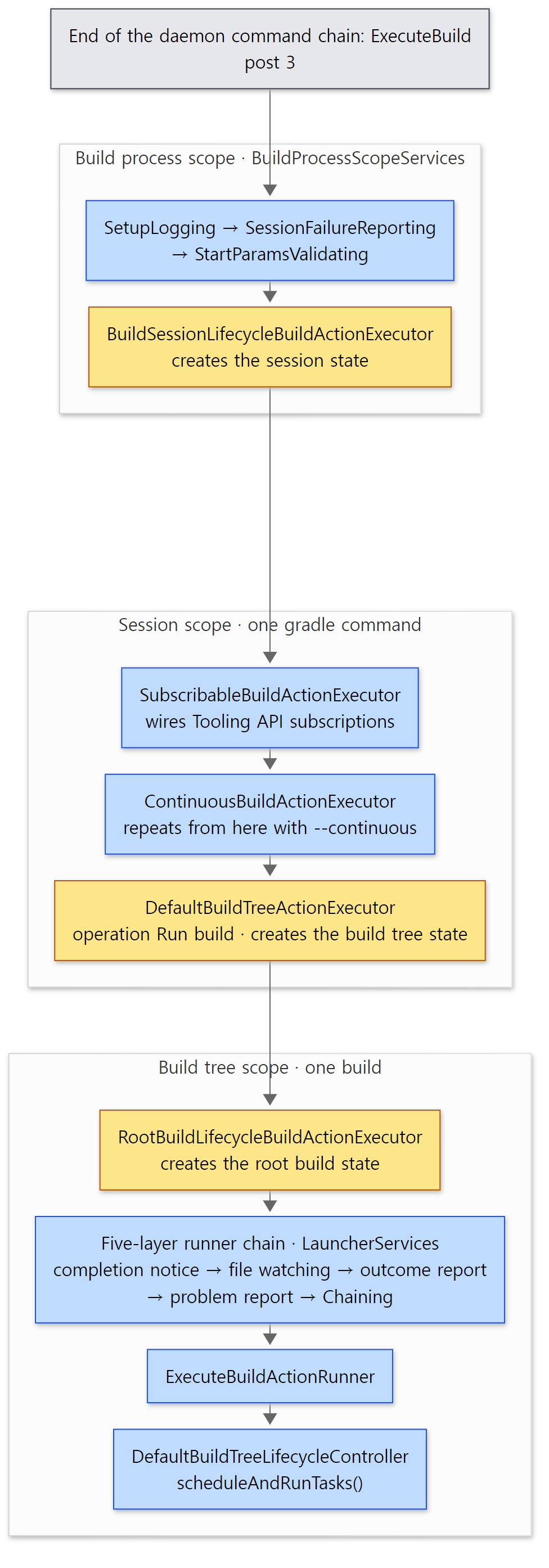 The yellow boxes are where the next layer's state object is created. Each group of boxes matches one scope.
- Build process scope (the four created by
BuildProcessScopeServices): sets up logging for this build, reports failures that happen outside the session, validates the start parameters, and thenBuildSessionLifecycleBuildActionExecutorcreatesCrossBuildSessionStateandBuildSessionState(try (BuildSessionState buildSessionState = new BuildSessionState(…)), line 66). - Session scope:
SubscribableBuildActionExecutorregisters listeners for the events a Tooling API client subscribed to, andContinuousBuildActionExecutorchecks for--continuous. In continuous mode it runs the build many times inside the same session (executeMultipleBuilds, line 108); otherwise it passes it on once (line 111).DefaultBuildTreeActionExecutoropens the build operationRun buildand creates theBuildTreeState(line 145). - Build tree scope:
RootBuildLifecycleBuildActionExecutorcreates the root build's state withbuildStateRegistry.createRootBuild(...)and hands it to the five runner layers above withrootBuild.run(buildController -> buildActionRunner.run(action, buildController))(RootBuildLifecycleBuildActionExecutor.javalines 99–100).
Why build it as a chain?
The layering of the chain lines up exactly with part 2's state hierarchy. The executor that creates the session state sits outside the session scope; the one that creates the build tree state sits inside the session. Each executor opens its state with try (… State … = new …State(…)), calls the inner one, then closes it — so a state lives exactly as long as that executor's method is on the stack. That one session can see many build trees come and go in continuous mode also falls out naturally, because ContinuousBuildActionExecutor sits between the session and the build tree.
The other reason is separation of concerns. "Turning file watching on and off", "printing BUILD SUCCESSFUL" and "notifying the Build Scan" must happen the same way whatever the build action is (a command-line build or an IDE model request). Giving each one its own wrapping runner means the before-and-after work is never skipped, whichever runner ChainingBuildActionRunner at the end picks. It is the same job Spring MVC interceptors and servlet filters do (Spring part 20).
Easy to confuse
- The classes of the configuration-cache-off road live in the
configuration-cachemodule.VintageBuildTreeWorkController,BarrierAwareBuildTreeWorkPreparerandVintageConfigurationTimeActionRunnerin the stack are all underplatforms/core-configuration/configuration-cache/. The place that decides whether the configuration cache is on (BuildTreeModelControllerServices.kt) lives in that module, so it registers the "off" (Vintage) implementations there too (theif (modelParameters.isVintage)branch, lines 127–140). Skip that folder thinking "it's configuration-cache only" and you miss the default road. The executor chain isn't visible in one file either: the four outside the session come fromBuildProcessScopeServices(build-state module), the session and build tree ones from two inner classes ofLauncherServices.
2. The mechanism that guards state — StateTransitionController
Three lifecycle objects, each with its own state enum
The bottom half of the stack shows StateTransitionController three times (transition, maybeTransition, transitionIfNotPreviously), because each lifecycle object holds one.
| Object | Scope | State enum |
|---|---|---|
DefaultBuildTreeLifecycleController |
one build tree | NotStarted, Complete (lines 43–45) |
DefaultBuildLifecycleController |
one build (the root build, and each included build) | Configure, TaskSchedule, ReadyToRun, BuildFinishHooks, ReadyToReset, Finished (lines 56–66) |
VintageBuildModelController |
the build model (settings and projects) | Created, SettingsLoaded, Configured (lines 30–32) |
How the last two overlap is in part 2's state diagram (lifecycle-states). Here we look at who guards those states, and how. We start with the build tree's runBuild().
    private <T> T runBuild(Supplier<ExecutionResult<? extends T>> action) {
        return state.transition(State.NotStarted, State.Complete, () -> {
            ExecutionResult<? extends T> result;
            try {
                result = action.get();
            } catch (Throwable t) {
                result = ExecutionResult.failed(t);
            }

            RuntimeException finalReportableFailure = finishExecutor.finishBuildTree(result.getFailures());
            if (finalReportableFailure != null) {
                throw finalReportableFailure;
            }

            return result.getValue();
        });
    }
Inside a single NotStarted → Complete transition it does both the work (action.get()) and the wrap-up (finishBuildTree). Even if the work throws, the catch turns it into a result and moves on to the wrap-up. In Example 1, lambda:159 (the work) and lambda:164 in the buildFinished stack (the wrap-up) are these two lines. A build tree can pass through this method only once: call it a second time and the state is already Complete, so the transition is refused.
Inside one transition
transition(from, to, action) ends up in doTransition().
    private <S> ExecutionResult<S> doTransition(T fromState, T toState, Supplier<ExecutionResult<S>> action) {
        CurrentState<T> current = state;
        current.assertCanTransition(fromState, toState);
        state = current.transitioningTo(toState);
        ExecutionResult<S> result;
        try {
            result = action.get();
        } catch (Throwable t) {
            result = ExecutionResult.failed(t);
        }
        if (!result.getFailures().isEmpty()) {
            state = state.failed(result);
        } else {
            state = state.nextState(toState);
        }
        return result;
    }
It boils down to four steps: ① check the current state is from, ② mark "on the way to to", ③ do the work, ④ move to to on success, or to "failed" on failure. The interesting part is that the current state is not a bare enum value but an object. The same file has three subclasses of CurrentState.
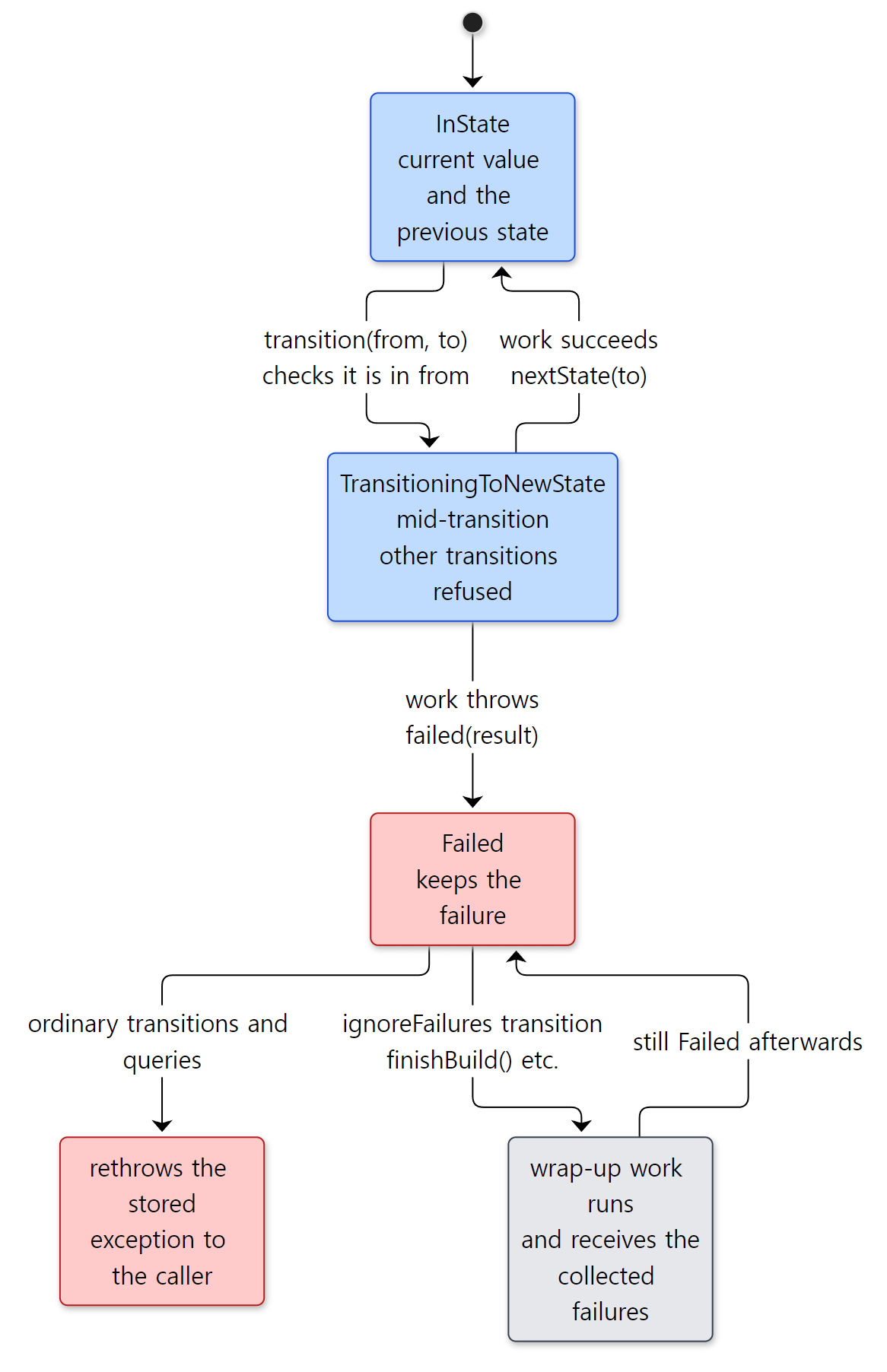 The state value (
Configure and so on) is a field of these objects; the kind of object decides the transition rules.
InStatepoints not only to the state value but also to the previous state (lines 392–398). That is what letstransitionIfNotPreviously()ask "have we ever been in this state?". As seen in part 2,VintageBuildModelControlleruses it to read settings and configure projects only once per build.TransitioningToNewStaterefuses another transition while one is in progress withCannot transition … as already transitioning to state …(lines 527–533). It catches the tangle where the work, while running, calls back into itself.Failedholds the failure and rethrows the stored exception on almost every call that comes after (throwFailure(), lines 569–571). This stops other code from unknowingly carrying on with a build model that has already failed.
On top of that, almost every method that changes the state, or does work while checking the state, runs inside synchronizer.withLock(...) (the exception is notInStateIgnoreOtherThreads(), which, as the name says, doesn't wait for other threads and runs its work without the lock, lines 117–130). The synchronizer is a resource handed out by the worker lease service (StateTransitionControllerFactory.java line 46). Even if several threads touch the same build's state, only one transition happens at a time.
Wrap up even after a failure — ignoreFailures
If Failed blocked every call, a failed build could not even call the buildFinished hook. So there is one exception:
        @Override
        public void assertCanTransition(T fromState, T toState, boolean ignoreFailures) {
            if (!ignoreFailures) {
                throwFailure();
            }
        }
The places that pass ignoreFailures = true are the two transition() overloads that take a function (Function<ExecutionResult<Void>, ExecutionResult<Void>>, lines 278–292) and restart(), which starts the state over with no failure recorded (lines 203–210; resetModel() uses it to discard the model and go back to Configure). Of these, the two transition() overloads pass the collected failures to the function as its argument (action.apply(currentResult), line 299). finishBuild() in section 6 comes in exactly this way. That is why the wrap-up hooks still run in a failed build, and why they can receive "what failed".
Tomcat also had a state machine that every component follows (LifecycleBase in Tomcat part 3). But where Tomcat's focus is firing an event on every state change, Gradle's StateTransitionController focuses on collecting failures and rethrowing them. In Gradle, hooks are called by the lifecycle code, not by the state machine (sections 3–6).
Easy to confuse
- After a failure the state value stops moving forward. Even when an
ignoreFailurestransition succeeds fromFailed,nextState()returns a newFailed(lines 647–650). So in a failed build,DefaultBuildLifecycleControllerdoes not reachBuildFinishHooksafterfinishBuild(); it stays "failed". Easy to trip over when you watch the state in a debugger and wonder why it never reaches the wrap-up state. maybeTransitionandtransitionIfNotPreviouslydiffer. The first means "do nothing if we're already into" (lines 243–250); the second, "do nothing if we've ever been into" (lines 266–273).DefaultBuildLifecycleController.prepareToScheduleTasks()uses the first. After tasks run, the state goes back toConfigure(part 2), so the same build must be able to go toTaskScheduleagain when it schedules more tasks.
3. Initialization — Load build
The lifecycle's first step
From scheduleAndRunTasks() it takes three steps down to reach initialization. The build tree's work preparer, DefaultBuildTreeWorkPreparer.scheduleRequestedTasks(), first tells the build "get ready to schedule tasks" (prepareToScheduleTasks(), line 35), and then builds the task graph (graph.scheduleWork(...), lines 36–41; section 5). The build's lifecycle moves its state Configure → TaskSchedule and hands over to the model:
    @Override
    public void prepareToScheduleTasks() {
        buildState.maybeTransition(State.Configure, State.TaskSchedule, () -> {
            hasTasks = true;
            modelController.prepareToScheduleTasks();
        });
    }
The model (VintageBuildModelController) calls prepareSettings() then prepareProjects() (part 2), and the first of these is DefaultSettingsPreparer.prepareSettings(). That method wraps the work in the build operation Load build (lines 123–145) and calls loadBuild() inside. This one method is the body of the initialization phase.
    private void loadBuild(GradleInternal gradle) {
        loadGradlePropertiesForBuild(gradle);
        // ... for the root build, validate the daemon JVM settings ...
        initScriptHandler.executeScripts(gradle);

        SettingsState state = findAndLoadSettings(gradle);
        gradle.attachSettings(state);

        SettingsInternal settings = state.getSettings();
        projectRegistry.registerProjects(gradle.getOwner(), settings.getProjectRegistry());
        // ... add --include-build from the command line ...
        // Load included builds defined in settings and those added above
        gradle.setIncludedBuilds(loadIncludedBuildsRecursively(settings));
        // ...
    }
subprojects/core/src/main/java/org/gradle/initialization/DefaultSettingsPreparer.java lines 148–181
The order is exactly the initialization you know: ① read gradle.properties (line 149), ② run init scripts (line 157), ③ find and run the settings file (line 159), ④ register the projects included in settings with the state registry (line 163), ⑤ load builds pulled in with includeBuild (line 173). gradle.properties comes before init scripts so that init scripts can read its values with providers.gradleProperty(...) too.
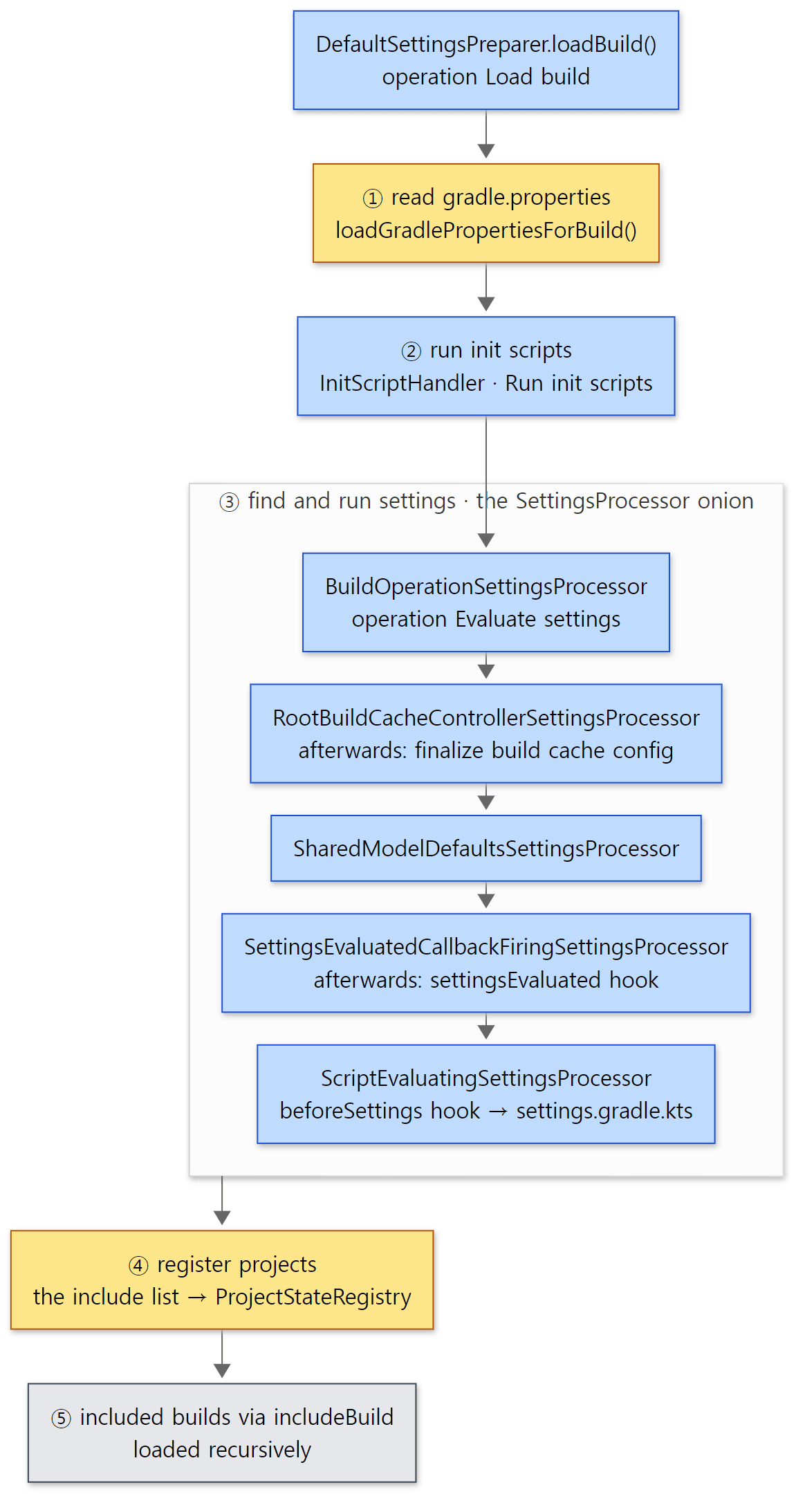 Inside ③ the boxes are wrapped from the outside in. The outer "afterwards" work runs only once the inner one has finished.
The settings processor onion
findAndLoadSettings() in ③ calls settingsProcessor.process(...) (line 262), and that processor is a wrapped chain too.
        SettingsProcessor settingsProcessor = new SettingsEvaluatedCallbackFiringSettingsProcessor(
            new ScriptEvaluatingSettingsProcessor(
                // ... 5 arguments ...
            )
        );
        if (buildModelParameters.isIsolatedProjects()) {
            settingsProcessor = new StartParameterMutationReportingSettingsProcessor(settingsProcessor, isolatedProjectsProblemsReporter);
        }
        return new BuildOperationSettingsProcessor(
            new RootBuildCacheControllerSettingsProcessor(
                new SharedModelDefaultsSettingsProcessor(settingsProcessor)
            ),
            buildOperationRunner
        );
The innermost ScriptEvaluatingSettingsProcessor creates the Settings object, calls the beforeSettings hook and applies the settings script (lines 67–73). The SettingsEvaluatedCallbackFiringSettingsProcessor around it calls the hook once the script is done and locks the settings.
    public SettingsState process(GradleInternal gradle, SettingsLocation settingsLocation, ClassLoaderScope buildRootClassLoaderScope, StartParameterInternal startParameter) {
        SettingsState state = delegate.process(gradle, settingsLocation, buildRootClassLoaderScope, startParameter);
        SettingsInternal settings = state.getSettings();
        gradle.getBuildListenerBroadcaster().settingsEvaluated(settings);
        settings.preventFromFurtherMutation();
        return state;
    }
Note preventFromFurtherMutation(). The settingsEvaluated hook is the last chance to change settings; after it, changes are blocked. Further out, RootBuildCacheControllerSettingsProcessor finalizes the build cache configuration once the buildCache { } block in settings has been fully applied (the Finalize build cache configuration in part 1's trace; part 11), and the outermost BuildOperationSettingsProcessor wraps the whole thing in the operation Evaluate settings.
The onion exists for the same reason as the executor chain in section 1. "Running the script", "calling the hook afterwards" and "finalizing the build cache" don't need to know about each other, and an extra layer can be slipped in only when a condition holds, as with isolated projects mode (lines 638–640).
Example 2: registering every lifecycle hook and watching the order
The init script registers every hook in the public API.
// Example written for this post (not part of Gradle's source)
// Init script: registers every lifecycle hook and prints the order they are called in. Passed with -I on the command line.
println("[script] init.gradle.kts")

gradle.beforeSettings { println("[hook  ] beforeSettings") }
gradle.settingsEvaluated { println("[hook  ] settingsEvaluated") }
gradle.projectsLoaded { println("[hook  ] projectsLoaded") }
gradle.beforeProject { println("[hook  ] beforeProject $path") }
gradle.afterProject { println("[hook  ] afterProject $path") }
gradle.projectsEvaluated { println("[hook  ] projectsEvaluated") }
gradle.taskGraph.whenReady { println("[hook  ] taskGraph.whenReady ${allTasks.map { it.path }}") }

// buildFinished is @Deprecated in 9.x (it can't be used with the configuration cache)
@Suppress("DEPRECATION")
gradle.buildFinished { println("[hook  ] buildFinished action=$action failure=${failure?.javaClass?.simpleName}") }
The project is a root plus two subprojects (app, lib). The settings script only does include("app", "lib"), and the build scripts of the root and app register a hello task with tasks.register, printing [config] in the configuration block and [task ] in doLast. lib has no task. The root build script also registers one Flow API action ([flow ]) that we use in section 6. Here is what ex/u05-hooks/run.sh printed for gradle hello -I init.gradle.kts --offline --console=plain --warning-mode=all:
Welcome to Gradle 9.10.0-20261107025045+0000!

Starting a Gradle Daemon (subsequent builds will be faster)
Shared read-only dependency cache is an incubating feature.
[script] init.gradle.kts
[hook  ] beforeSettings
[script] settings.gradle.kts
[hook  ] settingsEvaluated
[hook  ] projectsLoaded

> Configure project :
[hook  ] beforeProject :
[script] build.gradle.kts (:)
[hook  ] afterProject :

> Configure project :app
[hook  ] beforeProject :app
[script] app/build.gradle.kts
[hook  ] afterProject :app

> Configure project :lib
[hook  ] beforeProject :lib
[script] lib/build.gradle.kts
[hook  ] afterProject :lib
[hook  ] projectsEvaluated
[config] configure task :hello
[config] configure task :app:hello
[hook  ] taskGraph.whenReady [:hello, :app:hello]

> Task :hello
[task  ] :hello action

> Task :app:hello
[task  ] :app:hello action
[flow  ] SayFinished failed=false
[hook  ] buildFinished action=Build failure=null

BUILD SUCCESSFUL in 53s
2 actionable tasks: 2 executed
(The time in BUILD SUCCESSFUL in … differs from run to run; this first run was slow because it started the daemon and compiled the scripts. Shared read-only dependency cache … is printed because of the read-only dependency cache used by this series' Docker image.) For this section, look at the first lines: init script → beforeSettings → settings script → settingsEvaluated. That is exactly lines 157 and 159 of loadBuild() above, and the onion from the inside out. The remaining lines are covered one by one in sections 4–6.
Easy to confuse
beforeSettingsis only useful in an init script. The hook runs just before the settings script is executed (ScriptEvaluatingSettingsProcessor.javaline 70), so registering it inside the settings script is already too late. The only user code that runs before this moment is init scripts.- There is no
Projectyet in the settings script. What ④ registers is each project's descriptor (ProjectDescriptor) and state slot; theProjectobjects are created in the next phase (section 4). That settings'rootProjectis not a project was covered in part 2.
4. Configuration — Configure build
Three layers around project configuration
The model's second step, prepareProjects(), calls a ProjectsPreparer, which is three layers again (BuildScopeServices.java lines 658–667): from the outside in, BuildOperationFiringProjectsPreparer (operation Configure build) → BuildTreePreparingProjectsPreparer → DefaultProjectsPreparer. The middle one does surprisingly much.
    @Override
    public void prepareProjects(GradleInternal gradle) {
        // Setup classloader for root project, all other projects will be derived from this.
        SettingsInternal settings = gradle.getSettings();
        ClassLoaderScope settingsClassLoaderScope = settings.getClassLoaderScope();
        ClassLoaderScope buildSrcClassLoaderScope = settingsClassLoaderScope.createChild("buildSrc[" + gradle.getIdentityPath() + "]", null);
        gradle.setBaseProjectClassLoaderScope(buildSrcClassLoaderScope);
        generateDependenciesAccessorsAndAssignPluginVersions(gradle.getServices(), settings, buildSrcClassLoaderScope);
        // attaches root project
        buildLoader.load(gradle.getSettings(), gradle);
        // ... register dependency substitutions of included builds ...
        // Build buildSrc and export classpath to root project
        buildBuildSrcAndLockClassloader(gradle, buildSrcClassLoaderScope);

        delegate.prepareProjects(gradle);
        // ...
    }
Before a single project build script runs, four things are prepared: ① the root of the class loader scopes for the projects is created under settings (lines 53–54; the class loader tree is in part 6), ② if gradle/libs.versions.toml exists, version catalog accessors (libs.…) are generated (line 55, lines 75–93), ③ buildLoader.load() creates the Project objects (line 57), and ④ buildSrc is built and its classpath attached to the project class loader (line 63; part 7). Only then does delegate.prepareProjects() run the build scripts.
The buildLoader in ③ is three layers: a NotifyingBuildLoader wrapping a ProjectPropertySettingBuildLoader (which puts properties such as those from gradle.properties onto the new projects), which in turn wraps an InstantiatingBuildLoader (BuildScopeServices.java lines 479–486). The outermost one has the projects created inside the operation Load projects, and then calls the projectsLoaded hook inside the following operation Notify projectsLoaded listeners (NotifyingBuildLoader.java lines 46–90). The one that actually creates projects walks down the settings' descriptor tree and calls createMutableModel() for each project (InstantiatingBuildLoader.java lines 37–54).
The inner DefaultProjectsPreparer is short:
    @Override
    public void prepareProjects(GradleInternal gradle) {
        if (skipEvaluationDuringProjectPreparation(buildModelParameters, gradle)) {
            return;
        }

        ProjectState rootProject = gradle.getOwner().getRootProject();
        if (buildModelParameters.isParallelProjectConfiguration()) {
            projectConfigurer.configureHierarchyInParallel(rootProject);
        } else {
            projectConfigurer.configureHierarchy(rootProject);
        }
        new ProjectsEvaluatedNotifier(buildOperationRunner).notify(gradle);
    }
subprojects/core/src/main/java/org/gradle/configuration/DefaultProjectsPreparer.java lines 42–55
It configures the project tree in order (configureHierarchy() — ensureConfigured() on each project, TaskPathProjectEvaluator.java lines 75–79) and then calls the projectsEvaluated hook (line 54). The leading skipEvaluationDuringProjectPreparation() is true for the root build under configure-on-demand (org.gradle.configureondemand=true) (DeferredProjectEvaluationCondition.java lines 26–31). In that case no project is configured here; only the projects needed by the requested tasks are configured later.
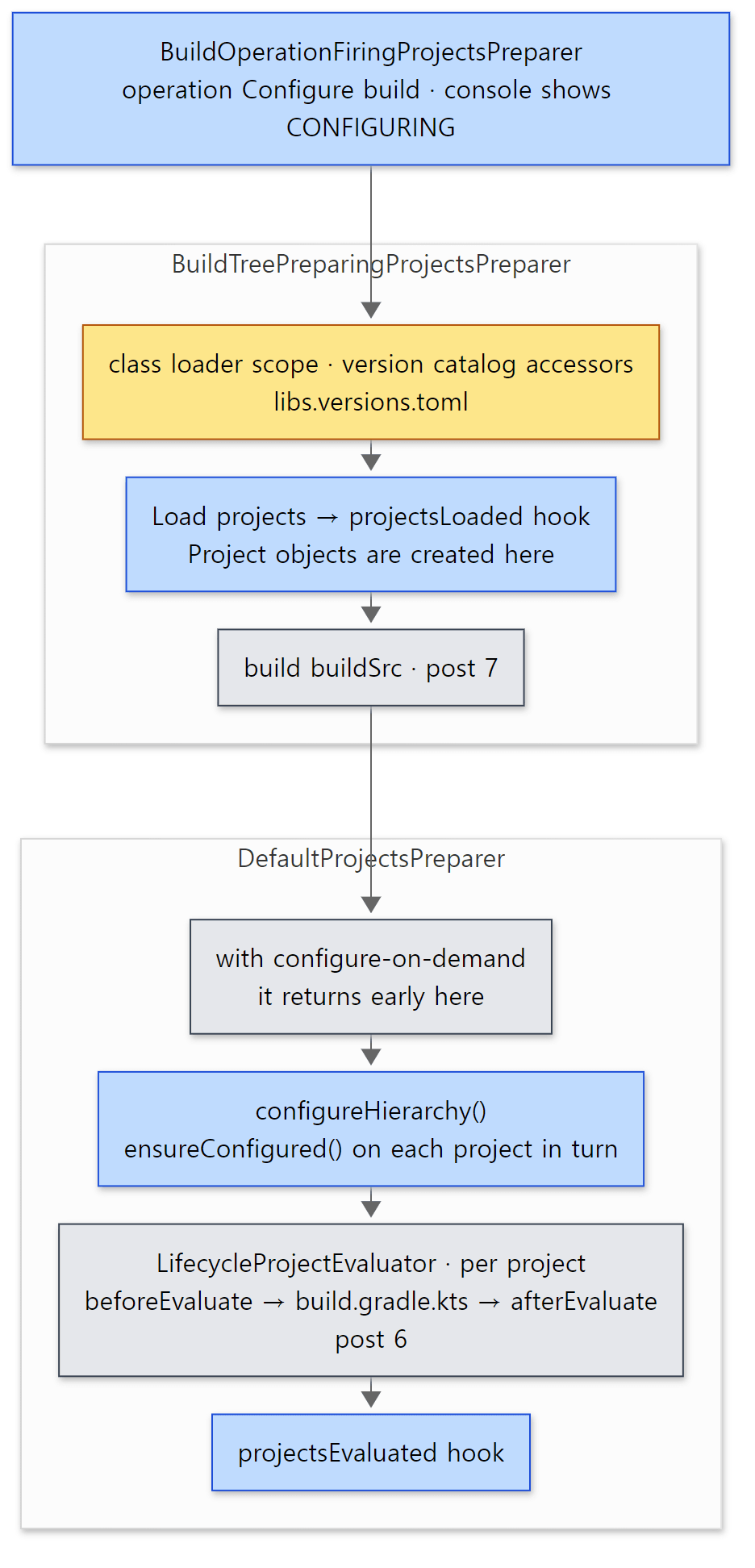 Grey boxes are covered in detail in other posts.
Configuring one project — beforeEvaluate, the script, afterEvaluate
ensureConfigured() ends up in LifecycleProjectEvaluator, the outermost link of the project evaluator chain. The full evaluator chain is in part 6; here we only look at where the hooks sit.
                // Note: beforeEvaluate and afterEvaluate ops do not throw, instead mark state as failed
                try {
                    state.toBeforeEvaluate();
                    buildOperationRunner.run(new NotifyBeforeEvaluate(project, state));

                    if (!state.hasFailure()) {
                        state.toEvaluate();
                        try {
                            delegate.evaluate(project, state);
                        } catch (Exception e) {
                            addConfigurationFailure(project, state, e, context);
                        } finally {
                            state.toAfterEvaluate();
                            buildOperationRunner.run(new NotifyAfterEvaluate(project, state));
                        }
                    }

                    if (state.hasFailure()) {
                        state.rethrowFailure();
                    // ...
delegate.evaluate() is where the build script runs, and the beforeEvaluate and afterEvaluate hooks are called before and after it, each wrapped in an operation. Keep in mind that afterEvaluate is inside finally: it runs even if the script throws (we confirm this in section 7). In Example 2's output, beforeProject : → script → afterProject : under > Configure project : is this spot, and the order : → :app → :lib comes from ProjectOrderingUtil.orderedAllProjectsOf() (TaskPathProjectEvaluator.java line 76). The final projectsEvaluated is line 54 of DefaultProjectsPreparer above.
Easy to confuse
projectsLoadedis called inside the "configure" operation. The user manual often describes this hook as the end of initialization, but in the source it is called right afterLoad projectsinside theConfigure buildoperation (visible in the tree in section 8). The console already showsCONFIGURINGat that moment (section 5). Because theProjectobjects are created at exactly this point, it is more accurate to read it as "right after the projects come into existence".- Under configure-on-demand,
projectsEvaluatedis called later. IfDefaultProjectsPreparerabove returns early, line 54 doesn't run either. InsteadDefaultTaskExecutionPreparersends the same notification after the requested tasks are added to the graph (DefaultTaskExecutionPreparer.javalines 49–51). An example of the same hook being called in different places depending on the road.
5. Between configuration and execution — the task graph and the configuration time barrier
Task configuration blocks run after projectsEvaluated
In Example 2's output, [config] configure task :hello was printed after projectsEvaluated. The build script only registered the task with tasks.register("hello") { … }; the configuration block ran when the task was actually needed — when hello was added to the task graph. This "create it when needed" (lazy configuration) is the subject of part 8, and the computation that builds the task graph is the subject of part 9. What matters on the lifecycle side is where that computation is slotted in.
It is the graph.scheduleWork(...) that section 3's DefaultBuildTreeWorkPreparer calls after prepareToScheduleTasks() (initialization + configuration). It opens the operation Calculate build tree task graph (DefaultIncludedBuildTaskGraph.java lines 207–224), and inside it each build's execution plan is filled and finalized. Finalizing moves the lifecycle's state TaskSchedule → ReadyToRun:
    @Override
    public void finalizeWorkGraph(BuildWorkPlan plan) {
        DefaultBuildWorkPlan workPlan = unpack(plan);
        if (workPlan.empty) {
            return;
        }
        buildState.transition(State.TaskSchedule, State.ReadyToRun, () -> {
            // ...
            workPlan.finalizedPlan = workPreparer.finalizeWorkGraph(gradle, workPlan.plan);
        });
    }
Inside workPreparer.finalizeWorkGraph() the plan is finalized, Tasks to be executed: … is logged at --info, and then taskGraph.populate(...) calls the whenReady hook (DefaultBuildWorkPreparer.java lines 57–64 → DefaultTaskExecutionGraph.java lines 89–100 and 283–290). The end of the taskGraph.whenReady stack in Example 1 was exactly DefaultBuildLifecycleController.finalizeWorkGraph:207 → DefaultBuildWorkPreparer.finalizeWorkGraph:64. So whenReady is "right after the task graph is finalized, before any task has run" — in terms of state, in the middle of the transition to ReadyToRun.
The configuration time barrier — the boundary is a single flag
So where exactly does "configuration end"? The answer was in Example 1's stack. BarrierAwareBuildTreeWorkPreparer wraps the whole of work preparation in this:
    fun <T> runConfigurationTimeAction(action: () -> T): T {
        configurationTimeBarrier.prepare()
        InstrumentedInputs.setListener(inputsListener)
        try {
            return action()
        } finally {
            configurationTimeBarrier.cross()
            InstrumentedInputs.discardListener()
        }
    }
prepare() sets atConfigurationTime = true and cross() sets it back to false — a flag (DefaultConfigurationTimeBarrier.java lines 23–32). And action() is the whole of DefaultBuildTreeWorkPreparer.scheduleRequestedTasks(): initialization + configuration + finalizing the task graph. The flag is crossed right after the graph is finalized, and only then does VintageBuildTreeWorkController call the executor:
    override fun scheduleAndRunRequestedTasks(taskSelector: EntryTaskSelector?): ExecutionResult<Void> {
        return taskGraph.withNewWorkGraph { graph: BuildTreeWorkGraph ->
            val finalizedGraph: Try<BuildTreeWorkGraph.FinalizedGraph> = Try.ofFailable { workPreparer.scheduleRequestedTasks(graph, taskSelector) }

            if (finalizedGraph.isSuccessful) {
                workExecutor.execute(finalizedGraph.get())
            } else {
                ExecutionResult.failed(finalizedGraph.failure.get())
            }
        }
    }
The configuration phase and the execution phase split between line 37 and line 40. By the time line 37 returns the flag has been crossed, and from line 40 on it is execution. Whoever reads this flag sets the rules for execution time. For example, with the configuration cache on, this flag is used to tell whether a task action touches project during execution (TaskExecutionAccessCheckers.kt lines 104–113; part 11).
Example 3: even --dry-run does all of configuration
gradle hello --dry-run (-m) means "don't actually run the tasks, just show what would run". In the source, it branches at the very front of the execution side:
    public ExecutionResult<Void> displayOrExecutePlan(GradleInternal gradle, FinalizedExecutionPlan plan) {
        if (configurationTimeBarrier.isAtConfigurationTime()) {
            return executePlan(plan, gradle.getTaskGraph());
        }

        if (gradle.getStartParameter().isDryRun()) {
            for (Task task : plan.getContents().getTasks()) {
                // ... prints the task path followed by "SKIPPED" ...
            }

            return ExecutionResult.succeeded();
        }
        // ...
subprojects/core/src/main/java/org/gradle/execution/DefaultBuildWorkExecutor.java lines 101–117
(Line 102 is the road for running a plan inside configuration time, before the barrier has been crossed. In which cases that happens I did not follow this time.) A dry run prints the plan's task names with SKIPPED and stops. Everything before it — initialization, configuration, the graph computation — happens as usual. Here is the same example run with --dry-run. The twenty lines before projectsEvaluated (from the init script to :lib's afterProject) are identical to Example 2, so I replaced them with ....
...
[hook  ] projectsEvaluated
[config] configure task :hello
[config] configure task :app:hello
[hook  ] taskGraph.whenReady [:hello, :app:hello]
:hello SKIPPED
:app:hello SKIPPED
[flow  ] SayFinished failed=false
[hook  ] buildFinished action=Build failure=null

BUILD SUCCESSFUL in 3s
Only the task actions ([task ]) are missing; everything else printed. Since even the configuration blocks ([config]) ran, a dry run is fine as a tool for "quickly checking the build scripts for bugs", but not for "quickly skimming a build whose configuration is slow". It took 3 seconds because this was the second run and the daemon was already up (the time differs on every run).
Example 4: INITIALIZING · CONFIGURING · EXECUTING on the console
When you run Gradle in a terminal, a progress bar like <====> 66% CONFIGURING [2s] appears at the bottom. Who decides the phase name? BuildStatusRenderer on the console side:
            if (startEvent.isBuildOperationStart()) {
                if (buildStartTimestamp == 0 && startEvent.getParentProgressOperationId() == null) {
                    // The very first event starts the Initializing phase
                    // ...
                    phaseStarted(startEvent, Phase.Initializing);
                } else if (startEvent.getBuildOperationCategory() == BuildOperationCategory.CONFIGURE_ROOT_BUILD) {
                    // Once the root build starts configuring, we are in Configuring phase
                    phaseStarted(startEvent, Phase.Configuring);
                // ...
                } else if (startEvent.getBuildOperationCategory() == BuildOperationCategory.RUN_MAIN_TASKS) {
                    phaseStarted(startEvent, Phase.Executing);
The console knows nothing about the lifecycle classes. It only looks at the category attached to a build operation when it starts. When the first operation (Run build) arrives it shows INITIALIZING; when an operation with category CONFIGURE_ROOT_BUILD arrives (the one BuildOperationFiringProjectsPreparer attaches to Configure build, lines 59–60) it shows CONFIGURING; and on RUN_MAIN_TASKS (Run main tasks from BuildOperationFiringBuildTreeWorkExecutor, line 49) it shows EXECUTING. The percentage comes from the operations too: Configure build reports the number of projects as its total (BuildOperationFiringProjectsPreparer.java line 64), and Run tasks the size of the execution plan (DefaultBuildWorkExecutor.java line 94).
I ran the same example with --console=rich and extracted just the progress bar lines. A fast build hardly draws the bar at all, so I attached a separate init script (slow.gradle.kts) that sleeps 0.8 seconds in each hook. Control characters and the elapsed time [Ns] were removed.
0% INITIALIZING   > Running init scripts
0% INITIALIZING   > IDLE
0% CONFIGURING   > root project
33% CONFIGURING   > :app
66% CONFIGURING   > :lib
100% CONFIGURING   > Running projects evaluated listeners
100% CONFIGURING   > Running task graph ready listeners
0% EXECUTING   > IDLE
50% EXECUTING   > :app:hello
0% WAITING   > IDLE
(Which lines get captured varies a little between runs, depending on how the screen redraws line up with the sleeps.) Configuring three projects moves it 33% → 66% → 100%, and running two tasks 0% → 50%. The status lines > Running projects evaluated listeners and > Running task graph ready listeners are the operations' progress display names (ProjectsEvaluatedNotifier.java line 55, DefaultTaskExecutionGraph.java line 314). While the task graph is being computed (including whenReady), the console still says CONFIGURING, which fits section 2's states and the barrier above.
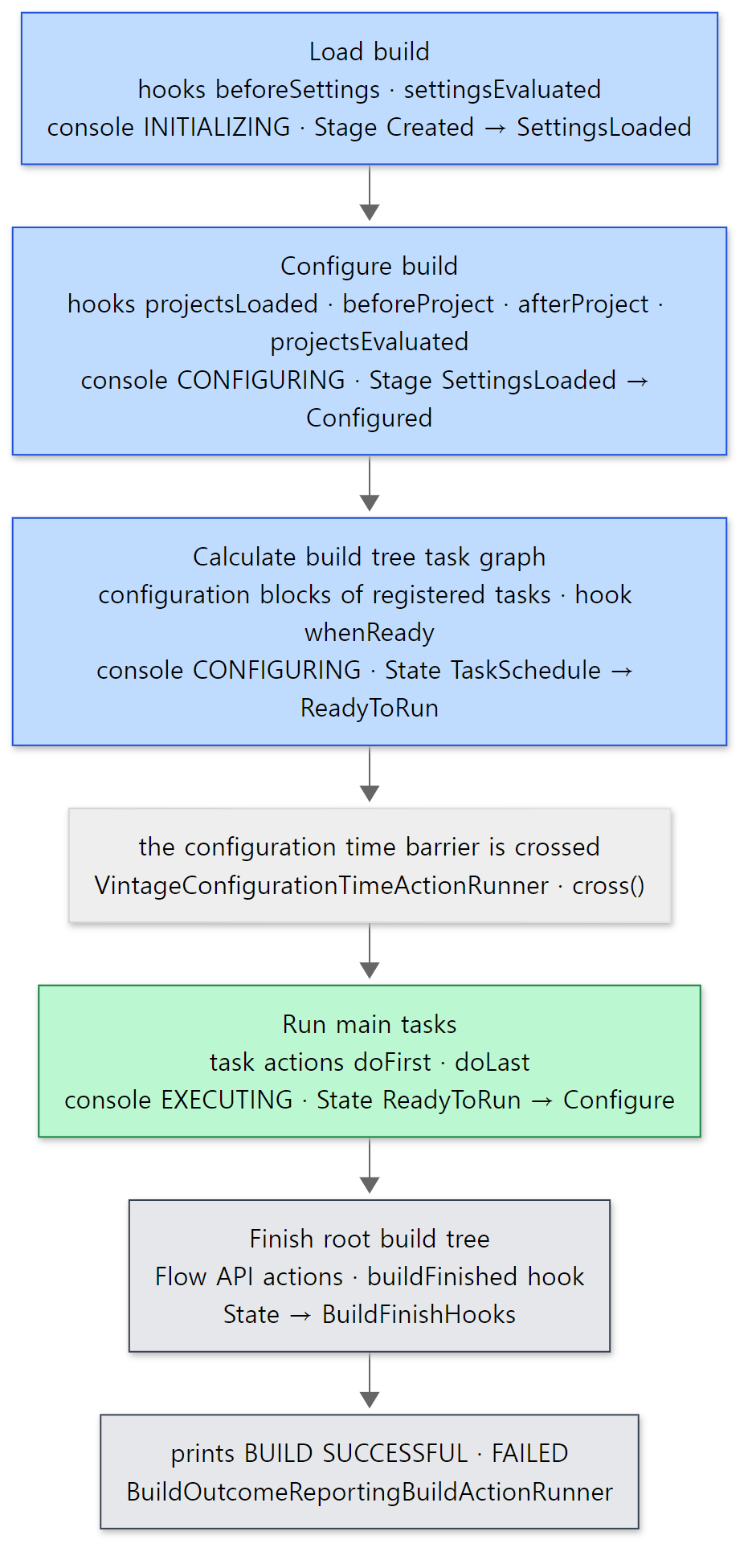 Box names are build operation names. The console phase, the state value and the barrier do not all change at the same spot.
Easy to confuse
- The source has three "ends of configuration". The console switches to
EXECUTINGwhen theRun main tasksoperation starts; the configuration time barrier is crossed slightly before that; andDefaultBuildLifecycleController's state only moves onceexecuteTasks()is called after it reachedReadyToRun. All three sit in the same gap — "after the task graph is finalized, before the first task" — but not on exactly the same line. To know which flag a rule like "don't useprojectat execution time" looks at, you have to read each check. whenReadyis part of configuration. The name suggests "just before execution = execution phase", but it runs before the barrier is crossed and the console still showsCONFIGURING.
6. The end of the build — finishBuild, buildFinished, the Flow API
The wrap-up transition
When execution ends, we reach finishExecutor.finishBuildTree(...) on line 164 of runBuild() (section 2). DefaultBuildTreeFinishExecutor first finishes any included builds, tidies up the list of failures, and then calls the root build's finishBuild() (DefaultBuildTreeFinishExecutor.java lines 44–73). The operation is named Finish root build tree (OperationFiringBuildTreeFinishExecutor.java line 54).
    @Override
    public ExecutionResult<Void> finishBuild(@Nullable Throwable failure) {
        return buildState.transition(CONFIGURATION_STATES, State.BuildFinishHooks, stageFailures -> {
            // Fire the build finished events even if nothing has happened to this build, because quite a lot of internal infrastructure
            // adds listeners and expects to see a build finished event. Infrastructure should not be using the public listener types
            // In addition, they almost all should be using a build tree scoped event instead of a build scoped event

            Throwable reportableFailure = failure;
            if (reportableFailure == null && !stageFailures.getFailures().isEmpty()) {
                reportableFailure = exceptionAnalyser.transform(stageFailures.getFailures());
            }
            BuildResult buildResult = new BuildResult(hasTasks ? "Build" : "Configure", gradle, reportableFailure);
            return ExecutionResult.maybeFailing(() -> buildListener.buildFinished(buildResult));
        });
    }
This is the function-taking transition() from section 2, so it gets in even after an earlier failure, takes that failure (stageFailures), puts it in a BuildResult and broadcasts buildFinished. The source comment is candid about why: "Fire the build finished events even if nothing has happened to this build, because quite a lot of internal infrastructure … expects to see a build finished event. Infrastructure should not be using the public listener types…"
What about buildFinished in 9.x?
The public API Gradle.buildFinished() is @Deprecated at this commit.
    /**
     * Adds a closure to be called when the build is completed.
     // ...
     * @see org.gradle.api.flow.FlowProviders#getBuildWorkResult()
     * @deprecated This method is not supported when configuration caching is enabled.
     * @since 0.9
     */
    @Deprecated
    void buildFinished(Closure closure);
subprojects/core-api/src/main/java/org/gradle/api/invocation/Gradle.java lines 308–320
The reason given is that it can't be used with the configuration cache, and it points to FlowProviders.getBuildWorkResult() instead. That is the Flow API (incubating, since 8.1). You register an action to run when the build ends with FlowScope.always(...) and receive the result as a Provider. In the example's root build script:
// The suggested replacement for buildFinished: the Flow API (incubating). The FlowAction is called when the build ends.
abstract class SayFinished : FlowAction<SayFinished.Params> {
    interface Params : FlowParameters {
        @get:Input
        val failed: Property<Boolean>
    }

    override fun execute(parameters: Params) {
        println("[flow  ] SayFinished failed=${parameters.failed.get()}")
    }
}

abstract class FlowHooks @Inject constructor(val scope: FlowScope, val results: FlowProviders)

val flow = objects.newInstance<FlowHooks>()
flow.scope.always(SayFinished::class.java) {
    parameters.failed = flow.results.buildWorkResult.map { it.failure.isPresent }
}
[Shortened from the example ex/u05-hooks/project/build.gradle.kts — the header comments, the imports, one println line and the hello task registration are left out]
A build script cannot receive FlowScope and FlowProviders directly, so I created a small class that takes them through an @Inject constructor with objects.newInstance() (the injection from part 4). Open the class that implements the Flow API, though, and there is a surprise:
    @Deprecated("Deprecated in Java")
    override fun buildFinished(result: BuildResult) {
        setBuildWorkResult(result.failure)
        schedulePendingActions()
    }
BuildFlowScope is itself a buildFinished listener (it extends BuildAdapter, lines 39–45). It receives the same notification from finishBuild(), fills the result provider, and runs the registered actions as Run flow action … operations (FlowScheduler.kt lines 65–80). What was taken away from users is "registering a build-script lambda as a listener", not "the moment the build ends". A Flow API action is split into a class and its parameters (FlowParameters), so the configuration cache can store just the parameters and recreate the action in the next build. A lambda can't be treated that way (what the configuration cache stores is in part 11).
Look again at the end of Example 2's output:
[flow  ] SayFinished failed=false
[hook  ] buildFinished action=Build failure=null

BUILD SUCCESSFUL in 53s
2 actionable tasks: 2 executed
Even with --warning-mode=all, no deprecation warning was printed for buildFinished. On this configuration-cache-off road the API only carries @Deprecated; no warning appeared at run time. The Flow action printed before the init script's hook because of the order in which the listeners are called, but I did not verify the code that decides that order this time.
Who prints BUILD SUCCESSFUL?
The last two lines are printed outside the lifecycle, by section 1's BuildOutcomeReportingBuildActionRunner. Before the build it registers BuildLogger as a "logger" (line 81), and after the inner chain (delegate.run, line 83) has fully returned it calls buildLogger.logResult(...) and TaskExecutionStatisticsReporter (lines 88–89). BuildLogger is a listener too. Starting Build, Settings evaluated using …, Projects loaded. … and All projects evaluated. printed at --info all come from its hook methods (BuildLogger.java lines 77–110). In its buildFinished hook it only remembers the action name from the BuildResult ("Build" or "Configure", lines 113–116), and logResult() upper-cases it into BUILD SUCCESSFUL in 53s (BuildResultLogger.java lines 68–76). On a road where no task is scheduled (hasTasks is false), the same spot prints CONFIGURE SUCCESSFUL. The 2 actionable tasks: 2 executed below it comes from TaskExecutionStatisticsReporter.
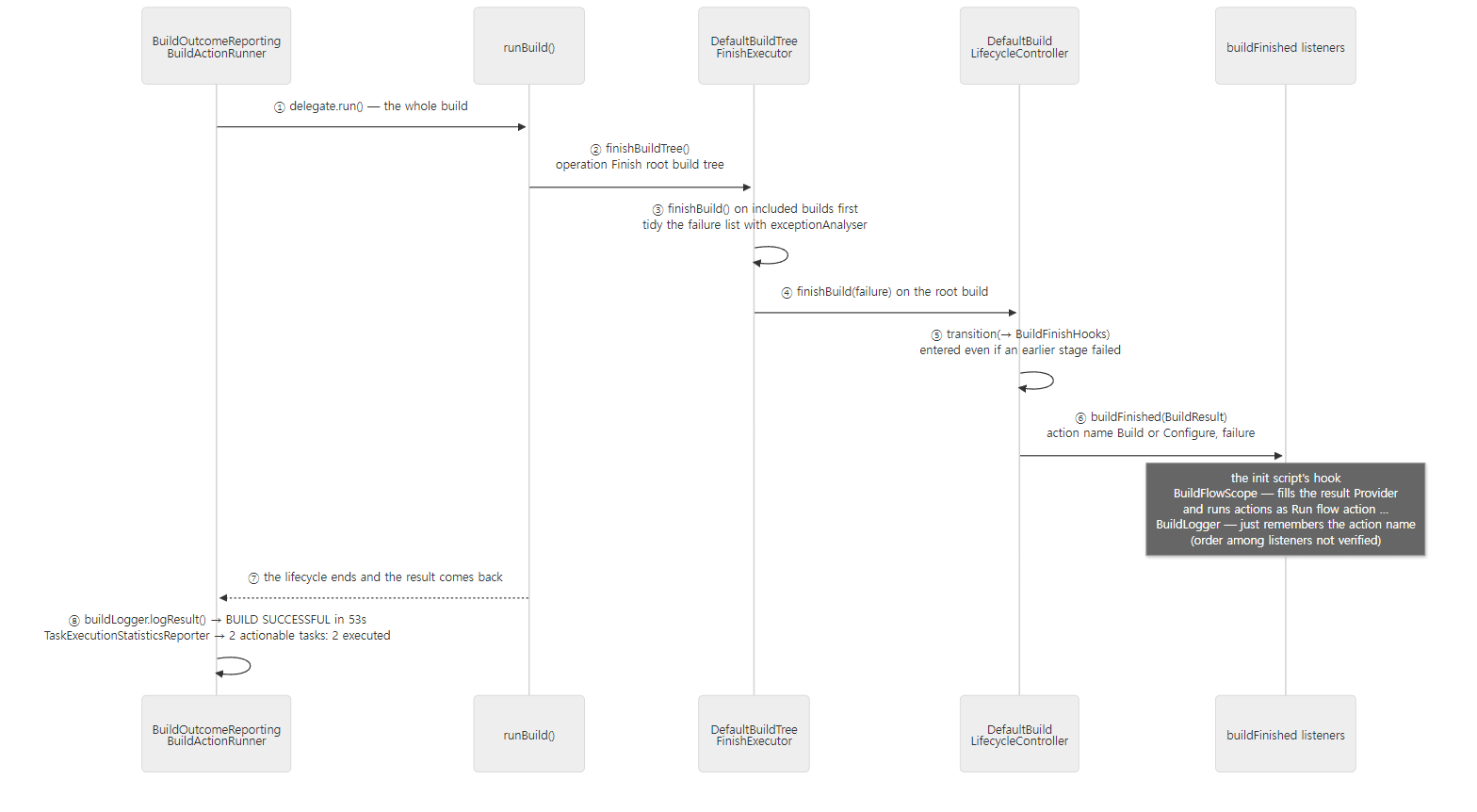 Hooks and Flow actions run at ⑥; the two result lines are printed at ⑧, outside the lifecycle. The time and task count are example 2's output.
Easy to confuse
- When the
buildFinishedhook runs,BUILD SUCCESSFULhasn't been printed yet. The hook runs inside the lifecycle (finishBuild()), while the result is printed outside it (by the runner). Don't expect to get "the build result as shown on screen" from the hook.
7. When something fails
Example 5: failing on purpose in each of the three phases
I made a project where -Pfail=settings|configure|execute picks where to fail. The settings script does throw GradleException("boom in settings") on line 5 when fail is settings, and the build script is:
// Example written for this post (not part of Gradle's source)
val fail = providers.gradleProperty("fail").orNull

// Check whether afterEvaluate is still called when the script ends with an exception
afterEvaluate { println("[hook  ] afterEvaluate failure=${state.failure?.javaClass?.simpleName}") }

println("[script] build.gradle.kts")
if (fail == "configure") throw GradleException("boom in configuration")

tasks.register("hello") {
    doLast {
        if (fail == "execute") throw GradleException("boom in execution")
        println("[task  ] :hello action")
    }
}
The init script has a single buildFinished hook that prints action and the class name of failure. ex/u05-failures/run.sh starts the daemon first, runs the three cases in turn, and captures stdout and stderr separately. When I first captured them together, the buildFinished line of the settings failure appeared after BUILD FAILED, making the order look reversed. The failure report (FAILURE: …, BuildExceptionReporter.java line 184) and the BUILD FAILED line (BuildResultLogger.java line 66) are logged at error level (LogLevel.ERROR) and go to stderr, and the order in which the two streams interleave is not guaranteed. First the configuration failure:
=== -Pfail=configure ===
exit code: 1
--- stdout ---
[script] settings.gradle.kts

> Configure project :
[script] build.gradle.kts
[hook  ] afterEvaluate failure=ProjectConfigurationException
[hook  ] buildFinished action=Build failure=LocationAwareException
--- stderr ---

FAILURE: Build failed with an exception.

* Where:
Build file '/tmp/p/build.gradle.kts' line: 8

* What went wrong:
boom in configuration

* Try:
...

BUILD FAILED in 4s
(The four lines of advice under * Try: are shortened. The time differs from run to run.) Three things to read:
afterEvaluateran. Just as in section 4'sLifecycleProjectEvaluator, whereafterEvaluatesits insidefinally. At that moment the project's failure is aProjectConfigurationException— the script's exception wrapped with the messageA problem occurred configuring root project 'failures'.(LifecycleProjectEvaluator.javalines 82–86).- The failure
buildFinishedreceives is aLocationAwareException. WhenDefaultBuildTreeFinishExecutortidies up the failures withexceptionAnalyser.transform()(line 56), it finds the deepest cause in the exception chain and wraps it with the file name and line number (DefaultExceptionAnalyser.javalines 67–97). That is where the report's* Where: Build file '/tmp/p/build.gradle.kts' line: 8comes from. - "What went wrong" shows the original message (
boom in configuration), not the outer one. The message of the wrappingProjectConfigurationExceptiondoesn't appear in the report. The user sees the exception they threw.
When settings fails, stdout has just two lines, [script] settings.gradle.kts and [hook ] buildFinished action=Build failure=LocationAwareException; the report's * Where: is Settings file '/tmp/p/settings.gradle.kts' line: 5 and "What went wrong" is boom in settings. The execution failure looks like this:
=== -Pfail=execute ===
exit code: 1
--- stdout ---
[script] settings.gradle.kts

> Configure project :
[script] build.gradle.kts
[hook  ] afterEvaluate failure=null

> Task :hello FAILED
[hook  ] buildFinished action=Build failure=LocationAwareException
1 actionable task: 1 executed
--- stderr ---

FAILURE: Build failed with an exception.

* What went wrong:
Execution failed for task ':hello' (registered in build file 'build.gradle.kts').
> boom in execution

* Try:
...

BUILD FAILED in 4s
(The four lines under * Try: are the same as before and are shortened; the time differs on every run. All three cases ended with exit code: 1, and the settings failure output also began with the Welcome to Gradle … greeting.) Whichever phase failed, buildFinished was called, and action was always Build. Even though the settings failure meant no task could be scheduled, it is still Build because prepareToScheduleTasks() sets hasTasks = true before it starts the work (lines 183–184 in section 3). The execution failure's report has no * Where:; instead it says which task failed and which file registered it.
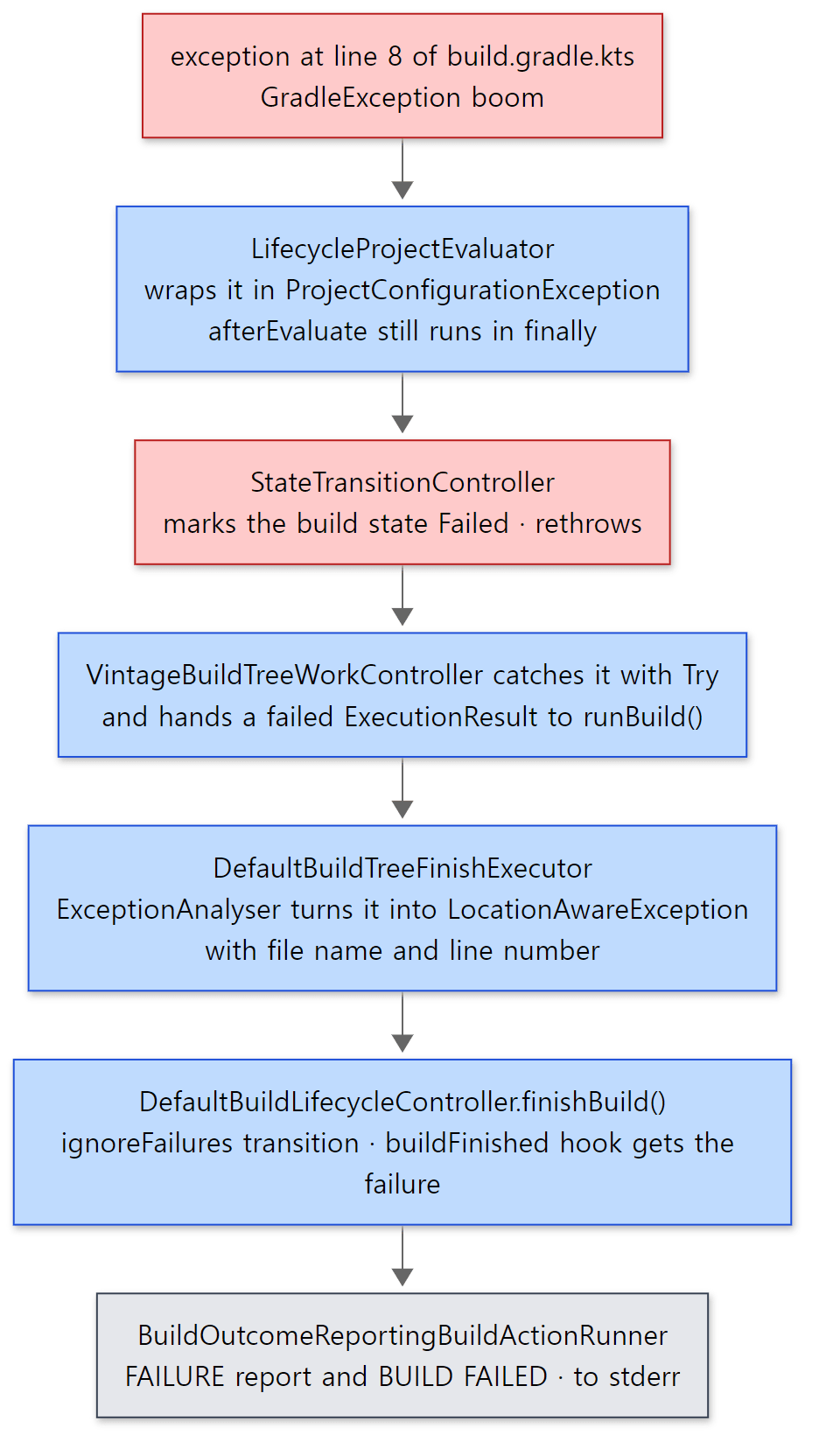 The failure is thrown upward until
VintageBuildTreeWorkController turns it into a "result"; from there on it travels as a value.
Why throw and then turn it into a result?
The middle of the diagram is the heart of the design. The project evaluator and the state transition mechanism throw exceptions, but from VintageBuildTreeWorkController (the Try.ofFailable on line 37 in section 5) and runBuild() (the catch in section 2) onward, the failure is carried as a value, an ExecutionResult. As a value, several failures can be collected (several tasks failing with --continue, included builds failing separately), and the wrap-up phase can take that list and deal with it. If the exception kept being thrown, only the first failure would survive and the wrap-up code would run in a finally without knowing what failed.
Compare it with Spring's refresh() (Spring part 7). When one of refresh()'s twelve steps fails, its catch destroys the beans already created (destroyBeans()) and rethrows the exception. The goal is to throw away the failed context. Gradle's goal is to wrap up a failed build all the way: call the hooks, tidy the file-watching state, write the report — and then the daemon has to take the next build. The state machine's ignoreFailures and the layer that turns failures into values come from that goal.
Easy to confuse
- In
afterEvaluateyou can see the failure viastate.failure, but you cannot save the build. Once the hook finishes,state.rethrowFailure()throws the failure again (LifecycleProjectEvaluator.javalines 118–119).afterEvaluateis a place to clean up or record, not to swallow a failure. - The exception type
buildFinishedreceives is wrapped for the report. To get at theGradleExceptionyou actually threw, followfailure.causedown.
8. Build operations — why give every phase a name?
The life of one operation
Almost every phase so far had a BuildOperationFiring… or buildOperationRunner.run(...) attached. The core of it is short:
    private <O> O execute(BuildOperationDescriptor.Builder descriptorBuilder, BuildOperationExecution<O> execution) {
        BuildOperationState descriptorParent = (BuildOperationState) descriptorBuilder.getParentState();
        BuildOperationState parent = descriptorParent == null ? getCurrentBuildOperation() : descriptorParent;
        OperationIdentifier id = new OperationIdentifier(buildOperationIdFactory.nextId());
        BuildOperationDescriptor descriptor = descriptorBuilder.build(id, parent == null
            ? null
            : parent.getDescription().getId());
        // ...
        BuildOperationState operationState = new BuildOperationState(descriptor, clock.getCurrentTime());
        BuildOperationTrackingListener listener = new BuildOperationTrackingListener(currentBuildOperationRef, listenerFactory.createListener());
        // ...
    }
Unless a parent is given explicitly, the operation currently running on this thread becomes the parent (line 157). So the shape of methods calling methods becomes the shape of the operation tree. The work itself runs between listener.start() and listener.stop() (lines 64–74), and if it throws, the operation is marked failed and the exception is rethrown (lines 68–77). An operation doesn't change the flow of work; it only records.
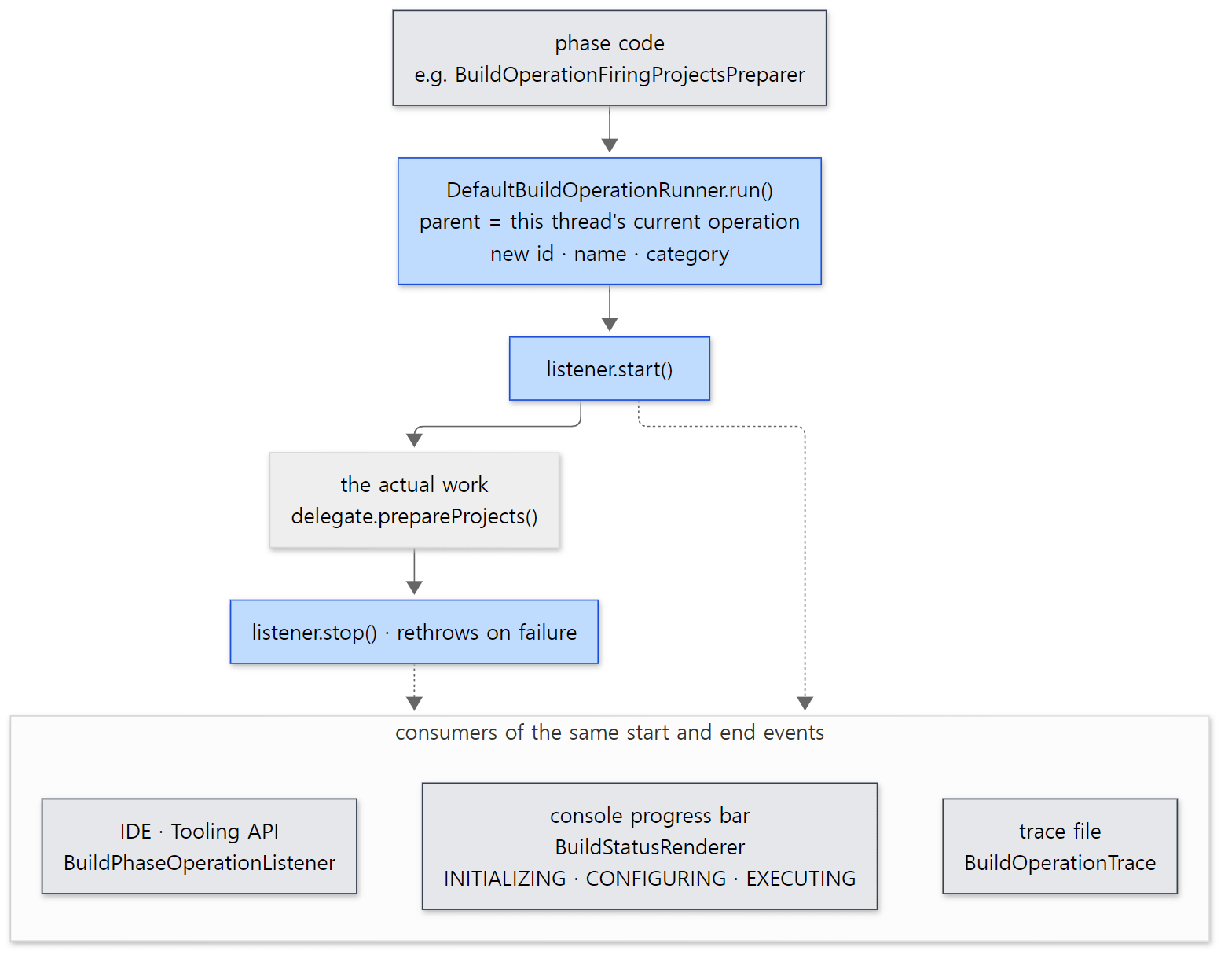 The phase code doesn't know who receives its events, and the receivers don't know the phase code.
Example 6: where the hooks hang in the operation tree
I ran Example 2 once more with the trace options (-Dorg.gradle.internal.operations.trace=/tmp/trace -Dorg.gradle.internal.operations.trace.tree=true) and kept only the operation names from trace-tree.txt. Each println line is shown as » … under the operation that printed it, and operations unrelated to this post — plugin application, task registration, snapshots — are filtered out by the awk in run.sh. The parts for :app and :lib look the same as :, so they are shortened (...).
Run build
  Load build
    Run init scripts
      Apply initialization script 'init.gradle.kts' to build ':'
          » [script] init.gradle.kts
    Evaluate settings
      » [hook  ] beforeSettings
      » [hook  ] settingsEvaluated
      Apply settings file 'settings.gradle.kts' to settings 'p'
          » [script] settings.gradle.kts
      Finalize build cache configuration
  Configure build
    Load projects
    Notify projectsLoaded listeners
      Execute Gradle.projectsLoaded listener
        » [hook  ] projectsLoaded
    Configure project :
      Notify beforeEvaluate listeners of :
        Execute Gradle.beforeProject listener
          » [hook  ] beforeProject :
      Apply build file 'build.gradle.kts' to root project 'hooks'
            » [script] build.gradle.kts (:)
      Notify afterEvaluate listeners of :
        Execute Gradle.afterProject listener
          » [hook  ] afterProject :
    Configure project :app
    ...
    Configure project :lib
    ...
    Notify projectsEvaluated listeners
      Execute Gradle.projectsEvaluated listener
        » [hook  ] projectsEvaluated
  Calculate build tree task graph
    Calculate task graph
      Realize task :hello
        Execute container callback action
          » [config] configure task :hello
      Realize task :app:hello
      ...
    Notify task graph whenReady listeners
      Execute TaskExecutionGraph.whenReady listener
        » [hook  ] taskGraph.whenReady [:hello, :app:hello]
  Run main tasks
    Run tasks
      Task :hello
        Executing task ':hello'
          Execute doLast {} action for :hello
            » [task  ] :hello action
      Task :app:hello
      ...
  Finish root build tree
    » [hook  ] buildFinished action=Build failure=null
    Run flow action Build_gradle$SayFinished
      » [flow  ] SayFinished failed=false
Everything this post followed is on one page:
Run init scriptsandEvaluate settingsinsideLoad build(section 3),Load projectsandprojectsLoadedinsideConfigure build(section 4's easy-to-confuse note), task realization andwhenReadyinsideCalculate build tree task graph(section 5),buildFinishedand the Flow action insideFinish root build tree(section 6).- Most user hooks are wrapped once more in an
Execute <registration point> listeneroperation. When you register a hook,DefaultGradlewraps the listener in a decorator that attaches an operation name ("Execute " + registrationPoint + " listener",DefaultListenerBuildOperationDecorator.javaline 130). That is what lets a Build Scan show "how long each plugin's or script's hooks took". beforeSettings,settingsEvaluatedandbuildFinishedhave no such wrapper.DefaultGradleregisters these three without the decorator (DefaultGradle.javalines 364–382 and 404–416), so their output lines attach directly to the phase operation above them (Evaluate settings,Finish root build tree).
Why give every phase a name?
Without operations, finding out "where did this build's time go?" would mean adding timing code to every phase, and the console, the IDE and Build Scans would each have to reach into the phase code. Gradle does the opposite. Phase code only announces "from now on I'm doing work with this name", and consumers subscribe to those events. The console in Example 4 (BuildStatusRenderer) looks at the category to pick the phase name; the trace file in part 1 and Example 6 (BuildOperationTrace) records the whole tree; and the IDE receives the same categories (CONFIGURE_ROOT_BUILD, RUN_MAIN_TASKS and so on, lines 48–53) through the Tooling API's BuildPhaseOperationListener to draw progress. Because one event is used differently by many consumers, adding a new phase only takes an operation name, and it shows up in the console, the IDE and the scan automatically. There is a price: this wrapping is why part 1's call stacks were so thick, and why Example 1 had to filter out names containing BuildOperation.
Easy to confuse
- Operation names are not class names.
Load buildis attached byDefaultSettingsPreparer,Configure buildbyBuildOperationFiringProjectsPreparer,Run buildbyDefaultBuildTreeActionExecutor. When looking for the source of a name you saw in a trace,git grepfor the name string is fastest (git grep '"Calculate task graph"').
What this post leaves out
- The configuration-cache-on road —
ConfigurationCacheBuildTreeLifecycleControllerFactory.kt,ConfigurationCacheAwareBuildTreeWorkController.kt(line 105, where it discards the models withbuildRegistry.resetModels()after storing the cache, is what usesReadyToResetfrom part 2's state diagram),ConfigurationCacheAwareBuildModelController.kt: part 11 - The road taken when an IDE asks for a model —
DefaultBuildTreeLifecycleController.fromBuildModel()(lines 83–103),DefaultBuildTreeModelCreator,platforms/ide/tooling-api-builders/…/runner/BuildModelActionRunner.java - The lifecycle of included (composite) builds —
subprojects/composite-builds/…/DefaultIncludedBuildRegistry.java,DefaultNestedBuild.java,DefaultIncludedBuildTaskGraph.java - Configuring projects in parallel —
TaskPathProjectEvaluator.configureHierarchyInParallel()(lines 82–105, isolated projects mode) - The repetition in continuous builds —
ContinuousBuildActionExecutor.executeMultipleBuilds() - Internal listeners for build start and end —
RootBuildLifecycleListener(DefaultRootBuildState.javalines 102–120),BuildTreeLifecycleListener(RootBuildLifecycleBuildActionExecutor.javalines 92 and 104) - The road to Build Scans —
GradleEnterprisePluginManagerinBuildCompletionNotifyingBuildActionRunner
Summary
| Concept | One-line summary |
|---|---|
| Executor chain | About ten layers from the daemon's ExecuteBuild to ExecuteBuildActionRunner. Each layer opens and closes one state (session, build tree, root build) |
| Five runner layers | completion notice → file watching → outcome report → problem report → Chaining. They handle the before-and-after work regardless of the kind of build action |
ChainingBuildActionRunner |
Doesn't wrap; loops over a list asking "can you handle this action?". Command-line builds go to ExecuteBuildActionRunner |
StateTransitionController |
Holds state as InState, TransitioningToNewState and Failed objects, blocking wrong transitions and use after a failure |
ignoreFailures |
Only the function-taking transition() (and restart(), which starts the state over) get in after a failure. transition() receives the collected failures; finishBuild() takes this road |
| Initialization | DefaultSettingsPreparer.loadBuild(): gradle.properties → init scripts → settings onion → register projects → included builds |
| Settings onion | operation → finalize build cache → … → settingsEvaluated → beforeSettings + script. Settings are locked afterwards |
| Configuration | BuildTreePreparingProjectsPreparer creates the Projects (projectsLoaded) and builds buildSrc; then DefaultProjectsPreparer evaluates each project and fires projectsEvaluated |
afterEvaluate |
Called inside finally, so it runs even if the script fails. The failure is rethrown afterwards |
| Task graph | Configuration blocks of registered tasks and whenReady run after projectsEvaluated, still at configuration time |
| Configuration time barrier | prepare()/cross() around initialization, configuration and finalizing the graph. Configuration and execution split between lines 37 and 40 of VintageBuildTreeWorkController |
| Console phase | BuildStatusRenderer picks INITIALIZING, CONFIGURING or EXECUTING from operation categories alone |
buildFinished |
@Deprecated in 9.x. The Flow API replaces it — and its implementation BuildFlowScope is itself a buildFinished listener |
| Failure | Thrown upward until VintageBuildTreeWorkController turns it into an ExecutionResult; the wrap-up runs to the end. The report goes to stderr |
| Build operations | A tree whose parent is the current thread's operation. They only record, and the console, trace and IDE consume the same events |
What's next
Next we go into the spot this post skipped with the single line delegate.evaluate(project, state) — where build.gradle.kts actually runs. We look at the evaluator chain inside LifecycleProjectEvaluator, how a Kotlin DSL script is split into plugins {} and the body and compiled separately, and the class loader tree that runs from settings to the root project to subprojects. It continues in Part 6: Projects and Build Scripts — How build.gradle.kts Gets Run.
Earlier series covered similar ground. refresh() in Spring part 7 writes the twelve steps of starting a container in order in one method, and on failure destroys what it built and throws. Gradle's lifecycle splits the phases into state transitions across several objects and still runs the wrap-up hooks after a failure. LifecycleBase in Tomcat part 3 is a state machine that fires an event on every state change, and the valve chain in Tomcat part 8 has the same "wrap it and call the next one" shape as this post's executor chain. The hooks in httpd part 6, where the core calls registered functions in turn at fixed points, resemble Gradle's lifecycle hooks.
- Part 2: The Big Picture — Client and Daemon, Service Scopes, and the Three Build Phases
- Part 4: The Service Registry — the DI Container Inside Gradle
- Part 8: Tasks and Lazy Configuration — DefaultTask, TaskContainer and Provider
- Part 9: The Task Graph and the Execution Plan — What, in What Order, How Many at Once
- Part 11: The Build Cache and the Configuration Cache — Two Ways to Reuse Work