What this post covers
This is the third post in the "Digging into Gradle's Source" series. Part 1 drew the main road a single gradle build travels, and Part 2 laid that road out again as a map of processes, state and phases. From this post on, we zoom into one square of that map at a time. The first square is zone A of the Part 2 map (client and daemon), and within it the single arrow between the client process and the daemon process. That is everything that happens before even one line of your build script runs.
We want to answer four questions.
- When you type
gradlein a terminal, which process starts, and what does it do? - How is it decided whether to use a daemon, and which of the running daemons to use? Does
--no-daemonreally avoid starting a daemon? - Inside the daemon, what path does a build request take before it reaches the actual build? When does a daemon die?
- Where do
./gradlewand your IDE fit into this road?
| Item | Details |
|---|---|
| Project | Gradle Build Tool |
| Version | 9.10.0 development build (master) |
| Commit | 07ecbf9ead (2026-10-24) |
| Main classes read | launcher/GradleMain, launcher/cli/BuildActionsFactory, daemon/client/DaemonClient·DefaultDaemonConnector·DefaultDaemonStarter, daemon/context/DaemonCompatibilitySpec, daemon/bootstrap/DaemonMain, daemon/server/Daemon·DaemonServices·DaemonStateCoordinator, wrapper/GradleWrapperMain·Install |
All line numbers in this post refer to this commit. How to get the same commit and build the Docker image used for the examples is in Part 1. The classes here are spread over several subprojects under platforms/core-runtime/, and the org.gradle.launcher.daemon package alone has 165 files (health checks, cancellation, file-watching integration, message serialization…). This post picks only the main thread; what was left out is listed by name and location in "What this post leaves out" at the end.
Words to know first
The client is the JVM process that starts when you type gradle or ./gradlew. Despite the name, it does not build anything. It finds or starts a daemon, sends it a request saying "please run these tasks", prints the log the daemon sends back, and turns the result into an exit code.
The daemon is a long-lived JVM process that does the actual building. Once started, it waits for the next request for three hours by default. Why the work is split into two processes was covered in "Why have a daemon" in Part 1 (so that JVM startup, class loading, script compilation and JIT warm-up are not paid again on every build).
The daemon registry is the file ~/.gradle/daemon/<Gradle version>/registry.bin, which records "which daemons are running on this machine, on which port, in which state". The client and the daemon find each other through this file.
Compatibility means "can I hand my build to this daemon?". It checks things like whether it is the same JVM and whether the JVM options (-Xmx and so on) are the same. A daemon that does not match is not used even if it is free; a new one is started instead.
A single-use daemon is a daemon that does exactly one build and then stops itself. It is used when you pass --no-daemon but the current client JVM cannot run the build itself (§2).
The wrapper is the gradlew script and gradle/wrapper/gradle-wrapper.jar checked into a repository. It downloads a fixed version of Gradle and builds with that (§7).
The Tooling API is the library IDEs such as IntelliJ IDEA use to call Gradle. It, too, ends up attached to the same daemon (§8).
1. Two processes — from the shell script to the daemon's door
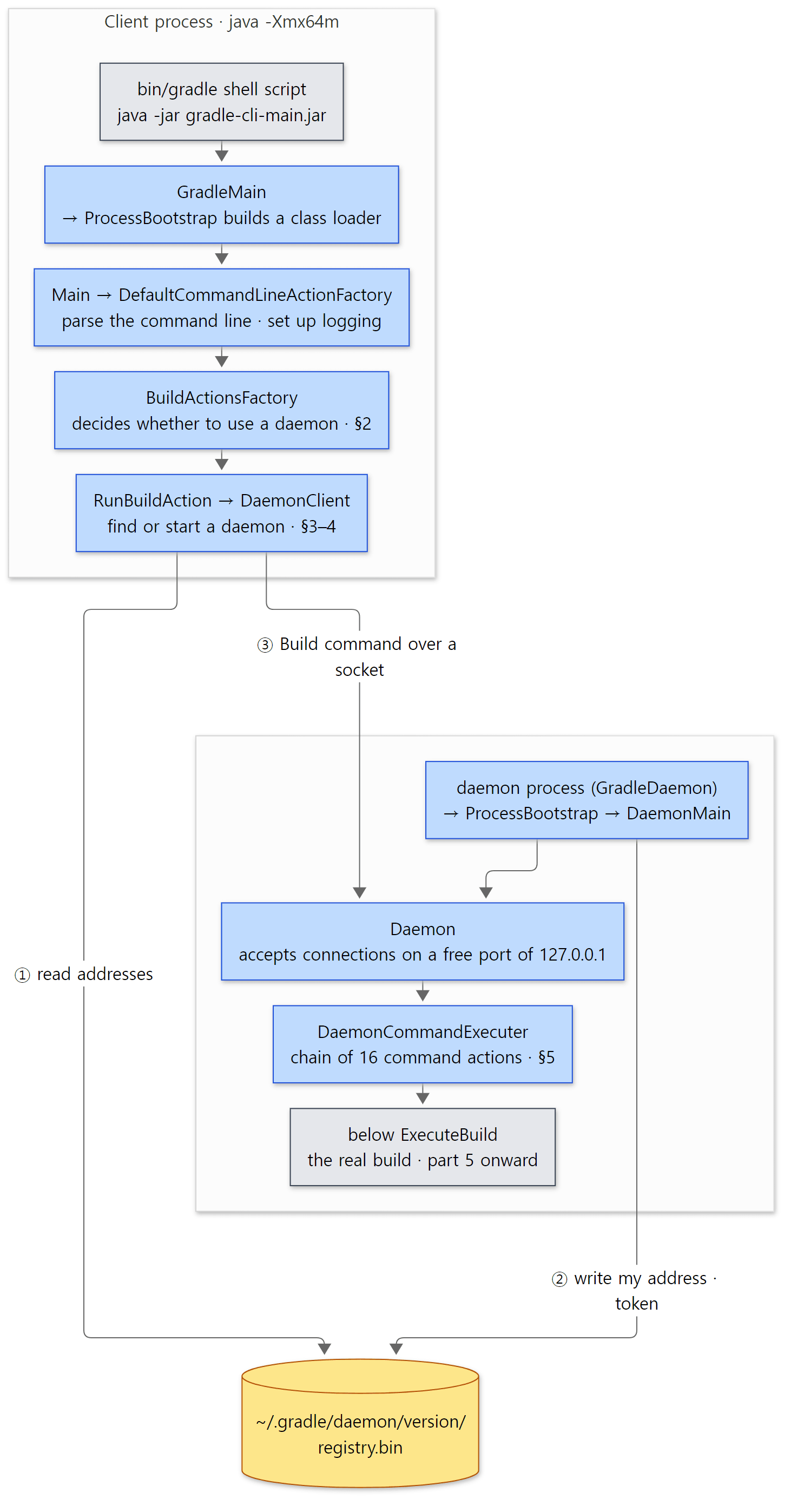 The blue boxes are the classes read in this post. The two processes find each other through the registry file and talk over a socket.
The shell script starts a 64 MiB JVM
The gradle command is really the bin/gradle shell script in the Gradle installation. The script is not checked into the source repository as is; it is generated by a plugin that builds the Gradle repository itself. The default JVM options that plugin writes into the script are setDefaultJvmOpts(listOf("-Xmx64m", "-Xms64m")) (build-logic/jvm/…/GradleStartScriptGenerator.kt lines 83–90).
The client JVM's heap is 64 MiB. It does not build, so that is enough — and this number decides how --no-daemon behaves in §2. You can change this JVM's options with the GRADLE_OPTS environment variable (the daemon JVM's options are org.gradle.jvmargs — the two are easy to confuse).
Here is what the generated script and the jar manifests look like in the example container's installation (/opt/gradle) — the first part of Example 1, output exactly as printed.
=== bin/gradle: default JVM options and the java command ===
203:DEFAULT_JVM_OPTS='"-Xmx64m" "-Xms64m"'" \"-javaagent:$APP_HOME/lib/agents/gradle-instrumentation-agent-9.10.0.jar\""
213:        -jar "$APP_HOME/lib/gradle-gradle-cli-main-9.10.0.jar" \
--- jar manifests ---
gradle-gradle-cli-main-9.10.0.jar: Class-Path: gradle-build-process-services-9.10.0.jar gradle-classloaders Main-Class: org.gradle.launcher.GradleMain
gradle-launcher-9.10.0.jar: Class-Path: gradle-gradle-cli-main-9.10.0.jar
(Manifests wrap lines at 72 characters, and run.sh picked only the first line, so Class-Path looks cut off in the middle.) The script runs java -Xmx64m -Xms64m -javaagent:… -jar lib/gradle-gradle-cli-main-9.10.0.jar, and that jar's Main-Class is org.gradle.launcher.GradleMain.
GradleMain and ProcessBootstrap — the real work happens in another class loader
GradleMain.main() is a single line: ProcessBootstrap.run(GradleMain.class.getName(), "gradle-gradle-cli", "org.gradle.launcher.Main", args) (GradleMain.java lines 24–28). ProcessBootstrap.run() builds a new class loader from the jars the gradle-gradle-cli module needs, finds org.gradle.launcher.Main inside it and calls run().
            DefaultModuleRegistry moduleRegistry = new DefaultModuleRegistry(CurrentGradleInstallation.get());
            // ...
            ClassPath runtimeClasspath = moduleRegistry.getRuntimeClasspath(moduleName);
            antClassLoader = classLoaderFactory.createIsolatedClassLoader("ant-loader", antClasspath);
            runtimeClassLoader = VisitableURLClassLoader.fromClassPath("ant-and-gradle-loader", antClassLoader, runtimeClasspath);
            // ...
            Class<?> mainClass = runtimeClassLoader.loadClass(mainClassName);
            Object entryPoint = mainClass.getConstructor().newInstance();
            Method mainMethod = mainClass.getMethod("run", String[].class);
            mainMethod.invoke(entryPoint, new Object[]{args});
Why the detour? The class path java -jar loads first is fixed by the jar manifest's Class-Path. Gradle keeps that fixed list tiny and, for everything else, reads the module information in the installation (DefaultModuleRegistry) and puts only the modules it needs into a class loader. The daemon starts the same way: GradleDaemon → ProcessBootstrap → DaemonMain (§4). Splitting work across class loaders resembles the class-loader hierarchy in Tomcat Part 4; Gradle's own class-loader tree comes back in Part 6.
DefaultCommandLineActionFactory — turning the command line into one action
Main.doAction() runs, in one line, the action returned by DefaultCommandLineActionFactory.convert(args) (Main.java lines 33–36). From the outside in, that action is wrapped as: logging setup (WithLogging) → exception reporting → native services initialization → welcome message → the real action (ParseAndBuildAction). The real action parses the command line, then asks the registered "action creators" one by one and stops at the first one that returns an action (if what it returned is a "continuing action", it keeps asking the next ones, lines 283–300).
The creators, in order, are BuiltInActionCreator (--help, --version), ContinuingActionCreator (--show-version), and finally BuildActionsFactory (lines 250–252 and 264). With --version, the first one returns an action and the search stops there. That is why gradle --version does not start a daemon. --show-version is a "continuing action" (ContinuingAction), so it prints the version and moves on to build as well. Every command that builds goes all the way down to the last one, BuildActionsFactory.
Easy to get wrong
gradle-launcher-9.10.0.jaris not the entry point. By the name it looks like the launcher, but what the shell script opens with-jarisgradle-gradle-cli-main-9.10.0.jar. Thegradle-launcherjar's manifest has noMain-Class; itsClass-Pathonly points at the cli-main jar. The one that looks for this jar is the wrapper (BootstrapMainStarterin §7 searches forlib/gradle-launcher-*.jar).GRADLE_OPTSsets the client JVM's options. If your build fails for lack of memory,GRADLE_OPTS=-Xmx4gwill not reach the daemon that does the building. The daemon's heap is set byorg.gradle.jvmargsingradle.properties(§2).
2. Daemon or not — the three paths of BuildActionsFactory
BuildActionsFactory.createAction() is the fork in the road. Part 1 glanced at this spot; this time we follow the conditions all the way.
        DaemonRequestContext requestContext = daemonParameters.toRequestContext();
        if (daemonParameters.getRequestedJvmCriteria() instanceof DaemonJvmCriteria.Spec) {
            startParameter.setDaemonJvmCriteriaConfigured(true);
        }

        if (daemonParameters.isEnabled()) {
            return Actions.toAction(runBuildWithDaemon(startParameter, daemonParameters, requestContext, buildLayoutConfiguration));
        }
        if (canUseCurrentProcess(daemonParameters, requestContext)) {
            return Actions.toAction(runBuildInProcess(startParameter, daemonParameters));
        }

        return Actions.toAction(runBuildInSingleUseDaemon(startParameter, daemonParameters, requestContext, buildLayoutConfiguration));
Above this (lines 105–133), --stop, --status and --foreground are filtered out first. --stop and --status create a client that sends one short command to each daemon, and with --foreground this client process becomes a daemon itself.
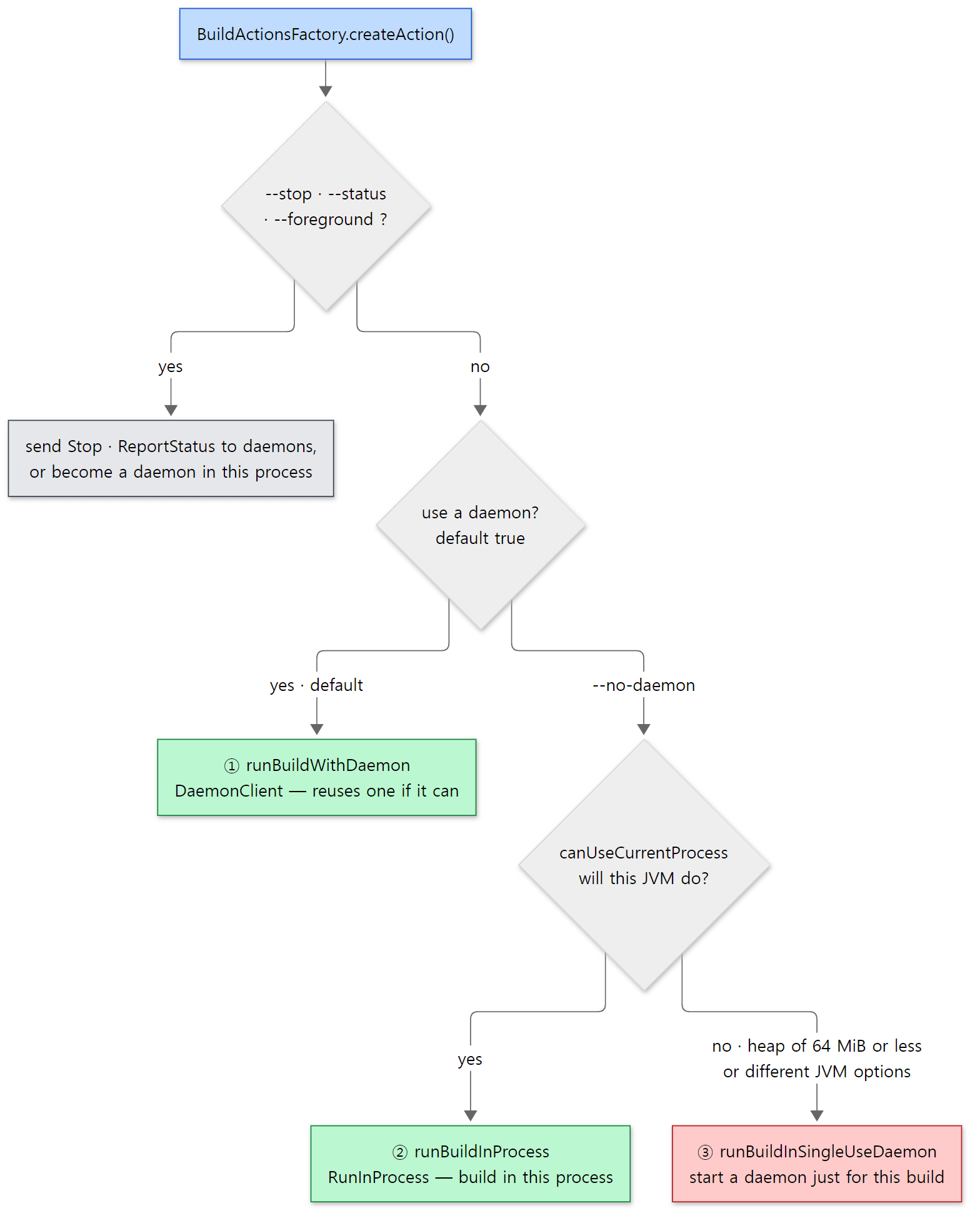 Green paths start no new JVM (① only when a daemon already exists); red is the path that starts another JVM even with
--no-daemon.
The default for using a daemon lives in DaemonParameters.
    static final int DEFAULT_IDLE_TIMEOUT = 3 * 60 * 60 * 1000;
    public static final int DEFAULT_PERIODIC_CHECK_INTERVAL_MILLIS = 10 * 1000;

    public static final List<String> DEFAULT_JVM_ARGS = ImmutableList.of("-Xmx512m", "-Xms256m", "-XX:MaxMetaspaceSize=384m", "-XX:+HeapDumpOnOutOfMemoryError");
Line 59 of the same file is private boolean enabled = true;. The daemon is on by default, ends after three idle hours (DEFAULT_IDLE_TIMEOUT), and checks itself every ten seconds (§6). The daemon JVM's default options give it a 512 MiB heap. --no-daemon or org.gradle.daemon=false is turned into setEnabled(false) by DaemonBuildOptions.DaemonOption (DaemonBuildOptions.java lines 322–324).
canUseCurrentProcess — pretending the current JVM is a daemon
The check used with --no-daemon has an interesting shape.
    protected boolean canUseCurrentProcess(DaemonParameters daemonParameters, DaemonRequestContext requestContext) {
        // Pretend like the current process is actually a daemon, and see if it satisfies the compatibility spec
        CurrentProcess currentProcess = new CurrentProcess(fileCollectionFactory);
        DaemonContext contextForCurrentProcess = buildDaemonContextForCurrentProcess(requestContext, currentProcess);

        DaemonCompatibilitySpec comparison = new DaemonCompatibilitySpec(requestContext);
        if (currentProcess.isLowMemoryProcess()) {
            LOGGER.info(CAN_USE_CURRENT_PROCESS_MESSAGE, "The maximum heap size is insufficient.\n");
            return false;
        }
        String whyUnsatisfied = comparison.whyUnsatisfied(contextForCurrentProcess);
        // ...
        return whyUnsatisfied == null;
    }
As the comment says, it pretends the current process is a daemon and runs the compatibility check from §3 on it — reusing the very yardstick used to pick daemons. But before that comes isLowMemoryProcess().
    public boolean isLowMemoryProcess() {
        return Runtime.getRuntime().maxMemory() <= 64L * 1024 * 1024; // 64MB is our default for a launcher process
    }
As we saw in §1, the shell script starts the client with -Xmx64m. So an unmodified gradle --no-daemon always gets false here and starts a single-use daemon. A single-use daemon stops itself when the build ends: RequestStopIfSingleUsedDaemon in the daemon's command chain registers "stop when done" at the start of the build (§5). On top of that, runBuildInSingleUseDaemon() cuts the idle timeout to at most two minutes, and its comment openly calls this a "workaround" that might be kept as "an extra safety net" (lines 239–245).
Example 2: the three faces of --no-daemon
This example was run in a Docker container (Eclipse Temurin JDK 25) with the Gradle 9.10.0 development build built as is from the reference commit (07ecbf9ead). The build script prints the pid, the main class and the maximum heap of the process it runs in.
// Example written for this post (not part of Gradle's source)

// Print which process this build script runs in:
// a daemon has GradleDaemon as its main class; the client process itself was started with -jar on the gradle-gradle-cli-main jar
val me = ProcessHandle.current()
val args = me.info().arguments().map { it.toList() }.orElse(emptyList())
val main = args.firstOrNull { it.endsWith(".GradleDaemon") }
    ?: args.firstOrNull { it.contains("cli-main") }?.substringAfterLast('/')
    ?: "?"
val heap = Runtime.getRuntime().maxMemory() / 1024 / 1024
println("[configure] pid=${me.pid()} main=$main maxHeap=${heap}MiB")
[Abridged from example ex/u03-no-daemon/project/build.gradle.kts — there is one more hello task below]
run.sh runs three cases in turn and greps only the relevant lines out of the --info output (the leading numbers are line numbers in the log). First, plain --no-daemon.
=== 1. --no-daemon (default launcher JVM: -Xmx64m) ===
6:The current JVM process isn't compatible with build requirement. The maximum heap size is insufficient.
8:To honour the JVM settings for this build a single-use Daemon process will be forked. For more on this, please refer to https://docs.gradle.org/9.10.0-20261107025045+0000/userguide/gradle_daemon.html#sec:disabling_the_daemon in the Gradle documentation.
12:The client will now receive all logging from the daemon (pid: 50). The daemon log file: /root/.gradle/daemon/9.10.0-20261107025045+0000/daemon-50.out.log
42:[configure] pid=50 main=org.gradle.launcher.daemon.bootstrap.GradleDaemon maxHeap=512MiB
58:BUILD SUCCESSFUL in 20s
--- processes left after the build ---
(no Gradle JVM left)
The isLowMemoryProcess() message is printed verbatim, followed by SingleUseDaemonClient's notice (To honour the JVM settings…). The build script ran in a GradleDaemon process with a 512 MiB heap. After the build, no Gradle JVM was left. A daemon process did start, but it did one build and went away.
Second, we started the client JVM with the same options as the daemon defaults.
=== 2. --no-daemon with a launcher JVM that matches the daemon JVM options ===
18:[configure] pid=161 main=gradle-gradle-cli-main-9.10.0.jar maxHeap=512MiB
34:BUILD SUCCESSFUL in 6s
With GRADLE_OPTS="-Xmx512m -Xms256m -XX:MaxMetaspaceSize=384m -XX:+HeapDumpOnOutOfMemoryError", the compatibility check passed and the client process itself (main=gradle-gradle-cli-main-9.10.0.jar) ran the build. There is no daemon log line and no single-use notice. This is path ② of the three, RunInProcess. The third case (a build asking for different JVM options) comes in §3. Pids and times differ on every run.
Easy to get wrong
--no-daemonmeans "leave no daemon behind", not "use only one JVM". With default settings two JVMs start (the 64 MiB client plus a one-build daemon). Using--no-daemonon CI is about not leaving processes behind after the build, and it does achieve that — but you still pay the daemon startup cost.org.gradle.jvmargsreplaces the default options instead of adding to them.DaemonBuildOptions.JvmArgsOptioncallssettings.setJvmArgs(...)(line 145), which isjvmOptions.setAllJvmArgs()(DaemonParameters.javalines 166–168). If you write onlyorg.gradle.jvmargs=-Xmx2g, the defaults-XX:MaxMetaspaceSize=384mand-XX:+HeapDumpOnOutOfMemoryErrordisappear too. You can see it directly in theWanted:line of Example 3.
3. Finding a daemon — the registry and compatibility
Once a daemon is to be used (①), DaemonClient.execute() is called. The skeleton of the client-side story is all in this method.
        // Attempt to connect to an existing idle and compatible daemon
        int saneNumberOfAttempts = 100; //is it sane enough?
        for (int i = 1; i < saneNumberOfAttempts; i++) {
            final DaemonClientConnection connection = connector.connect(compatibilitySpec);
            // No existing, compatible daemon is available to try
            if (connection == null) {
                break;
            }
            // Compatible daemon was found, try it
            try {
                // ...
                return executeBuild(build, connection, requestContext.getCancellationToken(), requestContext.getEventConsumer());
            } catch (DaemonInitialConnectException e) {
                // this exception means that we want to try again.
                // ...
            }
        }

        // No existing daemon was usable, so start a new one and try it once
        final DaemonClientConnection connection = connector.startDaemon(compatibilitySpec);
"Try a matching daemon → if it says 'I'm busy', look for another → if none, start a new one and try it only once." Being turned away after connecting really happens: a daemon marked Idle in the registry may have been grabbed by another client in the meantime (a race between reading the file and connecting). The daemon then answers DaemonUnavailable from StartBuildOrRespondWithBusy (§5), and the client turns that into a DaemonInitialConnectException and moves on to the next daemon (lines 229–230).
Choosing candidates is DefaultDaemonConnector.connect()'s job (lines 120–141). It splits the registry's daemons into Idle and the rest, and tries the compatible Idle ones one by one. If none works, it waits up to three seconds (CANCELED_WAIT_TIMEOUT, line 62) for a daemon that is "cleaning up a cancelled build" to become Idle. If there is still nothing, it returns null, and just before that handleStopEvents() prints the familiar sentence via DaemonStartupMessage.generate() (DaemonStartupMessage.java lines 43–48).
If no daemon was passed over, you get Starting a Gradle Daemon (subsequent builds will be faster); if some were, it tells you why a new one is being started, like Starting a Gradle Daemon, 1 busy Daemon could not be reused, use --status for details (Example 4) or … 1 incompatible Daemon could not be reused … (Example 3). (handleStopEvents() passes the number of Idle daemons it read from the registry straight through as "incompatible". Getting this far means none of those Idle daemons could be used, line 155.) If you see this sentence on a build that is not your first, read those numbers.
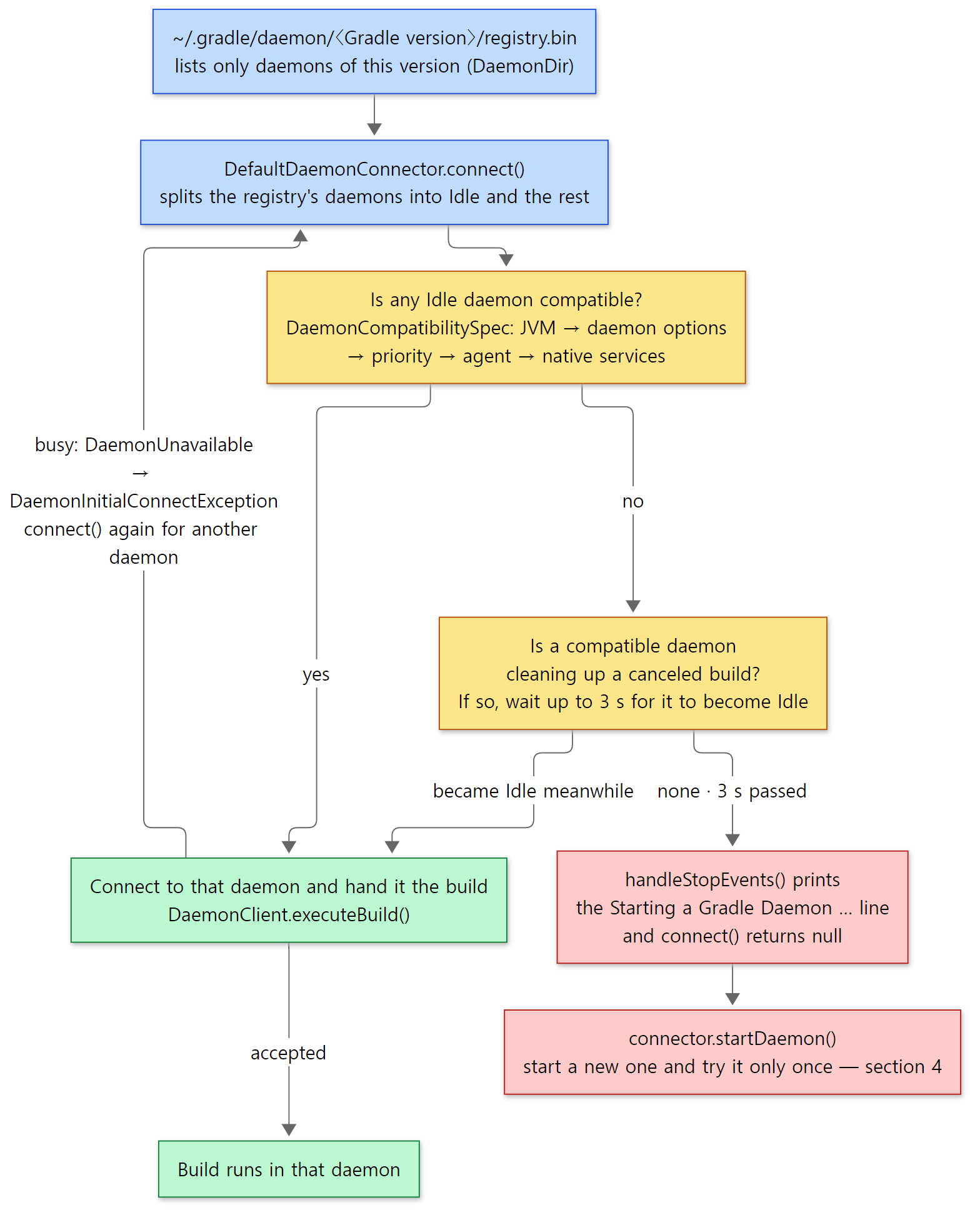 The code and the three paragraphs above, in one picture. Yellow boxes are where a choice is made, green boxes are the path that reuses an existing daemon, red boxes are the path that starts a new one.
Compatibility — DaemonCompatibilitySpec
The definition of a "matching daemon" is DaemonCompatibilitySpec.whyUnsatisfied() (lines 41–55). With if … else if, it checks five things in this order and returns the reason for the first one that fails ("JVM is incompatible.", "At least one daemon option is different." …).
| Check | What it compares | What changes it |
|---|---|---|
| JVM | Whether the wanted JVM's java executable and the daemon's are the same file (Files.isSameFile, line 96). If a daemon JVM criterion (gradle-daemon-jvm.properties) is set, whether version and vendor match |
JAVA_HOME, org.gradle.java.home, daemon JVM criteria |
| Daemon options | Whether the list of immutable JVM options is the same regardless of order (lines 62–65) | org.gradle.jvmargs |
| Priority | Process priority (--priority low) |
org.gradle.priority |
| Agent | Whether the instrumentation agent (-javaagent) is used |
org.gradle.internal.instrumentation.agent (internal) |
| Native services | Whether native integration is on | org.gradle.native |
The Gradle version is not in this table. It does not need to be checked because the registry file itself is separate per version.
    public DaemonDir(File baseDir) {
        this.baseDir = baseDir;
        this.versionedDir = new File(baseDir, GradleVersion.current().getVersion());
        this.registryFile = new File(versionedDir, "registry.bin");
        GFileUtils.mkdirs(this.versionedDir);
    }
A 9.10.0 client only reads ~/.gradle/daemon/9.10.0…/registry.bin, so a 9.8.2 daemon is invisible from the start. That is also why gradle --status adds "Only Daemons for the current Gradle version are displayed".
Example 3: a build that asks for different JVM options
This is the third part of Example 2's run.sh. Start an ordinary daemon, then build again with -Dorg.gradle.jvmargs=-Xmx600m.
=== 3. a normal daemon, then a build that asks for different JVM options ===
[configure] pid=279 main=org.gradle.launcher.daemon.bootstrap.GradleDaemon maxHeap=512MiB
[execute] hello
3:Found daemon DaemonInfo{pid=279, address=[f7e53902-7ca5-4489-8893-0156bde1336c port:34395, addresses:[/127.0.0.1]], state=Idle, lastBusy=1794024042913, context=DefaultDaemonContext[uid=7c23604c-1901-4dbc-ae67-adb4007e2f3b,javaHome=/opt/java/openjdk,javaVersi
4:At least one daemon option is different.
5:Wanted: DaemonRequestContext{jvmCriteria=/opt/java/openjdk (no Daemon JVM specified, using current Java home), daemonOpts=[-Xmx600m, -Dfile.encoding=UTF-8, -Duser.country=US, -Duser.language=en, -Duser.variant], applyInstrumentationAgent=true, nativeServices
6:Actual: DefaultDaemonContext[uid=7c23604c-1901-4dbc-ae67-adb4007e2f3b,javaHome=/opt/java/openjdk,javaVersion=25,javaVendor=Eclipse Adoptium,daemonRegistryDir=/root/.gradle/daemon,pid=279,idleTimeout=10800000,priority=NORMAL,applyInstrumentationAgent=true,nat
8:  Looking for a different daemon...
10:Starting a Gradle Daemon, 1 incompatible Daemon could not be reused, use --status for details
14:The client will now receive all logging from the daemon (pid: 398). The daemon log file: /root/.gradle/daemon/9.10.0-20261107025045+0000/daemon-398.out.log
32:[configure] pid=398 main=org.gradle.launcher.daemon.bootstrap.GradleDaemon maxHeap=600MiB
48:BUILD SUCCESSFUL in 6s
--- gradle --status ---
   PID STATUS   INFO
   279 IDLE     9.10.0-20261107025045+0000
   398 IDLE     9.10.0-20261107025045+0000
(run.sh cut long lines at 260 characters.) getCompatibleDaemons()'s Found daemon … however its context does not match the desired criteria (lines 192–194) is printed over several lines (log lines 3–8), and the reason is the second row of the table, daemon options. That the daemonOpts under Wanted: contain only -Xmx600m, with the defaults -Xms256m and -XX:MaxMetaspaceSize=384m gone, is the "replacement" from the end of §2. In the end a new daemon (pid 398, 600 MiB heap) was started, and two Idle daemons were left in the registry. Pids, ports, uids, lastBusy and times differ on every run.
Easy to get wrong
- If
org.gradle.jvmargsdiffers per project, you get one daemon per project. One daemon can build many projects, but if even one option differs it fails the check above. Each daemon holds a few hundred MiB of heap, which is a common reason developers who hop between repositories run short of memory. - The JVM is compared as "the same
javafile", not "the same version". Unless a daemon JVM criterion is set, the executables are compared withFiles.isSameFile(). The same JDK 25 installed in another folder counts as a different JVM.
4. Starting and connecting to a daemon — settings via stdin, address via the registry
When no daemon matches, it is connector.startDaemon(). Let's see the whole order in a picture first.
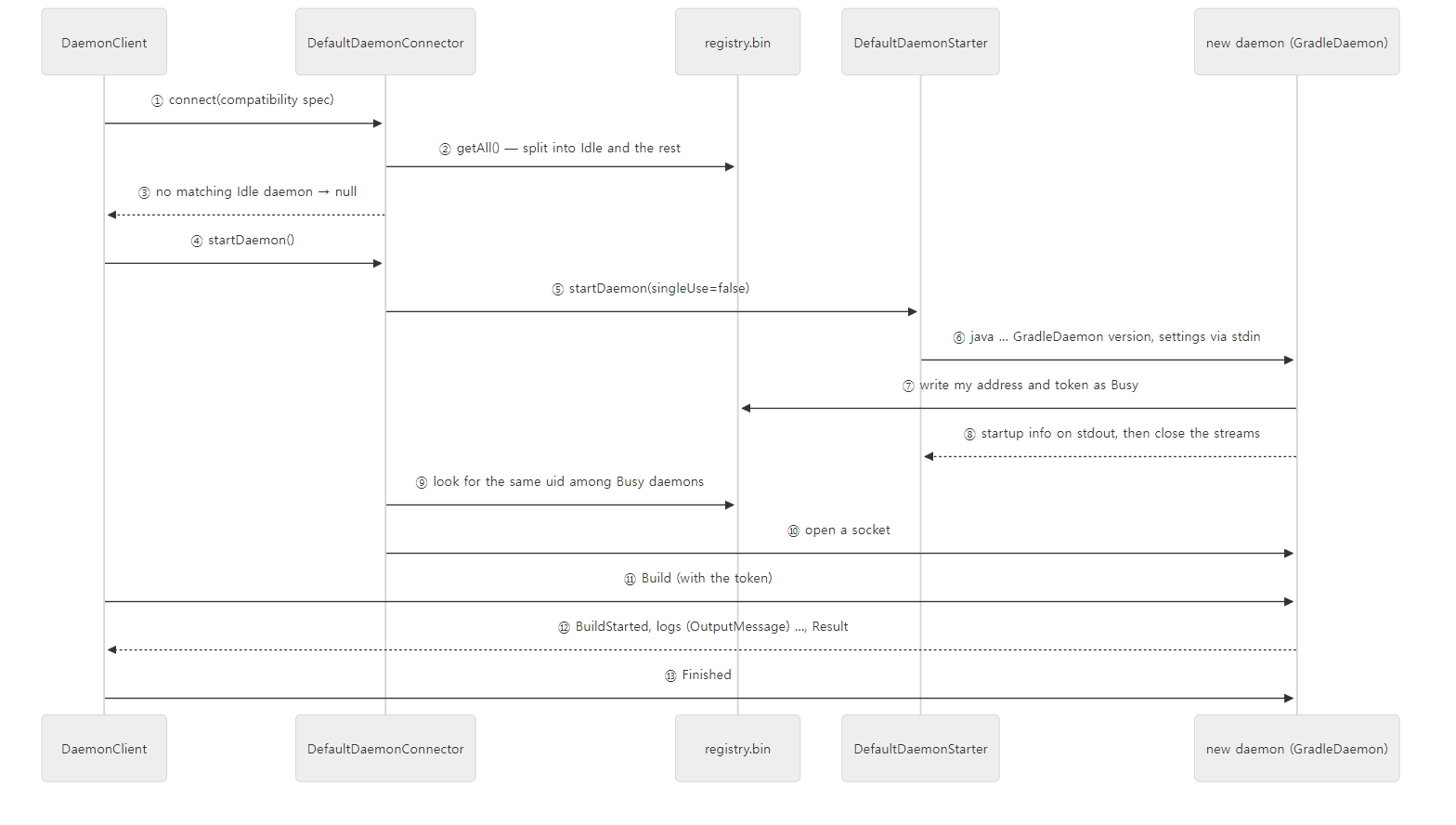 This is the order on the very first build. If a daemon already exists, ④–⑨ do not happen and the client goes straight from the daemon picked in ② to ⑩.
DefaultDaemonStarter — building the command line
        // We only need the daemon main jar for initial startup. The daemon is responsible for loading everything else.
        ModuleRegistry registry = new DefaultModuleRegistry(CurrentGradleInstallation.get());
        ClassPath classpath = registry.getModule("gradle-daemon-main").getImplementationClasspath();
        // ...
        daemonArgs.addAll(daemonOpts);
        daemonArgs.add("-cp");
        daemonArgs.add(CollectionUtils.join(File.pathSeparator, classpath.getAsFiles()));
        // ...
        daemonArgs.add("org.gradle.launcher.daemon.bootstrap.GradleDaemon");
        // Version isn't used, except by a human looking at the output of jps.
        daemonArgs.add(GradleVersion.current().getVersion());

        // Serialize configuration to daemon via the process' stdin
        StreamByteBuffer buffer = new StreamByteBuffer();
Three things stand out.
- The class path is a single jar (
gradle-daemon-main). The daemon loads everything else itself withProcessBootstrap(the same trick as in §1). - The version number at the end of the command line is decoration. As the comment says, it is for humans looking at
jps. The daemon only checks that there is exactly one argument (DaemonMainlines 69–71). - The real settings (user home, daemon uid, idle timeout, JVM options…) go through standard input (stdin). Putting them on the command line would expose them to anyone running
psand hit length limits — that seems to be the reason, though the source comment only says "via stdin" and gives no reason.
Then, after launching the process, it waits for that process to finish.
                ExecHandle handle = new DaemonExecHandleBuilder().build(args, workingDir, outputConsumer, stdInput, execActionFactory.newExecHandleBuilder());

                handle.start();
                LOGGER.debug("Gradle daemon process is starting. Waiting for the daemon to detach...");
                handle.waitForFinish();
                LOGGER.debug("Gradle daemon process is now detached.");
Waiting for a process that is supposed to live a long time to finish sounds odd. The answer is on the daemon side.
DaemonMain — read the settings, register, close the stream
        // Read configuration from stdin
        DaemonServerConfiguration parameters = DaemonStartupCommunication.readDaemonServerConfiguration(System.in);
        // ...
        // Any logging prior to this point will not end up in the daemon log file.
        initialiseLogging(loggingManager, daemonLog);

        // Detach the process from the parent terminal/console
        ProcessEnvironment processEnvironment = daemonServices.get(ProcessEnvironment.class);
        processEnvironment.maybeDetachProcess();
        // ...
        daemon.start();

        try {
            // ...
            daemonStarted(pid, daemon.getUid(), daemon.getAddress(), daemonLog);
            DaemonExpirationStrategy expirationStrategy = daemonServices.get(MasterExpirationStrategy.class);
            DaemonStopState stopState = daemon.stopOnExpiration(expirationStrategy, parameters.getPeriodicCheckIntervalMs());
            daemonProcessState.stopped(stopState);
        } finally {
            CompositeStoppable.stoppable(daemon, daemonProcessState).stop();
        }
In order: ① read the settings from stdin; ② redirect standard output and error to the log file (daemon-<pid>.out.log) (initialiseLogging()); ③ detach from the terminal (maybeDetachProcess()); ④ open the socket and register in the registry with Daemon.start(); ⑤ daemonStarted() writes the startup info (uid, address, pid, log file) to the original standard output and closes that stream (lines 115–125). Then ⑥ it waits in stopOnExpiration() until it dies.
What the client's waitForFinish() waited for was not the end of the process but the startup info from ⑤. DaemonExecHandleBuilder creates the exec handle with setDaemon(true) (line 34), and such a handle ends in the DETACHED state without waiting for the process, once the output handler (DaemonOutputConsumer) has read the startup info from the daemon's standard output (ExecHandleRunner.java lines 136–138). That is what "now detached" in the log means. By then the daemon is a process living on its own, independent of the client, and it stays when the client ends.
Two things in Daemon.start() from ④ are worth a look. One is that it creates, with SecureRandom, a 16-byte "authentication token, which must be provided by the client in any requests it makes" (Daemon.java lines 122–127); the other is this method that writes the daemon into the registry.
    public void onStart(Address connectorAddress) {
        LOGGER.info("{}{}", DaemonMessages.ADVERTISING_DAEMON, connectorAddress);
        LOGGER.debug("Advertised daemon context: {}", daemonContext);
        this.connectorAddress = connectorAddress;
        daemonRegistry.store(new DaemonInfo(connectorAddress, daemonContext, token, Busy));
    }
- The token: the daemon writes the token only into the registry. The client puts the token it read from the registry into every command, and the daemon rejects commands whose token differs (
DefaultIncomingConnectionHandlerlines 158–160, §5). Only someone who can read the registry file (the same user) can make the daemon do work. By default the socket is opened on a free port (port 0 lets the OS choose) of the loopback address 127.0.0.1 (TcpIncomingConnectorline 66,InetAddressFactoryline 110). - The first registered state is Busy. Why claim to be busy before doing any build? A comment on the client side explains: "a daemon will start in busy state so that nobody else will grab it" (
DefaultDaemonConnector.javaline 248). The client that launched it finds the daemon among the Busy ones by the uid it generated itself (⑨ in the picture). Only after the first build does it become Idle.
Example 1: the life of one daemon
The first daemon startup lines (Starting process 'Gradle build daemon'…) were already shown in Part 1, Example 1, so here we look at what comes after. The build script prints the pid and thread name in the configuration phase and in a task action.
// Example written for this post (not part of Gradle's source)

// Configuration phase: the build script body runs inside the daemon process
println("[configure] pid=${ProcessHandle.current().pid()} thread=${Thread.currentThread().name}")

// From the stack that called the build script, print only the daemon command chain (org.gradle.launcher.daemon)
if (providers.gradleProperty("showStack").isPresent) {
    Throwable().stackTrace
        .filter { it.className.startsWith("org.gradle.launcher.daemon") }
        .forEach { println("[stack]   at ${it.className.substringAfterLast('.')}.${it.methodName}") }
}

tasks.register("hello") {
    doLast {
        // Execution phase: the task action runs in the same daemon process too
        println("[execute] pid=${ProcessHandle.current().pid()} thread=${Thread.currentThread().name}")
    }
}
[Example ex/u03-daemon-lifecycle/project/build.gradle.kts]
After the first build, run.sh looks at the processes and the ~/.gradle/daemon folder, then runs a second build and gradle --status.
=== first run (--info, daemon related lines) ===
...
57:BUILD SUCCESSFUL in 19s
=== processes ===
64 org.gradle.launcher.daemon.bootstrap.GradleDaemon
...
=== ~/.gradle/daemon ===
9.10.0-20261107025045+0000
CACHEDIR.TAG
daemon-64.out.log
registry.bin
registry.bin.lock
=== second run (--info, daemon related lines) ===
3:The client will now receive all logging from the daemon (pid: 64). The daemon log file: /root/.gradle/daemon/9.10.0-20261107025045+0000/daemon-64.out.log
4:Starting 2nd build in daemon [uptime: 19.518 secs, performance: 99%, GC rate: 0.00/s, heap usage: 0% of 512 MiB, non-heap usage: 17% of 384 MiB]
17:[configure] pid=64 thread=Daemon worker
31:[execute] pid=64 thread=Execution worker
33:BUILD SUCCESSFUL in 2s
=== gradle --status ===
   PID STATUS   INFO
    64 IDLE     9.10.0-20261107025045+0000
...
(The ... stand for the first build's log, the daemon command line, the second build's other lines and the --status footer.)
- The
GradleDaemonprocess (pid 64) is still there after the build. The client JVM has already ended, so it does not show up injps. - Under
~/.gradle/daemon/<version>/areregistry.bin, theregistry.bin.lockthat locks it, and the daemon logdaemon-64.out.log. The version folder is called9.10.0-20261107025045+0000because a development build uses a version number with the build time attached. - The second build has no
Starting a Gradle Daemon; it goes straight toStarting 2nd build in daemon [uptime: …](a line printed byLogAndCheckHealth). The same pid 64 did both configuration and execution. The first build took 19 seconds, the second 2 (the first build's daemon startup lines are the same as in Part 1). - The build script body ran on the
Daemon workerthread. Where that name comes from is in §5. The task action'sExecution workeris the worker thread of Part 9. In the first build (cut above) the same task action printedthread=included builds. Which thread picks up a task can vary from run to run; Part 9 covers both names.
Pids, ports, times and memory usage figures differ on every run.
Easy to get wrong
- Daemon logs pile up in the user home, not in the project folder. They are
~/.gradle/daemon/<version>/daemon-<pid>.out.log, and the daemon infrastructure logs at DEBUG regardless of the build's log level (the comment atDaemonMainlines 147–149). When a build ends strangely, what--infodid not show is often in here. gradle --statusasks the daemons, not the registry. It reads the addresses from the registry, sends each daemon aReportStatuscommand, and the daemon reports its own state (ReportDaemonStatusClient.listAll(), lines 60–78; the receiving end isHandleReportStatusin §5). That is why even a busy daemon answers (Example 4). Only the STOPPED lines come from the "stop records" left in the registry.
5. The command chain inside the daemon
When a connection comes in, DefaultIncomingConnectionHandler receives one command per connection on a thread named Daemon, checks that the token matches the one written into the registry, and hands it to DaemonCommandExecuter (lines 155–161). executeCommand() builds a DaemonCommandExecution from the list of 16 command actions (DaemonCommandAction) that DaemonServices prepared, and calls proceed(). The list was shown verbatim in Part 1 (DaemonServices.java lines 164–181), and this section's picture numbers them in order.
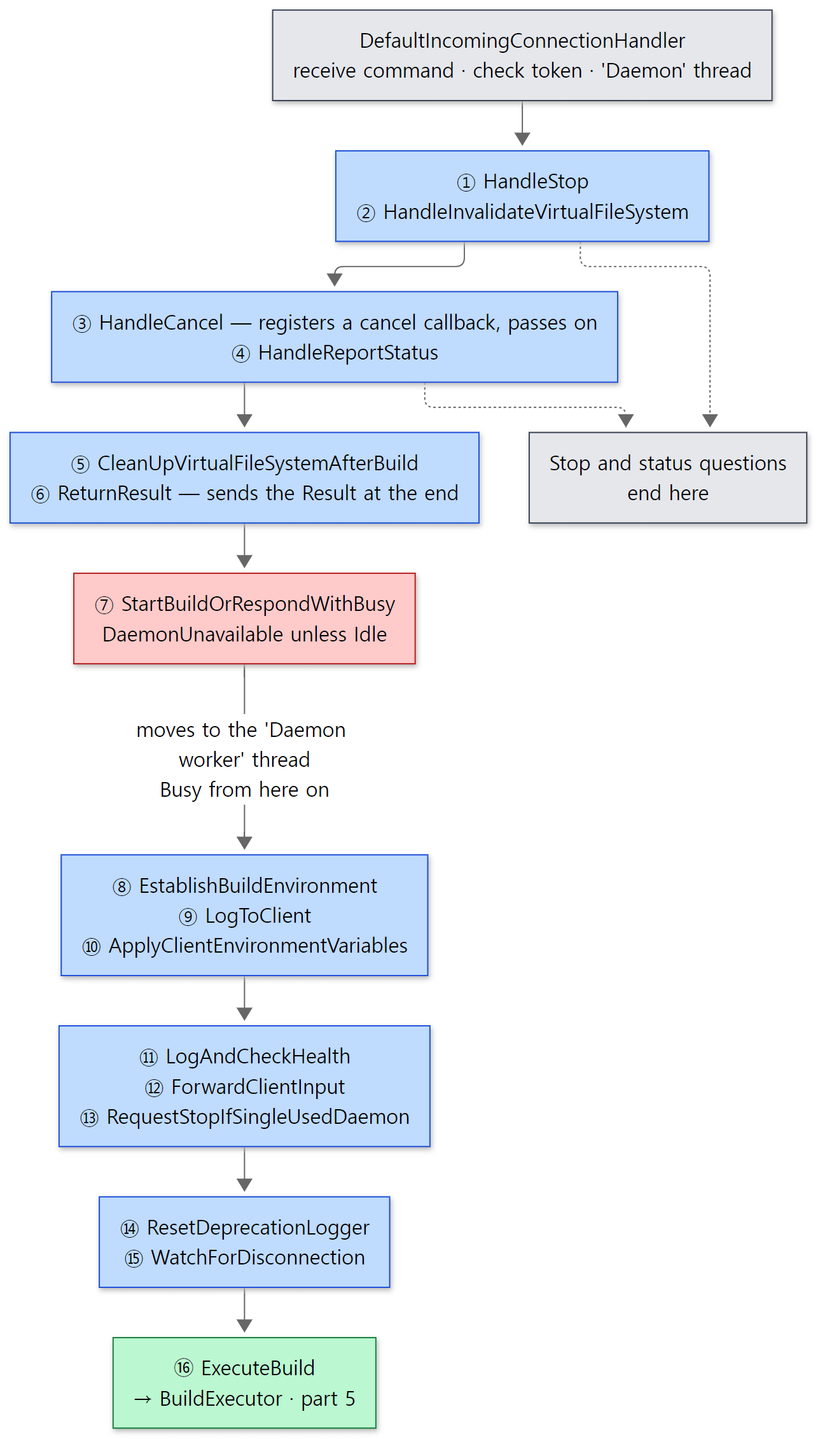 The red box is the gatekeeper. Above it are commands even a busy daemon handles; below it is the road only build requests travel.
The machinery that drives the chain is five lines.
    public boolean proceed() {
        if (actions.isEmpty()) {
            return false;
        } else {
            actions.removeFirst().execute(this);
            return true;
        }
    }
It takes the first action off the list and runs it; if that action calls proceed() again from inside, the next action runs. If it doesn't, the chain ends there. It is the same shape as a valve calling getNext().invoke() in Tomcat Part 8, or a servlet filter calling chain.doFilter(). The actions come in three kinds.
① Actions that handle their own command and stop. HandleStop is the typical one.
    @Override
    public void execute(DaemonCommandExecution execution) {
        if (execution.getCommand() instanceof Stop) {
            listenerBroadcast.onExpirationEvent(new DaemonExpirationResult(DaemonExpirationStatus.IMMEDIATE_EXPIRE, EXPIRATION_REASON));
            execution.getConnection().completed(new Success(null));
        // ... GRACEFUL_EXPIRE for StopWhenIdle
        } else {
            execution.proceed();
        }
    }
For Stop, it announces an "immediate expiry" event, answers success, and does not call proceed(). HandleInvalidateVirtualFileSystem (when the IDE reports "these files changed") and HandleReportStatus (--status) have the same shape. gradle --stop and --status get answers even from busy daemons because these actions sit before step 7, which checks for Busy.
② Actions that wrap the rest. ReturnResult first runs everything else with proceed(), then on the way back sends the result to the client.
    @Override
    public void execute(DaemonCommandExecution execution) {
        execution.proceed();

        Result result = new Success(execution.getResult());

        LOGGER.debug("Daemon is dispatching the build result: {}", result);
        execution.getConnection().completed(result);
    }
HandleCancel (registers/removes a cancel callback), CleanUpVirtualFileSystemAfterBuild (cleanup after the build), LogToClient (starts/stops the log relay thread) and WatchForDisconnection (cancels if the client disconnects) also do work before and after, in the shape try { proceed() } finally { … }. EstablishBuildEnvironment and ApplyClientEnvironmentVariables dress this daemon process in the system properties, working directory and environment variables the client sent, and change them back after the build. The daemon is a long-lived process that serves many clients in turn, so for each build it has to change into that client's environment.
③ The gatekeeper. Step 7, StartBuildOrRespondWithBusy.
    @Override
    protected void doBuild(final DaemonCommandExecution execution, final Build build) {
        DaemonStateControl stateCoordinator = execution.getDaemonStateControl();

        try {
            Runnable command = new Runnable() {
                @Override
                public void run() {
                    LOGGER.info("Daemon is about to start building {}. Dispatching build started information...", build);
                    execution.getConnection().buildStarted(new BuildStarted(diagnostics));
                    execution.proceed();
                }
            };

            stateCoordinator.runCommand(command, execution.toString());
        } catch (DaemonUnavailableException e) {
            LOGGER.info("Daemon will not handle the command {} because is unavailable: {}", build, e.getMessage());
            execution.getConnection().daemonUnavailable(new DaemonUnavailable(e.getMessage()));
        } catch (DaemonStoppedException e) {
            execution.getConnection().completed(new Failure(e));
        }
    }
It puts the rest of the chain into a Runnable and hands it to DaemonStateCoordinator.runCommand(). If the daemon is not Idle, runCommand() throws DaemonUnavailableException, and the client receives DaemonUnavailable and looks for another daemon as in §3. If it is Idle, it sends BuildStarted and continues the chain. Looking at runCommand(), the thread changes.
    @Override
    public void runCommand(final Runnable command, String commandDisplayName) throws DaemonUnavailableException {
        onStartCommand(commandDisplayName);
        try {
            executor.execute(() -> {
                try {
                    command.run();
                    onCommandSuccessful();
                } catch (Throwable t) {
                    onCommandFailed(t);
                }
            });
            waitForCommandCompletion();
        } finally {
            onFinishCommand();
        }
    }
The executor is created in the constructor with executorFactory.create("Daemon worker") (line 74). Steps 8 through 16 (ExecuteBuild), and the build action below them (including the configuration phase), run on the Daemon worker thread, while the Daemon thread that took the connection waits in waitForCommandCompletion(). That is why the build script in Example 1 printed thread=Daemon worker. Task execution, however, does not happen on this thread: Daemon worker hands the execution plan to included builds and Execution worker threads and waits for them to finish (Part 9).
Example 1 (continued): seeing the chain in a stack and in the daemon log
Running the same example once more with -PshowStack keeps only the org.gradle.launcher.daemon frames of the stack that called the build script. It is a stack, so read it from the bottom up.
=== stack from build script (third run) ===
[configure] pid=64 thread=Daemon worker
[stack]   at ExecuteBuild.doBuild
[stack]   at BuildCommandOnly.execute
[stack]   at DaemonCommandExecution.proceed
[stack]   at WatchForDisconnection.execute
[stack]   at DaemonCommandExecution.proceed
[stack]   at ResetDeprecationLogger.execute
[stack]   at DaemonCommandExecution.proceed
[stack]   at RequestStopIfSingleUsedDaemon.execute
[stack]   at DaemonCommandExecution.proceed
[stack]   at ForwardClientInput.lambda$execute$0
[stack]   at ForwardClientInput.execute
[stack]   at DaemonCommandExecution.proceed
[stack]   at LogAndCheckHealth.execute
[stack]   at DaemonCommandExecution.proceed
[stack]   at ApplyClientEnvironmentVariables.doBuild
[stack]   at BuildCommandOnly.execute
[stack]   at DaemonCommandExecution.proceed
[stack]   at LogToClient.doBuild
[stack]   at BuildCommandOnly.execute
[stack]   at DaemonCommandExecution.proceed
[stack]   at EstablishBuildEnvironment.doBuild
[stack]   at BuildCommandOnly.execute
[stack]   at DaemonCommandExecution.proceed
[stack]   at StartBuildOrRespondWithBusy$1.run
[stack]   at DaemonStateCoordinator.lambda$runCommand$0
[execute] pid=64 thread=Execution worker
Starting from the lambda in DaemonStateCoordinator.runCommand → StartBuildOrRespondWithBusy$1.run (the anonymous Runnable in the code above), steps 8 through 16 are stacked neatly with proceed() between them, in exactly the order of the DaemonServices list. Steps 1–7 are not visible. They are on the Daemon thread's stack, and these lines are the Daemon worker thread's stack. BuildCommandOnly.execute shows up often because it is the parent class of the build-only actions: it checks "throw if this is not a Build" and then calls doBuild().
In the daemon log you can see the trail one command leaves through the chain (run.sh picked only the relevant lines and removed the leading timestamps; long lines were cut at 200 characters).
=== daemon log: the command chain at work ===
12:[INFO] [org.gradle.launcher.daemon.server.DaemonRegistryUpdater] Advertising the daemon address to the clients: [c6fba755-7199-428f-ad6d-e7b74bf2ab1b port:34051, addresses:[localhost/127.0.0.1]]
18:[LIFECYCLE] [org.gradle.launcher.daemon.server.Daemon] Daemon server started.
25:[INFO] [org.gradle.launcher.daemon.server.DefaultIncomingConnectionHandler] Received command: Build{id=220e8a8d-e587-45b0-9589-8aab32b1f8fc, currentDir=/tmp/p}.
27:[DEBUG] [org.gradle.launcher.daemon.server.DaemonStateCoordinator] Command execution: started DaemonCommandExecution[command = Build{id=220e8a8d-e587-45b0-9589-8aab32b1f8fc, currentDir=/tmp/p}, con
35:[INFO] [org.gradle.launcher.daemon.server.exec.StartBuildOrRespondWithBusy] Daemon is about to start building Build{id=220e8a8d-e587-45b0-9589-8aab32b1f8fc, currentDir=/tmp/p}. Dispatching build st
41:[DEBUG] [org.gradle.launcher.daemon.server.exec.ExecuteBuild] The daemon has started executing the build.
87:[DEBUG] [org.gradle.launcher.daemon.server.exec.ExecuteBuild] The daemon has finished executing the build.
90:[DEBUG] [org.gradle.launcher.daemon.server.DaemonStateCoordinator] Command execution: completed DaemonCommandExecution[command = Build{id=220e8a8d-e587-45b0-9589-8aab32b1f8fc, currentDir=/tmp/p}, c
98:[DEBUG] [org.gradle.launcher.daemon.server.exec.ReturnResult] Daemon is dispatching the build result: Success[value=org.gradle.launcher.exec.BuildActionResult@7c68ba56]
106:[DEBUG] [org.gradle.launcher.daemon.server.DefaultIncomingConnectionHandler] Received finished message: org.gradle.launcher.daemon.protocol.Finished@1aa8bf77
...
197:[INFO] [org.gradle.launcher.daemon.server.DefaultIncomingConnectionHandler] Received command: ReportStatus[id=366c51fb-8713-44b2-a1cf-7092307fe9f6].
203:[DEBUG] [org.gradle.launcher.daemon.server.DefaultIncomingConnectionHandler] Received finished message: org.gradle.launcher.daemon.protocol.Finished@4f3afa6
(The ... stands for the same lines from the second build. The uid and port in the address, Build{id=…} and the object hashes @… differ on every run.) Advertise the address in the registry (Advertising…) → receive the command (Received command: Build) → the state becomes Busy (Command execution: started) → pass the gatekeeper → ExecuteBuild does the build → after the state is back to Idle → ReturnResult sends the result → receive the client's Finished. completed comes before dispatching the build result because ReturnResult (step 6) wraps StartBuildOrRespondWithBusy (step 7). The ReportStatus sent by gradle --status ended with Finished right away, with no Busy marking (it stopped at step 4).
The rules of this conversation are written in the DaemonClient class description. The client sends exactly one Build; the daemon answers with exactly one of BuildStarted, Failure or DaemonUnavailable; if the build started, it sends any number of logs (OutputMessage) and build events (BuildEvent), then finishes with one Result. The client sends Finished and closes the connection (DaemonClient.java lines 64–80). Unlike HTTP's one-request-one-response, the defining feature is that one request produces "started → live broadcast → result" flowing over a single connection.
Easy to get wrong
- The build log in your console was sent by the daemon. From
LogToClient(step 9) down, only log events matching the log level the build asked for (--infoand so on) are picked and sent over the socket by theAsynchronousLogDispatcherthread (LogToClientlines 59–61 and 90–92). So problems that occur before step 9 appear only in the daemon log file, not in the console. - The command chain is built by a
@Providesmethod ofDaemonServices.DaemonServicesis itself a class that contributes services to a service registry, and the method parameters (BuildExecutor,DaemonContext…) are filled in by the registry. That mechanism is the topic of Part 4.
6. Idle and Busy, and when a daemon dies
DaemonStateCoordinator holds one of seven states: Idle, Busy, Canceled, StopRequested, Stopped, ForceStopped and Broken (DaemonState.java line 19). A build can only be accepted when Idle, and onStartCommand() enforces that.
            switch (state) {
                // ... Broken, StopRequested, Stopped, ForceStopped also throw DaemonUnavailableException
                case Busy:
                case Canceled:
                    throw new DaemonUnavailableException(String.format("This daemon is currently executing: %s", currentCommandExecution));
                case Idle:
                    break;
            }

            LOGGER.debug("Command execution: started {} after {} minutes of idle", commandDisplayName, getIdleMinutes());
            try {
                setState(DaemonState.Busy);
                onStartCommand.run();
A daemon does one build at a time. If another build arrives while it is Busy, it is rejected with an exception. onStartCommand.run() is the callback passed in by Daemon.start(), and it changes the registry's state to Busy (DaemonRegistryUpdater.onStartActivity()). When the build ends, onFinishCommand() changes the registry back to Idle and restarts the idle clock (idleTimer). If updating the registry fails, the state becomes Broken (lines 411–413).
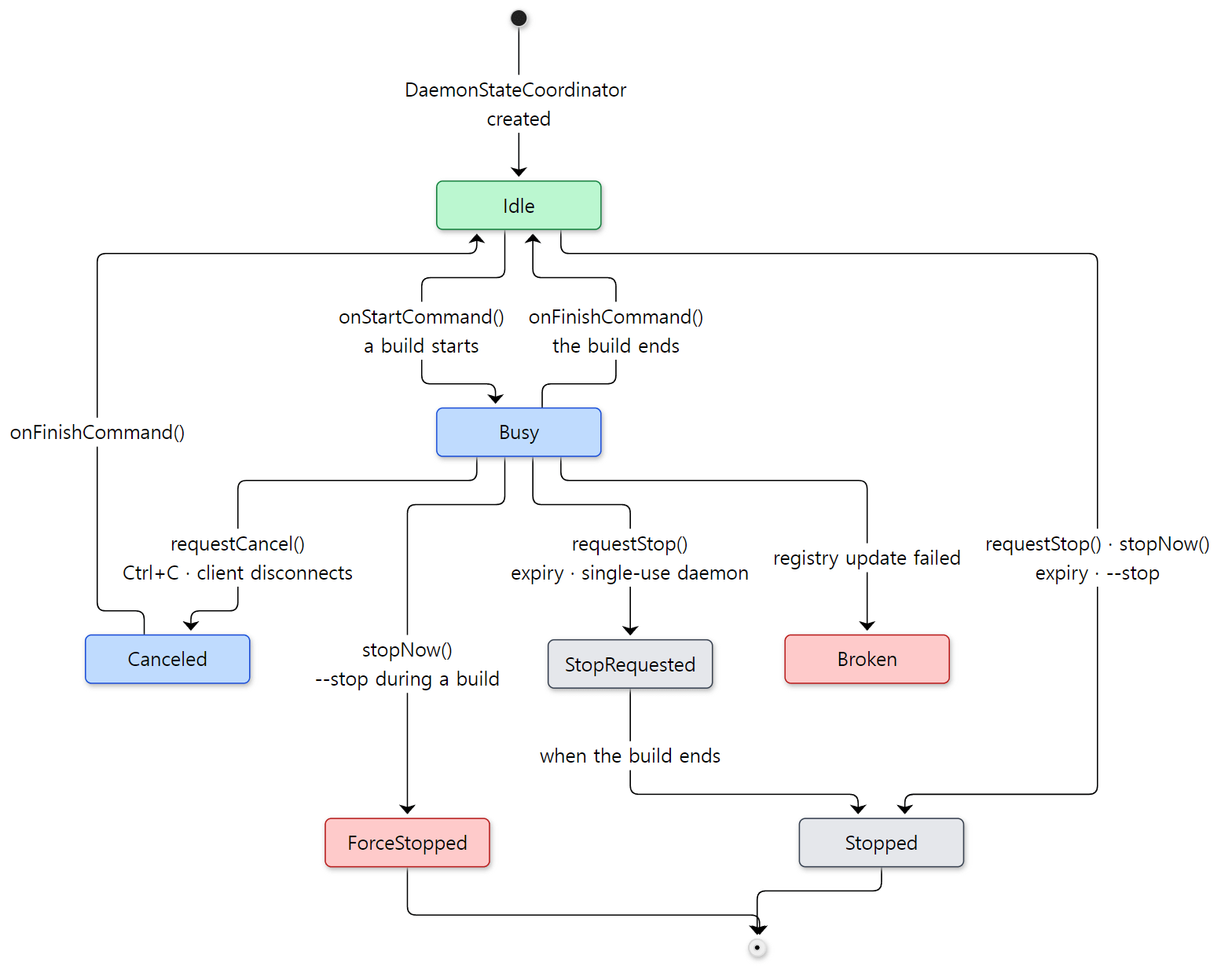 Green is the only state in which a build can be accepted. Red is the abnormal-ending side.
requestStop() leaves a Busy daemon in StopRequested and stops it when the build ends, but stops an Idle daemon right away with stopNow() (lines 131–146). A single-use daemon calling requestStop("") at the start of its build (step 13 in §5) is exactly the first case.
When a daemon stops itself — MasterExpirationStrategy
stopOnExpiration(), seen at the end of DaemonMain, calls MasterExpirationStrategy.checkExpiration() every ten seconds by default (DEFAULT_PERIODIC_CHECK_INTERVAL_MILLIS; org.gradle.daemon.healthcheckinterval changes it). This strategy combines six strategies as "if any one applies" (AnyDaemonExpirationStrategy), and the source comments give a reason for each (MasterExpirationStrategy.java lines 43–65).
| Condition | Meaning |
|---|---|
| Health | Heap or GC pressure is high (HealthExpirationStrategy) |
| File locks | The component that coordinates lock ownership with other builds (FileLockContentionHandler) has stopped — expire immediately |
| Duplicate | There is another compatible Idle daemon besides me, I have been idle for more than 10 seconds (DUPLICATE_DAEMON_GRACE_PERIOD_MS, line 36), and I am not the most recently used daemon — all three |
| Idle timeout | Idle for more than 3 hours by default (org.gradle.daemon.idletimeout) |
| Low memory | The machine is low on free memory, I have been idle for more than 10 seconds, and I am not the most recently used daemon |
| Registry | The registry file cannot be reached |
The idle-timeout check (DaemonIdleTimeoutExpirationStrategy.checkExpiration(), lines 44–52) simply compares getStateCoordinator().getIdleMillis() with the limit. getIdleMillis() returns the elapsed time only when Idle and 0 when Busy (lines 469–475). So a daemon never dies of the idle timeout in the middle of a build that takes hours.
Example 4: a busy daemon, a second client, and the exit of a duplicate daemon
We prepared a slow task that sleeps for 20 seconds and a hello task that finishes right away.
// Example written for this post (not part of Gradle's source)

// A slow task: while this build runs, the daemon is Busy
tasks.register("slow") {
    doLast {
        println("[slow] start in pid=${ProcessHandle.current().pid()}")
        Thread.sleep(20_000)
        println("[slow] done")
    }
}

tasks.register("hello") {
    doLast { println("[hello] pid=${ProcessHandle.current().pid()}") }
}
[Example ex/u03-busy-daemon/project/build.gradle.kts]
run.sh warms up one daemon, runs client A (slow) in the background, and while A runs, runs --status, jstack and client B (hello) in turn. At the end it waits 35 seconds and looks at --status once more.
=== warm up: one daemon ===
[hello] pid=50
=== client A: 'slow' in the background ===
[slow] start in pid=50
=== gradle --status while A is running ===
   PID STATUS   INFO
    50 BUSY     9.10.0-20261107025045+0000
=== daemon threads while busy (jstack) ===
      1 "Asynchronous log dispatcher for DefaultDaemonConnection: socket connection from ..."
      1 "Daemon"
      ...
      1 "Daemon periodic checks"
      1 "Daemon Thread 2"
      1 "Daemon worker"
      1 "Execution worker"
      ...
=== client B: 'hello' while A is busy ===
4:Starting a Gradle Daemon, 1 busy Daemon could not be reused, use --status for details
8:The client will now receive all logging from the daemon (pid: 388). The daemon log file: /root/.gradle/daemon/9.10.0-20261107025045+0000/daemon-388.out.log
39:[hello] pid=388
41:BUILD SUCCESSFUL in 8s
[slow] start in pid=50
[slow] done
=== gradle --status after both builds ===
   PID STATUS   INFO
    50 IDLE     9.10.0-20261107025045+0000
   388 IDLE     9.10.0-20261107025045+0000
=== wait 35 s: duplicate idle daemons expire ===
   PID STATUS   INFO
   388 IDLE     9.10.0-20261107025045+0000
    50 STOPPED  (other compatible daemons were started and after being idle for 0 minutes and not recently used)
(Two lines, Daemon client event forwarder and Daemon health stats, and the ten lines from Execution worker Thread 2 to Thread 11 were cut.)
- While A was running,
--statusreported pid 50 as BUSY. As said at the end of §4, even a busy daemon answers status questions. - The busy daemon's threads include all the names from this post:
DaemonandDaemon Thread 2, which handle connections (the thread poolDefaultIncomingConnectionHandlercreates withexecutorFactory.create("Daemon"), line 59);Daemon worker, which runs the build action (§5);Asynchronous log dispatcher, which sends logs to the client (step 9,LogToClient);Daemon periodic checks, which checks for expiry every ten seconds (Daemonline 89); and theExecution workers that run tasks (Part 9). - B printed
Starting a Gradle Daemon, 1 busy Daemon could not be reusedand started a new daemon (pid 388) — §3'sDaemonStartupMessageexactly. - When both builds were done there were two compatible Idle daemons. 35 seconds later, pid 50 had stopped itself. The reason string joins the reasons of the three "duplicate" strategies with
and(line 60 ofAllDaemonExpirationStrategyjoins them withJoiner.on(" and ")). The most recently used one, 388, survived, and 50, used before it, stepped down. "idle for 0 minutes" is rounded down to whole minutes, so ten-odd seconds of idling shows as 0 minutes.
Pids and times differ on every run.
Easy to get wrong
- A pile of daemons is mostly temporary. Daemons of the same version and options multiply when busy and shrink back to one through the "duplicate" strategy once idle. The ones that stay for long are daemons with different (incompatible) options, because
CompatibleDaemonExpirationStrategyonly counts compatible Idle daemons (lines 47–48). --stopstops busy daemons too. WhatHandleStopsends isIMMEDIATE_EXPIRE, andDaemon's expiration listener turns that intorequestForcefulStop()(Daemon.javalines 304–305). During a build the daemon becomes ForceStopped, and that build's client sees the connection drop.
7. The wrapper — gradlew downloads Gradle and calls it in the same JVM
In practice you type ./gradlew more often than gradle. The wrapper has one job: prepare the version of Gradle the repository asks for, and call the GradleMain from §1.
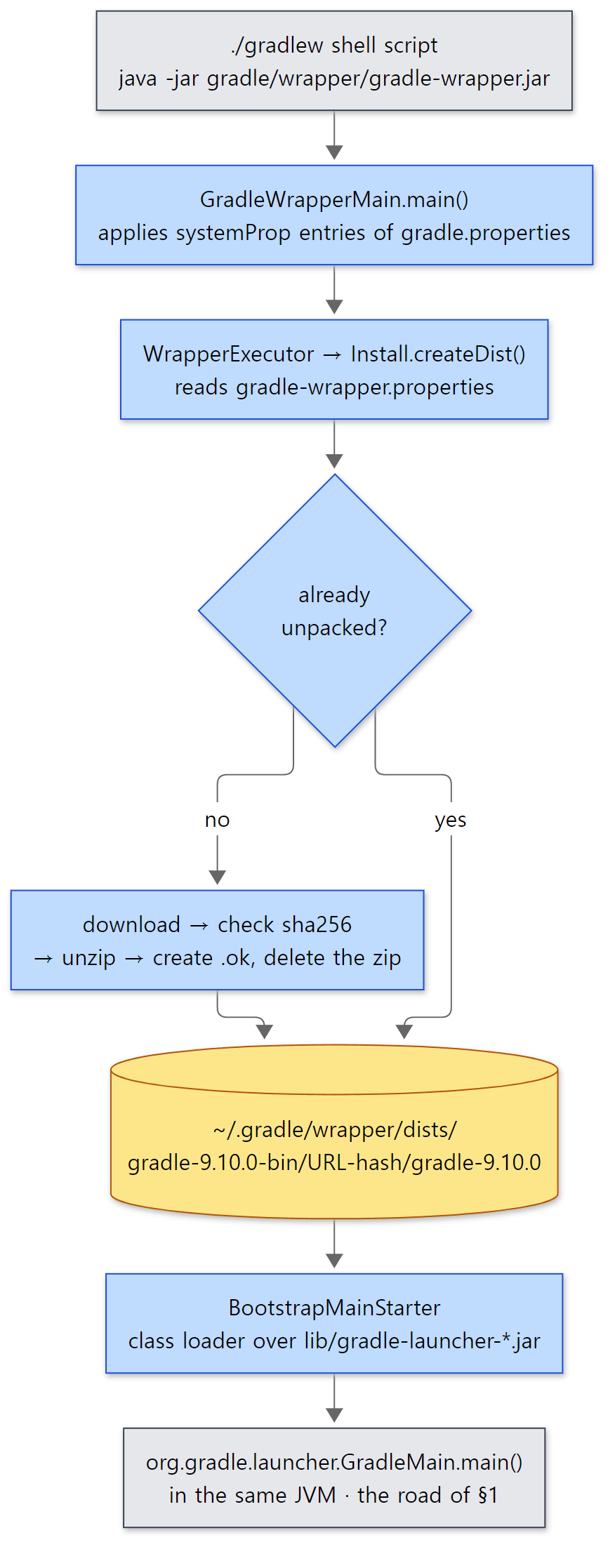 The wrapper does not start a new process. The wrapper's JVM itself becomes the client from §1.
The entry point is GradleWrapperMain.main(), and what it does is the single line prepareWrapper(args, wrapperJar()).execute() (GradleWrapperMain.java lines 40–43). From the location of its own jar, prepareWrapper() works out gradle-wrapper.properties (same folder, same name with a different extension) and the project root (three levels up), raises the systemProp.* entries of the project's and the user's gradle.properties to system properties, and returns an action that ties together WrapperExecutor, Install and BootstrapMainStarter (lines 76–85). WrapperExecutor.execute() is two lines: install, then start.
    public void execute(String[] args, Install install, BootstrapMainStarter bootstrapMainStarter) throws Exception {
        File gradleHome = install.createDist(config);
        bootstrapMainStarter.start(args, gradleHome);
    }
Install.createDist — download only once
        return exclusiveFileAccessManager.access(localZipFile, () -> {
            final File markerFile = new File(localZipFile.getParentFile(), localZipFile.getName() + ".ok");
            if (distDir.isDirectory() && markerFile.isFile()) {
                InstallCheck installCheck = verifyDistributionRoot(distDir, distDir.getAbsolutePath());
                if (installCheck.isVerified()) {
                    return requireNonNull(installCheck.gradleHome);
                }
                // ...
            }

            fetchDistribution(localZipFile, distributionUrl, distDir, configuration);

            InstallCheck installCheck = verifyDistributionRoot(distDir, safeUriDisplay(distributionUrl));
            if (installCheck.isVerified()) {
                setExecutablePermissions(requireNonNull(installCheck.gradleHome));
                markerFile.createNewFile();
                localZipFile.delete();
                return requireNonNull(installCheck.gradleHome);
            }
            // ...
        });
- The
.okfile is the "installation complete" marker. Even if the folder exists, a missing.ok(unzipping was interrupted) means it is downloaded again. The marker is created only after unzipping and verification are done. exclusiveFileAccessManageruses a lock file (.lck) next to the zip to keep other processes out. Even if several CI builds run./gradlewfor the first time at once, only one process downloads and the others wait (line 60, waiting up to 120 seconds).fetchDistribution()checks the hash ifdistributionSha256Sumis set, then unzips (lines 101–129). The unpacked folder must contain exactly one directory, and that directory must containlib/gradle-launcher-*.jar, to count as a real distribution (verifyDistributionRoot(), lines 238–252).
The install location is <distribution name>/<URL hash>, where the hash is the MD5 of the URL string written in base 36 (PathAssembler.rootDirName() and getHash(), lines 50–75). Even the same gradle-9.10.0-bin.zip lands in a different folder if it came from a different address. Mixing a company mirror with the official address is why the same version gets installed twice.
Finally, BootstrapMainStarter builds a class loader over the unpacked distribution's launcher jar and calls GradleMain.main() directly through reflection.
    public void start(String[] args, File gradleHome) throws Exception {
        File gradleJar = findLauncherJar(gradleHome);
        // ...
        // The URLClassloader will also include the jars listed in the launcher jar's
        // Class-Path manifest attributes as candidates for loading classes.
        URLClassLoader contextClassLoader = new URLClassLoader(new URL[]{gradleJar.toURI().toURL()}, ClassLoader.getSystemClassLoader().getParent());
        Thread.currentThread().setContextClassLoader(contextClassLoader);
        Class<?> mainClass = contextClassLoader.loadClass("org.gradle.launcher.GradleMain");
        Method mainMethod = mainClass.getMethod("main", String[].class);
        mainMethod.invoke(null, new Object[]{args});
        ((Closeable) contextClassLoader).close();
    }
As the comment says, GradleMain is loaded by following the gradle-launcher jar's manifest Class-Path (the gradle-gradle-cli-main-9.10.0.jar we saw in §1). This is what "the wrapper is the one that looks for the gradle-launcher jar" in §1's "Easy to get wrong" meant. The wrapper JVM is also started with -Xmx64m by its shell script, so it becomes a 64 MiB client as is.
Example 5: running the wrapper without a network
To test the wrapper offline, we zipped the container's /opt/gradle and gave a file: address as the distribution URL (ex/u03-wrapper/run.sh). gradle wrapper --gradle-distribution-url file:///tmp/dist/gradle-9.10.0-bin.zip creates the wrapper files, and then ./gradlew hello is run three times.
// Example written for this post (not part of Gradle's source)

tasks.register("hello") {
    doLast {
        // Print where the Gradle running this build is installed
        println("[hello] gradleHome=${gradle.gradleHomeDir} pid=${ProcessHandle.current().pid()}")
    }
}
[Example ex/u03-wrapper/project/build.gradle.kts]
--- gradle/wrapper/gradle-wrapper.properties ---
distributionBase=GRADLE_USER_HOME
distributionPath=wrapper/dists
distributionUrl=file\:///tmp/dist/gradle-9.10.0-bin.zip
...
--- how gradlew starts java ---
203:DEFAULT_JVM_OPTS='"-Xmx64m" "-Xms64m"'
213:        -jar "$APP_HOME/gradle/wrapper/gradle-wrapper.jar" \
gradle-wrapper.jar: Main-Class: org.gradle.wrapper.GradleWrapperMain
=== ./gradlew hello (first) ===
Fetching distribution.
Downloading file:/tmp/dist/gradle-9.10.0-bin.zip
............10%.............20%.............30%.............40%.............50%.............60%.............70%............80%.............90%.............100%
...
> Task :hello
[hello] gradleHome=/opt/gradle pid=79
...
--- ~/.gradle/wrapper/dists ---
/root/.gradle/wrapper/dists
/root/.gradle/wrapper/dists/CACHEDIR.TAG
/root/.gradle/wrapper/dists/gradle-9.10.0-bin
/root/.gradle/wrapper/dists/gradle-9.10.0-bin/2zbgt1zpjqnhoq9ssyran7l9u
/root/.gradle/wrapper/dists/gradle-9.10.0-bin/2zbgt1zpjqnhoq9ssyran7l9u/gradle-9.10.0
/root/.gradle/wrapper/dists/gradle-9.10.0-bin/2zbgt1zpjqnhoq9ssyran7l9u/gradle-9.10.0-bin.zip.lck
/root/.gradle/wrapper/dists/gradle-9.10.0-bin/2zbgt1zpjqnhoq9ssyran7l9u/gradle-9.10.0-bin.zip.ok
=== ./gradlew hello (second) ===
...
[hello] gradleHome=/opt/gradle pid=79
...
=== gradle --status ===
   PID STATUS   INFO
    79 IDLE     9.10.0-20261107025045+0000
=== gradle --stop, then ./gradlew hello (third) ===
[hello] gradleHome=/root/.gradle/wrapper/dists/gradle-9.10.0-bin/2zbgt1zpjqnhoq9ssyran7l9u/gradle-9.10.0 pid=487
(The ... stand for the other six lines of gradle-wrapper.properties (networkTimeout, retries and so on), the welcome message, and the hint lines after BUILD SUCCESSFUL.)
gradlewisjava -Xmx64m -Xms64m -jar gradle/wrapper/gradle-wrapper.jar, and that jar'sMain-ClassisGradleWrapperMain.- On the first run, after
Fetching distribution.→Downloading …, it was unpacked into the foldergradle-9.10.0-bin/2zbgt1zpjqnhoq9ssyran7l9u/. What remains is the unpacked folder plus.lckand.ok; the zip was deleted (localZipFile.delete()). We confirmed separately, with Node, that the folder name2zbgt1zpjqnhoq9ssyran7l9uequals the MD5 offile:/tmp/dist/gradle-9.10.0-bin.zipwritten in base 36. The string the wrapper hashes is the normalizedfile:/…, notfile:///…(Download.safeUri()). - The second run has no download, because
.okexists. - The third line is where this example genuinely surprised us. See below.
Pids differ on every run.
Easy to get wrong
- You can type
./gradlewand have a daemon from another installation do the build. On the first and second runs,gradleHomewas not the folder the wrapper had just unpacked but/opt/gradle. The daemon started from/opt/gradlewhen we rangradle wrapper(pid 79) was still Idle, and the 9.10.0 client prepared by the wrapper judged it "compatible" by the rules of §3. The registry is split by version number (DaemonDir), and the compatibility table has no installation location. Only on the third run, after--stopremoved that daemon, did the Gradle in the wrapper's folder start a daemon. Normally distributions of the same version have the same contents, so this does not matter — but when testing a Gradle you built yourself with the same version number, stop existing daemons first. - The version that ran
gradle wrapperand the versiongradlewdownloads can differ. The installed Gradle writes the wrapper files, but the versiongradlewuses afterwards is decided bydistributionUrl. This blog's own repository wrapper points at 9.5.1 — a different version from the 9.10.0 development build this series reads.
8. The Tooling API — IDEs attach to the same daemon
When you open a Gradle project in IntelliJ IDEA or press "Reload", the IDE does not type a gradle command; it uses the Tooling API library (gradle-tooling-api.jar). We only take a short look at where this road leads. This was not checked in an IDE; it is the result of following the source.
The IDE-side library is thin. DefaultToolingImplementationLoader builds a separate class loader from the jars of the Gradle distribution the project uses (createImplementationClassLoader(), lines 111–119) and looks up the real implementation inside it. The only thing shared between the IDE and the distribution is the org.gradle.tooling.internal.protocol package (a set of interfaces) plus the single JavaVersion class (lines 115–116). The implementation class is found through the file META-INF/services/org.gradle.tooling.internal.protocol.ConnectionVersion4 (findFactory at line 77), and the name in that file is org.gradle.tooling.internal.provider.DefaultConnection. This way, even if the Tooling API version in the IDE differs from the project's Gradle version, the project's Gradle supplies its own version's implementation.
DefaultConnection hands the work to ProviderConnection, and the road forks in ProviderConnection.createExecutor() (lines 320–338). If "embedded" (running inside the same process — mainly for Gradle's own tests), it uses RunInProcess from §2; otherwise it uses the same DaemonClient from §3, created by daemonClientFactory.createBuildClientServices(...). So daemons started by the IDE and daemons started by ./gradlew in a terminal are written into the same registry, and if their options match they reuse each other's daemons.
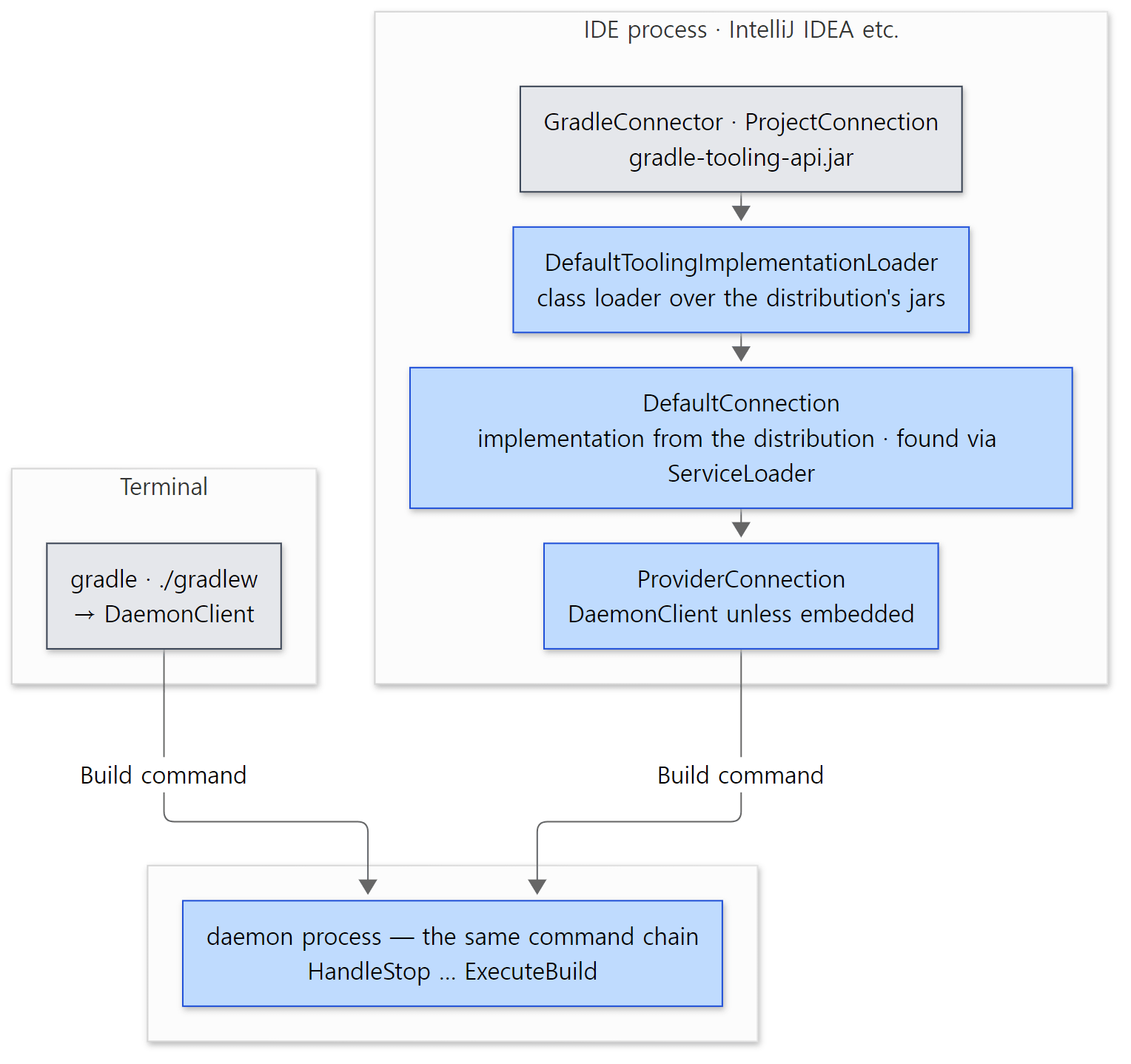 The
DefaultConnection and ProviderConnection running inside the IDE are code from the Gradle distribution the project uses, not from the IDE's jars.
Easy to get wrong
DefaultConnectionandProviderConnectionrun in the IDE process, not in the daemon. The name "provider" makes them look like daemon-side code, but they are loaded into the class loaderDefaultToolingImplementationLoaderbuilds inside the IDE. The boundary with the daemon is the socket opened by theDaemonClientbelow them.
What this post leaves out
- Daemon JVM criteria (
gradle/gradle-daemon-jvm.properties) and automatic JDK download:Specindaemon-protocol/…/launcher/daemon/toolchain/DaemonJvmCriteria.java,client-services/…/DefaultDaemonStarter.javalines 108–115 - The foreground daemon (
--foreground):launcher/…/launcher/daemon/bootstrap/ForegroundDaemonAction.java,BuildActionsFactory.javalines 111–133 - Build cancellation (Ctrl+C): client
client-services/…/DaemonCancelForwarder.java, daemonlauncher/…/exec/HandleCancel.java,DaemonStateCoordinator.cancelBuild() - File-watching integration (the
InvalidateVirtualFileSystemAfterChangecommand the IDE uses to report changed files):launcher/…/api/HandleInvalidateVirtualFileSystem.java; the VFS itself is in Part 10 - Daemon health checks and GC monitoring:
launcher/…/daemon/server/health/ - Message serialization (
Build,OutputMessageand so on into bytes):daemon-messaging/…/launcher/daemon/protocol/DaemonMessageSerializer.java; socket connections:messaging/…/internal/remote/internal/inet/TcpIncomingConnector.java - Records of why daemons stopped (the STOPPED lines of
--status):daemon-protocol/…/registry/DaemonStopEvent.javaandDaemonStopEvents.java - The executor chain where the build starts inside the daemon (the
BuildExecutorcalled byExecuteBuild): Part 5
Summary
| Concept | One-line summary |
|---|---|
bin/gradle |
java -Xmx64m -jar gradle-gradle-cli-main.jar. The client does not build |
GradleMain → ProcessBootstrap |
Builds a class loader holding only the needed modules and calls Main. The daemon starts the same way |
BuildActionsFactory |
Three paths: daemon (default) / this process (--no-daemon and a matching JVM) / single-use daemon |
--no-daemon |
A 64 MiB client cannot build, so usually a single-use daemon is started. It just doesn't stay |
registry.bin |
One per version. Records each daemon's address, token and state (Idle/Busy…) |
| Compatibility | Same java file, same JVM options, priority, agent, native services. Version and install location are not checked |
org.gradle.jvmargs |
Replaces the default daemon options. Different options mean a different daemon |
| Daemon startup | Settings arrive via stdin; once the startup info is given on stdout the client stops waiting ("detached"). Registered first as Busy |
| Command chain | 16 actions linked with proceed(). Stop and status end early; step 7 switches to Busy and from step 8 on it runs on the Daemon worker thread |
| Conversation rules | One Build → BuildStarted → logs → Result → Finished |
| State | Builds are accepted only when Idle. One daemon does one build at a time |
| Expiry | Checked every 10 seconds by default. Leaves after 3 idle hours (default), or when another compatible Idle daemon exists, it has idled over 10 seconds and is not the most recent |
| Wrapper | Unpacks the distribution once into ~/.gradle/wrapper/dists/<name>/<URL hash>/ and calls GradleMain in the same JVM |
| Tooling API | Loads the distribution's implementation inside the IDE, and ends up at the same daemon through the same DaemonClient |
What's next
In §5 we saw that a @Provides method of DaemonServices builds the command chain, and that someone fills in its parameters. That "someone" is Gradle's internal DI container, the service registry. There is one registry per daemon process, user home, build session, build and project, stacked in layers, and a task's @Inject constructor gets its services from these registries too. It continues in Part 4: The Service Registry — the DI Container Inside Gradle. The road along which the build actually starts below ExecuteBuild is in Part 5: The Build Lifecycle.
Earlier series covered similar things. The daemon's command chain has the same shape as the valve chain in Tomcat Part 8: an action calls proceed() as a valve calls getNext().invoke(), the chain ends where it isn't called, and an action like ReturnResult that "calls the next one first and works on the way back" sits where Tomcat's ErrorReportValve does. In that it is a long-lived process that keeps taking requests, the daemon is a server program — but unlike the MPMs in httpd Part 8, which take requests concurrently with several processes and threads, a Gradle daemon takes only one at a time, and when it is busy the client starts another daemon. The decision to grow and shrink the number of daemons is shared by the client and the expiration strategies rather than made by a server. Other ways of starting and managing processes are covered in the nginx series.
- Part 1: How I Read It with AI, and the Map
- Part 2: The Big Picture — Client and Daemon, Service Scopes, and the Three Build Phases
- Part 9: The Task Graph and the Execution Plan — What, in What Order, How Many at Once
- Tomcat Part 3: Lifecycle and Startup — What Happens After catalina.sh start
- httpd Part 5: main() and Startup — Why the Config Is Read Twice, and Restarts