What this post covers
This is the sixth post in the "Digging into Gradle's Source" series. In part 5 we saw where one build splits into initialization, configuration and execution — the order in which the states of DefaultBuildLifecycleController and VintageBuildModelController change. The "configuration" part of that boils down to running a build script for each project. This post zooms into that one box.
On the map from part 2, this is the first box of area D (the configuration phase), "run the build script (Kotlin and Groovy DSL)". LifecycleProjectEvaluator and KotlinScriptEvaluator, which part 2 listed as the starting points of area D, are the main characters here. The rest of that area — plugins (DefaultPluginManager) and tasks (DefaultTaskContainer) — comes in parts 7 and 8.
We'll answer four questions.
- Who creates the
projectobject in mybuild.gradle.kts, and when? In what order does configuration happen? - How does Gradle decide whether to run
build.gradleorbuild.gradle.kts? - Why must the
plugins {}block sit at the top on its own, and why can't it use variables from the script body? Where do names liketasks.compileJavacome from? - A library added to the root project's
buildscript {}is visible in subprojects — so why not the other way round?
| Item | Details |
|---|---|
| Project | Gradle Build Tool |
| Version | 9.10.0 development build (master) |
| Commit | 07ecbf9ead (2026-10-24) |
| Main classes | DefaultProject, ProjectFactory, DefaultProjectState, LifecycleProjectEvaluator, BuildScriptProcessor, ScriptPluginFactorySelector, DefaultScriptPluginFactory, KotlinScriptPluginFactory, Interpreter, ProgramParser, DefaultClassLoaderScope |
All line numbers in this post refer to this commit. How to get the same source and build the Docker image used for the examples is in part 1.
The Kotlin DSL module (platforms/core-configuration/kotlin-dsl) alone has hundreds of Kotlin files, and script compilation has many side branches — incremental compilation, metadata checks, IDE support. This post follows only the main line of "how one file gets run". What I left out is listed by name and location under "What this post leaves out" at the end.
Terms to know first
Project state and project model. As we saw in part 2, Gradle handles one project with two objects. ProjectState (the state) exists as soon as settings has been read and manages "who is touching this project right now". DefaultProject (the model) is the mutable object you see as project in a build script, and it is created when the state needs it.
Evaluate is the old word the Gradle source uses for "configure a project". The class comment of LifecycleProjectEvaluator says the term "evaluate" is a legacy constraint and that project evaluation is synonymous with project configuration (LifecycleProjectEvaluator.java lines 50–51). It's the evaluate in afterEvaluate {}.
Script plugin is the object (ScriptPlugin) Gradle wraps around one script file to make it runnable. Build scripts, settings scripts, init scripts, and scripts applied with apply(from = "other.gradle") all run through it. Its single apply(target) means "run this script against this object".
Class loader scope is the object (ClassLoaderScope) Gradle uses to manage class loaders as a tree. There is one for settings and one per project, and each scope keeps "classes only I can see (local)" and "classes my children can also see (export)" separately. Section 8 covers it.
Stage 1 and stage 2 are how the Kotlin DSL splits a script. Stage 1 is the buildscript {}·plugins {} blocks; stage 2 is the rest of the body. The Groovy DSL does the same thing as "pass 1 and pass 2". Why they split is the topic of sections 5 and 6.
Accessors are extension properties the Kotlin DSL generates for a project after its plugins are applied. tasks.compileJava, java { … } and implementation(…) are all accessors. Section 7 covers them.
1. Who creates the project object, and when
include("app") in a settings script does not create a project. When the settings step is done, all that exists is the project's descriptor (ProjectDescriptor — name, directory, build file name) and one state object ProjectState per descriptor (registerProjects() at line 163 of DefaultSettingsPreparer.java). The real Project objects are created all at once by InstantiatingBuildLoader at the very start of the configuration phase.
    private void createChildProjectsRecursively(BuildState owner, ProjectDescriptorInternal parentProjectDescriptor, ClassLoaderScope parentProjectClassLoaderScope, ClassLoaderScope baseProjectClassLoaderScope) {
        for (ProjectDescriptorInternal childProjectDescriptor : parentProjectDescriptor.children()) {
            ClassLoaderScope childProjectClassLoaderScope = parentProjectClassLoaderScope.createChild("project-" + childProjectDescriptor.getName(), null);
            ProjectState projectState = owner.getProjects().getProject(childProjectDescriptor.path());
            projectState.createMutableModel(childProjectClassLoaderScope, baseProjectClassLoaderScope);
            createChildProjectsRecursively(owner, childProjectDescriptor, childProjectClassLoaderScope, baseProjectClassLoaderScope);
        }
    }
subprojects/core/src/main/java/org/gradle/initialization/InstantiatingBuildLoader.java lines 47–54
The root is created first by createProjects() just above (lines 37–45), and then this method walks down. Two things to notice:
- It walks the descriptor tree depth-first from the root, calling
createMutableModel()for each project. At this point projects are only created — not a single build script has run yet. - Every project gets its own class loader scope. The root's scope (
root-project[:]) is a child ofbaseProjectClassLoaderScope(line 39), and a subproject's scope is a child of its parent project's scope. Every project is also handed the sharedbaseProjectClassLoaderScope. These two scopes are the story of section 8.
createMutableModel() goes to the ProjectLifecycleController held by the state object (DefaultProjectState), which prepares a factory for the project-scoped service registry (ProjectScopeServices from part 4) and hands it to ProjectFactory (the registry itself is created in the DefaultProject constructor, line 238).
        File buildFile = scriptResolution.resolveScriptsForProject(owner.getIdentity(), projectDescriptor::getBuildFile);
        TextResource resource = textFileResourceLoader.loadFile("build file", buildFile);
        ScriptSource source = new TextResourceScriptSource(resource);
        DefaultProject project = instantiator.newInstance(DefaultProject.class,
            buildFile,
            source,
            owner,
            serviceRegistryFactory,
            selfClassLoaderScope,
            baseClassLoaderScope
        );
subprojects/core/src/main/java/org/gradle/api/internal/project/ProjectFactory.java lines 57–67
When the project is created, Gradle finds the build file, reads its contents and hands it over as a ScriptSource. A project is born holding its build script. Note also that it uses instantiator.newInstance(...) rather than new DefaultProject(...). DefaultProject is an abstract class (line 159), and abstract getters like getProjectEvaluator() carry @Inject. As we saw in part 4, Gradle generates a subclass DefaultProject_Decorated with ASM that fills in those getters. In example 2, project.javaClass.name really prints org.gradle.api.internal.project.DefaultProject_Decorated.
Right after this (lines 70–73) it registers one beforeEvaluate hook. That hook is how the version catalog's libs extension gets attached to every project just before its build script runs.
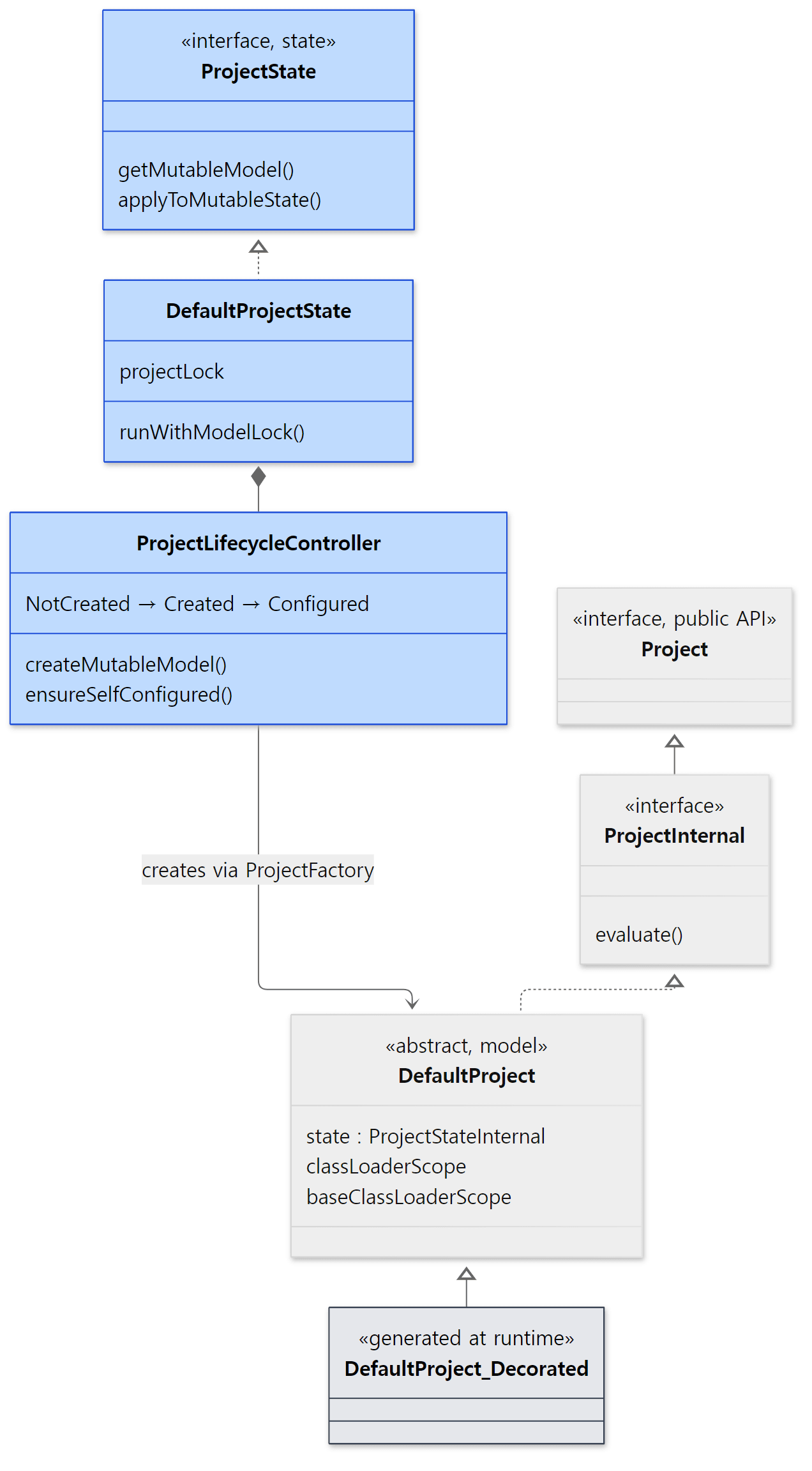 Blue boxes are the "state" side; the rest is the "model" side that build scripts touch.
ProjectLifecycleController has just three states: NotCreated, Created and Configured (lines 49–51). The transition from Created to Configured is "running the build script". The method that triggers it is ensureSelfConfigured().
    public void ensureSelfConfigured() {
        controller.maybeTransitionIfNotCurrentlyTransitioning(State.Created, State.Configured, () -> lockGuard.withProjectLock(() -> project.evaluateUnchecked()));
    }
The StateTransitionController from part 5 shows up here too. It configures only once — "if we're still in Created and not in the middle of a transition". So no matter how many places ask "please make sure this project is configured", the script runs once. And that work happens inside the project lock (withProjectLock). We'll look at the lock in section 2.
Easy to get wrong
- It's no accident that the root is configured first.
DefaultProjectState.ensureConfigured()calls the parent'sensureConfigured()before configuring itself (DefaultProjectState.javalines 182–190). The comment says this is for configure-on-demand (a mode that configures only the projects needed), but the class loader tree in section 8 suggests another reason: a subproject's script can only be compiled after the parent's script has settled the classpath. - In the default mode, projects are configured one at a time. There is a path that configures projects in parallel (
TaskPathProjectEvaluator.configureHierarchyInParallel()), but the switch for it,isParallelProjectConfiguration(), can only betruein Isolated Projects mode (the per-mode implementations inBuildModelParameters.kt, lines 64, 94 and 131). The other modes returnfalse, so in an ordinary build the configuration phase stays sequential even with--parallel.
2. The evaluator chain that configures one project
project.evaluateUnchecked() does nothing more than fetch a ProjectEvaluator from the service registry and call evaluate(this, state) (DefaultProject.java lines 787–791). The real ProjectEvaluator is assembled in a surprising place — BuildModelControllerServices.kt in the configuration cache module.
        ): ProjectEvaluator {
            val withActionsEvaluator = ConfigureActionsProjectEvaluator(
                PluginsProjectConfigureActions.from(cachingServiceLocator),
                BuildScriptProcessor(scriptPluginFactory),
                DelayedConfigurationActions()
            )
            return LifecycleProjectEvaluator(buildOperationRunner, withActionsEvaluator, cancellationToken)
        }
platforms/core-configuration/configuration-cache/src/main/kotlin/org/gradle/internal/cc/impl/BuildModelControllerServices.kt lines 118–125 (VintageModelProvider.createProjectEvaluator())
Read from the outside in, the chain looks like this.
LifecycleProjectEvaluator— opens the build operationConfigure project :…, callsbeforeEvaluate→ (the inner evaluator) →afterEvaluate, and updates the state.ConfigureActionsProjectEvaluator— simply runs the three actions it was given, in order.PluginsProjectConfigureActions— finds and runs the classes listed inMETA-INF/services/org.gradle.configuration.project.ProjectConfigureActionvia aServiceLocator.BuildScriptProcessor— runs the build script.DelayedConfigurationActions— runs configuration actions that were deferred in the meantime (ProjectConfigurationActionContainer).
The same file also has a ConfigurationCacheModelProvider that wraps this chain once more in ConfigurationCacheAwareProjectEvaluator (lines 95–108). But the condition that selects it, isCachingModelBuilding, is only on when building IDE models in Isolated Projects mode (line 216 of BuildModelParametersProvider.kt). Ordinary builds use the VintageModelProvider above. What changes when the configuration cache is on is for part 11.
Here is the core of the outer LifecycleProjectEvaluator.
        @Override
        public void run(final BuildOperationContext context) {
            project.getOwner().applyToMutableState(p -> {
                // Note: beforeEvaluate and afterEvaluate ops do not throw, instead mark state as failed
                try {
                    state.toBeforeEvaluate();
                    buildOperationRunner.run(new NotifyBeforeEvaluate(project, state));

                    if (!state.hasFailure()) {
                        state.toEvaluate();
                        try {
                            delegate.evaluate(project, state);
                        } catch (Exception e) {
                            addConfigurationFailure(project, state, e, context);
                        } finally {
                            state.toAfterEvaluate();
                            buildOperationRunner.run(new NotifyAfterEvaluate(project, state));
                        }
                    }

                    if (state.hasFailure()) {
                        state.rethrowFailure();
                    } // ... on success, record the result ...
                } finally {
                    state.configured();
                }
            });
        }
Three things stand out.
afterEvaluateruns even if the script fails, because it sits infinally. The failure isn't thrown right away; it is collected instate(addConfigurationFailure) and thrown all at once at the end byrethrowFailure(), wrapped inProjectConfigurationException("A problem occurred configuring root project 'x'.")(lines 82–86). That's the familiar first line of every configuration failure.- Conversely, if
beforeEvaluatefails, the build script never runs (if (!state.hasFailure())). - All of this happens inside
applyToMutableState(), i.e. while holding the project lock.
The middle link, ConfigureActionsProjectEvaluator.evaluate(), is just a for loop over its actions (lines 32–37). And here is BuildScriptProcessor, which actually hands over the build script.
        ScriptSource scriptSource = project.getBuildScriptSource();

        if (LOGGER.isInfoEnabled()) {
            LOGGER.info("Evaluating {} using {}.", project, scriptSource.getDisplayName());
        }

        final Timer clock = Time.startTimer();
        try {
            final ScriptPlugin configurer = configurerFactory.create(scriptSource, project.getBuildscript(), project.getClassLoaderScope(), project.getBaseClassLoaderScope(), true);
            project.getOwner().applyToMutableState(configurer::apply);
        } finally {
            // ... logs the elapsed time at debug level ...
        }
The Evaluating root project 'x' using build file '…'. line you see with --info is line 40 here. The arguments contain the whole rest of this post: the script source the project was born with (section 1), the ScriptHandler that receives buildscript {}, the project's two class loader scopes, and true for "is this the top-level script (the build script itself)". If that last value is false, it's a script applied with apply(from = …).
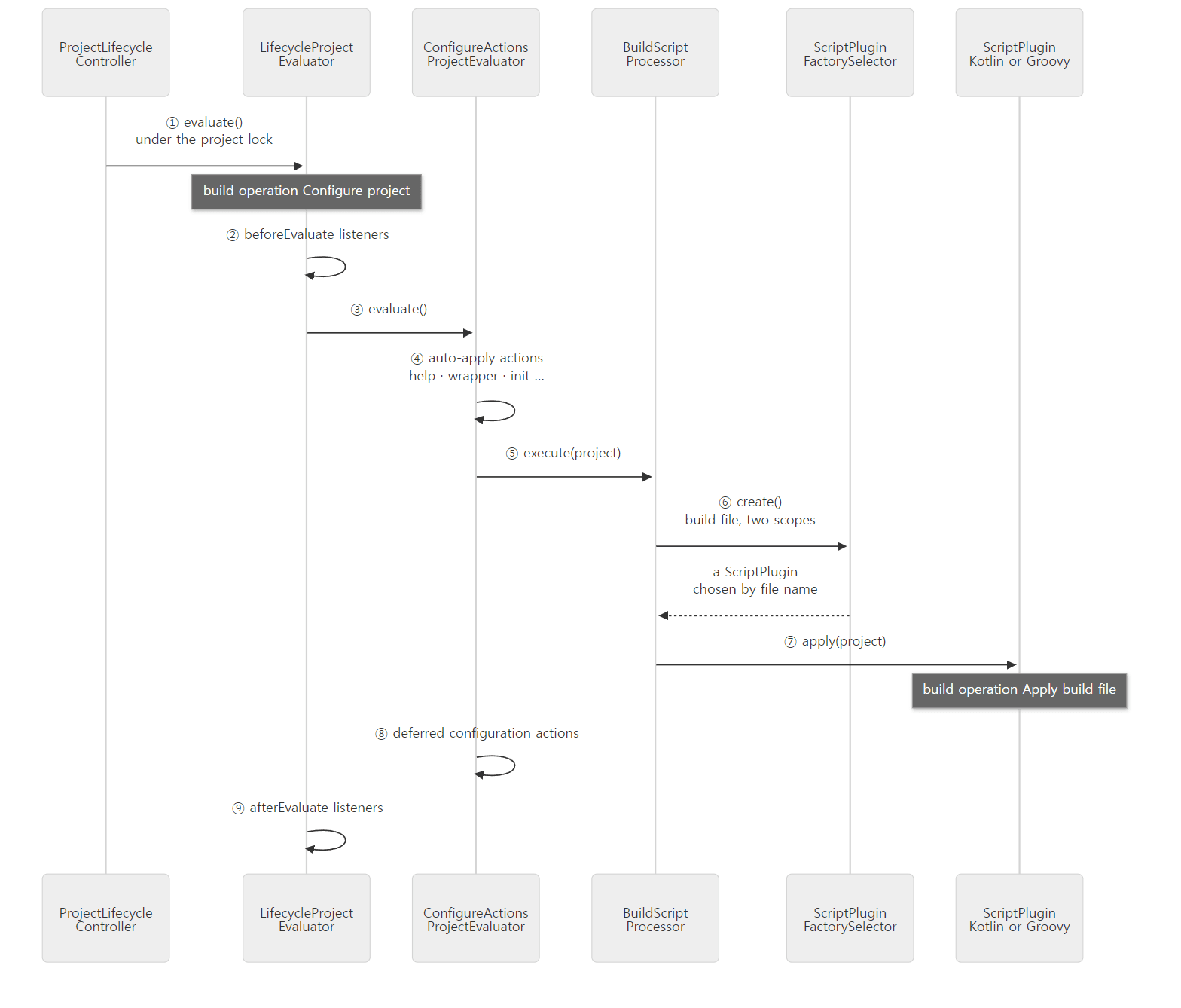 ①, ③, ⑤ and ⑦ appear in the example's stack trace below, reading bottom to top.
Example 1: printing the stack from a build script body
To check that we really go through this chain, I walked the stack with StackWalker from the build script body and printed only the classes this post talks about.
// Example written for this post (not Gradle source)
// ... the import and buildscript {} are in section 8 ...

// 1) How we got here: print only the stack frames for classes this post covers (Java lambda frames skipped)
val interesting = Regex(
    "ProjectLifecycleController|DefaultProject\\.|LifecycleProjectEvaluator|ConfigureActionsProjectEvaluator|" +
    "BuildScriptProcessor|DefaultProjectState|ScriptPlugin|Interpreter|Program\\.|Build_gradle"
)
println("--- call path of the root build script (inner first) ---")
StackWalker.getInstance().forEach { f ->
    val name = "${f.className}.${f.methodName}"
    if (interesting.containsMatchIn(name) && ".lambda\$" !in name) println("  at $name:${f.lineNumber}")
}
// ... 2) project state, 3) class loader scopes, 4) the lateHook task: see sections 3 and 8 ...
[From example ex/u06-evaluator-chain/project/build.gradle.kts, shortened]
This example was run in a Docker container (Eclipse Temurin JDK 25) with a Gradle 9.10.0 development build built straight from the reference commit (07ecbf9ead). ex/u06-evaluator-chain/run.sh runs gradle help --offline --console=plain -q. Here's the first part of the output (Java lambda frames filtered out).
=== configure both projects ===
--- call path of the root build script (inner first) ---
  at Build_gradle.<init>:16
  at Program.execute:-1
  at org.gradle.kotlin.dsl.execution.Interpreter$ProgramHost$eval$1.run:544
  at org.gradle.kotlin.dsl.execution.Interpreter$ProgramHost.eval:539
  at org.gradle.kotlin.dsl.execution.Interpreter$ProgramHost.evaluateSecondStageOf:470
  at Program.execute:-1
  at org.gradle.kotlin.dsl.execution.Interpreter$ProgramHost$eval$1.run:544
  at org.gradle.kotlin.dsl.execution.Interpreter$ProgramHost.eval:539
  at org.gradle.kotlin.dsl.execution.Interpreter.eval:234
  at org.gradle.kotlin.dsl.provider.KotlinScriptPluginFactory.create$lambda$0:61
  at org.gradle.kotlin.dsl.provider.KotlinScriptPlugin.apply:35
  at org.gradle.configuration.BuildOperationScriptPlugin$1.run:71
  at org.gradle.configuration.BuildOperationScriptPlugin.apply:68
  at org.gradle.api.internal.project.DefaultProjectState.runWithModelLock:246
  at org.gradle.api.internal.project.DefaultProjectState.fromMutableState:228
  at org.gradle.api.internal.project.DefaultProjectState.applyToMutableState:220
  at org.gradle.configuration.project.BuildScriptProcessor.execute:46
  at org.gradle.configuration.project.BuildScriptProcessor.execute:27
  at org.gradle.configuration.project.ConfigureActionsProjectEvaluator.evaluate:35
  at org.gradle.api.internal.project.DefaultProjectState.runWithModelLock:246
  at org.gradle.api.internal.project.DefaultProjectState.fromMutableState:228
  at org.gradle.api.internal.project.DefaultProjectState.applyToMutableState:220
  at org.gradle.configuration.project.LifecycleProjectEvaluator$EvaluateProject.run:100
  at org.gradle.configuration.project.LifecycleProjectEvaluator.evaluate:72
  at org.gradle.api.internal.project.DefaultProject.evaluateUnchecked:789
  at org.gradle.api.internal.project.DefaultProjectState.runWithModelLock:248
  at org.gradle.api.internal.project.DefaultProjectState.withProjectLock:232
  at org.gradle.api.internal.project.ProjectLifecycleController.ensureSelfConfigured:96
  at org.gradle.api.internal.project.DefaultProjectState.ensureConfigured:189
Read it from the bottom (outside) to the top (inside).
ensureConfiguredline 189 →ensureSelfConfiguredline 96 →evaluateUncheckedline 789 →LifecycleProjectEvaluatorlines 72 and 100 →ConfigureActionsProjectEvaluatorline 35 →BuildScriptProcessorline 46. These match the lines quoted above.runWithModelLockappears three times. But line 248 (the line that actually takes a lock) appears only once, at the bottom; the other two are line 246. As the next subsection shows, line 246 means "already holding the lock, just run it".- Above
BuildScriptProcessorcomeBuildOperationScriptPlugin(the build operationApply build file …),KotlinScriptPluginFactoryandInterpreter, and at the very topBuild_gradle.<init>is this script's body. Line 16 is theStackWalker…line inbuild.gradle.kts. The twoProgram.executeframes andevaluateSecondStageOfin between are explained in section 6.
The project lock
DefaultProjectState.runWithModelLock() is what makes everyone follow "take the lock before touching the model".
    @Override
    public <S extends @Nullable Object> S runWithModelLock(Supplier<S> action) {
        if (canDoAnythingToThisProject.contains(Thread.currentThread())) {
            // Current thread is allowed to access anything at any time, so run the action
            return action.get();
        }
        if (workerLeaseService.holdsProjectLock(projectLock)) {
            // We're already holding the lock for this project.
            return action.get();
        }
        return workerLeaseService.withReplacedLocks(workerLeaseService.getCurrentProjectLocks(), Collections.singletonList(projectLock), action::get);
    }
The lock is a ResourceLock handed out per project by WorkerLeaseService (line 75). withReplacedLocks on line 248 does what its name says: it releases the other project locks the thread holds and takes this project's lock instead. When configuring the root requires touching a subproject, the thread never holds both locks at once — which reads as a way to avoid deadlocks where two threads wait on each other. The same state object also holds a separate lock for the execution phase (taskLock, line 76). How execution-phase locks relate to --parallel is for part 9.
Easy to get wrong
- The
help,tasks,wrapperandinittasks exist before the build script runs (wrapperandinitonly in the root project —WrapperPluginandBuildInitPluginregister them only whenproject.getParent() == null). The reasongradle tasksworks in a project with an empty build file is the first link of the chain,PluginsProjectConfigureActions. In this commit, the fileMETA-INF/services/org.gradle.configuration.project.ProjectConfigureActionexists in six modules, and the classes listed there —HelpTasksAutoApplyAction,BuildInitAutoApplyAction,WrapperPluginAutoApplyAction,SoftwareReportingTasksAutoApplyActionand others — apply plugins. In example 2's build operation trace, too,Apply plugin org.gradle.help-tasks,org.gradle.build-initandorg.gradle.wrappershowed up beforeApply build file(for space, they are filtered out of the trace shown in section 6).
3. Project state — between beforeEvaluate and afterEvaluate
The state that LifecycleProjectEvaluator kept updating is a ProjectStateInternal, which has five states.
    enum State {
        UNCONFIGURED,
        IN_BEFORE_EVALUATE,
        IN_EVALUATE,
        IN_AFTER_EVALUATE,
        CONFIGURED
    }

    // ...
    @Override
    public boolean getExecuted() {
        // We intentionally consider "execution" done before doing afterEvaluate.
        // The Android plugin relies on this behaviour.
        return state.ordinal() > State.IN_EVALUATE.ordinal();
    }
project.state.executed in a build script is this getExecuted(). The comment is candid: counting the project as "executed" before afterEvaluate is intentional, and the Android plugin relies on it.
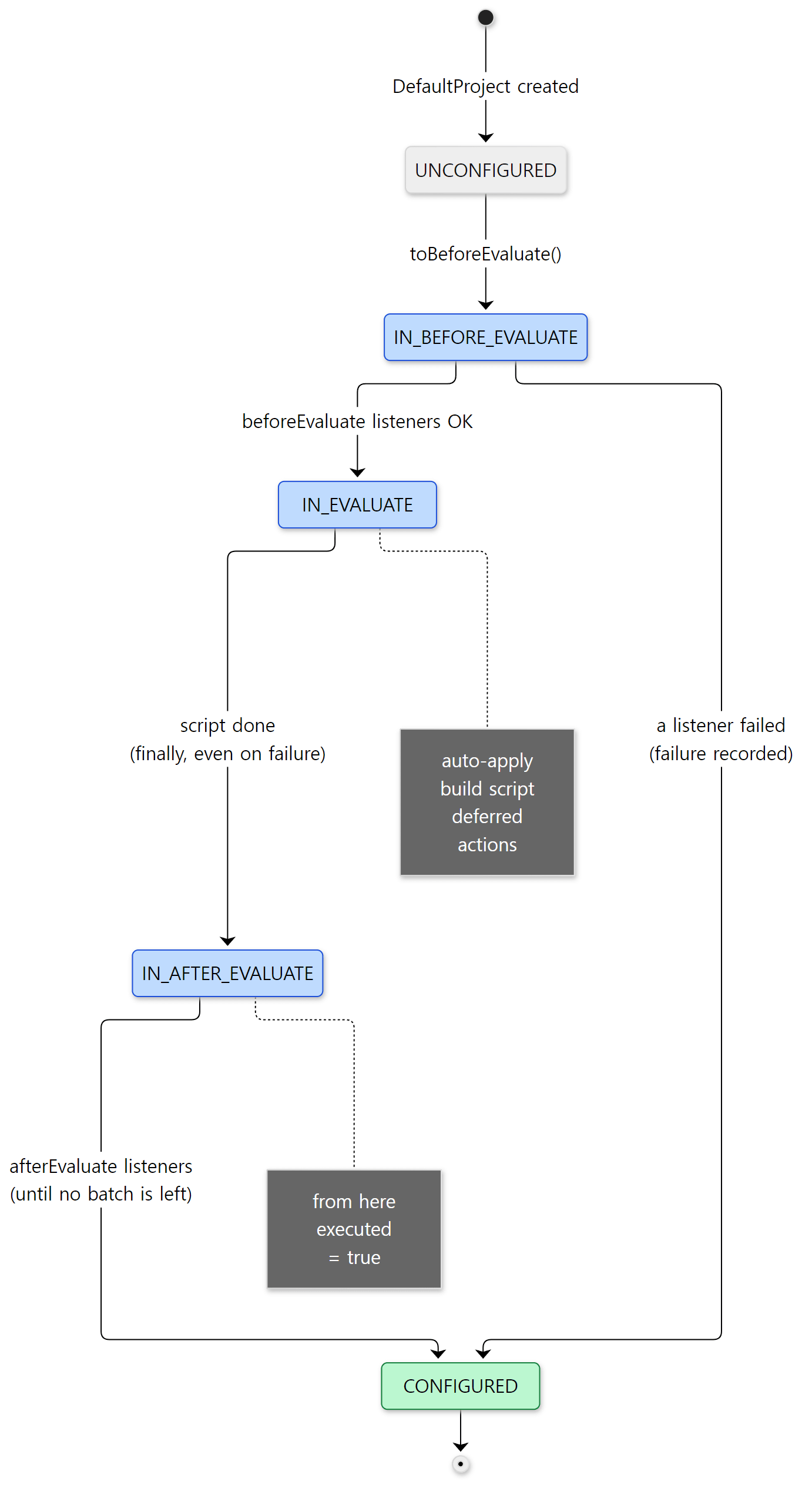 The build script body runs in
IN_EVALUATE; an afterEvaluate {} block runs in IN_AFTER_EVALUATE.
The code that calls the afterEvaluate listeners (NotifyAfterEvaluate) doesn't stop after one round. With do { … } while (nextBatch != null) it collects any afterEvaluate registered while the listeners were running into the next batch and keeps going until that batch is empty (LifecycleProjectEvaluator.java lines 251–258; the batch swapping is DefaultProject.stepEvaluationListener(), lines 1540–1552). That's why an afterEvaluate registered inside another afterEvaluate isn't lost.
Registering one after configuration has finished, however, is blocked. DefaultProject.afterEvaluate() calls failAfterProjectIsEvaluated() before registering, which throws InvalidUserCodeException("Cannot run Project.afterEvaluate(Action) when the project is already evaluated.") if the state is neither "not configured yet" nor "configuring" (DefaultProject.java lines 1067–1091).
Example 1 (continued): printing the state, and a late afterEvaluate
The root script of example 1 prints project.state.executed in the body and inside afterEvaluate {}, and also registers a lateHook task that calls project.afterEvaluate { } during the execution phase. Here are the relevant lines from gradle help and gradle lateHook (the scope output in between is in section 8).
--- project state ---
in script body : executed=false
...
in afterEvaluate: executed=true
...
=== afterEvaluate during the execution phase ===
* What went wrong:
Execution failed for task ':lateHook' (registered in build file 'build.gradle.kts').
> Cannot run Project.afterEvaluate(Action) when the project is already evaluated.
It's false in the body and true inside afterEvaluate. An afterEvaluate registered during the execution phase fails with the message from line 1089.
Easy to get wrong
afterEvaluatedoes not mean "after all projects are configured". It's the end of configuring that one project. The root'safterEvaluateruns before the subprojects' scripts (as section 1 showed, projects are finished one at a time). The hook that waits for all projects isgradle.projectsEvaluated, which we saw in part 5.afterEvaluateruns even when the script fails, because of thefinallyin section 2. If yourafterEvaluatereaches for something the script should have created and throws a second exception, the failure report may show two causes piled together (ProjectStateInternal.failed()merges the causes, lines 90–98).
4. build.gradle or build.gradle.kts?
The configurerFactory that BuildScriptProcessor called is ScriptPluginFactorySelector (registered as the ScriptPluginFactory service at lines 566–574 of BuildScopeServices.java). Before that, "which file is the build file" was already decided when ProjectFactory asked the descriptor in section 1. Unless a name was set explicitly, the descriptor finds it with DefaultScriptFileResolver.
resolveScriptFile() walks the list of extensions in order, checks whether build + extension exists, picks the first one it finds, and collects any later matches separately as "ignored candidates" (DefaultScriptFileResolver.java lines 43–63). The order of EXTENSIONS comes from the list of scripting languages, ScriptingLanguages.
    private static final List<ScriptingLanguage> ALL =
        Collections.unmodifiableList(
            Arrays.asList(
                scriptingLanguage(".gradle", null),
                scriptingLanguage(".gradle.kts", "org.gradle.kotlin.dsl.provider.KotlinScriptPluginFactory"),
                scriptingLanguage(".gradle.dcl", "org.gradle.internal.declarativedsl.provider.DeclarativeDslScriptPluginFactory")
            )
        );
This one list does two jobs. When finding the file, Gradle tries build.gradle → build.gradle.kts → build.gradle.dcl in this order and uses the first it finds. If none exists, it pretends there's an empty build.gradle (ScriptFileUtil.java lines 36–37). And when running it, the selector uses the same list to match the end of the file name.
    private ScriptPluginFactory scriptPluginFactoryFor(String fileName) {
        for (ScriptingLanguage scriptingLanguage : ScriptingLanguages.all()) {
            if (fileName.endsWith(scriptingLanguage.getExtension())) {
                String provider = scriptingLanguage.getProvider();
                if (provider != null) {
                    return instantiate(provider);
                }
                return defaultScriptPluginFactory;
            }
        }
        return defaultScriptPluginFactory;
    }
.gradle, which has no provider name, and any file matching no extension go to the defaultDefaultScriptPluginFactory(the Groovy DSL)..gradle.ktsleads to the class name string"org.gradle.kotlin.dsl.provider.KotlinScriptPluginFactory". The core (subprojects/core) doesn't know the Kotlin DSL module at compile time; it loads the class by name and creates it with anInstantiator(lines 62–79). That's whyKotlinScriptPluginFactorycarries the comment@Suppress("unused") // The name of this class is hardcoded in Gradle(KotlinScriptPluginFactory.ktline 38).- Whatever is chosen,
create()just above wraps it inBuildOperationScriptPlugin(line 109). That's where the build operationApply build file 'build.gradle.kts' to root project 'x'comes from, and why both DSLs leave an operation with the same name.
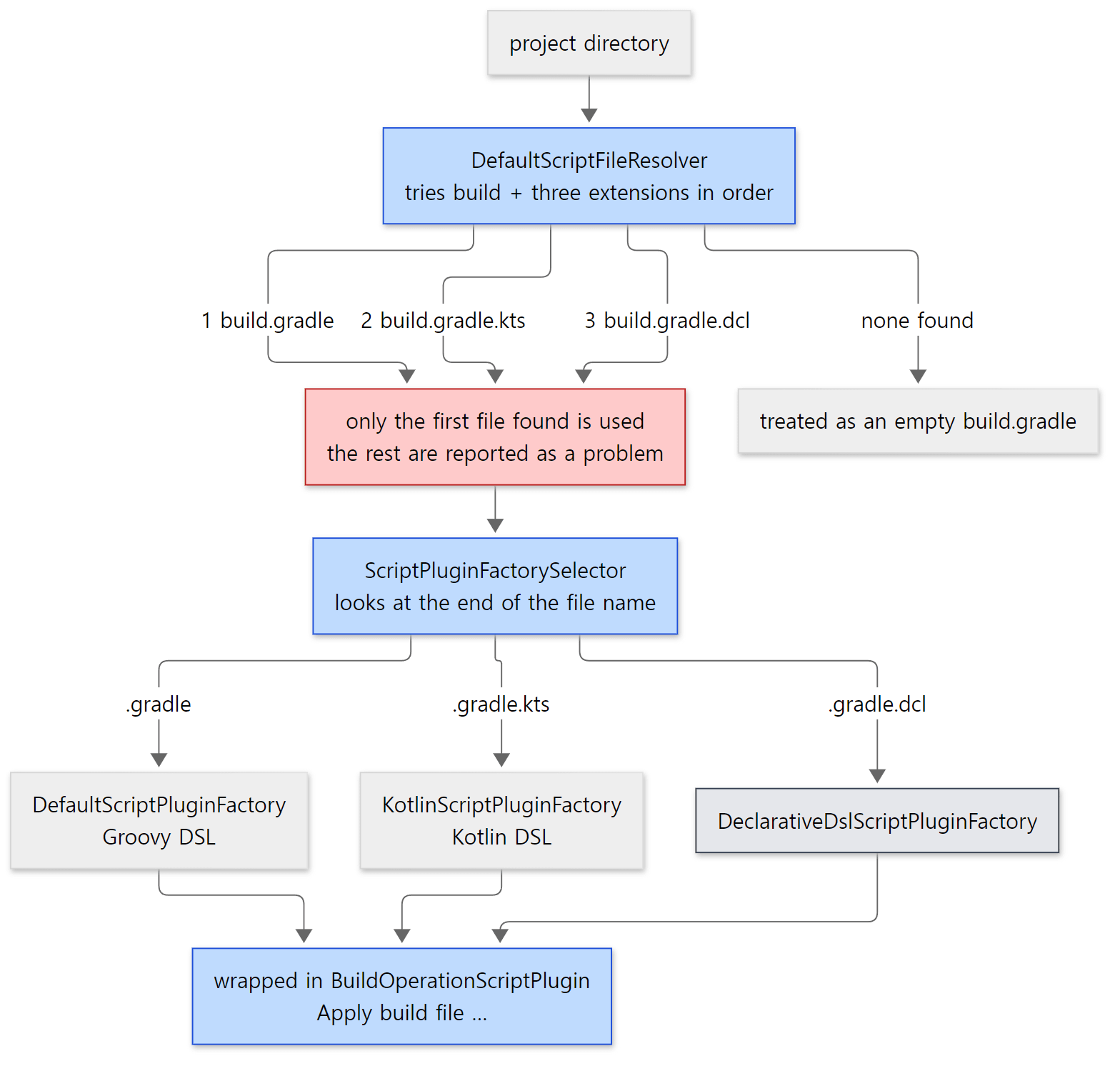 The red box is the trap in the example below.
Example 2: when both build files are present
I put build.gradle (println("running build.gradle")) and build.gradle.kts (println("running build.gradle.kts")) in the same directory and ran gradle help (ex/u06-script-classes/project-both). The last two lines are the sentences run.sh pulled out of the problems report HTML with grep. The time (in 6s) varies from run to run.
=== both build.gradle and build.gradle.kts in one directory ===
running build.gradle
[Incubating] Problems report is available at: file:///tmp/both/build/reports/problems/problems-report.html
BUILD SUCCESSFUL in 6s
problems-report.html
Multiple build script files were found in directory '/tmp/both'. Selected 'build.gradle', and ignoring 'build.gradle.kts'.
Multiple build script files were found in directory '/tmp/both'
Only build.gradle ran, and what was dropped is recorded only in the problems report, not on the console. The two sentences are the details (line 49) and the short contextual label (line 46) of a single problem that ScriptResolutionResultReporter.reportResolutionProblemsOf() reports (ScriptResolutionResultReporter.java lines 43–54). On my first run I had added --warning-mode=all, and the same content appeared on the console as Problem found: Multiple script files in one directory. Without it, all you get is the one line pointing to the report, as above.
Easy to get wrong
- If you migrate from Groovy to Kotlin and leave the old
build.gradlebehind, your editedbuild.gradle.ktsnever runs. That's exactly the example above:.gradlecomes first in the order. .gradle.dclis the declarative DSL (Declarative Gradle), which this post doesn't cover. For reference, a Kotlin DSL script, if it is a project build script, is also first tried with the declarative interpreter when theorg.gradle.kotlin.dsl.dclproperty is on, falling back to normal Kotlin interpretation if that fails (KotlinScriptPluginFactory.ktlines 54–58). The property defaults tofalse(AccessorsClassPath.ktline 158).
5. Groovy DSL — compiling the same file twice
apply() in the Groovy DSL's DefaultScriptPluginFactory packs more into one method than anything else in this post.
        @Override
        public void apply(final Object target) {
            // ... creates a service registry just for this script ...
            final ScriptTarget initialPassScriptTarget = initialPassTarget(target);

            ScriptCompiler compiler = scriptCompilerFactory.createCompiler(scriptSource);

            // Pass 1, extract plugin requests and plugin repositories and execute buildscript {}, ignoring (i.e. not even compiling) anything else
            CompileOperation<?> initialOperation = compileOperationFactory.getPluginsBlockCompileOperation(initialPassScriptTarget);
            Class<? extends BasicScript> scriptType = initialPassScriptTarget.getScriptClass();
            ScriptRunner<? extends BasicScript, ?> initialRunner = compiler.compile(scriptType, target, baseScope, initialOperation, Actions.doNothing());
            initialRunner.run(target, services);

            // ... takes the plugin requests (allPluginRequests) collected by pass 1 ...
            pluginRequestApplicator.applyPlugins(allPluginRequests, scriptHandler, pluginManager, targetScope);

            // Pass 2, compile everything except buildscript {}, pluginManagement{}, and plugin requests, then run
            final ScriptTarget scriptTarget = secondPassTarget(target);
            scriptType = scriptTarget.getScriptClass();

            CompileOperation<BuildScriptData> operation = compileOperationFactory.getScriptCompileOperation(scriptSource, scriptTarget);

            final ScriptRunner<? extends BasicScript, BuildScriptData> runner = compiler.compile(scriptType, target, targetScope, operation, ClosureCreationInterceptingVerifier.INSTANCE);
            // ...
            Runnable buildScriptRunner = () -> runner.run(target, services);

            boolean hasImperativeStatements = runner.getData().getHasImperativeStatements();
            scriptTarget.addConfiguration(buildScriptRunner, !hasImperativeStatements);
        }
Just as the comments say, there are two passes.
- Pass 1: build a class that keeps only
buildscript {},plugins {}and (for settings)pluginManagement {}— the rest is not even compiled — and run it. That run piles up thebuildscriptrepositories and classpath dependencies in theScriptHandlerand collects theplugins {}requests. The class loader used for compiling isbaseScope. - Call
applyPlugins(…, targetScope)with the collected requests. This resolves the classpath, attaches it to the project's scope (targetScope) and applies the plugins (more in section 8). - Pass 2: compile everything except those blocks, this time with
targetScope, and run it. Now the libraries added viabuildscriptand the plugins' classes are visible, so the body can use those types.
Why twice? The types a script body uses (say, JavaPluginExtension created by a plugin, or a class from a library pulled in via buildscript) only land on the classpath after part of the script has run. Compiling the whole body in one go would mean compiling without knowing those types. So Gradle cuts out "the part that decides the classpath", runs it first, and compiles the rest on top of the result. The Kotlin DSL splits in two for the same reason (section 6).
Transformers decide what each pass keeps or drops. Pass 2's BuildScriptTransformer installs a filter that removes three blocks: getClasspathBlockName(), plugins and pluginManagement (BuildScriptTransformer.java lines 37–46). getClasspathBlockName() is "buildscript" for a build script and "initscript" for an init script (ProjectScriptTarget.java lines 45–47, InitScriptTarget.java lines 39–41). Pass 1 does the opposite: SubsetScriptTransformer keeps only those blocks. The two compilations get different ids and stage names: pass 1 is "cp_" + target id (cp_proj for a build script) with CLASSPATH, pass 2 is proj with BODY (DefaultCompileOperationFactory.java lines 45–58).
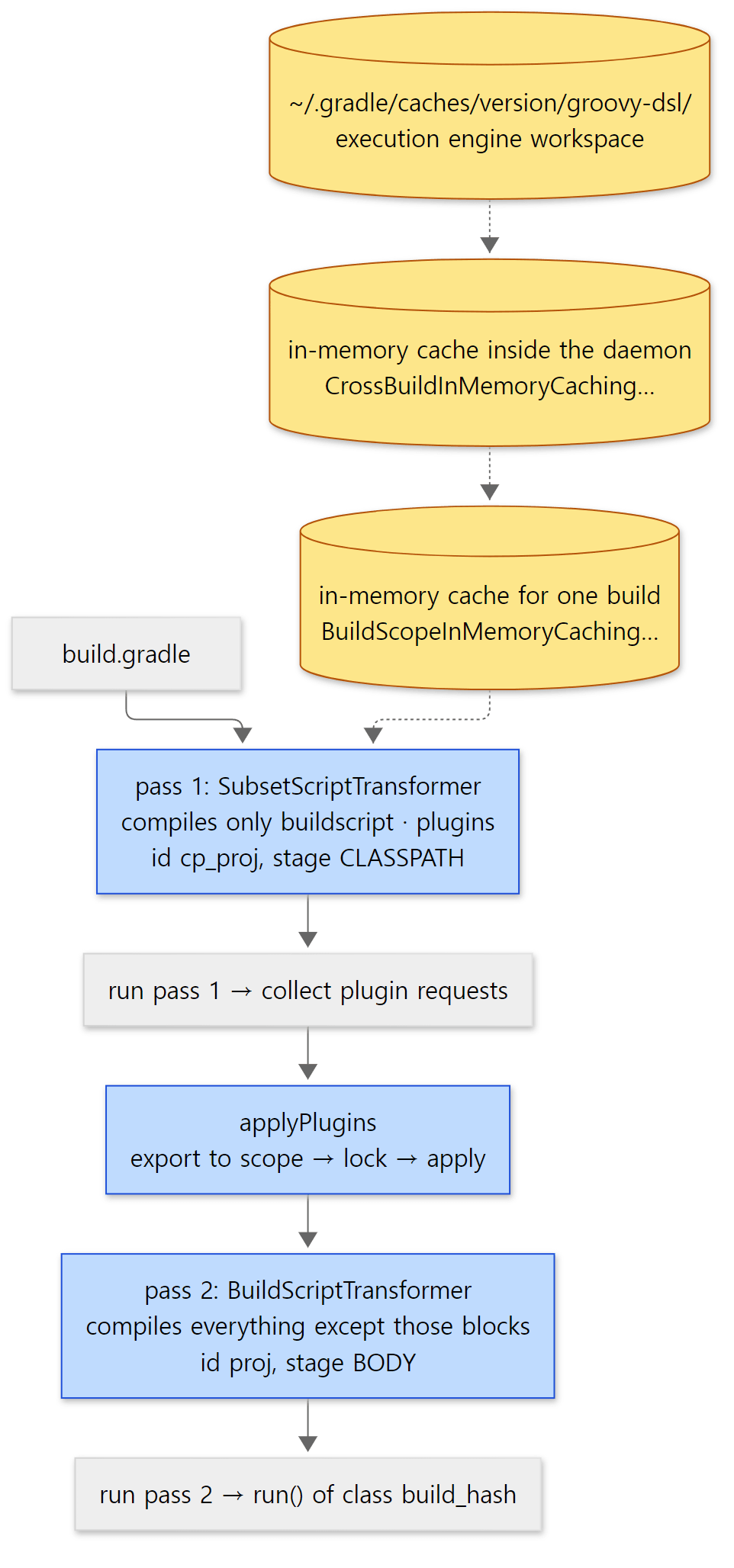 The three yellow cylinders are searched bottom to top, nearest cache first.
Compiled results are looked up in three layers
Behind compiler.compile(...) there are three layers of caching.
- An in-memory cache for one build,
BuildScopeInMemoryCachingScriptClassCompiler— doesn't compile the same script twice in one build. Its class comment notes that it's called concurrently when projects are configured in parallel, so it must be thread-safe (lines 35–36). - An in-memory cache inside the daemon,
CrossBuildInMemoryCachingScriptClassCache— annotated@ServiceScope(Scope.UserHome.class), so the daemon keeps it across builds as long as the same~/.gradleis used. - Disk,
GroovyScriptClassCompiler— turns the compilation into a unit of work for the execution engine and hands it over withgetExecutionEngine(target).createRequest(unitOfWork).execute()(lines 170–174).
Script compilation rides on the same execution engine that decides whether a task is UP-TO-DATE (part 10). If the inputs (source hash, template id, classpath) are the same, it reuses the result already in the workspace ~/.gradle/caches/<version>/groovy-dsl (GroovyDslWorkspaceProvider.java lines 42–45). For a project build script it picks the project-side execution engine, which can also use the build cache (the comment at lines 177–191).
Example 2 (continued): the same script in both DSLs
I wrote the same build script once in Groovy and once in Kotlin. Each prints the script's own class.
// Example written for this post (not Gradle source)
// ... same content as build.gradle.kts, in the Groovy DSL: plugins { id 'base' } ...
println("script class  = ${this.getClass().name}")
println("superclass    = ${this.getClass().superclass.name}")
println("project class = ${project.getClass().name}")
println("script loader = ${this.getClass().classLoader.getClass().simpleName}")
// ... the hello task ...
[From example ex/u06-script-classes/project-groovy/build.gradle, shortened]
run.sh runs gradle hello --offline --console=plain --info twice on the same daemon and keeps only the lines about compiling and evaluating.
=== groovy: first run (--info, filtered) ===
Compiling settings file '/tmp/groovy/settings.gradle' using SubsetScriptTransformer.
Compiling settings file '/tmp/groovy/settings.gradle' using BuildScriptTransformer.
Evaluating root project 'groovy' using build file '/tmp/groovy/build.gradle'.
Compiling build file '/tmp/groovy/build.gradle' using SubsetScriptTransformer.
Compiling build file '/tmp/groovy/build.gradle' using BuildScriptTransformer.
script class  = build_cb61zcm69ge6cvh1owhi4eh57
superclass    = org.gradle.api.internal.project.ProjectScript
project class = org.gradle.api.internal.project.DefaultProject_Decorated
script loader = ScriptClassLoader
BUILD SUCCESSFUL in 2s
=== groovy: second run, same daemon ===
Evaluating root project 'groovy' using build file '/tmp/groovy/build.gradle'.
script class  = build_cb61zcm69ge6cvh1owhi4eh57
BUILD SUCCESSFUL in 1s
- The first run prints two compile lines with different transformer names each — for settings and for the build script. That's
Compiling {} using {}.at line 135 ofDefaultScriptCompilationHandler. - The script class is
build_+ a hash, extendingProjectScript.TextResourceScriptSource.classNameFromPath()builds the name from the file name (at most 30 characters) plus a hash of the file path (lines 95–112). So even if every subproject has abuild.gradle, the class names don't collide. The hash differs with the path in each environment. - The second run uses the same daemon, so there are no compile lines. The time in
BUILD SUCCESSFUL in …varies from run to run.
In the build operation trace (-Dorg.gradle.internal.operations.trace=… -Dorg.gradle.internal.operations.trace.tree=true, the method from part 1), under Apply build file 'build.gradle' we get Executing Groovy DSL script compilation (cp_proj) → Compile build file 'build.gradle' (CLASSPATH) → Apply plugin org.gradle.base → Executing Groovy DSL script compilation (proj) → Compile build file 'build.gradle' (BODY), in that order. Executing … is the name the execution engine's ExecuteStep gives its operation, which is evidence that script compilation really goes through the execution engine. The Kotlin trace is shown in section 6.
Easy to get wrong
- On disk the class is called
_BuildScript_. After a run,~/.gradle/caches/<version>/groovy-dsl/<hash>/classes/cp_proj/contains_BuildScript_.classand_BuildScript_$_run_closure1.class. Compilation uses a path-independent name (RemappingScriptSource.MAPPED_SCRIPT = "_BuildScript_", line 29), and the classes are renamed tobuild_hashwhen loaded (GroovyScriptClassCompiler.javalines 193–218). This reads as a way to share the compiled result on disk between two projects with identical content at different paths (I didn't find a comment stating that intent). - A script with only
model {}runs later. The last line,addConfiguration(buildScriptRunner, !hasImperativeStatements), defers running the script if it has no imperative statements at all (only old rule-based model blocks) (ProjectScriptTarget.javalines 74–81). It goes to the project's deferred configuration, not toDelayedConfigurationActionsin the section 2 chain. You'll rarely see this in modern builds.
6. Kotlin DSL — a "program" split into two stages
The Kotlin entry point KotlinScriptPluginFactory.create() returns a KotlinScriptPlugin whose apply() (skipping the declarative interpretation mentioned in section 4) passes the target, source, ScriptHandler and both scopes straight to kotlinScriptEvaluator.evaluate(…) (lines 45–70). StandardKotlinScriptEvaluator hashes the source and passes it on to Interpreter.eval(). The class comment of Interpreter explains the design: rather than interpreting the script directly, it emits a specialized program tailored to the script's structure (is there a buildscript block? a plugins block? a body?), its target (project, settings, init) and whether it's top-level. The technique is called partial evaluation (Interpreter.kt lines 52–77). For example, a script with a plugins {} block and no body becomes a program that does nothing but instantiate that block's class.
The rest of Interpreter.eval() is simple: look the program up in the in-memory cache and run it if found; otherwise build it with emitSpecializedProgramFor(), put it in the cache, and run it (lines 207–234). The programId consists of the template id (a string like Project/TopLevel/stage1, lines 580–581), the script path, the source hash, the parent class loader and the compiler options (lines 198–205). The in-memory cache is KotlinScriptClassloadingCache, in the same UserHome scope as Groovy's daemon cache.
ProgramParser — cutting out the top-level blocks
The first step in building a "specialized program" is ProgramParser, which cuts the source into pieces.
            val pluginsFragment =
                topLevelBlocks
                    .takeIf { topLevelBlockIds.contains(TopLevelBlockId.plugins) && kind == ProgramKind.TopLevel }
                    ?.singleSectionOf(TopLevelBlockId.plugins)
                    ?.let { sourceWithoutComments.fragment(it) }
            // ... buildscript and pluginManagement are cut out the same way, and the three form stage 1 ...
            val remainingSource =
                sourceWithoutComments.map {
                    it.erase(
                        rangesToErase(buildscriptFragment, pluginManagementFragment, pluginsFragment, annotations)
                    )
                }
- A simple lexer (
Lexer.kt) finds only top-level blocks. Aplugins {}inside anifor a function is not a top-level block, so it doesn't go to stage 1. plugins {}is cut out only for a top-level script (ProgramKind.TopLevel), not for script plugins applied withapply(from = …).- What's left of the source becomes stage 2 (
Program.Script, lines 86–88). The cut-out parts are wiped witherase(), and how it wipes them is worth a look.
        for (ch in subSequence(range)) {
            result.append(
                if (Character.isWhitespace(ch)) ch
                else ' '
            )
        }
Whitespace (including line breaks) is kept, and every other character becomes a space. So the stage 2 body has the same line count and column positions as the original. That's why Build_gradle.<init>:16 in example 1's stack pointed exactly at line 16 of the original, and why the compile errors in example 3 below point at the original line numbers.
Next, PartialEvaluator looks at the combination of pieces (stage 1 only, stage 2 only, both, …) and reduces it to a residual program (ResidualProgram), and ResidualProgramCompiler writes it out directly as bytecode for a class named Program (comment at ResidualProgramCompiler.kt lines 82–85, lines 674–683). The stage 1 blocks and the stage 2 body are each compiled by the Kotlin compiler into script classes. The stage names are CLASSPATH for stage 1 and BODY for stage 2 (lines 762–768) — the same names as in Groovy. The comment says changes to these constants must be coordinated with the "GE team" (Gradle Enterprise, now Develocity), meaning whatever consumes and displays build operations depends on these names.
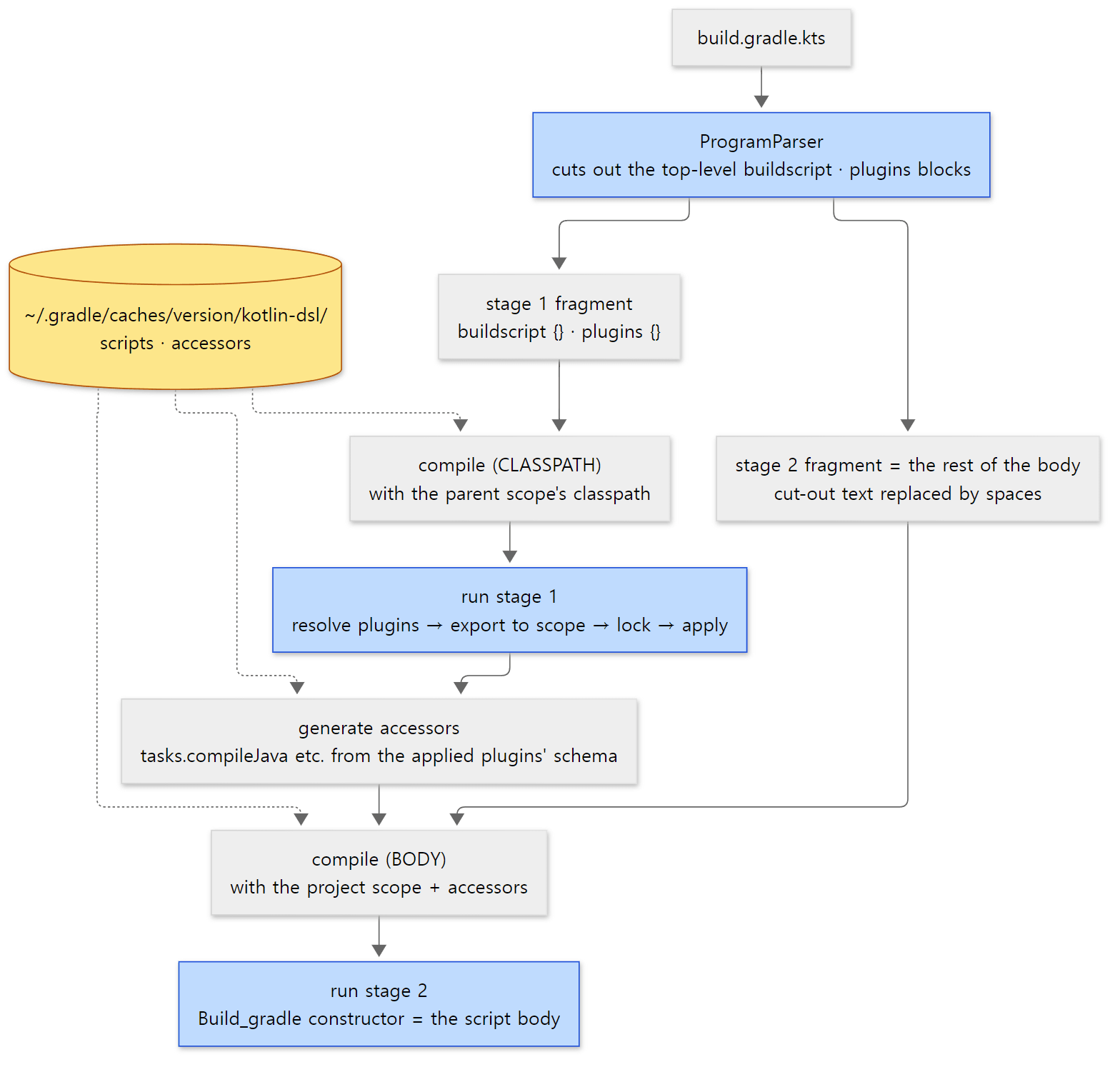 Same idea as Groovy's two passes. The difference is "generate accessors" in the middle (section 7).
The stage 1 program calls stage 2
Remember the two Program.execute frames in example 1's stack. The lower Program (called from line 234) is the stage 1 program. It runs plugins {}·buildscript {} and then calls evaluateSecondStageOf(). That method compiles the stage 2 body only now (or takes it from the cache) and runs it. The upper Program is the stage 2 program, and inside it the constructor of Build_gradle (<init>) is called — because a Kotlin script is compiled so that the whole body becomes the constructor of the script class.
Stage 2 is compiled with a different classpath from stage 1. Stage 1 was compiled with the classpath of targetScope.parent (line 294). Stage 2 is compiled with the classpath of targetScope itself — which stage 1 has just extended and locked — plus the accessors (compileSecondStageOf(), lines 488–489).
The stage 2 script class extends CompiledKotlinBuildScript. A trap hides there.
@KotlinScript(compilationConfiguration = BuildScriptCompilationConfiguration::class)
open class CompiledKotlinBuildScript(
    private val host: KotlinScriptHost<Project>
) : DefaultKotlinScript(defaultKotlinScriptHostForProject(host.target)), PluginAware by host.target {
    // ... the buildscript property and buildscript {} function, and the KDoc for plugins ...
    @Suppress("unused")
    open fun plugins(@Suppress("unused_parameter") block: PluginDependenciesSpecScope.() -> Unit): Unit =
        invalidPluginsCall()
}
Calling plugins {} in the stage 2 body calls this function, and invalidPluginsCall() always throws (lines 140–144). The top-level plugins {} has already been cut out, so a plugins {} still left in the body must be somewhere that isn't top level.
Example 2 (continued): compiling and caching the Kotlin script
I ran a build.gradle.kts with the same content as the Groovy one (plugins { base } and four printlns). The Kotlin compile lines only appear with --debug, so I ran with --debug and filtered the same way (the timestamp and log level prefixes are removed with sed, and the debug lines starting with Build operation … are dropped). For the second and third runs only the script class line is kept.
=== kts: first run (--debug, filtered) ===
Compiling Settings/TopLevel/stage1 from settings file '/tmp/kts/settings.gradle.kts'
Evaluating root project 'kts' using build file '/tmp/kts/build.gradle.kts'.
Compiling Project/TopLevel/stage1 from build file '/tmp/kts/build.gradle.kts'
Loading Project/TopLevel/stage1 from build file '/tmp/kts/build.gradle.kts'
Compiling Project/TopLevel/stage2 from build file '/tmp/kts/build.gradle.kts'
Loading Project/TopLevel/stage2 from build file '/tmp/kts/build.gradle.kts'
script class  = Build_gradle
superclass    = org.gradle.kotlin.dsl.support.CompiledKotlinBuildScript
project class = org.gradle.api.internal.project.DefaultProject_Decorated
script loader = VisitableURLClassLoader
BUILD SUCCESSFUL in 21s
=== kts: second run, same daemon ===
Evaluating root project 'kts' using build file '/tmp/kts/build.gradle.kts'.
script class  = Build_gradle
BUILD SUCCESSFUL in 2s
=== stop the daemon, then run both again (new daemon, disk cache only) ===
Evaluating root project 'kts' using build file '/tmp/kts/build.gradle.kts'.
Loading Project/TopLevel/stage1 from build file '/tmp/kts/build.gradle.kts'
Loading Project/TopLevel/stage2 from build file '/tmp/kts/build.gradle.kts'
script class  = Build_gradle
BUILD SUCCESSFUL in 8s
Evaluating root project 'groovy' using build file '/tmp/groovy/build.gradle'.
script class  = build_cb61zcm69ge6cvh1owhi4eh57
BUILD SUCCESSFUL in 1s
Timings vary from run to run. Here's what to read.
- The first run compiles and loads
stage1, and only then compiles and loadsstage2. The filtered-out debug lines show aResolve buildscript classpath for configuration 'classpath'operation in between. That's exactly the order in the diagram. These lines come fromlogCompilationOf()·logClassLoadingOf()inInterpreter.kt(lines 659–668). - The second run on the same daemon has no
CompilingorLoadingat all — the program came straight out of the in-memory cache (cachedClassFor). - After
gradle --stopand a run on a fresh daemon, there'sLoadingbut noCompiling. The in-memory cache is empty, but the execution engine found the compiled result on disk (~/.gradle/caches/<version>/kotlin-dsl/scripts). The Groovy side, too, printed onlyEvaluating …with no compile lines. - The script class is
Build_gradleand its superclass isCompiledKotlinBuildScript. Unlike Groovy there's no hash in the name; instead, the script path goes into the class loader scope id (kotlin-dsl:<path>:<template id>,Interpreter.ktlines 584–586).
Looking at the Gradle user home in the same container, groovy-dsl and kotlin-dsl sit side by side under caches/9.10.0-20261107025045+0000/, and kotlin-dsl contained accessors, classpath-snapshots, ic and scripts (the find output in run.sh). accessors and scripts are the two workspaces at lines 40–42 of KotlinDslWorkspaceProvider.kt. ic holds the incremental compilation state of Kotlin DSL scripts (KotlinDslIncrementalCompilationCache). That class doesn't exist in the source of the 9.8.2 release; it looks new in this development build, and this post only mentions it by name.
Finally, the build operation trace for the same script (with the disk cache cleared, on a fresh daemon).
    Configure project :
      Notify beforeEvaluate listeners of :
      Apply build file 'build.gradle.kts' to root project 'kts'
        Execute unit of work: GENERATE_PLUGIN_SPEC_BUILDER_ACCESSORS
          Executing Kotlin DSL plugin specs accessors for classpath '2e5a5830beed53419073fd45087674dc'
        Execute unit of work: COMPILE_KOTLIN_SCRIPT
          Executing Kotlin DSL script compilation (Project/TopLevel/stage1)
            Compile script build.gradle.kts (CLASSPATH)
        Evaluate build file 'build.gradle.kts'
          Apply plugin org.gradle.base to root project 'kts'
          Apply plugin org.gradle.kotlin.dsl.provider.plugins.KotlinScriptBasePlugin to root project 'kts'
          Execute container callback action
          Execute unit of work: GENERATE_PROJECT_ACCESSORS
            Executing Kotlin DSL accessors for root project 'kts'
          Execute unit of work: COMPILE_KOTLIN_SCRIPT
            Executing Kotlin DSL script compilation (Project/TopLevel/stage2)
              Compile script build.gradle.kts (BODY)
          Evaluate build file 'build.gradle.kts'
      Notify afterEvaluate listeners of :
The hash varies from run to run (run.sh filters out the Snapshot outputs … lines and things like input fingerprinting). Three differences from Groovy stand out.
- The stage 2 compilation (
stage2,BODY) sits inside stage 1'sEvaluate build file. That's the "stage 1 program calls stage 2" we just saw. The outerEvaluate …is stage 1; the inner, lastEvaluate …is stage 2 running (the name given byeval()atInterpreter.ktlines 538–552). - Right after the
baseplugin during stage 1,KotlinScriptBasePluginis applied. It registers thekotlinDslAccessorsReporttask in every Kotlin DSL project (DefaultKotlinScriptBasePluginsApplicator.ktlines 26–37). - After that, right before the stage 2 compilation, comes
GENERATE_PROJECT_ACCESSORS— the accessors of the next section. TheGENERATE_PLUGIN_SPEC_BUILDER_ACCESSORSat the start builds the accessors used inside stage 1 blocks: version catalogs, and names for the plugin ids found on the buildSrc classpath (Stage1BlocksAccessorClassPath.ktlines 56–63).
Example 3: errors that come from the two stages
I confirmed the split with errors (ex/u06-kotlin-stages). First, line 3 of the body declares val pluginId = "java", and the plugins { id(pluginId) } on lines 5–7 uses it (project-var-in-plugins/build.gradle.kts).
=== a body variable used inside plugins {} ===
e: file:///tmp/var-in-plugins/build.gradle.kts:6:8: Unresolved reference 'pluginId'.
Build file '/tmp/var-in-plugins/build.gradle.kts' line: 6
* What went wrong:
Script compilation error:
  Line 6:     id(pluginId)
                 ^ Unresolved reference 'pluginId'.
BUILD FAILED in 3s
(The BUILD FAILED in … times in example 3 vary from run to run.) plugins {} is cut out and compiled on its own, so the body's pluginId doesn't exist in that compilation unit. Note also that line 6 is the original line number.
Second, after val wantJava = true, I put plugins {} inside an if, as in if (wantJava) { plugins { java } } (line 6; project-plugins-in-body/build.gradle.kts).
=== plugins {} inside an if ===
Build file '/tmp/plugins-in-body/build.gradle.kts' line: 6
* What went wrong:
The plugins {} block must not be used here. If you need to apply a plugin imperatively, please use apply<PluginType>() or apply(plugin = "id") instead.
BUILD FAILED in 3s
This time it compiles, and fails while running. Because it isn't top level, it stayed in the stage 2 body, and plugins in the body is the CompiledKotlinBuildScript.plugins() → invalidPluginsCall() we saw above. The message is that function's string, word for word.
Easy to get wrong
- A Kotlin script's "compile error" happens before any line of the body runs. The stage 2 body is compiled as one class, so even if the error is on the last line, not even the
printlnon the first line runs. In example 3'sproject-no-plugin(section 7 below), theprintln("before")at the very start of the body (line 3) was never printed. Groovy's pass 2 also compiles the whole body as one class, but since Groovy is dynamic, unknown names usually fail only at run time (that's a general property of the language; I didn't run it separately for this post). - In a settings script,
pluginManagement {}must come first if you use it.checkForTopLevelBlockOrder()throwsUnexpectedBlockOrderif there is apluginManagementblock but the first top-level block isn't it (ProgramParser.ktlines 152–161). Writing the same block twice fails with "Only onepluginsblock is allowed per script." (Lexer.ktlines 36–37).
7. Generated accessors — where does tasks.compileJava come from?
In Groovy you can write any name, like compileJava { … }, and it's looked up dynamically at run time. In statically typed Kotlin, the compiler must know a property called tasks.compileJava at compile time. But whether such a task exists is only known after applying the java plugin. So after stage 1 has applied the plugins, the Kotlin DSL reads the shape of the project (its schema), generates Kotlin extension properties, and puts them on the stage 2 compile classpath.
    private
    fun configuredProjectSchemaOf(scriptTarget: Any, classLoaderScope: ClassLoaderScope): TypedProjectSchema? {
        require(classLoaderScope.isLocked) {
            "project.classLoaderScope must be locked before querying the project schema"
        }
        return projectSchemaProvider.schemaFor(scriptTarget, classLoaderScope)?.takeIf { it.isNotEmpty() }
    }
The schema is a list of names and types — extensions, tasks, container elements, configurations and so on (ProjectSchemaProvider.kt lines 49–58). require(classLoaderScope.isLocked) enforces the order: a locked scope means stage 1 has finished applying plugins. Generating the accessors (GenerateProjectAccessors) is itself a unit of work for the execution engine, so when the schema hash and classpath (plus the declarative-DSL setting) match, it doesn't regenerate but reuses the jar in the kotlin-dsl/accessors workspace (identify() at lines 217–224 of the same file). Subprojects with the same plugin combination share accessors.
What one task accessor looks like is in the generator's string template.
        /**
         * Provides the existing [$original][$type] task.
         */
        ${annotations}val TaskContainer.`$kotlinIdentifier`: TaskProvider<$type>
            get() = named<$type>("$stringLiteral")
platforms/core-configuration/kotlin-dsl/src/main/kotlin/org/gradle/kotlin/dsl/accessors/CodeGenerator.kt lines 264–268 (the string template in accessibleExistingTaskAccessorFor())
tasks.compileJava is just another name for tasks.named<JavaCompile>("compileJava"). It doesn't create or realize the task; it only returns a TaskProvider (which fits the lazy configuration of part 8). One more detail: this string is the human-readable source (for the sources jar and the report); the actual class files are written directly with ASM, without going through the Kotlin compiler. fragmentsForContainerElementOf() in AccessorFragments.kt emits bytecode that calls named directly (lines 791–820).
Example 3 (continued): using, viewing, and missing accessors
In a project with the java plugin, I compared the accessor with named().
// Example written for this post (not Gradle source)
// ... plugins { java } ...
// get the task registered by the java plugin through the generated accessor
val byAccessor: TaskProvider<JavaCompile> = tasks.compileJava
val byName = tasks.named<JavaCompile>("compileJava")
println("accessor  -> ${byAccessor.name} (${byAccessor.javaClass.simpleName})")
println("named()   -> ${byName.name} (${byName.javaClass.simpleName})")
println("same task -> ${byAccessor.get() === byName.get()}")
[From example ex/u06-kotlin-stages/project-accessors/build.gradle.kts, shortened]
=== accessors: tasks.compileJava ===
accessor  -> compileJava (DefaultTaskContainer$TaskCreatingProvider_Decorated)
named()   -> compileJava (DefaultTaskContainer$TaskCreatingProvider_Decorated)
same task -> true
=== accessors: what the generated accessor looks like ===
    /**
     * Provides the existing [compileJava][org.gradle.api.tasks.compile.JavaCompile] task.
     */
    val TaskContainer.`compileJava`: TaskProvider<org.gradle.api.tasks.compile.JavaCompile>
        get() = named<org.gradle.api.tasks.compile.JavaCompile>("compileJava")
Both paths return the same kind of TaskProvider and reach the same task. The second block (what the generated accessor looks like) is the compileJava part picked out of the gradle kotlinDslAccessorsReport output — exactly the template above with the name and type filled in.
Using the same accessor without the java plugin, with println("before") at the very start of the body (line 3), gives this (ex/u06-kotlin-stages/project-no-plugin).
=== no java plugin, but tasks.compileJava ===
e: file:///tmp/no-plugin/build.gradle.kts:4:15: Unresolved reference 'compileJava' on receiver of type 'TaskContainer'.
Build file '/tmp/no-plugin/build.gradle.kts' line: 4
* What went wrong:
Script compilation error:
  Line 4: println(tasks.compileJava.name)
                        ^ Unresolved reference 'compileJava' on receiver of type 'TaskContainer'.
BUILD FAILED in 2s
The schema has no compileJava, so there's no accessor, and the stage 2 compilation fails. before was never printed (the grep in run.sh was set to keep lines starting with before, but there were none).
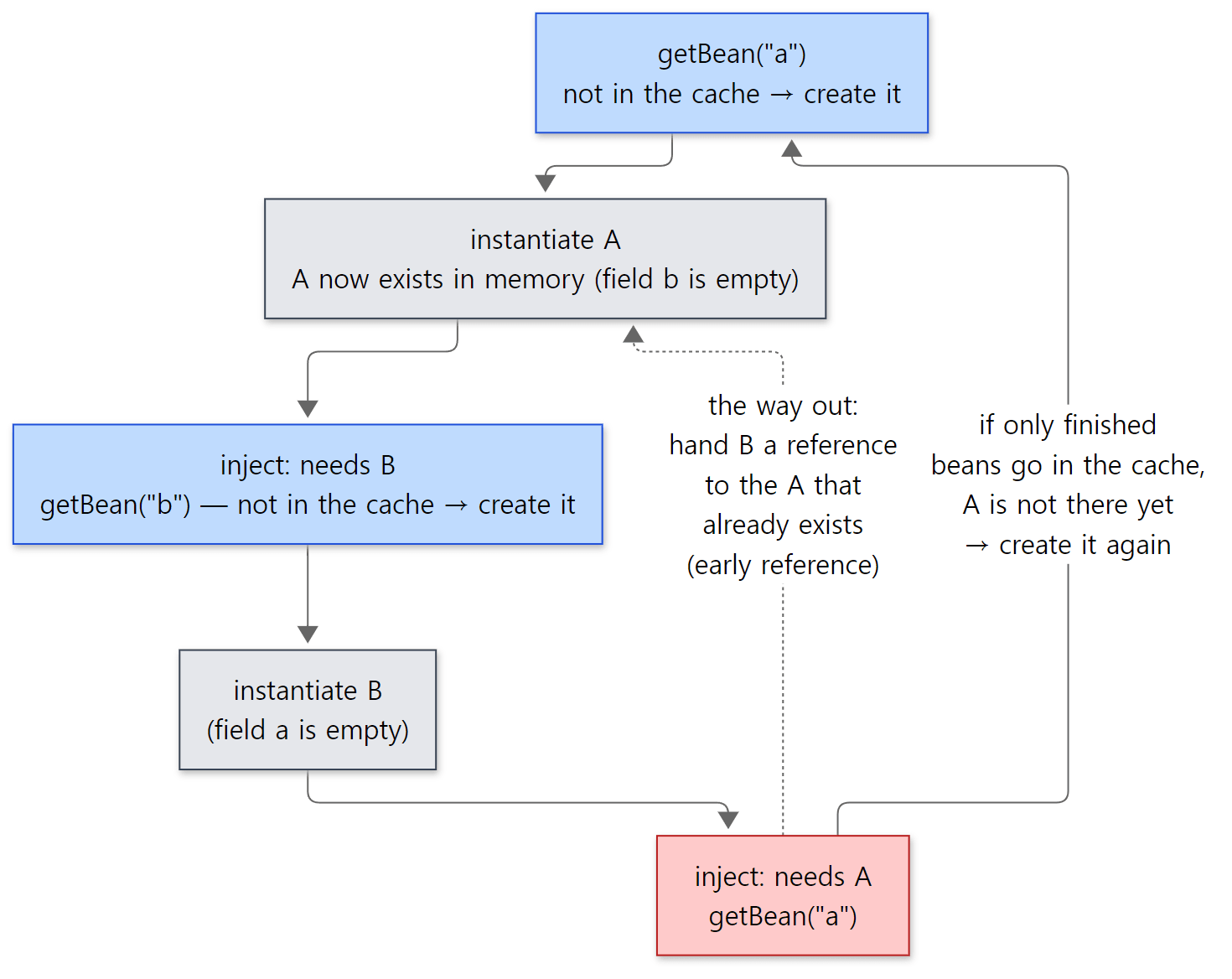 Follow the solid line on the right from the red box and the loop never ends. The dotted line in the middle points to the fix covered in section 5.
Easy to get wrong
- A plugin applied with
apply(plugin = "java")gets no accessors. Accessors are generated from the schema as it stands at the end of stage 1, andapply(plugin = …)runs in the stage 2 body. That follows from the order above; I didn't run this case separately. In that case, get the task by name, e.g.tasks.named<JavaCompile>("compileJava"). - The same goes for buildSrc and precompiled script plugins. Accessors are decided by what that build script's
plugins {}actually applied. Precompiled script plugins have their own way of generating accessors, which part 7 touches on briefly.
8. Class loader scopes — from settings down to subprojects
Now for the two scopes we left in section 1. The heart of ClassLoaderScope is two methods. local(classPath) adds classes "visible to this scope only, not its children"; export(classPath) adds classes "visible to this scope and all its children". Neither can be called after the scope is locked (ClassLoaderScope.java lines 67–85).
Each scope has two class loaders. getExportClassLoader() is the one child scopes use as their parent, and getLocalClassLoader() is the one this scope's own scripts use. After lock() nothing more can be added. If the real loaders are created only after locking, they can be trimmed — for example, when nothing was added, no new loader is created and the parent's is reused (DefaultClassLoaderScope.buildEffectiveLoaders() lines 93–110). The interface comment, too, names lazy and potentially optimized class loader creation as the purpose of this mechanism (ClassLoaderScope.java line 32).
Following who adds what draws the tree.
- At the top,
coreAndPluginsis the root holding the Gradle API and core plugins (DefaultClassLoaderScopeRegistry.javaline 30). settings[:]is the target scope of the settings script (SettingsFactory.javaline 54).buildSrc[:]is every project'sbaseProjectClassLoaderScope.BuildTreePreparingProjectsPreparer.prepareProjects()creates it as a child of the settings scope, registers it withgradle.setBaseProjectClassLoaderScope(), exports the version catalog accessors (libs) and the classpath of the built buildSrc, and then locks it (BuildTreePreparingProjectsPreparer.javalines 48–73; the catalog side is line 211 ofDefaultDependenciesAccessors.java).- Below it,
root-project[:]and below thatproject-<name>are the project scopesInstantiatingBuildLoadercreated in section 1. Attaching each script'sbuildscript {}classpath and the plugins fromplugins {}to them is theapplyPlugins(…, targetScope)we saw in sections 5 and 6.
        // Perform resolution & configure the classloader
        classLoaderScope.export(scriptHandler.getInstrumentedScriptClassPath());
        pluginDependencies.getAdditionalClassloaders().forEach(classLoaderScope::export);
        classLoaderScope.lock();

        // Apply the plugins
        pluginApplyActions.forEach(action -> action.apply(target));
It's export, not local. So classes added by the root's buildscript are visible to the root's children — every subproject. Conversely, what a subproject adds isn't visible to its parent. You can also see the order: attach the classpath, lock right away, and only then apply the plugins (plugin resolution and application themselves are in part 7).
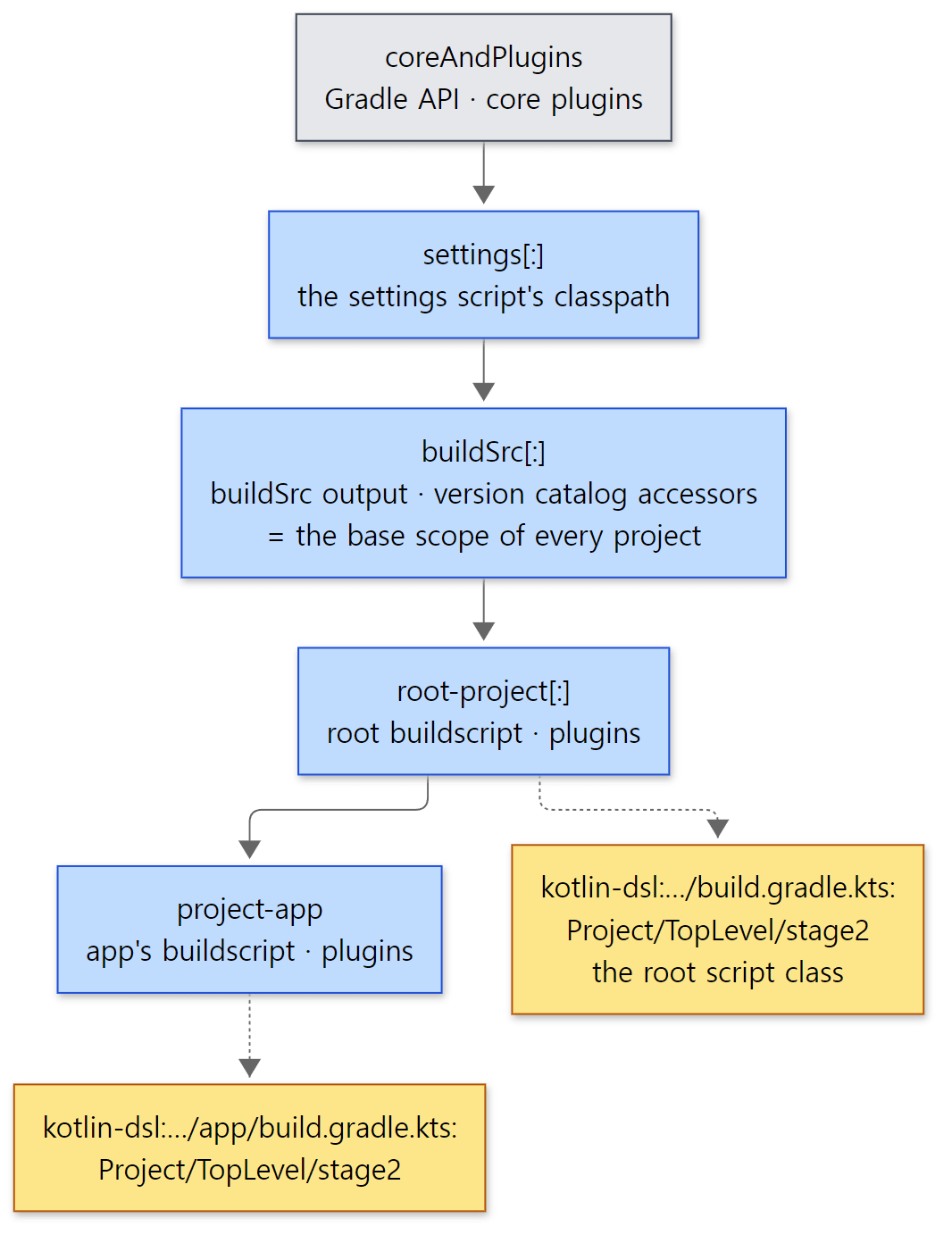 The yellow boxes are the locked child scopes the script classes themselves are loaded into (
createLockedChild).
Example 1 (continued): what each project can see
Example 1 puts commons-text in the root's buildscript and guava in the buildscript of the subproject app. Each script prints its project's scope id and tries to find a class from each library through the script class's class loader.
// Example written for this post (not Gradle source)
// ... the import, and buildscript {} adding guava 33.3.1-jre to the classpath ...

println("--- ${project.path} ---")
println("scope  = ${(project as ProjectInternal).classLoaderScope.id}")
for (cls in listOf("org.apache.commons.text.WordUtils", "com.google.common.base.Strings")) {
    val seen = runCatching { Class.forName(cls, false, this.javaClass.classLoader) }.isSuccess
    println("  sees ${cls.substringAfterLast('.')}: $seen")
}
// a class from the parent (root) script's buildscript can be used at compile time too
println("  WordUtils.capitalize -> ${org.apache.commons.text.WordUtils.capitalize("hello app")}")
[From example ex/u06-evaluator-chain/project/app/build.gradle.kts, shortened]
The root prints the same through a function. --offline works because both libraries are pre-loaded in the image's read-only dependency cache (part 1). The result:
--- : ---
scope  = ClassLoaderScopeIdentifier{coreAndPlugins:settings[:]:buildSrc[:]:root-project[:]}
  sees WordUtils: true
  sees Strings: false
in afterEvaluate: executed=true
--- :app ---
scope  = ClassLoaderScopeIdentifier{coreAndPlugins:settings[:]:buildSrc[:]:root-project[:]:project-app}
  sees WordUtils: true
  sees Strings: true
  WordUtils.capitalize -> Hello App
- The scope id is literally the path in the tree, matching the diagram.
- The root sees only its own
WordUtils, notapp'sStrings.appsees both. - The
appscript even compiled againstWordUtilsby name, which came from the root. As section 6 showed, stage 2 is compiled with the classpath oftargetScope, which includes what the parents export. - The root's
afterEvaluateprinted before the:appscript — the "end of configuring that one project" from section 3.
Compared with Tomcat, the shape is the opposite. In Tomcat part 4, web app loaders are all sibling children of the shared loader, so web apps can't see each other's classes — the goal is to keep web apps apart. Gradle's project scopes follow the project tree as parent and child, so that subprojects inherit the build logic their parent project set up.
Easy to get wrong
- If subprojects each apply the same plugin separately, each loads it into its own scope. The common advice to list plugins in the root's
plugins {}withapply falsefits this tree. Even withapply false, the plugin's classpath is exported to the root scope (the export in the code above happens regardless of whether the plugin is applied; only requests withisApply()are applied, lines 106–108). With the classes exported once in the root scope, every subproject sees the same classes. If instead each subproject applies the plugin without the root, the plugin's classes are loaded separately per scope, and passing plugin types between subprojects can hit the "same name, different class" problem. That last sentence follows from the structure above; I didn't reproduce it for this post.
What this post leaves out
- The Kotlin DSL's partial evaluator and the kinds of residual programs:
platforms/core-configuration/kotlin-dsl/src/main/kotlin/org/gradle/kotlin/dsl/execution/PartialEvaluator.kt,ResidualProgram.kt - Kotlin DSL incremental compilation state and classpath snapshots:
…/kotlin/dsl/cache/KotlinDslIncrementalCompilationCache.kt,KotlinDslClasspathEntrySnapshotCache - Kotlin metadata compatibility checks (when applying plugins built with an old Kotlin):
…/kotlin/dsl/execution/KotlinMetadataCompatibilityChecker.kt - The declarative DSL (
.gradle.dcl):DeclarativeDslScriptPluginFactory,platforms/core-configuration/declarative-dsl-provider/ - Script plugins applied with
apply(from = …)and their scope ("script-" + scriptUri): line 151 ofsubprojects/core/src/main/java/org/gradle/api/internal/plugins/DefaultObjectConfigurationAction.java - Handling of init scripts:
subprojects/core/src/main/java/org/gradle/configuration/DefaultInitScriptProcessor.java - The dynamic object that looks up properties by name up the parent projects, and the preparation for removing it (
FAIL_ON_PARENT_PROPERTY_LOOKUP):DefaultProject.javalines 166–176 and 242–253
Summary
| Concept | One-line summary |
|---|---|
| Project object | Created after settings by InstantiatingBuildLoader walking the descriptor tree. The real class is DefaultProject_Decorated |
| Build script source | ProjectFactory finds and reads it when creating the project and hands it over as a ScriptSource |
ensureSelfConfigured() |
The Created → Configured transition. Once only, under the project lock, parent first |
| Evaluator chain | LifecycleProjectEvaluator → ConfigureActionsProjectEvaluator → auto-apply actions · BuildScriptProcessor · deferred actions |
| Project lock | runWithModelLock(). Run directly if already held; otherwise swap it in for other project locks |
| Project state | UNCONFIGURED → IN_BEFORE_EVALUATE → IN_EVALUATE → IN_AFTER_EVALUATE → CONFIGURED. executed is true before afterEvaluate |
afterEvaluate |
Runs even if the script fails. Registering one after configuration throws |
| Choosing the build file | First of .gradle → .gradle.kts → .gradle.dcl. The rest only show up in the problems report |
| Choosing the runner | ScriptPluginFactorySelector by the end of the file name. The Kotlin one is loaded from a class name string |
| Groovy's two passes | cp_proj (CLASSPATH, base scope) → apply plugins → proj (BODY, project scope) |
| Kotlin's two stages | ProgramParser cuts out top-level blocks and fills them with spaces. The stage 1 program compiles and runs stage 2 |
| Script compile caches | In memory (per build, per daemon) + execution engine workspaces (caches/<version>/groovy-dsl, kotlin-dsl/scripts) |
| Accessors | Generated from the schema after stage 1. tasks.compileJava = tasks.named<JavaCompile>("compileJava") |
| Class loader scopes | coreAndPlugins → settings → buildSrc → root → subprojects. buildscript is exported, then locked |
What's next
This post took the plugins {} block only as far as "it runs in stage 1 and applies plugins". How id("java") becomes the JavaPlugin class, what gets downloaded for a plugin from the Plugin Portal, what stops apply() from running twice, and when pluginManager.withPlugin() fires — that's part 7: Applying Plugins — From the plugins {} Block to apply().
Earlier series covered similar ground. The per-project class loader tree was built for the exact opposite purpose of the web app class loaders in Tomcat part 4 (section 8). DefaultProject_Decorated, a subclass generated at runtime, is the _Decorated class from part 4, and the idea resembles the CGLIB proxies in Spring part 10. Wrapping the configuration phase in layers of evaluators is the same "outer calls inner" shape as the valves in Tomcat part 8, and LifecycleProjectEvaluator always calling afterEvaluate in finally mirrors a valve always passing back through on the way out.