What this post covers
This is the ninth post in the "Digging into Gradle's Source" series. In post 8 we saw that a task is only registered by register() and created when it is needed, and that inputs wired up with a Provider create a dependency without any dependsOn. When the configuration phase ends, what Gradle has in hand is a set of tasks and the relationships between them. This post picks up from there: the part that uses those relationships to decide what to run, in what order and how many at once, and then actually hands the work to threads.
We will answer four questions.
- How does
gradle pAon the command line become thepackageApptask? - What do
dependsOn,mustRunAfter,shouldRunAfterandfinalizedBybecome in the execution plan, and who decides the order? - While the build runs, who picks "the next task to run", and how? Where do the thread names
Execution workerandincluded buildsthat show up in the console come from? - What exactly do
--paralleland--max-workerslimit? And how is the Worker API a different road inside all that?
| Item | Details |
|---|---|
| Project | Gradle Build Tool |
| Version | 9.10.0 development build (master) |
| Commit | 07ecbf9ead (2026-10-24) |
| Main classes | DefaultTaskSelector, DefaultExecutionPlan, DetermineExecutionPlanAction, Node·TaskNode·LocalTaskNode, DefaultFinalizedExecutionPlan, DefaultTaskExecutionGraph, DefaultPlanExecutor, DefaultWorkerLeaseService, DefaultWorkerExecutor |
Every line number in this post refers to this commit. Post 1 shows how to check out the same commit and build the Docker image used for the examples.
On the map from post 2, this post zooms into the first box of zone E (the execution phase), "execution plan and nodes (worker threads)". In post 2's "execution path" diagram, our scope runs from the FinalizedExecutionPlan being handed to DefaultPlanExecutor up to the Execution worker threads picking nodes; the execution engine that decides UP-TO-DATE inside a picked node belongs to post 10.
The execution/plan package alone has 54 source files, and the node-picking logic used during execution (DefaultFinalizedExecutionPlan) is over 850 lines by itself. This post follows only the main path that someone opening the code for the first time can keep up with. What I left out is listed by name and location in "What this post leaves out" at the end.
Terms to know first
The task graph is "the tasks to run in this build and the order between them". It is what you touch as gradle.taskGraph in a build script, and in the source its public face is DefaultTaskExecutionGraph. Behind that face, the thing actually holding the graph is the execution plan. The plan has two shapes: DefaultExecutionPlan while nodes are being collected and ordered, and DefaultFinalizedExecutionPlan, which hands out "the next node" during execution once the order is fixed.
A node is one point in the execution plan. One task usually becomes one LocalTaskNode, but there are nodes that are not tasks too (a task in an included build, an artifact transform, a node that works out output locations right before a task runs, and so on — section 3).
Successor is the most confusing name in this post. In Gradle's source, a "successor" of node A is a node that has to finish before A. If b.dependsOn(a), then a is a dependency successor of b. The graph draws the arrow as b → a, and following the arrow leads to the "successor" — it does not mean later in time.
A worker lease is a ticket that says "you may work right now". The total number is set by --max-workers, and every thread holds one while it works, whether it runs tasks or Worker API items (section 7).
A resource lock is separate from worker leases: a lock that lets only one thread use a given resource at a time. The ones that matter here are the task execution lock and the project lock. What --parallel changes is precisely the granularity of these locks.
The Worker API is a public API (WorkerExecutor) that lets a task split the work inside its action into pieces and run them on other threads or in other processes. It is a different road from running tasks in parallel with each other (section 8).
1. The big picture: name → nodes → order → threads
Between TaskSchedule and ReadyToRun in the build lifecycle we saw in post 2 — the build operation named Calculate task graph — lies the first half of this post. The class that ties that work together is short.
    @Override
    public void populateWorkGraph(GradleInternal gradle, ExecutionPlan plan, Consumer<? super ExecutionPlan> action) {
        action.accept(plan);
        plan.determineExecutionPlan();
    }

    @Override
    public FinalizedExecutionPlan finalizeWorkGraph(GradleInternal gradle, ExecutionPlan plan) {
        TaskExecutionGraphInternal taskGraph = gradle.getTaskGraph();
        // ...
        FinalizedExecutionPlan finalizedExecutionPlan = plan.finalizePlan();

        if (LOGGER.isInfoEnabled()) {
            LOGGER.info("Tasks to be executed: {}", plan.getContents().getTasks());
            LOGGER.info("Tasks that were excluded: {}", plan.getContents().getFilteredTasks());
        }

        taskGraph.populate(finalizedExecutionPlan);
        // ...
        return finalizedExecutionPlan;
    }
subprojects/core/src/main/java/org/gradle/internal/build/DefaultBuildWorkPreparer.java lines 45–68
The action passed to populateWorkGraph() picks the task names from the command line and puts them in the plan (sections 2 and 3), and determineExecutionPlan() decides the order (section 4). finalizeWorkGraph() freezes the plan (finalizePlan()) and fills gradle.taskGraph with it (taskGraph.populate(), section 5). After that, inside the build operation Run tasks (DefaultBuildWorkExecutor, line 88), DefaultPlanExecutor hands the frozen plan out to threads (sections 6 and 7).
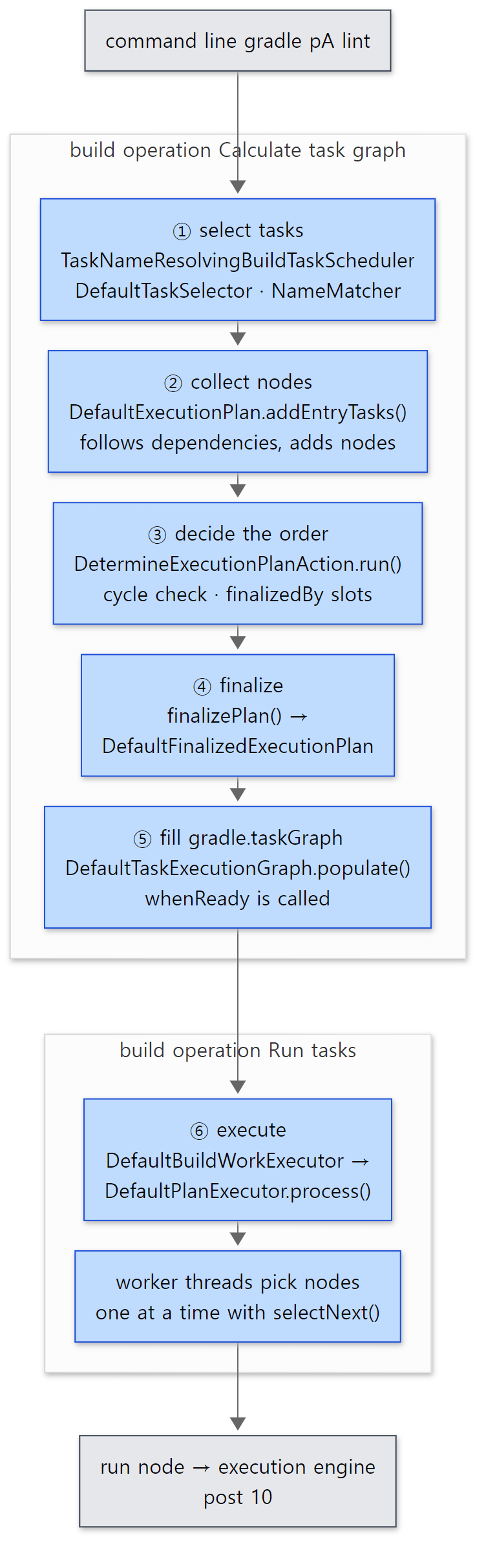 The numbers in the diagram roughly match the section numbers. The blue boxes are what this post reads.
Example 1: printing the finalized plan
The first example is a single project with seven tasks. Each task's action prints its own path and the thread name, and gradle.taskGraph.whenReady prints the finalized plan on one line.
// Example written for this post (not part of Gradle's source)

// When a task action runs, print its path and thread name
fun Task.say() = doLast { println("run ${path} on [${Thread.currentThread().name}]") }

val generate = tasks.register("generate") {
    say()
    // ... with -Pstack, print part of the stack (section 6) ...
}
val compileApp = tasks.register("compileApp") { dependsOn(generate); say() }
tasks.register("alpha") { say() }
tasks.register("zeta") { say() }
tasks.register("packageApp") {
    // declared order: compileApp, zeta, alpha
    dependsOn(compileApp, "zeta", "alpha")
    finalizedBy("report")
    say()
    // ... with -Pfail, this task fails (section 5) ...
}
tasks.register("report") { say() }
tasks.register("lint") {
    // orders the two only when both are in the graph — lint does not pull packageApp in
    mustRunAfter("packageApp")
    say()
}
// ... settings added only with -Pcycle or -Pimplicit (sections 4 and 7) ...

// Once the execution plan is final, print its tasks in order
gradle.taskGraph.whenReady {
    println("graph ready: " + allTasks.joinToString(" -> ") { it.path })
}
[Shortened from the example ex/u09-plan-order/project/build.gradle.kts]
All examples in this post were run with Gradle 9.10.0 (development build), built as-is from the reference commit (07ecbf9ead), inside a Docker container (Eclipse Temurin JDK 25). Here is gradle pA --info, with only the lines relevant to this post kept by grep.
=== gradle pA (abbreviated name, --info lines) ===
Abbreviated task name 'pA' matched 'packageApp'
Selected primary task 'pA' from project :
Tasks to be executed: [task ':alpha', task ':generate', task ':compileApp', task ':zeta', task ':packageApp', task ':report']
Tasks that were excluded: []
graph ready: :alpha -> :generate -> :compileApp -> :zeta -> :packageApp -> :report
run :alpha on [Execution worker]
run :generate on [included builds]
run :compileApp on [included builds]
run :zeta on [included builds]
run :packageApp on [Execution worker Thread 10]
run :report on [Execution worker Thread 10]
BUILD SUCCESSFUL in 34s
All of this post's questions are in these thirteen lines: the line where pA became packageApp (section 2), a plan order that differs from the compileApp, zeta, alpha written in dependsOn (sections 3 and 4), report, which we never asked for but which joined anyway (section 4), and thread names that change from task to task (section 6). The number at the end of a thread name (Thread 10) and which task went to which thread vary from run to run. The 34s includes starting a daemon and compiling the scripts, because the container gets a fresh Gradle user home every time (the build time varies between runs too: a later run took 1m 26s, and that time all six tasks ran on Execution worker).
2. Selecting tasks — how gradle pA becomes packageApp
TaskNameResolvingBuildTaskScheduler takes the task names off the command line one by one and puts them into the plan.
        List<TaskExecutionRequest> taskParameters = gradle.getStartParameter().getTaskRequests();
        for (TaskExecutionRequest taskParameter : taskParameters) {
            List<TaskSelection> taskSelections = commandLineTaskParser.parseTasks(taskParameter);
            for (TaskSelection taskSelection : taskSelections) {
                LOGGER.info("Selected primary task '{}' from project {}", taskSelection.getTaskName(), taskSelection.getProjectPath());
                plan.addEntryTasks(taskSelection.getTasks());
            }
        }
Selected primary task 'pA' from project : in the example output is line 64. Note that one name becomes a set of tasks (getTasks()): in a multi-project build, gradle build selects the build task of the root and every subproject at once. The selecting itself is done by DefaultTaskSelector.getSelection().
        TaskSelectionResult tasks = taskNameResolver.selectWithName(taskName, targetProject, includeSubprojects);
        if (tasks != null) {
            LOGGER.info("Task name matched '{}'", taskName);
            return new TaskSelection(targetProject.getProjectPath().asString(), taskName, tasks);
        }

        Map<String, TaskSelectionResult> tasksByName = taskNameResolver.selectAll(targetProject, includeSubprojects);
        NameMatcher matcher = new NameMatcher();
        String actualName = matcher.find(taskName, tasksByName.keySet());

        if (actualName == null) {
            throw throwTaskSelectionException(context, targetProject, taskName, includeSubprojects, matcher);
        }
        LOGGER.info("Abbreviated task name '{}' matched '{}'", taskName, actualName);
        return new TaskSelection(targetProject.getProjectPath().asString(), taskName, tasksByName.get(actualName));
subprojects/core/src/main/java/org/gradle/execution/DefaultTaskSelector.java lines 76–90
It first looks for a task with exactly that name (line 76); if there is none, it collects every task name and asks NameMatcher to expand the abbreviation (lines 82–84). Abbreviated task name 'pA' matched 'packageApp' in the example is line 89.
NameMatcher turns the abbreviation into a regular expression. pA is split at the uppercase boundary into "p followed by any lowercase letters, then A followed by any lowercase letters" (NameMatcher.java lines 155–166), so pA matches packageApp. It tries kebab case the same way (gBD → gradle-binary-distribution). Candidates are collected at several levels, and if an earlier level found something, that is what gets used (lines 132–146).
| Order | How it matches | Example |
|---|---|---|
| 1 | Same name, differing only in case | PACKAGEAPP → packageApp |
| 2 | The whole camel-case pattern matches (case-sensitive) | pA → packageApp |
| 3 | The camel-case pattern matches the beginning | pack → packageApp |
| 4 | Case-insensitive camel-case prefix | PA → packageApp |
| separately | Kebab case, whole or prefix | gBD → gradle-binary-distribution |
The name is resolved only when exactly one candidate is left at the end (lines 148–152). With two or more you get "ambiguous", with none you get "not found", and among the names that matched nothing, the ones with a small edit distance (Levenshtein distance) are shown as "Some candidates are" (lines 123–129). Here is what happens with a name that does not exist, pZ:
=== gradle pZ (not found) ===
* What went wrong:
Task not found
  Task 'pZ' not found in root project 'plan-order'.
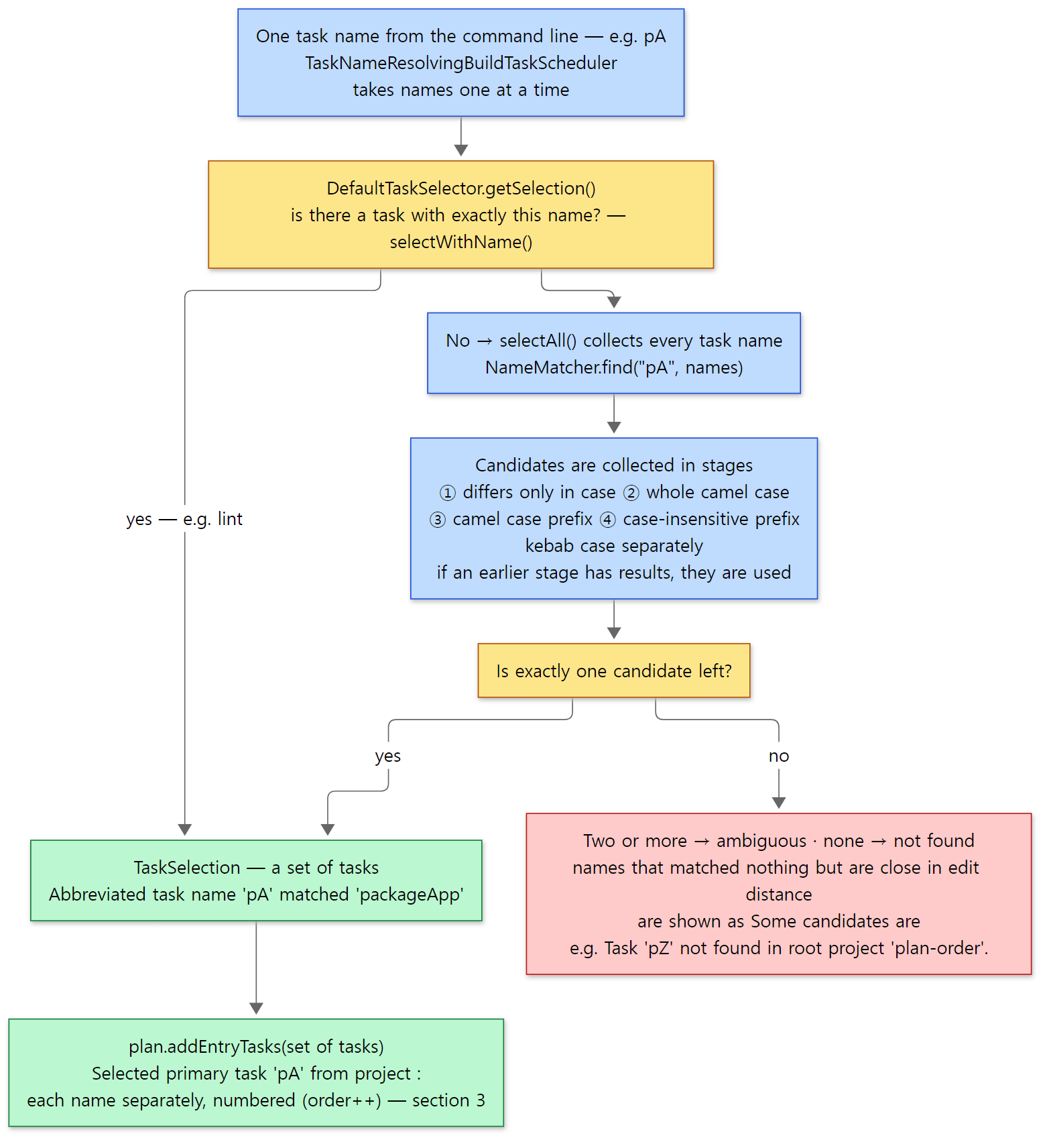 The three pieces of code in this section joined into one path. The Abbreviated…, Selected… and Task 'pZ' not found… lines are the example's actual output.
Easy to get wrong
- An abbreviation can break when you add a task. Since the rule is "exactly one candidate",
gradle pAthat works today becomes ambiguous the day someone adds apublishApptask. Avoid abbreviations in CI scripts. - Names are selected per project, and the plan is built per name. The two names in
gradle lint packageAppeach go in through their ownaddEntryTasks()call in the outer loop on line 61. The number attached at that point (order++) ties into section 3 and to "command-line order" (ordinal) at the end of this post.
3. Collecting nodes — addEntryTasks() and following dependencies
The selected tasks go into DefaultExecutionPlan.addEntryTasks(). This creates entry nodes (the nodes of the tasks picked directly on the command line) and then follows their dependencies to find every node that belongs in the plan.
The method that runs after the entry nodes are put into a queue (doAddEntryNodes() lines 153–166) is this one.
    private void discoverNodeRelationships(Deque<Node> queue) {
        Set<Node> visiting = new HashSet<>();
        HeadInsertBuffer<Node> successorBuffer = new HeadInsertBuffer<>();
        while (!queue.isEmpty()) {
            Node node = queue.getFirst();
            node.prepareForScheduling();
            if (node.getDependenciesProcessed() || node.isCannotRunInAnyPlan()) {
                // Have already visited this node or have already executed it - skip it
                queue.removeFirst();
                continue;
            }
            // ... handling of tasks excluded with -x (filtered) ...
            node.require();

            if (visiting.add(node)) {
                // Have not seen this node before - add its dependencies to the head of the queue and leave this
                // node in the queue
                node.resolveDependencies(dependencyResolver);
                // ...
                for (Node successor : node.getDependencySuccessors()) {
                    if (!visiting.contains(successor)) {
                        successorBuffer.add(successor);
                    }
                }
                successorBuffer.drainTo(queue);
            } else {
                // Have visited this node's dependencies - add it to the graph
                queue.removeFirst();
                visiting.remove(node);
                node.dependenciesProcessed();
                // Finalizers run immediately after the node
                for (Node finalizer : node.getFinalizers()) {
                    finalizers.add(finalizer);
                    if (!visiting.contains(finalizer)) {
                        queue.addFirst(finalizer);
                    }
                }
            }
        }
    }
subprojects/core/src/main/java/org/gradle/execution/plan/DefaultExecutionPlan.java lines 168–218
The first time it sees the node at the head of the queue (line 191), it resolves the node's dependencies and pushes them onto the front of the queue, leaving the node itself in place. When it comes back and sees the node a second time (line 204), all dependencies have been seen, so it marks the node as "processed" and pushes the node's finalizers (tasks attached with finalizedBy) onto the front of the queue. It is a depth-first search done with a queue instead of recursion. node.require() (line 189) moves the node into the SHOULD_RUN state; states come in section 5.
The goal of this step is to collect every node, not to order them. The order is decided in section 4 by DetermineExecutionPlanAction, which walks everything again from the start.
Where a node resolves its dependencies
Here is what resolveDependencies(), called on lines 191–194, actually does for a task.
    @Override
    public void resolveDependencies(TaskDependencyResolver dependencyResolver) {
        // Make sure it has been configured
        taskProject.getTasks().prepareForExecution(task);

        for (Node targetNode : getDependencies(dependencyResolver)) {
            addDependencySuccessor(targetNode);
        }

        lifecycleSuccessors = dependencyResolver.resolveDependenciesFor(task, TaskInternalUtil.getLifecycleDependencies(task));

        for (Node targetNode : getFinalizedBy(dependencyResolver)) {
            if (!(targetNode instanceof TaskNode)) {
                throw new IllegalStateException("Only tasks can be finalizers: " + targetNode);
            }
            addFinalizerNode((TaskNode) targetNode);
        }
        for (Node targetNode : getMustRunAfter(dependencyResolver)) {
            addMustSuccessor(targetNode);
        }
        for (Node targetNode : getShouldRunAfter(dependencyResolver)) {
            addShouldSuccessor(targetNode);
        }
    }
subprojects/core/src/main/java/org/gradle/execution/plan/LocalTaskNode.java lines 122–145
The first line, prepareForExecution(task), connects to "realizing" from post 8. A task that was only registered with register() has its configuration block run and becomes a real object the moment it enters this plan. Next, the four kinds of relationship are copied over as relationships between nodes, one after another. What getDependencies() returns includes both what you wrote with dependsOn and the producer tasks that the input Providers from post 8 drag along (TaskInternalUtil.getTaskDependencies()). lifecycleSuccessors (line 131) keeps, separately, only the ones declared directly with dependsOn. It is used to tell, when an earlier task fails, whether this dependency relies on the earlier task's outcome or only on its output files (LocalTaskNode.java lines 216–225).
How the four relationships differ at node level is shown by two methods on TaskNode (TaskNode.java lines 76–93). getAllSuccessors() chains shouldSuccessors, finalizingSuccessors, getMustSuccessors() and the dependency successors; getHardSuccessors() is the same minus shouldSuccessors. A hard successor is a relationship that cannot be removed. The comment on Node.getHardSuccessors() says it directly: "shouldRunAfter isn't a hard successor while mustRunAfter is" (Node.java lines 532–540). In summary:
| Build script | On the node | Hard? | Pulls the other task into the plan? |
|---|---|---|---|
dependsOn(a), input Provider |
a is a dependency successor |
yes | yes (discoverNodeRelationships follows it) |
finalizedBy(f) |
this task is a finalizing successor of f |
yes | yes (queued after line 204) |
mustRunAfter(a) |
a is a must successor |
yes | no |
shouldRunAfter(a) |
a is a should successor |
no — dropped if it creates a cycle | no |
Note that only finalizedBy points the other way. Writing packageApp.finalizedBy(report) records on the report side that "I run after packageApp" (report's finalizing successor = packageApp) (LocalTaskNode.java lines 147–150, TaskNode.java lines 62–65).
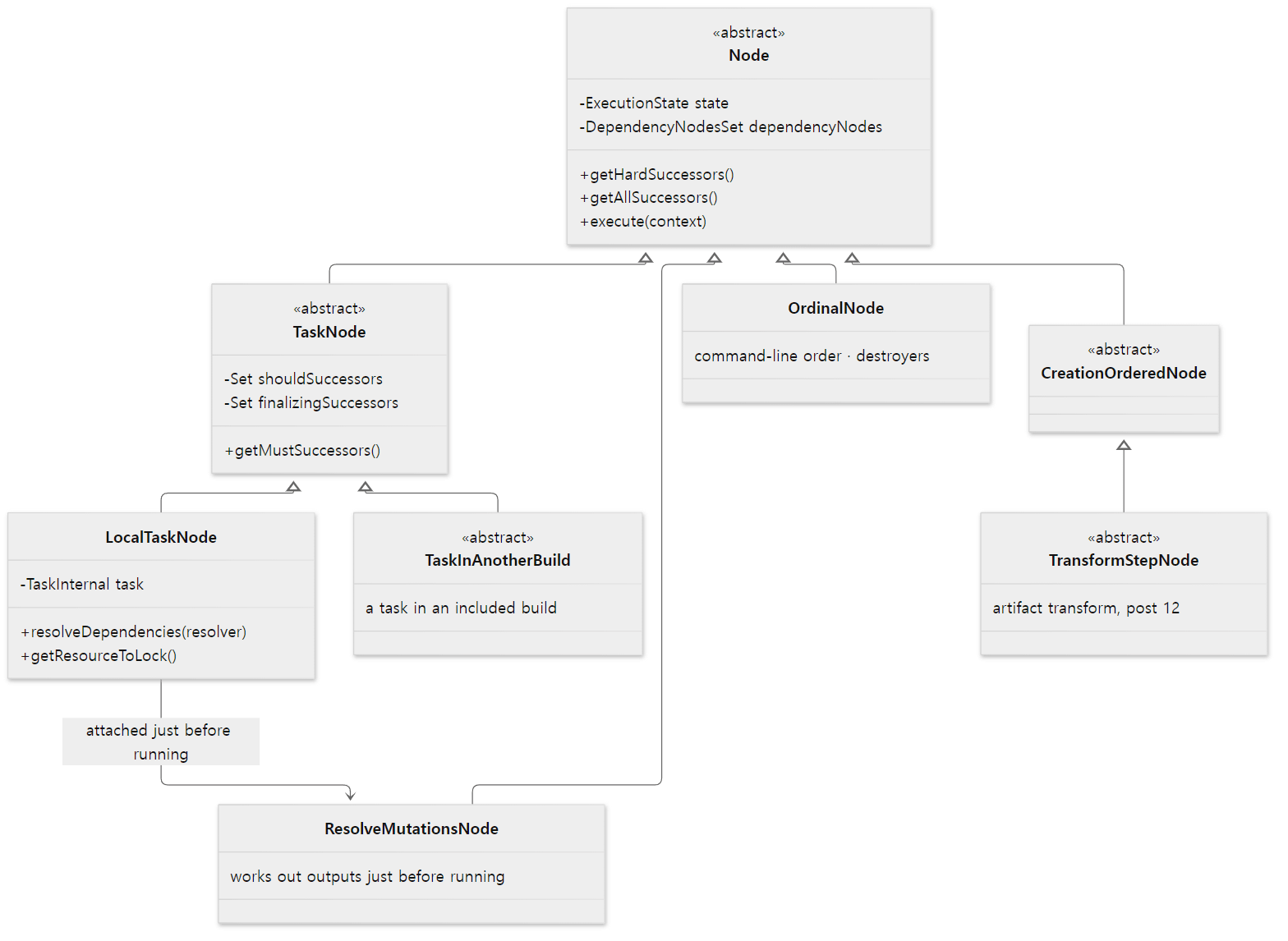 The blue box is the star of this post,
LocalTaskNode; the grey boxes are nodes we only see by name.
Easy to get wrong: the order in dependsOn is not an order
The example's packageApp was declared with dependsOn(compileApp, "zeta", "alpha"), but the plan came out as alpha → generate → compileApp → zeta. That is alphabetical order. A node's successor sets are sets sorted by a comparator (newSortedNodeSet(), NodeSets.java lines 35–37). Task nodes are ultimately compared with Task.compareTo(), which looks at project depth first and, if equal, compares the task path strings (AbstractTask.java lines 574–582). Since :alpha < :compileApp < :zeta, the depth-first search goes in that order, and compileApp brings its own dependency generate in first. The result is the order in the example. If you need an order between two tasks, declare that relationship directly instead of relying on the listing order in dependsOn. Besides, this order only says "which ready node to try first"; with --parallel they can run at the same time (section 7).
4. Deciding the order — DetermineExecutionPlanAction
Once all nodes are collected, determineExecutionPlan() creates a DetermineExecutionPlanAction and runs it (DefaultExecutionPlan.java lines 227–239). The class description says it "determines the execution plan, checking for cycles and making sure finalizedBy constraints are honored".
    public ImmutableList<Node> run() {
        updateFinalizerGroups();
        processEntryNodes();
        processNodeQueue();
        return createOrdinalRelationshipsAndCollectNodes();
    }
The heart of it is processNodeQueue(). It has the same shape as the walk in section 3, with two differences: it follows getAllSuccessors() — that is, including mustRunAfter, shouldRunAfter and finalizedBy — and it appends a node to the end of the plan the second time it sees it.
            if (visitingNodes.put(node, currentSegment)) {
                // Have not seen this node before - add its dependencies to the head of the queue and leave this
                // node in the queue
                // ...
                // Add any finalizers to the queue just after the current node
                for (Node finalizer : node.getFinalizers()) {
                    addFinalizerToQueue(visitingSegmentCounter++, finalizer);
                }

                for (Node successor : node.getAllSuccessors()) {
                    if (visitingNodes.containsEntry(successor, currentSegment)) {
                        if (!walkedShouldRunAfterEdges.isEmpty()) {
                            //remove the last walked should run after edge and restore state from before walking it
                            // ...
                            break;
                        } else {
                            onOrderingCycle(successor, node);
                        }
                    }
                    successorBuffer.add(new NodeInVisitingSegment(successor, currentSegment));
                }
                successorBuffer.drainTo(nodeQueue);
                path.push(node);
            } else {
                // Have visited this node's dependencies - add it to the end of the plan
                nodeQueue.removeFirst();
                maybeRemoveProcessedShouldRunAfterEdge(node);
                visitingNodes.remove(node, currentSegment);
                path.pop();
                nodeMapping.add(node);
            }
Because a node is added only after all its successors are in the plan (line 204), the plan ends up ordered "whatever must finish first comes first" — a topological sort. Meeting a node that is already on the path being walked (line 176) means a cycle. If the path being walked contains a shouldRunAfter edge, the most recently walked such edge is removed, the state is rolled back to before that edge was walked, and the walk continues (lines 177–189); if the path has no shouldRunAfter edge, the build fails (line 191). This is what the documentation means when it says shouldRunAfter is an order that is "kept if possible, dropped if not", while mustRunAfter is an order whose violation is an error.
But what if the other task in a mustRunAfter or shouldRunAfter is not in the plan? A node taken off the queue is discarded if isDoNotIncludeInPlan() is true, and one of the examples in that comment is "it is reachable only via a must-run-after or should-run-after edge" (lines 149–153). A node that never got require() in section 3 (NOT_SCHEDULED) is thrown away here. Section 3 did not follow mustRunAfter, so a node reachable only through that edge never enters the plan. Let's check with the example.
=== gradle lint (alone) ===
graph ready: :lint
run :lint on [Execution worker]
=== gradle lint packageApp ===
graph ready: :alpha -> :generate -> :compileApp -> :zeta -> :packageApp -> :lint -> :report
...
(I cut the seven run … lines of the second build; they appear in the same order as the plan.) Calling lint alone does not pull in packageApp. Calling both puts lint after packageApp, even though lint came first on the command line.
Where the finalizer goes
report is packageApp's finalizer. In the plan, report is not right after packageApp but after lint, at the very end. That comes from the way addFinalizerToQueue() picks the queue slot for a finalizer (DetermineExecutionPlanAction.java lines 221–236). By default a finalizer goes into the second slot of the queue (insertPosition = 1 on line 222, right after the current node), and if a node it finalizes appears again further back in the queue, it is pushed back to that slot (lines 230–232). Tracing gradle lint packageApp:
- The two entry nodes go into the queue in command-line order. Queue:
lint,packageApp. - The first time
lintis seen, itsmustRunAftertargetpackageAppis pushed to the front. Queue:packageApp,lint,packageApp(the entry node's copy). - The first time the front
packageAppis seen, its finalizerreportis inserted. Since there is anotherpackageAppfurther back, it goes to that slot (the third). Queue:packageApp,lint,report,packageApp. packageAppgoes through its dependencies and is appended to the plan, followed bylintand thenreport. The lastpackageAppis already in the plan and is discarded (line 149).
That is why report ended up after lint. During execution, though, the actual start time is decided less by this slot than by the rule in section 5 (a finalizer starts after the nodes it finalizes have finished) and by the "ready node" picking in section 6.
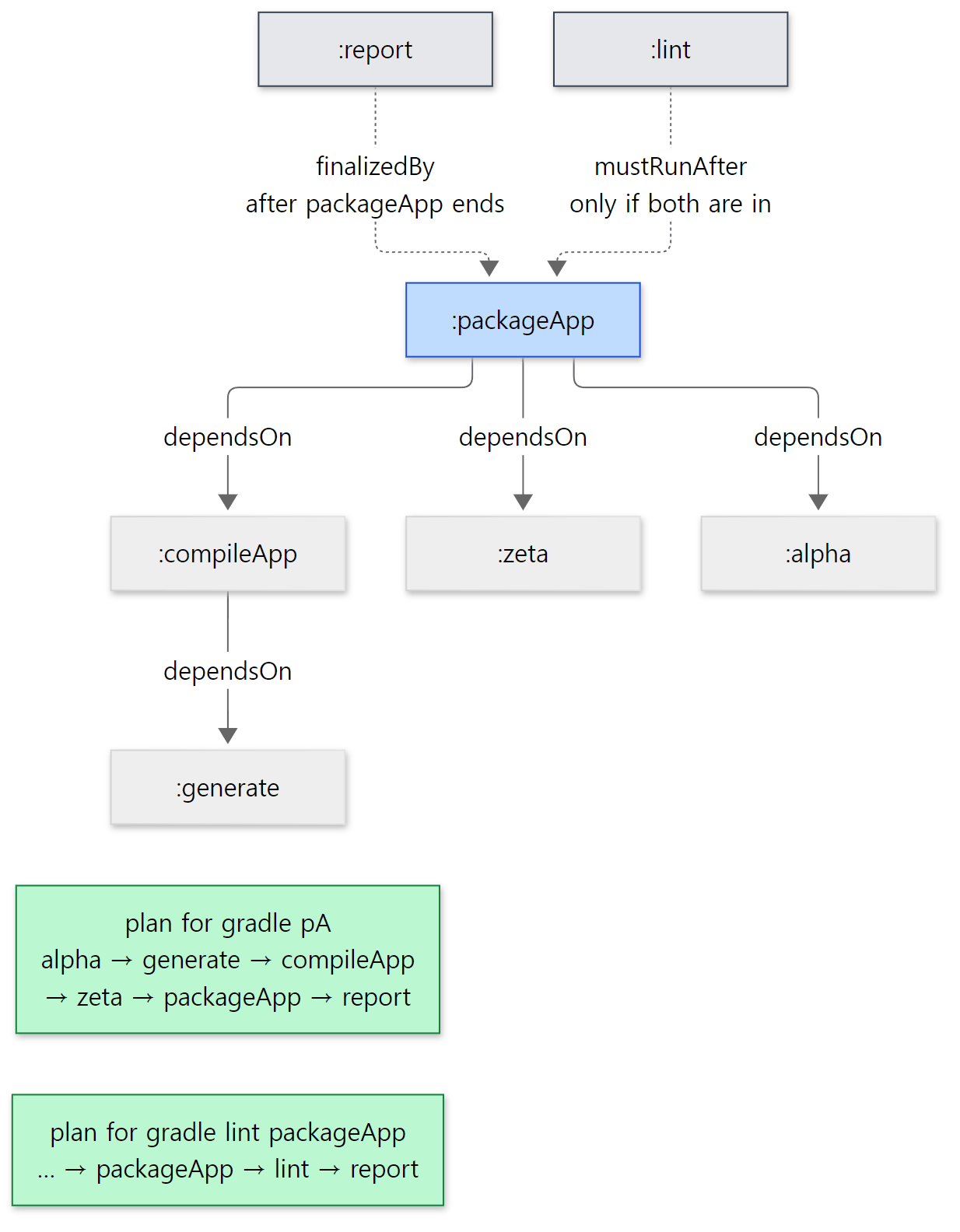 Arrows follow the source's "successor" direction. The node at the arrowhead has to finish first.
When there is a cycle
With -Pcycle, the example adds generate.dependsOn("packageApp"), creating the cycle generate → packageApp → compileApp → generate.
=== gradle pA -Pcycle ===
* What went wrong:
Circular dependency between the following tasks:
:compileApp
\--- :generate
     \--- :packageApp
          \--- :compileApp (*)

(*) - details omitted (listed previously)
onOrderingCycle() finds the cycle with a CachingDirectedGraphWalker and draws it with a DirectedGraphRenderer (DetermineExecutionPlanAction.java lines 292–327). The cycle search follows only hard successors (line 305), so shouldRunAfter never appears in this message.
Easy to get wrong
mustRunAfterdecides only order;dependsOndecides both order and inclusion. "When I runlint, I wantpackageAppto have run too" isdependsOn; "when both run, just keep this order" ismustRunAfter.- The cycle in a cycle error is just a cycle. The
:compileAppat the top of the output above is merely the cycle's starting point picked by sorting (sortedListOf, line 312), not the cause. You need to cut any one relationship in the cycle.
5. Finalizing and gradle.taskGraph — whenReady, --dry-run, node states
The ordered plan becomes a DefaultFinalizedExecutionPlan in finalizePlan() (DefaultExecutionPlan.java lines 291–302). Its constructor gives every node in the plan a sequence number (index) and puts the nodes that can start right away into the "ready nodes" queue (DefaultFinalizedExecutionPlan.java lines 129–136). This index decides, in section 6, "which one first when several nodes are ready".
Then the taskGraph.populate() from section 1 is called.
    @Override
    public void populate(FinalizedExecutionPlan plan) {
        // ...
        executionPlan = plan;
        // Take a snapshot of all tasks, so they remain queryable after the plan is discarded
        // at the end of execution.
        // ...
        tasks = new TasksSnapshot(ImmutableSet.copyOf(executionPlan.getContents().getTasks()));
        if (!hasFiredWhenReady) {
            fireWhenReady();
            hasFiredWhenReady = true;
        } else if (!graphListeners.isEmpty()) {
            LOGGER.info("Ignoring listeners of task graph ready event, as this build ({}) has already executed work.", gradleInternal.getIdentityPath());
        }
    }
gradle.taskGraph is a window that briefly borrows the execution plan to show it to you. allTasks is the snapshot taken on line 98, in exactly the order the nodes were appended in section 4 (NodeMapping uses a LinkedHashMap, DefaultExecutionPlan.java lines 395–397). That is why the example's graph ready: line and --info's Tasks to be executed: show the same order. And whenReady is called only once per build (lines 99–104). If the same build gets a plan populated again, the listeners are not called and only a note is left in --info.
--dry-run still builds the whole plan
--dry-run (-m) is handled at the fork in DefaultBuildWorkExecutor right before execution. It prints each task's path in the plan with SKIPPED and returns success, without calling PlanExecutor (DefaultBuildWorkExecutor.java lines 106–117).
=== gradle pA --dry-run ===
graph ready: :alpha -> :generate -> :compileApp -> :zeta -> :packageApp -> :report
:alpha SKIPPED
:generate SKIPPED
:compileApp SKIPPED
:zeta SKIPPED
:packageApp SKIPPED
:report SKIPPED

BUILD SUCCESSFUL in 2s
Consider enabling configuration cache to speed up this build: https://docs.gradle.org/9.10.0-20261107025045+0000/userguide/configuration_cache_enabling.html
The fact that whenReady was called means the configuration phase and plan building both happened. --dry-run is a mode that "only skips calling the task actions", and the lines come out in plan order. The configuration-cache suggestion on the last line is the subject of post 11.
Node states
A node in the plan is in one of the five states of Node.ExecutionState (Node.java lines 40–52). The methods that change the state are require(), startExecution(), finishExecution(), markFailedDueToDependencies() and cancelExecution() in the same file (lines 288–329).
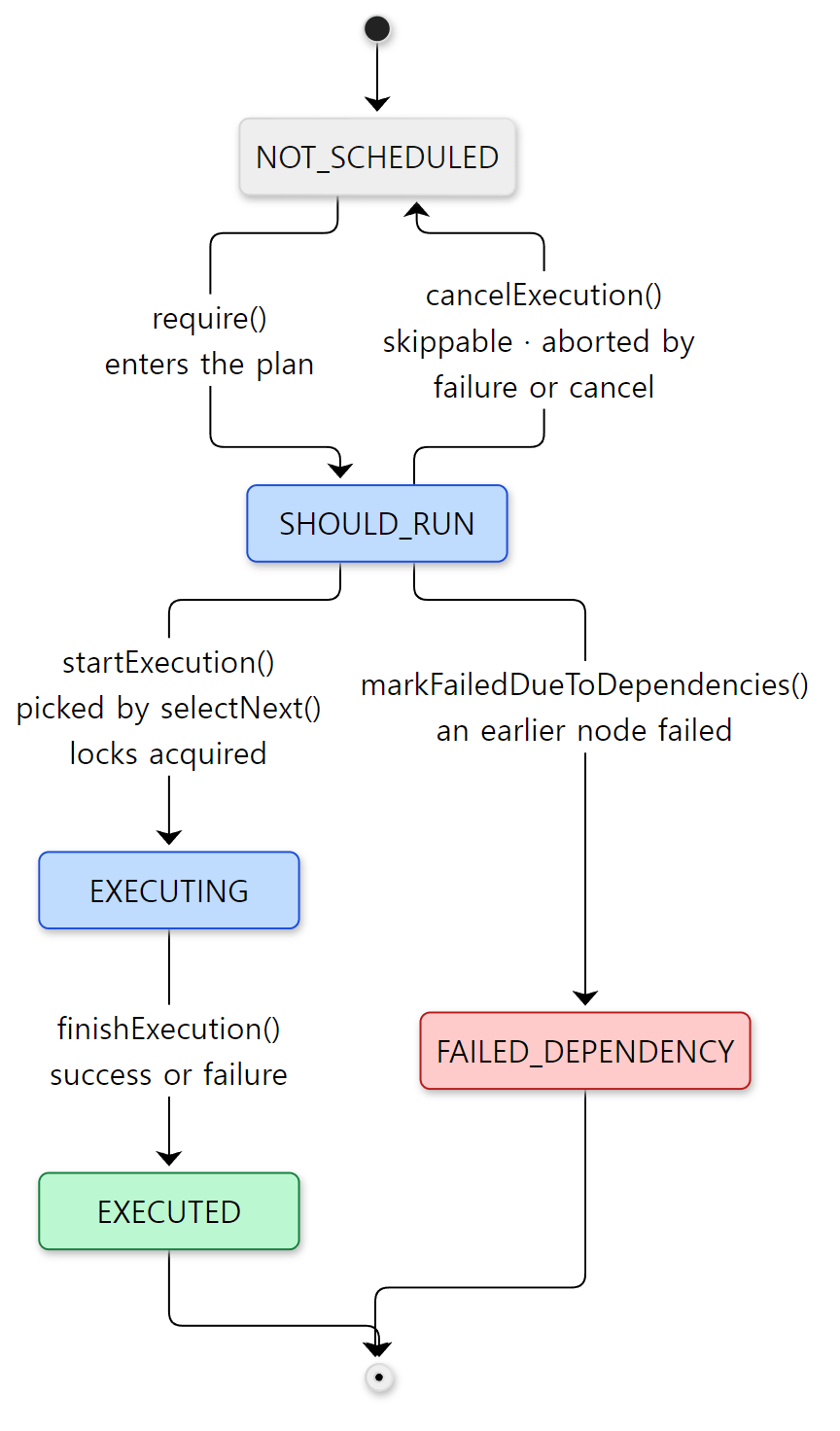
EXECUTED does not mean "succeeded" — it means "finished running". A failed task is EXECUTED too.
The two end states, EXECUTED and FAILED_DEPENDENCY, are not cleared even by the reset() that runs when a plan is closed (Node.java lines 349–361). That is how line 174 in section 3 can skip "nodes that have already run".
A finalizer runs even when the earlier task fails
With -Pfail, packageApp's action throws an exception.
=== gradle packageApp -Pfail ===
graph ready: :alpha -> :generate -> :compileApp -> :zeta -> :packageApp -> :report
> Task :alpha
run :alpha on [Execution worker]
> Task :generate
run :generate on [Execution worker]
> Task :compileApp
run :compileApp on [Execution worker]
> Task :zeta
run :zeta on [Execution worker]
> Task :packageApp FAILED
run :packageApp on [Execution worker]
> Task :report
run :report on [Execution worker]
> packageApp failed on purpose
BUILD FAILED in 1s
report ran. Two things work together here.
First, without --continue, the moment a node fails handleFailure() calls abortExecution(), which cancels every node that has not started yet and can be cancelled (to NOT_SCHEDULED via cancelExecution(), DefaultFinalizedExecutionPlan.java lines 685–702 and lines 721–737). But the group a finalizer belongs to (FinalizerGroup) answers "cannot be cancelled" as soon as any node it finalizes has started (the comment reads "Don't cancel if any finalized node has started", FinalizerGroup.java lines 143–157). packageApp had already started, so report was not cancelled.
Second, the relationship between a finalizer and the nodes it finalizes (finalizingSuccessors) is not a dependency successor, so it does not take part in computing the dependency state that asks "did an earlier node fail?". Instead, FinalizerGroup takes care of "wait until the finalized nodes have finished".
    private MemberSuccessors getNodesThatBlock(Node node) {
        if (isFinalizerNode(node)) {
            return new WaitForNodesToComplete(getFinalizedNodes());
        }
subprojects/core/src/main/java/org/gradle/execution/plan/FinalizerGroup.java lines 262–265
Because it waits for "complete" rather than "successful", clean-up work (stopping a server, writing a report) can still run after a failure. That is the reason finalizedBy exists. In contrast, a task that depended on packageApp through dependsOn would not run: without --continue, the abortExecution() above cancels it, and with --continue, selectNext() in section 6 marks it FAILED_DEPENDENCY (markFailedDueToDependencies()) or, in some cases, cancels it (lines 254–269). I did not run this case as an example; it is confirmed from the source only.
6. Execution — DefaultPlanExecutor and three thread names
Now for Run tasks. DefaultBuildWorkExecutor passes the frozen plan to PlanExecutor.process(), together with a lambda saying "when you get a node, call node.execute()" (DefaultBuildWorkExecutor.java lines 143–158). There is a single implementation, DefaultPlanExecutor, and it is a build-tree-scoped service (ExecutionServices.java lines 29–32).
    @Override
    public <T> ExecutionResult<Void> process(WorkSource<T> workSource, Action<T> worker) {
        BuildOperationRef parentOperation = CurrentBuildOperationRef.instance().get();
        if (parentOperation == null) {
            throw new IllegalStateException("No operation is currently running.");
        }

        PlanDetails planDetails = new PlanDetails(Cast.uncheckedCast(workSource), Cast.uncheckedCast(worker), parentOperation);
        queue.add(planDetails);

        maybeStartWorkers(queue, executor);

        // Run the work from the source from this thread as well, given that it will be blocked waiting for that work to complete anyway
        WorkerLease currentWorkerLease = workerLeaseService.getCurrentWorkerLease();
        MergedQueues thisPlanOnly = new MergedQueues(coordinationService, true);
        thisPlanOnly.add(planDetails);
        new ExecutorWorker(thisPlanOnly, currentWorkerLease, cancellationToken, coordinationService, workerLeaseService, stats).run();

        List<Throwable> failures = new ArrayList<>();
        awaitCompletion(workSource, currentWorkerLease, failures);
        return ExecutionResult.maybeFailed(failures);
    }
subprojects/core/src/main/java/org/gradle/execution/plan/DefaultPlanExecutor.java lines 102–123
It does three things: puts the plan on a shared queue (line 110), starts worker threads (line 112), and then the thread that called process() becomes a worker itself (lines 114–118), picking nodes until the plan is done. As the comment says, it has to wait for the work to finish anyway, so it helps instead of idling. The number of workers it starts:
    private void maybeStartWorkers(MergedQueues queue, Executor executor) {
        int executorCount = workerLimits.getMaxWorkerCount();
        state.maybeStartWorkers(() -> {
            LOGGER.debug("Using {} parallel executor threads", executorCount);
            for (int i = 1; i < executorCount; i++) {
                executor.execute(new ExecutorWorker(queue, null, cancellationToken, coordinationService, workerLeaseService, stats));
            }
        });
    }
subprojects/core/src/main/java/org/gradle/execution/plan/DefaultPlanExecutor.java lines 183–191
The loop starts at i = 1, so it is max-workers − 1 threads, because the calling thread takes one slot. maybeStartWorkers() runs only the first time for this DefaultPlanExecutor (lines 547–554). These threads' executor is named by executorFactory.create("Execution worker") (line 90), and the threads are named Execution worker, Execution worker Thread 2 and so on.
So what is the included builds we saw in the example? We first saw these lines 112–118 in post 1. If you follow who that "thread that handed over the plan" is, you reach the code that dispatches one build's execution.
    private ExecutionResult<Void> doRun() {
        try {
            return workerLeaseService.runAsWorkerThread(workGraph::runWork);
        } catch (Throwable t) {
            return ExecutionResult.failed(t);
        }
    }
There is one DefaultBuildController per build in the build tree, and startExecution() hands this doRun() to an executor (lines 127–131). That executor is executorFactory.create("included builds") (DefaultIncludedBuildTaskGraph.java line 96). Even an ordinary single build with no included builds runs its one root build this way. The name is included builds because every build shares machinery that was made for composite builds. Meanwhile, the Daemon worker thread waits for all builds to finish, periodically checking the executor's health (DefaultBuildControllers.java lines 105–123).
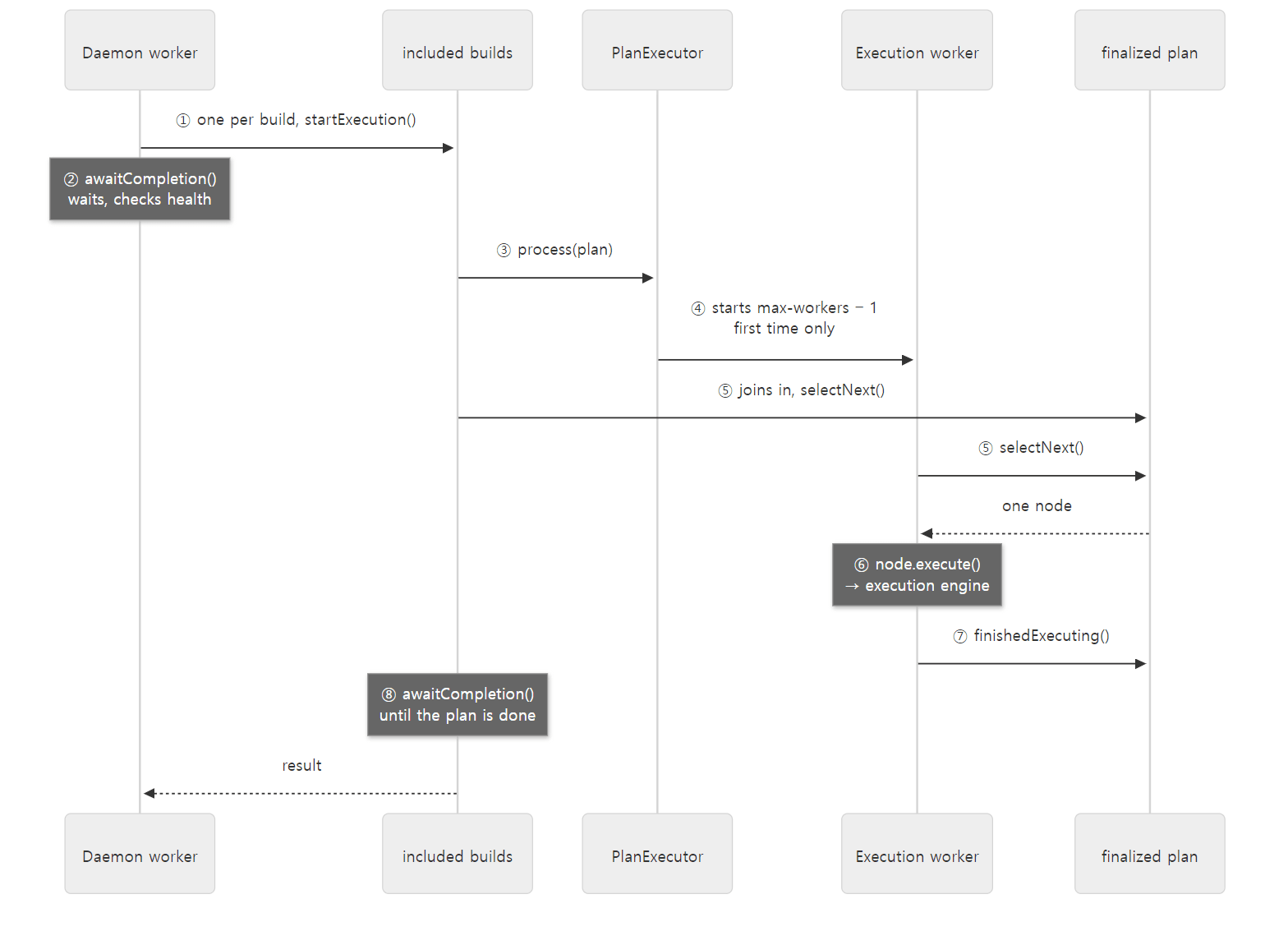 The threads that run task actions are
included builds and the Execution workers. Daemon worker only waits.
Example 2: looking at the threads during execution
To see whether that is really so, I put a work task that sleeps for 4 seconds in each of three projects (a, b, c), ran them with --parallel --max-workers=2, and took a thread dump of the daemon (jstack) while they ran. I kept only the threads of interest and, for each, a few Gradle frames (shortened).
=== jstack while tasks run (--parallel --max-workers=2) ===
thread: Daemon worker
    at org.gradle.composite.internal.DefaultBuildControllers.awaitCompletion
    at org.gradle.composite.internal.DefaultBuildControllers.execute
thread: included builds
    at Build_gradle.act
    at org.gradle.execution.plan.DefaultPlanExecutor$ExecutorWorker.execute
    at org.gradle.execution.plan.DefaultPlanExecutor$ExecutorWorker.run
    at org.gradle.execution.plan.DefaultPlanExecutor.process
    at org.gradle.composite.internal.DefaultBuildController.doRun
thread: Execution worker
    at Build_gradle.act
    at org.gradle.execution.plan.DefaultPlanExecutor$ExecutorWorker.execute
    at org.gradle.execution.plan.DefaultPlanExecutor$ExecutorWorker.run
...
(I also cut the six start/end timing lines this build prints after the dump; apart from the 4-second steps they look the same as the --max-workers=2 result in Example 3.) Exactly as in the diagram. Daemon worker waits in awaitCompletion, while the included builds thread goes through doRun → process → ExecutorWorker.run to run our task action (Build_gradle.act, a function written in the build script). The Execution worker stack starts at ExecutorWorker.run, because it is a thread the executor created to do just that from the beginning. With max-workers=2, there was only one Execution worker.
The worker loop
Here is the loop in ExecutorWorker.run() that both kinds of thread run.
                while (true) {
                    WorkItem workItem = getNextItem(workerLease);
                    if (workItem == null) {
                        break;
                    }
                    Object selected = workItem.selection.getItem();
                    LOGGER.info("{} ({}) started.", selected, Thread.currentThread());
                    execute(selected, workItem.plan, workItem.executor, workItem.parentOperation);
                }
subprojects/core/src/main/java/org/gradle/execution/plan/DefaultPlanExecutor.java lines 385–393
Thanks to line 391, --info shows "which thread picked which node". Here are just those lines from example 2 with --parallel --max-workers=2 (the thread number #… changes every run, so I replaced it with #N).
=== --info: who picked which node (--parallel --max-workers=2) ===
Resolve mutations for :a:work (Thread[#N,included builds,5,main]) started.
:a:work (Thread[#N,included builds,5,main]) started.
Resolve mutations for :b:work (Thread[#N,Execution worker,5,main]) started.
:b:work (Thread[#N,Execution worker,5,main]) started.
Resolve mutations for :c:work (Thread[#N,Execution worker,5,main]) started.
:c:work (Thread[#N,Execution worker,5,main]) started.
Each task is preceded by a node called Resolve mutations for …: the ResolveMutationsNode from diagram 2. When a task's turn comes, selectNext() inserts this node as one of the task's dependencies (lines 271–286 below), and the node works out and records the task's output and destroy locations (ResolveMutationsNode.java lines 87–101). Output locations are computed right before running because, as we saw in post 8, outputs are Providers whose values are only settled once configuration is complete.
selectNext() — picking the next node
getNextItem() calls the plan's selectNext() under the state lock. Here is the skeleton of DefaultFinalizedExecutionPlan.selectNext().
        readyNodes.restart();
        while (readyNodes.hasNext()) {
            Node node = readyNodes.next();
            if (node.allDependenciesComplete()) {
                if (!node.allDependenciesSuccessful()) {
                    // ... if an earlier node failed, skip it or mark it FAILED_DEPENDENCY ...
                }

                if (node.hasPendingPreExecutionNodes()) {
                    // The node is ready to execute and its pre-execution nodes have not been scheduled, so do this now
                    // ... insert the ResolveMutationsNode as a dependency of this node ...
                }

                // Node is ready to execute and all dependencies and pre-execution nodes have completed
                NodeStartResult startResult = attemptToStart(node, resources);
                if (startResult == NodeStartResult.STARTED) {
                    readyNodes.remove();
                    waitingToStartNodes.remove(node);
                    node.getConsumerState().started();
                    return Selection.of(node);
                }
                // ...
            }
            // ...
        }
The ready-node queue (readyNodes) is sorted by the index assigned in section 5 (NODE_EXECUTION_ORDER, lines 52–67). It walks from the front and hands out the first node whose dependencies are all done, whose pre-execution node is done, and which got the locks it needs. Getting those locks is attemptToStart(), the subject of section 7. When a node finishes, markFinished() tells the plan under the state lock and wakes the waiting threads with notifyStateChange() (lines 488–504).
With -Pstack in example 1, the generate action prints only the frames of its callers in the org.gradle.execution and org.gradle.composite packages.
=== gradle generate -Pstack ===
run :generate on [Execution worker Thread 5]
  at org.gradle.execution.plan.LocalTaskNode.execute:229
  at org.gradle.execution.DefaultBuildWorkExecutor.lambda$executePlan$0:153
  at org.gradle.execution.plan.DefaultPlanExecutor$ExecutorWorker.lambda$execute$0:476
  at org.gradle.execution.plan.DefaultPlanExecutor$ExecutorWorker.execute:475
  at org.gradle.execution.plan.DefaultPlanExecutor$ExecutorWorker.run:392
Reading from the bottom up: line 392 (the execute(...) in the loop above) → line 476 (worker.execute(selected)) → DefaultBuildWorkExecutor line 153 (node.execute(projectContext)) → LocalTaskNode line 229. Line 229 is context.getService(TaskNodeExecutor.class).execute(this), and from there on it is post 10's DefaultTaskNodeExecutor and execution engine. This time an Execution worker picked the node, so no composite frames show up.
Easy to get wrong
- The thread name of a task action is not fixed. In the first run of example 1,
alpharan onExecution worker, the next three onincluded builds, and the rest onExecution worker Thread 10. That happens even without--parallel: workers take from the same queue, and whoever grabs first gets the node. Task code that relies on aThreadLocalshould keep this in mind. Daemon workerdoes not run tasks (on this path). The thread callingprocess()isincluded builds, andDaemon workerwaits above it. All examples in this post run tasks from the command line without the configuration cache.
7. How many at once — worker leases, task execution locks, --parallel
Around attemptToStart(), a node has to pass through four gates before it can start.
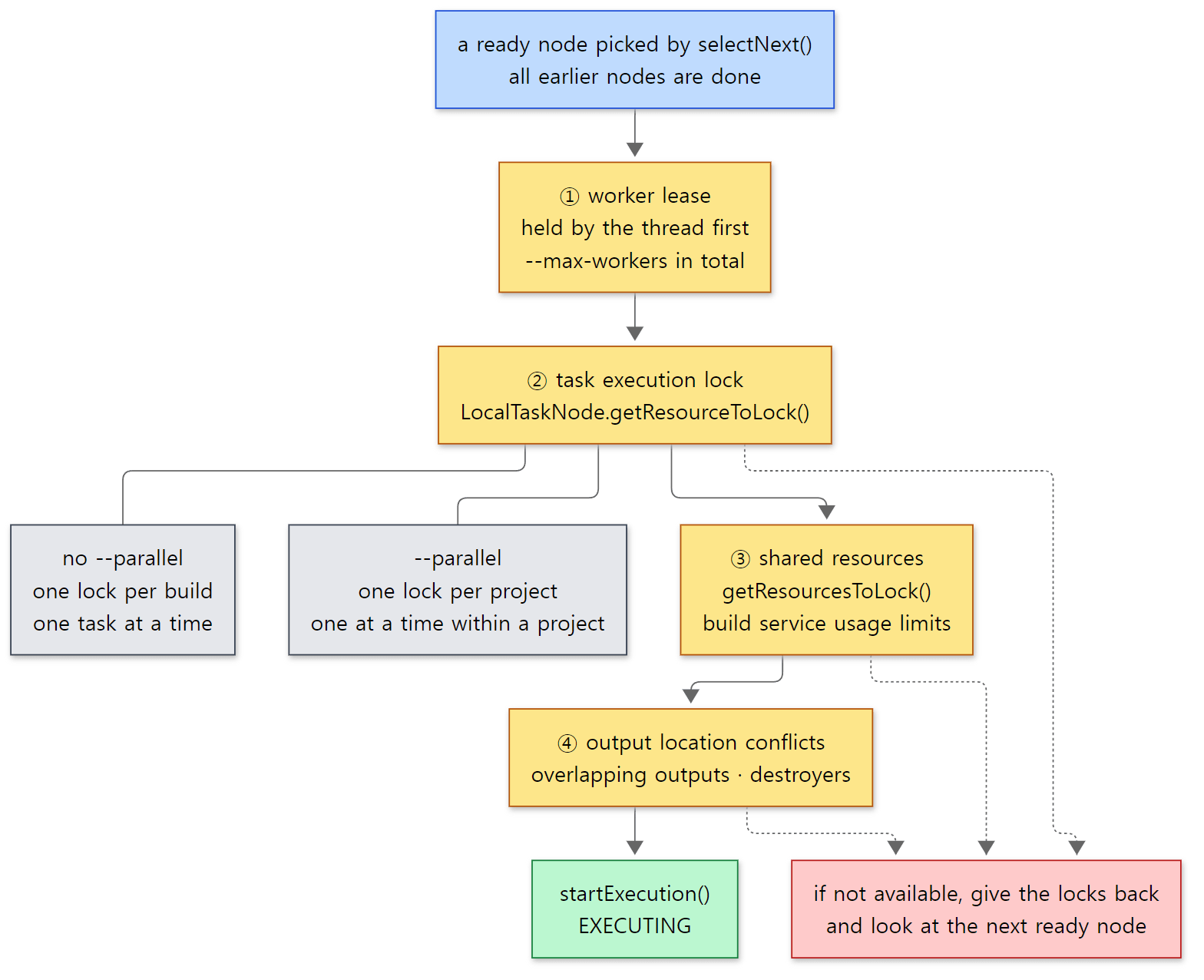 All the yellow boxes are "locks". If even one cannot be acquired, the node is skipped and the next ready node is examined.
① Worker leases — --max-workers tickets
A worker thread takes a worker lease before it picks a node. If workerLease.tryLock() fails in getNextItem(), it waits with RETRY without even looking at the nodes (DefaultPlanExecutor.java lines 426–432). The side that hands out leases does nothing more than count. LeaseHolder.grantLease() returns false if the leases in use have reached maxWorkerCount, and otherwise adds one and returns true (LeaseHolder.java lines 27–33). The default for maxWorkerCount is Runtime.getRuntime().availableProcessors() (DefaultParallelismConfiguration.java lines 85–87). DefaultWorkerLeaseService reports the value in --info when it is created (DefaultWorkerLeaseService.java line 73). The container in example 2 saw 12 CPUs and printed Using 12 worker leases..
--max-workers is not a thread count but the number of slots that may work at the same time. There are many threads besides Execution worker (included builds, the Worker API threads in section 8), and every one of them holds one ticket while it works. While waiting, they put it down (lines 434–438, and the awaitCompletion() at the end of process(), lines 163–181).
② The task execution lock — what --parallel changes
This is the resource a task node has to hold.
    @Nullable
    @Override
    public ResourceLock getResourceToLock() {
        if (isolated) {
            return null;
        } else {
            // Running the task requires permission to execute against its containing project
            return taskProject.getOwner().getTaskExecutionLock();
        }
    }
subprojects/core/src/main/java/org/gradle/execution/plan/LocalTaskNode.java lines 70–79
It is called the project's task execution lock, but what that lock actually is depends on --parallel.
    public ResourceLock getTaskExecutionLock(Path buildIdentityPath, final Path projectIdentityPath) {
        if (projectLockRegistry.getAllowsParallelExecution()) {
            return getTaskExecutionLockForProject(projectIdentityPath, projectIdentityPath, buildIdentityPath);
        } else {
            return getTaskExecutionLockForBuild(buildIdentityPath, projectIdentityPath);
        }
    }
With parallel execution off, the key of the lock is the build path: every project in the build shares a single lock. The project lock (the lock held while touching a project's model) works the same way, and its comment says so word for word: "When not running in parallel, all projects of a build share a single lock." (ProjectLockRegistry.java lines 34–41). Acquiring the task execution lock also acquires that project lock (TaskExecutionLock.java lines 28–37). So it adds up to this:
| Setting | Granularity of the task execution lock | Result |
|---|---|---|
no --parallel (default) |
one per build | a build's tasks run one at a time, even with 12 worker leases |
--parallel |
one per project | tasks of different projects at the same time, tasks of the same project one at a time |
| (both) | --max-workers worker leases |
the upper limit on slots working at once |
This table covers plans built without the configuration cache, like every example in this post. Task nodes in a plan loaded from the configuration cache are marked isolated(), so getResourceToLock() above returns null and they do not take this lock at all (see "What this post leaves out"). There are also ways to release the lock while running, such as the Worker API in section 8.
Whether --parallel is on is fixed by startProjectExecution(parallel) when the build starts and does not change during the build (RootBuildLifecycleBuildActionExecutor.java line 90, DefaultWorkerLeaseService.java lines 514–522).
Example 3: varying --parallel and --max-workers
I took the build from example 2, shortened work to 1.5 seconds, and added one more task, extra, only to project a, with no dependency on anything. Taking the moment the plan is finalized (whenReady) as time zero, it prints start and end times rounded to 0.5 seconds. I first measured with System.currentTimeMillis(), but once a task that sleeps for 1.5 seconds was printed as finishing in 1.0 second. I did not find the cause, but since the wall clock can be adjusted while running, and every task runs in the same daemon JVM, I switched to the monotonic clock System.nanoTime().
// Example written for this post (not part of Gradle's source)

// Take the moment the execution plan is final as time zero (the daemon is reused, so reset it every build; nanoTime instead of the wall clock)
gradle.taskGraph.whenReady { System.setProperty("lab.t0", System.nanoTime().toString()) }
// ... slow() adds a doLast that prints "+0.0s start …", sleeps 1.5 s (4 s with -Phold), and prints "+1.5s end …" ...

subprojects {
    tasks.register("work") { slow() }
}
// Add one more task, with no dependencies, to project a only
project(":a") {
    tasks.register("extra") { slow() }
}
[Shortened from the example ex/u09-parallel/project/build.gradle.kts]
Here are the results of three runs. Look at the times at the front rather than the order of the lines: console output is printed grouped per task, so the line order differs from the time order.
=== CPUs (nproc): 12 ===
=== gradle work (no --parallel) ===
Using 12 worker leases.
+0.5s start :a:work [Execution worker]
+2.0s end   :a:work
+2.0s start :b:work [Execution worker]
+3.5s end   :b:work
+3.5s start :c:work [Execution worker]
+5.0s end   :c:work
BUILD SUCCESSFUL in 38s
=== gradle work --parallel --max-workers=2 ===
+0.0s start :a:work [included builds]
+1.5s end   :a:work
+0.0s start :b:work [Execution worker]
+1.5s end   :b:work
+1.5s start :c:work [included builds]
+3.0s end   :c:work
BUILD SUCCESSFUL in 5s
=== gradle work extra --parallel --max-workers=4 ===
+0.0s start :c:work [Execution worker Thread 3]
+1.5s end   :c:work
+0.0s start :a:work [Execution worker]
+1.5s end   :a:work
+0.0s start :b:work [included builds]
+1.5s end   :b:work
+1.5s start :a:extra [Execution worker]
+3.0s end   :a:extra
BUILD SUCCESSFUL in 5s
- No parallel: even with 12 worker leases,
a→b→cran one at a time, because there is one task execution lock per build. Raising--max-workersalone does not make tasks run at the same time. (Times are rounded to 0.5 seconds and vary a little from run to run; this time the first task started at 0.5 seconds.) --parallel --max-workers=2:aandbstarted together at 0 seconds, and since both leases were taken,cstarted at 1.5 seconds. The threads that worked wereincluded buildsand oneExecution worker— exactlymax-workers − 1workers plus the calling thread, two in total.--parallel --max-workers=4: theworktasks of all three projects started together at 0 seconds, buta:extraonly started at 1.5 seconds, whena:workfinished. There were leases left, buta:workwas holding projecta's task execution lock.
The jstack in example 2 used the same settings as run 2: Daemon worker waited, and exactly two threads did the work.
③ and ④: the other gates
After the task execution lock, tryAcquireLocksForNode() locks the shared resources (getResourcesToLock() — things like the maxParallelUsages of build services the task declared with usesService()) (DefaultFinalizedExecutionPlan.java lines 383–392), and then attemptToStart() checks for output location conflicts. If the node's output locations overlap with a node currently running, or a destroyer is about to delete an output someone still needs to read, it does not start (lines 346–375). Whatever gate blocks it, it gives back the locks it got and moves on to the next ready node.
Easy to get wrong: declaring files but not the relationship
The bookkeeping of output locations is used for one more thing during execution. If a task reads another task's output file as an input and there is no relationship at all between them (dependsOn, an input Provider, mustRunAfter), Gradle stops the task the moment it is about to run it. With -Pimplicit, example 1 makes writer declare build/shared.txt as an output with outputs.file(shared) and reader declare the same file as an input with inputs.file(shared), without any relationship between the two (example ex/u09-plan-order/project/build.gradle.kts).
=== gradle writer reader -Pimplicit ===
> Task :writer
> Task :reader FAILED
* What went wrong:
A problem was found with the configuration of task ':reader' (type 'DefaultTask').
Property has implicit dependency
  Gradle detected a problem with the following location: '/tmp/p/build/shared.txt'
    Task ':reader' uses this output of task ':writer' without declaring an explicit or implicit dependency. This can lead to incorrect results being produced, depending on what order the tasks are executed
    For more information, please refer to https://docs.gradle.org/9.10.0-20261107025045+0000/userguide/validation_problems.html#implicit_dependency in the Gradle documentation.
    Possible solutions:
      1. Declare task ':writer' as an input of ':reader'.
      2. Declare an explicit dependency on ':writer' from ':reader' using Task#dependsOn.
      3. Declare an explicit dependency on ':writer' from ':reader' using Task#mustRunAfter.
Thanks to the command-line order, writer did run first this time, and the build still fails: Gradle does not accept "it happened to work out this time". The check happens not while building the plan but when the task runs: in the execution engine's validation step, TaskExecution calls MissingTaskDependencyDetector (TaskExecution.java lines 521–526). The message and the three solutions are right there in that class (MissingTaskDependencyDetector.java lines 206–218). Solution 3 is mustRunAfter because the check passes if there is "any order at all" between the two (hasNoSpecifiedOrder(), lines 138–140). Within a single build it fails like this; between tasks of different builds (included builds), the code says it currently only emits a deprecation warning and will become an error in Gradle 10 (lines 188–204).
8. The Worker API — a different road for splitting work inside a task
According to the table in section 7, without --parallel a build runs only one task at a time. But what if, like a compiler or a test run, there is a lot of divisible work inside one task? That road is the Worker API. A task gets a WorkerExecutor injected (the @Inject from post 4) and picks an isolation level to get a queue. In the implementation, DefaultWorkerExecutor, noIsolation(), classLoaderIsolation() and processIsolation() all create a DefaultWorkQueue; the only difference is the WorkerFactory plugged into the queue (DefaultWorkerExecutor.java lines 118–143).
| Isolation level | Factory | Where it runs |
|---|---|---|
noIsolation() |
NoIsolationWorkerFactory |
inside the daemon, in the task's own class loader (the context class loader of the submitting thread) |
classLoaderIsolation() |
IsolatedClassloaderWorkerFactory |
inside the daemon, in a class loader created per item |
processIsolation() |
WorkerDaemonFactory |
in a separately started worker daemon process |
noIsolation puts Thread.currentThread().getContextClassLoader() into a FixedClassLoaderWorkerRequirement (line 234), classLoaderIsolation creates a class loader per item with createIsolatedWorkerClassloader() (IsolatedClassloaderWorkerFactory.java lines 52–61), and processIsolation borrows an idle worker daemon or starts a new one (WorkerDaemonFactory.java lines 76–83).
submit() wraps the item in a WorkItemExecution, puts it on a queue (executionQueue.submit(execution)), registers it as "unfinished work" of the current build operation — that is, this task action (asyncWorkTracker.registerWork(...)) — and returns immediately (DefaultWorkerExecutor.java lines 163–177). executionQueue is the "WorkerExecutor Queue", one per build session (WorkerExecutionQueueFactory.java line 32). While a thread of this queue runs an item, it holds one worker lease through runAsWorkerThread() (DefaultConditionalExecutionQueue.java lines 162–163). So Worker API items also run within --max-workers.
After the action returns — releasing the locks and waiting
An action that only calls submit() and never await() finishes right away. TaskExecution takes over from there.
                    try {
                        action.execute(task);
                    } catch (Throwable t) {
                        actionFailure = t;
                    } finally {
                        action.clearInputChanges();
                    }

                    try {
                        asyncWorkTracker.waitForCompletion(currentOperation, hasMoreWork ? RELEASE_AND_REACQUIRE_PROJECT_LOCKS : RELEASE_PROJECT_LOCKS);
After each action, it waits until the work that action submitted is all done. After the last action it waits with RELEASE_PROJECT_LOCKS; if more actions follow, it waits with RELEASE_AND_REACQUIRE_PROJECT_LOCKS (if work is still in progress, release the locks, wait, then take them back — DefaultAsyncWorkTracker.java lines 95–101). The example in this post has a single action, so it is the former. RELEASE_PROJECT_LOCKS calls runAsIsolatedTask() before waiting (DefaultAsyncWorkTracker.java lines 91–94), which releases the project lock and the task execution lock held by this thread.
    @Override
    public void runAsIsolatedTask() {
        Registries registries = getRegistries();
        releaseLocks(registries.getProjectLockRegistry().getResourceLocksByCurrentThread());
        releaseLocks(registries.getTaskExecutionLockRegistry().getResourceLocksByCurrentThread());
    }
With section 7's table in mind, the meaning is clear: while Worker API items run, another task can use the single task execution lock a build has without --parallel. While waiting, the thread also puts down its worker lease ("Release worker lease while waiting" in waitForItemsAndGatherFailures(), lines 125–128).
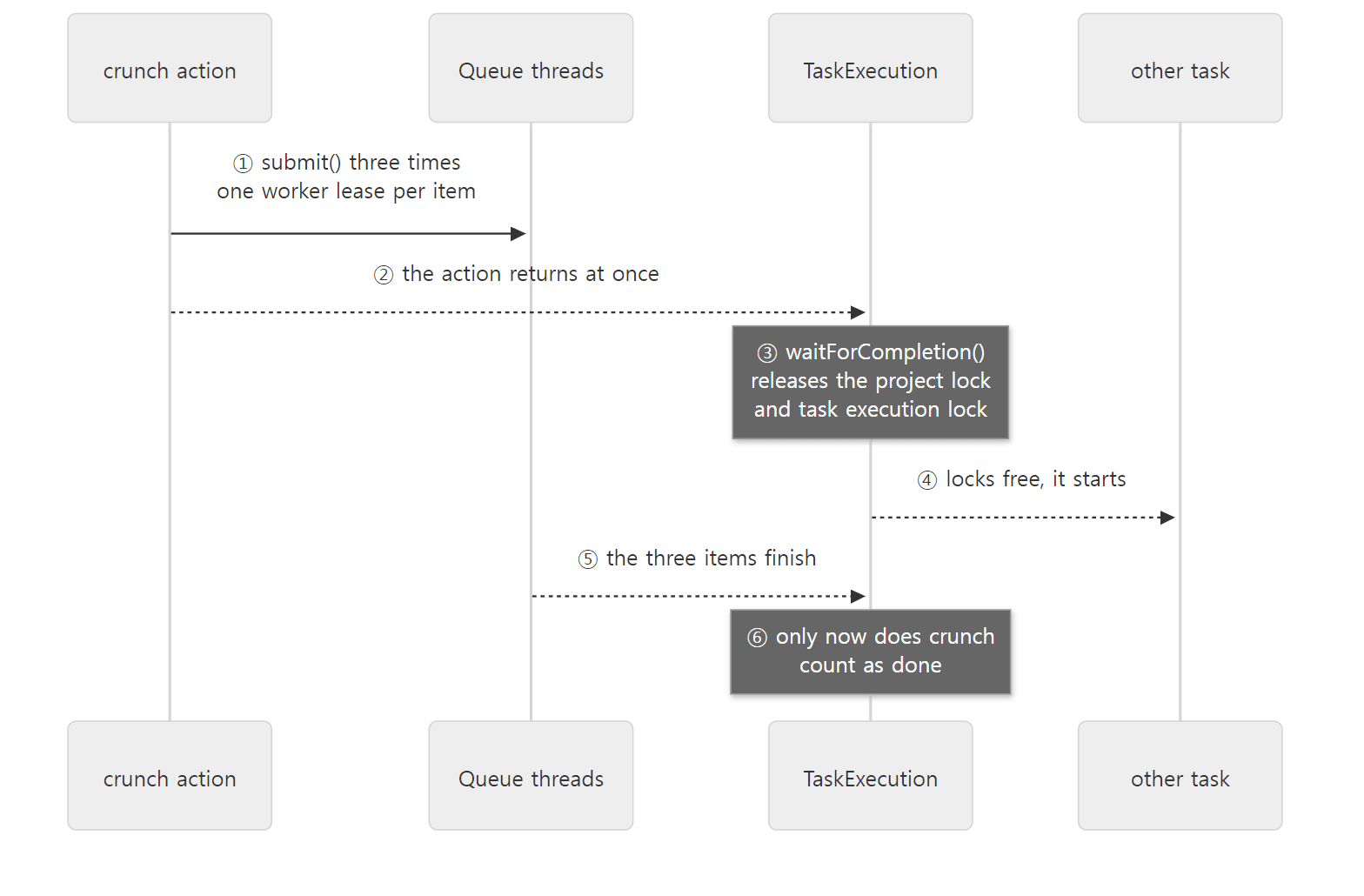 The task is not finished, but it has let go of the locks. Another task slips into that gap.
Example 4: three items and one other task
I put a CrunchTask and a Crunch (one work item that sleeps for 1 second), both in Java, into buildSrc.
// Example written for this post (not part of Gradle's source)
package lab;
// ... imports omitted ...

// A task that hands three items to the Worker API and returns without waiting
public abstract class CrunchTask extends DefaultTask {

    @Input
    public abstract Property<String> getMode(); // none, classloader, process

    @Inject
    public abstract WorkerExecutor getWorkerExecutor(); // service injection from post 4

    @TaskAction
    public void run() {
        String mode = getMode().get();
        WorkQueue queue;
        // ... depending on mode, one of processIsolation(), classLoaderIsolation(), noIsolation() ...
        for (String label : new String[] {"1", "2", "3"}) {
            queue.submit(Crunch.class, p -> p.getLabel().set(getName() + "-" + label));
        }
        // await() is not called — the action returns right away
        System.out.println(Clock.elapsed() + " " + getPath() + " submitted 3 items from [" + Thread.currentThread().getName() + "]"
            + " pid=" + ProcessHandle.current().pid());
    }
}
[Shortened from the example ex/u09-worker-api/project/buildSrc/src/main/java/lab/CrunchTask.java]
Crunch.execute() prints, when it starts, the thread name, the process id (pid) and the class name of the class loader that loaded it, sleeps for 1 second, and prints when it ends. The root build has crunch (noIsolation), crunchLoader and crunchProcess, plus an unrelated other task. Times are measured the same way as in example 3.
=== gradle crunch other --max-workers=4 (no --parallel) ===
+0.0s :other runs [included builds]
+0.0s :crunch submitted 3 items from [Execution worker Thread 2] pid=51
+0.0s item crunch-3 start [WorkerExecutor Queue Thread 3] pid=51 loader=InstrumentingVisitableURLClassLoader
+0.0s item crunch-1 start [WorkerExecutor Queue] pid=51 loader=InstrumentingVisitableURLClassLoader
+0.0s item crunch-2 start [WorkerExecutor Queue Thread 2] pid=51 loader=InstrumentingVisitableURLClassLoader
+1.0s item crunch-3 end
+1.0s item crunch-2 end
+1.0s item crunch-1 end
BUILD SUCCESSFUL in 53s
=== gradle crunch other --max-workers=2 ===
+0.0s :other runs [included builds]
+0.0s item crunch-1 start [WorkerExecutor Queue] pid=51 loader=InstrumentingVisitableURLClassLoader
+0.0s :crunch submitted 3 items from [Execution worker] pid=51
+0.0s item crunch-2 start [WorkerExecutor Queue Thread 2] pid=51 loader=InstrumentingVisitableURLClassLoader
+1.0s item crunch-1 end
+1.0s item crunch-3 start [WorkerExecutor Queue] pid=51 loader=InstrumentingVisitableURLClassLoader
+1.0s item crunch-2 end
+2.0s item crunch-3 end
BUILD SUCCESSFUL in 3s
- Even without
--parallel,otherran at 0 seconds, at the same time ascrunch's items. Whichever comes first in the plan, oncecrunch's action returns,TaskExecutionreleases the task execution lock, so another task can get in while the three items run. The three items ran at the same time on threeWorkerExecutor Queuethreads. The53sof the first run includes compiling buildSrc and the Kotlin DSL scripts for the first time. - With
--max-workers=2, only two items ran at a time (crunch-3started at 1 second, when the first two finished), because the two items held both leases. You can see that Worker API items and tasks share the same tickets.otherran at 0 seconds this time, but in an earlier run of the same example it waited while the two items held both leases and ran at 1 second (+1.0s :other runs [included builds]). It is a task that prints a single line, so it depends on when it manages to grab a lease.
Here is the comparison of the three isolation levels.
=== gradle crunchLoader crunchProcess ===
+0.0s :crunchLoader submitted 3 items from [Execution worker Thread 8] pid=51
+0.0s item crunchLoader-2 start [WorkerExecutor Queue Thread 2] pid=51 loader=VisitableURLClassLoader
+0.0s item crunchLoader-3 start [WorkerExecutor Queue Thread 3] pid=51 loader=VisitableURLClassLoader
+0.0s item crunchLoader-1 start [WorkerExecutor Queue] pid=51 loader=VisitableURLClassLoader
+1.0s item crunchLoader-3 end
+1.0s item crunchLoader-1 end
+1.0s item crunchLoader-2 end
+0.0s :crunchProcess submitted 3 items from [Execution worker Thread 9] pid=51
+? item crunchProcess-2 start [/127.0.0.1:35702 to /127.0.0.1:39283 workers] pid=311 loader=VisitableURLClassLoader
+? item crunchProcess-1 start [/127.0.0.1:35306 to /127.0.0.1:41447 workers] pid=304 loader=VisitableURLClassLoader
+? item crunchProcess-3 start [/127.0.0.1:60944 to /127.0.0.1:46759 workers] pid=307 loader=VisitableURLClassLoader
+? item crunchProcess-2 end
+? item crunchProcess-1 end
+? item crunchProcess-3 end
BUILD SUCCESSFUL in 3s
=== JVMs left after the build ===
jdk.jcmd/sun.tools.jps.Jps
org.gradle.launcher.daemon.bootstrap.GradleDaemon
noIsolationitems ran in the class loader that loaded the buildSrc classes (InstrumentingVisitableURLClassLoader), andclassLoaderIsolationitems in a separately created class loader (VisitableURLClassLoader). Both ran in the daemon (pid 51).processIsolationitems had pids 304, 307 and 311: a different process for each item. Three items running at once got three worker daemons. The thread name is a socket address (the connection to the daemon), and the time is+?because a different process does not have the daemon's system property (lab.t0). Pids and ports vary from run to run.- No worker daemon was left after the build.
jpsshows only the Gradle daemon andjpsitself.
That last point is confirmed straight from the source. The Worker API's process isolation keeps worker daemons alive only until the end of the build session.
        if (configuration instanceof ProcessWorkerSpec) {
            DaemonForkOptionsBuilder builder = new DaemonForkOptionsBuilder(forkOptionsFactory)
                .keepAliveMode(KeepAliveMode.SESSION);
KeepAliveMode has two values, SESSION (until the end of the build session) and DAEMON (until the Gradle daemon stops) (KeepAliveMode.java lines 19–28), and when a session ends, WorkerDaemonClientsManager stops every SESSION worker (lines 246–254). Worker daemons that survive a build and get reused by the next one are those created in DAEMON mode. For example, the forked Java compiler daemon (DaemonJavaCompiler) uses KeepAliveMode.DAEMON (DaemonJavaCompiler.java line 101). I did not run that path for this post.
Easy to get wrong
- The Worker API is not a replacement for
--parallelbut a different axis.--parallelruns "tasks of different projects" concurrently; the Worker API runs "pieces of one task" concurrently. Both use the same worker leases. - Calling
await()waits while holding the locks.WorkerExecutor.await()andWorkQueue.await()wait withRETAIN_PROJECT_LOCKS(DefaultWorkerExecutor.javalines 188–205). Call it only when the action really needs the results; otherwise, letting the action simply return gives other tasks a slot. This difference was confirmed from the source; I did not run an example that callsawait(). - Work can only be submitted from threads Gradle manages. Calling
submit()from a thread you created yourself inside a task action is blocked bycheckIsManagedThread()(lines 179–183) with "Work may only be submitted from a Gradle-managed thread".
What this post leaves out
- Command-line order and destroyers (in
gradle clean build,cleanruns beforebuild's outputs are produced):OrdinalNode,OrdinalGroup,OrdinalNodeAccess,DetermineExecutionPlanAction.createOrdinalRelationships()lines 329–347 - The details of rolling back a
shouldRunAftercycle (restorePath,restoreQueue,restoreExecutionPlan):DetermineExecutionPlanAction.javalines 245–290 - The group computation for finalizers (
FinalizerGroup,CompositeNodeGroup) and "when does a dependency needed only by finalizers start":subprojects/core/…/execution/plan/FinalizerGroup.java, and the class comment ofDetermineExecutionPlanAction, lines 59–65 - The filter for
-x(excluding tasks) andTaskPathSpec:DefaultTaskSelector.getFilter()lines 53–66 - Nodes pointing at tasks in included builds (
TaskInAnotherBuild) and how plans of different builds are connected:subprojects/core/…/execution/plan/TaskInAnotherBuild.java,subprojects/composite-builds/…/DefaultBuildControllers.java - Artifact transform nodes (
TransformStepNode): together with dependency resolution in post 12 - Plans loaded from the configuration cache (nodes serialized and restored, with tasks marked
isolated()so they run without the task execution lock):platforms/core-configuration/core-serialization-codecs/…/TaskNodeCodec.ktline 95 — post 11 - The executor health check ("Unable to make progress running work"):
DefaultPlanExecutor.assertHealthy()lines 125–158 --continue(keep running other tasks after a failure) and the special handling of verification failures:DefaultFinalizedExecutionPlan.handleFailure()andabortExecution(),Node.shouldContinueExecution()- The internal option
org.gradle.internal.executor.stats(executor statistics):DefaultPlanExecutor.javaline 65 - The inside of worker daemon processes (
GradleWorkerMain, the connection to the daemon):platforms/core-execution/worker-main/
Summary
| Concept | One-line summary |
|---|---|
| Selecting tasks | For each command-line name, DefaultTaskSelector tries the exact name, then a NameMatcher abbreviation. Only when exactly one candidate is left |
| Entry nodes | Nodes of the tasks picked on the command line. One addEntryTasks() per name, each with a number (ordinal) |
| Collecting nodes | discoverNodeRelationships() follows dependsOn, input Providers and finalizedBy and calls require(). It does not follow mustRunAfter |
| Successor | "A node that must finish first". Hard ones (dependsOn, finalizedBy, mustRunAfter) and a removable one (shouldRunAfter) |
| Deciding the order | Depth-first post-order traversal in DetermineExecutionPlanAction. A cycle is dropped if it is a shouldRunAfter, otherwise Circular dependency |
| Successor ordering | Otherwise equal nodes go by project depth, then task path. Not the order written in dependsOn |
gradle.taskGraph |
DefaultTaskExecutionGraph: a window that borrows the finalized plan. whenReady fires once per build |
--dry-run |
Does all of configuration and plan building, then just prints SKIPPED right before execution |
| Node states | NOT_SCHEDULED→SHOULD_RUN→EXECUTING→EXECUTED, or FAILED_DEPENDENCY. A failed task is EXECUTED too |
| Finalizers | Wait for the finalized nodes to "finish" (not succeed), and once those have started they are not cancelled by a failure abort |
DefaultPlanExecutor |
Starts max-workers − 1 Execution worker threads, and the thread that called process() becomes a worker too |
| Thread names | The caller of process() is included builds (one per build); Daemon worker waits |
selectNext() |
Walks the ready nodes in index order and hands out the first one whose pre-execution node (Resolve mutations) is done and whose locks are acquired |
| Worker leases | --max-workers (default: CPU count) tickets. Held one at a time by whoever is working, task or Worker API item |
| Task execution lock | One per build without --parallel, one per project with it. Tasks of the same project run one at a time (tasks in a plan loaded from the configuration cache do not use this lock) |
| Undeclared dependency | Reading another task's output without any relationship fails at run time with implicit dependency |
| Worker API | Splits one task's work. The action returns and waits after releasing the locks, so other tasks run in the gap |
| Process isolation | Worker daemons are KeepAliveMode.SESSION — they stop when the build session ends |
What's next
This post stopped where a worker picks a node and calls LocalTaskNode.execute(). Right behind that line, DefaultTaskNodeExecutor checks onlyIf and "no actions" to decide whether to skip, wraps the task as a unit of work for the execution engine, and hands it to the chain of steps from IdentifyStep to ExecuteStep. The validation step where section 7's implicit dependency check happened is one link of that chain. We will read how fingerprints of inputs and outputs are compared with the previous execution history to decide UP-TO-DATE, together with the reason lines in --info.
Earlier series covered similar things. The worker thread pool in Tomcat post 5 sets a number of threads with maxThreads, but Gradle's --max-workers is not a thread count; it is the number of tickets for working at the same time. The threads live in separate pools (Execution worker, WorkerExecutor Queue) and share one set of tickets. The way an MPM in httpd post 8 chooses between "split by processes or by threads" resembles the Worker API's three isolation levels: threads in the same process (noIsolation) are light but share everything, while processes (processIsolation) are heavy but kept apart. @Async in Spring post 27, which hands a method call to a TaskExecutor and returns right away, has the same shape as WorkQueue.submit(); the difference is that Gradle then postpones "the task is done" until all the work finishes, and gives up its locks in the meantime.
- Post 8: Tasks and Lazy Configuration — DefaultTask, TaskContainer and Provider
- Post 4: The Service Registry — the DI Container Inside Gradle
- Post 2: The Big Picture — Client and Daemon, Service Scopes, and the Three Build Phases
- Post 11: The Build Cache and the Configuration Cache — Two Ways to Reuse Work