What this post covers
This is the second post in the "Digging into Gradle's Source" series. In part 1 we checked out the source at a fixed commit, built it, and unfolded the folder map and the main road that one gradle build travels. This post is the big map we spread out before reading code line by line. Every post from part 3 to part 12 starts by coming back to this map and saying "this is the part we zoom into".
If you have used Gradle, you have seen the line Starting a Gradle Daemon the first time you ran ./gradlew build, and you have probably heard that "a build runs in three phases: initialization, configuration and execution". This post uses those two things as a bridge and answers the following questions.
- How many processes take part in one
gradlecommand, and what does each one do? - What layers is the state inside the daemon split into, and why do those layers line up one-to-one with service scopes?
- Which class, and which state of it, are the initialization, configuration and execution phases in the source?
- How does the model you touch in a build script (
Gradle,Settings,Project,Task) connect to the side that runs tasks (execution plan, nodes, execution engine)?
| Item | Details |
|---|---|
| Target | Gradle Build Tool |
| Version | 9.10.0 development build (master) |
| Commit | 07ecbf9ead (2026-10-24) |
| Main classes | Scope·@ServiceScope, BuildProcessState·BuildSessionState·BuildTreeState·BuildState·ProjectState, DefaultBuildLifecycleController·VintageBuildModelController, DefaultBuildWorkExecutor·LocalTaskNode·DefaultTaskNodeExecutor |
All line numbers in this post refer to this commit. How to check out the same commit and build the Docker image for the examples is in part 1. Paths start at the repository root; I write the full path once and then shorten it, like subprojects/core/…/DefaultProject.java.
Since this post draws a map, it only follows the main lines. Each section points to the post that reads that part in detail ("we'll see this in part N").
Terms to know first
The daemon is the long-lived JVM process that actually runs the build. The gradle command does not build anything itself; it just asks the daemon "please run this build". When the build ends, the daemon does not die right away — it waits for the next request.
Build tree, build, and project are the units Gradle divides work into. The group governed by one settings.gradle.kts is a build, and each thing you add inside it with include("app") is a project. If you pull in another build with includeBuild("../lib") (this is called a composite build), there is more than one build, and the whole set is called the build tree. A build pulled in this way is an included build.
The service registry is the DI container inside Gradle. Like Spring's ApplicationContext, you ask it for "an object of this type" and it hands you one it already made or makes a new one. A service is an object registered in such a registry.
A service scope is how long a service lives. There is a separate registry for each lifetime — "as long as the daemon lives", "for one build", "one per project" — and each service declares which one it belongs to with the @ServiceScope annotation (section 3).
The build lifecycle is the sequence of states one build goes through. The user documentation describes it as three phases: initialization, configuration and execution. In the source, two state enums do this job (section 4).
Execution plan, node and execution engine are the parts of the execution phase. The execution plan is a graph that decides "what to run, in what order", and each point in that graph is a node. One task is usually one node. The place that actually runs a node is the execution engine. The engine receives a task in a generic shape called a unit of work and runs it through a series of steps that ask "is it already up to date (UP-TO-DATE)? is it in the cache?" (section 6).
1. Four processes — who runs the build?
The four processes in the repository's design notes
The Gradle repository has a folder of short design documents called architecture/. The first lines of runtimes.md split the processes that make up Gradle into four.
- Gradle daemon. This is the process that actually runs the build. It hosts build logic and coordinates the lifecycle of the build. It is a long-running daemon process.
- CLI client. This is the
gradleorgradlewcommand, and is responsible for locating, starting and interacting with the Gradle daemon, potentially downloading the Gradle distribution.- Tooling API client. This a library that is embedded into applications, such as IDEs or CI agents, that allows them to act as a Gradle client.
- Worker processes. Long-running daemon processes that the Gradle daemon starts to run specific kinds of work, such as compilation or test execution.
(architecture/runtimes.md lines 5–8) The same document adds that these four "are all Java processes" and that "each process has a corresponding runtime" (line 39). A runtime is the set of conditions code running in that process must respect — which JVM versions, which services and which libraries it may use. Most of the source in the repository runs in the daemon.
Here are the four with their entry points in the source.
| Process | What it does | Entry classes | Details |
|---|---|---|---|
| CLI client | Finds or starts a suitable daemon, sends the request, receives and prints the logs | platforms/core-runtime/gradle-cli-main/…/launcher/GradleMain.java → client-services/…/launcher/daemon/client/DaemonClient.java |
Part 3 |
| Tooling API client | A library inside an IDE or CI. It runs builds and also fetches the "project model" | platforms/ide/tooling-api/…/tooling/internal/consumer/DefaultGradleConnector.java |
Part 3 |
| Daemon | Runs the build scripts and the tasks | platforms/core-runtime/daemon-main/…/launcher/daemon/bootstrap/GradleDaemon.java, daemon-server/…/bootstrap/DaemonMain.java |
This whole post |
| Worker processes | Started by the daemon to take over work such as tests and compilation | platforms/core-execution/worker-main/…/process/internal/worker/GradleWorkerMain.java |
Part 9 |
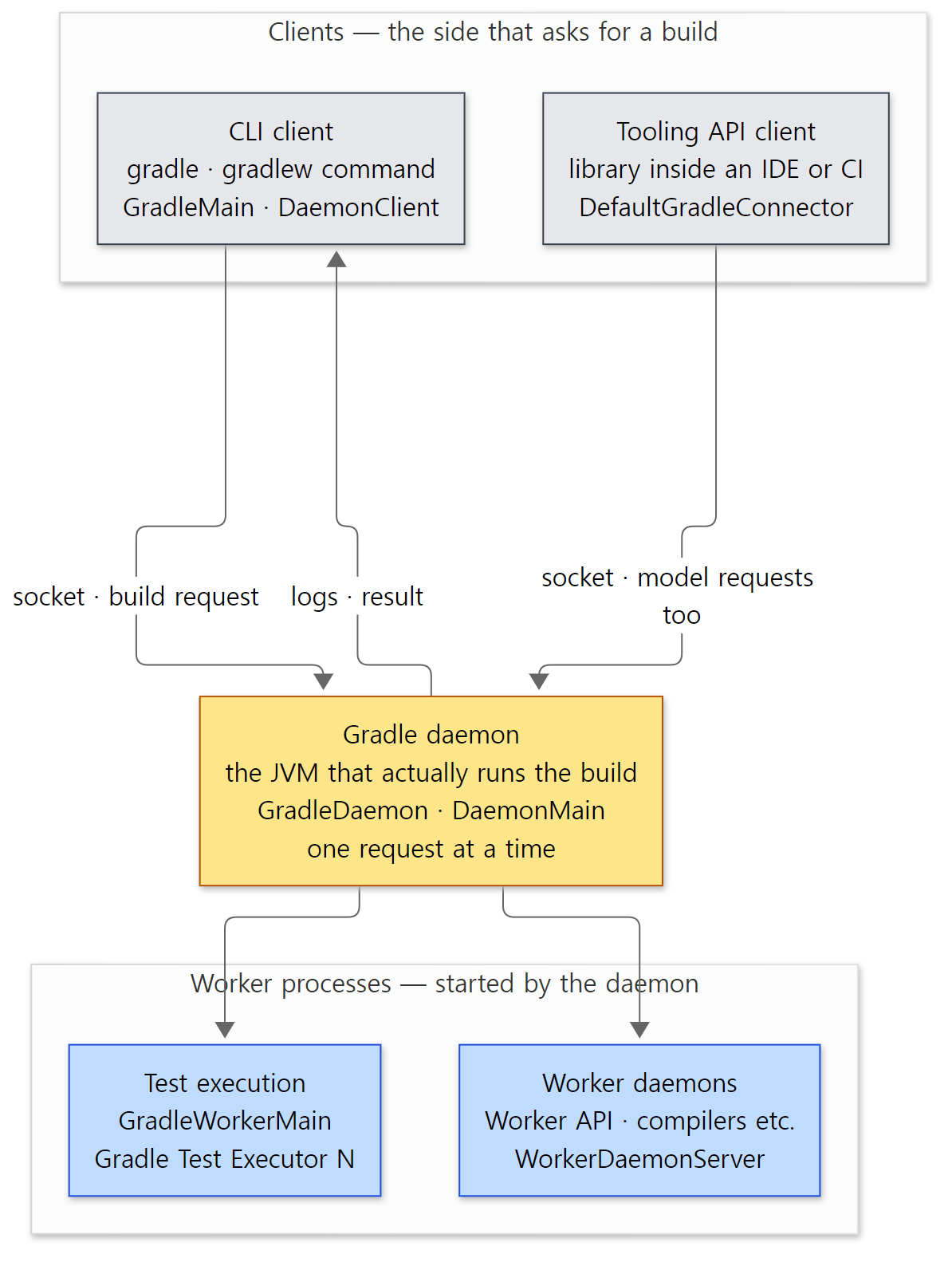 The yellow box is the daemon, which holds the build's state. Gray is the side that asks; blue is the side the daemon hands work to.
Why have a separate daemon?
If you start a new JVM for every build, you pay the same price every time: the JVM starts, thousands of Gradle classes are loaded, the JIT warms up, build scripts are compiled, and the state of the files in your project is read from scratch. The daemon pays this price only on the first build; after that it reuses an already warm JVM and the state left in memory for the next build.
"What is left" is not vague — it is written in the source. Among the service scopes we'll see in section 3, the services in the Global and UserHome scopes are the ones that survive the end of a build. For example, FileSystemAccess, which remembers the state of the file system, is declared @ServiceScope({Scope.UserHome.class, Scope.BuildSession.class}) (platforms/core-execution/snapshots/src/main/java/org/gradle/internal/vfs/FileSystemAccess.java line 36). How file state is remembered between builds is covered in part 10.
The exchange between client and daemon is also written in the design notes as six steps (architecture/build-execution-model.md). In short: the client looks for a compatible idle daemon (and starts one if there is none), sends the request, gets rejected and looks again if the daemon is busy, receives logs while the daemon runs the request, receives the result, and disconnects. How this works over the socket is in part 3.
Example 1: the processes alive during a build
All examples in this post were run in a Docker container (Eclipse Temurin JDK 25) with Gradle 9.10.0 development build, built as-is from the reference commit (07ecbf9ead). There are four example folders — ex/u02-phases, ex/u02-processes, ex/u02-scopes, ex/u02-landmarks — and the === lines in the output are headings printed by the run script.
The run.sh of ex/u02-phases runs a build twice on the same project, looks at the daemon with gradle --status, and finally runs a task nap, which sleeps for 5 seconds, in the background and prints jps -l (the list of running JVMs) in the meantime. Below is the second half of that run.sh.
echo "=== daemon status ==="
gradle --status | head -3
echo "=== processes while a build is running ==="
gradle nap --offline --console=plain -q > /dev/null &
sleep 3
jps -l | grep -v Jps | sort -n
wait
=== daemon status ===
   PID STATUS   INFO
    50 IDLE     9.10.0-20261107025045+0000

=== processes while a build is running ===
50 org.gradle.launcher.daemon.bootstrap.GradleDaemon
266 /opt/gradle/lib/gradle-gradle-cli-main-9.10.0.jar
The pids change from run to run (in other runs the client was 245 and 248).
- After two builds, one daemon (pid 50) is left
IDLE. That means the second build did not start a new daemon but reused this one. You can also see it in the output in section 4, where the scripts of both builds printpid=50. - While a build is running there are two JVMs.
GradleDaemonis the daemon, andgradle-gradle-cli-main-9.10.0.jaris the client started by thegradlecommand. The client goes away when the build ends.
Example 2: tests run in a worker process
We looked at the fourth kind of process with ex/u02-processes. The project applies the java plugin and has one JUnit test, which prints its own pid, its parent's pid, and the last two JVM arguments. For comparison, the test task's doFirst prints a pid too.
// An example written for this post (not Gradle's source)
package lab;
// ... (imports omitted)
class WhereTest {
    @Test
    void printWhereIRun() {
        ProcessHandle me = ProcessHandle.current();
        List<String> args = List.of(me.info().arguments().orElse(new String[0]));
        System.out.println("test   : pid=" + me.pid()
            + " parent=" + me.parent().map(ProcessHandle::pid).orElse(-1L)
            + " thread=" + Thread.currentThread().getName());
        // the last two JVM arguments = the worker's main class and the worker's name
        System.out.println("worker : " + args.subList(Math.max(0, args.size() - 2), args.size()));
    }
}
=== gradle test ===
> Task :testClasses
> Task :test
daemon : pid=52 thread=Execution worker Thread 2
    test   : pid=166 parent=52 thread=Test worker
    worker : [worker.org.gradle.process.internal.worker.GradleWorkerMain, 'Gradle Test Executor 1']
BUILD SUCCESSFUL in 27s
=== java processes left after the build ===
52 org.gradle.launcher.daemon.bootstrap.GradleDaemon
(run.sh picks the lines with grep. Pids, the number at the end of thread names and the elapsed time change from run to run.) The test task runs in the daemon (pid 52), but the test code ran in another JVM whose parent is the daemon (pid 166). That JVM's main class is the GradleWorkerMain from the table, and its name is Gradle Test Executor 1. Because test code does not run inside the daemon, the daemon survives even if a test calls System.exit() or eats all the memory.
Easy to confuse: not every worker process lives long
The design notes call worker processes "long-running daemon processes", but the last line of example 2 shows that after the build only one JVM is left: the daemon. The test worker ended when the tests ended. Not every worker daemon (bottom right of the figure) lives long either. The worker daemons started by Worker API process isolation (WorkerDaemonFactory) are created with KeepAliveMode.SESSION (platforms/core-execution/workers/src/main/java/org/gradle/workers/internal/DefaultWorkerExecutor.java lines 216–218) and are stopped when the build session ends (WorkerDaemonClientsManager.java lines 246–254). Only worker daemons created with KeepAliveMode.DAEMON stay alive after the build and get reused by the next one; the forked Java compiler daemon is an example (I did not run that path for this post). The details are in part 9.
Easy to confuse: a daemon runs only one build at a time
architecture/README.md says "Each daemon runs one request at a time." (line 40). If you send a second build to the same daemon at the same time, the daemon refuses, and the client looks for another idle daemon or starts a new one. That is why you end up with two daemons when you run ./gradlew in two terminals at once. The same document also says the daemon never runs user code "in the background" (line 42). The daemon runs build scripts only when asked.
2. The state hierarchy — process > session > build tree > build > project
Five layers
A daemon runs many builds one after another, and inside one build there can be several builds (a composite build) and several projects. So the state cannot be held as a single lump. architecture/build-state-model.md divides the state the daemon holds into five layers and assigns one class per layer to manage it.
| Layer | Class that manages the state | Lifetime | How many |
|---|---|---|---|
| Build process | platforms/core-runtime/build-state/…/internal/buildprocess/BuildProcessState.java |
As long as the daemon process lives | One per process |
| Build session | platforms/core-runtime/build-state/…/internal/session/BuildSessionState.java |
One gradle command. With continuous build (--continuous), several builds inside it |
One per command |
| Build tree | subprojects/core/…/internal/buildtree/BuildTreeState.java |
One build run | One per run |
| Build | subprojects/core/…/internal/build/BuildState.java (interface) |
One build run | One per build in the build tree |
| Project | subprojects/core/…/api/internal/project/ProjectState.java (interface) |
One build run | One per project |
The reason sessions and build trees are separate is continuous build. With --continuous, Gradle reruns the build every time files change; meanwhile there is one command (one session) and many build runs (many build trees).
Lifetimes show up in the shape of the code
"Lives for one command" shows up in the code as the braces of try-with-resources. Here is BuildSessionLifecycleBuildActionExecutor, which a build request passes through when it reaches the daemon.
            try (CrossBuildSessionState crossBuildSessionState = new CrossBuildSessionState(globalServices, startParameter, userActionRoot)) {
                try (BuildSessionState buildSessionState = new BuildSessionState(userHomeServiceRegistry, crossBuildSessionState, startParameter, requestContext, actionParameters.getInjectedPluginClasspath(), requestContext.getCancellationToken(), requestContext.getClient(), requestContext.getEventConsumer())) {
                    return buildSessionState.run(actionWrapper);
                }
            }
Every time a request comes in, a new session state is created, and when run() finishes it is thrown away with close(). Further in, the build tree state is created and thrown away in the same shape.
            try (BuildTreeState buildTree = new BuildTreeState(buildSessionServices, actionRequirements, buildModelParameters, buildInvocationScopeId)) {
                // assign instead of return to allow combining build failures with cleanup failures below
                result = buildTree.getServices().get(RootBuildLifecycleBuildActionExecutor.class).execute(action);
            }
The process state, on the other hand, is created once when the daemon starts. The daemon's DaemonProcessState constructor calls new BuildProcessState(…) (platforms/core-runtime/launcher/src/main/java/org/gradle/launcher/daemon/server/DaemonProcessState.java lines 44–56). The first argument, !configuration.isSingleUse(), means "is this a long-lived process?". For a daemon that runs a single build and exits (a single-use daemon) it becomes false. When such a daemon is started is covered in part 3.
The build layer has several implementations
BuildState is an interface, and each kind of build has its own implementation. All of them extend subprojects/core/…/internal/build/AbstractBuildState.java.
| Implementation | Which build | Created in |
|---|---|---|
DefaultRootBuildState |
The build in the folder where you ran gradle |
BuildStateFactory.createRootBuild() |
DefaultIncludedBuild |
A build pulled in with includeBuild(…) |
DefaultIncludedBuildFactory |
DefaultNestedBuild |
The build in the buildSrc folder |
DefaultIncludedBuildRegistry.maybeAddBuildSrcBuild() → BuildStateFactory.createNestedBuild() |
RootOfNestedBuildTree |
The root of a separate build tree started by the GradleBuild task |
DefaultNestedBuildTree |
(All in subprojects/composite-builds/src/main/java/org/gradle/composite/internal/.) The difference is that buildSrc is one more build inside the same build tree, while the GradleBuild task even creates a new session. DefaultNestedBuildTree calls new BuildSessionState(…) directly (DefaultNestedBuildTree.java line 80). How included builds and buildSrc are handled comes up bit by bit in part 5 and part 7.
Easy to confuse: there are two ProjectStates
The repository has two types named ProjectState. subprojects/core-api/src/main/java/org/gradle/api/ProjectState.java is the public API you can see as project.state in a build script; it tells you "has this project finished evaluating, did it fail". The one in this post's state hierarchy is subprojects/core/src/main/java/org/gradle/api/internal/project/ProjectState.java, an internal interface with internal in its package. When you meet ProjectState in the source, check the import first.
Easy to confuse: a project state's parent is not the parent project
:app is a subproject of the root project :, but in the state hierarchy the layer directly above :app's project state is not the root project — it is the build. The design notes spell this out separately ("is contained by the build state (and not the state of the parent project)"), and as we'll see in section 3, the parent passed in when the project-scope registry is created is also the build's registry. The parent/child relationship between projects belongs to the model (section 5), not to lifetimes.
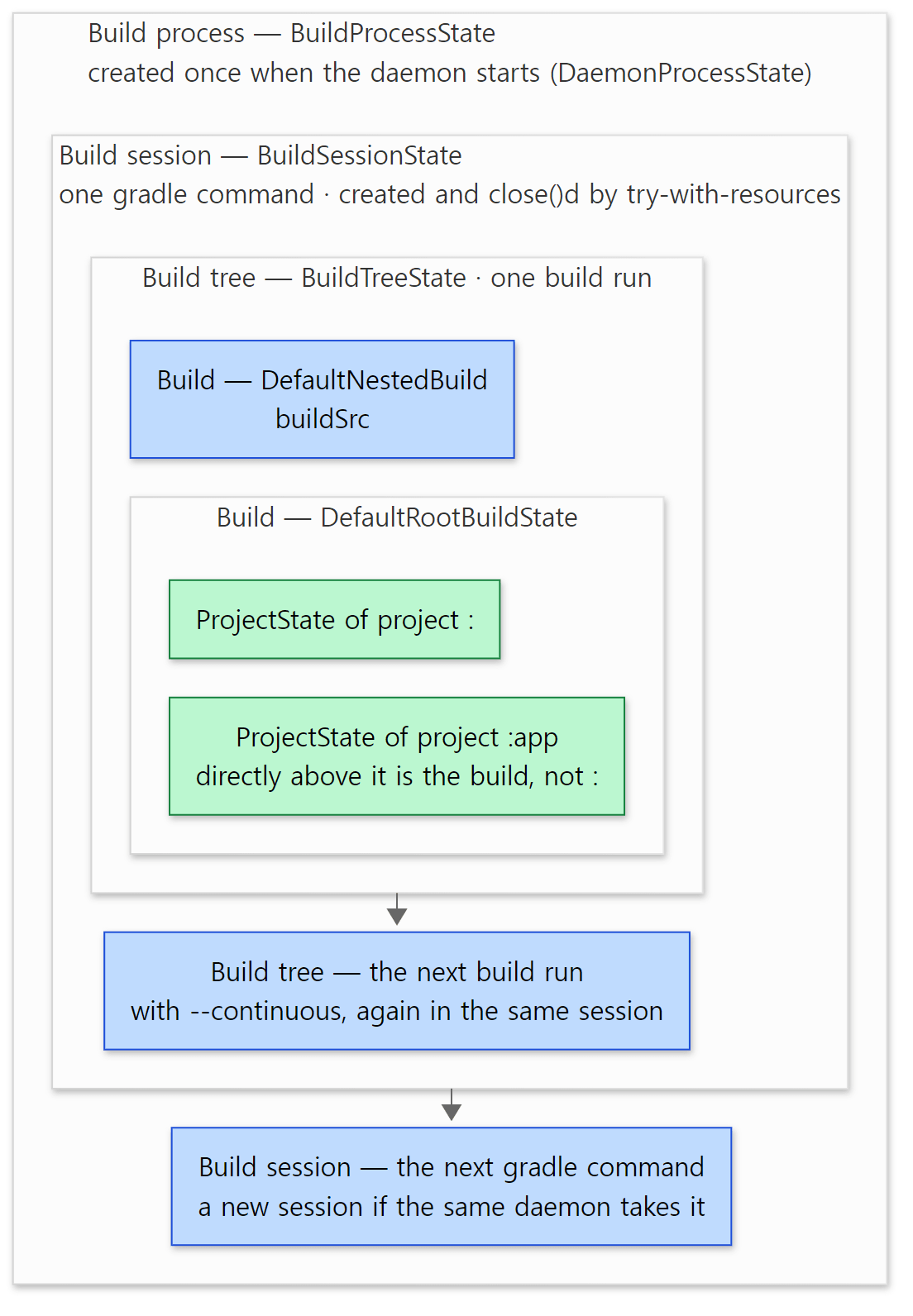 Each outlined box is one layer, and an inner state lives only while the outer one does. Blue boxes are other states of the same layer, green boxes are project states.
3. Service scopes — one registry per layer
The whole map is drawn in the Scope interface
The five layers from section 2 become layers of service registries as they are. The markers that decide which service lives in which layer are the sub-interfaces of Scope, and the comment in that file draws the entire map.
 * <h2>Scope hierarchy</h2>
 * The scopes are arranged in a hierarchy (with some scopes having multiple parents):
 * <pre>
 *            Global
 *     ┌────────┴─────────┐
 *  UserHome      CrossBuildSession
 *     └────────┬─────────┘
 *         BuildSession
 *              │
 *          BuildTree
 *              │
 *            Build
 *         ┌────┴────┐
 *      Project   Settings
 * </pre>
 *
 * Each scope roughly corresponds to the following user-facing concepts:
 * <ul>
 * <li>{@link Global}            — Gradle daemon process
 * <li>{@link UserHome}          — Gradle user home
 * <li>{@link CrossBuildSession} — exists mainly because of {@code GradleBuild} task
 * <li>{@link BuildSession}      — continuous build
 * <li>{@link BuildTree}         — composite build
 * <li>{@link Build}             — build in a composite build
 * <li>{@link Settings}          — init scripts, settings script
 * <li>{@link Project}           — project in a build
 * </ul>
Three more have been added to the five layers of section 2. UserHome is a layer kept separately per Gradle user home (~/.gradle), CrossBuildSession is a layer shared by the outer session and an "inner session" created by the GradleBuild task, and Settings is a layer for init scripts and settings scripts. The same comment goes on to say "Services of all parent scopes are visible to services in a given scope", but not vice versa (lines 77–78).
On the service side, each service declares its scope with an annotation.
/**
 * Attached to a service interface to indicate in which scopes it is defined in.
 * Services are lifecycled with their scope, and stopped/closed when the scope is closed.
 * <p>
 * Services are visible to other services in the same scope and descendent scopes.
 * Services are not visible to services in ancestor scopes.
 * <p>
 * When a service is defined in multiple scopes, the highest scope determines the visibility.
 * The additional instances of the service in lower scopes "override" the instance from the parent
 * for their scope and its children.
 *
 * @see Scope
 */
@Documented
@Retention(RetentionPolicy.RUNTIME)
@Target(ElementType.TYPE)
@Inherited
public @interface ServiceScope {
For example, the interfaces of classes on part 1's main road carry these annotations.
| Service (interface) | @ServiceScope |
Meaning |
|---|---|---|
ExecutorFactory, ListenerManager, BuildOperationRunner |
Global |
One for the whole daemon |
GradleUserHomeDirProvider, GlobalCacheLocations |
UserHome |
One per ~/.gradle, kept for the next build |
WorkerLeaseService |
CrossBuildSession |
One command — hands out the shares that may work at once (worker leases) and project locks |
InputFingerprinter |
BuildSession |
One command |
PlanExecutor, BuildStateRegistry, ProjectStateRegistry |
BuildTree |
One build run |
BuildLifecycleController, ExecutionEngine, BuildCacheController, ExecutionHistoryStore |
Build |
One per build |
WorkerExecutor |
Project |
One per project |
ObjectFactory |
Global, BuildTree, Project |
Separate instances in several scopes (see "Easy to confuse" below) |
(I checked the @ServiceScope line in each interface file. For example: ExecutionEngine.java line 32, PlanExecutor.java line 29, ObjectFactory.java line 52.)
Counting with git grep the lines under src/main that start with @ServiceScope( (ignoring indentation) gives 820 lines. Counting per scope (a line that lists several scopes counts once for each) gives Build 237, Global 170, BuildTree 167, Project 131, BuildSession 93, UserHome 76, CrossBuildSession 20, Settings 10. Most services last for one build (Build, BuildTree), and those that live with the daemon (Global, UserHome) come next.
Where the registries are built
So where is each scope's registry created? Searching with git grep for places that pass .scopeStrictly(Scope.X.class) to a ServiceRegistryBuilder finds roughly one place per scope (excluding tests and test fixtures).
| Scope | Where the registry is built | Registry name (displayName) |
Parent |
|---|---|---|---|
Global |
BuildProcessState constructor (line 47) |
Global services |
Logging and native services |
UserHome |
DefaultGradleUserHomeScopeServiceRegistry.getServicesFor() (line 86) |
services for Gradle user home dir … |
Global |
CrossBuildSession |
CrossBuildSessionState constructor (line 56) |
cross session services |
Global |
BuildSession |
BuildSessionState constructor (line 56) |
build session services |
UserHome and CrossBuildSession |
BuildTree |
BuildTreeState constructor (line 41) |
build tree services |
BuildSession |
Build |
AbstractBuildState constructor (line 58) |
Build-scoped services |
BuildTree |
Settings |
SettingsScopeServices.create() (line 61) |
settings services |
Build |
Project |
ProjectScopeServices.create() (line 124) |
project services |
Build |
(Besides the daemon, a Global-scope registry is also built by the command-line client itself (Basic global services in DefaultCommandLineActionFactory), on the path that runs the build inside the client process without a daemon (BuildActionsFactory), and in the Tooling API's embedded execution (DefaultConnection). With the configuration cache on, there is one more place that builds a Settings registry (DefaultConfigurationCacheHost.kt).)
They all look the same. Here is the build tree one.
    public BuildTreeState(
        ServiceRegistry buildSessionServices,
        BuildActionModelRequirements buildActionRequirements,
        BuildModelParameters buildModelParameters,
        BuildInvocationScopeId buildInvocationScopeId
    ) {
        services = ServiceRegistryBuilder.builder()
            .scopeStrictly(Scope.BuildTree.class)
            .displayName("build tree services")
            .parent(buildSessionServices)
            .provider(new BuildTreeScopeServices(buildActionRequirements, buildModelParameters, buildInvocationScopeId))
            .build();
    }
subprojects/core/src/main/java/org/gradle/internal/buildtree/BuildTreeState.java lines 34–46
.parent(…) connects the registry one layer up, and .provider(…) passes the object that creates this layer's services (BuildTreeScopeServices). scopeStrictly adds a check that "only services with @ServiceScope(BuildTree) may enter this registry". The check that blocks services with the wrong scope (ServiceScopeValidator) and how a provider's @Provides methods are called are covered in part 4.
Modules also have a way to add their own services to each scope. The GradleModuleServices interface has one method per scope, from registerGlobalServices() to registerProjectServices(), eight in all (platforms/core-runtime/service-provider/src/main/java/org/gradle/internal/service/scopes/GradleModuleServices.java lines 38–94). This is the opening that lets the dozens of modules we saw in part 1 plug services into the registries without knowing each other directly.
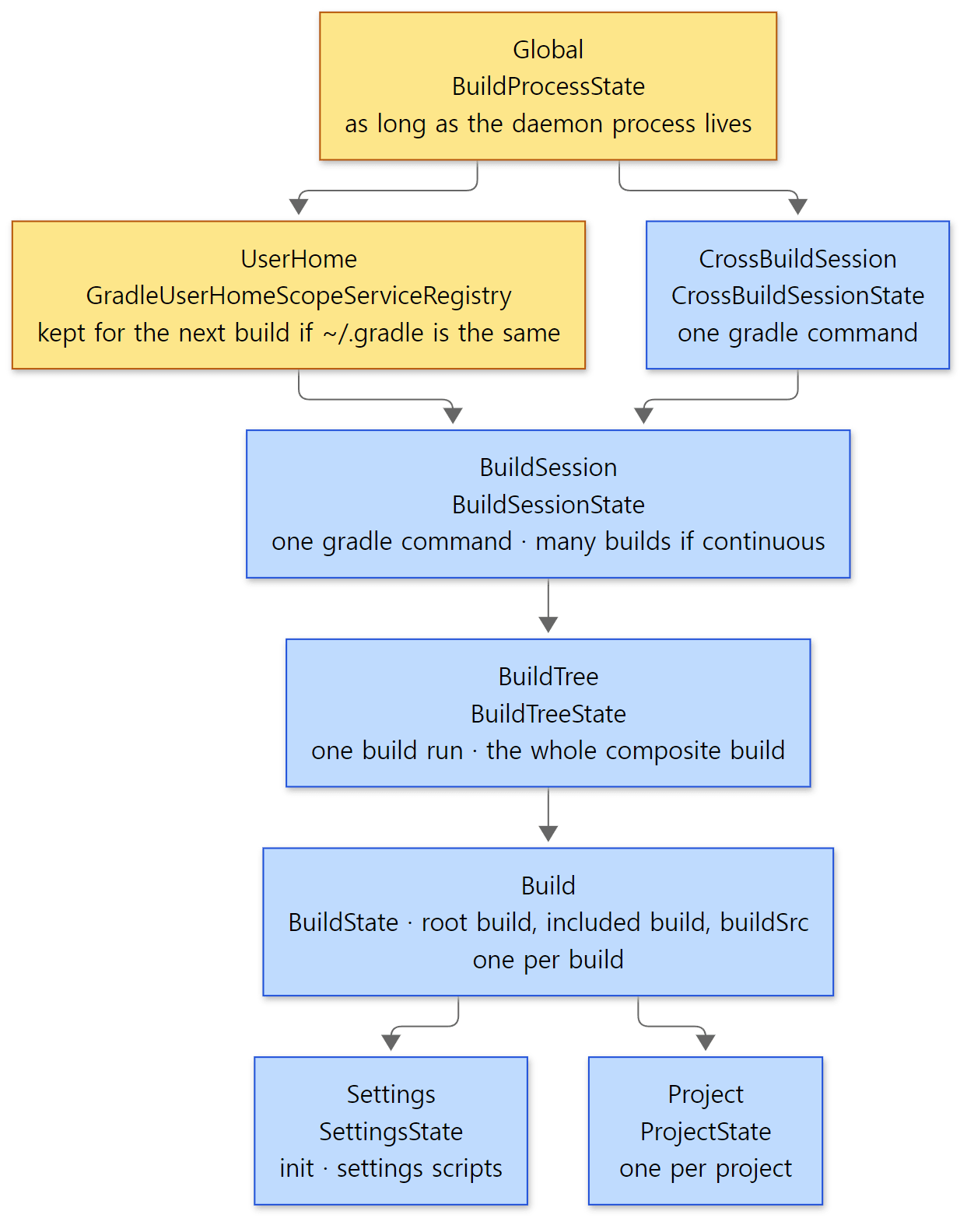 Services in the yellow boxes stay in the daemon after a build ends; services in the blue boxes are created anew for every build (or command).
Example 3: run twice — what stays the same and what is new?
We checked whether the colors in the figure are right with ex/u02-scopes. The build script takes the project's service registry, fetches one service declared only in that scope for each scope, and prints the object's identityHashCode. If the value is the same across two builds in the same daemon, it is the same object; if it differs, it is a newly created one.
// An example written for this post (not Gradle's source)
// For each scope, fetch one service registered only in that scope and print the object's identityHashCode.
// Run twice in the same daemon: the same value means "an object that survived the build", a different one means "a new object for each build".
// (org.gradle.internal.* is Gradle's internal API — used here to read the source, never use it in a real build)
import org.gradle.api.internal.project.ProjectInternal

fun id(o: Any) = "%08x".format(System.identityHashCode(o))

val services = (project as ProjectInternal).services
val probes = listOf(
    "Global           " to org.gradle.internal.concurrent.ExecutorFactory::class.java,
    "UserHome         " to org.gradle.initialization.GradleUserHomeDirProvider::class.java,
    "CrossBuildSession" to org.gradle.internal.work.WorkerLeaseService::class.java,
    "BuildSession     " to org.gradle.internal.execution.InputFingerprinter::class.java,
    "BuildTree        " to org.gradle.internal.build.BuildStateRegistry::class.java,
    "Build            " to org.gradle.internal.build.BuildLifecycleController::class.java,
)
for ((scope, type) in probes) {
    println("$scope  ${id(services.get(type))}  ${type.simpleName}")
}
println("Project (:)       ${id(project)}  ${services}")

project(":app") {
    val appServices = (this as ProjectInternal).services
    println("Project (:app)    ${id(this)}  same Build service? " +
        (appServices.get(org.gradle.internal.build.BuildLifecycleController::class.java) ===
            services.get(org.gradle.internal.build.BuildLifecycleController::class.java)))
}
// ... (registers a task noop that does nothing)
run.sh runs gradle noop --offline --console=plain -q twice.
=== first build ===
Global             081d790f  ExecutorFactory
UserHome           7f4757bd  GradleUserHomeDirProvider
CrossBuildSession  59fd2e23  WorkerLeaseService
BuildSession       7f50d4e2  InputFingerprinter
BuildTree          3ac0b52f  BuildStateRegistry
Build              7f7ff775  BuildLifecycleController
Project (:)       4f43428f  project services
Project (:app)    6f02c140  same Build service? true
=== second build, same daemon ===
Global             081d790f  ExecutorFactory
UserHome           7f4757bd  GradleUserHomeDirProvider
CrossBuildSession  11893215  WorkerLeaseService
BuildSession       67895b63  InputFingerprinter
BuildTree          1c6fee75  BuildStateRegistry
Build              40a5782c  BuildLifecycleController
Project (:)       1864f3b7  project services
Project (:app)    359bf19b  same Build service? true
The hash values themselves change from run to run. What matters is whether they are the same or different between the two builds.
- The
GlobalandUserHomeobjects are the same in both builds. The daemon keeps these two between builds. - From
CrossBuildSessiondown toBuild, every object in the second build is new. This is the result of the try-with-resources from section 2 creating and discarding the session and build tree for each build. :and:appare different project objects, but theBuildLifecycleControllertaken from the two projects' registries is the same object (true). The two project registries share the sameBuildregistry as parent.- Printing
servicesas-is givesproject services— thedisplayNamefrom the table above.
Like Spring's container, and unlike it
Registries chained as parent and child resemble Spring's ApplicationContext hierarchy. It is the same rule as in Spring MVC, where the web context has the root context as its parent, and the child sees the parent's beans but the parent cannot see the child's (Spring part 3 looked at the BeanFactory hierarchy). There are three differences.
- There can be two parents.
BuildSessionStatecalls both.parent(userHomeServices)and.parent(crossBuildSessionServices.getServices())(BuildSessionState.java lines 55–61). - The layers are fixed, and services declare their own layer. In Spring, whoever writes the configuration decides which context a bean goes into; in Gradle, the service interface decides with
@ServiceScope, and the registry checks it. - Each layer has a different lifetime. Spring's parent and child contexts usually live as long as the application, but Gradle's lower layers are created and closed for every build.
Easy to confuse: the same service can exist in several scopes
ObjectFactory is @ServiceScope({Scope.Global.class, Scope.BuildTree.class, Scope.Project.class}). As the ServiceScope comment says, the additional instances "override" the instance from the parent for their scope and its children. So the ObjectFactory you get as objects in a build script is the project-scope one, a different object from the daemon-wide one. When you check the scope of a service, look at the whole list, not just the "highest scope".
Easy to confuse: UserHome lives "with ~/.gradle", not "with the daemon"
The UserHome registries sit in a map keyed by the user home folder. When a request comes for a different folder, the registry of the old, unused folder is closed and a new one is created.
            Services services = servicesForHomeDir.get(gradleUserHomeDir);
            if (services == null) {
                if (servicesForHomeDir.size() == 1) {
                    Services otherServices = servicesForHomeDir.values().iterator().next();
                    if (otherServices.count == 0) {
                        // Other home dir cached and not in use, clean it up
                        stoppable(otherServices.registry).stop();
                        servicesForHomeDir.clear();
                    }
                }
Usually the user home does not change, so the design notes call it "effectively process state". But the daemon registry (registry.bin) also lives inside the user home, so giving a different user home with -g usually starts a different daemon. Because of that, we could not see this swap directly in an example.
4. The three build phases — initialization, configuration, execution
Three phases in the docs, two states in the source
The user documentation describes the three phases like this (this is the well-known definition, not something I checked in the source). In initialization, init scripts and the settings script run and decide which projects are part of the build; in configuration, each project's build script runs and registers tasks; in execution, the requested tasks and the tasks they depend on run.
There is no state called "initialization" in the source. Instead, two state enums overlap. The outer one is DefaultBuildLifecycleController, which guards the lifecycle of one build.
public class DefaultBuildLifecycleController implements BuildLifecycleController {
    private enum State implements StateTransitionController.State {
        // Configuring the build, can access build model
        Configure,
        // Scheduling tasks for execution
        TaskSchedule,
        ReadyToRun,
        BuildFinishHooks,
        ReadyToReset,
        // build has finished and should do no further work
        Finished
    }

    private static final ImmutableList<State> CONFIGURATION_STATES = ImmutableList.of(State.Configure, State.TaskSchedule, State.ReadyToRun);
The inner one is VintageBuildModelController, which remembers how much of the build model (the settings and the projects) has been created.
    private enum Stage implements StateTransitionController.State {
        Created, SettingsLoaded, Configured
    }
The three phases from the docs sit on these two enums like this.
| Phase in the docs | In the source | Where the work happens | Build operation name | Details |
|---|---|---|---|---|
| Initialization | Stage.Created → SettingsLoaded |
VintageBuildModelController.prepareSettings() → DefaultSettingsPreparer |
Load build (containing Run init scripts, Evaluate settings) |
Part 5 |
| Configuration | Stage.SettingsLoaded → Configured |
prepareProjects() → DefaultProjectsPreparer → the evaluator for each project |
Configure build (containing Configure project :…) |
Part 5, part 6 |
| (between configuration and execution) | State.TaskSchedule → ReadyToRun |
Fills in and finalizes the execution plan | Calculate task graph |
Part 9 |
| Execution | State.ReadyToRun → Configure |
executeTasks() → DefaultBuildWorkExecutor |
Run tasks |
Part 9, part 10 |
A build operation is a label Gradle attaches to each chunk of work; in part 1 we looked at their tree with a trace file. I confirmed the names in the table at DefaultSettingsPreparer.java line 132, InitScriptHandler.java line 65, BuildOperationSettingsProcessor.java line 56, BuildOperationFiringProjectsPreparer.java line 58, LifecycleProjectEvaluator.java line 137, BuildOperationFiringBuildWorkPreparer.java line 114 and DefaultBuildWorkExecutor.java line 88.
The methods that move Stage are short.
    @Override
    public void prepareToScheduleTasks() {
        prepareSettings();
        prepareProjects();
    }

    @Override
    public void scheduleRequestedTasks(@Nullable EntryTaskSelector selector, ExecutionPlan plan) {
        state.inState(Stage.Configured, () -> taskExecutionPreparer.scheduleRequestedTasks(gradle, selector, plan));
    }

    private void prepareSettings() {
        state.transitionIfNotPreviously(Stage.Created, Stage.SettingsLoaded, () -> settingsPreparer.prepareSettings(gradle));
    }

    private void prepareProjects() {
        state.transitionIfNotPreviously(Stage.SettingsLoaded, Stage.Configured, () -> projectsPreparer.prepareProjects(gradle));
    }
transitionIfNotPreviously means "do the transition only if it has never been done before". Loading the settings and configuring the projects happen only once per build; no matter who calls them or how often, the second call onward does nothing. The mechanism that guards these transitions is subprojects/core/…/internal/model/StateTransitionController.java. It throws an exception if called in the wrong state; we'll look inside in part 5.
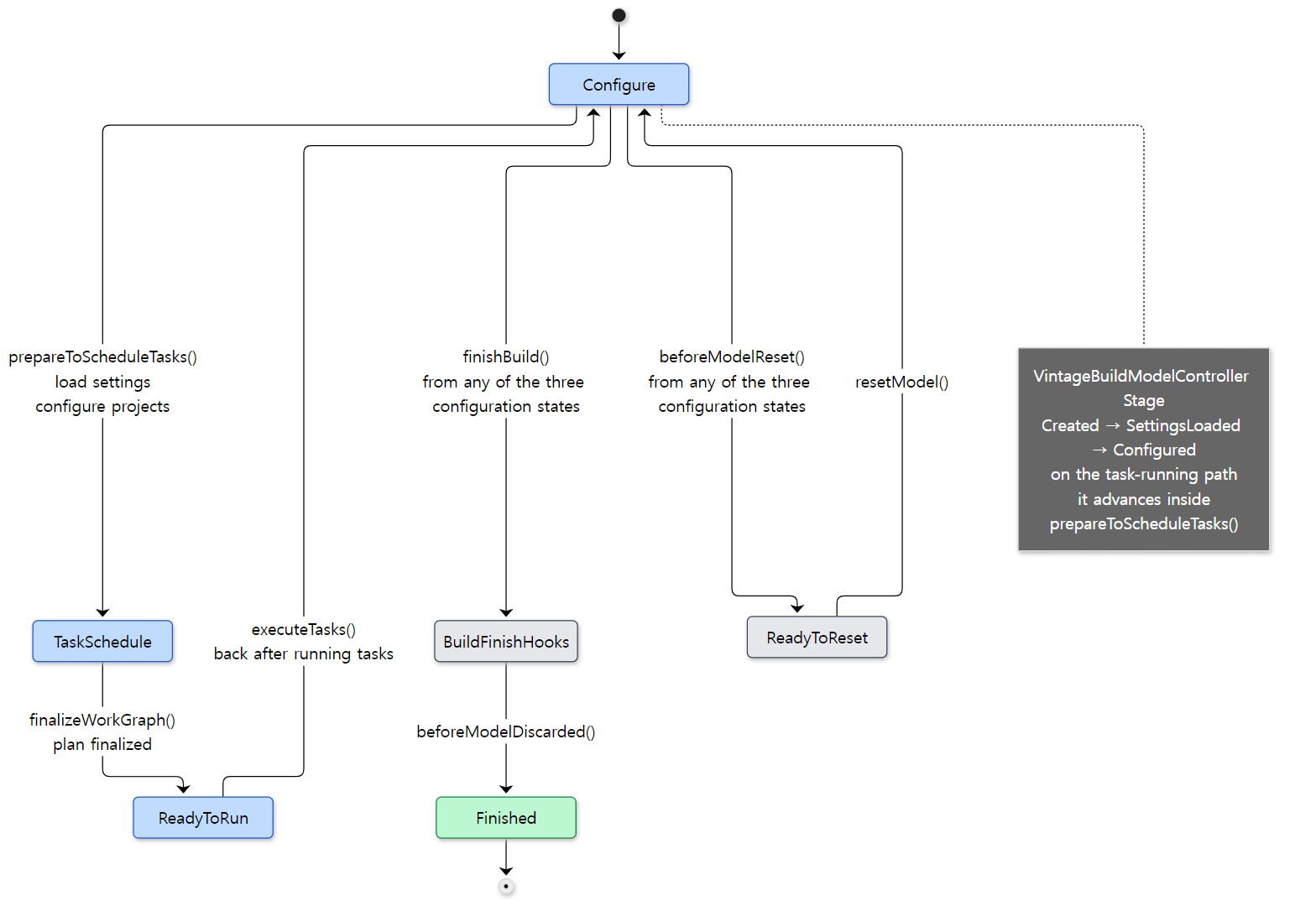 The three blue states are
CONFIGURATION_STATES in the source. The docs' "initialization and configuration" both happen inside the first arrow.
The call order of one build
Laying the state diagram out in time order gives the figure below. It zooms into what comes after DefaultBuildTreeLifecycleController on part 1's main road.
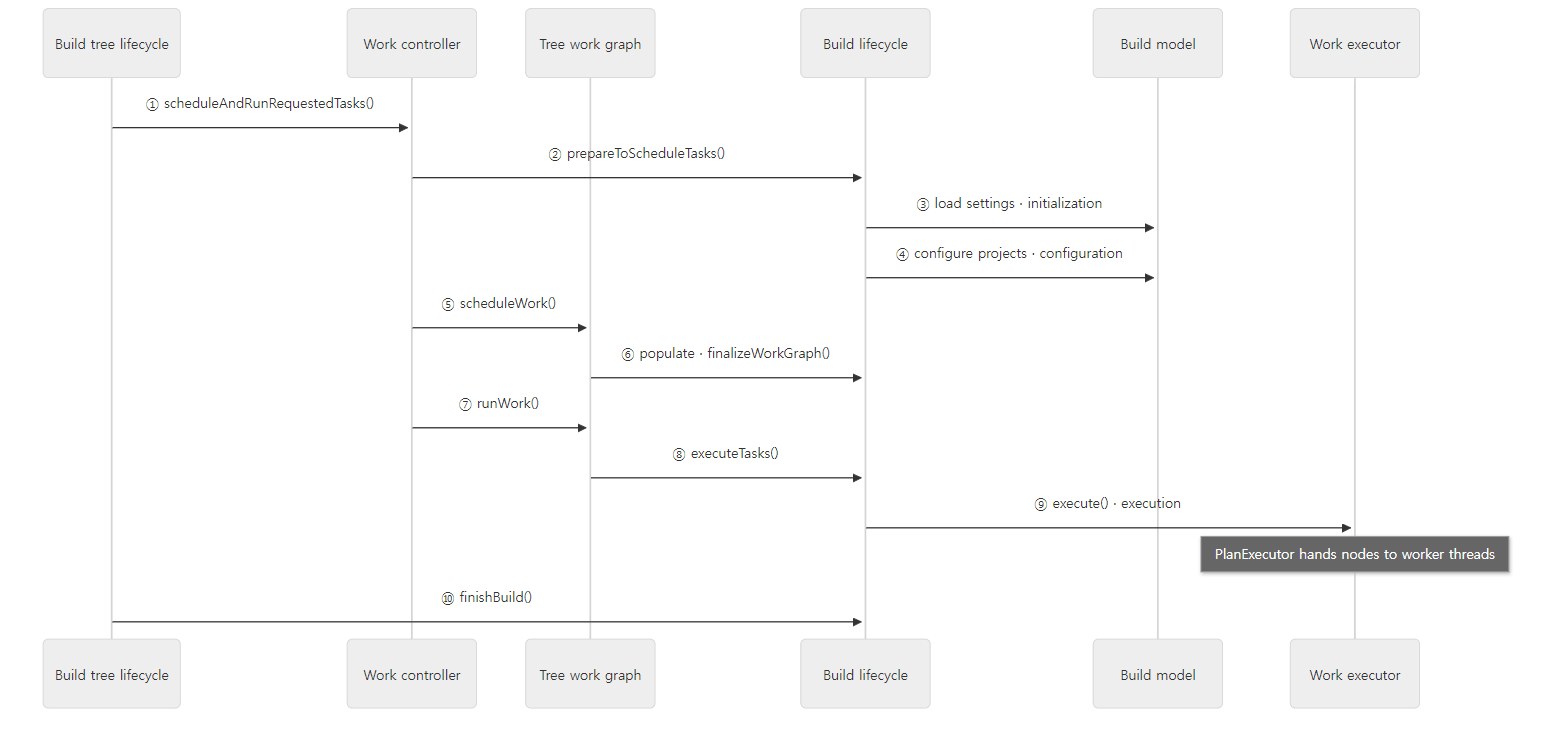 Participants are named by role. The actual call in ② goes through
DefaultBuildTreeWorkPreparer, and ⑩ goes through DefaultBuildTreeFinishExecutor. Up to ⑦ everything runs on the Daemon worker thread; ⑧ and ⑨ run on an included builds thread, one handed out per build (section 6).
The work controller after ① is a short class written in Kotlin.
    override fun scheduleAndRunRequestedTasks(taskSelector: EntryTaskSelector?): ExecutionResult<Void> {
        return taskGraph.withNewWorkGraph { graph: BuildTreeWorkGraph ->
            val finalizedGraph: Try<BuildTreeWorkGraph.FinalizedGraph> = Try.ofFailable { workPreparer.scheduleRequestedTasks(graph, taskSelector) }

            if (finalizedGraph.isSuccessful) {
                workExecutor.execute(finalizedGraph.get())
            } else {
                ExecutionResult.failed(finalizedGraph.failure.get())
            }
        }
    }
"Make a plan (scheduleRequestedTasks), and if that succeeds, run it (execute)" — these two lines are the skeleton of one build. The inside of making a plan (②–⑥) looks like this.
    @Override
    public BuildTreeWorkGraph.FinalizedGraph scheduleRequestedTasks(BuildTreeWorkGraph graph, @Nullable EntryTaskSelector selector) {
        targetBuildController.prepareToScheduleTasks();
        return graph.scheduleWork(graphBuilder -> {
            if (selector != null) {
                graphBuilder.addFinalization(targetBuild, selector::postProcessExecutionPlan);
            }
            graphBuilder.withWorkGraph(targetBuild, builder -> builder.addRequestedTasks(selector));
        });
    }
Initialization and configuration both finish inside the single line targetBuildController.prepareToScheduleTasks(), and only then are the tasks you named on the command line put into the graph (addRequestedTasks). Naturally — you cannot know which tasks exist until all the build scripts have run.
Example 4: which thread and which object each phase runs in
ex/u02-phases prints one line each from the init script (passed with -I), settings.gradle.kts, the root and :app build.gradle.kts, and the task action: the thread name and pid, and the actual class name of the gradle, settings, project, tasks or task object at that spot. Each file has the same helper function at the top.
fun where() = "thread=${Thread.currentThread().name} pid=${ProcessHandle.current().pid()}"
The root project's build script looks like this (the other files have the same shape).
// An example written for this post (not Gradle's source)
// The root project's build script: runs in the configuration phase.
fun where() = "thread=${Thread.currentThread().name} pid=${ProcessHandle.current().pid()}"

println("[3 config  ] build.gradle.kts (:)   ${where()}")
println("             project  = ${project.javaClass.name}")
println("             tasks    = ${tasks.javaClass.name}")

tasks.register("hello") {
    // This block (the configuration block) runs when the task is needed. The doLast lambda runs in the execution phase.
    doLast {
        println("[5 execute ] task :hello action    ${where()}")
        println("             task     = ${javaClass.name}")
    }
}
// ... (the nap task from section 1)
Here is the output of the first run of gradle hello -I init.gradle.kts --offline --console=plain.
=== first run ===

Welcome to Gradle 9.10.0-20261107025045+0000!

Starting a Gradle Daemon (subsequent builds will be faster)
Shared read-only dependency cache is an incubating feature.
[1 init    ] init.gradle.kts        thread=Daemon worker pid=50
             gradle   = org.gradle.invocation.DefaultGradle_Decorated
[2 init    ] settings.gradle.kts    thread=Daemon worker pid=50
             settings = org.gradle.initialization.DefaultSettings_Decorated

> Configure project :
[3 config  ] build.gradle.kts (:)   thread=Daemon worker pid=50
             project  = org.gradle.api.internal.project.DefaultProject_Decorated
             tasks    = org.gradle.api.internal.tasks.DefaultTaskContainer_Decorated

> Configure project :app
[4 config  ] build.gradle.kts (:app) thread=Daemon worker pid=50

> Task :hello
[5 execute ] task :hello action    thread=Execution worker pid=50
             task     = org.gradle.api.DefaultTask_Decorated

> Task :app:hello
[5 execute ] task :app:hello action thread=Execution worker pid=50

BUILD SUCCESSFUL in 22s
2 actionable tasks: 2 executed
Consider enabling configuration cache to speed up this build: https://docs.gradle.org/9.10.0-20261107025045+0000/userguide/configuration_cache_enabling.html
=== second run (same daemon?) ===
[1 init    ] init.gradle.kts        thread=Daemon worker pid=50
...
[5 execute ] task :app:hello action thread=Execution worker pid=50

BUILD SUCCESSFUL in 1s
2 actionable tasks: 2 executed
Consider enabling configuration cache to speed up this build: https://docs.gradle.org/9.10.0-20261107025045+0000/userguide/configuration_cache_enabling.html
(The second run prints the same lines as the first, so the middle is cut. Pids, elapsed times and the build timestamp after the version change from run to run. Shared read-only dependency cache is an incubating feature. appears because the example image mounts pre-downloaded libraries as a read-only cache.)
Four things to read from the output.
- Initialization and configuration ran on the
Daemon workerthread, and the task actions on anExecution workerthread. (Task actions can also run on a thread calledincluded builds; see section 6.) Both names are in the source as-is.DaemonStateCoordinatorcreates the thread that runs requests withexecutorFactory.create("Daemon worker")(platforms/core-runtime/launcher/src/main/java/org/gradle/launcher/daemon/server/DaemonStateCoordinator.java line 74), andDefaultPlanExecutorcreates the threads that run nodes withexecutorFactory.create("Execution worker")(subprojects/core/src/main/java/org/gradle/execution/plan/DefaultPlanExecutor.java line 90). - The order is init → settings → root →
:app→ tasks. Exactly the phase order in the table. - The second run is also
pid=50. The same daemon ran the second build, which is why 22 seconds became 1 second. Even so, everything ran again starting from the init script. What the daemon reuses is the JVM and theGlobal/UserHomestate, not the result of configuring the build (reusing that is the configuration cache that the last line recommends; see part 11). - Every class name ends in
_Decorated. We'll see why in section 5.
Easy to confuse: after running tasks, the state goes back to Configure
executeTasks() does not go from ReadyToRun to Finished; it goes back to Configure. The comment in the source says why.
    @Override
    public ExecutionResult<Void> executeTasks(BuildWorkPlan plan) {
        // Execute tasks and transition back to "configure", as this build may run more tasks;
        DefaultBuildWorkPlan workPlan = unpack(plan);
        if (workPlan.empty) {
            return ExecutionResult.succeeded();
        }
        return buildState.tryTransition(State.ReadyToRun, State.Configure, () -> {
As the comment says, one build may run tasks more than once. What ends a build is finishBuild(), which moves to BuildFinishHooks from any of the three CONFIGURATION_STATES (line 345). The name of the build result is decided there too: "Build" if any task was scheduled, otherwise "Configure" (line 354).
Easy to confuse: "Vintage" means the configuration cache is off
The Vintage (old-style) in VintageBuildModelController and VintageBuildTreeWorkController means the path with the configuration cache turned off. ConfigurationCacheAwareBuildTreeWorkController.kt sits next to it in the same folder, and with --configuration-cache it takes position ①. Its scheduleAndRunRequestedTasks() first tries to load the execution plan from the cache (loadAndRun), and if that works it runs right away without ②–⑥ — skipping the initialization and configuration phases entirely. All figures and examples in this post follow the path with the configuration cache off. The other path is covered in part 11.
5. The big picture of the model — Gradle, Settings, Project, Task
What is this in a build script?
The objects you touch in build scripts — gradle in an init script, settings in a settings script, project in a build script, and tasks inside it — are together called Gradle's model. The public interfaces are in subprojects/core-api; the implementations and internal interfaces are in subprojects/core.
| In a build script | Public interface | Internal interface | Implementation | Actual class (example 4) | State-side partner |
|---|---|---|---|---|---|
gradle |
api/invocation/Gradle |
api/internal/GradleInternal |
invocation/DefaultGradle |
DefaultGradle_Decorated |
BuildState |
settings |
api/initialization/Settings |
api/internal/SettingsInternal |
initialization/DefaultSettings |
DefaultSettings_Decorated |
SettingsState |
project |
api/Project |
api/internal/project/ProjectInternal |
api/internal/project/DefaultProject |
DefaultProject_Decorated |
ProjectState |
tasks |
api/tasks/TaskContainer |
api/internal/tasks/TaskContainerInternal |
api/internal/tasks/DefaultTaskContainer |
DefaultTaskContainer_Decorated |
— |
| one task | api/Task |
api/internal/TaskInternal |
api/DefaultTask → api/internal/AbstractTask |
DefaultTask_Decorated |
— |
(All paths are under org/gradle/.) Every implementation class is abstract.
public abstract class DefaultProject extends AbstractPluginAware implements ProjectInternal, DynamicObjectAware {
subprojects/core/src/main/java/org/gradle/api/internal/project/DefaultProject.java line 159
So are DefaultGradle (line 81), DefaultSettings (line 72) and DefaultTask (line 50). You cannot new an abstract class, so at runtime Gradle generates a subclass of it as bytecode and uses that. That subclass's name is …_Decorated. It fills in the getters left abstract (services received with @Inject, Property<T> properties) and adds dynamic features such as the build script's extra properties and extensions. It is a trick similar to Spring using CGLIB to generate a subclass of a @Configuration class (Spring part 10). AsmBackedClassGenerator, which generates these classes, is covered in part 4.
The state owns the model
The state objects of section 2 and the model objects of this section are different things. The state side owns the model.
    /**
     * Returns the current state of the mutable model of this build. Try to avoid using the model directly.
     */
    GradleInternal getMutableModel();
subprojects/core/src/main/java/org/gradle/internal/build/BuildState.java lines 142–145
The project side is the same. The internal ProjectState is declared as public interface ProjectState extends ModelContainer<ProjectInternal> (subprojects/core/src/main/java/org/gradle/api/internal/project/ProjectState.java line 40) and hands out a ProjectInternal through getMutableModel().
Why split them in two? The comment on getMutableModel(), "Try to avoid using the model directly", is the hint. The model (DefaultProject) is a mutable object that build scripts change freely, and it breaks if several threads touch it at once. The state object stands in front of it and manages "who is touching this project's model right now". That is also why ProjectState is marked @ThreadSafe (line 39). And the state exists before the model and can throw the model away and create it again (resetModel() in the section 4 figure). Project locks are covered in part 6 and part 9.
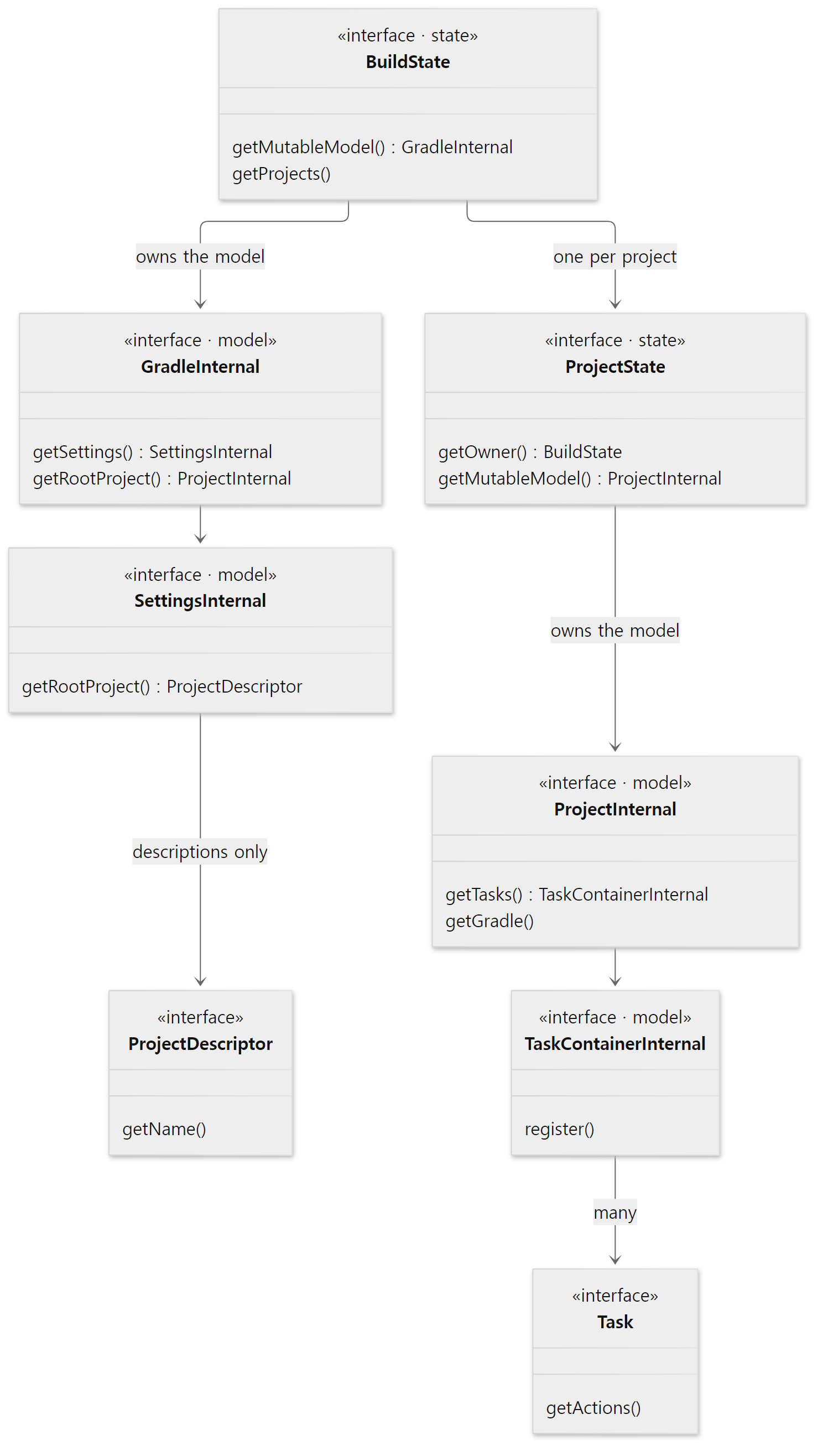 The two marked "state" are the hierarchy from section 2; the four marked "model" are the objects build scripts touch.
Easy to confuse: rootProject in settings is not a project
When you write rootProject.name = "phases" in a settings script, that rootProject is not a Project.
ProjectDescriptor getRootProject();
subprojects/core-api/src/main/java/org/gradle/api/initialization/Settings.java line 259
That is because there are no project objects yet during initialization. Settings only builds descriptions (ProjectDescriptor) saying "there will be a project with this name in this folder", and DefaultProject objects are created from those descriptions as configuration begins. Gradle.getRootProject(), on the other hand, returns a Project but carries throws IllegalStateException (subprojects/core-api/src/main/java/org/gradle/api/invocation/Gradle.java line 114). Calling it directly in the body of an init script fails because the project does not exist yet. That is why init scripts usually use a "do this when it exists" callback like gradle.rootProject { … } (line 125 of the same file).
Easy to confuse: the public Gradle has no getSettings()
GradleInternal has SettingsInternal getSettings() (GradleInternal.java line 95), but the public interface Gradle does not. Through the public API you can reach settings only via callbacks like gradle.settingsEvaluated { … }. Reading the source, you often meet code that casts to an internal interface (…Internal) to get at things the public API doesn't have. Example 3 did that too. It is a technique you should not use in your own builds.
6. The big picture of execution — execution plan, nodes, execution engine
Take the plan, hand out the nodes
When the configuration phase ends, the build is left with one execution plan. At ⑨ in the section 4 figure, DefaultBuildWorkExecutor takes that plan, wraps it in a build operation called Run tasks, and passes the plan's nodes to PlanExecutor.
        try {
            return planExecutor.process(
                plan.asWorkSource(),
                node -> {
                    // TODO: A Node should not expose its owning project.
                    // TODO: A Node should be created with the state required to execute it.
                    ProjectInternal project = node.getOwningProject();
                    if (project != null) {
                        NodeExecutionContext projectContext = projectContexts.computeIfAbsent(project, p ->
                            new TaskGraphNodeExecutionContext(ProjectExecutionServices.create(p))
                        );
                        node.execute(projectContext);
                    } else {
                        node.execute(globalContext);
                    }
                }
            );
subprojects/core/src/main/java/org/gradle/execution/DefaultBuildWorkExecutor.java lines 142–158
The second argument of process() is "what to do when given one node". If the node belongs to a project, it builds that project's execution services (ProjectExecutionServices) as the context and passes it to node.execute(). Section 3's registries are at work here too.
The same file also shows where --dry-run branches off. It builds the execution plan all the way, then in displayOrExecutePlan() it prints only each task's name and SKIPPED and returns (lines 106–116). That is why --dry-run prints the printlns of the configuration phase but does not run task actions.
Nodes are not only tasks
The nodes in an execution plan extend subprojects/core/…/execution/plan/Node.java. Searching this commit for extends Node, extends TaskNode and extends CreationOrderedNode turns up the following.
| Node | What it is |
|---|---|
LocalTaskNode |
One task of this build. Most nodes are this |
TaskInAnotherBuild |
A task of an included build. It asks that build to run it |
TransformStepNode |
One step of a dependency artifact transform (platforms/software/dependency-management) |
ActionNode |
One piece of non-task work (WorkNodeAction) |
OrdinalNode |
A helper node that keeps the order between deleting tasks and producing tasks, as in gradle clean build |
ResolveMutationsNode |
A helper node that works out, before execution, what a task changes (its output locations etc.) (Resolve mutations for task …) |
In this commit, a task node hands off its work with these two lines.
    @Override
    public void execute(NodeExecutionContext context) {
        context.getService(TaskNodeExecutor.class).execute(this);
    }
subprojects/core/src/main/java/org/gradle/execution/plan/LocalTaskNode.java lines 227–230
The node does not know how to run itself; it takes a TaskNodeExecutor from the context's registry and hands the job over. Its implementation is subprojects/core/…/api/internal/tasks/execution/DefaultTaskNodeExecutor.java, which skips tasks whose onlyIf is false or that have no actions, then wraps the task in a unit of work called TaskExecution and passes it to the execution engine.
            ExecutionEngine.Request request = executionEngine.createRequest(work);
            taskExecutionMode.getRebuildReason().ifPresent(request::forceNonIncremental);
            request.withValidationContext(node.getValidationContext());
            ExecutionEngine.Result result = request.execute();
(work is the new TaskExecution(…) just above, at line 341.)
Why wrap a task as a "unit of work"?
The execution engine (platforms/core-execution/execution/…/internal/execution/ExecutionEngine.java) does not know about tasks. All it knows is a generic shape — "a piece of work with inputs, outputs, that can be executed" — that is, a unit of work. A task is wrapped as TaskExecution, a dependency artifact transform as another unit of work, and both ride the same engine. So judgments such as "skip it if the inputs haven't changed (UP-TO-DATE)" and "fetch the result from the cache if the same inputs have been seen (FROM-CACHE)" only need to be implemented once, in the engine. Inside, the engine is a chain of small steps, and the last one, ExecuteStep, calls the task action. It has the same shape as a request in Tomcat passing through a chain of valves before reaching the servlet (Tomcat part 8).
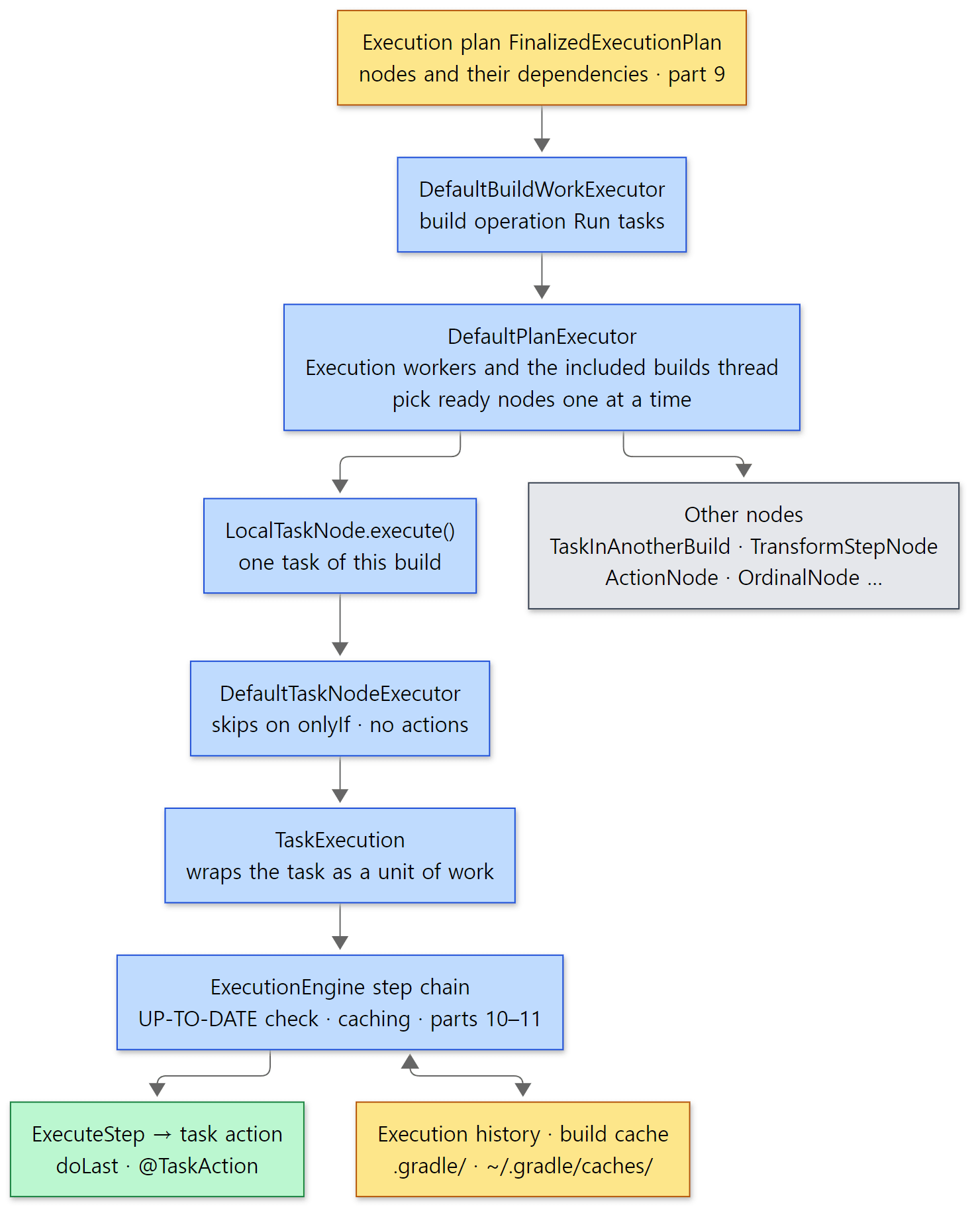 Yellow boxes are what stays in memory and on disk. Execution history lives in the project's
.gradle/, and the local build cache under ~/.gradle/caches/ (build-cache-1).
Easy to confuse: a task may run on a thread other than Execution worker
In example 4 all task actions ran on Execution worker threads, but that is not always so. DefaultPlanExecutor.process() wakes up the worker threads and then uses the calling thread as a worker too.
        // Run the work from the source from this thread as well, given that it will be blocked waiting for that work to complete anyway
        WorkerLease currentWorkerLease = workerLeaseService.getCurrentWorkerLease();
        MergedQueues thisPlanOnly = new MergedQueues(coordinationService, true);
        thisPlanOnly.add(planDetails);
        new ExecutorWorker(thisPlanOnly, currentWorkerLease, cancellationToken, coordinationService, workerLeaseService, stats).run();
subprojects/core/src/main/java/org/gradle/execution/plan/DefaultPlanExecutor.java lines 114–118
It has to wait until the work is done anyway, so instead of idling it helps. But this "calling thread" is not Daemon worker. Every build in the build tree has one DefaultBuildController, which hands that build's execution (from ⑧ on in the section 4 figure) to an executor created with executorFactory.create("included builds") (subprojects/composite-builds/src/main/java/org/gradle/composite/internal/DefaultIncludedBuildTaskGraph.java line 96). Even a plain single build with no included builds runs its one root build this way. Meanwhile Daemon worker just waits for all builds to finish (DefaultBuildControllers.awaitCompletion()). So on this path (running tasks from the command line without the configuration cache), task actions run on the Execution worker threads or on the included builds thread, never on Daemon worker. In fact, when I reran example 4, the first build's :app:hello printed thread=included builds, while in the second build both tasks were on Execution worker. That is why task code must not rely on thread names. Confirming these threads with jstack, the number of worker threads and project locks are covered in part 9.
7. The map on one page — where parts 3 to 12 read
The part 2 map
Here are all the sections so far on one page, divided into zones showing which part of it each remaining post zooms into. From part 3 on, posts start by naming a letter of this figure, as in "zone C of the part 2 map".
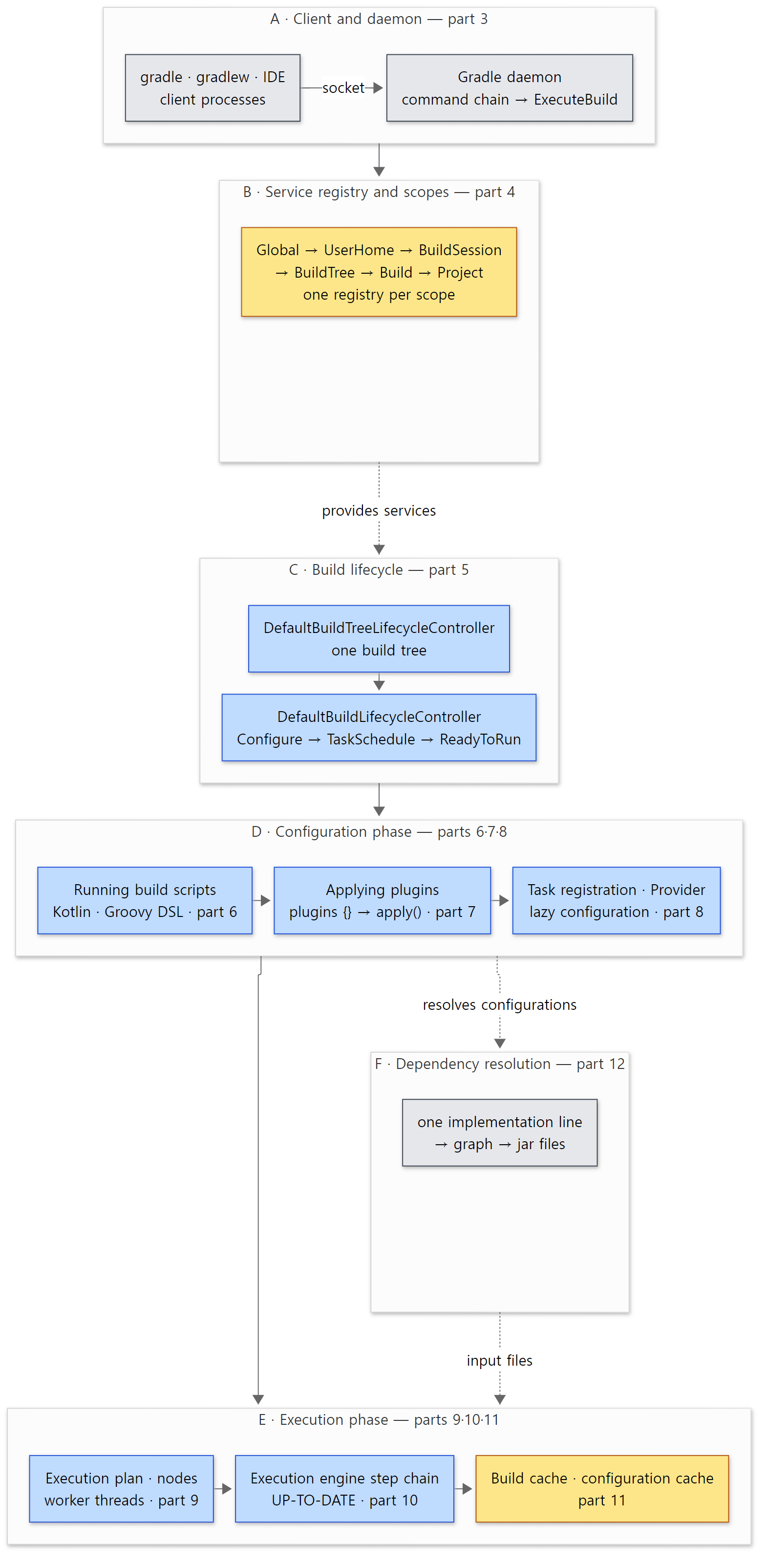 The zone letters (A–F) are the names other posts in this series use to point at this figure.
| Zone | Section of this post | Covered in | Starting classes |
|---|---|---|---|
| A Client and daemon | Section 1 | Part 3 | GradleMain, DaemonClient, DaemonMain, the command chain in DaemonServices, DaemonStateCoordinator |
| B Service registry and scopes | Sections 2·3 | Part 4 | DefaultServiceRegistry, ServiceRegistryBuilder, GradleModuleServices, AsmBackedClassGenerator |
| C Build lifecycle | Section 4 | Part 5 | The executor chain in LauncherServices, DefaultBuildTreeLifecycleController, DefaultBuildLifecycleController, StateTransitionController, DefaultSettingsPreparer |
| D Configuration phase | Sections 4·5 | Part 6, part 7, part 8 | LifecycleProjectEvaluator, KotlinScriptEvaluator, DefaultPluginManager, DefaultTaskContainer, DefaultProperty |
| E Execution phase | Section 6 | Part 9, part 10, part 11 | DefaultExecutionPlan, DefaultPlanExecutor, DefaultTaskNodeExecutor, ExecutionEngine steps, BuildCacheStep, DefaultConfigurationCache |
| F Dependency resolution | — | Part 12 | DefaultConfiguration, DependencyGraphBuilder, conflict resolution |
F is connected with dotted lines because dependency resolution is not tied to a fixed phase. implementation(…) only writes into a "configuration" during the configuration phase; actual resolution happens when someone first asks for the file list — usually during the execution phase, when the inputs of compileJava are computed. We'll check that timing with println in part 12.
Example 5: laying the map over the call stack
As a final check that the map matches reality, we used call stacks. In part 1 we printed the whole stacks of the configuration phase and of a task action and counted their length. This time we take stacks at the same two spots but keep only the frames of classes named on the map, printed from the outside (bottom) in (ex/u02-landmarks).
// An example written for this post (not Gradle's source)
// From the current thread's call stack, keep only the frames of "classes named on the map" and print them from the outside (bottom) in.
val landmarks = setOf(
    "DaemonStateCoordinator", "ExecuteBuild",
    "BuildSessionLifecycleBuildActionExecutor", "DefaultBuildTreeActionExecutor", "RootBuildLifecycleBuildActionExecutor",
    "DefaultBuildTreeLifecycleController", "VintageBuildTreeWorkController", "DefaultBuildTreeWorkPreparer",
    "DefaultBuildLifecycleController", "VintageBuildModelController",
    "DefaultProjectsPreparer", "LifecycleProjectEvaluator",
    "DefaultBuildWorkExecutor", "DefaultPlanExecutor", "LocalTaskNode",
    "DefaultTaskNodeExecutor", "DefaultExecutionEngine", "ExecuteStep",
)

fun landmarkStack(label: String) {
    // ... (keeps only the landmarks frames from the stack, prints consecutive frames of the same class on one line,
    //      and counts how many kinds of classes whose names end in ...Step there are)
}

landmarkStack("configuring build.gradle.kts")

tasks.register("where") {
    doLast { landmarkStack("running task action") }
}
Here is the output of gradle where --offline --console=plain -q.
--- configuring build.gradle.kts (thread=Daemon worker) ---
  DaemonStateCoordinator  (lambda)
  ExecuteBuild  doBuild
  BuildSessionLifecycleBuildActionExecutor  execute > apply
  DefaultBuildTreeActionExecutor  runBuildTreeAction > runAsBuildOperation > call > runBuildTreeLifecycle
  RootBuildLifecycleBuildActionExecutor  execute
  DefaultBuildTreeLifecycleController  scheduleAndRunTasks > runBuild
  VintageBuildTreeWorkController  scheduleAndRunRequestedTasks > apply > call
  DefaultBuildTreeWorkPreparer  scheduleRequestedTasks
  DefaultBuildLifecycleController  prepareToScheduleTasks
  VintageBuildModelController  prepareToScheduleTasks > prepareProjects
  DefaultProjectsPreparer  prepareProjects
  LifecycleProjectEvaluator  evaluate > run
--- running task action (thread=Execution worker) ---
  DefaultPlanExecutor  run > execute
  DefaultBuildWorkExecutor  (lambda)
  LocalTaskNode  execute
  DefaultTaskNodeExecutor  execute > run > executeWithLifecycle > executeWithFallbackOperationId > executeCatchingFailures > executeSkippingOnlyIf > executeSkippingWithNoActions > executeFinalizingProperties > executeTrackingTaskIdentity > doExecute
  DefaultExecutionEngine  execute
  ExecuteStep  execute > call > executeInternal
  (27 distinct *Step classes on the stack)
((lambda) means that class's frames were all lambdas. All other frames between the chosen ones were dropped.)
| Lines of the stack | Zone on the map | This post |
|---|---|---|
DaemonStateCoordinator – ExecuteBuild |
A daemon | Section 1 |
BuildSessionLifecycleBuildActionExecutor, DefaultBuildTreeActionExecutor |
B where the session and build tree states are created | Section 2 |
RootBuildLifecycleBuildActionExecutor – VintageBuildModelController |
C build lifecycle | Section 4 |
DefaultProjectsPreparer, LifecycleProjectEvaluator |
D configuration phase | Section 4 |
DefaultPlanExecutor – ExecuteStep |
E execution phase | Section 6 |
Three things to read.
- The first stack matches the order ①②④ in the section 4 figure exactly.
prepareSettingsis missing fromVintageBuildModelControllerbecause loading the settings had already finished and left the stack (it was called earlier inside the sameprepareToScheduleTasks()). - The second stack starts at
DefaultPlanExecutor. In this run the task action ran on another thread (Execution worker), so neither the daemon nor the lifecycle appears on that thread's stack. A worker thread starts its work by picking a node from the execution plan. - Inside
DefaultTaskNodeExecutorcome methods likeexecuteSkippingOnlyIfandexecuteSkippingWithNoActionswhose names tell you what they skip, and betweenDefaultExecutionEngineandExecuteStepthere are 27 kinds of classes whose names end inStep. We read that chain one by one in part 10.
What this post leaves out
Things left out to keep the map on one page.
- The command chain inside the daemon (
HandleStop…ExecuteBuildinDaemonServices) and the daemon registry.platforms/core-runtime/launcher/…/launcher/daemon/server/DaemonServices.java— part 3 - How the Tooling API connects to the daemon and "model requests" (
BuildModelAction).platforms/core-runtime/tooling-api-provider/…/DefaultConnection.java,launcher/…/ProviderConnection.java— part 3 - The executor chain in
LauncherServices(file watching, problem reporting and so on outsideRootBuildLifecycleBuildActionExecutor).platforms/core-runtime/launcher/…/tooling/internal/provider/LauncherServices.java— part 5 - The service registry itself (looking up services,
@Provides, scope checks).platforms/core-runtime/service-registry-impl/…/DefaultServiceRegistry.java— part 4 - Class loader scopes (the class loader tree from settings → root → subprojects).
subprojects/core/…/api/internal/initialization/ClassLoaderScope.java— part 6 - Isolated projects and parallel configuration, configure-on-demand. All figures in this post follow the default path
- Where continuous build (
--continuous) repeats builds in one session.ContinuousBuildActionExecutorinplatforms/core-runtime/launcherand others - Recording and listening to build operations.
platforms/core-runtime/build-operations/— seen with a trace in part 1, and again in part 5
Summary
| Concept | One-line summary |
|---|---|
| Four processes | The CLI client and Tooling API client ask, the daemon runs the build, worker processes take tests and compilation |
| Daemon | A long-lived JVM. One request at a time. Reuses the JVM and the Global/UserHome state between builds |
| State hierarchy | Build process ⊃ build session ⊃ build tree ⊃ build ⊃ project. Classes BuildProcessState … ProjectState |
| Lifetime of state | Sessions and build trees are created and closed per request with try-with-resources |
| Service scopes | Global, UserHome, CrossBuildSession, BuildSession, BuildTree, Build, Settings, Project. One registry per scope; services declare their scope with @ServiceScope |
| Registry parents | Children see their parents' services, parents cannot see children's. BuildSession has two parents, Project's parent is Build |
| Build lifecycle | DefaultBuildLifecycleController.State (Configure → TaskSchedule → ReadyToRun → back to Configure, ending with BuildFinishHooks → Finished) |
| Initialization and configuration | VintageBuildModelController.Stage (Created → SettingsLoaded → Configured), inside the single line prepareToScheduleTasks() |
| Threads | Initialization and configuration on Daemon worker, task actions on Execution worker or included builds (one per build); Daemon worker waits during execution |
| Model | DefaultGradle, DefaultSettings, DefaultProject, DefaultTaskContainer and DefaultTask are all abstract; the real objects are …_Decorated |
| State and model | The state (BuildState, ProjectState) owns the mutable model through getMutableModel() and manages access to it |
| Execution side | Execution plan → DefaultPlanExecutor hands out nodes → LocalTaskNode → DefaultTaskNodeExecutor → TaskExecution (unit of work) → execution engine steps → task action |
| The part 2 map | A client and daemon (part 3), B registries (part 4), C lifecycle (part 5), D configuration (parts 6–8), E execution (parts 9–11), F dependencies (part 12) |
What's next
We fold the map and step into zone A. The next post covers everything from the moment you type gradle build in a terminal until the daemon receives the request: how GradleMain and Main read the command line, check for --no-daemon, and pick a compatible daemon or start a new one; how the wrapper (gradlew) downloads and unpacks a distribution; the order in which a request passes through the daemon's command chain from HandleStop to ExecuteBuild; and how a second client starts a new daemon when the first one is busy — all checked with --info and jps.
The series we already finished spread out a map at the same point. In Spring part 2, Spring started one container (ApplicationContext) through the twelve steps of refresh() (Spring part 7); Gradle has a separate container per scope and starts the lower layers fresh for every build. Guarding phases with a state machine resembles Lifecycle in Tomcat part 2, and the execution engine's step chain is the same idea as Tomcat's valve chain (Tomcat part 8) and the hook chain in httpd part 3. In that a long-lived process takes a request, handles it and waits for the next, the Gradle daemon is closer to a server than to a build tool. The nginx series and the MariaDB series, written at the same time, also deal with the structure of server processes.