What this post covers
This is the fourth post in the "Digging into Gradle's Source" series. In part 3 we followed the gradle command as it finds or starts a daemon, hands over the build request, and the daemon starts the build through its command chain. Inside that daemon, the objects doing the work (the cache that remembers file hashes, the factory that creates tasks, the service that resolves dependencies) need to find each other. How? This post reads the answer: the service registry.
Back on the map from part 2: part 2 drew the hierarchy of state (build process → session → build tree → build → project) and the service scopes that pair one-to-one with it. This post opens the "box of services, one per scope" from that picture. What does a box look like, how are boxes connected, and how does the task class you wrote get services out of a box? Those are the questions.
- What does a registry look like, and in what order does it search when you look up a service?
- How are services declared, and when are they created? What happens when two services have the same type, or need each other?
- What stops a service from being registered in the wrong scope? How do the platform modules contribute their own services?
- Who fills in a task's
@Injectconstructor andabstractgetters? What is a_Decoratedclass?
| Item | Details |
|---|---|
| Subject | Gradle Build Tool |
| Version | 9.10.0 development build (master) |
| Commit | 07ecbf9ead (2026-10-24) |
| Main classes read | DefaultServiceRegistry, ServiceRegistryBuilder, ServiceRegistrationProvider·@Provides, ServiceScopeValidator, GradleModuleServices, DependencyInjectingInstantiator, AsmBackedClassGenerator |
All line numbers in this post refer to this commit. Part 1 explains how to get the same commit and build the Docker image used for the examples.
The core file DefaultServiceRegistry.java alone is 1,495 lines, and AsmBackedClassGenerator.java, which creates user classes, is 2,145 lines. This post sticks to the main thread. The parts left out are listed by name and location in "What this post leaves out" at the end.
Terms to know first
A service is a long-lived object inside Gradle. It does one job: "compute file hashes", "create tasks", "record build operations", and so on. Usually one interface (FileHasher, ObjectFactory, …) is the service's type, and other services find it by that type. It plays the same role as a bean in Spring.
A service registry is the box that holds services and hands them out by type. Its interface is ServiceRegistry, and get(type), find(type) and getAll(type) are nearly all of it (ServiceRegistry.java lines 27–70). There is a single implementation, DefaultServiceRegistry. It sits where Spring's BeanFactory sits (Spring part 3), and throughout the source it simply shows up as a variable named services.
A service scope is a compartment for services grouped by how long they live: for the whole life of the daemon (Global), while the same Gradle user home (~/.gradle) is in use (UserHome), for one command (BuildSession), for one build (Build), for one project (Project), and so on. Scopes match the hierarchy of state from part 2 one-to-one, and one registry is created per scope.
A service registration provider is a class that adds services to a registry. A createXxx() method annotated with @Provides declares "this is how to make a service of this type". Think of Spring's @Configuration classes and @Bean methods. Classes whose names end in …Services, such as GlobalScopeServices, BuildScopeServices and ProjectScopeServices, are usually providers.
A decorator takes a service that already exists in the parent registry, wraps it, and offers the result as a new service of the same type. It is used when a child scope wants a slightly modified version of the parent's service.
A generated class is a subclass that Gradle creates at run time with ASM (a bytecode generation library). When you write abstract class Probe : DefaultTask(), Gradle creates Probe_Decorated, fills in the abstract getters, and actually uses an instance of that. We already saw this in part 1's example under the name Build_gradle$Hello_Decorated.
1. The big picture: one registry per scope, lookup through parents
Registries are made with a builder (ServiceRegistryBuilder). Here is the Global registry, the first one the daemon creates on startup.
        ServiceRegistryBuilder builder = ServiceRegistryBuilder.builder()
            .scopeStrictly(Scope.Global.class)
            .displayName("Global services")
            .provider(new GlobalScopeServices(longLiving, agentStatus, currentGradleInstallation))
            .provider(new BuildProcessScopeServices());
        for (ServiceRegistry parent : parents) {
            builder.parent(parent);
        }
        for (ServiceRegistrationProvider serviceProvider : serviceProviders) {
            builder.provider(serviceProvider);
        }
        services = builder.build();
The builder takes four things: which scope (scopeStrictly), a name (displayName), the providers that contribute services (provider), and the parent registries (parent). The registry of a single project has the same shape.
    public static CloseableServiceRegistry create(
        ServiceRegistry buildServices,
        ProjectInternal project,
        LoggingManagerFactory loggingManagerInternalFactory
    ) {
        return ServiceRegistryBuilder.builder()
            .scopeStrictly(Scope.Project.class)
            .displayName("project services")
            .parent(buildServices)
            .provider(new ProjectScopeServices(project, loggingManagerInternalFactory))
            .provider(new WorkerSharedProjectScopeServices(project.getProjectDir()))
            .build();
    }
The parent is buildServices, the registry of the build this project belongs to. BuildSessionState makes the session registry, BuildTreeState the build tree registry and AbstractBuildState the build registry, all with the same builder. You could say this whole post is about the chain those registries form as parents and children.
Example 1: printing the parent chain from a project registry
I checked from a build script that they really are connected this way. The project's registry is available through the internal API ProjectInternal.getServices(). And the private field allServices of DefaultServiceRegistry has a toString() that prints the whole parent chain (section 3 shows why).
// An example written for this post (not Gradle source code)
import org.gradle.api.internal.GradleInternal
import org.gradle.api.internal.project.ProjectInternal
import org.gradle.internal.service.DefaultServiceRegistry
// ...

println("project class        = ${project.javaClass.name}")
val projectServices = (project as ProjectInternal).services
println("project registry     = $projectServices (${projectServices.javaClass.simpleName})")

// toString() of DefaultServiceRegistry's private field allServices shows the whole parent chain
val allServices = DefaultServiceRegistry::class.java.getDeclaredField("allServices").apply { isAccessible = true }
println("lookup chain         = ${allServices.get(projectServices)}")
[Shortened from the example ex/u04-injection/project/build.gradle.kts]
org.gradle.internal and ProjectInternal are Gradle's internal API. They are used here to read the source; don't use them in a real build. This example was run in a Docker container (Eclipse Temurin JDK 25) with a Gradle 9.10.0 development build compiled straight from the reference commit (07ecbf9ead). Here is the start of gradle probe --offline --console=plain.
=== gradle probe ===

Welcome to Gradle 9.10.0-20261107025045+0000!

Starting a Gradle Daemon (subsequent builds will be faster)
Shared read-only dependency cache is an incubating feature.

> Configure project :
project class        = org.gradle.api.internal.project.DefaultProject_Decorated
project registry     = project services (ScopedServiceRegistry)
lookup chain         = [project services, [Build-scoped services, [build tree services, [build session services, [[services for Gradle user home dir /root/.gradle, [Global services, [logging services, native services]]], [cross session services, [Global services, [logging services, native services]]]]]]]]
The Shared read-only dependency cache … line appears because this series' image mounts pre-downloaded libraries as a read-only cache (part 1). The line to read is the last one. Each pair of brackets means "own services, then the parents". Drawn out, it looks like this.
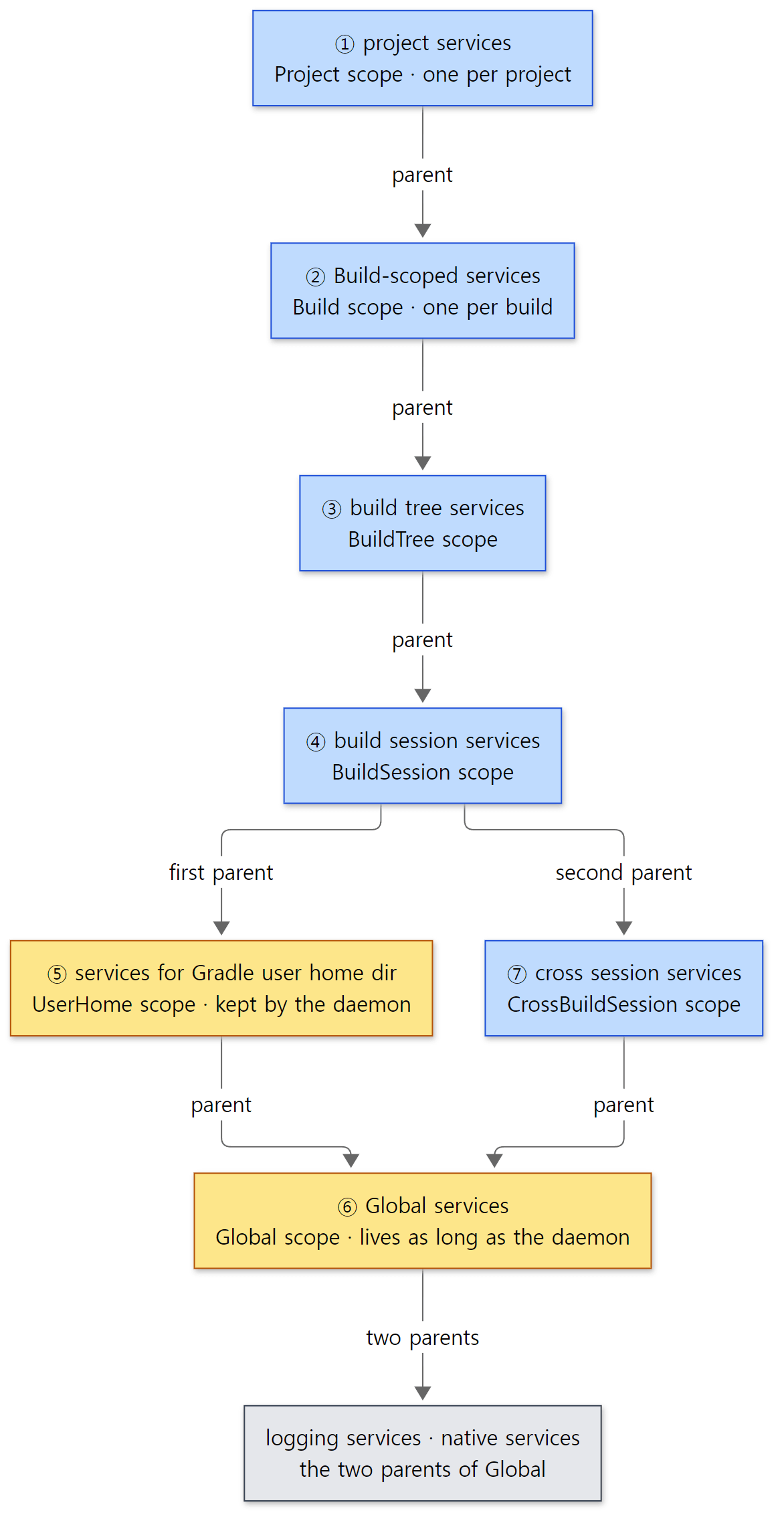 The numbers give the lookup order. Yellow boxes are registries that stay in the daemon after the build ends.
- A lookup from the project searches in this order: own → Build → BuildTree → BuildSession → UserHome → Global → (logging, native) → CrossBuildSession. Global appears twice because both paths point at the same registry. The UserHome side is created by
GlobalScopeServices, which passes in the Global registry itself (ServiceRegistry globalServices) (lines 244–245), and the CrossBuildSession side is created withnew CrossBuildSessionState(globalServices, …)(BuildSessionLifecycleBuildActionExecutor.javaline 65). Section 3 shows the lookup rules in the source. - The first line,
project class, isDefaultProject_Decorated. Theprojectin your build script is also a subclass that Gradle generated. We come back to this in section 6.
Why split it into many boxes?
As we saw in part 1, the Gradle daemon is a long-lived process that takes one build after another. So objects have different lifetimes. Some, like the file hash cache, must survive the end of a build so the next build is faster; others, like this build's project model, must be thrown away when the build ends. With a separate registry per scope, "the build is over" becomes "close the Build registry", and the services inside are cleaned up together. Children can use their parents' services, but parents don't know their children, so the structure itself prevents a long-lived service from holding on to an object that is about to go away.
The doc comment on @ServiceScope states this rule directly: "Services are visible to other services in the same scope and descendent scopes. Services are not visible to services in ancestor scopes" (ServiceScope.java lines 26–38).
Easy to get wrong
- Some registries have two parents.
BuildSessionStatecalls.parent(userHomeServices)and then.parent(crossBuildSessionServices.getServices())(BuildSessionState.javalines 55–61). The Global registry inside the daemon also has two parents, logging and native (DaemonProcessState.javalines 44–56). So the lookup climbs a tree, not a chain. The order in which parents are added is the lookup order. - A project registry's parent is Build, not Settings. The diagram in
Scope.javaalso draws Settings and Project as siblings under Build (lines 33–45). Don't assume that a service you used insettings.gradle.ktsis visible inbuild.gradle.kts. - The daemon's Global registry also holds the daemon services.
DaemonProcessStateputsDaemonServices(where part 3's command chain is built) into the Global registry. The comment says it would be better to separate them into different scopes, but many things still assume daemon services are in the global scope, so they are merged as a migration step (lines 41–43).
2. Declaring services — providers and @Provides
The standard way to put services into a registry is a provider class. ServiceRegistrationProvider is a marker interface with no methods; the rules live in its doc comment (ServiceRegistrationProvider.java lines 19–139). In short:
| Method shape | Meaning |
|---|---|
@Provides + name starts with create… or decorate… + has a return type |
a factory for a service of the return type. Parameters are the services it depends on |
| same as above, but one parameter has the same type as the return type | a decorator — that parameter receives the parent registry's service of the same type |
named configure + void + a ServiceRegistration parameter |
registers in code, adding services with registration.add(...) |
a parameter of type List<T> |
receives every T in this registry and its parents |
a parameter of type ServiceRegistry |
receives the registry that owns this service |
The class that actually enforces these rules is RelevantMethods. It goes through a provider class's methods and sorts them into three groups.
        private void addMethod(Method method) {
            if (method.getName().equals("configure")) {
                if (!method.getReturnType().equals(Void.TYPE)) {
                    throw new ServiceValidationException(String.format("Method %s.%s() must return void.", type.getName(), method.getName()));
                }
                add(configurers, method);
            } else if (method.getName().startsWith("create") || method.getName().startsWith("decorate")) {
                if (method.getAnnotation(Provides.class) == null) {
                    throw new ServiceValidationException(String.format("Method %s.%s() must be annotated with @Provides.", type.getName(), method.getName()));
                }
                if (method.getReturnType().equals(Void.TYPE)) {
                    throw new ServiceValidationException(String.format("Method %s.%s() must not return void.", type.getName(), method.getName()));
                }
                if (takesReturnTypeAsParameter(method)) {
                    add(decorators, method);
                } else {
                    add(factories, method);
                }
            } else if (method.getAnnotation(Provides.class) != null) {
                throw new ServiceValidationException(String.format("Non-factory method %s.%s() must not be annotated with @Provides.", type.getName(), method.getName()));
            }
        }
If the name and the annotation disagree, it throws right away: a method starting with create without @Provides fails, and so does @Provides on a method whose name doesn't start with create/decorate. The result is remembered per class in a ClassValue (lines 30–35), so building many registries from the same provider class costs reflection only once. Since a new registry is built with ProjectScopeServices for every project, this cache matters.
DefaultServiceRegistry.addProvider() takes the sorted methods and turns them into service objects.
    private void findProviderMethods(ServiceRegistrationProvider target, ServiceAccessToken token) {
        Class<? extends ServiceRegistrationProvider> type = target.getClass();
        RelevantMethods methods = RelevantMethods.getMethods(type);
        for (ServiceMethod method : methods.decorators) {
            if (parentServices == null) {
                throw new ServiceLookupException(String.format("Cannot use decorator method %s.%s() when no parent registry is provided.", type.getSimpleName(), method.getName()));
            }
            ownServices.add(new FactoryMethodService(this, determineAccessScope(method, token), token, target, method));
        }
        for (ServiceMethod method : methods.factories) {
            ownServices.add(new FactoryMethodService(this, determineAccessScope(method, token), token, target, method));
        }
        for (ServiceMethod method : methods.configurers) {
            applyConfigureMethod(token, method, target);
        }
    }
Two things are worth noticing.
- Factories and decorators are not called; they are wrapped in a
FactoryMethodServiceand only registered. No service has been created yet (section 3). configuremethods are called right away (applyConfigureMethod(), lines 194–218). If a parameter needs another service, that service is created at this point. TheServiceRegistryBuilderdoc comment also says that "theconfiguremethods will be executed before the registry is built" (ServiceRegistryBuilder.javalines 97–98).
The registration.add(...) used inside configure comes in two forms. add(type, object), which takes an object that already exists, becomes a FixedInstanceService; add(type, implementationClass), which takes a class, becomes a ConstructorService that calls the class's constructor later (lines 235–264). Constructor parameters are looked up as services, just like @Provides method parameters. So in the end each service is wrapped as one of three kinds.
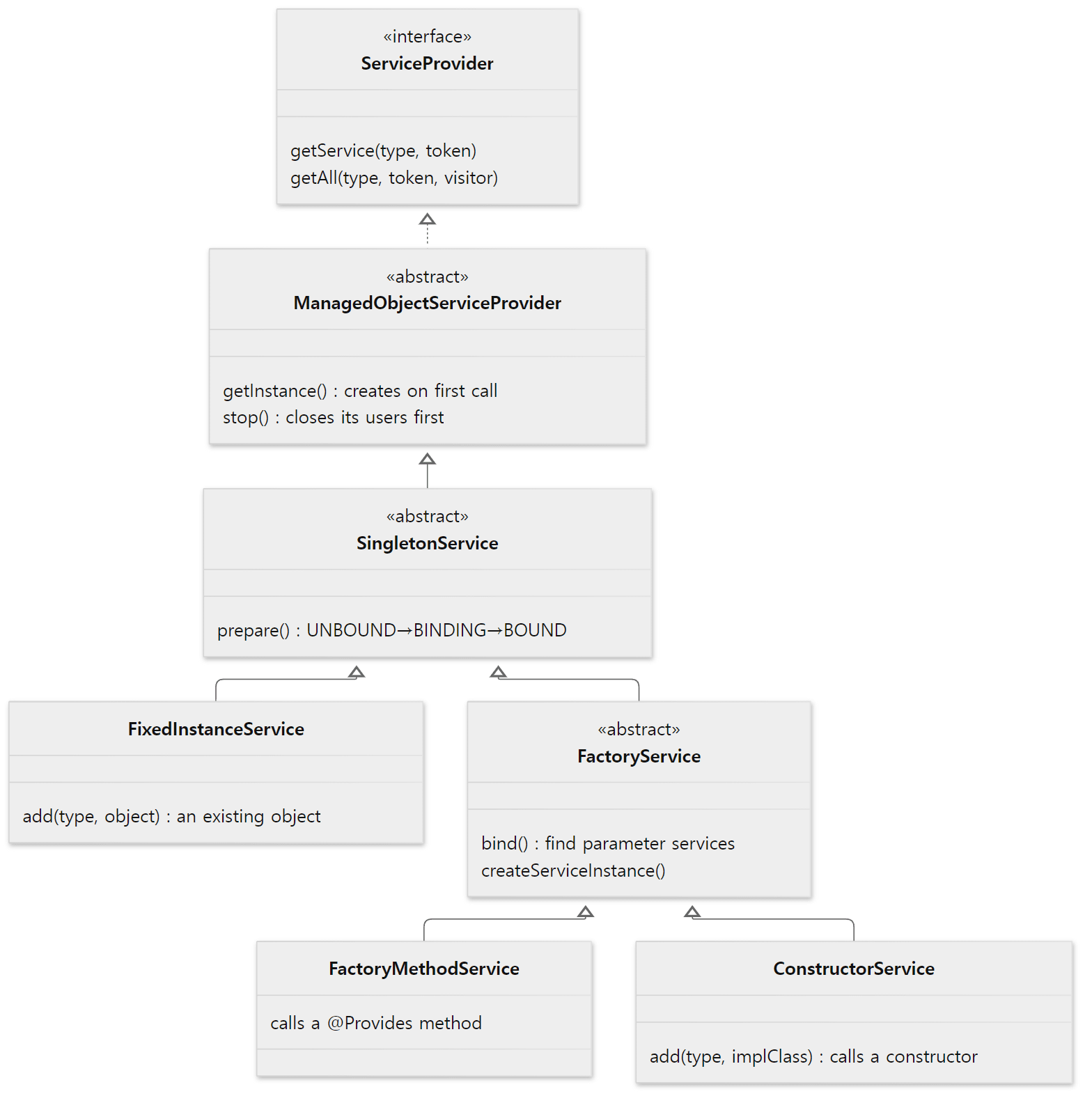 Except for the
ServiceProvider interface, all of these are private nested classes inside DefaultServiceRegistry.
Method handle or reflection?
Two ways of calling @Provides methods are prepared. DefaultServiceMethodFactory picks the method handle (java.lang.invoke.MethodHandle) factory if method handles are available, otherwise the reflection factory (DefaultServiceMethodFactory.java lines 25–36). But choosing the method handle factory doesn't mean everything is called through a method handle.
    @Override
    public ServiceMethod toServiceMethod(Method method) {
        if (Modifier.isPublic(method.getModifiers()) && Modifier.isPublic(method.getDeclaringClass().getModifiers())) {
            try {
                return new MethodHandleBasedServiceMethod(method);
            } catch (IllegalAccessException ex) {
                return new ReflectionBasedServiceMethod(method);
            }
        }
        return new ReflectionBasedServiceMethod(method);
    }
A method handle is used only when both the method and its class are public (because it uses MethodHandles.publicLookup()). Yet most of Gradle's provider methods are protected or have no access modifier. Counting the methods annotated with Gradle's @Provides (org.gradle.internal.service.Provides) in the Java sources of the reference commit gave 648: 22 public, 168 protected, and the other 458 package-private (two example files that use the same-named @Provides of Guice and Dagger were left out). So most are called through reflection. Each such method is called once per service, so the speed difference probably doesn't matter much (I haven't measured it).
Easy to get wrong: the parameters, not the name, make a decorator
You might think a decorator has to start with decorate, but all RelevantMethods checks is "does a parameter have the same type as the return type?" (lines 88–92 of the code above). So there are also decorators named create…. The task factory in the project registry is one.
    @Provides
    protected ITaskFactory createTaskFactory(ServiceRegistry projectScopeServiceRegistry, ITaskFactory parentFactory, TaskScheme taskScheme) {
        return parentFactory.createChild(project, taskScheme.getInstantiationScheme().withServices(projectScopeServiceRegistry));
    }
ITaskFactory parentFactory has the return type, so this is a decorator. That parameter receives the Build registry's ITaskFactory (the AnnotationProcessingTaskFactory created in BuildScopeServices lines 490–496), and the project registry offers a child factory with "this project and this project's services" attached. That's why ITaskFactory declares two scopes with @ServiceScope({Scope.Build.class, Scope.Project.class}). createPluginRegistry(PluginRegistry rootRegistry), earlier in the same file, is the same kind of decorator (lines 158–168). In section 6's example we'll see this factory create a task, in a stack trace.
3. Lookup and creation — lazy singletons
Own services first, then the parents
The registry's constructor fixes the lookup order.
    public DefaultServiceRegistry(@Nullable String displayName, ServiceRegistry... parents) {
        assertAllowedImplementation(getClass());

        this.displayName = displayName;
        this.ownServices = new OwnServices();
        if (parents.length == 0) {
            this.parentServices = null;
            this.allServices = ownServices;
            this.inspector = new ClassInspector();
        } else {
            this.parentServices = setupParentServices(parents);
            this.allServices = new CompositeServiceProvider(ownServices, parentServices);
            this.inspector = parents[0] instanceof DefaultServiceRegistry ? ((DefaultServiceRegistry) parents[0]).inspector : new ClassInspector();
        }
        this.thisAsServiceProvider = allServices;
    }
allServices is CompositeServiceProvider(ownServices, parentServices). CompositeServiceProvider.getService() asks its members front to back and returns the first answer (lines 1058–1066). With several parents, parentServices is itself a CompositeServiceProvider of the parents in the order they were added (lines 123–135). The nested brackets printed in example 1 are exactly the toString() of these objects (lines 1086–1088). This matches the order written in the provider doc comment: "own services of the current registry → all services of the first parent → all services of the second parent → …. The decorator declarations skip the own services, and start the lookup in the parents" (ServiceRegistrationProvider.java lines 102–116).
assertAllowedImplementation() prevents subclassing this class, except for ScopedServiceRegistry (lines 75–83). It looks like registries used to be subclassed to add services; now that path is closed with a message telling you to use ServiceRegistryBuilder.
Looking among own services
        @Override
        public @Nullable Service getService(Type type, @Nullable ServiceAccessToken token) {
            PersistentArray<ServiceProvider> serviceProviders = getProviders(unwrap(type));
            if (serviceProviders.isEmpty()) {
                return null;
            }
            if (serviceProviders.size() == 1) {
                return serviceProviders.get(0).getService(type, token);
            }

            List<Service> services = new ArrayList<Service>(serviceProviders.size());
            for (ServiceProvider serviceProvider : serviceProviders) {
                Service service = serviceProvider.getService(type, token);
                if (service != null) {
                    services.add(service);
                }
            }
            // ...
            Formatter formatter = new Formatter();
            formatter.format("Multiple services of type %s available in %s:", format(type), getDisplayName());
            for (String description : descriptions) {
                formatter.format("%n   - %s", description);
            }
            throw new ServiceLookupException(formatter.toString());
        }
getProviders() takes candidates from providersByType, a map keyed by type. When a service is registered, this map is filled with the declared type and all its supertypes (except Object) as keys (collectProvidersForClassHierarchyOf(), lines 1466–1493). So a service registered as FileSystemOperations is also found when you ask for one of its superinterfaces. Then: zero candidates gives null (and the lookup moves to the parents), one gives that candidate, and two or more throw. Unlike Spring, there is no @Primary or name-based mechanism for picking one (compare with Spring part 5).
The same map blocks one more thing. If ServiceRegistry shows up while walking the supertypes, it throws (lines 1477–1480). That's because ServiceRegistry is a special service: every registry already contains itself under that type (the OwnServices constructor, lines 400–410). This is what section 2's table meant by "a ServiceRegistry parameter receives the owning registry".
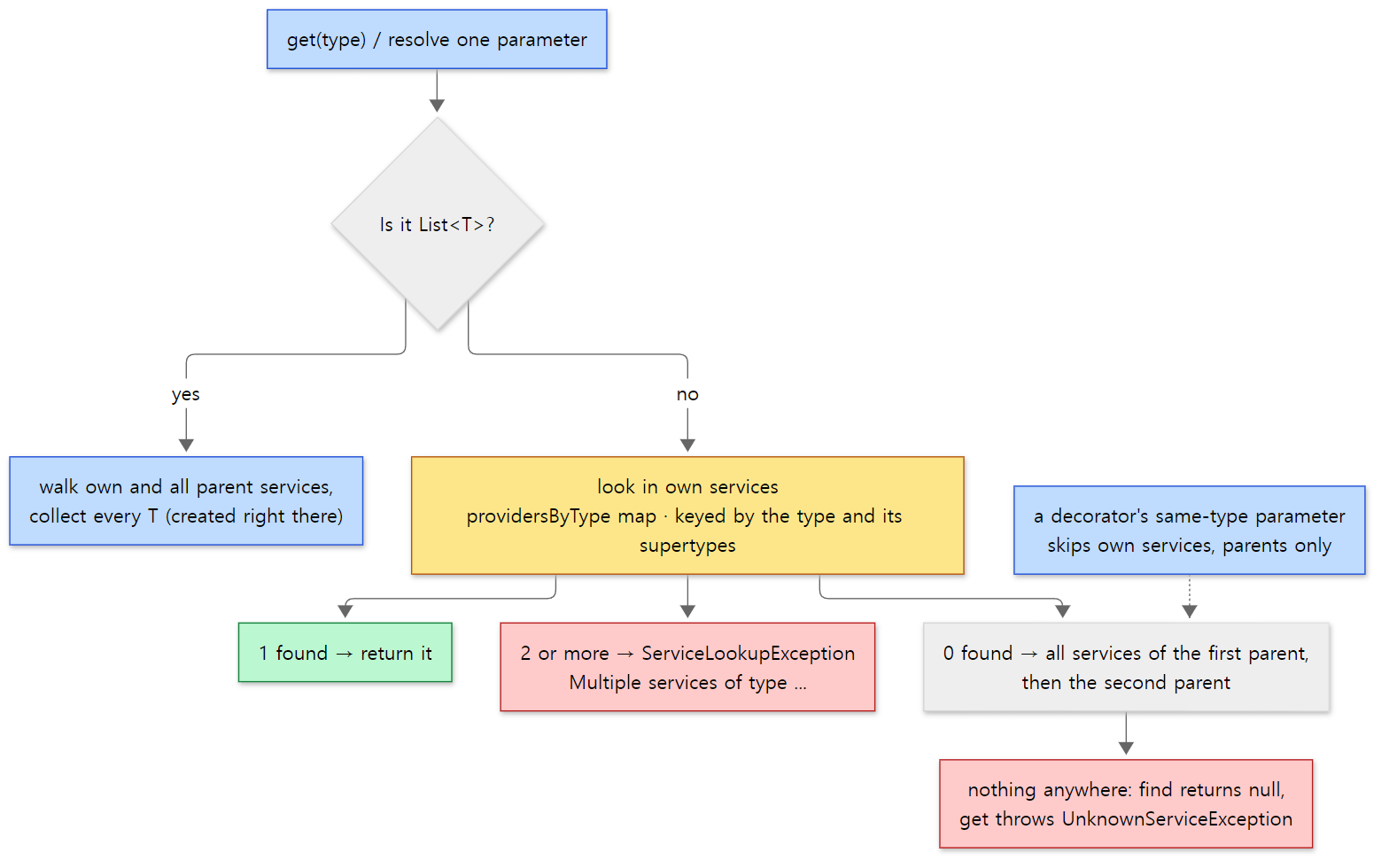 The lookup only moves to the parents when own services have zero matches. With two, it fails without looking at the parents.
Created on first lookup
Finding a service doesn't create it immediately. A service object goes through two steps. First prepare() does the "get ready to create" step (bind),
        private Service prepare() {
            if (state == BindState.BOUND) {
                return this;
            }
            synchronized (this) {
                if (state == BindState.BINDING) {
                    throw new ServiceValidationException("Cycle in dependencies of " + getDisplayName() + " detected");
                }
                if (state == BindState.UNBOUND) {
                    state = BindState.BINDING;
                    try {
                        bind();
                        state = BindState.BOUND;
                    } catch (RuntimeException e) {
                        state = BindState.UNBOUND;
                        throw e;
                    }
                }
                return this;
            }
        }
and then, when someone asks for the object, getInstance() creates it exactly once with double-checked locking (lines 592–603).
FactoryService.bind() only locates a service for each parameter (lines 747–800). If the parameter type equals the return type (a decorator), it looks only in owner.parentServices; otherwise in owner.allServices. If nothing is found, it fails with a message like Cannot create service of type ... using ... as required service of type ... for parameter #N is not available. Only when createServiceInstance() runs does it call get() on each located parameter service in turn (which creates them one after another) and then call the method or constructor (lines 803–825). The created object stays in the instance field, so within one registry a service is a singleton.
One line of the doc comment gives the reason for this design: "Services are created lazily and might not be instantiated at all during the lifetime of the owning service registry" (ServiceRegistrationProvider.java line 134). BuildScopeServices alone has 58 @Provides, and the reference commit has 690 in total (lines starting with @Provides, counted with git grep over Java and Kotlin src/main, leaving out 34 lines that use the same-named @Provides of Guice and Dagger). A single build doesn't use all of them. Spring's ApplicationContext creates its singletons up front with preInstantiateSingletons() on startup (Spring part 4); Gradle's registry has no such step.
Example 2: using the registry directly, outside a build
The registry is plain Java code in a few jars of the Gradle distribution. So it can be used directly with javac/java, no build needed. I put the image's /opt/gradle/lib/* on the classpath and wrote a small program that imitates two scopes (Global and Build).
// An example written for this post (not Gradle source code)
// ... imports omitted ...
public class RegistryLab {

    // ---- service types: @ServiceScope says which scope each lives in ----
    @ServiceScope(Scope.Global.class)
    public interface Clock {
    // ... String now() ...
    @ServiceScope({Scope.Global.class, Scope.Build.class})
    public interface Greeter {
    // ... String greet(String name) ...
    @ServiceScope({Scope.Global.class, Scope.Build.class})
    public interface Plugin {
    // ... String id() ...
    @ServiceScope(Scope.Build.class)
    public interface Report extends Closeable {
    // ... String render() ...
    // ... also omitted: interface Unscoped (no @ServiceScope) and the log() helper ...

    // ---- a provider that adds services to the Global scope ----
    static class GlobalServices implements ServiceRegistrationProvider {
        @Provides
        Clock createClock() {
            log("create Clock");
            return () -> "12:00";
        }

        @Provides
        Greeter createGreeter(Clock clock) {
        // ... a Greeter returning "Hello, <name> at 12:00" ...
        @Provides
        Plugin createCorePlugin() {
        // ... a Plugin whose id is "core" ...
    }

    // ---- a provider that adds services to the Build scope ----
    static class BuildServices implements ServiceRegistrationProvider {
        // parameter type == return type makes it a "decorator" — it wraps the parent's Greeter
        @Provides
        Greeter decorateGreeter(Greeter parent) {
        // ... a Greeter that upper-cases the parent's result ...
        @Provides
        Plugin createJavaPlugin() {
        // ... a Plugin whose id is "java" ...

        // List<T> collects every T in this registry and its parents
        // ServiceRegistry is the registry that owns this service
        @Provides
        Report createReport(Greeter greeter, List<Plugin> plugins, ServiceRegistry owner) {
        // ... render() builds one line from greeter and plugins; close() logs ...
    }

    // ... main() builds two registries with the same builder as in section 1:
    // ...   global = scopeStrictly(Global) + GlobalServices
    // ...   build  = scopeStrictly(Build)  + BuildServices + parent(global)
    // ... then runs steps 1 to 8 of the output below ...
}
[Shortened from the example ex/u04-registry-lab/RegistryLab.java — the omitted method bodies also log the moment of creation with log("create …") on their first line; the real file's comments are in Korean]
ex/u04-registry-lab/run.sh runs javac -cp "/opt/gradle/lib/*" RegistryLab.java and then java. Here is the output of steps 1 to 3.
=== 1. build two registries (nothing is created yet) ===
built: lab build
=== 2. first lookup of Report in the build registry ===
    [create Plugin java]
    [create Plugin core]
    [create Clock]
    [create Greeter (global)]
    [decorate Greeter]
    [create Report, owner = lab build]
render(): HELLO, GRADLE AT 12:00 / plugins: java core
same instance next time? true
=== 3. the same type seen from each registry ===
build.get(Greeter)  -> HELLO, X AT 12:00
global.get(Greeter) -> Hello, x at 12:00
global.find(Report) -> null
build.getAll(Plugin) size = 2
- Two registries were built, but nothing was created. There is no
[create …]between steps 1 and 2. - A single
get(Report)created everything it needed, one after another. The twoPlugins come first, thenClock→ the globalGreeter→ the decorator →Report. The figure below explains the order. - The same
Greetertype is the decorated one (upper case) in the Build registry and the original in Global. The child has effectively overridden the parent's service. List<Plugin>holds the registry's own (java) first and then the parent's (core), exactly the lookup order.- In Global,
Reportisnull. Parents don't know their children. - The registry received as
ownerislab build, the registry that owns the service.
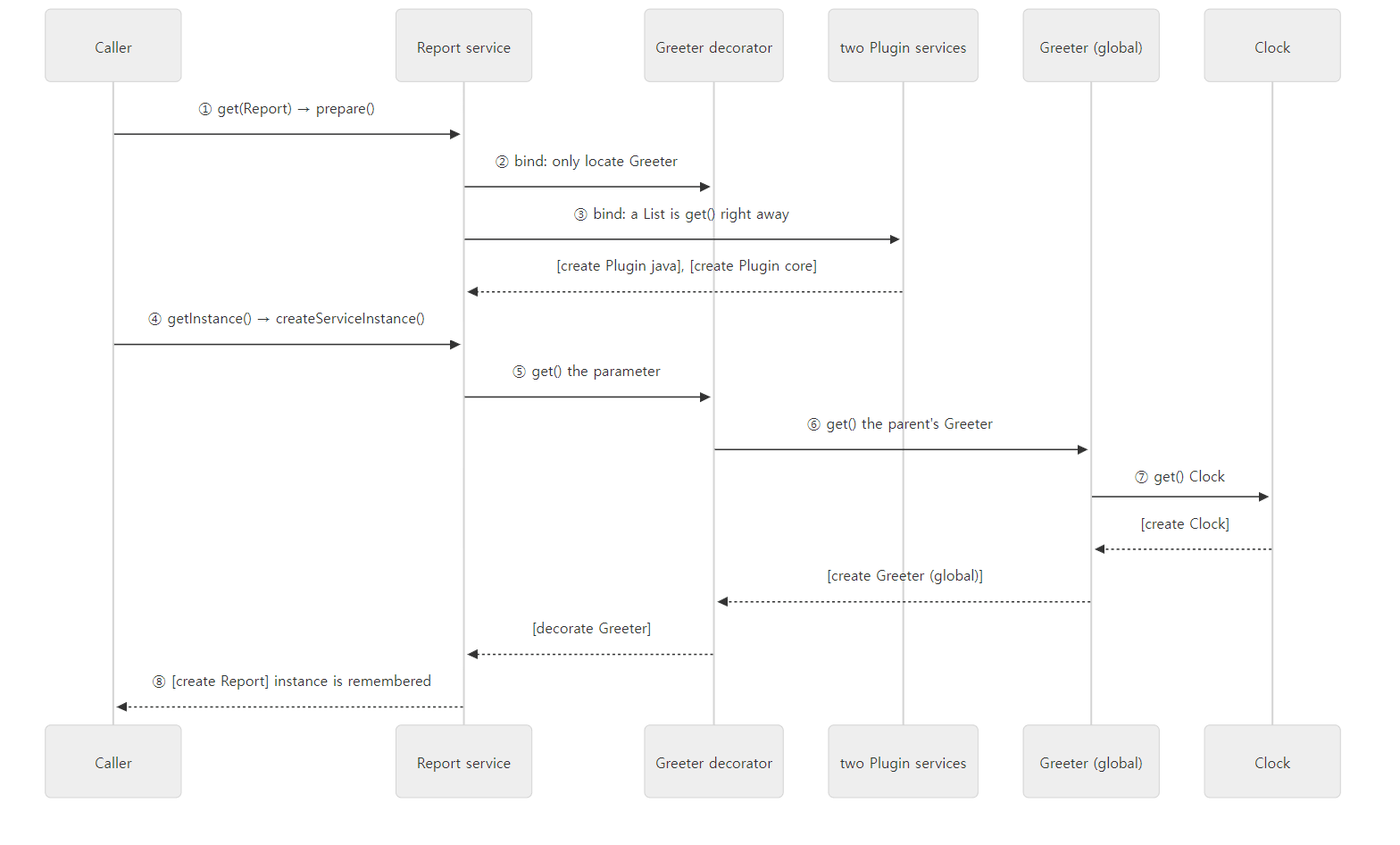 The bracketed lines are the log lines from the example output. Because locating (bind) and creating are separate steps, the
Plugins were created first.
Easy to get wrong
-
A
List<T>is created during bind. That's whyPluginwas created beforeClockin the example. Ordinary parameters are only located during bind, but for a collection the lookup functiongetCollectionService()callsservice.get()on every candidate to fill the list (lines 1158–1167). "Lazy" is only half true forListparameters. -
build()succeeds even with two services of the same type. It fails the first time that type is looked up. Step 7 of the same program (with two providers that create aClock):=== 7. two providers of the same type in one registry === build() succeeded; now get(Clock): ServiceLookupException: Multiple services of type RegistryLab$Clock available in twice: - Service RegistryLab$Clock via RegistryLab$<anonymous>.createOtherClock() - Service RegistryLab$Clock via RegistryLab$GlobalServices.createClock()The
ServiceRegistryBuilderdoc comment says the same: registering a type more than once within own services "will result in an ambiguity error at the lookup time" (ServiceRegistryBuilder.javalines 44–47). If nobody looks it up, it never surfaces. -
Services that need each other fail immediately. If A's bind looks up B and B's bind looks up A again, A is still
BINDING, so lines 685–687 ofprepare()above throwCycle in dependencies of ... detected. Spring resolves cycles in field and setter injection with its three-level cache (Spring part 4), but Gradle services receive dependencies only through method parameters and constructors, so there's no way to resolve it, and it doesn't try. I only checked this case in the source; I didn't run it as an example. -
Nothing can be added after the first lookup. As soon as
get()/find()has been called once, the state changes fromINITtoSTARTED(serviceRequested(), lines 307–316), and lateradd()calls are refused. Step 4 of the example:=== 4. adding a service after the first lookup === IllegalStateException: Cannot add services to service registry lab build as it is no longer mutable
Closing
    @Override
    public void close() {
        noLongerMutable();
        if (state.compareAndSet(State.STARTED, State.CLOSED)) {
            CompositeStoppable.stoppable(allServices).stop();
        }
    }
allServices contains the parents too, but they are wrapped in ParentServices, whose stop() does nothing (lines 1091–1119, with the comment "Wraps a parent to ignore stop requests"). So only own services are closed. When one service is closed, the services in the same registry that use it (recorded with requiredBy() during bind) are closed first, then the service itself (lines 622–632). That's what the class comment means by "Instances are closed in reverse dependency order" (line 58). If the object is Closeable or Stoppable, close()/stop() is called; a service that was never created has nothing to close. The last step of the example:
=== 8. close the build registry, then the global one ===
    [close Report]
build closed; global still works: Hello, y at 12:00
IllegalStateException: lab global has been closed.
This is how the Build registry is closed when a build ends, and the Global registry when the daemon ends.
4. Scope checks — is every service in its place?
Even with one registry per scope, if a developer accidentally registered a build-lifetime service in the Global registry, it would survive the end of the build and carry the previous build's state around. What prevents this is the @ServiceScope annotation on service types and the ServiceScopeValidator that checks it.
The .scopeStrictly(Scope.Global.class) in section 1's builder code is the switch. When given a scope, the builder creates a ScopedServiceRegistry instead of a DefaultServiceRegistry (ServiceRegistryBuilder.java lines 169–180). All ScopedServiceRegistry does is one line in its constructor: add(new ServiceScopeValidator(scope, strict)) (ScopedServiceRegistry.java lines 41–43). The validator is itself a service. It is a special kind of service, an AnnotatedServiceLifecycleHandler, so the registry notifies it of every service registered after it (OwnServices.add(), lines 470–477). The validator then checks each declared type like this.
    private void validateScope(Class<?> serviceType) {
        if (ServiceScopeValidator.class.isAssignableFrom(serviceType)) {
            return;
        }

        if (ServiceScopeValidatorWorkarounds.shouldSuppressValidation(serviceType)) {
            return;
        }

        Class<? extends Scope>[] serviceScopes = scopeOf(serviceType);

        if (serviceScopes == null) {
            if (strict) {
                failWithMissingScope(serviceType);
            }
            return;
        }

        if (serviceScopes.length == 0) {
            throw new IllegalArgumentException(String.format("Service '%s' is declared with empty scope list", serviceType.getName()));
        }

        if (!contains(serviceScopes, scope)) {
            throw new IllegalArgumentException(invalidScopeMessage(serviceType, serviceScopes));
        }
    }
There are two rules. If the type has @ServiceScope, its list must include this registry's scope; and if the registry is strict (= scopeStrictly), having no @ServiceScope at all is also a failure. Every per-scope registry Gradle creates, from Global to Project, is built with scopeStrictly (git grep finds 10 places in src/main that call scopeStrictly(, and none that call the lenient scope(Scope…)). The exception is a registry built with no scope at all. The plugin validation helper PropertyValidationAccess builds its own registry named "Global services" without a scope (PropertyValidationAccess.java line 58), and no validator runs in a registry like that.
Steps 5 and 6 of example 2 break these two rules on purpose. Step 5 puts Clock, which is @ServiceScope(Scope.Global.class), into a Build registry; step 6 puts Unscoped, which has no annotation, into a strict Build registry.
=== 5. a Global-only service registered in a Build registry ===
IllegalArgumentException: The service 'RegistryLab$Clock' declares service scope 'Global' but is registered in the 'Build' scope. Either update the '@ServiceScope()' annotation on 'Clock' to include the 'Build' scope or move the service registration to one of the declared scopes.
=== 6. a service without @ServiceScope in a strict registry ===
IllegalArgumentException: The service 'RegistryLab$Unscoped' is registered in the 'Build' scope but does not declare it. Add the '@ServiceScope()' annotation on 'Unscoped' with the 'Build' scope.
Both failed in build(), unlike step 7's ambiguity error, which appeared at lookup. The check runs at registration time, so a wrong scope shows up as soon as the daemon builds the registry, even if the service is never looked up. It's designed to fail fast during development.
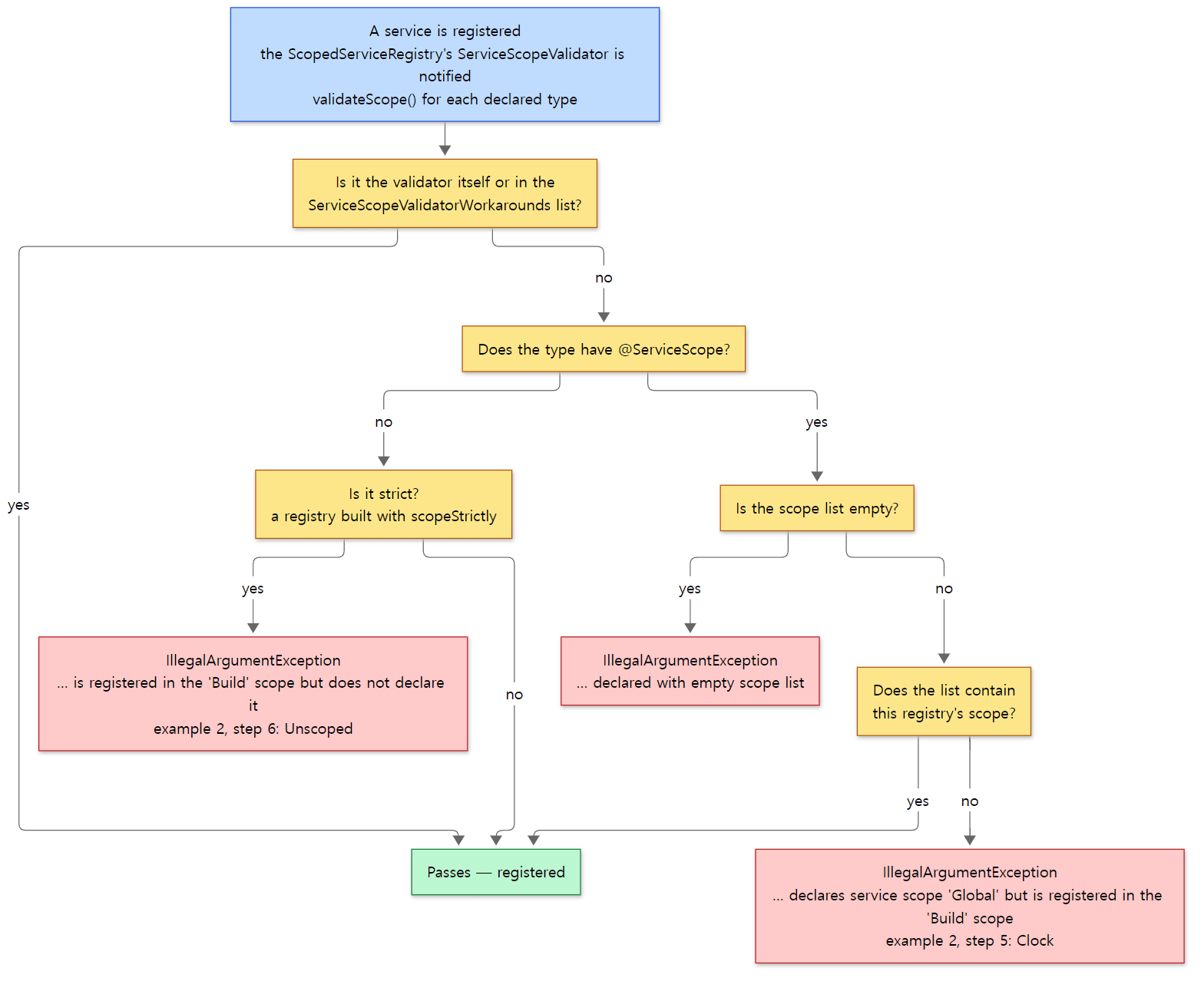 The
validateScope() code above as a set of forks. The messages in the red boxes are example 2's actual output (we did not trigger the empty-list error in the example).
One type in several scopes — ObjectFactory
Some types list several scopes in @ServiceScope. ObjectFactory, which you use as objects in build scripts, is one.
@ServiceScope({Scope.Global.class, Scope.BuildTree.class, Scope.Project.class})
public interface ObjectFactory {
subprojects/core-api/src/main/java/org/gradle/api/model/ObjectFactory.java lines 52–53
There really is one factory method in each of the three scopes (GlobalScopeServices.java lines 263–279, BuildTreeScopeServices.java lines 159–176, WorkerSharedProjectScopeServices.java lines 169–172). All three build a DefaultObjectFactory with instantiatorFactory.decorate(<that scope's registry>). Global and BuildTree do it directly inside the method; Project hands its registry to an ObjectFactoryFactory, which does it (DefaultObjectFactoryFactory.java lines 57–69). The difference is the registry in the parentheses. It decides which registry's services get injected into objects created with objects.newInstance(...). Objects created with a project's objects must be able to receive project services, so each project needs its own ObjectFactory. The @ServiceScope doc comment puts it this way: "The additional instances of the service in lower scopes 'override' the instance from the parent for their scope and its children" (ServiceScope.java lines 33–35).
I compared the two in example 1's build script.
val buildServices = (gradle as GradleInternal).services
println("gradle.services      = $buildServices")
val fromProject = projectServices.get(ObjectFactory::class.java)
val fromBuild = buildServices.get(ObjectFactory::class.java)
println("project.objects === project registry's ObjectFactory? ${project.objects === fromProject}")
println("project registry's ObjectFactory === build registry's? ${fromProject === fromBuild}")
gradle.services      = Build-scoped services
project.objects === project registry's ObjectFactory? true
project registry's ObjectFactory === build registry's? false
project.objects is the project registry's, and it's a different object from the one found in the Build registry (gradle.services). The Build scope has no ObjectFactory, so the Build registry presumably climbed to its parent and returned the BuildTree one (this last part is inferred from the lookup order in the source; I didn't separately print whether the object is BuildTree's).
Easy to get wrong
- The check looks only at "declared types". The validator looks at
registration.getDeclaredTypes(), meaning the return type of a@Providesmethod or the type passed toadd()(lines 64–68). It doesn't look at the implementation class. So if you write the implementation class as the return type, that class has no@ServiceScopeand fails the strict check. If exactly one supertype carries@ServiceScope, the error message kindly suggests changing the return type to the service type (lines 97–106, 159–169). - There's a list of exceptions.
ServiceScopeValidatorWorkaroundslists 15 class names that skip the check (Factory,Serializer,StartParameterInternaland others, lines 25–58). Comments give reasons such as interactions with the configuration cache. Not every service is checked. @ServiceScopeis@Inherited, but not through interfaces. Java's@Inheritedonly passes down annotations from a superclass. If you put@ServiceScopeon an interface and register a class implementing it as the service type,getAnnotation()on that class returnsnull(the validator'sscopeOf(), lines 183–186). That's the path to the error in the first bullet.
5. How modules add services — GradleModuleServices
As part 1 showed, the Gradle repository is split into platforms and modules. Modules such as the configuration cache (configuration-cache), the build cache and dependency management also need to put services into each scope, but if BuildScopeServices in subprojects/core knew all of them, the dependency direction would be backwards. So there's a way for modules to register themselves. The interface GradleModuleServices has one method per scope, eight in all, from registerGlobalServices() to registerProjectServices() (GradleModuleServices.java lines 29–94). A module implements this interface (usually by extending the empty implementation AbstractGradleModuleServices and overriding only what it needs) and writes the class name into its jar's META-INF/services/org.gradle.internal.service.scopes.GradleModuleServices file. The file in subprojects/core has five lines (CoreServices, BuildCacheServices, ExecutionServices, VirtualFileSystemServices, BuildEventServices).
These files are read when the Global registry is built.
public class BuildProcessScopeServices implements ServiceRegistrationProvider {
    void configure(ServiceRegistration registration, ClassLoaderRegistry classLoaderRegistry) {
        List<GradleModuleServices> servicesProviders = new DefaultServiceLocator(classLoaderRegistry.getRuntimeClassLoader(), classLoaderRegistry.getPluginsClassLoader()).getAll(GradleModuleServices.class);
        for (GradleModuleServices services : servicesProviders) {
            registration.add(GradleModuleServices.class, services);
            services.registerGlobalServices(registration);
        }
    }
It creates the module objects, registers them as Global services (registration.add(GradleModuleServices.class, services)) and has them register their Global share. Later, when the registry of another scope is built, these objects are taken back out of Global and asked to register their share for that scope. UserHome gets them with globalServices.getAll(GradleModuleServices.class) (GradleUserHomeScopeServices.java lines 126–128), and Project takes a List<GradleModuleServices> parameter in configure() and gets them through the collection injection from section 2 (ProjectScopeServices.java lines 141–156). The other scopes follow the same pattern (git grep "register…Services(registration)" shows a call site for each of the eight scopes).
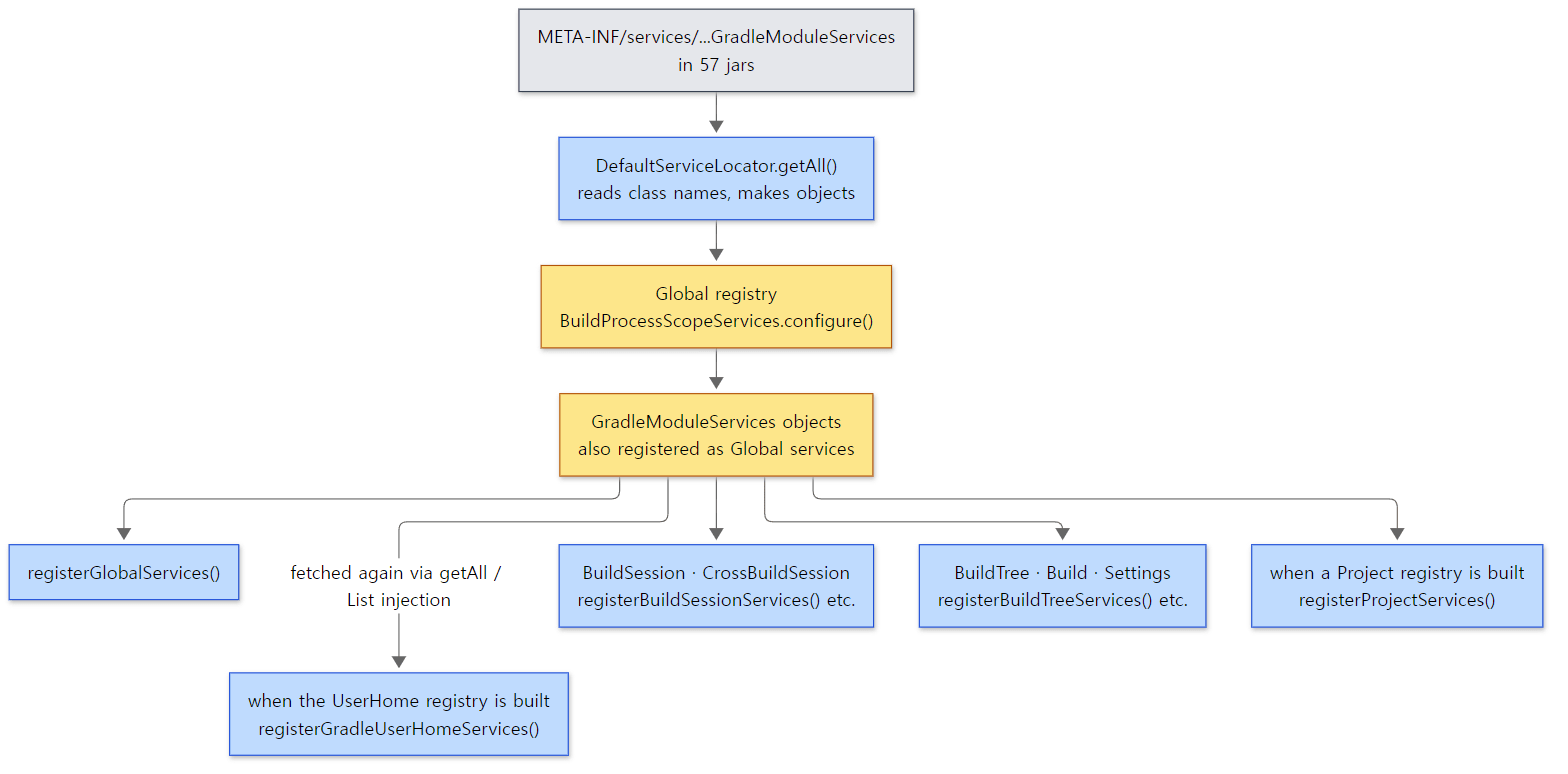 The daemon holds one set of module objects; each time a new registry is created they are called on to add their share.
Example 3: counting the registered modules in the distribution
At the end of ex/u04-injection/run.sh, I went through every jar in the distribution and counted the jars containing this file and the classes listed in it.
=== GradleModuleServices listed in the distribution's jars ===
jars with the file: 57, implementation classes listed: 68
org.gradle.internal.service.scopes.CoreServices
org.gradle.caching.internal.BuildCacheServices
org.gradle.internal.service.scopes.ExecutionServices
org.gradle.internal.service.scopes.VirtualFileSystemServices
org.gradle.internal.build.event.BuildEventServices
The last five lines are the file's contents in gradle-core-9.10.0.jar. Counting on the source side, there are 57 such files under src/main/resources, with 68 class names once blank lines are dropped. The platforms with the most files are software (14), core-configuration (12), jvm (7) and core-runtime (6). The numbers match the distribution.
Easy to get wrong
- It's not
java.util.ServiceLoader. The file name and format are the same as Java's standard service loader, but the reader is Gradle's ownDefaultServiceLocator. It callsgetResources("META-INF/services/" + type name)on each class loader, loads the class on each line, and checks that it implements the type (DefaultServiceLocator.javalines 117–140). For the Global registry it looks at two class loaders, the runtime class loader and the plugins class loader (line 39 ofBuildProcessScopeServicesabove). CoreServicesaddsCoreBuildSessionServices. From the name you'd expect it to be the session registry's default bundle, but whatBuildSessionStateadds directly isBuildSessionScopeServices, notCoreBuildSessionServices.subprojects/core, acting as just another module, adds it inCoreServices.registerBuildSessionServices()withaddProvider(new CoreBuildSessionServices())(CoreServices.javalines 21–31). This seems to be becauseBuildSessionStatelives in thebuild-statemodule and doesn't know aboutcore.
6. All the way to user code — @Inject and _Decorated classes
So far it's been about Gradle's internal objects. Now let's follow how a task you write receives services. The public API offers two ways to get services into a task: put @Inject on the constructor, or on an abstract getter. I added a task that does both to example 1's build script.
// An example written for this post (not Gradle source code)
// A task that uses both constructor injection and getter injection
abstract class Probe @Inject constructor(
    private val fs: FileSystemOperations       // constructor parameter — looked up from services and passed in
) : DefaultTask() {

    @get:Inject
    abstract val objects: ObjectFactory        // abstract getter — implemented by the generated subclass

    init {
        // who creates this object? print only the org.gradle and build script frames
        println("Probe constructor, called through:")
        Throwable().stackTrace
            .filter { it.className.startsWith("org.gradle") || it.className.startsWith("Build_gradle") }
            .take(16)
            .forEach { println("    at ${it.className}.${it.methodName}:${it.lineNumber}") }
    }

    @TaskAction
    fun run() {
        println("task class  = ${javaClass.name}")
        println("superclass  = ${javaClass.superclass.name}")
        println("fs          = ${fs.javaClass.name}")
        println("objects     = ${objects.javaClass.name}")
        // fields and methods the generated subclass declares itself
        println("generated fields  = " + javaClass.declaredFields.map { it.name }.sorted())
        // ... also prints the method list, omitted here because it's long ...
    }
}

// ... the Greeting class created with objects.newInstance() is omitted (we'll see it later in section 6) ...

tasks.register<Probe>("probe")
[Shortened from the example ex/u04-injection/project/build.gradle.kts]
Here is the rest of the gradle probe output.
Probe constructor, called through:
    at Build_gradle$Probe.<init>:20
    at Build_gradle$Probe_Decorated.<init>:-1
    at org.gradle.internal.instantiation.generator.AsmBackedClassGenerator$InvokeConstructorStrategy.newInstance:2114
    at org.gradle.internal.instantiation.generator.AbstractClassGenerator$GeneratedClassImpl$GeneratedConstructorImpl.newInstance:592
    at org.gradle.internal.instantiation.generator.DependencyInjectingInstantiator.doCreate:64
    at org.gradle.internal.instantiation.generator.DependencyInjectingInstantiator.newInstanceWithDisplayName:50
    at org.gradle.api.internal.project.taskfactory.TaskFactory$1.call:88
    at org.gradle.api.internal.project.taskfactory.TaskFactory$1.call:82
    at org.gradle.internal.UncheckedException.uncheckedCall:103
    at org.gradle.api.internal.AbstractTask.injectIntoNewInstance:224
    at org.gradle.api.internal.project.taskfactory.TaskFactory.create:82
    at org.gradle.api.internal.project.taskfactory.AnnotationProcessingTaskFactory.create:47
    at org.gradle.api.internal.tasks.DefaultTaskContainer.createTask:362
    at org.gradle.api.internal.tasks.DefaultTaskContainer.access$200:77
    at org.gradle.api.internal.tasks.DefaultTaskContainer$TaskCreatingProvider.createDomainObject:760
    at org.gradle.api.internal.tasks.DefaultTaskContainer$TaskCreatingProvider.createDomainObject:717

> Task :probe
task class  = Build_gradle$Probe_Decorated
superclass  = Build_gradle$Probe
fs          = org.gradle.api.internal.file.DefaultFileSystemOperations_Decorated
objects     = org.gradle.api.internal.model.DefaultObjectFactory
generated fields  = [__objects__, _gr_dn_, _gr_map_, _gr_mc_, _gr_owner_]

BUILD SUCCESSFUL in 1m 9s
The innermost frame is at the top (cut at 16 frames; the long generated methods line was dropped from the output). Reading from the bottom: DefaultTaskContainer, which actually creates a task that was only registered (part 8 covers it) → the two task factories from section 2 (AnnotationProcessingTaskFactory, TaskFactory) → AbstractTask.injectIntoNewInstance → DependencyInjectingInstantiator → AsmBackedClassGenerator$InvokeConstructorStrategy → the constructor of Probe_Decorated → the constructor of my Probe. The duration differs from run to run (this run started a fresh daemon: 1 min 9 s).
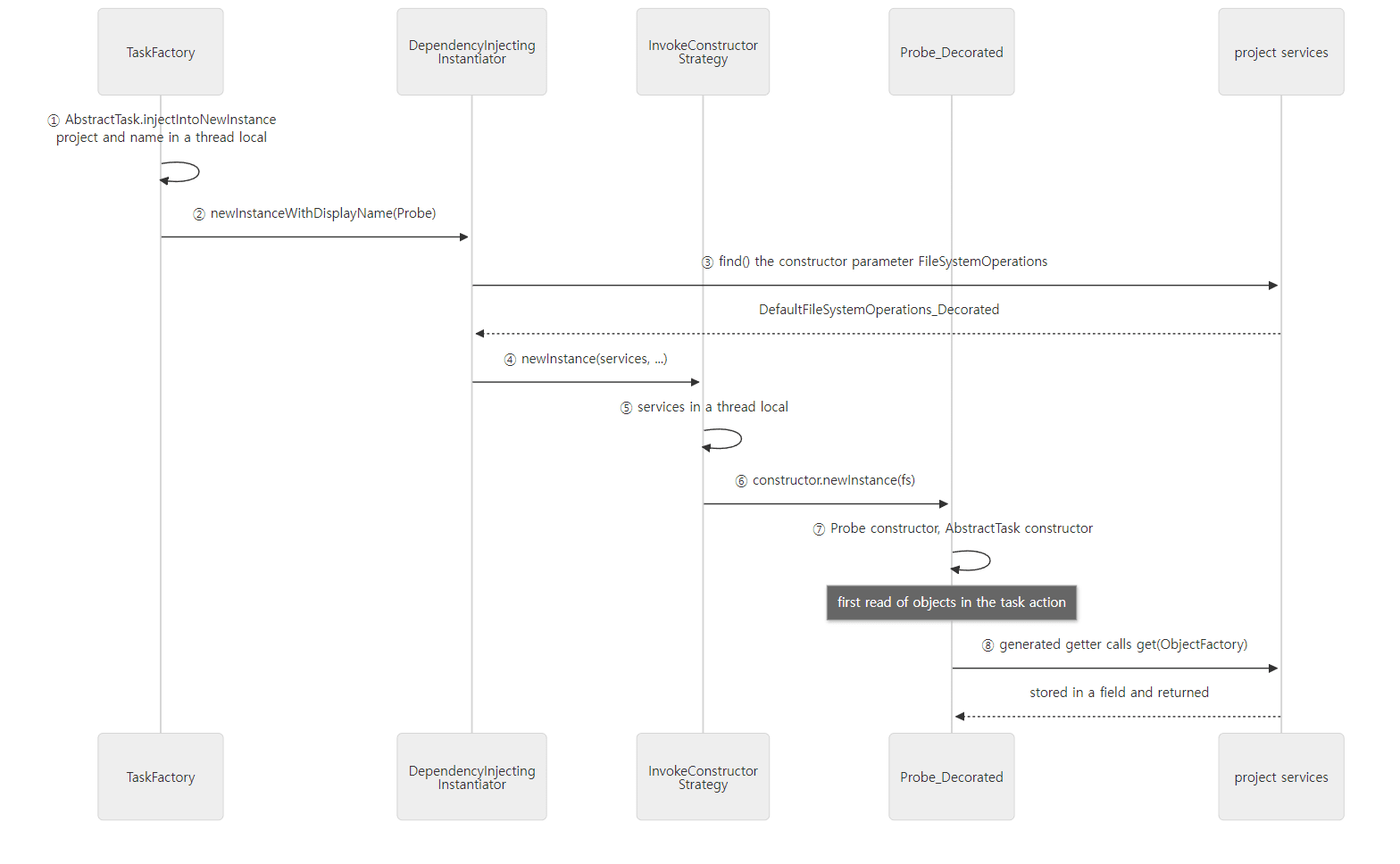 Constructor injection happens before the object exists; getter injection happens on first read.
Which registry? The project registry
Look again at section 2's createTaskFactory(): taskScheme.getInstantiationScheme().withServices(projectScopeServiceRegistry). It hands the project registry to the instantiator that creates tasks. So a task can receive any service in the chain printed in example 1, from the project through Build and on up to Global. What TaskScheme uses is instantiatorFactory.decorateScheme(), the "decorate and inject" mode (ExecutionGlobalServices.java lines 217–219).
Filling in constructor parameters
    private Object[] addServicesToParameters(Class<?> type, ClassGenerator.GeneratedConstructor<?> constructor, ServiceLookup services, Object[] parameters) {
        Class<?>[] parameterTypes = constructor.getParameterTypes();
        Type[] genericTypes = constructor.getGenericParameterTypes();
        Object[] resolvedParameters = new Object[parameterTypes.length];
        int pos = 0;
        for (int i = 0; i < resolvedParameters.length; i++) {
            Class<?> targetType = parameterTypes[i];
            Type serviceType = genericTypes[i];
            if (pos < parameters.length) {
                // ...
                if (parameter == null || targetType.isInstance(parameter)) {
                    resolvedParameters[i] = parameter;
                    pos++;
                    continue;
                }
            }
            Object service = services.find(serviceType);
            if (service != null) {
                resolvedParameters[i] = service;
                continue;
            }
            TreeFormatter formatter = new TreeFormatter();
            formatter.node("Unable to determine constructor argument #" + (i + 1) + ": ");
            // ...
It walks the constructor parameters front to back. If an argument passed by the caller (the arguments of tasks.register<T>("name", args…)) has a matching type, it uses that; otherwise it looks the type up in the registry with services.find(type). That's why passed arguments and services can be mixed. If neither works, it fails. I added a task that takes a single String to the example and ran it.
// a constructor parameter that can't be injected (String is not a service)
abstract class Broken @Inject constructor(val label: String) : DefaultTask()
tasks.register<Broken>("broken")
=== gradle broken (expected to fail) ===
> Configure project :
* What went wrong:
> Could not create task ':broken'.
   > Could not create task of type 'Broken'.
      > Unable to determine constructor argument #1: missing parameter of type String, or no service of type String.
(Only the failure lines were kept, with grep; the > Run with … hint lines and the BUILD FAILED line that follow were cut.) It means "no such argument was passed, and there's no service of type String". The rules for choosing the constructor are in InjectUtil.selectConstructor(): if there's a single constructor with no parameters (and it is public or package-private), it's used as is; a constructor with parameters must carry @Inject; and with several constructors exactly one must carry @Inject (InjectUtil.java lines 36–87).
Two thread locals
The stack contained AbstractTask.injectIntoNewInstance and InvokeConstructorStrategy.newInstance. Both use the same technique. The first puts the task name and project into the thread local NEXT_INSTANCE, calls the factory, and clears it in finally (AbstractTask.java lines 221–228). The second looks like this.
        @Override
        public Object newInstance(ServiceLookup services, InstanceGenerator nested, @Nullable Describable displayName, Object[] params) throws InvocationTargetException, IllegalAccessException, InstantiationException {
            ObjectCreationDetails previous = SERVICES_FOR_NEXT_OBJECT.get();
            SERVICES_FOR_NEXT_OBJECT.set(new ObjectCreationDetails(nested, services, displayName, roleHandler));
            try {
                return constructor.newInstance(params);
            } finally {
                SERVICES_FOR_NEXT_OBJECT.set(previous);
            }
        }
Right before calling the constructor, it puts "what the object being created will need" (task name and project, the registry) into a thread local, and clears it afterwards. The constructors users write take no arguments, like DefaultTask(), so AbstractTask's constructor takes the project from the thread local (lines 172–178) and grabs the project registry from it with this.services = project.getServices() (line 198). The generated class likewise takes the registry from the thread local while it is being constructed (getServicesForNext(), lines 138–140). It's a way to pass hidden arguments without changing constructor signatures. When the thread local is empty, the AbstractTask constructor throws Task of type '…' has been instantiated directly which is not supported. (line 183). That's why you can't create a task with new.
What the generated class does
Probe_Decorated is what implements the abstract getter getObjects(). The comment AsmBackedClassGenerator leaves where it generates the bytecode shows the shape directly.
        @Override
        public void applyServiceInjectionToGetter(PropertyMetadata property, @Nullable final Class<? extends Annotation> annotation, MethodMetadata getter) {
            // GENERATE public <type> <getter>() { if (<field> == null) { <field> = <services>>.get(<service-type>>); } return <field> }
If the field is empty, it looks the service type up in the registry with get(serviceType) and stores it in the field; after that it returns the field. The field name is "__" + name + "__" (propFieldName(), lines 1952–1954). The __objects__ in the example's generated fields is that field.
So what is <services>? The two classes in the example give different answers. I also printed the fields of the object created in the build script with objects.newInstance(Greeting::class.java).
objects.newInstance  = Build_gradle$Greeting_Decorated (providers = DefaultProviderFactory_Decorated)
its generated fields = [__message__, _gr_dn_, _gr_dyn_, _gr_f_, _gr_map_, _gr_mc_, _gr_owner_, _gr_svcs_]
Greeting_Decorated has a _gr_svcs_ field holding the registry; Probe_Decorated doesn't. If the class already has a services property returning a ServiceRegistry, the generator uses it instead of creating its own field.
        @Override
        public boolean claimPropertyImplementation(PropertyMetadata property) {
            if (property.getName().equals("services") && property.isReadable() && ServiceRegistry.class.isAssignableFrom(property.getType())) {
                hasServicesProperty = true;
                return true;
            }
            return false;
        }
A task has AbstractTask.getServices() (line 696), so the getter calls this.getServices(), the project registry we just saw (putServiceRegistryOnStack(), lines 1332–1342). Greeting has no such property, so a _gr_svcs_ field and a $gradleServices() method are generated (lines 1763–1767). DefaultProject is also on the getServices() side.
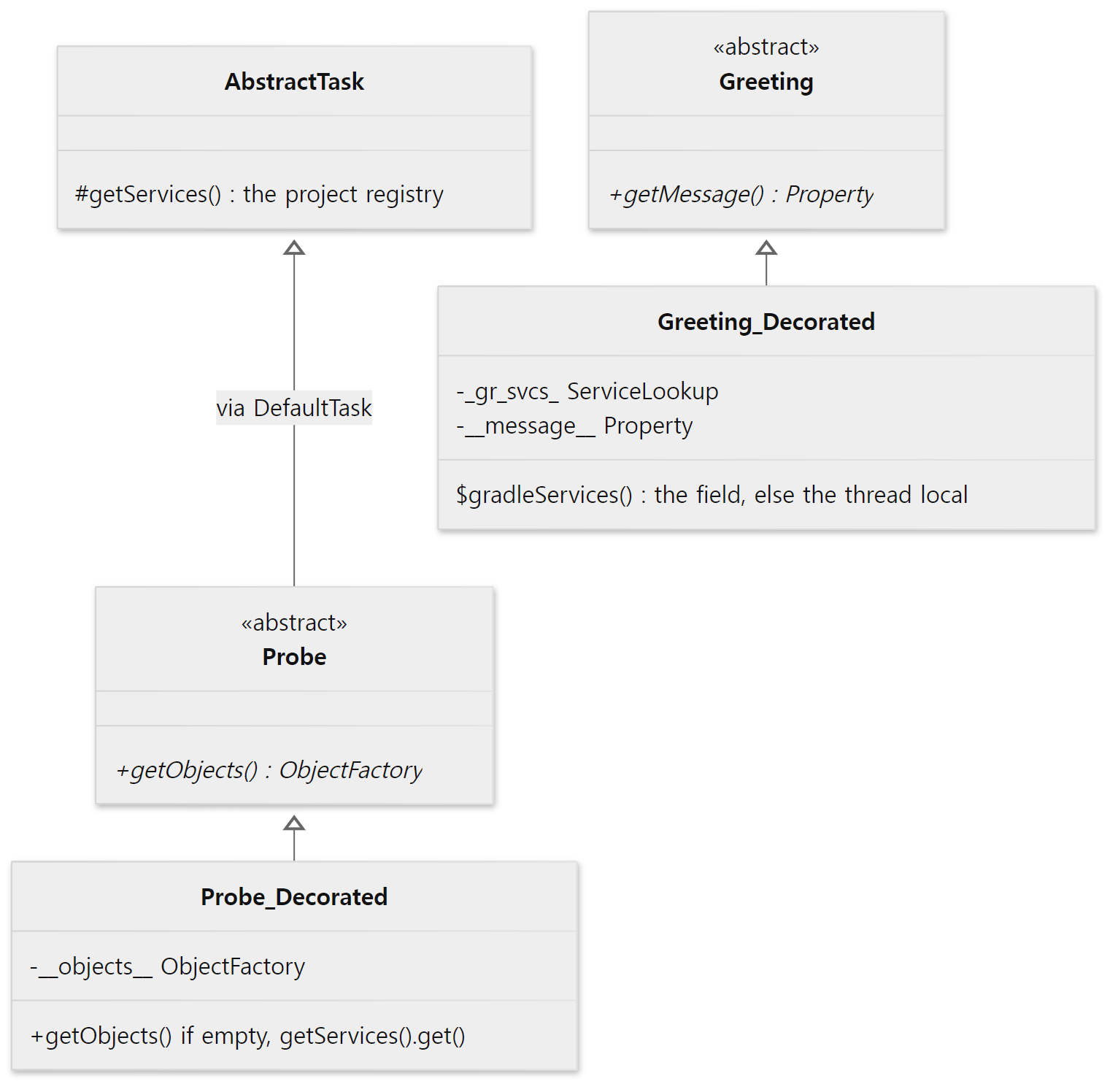 The field names are the real names printed with
declaredFields in the example.
That's also why the build script's project was a DefaultProject_Decorated. DefaultProject is an abstract class, and many of its getters behind project.repositories, project.configurations and project.objects are @Inject abstract (for example getArtifacts(), getRepositories() and getConfigurations(), DefaultProject.java lines 556–566). @Inject appears 29 times in DefaultProject.java. The first time you write repositories { … } in a build script, the generated getter fetches the RepositoryHandler from the project registry. Gradle's own core model uses exactly the same injection machinery as user tasks.
Why getters instead of constructors?
With constructor injection only, receiving one more service means changing the constructor, and every subclass constructor has to follow. An abstract getter just declares "I need this type" without touching the constructor, and the subclass Gradle generates fetches the value on first read. Services you never use are never even looked up. It's the same idea as section 3's lazy singletons, carried all the way to user objects. The technique resembles Spring creating a subclass with CGLIB to intercept methods (Spring part 10), but the purpose differs: Spring's proxy adds behaviour (transactions and so on) around methods that already exist, while Gradle's _Decorated fills in empty (abstract) methods.
Easy to get wrong
-
A class in a build script must not use the script's members. When I first wrote the example, I put the stack-printing function at the top of the script as a
funand called it from the task constructor. The build failed like this:> Could not create task ':probe'. > Could not create task of type 'Probe'. > Class Build_gradle.Probe is a non-static inner class.In a Kotlin script, a class that uses a script-level function or value becomes an inner class holding on to the script object, and Gradle can't instantiate such a class. Moving the function into the class fixed it; the example code above is the fixed version.
-
_Decoratedisn't the only kind.DefaultInstantiatorFactorycreates two generators in its constructor:decorateAndInject, which decorates and injects (suffix_Decorated), andinjectOnly, which only injects (suffix$Inject_followed by a number) (DefaultInstantiatorFactory.javalines 61–62,AsmBackedClassGenerator.javalines 179–223). A TODO comment says the_Decoratedname is kept fixed because IDE import relies on it (lines 189–190). Tasks and objects created throughObjectFactoryare on the decorating side (as the names printed by the example show). -
What you can inject isn't limited to the public API. A task constructor is resolved from the project registry, so if you know the type you can even receive services from
org.gradle.internal. But the services the official documentation recommends for injection are public ones such asObjectFactory,FileSystemOperations,ExecOperationsandProviderFactory(this list comes from the user guide, not the source). Internal services can be renamed in the next version without notice.
7. Compared with Spring's IoC container
Both are "DI containers", but they look quite different. Side by side, with the Gradle column checked in the source in this post and the Spring column from the Spring series:
| Gradle service registry | Spring BeanFactory/ApplicationContext |
|
|---|---|---|
| Hierarchy | one registry per scope, possibly several parents | a single parent factory (HierarchicalBeanFactory, part 3) |
| Declaration | @Provides create…() / configure() in provider classes |
BeanDefinition (@Bean, component scanning, etc.) |
| Lookup key | type only | name and type |
| Two candidates | always an error within that registry | picks one by @Primary, @Qualifier, name, etc. (part 5) |
| When created | on first lookup (lazy) | non-lazy singletons up front on startup (part 4) |
| Circular dependencies | detected via the BINDING state, then an error |
field and setter injection resolved with the three-level cache (part 4) |
| Lifetime checks | @ServiceScope + ServiceScopeValidator, checked at registration |
each bean picks a scope; no such check at registration |
| User objects | a _Decorated subclass fills in abstract getters |
a CGLIB subclass intercepts methods (part 10) |
Gradle's side is simpler and stricter: one key (the type), failure on ambiguity, failure on a wrong scope. Unlike Spring, where users assemble the container themselves, only Gradle's developers register services in Gradle's registry and users just take them out; that difference seems to explain these choices (this is my interpretation, not something the source says).
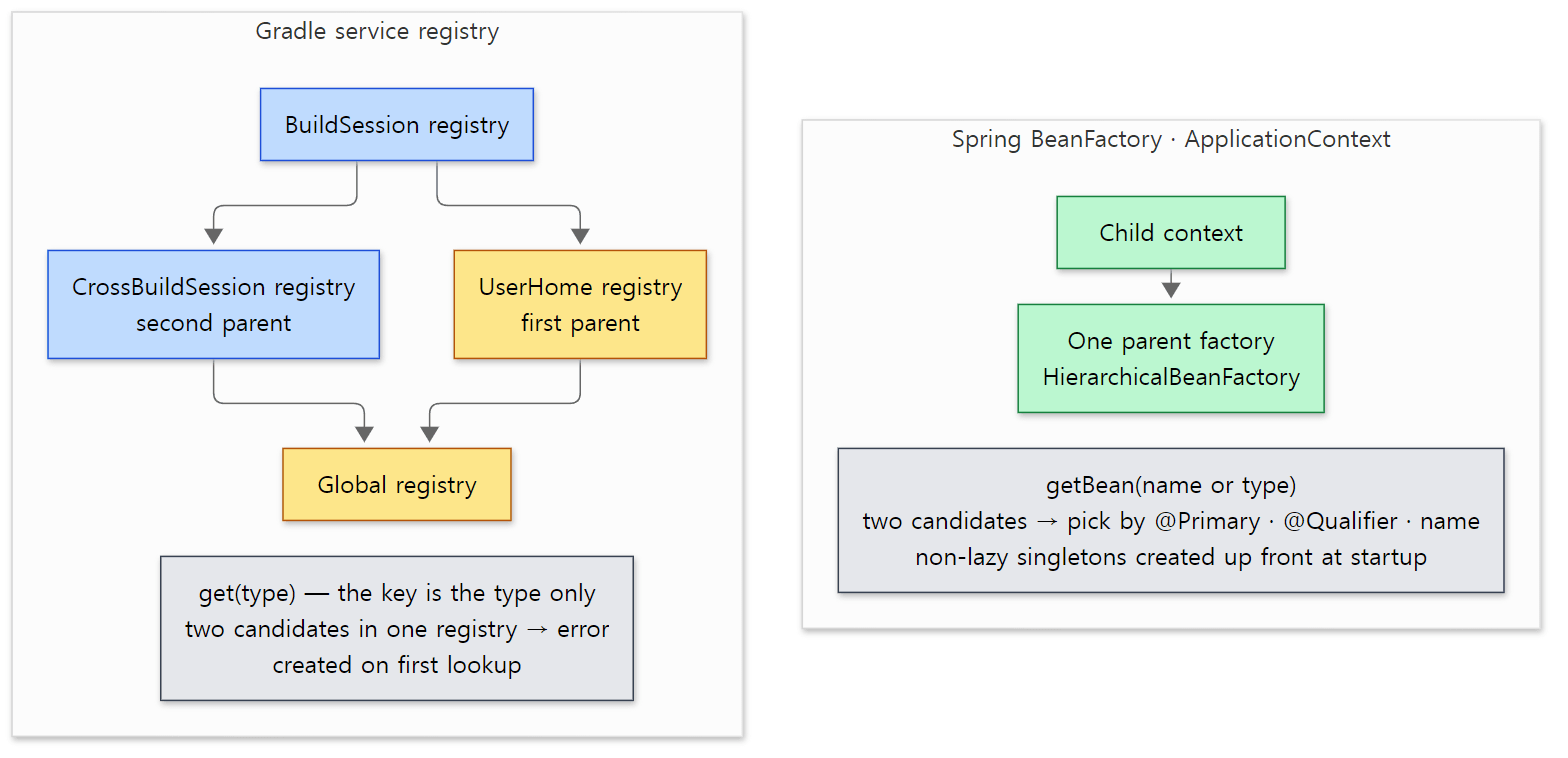 Arrows point to the parent. The Gradle side is just the BuildSession part of the parent chain picture in section 1.
What this post leaves out
- Private services (
@PrivateService— visible only within the same provider) and access tokens:DefaultServiceRegistry.javalines 189–192,ServiceAccess.java,ServiceAccessScope.java - One method offering several types with
@Provides(value = {…}):FactoryMethodService.serviceTypesOf()(lines 866–869) - How the registry automatically wires listener services (
@StatefulListener,@ListenerService) to events:AnnotatedServiceLifecycleHandler,platforms/core-runtime/messaging/…/internal/event/DefaultListenerManager.java - The other features of generated classes — extensions (
extensions), convention mapping (ConventionMapping), Groovy DSL support (the_gr_mc_and_gr_dyn_fields):AsmBackedClassGenerator.java,AbstractClassGenerator.java - Managed properties (filling in
abstract val message: Property<String>):ManagedObjectFactory.javaandapplyManagedStateToGetter()inAsmBackedClassGenerator— part 8 covers them together withProperty - The service bundle shared with worker processes (
WorkerSharedProjectScopeServices— it's also in this post's project registry) and the worker-side registries: part 9 - How the configuration cache looks services up again instead of serializing them (the comments in
ServiceScopeValidatorWorkaroundshint at it): part 11
Compared with the 9.8.2 release, the four registry modules of the reference commit (service-lookup, service-provider, service-registry-builder, service-registry-impl) are identical except for one removed @SuppressWarnings line in ReflectionBasedServiceMethod.java (checked with git diff v9.8.2 07ecbf9ead). So the registry itself is the same in the widely used 9.8.x as in this post. The class generator (instantiation/generator) has changed a little since, so the line numbers only match this commit.
Summary
| Concept | One-line summary |
|---|---|
| Service registry | a box handing out services by type. One implementation, DefaultServiceRegistry, built by ServiceRegistryBuilder |
| Scopes and registries | one registry per scope. Project → Build → BuildTree → BuildSession → (UserHome, CrossBuildSession) → Global |
| Lookup order | own → all of the first parent → all of the second parent. Two among own services is an error, without looking at the parents |
Providers and @Provides |
create…/decorate… methods are factories; a parameter of the return type makes a decorator; configure() runs immediately |
| Lazy singletons | registration only wraps; bind on first lookup; created on first get(). Except List<T>, which is created during bind |
| Cycles and ambiguity | cycles detected via the BINDING state and reported as errors; two of the same type fail at lookup |
| Closing | only own services, users first. ParentServices shields the parents |
@ServiceScope |
the scope a service type lives in. scopeStrictly registries check it at registration |
GradleModuleServices |
57 modules register through META-INF/services and add their share whenever a registry is created |
@Inject constructor |
DependencyInjectingInstantiator uses passed arguments first, then looks up the project registry |
_Decorated |
a subclass generated with ASM. It fills abstract getters with "on first read, get() and keep in a field" |
| Thread locals | a way to pass the project and registry without changing constructor signatures |
What's next
With this post, the foundation inside the daemon is in place. Part 3 showed how the daemon receives a build, and this post how the objects inside it find each other. Next comes the order in which a build actually runs on top of that. The executor chain after ExecuteBuild creates the build tree and the build, and DefaultBuildLifecycleController guards loading settings → configuring projects → the task graph → execution with state transitions. The registries in this post are exactly what those state objects (BuildSessionState, BuildTreeState, AbstractBuildState) create. It continues in part 5: The Build Lifecycle — Where Initialization, Configuration and Execution Split.
Earlier series covered similar ground. Spring part 3 read the parent-child hierarchy of BeanFactory, and Spring part 5 the rules for picking one among several candidates; Gradle is the side that has no such rules at all. The CGLIB proxies of Spring part 10 are the same "create a subclass at run time" as this post's _Decorated. Registries living separately per scope resemble class loaders living separately per web app (Tomcat part 4): both let you see your parent's things but not your siblings' or children's, so discarding one doesn't hurt the others.
- Part 2: The Big Picture — Client and Daemon, Service Scopes, and the Three Build Phases
- Part 3: From the gradle Command to the Daemon — the Launcher, the Wrapper and the Daemon Protocol
- Part 6: Projects and Build Scripts — How build.gradle.kts Gets Run
- Part 8: Tasks and Lazy Configuration — DefaultTask, TaskContainer and Provider
- Spring part 4: How Beans Are Created — the Creation Flow and the Three-Level Cache