What this post covers
This is the eleventh post in the "Digging into Gradle's Source" series. In part 10 we followed a single task through the execution engine's step chain to the point where it is skipped as UP-TO-DATE. UP-TO-DATE means "nothing changed compared to the last run", so there is only one thing to compare against. This post looks at two mechanisms that look further back: the build cache and the configuration cache. Both exist so that Gradle does not redo work it has already done, but they store completely different things and sit in completely different places.
Going back to the last figure of part 2, "the part 2 map", this post zooms into the bottom box of zone E (the execution phase), "build cache and configuration cache". The configuration cache, however, does not belong to the execution phase: it skips the whole configuration phase, so it also reaches into zone C (the build lifecycle) and its DefaultBuildTreeLifecycleController.
The post tries to answer four questions:
- Where in the execution engine does the build cache sit, and what goes into a cache key? How is it different from
UP-TO-DATE? - What does a cache entry look like on disk, and why does a copy of the project in another folder still get
FROM-CACHE? - What does the configuration cache store, and where does it hook into the build lifecycle?
- When is a configuration cache entry thrown away (invalidated), and why does touching
projectat execution time make the build fail?
| Item | Value |
|---|---|
| Target | Gradle Build Tool |
| Version | 9.10.0 development build (master) |
| Commit | 07ecbf9ead (2026-10-24) |
| Main classes | execution/steps/ResolveMutableCachingStateStep·BuildCacheStep, caching/impl/DefaultCachingStateFactory, tasks/execution/DefaultTaskCacheabilityResolver, caching/internal/controller/DefaultBuildCacheController, caching/local/internal/DirectoryBuildCache, packaging/impl/TarBuildCacheEntryPacker, cc/impl/DefaultConfigurationCache·ConfigurationCacheAwareBuildTreeWorkController·ConfigurationCacheKey, fingerprint/ConfigurationCacheFingerprintWriter·…Checker, problems/ConfigurationCacheProblems |
All line numbers in this post refer to this commit. How to get the same source and build the Docker image used for the examples is explained in part 1. The build cache code lives under platforms/core-execution/ (execution, build-cache, build-cache-local, build-cache-packaging), and almost all of the configuration cache code lives under platforms/core-configuration/configuration-cache/ (Kotlin).
The configuration-cache module alone has 114 Kotlin files and 17,634 lines under src/main, and the fingerprint folder (fingerprint/) inside it alone is 3,292 lines (counted with git ls-files, comments included). The remote cache (HTTP), Isolated Projects and the Tooling API model cache are all woven into the same code. This post picks only the main path of a single gradle <task> run; what was left out is listed by name and location in "What this post leaves out" at the end.
Words to know first
The unit of work and the step chain were covered in part 10. The execution engine receives a task wrapped as a UnitOfWork and passes it through a chain of twenty-odd step objects that wrap one another. The build cache in this post is two links of that chain.
Fingerprint is used with two meanings in this post. On the build cache side it means what it meant in part 10: a hash that condenses a task's input files, taking into account how their paths should be treated (@PathSensitive). On the configuration cache side it means "the list of outside inputs the configuration phase read, with the values it saw" (section 8). The shared name is confusing, so each section says which one it means.
The build cache stores a task's output files. Assuming that the same inputs produce the same outputs, it uses a key computed from the inputs (the cache key) to find a bundle of outputs and simply unpacks it. When the console prints > Task :compileJava FROM-CACHE, the task came through this path. It is off by default; you turn it on with --build-cache or org.gradle.caching=true in gradle.properties.
The cache key is a 32-digit hexadecimal hash of the task's implementation and inputs. Gradle trusts that the same key means the same outputs.
A cache entry is the bundle of output files tied to one key. In the local cache it is a single file named after the key, and inside it is a gzipped tar (section 5).
The configuration cache stores the result of the configuration phase: the work graph, with the tasks and their configured values. If no outside input changed, the next build does not run the settings and build scripts at all and goes straight to the execution phase with the stored graph. It is off by default; you turn it on with --configuration-cache or org.gradle.configuration-cache=true.
Serialization means writing an in-memory object graph out as bytes. The configuration cache does not use Java's Serializable; it writes objects with codecs (a writer/reader pair) that Gradle defines per type (section 7).
1. Where the two caches sit on the map
First, one figure showing where the two caches fit into a single gradle run.
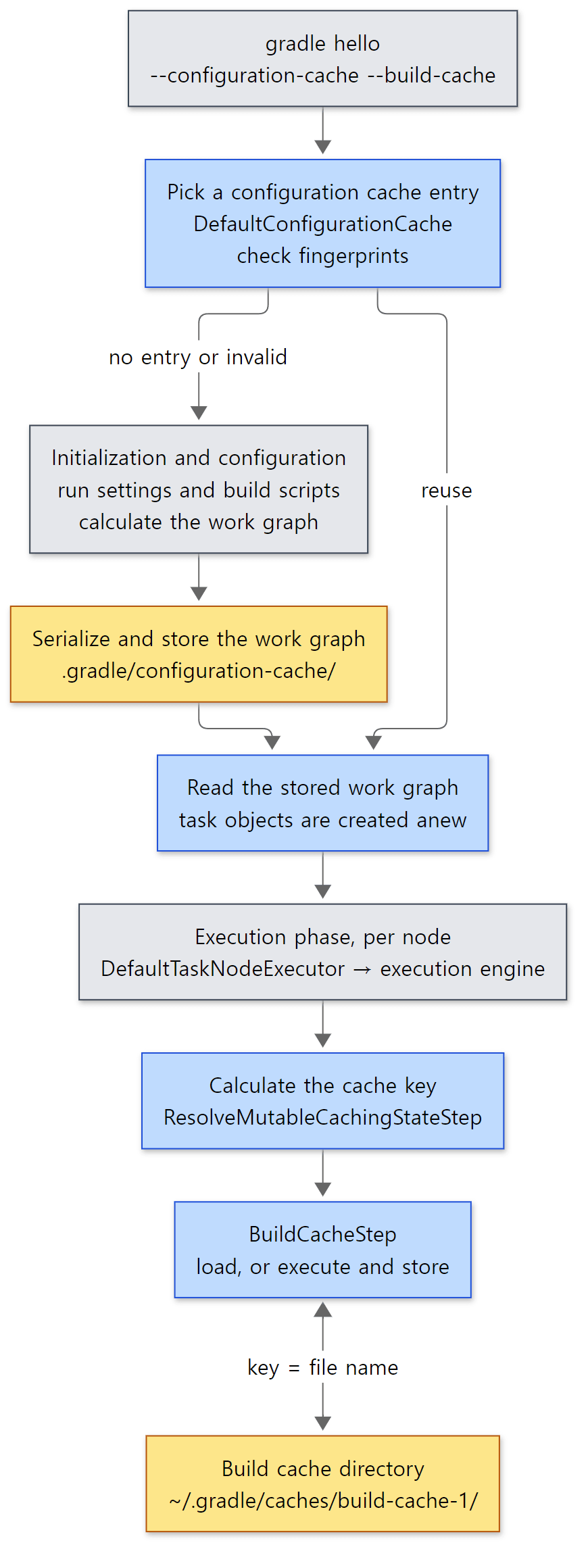 Yellow boxes are what stays on disk. The configuration cache is used once per build tree, the build cache once per task.
Side by side:
| Build cache | Configuration cache | |
|---|---|---|
| What it stores | The output files of one task | The whole work graph (task objects and their field values) |
| What it skips | Running the task actions | The whole initialization and configuration phases |
| Key | Hash of the task's implementation + inputs (per task) | Hash of the Gradle version + requested task names + a few options (per build) |
| Deciding to reuse | Same key means the same outputs, always | Re-checks every fingerprint (inputs read during configuration) of the entry found by the key |
| Default location | ~/.gradle/caches/build-cache-1/ (shared by many projects) |
The project's .gradle/configuration-cache/ |
| Turning it on | --build-cache, org.gradle.caching=true |
--configuration-cache, org.gradle.configuration-cache=true |
| Main code | platforms/core-execution/ (Java) |
platforms/core-configuration/configuration-cache/ (Kotlin) |
The portal repository that builds this blog (Gradle 9.5.1 wrapper) has no gradle.properties, so both are off there. The Gradle repository itself, on the other hand, turns both on.
org.gradle.caching=true
org.gradle.configuration-cache=true
org.gradle.configuration-cache.parallel=true
org.gradle.configuration-cache.entries-per-key=2
When the reference commit was built for part 1, 114 of 1,245 tasks were FROM-CACHE; that was thanks to this first line (and the Gradle team's remote cache).
Easy to get wrong: similar names, but they do not know each other
The two caches never call each other. With the configuration cache on, tasks still go through the execution engine every time, and if the build cache is on, it computes its own key there. With only the build cache on, the settings and build scripts run every time. The effect of "skipping configuration and also skipping task execution" when both are on comes from two separate mechanisms each doing its job in a different phase.
2. The build cache — two links in the step chain
Let's take out the mutable pipeline from part 10 again. Tasks go through this pipeline.
        Step<IdentityContext, WorkspaceResult> mutablePipeline =
            new AssignMutableWorkspaceStep<>(
            // ... HandleStaleOutputsStep, LoadPreviousExecutionStateStep, CaptureMutableStateBeforeExecutionStep and so on ...
            new ResolveChangesStep<>(changeDetector,
            new ResolveMutableCachingStateStep<>(buildCacheController, emitBuildCacheDebugLogging,
            new MarkSnapshottingInputsFinishedStep<>(
            new SkipUpToDateStep<>(
            new StoreExecutionStateStep<>(
            new BuildCacheStep<>(buildCacheController, deleter, fileSystemAccess, outputChangeListener,
            new ResolveInputChangesStep<>(
            // ... CaptureOutputsAfterExecutionStep, RemovePreviousOutputsStep, TimeoutStep and so on ...
            new ExecuteStep.Mutable(buildOperationRunner
        )))))))))))))))))))));
The build cache uses two of these links. ResolveMutableCachingStateStep (line 197), right below ResolveChangesStep on line 196, calculates the cache key and decides "may this be cached?". BuildCacheStep (line 201), below SkipUpToDateStep and StoreExecutionStateStep, actually loads from or stores into the cache. Both steps take buildCacheController in their constructor.
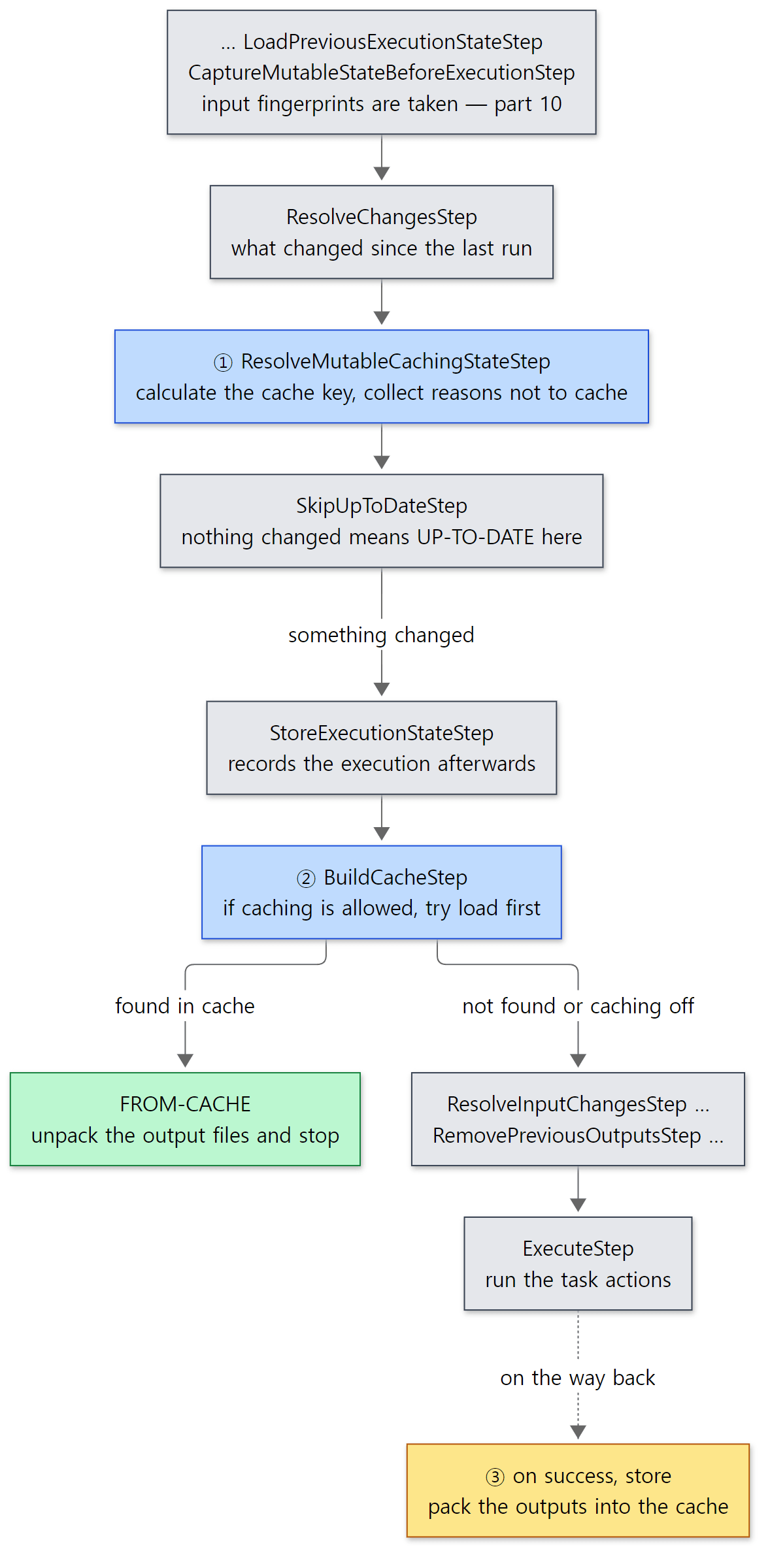 The two blue boxes are the build cache. The key is calculated before the
UP-TO-DATE check, and the load happens after it.
BuildCacheStep.execute() is short.
    @Override
    public AfterExecutionResult execute(UnitOfWork work, C context) {
        return context.getCachingState().fold(
            cachingEnabled -> executeWithCache(work, context, cachingEnabled.getCacheKeyCalculatedState().getKey()),
            cachingDisabled -> executeWithoutCache(work, context)
        );
    }
If the CachingState prepared by the earlier step is "enabled", it goes to executeWithCache() with the key; if "disabled", it does nothing and hands over to the next step. This step does not decide anything. The deciding is all done by ResolveMutableCachingStateStep above. And because the deciding step sits before SkipUpToDateStep, the key and the "reasons not to cache" are calculated and logged even for a build that ends as UP-TO-DATE (step 8 of example 1).
executeWithCache() first tries to load (tryLoadingFromCache), and if nothing is found it runs the work in executeAndStoreInCache() and stores the result.
        AfterExecutionResult result = executeWithoutCache(cacheableWork.work, context);
        try {
            result.getExecution().ifSuccessfulOrElse(
                executionResult -> storeInCacheUnlessDisabled(cacheableWork, cacheKey, result, executionResult),
                failure -> LOGGER.debug("Not storing result of {} in cache because the execution failed", cacheableWork.getDisplayName())
            );
BuildCacheStep.java lines 145–150
It stores only when the run succeeded. Half-written outputs of a failed task never get into the cache. When a load succeeds, line 96 creates the result Execution.skipped(FROM_CACHE, work). The FROM-CACHE label on the console comes from this value.
Easy to get wrong: the execution history is recorded even after a load from the cache
StoreExecutionStateStep is outside BuildCacheStep. So whether the outputs were loaded from the cache or the task really ran, the execution history (part 10's executionHistory) is stored on the way back. The cache key goes into that record as well.
    protected R executeMutable(MutableUnitOfWork work, C context) {
        R result = delegate.execute(work, context);
        work.getHistory()
            // ...
                    .map(executionOutputState -> new DefaultAfterExecutionState(
                        ((BuildCacheKeyInternal) cacheKeyCalculatedState.getKey()).getHashCodeInternal(),
                        // ...
                .ifPresent(afterExecutionState -> history.store(
This record is why a task that got its outputs FROM-CACHE becomes UP-TO-DATE in the next build, and why the "reuse the previous key" trick in section 3 works.
3. What goes into the cache key
The key is made in DefaultCachingStateFactory.calculateCacheKey(). You can see at a glance what goes into the hash and in what order (the logger.warn("Appending …") lines in front of each piece are cut, except the last one).
    public HashCode calculateCacheKey(BeforeExecutionState beforeExecutionState) {
        final Hasher cacheKeyHasher = Hashing.newHasher();
        // ...
        beforeExecutionState.getImplementation().appendToHasher(cacheKeyHasher);
        // ...
            additionalImplementation.appendToHasher(cacheKeyHasher);
        // ...
            cacheKeyHasher.putString(propertyName);
            valueSnapshot.appendToHasher(cacheKeyHasher);
        // ...
            cacheKeyHasher.putString(propertyName);
            cacheKeyHasher.putHash(fingerprint.getHash());
        // ...
            logger.warn("Appending output property name to build cache key: {}", propertyName);
            cacheKeyHasher.putString(propertyName);
        // ...
        return cacheKeyHasher.hash();
    }
Five pieces go in, one after another.
- Implementation — the task class.
ClassImplementationSnapshothashes the class name together with the hash of the class loader that loaded the class (ClassImplementationSnapshot.javalines 35–39). Even with the same class name, a changed plugin jar changes the key. - Additional implementations — one per task action.
TaskExecution.visitImplementations()passes the task class first, then the implementation of each ofgetTaskActions()(TaskExecution.javalines 332–339). Adding an action withdoLast { }changes the key too. - Input values — the names and values of
@Inputproperties. - Input files — the names of
@InputFile/@InputFilesproperties and the hash of their file fingerprints from part 10. - Output property names — only the names, not the values (paths) of the outputs.
The default hash function of Hashing.newHasher() is MD5 (Hashing.java lines 43–56). That is why a key is 128 bits, or 32 hexadecimal digits.
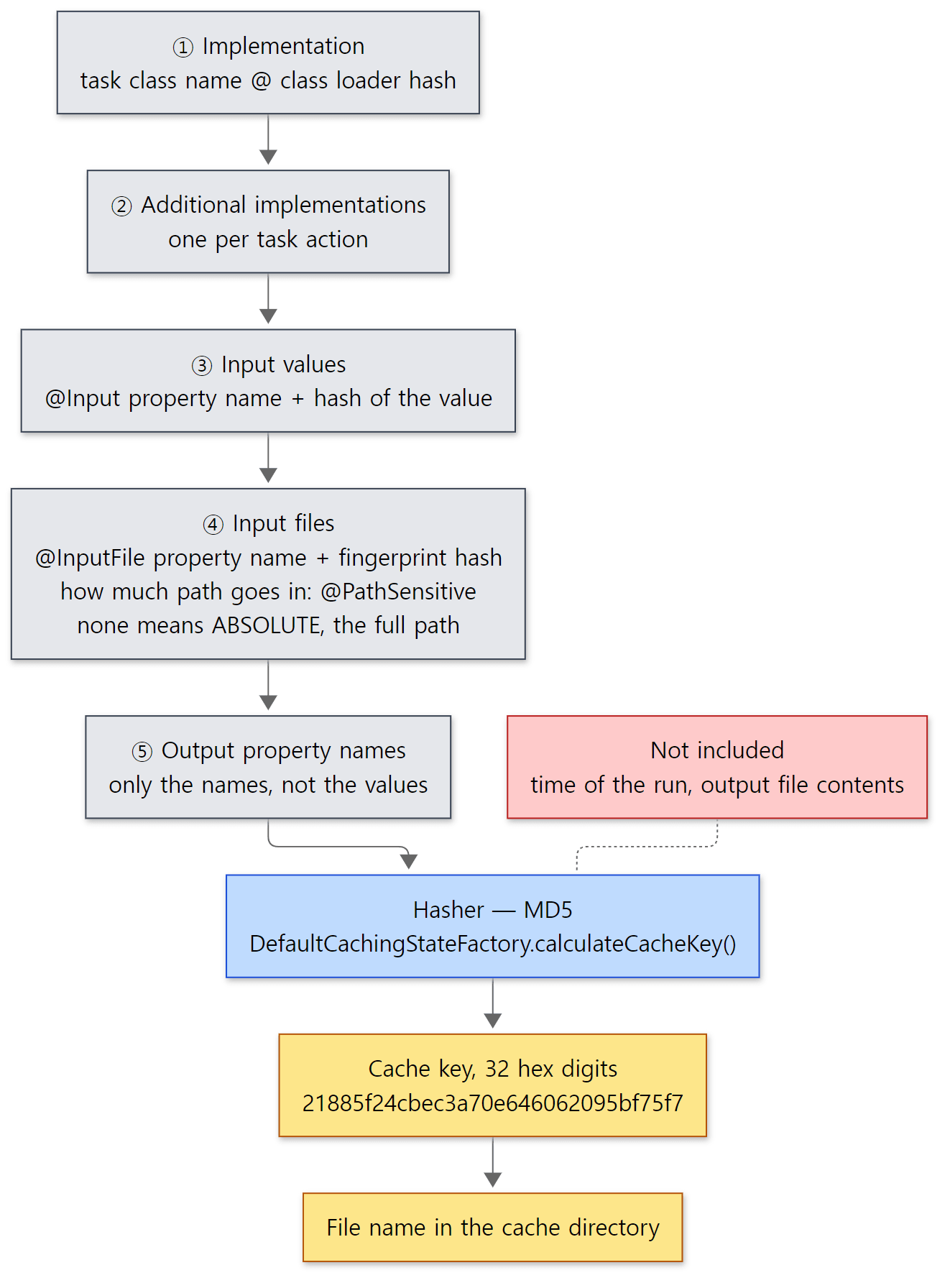 Since output paths are not in the key, a project in another folder gets the same key as long as the inputs are the same (step 6 of example 1).
Notice that the logging lines that were cut are all logger.warn. This logger comes in through the constructor, and the caller, AbstractResolveCachingStateStep, passes the real logger only when org.gradle.caching.debug is on, and a do-nothing NOPLogger otherwise.
        Logger logger = emitDebugLogging
            ? LOGGER
            : NOPLogger.NOP_LOGGER;
        CachingStateFactory cachingStateFactory = new DefaultCachingStateFactory(logger);
        HashCode cacheKey = calculateCacheKey(context, beforeExecutionState, cachingStateFactory);
        // ...
        if (!buildCache.isEnabled()) {
            cachingDisabledReasonsBuilder.add(BUILD_CACHE_DISABLED_REASON);
        }
        checkIfWorkIsCacheable(work, context, cachingDisabledReasonsBuilder);
It stays quiet normally, but with -Dorg.gradle.caching.debug=true every ingredient of the key is printed at warning level. This is the switch to use when you want to find out why the cache does not hit. One more thing to notice is line 78: the key is calculated first, whether caching will be used or not, and the reasons not to cache are collected afterwards. That is why the key ends up in the execution history even when the build cache is off.
Easy to get wrong: if nothing changed, the key is not recalculated
ResolveMutableCachingStateStep in the mutable pipeline wraps the key calculation once more.
    @Override
    protected HashCode calculateCacheKey(C context, BeforeExecutionState beforeExecutionState, CachingStateFactory cachingStateFactory) {
        return getPreviousCacheKeyIfApplicable(context)
            .orElseGet(() -> super.calculateCacheKey(context, beforeExecutionState, cachingStateFactory));
    }

    /**
     * Return cache key from previous build if there are no changes.
     */
    private static Optional<HashCode> getPreviousCacheKeyIfApplicable(MutableChangesContext context) {
        return context.getChanges()
            .flatMap(changes -> context.getPreviousExecutionState()
                .filter(__ -> changes.getChangeDescriptions().isEmpty())
                .map(PreviousExecutionState::getCacheKey));
    }
If the earlier ResolveChangesStep found that nothing at all changed since the last run, it reuses the previous key stored in the execution history from section 2. I did not know this at first: I ran --build-cache -Dorg.gradle.caching.debug=true again in the same folder, got only a single Build cache key … line and no Appending … lines at all, and stared at it for a while. To see the ingredients of the key, change an input or run in a fresh folder (steps 7 and 8 of example 1).
4. May this be cached? — @CacheableTask and the list of reasons
Having a key does not mean the result gets cached. A task has to declare by itself that it may be cached. The most common way is to put @CacheableTask on the task class, and that annotation turns into one cacheIf condition when the task is created.
        // Enabled caching if task type is annotated with @CacheableTask
        if (taskClassInfo.isCacheable()) {
            task.getOutputs().cacheIf("Annotated with @CacheableTask", Specs.SATISFIES_ALL);
        }
The annotation does the same thing as writing outputs.cacheIf { true } yourself in a build script. The decision after that is made by DefaultTaskCacheabilityResolver. The beginning is the important part.
        if (cacheIfSpecs.isEmpty()) {
            if (task.getClass().isAnnotationPresent(DisableCachingByDefault.class)) {
                // ... returns the "because" text of @DisableCachingByDefault as the reason ...
            }

            return Optional.of(task.getReasonNotToTrackState()
                .map(s -> new CachingDisabledReason(CachingDisabledReasonCategory.NOT_CACHEABLE, "Task is untracked because: " + s))
                .orElse(CACHING_NOT_ENABLED));

        }

        if (!taskProperties.hasDeclaredOutputs()) {
            return Optional.of(NO_OUTPUTS_DECLARED);
        }
With no cacheIf at all, the decision ends right there. If the class carries @DisableCachingByDefault, its because text is the reason; if the task is untracked, that reason is used; otherwise it is "Caching has not been enabled for the task" (CACHING_NOT_ENABLED on line 34). This is what "caching is off by default" means at the task level. After that the resolver checks, in order: no declared outputs, outputs overlapping with another task, an untracked task, a file-tree output, an unsatisfied cacheIf condition and a satisfied doNotCacheIf condition (lines 69–109). calculateCachingState() from section 3 adds "build cache is disabled" and "validation failed" to build the list of reasons, and the caching state becomes "enabled" only if the list is empty.
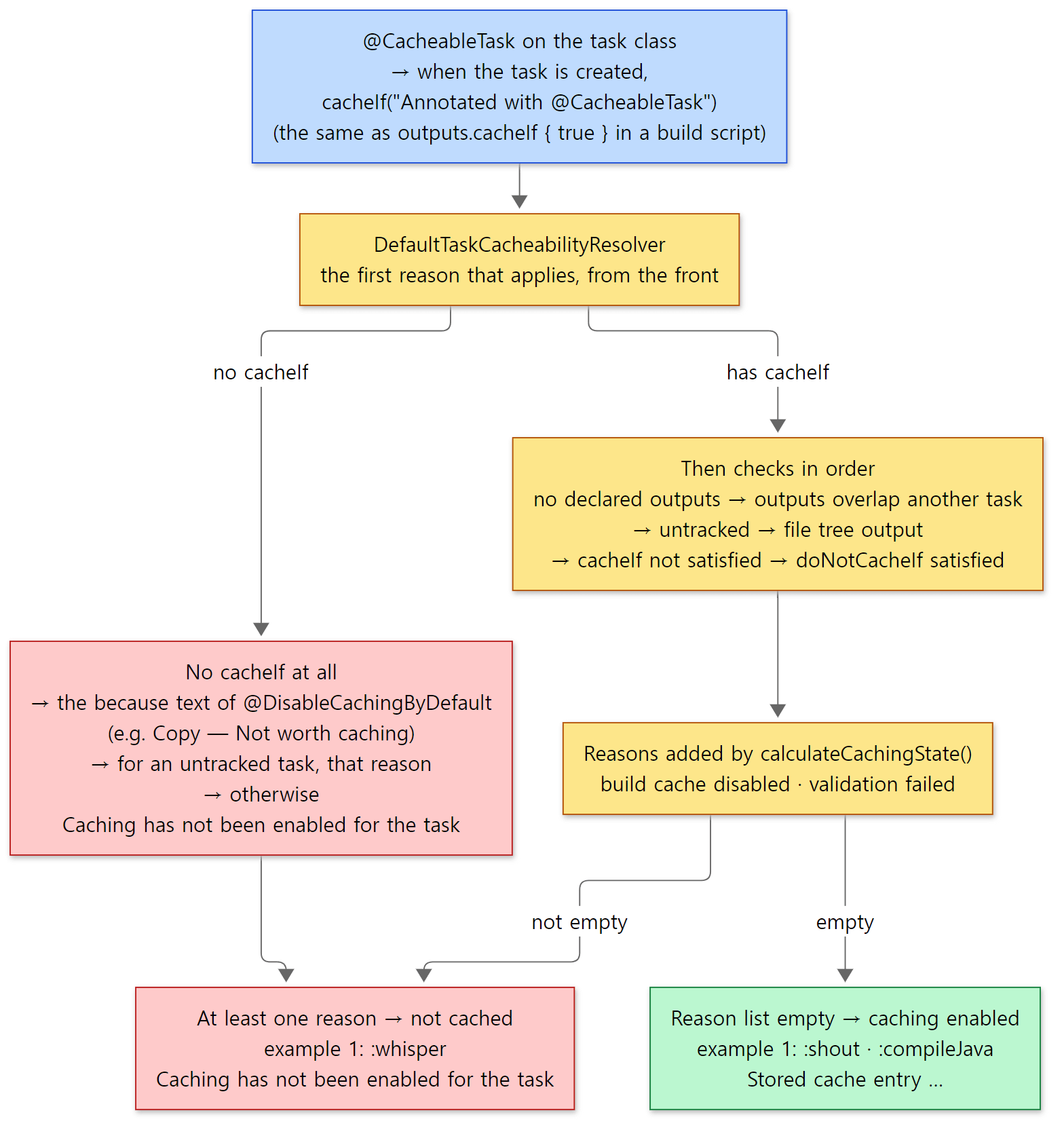 The red boxes are the path to "not cached". A task that does nothing special goes down the left path — that's why caching is off by default. Example 1's messages are exactly as in the output below.
Why is the default "no"? The source comments do not say, so this is my interpretation. If outputs loaded from the cache differ from what a real run would produce, the build is silently wrong. Gradle cannot know whether every input was declared, so it makes the task author take responsibility and say so. Also, for a task that only copies a file, loading from the cache (unpacking) can cost more than just running it again. In fact, Gradle's Copy task carries @DisableCachingByDefault(because = "Not worth caching") (Copy.java line 73). JavaCompile, on the other hand, carries @CacheableTask (JavaCompile.java line 96).
Example 1: the difference one @CacheableTask makes
This example was run in a Docker container (Eclipse Temurin JDK 25) with the Gradle 9.10.0 development build built as is from the reference commit (07ecbf9ead). I made two tasks that do the same thing (read an input file, write an output file) and put @CacheableTask on only one of them.
// Example written for this post (not part of Gradle's source)
plugins {
    java
}

// A task that declares its results may be put into the build cache
@CacheableTask
abstract class Shout : DefaultTask() {
    @get:InputFile
    @get:PathSensitive(PathSensitivity.RELATIVE) // put only the relative path into the key, not the absolute one
    abstract val source: RegularFileProperty

    @get:Input
    abstract val suffix: Property<String>

    @get:OutputFile
    abstract val target: RegularFileProperty

    @TaskAction
    fun run() {
        println("Shout: really running (suffix=${suffix.get()})")
        target.get().asFile.writeText(source.get().asFile.readText().trim().uppercase() + suffix.get() + "\n")
    }
}

// ... a Whisper task that does the same work but has no @CacheableTask ...

tasks.register<Shout>("shout") {
    source = layout.projectDirectory.file("message.txt")
    // an input value that can be changed with -Psuffix=…
    suffix = providers.gradleProperty("suffix").orElse("!")
    target = layout.buildDirectory.file("shout.txt")
}
// ... registration of whisper, and one src/main/java/lab/Hello.java ...
[Abridged from example ex/u11-build-cache/project/build.gradle.kts]
I moved the local cache somewhere easy to look at with buildCache { local { directory = "/tmp/build-cache" } } in settings.gradle.kts. From the output of gradle shout whisper compileJava --build-cache --info I kept only the lines about caching, and cut a few lines about script accessors and plugin resolution to ... (step 1 of run.sh).
=== 1. first run with --build-cache (--info, filtered) ===
Caching disabled for Kotlin DSL script compilation (Settings/TopLevel/stage1) because:
  Build cache is disabled
Using local directory build cache for the root build (location = /tmp/build-cache, remove unused entries = after 7 days).
Projects loaded. Root project using build file '/tmp/p/build.gradle.kts'.
...
Build cache key for Kotlin DSL script compilation (Project/TopLevel/stage1) is b219c9e4f07f28481d14a8aad1f2dd3c
Stored cache entry for Kotlin DSL script compilation (Project/TopLevel/stage1) with cache key b219c9e4f07f28481d14a8aad1f2dd3c
...
Build cache key for Kotlin DSL script compilation (Project/TopLevel/stage2) is 6b9b6f24570bc266e91a848f2a3e106c
Stored cache entry for Kotlin DSL script compilation (Project/TopLevel/stage2) with cache key 6b9b6f24570bc266e91a848f2a3e106c
All projects evaluated.
> Task :shout
Build cache key for task ':shout' is 21885f24cbec3a70e646062095bf75f7
Shout: really running (suffix=!)
Stored cache entry for task ':shout' with cache key 21885f24cbec3a70e646062095bf75f7
> Task :whisper
Caching disabled for task ':whisper' because:
  Caching has not been enabled for the task
Whisper: really running
> Task :compileJava
Build cache key for task ':compileJava' is 8ce58e82517d138d1dbb808c172759ab
Stored cache entry for task ':compileJava' with cache key 8ce58e82517d138d1dbb808c172759ab

BUILD SUCCESSFUL in 1m 45s
3 actionable tasks: 3 executed
Three things to read here:
:shoutand:compileJava(JavaCompileis@CacheableTask) got a key and aStored cache entryafter running, while:whisperwas not cached, with exactly theCACHING_NOT_ENABLEDmessage from section 4. These lines are printed bylogCacheKey()/logDisabledReasons()inAbstractResolveCachingStateStep(lines 109–126) and by line 175 ofBuildCacheStep.- Build script compilation also goes through the build cache. Kotlin DSL script compilation is submitted to the execution engine as a unit of work (
KotlinScriptEvaluator.ktlines 307–308). The execution engine is not only for tasks. - But the very first line, stage 1 of the settings script, says "Build cache is disabled", even though
--build-cachewas given. Where the build cache lives is decided by thebuildCache {}block in that very settings script, so when the settings script is compiled there is no real controller yet. The root build's controller starts out as the do-nothingNoOpBuildCacheController(LifecycleAwareBuildCacheControllerFactory.javalines 124–126) and is replaced by the real one after the settings script has been read (beforeProjects loaded.in the output), together with theUsing local directory build cache …line. That line is printed by line 194 ofAbstractBuildCacheControllerFactory, which creates the controller.
I ran this example twice, and both times the key of :shout was the same 21885f24…. Same inputs and same Gradle, so that is expected, but it shows with your own eyes that no timestamp or container-specific value leaks into the key. The time (1m 45s) differs on every run.
5. How a cache entry is loaded and stored
The implementation of BuildCacheController that BuildCacheStep calls is DefaultBuildCacheController (when the build cache is off it is NoOpBuildCacheController, whose isEnabled() is false and whose load() always returns empty). Loading (load(), lines 114–121) returns right away if loadLocal() finds the entry and goes to loadRemoteAndStoreResultLocally() only if it does not. Storing looks like this:
    @Override
    public void store(BuildCacheKey key, CacheableEntity entity, Map<String, FileSystemSnapshot> snapshots, Duration executionTime) {
        if (!local.canStore() && !remote.canStore()) {
            return;
        }
        tmp.withTempFile(((BuildCacheKeyInternal) key).getHashCodeInternal(), file -> {
            packExecutor.pack(file, key, entity, snapshots, executionTime);
            remote.maybeStore(key, file);
            local.maybeStore(key, file);
        });
    }
DefaultBuildCacheController.java lines 151–161
- Loading goes local first; if the entry is not there, it is downloaded from the remote into a temporary file, unpacked, and also stored locally (lines 131–149). Next time it is served locally.
- Storing packs the outputs into one temporary file, once, and hands that file to the remote and the local cache in turn. With
--offlinethe remote is off from the start (the warningRemote build cache is disabled when running with --offline.on lines 103–106 ofAbstractBuildCacheControllerFactory).
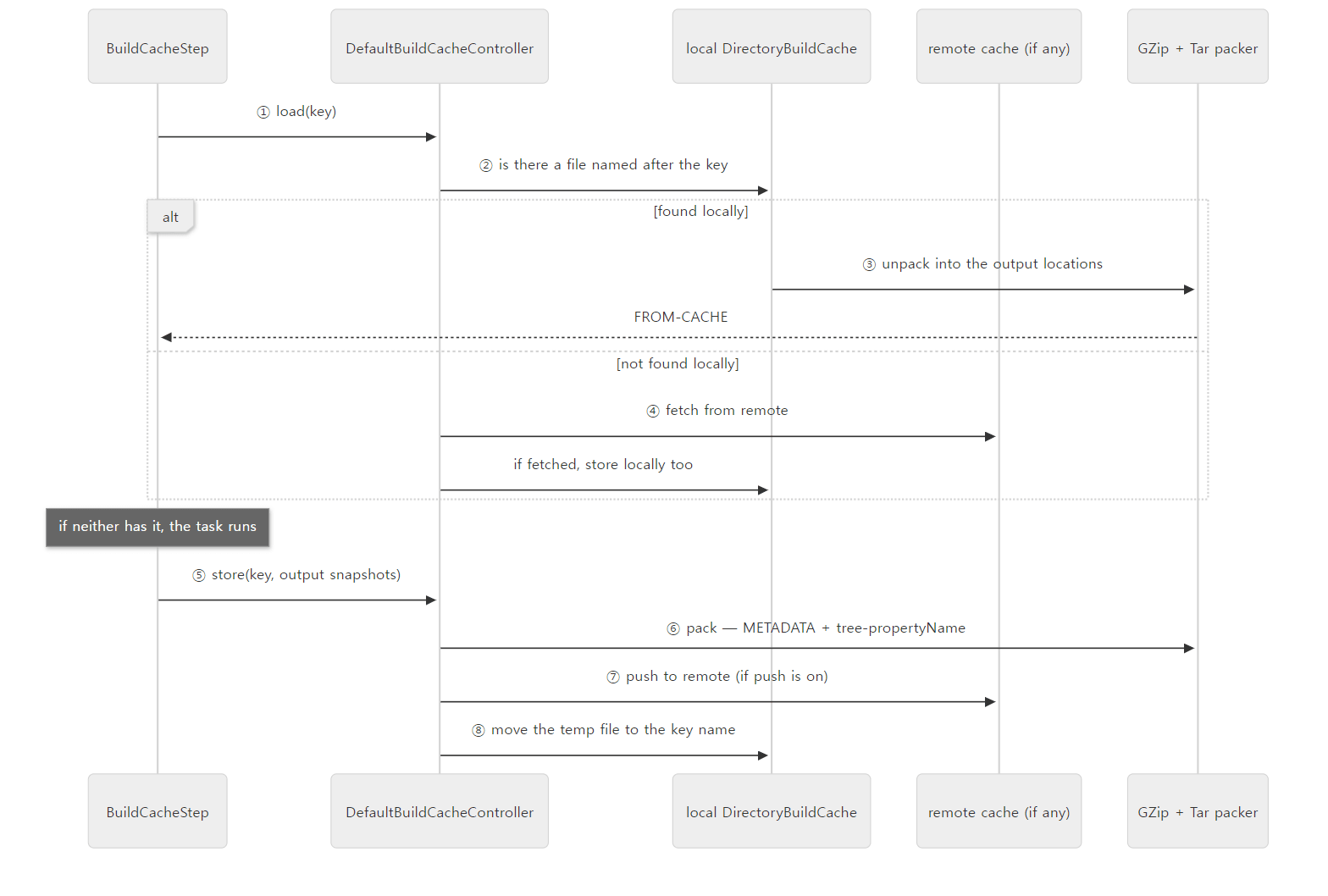 The examples did not use a remote cache (offline). It is drawn only to show the structure.
The local cache — the key is the file name
In the local cache, DirectoryBuildCache, the method that decides where an entry lives is three lines long.
    private File getCacheEntryFile(HashCode key) {
        return new File(persistentCache.getBaseDir(), key.toString());
    }
No index file, no database. If a file named after the key exists directly in the cache directory, the entry is in the cache. If you do not set a directory, it is placed under the cache folder of the Gradle user home with the name build-cache-1 (DirectoryBuildCacheServiceFactory.java lines 46–47 and 79–83). Because it is in the user home, all the projects on one machine share one cache.
When storing, the temporary file is moved atomically to the key name with Files.move(…, StandardCopyOption.ATOMIC_MOVE), and a FileAlreadyExistsException (the name already exists) is ignored (DirectoryBuildCache.java lines 149–162). The temporary file is deliberately created inside the cache directory (the comment in the constructor, lines 53–54: it has to be on the same file system so the move can always be atomic). Even when several daemons share one cache, other processes either see a complete file or no file at all. An existing file is ignored because the same key is trusted to mean the same contents. markAccessed() records the last time a file was used, for the cleanup that removes entries not used for a while (7 days by default — remove unused entries = after 7 days in the example output).
Inside an entry — a gzipped tar
The packer is a TarBuildCacheEntryPacker wrapped in a GZipBuildCacheEntryPacker (BuildCacheServices.java lines 127–137).
Two constants define the naming inside the tar.
    private static final String METADATA_PATH = "METADATA";
    private static final Pattern TREE_PATH = Pattern.compile("(missing-)?tree-([^/]+)(?:/(.*))?");
The origin information METADATA is written first (packMetadata on line 129), then each output property's file or folder goes in as tree-<property name>. A property that produced no output becomes missing-tree-<name>. When unpacking (lines 177–219), the property name is taken from this entry name and the content is unpacked into the path that the same property of the current task points to. There are no absolute paths inside the tar, so it can be unpacked into a project in another folder. The contents of METADATA are written by OriginMetadataFactory.createWriter() in Properties file format: the build ID, the type and name of the unit of work, the cache key, the creation time and the time the original run took (OriginMetadataFactory.java lines 44–56). When an entry is loaded, this executionTime (the time the original run took) is carried into the result as is (BuildCacheStep line 102).
Example 1, continued: the directory, an entry, and loading it back
Steps 2 and 3 of run.sh look at the cache directory and unpack the entry of :shout with tar.
=== 2. the cache directory: one file per cache key ===
-rw------- 1 root root  468 Nov  7 04:44 21885f24cbec3a70e646062095bf75f7
-rw------- 1 root root 5823 Nov  7 04:44 6b9b6f24570bc266e91a848f2a3e106c
-rw------- 1 root root 1182 Nov  7 04:44 8ce58e82517d138d1dbb808c172759ab
-rw------- 1 root root 3796 Nov  7 04:44 b219c9e4f07f28481d14a8aad1f2dd3c
-rw-r--r-- 1 root root   17 Nov  7 04:44 build-cache.lock
-rw-r--r-- 1 root root    0 Nov  7 04:44 gc.properties
=== 3. inside the entry of :shout ===
key = 21885f24cbec3a70e646062095bf75f7
-rw-r--r-- 0/0             313 2026-11-07 04:44 METADATA
-rw-r--r-- 0/0              19 2026-11-07 04:44 tree-target
--- METADATA ---
#Generated origin information
#Sat Nov 07 04:44:38 UTC 2026
buildCacheKey=21885f24cbec3a70e646062095bf75f7
buildInvocationId=e7el7wus2bdqtpveoz3j7min5a
creationTime=1794026678269
executionTime=67
gradleVersion=9.10.0-20261107025045+0000
identity=\:shout
type=org.gradle.api.internal.tasks.execution.TaskExecution
- The four file names are exactly the four keys from the output of example 1 (two script compilations,
:shoutand:compileJava). The file sizes (by a few bytes) and times differed between runs, but the names (the keys) stayed the same when I ran it again. tar tzvfreads it directly. Inside there are onlyMETADATAandtree-targetfor the output propertytarget.typeis not the task class (Shout) butTaskExecution, because the unit of work the execution engine receives is theTaskExecutionthat wraps the task (part 10).gradleVersionis not one of the six basic keys ofcreateWriter(); it is added by theadditionalPropertiespassed when theOriginMetadataFactoryis created (BuildCacheServices.javalines 93–96). The times,executionTimeandbuildInvocationIddiffer on every run.
Step 4 deletes build/ with clean and runs the same command again.
=== 4. clean, then the same build again ===
> Task :shout FROM-CACHE
Loaded cache entry for task ':shout' with cache key 21885f24cbec3a70e646062095bf75f7
> Task :whisper
Whisper: really running
> Task :compileJava FROM-CACHE
Loaded cache entry for task ':compileJava' with cache key 8ce58e82517d138d1dbb808c172759ab
3 actionable tasks: 1 executed, 2 from cache
There is no Shout: really running. The task action was not called; only the output file was unpacked. :whisper was not cached, so it ran again.
Step 5 shows the difference between UP-TO-DATE and the build cache best. Without clean, an input value is changed and then changed back.
=== 5. change an input, then change it back (no clean) ===
> Task :shout
Shout: really running (suffix=?)
HELLO BUILD CACHE?
> Task :shout FROM-CACHE
HELLO BUILD CACHE!
Running with -Psuffix=? changes an input, so the task runs (and stores under a new key). Running again with the default !, the input again differs from "last time" (?), so it cannot be UP-TO-DATE. But the key from the ! run is still in the build cache, so it is FROM-CACHE. UP-TO-DATE compares only with the last run; the build cache compares with every past run whose key is still there. That is why the build cache pays off when you switch back and forth between branches.
Step 6 copies the same project into a different folder, /tmp/p2, and runs it there. There is no execution history (.gradle/) and no build/.
=== 6. the same project copied to another directory ===
> Task :shout FROM-CACHE
> Task :compileJava FROM-CACHE
2 actionable tasks: 2 from cache
This works because the key ingredients from section 3 contain no output paths, and Shout's input file is @PathSensitive(RELATIVE), so only the relative path message.txt goes in. This is called being relocatable. It is what lets CI machines and developer PCs share a remote cache.
Easy to get wrong: without @PathSensitive, the default is the absolute path
The doc comment of @PathSensitive says "if a task declares a file property without this annotation, the default is PathSensitivity.ABSOLUTE" (PathSensitive.java line 31). Then the absolute path of the input file goes into the fingerprint, and therefore into the key, so even on the same PC a different folder gives a different key. It is a good idea to put @PathSensitive on the properties of your own @CacheableTask. The output of step 7 shows the difference.
=== 7. what goes into the key (-Dorg.gradle.caching.debug=true, fresh copy) ===
> Task :shout FROM-CACHE
Appending implementation to build cache key: Build_gradle$Shout_Decorated@b06e37f55f149f6cf2411b2664e28f71
Appending additional implementation to build cache key: Build_gradle$Shout_Decorated@b06e37f55f149f6cf2411b2664e28f71
Appending input value fingerprint for 'suffix' to build cache key: e6bb36e3d3215fc6588af49335006ae6
Appending input file fingerprints for 'source' to build cache key: 4915c002f8de048dcf75ff8e8660b0fc - RELATIVE_PATH{/tmp/p3/message.txt='message.txt' / 45ddde6bec0517e02debeff607fb5696}
Appending output property name to build cache key: target
Build cache key for task ':shout' is 21885f24cbec3a70e646062095bf75f7
=== 8. the same command once more (inputs unchanged) ===
> Task :shout UP-TO-DATE
Build cache key for task ':shout' is 21885f24cbec3a70e646062095bf75f7
- The five pieces from the section 3 code were printed in exactly that order. The implementation is
Build_gradle$Shout_Decorated, the_Decoratedsubclass Gradle generates aroundShoutinside the build script class (part 4), and the part after@is the class loader hash. The additional implementation has the same name because the@TaskActionmethod lives in that class. - The key line is
RELATIVE_PATH{/tmp/p3/message.txt='message.txt' / …}for the input file. The real path is/tmp/p3/…, but only'message.txt'went into the key, so the key is the same21885f24…that was made in/tmp/p. - Step 8 runs once more in the same folder. It is
UP-TO-DATE, yet the key line is printed (section 2: the key is calculated beforeSkipUpToDateStep), and there is not a singleAppendingline (section 3: if nothing changed, the previous key is reused). Withorg.gradle.caching.debugon, the key line is also printed at warning level, so it shows up without--info(AbstractResolveCachingStateSteplines 110–111). - I did not find out why the task header (
FROM-CACHE) in step 7 was printed before theAppendinglines. In the source, the key calculation (ResolveMutableCachingStateStep) comes before the load (BuildCacheStep).
6. The configuration cache — the whole work graph at once
Now the configuration cache. This mechanism hooks not into the execution engine but into the build lifecycle from part 5. It does so by registering different implementations in the service registry (part 4).
        if (modelParameters.isVintage) {
            // ...
            add(BuildTreeLifecycleControllerFactory::class.java, BarrierAwareBuildTreeLifecycleControllerFactory::class.java)
            // ...
        } else if (modelParameters.isConfigurationCache) {
            // ...
            add(BuildTreeLifecycleControllerFactory::class.java, ConfigurationCacheBuildTreeLifecycleControllerFactory::class.java)
"Vintage" is the path with the configuration cache off (see "Easy to get wrong" in part 2). When it is on, the factory that creates the build tree lifecycle controller becomes ConfigurationCacheBuildTreeLifecycleControllerFactory, and this factory swaps in only one part, the work controller.
    private
    fun createController(applyCaching: Boolean, targetBuild: BuildLifecycleController, workExecutor: BuildTreeWorkExecutor, finishExecutor: BuildTreeFinishExecutor): BuildTreeLifecycleController {
        if (!applyCaching) {
            return vintageFactory.createController(targetBuild, workExecutor, finishExecutor)
        }

        val workPreparer = vintageFactory.createWorkPreparer(targetBuild)
        val workController = ConfigurationCacheAwareBuildTreeWorkController(
            workPreparer,
            // ... workExecutor, taskGraph, cache and so on ...
        )
        // ...
        val finisher = ConfigurationCacheAwareFinishExecutor(finishExecutor, cache)

        return DefaultBuildTreeLifecycleController(targetBuild, workController, modelCreator, finisher, stateTransitionControllerFactory)
    }
The DefaultBuildTreeLifecycleController on the last line is exactly the class from part 5. Where VintageBuildTreeWorkController would go with the configuration cache off (VintageBuildTreeLifecycleControllerFactory.kt line 66), ConfigurationCacheAwareBuildTreeWorkController goes in, and this object wraps the real configuration work (workPreparer — taken unchanged from vintage) and decides "whether to do it at all". It does not change the lifecycle itself but wraps one part, which resembles the step chain from part 10 and the valves of Tomcat part 8.
createRootBuildController() (lines 60–68) calls cache.initializeCacheEntry() before creating this controller. In other words, whether a stored entry will be used is decided before a single line of the settings script runs.
The two paths of the work controller
ConfigurationCacheAwareBuildTreeWorkController.scheduleAndRunRequestedTasks() (lines 49–62) boils down to two lines. loadAndRun() first tries to read a stored graph and run it, and if that fails (null), scheduleStoreAndRun() configures, stores and runs. But the "run" in scheduleStoreAndRun() is not what you might expect.
        val executionResult: ExecutionResult<Void>? = workGraph.withNewWorkGraph { graph ->
            val outcome = cache.scheduleRequestedTasks(graph) { workPreparer.scheduleRequestedTasks(graph, taskSelector) }
            // ...
            if (outcome is BuildTreeConfigurationCache.ScheduleOutcome.Stored && !buildModelParameters.isModelBuilding) {
                // CC miss, graph has been successfully stored. We don't try to execute the graph directly but store it first, discard, and then reload.
                // We don't want to fold the code below here so the "live" graph can be garbage collected before execution.
                null
            } else {
        // ...
        return storeAndReload(scheduleTaskSelectorPostProcessing)
    }

    private fun storeAndReload(scheduleTaskSelectorPostProcessing: BuildTreeWorkGraphBuilder?): ExecutionResult<Void> {
        cache.finalizeCacheEntry()
        buildRegistry.resetModels()

        return workGraph.withNewWorkGraph { graph ->
            val (finalizedGraph, workGraphRestorationFailed) = cache.loadRequestedTasks(graph, scheduleTaskSelectorPostProcessing)
            // ...
                workExecutor.execute(finalizedGraph)
ConfigurationCacheAwareBuildTreeWorkController.kt lines 82–116, abridged
The comment on lines 87–88 is the point: "on a cache miss, once the graph has been stored, we don't execute it directly — we store it first, discard it, and then reload it." So even the first build commits the entry with finalizeCacheEntry(), throws away the project model it just configured with resetModels(), and then reads the graph back from the file it just wrote and runs that. Note the condition on line 86, though: this happens only when the store succeeded (Stored) and the request is not a Tooling API model request. If the entry is discarded because of problems found during configuration (NotStored), if the cache is in read-only mode (SkipStore), or if a model is being built, the configured graph is run as is (lines 91–92).
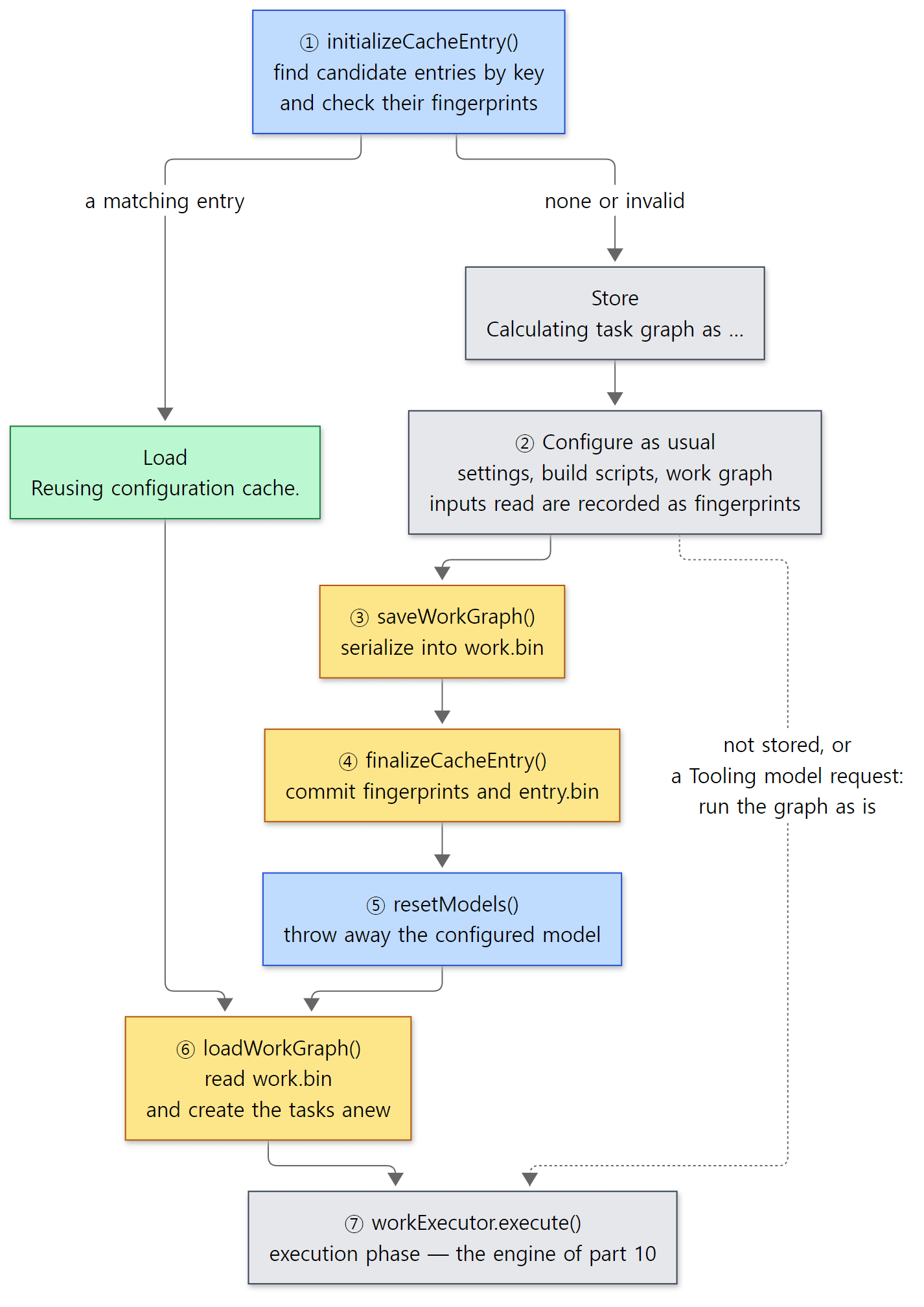 The usual two paths both go through ⑥. In a build whose store succeeded, the tasks the execution phase sees are the ones brought back from the file (the dashed line is the exception).
Why go to this trouble? The reason written in the comment is memory: the "live" graph used for configuration is let go before execution so the garbage collector can reclaim it (line 88). To add my own interpretation: running only from the stored graph means the first build and later builds run with exactly the same object state. If a task depends on something that only existed in memory during configuration and was never written to the file, the problem shows up in the first build rather than the second.
Example 2: from the very first build, the task is a different object
I printed System.identityHashCode() of the task object in the configuration phase and in the execution phase.
// Example written for this post (not part of Gradle's source)
println("build script: configuring project '${project.name}'")

// Read an environment variable during configuration — the configuration cache records this read
val greeting = System.getenv("GREETING") ?: "hello"

tasks.register("hello") {
    println("hello task: configured, instance ${System.identityHashCode(this)}")
    val message = greeting // turn it into a value during configuration
    doLast {
        println("hello task: running,    instance ${System.identityHashCode(this)} -> $message")
    }
}
// ... a bad task that reads project.name inside doLast — section 9 ...
[Abridged from example ex/u11-configuration-cache/project/build.gradle.kts]
settings.gradle.kts has a single println("settings script: evaluated"). These are the results run.sh got by running one after another in the same container.
=== 0. without the configuration cache ===
...
Starting a Gradle Daemon (subsequent builds will be faster)
Shared read-only dependency cache is an incubating feature.
settings script: evaluated

> Configure project :
build script: configuring project 'u11-configuration-cache'
hello task: configured, instance 1408746995

> Task :hello
hello task: running,    instance 1408746995 -> hello

BUILD SUCCESSFUL in 29s
1 actionable task: 1 executed
Consider enabling configuration cache to speed up this build: https://docs.gradle.org/9.10.0-20261107025045+0000/userguide/configuration_cache_enabling.html
=== 1. --configuration-cache, first run ===
Calculating task graph as no cached configuration is available for tasks: hello
settings script: evaluated

> Configure project :
build script: configuring project 'u11-configuration-cache'
hello task: configured, instance 55274733

> Task :hello
hello task: running,    instance 1180832621 -> hello

BUILD SUCCESSFUL in 3s
1 actionable task: 1 executed
Configuration cache entry stored.
=== 2. --configuration-cache, second run ===
Reusing configuration cache.

> Task :hello
hello task: running,    instance 1359404247 -> hello

BUILD SUCCESSFUL in 1s
1 actionable task: 1 executed
Configuration cache entry reused.
(The Welcome to Gradle … banner of the first run is cut to .... Shared read-only dependency cache is an incubating feature. is printed because of the read-only dependency cache used by this series' Docker image. The numbers and times differ on every run.)
- In run 0 (configuration cache off) the number is
1408746995both at configuration and at execution. It is the same task object. The last line, "Consider enabling configuration cache…", is a suggestion added when the configuration cache is off and was not explicitly turned off (ConfigurationCachePromoHandleron line 119 ofBuildTreeModelControllerServices.kt). The configuration cache is off by default (StartParameterInternal.javaline 42). - In run 1 (the first build) the settings and build scripts all ran, yet the number at configuration (
55274733) and at execution (1180832621) are different. The "store, discard, reload" from the code above is right there. The first line,Calculating task graph as no cached configuration is available for tasks: hello, is the message fromdetermineBasicCacheAction(), which we will see in section 8. - In run 2 there is no
printlnfrom the settings or build script at all. The whole configuration phase was skipped. Still,-> hellowas printed.messageis a value made during configuration; the value captured by the lambda (doLast) was written to the file and brought back. - The last lines,
Configuration cache entry stored./reused., are printed byConfigurationCacheProblemswhen the build is completely finished (section 9).
Easy to get wrong: "a value made during configuration" is not "configuration code"
If doLast called System.getenv("GREETING") instead of using greeting, that would be code running at every execution, so it would read the current value each time. When the value is read during configuration and kept in a variable, as in the example, a reused entry like run 2 uses the stored value. So what happens when the environment variable changes? The configuration cache guards against stale values with "fingerprints" (section 8).
7. What gets stored — the key, the entry, the codecs
The key: requested tasks and a few options
The configuration cache key is built by ConfigurationCacheKey.
    fun Hasher.putCacheKeyComponents() {
        putString(GradleVersion.current().version)
        // ...
        if (buildActionRequirements.isRunsTasks) {
            putAll(startParameter.requestedTaskNames)
            putAll(startParameter.excludedTaskNames)
        }

        putBoolean(startParameter.isOffline)
        // ...
        putBoolean(encryptionConfiguration.isEncrypting)
        putHash(encryptionConfiguration.encryptionKeyHashCode)
        // ...
    }
The Gradle version, the requested task names (hello) and options such as --offline are hashed with MD5 into a short string (lines 40–44). The contents of the build scripts are not part of the key. gradle hello and gradle build have different keys, but editing a script leaves the key unchanged. Whether a script changed is checked separately by the fingerprint of the entry found with the key (section 8). Where the build cache "melts every input into the key", the configuration cache "finds candidates by key, then re-checks the inputs one by one". The inputs the configuration phase will read cannot be known before running it, so they cannot be melted into the key in advance.
The encryptionKeyHashCode near the end is also worth a look. Configuration cache files are encrypted by default (the internal option org.gradle.internal.configuration-cache.encryption in DefaultEncryptionService.kt defaults to true, line 44). Not every file, though: only the state types whose encryptable flag is true in the StateType enum we will see below (the work graph work.bin, the fingerprints and so on); entry.bin, candidates.bin and classloaderscopes.bin are not encrypted. It looks like a way to keep values such as passwords in task inputs from sitting on disk in plain text (that reason is my reading, not a source comment). Unless a key is given in the GRADLE_ENCRYPTION_KEY environment variable, the encryption key lives in a keystore created in the Gradle user home's cache (cc-keystore) (EncryptionKind.select()), and the hash of that key goes into the configuration cache key. This series' example containers use a fresh user home every time, so the directory name (the key) in the example below changed every time a new container was started.
The entry: a key folder and UUID folders
ConfigurationCacheRepository creates folders named after keys or entry IDs (lines 326–327) under the build-tree-scoped cache folder configuration-cache (lines 276–277 — the root project's .gradle/configuration-cache/), and puts one <lowercase state type>.bin file per kind of state in them (lines 337–339). How many entries one key can have is org.gradle.configuration-cache.entries-per-key, which defaults to 1 (StartParameterInternal.java line 55). We saw in section 1 that the Gradle repository sets it to 2. A new entry's ID is a random UUID chosen by initializeCacheEntry() (DefaultConfigurationCache.kt lines 214–224).
This is .gradle/configuration-cache after running up to step 3 of example 2 (section 8 below).
=== 4. what is on disk ===
.gradle/configuration-cache
.gradle/configuration-cache/7z43g5hhkp3l9ngwtlgt2fs3n
.gradle/configuration-cache/7z43g5hhkp3l9ngwtlgt2fs3n/candidates.bin
.gradle/configuration-cache/9d73552e-903b-4a85-b2c4-d1369b0add3f
.gradle/configuration-cache/configuration-cache.lock
.gradle/configuration-cache/f1de74b3-e639-495a-8174-5d5911b348d8
.gradle/configuration-cache/f1de74b3-e639-495a-8174-5d5911b348d8/buildfingerprint.bin
.gradle/configuration-cache/f1de74b3-e639-495a-8174-5d5911b348d8/classloaderscopes.bin
.gradle/configuration-cache/f1de74b3-e639-495a-8174-5d5911b348d8/entry.bin
.gradle/configuration-cache/f1de74b3-e639-495a-8174-5d5911b348d8/.globals.work.bin
.gradle/configuration-cache/f1de74b3-e639-495a-8174-5d5911b348d8/projectfingerprint.bin
.gradle/configuration-cache/f1de74b3-e639-495a-8174-5d5911b348d8/.strings.work.bin
.gradle/configuration-cache/f1de74b3-e639-495a-8174-5d5911b348d8/_.work.bin
.gradle/configuration-cache/f1de74b3-e639-495a-8174-5d5911b348d8/work.bin
.gradle/configuration-cache/gc.properties
7z43g5…is the key folder, and thecandidates.binin it is the list of entry IDs belonging to this key (ConfigurationCacheCandidateEntries).f1de74b3-…is the current entry. The names of theStateTypeenum (ConfigurationCacheState.ktline 111 onward) are the file names as is.work.binis the work graph,buildfingerprint.bin/projectfingerprint.binare the fingerprints of section 8, andentry.binholds the entry's details..strings,.globalsand_.work.binare companion files made by the functions at the end ofConfigurationCacheRepository(relatedStateFileFor,sharedObjectsFileFor).- The empty
9d73552e-…is the entry from before the environment variable changed (run 1). With one entry per key, its contents seem to have been removed when the new entry came in (I did not check why the folder itself stays).
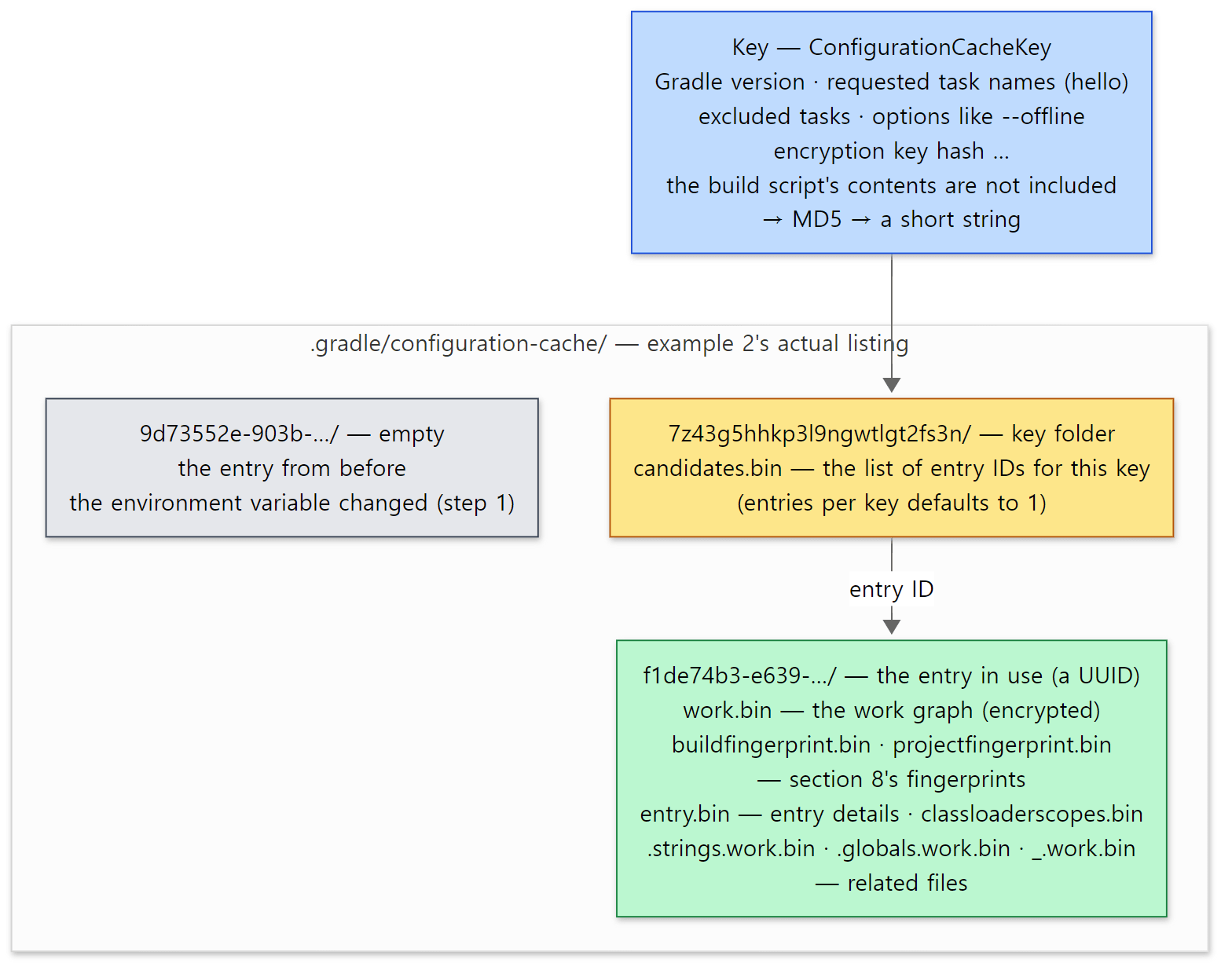 Folder and file names are exactly as in the
4. what is on disk output above. The key and UUIDs differ from run to run.
The codecs: tasks are written field by field
Tasks are written into work.bin by TaskNodeCodec.
    suspend fun WriteContext.writeTask(task: TaskInternal) {
        withDebugFrame({ task.path }) {
            val taskType = GeneratedSubclasses.unpackType(task)
            val taskName = task.name
            writeClass(taskType)
            writeProjectRef(task.project)
            writeString(taskName)
            // ...
            withDebugFrame({ taskType.name }) {
                withTaskOf(taskType, task, userTypesCodec) {
                    writeUpToDateSpec(task)
                    writeCacheabilitySpecs(task)
                    writeReasonNotToTrackState(task)
                    writeOnlyIfSpec(task)
                    beanStateWriterFor(task.javaClass).run {
                        writeStateOf(task)
                        writeRegisteredPropertiesOf(task)
                    }
                    writeTaskActions(task)
                    // ...
                    writeRequiredServices(task)
                    writeTaskLoggingListeners(task)
                }
            }
        }
    }
- It writes "which task" through the class, the project and the name, and then the
cacheIfconditions from section 4 (writeCacheabilitySpecs),onlyIf, the field state (writeStateOf), the task actions (writeTaskActions— the example'sdoLastlambda and themessageit captured) and even the build services it needs. You can also see thatGeneratedSubclasses.unpackType()strips_Decoratedand writes the original class. - The reading side,
readTask()(lines 146–173), creates the task anew withcreateTask(...)on line 154 and fills it in the same order. That is why the numbers in example 2 differed. - The field state is written with reflection. The targets are the declared fields that are not
staticortransient(most ofAbstractTask's internal fields and a few special fields are skipped), sorted by name (BeanSchema.ktlines 141–152). Each field value gets a codec matching its type (Property,FileCollection,List, user classes …). The codecs live inplatforms/core-configuration/core-serialization-codecs/andgraph-serialization/.
The configuration cache's rules follow naturally from this structure. Everything a task holds must be writable to the file, and at execution time a task may use only what was brought back from the file. A Project object is connected to the model of the entire build and cannot be written as a whole, so a task that reaches for project at execution time breaks the rule (section 9).
8. When the cache is thrown away — fingerprints
Now let's see how Gradle knows whether a stored value has gone stale. The starting point is determineBasicCacheAction(), called by initializeCacheEntry() from section 7.
            when (val checkedFingerprint = entrySelector.selectEntry()) {
                is CheckedFingerprint.NotFound -> {
                    val description = formatBootstrapSummary(
                        "%s as no cached configuration is available for %s",
                        // ...
                    Store.withDescription(description)
                }

                is CheckedFingerprint.Invalid -> {
                    val description = formatBootstrapSummary(
                        "%s as configuration cache cannot be reused because %s.",
                        // ...
                    Store.withDescription(description)
                }

                is CheckedFingerprint.Valid -> {
                    when (val invalid = checkedFingerprint.invalidProjects) {
                        null -> {
                            val description = StructuredMessage.forText("Reusing configuration cache.")
                            logBootstrapSummary(description)
                            Load(checkedFingerprint.entryId).withDescription(description)
                        }
DefaultConfigurationCache.kt lines 494–521, abridged
The first lines of example 2 all come from here. No entry gives NotFound → "… as no cached configuration is available for tasks: hello", a fingerprint mismatch gives Invalid → "… cannot be reused because Load → "Reusing configuration cache.". (Before this branch there are branches that go to Store without even looking at fingerprints for options such as --refresh-dependencies and --write-locks, lines 457–491.)
A fingerprint is the record of what the configuration phase "read"
Fingerprints pile up while the configuration phase runs. DefaultConfigurationCache.runWorkThatContributesToCacheEntry() (lines 560–567) wraps the configuration work, starts recording with cacheFingerprintController.maybeStartCollectingFingerprint(), and stops when it ends. The subclasses of ConfigurationCacheFingerprint show what is recorded: files read (InputFile), directory listings (DirectoryChildren), ValueSources (providers such as providers.environmentVariable(…)), system properties (UndeclaredSystemProperty), environment variables (UndeclaredEnvironmentVariable), Gradle properties, init scripts … (fingerprint/ConfigurationCacheFingerprint.kt). The build script file itself is also recorded as an InputFile when its class is loaded (ConfigurationCacheFingerprintWriter.onScriptClassLoaded(), lines 532–536).
But the build script in example 2 did not use a Gradle API; it simply called the JDK's System.getenv(). How did Gradle know? The answer is bytecode rewriting. Before using the compiled class of a build script, Gradle rewrites its bytecode (instrumentation) and replaces calls to System.getenv with calls to its own method.
            } else if (name.equals("getenv")) {
                if (descriptor.equals(RETURN_STRING_FROM_STRING)) {
                    // System.getenv(String) -> String
                    mv._LDC(binaryClassNameOf(className));
                    mv._INVOKESTATIC(INSTRUMENTED_TYPE, "getenv", RETURN_STRING_FROM_STRING_STRING);
                    return true;
While rewriting method bodies with ASM, whenever it meets System.getenv(String), it pushes the name of the calling class as one more argument (_LDC) and calls Instrumented.getenv(String, String) instead. The replacement looks like this:
    // Called by generated code.
    public static String getenv(String key, String consumer) {
        String value = System.getenv(key);
        envVariableQueried(key, value, consumer);
        return value;
    }
It still reads and returns the real value, but in between it reports "who read what and got what". Where the proxies of Spring part 10 wrap an object to intercept calls, this rewrites the bytecode of the caller and so intercepts even static JDK method calls. The report goes through InstrumentedInputAccessListener.envVariableQueried() (lines 88–93) to the fingerprint writer.
    fun envVariableRead(key: String, value: String?, consumer: String?) {
        if (isInputTrackingDisabled()) {
            return
        }
        addEnvVariableToFingerprint(key, value, consumer)
    }
addEnvVariableToFingerprint() (lines 389–393) calls sink().envVariableRead() (lines 909–913), which writes UndeclaredEnvironmentVariable(key, value) only once, the first time a name is read. In run 1 of the example, GREETING was not set, so the value null is recorded. In the next build, ConfigurationCacheFingerprintChecker re-checks the records one by one.
            is ConfigurationCacheFingerprint.UndeclaredEnvironmentVariable -> input.run {
                ifOrNull(System.getenv(key) != value) {
                    text("environment variable ").reference(key).text(" has changed")
                }
            }
It reads the current value and, if it differs from the recorded one, builds a reason sentence. That sentence goes into the %s of determineBasicCacheAction() above.
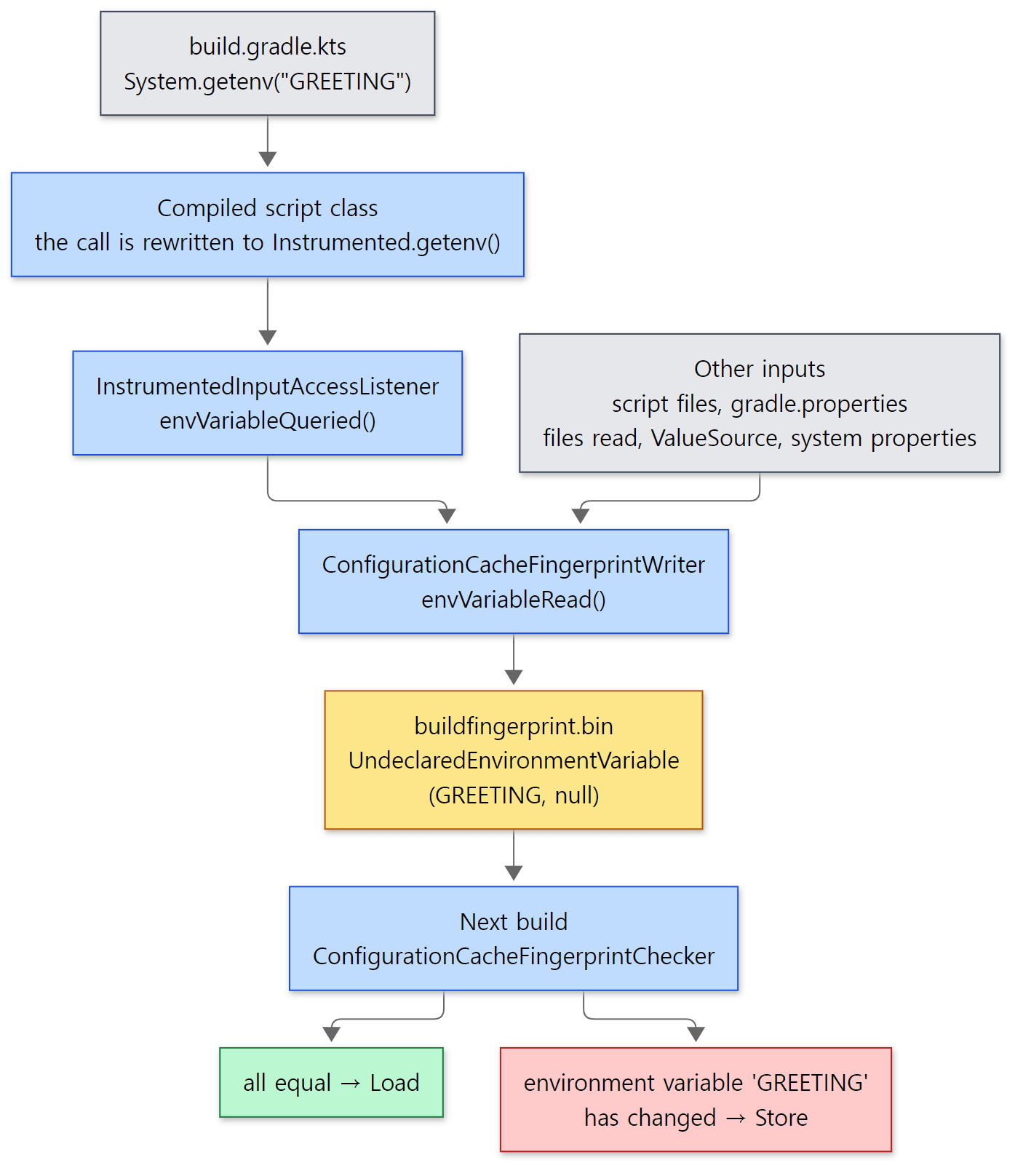 The yellow box is
buildfingerprint.bin from the listing in section 7. If even one input differs, the whole entry is rebuilt.
Example 2, continued: changing the environment variable
=== 3. the environment variable changes ===
Calculating task graph as configuration cache cannot be reused because environment variable 'GREETING' has changed.
settings script: evaluated

> Configure project :
build script: configuring project 'u11-configuration-cache'
hello task: configured, instance 1707233178

> Task :hello
hello task: running,    instance 266303648 -> bonjour

BUILD SUCCESSFUL in 2s
1 actionable task: 1 executed
Configuration cache entry stored.
I ran GREETING=bonjour gradle hello --configuration-cache. The reason sentence on the first line is exactly the two pieces of code above joined together (the text(...) in the checker and "%s as configuration cache cannot be reused because %s." in determineBasicCacheAction()). The configuration phase ran again, the new value bonjour was used, and a new entry was stored (f1de74b3-… in the listing in section 7).
An environment variable given to the client is visible to the daemon's System.getenv() thanks to ApplyClientEnvironmentVariables in the daemon's command chain (⑩ in part 3).
Easy to get wrong: reads during execution are not recorded
The first line of the writer's envVariableRead() returns if isInputTrackingDisabled(). There are also checks such as isExecutingWork() (line 318) in the same class that ask "is a task executing right now?". Fingerprints record only what the configuration phase read. An environment variable read inside a task action is read fresh at every execution, so it is no reason to throw the cache away. Conversely, every value read during configuration is a potential reason to throw it away. The less the configuration phase reads from outside, the better the configuration cache hits.
9. The problem report — touching project at execution time
The example's bad task reads project.name inside doLast. Task.getProject() looks like this:
    public Project getProject() {
        taskExecutionAccessChecker.notifyProjectAccess(this);
        return project;
    }
subprojects/core/src/main/java/org/gradle/api/internal/AbstractTask.java lines 250–253
Before returning the value, it notifies a checker. The checker's notifyProjectAccess() asks "is this execution time?", and if so, reports a problem with onProjectAccess("Task.project", …) (TaskExecutionAccessCheckers.kt lines 45–49 and 111–112). With the configuration cache on, the checker is ConfigurationTimeBarrierBased, which decides by "have we already passed the configuration-time barrier?" (!configurationTimeBarrier.isAtConfigurationTime). The TaskStateBased checker, which asks "is this task executing?" (task.state.executing), is used when the configuration cache is off (BuildModelControllerServices.kt lines 139–142). In DefaultConfigurationCacheProblemsListener.onProjectAccess(), the report becomes a problem with the sentence "invocation of 'Task.project' at execution time is unsupported with the configuration cache." (ConfigurationCacheProblemsListener.kt lines 113–147), and goes to ConfigurationCacheProblems.onExecutionTimeProblem().
    override fun onExecutionTimeProblem(problem: PropertyProblem) {
        val severity = when {
            isWarningMode -> ProblemSeverity.Deferred
            cacheAction == SkipStore || degradationDecision.shouldDegrade -> ProblemSeverity.SuppressedSilently
            else -> ProblemSeverity.Interrupting
        }
        onProblem(problem, severity)
    }
The default is Interrupting, and onProblem() throws an exception at that severity (lines 309–313). So the task fails right there. With --configuration-cache-problems=warn, isWarningMode makes it Deferred (collected and reported as warnings later).
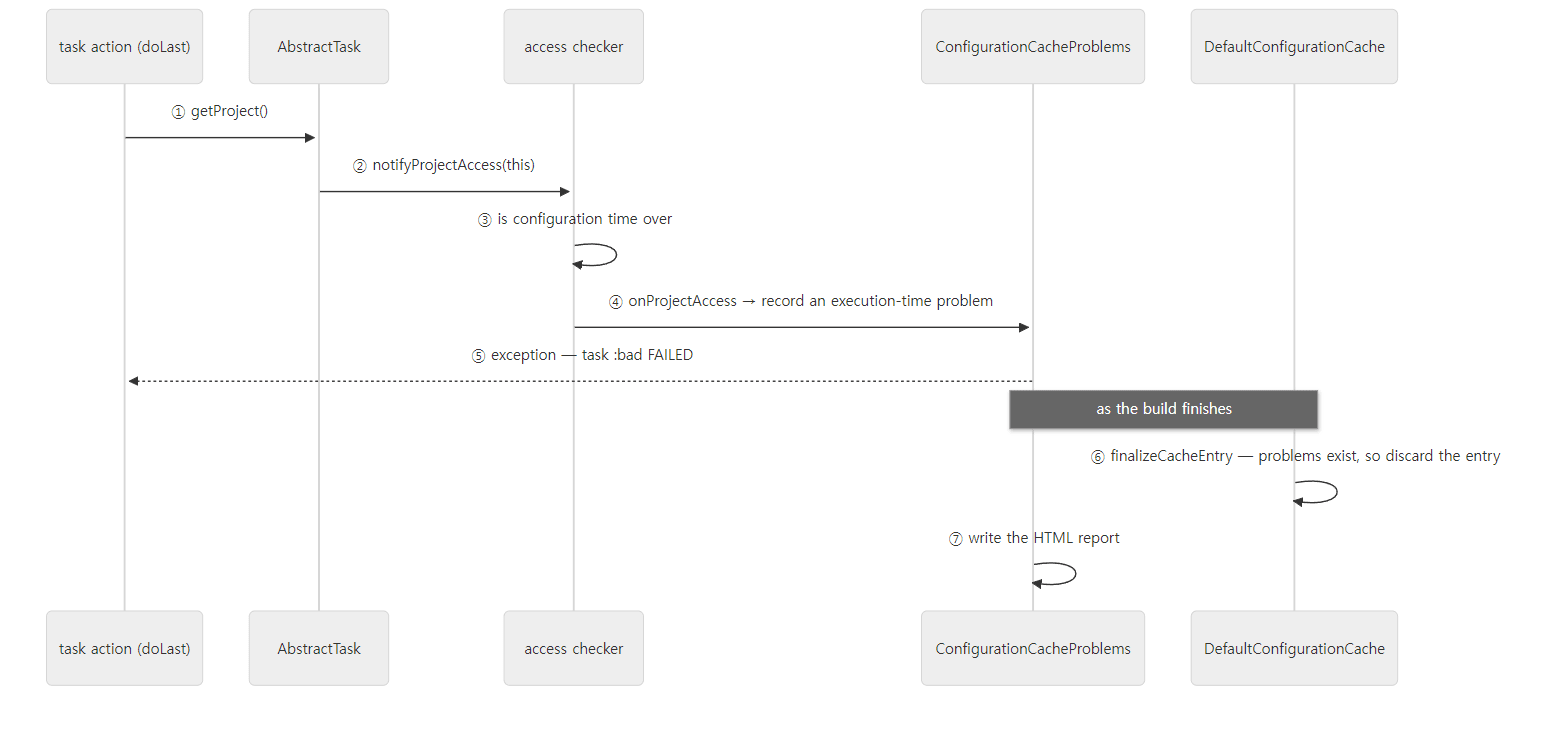 The checker stands at the door called
getProject(). Using project during configuration is not a problem.
Example 2, continued: gradle bad --configuration-cache
=== 5. a task that touches project at execution time ===
Calculating task graph as no cached configuration is available for tasks: bad
settings script: evaluated

> Configure project :
build script: configuring project 'u11-configuration-cache'

> Task :bad FAILED

1 problem was found storing the configuration cache.
- Task `:bad` of type `org.gradle.api.DefaultTask`: invocation of 'Task.project' at execution time is unsupported with the configuration cache.
  See https://docs.gradle.org/9.10.0-20261107025045+0000/userguide/configuration_cache_requirements.html#config_cache:requirements:use_project_during_execution

See the complete report at file:///tmp/p/build/reports/configuration-cache/cfbleachwswu3am44cg9ajjub/10jmbtidz96ck7xtcv2rl5a10/configuration-cache-report.html

FAILURE: Build failed with an exception.

* What went wrong:
Execution failed for task ':bad' (registered in build file 'build.gradle.kts').
> Invocation of 'Task.project' by task ':bad' at execution time is unsupported with the configuration cache.

* Try:
// ... (four lines of --stacktrace, --info, --scan and help hints) ...

BUILD FAILED in 1s
1 actionable task: 1 executed
Configuration cache entry discarded with 1 problem.
(exit code 1)
=== 6. the same failing build again ===
Calculating task graph as no cached configuration is available for tasks: bad
Configuration cache entry discarded with 1 problem.
(The single [Incubating] Problems report … line, the four lines under * Try:, and the list of report folders that run.sh prints with ls at the end of step 5 are cut. The first name in the report path is the configuration cache key, so it changed with every new container (because of the encryption key, section 7); the second name is a hash of the report contents (reportHash() in CommonReport.kt), and it was the same 10jmbtidz… when I ran it again.)
- The problem comes in two sentences. "invocation of 'Task.project' at execution time is unsupported…" in the list is the sentence used for grouping problems, and the task failure message "Invocation of 'Task.project' by task ':bad' at execution time…" is the sentence for the exception. Both are written side by side in
onTaskExecutionAccessProblem()inConfigurationCacheProblemsListener.kt(lines 130–141). - In the report path
build/reports/configuration-cache/<key>/…/configuration-cache-report.html,<key>is the configuration cache key from section 7 (outputDirectoryFor(), lines 475–477 ofConfigurationCacheProblems.kt). Besides the list of problems, the report also lists the inputs the configuration phase read ("build configuration inputs", the comment on line 416). - The last line,
Configuration cache entry discarded with 1 problem., means the entry this build had stored was thrown away. When the same build ran again in step 6, the answer was notReusingbut again "no cached configuration is available". It really was discarded.
Easy to get wrong: the entry is discarded after it has already been stored
As we saw in section 6, bad runs after the entry has been stored and read back. So discarding the entry because of a problem during execution needs one more step. That is done by ConfigurationCacheAwareFinishExecutor at the end of the build.
    override fun finishBuildTree(failures: List<Throwable>): RuntimeException? {
        cache.finalizeCacheEntry()
        return delegate.finishBuildTree(failures)
    }
So finalizeCacheEntry() is called twice in one build (once in storeAndReload() from section 6, once here). The second time there is nothing to commit, but if problems.shouldDiscardEntry is true, it removes the entry from the candidate list (DefaultConfigurationCache.kt lines 393–396). The last sentence on the console is printed after that, when the build completes (beforeComplete).
            when {
                // ...
                cacheAction == Store && discardStateDueToProblems -> log("Configuration cache entry discarded with {}.", problemCountString)
                // ...
                cacheAction == Store && !hasProblems -> log("Configuration cache entry stored.")
                // ...
                cacheAction is Load && !hasProblems -> log("Configuration cache entry reused.")
                // ...
            }
ConfigurationCacheProblems.kt lines 504–521, abridged
The three sentences seen in the examples, stored., reused. and discarded with 1 problem., are all inside this when. That is also why these sentences appear at the very end of the build (below BUILD SUCCESSFUL).
The way to fix bad is to make the value during configuration. Read val name = project.name outside doLast (in the configuration block) and use only name inside the lambda; then, like message in section 6, the value is written to the file and brought back. I did not run the fixed code separately; the hello task in section 6 has the same shape.
What this post leaves out
- The remote build cache (HTTP) and its error handling:
platforms/core-execution/build-cache-http/,build-cache/…/controller/service/OpFiringRemoteBuildCacheServiceHandle.java - The cache step of the immutable pipeline,
ResolveImmutableCachingStateStep(used by artifact transforms, script compilation and others):ExecutionBuildServices.javalines 171–186 - Cleanup of old cache entries (LRU; 7 days by default for the local build cache):
build-cache-core/…/DirectoryBuildCacheServiceFactory.javalines 103–112,ConfigurationCacheRepository.ktlines 286–296 - The configuration cache's
Updateaction (reconfiguring only some projects under Isolated Projects):DefaultConfigurationCache.ktlines 243–248 and 523–531 - The configuration cache and Tooling API models (
loadOrCreateModel,IntermediateModelController):DefaultConfigurationCache.ktlines 313–375 - Parallel store/load (
org.gradle.configuration-cache.parallel) and string deduplication:DefaultConfigurationCacheIO.ktlines 418–449 - Serialization of build services (
BuildService) and flow actions (FlowAction):ConfigurationCacheState.ktlines 636–705 notCompatibleWithConfigurationCache()for tasks that do not work with the configuration cache, and "graceful degradation":DefaultConfigurationCacheDegradationController.kt
Summary
| Concept | One-line summary |
|---|---|
| Where the build cache sits | Two links of the mutable pipeline. ResolveMutableCachingStateStep decides the key and the reasons, BuildCacheStep loads or stores |
| Order | The key is calculated before SkipUpToDateStep; the load is inside StoreExecutionStateStep. The execution history is recorded even after a load |
| Cache key | MD5 of the implementation (class@class loader hash) + actions + input values + input file fingerprints + output property names. If nothing changed, the previous key is reused |
@CacheableTask |
Becomes one cacheIf when the task is created. Without any cacheIf (and no @DisableCachingByDefault or untracked state): "Caching has not been enabled for the task" |
| Local cache | One file, ~/.gradle/caches/build-cache-1/<key>. A temporary file is moved in atomically |
| Cache entry | A gzipped tar. METADATA + tree-<output property>. No absolute paths, so it unpacks into other folders too |
Difference from UP-TO-DATE |
UP-TO-DATE compares with the last run only; the build cache with every key still present |
@PathSensitive |
Defaults to ABSOLUTE. For relocatable keys, use RELATIVE or similar |
| Where the configuration cache sits | Swaps a service registration so the work controller is wrapped by ConfigurationCacheAwareBuildTreeWorkController |
| Store, then reload | Even the first build (when the store succeeds) stores the graph, discards the model, and runs the graph read back from the file. The task objects change |
| Configuration cache key | Hash of the Gradle version + requested tasks + options. Script contents are handled by fingerprints, not by the key |
| Storage format | .gradle/configuration-cache/<entry UUID>/work.bin and others. Tasks are written field by field with codecs; the work graph and fingerprints are encrypted by default |
| Fingerprint | A record of files, environment variables and properties read during configuration. System.getenv is intercepted by rewriting bytecode |
| Problem report | An execution-time Task.project is caught by a checker and fails the task; at the end of the build the entry is discarded and an HTML report is written |
What's next
Over eleven posts we have followed a single gradle build from the client to the daemon, through the configuration phase, and on to the execution engine and the two caches. What remains is a line found in almost every build script: implementation("…"). How that one line becomes an object, goes into a configuration, gets resolved as a graph and turns into a list of jar files downloaded from repositories is the subject of part 12: Dependency Resolution — From One implementation Line to Jar Files, and Wrapping Up the Series. Among the subclasses of ConfigurationCacheFingerprint from section 8 there are also dynamic versions and changing modules (ChangingDependencyResolutionValue), which connect to that post as well.
Earlier series covered similar things. @Cacheable in Spring part 27 builds a key from the method arguments and stores the return value. The build cache moves the same idea to tasks, but differs in that the key also includes the "implementation" (the class and its class loader), because changed code can change the result. AOT in Spring part 16 precomputes the container configuration at build time, which points in the same direction as the configuration cache: "store the result of configuration and skip the computation on the next start". Tomcat part 11 serializes sessions to a file on restart and silently drops attributes that are not Serializable; the configuration cache, in contrast, announces the same situation loudly with a problem report. Jasper in Tomcat part 13 keeps compiled JSPs and reuses them, which resembles the "cache of script compilation results" we saw in example 1.
- Part 10: The Execution Engine and Incremental Builds — How UP-TO-DATE Is Decided
- Part 5: The Build Lifecycle — Where Initialization, Configuration and Execution Split
- Part 4: The Service Registry — the DI Container Inside Gradle
- Part 2: The Big Picture — Client and Daemon, Service Scopes, and the Three Build Phases