What this post covers
This is the tenth post in the "Digging into Gradle's Source" series. In Part 9 we saw the execution plan put tasks in order and the worker threads of DefaultPlanExecutor pick up "a node that can run now", one at a time. This post covers what happens after a node is picked up: how a single node reaches the task actions, or gets skipped as UP-TO-DATE.
Going back to the Part 2 map, this post zooms into the middle box of zone E (the execution phase), "execution engine step chain (UP-TO-DATE, Part 10)". It is the part that Part 2's "execution side" diagram drew as a single line: DefaultTaskNodeExecutor → TaskExecution → ExecutionEngine step chain → task actions.
We want to answer four questions.
- In how many ways can a task be skipped instead of run, and where is each decided (
SKIPPED,UP-TO-DATE,NO-SOURCE)? - Why doesn't the execution engine handle tasks directly, but receives them wrapped as "units of work"? Why is it built as a chain of small steps?
- What does
UP-TO-DATEcompare against what? Where is that record kept? Who writes the "not up-to-date because" lines you see with--info? - What do
@PathSensitive, file system watching (the VFS) andInputChangeschange in that comparison?
| Item | Details |
|---|---|
| Project | Gradle Build Tool |
| Version | 9.10.0 development build (master) |
| Commit | 07ecbf9ead (2026-10-24) |
| Main classes | DefaultTaskNodeExecutor, TaskExecution, ExecutionBuildServices, DefaultExecutionEngine, in steps/: LoadPreviousExecutionStateStep·CaptureMutableStateBeforeExecutionStep·ResolveChangesStep·SkipUpToDateStep·StoreExecutionStateStep·ResolveInputChangesStep·ExecuteStep, DefaultExecutionStateChangeDetector, DefaultFileSystemAccess |
All line numbers in this post refer to this commit. Part 1 explains how to check out the same commit and build the Docker image used for the examples.
The engine's steps package alone has about fifty classes, and the history/changes package that finds what changed adds about forty more. This post picks only the main path that a first-time reader can follow. What I left out is listed by name and location under "What this post leaves out" at the end. The build cache (FROM-CACHE) sits in the same chain, but gets its own post in Part 11.
Terms to know first
The execution engine takes "one piece of work that has inputs and outputs", decides whether to run it or skip it, and records the result if it ran. The interface is platforms/core-execution/execution/src/main/java/org/gradle/internal/execution/ExecutionEngine.java, and DefaultExecutionEngine is its only implementation. It is what Part 2 briefly described as "the engine doesn't know about tasks".
A unit of work is the shape of the work the engine receives: the UnitOfWork interface, which says "these are my inputs, those are my outputs, call this method to run me". A task enters the engine wrapped in a unit of work called TaskExecution.
A step is one small piece of processing inside the engine. A step holds the next step (delegate), does its own job and calls the next step. Because steps wrap steps, an outer step can also do work on the way back after the inner ones finish. It resembles the valves in Tomcat Part 8.
The execution history is a summary of a task's inputs and outputs from the last time it succeeded. It is stored in the project's .gradle/<Gradle version>/executionHistory/, and the next build reads it to decide "is this the same as last time?"
A snapshot and a fingerprint reduce file state to something easy to compare. A snapshot is each file's absolute path, type and content hash; a fingerprint reorganizes that by the criteria the task cares about (whether to look at the absolute path or only the relative path). @PathSensitive sets those criteria.
The VFS (virtual file system) is the tree of file snapshots the daemon keeps in memory. It stops a build from reading the same file many times, and if file system watching is on, it survives between builds. It is one of the reasons the daemon lives long (Part 3).
1. The big picture: from a node to the task actions
When a Part 9 worker thread picks up a LocalTaskNode, it calls node.execute(), and the node hands the job to the TaskNodeExecutor service (lines 227–230 of LocalTaskNode.java, which we saw in Part 2). Its implementation is subprojects/core/src/main/java/org/gradle/api/internal/tasks/execution/DefaultTaskNodeExecutor.java. From there to the task actions there are three layers.
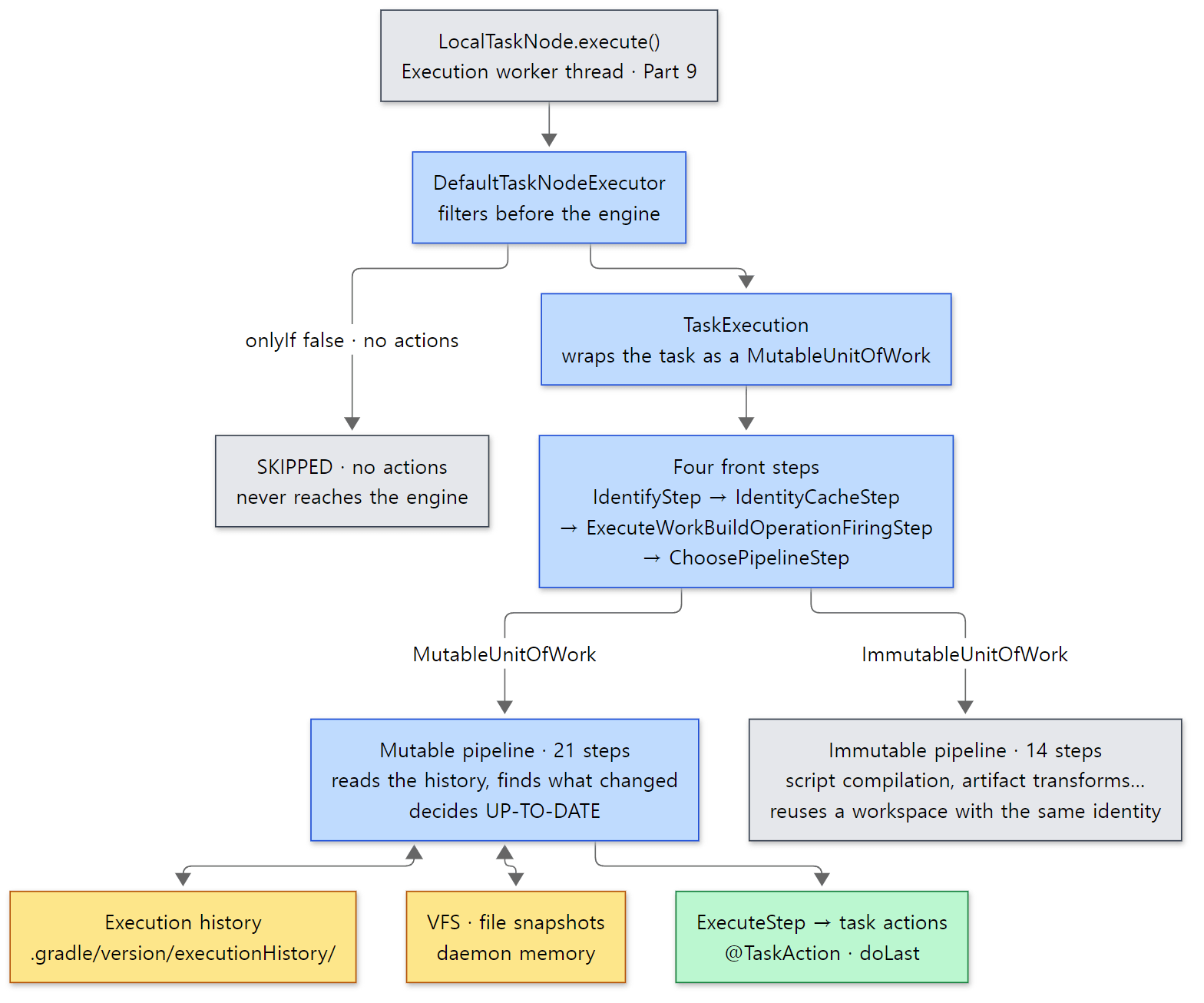 The blue boxes are the path this post follows. The yellow boxes are what stays on disk (execution history) and in daemon memory (VFS).
- Filtering —
DefaultTaskNodeExecutorfirst filters out tasks that don't need to go to the engine: disabled tasks, tasks whoseonlyIfis false, and tasks with no actions at all (section 2). - Wrapping — the remaining task is wrapped in a unit of work called
TaskExecution. The engine only sees this unit of work (section 3). - Step chain — the engine is a chain of twenty-five nested steps. Every unit of work goes through the first four; at
ChoosePipelineStepit branches into one of two pipelines depending on its kind. Tasks go to the mutable pipeline (21 steps). That is whereUP-TO-DATEis decided (sections 4 and 5).
As far as UP-TO-DATE goes, it all comes down to one sentence: compare the summary of inputs and outputs from the last successful run (the execution history) with the current summary, and if nothing differs, don't call the actions. Everything else is machinery to make that comparison fast, correct and explainable.
Example 1: running one task seven times
I made one task to use throughout the post. It has two inputs (a string @Input and a file @InputFile) and one output (@OutputFile).
// Example written for this post (not part of Gradle's source)
// A task with two inputs (@Input string, @InputFile file) and one output (@OutputFile)
abstract class Render : DefaultTask() {
    @get:Input
    abstract val greeting: Property<String>

    @get:InputFile
    abstract val template: RegularFileProperty

    @get:OutputFile
    abstract val outputFile: RegularFileProperty

    @TaskAction
    fun render() {
        val text = template.get().asFile.readText().replace("{greeting}", greeting.get())
        outputFile.get().asFile.writeText(text)
        println("render: wrote ${outputFile.get().asFile.name}")
    }
}

tasks.register<Render>("render") {
    greeting = providers.gradleProperty("greeting").orElse("Hello")
    template = layout.projectDirectory.file("src/template.txt")
    outputFile = layout.buildDirectory.file("out/greeting.txt")
}
[Shortened from the example ex/u10-up-to-date/project/build.gradle.kts]
I ran this example in a Docker container (Eclipse Temurin JDK 25) with Gradle 9.10.0 development build, built directly from the reference commit (07ecbf9ead). run.sh runs gradle render --info seven times with the same daemon, touching one input or output between runs. The --info output is long, so grep keeps only the lines this post needs. Here are the first two runs.
=== 1st run (no history) ===
Caching disabled for Kotlin DSL script compilation (Settings/TopLevel/stage1) because:
  Build cache is disabled
...
> Task :render
Caching disabled for task ':render' because:
  Build cache is disabled
  Caching has not been enabled for the task
Task ':render' is not up-to-date because:
  No history is available.
render: wrote greeting.txt
BUILD SUCCESSFUL in 40s
1 actionable task: 1 executed
=== 2nd run (nothing changed) ===
Included projects: [root project 'up-to-date']
Evaluating root project 'up-to-date' using build file '/tmp/p/build.gradle.kts'.
> Task :render UP-TO-DATE
Caching disabled for task ':render' because:
  Build cache is disabled
  Caching has not been enabled for the task
Skipping task ':render' as it is up-to-date.
BUILD SUCCESSFUL in 2s
1 actionable task: 1 up-to-date
(In the first run, the ... stands for the Included projects and Evaluating lines plus ten Caching disabled lines of the same shape about Kotlin DSL script compilation and accessor generation. Times differ from run to run. The first run is slow because it starts a new daemon and compiles the scripts for the first time.)
There are already three things to read here.
- The reason for the first run is
No history is available.: there is no previous record to compare with, so it runs. The second run saysSkipping task ':render' as it is up-to-date.These two lines are written byResolveChangesStepandSkipUpToDateStepin section 5. - The
Caching disabled for task ':render'lines are printed before theUP-TO-DATEdecision. That's because the step that computes the cache key (ResolveMutableCachingStateStep) comes before the step that decides whether to skip (SkipUpToDateStep). It matches the order in section 4. - In the first run,
Kotlin DSL script compilationalso getsCaching disabledlines. This means build script compilation goes through the same execution engine — but through a different pipeline than tasks (the immutable pipeline). We'll see that in section 3.
The other five runs come up in sections 5 and 6, together with their reason lines.
2. The filter in front of the engine — DefaultTaskNodeExecutor
The method names are the order
DefaultTaskNodeExecutor.execute() wraps one task in a build operation named Task :render (the mechanism we saw in Part 5) and, inside it, calls a series of methods starting with executeWithLifecycle(). Each method checks one thing and calls the next, so just reading the names in order shows the sequence.
executeWithLifecycle → executeWithFallbackOperationId → executeCatchingFailures → executeSkippingOnlyIf → executeSkippingWithNoActions → executeFinalizingProperties → executeTrackingTaskIdentity → doExecute
The first three call listeners, attach logs to the current build operation, and turn exceptions into task failures. The next two decide about skipping.
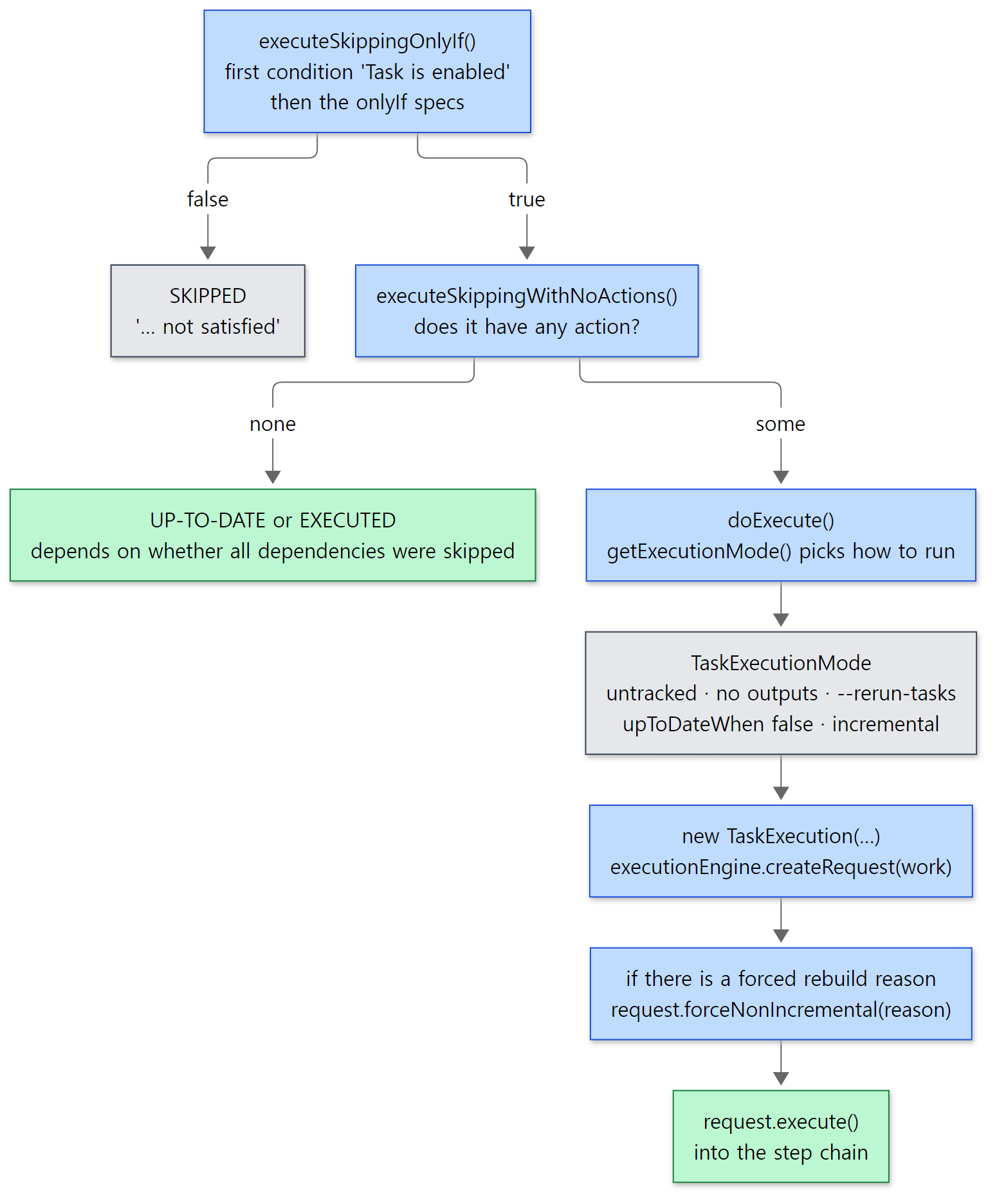 Green boxes are "endings that aren't failures". The two endings on the left never even enter the execution engine.
onlyIf and enabled are filtered in the same place
    private ExecutionEngine.@Nullable Result executeSkippingOnlyIf(LocalTaskNode node) {
        TaskInternal task = node.getTask();
        TaskStateInternal state = task.getState();
        Spec<? super TaskInternal> unsatisfiedSpec = null;
        try {
            Spec<? super TaskInternal> onlyIf = task.getOnlyIf();
            // ...
        if (unsatisfiedSpec != null) {
            if (unsatisfiedSpec instanceof SelfDescribingSpec) {
                SelfDescribingSpec<? super TaskInternal> selfDescribingSpec = Cast.uncheckedCast(unsatisfiedSpec);
                LOGGER.info("Skipping {} as task onlyIf '{}' is false.", task, selfDescribingSpec.getDisplayName());
                state.setSkipReasonMessage("'" + selfDescribingSpec.getDisplayName() + "' not satisfied");
            } else {
                // ...
            }
            state.setOutcome(TaskExecutionOutcome.SKIPPED);
            return null;
        }

        return executeSkippingWithNoActions(node);
    }
It looks for the first unsatisfied condition in the bundle returned by task.getOnlyIf() (the elided part, lines 246–253). If there is one, it sets the state to SKIPPED and returns null. The engine is never called.
Yet there is no separate code in this class that checks enabled = false. The answer is in AbstractTask. Whenever it creates a new condition bundle, it puts "is the task enabled?" in as the first condition.
    private DescribingAndSpec<Task> createNewOnlyIfSpec() {
        return new DescribingAndSpec<>(new Spec<Task>() {
            @Override
            public boolean isSatisfiedBy(Task element) {
                return element == AbstractTask.this && enabled;
            }
        }, "Task is enabled");
    }
subprojects/core/src/main/java/org/gradle/api/internal/AbstractTask.java lines 402–409
An onlyIf { … } in a build script adds a condition to this bundle with and (lines 343–370). Even if you replace the conditions with setOnlyIf(…), the new bundle starts from createNewOnlyIfSpec(), so "is the task enabled?" never disappears (lines 373–400). That's why the --info line for a disabled task reads onlyIf 'Task is enabled' is false. We'll check it in the example.
Tasks without actions
    private ExecutionEngine.@Nullable Result executeSkippingWithNoActions(LocalTaskNode node) {
        TaskInternal task = node.getTask();
        if (!task.hasTaskActions()) {
            LOGGER.info("Skipping {} as it has no actions.", task);
            TaskStateInternal state = task.getState();
            state.setActionable(false);
            state.setOutcome(allDependencyTasksSkipped(node)
                ? TaskExecutionOutcome.UP_TO_DATE
                : TaskExecutionOutcome.EXECUTED);
            return null;
        }
        return executeFinalizingProperties(node);
    }
Lifecycle tasks such as build and assemble usually have no actions, only dependencies. Such a task never enters the engine; it is marked UP-TO-DATE if all of its dependencies were skipped, and EXECUTED if any of them ran. That is why you see > Task :build UP-TO-DATE when everything is up to date. This UP-TO-DATE does not come from comparing against the execution history. setActionable(false) keeps the task out of the "N actionable tasks" count at the end.
Picking how to run — TaskExecutionMode
After the two filters, doExecute() decides "how to run this task" before creating the unit of work.
    public TaskExecutionMode getExecutionMode(TaskInternal task, TaskProperties properties) {
        if (task.getReasonNotToTrackState().isPresent()) {
            return DefaultTaskExecutionMode.untracked(task.getReasonNotToTrackState().get());
        }
        // Only false if no declared outputs AND no Task.upToDateWhen spec. We force to true for incremental tasks.
        AndSpec<? super TaskInternal> upToDateSpec = task.getOutputs().getUpToDateSpec();
        if (!properties.hasDeclaredOutputs() && upToDateSpec.isEmpty()) {
            // ... error for incremental tasks, otherwise noOutputs() ...
        }

        if (startParameter.isRerunTasks()) {
            return DefaultTaskExecutionMode.rerunTasksEnabled();
        }

        if (!upToDateSpec.isSatisfiedBy(task)) {
            return DefaultTaskExecutionMode.upToDateWhenFalse();
        }

        return DefaultTaskExecutionMode.incremental();
    }
There are five possible results, each with a "forced rebuild reason" and two switches (DefaultTaskExecutionMode.java lines 29–33).
| Mode | Rebuild reason (--info line) |
Keeps execution history? | Uses the cache? |
|---|---|---|---|
Disabled with doNotTrackState(…) |
Task state is not tracked. or the reason you gave |
No | No |
No outputs and no upToDateWhen declared |
Task has not declared any outputs despite executing actions. |
No | No |
--rerun-tasks |
Executed with '--rerun-tasks'. |
Yes | No |
upToDateWhen is false |
Task.upToDateWhen is false. |
Yes | No |
| Normal (incremental) | none | Yes | Yes |
doExecute() creates a TaskExecution with this mode (lines 340–357) and hands it to the engine.
        TaskStateInternal state = task.getState();
        try {
            ExecutionEngine.Request request = executionEngine.createRequest(work);
            taskExecutionMode.getRebuildReason().ifPresent(request::forceNonIncremental);
            request.withValidationContext(node.getValidationContext());
            ExecutionEngine.Result result = request.execute();
            result.getExecution().ifSuccessfulOrElse(
                success -> state.setOutcome(convertOutcome(success.getOutcome())),
                failure -> state.setOutcome(new TaskExecutionException(task, failure))
            );
            return result;
If there is a "rebuild reason", it is attached to the request with forceNonIncremental(reason); ResolveChangesStep in section 5 picks it up. The result returned by the engine (ExecutionOutcome) is turned into what the console shows in convertOutcome() (lines 376–390): UP_TO_DATE → UP-TO-DATE, FROM_CACHE → FROM-CACHE, and the engine's SHORT_CIRCUITED is the console's NO-SOURCE.
Example 1 continued: tasks that end before the engine
I added four more tasks to the same build script.
// A task with no declared outputs — it keeps no record, so it runs every time
tasks.register("noOutputs") { doLast { println("noOutputs: ran") } }

// A disabled task — enabled = false
tasks.register("disabled") { enabled = false; doLast { println("disabled: never printed") } }

// A task skipped when its onlyIf condition is false
val go = providers.gradleProperty("go")
tasks.register("conditional") {
    onlyIf("property 'go' is set") { go.isPresent }
    doLast { println("conditional: ran") }
}

// A task whose action runs but reports "I did nothing"
tasks.register("nothingToDo") {
    outputs.file(layout.buildDirectory.file("nothing.txt"))
    doLast { println("nothingToDo: action ran, but reports didWork = false"); didWork = false }
}
[Shortened from the example ex/u10-up-to-date/project/build.gradle.kts]
I ran the same command twice.
=== tasks that are skipped before the engine ===
> Task :noOutputs
Task ':noOutputs' is not up-to-date because:
  Task has not declared any outputs despite executing actions.
noOutputs: ran
> Task :disabled SKIPPED
Skipping task ':disabled' as task onlyIf 'Task is enabled' is false.
> Task :conditional SKIPPED
Skipping task ':conditional' as task onlyIf 'property 'go' is set' is false.
> Task :nothingToDo UP-TO-DATE
Task ':nothingToDo' is not up-to-date because:
  No history is available.
nothingToDo: action ran, but reports didWork = false
BUILD SUCCESSFUL in 1s
=== same tasks, second run ===
> Task :noOutputs
Task ':noOutputs' is not up-to-date because:
  Task has not declared any outputs despite executing actions.
noOutputs: ran
...
> Task :nothingToDo UP-TO-DATE
Skipping task ':nothingToDo' as it is up-to-date.
BUILD SUCCESSFUL in 2s
(In the second run, the ... stands for the same four SKIPPED lines for disabled and conditional as in the first run. Build times differ from run to run.)
disabledandconditionalwere both skipped with the same sentence shape (as task onlyIf '…' is false). The output itself shows thatenabled = falseis the firstonlyIfcondition.noOutputsran again the second time. Without declared outputs (and without anupToDateWhenspec),TaskExecutionModebecomes "keeps no history", so there is never a record to compare against. A task that declares inputs but no outputs can never beUP-TO-DATE(addingoutputs.upToDateWhen { … }takes it off this branch,DefaultTaskExecutionModeResolver.javaline 46).nothingToDoshowsUP-TO-DATEon its first run even though its action ran (theaction ranline). This is explained in "Easy to get confused" at the end of section 5.
Easy to get confused: SKIPPED and UP-TO-DATE are decided at different layers
On the console both look like "didn't run", but SKIPPED is decided by DefaultTaskNodeExecutor before entering the engine, while a real UP-TO-DATE is decided by SkipUpToDateStep inside the engine. So a SKIPPED task neither reads its inputs nor touches the execution history. Conversely, the UP-TO-DATE of a task without actions is a label attached outside the engine and has nothing to do with the execution history. The same word comes from two places.
3. Turning a task into a unit of work — TaskExecution
The questions the engine asks
What the engine asks a unit of work is all written in the interfaces. MutableUnitOfWork, which tasks implement, has getWorkspaceProvider() (workspace), getHistory() (execution history store) and getExecutionBehavior() (can it run incrementally?) (MutableUnitOfWork.java lines 29–43), and its parent UnitOfWork has questions like identify() (the work's identity), execute() (actually run it), visitImplementations() (implementation classes), visitMutableInputs()·visitImmutableInputs() (inputs) and visitOutputs() (outputs) (UnitOfWork.java lines 37–93). TaskExecution answers each question from the task.
| The engine's question | TaskExecution's answer |
Lines |
|---|---|---|
identify() — who are you? |
The task path (task::getPath, e.g. :render) |
172–175 |
visitImplementations() — what code runs? |
The task class, plus each action's implementation | 331–339 |
visitMutableInputs() — inputs? |
@Input properties and file properties such as @InputFile·@InputDirectory |
341–367 |
visitOutputs() — outputs? |
@OutputFile·@OutputDirectory properties, local state, files to destroy |
369–389 |
getHistory() — keep a record? |
The execution history store, only if the TaskExecutionMode keeps history |
319–324 |
getExecutionBehavior() — incremental? |
INCREMENTAL if any action is an incremental action (IncrementalTaskAction, an action that takes InputChanges) |
463–471 |
execute() — run! |
Calls the task actions in order | 177–206 |
The inputs and outputs come from TaskProperties, built by reading the @Input·@OutputFile annotations we saw in Part 8. The engine doesn't know about annotations. TaskExecution translates them into "named input values" and "named file collections". In --info's Input property 'template', template is that name — the property name.
Why wrap it — the other work that uses the same engine
Searching this commit with git grep for classes that implement MutableUnitOfWork·ImmutableUnitOfWork turns up several besides tasks.
| Unit of work | Kind | What |
|---|---|---|
TaskExecution |
mutable | One task |
MutableTransformExecution |
mutable | An incremental (InputChanges-taking) artifact transform on artifacts produced by a project (platforms/software/dependency-management, DefaultTransformInvocationFactory.java lines 92–96) |
ImmutableTransformExecution |
immutable | Other artifact transforms |
Subclasses of BuildScriptCompilationAndInstrumentation |
immutable | Groovy·Kotlin build script compilation (GroovyScriptClassCompiler, KotlinScriptEvaluator) |
A unit of work inside DefaultDependenciesAccessors |
immutable | Version catalog accessor generation |
Kotlin DSL accessor generation (AccessorsClassPath.kt, Stage1BlocksAccessorClassPath.kt) |
immutable | Generates accessor code such as tasks.compileJava |
The Caching disabled for Kotlin DSL script compilation and Caching disabled for Kotlin DSL accessors lines in section 1's first run are traces of the lower rows of this table passing through the engine. The engine implements fingerprinting inputs, computing cache keys and reusing results once, and tasks, transforms and script compilation all use it. That is why the engine doesn't know about tasks.
The two kinds split at ChoosePipelineStep.
    @Override
    public R execute(UnitOfWork work, C context) {
        if (work instanceof ImmutableUnitOfWork) {
            return immutablePipeline.execute(work, context);
        } else if (work instanceof MutableUnitOfWork) {
            return mutablePipeline.execute(work, context);
        } else {
            throw new AssertionError("Invalid work type: " + work.getClass().getName());
        }
    }
- A mutable unit of work is one that "can be executed multiple times in the same workspace and can reuse outputs from a previous execution" (the description on lines 25–28 of
MutableUnitOfWork.java). A task'sbuild/output folder is overwritten on every run, so it is mutable. That's why it must ask "is this the same as last time?" and needs an execution history. - An immutable unit of work is one that "will only be executed atomically and its outputs be reused indefinitely from an immutable workspace" (
ImmutableUnitOfWork.javaline 26). Its identity is built from all of its inputs, and the result goes into a folder named after that identity. If a folder with the same identity already exists, it is reused as is (AssignImmutableWorkspaceStep). When inputs change, the identity changes and it becomes a different folder, so there's no need to "compare with last time". That's why the immutable pipeline hasNeverUpToDateStepinstead ofSkipUpToDateStep.
This difference is also why a task's identity is its path (:render), which has nothing to do with its inputs. A task is "the slot called :render", and Gradle compares that slot's last record with now.
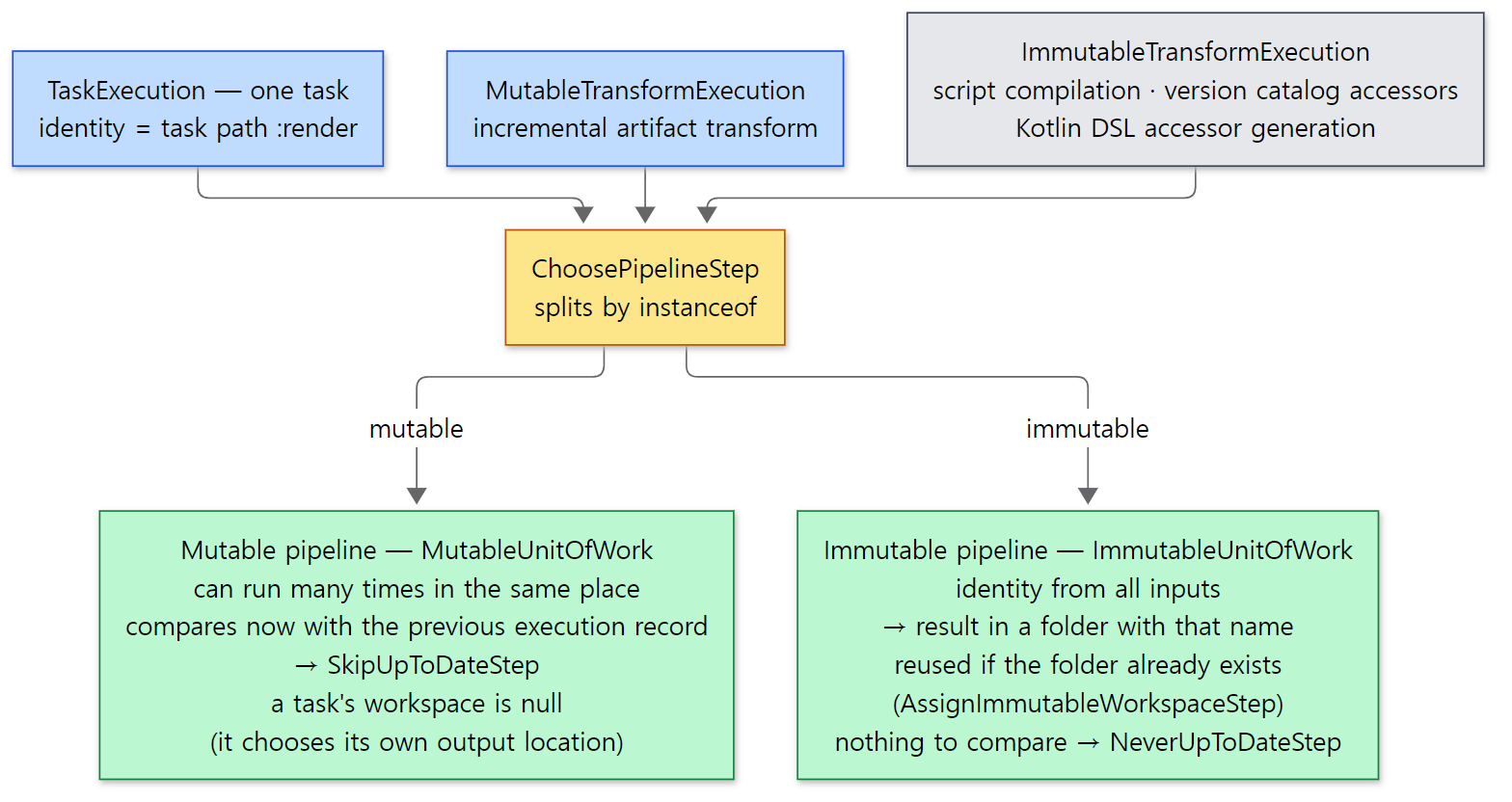 The two tables and the
ChoosePipelineStep code above in one picture. The gray box groups several units of work together.
Easy to get confused: tasks have no "workspace"
The first step of the mutable pipeline, AssignMutableWorkspaceStep, asks the unit of work for a workspace. TaskExecution answers null.
            public <T> T withWorkspace(String path, WorkspaceAction<T> action) {
                // TODO Use a better way to handle a no workspace situation for tasks
                return action.executeInWorkspace(null);
            }
Tasks decide their output locations themselves (with @OutputFile). The description of UnitOfWork.visitOutputs() also says "for tasks workspace is null for now" (UnitOfWork.java line 83). Workspaces are for work such as artifact transforms, where Gradle decides where the result goes.
4. The step chain — an onion with twenty-five layers
The chain is assembled in one go, inside constructors
The engine is built in the build-scoped service bundle subprojects/core/src/main/java/org/gradle/internal/service/scopes/ExecutionBuildServices.java (a @Provides factory method from Part 4). Here is the mutable pipeline and the engine.
        Step<IdentityContext, WorkspaceResult> mutablePipeline =
            new AssignMutableWorkspaceStep<>(
            new HandleStaleOutputsStep<>(buildOperationRunner, buildOutputCleanupRegistry,  deleter, outputChangeListener, outputFilesRepository,
            new LoadPreviousExecutionStateStep<>(
            new MarkSnapshottingInputsStartedStep<>(
            new SkipEmptyMutableWorkStep(problemHandler, outputChangeListener, workInputListeners, skipEmptyWorkOutputsCleanerSupplier,
            new CaptureMutableStateBeforeExecutionStep<>(buildOperationRunner, outputSnapshotter, overlappingOutputDetector,
            new ValidateStep.Mutable<>(problemHandler,
            new ResolveChangesStep<>(changeDetector,
            new ResolveMutableCachingStateStep<>(buildCacheController, emitBuildCacheDebugLogging,
            new MarkSnapshottingInputsFinishedStep<>(
            new SkipUpToDateStep<>(
            new StoreExecutionStateStep<>(
            new BuildCacheStep<>(buildCacheController, deleter, fileSystemAccess, outputChangeListener,
            new ResolveInputChangesStep<>(
            new CaptureOutputsAfterExecutionStep<>(buildOperationRunner, buildId, outputSnapshotter, new OverlappingOutputsFilter(),
            new BroadcastChangingOutputsStep<>(outputChangeListener,
            new RemovePreviousOutputsStep<>(deleter, outputChangeListener,
            new PreCreateOutputParentsStep<>(
            new TimeoutStep<>(timeoutHandler, currentBuildOperationRef,
            new CancelExecutionStep<>(cancellationToken,
            new ExecuteStep.Mutable(buildOperationRunner
        )))))))))))))))))))));

        return new DefaultExecutionEngine(
            new IdentifyStep<>(buildOperationRunner, classLoaderHierarchyHasher,
            new IdentityCacheStep<>(buildOperationProgressEventEmitter,
            new ExecuteWorkBuildOperationFiringStep<>(buildOperationRunner,
            new ChoosePipelineStep<>(
                immutablePipeline,
                mutablePipeline
        )))), problems);
Constructors are nested inside constructors, new A(new B(new C(…))), so that reading top to bottom gives exactly the execution order (auto-formatting is turned off with @formatter:off, line 169). The mutable pipeline has 21 steps; adding the front four, a task passes through 25 steps. The immutable pipeline (lines 171–186) has 14. In the 9.8.2 release, the same file had both pipelines and the front four with the same names in the same order.
The step interface is a single method.
public interface Step<C extends Context, R extends Result> {
    R execute(UnitOfWork work, C context);
}
DefaultExecutionEngine just holds the head of this chain (IdentifyStep) and calls it with a single line, pipeline.execute(work, createExecutionRequestContext()), in the request's execute() (DefaultExecutionEngine.java lines 66–69). The reason attached with forceNonIncremental() in section 2 goes into this ExecutionRequestContext.
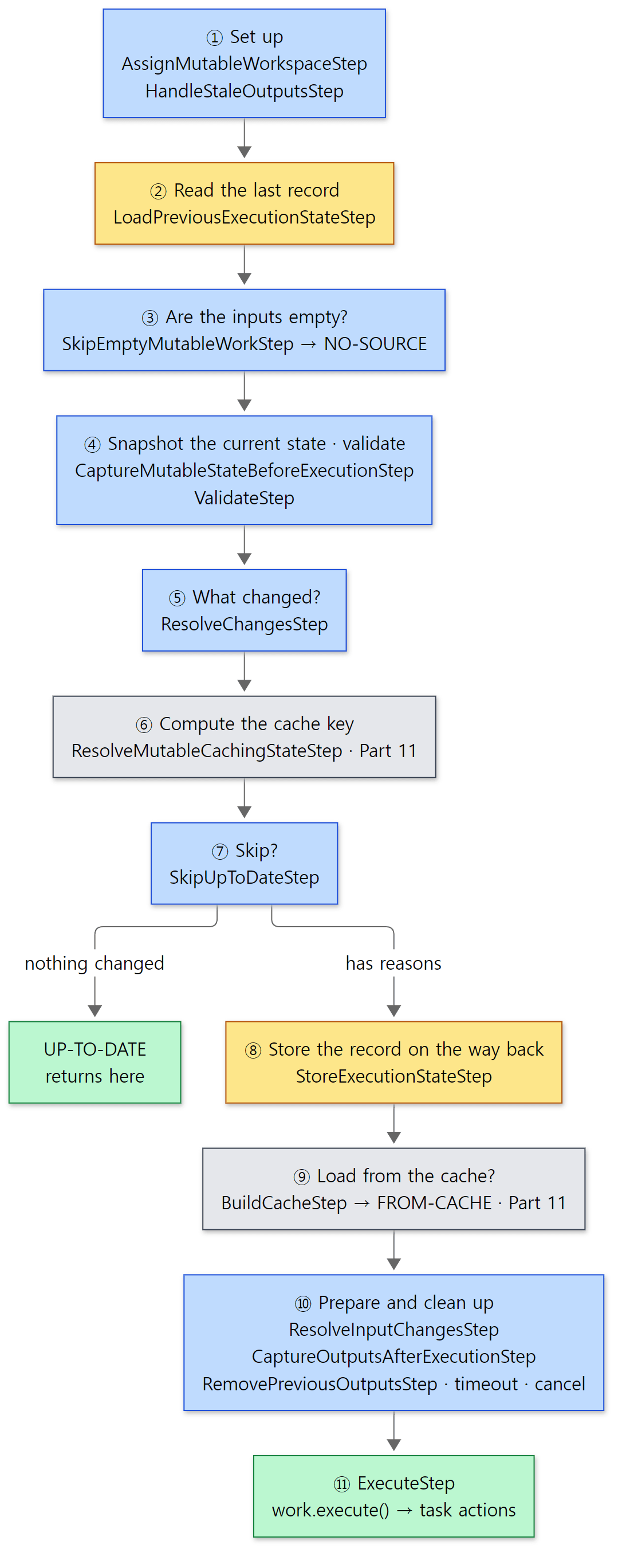 The 21 steps grouped by what they do. The two
MarkSnapshottingInputs…Steps, which start and stop a measurement for build scans, and BroadcastChangingOutputsStep·PreCreateOutputParentsStep are left out of the diagram.
As the diagram shows, the chain has two halves. Up to ⑦ is the first half that decides "does it need to run?", and from ⑧ on is the second half, after "it runs" has been decided. When the result is UP-TO-DATE, it returns at ⑦, so the second half is never called. On the other hand, storing the execution history (⑧) sits inside ⑦, so the record is written on the way back after all the inner steps finish.
Why a chain — the context gets one layer thicker at each step
The context a step passes to the next becomes a new type with one more layer of information each time.
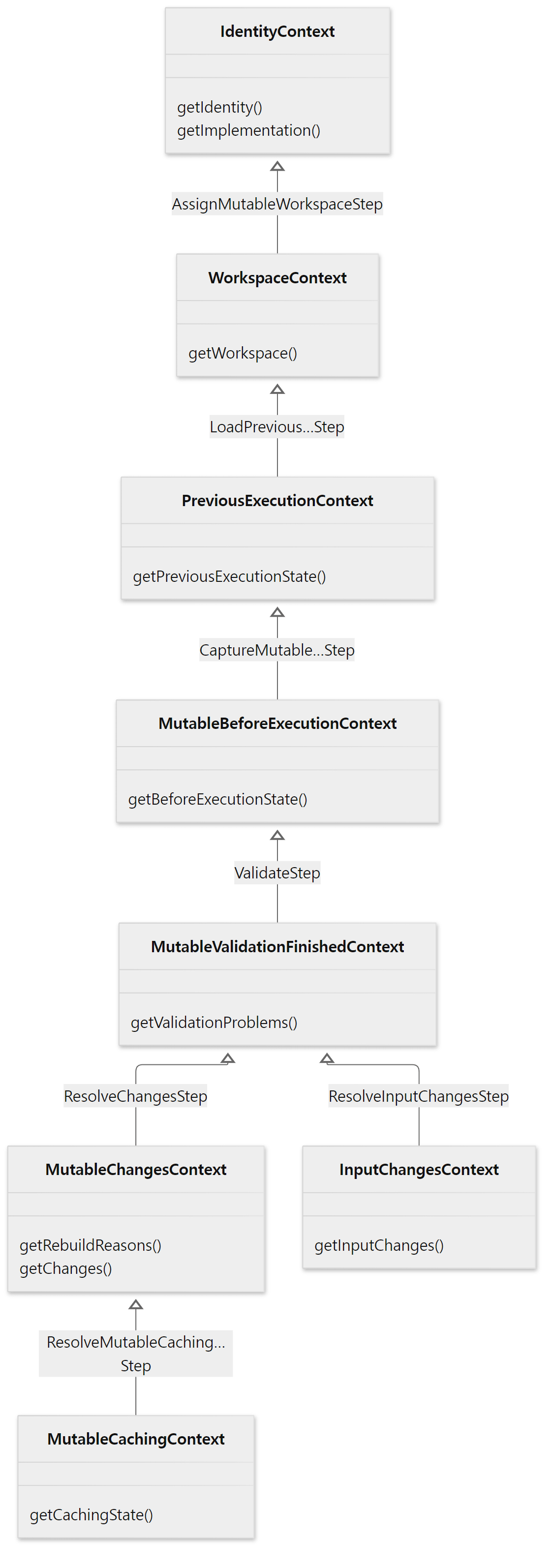 The name next to each arrow is the step that creates that context. Each context extends its parent, so it has all the information added before it.
And each step pins down the type of context it accepts with generics: LoadPreviousExecutionStateStep<C extends WorkspaceContext, …>, ResolveChangesStep<C extends MutableValidationFinishedContext, …>, SkipUpToDateStep<C extends MutableChangesContext> (the declaration line of each class). So if someone tried to put SkipUpToDateStep before ResolveChangesStep, it would be handed a context without the "what changed" information and would not compile. The order of the steps is enforced by types, not by comments or documents.
I see three benefits from splitting things this way.
- Each step knows one thing.
SkipUpToDateStepis an 89-line file that only looks at "is the reason list empty?". It doesn't know how the reasons were found. - The two pipelines share steps.
BuildCacheStep,CaptureOutputsAfterExecutionStep,TimeoutStep,CancelExecutionStepand others appear as the same classes in both the mutable and the immutable pipeline. - Work can be done on the way back. Storing the execution history (
StoreExecutionStateStep) and "removing the record if no outputs were captured" (LoadPreviousExecutionStateSteplines 38–44) happen afterdelegate.execute()returns. It's the same shape as Tomcat'sErrorReportValve, which calls the next valve first and does its work when control comes back.
These benefits are read from the structure of the source; Gradle's design documents don't state these reasons (the documents in architecture/ have no section on the execution engine's steps).
Example 2: seeing the step chain from a task action
To check that the steps are really nested in this order, I walked the call stack with StackWalker inside a task action. Consecutive frames of the same class are merged into one line, printed from the outside (the bottom of the stack) in.
// Example written for this post (not part of Gradle's source)
// ... (the Mirror task in the same file is shown in section 7) ...
abstract class WhereAmI : DefaultTask() {
    // ... one @OutputFile ...
    @TaskAction
    fun run() {
        marker.get().asFile.writeText("here\n")
        val keep = Regex(""".*(Step|DefaultTaskNodeExecutor|DefaultExecutionEngine|TaskExecution|LocalTaskNode)""")
        val frames = StackWalker.getInstance().walk { s -> s.toList() }.reversed()
        // ... merge consecutive frames of the same class and print "number class method > method" ...
    }
}
[Shortened from the example ex/u10-input-changes/project/build.gradle.kts]
> Task :whereAmI
thread: Execution worker
   1 LocalTaskNode                            execute
   2 DefaultTaskNodeExecutor                  execute > run > access > executeWithLifecycle > executeWithFallbackOperationId > executeCatchingFailures > executeSkippingOnlyIf > executeSkippingWithNoActions > executeFinalizingProperties > executeTrackingTaskIdentity > doExecute
   3 DefaultExecutionEngine                   execute
   4 IdentifyStep                             execute
   5 IdentityCacheStep                        execute
   6 ExecuteWorkBuildOperationFiringStep      execute
   7 ChoosePipelineStep                       execute
   8 AssignMutableWorkspaceStep               executeMutable
   9 TaskExecution                            withWorkspace
  10 AssignMutableWorkspaceStep               executeMutable
  11 HandleStaleOutputsStep                   executeMutable
  12 LoadPreviousExecutionStateStep           executeMutable
  13 MarkSnapshottingInputsStartedStep        execute
  14 SkipEmptyMutableWorkStep                 executeMutable > executeWithNonEmptySources
  15 CaptureMutableStateBeforeExecutionStep   execute > executeMutable
  16 ValidateStep                             execute > executeDelegate
  17 ResolveChangesStep                       executeMutable
  18 AbstractResolveCachingStateStep          execute
  19 ResolveMutableCachingStateStep           executeDelegate
  20 MarkSnapshottingInputsFinishedStep       execute
  21 SkipUpToDateStep                         execute > executeBecause
  22 StoreExecutionStateStep                  executeMutable
  23 BuildCacheStep                           execute > executeWithoutCache
  24 ResolveInputChangesStep                  executeMutable
  25 CaptureOutputsAfterExecutionStep         execute
  26 BroadcastChangingOutputsStep             execute
  27 RemovePreviousOutputsStep                executeMutable
  28 PreCreateOutputParentsStep               execute
  29 TimeoutStep                              execute > executeWithoutTimeout
  30 CancelExecutionStep                      execute
  31 ExecuteStep                              execute > call > access > executeInternal
  32 TaskExecution                            execute > executeWithPreviousOutputFiles > executeActions > executeAction > run
- The thread name on the first line differs from run to run (on a rerun it was
Execution worker Thread 8). It's one ofDefaultPlanExecutor's worker threads from Part 9. - Lines 4 to 31 follow exactly the order in lines 188–219 of
ExecutionBuildServices. The front four (4–7) and all 21 steps of the mutable pipeline are on the stack. While the action runs, every step is still unfinished, piled up underneath it. That's the onion. - Line 9,
TaskExecution.withWorkspace, is the "no workspace" callback from section 3.AssignMutableWorkspaceStepasks the unit of work for a workspace, and the unit of work calls the next step inside that callback, so it shows up in between. - Lines 18 and 19 are one step.
ResolveMutableCachingStateStepinheritsexecute()from its parentAbstractResolveCachingStateStep. Similarly, for many steps,execute()comes from the common parentMutableStep, which casts the unit of work toMutableUnitOfWorkand callsexecuteMutable(); those frames are left out of the output. - Line 21,
SkipUpToDateStep, includesexecuteBecause— it took the "run because there are reasons" branch (section 5). Line 23,BuildCacheStep, passed throughexecuteWithoutCachebecause the cache is off.
Easy to get confused: counting the steps
The example in Part 2 counted "27 distinct classes whose names end in Step" on a stack at the same place. That differs from this post's "25" because they count different things. Part 2 counted class names seen on the stack, which adds the common parents MutableStep and AbstractResolveCachingStateStep to make 27. This post counts the step objects created with new in ExecutionBuildServices (4 + 21 = 25). Both numbers are right.
5. Deciding UP-TO-DATE — read the record, snapshot now, compare, skip
Now let's go through the five steps in the chain that are directly involved in UP-TO-DATE.
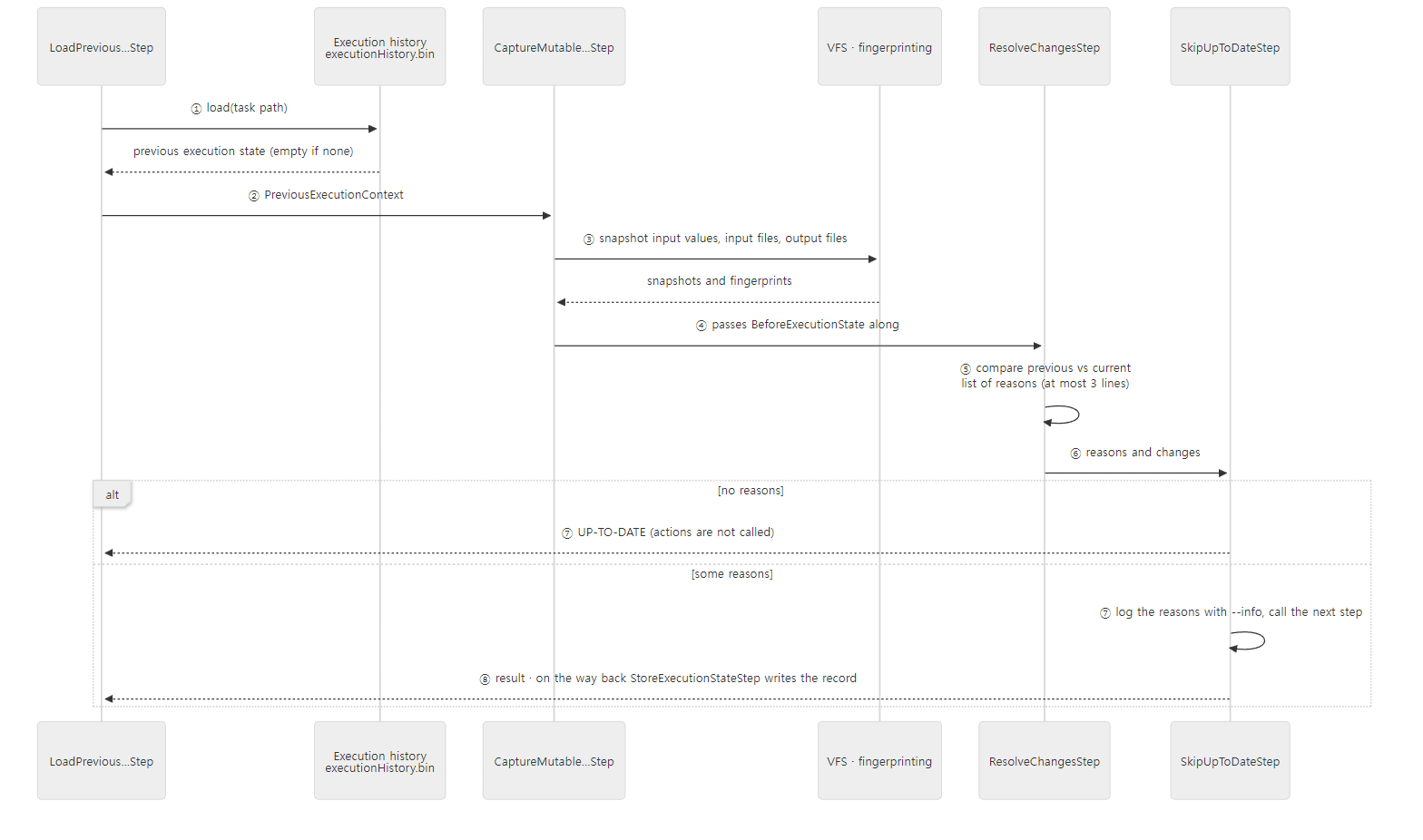 The other steps in between (empty input check, validation, cache key computation) are left out of the diagram.
① Reading the last record — LoadPreviousExecutionStateStep
    @Override
    protected R executeMutable(MutableUnitOfWork work, C context) {
        Identity identity = context.getIdentity();
        PreviousExecutionState previousExecutionState = work.getHistory()
            .flatMap(history -> history.load(identity.getUniqueId()))
            .orElse(null);
        R result = delegate.execute(work, new PreviousExecutionContext(context, previousExecutionState));

        // If we did not capture any outputs after execution, remove them from history
        work.getHistory()
            .ifPresent(history -> {
                if (!result.getAfterExecutionOutputState().isPresent()) {
                    history.remove(context.getIdentity().getUniqueId());
                }
            });
        return result;
    }
The key is the identity from section 3, i.e. the task path. If work.getHistory() is empty (no declared outputs, or doNotTrackState), it doesn't even read. Here we see once more why section 2's noOutputs runs every time.
The history store is DefaultExecutionHistoryStore, and on the disk side DefaultExecutionHistoryCacheAccess opens it as a cache named executionHistory (DefaultExecutionHistoryCacheAccess.java lines 28–34). Because ExecutionBuildServices creates it with the build-scoped cache factory (BuildScopedCacheBuilderFactory, lines 101–103), it lives not in the user home but in that build's .gradle/<version>/. Inside, an indexed cache named executionHistory is used (DefaultExecutionHistoryStore.java lines 58–61). Here is .gradle after example 1.
=== where the history lives ===
.gradle
.gradle/9.10.0-20261107025045+0000
.gradle/9.10.0-20261107025045+0000/checksums
.gradle/9.10.0-20261107025045+0000/executionHistory
...
.gradle/9.10.0-20261107025045+0000/fileHashes
...
.gradle/buildOutputCleanup
...
total 16
-rw-r--r-- 1 root root 18897 Nov  7 05:01 executionHistory.bin
-rw-r--r-- 1 root root    17 Nov  7 05:01 executionHistory.lock
(Ten folder and file lines are shortened to .... The last two lines are the contents of executionHistory/. The file times differ from run to run.)
The version folder is named 9.10.0-20261107025045+0000 because this is a development build, which appends the build time to the version number. A release would give a name like 9.10.0. Since the folder differs per version, the first build after upgrading Gradle can't find the previous records, so every task that keeps execution history runs again (it can still be loaded from the build cache if that is enabled, Part 11). fileHashes comes up in section 6.
② Snapshotting the current state — CaptureMutableStateBeforeExecutionStep
The next step snapshots the current inputs and outputs into a BeforeExecutionState. This step, too, only snapshots when work.getHistory().isPresent() (lines 71–73). It captures three things (lines 115–139).
- Implementation: class loader hashes of the task class and its actions (already computed by
IdentifyStep) - Inputs: snapshots of the
@Inputvalues (ValueSnapshot) and fingerprints of the input files —work.getInputFingerprinter().fingerprintInputProperties(…) - Outputs: file snapshots of the output locations —
outputSnapshotter.snapshotOutputs(…)
This work is wrapped in a build operation called Snapshot inputs and outputs before executing task ':render' (lines 98–100). How files are actually snapshotted is in section 6.
③ Comparing — ResolveChangesStep and DefaultExecutionStateChangeDetector
    private ExecutionStateChanges resolveExecutionStateChanges(MutableUnitOfWork work, MutableValidationFinishedContext context, BeforeExecutionState beforeExecution) {
        IncrementalInputProperties incrementalInputProperties = createIncrementalInputProperties(work);
        return context.getNonIncrementalReason()
            .map(ImmutableList::of)
            .map(nonIncrementalReason -> nonIncremental(nonIncrementalReason, beforeExecution, incrementalInputProperties))
            .orElseGet(() -> context.getPreviousExecutionState()
                .map(previousExecution -> context.getValidationProblems().isEmpty()
                    ? changeDetector.detectChanges(work, previousExecution, beforeExecution, incrementalInputProperties, context.getDetectedOverlappingOutputs().isPresent())
                    : nonIncremental(VALIDATION_FAILED, beforeExecution, incrementalInputProperties)
                )
                .orElseGet(() -> nonIncremental(NO_HISTORY, beforeExecution, incrementalInputProperties))
            );
    }
The Optional chain is hard to read, but unrolled in order it is the priority for picking the "rebuild reason".
- If there is a forced reason sent from section 2, that one (
Executed with '--rerun-tasks'.and so on) - If there is a previous record and no validation problems → a real comparison with
changeDetector.detectChanges(…) - If there is a previous record but there are validation problems →
Incremental execution has been disabled to ensure correctness. …(line 37) - If there is no previous record →
No history is available.(line 35)
If the current state wasn't snapshotted at all (a task that keeps no history), the reason from section 2 is used, or Change tracking is disabled. (line 36) if there is none (lines 56–61).
The real comparison is done by DefaultExecutionStateChangeDetector.detectChanges(). It builds a "list of changes" per item from the previous and current state, then bundles them together.
        // Collect changes that would trigger a rebuild
        ChangeContainer rebuildTriggeringChanges = errorHandling(executable, new SummarizingChangeContainer(
            previousSuccessState,
            implementationChanges,
            inputPropertyChanges,
            inputPropertyValueChanges,
            outputFilePropertyChanges,
            outputFileChanges,
            inputFilePropertyChanges,
            nonIncrementalInputFileChanges
        ));
        ImmutableList<String> rebuildReasons = collectChanges(rebuildTriggeringChanges);
The bundle's order is the order in which reasons are printed with --info. The sentence each one produces is written right in its class.
| Order | Compares | Sentence shape (source) |
|---|---|---|
| 1 | Did it succeed last time? | Task has failed previously. (PreviousSuccessChanges line 20) |
| 2 | Implementation class·classpath | The type of … has changed from '…' to '…'., Class path of … has changed from … to …. (ImplementationChanges lines 48·53) |
| 3 | Were @Input properties added or removed? |
Input property '…' has been added/removed for … (PropertyChanges lines 50·53) |
| 4 | @Input values |
Value of input property '…' has changed for … (InputValueChanges line 54) |
| 5·6 | Output properties, output files | Output property '…' file … has been removed. etc. (OutputFileChanges line 60, DefaultFileChange line 58) |
| 7·8 | Input file properties, input files | Input property '…' file … has changed. etc. |
collectChanges() collects the reasons by passing MAX_OUT_OF_DATE_MESSAGES to a MessageCollectingChangeVisitor (lines 127–131). That value is 3 (ExecutionStateChangeDetector.java line 27). Even if there are a hundred reasons, --info prints only three lines. The example in section 6 really does cut off at three.
If there is even one reason, it returns a "non-incremental" change (lines 105–110). Only when there are none does it separately collect the list of changed files for incremental inputs (lines 111–123). That list is section 7's InputChanges.
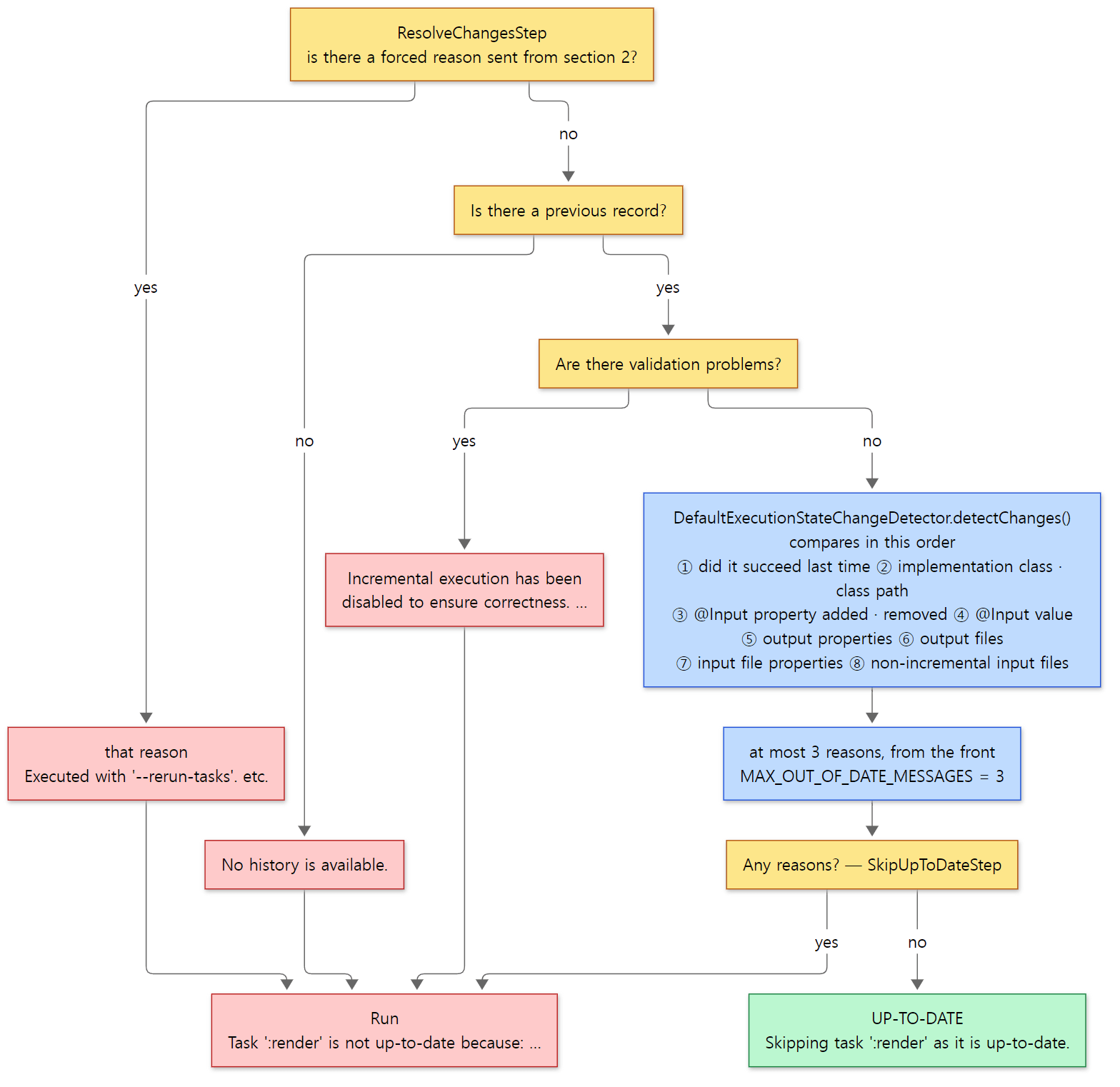 Yellow boxes ask questions; red boxes are reasons that lead to running. ①–⑧ follow the table above, which is also the order they appear in
--info.
④ Skipping — SkipUpToDateStep
    @Override
    public UpToDateResult execute(UnitOfWork work, C context) {
        if (LOGGER.isDebugEnabled()) {
            LOGGER.debug("Determining if {} is up-to-date", work.getDisplayName());
        }
        ImmutableList<String> reasons = context.getRebuildReasons();
        return context.getChanges()
            .filter(__ -> reasons.isEmpty())
            .map(changes -> skipExecution(work, context))
            .orElseGet(() -> executeBecause(work, reasons, context));
    }
The decision is one line: if changes were computed (getChanges() is present) and the reason list is empty, skip. When skipping (skipExecution()), it prints Skipping … as it is up-to-date. (line 58) and returns the previous execution's output state as the result without calling delegate (lines 61–70). Only when running (executeBecause()) does it call delegate.execute() (lines 73–77). Right before that, logExecutionReasons() prints Task ':render' is not up-to-date because: and the reasons below it (lines 79–88). Both --info sentences come from this file.
⑤ Writing the record on the way back — StoreExecutionStateStep
    @Override
    protected R executeMutable(MutableUnitOfWork work, C context) {
        R result = delegate.execute(work, context);
        work.getHistory()
            .ifPresent(history -> context.getCachingState().getCacheKeyCalculatedState()
                .flatMap(cacheKeyCalculatedState -> result.getAfterExecutionOutputState()
                    .filter(afterExecutionState -> result.getExecution().isSuccessful() || shouldPreserveFailedState(context, afterExecutionState))
                    .map(executionOutputState -> new DefaultAfterExecutionState(
                        ((BuildCacheKeyInternal) cacheKeyCalculatedState.getKey()).getHashCodeInternal(),
                        cacheKeyCalculatedState.getBeforeExecutionState(),
                        executionOutputState
                    )))
                .ifPresent(afterExecutionState -> history.store(
                    context.getIdentity().getUniqueId(),
                    // TODO: Encode the "no cache key available" case in the context type hierarchy
                    afterExecutionState)));
        return result;
    }
The first line runs everything inside first; it stores on the way back. What it stores is "the input state captured before running + the output state captured after running + the cache key". The next build's ① reads it. Two things are worth noticing.
- It only stores if a cache key was computed (line 48). The cache key is computed even if you don't use the build cache.
AbstractResolveCachingStateStep, which computes it, only addsBuild cache is disabledto the "disabled reasons" when the cache is off; it still computes the key (lines 78–89). TheCaching disabled … because: Build cache is disabledin section 1's output is that list of reasons. - Failed executions are, in principle, not stored. The exception is a failure that changed the outputs (line 50, lines 63–73; with no previous record, the outputs count as changed). The comment explains it well: if compilation fails and the outputs stay the same, not recording it lets the next build, after you fix the source, process "just the one fixed file" incrementally.
Example 1 continued: what reason appears for what change
I ran section 1's render five more times with the same daemon, touching one thing each time.
=== touch the template (timestamp only) ===
...
> Task :render UP-TO-DATE
...
Skipping task ':render' as it is up-to-date.
BUILD SUCCESSFUL in 1s
1 actionable task: 1 up-to-date
=== change the template content ===
...
> Task :render
...
Task ':render' is not up-to-date because:
  Input property 'template' file /tmp/p/src/template.txt has changed.
render: wrote greeting.txt
=== change the @Input value (-Pgreeting=Hi) ===
...
Task ':render' is not up-to-date because:
  Value of input property 'greeting' has changed for task ':render'
render: wrote greeting.txt
=== delete the output file ===
...
Task ':render' is not up-to-date because:
  Output property 'outputFile' file /tmp/p/build/out/greeting.txt has been removed.
render: wrote greeting.txt
=== --rerun-tasks ===
...
Task ':render' is not up-to-date because:
  Executed with '--rerun-tasks'.
render: wrote greeting.txt
(The Included projects, Evaluating and Caching disabled lines that repeat every time are shortened to .... In the three blocks from -Pgreeting=Hi on, the first ... also covers the > Task :render line, and from the template-content block on, the closing BUILD SUCCESSFUL in 1s and 1 actionable task: 1 executed lines are left out too. Build times differ from run to run.)
| What changed | Reason line | Produced by |
|---|---|---|
Only the timestamp, with touch |
(none — UP-TO-DATE) |
section 6 |
| Template file content | Input property 'template' file … has changed. |
input file fingerprint comparison |
-Pgreeting=Hi |
Value of input property 'greeting' has changed for task ':render' |
InputValueChanges |
| Output file deleted | Output property 'outputFile' file … has been removed. |
OutputFileChanges |
--rerun-tasks |
Executed with '--rerun-tasks'. |
section 2's TaskExecutionMode → ResolveChangesStep |
The rerun after deleting the output file matters. Gradle doesn't only look at inputs; it also checks whether the outputs it produced last time are still there unchanged. If someone edits or deletes a file under build/ by hand, it gets rebuilt.
Easy to get confused: a task can be UP-TO-DATE even if its action ran
Section 2's nothingToDo showed UP-TO-DATE on its first run although its action ran. ExecuteStep.Mutable, which decides the outcome, explains why.
        @Override
        protected ExecutionOutcome determineOutcome(InputChangesContext context, WorkOutput workOutput) {
            switch (workOutput.getDidWork()) {
                case DID_NO_WORK:
                    return UP_TO_DATE;
                case DID_WORK:
                    return context.getInputChanges()
                        .filter(InputChanges::isIncremental)
                        .map(Functions.constant(EXECUTED_INCREMENTALLY))
                        .orElse(EXECUTED_NON_INCREMENTALLY);
                default:
                    throw new AssertionError();
            }
        }
If an action reports "I did nothing" with didWork = false (it becomes DID_NO_WORK on line 220 of TaskExecution.java), the outcome is UP_TO_DATE. So the console's UP-TO-DATE comes from three places: tasks without actions (section 2), SkipUpToDateStep (this section), and actions that report they did nothing. The third does not mean "skipped because it matched the execution history". It's the label for an action that really ran but reported "I changed nothing".
6. File fingerprints and the VFS — what counts as "the same"
Why touch doesn't trigger a rerun
In the first block of section 5's example, a file whose only change was its timestamp did not count as changed. That's because what goes into the fingerprint is the file's content hash. The file snapshot the VFS holds, RegularFileSnapshot, has the absolute path, name, content hash and metadata (RegularFileSnapshot.java lines 31–39), but fingerprinting only uses the path (or part of it) and the hash. The default strategy, AbsolutePathFingerprintingStrategy, builds a new DefaultFileSystemLocationFingerprint(absolute path, type, content hash) for each file and collects them (AbsolutePathFingerprintingStrategy.java lines 51–67). The timestamp is not part of it.
That doesn't mean it reads every file and hashes it every time. CachingFileHasher, which produces the hashes, reuses the stored hash if the size and timestamp are the same as last time.
    private FileInfo snapshot(File file, long length, long timestamp) {
        String absolutePath = file.getAbsolutePath();
        if (timestampInspector.timestampCanBeUsedToDetectFileChange(absolutePath, timestamp)) {
            FileInfo info = cache.getIfPresent(absolutePath);

            if (info != null && length == info.length && timestamp == info.timestamp) {
                return info;
            }
        }

        HashCode hash = delegate.hash(file);
        // ... store the new hash together with size and timestamp, and return it ...
    }
This cache is named "fileHashes"; hashes of project files go to the one created in the build session scope (VirtualFileSystemServices.java line 341), which lives in the build tree's cache folder. That's the .gradle/<version>/fileHashes folder from section 5. (Files in global cache locations managed by Gradle, such as ~/.gradle/caches/, are handled by a cache of the same name in the user home scope, line 174; SplitFileHasher picks between the two, line 342.) In short, the timestamp is only used to decide "should I hash again?", while "did it change?" is decided by the hash. After touch, the timestamp differs so the file is hashed again, but the content is the same, so the hash is the same, and the task is UP-TO-DATE.
@PathSensitive — how much of the path to look at
The default strategy above put the absolute path into the fingerprint. That's the default: a normalizer that was null because there was no annotation gets filled in with ABSOLUTE_PATH here.
    public static FileNormalizer normalizerOrDefault(@Nullable FileNormalizer fileNormalizer) {
        // If this default is ever changed, ensure the documentation on PathSensitive is updated as well as this guide:
        // https://docs.gradle.org/current/userguide/build_cache_concepts.html#relocatability
        return fileNormalizer == null
            ? InputNormalizer.ABSOLUTE_PATH
            : fileNormalizer;
    }
With @PathSensitive, its value becomes the normalizer: NONE → IGNORE_PATH, NAME_ONLY → NAME_ONLY, RELATIVE → RELATIVE_PATH, ABSOLUTE → ABSOLUTE_PATH (InputNormalizer.java lines 42–55).
RelativePathFingerprintingStrategy, which corresponds to RELATIVE_PATH, uses the relative path within the input directory as the fingerprint's path. As its comment says, "file names for root directories are ignored; for root files, the file name is used" (RelativePathFingerprintingStrategy.java lines 36–40, lines 64–73).
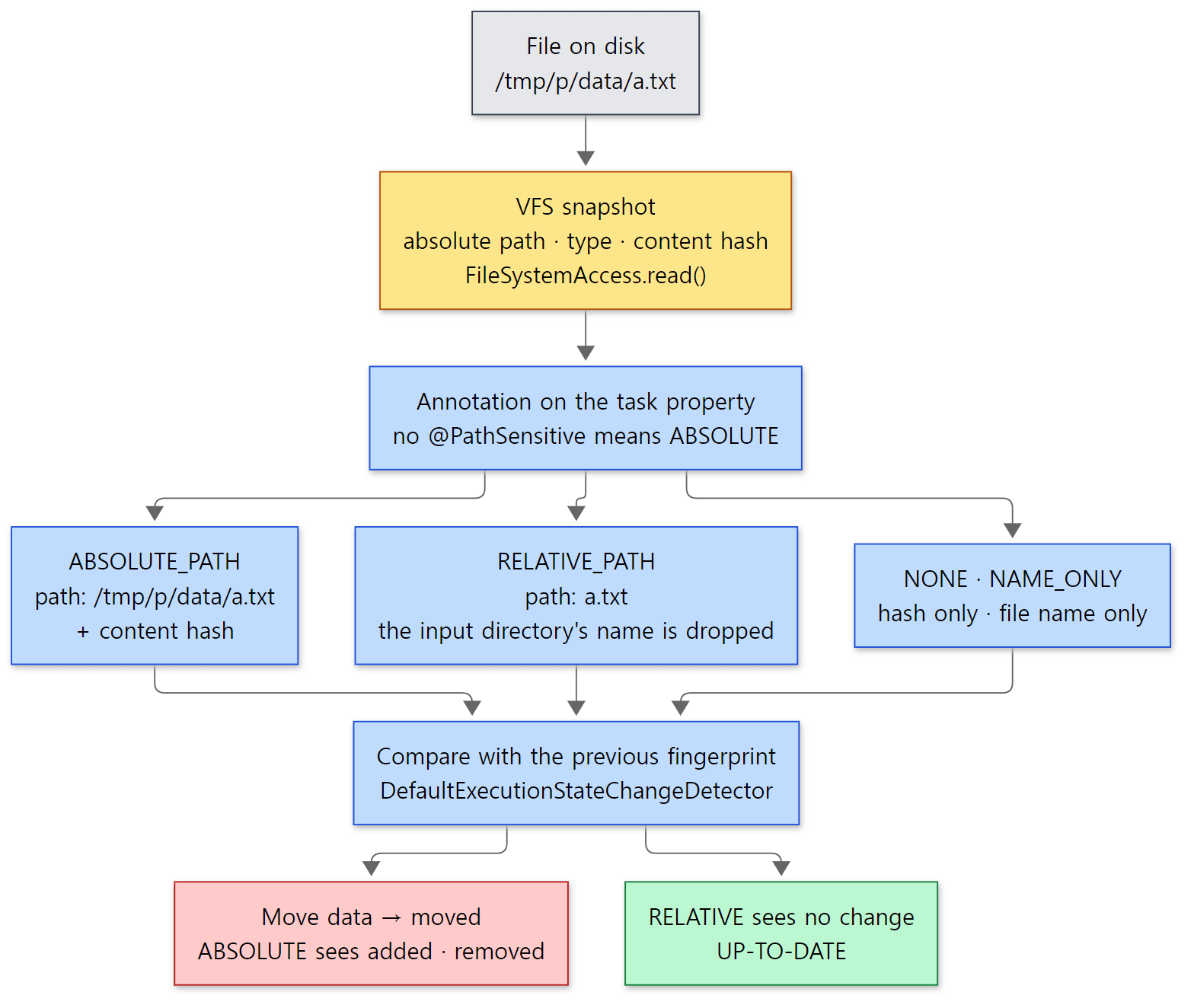 The red and green boxes are the results of example 3 below.
Example 3: moving the input directory
I made two tasks that read the same input directory, one without @PathSensitive and one with @PathSensitive(RELATIVE).
// Example written for this post (not part of Gradle's source)
// ... the parent class CountFiles is left out ...

// No @PathSensitive → default ABSOLUTE (the absolute path goes into the fingerprint)
abstract class CountAbsolute : CountFiles() {
    @get:InputDirectory
    abstract val inputDir: DirectoryProperty
}

// @PathSensitive(RELATIVE) → only the relative path inside the input directory goes into the fingerprint
abstract class CountRelative : CountFiles() {
    @get:InputDirectory
    @get:PathSensitive(PathSensitivity.RELATIVE)
    abstract val inputDir: DirectoryProperty
}

val dirName = providers.gradleProperty("dir").orElse("data")
// ... register countAbs and countRel with inputDir = layout.projectDirectory.dir(dirName) ...
[Shortened from the example ex/u10-path-sensitivity/project/build.gradle.kts — the parent CountFiles counts the files and writes the count to an @OutputFile]
data/ contains a.txt and sub/b.txt. I first ran with -Pdir=data, then copied data/ as is to moved/ and ran with -Pdir=moved.
=== 1st run with -Pdir=data ===
> Task :countAbs
Task ':countAbs' is not up-to-date because:
  No history is available.
countAbs: counted 2 files in data
> Task :countRel
Task ':countRel' is not up-to-date because:
  No history is available.
countRel: counted 2 files in data
BUILD SUCCESSFUL in 26s
=== copy data/ to moved/ and run with -Pdir=moved ===
> Task :countAbs
Task ':countAbs' is not up-to-date because:
  Input property 'inputDir' file /tmp/p/moved/a.txt has been added.
  Input property 'inputDir' file /tmp/p/moved/sub/b.txt has been added.
  Input property 'inputDir' file /tmp/p/data/a.txt has been removed.
countAbs: counted 2 files in moved
> Task :countRel UP-TO-DATE
Skipping task ':countRel' as it is up-to-date.
BUILD SUCCESSFUL in 4s
countAbsran again. Since absolute paths go into the fingerprint,moved/…are "added files" anddata/…are "removed files" — even though no content changed at all.- The reasons stop at three lines. The removed
data/sub/b.txtis also a change, but it isn't printed. That'sMAX_OUT_OF_DATE_MESSAGES = 3from section 5. countRelisUP-TO-DATE. The relative paths (a.txt,sub/b.txt) and contents are the same, so the fingerprint is the same.
(Build times differ from run to run.)
@PathSensitive(RELATIVE) matters because of the build cache in Part 11. The cache key is built from these fingerprints too, so if absolute paths go in, the same project checked out in a different folder (another developer's machine, CI) can't share the cache. Within this post, I only confirmed that "even on the same machine, moving the folder makes it run again".
The VFS — never reading the same file twice
DefaultFileCollectionSnapshotter, which snapshots input files, just calls fileSystemAccess.read(…) for each root of a file collection (DefaultFileCollectionSnapshotter.java lines 60–81). The real work is done by DefaultFileSystemAccess.
    private <T> T readSnapshotFromLocation(
        String location,
        Function<FileSystemLocationSnapshot, T> snapshotProcessor,
        Supplier<T> readFromDisk
    ) {
        return virtualFileSystem.findSnapshot(location)
            .map(snapshotProcessor)
            // Avoid snapshotting the same location concurrently
            // This is only a performance optimization for a common scenario; the VFS handles its own concurrency
            .orElseGet(() -> producingSnapshots.guardByKey(location,
                () -> virtualFileSystem.findSnapshot(location)
                    .map(snapshotProcessor)
                    .orElseGet(readFromDisk)
            ));
    }
If the VFS already has a snapshot for that location, it uses it without touching the disk. Only when there isn't one does it read the disk, create a snapshot and put it into the VFS. It also takes a per-location lock (guardByKey) so that several threads don't snapshot the same location at once. Since one task's output is often the next task's input, this alone reduces how many times a single build scans the same directory.
Conversely, when a task writes files, the snapshot for that location becomes wrong. So write() removes the location from the VFS with invalidate() before writing (DefaultFileSystemAccess.java lines 208–218).
File system watching — between builds
What about after the build ends? The user might edit files in their editor before the next build, so strictly the VFS should be thrown away. With file system watching on, it isn't. Gradle receives the operating system's file change notifications, removes only the locations that changed, and carries the rest over to the next build. The implementation is afterBuildStarted() (from line 115) and beforeBuildFinished() (from line 220) in platforms/core-execution/file-watching/src/main/java/org/gradle/internal/watch/vfs/impl/WatchingVirtualFileSystem.java. When watching is off, the VFS is emptied at the end of the build (currentRoot.empty(), line 293). The default is WatchMode.DEFAULT, i.e. "enabled if available" (StartParameterInternal.java line 39, WatchMode.java line 29).
With -Dorg.gradle.vfs.verbose=true you can see this in the log (StartParameterBuildOptions.java line 447). I ran the same build script as example 1 three times with --watch-fs (ex/u10-vfs).
=== 1st run (--watch-fs) ===
> Task :render
BUILD SUCCESSFUL in 31s
Received 3 file system events during the current build while watching 1 locations
Virtual file system retains information about 70 files, 16 directories and 3 missing files until next build
=== 2nd run (--watch-fs, same daemon) ===
Received 1 file system events since last build while watching 1 locations
Virtual file system retained information about 70 files, 16 directories and 3 missing files since last build
> Task :render UP-TO-DATE
BUILD SUCCESSFUL in 1s
Received 0 file system events during the current build while watching 1 locations
Virtual file system retains information about 71 files, 17 directories and 3 missing files until next build
=== change the template between builds ===
Received 2 file system events since last build while watching 1 locations
Virtual file system retained information about 70 files, 17 directories and 3 missing files since last build
> Task :render
BUILD SUCCESSFUL in 1s
Received 0 file system events during the current build while watching 1 locations
Virtual file system retains information about 71 files, 17 directories and 3 missing files until next build
- At the end of the first build it says it "retains information about 70 files, 16 directories and 3 missing files until the next build". That's the VFS left in daemon memory.
- At its start, the second build reports "events received since the last build" and "information retained", and
renderisUP-TO-DATE. It presumably compared using the VFS snapshots instead of snapshotting the input files from disk again (this isn't directly visible in the log; I'm describing it from the flow of the source). - In the third build, after editing the template between builds, it received events and the number of retained files dropped by one. The snapshot for the edited file was removed. That's why
renderran again.
The second build received one event even though nothing was edited. I didn't check what that event was about. Event and file counts, and build times, may differ from run to run. This example ran inside a Linux container; I didn't check the behavior on other operating systems.
Easy to get confused: @PathSensitive only matters for input files
Output files are not normalized. The output-side comparison (OutputFileChanges) matches the output snapshot taken after the last execution against the current one by absolute path (OutputFileChanges.java lines 35–64). And the place that reads @PathSensitive and turns it into a normalizer is AbstractInputFilePropertyAnnotationHandler, which handles input file annotations (lines 63–77). Also, SourceTask, which takes Java sources, deliberately carries @PathSensitive(PathSensitivity.ABSOLUTE) (SourceTask.java line 84). It's the default, so leaving it out would be the same, but it is spelled out.
7. Incremental tasks — only the changed files with InputChanges
So far it has been "run everything or run nothing". If a task has a thousand input files and only one changed, you can make the task process only that one: have the task action take InputChanges as a parameter. As in section 3's table, if there is such an action, getExecutionBehavior() becomes INCREMENTAL.
Incremental execution is decided by ResolveInputChangesStep in the mutable pipeline.
    @Nullable
    private static InputChangesInternal determineInputChanges(MutableUnitOfWork work, MutableChangesContext context) {
        if (work.getExecutionBehavior() == NON_INCREMENTAL) {
            return null;
        }
        ExecutionStateChanges changes = context.getChanges()
            .orElseThrow(() -> new IllegalStateException("Changes are not tracked, unable determine incremental changes."));
        InputChangesInternal inputChanges = changes.createInputChanges();
        if (!inputChanges.isIncremental()) {
            LOGGER.info("The input changes require a full rebuild for incremental {}.", work.getDisplayName());
        }
        return inputChanges;
    }
changes is what section 5's ResolveChangesStep made. As we saw in section 5, DefaultExecutionStateChangeDetector returns a non-incremental change if there is even one "rebuild reason", and the list of changed incremental input files only when there are none. Here is something easy to get confused about: changes to input files marked @Incremental are not "rebuild reasons". Among input files, only changes to non-incremental ones (nonIncrementalInputFileChanges, lines 73–76) go into the reason list (other items, such as output changes, still do). So when only incremental inputs change, those files do show up in the reason list (collectChanges(incrementalInputFileChanges), line 118), but execution goes incremental.
Example 4: a task that processes only the changed files
This task uppercases the files in src/ and puts them in build/mirror/.
// Example written for this post (not part of Gradle's source)
// An incremental task that processes only changed files with InputChanges: uppercases files in src/ into build/mirror/
abstract class Mirror : DefaultTask() {
    @get:Incremental
    @get:PathSensitive(PathSensitivity.RELATIVE)
    @get:InputDirectory
    abstract val sourceDir: DirectoryProperty

    @get:OutputDirectory
    abstract val targetDir: DirectoryProperty

    @TaskAction
    fun mirror(changes: InputChanges) {
        println("mirror: incremental = ${changes.isIncremental}")
        changes.getFileChanges(sourceDir).forEach { change ->
            if (change.fileType == FileType.DIRECTORY) return@forEach
            println("mirror:   ${change.changeType} ${change.normalizedPath}")
            val target = targetDir.file(change.normalizedPath).get().asFile
            if (change.changeType == ChangeType.REMOVED) {
                target.delete()
            } else {
                target.writeText(change.file.readText().uppercase())
            }
        }
    }
}
[Shortened from the example ex/u10-input-changes/project/build.gradle.kts]
I ran it once, then again after editing a.txt, adding c.txt and deleting b.txt, and finally once more after deleting one output file.
=== 1st run ===
> Task :mirror
Task ':mirror' is not up-to-date because:
  No history is available.
The input changes require a full rebuild for incremental task ':mirror'.
mirror: incremental = false
mirror:   ADDED a.txt
mirror:   ADDED b.txt
BUILD SUCCESSFUL in 59s
=== modify a.txt, add c.txt, remove b.txt ===
> Task :mirror
Task ':mirror' is not up-to-date because:
  Input property 'sourceDir' file /tmp/p/src/a.txt has changed.
  Input property 'sourceDir' file /tmp/p/src/b.txt has been removed.
  Input property 'sourceDir' file /tmp/p/src/c.txt has been added.
mirror: incremental = true
mirror:   MODIFIED a.txt
mirror:   REMOVED b.txt
mirror:   ADDED c.txt
BUILD SUCCESSFUL in 2s
a.txt
c.txt
=== delete an output file ===
> Task :mirror
Task ':mirror' is not up-to-date because:
  Output property 'targetDir' file /tmp/p/build/mirror/a.txt has been removed.
The input changes require a full rebuild for incremental task ':mirror'.
mirror: incremental = false
mirror:   ADDED a.txt
mirror:   ADDED c.txt
BUILD SUCCESSFUL in 2s
- The first run has no history, so it prints
The input changes require a full rebuildandincremental = false, and every file comes in asADDED. Even an incremental task processes everything on its first run. That line was printed by line 51 of the code above. - The second run lists the three changed files as reasons, yet
incremental = true, and the task received only those three (MODIFIED a.txt,REMOVED b.txt,ADDED c.txt). Onlya.txtandc.txtare left inbuild/mirror. - The third run, after deleting an output file, went back to full processing. An output change is a "rebuild reason", so it becomes a non-incremental change and
ResolveInputChangesStepbuilds anInputChangesfor full processing. The remaining input files,a.txtandc.txt, all came in asADDED.
(Build times differ from run to run.)
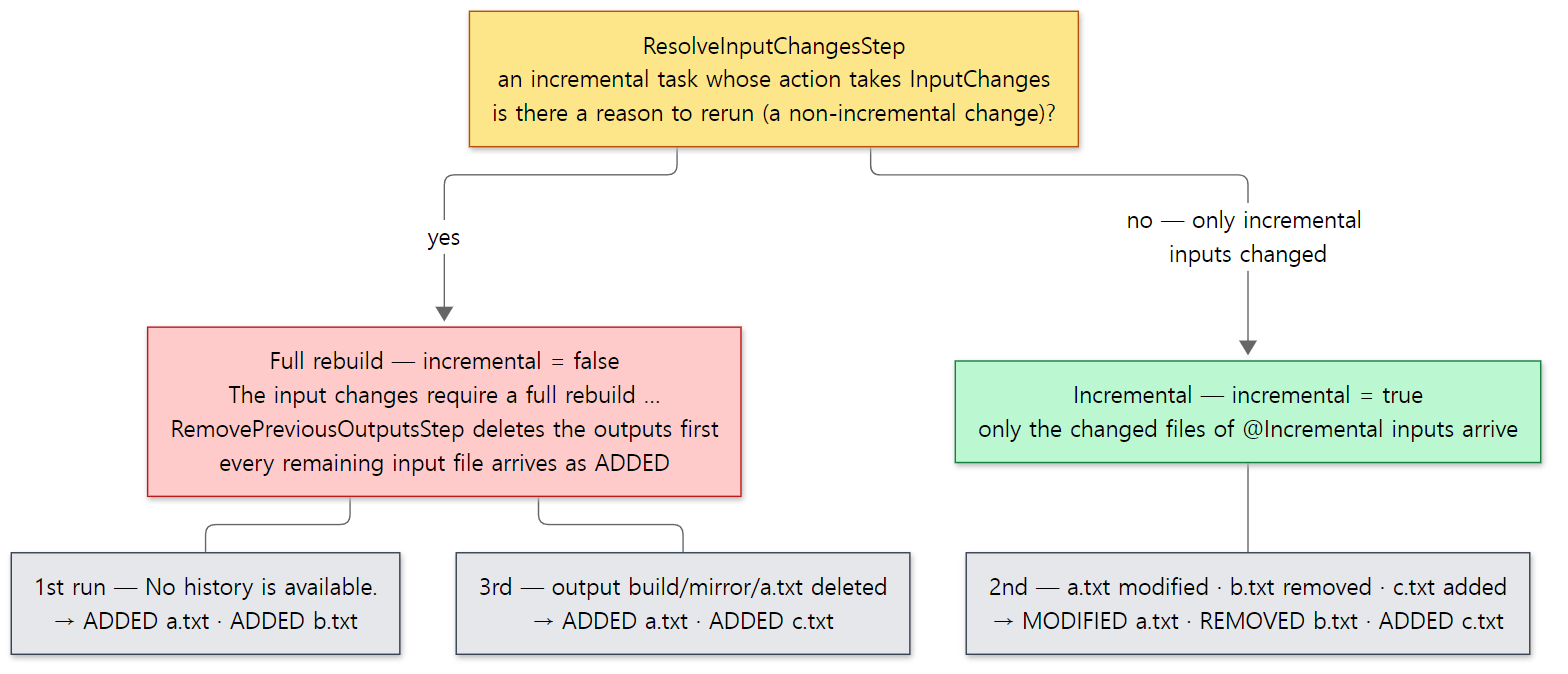 The file lists in the gray boxes are exactly the
mirror: lines in the output above.
Easy to get confused: who deletes the outputs on a full rebuild?
When falling back to full processing, if the previous outputs are still around, the task can't know about "outputs for inputs that were deleted" and may leave them behind. So RemovePreviousOutputsStep deletes the outputs beforehand on a non-incremental execution (lines 57–58) — but only for incremental tasks, because TaskExecution.shouldCleanupOutputsOnNonIncrementalExecution() returns true only when getExecutionBehavior() == INCREMENTAL (TaskExecution.java lines 429–436). As the comment explains, a task that takes InputChanges can be assumed to be prepared for full processing, but for an ordinary task Gradle can't know whether it's safe to wipe the output folder. Ordinary tasks have to clean up their output folder themselves.
What this post leaves out
- The build cache (
ResolveMutableCachingStateStep,BuildCacheStep, cache key computation): Part 11 - Removing stale outputs (outputs made by another Gradle version, or no longer produced by this build):
platforms/core-execution/execution/src/main/java/org/gradle/internal/execution/steps/HandleStaleOutputsStep.java, recorded in.gradle/buildOutputCleanup/outputFiles.bin(ExecutionBuildServices.javalines 120–129) - Detecting and handling overlapping outputs (two tasks writing to the same folder):
CaptureMutableStateBeforeExecutionStep.detectOverlappingOutputs()(lines 104–113),OverlappingOutputsFilter @SkipWhenEmpty, which skips asNO-SOURCEwhen inputs are empty:steps/SkipEmptyMutableWorkStep.java- Validation (properties missing annotations, undeclared dependencies):
steps/ValidateStep.java,TaskExecution.validate()(lines 510–519); for undeclared dependencies, theMissingTaskDependencyDetectorin Part 9 - Timeouts and cancellation:
steps/TimeoutStep.java,steps/CancelExecutionStep.java - The serialization format of the execution history:
platforms/core-execution/execution/src/main/java/org/gradle/internal/execution/history/impl/DefaultPreviousExecutionStateSerializer.java - Classpath normalization (
@Classpath,@CompileClasspath) and line ending normalization (@NormalizeLineEndings):AbstractInputFilePropertyAnnotationHandler.javalines 69–72·98–102 - The immutable pipeline and workspace reuse:
steps/AssignImmutableWorkspaceStep.java - OS-specific implementations of file system watching:
platforms/core-execution/file-watching/src/main/java/org/gradle/internal/watch/registry/impl/
Summary
| Concept | One-line summary |
|---|---|
DefaultTaskNodeExecutor |
The filter in front of the engine. SKIPPED if onlyIf (whose first condition is enabled) is false; tasks without actions end without the engine |
TaskExecutionMode |
"Forced rebuild reasons" such as no outputs, --rerun-tasks and upToDateWhen false, plus whether history and cache are used |
TaskExecution |
A task wrapped as a MutableUnitOfWork. Identity is the task path; inputs and outputs come from annotations |
| Two pipelines | Mutable (tasks etc., 21 steps, compares with the execution history) and immutable (script compilation etc., 14 steps, reuses workspaces) |
| Step chain | Assembled in ExecutionBuildServices by nesting new. The context type gets thicker at each step, so the types enforce the order |
| Execution history | The project's .gradle/<version>/executionHistory/. Keyed by task path; in principle only successful runs are stored |
ResolveChangesStep |
Picks the reason in this order: forced reason → comparison with the record → No history is available. |
| Reason lines | Collected per item by DefaultExecutionStateChangeDetector. At most 3 lines in --info |
SkipUpToDateStep |
With no reasons, returns UP-TO-DATE without calling delegate |
StoreExecutionStateStep |
On the way back, stores "inputs before running + outputs after running" |
| File fingerprint | (Normalized) path + content hash. The timestamp only decides whether to hash again |
@PathSensitive |
ABSOLUTE when absent. With RELATIVE, moving the folder still gives UP-TO-DATE |
| VFS | Keeps snapshots in daemon memory. With file watching on, it survives between builds and only changed parts are removed |
InputChanges |
When only incremental inputs change, only the changed files are passed. Any other reason means full processing |
What's next
This post skipped ⑥ cache key computation and ⑨ BuildCacheStep in the mutable pipeline. While the execution history only compares against "this slot's last run", the build cache fetches the result for the same inputs from anywhere it exists — after clean, in another folder, on another machine. And the configuration cache goes one step further back and skips the configuration phase that builds the task graph altogether. It continues in Part 11: The Build Cache and the Configuration Cache — Two Ways to Reuse Work.
Earlier series covered similar things. Steps wrapping and calling the next step look just like the valves in Tomcat Part 8. The difference is that Tomcat's valves are linked into a list at runtime as written in server.xml, whereas Gradle's steps are assembled with constructors in a single place in the code, with the context types enforcing the order; you can't insert a step through configuration. The advice chain in Spring Part 11 is a list of interceptors where each calls the next with proceed(), so building the chain at runtime puts it closer to Tomcat. The hooks in httpd Part 6 are called by the core in a loop, and the returned value decides what happens next. Gradle's SkipUpToDateStep cutting execution short by "not calling the next step" is the same approach as a Tomcat valve not calling getNext().invoke().
- Part 9: The Task Graph and the Execution Plan — What, in What Order, How Many at Once
- Part 8: Tasks and Lazy Configuration — DefaultTask, TaskContainer and Provider
- Part 4: The Service Registry — the DI Container Inside Gradle
- Part 2: The Big Picture — Client and Daemon, Service Scopes, and the Three Build Phases