What this post covers
This is the second post in "Digging into Spring's Source". Part 1 covered what Spring is, why read its source, and in what order. This post is the big map you spread out before reading any code line by line.
Clone the Spring Framework repository and you get more than twenty folders that start with spring-. The names alone do not tell you which ones are the centre and which are the outskirts. By the end of this post you will know:
- which modules Spring Framework is split into, and what each one does in a sentence
- which module leans on which, and where that relationship is written down
- what is inside
spring-core,spring-beans,spring-contextandspring-aop, the four names that keep coming back - the big picture of how the container starts and how a bean comes to life
- the three pieces that features like transactions and caching all repeat
The goal: when a later post says "this class lives in spring-beans", you can place it on the map and know what that part of the map is for.
| Item | Detail |
|---|---|
| Source | Spring Framework 7.1.0-SNAPSHOT |
| Commit | f447f3c310 (2026-10-01, main branch) |
| How it was checked | module list against settings.gradle, dependencies against each module's build file, file counts counted by hand in the checkout |
Line numbers and details can differ in other versions. Part 1 explains how to get the source at this exact commit.
Five words to know first
A module is a bundle of code that is built and published on its own. Spring Framework is not one big lump; it is a collection of modules such as spring-core and spring-beans, and each module becomes one jar file (an archive of compiled Java classes). That lets an application pull in only the modules it needs.
A package is Java's folder for grouping classes inside a module, with a name like org.springframework.beans.factory. In this post the leading org.springframework. is dropped, so that package is written beans.factory.
A dependency means "uses". If code in module A uses a class from module B, then A depends on B, drawn as A → B. Without B, A does not compile.
Bean and container. An object that Spring creates and manages for you is a bean; the thing that creates beans, wires them together and keeps them is the container. When the container hands a bean the other beans it needs, that is dependency injection (DI). Part 1 explains these in more detail.
Proxy and AOP. A proxy is a stand-in object that wraps the real object and receives calls on its behalf. Because it gets the call first, it can do something before and after the real method runs. Using that trick to apply a shared concern — "begin and end a transaction", say — to many methods at once is called AOP (aspect-oriented programming).
1. What you see when you open the repository: 22 modules
Spring Framework is built with Gradle, a build tool (a program that compiles source and packages it into jars). The settings.gradle file at the top of the repository is the list of "these are the modules in this repository".
include "spring-aop"
include "spring-aspects"
include "spring-beans"
include "spring-context"
// ...
include "spring-webmvc"
include "spring-websocket"
include "framework-api"
include "framework-bom"
include "framework-docs"
include "framework-platform"
include "integration-tests"

rootProject.name = "spring"
rootProject.children.each {project ->
	project.buildFileName = "${project.name}.gradle"
}
Three things can be read from it.
- There are 22 lines that start with
spring-. Those are Spring Framework itself, and they match the top-level folder names one to one. - The other five (
framework-api,framework-bom,framework-docs,framework-platform,integration-tests) are documentation, version lists and integration tests. You can skip them when reading how the framework works. - Because of the last three lines, a module's build file is not the usual
build.gradlebut<module name>.gradle. The build file of thespring-contextmodule, for example, isspring-context/spring-context.gradle. Section 3 opens that file.
Every module folder has the same shape. The real source is under src/main/java, as in spring-beans/src/main/java/org/springframework/beans/…, and the tests are under src/test. This series reads src/main/java.
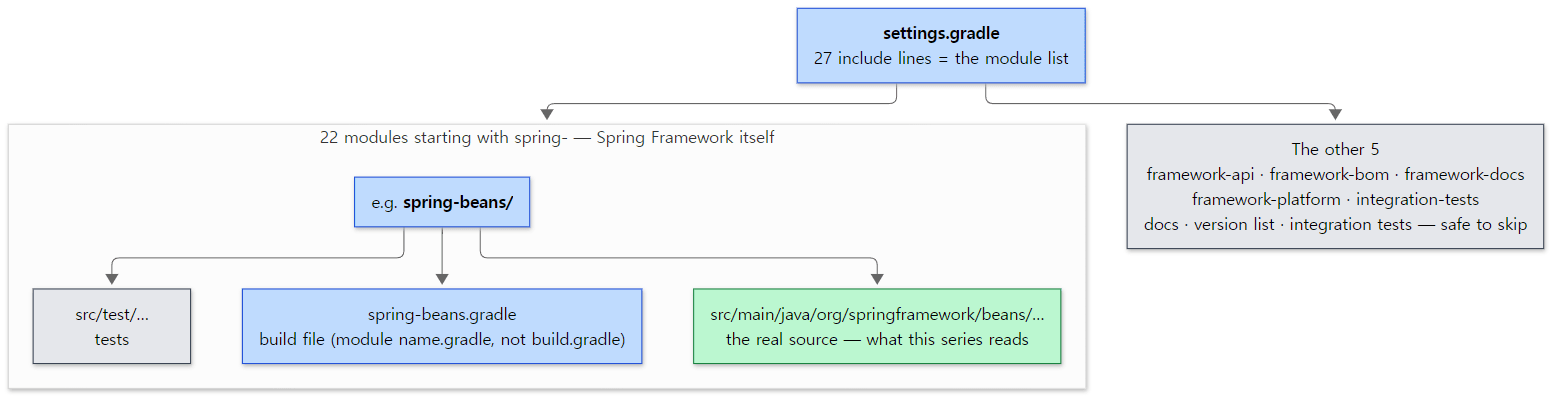 The shape of the repository, branching out from the single
settings.gradle file. The green box is what this series reads; gray boxes can be skipped.
2. Four layers on one page
There is no need to memorise 22 names at once. Start by sorting them into layers.
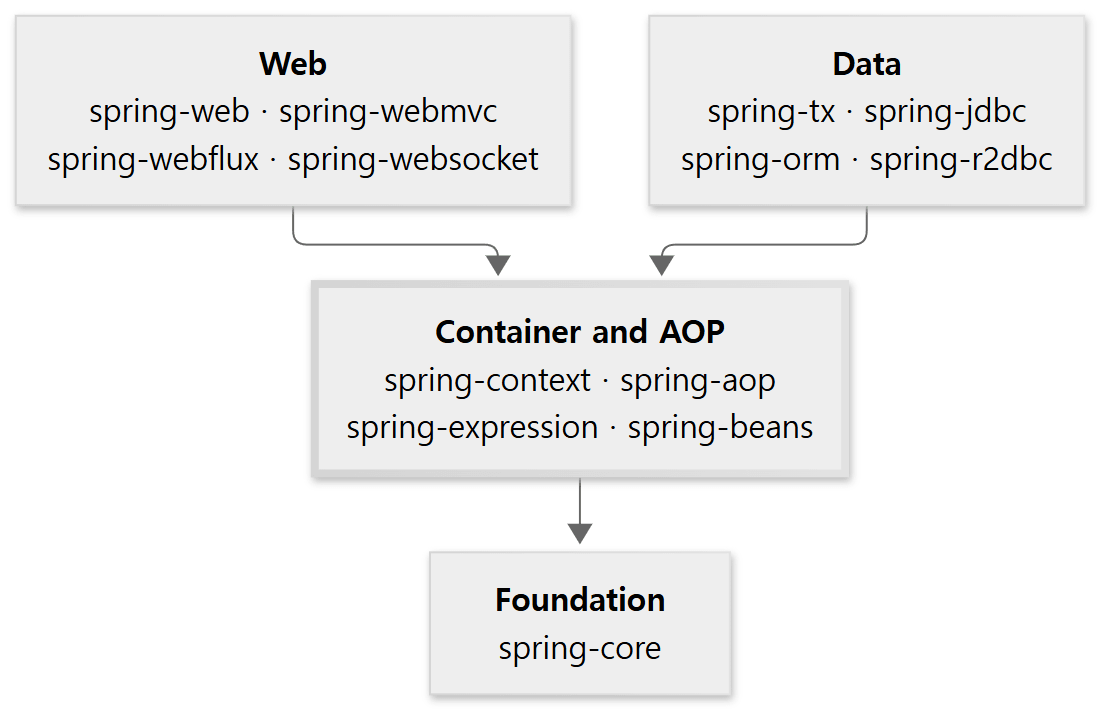 An arrow means "the upper layer uses the lower one". The middle layer with the thick border is where this series starts reading.
- Foundation — spring-core. Reading type information, handling resources such as files, configuration values, and all sorts of utilities. It depends on no other Spring module.
- Container and AOP — spring-beans, spring-aop, spring-expression, spring-context. The container that creates and wires beans, and proxies, live here. This is the heart of Spring.
- Data — spring-tx, spring-jdbc, spring-orm, spring-r2dbc. Transactions and database access.
- Web — spring-web, spring-webmvc, spring-webflux, spring-websocket. Receiving and handling HTTP requests.
What matters is the direction. An upper layer knows the layer below it; a lower layer does not know the ones above. None of the four middle-layer modules uses a single module from the data or web layers. That is why the middle layer can be read on its own, and why — once you know it — an upper layer is mostly a matter of "what did they add on top?".
3. Where the dependencies are written down
The arrows in that picture are not a guess; they are what the build files say. Let's check.
api and optional in a build file
This is the part of the spring-context build file that points at other modules.
dependencies {
	api(project(":spring-aop"))
	api(project(":spring-beans"))
	api(project(":spring-core"))
	api(project(":spring-expression"))
	// ...
	optional(project(":spring-instrument"))
	// ...
	optional("jakarta.annotation:jakarta.annotation-api")
	// ...
}
spring-context/spring-context.gradle, lines 9–19
project(":spring-aop") points at the spring-aop module in the same repository. Two different words come in front of it.
| Written as | Meaning | In this post's diagrams |
|---|---|---|
api(...) |
Required. It also travels along to whoever uses spring-context |
solid line |
optional(...) |
Used at compile time, but does not travel along to users. If it is there it is used; if not, only that feature is missing | dotted line |
optional is not a built-in Gradle word; Spring added it to its own build. It is defined in OptionalDependenciesPlugin.java, whose comment says the configuration "is part of the project's compile and runtime classpaths but does not affect the classpath of dependent projects".
The central axis: five modules
Unfolding the middle layer and the foundation into modules gives this.
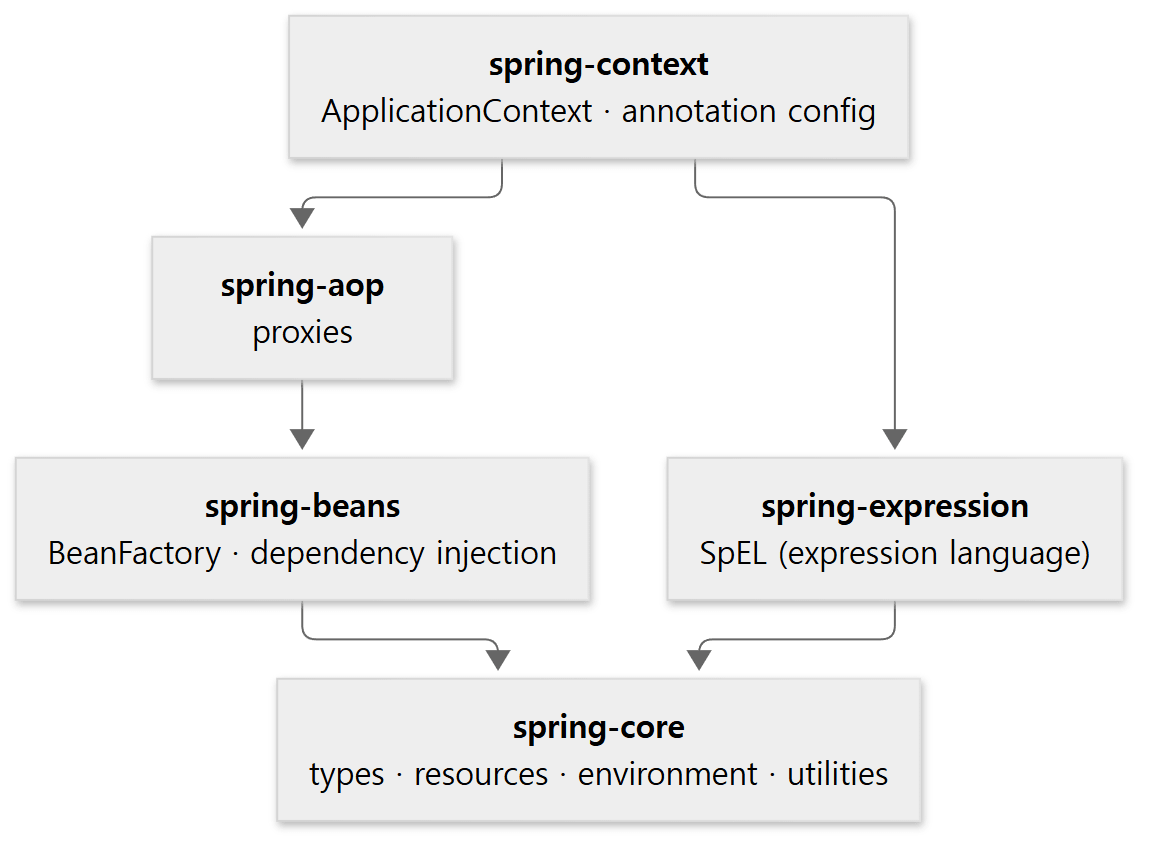
A → B means "A uses B". All of these are api dependencies; arrows you can already reach by following other arrows are left out (spring-context, for example, also declares spring-beans and spring-core directly).
Read from the bottom up and you see the order in which things stack.
- spring-core is at the bottom. Its build file has no line pointing at another module.
- spring-beans uses only spring-core. The core of the container is here.
- spring-aop sits on top of spring-beans — to make a proxy you need a bean to wrap.
- spring-expression uses only spring-core. It stands on its own, unrelated to spring-beans.
- spring-context gathers all four.
ApplicationContext, the thing people usually mean by "the Spring container", lives here.
The modules built on the axis
Drawing a few modules of the data and web layers the same way:
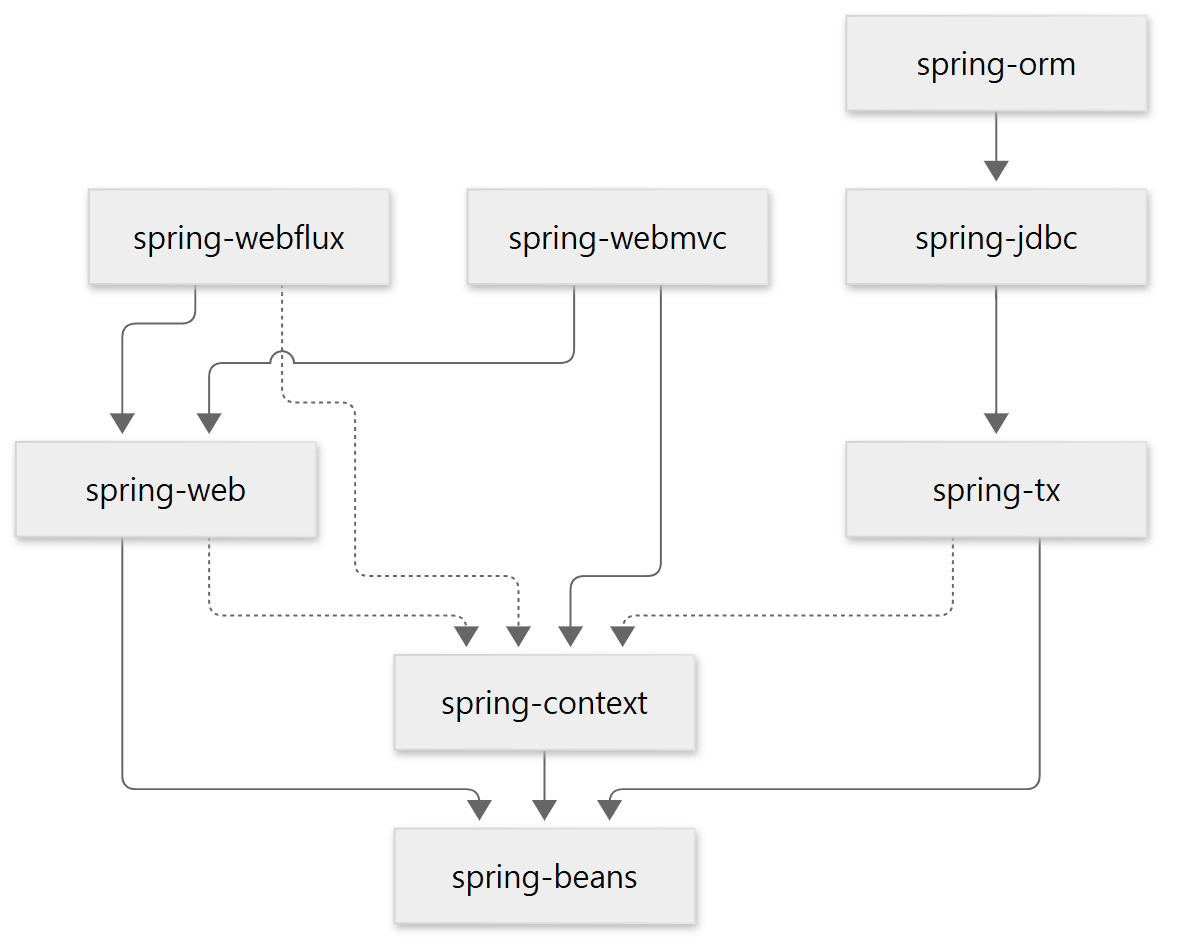 Solid lines are
api, dotted lines are optional. Every arrow drawn was confirmed in a build file; some are left out for readability (nearly every module declares spring-core directly, for instance).
- The data side stacks in a single line:
spring-orm → spring-jdbc → spring-tx → spring-beans. - On the web side
spring-webis the shared base, withspring-webmvcandspring-webfluxside by side on top of it. The shared base is read in Part 20, MVC in Part 21 and WebFlux in Part 24. spring-txandspring-webare tied tospring-beanswith a solid line, but tospring-contextonly with a dotted one.spring-webmvcpoints atspring-contextwith a solid line (api);spring-webfluxwith a dotted one (optional).
Easy to get wrong: a dotted line means "can live without it"
It is natural to assume that using transactions obviously requires spring-context. The build file says otherwise.
dependencies {
	api(project(":spring-beans"))
	api(project(":spring-core"))
	optional(project(":spring-aop"))
	optional(project(":spring-context"))  // for JCA, @EnableTransactionManagement
	// ...
}
spring-tx/spring-tx.gradle, lines 5–9
The only things spring-tx strictly requires are spring-beans and spring-core. As the comment says, spring-context is there only for JCA and @EnableTransactionManagement. Because the modules are cut small and only the truly necessary ones are tied with solid lines, an application is not forced to carry modules it does not need.
So how does the code deal with something that may or may not be there? It asks first whether the class is present. The spring-context build file above had optional("jakarta.annotation:jakarta.annotation-api"); the code that uses it looks like this.
	private static final boolean JAKARTA_ANNOTATIONS_PRESENT =
			ClassUtils.isPresent("jakarta.annotation.PostConstruct", classLoader);
spring-context/…/context/annotation/AnnotationConfigUtils.java, lines 119–120
ClassUtils.isPresent answers "can a class with this name be loaded?" with true or false. When you meet a line like this while reading the source, think "this is where an optional dependency is handled" and move on.
4. All 22 modules, one line each
Here is the full list. The file counts are the .java files under each module's src/main/java, counted directly in the checkout (including package-info.java; tests and Kotlin sources excluded).
| Module | What it does | Files |
|---|---|---|
| spring-core | Reading type and annotation information, resources (files etc.), environment (configuration values), type conversion, utilities | 738 |
| spring-beans | BeanFactory (the core of the container), BeanDefinition (a bean's blueprint), dependency injection |
338 |
| spring-aop | AOP done with proxies | 226 |
| spring-expression | SpEL, a small language that evaluates an expression written as a string at run time | 123 |
| spring-context | ApplicationContext, annotation-based configuration such as @Configuration, @Bean, @Component, events, plus extras like caching, scheduling and validation |
625 |
| spring-context-support | Bridges to external libraries (Caffeine and JCache caches, mail, Quartz, FreeMarker) | 87 |
| spring-tx | Transactions and @Transactional, data-access exceptions |
173 |
| spring-jdbc | JdbcTemplate and other tools that make JDBC easier |
253 |
| spring-orm | JPA integration (including Hibernate) | 65 |
| spring-r2dbc | Reactive database access | 65 |
| spring-web | The shared base for working with HTTP. HTTP clients such as RestClient are here too |
792 |
| spring-webmvc | The servlet-style web framework centred on DispatcherServlet (Spring MVC) |
363 |
| spring-webflux | The reactive web framework centred on DispatcherHandler, and WebClient |
276 |
| spring-websocket | WebSocket, SockJS | 170 |
| spring-messaging | The Message abstraction, STOMP messaging |
245 |
| spring-jms | JMS messaging (JmsTemplate) |
122 |
| spring-oxm | Converting between objects and XML | 28 |
| spring-test | Testing support (the TestContext framework, MockMvc and more) |
460 |
| spring-aspects | Aspects written in AspectJ. Not the same thing as the proxy-based spring-aop | 14 |
| spring-instrument | A single JVM agent class (InstrumentationSavingAgent) |
2 |
| spring-context-indexer | A tool that builds a list of components at compile time. Marked deprecated since 6.1 | 13 |
| spring-core-test | Tools used by Spring's own tests | 45 |
For "reactive", it is enough for now to read it as "handling requests asynchronously instead of holding one thread per request".
Added up, that is 5,223 files and about 840,000 lines (the line count is wc -l over the same files). The largest are spring-web (about 132,000 lines) and spring-core (about 128,000). spring-beans, the core of the container, is 338 files and about 64,000 lines — a modest share by volume, yet every other module stands on it.
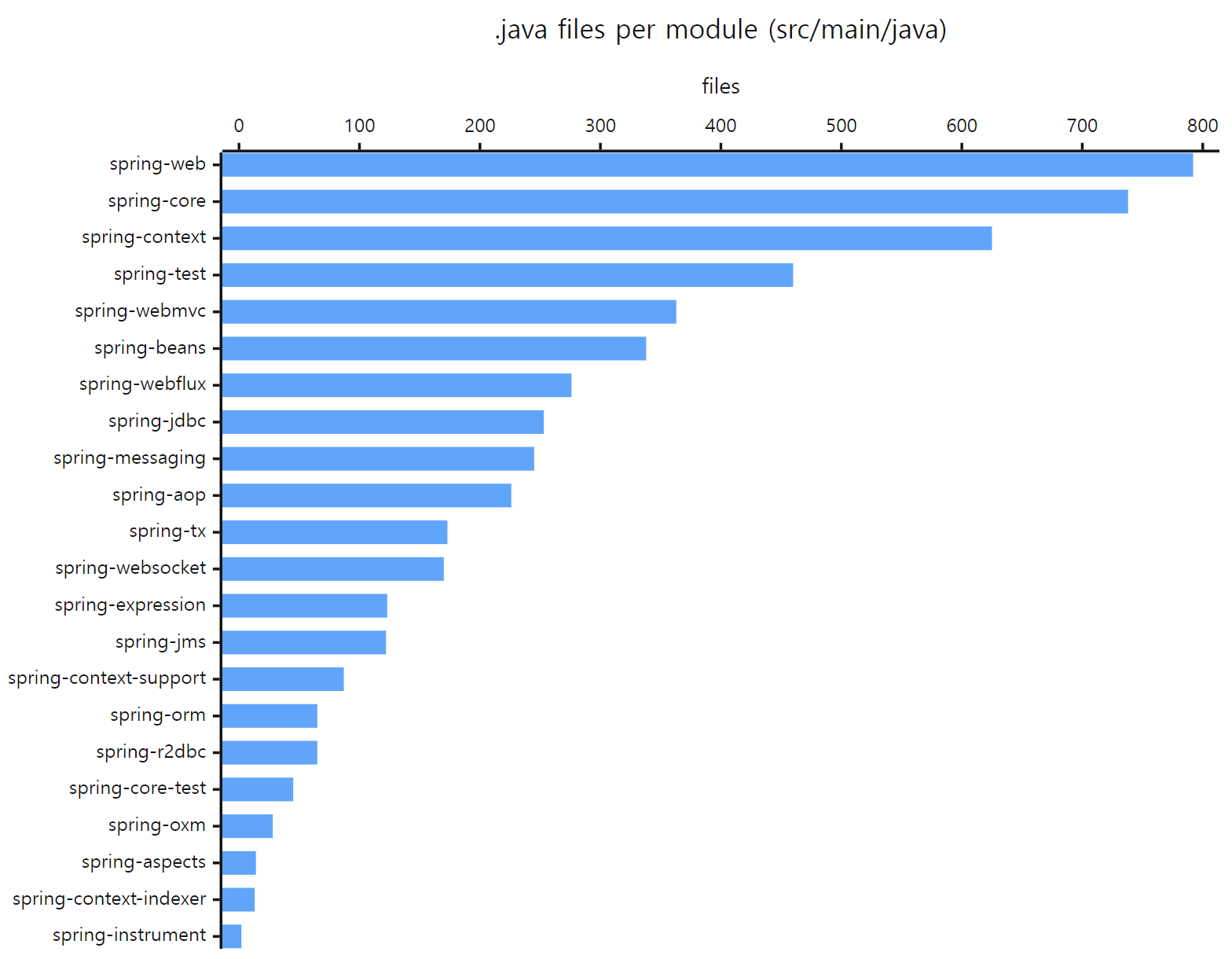 The file counts from the table above, drawn as bars. spring-beans, the core of the container, comes sixth.
5. What is inside the four key modules
Let's go one level deeper into just the four modules the next posts keep visiting. There is no need to memorise class names now. A feel for "names like this live around here" is enough.
spring-core: the toolbox everyone uses
| Package | Typical classes | What it does |
|---|---|---|
core |
ResolvableType, MethodParameter, Ordered |
Type information including generics, ordering |
core.annotation |
MergedAnnotations, AnnotationUtils, @AliasFor |
Reading annotations |
core.io |
Resource, ResourceLoader |
Reading resources the same way whether they are files or on the classpath |
core.env |
Environment, PropertySource, Profiles |
Configuration values and profiles |
core.convert |
ConversionService |
Type conversion (string → number and so on) |
util |
ClassUtils, ReflectionUtils, StringUtils, Assert |
Utilities (Part 16) |
asm, cglib |
— | External libraries carried along inside (explained below) |
spring-beans: the core of the container
| Package | Typical classes | What it does |
|---|---|---|
beans.factory |
BeanFactory, ListableBeanFactory, FactoryBean, ObjectProvider |
The interfaces seen by code that uses the container |
beans.factory.config |
BeanDefinition, BeanPostProcessor, BeanFactoryPostProcessor, Scope |
The bean blueprint, and the extension points for stepping into the container |
beans.factory.support |
DefaultListableBeanFactory, AbstractAutowireCapableBeanFactory, DefaultSingletonBeanRegistry |
The implementation classes that do the actual work |
beans.factory.annotation |
@Autowired, @Qualifier, @Value, AutowiredAnnotationBeanPostProcessor |
Injection driven by annotations |
beans |
BeanWrapper, BeanUtils |
Reading and writing an object's properties |
beans.factory.xml |
— | Reading XML configuration files |
Part 3 reads the first three rows (beans.factory, .config, .support); Part 4 reads how a bean gets created inside beans.factory.support.
spring-context: the container you actually use
| Package | Typical classes | What it does |
|---|---|---|
context |
ApplicationContext, ConfigurableApplicationContext, ApplicationEvent, Lifecycle |
The container's interfaces, events |
context.support |
AbstractApplicationContext, GenericApplicationContext |
The container's implementation. The start-up sequence is here |
context.annotation |
AnnotationConfigApplicationContext, @Configuration, @Bean, @ComponentScan, @Import, ConfigurationClassPostProcessor |
Configuration with annotations |
stereotype |
@Component, @Service, @Repository, @Controller |
Markers that say "register this class as a bean" |
context.event |
@EventListener, ApplicationEventMulticaster |
Delivering events |
cache, scheduling, validation, resilience and others |
@Cacheable, @Scheduled, @Async, Validator, @Retryable |
Extra features built on top of the container |
ApplicationContext is not a different thing that replaces BeanFactory; it is a BeanFactory with more added. Its declaration shows ApplicationContext extending ListableBeanFactory (ApplicationContext.java, lines 59–60). That is why spring-context sits above spring-beans in the layer picture of section 2.
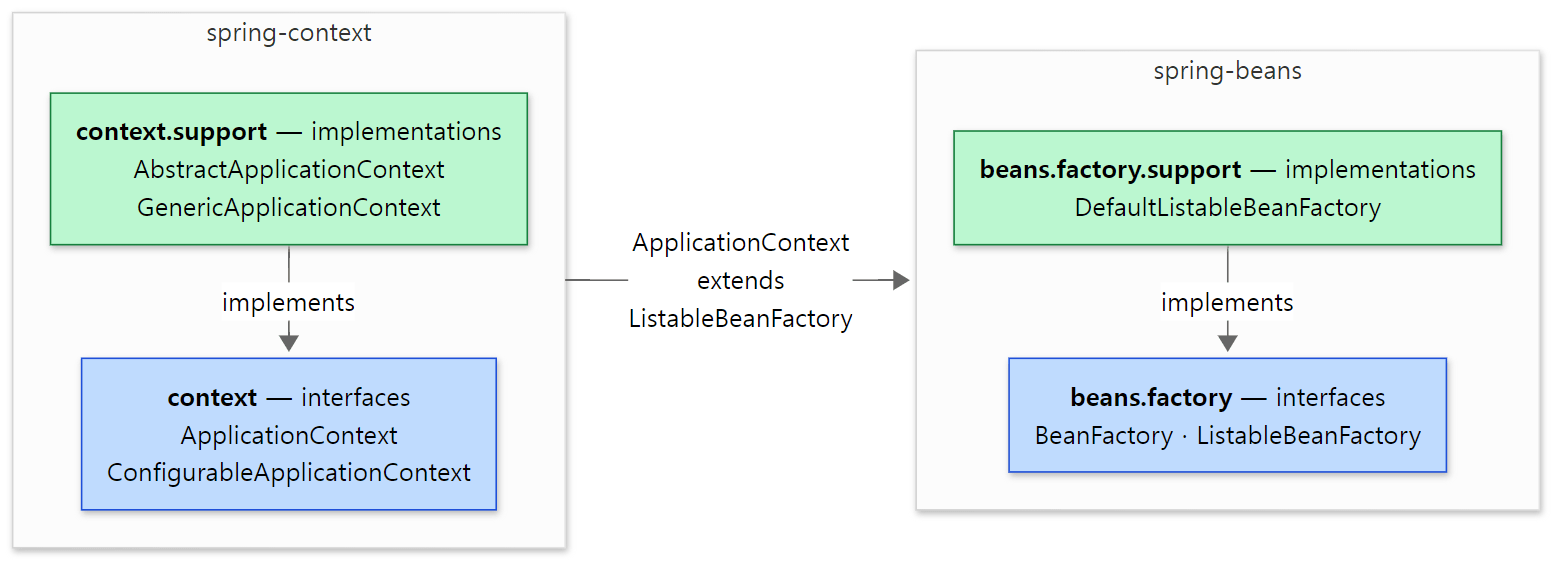 Blue boxes are the packages that hold interfaces; green boxes are the
support packages that hold their implementations. The implementation sometimes goes through an in-between interface (for example, DefaultListableBeanFactory implements ListableBeanFactory by way of ConfigurableListableBeanFactory).
spring-aop: proxies
| Package | Typical classes | What it does |
|---|---|---|
org.aopalliance |
Advice, MethodInterceptor, MethodInvocation |
Standard interfaces for intercepting a method call |
aop |
Pointcut, Advisor, TargetSource |
The basic ideas: "where" (Pointcut) to insert "what" (Advice) |
aop.framework |
ProxyFactory, JdkDynamicAopProxy, CglibAopProxy |
Where proxies are actually built |
aop.framework.autoproxy |
AbstractAutoProxyCreator |
Where a proxy is put around a bean automatically as the bean is created |
aop.aspectj |
— | Support for AspectJ expressions and @Aspect |
Easy to get wrong: names that do not match where things live
- Annotations live in different modules.
@Autowiredis in spring-beans (beans.factory.annotation);@Componentand@Serviceare in spring-context (stereotype);@Configurationand@Beanare in spring-context (context.annotation);@Transactionalis in spring-tx (transaction.annotation). Injection is a core container feature, so it sits low; "scan classes and register them as beans" is a higher-level feature, so it sits higher. - A package with
supportin its name is where the implementations are.beans.factoryholds interfaces;beans.factory.supportholds the classes that implement them.contextandcontext.supporthave the same relationship. If you are looking at an interface and wonder "who actually does this?", open thesupportpackage next door. asmandcglibinside spring-core are not code Spring wrote. They are ASM and CGLIB, external bytecode libraries, carried along with only the package name changed. The package description reads "Spring's repackaging of ASM 9.x (with Spring-specific patches; for internal use only)". Together the two are 174 files, and you can leave them out of your reading.- spring-aop contains a package that does not start with
org.springframework. It isorg.aopalliance— standard interfaces meant to be shared by several AOP implementations, shipped inside this module. - spring-aop and spring-aspects are different things. spring-aop wraps objects in proxies at run time. spring-aspects is for the other approach, where a separate tool called AspectJ weaves code into the classes themselves. This series reads spring-aop.
6. What happens when the container starts
Now that we know where the modules are, let's look at things in order of time. Here is about the smallest program that uses Spring.
// An example written for this post (not Spring's own code)
@Configuration
class AppConfig {
    @Bean
    GreetingService greetingService() {
        return new GreetingService();
    }
}

class GreetingService {}

public class Main {
    public static void main(String[] args) {
        var context = new AnnotationConfigApplicationContext(AppConfig.class);
        GreetingService service = context.getBean(GreetingService.class);
        context.close();
    }
}
@Configuration, @Bean and AnnotationConfigApplicationContext are all in spring-context's context.annotation package, and getBean is a method declared on BeanFactory in spring-beans. Placed on the map, this short program is using spring-context together with spring-beans beneath it.
The single line new AnnotationConfigApplicationContext(AppConfig.class) starts the container. Open the constructor and it is three lines.
	public AnnotationConfigApplicationContext(Class<?>... componentClasses) {
		this();
		register(componentClasses);
		refresh();
	}
spring-context/…/context/annotation/AnnotationConfigApplicationContext.java, lines 89–93
It registers the classes it was given (register) and calls refresh(). Nearly everything about container start-up happens inside that refresh(). The method lists twelve steps in order, each with a comment; keeping only the lines this post needs, it looks like this.
	public void refresh() throws BeansException, IllegalStateException {
		// ...
			// Prepare this context for refreshing.
			prepareRefresh();
			// ...
				// Invoke factory processors registered as beans in the context.
				invokeBeanFactoryPostProcessors(beanFactory);
				// Register bean processors that intercept bean creation.
				registerBeanPostProcessors(beanFactory);
				// ...
				// Instantiate all remaining (non-lazy-init) singletons.
				finishBeanFactoryInitialization(beanFactory);

				// Last step: publish corresponding event.
				finishRefresh();
			// ...
	}
spring-context/…/context/support/AbstractApplicationContext.java, lines 582–662
Open the link and the whole method reads like a running order. You do not need all twelve steps yet; group them into four chunks (Part 7 walks through the twelve one by one).
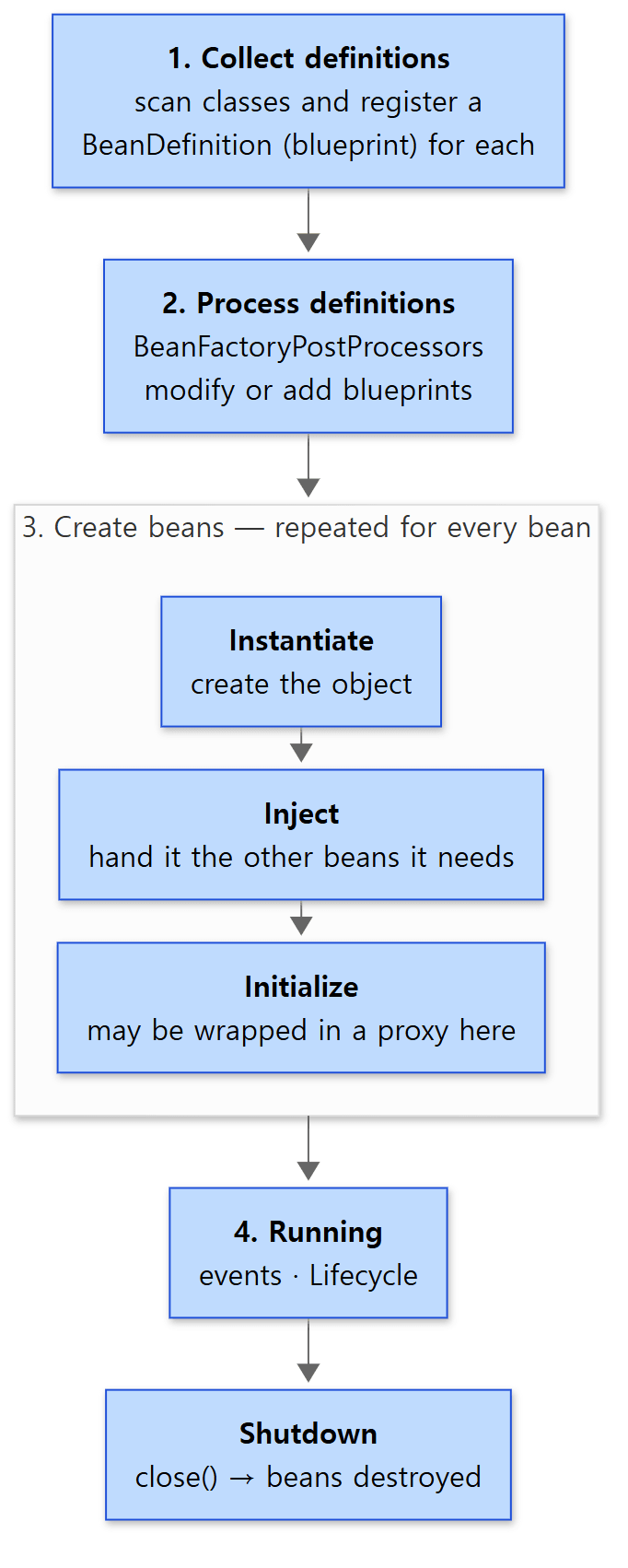 The big flow from the container starting to it shutting down. The three boxes inside stage 3 are how a single bean is made, repeated for every bean.
- Collect definitions. The container does not create objects straight away. First it gathers blueprints that say "which beans to make, and how". That blueprint is a
BeanDefinition(Part 3 looks at it closely). In the example above,registerregisters the blueprint forAppConfig, and the@Beanmethod insideAppConfigis read and added as a blueprint during theinvokeBeanFactoryPostProcessorsstep. - Process definitions. Once the blueprints are in, and before any object is made, there is a chance to change or add blueprints. The thing that does this is a
BeanFactoryPostProcessor; inrefresh()it isinvokeBeanFactoryPostProcessors. The very next line,registerBeanPostProcessors, gets theBeanPostProcessors ready for use in stage 3. - Create beans.
finishBeanFactoryInitializationactually builds the beans from the blueprints. As the source comment says, this covers singletons (beans the container makes once and shares) that are not lazy-init. One bean is made in three moves: instantiate (create the object) → inject (hand it the other beans it needs) → initialize (call its init methods and, if needed, wrap it in a proxy). Those three moves appear in order in doCreateBean of AbstractAutowireCapableBeanFactory under the namescreateBeanInstance,populateBeanandinitializeBean. That is the subject of Part 4. - Running and shutdown. When
finishRefreshpublishes the "ready" event (ContextRefreshedEvent), start-up is over. Later, callingclose()publishes a closing event and destroys the beans.
Easy to get wrong
BeanFactoryPostProcessorandBeanPostProcessorhave similar names but work on different things. The first works on blueprints (BeanDefinitions) and does its job in stage 2. The second works on bean objects as they are being made, in stage 3. Keeping these two apart makes the later posts much easier to read. Part 6 puts the places where each of them steps in on a single map.- Stages 1 and 2 are not cleanly separate. With annotation-based configuration, reading
@Configurationclasses and adding blueprints (stage 1) is done byConfigurationClassPostProcessor, and that class is itself a kind ofBeanFactoryPostProcessor. In other words, much of stage 1 is implemented with the machinery of stage 2. Read the four stages as the order of "what happens", not as four separate pieces of code. - A proxy is not created at the blueprint stage. There has to be an object to wrap, so it is put on during the initialize move of stage 3, after the object is fully built. (When beans need each other in a circle, a proxy can be created earlier; Part 4 covers that.)
7. Three pieces that many features repeat
The table in section 4 listed features such as transactions, caching and asynchronous execution. They look as if they were built separately, but open them up and they repeat the same three pieces.
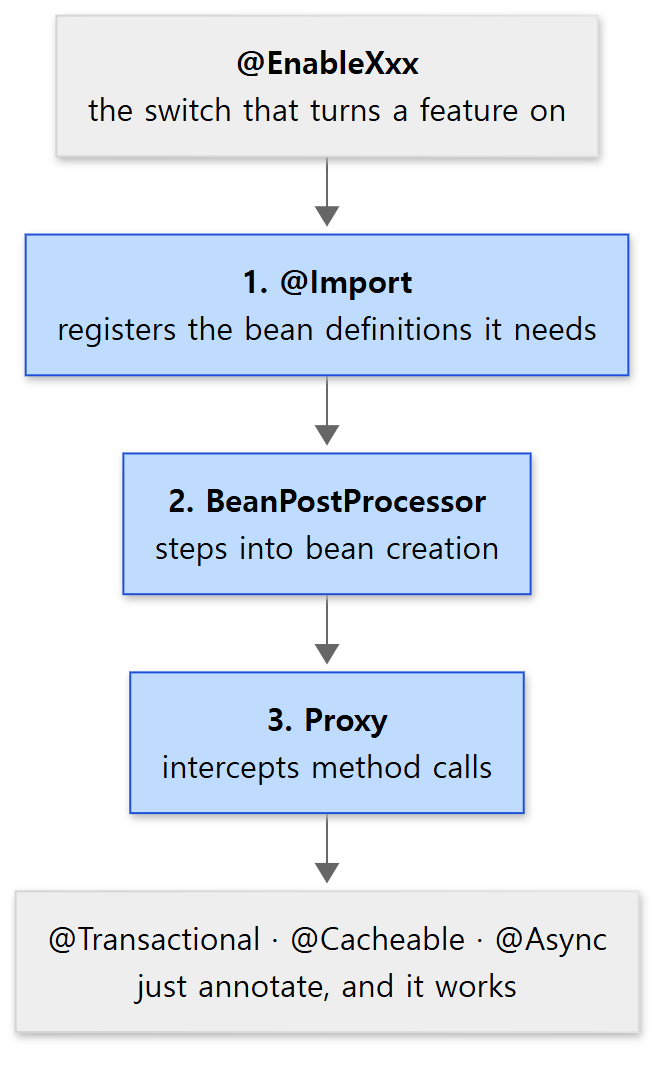 The three blue boxes are the repeated pieces: register definitions, step into bean creation, intercept calls.
Let's follow transactions. Put @Transactional on a method and that method runs inside a transaction. The switch that turns the feature on is @EnableTransactionManagement.
Piece 1 — @Import registers bean definitions. This is the declaration of the switch annotation.
@Target(ElementType.TYPE)
@Retention(RetentionPolicy.RUNTIME)
@Documented
@Import(TransactionManagementConfigurationSelector.class)
public @interface EnableTransactionManagement {
spring-tx/…/transaction/annotation/EnableTransactionManagement.java, lines 159–163
@Import means "also register the bean definitions this class tells you about". Follow the selectImports method of the class it points at and, in the default mode (PROXY), it brings in two things. AutoProxyRegistrar registers the blueprint of InfrastructureAdvisorAutoProxyCreator, a BeanPostProcessor that puts proxies on automatically; ProxyTransactionManagementConfiguration registers as beans the things that do the real work of "begin and end a transaction", such as TransactionInterceptor. This all happens in stages 1 and 2 of section 6.
Piece 2 — a BeanPostProcessor steps into bean creation. A BeanPostProcessor is an extension point the container calls every time it makes a bean. AbstractAutoProxyCreator, the parent class of the InfrastructureAdvisorAutoProxyCreator just registered, has this method.
	public @Nullable Object postProcessAfterInitialization(@Nullable Object bean, String beanName) {
		if (bean != null) {
			Object cacheKey = getCacheKey(bean.getClass(), beanName);
			if (this.earlyBeanReferences.remove(cacheKey) != bean) {
				return wrapIfNecessary(bean, beanName, cacheKey);
			}
		}
		return bean;
	}
spring-aop/…/aop/framework/autoproxy/AbstractAutoProxyCreator.java, lines 285–293
As the name says, it is called "after initialization" — the last box of stage 3 in the picture of section 6. It takes the bean, wraps it if needed (wrapIfNecessary), and otherwise returns it as it is.
Piece 3 — the proxy intercepts calls. The wrapped bean is stored in the container as a proxy. From then on, when someone calls a method on this bean, the proxy receives the call first, begins a transaction, calls the real method, and when it finishes commits or rolls back.
Other features take the same road. Every class name in the table below was confirmed in the source (for the default mode).
| Feature | Switch | What @Import brings in |
The BeanPostProcessor that steps in |
Proxy |
|---|---|---|---|---|
@Transactional |
@EnableTransactionManagement |
AutoProxyRegistrar, ProxyTransactionManagementConfiguration |
InfrastructureAdvisorAutoProxyCreator |
yes |
@Cacheable |
@EnableCaching |
AutoProxyRegistrar, ProxyCachingConfiguration |
InfrastructureAdvisorAutoProxyCreator |
yes |
@Async |
@EnableAsync |
ProxyAsyncConfiguration |
AsyncAnnotationBeanPostProcessor |
yes |
@Scheduled |
@EnableScheduling |
SchedulingConfiguration |
ScheduledAnnotationBeanPostProcessor |
no |
The last row is the one to notice. @Scheduled means "call this method at set times", so there is no call to intercept. ScheduledAnnotationBeanPostProcessor inspects the bean, registers the schedule, and returns the bean unchanged. Some features use all three pieces; some use only the first two.
That is why the middle layer is read first. Once you know how bean definitions get registered, when a BeanPostProcessor is called and how a proxy is made, most features in the upper layers can be read as "how did they combine these three pieces?".
8. So what order do we read in?
The map also settles the reading order: start from the bottom of the arrows, the side that others lean on. spring-beans (how a bean is created) → spring-context (refresh() and annotation configuration) → spring-aop (proxies) → then data and web on top. spring-core is not read as a separate block; the needed parts are pulled out whenever the reading gets stuck on them. How the reading is divided into units and how far it has got is laid out in Part 1.
 The bottom-up reading order, with part numbers. Dotted lines mean "opened when needed".
Recap
- Spring Framework is split into 22 modules whose names start with
spring-; the list is insettings.gradle. - There are four broad layers. On the foundation (spring-core) sits the container and AOP (spring-beans, spring-aop, spring-expression, spring-context), and on top of that, data and web. Upper layers use lower ones; lower layers do not know the upper ones.
- Dependencies are written in each module's
<module name>.gradle.apiis a required dependency;optionalis one that is used if present. - spring-beans has
BeanFactoryandBeanDefinition; spring-context hasApplicationContextand annotation configuration; spring-aop has proxies. Asupportpackage is where implementations are. - Container start-up is written out step by step in one method,
AbstractApplicationContext.refresh(): collect definitions → process definitions → create beans (instantiate → inject → initialize) → running. - Features such as transactions, caching and async repeat "register definitions with
@Import→ step into creation with aBeanPostProcessor→ intercept calls with a proxy".
What this post left out
To keep the map to one page, these were left out.
- The package-by-package contents of spring-expression, spring-tx, spring-web, spring-webmvc and spring-webflux. They belong to the posts that read those modules.
- The full list of
optionaldependencies between modules. The diagrams show only the ones the story needs. - Each of the twelve steps of
refresh(), and the details of bean creation. - The AOT (ahead-of-time processing) packages (covered in Part 16) and the Kotlin support code.
What to read next
Time to fold the map and walk into the first destination. The next post is about the beans.factory packages of spring-beans: why the BeanFactory interface is split into several, which classes are stacked up on the way to DefaultListableBeanFactory, which implements them all, and what is actually written in a BeanDefinition — the thing section 6 only called a "blueprint".
Digging into Spring's Source 3: The BeanFactory Hierarchy and BeanDefinition