What this post covers
"Digging into Spring's Source" is a series that reads the Spring Framework source code a little at a time, with help from AI, and writes up what is there. This is the first post, and it gets things ready before any deep reading starts.
- It shows what Spring is, how it works and what it is for (a section for newcomers), with the smallest possible example, three pictures and a three-minute exercise, and lists the questions this series answers.
- It explains why the series reads the source rather than teaching usage.
- It tells you how to get exactly the source this series reads.
- It explains how such a large codebase is divided up, and where AI comes into the process.
- It shows the reading order (the map) and how far the reading has got.
If you have never heard of Spring, read the "Five words to know first" and "What is Spring" sections below, in that order. Once you have the five words, an example, pictures and an exercise show you what Spring does, then a quick look at the questions this series answers leads into the main part. The reader I have in mind knows basic Java (classes, interfaces, inheritance, and that annotations exist) but has never used Spring. Every Spring term is explained the first time it appears.
This is the source the series reads.
| Item | Details |
|---|---|
| Project | Spring Framework (spring-projects/spring-framework) |
| Version | 7.1.0-SNAPSHOT |
| Commit | f447f3c310 (2026-10-01) |
| Language | Java |
Every line number and detail in these posts refers to that commit. In other versions the line numbers will differ, and some of the details may too.
The series has 27 posts in all.
- How I Read It with AI, and the Map (this post)
- The Big Map — Modules and Packages
- The BeanFactory Hierarchy and BeanDefinition
- How a Bean Gets Created — the Creation Flow and the Three-Level Cache
- How @Autowired Picks the Bean to Inject — Dependency Resolution
- Lifecycle Callbacks and PostProcessors — Where You Can Step into the Container
- The Twelve Steps of refresh() — the Order in Which the Container Starts
- How @Configuration and @ComponentScan Become Blueprints
- @Conditional, @Profile and @Import — Choosing Beans by Condition
- How an AOP Proxy Gets Built — the JDK Way and the CGLIB Way
- How @Aspect Gets Discovered and How the Advice Chain Runs
- Events, Environment, Resource — Three Abstractions Around the Container
- ResolvableType and MergedAnnotations — How Spring Reads Types and Annotations
- Type Conversion and BeanWrapper — From a String to an Object's Property
- SpEL — How an Expression Is Parsed and Evaluated
- Utilities and AOT — the Shared Toolbox and Computing Ahead of Time
- @Transactional — Who Opens a Transaction and Who Closes It
- JdbcTemplate — the Template-Callback Pattern and Exception Translation
- ORM and R2DBC Integration — JPA Support and Reactive Transactions
- The spring-web Foundation — HttpMessageConverter, WebApplicationContext, Filters
- DispatcherServlet — How One Request Becomes a Response
- Handler Mappings and Adapters — How @RequestMapping Methods Are Found and Called
- Exception Handling, Interceptors, Views — Before, After, and the End of a Request
- WebFlux — DispatcherHandler, Functional Endpoints, and WebClient
- WebSocket and Messaging — How a STOMP Message Flows
- spring-test — SpringExtension, TestContext, MockMvc
- Caching, Scheduling, Validation, Resilience — Features Built on Top of the Container
Five words to know first
The same handful of words comes up in everything written about Spring. Get these five straight and the rest reads much more easily.
Spring Framework is a framework for building programs in Java. A framework is the skeleton of a program built in advance; you only write the code that slots into it. People usually just call it "Spring".
A dependency is another object that an object needs in order to do its job. If a Car cannot run without an Engine, then Engine is a dependency of Car.
A bean is an object that Spring creates and manages. It is not a special kind of object — it is a plain Java object. The only difference is that Spring created it and keeps hold of it, rather than your own code creating it and holding on to it.
The container is the thing that creates beans, connects them to each other, and stores them. It is the heart of Spring. In the source it appears under the names BeanFactory and ApplicationContext.
DI and IoC. DI (Dependency Injection) means an object does not create what it needs; it is handed it from outside. IoC (Inversion of Control) means that the job of creating objects and wiring them together has moved from your code to the container. They are two sides of the same idea: the container is in charge (IoC), and it passes dependencies in (DI). That is why Spring's container is also called an IoC container.
Definitions only go so far, so the next section shows them with an analogy, diagrams and examples.
What is Spring — how it works and what it is for
Before opening the source, let's see what Spring does, with an example, pictures and a short exercise. If you have already built programs with Spring, you can skip to "Questions this series answers" at the end of this section.
In one sentence — a factory that assembles your parts
At its heart, Spring is an assembly plant that builds your objects for you and fits them together. You hand over the parts (your classes) and the assembly instructions (configuration). Write "a car gets an engine" in the instructions, and the plant builds the engine, fits it into a car, puts the finished car in its warehouse, and hands it over when you ask. The car never learns who built its engine.
That plant is the container from the list just above, and each finished product it makes is a bean. Everything else in Spring — handling web requests, transactions, test support — sits on top of this plant. In the end, this whole series follows one story through the source: how the plant reads its instructions, in what order it builds and fits the parts, and how it layers features on top.
Why do we need something like this?
A car and an engine, in plain Java:
// An example written for this post (not Spring's own code)
class Engine {
}

class Car {
    private final Engine engine = new Engine();   // Car creates its own Engine
}
Nothing is wrong with how this runs. But Car has decided for itself which Engine it uses. To swap in a different engine you have to edit Car. And when there are hundreds of objects instead of two, your own code has to keep track of who needs whom and what must be created first.
Concretely, here is what goes wrong as the number of objects grows.
- It is hard to change. To switch to an electric engine you have to open
Carand edit it. If ten classes callnew Engine()themselves, you edit ten places. - It is hard to test a piece on its own. You may want to test
Carby itself, butCarbuilds a realEngineon its own, so there is no gap to slip in a fake engine for the test. - People have to track the build order. If A needs B and B needs C,
mainhas to line up thenewcalls in the order C → B → A. And if several places share one object, you need code that carries it around and hands it over.
Put a container in the middle and each class only states "this is what I need" through its constructor, while what actually gets plugged in is written down in one place, the configuration. The container works out the build order from who needs what, keeps the objects it made, and passes them in wherever they are needed. To change the engine, you change only the configuration. Step 4 of the "three-minute exercise" below does exactly that.
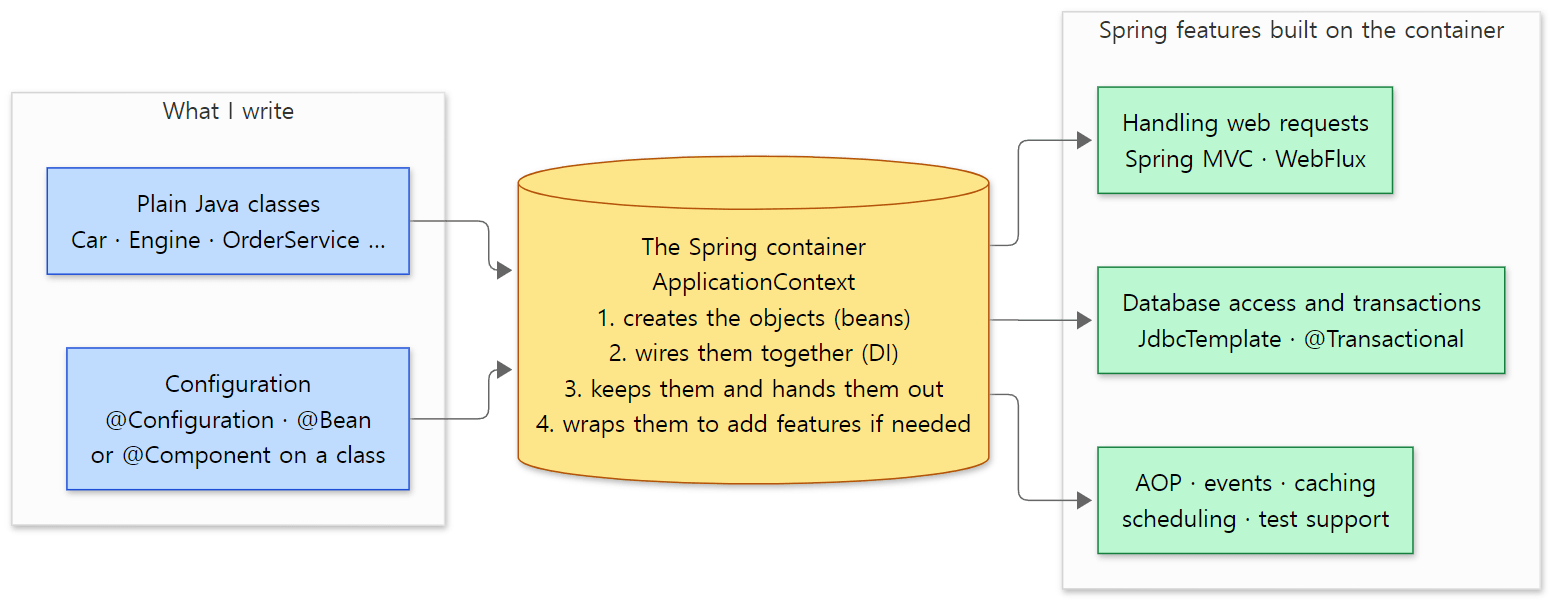 Spring in the middle. Blue boxes are what we write, the yellow box is the container, and green boxes are features built on the container. Item 4, "wraps them to add features", means handing out a stand-in object (a proxy) instead of the real one; post 10 covers it.
Handing it to Spring — the smallest example
Here is the same thing handed over to Spring. It is the smallest form, all in one file (example/Main.java).
// An example written for this post (not Spring's own code)
package example;

import org.springframework.context.annotation.AnnotationConfigApplicationContext;
import org.springframework.context.annotation.Bean;
import org.springframework.context.annotation.Configuration;

class Engine {
}

class Car {
    private final Engine engine;

    Car(Engine engine) {          // receives the Engine it needs from outside
        this.engine = engine;
    }
}

@Configuration
class AppConfig {

    @Bean
    Engine engine() {
        return new Engine();
    }

    @Bean
    Car car(Engine engine) {      // the container finds the Engine bean and passes it in
        return new Car(engine);
    }
}

public class Main {
    public static void main(String[] args) {
        var context = new AnnotationConfigApplicationContext(AppConfig.class);
        Car car = context.getBean(Car.class);
        System.out.println(car == context.getBean(Car.class));   // true
        context.close();
    }
}
Four things are new here.
| Code | Meaning |
|---|---|
@Configuration |
Marks this class as configuration: the place that says what should become a bean |
@Bean |
Marks a method whose return value should become a bean |
AnnotationConfigApplicationContext |
The container — the kind that reads configuration written with annotations |
getBean(Car.class) |
Asks the container for the bean of type Car |
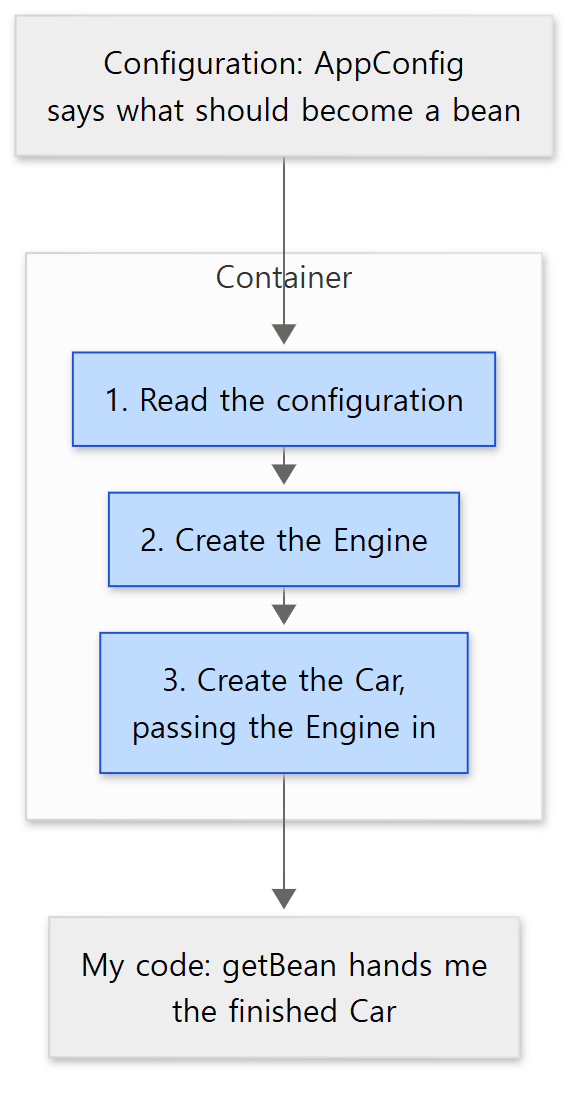 What the container does. The blue boxes are steps the container carries out on its own; my code only writes the configuration and takes the result out at the end.
Three places in this example are worth a closer look.
- Nothing in
Maincallsengine()orcar(). The container calls them. When objects are created, and in what order, is decided by the container and not by my code. That is IoC. - I never pass an argument to
car(Engine engine). The container finds the bean of typeEngineand passes it in. That is DI.Carhas no idea where the engine came from; it just uses what it was given. - Calling
getBean(Car.class)twice gives the same object. Unless told otherwise, the container creates a bean once and keeps handing back the same one. A bean like that is called a singleton, and post 4 covers it in detail.
I compiled and ran this example against a released version, Spring Framework 7.0.9, and confirmed that it prints true. (I did not build the 7.1.0-SNAPSHOT this series reads and run it against that.) Instead of writing @Bean methods, it is also common to put @Component on a class and let the container find it — but what the container does is the same.
Three-minute exercise — printing when the container does what
The example above prints a single true, so you cannot see when the container did what. So let's make every constructor print a line, add a few things, and run it. Three things differ from the example above.
Enginebecomes an interface with two implementations (GasEngine,ElectricEngine). Each prints a line when its constructor is called.Car's constructor also prints which kind of engine it received. Nothing inCar's code says which engine it will get.- There are two configuration classes.
GasConfigandElectricConfigdiffer only in the objectengine()returns, and inElectricConfigI deliberately wrotecar()beforeengine().
main goes through four steps in order.
- Start the container.
- Print the names of all beans the container holds right after starting.
- Take the
Carout withgetBean, use it, and take it out again to see whether it is the same object. - Change only the configuration to
ElectricConfigand start a new container.
// An example written for this post (not Spring's own code). The package line and the three imports are the same as above and are left out; other cuts are marked // ...
interface Engine {
    String sound();
}

class GasEngine implements Engine {
    GasEngine() {
        System.out.println("   [called by the container] GasEngine constructor");
    }

    public String sound() {
        return "vroom vroom";
    }
}

// ... ElectricEngine has the same shape (prints a line in its constructor; sound() returns "whirr")

class Car {
    private final Engine engine;

    Car(Engine engine) {          // Car has no idea which Engine it will get
        System.out.println("   [called by the container] Car constructor — engine received: " + engine.getClass().getSimpleName());
        this.engine = engine;
    }

    String drive() {
        return engine.sound();
    }
}

@Configuration
class GasConfig {
    @Bean
    Engine engine() {
        return new GasEngine();
    }

    @Bean
    Car car(Engine engine) {
        return new Car(engine);
    }
}

@Configuration
class ElectricConfig {             // car() is deliberately written before engine()
    @Bean
    Car car(Engine engine) {
        return new Car(engine);
    }

    @Bean
    Engine engine() {
        return new ElectricEngine();   // the only line that differs from GasConfig; Car is unchanged
    }
}

public class FirstLook {
    public static void main(String[] args) {
        System.out.println("1. Start the container: new AnnotationConfigApplicationContext(GasConfig.class)");
        var context = new AnnotationConfigApplicationContext(GasConfig.class);

        System.out.println("2. Bean names the container holds right after starting");
        for (String name : context.getBeanDefinitionNames()) {
            System.out.println("   " + name);
        }

        System.out.println("3. Take a bean out with getBean and use it");
        Car car = context.getBean(Car.class);
        System.out.println("   car.drive() → " + car.drive());
        System.out.println("   Same object when taken out again? " + (car == context.getBean(Car.class)));
        context.close();

        System.out.println("4. Change only the configuration to ElectricConfig and start a new container (Car unchanged)");
        try (var electric = new AnnotationConfigApplicationContext(ElectricConfig.class)) {
            System.out.print("   My bean names (registration order):");
            for (String name : electric.getBeanDefinitionNames()) {
                if (!name.startsWith("org.springframework")) {
                    System.out.print(" " + name);
                }
            }
            System.out.println();
            System.out.println("   car.drive() → " + electric.getBean(Car.class).drive());
        }
    }
}
I ran it in the example project like this (the command runs main through Gradle's application plugin).
./gradlew run -q -PmainClass=ex.u01.en.FirstLook
Here is the output. Running it several times gave the same output each time.
1. Start the container: new AnnotationConfigApplicationContext(GasConfig.class)
   [called by the container] GasEngine constructor
   [called by the container] Car constructor — engine received: GasEngine
2. Bean names the container holds right after starting
   org.springframework.context.annotation.internalConfigurationAnnotationProcessor
   org.springframework.context.annotation.internalAutowiredAnnotationProcessor
   org.springframework.context.annotation.internalCommonAnnotationProcessor
   org.springframework.context.annotation.internalPersistenceAnnotationProcessor
   org.springframework.context.event.internalEventListenerProcessor
   org.springframework.context.event.internalEventListenerFactory
   gasConfig
   engine
   car
3. Take a bean out with getBean and use it
   car.drive() → vroom vroom
   Same object when taken out again? true
4. Change only the configuration to ElectricConfig and start a new container (Car unchanged)
   [called by the container] ElectricEngine constructor
   [called by the container] Car constructor — engine received: ElectricEngine
   My bean names (registration order): electricConfig car engine
   car.drive() → whirr
As with the smallest example above, this was run against the released Spring Framework 7.0.9 (Java 21), not against the 7.1.0-SNAPSHOT this series reads. The source links below all point to lines at the reference commit f447f3c310.
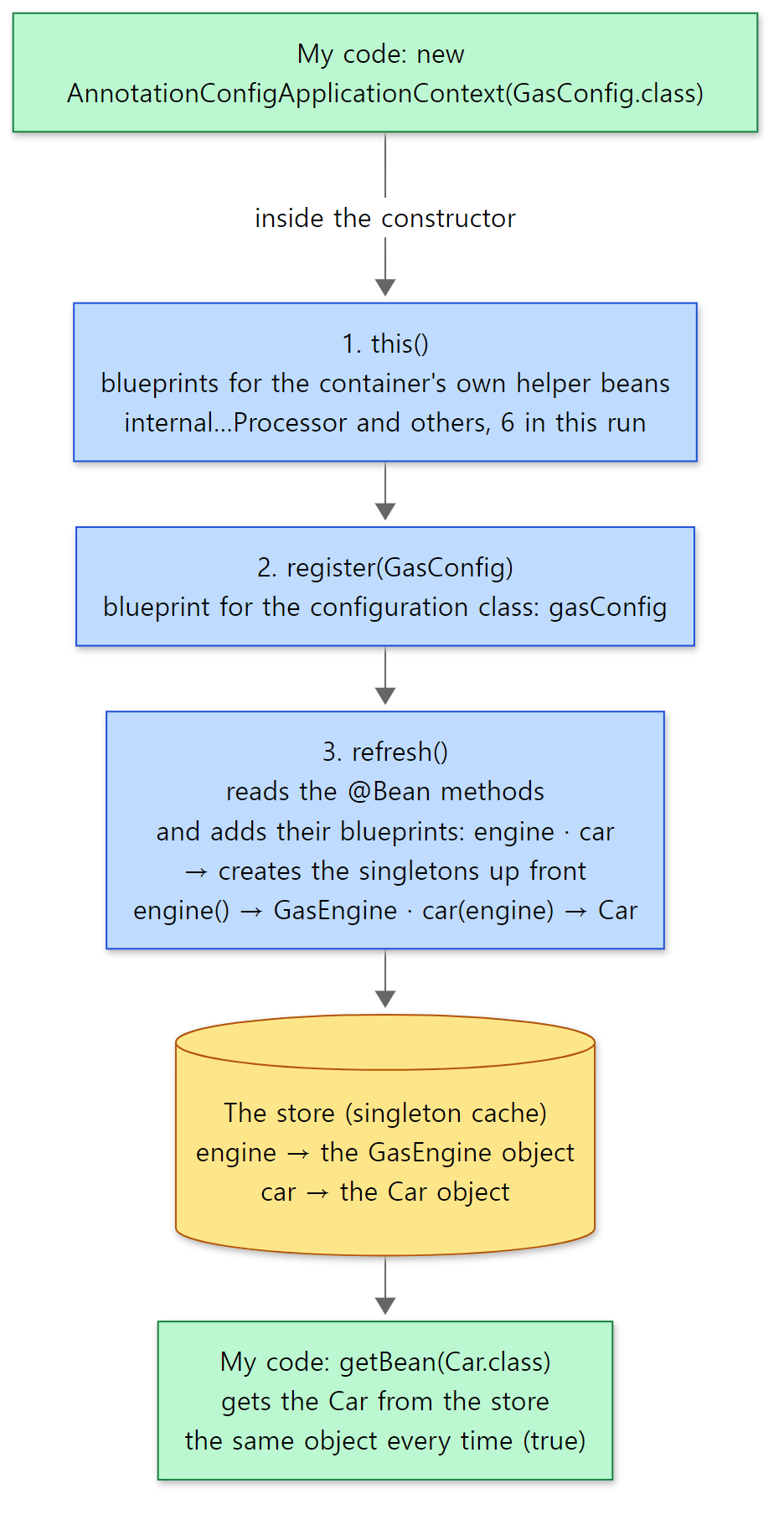 Steps 1–3 of the exercise as a picture. The blue boxes are what happens, in order, inside the single line
new AnnotationConfigApplicationContext(...). The blueprints (BeanDefinitions — information on how to build each bean) are gathered first, and only then are the objects built. The yellow box is the store that holds the beans once made, and the green boxes are my code.
There are five things to notice in the output.
- The objects are built before
getBean— on the line that starts the container. TheGasEngineandCarconstructors print right after "1.", and nothing new is built whengetBeanis called in step 3. Near the end ofrefresh(),finishBeanFactoryInitialization(AbstractApplicationContext.java, line 622) builds every singleton not marked as lazy, up front (line 995 of the same file, DefaultListableBeanFactory.java, lines 1117–1125). So if a configuration would fail while building a bean, it fails on the line that starts the container, without ever reachinggetBean. The twelve steps ofrefresh()are in post 7. - The container decides the build order. In step 4's
ElectricConfig,carwas registered beforeengine(see "registration order" in the output), yet theElectricEngineconstructor printed first. The container set out to buildcar, saw that it needed anEngineas an argument, and builtenginefirst. Our code never wrote down any order. How the container finds the bean to pass in is in post 5, and the flow of building one bean is in post 4. - Bean names are given automatically, and some beans were put there by the container itself. The configuration class
GasConfigbecomesgasConfig, with its first letter lower-cased (AnnotationBeanNameGenerator.java, lines 244–249), and a@Beanmethod, unless given a name, is named after the method:engine,car(ConfigurationClassBeanDefinitionReader.java, lines 317–319). The sixorg.springframework…internal…names above them are helpers we never registered. TheAnnotatedBeanDefinitionReadercreated by the constructor'sthis()registers them (AnnotationConfigApplicationContext.java, lines 68–71, AnnotatedBeanDefinitionReader.java, line 90, AnnotationConfigUtils.java, lines 156–204). The first one,internalConfigurationAnnotationProcessor, is the one that reads the@Beanmethods and adds the blueprints forengineandcar(ConfigurationClassPostProcessor.java, line 464, post 8), andinternalAutowiredAnnotationProcessorhandles@Autowired(post 5). Where helpers like these step into the container is in post 6. - The number of helpers depends on the environment.
internalCommonAnnotationProcessoris registered only whenjakarta.annotation.PostConstructis on the classpath (the list of libraries available to the program), andinternalPersistenceAnnotationProcessoronly when JPA is (AnnotationConfigUtils.java, lines 119–124, line 171, line 178). The example project has both, because examples for other posts need them, so six appeared. Going by the source, a project with neither would show four (I did not run it that way). - Taking a bean out again gives the same object, and changing the engine leaves
Caruntouched. Singletons, once built, go into the store, a map from name to object (DefaultSingletonBeanRegistry.java, lines 85–86), andgetBeanlooks in this store first (AbstractBeanFactory.java, line 257). A bean with no scope set is treated as a singleton (AbstractBeanDefinition.java, lines 532–534). And in step 4, changing only the configuration gaveCaranElectricEngine. That is the "change only the configuration" promised in "Why do we need something like this?".
The code behind that one line
Everything in the example happened inside a single line: new AnnotationConfigApplicationContext(AppConfig.class). Here is that constructor in Spring's source.
	public AnnotationConfigApplicationContext(Class<?>... componentClasses) {
		this();
		register(componentClasses);
		refresh();
	}
Just three lines. register registers the classes it was given (AppConfig) with the container, and refresh actually starts the container. Interpreting the configuration and creating the beans all happens inside that single refresh() call. The body of refresh() is at AbstractApplicationContext.java, line 582, and it goes through twelve steps in order.
This is what the series sets out to do: follow the code that really runs behind a one-line call. The big picture of how the container starts up is in post 2.
What is it used for?
Spring Framework layers a number of modules on top of the container and covers a wide range of what you need to build server programs in Java. Here they are, grouped by the modules this series reads.
| Use | What it does | In this series |
|---|---|---|
| Web applications and REST APIs | Takes an HTTP request, calls the right method (@RequestMapping), and turns the returned value into JSON or a page for the response |
spring-web, spring-webmvc (posts 20–23) |
| Reactive web | Handles requests without tying up a thread while waiting, and calls other servers | spring-webflux (post 24) |
| Working with databases | Takes over the code you would otherwise repeat for every SQL call (opening and closing connections, translating exceptions), and plugs ORMs such as JPA into the container | spring-jdbc, spring-orm, spring-r2dbc (posts 18, 19) |
| Transactions | Put @Transactional on a method and it starts, commits and rolls back for you |
spring-tx (post 17) |
| Real-time messages | Keeps a connection open with the browser to send and receive messages (WebSocket, STOMP) | spring-websocket, spring-messaging (post 25) |
| Plugging in shared behavior | Gathers work that goes into many methods the same way — logging, caching, transactions — into one place and plugs it in. Can also run methods on a schedule | spring-aop (posts 10, 11), caching and scheduling (post 27) |
| Testing | Starts a container for your tests and injects beans, and imitates web requests without starting a server | spring-test (post 26) |
Spring Boot, which you will hear about a lot, is a separate project built on top of this framework that sets up configuration and starts the server for you automatically. A program built with Boot still runs the container this series reads on the inside (see "Easy to get confused" below for how the two relate).
There are also places where it does not fit. For a small command-line tool or script with only a few objects, wiring them with new yourself is simpler. The container does preparation work when it starts — interpreting the configuration and building objects up front — so in a program that runs very briefly and exits, that preparation can be a large share of the work. (Spring has AOT, which does part of this preparation at build time instead — see post 16.) And Spring Framework is for languages on the Java Virtual Machine (JVM), such as Java and Kotlin, so it is not used for programs in other languages.
Questions this series answers
Running the exercise raises questions. This series answers them one by one from the source. If a question grabs you, feel free to start with that post.
| What you might wonder | Where the answer is |
|---|---|
| How do the 22 modules depend on each other? What is the big flow when the container starts? | Post 2: The Big Map |
What does the "blueprint" (BeanDefinition) from the exercise look like, and how do BeanFactory and ApplicationContext differ? |
Post 3: The BeanFactory Hierarchy and BeanDefinition |
What happens in a single getBean() call? If A needs B and B needs A, how do both get built? |
Post 4: How a Bean Gets Created |
If there are two Engine beans, which one goes into car(Engine engine)? |
Post 5: Dependency Resolution |
When, and in what order, do the internal…Processor beans from step 2 step in? |
Post 6: Lifecycle Callbacks and PostProcessors |
What are the twelve steps inside that one refresh() call? |
Post 7: The Twelve Steps of refresh() |
How do @Configuration and @Bean become blueprints? If you call a @Bean method yourself twice, do you get two engines? |
Post 8: Annotation Configuration Processing |
How do you pick different beans depending on the situation, like GasConfig and ElectricConfig in the exercise? |
Post 9: @Conditional, @Profile and @Import |
| How does item 4 in the picture, "wraps them to add features", work? Why doesn't it kick in when a class calls its own method? | Post 10: AOP Proxies, Post 11: The Advice Chain |
| How do events, configuration values and reading files connect to the container? | Post 12: Events, Environment, Resource |
| How does the container read generic types and annotations, and turn a configuration string into an object? | Post 13, Post 14, Post 15: SpEL, Post 16: Utilities and AOT |
With just @Transactional, who opens and closes the transaction? What does Spring take over when running SQL? |
Post 17: @Transactional, Post 18: JdbcTemplate, Post 19: ORM and R2DBC |
| What path does one HTTP request take to reach my method and become a response? | Post 20, Post 21: DispatcherServlet, Post 22, Post 23 |
| How do reactive web requests and WebSocket messages flow inside? | Post 24: WebFlux, Post 25: WebSocket and Messaging |
Does every test start a new container? How do @Cacheable and @Scheduled run? |
Post 26: spring-test, Post 27: Caching, Scheduling, Validation, Resilience |
The rest of this post is preparation for following these questions through the source: why read the source at all, how to get the same source, how such a large codebase is divided up and where AI comes in, and the reading order (the map). If you have no plans to download the source yourself, you can skip the "Getting the same source" section — every code link in these posts opens the same commit on GitHub.
Why read the source at all
Spring does a great deal where you cannot see it. The example above is nothing but two annotations and one constructor call, and behind them objects get created and wired together. You can build programs knowing only how to use Spring. Reading the source adds three things on top.
- Error messages start to make sense. When something goes wrong while a bean is being created, the stack trace printed on screen is mostly the names of Spring's internal classes, such as
AbstractAutowireCapableBeanFactoryandDefaultSingletonBeanRegistry. If you know what those places do, you can make a good guess at what went wrong and where. - You learn why things have to be written the way they are. Documentation tells you what to do; the source tells you why it is like that. The question the original study notes set out to answer is the same: why was it implemented this way internally, where are the pitfalls, and what do you touch to extend it?
- You get to look at a design that has been refined for a long time. The source of
BeanFactory, the most basic interface of the container, says@since 13 April 2001. This code has been worked on for more than twenty years.
Anyone can read it. Spring Framework is released under the Apache License 2.0, and all of it is on GitHub.
The problem is the size. Counting directly in this commit, the main code alone (src/main/java, tests excluded) comes to 22 modules, 5,223 Java files, and about 840,000 lines (blank lines and comments included). Starting at the first file and reading straight through would never end. So the first thing to settle is how to read.
One thing to say up front: this series is not a course on using Spring. To learn usage, read the official Overview and the guides alongside it.
Getting the same source
This section is for readers who want to open the line numbers on their own computer. If you only plan to read, the GitHub links in the posts are enough, so feel free to skip ahead to "How the reading works".
To open the line numbers these posts mention, you need the source at the same commit. If Git is installed, it takes three commands.
- Download the repository. It has a long history, so this takes a little while.
- Go into the folder you just downloaded.
- Switch to the commit this series is based on.
git clone https://github.com/spring-projects/spring-framework.git
cd spring-framework
git checkout f447f3c310009f5dc083306d25d12f13a1380dc4
The third command prints a notice that you are in a "detached HEAD" state. That only means you checked out a specific commit rather than a branch, and it is fine for reading. To confirm you are on the right commit, run the following. It should print the same long commit ID as above.
git rev-parse HEAD
The version is declared on the first line of gradle.properties in the top-level folder.
version=7.1.0-SNAPSHOT
SNAPSHOT marks a version that is still in development and has not been officially released. In other words, this series reads the code while 7.1 is still being made.
You can also read it on the web without downloading anything. This GitHub address opens the folder at that commit, and every code link in this series points to the same commit.
How the folders are laid out
In the top-level folder, each of the 22 folders whose name starts with spring- is a module. A module is a bundle of related code that is published separately. The list of modules is in settings.gradle, lines 5–26.
| Location | What is in it |
|---|---|
spring-beans, spring-context, spring-core and the rest — 22 in all |
Modules. This is what the series reads |
<module>/src/main/java |
The module's main code |
<module>/src/test/java |
The module's tests (present in nearly every module) |
framework-docs |
The source of the official reference documentation |
gradle.properties, settings.gradle, build.gradle |
Build configuration |
If you only want to read, you can open the folder in an editor without building anything. To step through the code line by line in a debugger you do need to build the project; for that, follow the Build from Source page the repository's README points to, and import-into-intellij-idea.md in the top-level folder.
How the reading works — the map first, then small units
This series is built on a set of study notes kept separately. The way those notes are written is the way this series reads, so here are the rules as the notes state them.
The principle fits in one sentence. Do not read everything at once; pick one small unit from the map and read only that, in depth.
What is a unit?
A unit is "as much code as it takes to answer one question". The question of unit U02, for example, is "what happens when getBean() is called once?". Each unit has a number — U01, U02, and so on — and there are 25 in all.
There is a rule about size. A unit is kept to between 10 and 25 core classes, and if it grows beyond that it is split. The idea is to cut the code into pieces small enough to hold in your head at once.
What the notes for one unit look like
Every unit's notes follow the same template.
| Order | Section | Contents |
|---|---|---|
| 1 | One-line summary | The question this unit answers |
| 2 | At a glance | Several diagrams with short explanations. Written so that this section alone gives you the outline |
| 3 | In detail | The classes involved, the call flow and the design reasons, with line-level evidence |
| 4 | Check it yourself | Where to put breakpoints, and small experiments to run |
| 5 | Self-check | Questions to answer on your own |
There are also a few rules about the content.
- Code locations are written as
module/path/File.java:line, and line numbers refer to commitf447f3c310. Written this way, anyone can open the same line and check whether the claim holds. Writing "AbstractApplicationContext.java, line 582" forrefresh()above is this rule in action. - Write "why was it built this way" rather than "how do you use it". That includes the reason behind a design and why the alternatives would not work.
- Point to where in the code a common pitfall comes from.
- Where behaviour changed between versions, record it together with the code.
- Use colour in a diagram only when it means something. A diagram has at most 12 boxes.
The original notes are written for developers who have used Spring for years, so they deliberately leave out basic concepts and usage examples. This blog series does the opposite: for readers new to Spring, it picks out the main line of the notes and explains it again from the beginning.
Where does AI come in?
I will only describe what the notes actually record.
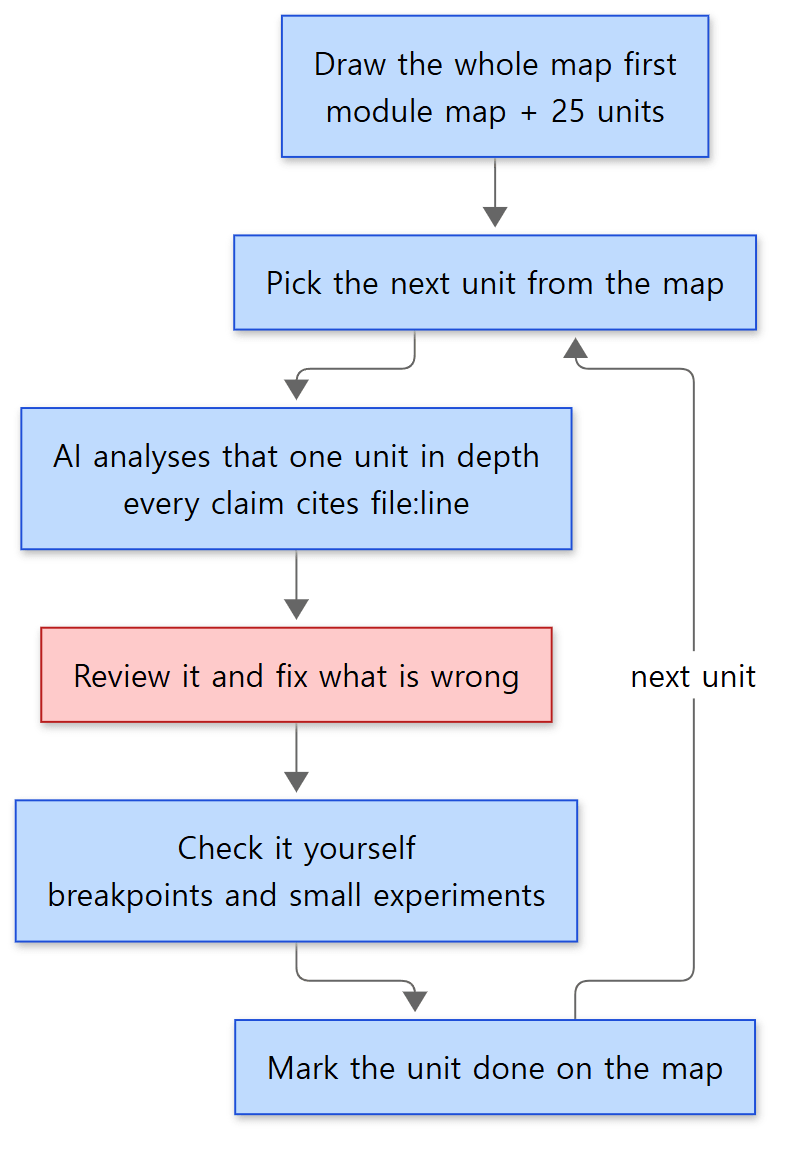 The order in which one unit is read. Blue boxes are steps; the red box is the step that catches mistakes in the AI's analysis.
- The maps are made first. One is the big map of how the modules and packages are divided (the basis of post 2); the other is the reading map that lays out the 25 units (the basis of this post).
- The analysis of one unit is given to one AI task. The notes call this a "sub-agent" — an AI task that runs on its own with a single job.
- What the AI wrote is reviewed and corrected. The progress log says that after U01 and U02 were analysed, a review corrected the predicted result of one experiment in U01 and strengthened two places in U02 where confidence had been low.
- A way to verify is left in the notes. The "Check it yourself" section at the end of each unit is there so that the claims can be verified by stepping through with a debugger.
The notes also record how much work this is. The amount of text an AI reads and writes is counted in tokens. According to the notes, analysing one unit takes roughly 150,000 to 350,000 tokens, and units that contain large classes take the most. AbstractAutowireCapableBeanFactory, which belongs to U02, is a single file of 2,072 lines, for example. U01 and U02 were analysed by two sub-agents running at the same time, and the log puts the total at about 420,000 tokens. The notes recommend doing two or three units at a time.
The steps that matter most here are 3 and 4. An AI's analysis can be wrong. That is the reason for the rule that pins line numbers to a commit, and for the "Check it yourself" section. When the evidence is written as "this file, this line", you can settle whether it is right by opening that line.
Turning the notes into blog posts
The posts in this series are not the notes copied out. While turning them into posts, the contents of the notes are checked again against the source at the same commit, and where the notes and the source disagree, the source wins. Spring code shown in a post is taken from the source as it is, anything cut is marked with // ..., and each snippet links to its lines on GitHub.
The map
The big division: six phases
The 25 units are grouped by topic into six phases.
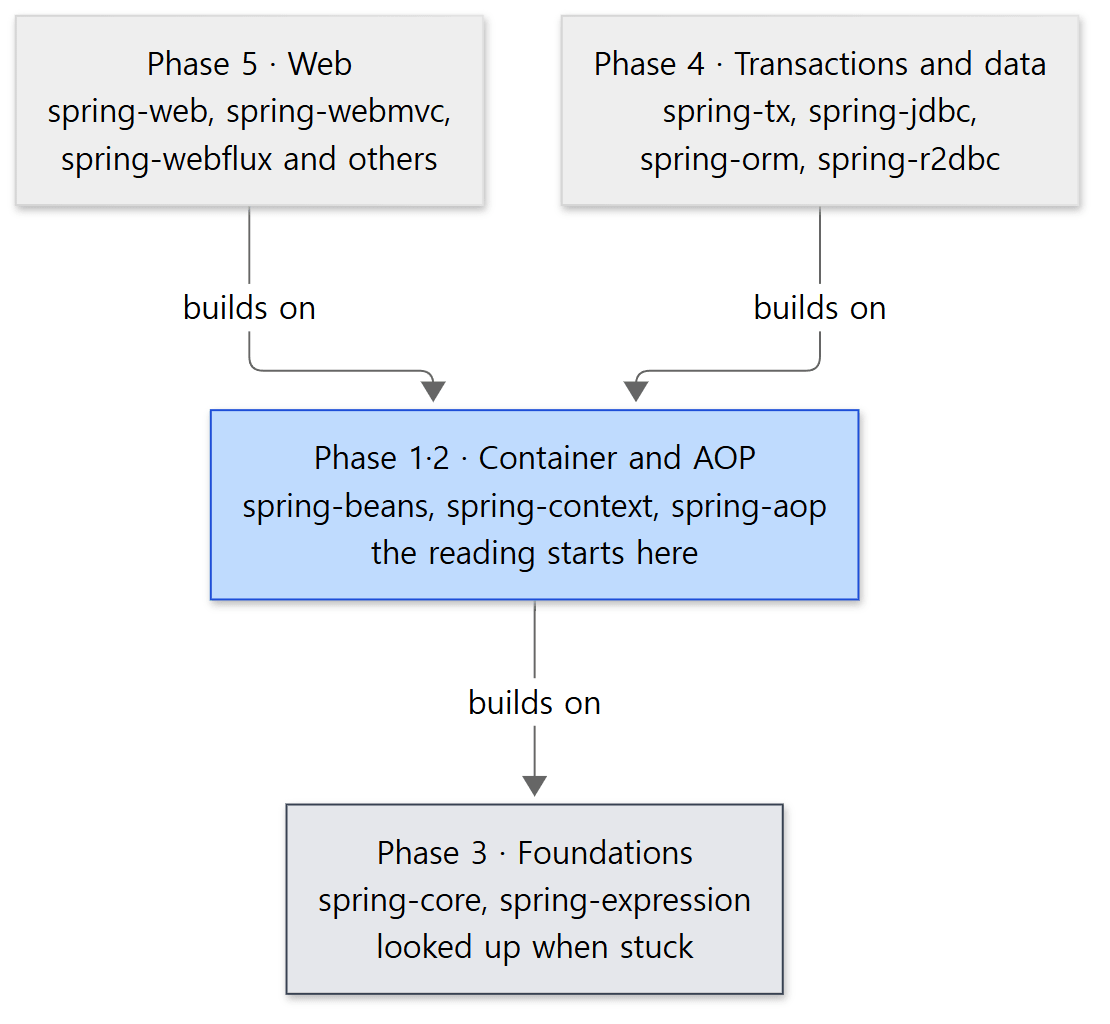 Phases and modules as layers. An arrow means "the upper one uses the code of the lower one". The reading starts at the blue box; the grey box is not read as a separate stage but looked up when needed.
| Phase | Topic | Modules mainly read | Units | Status |
|---|---|---|---|---|
| 1 | IoC container | spring-beans, spring-context |
U01–U08 | Done (posts 3~9 and 12) |
| 2 | AOP | spring-aop |
U09–U10 | Done (posts 10, 11) |
| 3 | Foundations | spring-core, spring-expression |
U11–U14 | Done (posts 13~16) |
| 4 | Transactions and data access | spring-tx, spring-jdbc, spring-orm, spring-r2dbc |
U15–U17 | Done (posts 17~19) |
| 5 | Web | spring-web, spring-webmvc, spring-webflux, spring-websocket, spring-messaging |
U18–U23 | Done (posts 20~25) |
| 6 | The rest | spring-test, plus caching, scheduling, validation and the like inside spring-context |
U24–U25 | Done (posts 26, 27) |
Phases and modules do not line up one to one. U08 in Phase 1, for instance, is also set to read the core.env and core.io packages, which live in spring-core. And some of the 22 modules, such as spring-jms and spring-oxm, have no unit of their own.
Here are the unfamiliar words in that table, briefly. You do not need them yet; they are explained again when their unit comes up.
- AOP (aspect-oriented programming): a way of gathering into one place the code that cuts in at many points in the same way, such as logging. Spring implements it with a proxy — a stand-in object that wraps the real object and receives calls in its place.
- Transaction: grouping several data operations so that either all of them happen or none of them do.
- SpEL: Spring's own small expression language. The
spring-expressionmodule is this.
Phase 1 in detail
Phase 1 is read first and most carefully, because the container is the centre of Spring.
| Unit | Title | The question it answers | Status |
|---|---|---|---|
| U01 | BeanFactory hierarchy and BeanDefinition | Which interfaces make up the container, and what is the "blueprint" of a bean? | Done → post 3 |
| U02 | Bean creation flow and the three-level cache | What happens in one call to getBean()? How are two beans that need each other created? |
Done → post 4 |
| U03 | Resolving dependency injection (DI) | How does @Autowired find the candidates to inject and choose among them? |
Done → post 5 |
| U04 | Lifecycle callbacks and PostProcessors | When, and in what order, are the extension points that let you step into the container's work (BeanPostProcessor and others) called? |
Done → post 6 |
| U05 | The 12 steps of refresh() |
In what order does the container start up? | Done → post 7 |
| U06 | Processing annotation-based configuration | How do @Configuration, @Bean and @ComponentScan turn into bean blueprints? |
Done → post 8 |
| U07 | @Conditional, @Profile, @Import |
How are registering beans conditionally and pulling in other configuration handled? | Done → post 9 |
| U08 | Events, Environment, Resource | How are publishing and receiving events, and reading settings and files, abstracted? | Done → post 12 |
Tied back to the example above: how a method marked @Bean becomes a bean's blueprint is U06, what that blueprint looks like is U01, getBean(Car.class) is U02, finding and passing the argument of car(Engine engine) is U03, and refresh() is U05.
The units in the other phases
| Phase | Units |
|---|---|
| 2 · AOP | U09 Creating proxies (the JDK way and the CGLIB way) (post 10) · U10 Auto-proxying and the advice chain (post 11) |
| 3 · Foundations | U11 Type and annotation metadata (post 13) · U12 Type conversion and BeanWrapper (post 14) · U13 SpEL (post 15) · U14 Utilities and AOT (post 16) |
| 4 · Transactions and data access | U15 The transaction abstraction and @Transactional (post 17) · U16 JdbcTemplate (post 18) · U17 ORM and R2DBC integration (post 19) |
| 5 · Web | U18 spring-web basics (post 20) · U19 How DispatcherServlet handles a request (post 21) · U20 Handler mappings and adapters (post 22) · U21 Exception handling, interceptors, views (post 23) · U22 WebFlux (post 24) · U23 WebSocket and messaging (post 25) |
| 6 · The rest | U24 spring-test (post 26) · U25 Caching, scheduling, validation, resilience (post 27) |
The reading order: nine units on the main path
The 25 units are not read in numerical order. Nine of them form the backbone, called the main path, and those are read first.
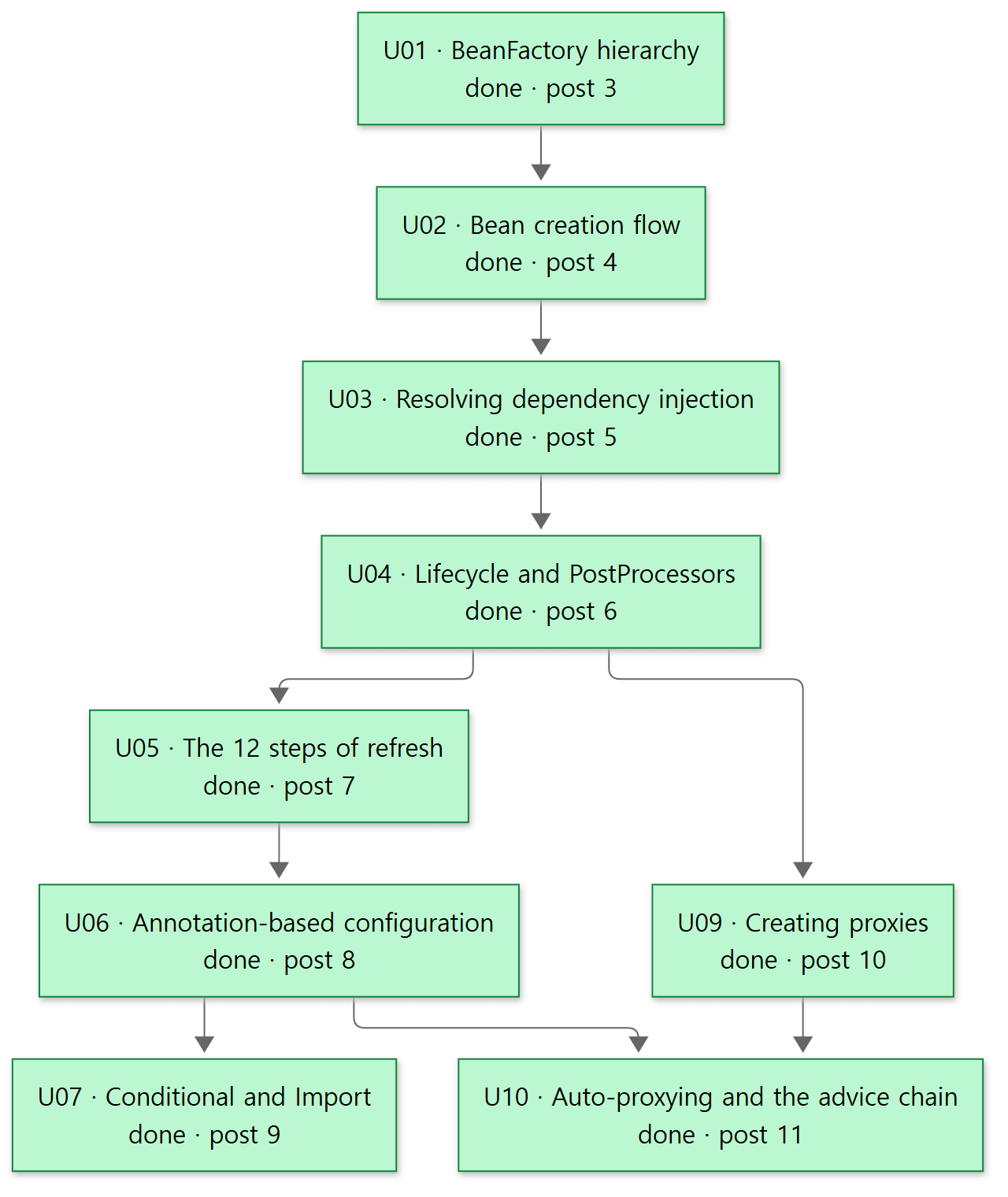 The main path. An arrow means "knowing the earlier one makes the later one quicker to understand". Green boxes are units already read, and the number in each box is the post that covers it.
There are three reasons for this order.
- The container comes first. As the layer diagram shows, the web and data modules sit on top of the container. Without knowing the container, the code in the upper layers cannot be read.
- Phase 3 (foundations) is not read as a stage of its own. It is the bottom layer, but it is not read first; it is pulled out wherever the main path gets stuck. The notes give an example: if U03 gets stuck on a class called
ResolvableType, that is when U11 is slotted in. - Phases 4 and 5 start after U10. Both assume what the main path teaches. Once the main path is finished, you can start with whichever of data or web interests you more.
The next unit is chosen by a fixed rule.
- Check on the map which units are done.
- Among the units whose prerequisites are all done, pick the one with the lowest number.
- If there are several candidates, one on the main path goes first.
- Once the main path is finished, pick the first unit of Phase 4 or Phase 5 according to interest.
The actual reading followed this rule. The nine units of the main path came first (posts 3~11), then U08, the one left over in Phase 1 (post 12), and then U11 through U25 in numerical order (posts 13~27).
The map in this post is abridged. The original notes also have, for every unit, the list of classes to read, and a table of what must be read before what. Those will be brought in as needed in the posts that cover each unit.
Easy to get confused
Spring Framework and Spring Boot are different projects. The repository's README introduces Spring Framework as the foundation for all Spring projects, and notes that the framework together with the family of projects built on it is often simply called "Spring". Spring Boot is one of the projects built on top. What this series reads is the foundation, Spring Framework.
Phase numbers are not the reading order. Phases are groups by topic. Phase 3 is only looked up when needed, and U08, which belongs to Phase 1, is not on the main path. The reading order is set by the main-path diagram and the selection rule.
The container has two names. Both BeanFactory and ApplicationContext are called the container. In the source, ApplicationContext inherits from interfaces of the BeanFactory family and adds features on top (ApplicationContext.java, lines 59–60). Post 3 covers how the two relate.
Line numbers change when the commit changes. If you download the latest source and open it, the line numbers will not match this series. To follow them, check out the commit given above or click the GitHub links in the posts.
"Done" means the notes for that unit have been written. It does not mean every line of that module has been read. spring-beans has 338 Java files, for example, but U01 and U02 cover only the classes among them that are needed to answer their questions.
Progress so far
Here is the progress log from the notes, matched up with the blog posts.
| Date | What was done | Blog post |
|---|---|---|
| 2026-10-02 | The reading map and the big map (modules, packages) written | Post 1 (this post), post 2 |
| 2026-10-02 | U01 and U02 analysed and reviewed | Post 3, post 4 |
| 2026-10-02 | The notes reorganised around diagrams | — |
| 2026-10-10 | U03~U25 checked again against the source at the pinned commit and written up | Post 5 through post 27 |
All 25 units have now been read once. As noted above, though, "done" does not mean every line of a module has been read.
Recap
| Item | In one line |
|---|---|
| Bean | An object that Spring creates and manages |
| Container | The thing that creates, connects and stores beans. BeanFactory, ApplicationContext |
| DI | Being handed the objects you need from outside instead of creating them yourself |
| IoC | The container, not your code, is in charge of creating and wiring objects |
| Source being read | Spring Framework 7.1.0-SNAPSHOT, commit f447f3c310. About 840,000 lines of main code alone |
| How it is read | Map first → pick one unit → AI analysis → review and correction → check it yourself |
| Unit | The code needed to answer one question. 10 to 25 core classes each, 25 units in all |
| Evidence | Written as file:line and pinned to a commit, because an AI's analysis can be wrong |
| Order | Container (Phase 1) → AOP (Phase 2) → data or web. Foundations when stuck |
| Progress | Two maps and all 25 units (U01~U25) done. 27 posts |
What to read next
The next post is the map. It looks at how the 22 modules lean on each other, what lives in which folder, and the overall flow of the container starting up.
- Next post: Digging into Spring's Source 2: The Big Map — Modules and Packages
- To go straight to the container's skeleton: Post 3: The BeanFactory Hierarchy and BeanDefinition
- If you are curious about the inside of
getBean(): Post 4: How a Bean Gets Created - A series that reads a web server written in C the same way: Digging into Apache httpd's Source 1: How I Read It with AI, and the Map
- A series that reads the servlet container Spring runs on, the same way: Digging into Tomcat's Source 1: How I Read It with AI, and the Map
- A series that reads the tool this repository is built with (the
settings.gradleandbuild.gradleabove), the same way: Digging into Gradle's Source 1: How I Read It with AI, and the Map