What this post covers
This is the twentieth post in the "Digging into Spring's Source" series. Part 19 closed transactions and data access (Phase 4), and with this post Phase 5, the web, of the map in Part 1 begins. The journey of one request through DispatcherServlet is the next post's job; this one looks at the floor underneath it, the spring-web module.
There are four questions to answer.
- Why is
spring-weba module of its own, and what is in it? - Who turns the body of an HTTP request or response (JSON, say) into a Java object, and how is one converter picked out of many?
- Inside a Servlet container (Tomcat), when and by whom is the Spring container started, and where is it kept afterwards?
- What do Spring's filter base classes (
OncePerRequestFilter,DelegatingFilterProxy) add to a plain Servlet filter?
| Item | Details |
|---|---|
| Source | Spring Framework 7.1.0-SNAPSHOT |
| Commit | f447f3c310 (2026-10-01, main branch) |
| Module read most | spring-web |
| Classes read most | HttpMessageConverter, AbstractHttpMessageConverter, DefaultHttpMessageConverters, ContextLoader, SpringServletContainerInitializer, OncePerRequestFilter, DelegatingFilterProxy |
Every line number and every detail in this post refers to that commit. In other versions the line numbers will differ and some details may too. Part 1 explains how to get the source at the same commit.
With 792 files and about 132,000 lines, spring-web has more lines than any other module in the repository (Part 2, section 4). This post keeps only the main thread that someone seeing Spring for the first time can follow; what was left out is named at the end, under "What this post left out".
Words to know first
HTTP message. The requests and responses a browser and a server exchange have the same shape. First come several headers, lines of the form Name: value, and then the body. The body is just a lump of bytes, so it is the headers that say what it is. Content-Type: application/json means "this body is JSON"; Accept: application/json means "I would like the response as JSON".
Media type. A name for a kind of content, written type/subtype, such as application/json or text/plain. A star stands for "anything" (text/*, */*), and parameters may follow, as in text/plain;charset=UTF-8.
Servlet and Servlet container. A Servlet is the standard interface for "a Java object that takes an HTTP request and writes a response", and a Servlet container is the server program that accepts network connections and calls those servlets (Tomcat, Jetty). For each web application the container keeps one ServletContext object, and that object comes with a store of attributes: you can put any object in under a name and get it back later. That store is the main character of section 5. The word "container" now means two things, so to be clear: in this post the Servlet container is a server such as Tomcat, and the Spring container is the ApplicationContext that builds beans.
Filter. An object that stands in line in front of a servlet and gets to touch the request and response first (jakarta.servlet.Filter). A filter does its work and calls chain.doFilter(...) to pass the request on. If it does not, the request stops there.
Serialisation and deserialisation. Turning an object into bytes (a JSON string, for example) is serialisation; the other direction is deserialisation. For JSON the best-known library doing this is Jackson.
ApplicationContext and refresh(). The method that actually starts a Spring container is refresh(), and it has twelve steps. Part 7 covered it. This post asks "in a web environment, who calls that refresh()?"
1. spring-web is the floor under both web frameworks
Spring has two web frameworks: Spring MVC (spring-webmvc), which runs on servlets, and the reactive WebFlux (spring-webflux). They process requests in completely different ways, yet both need the same answers to "how are HTTP headers represented?", "how is application/json parsed?", "where is the @RequestMapping annotation defined?". The module that holds that common ground is spring-web.
The build files show it. spring-webmvc, spring-webflux and spring-websocket all depend on this module with api(project(":spring-web")) (spring-webmvc.gradle line 12, spring-webflux.gradle line 9, spring-websocket.gradle line 6). The only Spring modules spring-web itself depends on with api are spring-beans and spring-core (its one other api dependency is Micrometer's micrometer-observation), while spring-context and the Servlet API (jakarta.servlet-api) are optional (spring-web.gradle lines 7–9, line 13, line 34). Part 2, section 3 explained the difference between api and optional. The reason is that WebFlux, which has no servlets, and programs that only use the HTTP client must be able to use this module too.
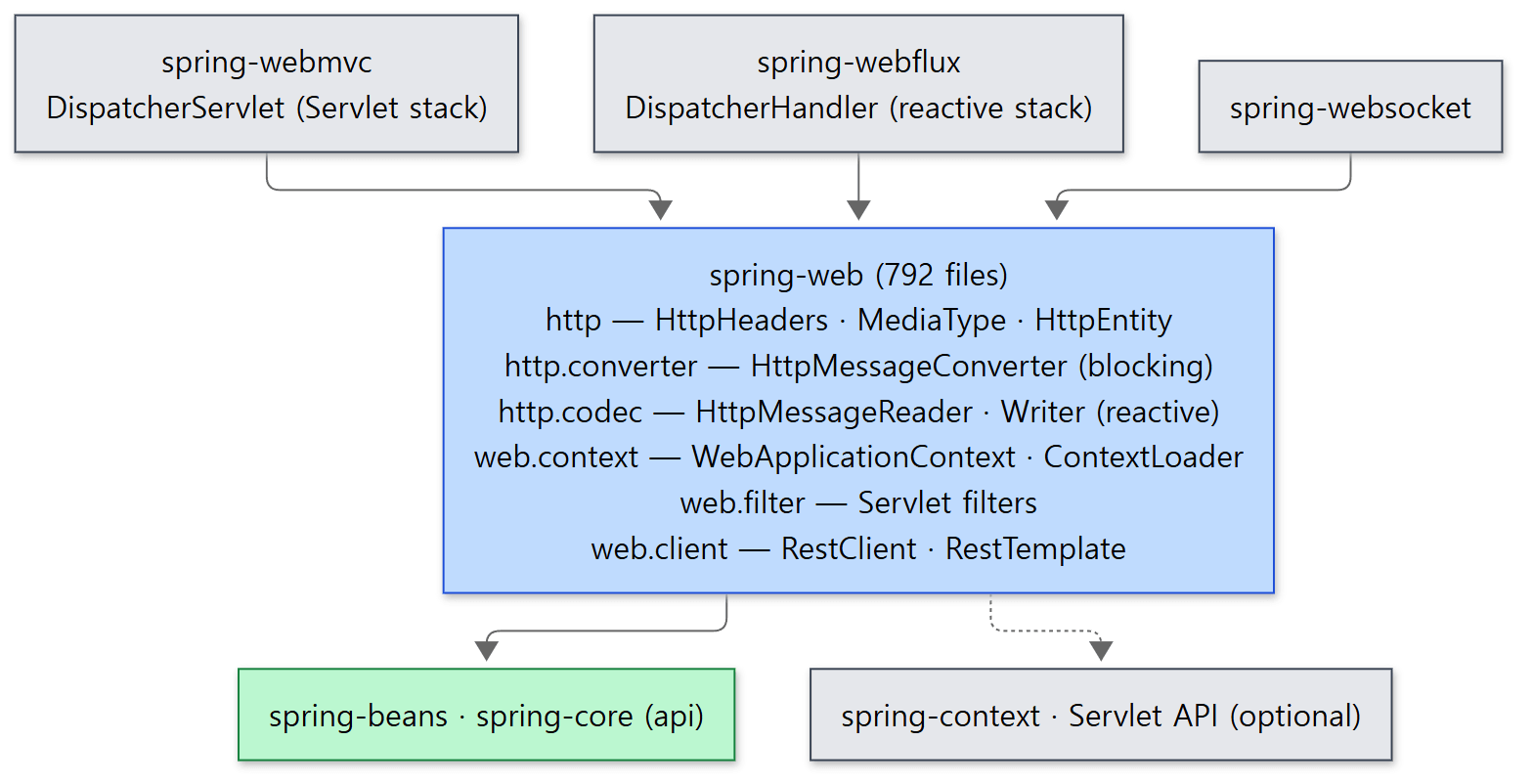 The blue box is the module this post reads. A dotted line is a dependency it can live without.
The packages grow from two roots. org.springframework.http deals with HTTP itself and does not need to know about servlets; org.springframework.web is what you build web applications with.
| Package | What is in it | In this post |
|---|---|---|
org.springframework.http |
HttpHeaders, MediaType, HttpEntity, ResponseEntity, HttpStatus |
section 2 |
http.converter |
HttpMessageConverter and its implementations (for blocking I/O) |
sections 3–4 |
http.codec |
HttpMessageReader/HttpMessageWriter (reactive; used by WebFlux) |
left out |
http.server, http.client |
request/response interfaces for the server and client sides | names only, section 2 |
web.context |
WebApplicationContext, ContextLoader, ContextLoaderListener |
section 5 |
web.filter |
GenericFilterBean, OncePerRequestFilter, DelegatingFilterProxy and more |
section 6 |
web.client |
RestClient, RestTemplate |
briefly, section 4 |
web.bind, web.method |
annotations such as @RequestMapping and @RequestBody, and the shared part of method-argument handling |
Part 22 |
Easy to get wrong
@RequestMappinglives inspring-web, not inspring-webmvc. MVC and WebFlux use the same annotation (packageweb.bind.annotation). Only the code that interprets it sits in each framework.- There are two sets of converters.
HttpMessageConverterinhttp.converterreads and writes throughInputStream/OutputStreamand is for blocking code;HttpMessageReader/HttpMessageWriterinhttp.codec(line 44) are for reactive code. The names are similar but they are different interfaces. This post looks at the first set only.
2. HTTP as objects — HttpMessage, HttpHeaders, MediaType
The Servlet API already has HttpServletRequest, so why did Spring define interfaces of its own? Because it wanted the code that converts a body to be usable on the server and on the client, with or without servlets. For that, the converter has to know very little: just "headers and a body stream".
That smallest contract is three interfaces. HttpMessage has a single getHeaders() (lines 26–34); HttpInputMessage adds InputStream getBody() (lines 32–41); HttpOutputMessage adds OutputStream getBody() (lines 32–41). A message you can read and a message you can write — that is all.
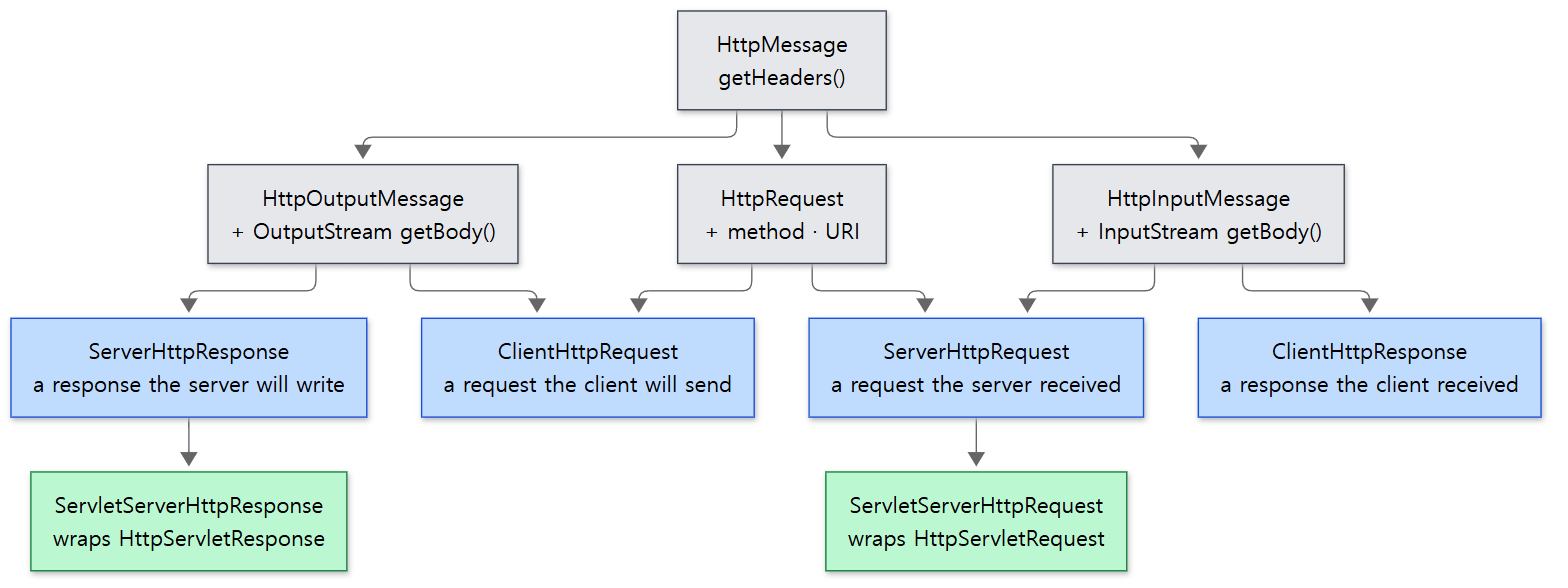 A request received by the server and a response received by the client are both "messages you read". The green boxes are adapters that wrap the Servlet objects in these interfaces.
The thing to notice in the picture is direction. A request the server received (ServerHttpRequest, line 34) and a response the client received (ClientHttpResponse, line 36) are both an HttpInputMessage. That is why one piece of code that "reads a JSON body into an object" serves both @RequestBody and the response handling of RestClient. In a Servlet environment ServletServerHttpRequest wraps an HttpServletRequest so that it looks like this interface (line 62).
The other three classes are value holders.
HttpHeaderswraps a map from header name to a list of values. The default constructor uses a map that ignores the case of the names (lines 454–456). So that you do not have to juggle strings it offers typed accessors such asgetContentType()(lines 1125–1128).MediaTypeis a media type, extendingMimeTypefromspring-core(line 56). Two comparison methods matter when a converter is picked.includesis one-way, as in "text/*includestext/plain" (MimeTypelines 374–407);isCompatibleWithis two-way and is satisfied whichever side carries the star (from line 418).HttpEntitybundles headers and a body (lines 59–70). Add a status code and you haveResponseEntity(lines 81–83); add a method and a URL and you haveRequestEntity. When a controller returnsResponseEntity.ok(body)it is saying "status 200, this body".
Easy to get wrong
HttpHeadersis no longer aMultiValueMap. The class comment says "Since 7.0, this class no longer implements theMultiValueMapcontract" (line 87), and the declaration is justimplements Serializable(line 98). Old code that passed anHttpHeadersaround as a map will not compile.- The body of an
HttpInputMessageis a stream, so it can be read only once. All the interface gives you is oneInputStream. If a filter consumes the body, the converter that comes later gets an empty one.
3. HttpMessageConverter — the interpreter between a body and an object
Now for the part that actually converts a body. The interface comes down to four methods. (Lines reading // ... are where this post cut something; everything else is the source as it is.)
public interface HttpMessageConverter<T> {

	// ...
	boolean canRead(Class<?> clazz, @Nullable MediaType mediaType);

	// ...
	boolean canWrite(Class<?> clazz, @Nullable MediaType mediaType);

	// ...
	T read(Class<? extends T> clazz, HttpInputMessage inputMessage)
			throws IOException, HttpMessageNotReadableException;

	// ...
	void write(T t, @Nullable MediaType contentType, HttpOutputMessage outputMessage)
			throws IOException, HttpMessageNotWritableException;

}
spring-web/src/main/java/org/springframework/http/converter/HttpMessageConverter.java lines 39–129
canRead/canWrite ask; read/write do. The question has two parts: the Java type (Class<?> clazz) and the media type. "Can you read the class Book as application/json?" — each converter answers yes or no. Splitting "can you?" from "do it" is what makes it possible to keep many converters in a list and ask them one after another (section 4).
AbstractHttpMessageConverter — a skeleton with the shared procedure
Most converters extend AbstractHttpMessageConverter (line 50). It has the same template method structure seen in AbstractPlatformTransactionManager in Part 17, section 4: the parent fixes the order of steps and the subclass fills in only what varies.
canRead is the && of two questions.
	@Override
	public boolean canRead(Class<?> clazz, @Nullable MediaType mediaType) {
		return supports(clazz) && canRead(mediaType);
	}
supports(clazz) is "do you handle this type?", implemented by the subclass (line 320). canRead(mediaType) checks whether one of the "supported media types" given to the constructor includes the requested one. If mediaType is null it simply returns true (lines 145–155).
write fills in the headers first and then hands the writing of the body to the subclass.
	@Override
	public final void write(final T t, @Nullable MediaType contentType, HttpOutputMessage outputMessage)
			throws IOException, HttpMessageNotWritableException {

		final HttpHeaders headers = outputMessage.getHeaders();
		addDefaultHeaders(headers, t, contentType);

		if (outputMessage instanceof StreamingHttpOutputMessage streamingOutputMessage) {
			// ...
		}
		else {
			writeInternal(t, outputMessage);
			outputMessage.getBody().flush();
		}
	}
addDefaultHeaders sets Content-Type if it is not there yet. If the contentType passed in is null or contains a star, it uses the converter's first supported type; if there is no charset it appends the converter's default charset as ;charset=. If the length can be known it sets Content-Length too (lines 244–271). A subclass has just three things to supply: supports, readInternal (line 330) and writeInternal (line 340).
Two representative implementations
StringHttpMessageConverter is the simplest. supports is String.class == clazz (lines 88–90), and the supported media types are text/plain and */* — in other words everything (lines 71–73). As long as the type is String, it will read any body as text.
JacksonJsonHttpMessageConverter reads and writes JSON with Jackson 3's JsonMapper (line 55; the source says @since 7.0). Its media types are application/json and application/*+json (lines 60–61), and on the type side its parent AbstractSmartHttpMessageConverter makes supports return true unconditionally (lines 66–69). It is the converter that says "if you call it JSON, I will take any object". The Smart in that name points at SmartHttpMessageConverter (line 41, @since 6.2), an extended interface that asks and answers with a ResolvableType (Part 13) instead of a Class, so generic information such as List<Book> is not lost. The Jackson 2 converter, MappingJackson2HttpMessageConverter, was marked for removal in 7.0 (lines 47–49).
Example 1: calling a converter by hand
A converter can be used on its own, with no container and no server. All it needs is the fake messages MockHttpInputMessage/MockHttpOutputMessage from spring-test (line 33). This is the core of ex/u18/ConverterExample.java. The example was run on the released Spring Framework 7.0.9 and produced the output below (I did not build and run the 7.1.0-SNAPSHOT this series reads).
// An example written for this post (not Spring's source)
public record Book(String title, int pages) { }

var string = new StringHttpMessageConverter();          // default charset ISO-8859-1
var json = new JacksonJsonHttpMessageConverter();
// ...
var out = new MockHttpOutputMessage();
json.write(new Book("소스 읽기", 320), null, out);      // no contentType given
System.out.println("Content-Type = " + out.getHeaders().getContentType());
System.out.println("body         = " + out.getBodyAsString(StandardCharsets.UTF_8));
// ...
var in = new MockHttpInputMessage("{\"title\":\"Spring\",\"pages\":100}".getBytes(StandardCharsets.UTF_8));
in.getHeaders().setContentType(appJson);
Object book = json.read(Book.class, in);
System.out.println("read         = " + book);
// ...
var latin = new MockHttpOutputMessage();
string.write("한글", textPlain, latin);
// ...
The two Korean strings are test data on purpose: "소스 읽기" ("reading source") is a book title, and "한글" is two Korean characters, six bytes in UTF-8.
[1] canRead / canWrite
string.canRead(String, text/plain)       = true
string.canRead(String, application/json) = true
string.canRead(Book,   application/json) = false
json.canRead(Book,     application/json) = true
json.canRead(Book,     text/plain)       = false
json.canWrite(Book,    null)             = true
[2] object -> JSON (write)
Content-Type = application/json
body         = {"title":"소스 읽기","pages":320}
[3] JSON -> object (read)
read         = Book[title=Spring, pages=100]
[4] default charset of StringHttpMessageConverter
new StringHttpMessageConverter()      : text/plain;charset=ISO-8859-1, Content-Length=2, body=??
new StringHttpMessageConverter(UTF_8) : text/plain;charset=UTF-8, Content-Length=6, body=한글
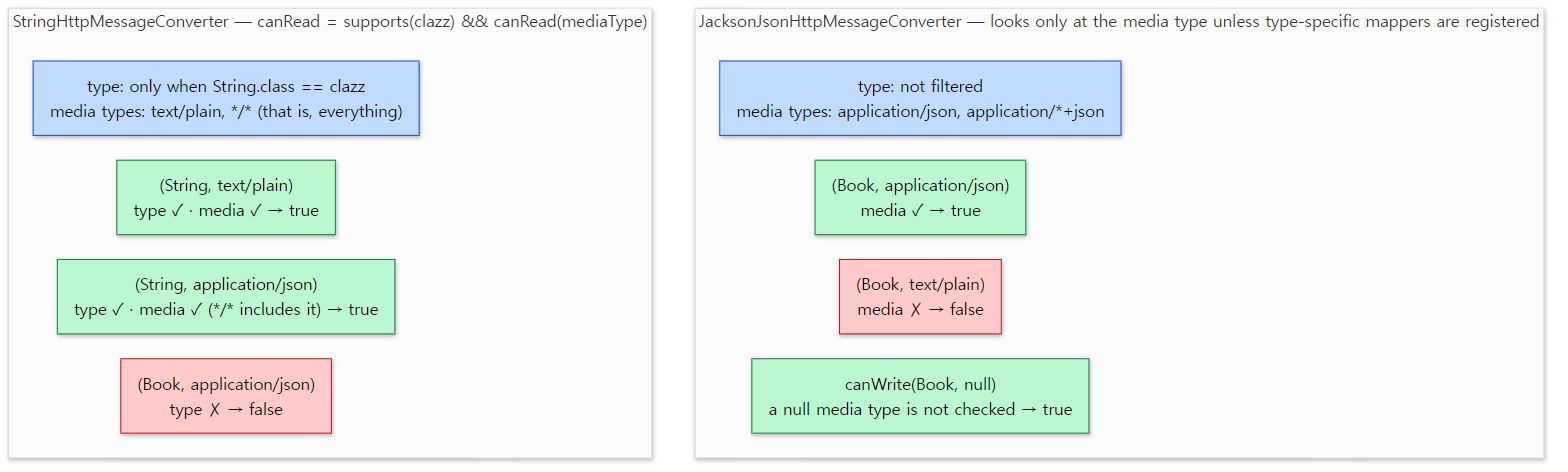 The type and the media type are two separate questions. Green is
true, red is false; the results are exactly output [1] above.
- [1]
stringis willing to readapplication/jsonas long as the type isString, and refusesBook.jsontakesBookbut refusestext/plain. The two criteria, type and media type, work independently. - [2]
nullwas passed ascontentType, and yetContent-Type: application/jsonappeared. That isaddDefaultHeadersfrom above putting in the first supported type. - [4] This is the first item under "Easy to get wrong" below.
Easy to get wrong
- The default charset of
StringHttpMessageConverteris ISO-8859-1, not UTF-8 (line 51; the default constructor is at lines 63–65). In output [4] the two Korean characters became two?bytes. If theContent-Typenames a charset that one is used, and JSON-like media types are an exception that falls back to UTF-8 (lines 144–159), but a baretext/plainfollows the default. The Jackson converter uses UTF-8 when no charset is given (lines 390–397). readandwritearefinal(lines 192–197, lines 203–205). When you write your own converter, the methods to override arereadInternal/writeInternal.canReadreturningtruedoes not mean the conversion will succeed. Unless per-type mappers have been registered, the Jackson converter'scanReadanswers from the media type alone (lines 262–268). Whether the class can really be built only shows inread, and a failure there becomes anHttpMessageNotReadableException(lines 367–369).
4. The converter list — who assembles it and how one is picked
One converter knows one format. A real application exchanges strings, JSON and files, so it holds a list of converters and picks one each time.
Assembling: HttpMessageConverters
Since 7.0 building the list is the job of an interface called HttpMessageConverters (line 34, @since 7.0). There are separate builders for server and client use (forClient() at line 61, forServer() at line 86), and calling registerDefaults() adds default converters depending on which libraries are on the classpath.
"Depending on" is meant literally. When the implementation class DefaultHttpMessageConverters is loaded, it runs checks such as ClassUtils.isPresent("tools.jackson.databind.ObjectMapper", …) once each, stores the answers in static final boolean fields (lines 152–172) and branches on them. This is the part that chooses the JSON converter.
			if (this.jsonConverter == null) {
				if (JACKSON_PRESENT) {
					this.jsonConverter = new JacksonJsonHttpMessageConverter();
				}
				else if (JACKSON_2_PRESENT) {
					this.jsonConverter = new MappingJackson2HttpMessageConverter();
				}
				else if (GSON_PRESENT) {
					this.jsonConverter = new GsonHttpMessageConverter();
				}
				else if (JSONB_PRESENT) {
					this.jsonConverter = new JsonbHttpMessageConverter();
				}
			}
Jackson 3, Jackson 2, Gson, JSON-B, in that order, and only the first one found is used. The if (this.jsonConverter == null) at the top means detection is skipped when the user supplied one with withJsonConverter(...). This is how spring-web can depend on Jackson only as optional (line 59 of the build file from section 1) and still use it whenever it is there.
The order of the list is decided by build(). The client builder adds the user's own converters → ByteArray, String, form → Resource → multipart → the rest such as JSON and XML (lines 500–529). The server builder has the same shape (lines 633–666).
Picking: ask from the front, take the first that says yes
The picking code lives with whoever uses the list. Inside spring-web the shortest specimen is HttpMessageConverterExtractor, which the HTTP clients use to read a response body.
			for (HttpMessageConverter<?> messageConverter : this.messageConverters) {
				if (messageConverter instanceof GenericHttpMessageConverter genericMessageConverter) {
					// ...
				}
				else if (messageConverter instanceof SmartHttpMessageConverter smartMessageConverter) {
					// ...
				}
				else if (this.responseClass != null && messageConverter.canRead(this.responseClass, contentType)) {
					// ...
					return (T) messageConverter.read((Class) this.responseClass, responseWrapper);
				}
			}
It is a single for loop. Walk the list from the front, ask canRead, and with the first converter that answers true call read and return at once. The three branches exist only so that a converter implementing one of the generics-aware extension interfaces (GenericHttpMessageConverter, SmartHttpMessageConverter) is asked through that interface's methods; the job is the same. If nobody takes it, an UnknownContentTypeException is thrown (lines 132–134).
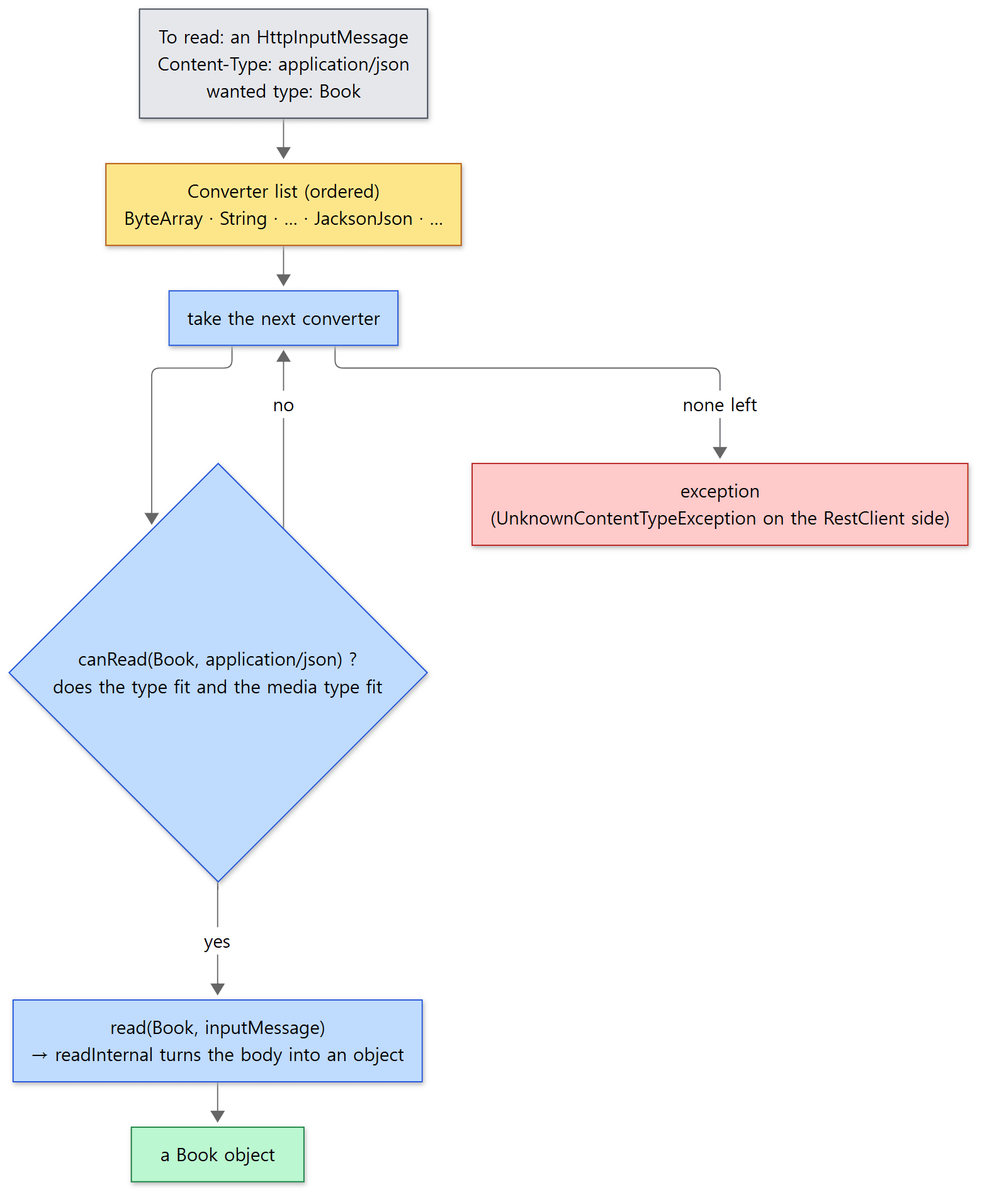 The yellow box is the converter list. Because "the first match" wins, the order changes the result.
The server side — the code behind @RequestBody and @ResponseBody — has a for loop of the same shape (AbstractMessageConverterMethodArgumentResolver line 178). That code lives in spring-webmvc, though, and is entangled with the negotiation that decides the response format from the Accept header, so it belongs to Part 22. The list Spring MVC uses is built by WebMvcConfigurationSupport.createMessageConverters() with HttpMessageConverters.forServer().registerDefaults() (lines 872–876).
RestClient and RestTemplate use the same converters
The HTTP clients in the web.client package use the same parts in the opposite direction. The object to send becomes the request body through canWrite/write, and the response becomes an object through the HttpMessageConverterExtractor above. The list is built in the same place too. RestTemplate's default constructor calls HttpMessageConverters.forClient().registerDefaults().build() (lines 129–131), and RestClient's builder registers the same defaults when the user configured nothing (lines 498–514).
Example 1 (continued): the default list and the pick
The last part of the same example imitates that for loop.
// An example written for this post (not Spring's source)
HttpMessageConverters converters = HttpMessageConverters.forClient().registerDefaults().build();
// ...
System.out.println("first converter that can read Book   + application/json = " + firstReader(converters, Book.class, appJson));
System.out.println("first converter that can read String + application/json = " + firstReader(converters, String.class, appJson));
// ...
private static String firstReader(HttpMessageConverters converters, Class<?> type, MediaType mediaType) {
    for (HttpMessageConverter<?> converter : converters) {
        if (converter.canRead(type, mediaType)) {
            return converter.getClass().getSimpleName();
        }
    }
    return "(none)";
}
[5] default converters (forClient) and who gets picked
  0 ByteArrayHttpMessageConverter
  1 StringHttpMessageConverter
  2 ResourceHttpMessageConverter
  3 AllEncompassingFormHttpMessageConverter
  4 JacksonJsonHttpMessageConverter
  5 Jaxb2RootElementHttpMessageConverter
first converter that can read Book   + application/json = JacksonJsonHttpMessageConverter
first converter that can read String + application/json = StringHttpMessageConverter
The last two lines are the point. With the very same application/json body, if the wanted type is String, converter 1, StringHttpMessageConverter, says yes first and you get the JSON text as a plain string; if it is Book, converters 0 to 3 all decline and converter 4, the Jackson one, takes it.
Note that this list is what 7.0.9 produces. The build() in the commit this post reads (lines 500–529) is slightly different. The form converter is a FormHttpMessageConverter placed right after String (lines 243–255); MultipartHttpMessageConverter, new in 7.1 (lines 138–141, @since 7.1), goes in after Resource; and the AllEncompassingFormHttpMessageConverter visible in the output was marked for removal in 7.1 (lines 32–35). I did not run 7.1.0-SNAPSHOT myself, so I am not printing its list here. Jaxb2RootElementHttpMessageConverter shows up because another dependency of the example project pulled in the JAXB API.
Easy to get wrong
- Order is priority. If you add your own converter at the end of the list, it is never called as long as an earlier one says yes first. That is why the builder puts user converters at the front (lines 507–508).
- When a controller returns a
String, no JSON quotes are added. TheStringtype is taken byStringHttpMessageConverterfirst. The last line of the output above shows the same thing in the reading direction. - The server builder's comment and its code disagree on the order. The comment on
forServer()lists the multipart converter last (lines 67–84), butbuild()puts it before converters such as JSON (lines 655–658). This post follows the code.
5. WebApplicationContext — starting the Spring container inside a Servlet container
The examples in Part 7 created a context in a main method and called refresh() themselves. A web application has no main of ours. The program belongs to Tomcat, and Tomcat knows nothing about Spring. So who calls refresh(), and how do servlets and filters find the context that was built?
What WebApplicationContext adds
WebApplicationContext is an interface that adds exactly two things to ApplicationContext (lines 45–105): one method, getServletContext(), and a few constants. The most important of those constants is this one.
String ROOT_WEB_APPLICATION_CONTEXT_ATTRIBUTE = WebApplicationContext.class.getName() + ".ROOT";
spring-web/src/main/java/org/springframework/web/context/WebApplicationContext.java line 55
It is a promise to put the context into the ServletContext's attribute store, the one from "Words to know first", under this name. Hang the Spring container on an object Tomcat knows (ServletContext), and anyone who can reach the ServletContext can take it down again. A context hung there is called the root context.
The implementation classes follow the two branches seen in Part 7, section 7. GenericWebApplicationContext extends GenericApplicationContext (lines 73–74), while AnnotationConfigWebApplicationContext and XmlWebApplicationContext extend AbstractRefreshableWebApplicationContext (line 100, lines 73–74). The place where a web context differs from an ordinary one is step 4 of refresh(), postProcessBeanFactory(), whose default implementation was empty. Here the request and session scopes are registered, the ServletContext is added as a bean named servletContext, and a post-processor is attached that hands the ServletContext to beans implementing ServletContextAware (lines 150–156, WebApplicationContextUtils lines 180–199, lines 218–261). The Environment also changes, to a StandardServletEnvironment that adds the Servlet init parameters as PropertySources (Part 12) (lines 109–116).
ContextLoaderListener — where refresh() gets called
The Servlet specification has an interface for "tell me when the web application starts and when it ends": ServletContextListener. ContextLoaderListener implements it, and its body is surprisingly short. On the start notification it calls initWebApplicationContext; on the end notification, closeWebApplicationContext (lines 122–125, lines 132–136). The real work is in the parent class ContextLoader.
	public WebApplicationContext initWebApplicationContext(ServletContext servletContext) {
		if (servletContext.getAttribute(WebApplicationContext.ROOT_WEB_APPLICATION_CONTEXT_ATTRIBUTE) != null) {
			throw new IllegalStateException(
					"Cannot initialize context because there is already a root application context present - " +
					"check whether you have multiple ContextLoader* definitions in your web.xml!");
		}
		// ...
		try {
			// Store context in local instance variable, to guarantee that
			// it is available on ServletContext shutdown.
			if (this.rootContext == null) {
				this.rootContext = createWebApplicationContext(servletContext);
			}
			if (this.rootContext instanceof ConfigurableWebApplicationContext cwac && !cwac.isActive()) {
				// The context has not yet been refreshed -> provide services such as
				// setting the parent context, setting the application context id, etc
				if (cwac.getParent() == null) {
					// The context instance was injected without an explicit parent ->
					// determine parent for root web application context, if any.
					ApplicationContext parent = loadParentContext(servletContext);
					cwac.setParent(parent);
				}
				configureAndRefreshWebApplicationContext(cwac, servletContext);
			}
			servletContext.setAttribute(WebApplicationContext.ROOT_WEB_APPLICATION_CONTEXT_ATTRIBUTE, this.rootContext);
			// ...
			return this.rootContext;
		}
		catch (RuntimeException | Error ex) {
			logger.error("Context initialization failed", ex);
			servletContext.setAttribute(WebApplicationContext.ROOT_WEB_APPLICATION_CONTEXT_ATTRIBUTE, ex);
			throw ex;
		}
	}
spring-web/src/main/java/org/springframework/web/context/ContextLoader.java lines 242–295
Reading from the top:
- If a root context already exists, throw. Something sitting in the attribute store under that name means
ContextLoaderwas registered twice. - If there is no context, create one. If one was passed to the constructor it is used; otherwise
createWebApplicationContextdecides on a class name and instantiates it. The name is looked up in the init parametercontextClass, and failing that it is the default written inContextLoader.propertiesinside thespring-webjar,XmlWebApplicationContext(lines 326–359). - If it has not been started yet, configure it and
refresh().configureAndRefreshWebApplicationContextpasses theServletContextin withsetServletContext(sc), sets the config location if there is acontextConfigLocationparameter, and on its last line callswac.refresh()(lines 361–392). The twelve steps of Part 7 run here. - Put it into the
ServletContextattribute (line 273). This one line joins Tomcat's world to Spring's. - On failure, put the exception object under the same name (line 292). That way whoever tries to fetch the context later learns not just "it is missing" but "why it failed".
WebApplicationContextUtils.getWebApplicationContextrethrows the value if it turns out to be an exception (lines 109–128).
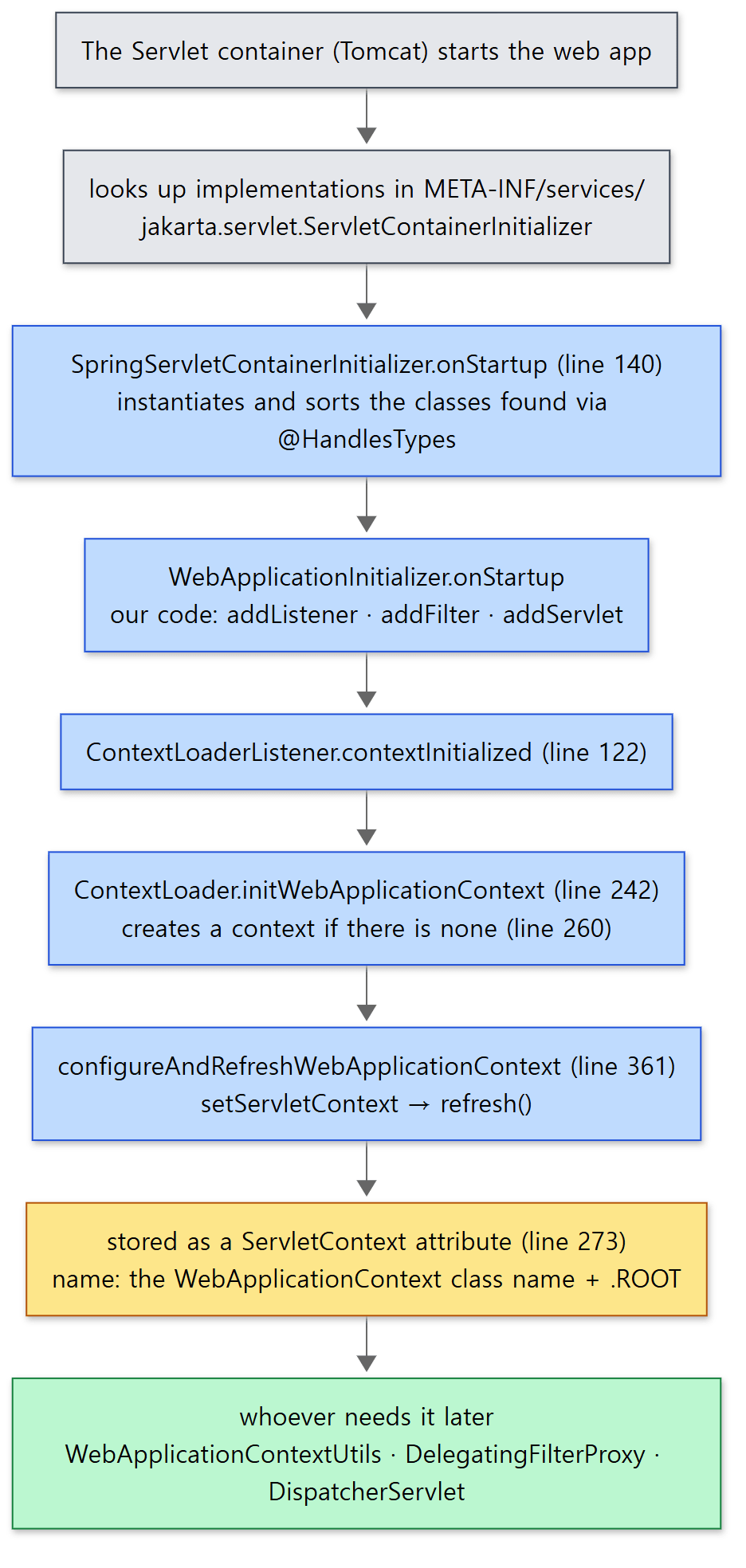 The yellow box is the
ServletContext's attribute store. Above it is the way in; below it, those who take it out.
Without web.xml — SpringServletContainerInitializer and WebApplicationInitializer
Then who registers ContextLoaderListener with Tomcat? Traditionally you write it as a <listener> in the file WEB-INF/web.xml. The Servlet specification also offers a way to register things in code, with no file, and this is how Spring hooked into it.
According to the Servlet specification, if a jar contains a file META-INF/services/jakarta.servlet.ServletContainerInitializer, the class named in it is called at startup. The spring-web jar has that file and it holds a single line, org.springframework.web.SpringServletContainerInitializer. That class carries @HandlesTypes(WebApplicationInitializer.class) (lines 110–111), so the container finds every class on the classpath that implements WebApplicationInitializer and passes them as the first argument of onStartup. That search is done by the Servlet container, so it is not something I verified in source for this post; it is what the comment on the onStartup method says (lines 115–118).
	public void onStartup(@Nullable Set<Class<?>> webAppInitializerClasses, ServletContext servletContext)
			throws ServletException {

		List<WebApplicationInitializer> initializers = Collections.emptyList();

		if (webAppInitializerClasses != null) {
			initializers = new ArrayList<>(webAppInitializerClasses.size());
			for (Class<?> waiClass : webAppInitializerClasses) {
				// ...
				if (!waiClass.isInterface() && !Modifier.isAbstract(waiClass.getModifiers()) &&
						WebApplicationInitializer.class.isAssignableFrom(waiClass)) {
					try {
						initializers.add((WebApplicationInitializer)
								ReflectionUtils.accessibleConstructor(waiClass).newInstance());
					}
					// ...
				}
			}
		}

		// ...
		AnnotationAwareOrderComparator.sort(initializers);
		for (WebApplicationInitializer initializer : initializers) {
			initializer.onStartup(servletContext);
		}
	}
It filters interfaces and abstract classes out of what it was given, creates objects with the no-argument constructor, sorts them in the order given by @Order or Ordered, and calls onStartup(servletContext) on each. WebApplicationInitializer is an interface with just that one method (lines 159–171), and inside it we do in Java what used to be written in web.xml, such as servletContext.addListener(new ContextLoaderListener(...)). The base class that does this registration for you is AbstractContextLoaderInitializer (lines 58–69).
Example 2: a root context on an embedded Tomcat
ex/u18/RootContextTomcatExample.java starts Tomcat inside the program and actually walks through the steps above. It was run on 7.0.9 with tomcat-embed-core 11.0.15.
// An example written for this post (not Spring's source)
/** Java configuration in place of web.xml. Spring calls it when the Servlet container starts. */
public static class MyInitializer implements WebApplicationInitializer {

    @Override
    public void onStartup(ServletContext servletContext) {
        System.out.println("1. WebApplicationInitializer.onStartup");
        var root = new AnnotationConfigWebApplicationContext();
        root.register(RootConfig.class);                      // not refreshed yet
        System.out.println("2. ContextLoaderListener registered (root.isActive=" + root.isActive() + ")");
        servletContext.addListener(new ContextLoaderListener(root));

        servletContext.addFilter("stampFilter", new DelegatingFilterProxy("stampFilter"))
                .addMappingForUrlPatterns(EnumSet.of(DispatcherType.REQUEST), false, "/*");

        servletContext.addServlet("hello", new HttpServlet() {
            @Override
            protected void doGet(HttpServletRequest request, HttpServletResponse response) throws IOException {
                WebApplicationContext wac =
                        WebApplicationContextUtils.getRequiredWebApplicationContext(getServletContext());
                response.setContentType("text/plain");
                response.getWriter().print(wac.getBean(Greeter.class).greet("servlet"));
            }
        }).addMapping("/hello");
    }
}

// ...
Context context = tomcat.addContext("", Files.createTempDirectory("u18-docbase").toString());
// what the container normally does by scanning jars is done by hand here
context.addServletContainerInitializer(new SpringServletContainerInitializer(), Set.of(MyInitializer.class));
tomcat.start();
// ...
RootConfig holds a Greeter bean and a filter bean, stampFilter, which gets the Greeter injected and adds an X-Stamp header to the response (section 6 comes back to it). Lines 3 and 7 are printed by an @EventListener inside RootConfig.
1. WebApplicationInitializer.onStartup
2. ContextLoaderListener registered (root.isActive=false)
3. root context refreshed: AnnotationConfigWebApplicationContext
4. ServletContext attribute name = org.springframework.web.context.WebApplicationContext.ROOT
   value = AnnotationConfigWebApplicationContext, Environment = StandardServletEnvironment, has servletContext bean = true
5. GET /hello -> 200 body="hello, servlet" X-Stamp="hello, filter"
6. tomcat.stop()
7. root context closed
8. attribute after stop = null
- 1→2→3. When the listener is registered in
onStartupthe context is still off (isActive=false); it is refreshed afterwards, when Tomcat calls the listener. That is the "if it has not been started yet, start it" branch ofContextLoader. - 4. The attribute name is the full name of the
WebApplicationContextinterface plus.ROOT; theEnvironmentis aStandardServletEnvironment; and a bean namedservletContextis there. - 5. A plain servlet with no Spring MVC anywhere fetched the root context through
WebApplicationContextUtilsand used a bean. - 6→7→8. Stopping Tomcat calls
contextDestroyed, which closes the context and removes the attribute (lines 502–519).
Easy to get wrong
- The root context is the place for "things that are not the web layer". The comment on
WebApplicationContextsays there is a single root context per application and each servlet has its own child context (lines 32–34). WhenDispatcherServletcreates its own context it takes the root context out of this attribute and makes it the parent (FrameworkServletlines 557–558). That story continues in Part 21. - Spring MVC works without
ContextLoaderListener.DispatcherServletcan create a context all by itself. Those who really need a root context are the ones looking for beans from outside the servlet, like theDelegatingFilterProxyin the example. - Without
contextConfigLocation, the default context goes looking for XML. The default class isXmlWebApplicationContext. To use Java configuration you either create the context yourself and pass it to the constructor, as the example does, or set thecontextClassparameter.
6. Filters — GenericFilterBean, OncePerRequestFilter, DelegatingFilterProxy
The web.filter package holds ready-made filters together with base classes to extend when writing your own. The base classes come in three layers, from the bottom up.
GenericFilterBean — a filter that behaves like a bean
A Servlet filter is normally created by the container and receives its settings through init(FilterConfig). GenericFilterBean (lines 80–81) makes the filter initialise the same way whichever of the two worlds created it.
- Created by the Servlet container:
init()copies the init parameters of theFilterConfiginto its own properties with aBeanWrapper(lines 205–238). A parameterencoding=UTF-8ends up as a call tosetEncoding("UTF-8").BeanWrapper, which sets properties from strings, was the subject of Part 14. - Created as a Spring bean: it is an
InitializingBean, soafterPropertiesSet()is called (lines 167–169).
Both roads end in a call to initFilterBean(), and a subclass only has to override that one method (lines 263–264).
OncePerRequestFilter — only once per request
A single request from the browser can pass through a filter several times. When a servlet hands the request to another servlet (a forward), sends it to an error page, or dispatches it again after asynchronous processing, the container may run the filter chain again. For a filter that authenticates or logs, running twice each time is a problem. OncePerRequestFilter is the base class that prevents it, and its method is to leave a mark on the request object.
	public void doFilter(ServletRequest request, ServletResponse response, FilterChain filterChain)
			throws ServletException, IOException {

		// ...
		String alreadyFilteredAttributeName = getAlreadyFilteredAttributeName();
		boolean hasAlreadyFilteredAttribute = request.getAttribute(alreadyFilteredAttributeName) != null;

		if (skipDispatch(httpRequest) || shouldNotFilter(httpRequest)) {
			// Proceed without invoking this filter...
			filterChain.doFilter(request, response);
		}
		else if (hasAlreadyFilteredAttribute) {
			if (DispatcherType.ERROR.equals(request.getDispatcherType())) {
				doFilterNestedErrorDispatch(httpRequest, httpResponse, filterChain);
				return;
			}

			// Proceed without invoking this filter...
			filterChain.doFilter(request, response);
		}
		else {
			// Do invoke this filter...
			request.setAttribute(alreadyFilteredAttributeName, Boolean.TRUE);
			try {
				doFilterInternal(httpRequest, httpResponse, filterChain);
			}
			finally {
				// Remove the "already filtered" request attribute for this request.
				request.removeAttribute(alreadyFilteredAttributeName);
			}
		}
	}
spring-web/src/main/java/org/springframework/web/filter/OncePerRequestFilter.java lines 89–123
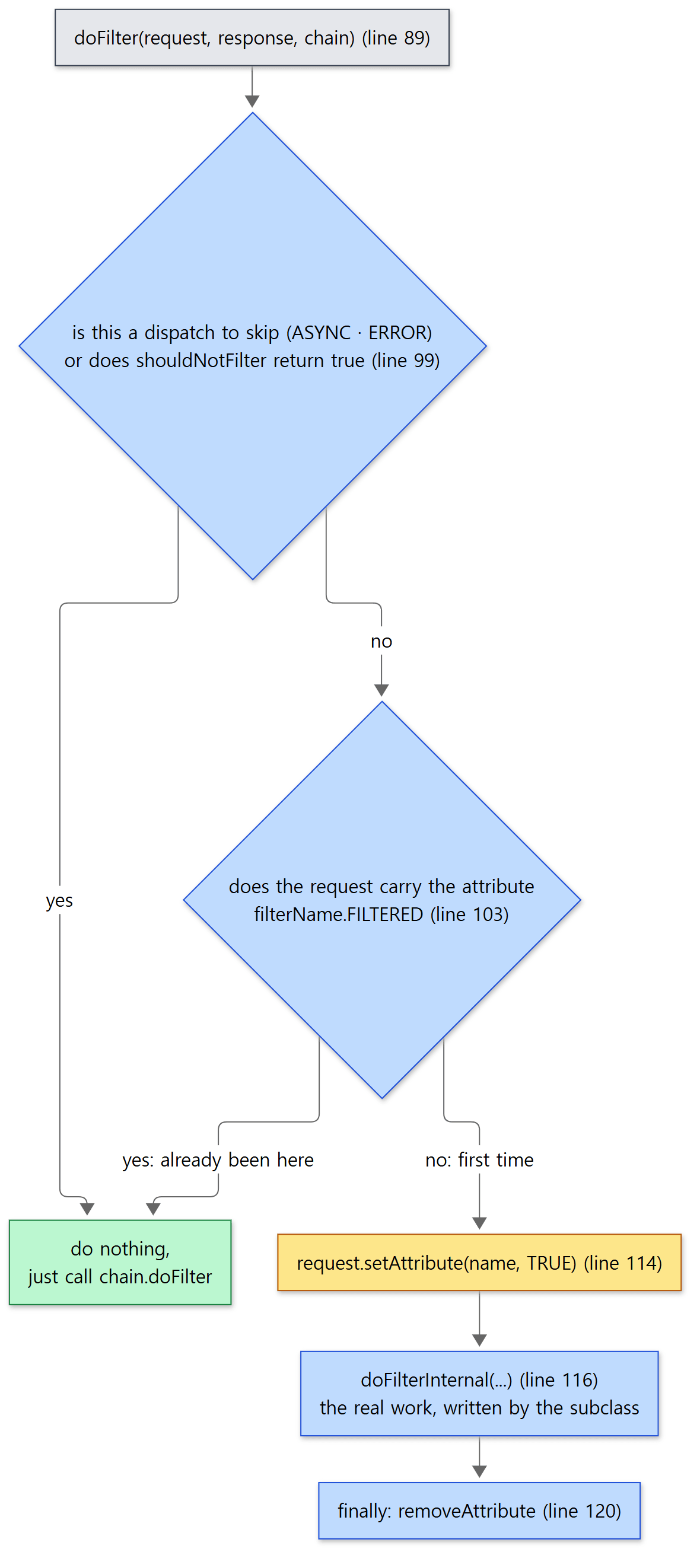 The yellow box is the line that leaves the mark. Both roads into the green box mean "no work this time".
- Decide the attribute name used as the mark: the filter name (or the class name if there is none) plus
.FILTERED(lines 168–174). - If this is a dispatch it has chosen to skip (ASYNC and ERROR by default, lines 205–207 and 216–218) or
shouldNotFilterreturnstrue, pass on without working. - If the request already carries the mark, pass on without working.
- If there is no mark, leave the mark and call
doFilterInternal. That is the method the subclass implements, and its arguments areHttpServletRequest/HttpServletResponsefrom the start, so no casting is needed (lines 228–230). - In
finally, remove the mark.
The mark is kept in a request attribute because request attributes travel along through a forward. Kept in a field of the filter object, it would get mixed up with other requests arriving at the same time.
CharacterEncodingFilter is the best-known filter extending this class. All its doFilterInternal does is set the configured encoding on the request if it has none (or if told to force it) and pass the chain on (lines 186–200).
Example 3: making one request pass a filter twice
ex/u18/OncePerRequestFilterExample.java imitates a forward with MockFilterChain from spring-test. The first servlet runs the filter chain once more with the same request object.
// An example written for this post (not Spring's source)
/** An ordinary filter: it works every time it is called. */
static class PlainFilter extends GenericFilterBean {
    int count;

    @Override
    public void doFilter(ServletRequest request, ServletResponse response, FilterChain chain)
            throws IOException, ServletException {
        System.out.println("  PlainFilter.doFilter #" + (++count));
        chain.doFilter(request, response);
    }
}

/** A filter that works only once per request. */
static class OnceFilter extends OncePerRequestFilter {
    int count;

    String flagName() {
        return getAlreadyFilteredAttributeName();   // to look at a protected method from outside
    }

    @Override
    protected void doFilterInternal(HttpServletRequest request, HttpServletResponse response, FilterChain chain)
            throws ServletException, IOException {
        System.out.println("  OnceFilter.doFilterInternal #" + (++count)
                + "  (" + flagName() + " = " + request.getAttribute(flagName()) + ")");
        chain.doFilter(request, response);
    }
}

// ...
Servlet forwarding = new HttpServlet() {
    @Override
    protected void service(HttpServletRequest request, HttpServletResponse response)
            throws ServletException, IOException {
        System.out.println("  servlet: run the chain again with the same request (like a forward)");
        new MockFilterChain(endpoint, plain, once).doFilter(request, response);
    }
};
// ...
var request = new MockHttpServletRequest("GET", "/hello");
new MockFilterChain(forwarding, plain, once).doFilter(request, new MockHttpServletResponse());
[1] one request passes the filters twice
  PlainFilter.doFilter #1
  OnceFilter.doFilterInternal #1  (ex.u18.OncePerRequestFilterExample$OnceFilter.FILTERED = true)
  servlet: run the chain again with the same request (like a forward)
  PlainFilter.doFilter #2
  servlet reached
PlainFilter ran 2 times, OnceFilter ran 1 time(s)
attribute after the request = null
[2] a new request
  OnceFilter.doFilterInternal #2  (ex.u18.OncePerRequestFilterExample$OnceFilter.FILTERED = true)
  servlet reached
OnceFilter ran 2 time(s) in total
[3] an ASYNC dispatch
  servlet reached
OnceFilter ran 2 time(s) in total
- [1] While the same request passed through twice,
PlainFilterworked twice andOnceFilteronce. InsidedoFilterInternalthe mark attribute istrue, and after the request it has been removed (null). - [2] A new request object carries no mark, so the filter works again. The unit of "once" is the request, not the filter object.
- [3] For a request whose dispatch type is ASYNC,
doFilterInternalwas not called at all, becauseshouldNotFilterAsyncDispatch()returnstrueby default.
DelegatingFilterProxy — a filter that is a Spring bean
Trouble starts when a filter needs other beans injected. A filter is an object managed by the Servlet container, and the Servlet container does not know Spring's beans. DelegatingFilterProxy (line 86) is the bridge between them. You register this proxy with the container as the filter, and when a request arrives the proxy finds the real filter bean in the Spring context and passes the call straight on.
	protected Filter initDelegate(WebApplicationContext wac) throws ServletException {
		String targetBeanName = getTargetBeanName();
		Assert.state(targetBeanName != null, "No target bean name set");
		Filter delegate = wac.getBean(targetBeanName, Filter.class);
		if (isTargetFilterLifecycle()) {
			delegate.init(getFilterConfig());
		}
		return delegate;
	}
spring-web/src/main/java/org/springframework/web/filter/DelegatingFilterProxy.java lines 332–340
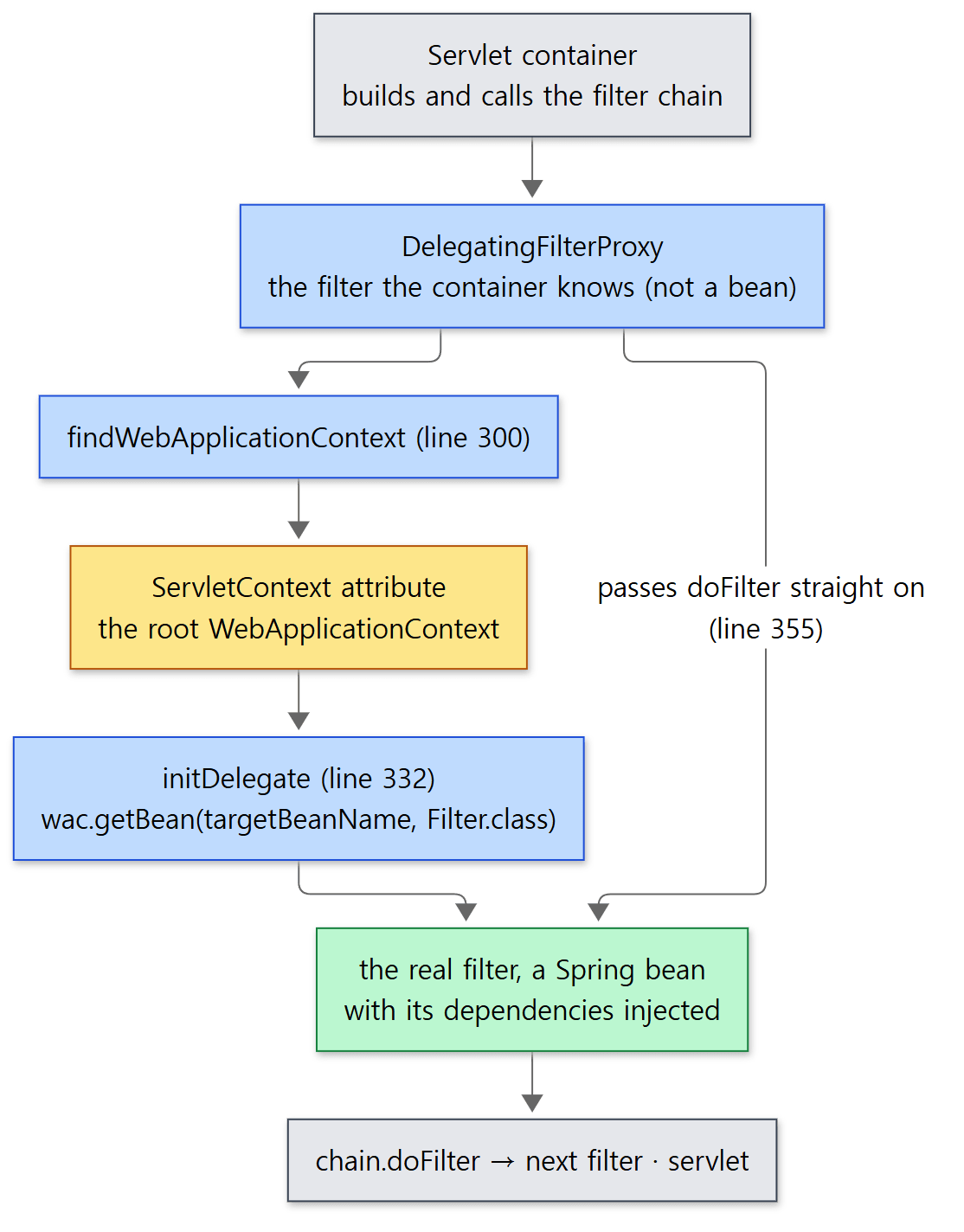 The yellow box is the attribute from section 5. Because the root context hangs on the
ServletContext, a filter can find beans.
wac is the root context taken out of the ServletContext attribute from section 5 (lines 300–316). Unless you set a bean name, the filter name is used (lines 229–231). There are two moments at which the real filter may be looked up. If the context already exists when the filter is initialised, it is looked up then (lines 224–244); if not, it is looked up when the first request arrives (lines 247–273). If there is still none, you get the exception "No WebApplicationContext found: no ContextLoaderListener or DispatcherServlet registered?".
Example 2 already used this. The proxy registered with addFilter("stampFilter", new DelegatingFilterProxy("stampFilter")) found the stampFilter bean in the root context, and since that bean had the Greeter injected, the response came back with X-Stamp="hello, filter". This is said to be how Spring Security's filter chain is attached to the Servlet container, but Spring Security is a separate project from this repository and that is not something I verified in source for this post.
Easy to get wrong
- The mark is removed when
doFilterInternalfinishes. So a case where the same request is dispatched again after the mark is gone cannot be caught by the mark. The class comment says ASYNC and ERROR dispatches happen in separate threads (lines 38–59), and what skips those two is not the mark but theskipDispatchof step 2 (lines 125–133). - Same filter name, same mark. The attribute name comes from the filter name, so two filters of the same class registered under the same name each see the other as "already been here".
- By default
DelegatingFilterProxydoes not call the target bean'sinit/destroy. The default oftargetFilterLifecycleisfalse(line 94). The assumption is that the target is a Spring bean, so the Spring container looks after its lifecycle (Part 6). - These filters are for servlets. WebFlux has a different interface,
WebFilter, instead ofjakarta.servlet.Filter(line 32). The classes in the similarly named packageweb.filter.reactiveare implementations of that one.
What this post left out
Names and places only. The reactive converters HttpMessageReader/HttpMessageWriter (http.codec; Part 24 looks at them) and the Encoder/Decoder beneath them that handle the bytes (those interfaces live in spring-core's core.codec). ClientHttpRequestFactory and interceptors, the road by which RestClient actually sends a request (http.client), and web.service, which builds an HTTP client from an annotated interface. Content negotiation, which decides the response format from the Accept header (web.accept), and converter selection on the @RequestBody/@ResponseBody side (from AbstractMessageConverterMethodProcessor line 315; Part 22). The request and session scopes and RequestContextHolder, which binds them to a thread (web.context.request). CORS (web.cors), file upload (web.multipart), UriComponentsBuilder for assembling URLs (web.util), and the error response format ProblemDetail. And the remaining filters in web.filter — ForwardedHeaderFilter, ShallowEtagHeaderFilter, CorsFilter, FormContentFilter, HiddenHttpMethodFilter and others.
Summary
| Concept | One-line summary |
|---|---|
spring-web |
The floor shared by MVC and WebFlux. spring-context and the Servlet API are optional |
HttpInputMessage / HttpOutputMessage |
Headers + a body stream. A request the server received and a response the client received share one interface |
HttpHeaders / MediaType |
Headers and media types as types rather than strings. Since 7.0 HttpHeaders is not a MultiValueMap |
HttpMessageConverter |
Asks with canRead/canWrite, does with read/write. The criteria are the Java type and the media type |
AbstractHttpMessageConverter |
The parent fills in headers; the subclass reads and writes the body (readInternal/writeInternal) |
StringHttpMessageConverter |
Takes every media type as long as the type is String. Default charset ISO-8859-1 |
JacksonJsonHttpMessageConverter |
Takes any object as long as the media type is JSON. Jackson 3, since 7.0 |
HttpMessageConverters |
Builds the default converter list by looking at the classpath. Server and client builders |
| Picking a converter | Walk the list from the front; the first to say yes wins. Order is priority |
WebApplicationContext |
ApplicationContext + getServletContext() + the attribute name the root context hangs under |
ContextLoaderListener |
When the web app starts, refresh()es the context and puts it into a ServletContext attribute. Closes it at the end |
SpringServletContainerInitializer |
The entry point the Servlet container calls at startup. Instantiates and calls the WebApplicationInitializers |
GenericFilterBean |
Filter init parameters become bean properties. Same initialisation whether the container or Spring created it |
OncePerRequestFilter |
Leaves a mark in a request attribute so doFilterInternal runs once per request |
DelegatingFilterProxy |
The container gets a proxy; the real work goes to a filter bean in the root context |
What to read next
With the floor in view, it is time to follow a request walking across it. The next post is about the one servlet at the centre of Spring MVC, DispatcherServlet: from creating its own context with the root context of this post as parent, to finding the handler for a request, calling it, and writing the result as a response — one full lap. The HttpMessageConverter of this post reappears at the end of that lap, where the object a controller returned becomes the response body.
- Next: Digging into Spring's Source 21: DispatcherServlet — How One Request Becomes a Response
- Previous: Part 19: ORM and R2DBC Integration — JPA Support and Reactive Transactions
- Posts this one leans on: Part 2: The Big Map — Modules and Packages, Part 7: The Twelve Steps of refresh(), Part 12: Events, Environment, Resource, Part 14: Type Conversion and BeanWrapper
- Part 1: How I Read It with AI, and the Map
- SCI discovery and the filter chain seen from the servlet container's side: Digging into Tomcat's Source 10: Deploying a Web App, Part 9: The Filter Chain and the Servlet Call