What this post covers
This is the eighteenth post in the "Digging into Spring's Source" series. Part 17 looked at who opens and closes the transaction around a method marked @Transactional, and at TransactionSynchronizationManager, which binds the opened connection to the thread. This time we read the side that actually sends SQL over that connection: JdbcTemplate. On the map in Part 1 this is U16, in Phase 4 (transactions and data access).
There are four questions to answer.
- Why a template? What does plain JDBC code repeat every time, and how does
JdbcTemplate.execute(...)wrap it? How do the result callbacksRowMapper,RowCallbackHandlerandResultSetExtractordiffer? - Where does the connection come from? Why is there only one connection when
JdbcTemplateis called three times inside@Transactional? - How are exceptions converted? The road from the checked
SQLExceptionto a Spring exception such asDuplicateKeyException, and which translator is the default in 7.x - What sits on top? Where do
NamedParameterJdbcTemplateand theJdbcClientadded in 6.1 delegate to in the end?
| Item | Details |
|---|---|
| Source | Spring Framework 7.1.0-SNAPSHOT |
| Commit | f447f3c310 (2026-10-01, main branch) |
| Modules read most | spring-jdbc (jdbc.core, jdbc.datasource, jdbc.support, jdbc.core.namedparam, jdbc.core.simple); the exception hierarchy is in spring-tx (dao) |
| Classes read most | JdbcTemplate, JdbcAccessor, DataSourceUtils, SQLExceptionSubclassTranslator, SQLStateSQLExceptionTranslator, SQLErrorCodeSQLExceptionTranslator, NamedParameterJdbcTemplate, DefaultJdbcClient |
Every line number and every detail in this post refers to that commit. In other versions the line numbers will differ and some details may too. Part 1 explains how to get the source at the same commit.
My study notes go much deeper, line by line. This post keeps only the main thread that someone seeing Spring for the first time can follow. What was left out is named at the end, under "If you want to go deeper".
Words to know first
JDBC (Java Database Connectivity) is the standard Java API for sending SQL to a relational database. It lives in the java.sql package, and each database ships a driver that implements its interfaces. Three objects matter: a Connection is one link to the database, a Statement (including PreparedStatement, which lets you plug values in) is one SQL statement sent over that link, and a ResultSet is a cursor that reads a query result one row at a time.
A DataSource is the javax.sql interface for "something that hands out connections on request". A simple implementation connects straight to the driver; a connection pool, which lends out connections it opened in advance, implements the same interface. Spring's JDBC code only ever looks at this DataSource, never at the driver.
A checked exception is one a method declares with throws and the caller must either catch or declare again. Nearly every JDBC method throws the checked SQLException. Subclasses of RuntimeException, by contrast, are unchecked and need no declaration.
The template-callback pattern puts "the skeleton that is the same every time" into one template method, and the caller hands over "the part that differs every time" as a callback (a lambda or a small object). The template runs the skeleton and calls the callback at a fixed point. It is the main character of this post.
The thread-bound connection. As Part 17 showed, when the transaction manager opens a transaction it wraps the connection in a ConnectionHolder and binds it, keyed by the DataSource, into a ThreadLocal map inside TransactionSynchronizationManager. Section 4 of this post looks at the side that reads from that map.
1. What plain JDBC repeats, and what the template wraps
Here is JDBC-only code that reads one user's name.
// An example written for this post (not Spring's code)
static String findNamePlainJdbc(DataSource ds, int id) {
    String sql = "select name from users where id = ?";
    try (Connection con = ds.getConnection();
            PreparedStatement ps = con.prepareStatement(sql)) {
        ps.setInt(1, id);
        try (ResultSet rs = ps.executeQuery()) {
            if (!rs.next()) {
                throw new IllegalStateException("no row");
            }
            return rs.getString("name");
        }
    }
    catch (SQLException ex) {
        throw new IllegalStateException("query failed: " + sql, ex);   // wrap the checked exception by hand
    }
}
Only three things here belong to this query: one line of SQL, one argument, and one line that reads name from the result. Everything else — getting the connection, building the PreparedStatement, closing the ResultSet, handling SQLException, closing the connection — repeats identically whatever the query is. The same job with JdbcTemplate looks like this.
// An example written for this post (not Spring's code)
static String findNameTemplate(JdbcTemplate jdbc, int id) {
    return jdbc.queryForObject("select name from users where id = ?", String.class, id);
}
Run against an in-memory H2 database, both methods return kim. This example was compiled and run with the released Spring Framework 7.0.9 (I did not build and run the 7.1.0-SNAPSHOT this series reads).
plain JDBC   : kim
JdbcTemplate : kim
One template: execute(StatementCallback)
JdbcTemplate has existed since May 2001 (JdbcTemplate line 105); it extends JdbcAccessor and implements the JdbcOperations interface (line 118). The file is over 1,800 lines, but its skeleton is a handful of template methods named execute; every query and update is a convenience layered on top. This is the template for SQL without bound values. (A // ... line marks something I cut for this post; everything else is the source as it is.)
	private <T extends @Nullable Object> T execute(StatementCallback<T> action, boolean closeResources) throws DataAccessException {
		Assert.notNull(action, "Callback object must not be null");

		Connection con = DataSourceUtils.getConnection(obtainDataSource());
		Statement stmt = null;
		try {
			stmt = con.createStatement();
			applyStatementSettings(stmt);
			T result = action.doInStatement(stmt);
			handleWarnings(stmt);
			return result;
		}
		catch (SQLException ex) {
			// Release Connection early, to avoid potential connection pool deadlock
			// in the case when the exception translator hasn't been initialized yet.
			if (stmt != null) {
				handleWarnings(stmt, ex);
			}
			String sql = getSql(action);
			JdbcUtils.closeStatement(stmt);
			stmt = null;
			DataSourceUtils.releaseConnection(con, getDataSource());
			con = null;
			throw translateException("StatementCallback", sql, ex);
		}
		finally {
			if (closeResources) {
				JdbcUtils.closeStatement(stmt);
				DataSourceUtils.releaseConnection(con, getDataSource());
			}
		}
	}
spring-jdbc/src/main/java/org/springframework/jdbc/core/JdbcTemplate.java, lines 404–435
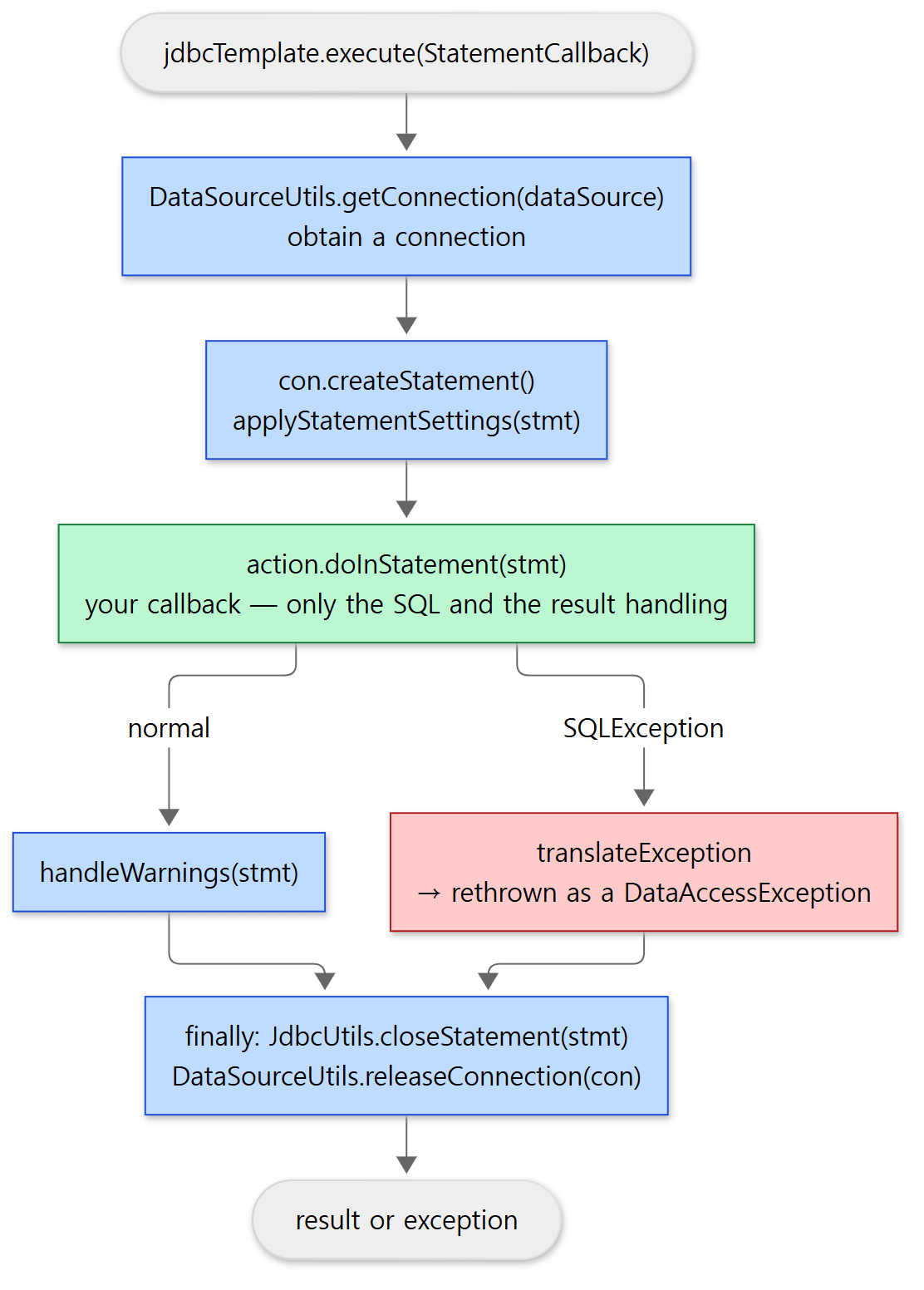 One run of the template. Only the green box is yours; the blue and red boxes are the template's.
Read from the top, the chores that plain JDBC repeated are all here.
- Get a connection. Not
ds.getConnection()butDataSourceUtils.getConnection(). That difference is the subject of section 4. - Create a
Statementand apply the settings.applyStatementSettingsappliesfetchSize,maxRowsand the query timeout (lines 1439–1449). - Call the callback.
action.doInStatement(stmt). This is the one place the caller fills in. - Catch
SQLExceptionand rethrow something else.translateExceptionturns it into Spring'sDataAccessException(section 5). The comment explains why the connection is released first: creating the translator for the first time may read database metadata, which needs one more connection, and with a small pool that could deadlock. - Close in
finally. TheStatementis closed and the connection released (whencloseResourcesistrue, which it is for almost every call).
The template for SQL with bound values, execute(PreparedStatementCreator, PreparedStatementCallback, boolean), has the same shape (lines 655–700). The only difference is that instead of con.createStatement() it calls psc.createPreparedStatement(con), so building the PreparedStatement is also left to a callback. There is also a lowest-level template that hands over the connection itself, execute(ConnectionCallback) (lines 359–379).
The callback interfaces are split by "what the template hands you"
| Callback | Method | What the template hands over | Used by |
|---|---|---|---|
ConnectionCallback<T> |
doInConnection(Connection) |
The connection | execute(ConnectionCallback) lines 43–68 |
StatementCallback<T> |
doInStatement(Statement) |
A Statement |
execute(StatementCallback) lines 39–71 |
PreparedStatementCreator |
createPreparedStatement(Connection) |
Receives the connection and returns a PreparedStatement it built |
execute(psc, …) lines 43–55 |
PreparedStatementSetter |
setValues(PreparedStatement) |
Puts values into the ? slots |
query(sql, pss, rse) lines 43–52 |
PreparedStatementCallback<T> |
doInPreparedStatement(PreparedStatement) |
A PreparedStatement |
execute(psc, PreparedStatementCallback) lines 46–78 |
All of them are @FunctionalInterface, so a lambda will do. The Javadoc of StatementCallback puts the contract in one sentence: it "does not need to care about closing the Statement or the Connection, or about handling transactions: this will all be handled by Spring's JdbcTemplate" (lines 42–46). The three callbacks that read results (RowMapper, RowCallbackHandler, ResultSetExtractor) get the next section to themselves.
Easy to get wrong
- Closing the connection inside a callback does not close it.
execute(ConnectionCallback)does not hand over the raw connection but a proxy made bycreateConnectionProxy(lines 365–366, lines 392–397). That proxy'sclose()does nothing and returnsnull, and itsisClosed()is alwaysfalse(lines 1667–1668). Closing is the job of the template'sfinally. execute(String)uses aStatement;update(String, Object...)with arguments uses aPreparedStatement.execute(String)builds aStatementCallbackthat callsstmt.execute(sql)and hands it to the template above (lines 443–462);update(String, Object...)packs the arguments into anArgumentPreparedStatementSetterand goes to thePreparedStatementtemplate (lines 1019–1021, lines 1458–1460). If you concatenate values into a string and pass it toexecute(String), nothing is bound to a?.
2. The three callbacks that receive results
A query also takes a callback for how to read the ResultSet. There are three, with different roles.
| Callback | Method | Who moves the cursor (rs.next()) |
Returns | State |
|---|---|---|---|---|
RowMapper<T> |
mapRow(ResultSet, int rowNum) |
The template | One object per row; the template collects them into a List<T> |
None (reusable) |
RowCallbackHandler |
processRow(ResultSet) |
The template | Nothing (void); it gathers a sum, a string and so on inside the object |
Yes |
ResultSetExtractor<T> |
extractData(ResultSet) |
The callback itself | One value built from the whole ResultSet |
Usually none |
The Javadoc of RowMapper is explicit: the method "should not call next() on the ResultSet; it is only supposed to map values of the current row" (RowMapper lines 54–57). RowCallbackHandler says the same (lines 51–55). ResultSetExtractor, by contrast, is contracted to "process the entire ResultSet", and is only told not to close it (ResultSetExtractor lines 55–60).
Every query overload funnels into a ResultSetExtractor
JdbcTemplate has a great many methods named query, but the one template that actually receives a ResultSet is the one taking a ResultSetExtractor. For SQL without bound values it looks like this.
	@Override
	public <T extends @Nullable Object> T query(String sql, ResultSetExtractor<T> rse) throws DataAccessException {
		// ...
		class QueryStatementCallback implements StatementCallback<T>, SqlProvider {
			@Override
			public T doInStatement(Statement stmt) throws SQLException {
				ResultSet rs = null;
				try {
					rs = stmt.executeQuery(sql);
					return rse.extractData(rs);
				}
				finally {
					JdbcUtils.closeResultSet(rs);
				}
			}
			// ...
		}

		return execute(new QueryStatementCallback(), true);
	}

	@Override
	public void query(String sql, RowCallbackHandler rch) throws DataAccessException {
		query(sql, new RowCallbackHandlerResultSetExtractor(rch, this.maxRows));
	}

	@Override
	public <T extends @Nullable Object> List<T> query(String sql, RowMapper<T> rowMapper) throws DataAccessException {
		return result(query(sql, new RowMapperResultSetExtractor<>(rowMapper, 0, this.maxRows)));
	}
spring-jdbc/src/main/java/org/springframework/jdbc/core/JdbcTemplate.java, lines 464–502
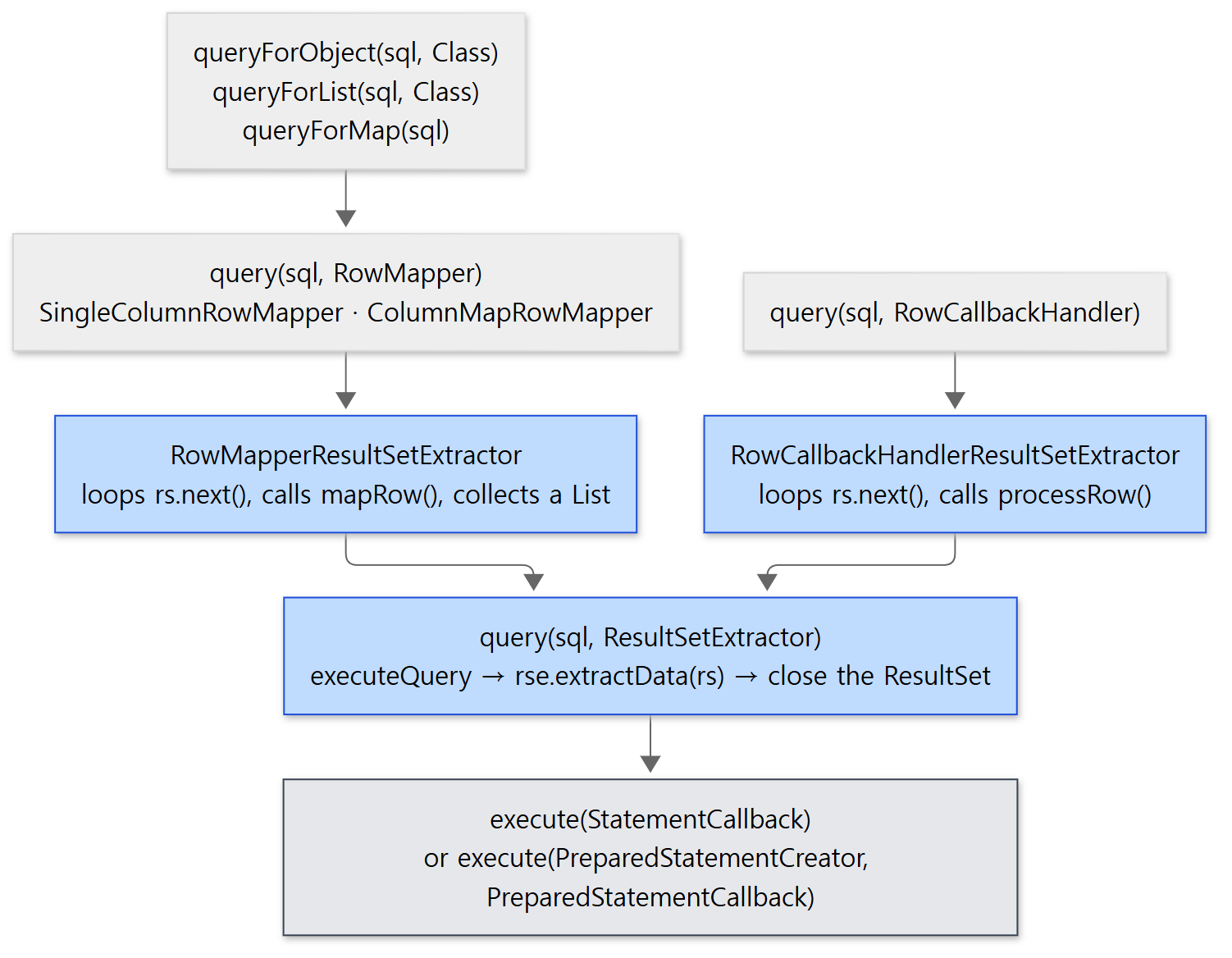 The convenience methods at the top narrow down to the template at the bottom. The blue boxes are the adapters that move the cursor.
The adapter that turns a RowMapper into a ResultSetExtractor is RowMapperResultSetExtractor. The while loop that moves the cursor lives here.
	@Override
	public List<T> extractData(ResultSet rs) throws SQLException {
		List<T> results = (this.rowsExpected > 0 ? new ArrayList<>(this.rowsExpected) : new ArrayList<>());
		int rowNum = 0;
		while (rs.next() && (this.maxRows == -1 || rowNum < this.maxRows)) {
			results.add(this.rowMapper.mapRow(rs, rowNum++));
		}
		return results;
	}
The adapter for RowCallbackHandler is a private class inside JdbcTemplate; it runs the same while, calls processRow and returns null (lines 1750–1769). The variant with bound values, query(String, RowMapper, Object...), likewise builds a RowMapperResultSetExtractor and goes to the PreparedStatement-side template query(psc, pss, rse) (lines 824–826, lines 725–748).
Example: reading the same table with the three callbacks
Three rows go into users(id, user_name, age) and are read with each callback. Run with Spring Framework 7.0.9.
// An example written for this post (not Spring's code)
// ① RowMapper lambda — one row to one object. The loop and the List are JdbcTemplate's job
List<User> users = jdbc.query("select * from users order by id",
        (rs, rowNum) -> new User(rs.getInt("id"), rs.getString("user_name"), rs.getInt("age")));
System.out.println("RowMapper lambda      : " + users);

// ② ResultSetExtractor — receives the whole ResultSet and drives it. Returns one sum
Integer ageSum = jdbc.query("select age from users", rs -> {
    int sum = 0;
    while (rs.next()) {
        sum += rs.getInt("age");
    }
    return sum;
});
System.out.println("ResultSetExtractor    : age sum = " + ageSum);

// ③ RowCallbackHandler — called per row, returns nothing
StringBuilder names = new StringBuilder();
jdbc.query("select user_name from users order by id", rs -> {
    names.append(rs.getString("user_name")).append(' ');
});
System.out.println("RowCallbackHandler    : " + names.toString().trim());
RowMapper lambda      : [User[id=1, userName=kim, age=30], User[id=2, userName=lee, age=25], User[id=3, userName=park, age=41]]
ResultSetExtractor    : age sum = 96
RowCallbackHandler    : kim lee park
DataClassRowMapper    : [User[id=1, userName=kim, age=30], User[id=2, userName=lee, age=25], User[id=3, userName=park, age=41]]
BeanPropertyRowMapper : [UserBean[1, kim, 30], UserBean[2, lee, 25], UserBean[3, park, 41]]
JdbcClient            : User[id=2, userName=lee, age=25]
The last three lines come from the RowMapper implementations that match the column user_name to the property userName automatically, and from the JdbcClient of section 6. The differences between the automatic mappers are listed under "If you want to go deeper".
Easy to get wrong
- One lambda can match two overloads. A lambda of the form
rs -> ...has one argument, so it could be either aRowCallbackHandler(no return) or aResultSetExtractor(returns a value). If the bodyreturns a value, as in the example, it resolves toResultSetExtractor; without areturnit is aRowCallbackHandler. Two arguments ((rs, rowNum)) make it aRowMapper. queryForStreamis not closed by the template. It is the one method that callsexecute(..., false), skipping thefinally, and instead attaches the closing code to the returnedStream'sonClose(lines 505–524). Unless you close thatStream(try-with-resources), the connection is never released.
3. queryForObject expects "exactly one row"
queryForObject(String sql, Class<T> requiredType) is two steps. It builds a SingleColumnRowMapper that reads one column, gets a list through query(sql, rowMapper), and takes one element out of that list.
	@Override
	public <T extends @Nullable Object> T queryForObject(String sql, RowMapper<T> rowMapper) throws DataAccessException {
		List<T> results = query(sql, rowMapper);
		return DataAccessUtils.nullableSingleResult(results);
	}

	@Override
	public <T> @Nullable T queryForObject(String sql, Class<T> requiredType) throws DataAccessException {
		return queryForObject(sql, getSingleColumnRowMapper(requiredType));
	}
spring-jdbc/src/main/java/org/springframework/jdbc/core/JdbcTemplate.java, lines 531–540
The "take one element" step, DataAccessUtils.nullableSingleResult, lives in the dao.support package of the spring-tx module.
	public static <T extends @Nullable Object> T nullableSingleResult(@Nullable Collection<T> results)
			throws IncorrectResultSizeDataAccessException {

		// This is identical to the requiredSingleResult implementation but differs in the
		// semantics of the incoming Collection (which we currently can't formally express)
		if (CollectionUtils.isEmpty(results)) {
			throw new EmptyResultDataAccessException(1);
		}
		if (results.size() > 1) {
			throw new IncorrectResultSizeDataAccessException(1, results.size());
		}
		return results.iterator().next();
	}
spring-tx/src/main/java/org/springframework/dao/support/DataAccessUtils.java, lines 192–204
Zero rows gives EmptyResultDataAccessException; two or more gives IncorrectResultSizeDataAccessException. The former is a subclass of the latter (EmptyResultDataAccessException line 30). The nullable in the name does not mean "returns null when there is no row"; it means that if the single row's value is null, that null is returned as is. requiredSingleResult throws even in that case (lines 164–178). If the row has more than one column, SingleColumnRowMapper throws IncorrectResultSetColumnCountException before any of this (lines 118–124).
Example: one row, no rows, two rows
Two rows with the same name (kim) go into users, and three queries run through queryForObject(sql, String.class). Run with Spring Framework 7.0.9.
ok        : kim
exception : EmptyResultDataAccessException (extends IncorrectResultSizeDataAccessException)
  message : Incorrect result size: expected 1, actual 0
exception : IncorrectResultSizeDataAccessException (extends DataRetrievalFailureException)
  message : Incorrect result size: expected 1, actual 2
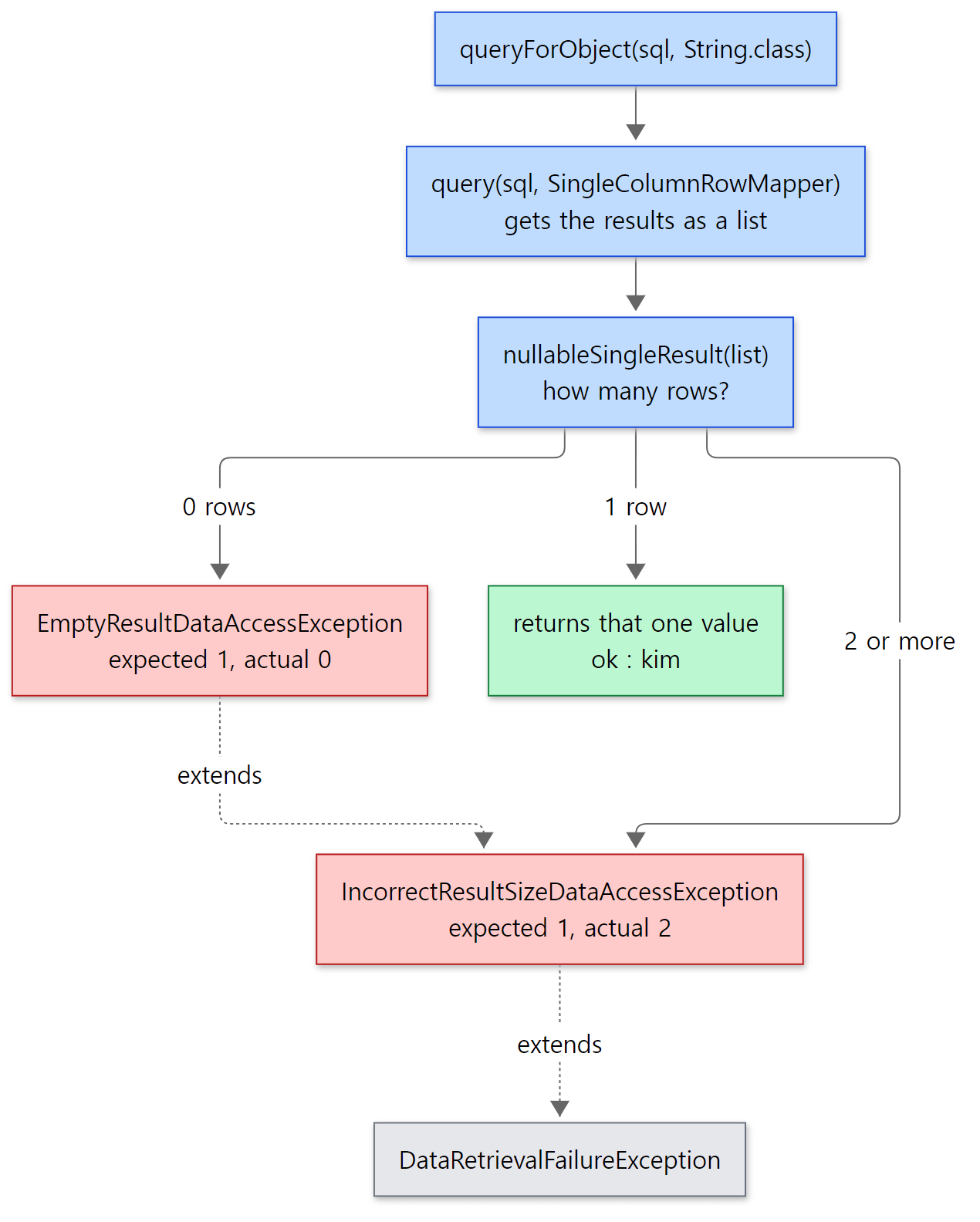 "Exactly one row" is checked only after the whole list has been fetched. The messages and the inheritance are exactly as in the real output of the example above.
update and batchUpdate
Writes sit on the same template. update(PreparedStatementCreator, PreparedStatementSetter) hands the PreparedStatement template a callback that sets the values, calls executeUpdate() and returns the affected row count (lines 961–983). The callback of batchUpdate(String, BatchPreparedStatementSetter) collects addBatch() calls and sends one executeBatch() if the driver supports batching (JdbcUtils.supportsBatchUpdates), and falls back to one executeUpdate() per row if it does not (lines 1034–1046, lines 1592–1641).
Easy to get wrong
queryForObjectthrows on zero rows; it does not returnnull. If you want "null when missing", take a list fromquery(sql, rowMapper, args)and applyDataAccessUtils.singleResult(lines 55–63), or use.optional()on theJdbcClientof section 6.- The old overloads that take an argument array are
@Deprecated. The forms withObject[]in the middle, such asquery(String, Object[], RowMapper), have been deprecated since 5.3 (lines 817–821); the current shape puts the varargs last, as inquery(String, RowMapper, Object...).
4. Where the connection comes from — DataSourceUtils
Let us follow the first line of the template in section 1, DataSourceUtils.getConnection(obtainDataSource()). getConnection only calls doGetConnection and wraps a SQLException in CannotGetJdbcConnectionException (lines 79–89). The real work is here.
	public static Connection doGetConnection(DataSource dataSource) throws SQLException {
		Assert.notNull(dataSource, "No DataSource specified");

		ConnectionHolder conHolder = (ConnectionHolder) TransactionSynchronizationManager.getResource(dataSource);
		if (conHolder != null && (conHolder.hasConnection() || conHolder.isSynchronizedWithTransaction())) {
			conHolder.requested();
			if (!conHolder.hasConnection()) {
				logger.debug("Fetching resumed JDBC Connection from DataSource");
				conHolder.setConnection(fetchConnection(dataSource));
			}
			return conHolder.getConnection();
		}
		// Else we either got no holder or an empty thread-bound holder here.

		logger.debug("Fetching JDBC Connection from DataSource");
		Connection con = fetchConnection(dataSource);

		if (TransactionSynchronizationManager.isSynchronizationActive()) {
			// ...
		}

		return con;
	}
spring-jdbc/src/main/java/org/springframework/jdbc/datasource/DataSourceUtils.java, lines 103–147
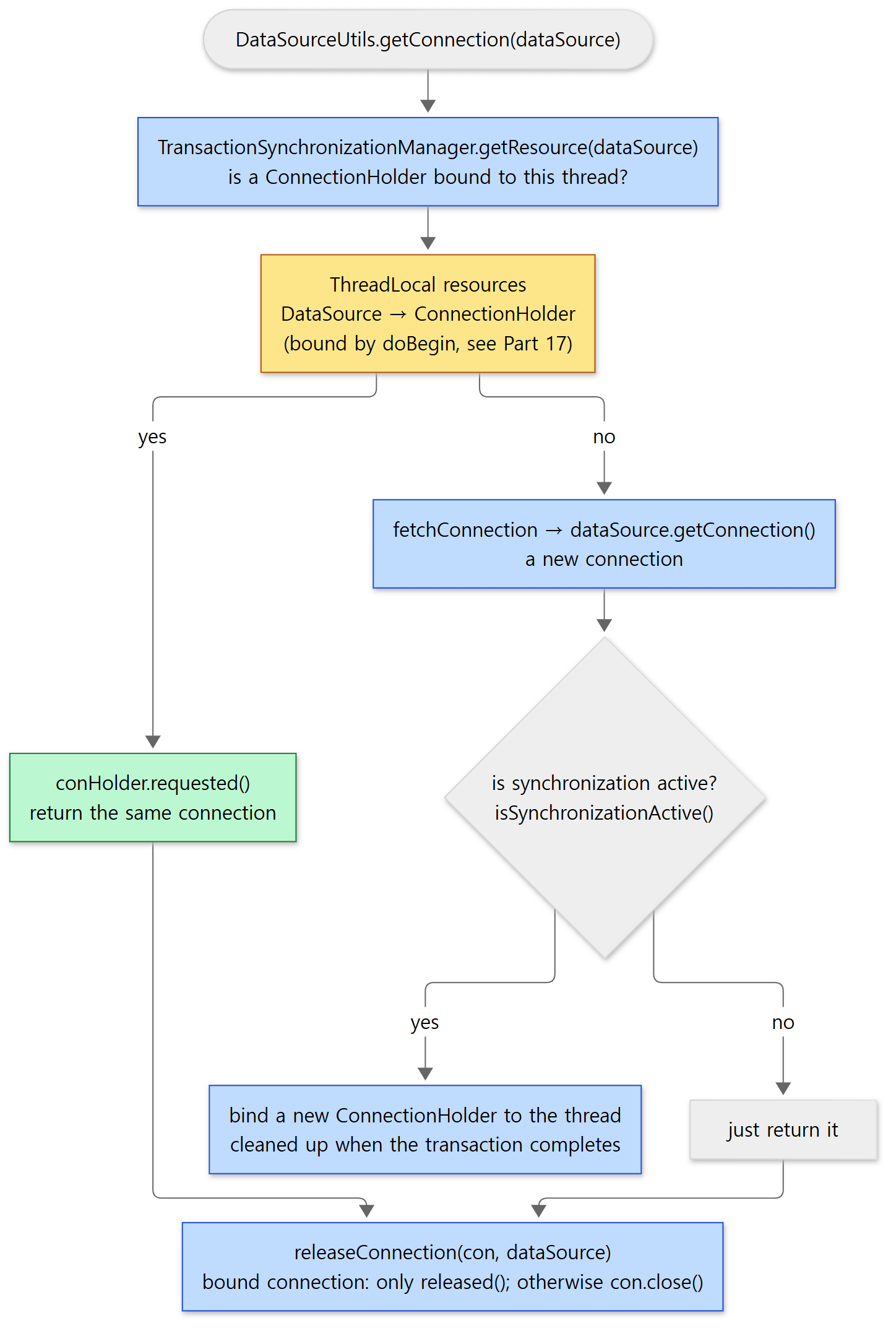 The yellow box is the same ThreadLocal map in which the transaction manager bound the connection in Part 17.
The first line is the key. TransactionSynchronizationManager.getResource(dataSource) reads the ThreadLocal<Map<Object, Object>> resources from Part 17, using this DataSource as the key (TransactionSynchronizationManager line 77, line 133). The side that put a ConnectionHolder there is DataSourceTransactionManager.doBegin (line 310). So there are two cases.
- Inside a transaction — a bound holder exists, so
requested()bumps its reference count (ResourceHolderSupportlines 162–163) and the same connection is returned. This is why there is one connection however many timesJdbcTemplateis called inside a@Transactionalmethod. The transaction manager andJdbcTemplatedo not know each other; they look at the same map keyed by the sameDataSourceobject, which is why both must be given the sameDataSource. - Outside a transaction — no holder, so
fetchConnection, which isdataSource.getConnection(), gets a new one (line 159). The cutifblock handles "no transaction but synchronization is active" (JTA, for example) by binding a new holder.
Releasing is symmetric.
	public static void doReleaseConnection(@Nullable Connection con, @Nullable DataSource dataSource) throws SQLException {
		if (con == null) {
			return;
		}
		if (dataSource != null) {
			ConnectionHolder conHolder = (ConnectionHolder) TransactionSynchronizationManager.getResource(dataSource);
			if (conHolder != null && connectionEquals(conHolder, con)) {
				// It's the transactional Connection: Don't close it.
				conHolder.released();
				return;
			}
		}
		doCloseConnection(con, dataSource);
	}
spring-jdbc/src/main/java/org/springframework/jdbc/datasource/DataSourceUtils.java, lines 407–420
For a bound connection only the reference count goes down (released()); it is not closed. Closing happens in the clean-up after commit or rollback described in Part 17. A connection that is not bound gets con.close() (lines 430–434); with a connection pool, close() is what returns it to the pool.
Example: how many connections, outside and inside a transaction
A DelegatingDataSource wrapper counts calls to DataSource.getConnection(). The same code, three JdbcTemplate calls, runs once outside a transaction and once inside a TransactionTemplate. Run with Spring Framework 7.0.9.
// An example written for this post (not Spring's code)
jdbc.update("insert into users values (1, 'a')");
jdbc.update("insert into users values (2, 'b')");
jdbc.queryForObject("select count(*) from users", Integer.class);
System.out.println("outside transaction : 3 calls -> getConnection() x " + ds.count.get());

ds.count.set(0);
TransactionTemplate tx = new TransactionTemplate(new DataSourceTransactionManager(ds));
tx.executeWithoutResult(status -> {
    jdbc.update("insert into users values (3, 'c')");
    jdbc.update("insert into users values (4, 'd')");
    jdbc.queryForObject("select count(*) from users", Integer.class);
});
System.out.println("inside transaction  : 3 calls -> getConnection() x " + ds.count.get());
outside transaction : 3 calls -> getConnection() x 3
inside transaction  : 3 calls -> getConnection() x 1
The single call inside the transaction was made by doBegin, not by JdbcTemplate; all three JdbcTemplate calls reused it.
Easy to get wrong
- Outside a transaction, every call gets and closes a fresh connection. That is the first output line. With a pool-less
DriverManagerDataSource, every call opens a new physical connection. If you want them to share one, put them in a transaction. - Plain JDBC code can take part in the transaction too.
TransactionAwareDataSourceProxyreturns, fromgetConnection(), a proxy connection that goes throughDataSourceUtils(TransactionAwareDataSourceProxylines 135–143), and that connection'sclose()only callsreleased()when the connection is the bound one (lines 216–231). But the Javadoc insists that the transaction manager must be given the originalDataSource, not this proxy (lines 40–41).
5. Exception translation — from SQLException to DataAccessException
Why translate — the hierarchy in the dao package
SQLException is checked, and what actually went wrong is hidden in a vendor-specific number (getErrorCode()) and a five-character string (getSQLState()). Spring converts it into an unchecked exception hierarchy in the org.springframework.dao package of the spring-tx module. The Javadoc of the root, DataAccessException, states the purpose: to let user code "find and handle the kind of error encountered without knowing the details of the particular data access API in use (for example, JDBC)" (DataAccessException lines 29–32). That is why the package is in spring-tx rather than the JDBC module, and why JPA and R2DBC translate into the same hierarchy.
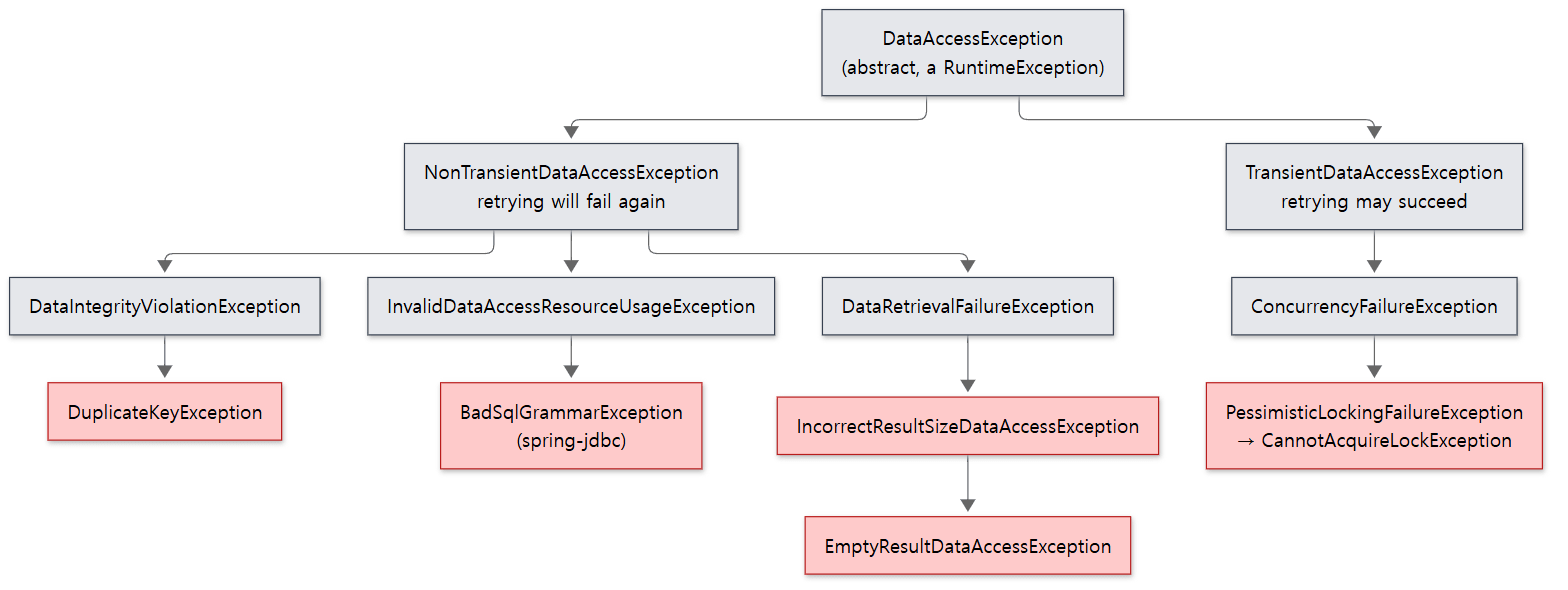 Only the exceptions mentioned in this post are drawn. Grey ones are parents used for classification; red ones are actually thrown.
| Exception | Parent | Meaning |
|---|---|---|
DataAccessException |
NestedRuntimeException |
The root. Abstract line 41 |
NonTransientDataAccessException / TransientDataAccessException |
DataAccessException |
Retrying will fail again / retrying may succeed line 31, line 31 |
DataIntegrityViolationException |
NonTransient… |
A constraint was violated line 36 |
DuplicateKeyException |
DataIntegrityViolationException |
A unique key was duplicated line 33 |
BadSqlGrammarException |
InvalidDataAccessResourceUsageException |
SQL syntax error. This one and UncategorizedSQLException below live in spring-jdbc line 37 |
CannotAcquireLockException |
PessimisticLockingFailureException |
A lock could not be obtained line 31 |
UncategorizedSQLException |
UncategorizedDataAccessException |
A SQLException that could not be classified line 33 |
Who picks the translator — JdbcAccessor.getExceptionTranslator
The translateException called from the catch in section 1 is two lines: delegate to the translator, and if null comes back wrap the exception in UncategorizedSQLException (lines 1549–1552). The translator is chosen by the parent class, JdbcAccessor.
	public SQLExceptionTranslator getExceptionTranslator() {
		SQLExceptionTranslator exceptionTranslator = this.exceptionTranslator;
		if (exceptionTranslator != null) {
			return exceptionTranslator;
		}
		synchronized (this) {
			exceptionTranslator = this.exceptionTranslator;
			if (exceptionTranslator == null) {
				if (SQLErrorCodeSQLExceptionTranslator.hasUserProvidedErrorCodesFile()) {
					exceptionTranslator = new SQLErrorCodeSQLExceptionTranslator(obtainDataSource());
				}
				else {
					exceptionTranslator = new SQLExceptionSubclassTranslator();
				}
				this.exceptionTranslator = exceptionTranslator;
			}
			return exceptionTranslator;
		}
	}
spring-jdbc/src/main/java/org/springframework/jdbc/support/JdbcAccessor.java, lines 114–132
The default is SQLExceptionSubclassTranslator. SQLErrorCodeSQLExceptionTranslator becomes the default in exactly one case: when the user has put a sql-error-codes.xml at the root of the classpath. hasUserProvidedErrorCodesFile() returns a static final flag, computed once at class-loading time, saying whether that file exists (lines 84–86, lines 429–431). The Javadoc of setExceptionTranslator says the same: SQLExceptionSubclassTranslator "serves as the default translator as of 6.0" (lines 99–101). The translator is created lazily, on the first SQLException (lazyInit defaults to true, line 50, lines 158–166).
The three translators and their order
All three translators extend AbstractFallbackSQLExceptionTranslator, whose translate fixes the order: ask the user-supplied customTranslator first (since 6.1), then call the translator's own doTranslate, and if that returns null, pass the exception to the fallbackTranslator (lines 89–115). Because each translator sets its own fallback in its constructor, a chain forms.
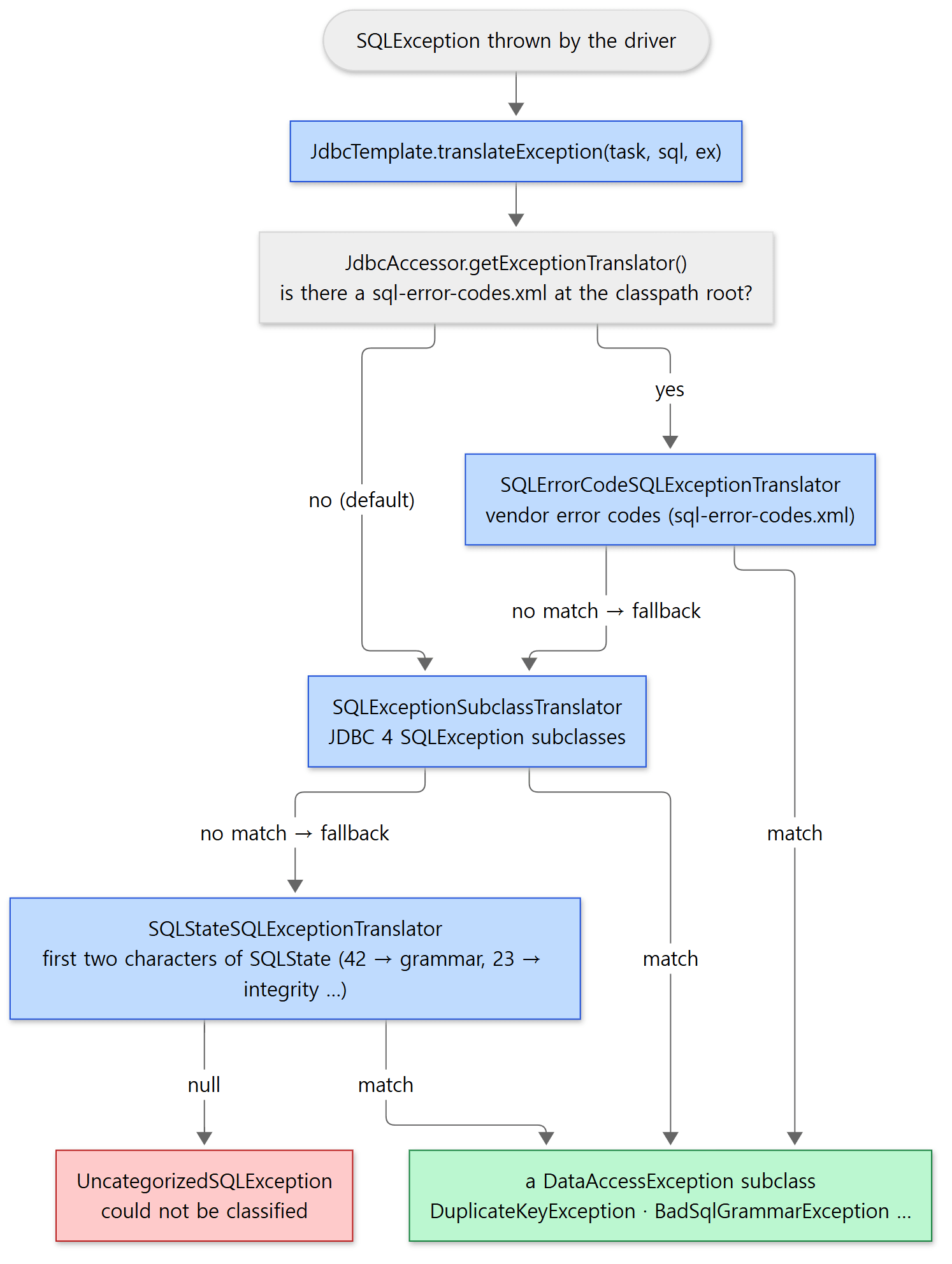 The default path is the two steps going down on the left. The vendor-code translator is inserted at the front only when the user supplies the file.
| Translator | What it looks at | Fallback |
|---|---|---|
SQLExceptionSubclassTranslator (line 68) |
The subclass of SQLException defined by JDBC 4 (SQLIntegrityConstraintViolationException, SQLSyntaxErrorException and so on) |
SQLStateSQLExceptionTranslator (lines 70–72) |
SQLStateSQLExceptionTranslator (line 57) |
The first two characters of the SQLState: 42, 07, 21, 2A, 37, 65 mean bad grammar; 23, 22, 01, 02, 27, 44 mean an integrity violation; and so on (lines 59–104) |
None → null (lines 165–166) |
SQLErrorCodeSQLExceptionTranslator (line 76) |
The vendor-specific error code, matched against the code groups found in sql-error-codes.xml under the database product name (lines 242–281) |
SQLExceptionSubclassTranslator (lines 95–97) |
The default translator's doTranslate is a ladder of instanceof checks. Part of it:
	@Override
	protected @Nullable DataAccessException doTranslate(String task, @Nullable String sql, SQLException ex) {
		// ...
		else if (sqlEx instanceof SQLNonTransientException) {
			// ...
			if (sqlEx instanceof SQLIntegrityConstraintViolationException) {
				if (SQLStateSQLExceptionTranslator.indicatesDuplicateKey(sqlEx.getSQLState(), sqlEx.getErrorCode())) {
					return new DuplicateKeyException(buildMessage(task, sql, sqlEx), ex);
				}
				return new DataIntegrityViolationException(buildMessage(task, sql, sqlEx), ex);
			}
			// ...
			if (sqlEx instanceof SQLSyntaxErrorException) {
				return new BadSqlGrammarException(task, (sql != null ? sql : ""), ex);
			}
			// ...
		}
		// ...

		// Fallback to Spring's own SQL state translation...
		return null;
	}
Whether a constraint violation is a duplicate key is decided by SQLState 23505, or by the generic 23000 paired with a well-known vendor code (Oracle 1, MySQL 1062 and so on) (SQLStateSQLExceptionTranslator lines 197–200). The sql-error-codes.xml read by the vendor-code translator ships inside the spring-jdbc jar (SQLErrorCodesFactory line 64, lines 108–131); its H2 entry, for instance, classes 23001,23505 as duplicate keys and 42000,42001,42101,… as grammar errors (sql-error-codes.xml lines 69–85). The file is written in Spring's own XML bean-definition format, so the factory reads it with a DefaultListableBeanFactory and an XmlBeanDefinitionReader — the container from Part 3 pressed into service as a config-file parser.
Example: the same SQLException through all three translators
On H2, the same primary key is inserted twice and a non-existent table is queried. Then the SQLException from the duplicate key is fed to each of the three translators. Run with Spring Framework 7.0.9.
translator in use : SQLExceptionSubclassTranslator
sql      : insert into users values (1, 'kim')
  thrown : org.springframework.dao.DuplicateKeyException
  cause  : org.h2.jdbc.JdbcSQLIntegrityConstraintViolationException (SQLState=23505, errorCode=23505)
  message: StatementCallback; SQL [insert into users values (1, 'kim')]; Unique index or primary key violation: "PRIMARY KEY ON PUBLIC.USERS(ID) ( /* key:1 */ 1, 'kim')"; SQL statement:
insert into users values (1, 'kim') [23505-232]
sql      : select * from no_such_table
  thrown : org.springframework.jdbc.BadSqlGrammarException
  cause  : org.h2.jdbc.JdbcSQLSyntaxErrorException (SQLState=42S02, errorCode=42102)
  message: StatementCallback; bad SQL grammar [select * from no_such_table]
SQLExceptionSubclassTranslator       -> DuplicateKeyException
SQLStateSQLExceptionTranslator       -> DuplicateKeyException
SQLErrorCodeSQLExceptionTranslator   -> DuplicateKeyException
The first line shows the default translator. The H2 driver throws JDBC 4 subclasses (JdbcSQLIntegrityConstraintViolationException, JdbcSQLSyntaxErrorException), so the default translator gets a match at the first step. The StatementCallback; SQL [...] prefix in the message is the task name and SQL that the template passed to translateException("StatementCallback", sql, ex), glued on by buildMessage (AbstractFallbackSQLExceptionTranslator lines 140–142). Here all three translators agree, but with a driver that does not use the subclasses, or a vendor whose SQLStates stray from the standard, the answers can differ.
Easy to get wrong
- "The default is the vendor-code translator" is old news. That was true before 6.0; at this commit, as the code above shows,
SQLExceptionSubclassTranslatoris the default. To bring vendor-code translation back, put asql-error-codes.xmlat the classpath root or plug one in withsetExceptionTranslator. - Translation happens only inside
JdbcTemplate. ThePersistenceExceptionTranslationPostProcessor, which converts exceptions thrown by@Repositorybeans using other data access APIs (JPA and friends) into the same hierarchy, is a separate mechanism and belongs to Part 19.
6. What sits on top — NamedParameterJdbcTemplate and JdbcClient
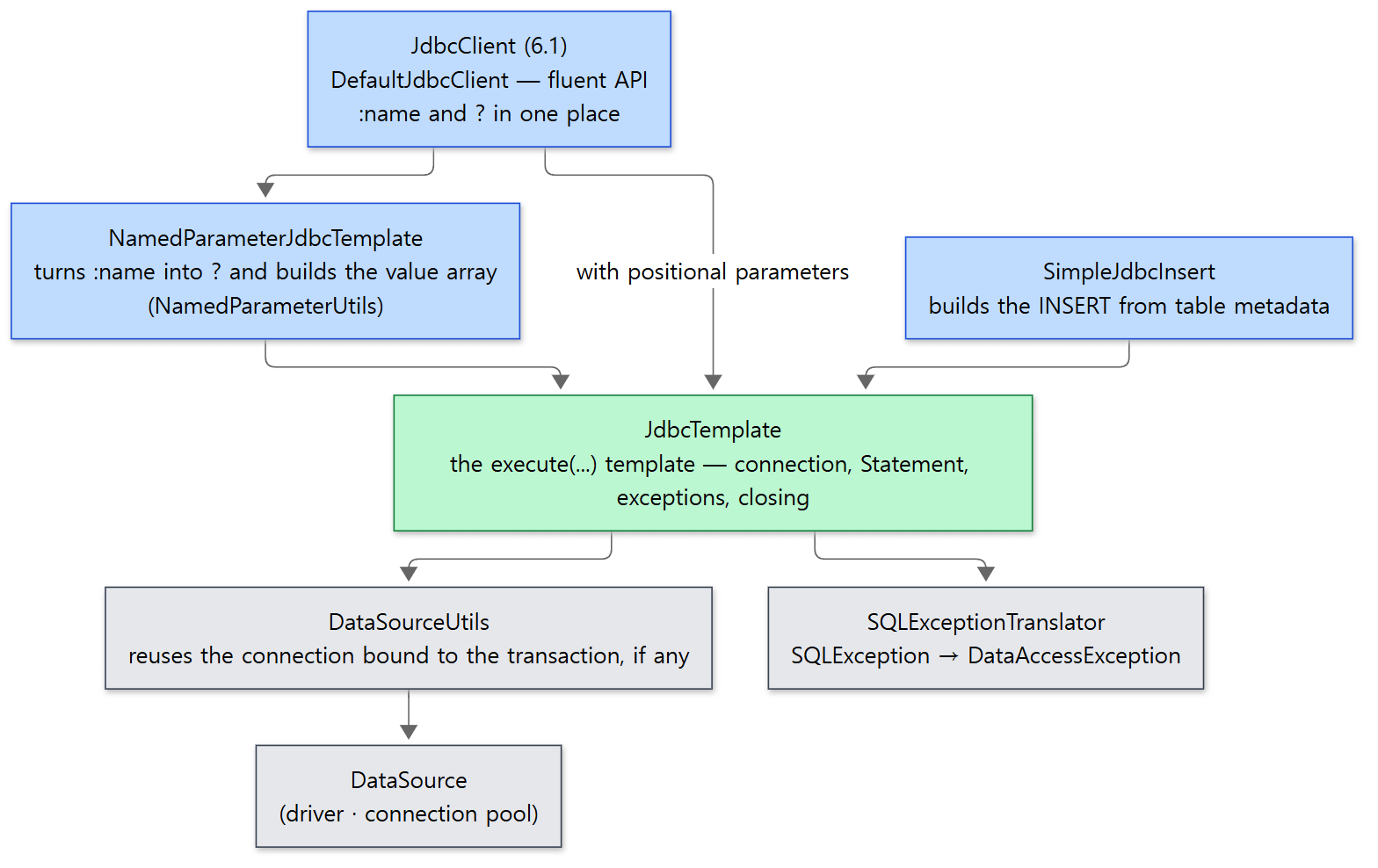 Green is the template of this post. The three above it only shape the SQL and hand it down; connections and exceptions are not their business.
NamedParameterJdbcTemplate lets you write :id instead of ?. It does not extend JdbcTemplate; it wraps one. It holds a single JdbcOperations field (NamedParameterJdbcTemplate line 81, line 88), and query, update and execute turn the SQL into a PreparedStatementCreator and pass it on (only batchUpdate(String, SqlParameterSource[]) passes the SQL string with ? substituted plus a BatchPreparedStatementSetter).
	protected PreparedStatementCreator getPreparedStatementCreator(String sql, SqlParameterSource paramSource,
			@Nullable Consumer<PreparedStatementCreatorFactory> customizer) {

		ParsedSql parsedSql = getParsedSql(sql);
		PreparedStatementCreatorFactory pscf = getPreparedStatementCreatorFactory(parsedSql, paramSource);
		if (customizer != null) {
			customizer.accept(pscf);
		}
		@Nullable Object[] params = NamedParameterUtils.buildValueArray(parsedSql, paramSource, null);
		return pscf.newPreparedStatementCreator(params);
	}
getParsedSql uses NamedParameterUtils.parseSqlStatement to scan the SQL character by character and record where each :name sits (skipping quotes and comments, and ignoring PostgreSQL's :: cast, NamedParameterUtils line 83, lines 114–118), and keeps the result in a 256-entry LRU cache (lines 489–492). substituteNamedParameters replaces each spot with ?, and if the value is an Iterable it expands it into ?, ?, ?, one per element (lines 287–340). That is why you can pass a list to in (:ids).
JdbcClient is an interface added in 6.1 (JdbcClient line 69, line 78). Its implementation, DefaultJdbcClient, holds one NamedParameterJdbcTemplate (lines 71–73); created from a DataSource, it builds a JdbcTemplate and then a NamedParameterJdbcTemplate around it (lines 80–86). Execution is nothing more than a branch on useNamedParams(): named parameters go to namedParamOps, positional ones to classicOps (the inner JdbcTemplate) (lines 264–268). When you give it a type, as in .query(User.class), it builds and caches a SingleColumnRowMapper for simple types and a SimplePropertyRowMapper otherwise (lines 229–235).
Example: :name becoming ?, and the delegation
Run with Spring Framework 7.0.9.
// An example written for this post (not Spring's code)
// ① Parse only — returns the SQL with :id and :name turned into ?
String named = "select name from users where id = :id or name = :name";
System.out.println("parsed SQL : " + NamedParameterUtils.parseSqlStatementIntoString(named));

// ② NamedParameterJdbcTemplate — wraps a JdbcTemplate inside
NamedParameterJdbcTemplate namedJdbc = new NamedParameterJdbcTemplate(jdbc);
System.out.println("wraps same JdbcTemplate : " + (namedJdbc.getJdbcOperations() == jdbc));
System.out.println("named query : " + namedJdbc.queryForList(named, Map.of("id", 1, "name", "lee"), String.class));

// ③ JdbcClient — named and positional parameters behind one API. It delegates too
JdbcClient client = JdbcClient.create(jdbc);
System.out.println("JdbcClient named   : " + client.sql("select name from users where id = :id").param("id", 2).query(String.class).single());
System.out.println("JdbcClient indexed : " + client.sql("select name from users where id = ?").param(1).query(String.class).single());
parsed SQL : select name from users where id = ? or name = ?
wraps same JdbcTemplate : true
named query : [kim, lee]
JdbcClient named   : lee
JdbcClient indexed : kim
Easy to get wrong
NamedParameterJdbcTemplateis not aJdbcOperations. It implements onlyNamedParameterJdbcOperations(line 81), so to use the?-style methods you take the inner one out withgetJdbcOperations().- Mixing named and positional parameters in
JdbcClientis an error.useNamedParams()throwsIllegalStateExceptionwhen both are present (lines 289–293).
If you want to go deeper
A lot was left out to keep the main thread visible; here are names and locations only. The three RowMappers that match column names to properties automatically — BeanPropertyRowMapper, which uses setters and registers both the lower-case and the underscored form of each property name (userName → user_name) as column-name candidates (lines 242–256, lines 313–315, lines 324–338); DataClassRowMapper, which fills constructor arguments by name, as for a record (DataClassRowMapper lines 90–135); and the 6.1 SimplePropertyRowMapper, which tries constructor, then setters, then fields (line 77). SimpleJdbcInsert, which reads table metadata and builds the INSERT for you (AbstractJdbcInsert lines 299–309). update(psc, KeyHolder), which collects generated keys (lines 991–1006). call and CallableStatementCallback for stored procedures (from line 1151). JdbcTransactionManager, which translates a SQLException raised during commit or rollback into the same hierarchy (since 5.3, JdbcTransactionManager line 54, lines 178–183). setCustomTranslator, which inserts a translator ahead of the chain (AbstractFallbackSQLExceptionTranslator lines 71–73). And StatementCreatorUtils, which picks the SQL type when a value is put into a ? (ArgumentPreparedStatementSetter lines 64–73).
Recap
| Concept | In one line |
|---|---|
| Template-callback | execute(...) gets the connection, builds the Statement, translates exceptions and closes; the callback supplies only the SQL and the result handling |
StatementCallback / PreparedStatementCallback / ConnectionCallback |
Whether the template hands you a Statement, a PreparedStatement or a Connection |
RowMapper |
One row → one object. The template moves the cursor; never call next() |
RowCallbackHandler |
Called per row, returns nothing. Gathers state inside the object |
ResultSetExtractor |
Receives the whole ResultSet and drives the cursor itself. Every query ends up here |
queryForObject |
Takes a list and applies nullableSingleResult: EmptyResult… for 0 rows, IncorrectResultSize… for 2 or more |
DataSourceUtils.getConnection |
A ConnectionHolder bound to the thread wins; otherwise dataSource.getConnection() |
releaseConnection |
A bound connection only gets released(); any other is close()d |
DataAccessException |
The dao package of spring-tx. Unchecked. A classification independent of the data access API |
| Default translator | SQLExceptionSubclassTranslator → fallback SQLStateSQLExceptionTranslator → UncategorizedSQLException if still null |
SQLErrorCodeSQLExceptionTranslator |
The default only when a sql-error-codes.xml sits at the classpath root; no match → the chain above |
NamedParameterJdbcTemplate |
Turns :name into ?, builds the value array and delegates to the inner JdbcTemplate |
JdbcClient |
The fluent API of 6.1. Delegates to NamedParameterJdbcTemplate / JdbcTemplate |
What to look at next
Part 17 was the side that opens and closes the transaction; this post was the side that sends SQL over that connection. The next post looks at where Spring steps in when you use an ORM such as JPA instead of JDBC — how an EntityManager is bound to the transaction, and how PersistenceExceptionTranslationPostProcessor converts the exceptions of @Repository beans into the DataAccessException hierarchy of this post — and at what R2DBC does instead, since a non-blocking driver cannot bind a connection to a ThreadLocal.
- Next: Part 19: ORM and R2DBC Integration — JPA Support and Reactive Transactions
- Previous: Part 17: @Transactional — Who Opens a Transaction and Who Closes It
- What happens once this SQL reaches the database server: Digging into MariaDB's Source 5: The Protocol and Command Dispatch — How One Packet Reaches dispatch_command
- The map of the series: Part 1: How I Read It with AI, and the Map
- How the modules are divided: Part 2: The Big Map — Modules and Packages
- The container that reads
sql-error-codes.xml: Part 3: The BeanFactory Hierarchy and BeanDefinition