What this post covers
This is the fifth post in the "Digging into MariaDB's Source" series. In Part 4 we saw that when a connection comes in, one thread (or a thread-pool worker) takes it on, finishes the login, and then calls do_command() over and over. This post opens up a single call to do_command(). On the Part 2 map, it zooms into zone ② "THD · commands" and the very last zone, ⑨ "sending the result".
There are four questions to answer.
- What does a "packet" between client and server look like, and what happens to data over 16 MB or a request larger than
max_allowed_packet? - How does the server decide what to do with a packet — where do
COM_QUERY,COM_PINGandCOM_STMT_EXECUTEpart ways? - Who turns result rows,
OKand errors into bytes, and in what order? What is different about the results of a prepared statement? - How can the query cache find a result before the SQL has even been parsed?
| Item | Details |
|---|---|
| Target | MariaDB Server |
| Version | 13.2.0 (main, alpha) |
| Commit | c894d97781 (2026-10-19) |
| Main files | sql/net_serv.cc, vio/viosocket.c, sql/sql_parse.cc (do_command, dispatch_command, mysql_parse), sql/protocol.cc, sql/sql_cache.cc, sql/sql_prepare.cc |
All line numbers in this post refer to this commit. How to get the same source and build the Docker image used for the examples is in Part 1.
dispatch_command() alone is over 900 lines, and protocol.cc is about two thousand lines (1,998) and sql_cache.cc over five thousand (5,342). This post follows only the main path that a first-time reader can keep up with. Things I left out, such as compression, SSL and replication commands, are listed by name and location in "What this post leaves out" at the end.
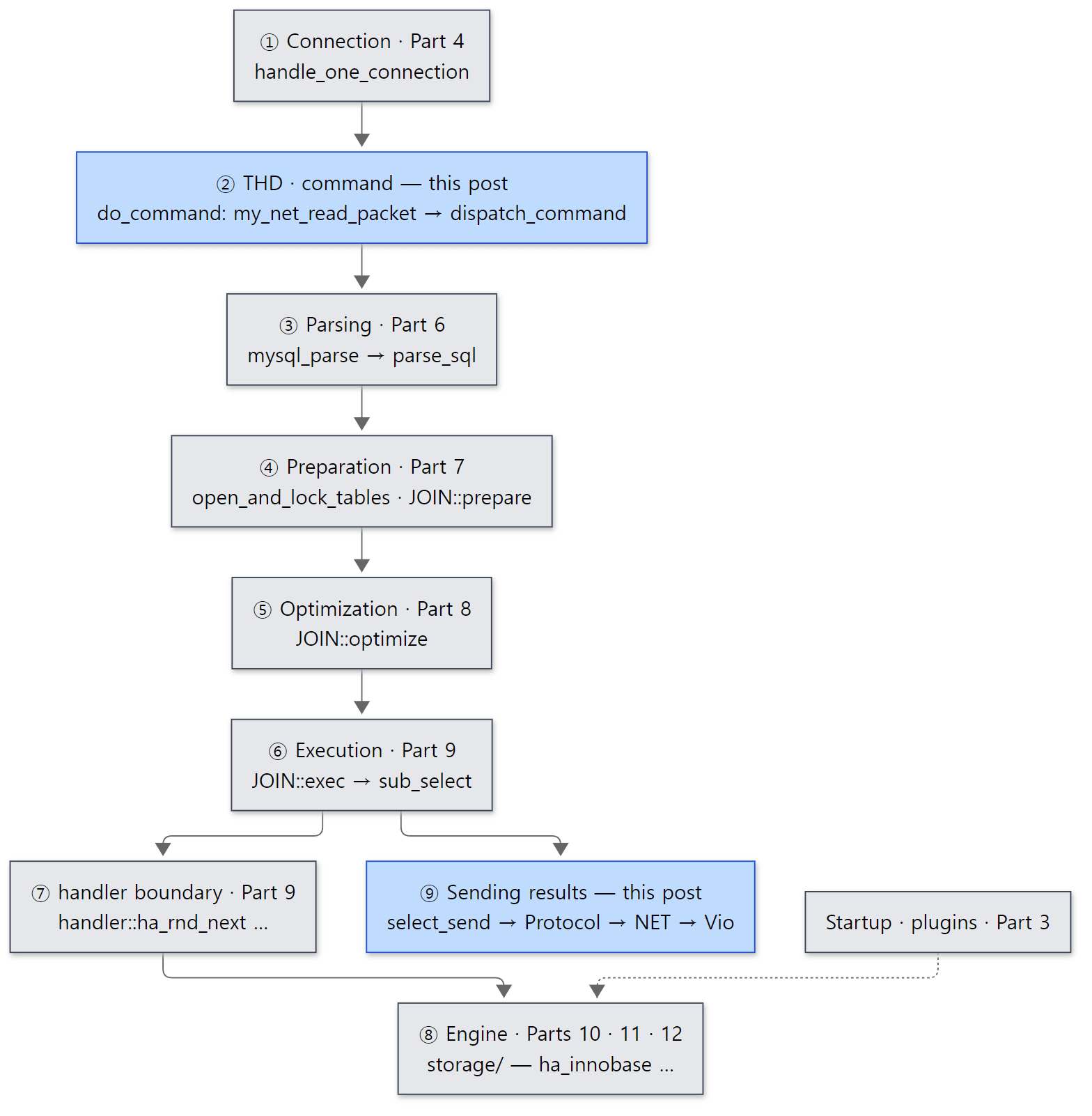 The blue boxes are what this post reads. Both the entrance where a request comes in and the exit where the result goes out belong to this post.
Terms to know first
THD is the object holding all the state of one connection (Part 2; it is created in Part 4). This post follows only four things inside it: net on the socket side, protocol which builds results, the Diagnostics_area which records the statement's final answer, and mem_root, the memory emptied after each statement.
Packet. MariaDB clients and servers talk over TCP (or a Unix socket) in units called "packets". It is not a text protocol split on newlines like HTTP; it is a binary protocol where the length comes first and you read exactly that many bytes. Every packet carries a 4-byte header — a 3-byte length and a 1-byte sequence number. The source calls the sequence number pkt_nr.
Command, COM_*. After login, the first byte of every packet a client sends is a command number saying "please do this". enum enum_server_command in include/mysql_com.h lists values from COM_SLEEP (0) through COM_QUIT (1), COM_QUERY (3), COM_PING (14), COM_STMT_PREPARE (22), COM_STMT_EXECUTE (23) and so on. Almost every SQL statement we write travels inside a single COM_QUERY. The Command column of SHOW PROCESSLIST (Sleep, Query …) is simply the name of this number.
NET and Vio. NET (struct st_net in include/mysql_com.h) is the layer that reads and writes packets. It holds the buffer, the current sequence number and the maximum packet size. Below it, Vio (struct st_vio in include/violite.h, "virtual I/O") is a socket abstraction that wraps TCP sockets, Unix sockets, SSL and Windows named pipes behind the same function pointers. NET knows "packets"; Vio knows "bytes".
Protocol. The class that encodes results into packet payloads (sql/protocol.h). The same integer 1 is sent as the text "1" for an ordinary query (COM_QUERY) and as a 4-byte integer for a prepared statement (COM_STMT_EXECUTE). The first is Protocol_text, the second Protocol_binary.
Diagnostics_area. The slot that records the final answer to give the client when a statement ends — OK, end of result set (EOF), or error — along with the affected row count and error number (sql/sql_error.h). During execution, my_ok() and my_error() only write into it; the actual sending happens once, at the very end.
1. The shape of one packet — net_serv.cc
sql/net_serv.cc is shared by the client library and the server. Its opening comment says everything the file does — "Writes are cached into net_buffer_length big packets. Read packets are reallocated dynamicly when reading big packets. Each logical packet has the following pre-info: 3 byte length & 1 byte package-number." (lines 22–27)
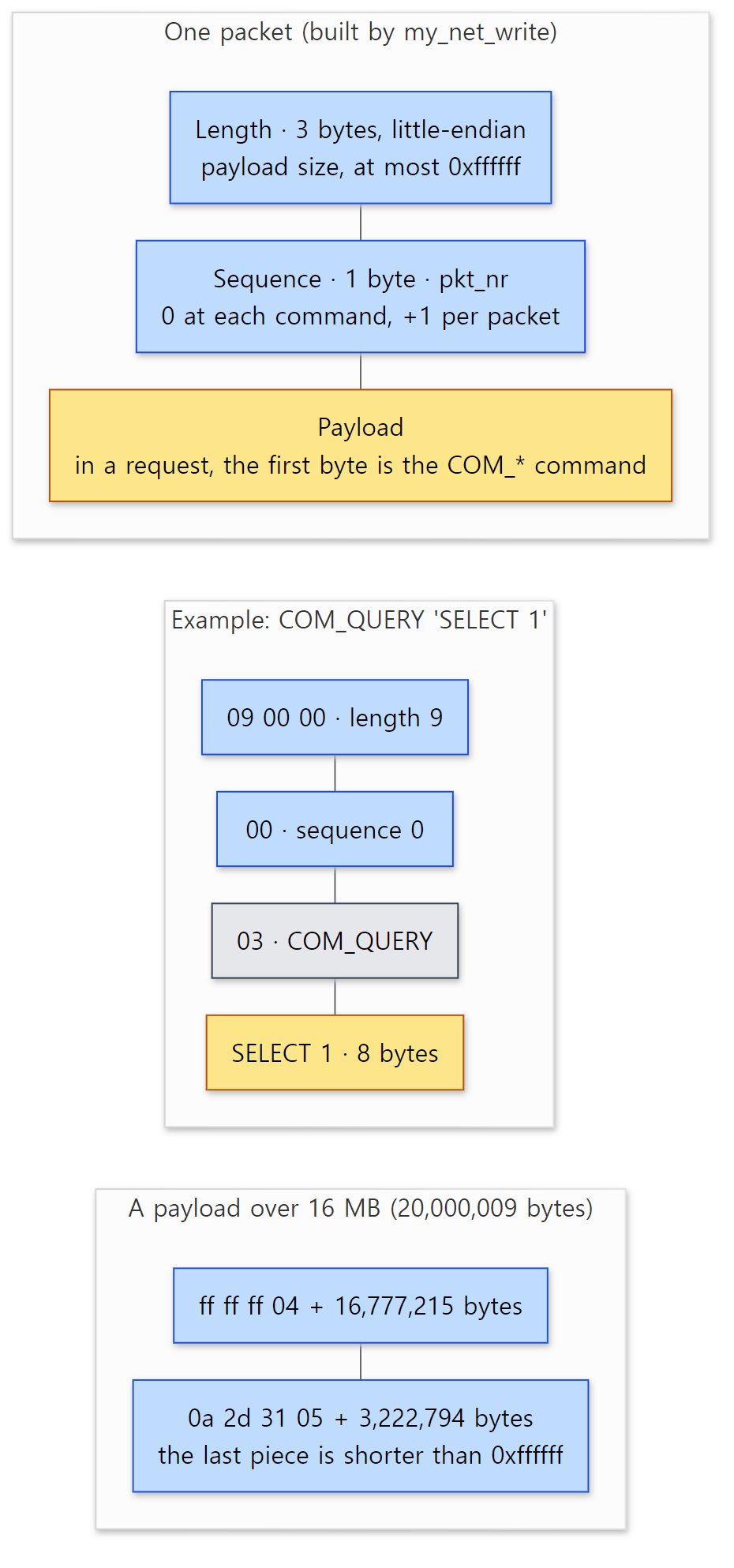 The 4-byte packet header. The two examples below are bytes that actually went over the wire in this post's examples.
Writing: my_net_write()
The function that writes a packet is my_net_write(). If the length reaches MAX_PACKET_LENGTH (= 256×256×256−1 = 0xffffff, one byte short of 16 MB; include/mysql_com.h line 64), it splits.
  while (len >= MAX_PACKET_LENGTH)
  {
    const ulong z_size = MAX_PACKET_LENGTH;
    int3store(buff, z_size);
    buff[3]= (uchar) net->pkt_nr++;
    if (net_write_buff(net, buff, NET_HEADER_SIZE) ||
	net_write_buff(net, packet, z_size))
    {
      MYSQL_NET_WRITE_DONE(1);
      return 1;
    }
    packet += z_size;
    len-=     z_size;
  }
  /* Write last packet */
  int3store(buff,len);
  buff[3]= (uchar) net->pkt_nr++;
  if (net_write_buff(net, buff, NET_HEADER_SIZE))
  {
    MYSQL_NET_WRITE_DONE(1);
    return 1;
  }
Three things stand out.
- The length is 3 bytes. So one packet's payload cannot exceed 0xffffff bytes; anything larger is sent as consecutive 0xffffff-byte pieces. The receiver understands "length exactly 0xffffff means another piece follows".
- The sequence number goes up by one per packet (
net->pkt_nr++). Each piece counts as a packet, so each takes a number. - Nothing goes straight to the socket.
net_write_buff()only copies into a buffer callednet->buff; when the buffer (net_buffer_length, default 16384 bytes —Sys_net_buffer_lengthinsys_vars.cc) fills up, ornet_flush()is called,net_real_write()does onevio_write()for all of it. The point is to avoid a system call per result row (the gdb example in section 5 confirms this).
What if the last piece ends at exactly 0xffffff bytes? The loop condition is len >= MAX_PACKET_LENGTH, so it goes around once more, and a zero-length packet is sent at the end. That is the case the comment right above this code means by "The last packet may even have a length of 0".
Reading: my_real_read() and max_allowed_packet
On the reading side the chain is my_net_read_packet() → my_net_read_packet_reallen() → my_real_read(). my_real_read() first reads the 4-byte header and checks the sequence number (a mismatch gives ER_NET_PACKETS_OUT_OF_ORDER), then extracts the length and grows the buffer if it is too small.
      len= uint3korr(net->buff + net->where_b);
      if (!len) /* End of big multi-packet */
        goto end;
      helping= MY_MAX(len, *complen) + net->where_b;
      /* The necessary size of net->buff */
      if (helping >= net->max_packet)
      {
        if (net_realloc(net, helping))
        {
          len= packet_error; /* Return error and close connection */
          goto end;
        }
      }
net_realloc(), which grows the buffer, is where max_allowed_packet is checked.
  if (length >= net->max_packet_size)
  {
    DBUG_PRINT("error", ("Packet too large. Max size: %lu",
                         net->max_packet_size));
    /* @todo: 1 and 2 codes are identical. */
    net->error= 1;
    net->last_errno= ER_NET_PACKET_TOO_LARGE;
    MYSQL_SERVER_my_error(ER_NET_PACKET_TOO_LARGE, MYF(0));
    DBUG_RETURN(1);
  }
net->max_packet_size is filled in from max_allowed_packet (default 16 MB, Sys_max_allowed_packet) by my_net_local_init() when the connection is set up — strictly, the larger of net_buffer_length and max_allowed_packet (sql/sql_client.cc lines 40–41). So max_allowed_packet is a limit meaning "I will not grow the receive buffer beyond this". The buffer starts at only net_buffer_length (16 KB) and grows only when a big packet arrives.
When a piece with length 0xffffff arrives, my_net_read_packet_reallen() glues the pieces together (lines 1084–1099). It moves where_b forward by the piece length, reads the next piece onto the end of the same buffer, and stops when a piece shorter than 0xffffff comes in. The "zero-length last packet" the writer sends is what ends this loop in the exact-fit case.
Example 1: seeing packet headers
This example and every other example in this post were run in a Docker container (Ubuntu 24.04) on MariaDB 13.2.0 (13.2.0-MariaDB-debug), a Debug build of the reference commit (c894d97781) as-is. The example folder is ex/u05-packets.
my_net_write() and my_real_read() contain DBUG_DUMP("packet_header", …). In a Debug build you can turn on just that keyword with the session variable debug_dbug and capture it to a file. The server was started with --max-allowed-packet=64M.
# Example written for this post (not MariaDB source)
# ...
mariadb -e "SET SESSION debug_dbug = 'd,packet_header:o,/tmp/pk1.trace'; SELECT 1 AS one;" > /dev/null
grep -A1 "packet_header" /tmp/pk1.trace | grep -v "^--" | head -20
# ...
Protocol::net_send_ok: packet_header: Memory: 0x7f5d40085ca4  Bytes: (4)
07 00 00 01
my_net_read_packet: packet_header: Memory: 0x775cf800bde0  Bytes: (4)
10 00 00 00
Protocol::send_result_set_metadata: packet_header: Memory: 0x7f5d40084c04  Bytes: (4)
02 00 00 01
Protocol::write: packet_header: Memory: 0x7f5d40084bb4  Bytes: (4)
1A 00 00 02
Protocol::send_result_set_metadata: packet_header: Memory: 0x7f5d40084bb4  Bytes: (4)
05 00 00 03
Protocol::write: packet_header: Memory: 0x7f5d40084db4  Bytes: (4)
02 00 00 04
Protocol::net_send_eof: packet_header: Memory: 0x7f5d40084cf4  Bytes: (4)
05 00 00 05
my_net_read_packet: packet_header: Memory: 0x775cf800bde0  Bytes: (4)
01 00 00 00
The addresses after Memory: differ on every run. Read line by line:
| Header | Who | Meaning |
|---|---|---|
07 00 00 01 |
Protocol::net_send_ok |
OK for the previous statement, SET (7-byte payload, sequence 1) |
10 00 00 00 |
my_net_read_packet |
The received COM_QUERY — 16-byte payload (command 1 + SELECT 1 AS one 15), sequence 0 |
02 00 00 01 |
send_result_set_metadata |
Column-count packet |
1A 00 00 02 |
Protocol::write |
One column definition (26 bytes) |
05 00 00 03 |
send_result_set_metadata |
EOF marking the end of column definitions |
02 00 00 04 |
Protocol::write |
One row |
05 00 00 05 |
Protocol::net_send_eof |
EOF ending the result set |
01 00 00 00 |
my_net_read_packet |
The next command — the COM_QUIT the client sent on its way out |
Each time a command arrives the sequence returns to 0, and the server's reply continues from 1. Next, let's get a 20-million-byte value back (the client also gets --max-allowed-packet=64M).
--- 2. a 20,000,000-byte value is sent as packets of 0xffffff + rest
20000005
Protocol::net_send_ok: packet_header: Memory: 0x7f5d40085ca4  Bytes: (4)
07 00 00 01
my_net_read_packet: packet_header: Memory: 0x775cf800bde0  Bytes: (4)
24 00 00 00
Protocol::send_result_set_metadata: packet_header: Memory: 0x7f5d40084c04  Bytes: (4)
02 00 00 01
Protocol::write: packet_header: Memory: 0x7f5d40084bb4  Bytes: (4)
1A 00 00 02
Protocol::send_result_set_metadata: packet_header: Memory: 0x7f5d40084bb4  Bytes: (4)
05 00 00 03
Protocol::write: packet_header: Memory: 0x7f5d40084db4  Bytes: (4)
0A 2D 31 05
Protocol::net_send_eof: packet_header: Memory: 0x7f5d40084cf4  Bytes: (4)
05 00 00 06
my_net_read_packet: packet_header: Memory: 0x775cf800bde0  Bytes: (4)
01 00 00 00
20000005 is the number of bytes received (the 20-million-byte value plus the header line big and newlines). Where the row packet was, this time we see 0A 2D 31 05: length 0x312d0a = 3,222,794 bytes, sequence 5. The row payload is the 20-million-byte value preceded by a 9-byte length marker (0xfe + an 8-byte integer), 20,000,009 bytes in all; after the first 16,777,215 bytes (sequence 4), 3,222,794 remain. The header of the first piece with sequence 4 (ff ff ff 04) does not appear because the DBUG_DUMP sits outside the loop, just before the last piece is written (lines 447–449). Still, the final EOF's sequence moving from 05 to 06 shows that one extra piece was sent.
Finally, we shrink the server's max_allowed_packet to 1 MB and send a 2 MB query.
--- 3. a query bigger than the server's max_allowed_packet
query length: 2000024
--------------
SELECT LENGTH('aaaaaaaaaaaaaaaaaaaaaaaaaaaaaaaaaaaaaaaaaaaaaaaaaaaaaaaaaaaaaaaaaaaaaaaaaaaaaaaaaaaaaaaaaaaaaaaaaaaaaaaaa
--------------

ERROR 2006 (HY000) at line 1: Server has gone away
Variable_name	Value
Aborted_clients	1
Aborted connection 8 to db: 'unconnected' user: 'root' host: 'localhost' (Got a packet bigger than 'max_allowed_packet' bytes)
The server's net_realloc() sets ER_NET_PACKET_TOO_LARGE and closes the connection. The client, still busy writing 2 MB, never read the error packet and saw only ERROR 2006 … Server has gone away; on the server side Aborted_clients went up and the error log recorded Got a packet bigger than 'max_allowed_packet' bytes. This is the familiar "I sent a big INSERT and the server went away" symptom.
Easy to get wrong: max_allowed_packet exists on both sides
The limit is not only the server's. sql/net_serv.cc is also used by the client library, and the client also refuses packets bigger than its own max_allowed_packet (mariadb --max-allowed-packet). That is why the example gave the client 64M too. It is easy to raise only the server's value and then get stuck on the client side when fetching a big result.
2. Talking to the server by hand — the handshake and Vio
When a client connects, the server speaks first. It sends a greeting packet (the handshake), the client answers with a user name and authentication data, and the server finishes with OK or an error. Authentication plugins and acl_authenticate() belong to Part 4, so here we look only at the start of send_server_handshake_packet(), which builds the greeting.
  *end++= protocol_version;
  // ...
  end= strnmov(end, server_version, SERVER_VERSION_LENGTH) + 1;

  int4store((uchar*) end, mpvio->auth_info.thd->thread_id);
  end+= 4;
  // ...
  CHARSET_INFO *handshake_cs= default_charset_info;
  if (handshake_cs->number > 0xFF)
  {
    // ...
    handshake_cs= cs ? cs : &my_charset_latin1;
  }

  /* write server characteristics: up to 16 bytes allowed */
  end[2]= (char) handshake_cs->number;

  int2store(end+3, mpvio->auth_info.thd->server_status);
sql/sql_acl.cc lines 15773–15858
In order it contains: the protocol version (protocol_version, 10 from cmake/mysql_version.cmake), the server version string, the connection ID (thread_id), random bytes for authentication (the scramble), a bit set of what the server can do (capabilities), a character set number, and the server status. At the end it is sent with my_net_write() and net_flush().
Example 2: talking to the server from bash
I carried out this conversation by hand, with no client library. Opening /dev/tcp/host/port in bash creates a TCP connection. I created a passwordless user lab@'127.0.0.1' and printed received bytes with od -A d -t x1z (decimal offset, hex bytes, characters). The example folder is ex/u05-handshake; the heart of the script is this (I dropped the echo lines that print step names and moved the step numbers into end-of-line comments).
# Example written for this post (not MariaDB source)
# ... (creating user lab and printing counters omitted)
# read everything that arrives on the socket for 0.5 s and print it with od
dump() { timeout 0.5 cat <&3 > /tmp/in.bin || true; od -A d -t x1z -v /tmp/in.bin; }

exec 3<>/dev/tcp/127.0.0.1/3306
dump                                   # 1. the server's greeting

# 2. handshake response: header (length 0x25, sequence 1), capabilities 0x00008200 (PROTOCOL_41|SECURE_CONNECTION),
#    max packet 16MB, charset 33, 23 zero bytes, "lab\0", password length 0
printf '\x25\x00\x00\x01''\x00\x82\x00\x00''\x00\x00\x00\x01''\x21' >&3
printf '\x00%.0s' $(seq 23) >&3
printf 'lab\x00''\x00' >&3
dump

printf '\x01\x00\x00\x00''\x0e' >&3                # 3. COM_PING
dump
printf '\x09\x00\x00\x00''\x03''SELECT 1' >&3      # 4. COM_QUERY
dump
First, the server's greeting.
--- 0. collation_server=utf8mb4_uca1400_ai_ci (id 2304), id 45 = utf8mb4_general_ci
--- 0. counters before: Aborted_clients=0 Com_admin_commands=1 Com_select=1 Com_stmt_execute=0 Com_stmt_prepare=0
--- 1. server greeting (handshake packet)
0000000 58 00 00 00 0a 31 33 2e 32 2e 30 2d 4d 61 72 69  >X....13.2.0-Mari<
0000016 61 44 42 2d 64 65 62 75 67 00 07 00 00 00 3a 6f  >aDB-debug.....:o<
0000032 42 3b 43 7a 60 51 00 fe ff 2d 02 00 ff 81 15 00  >B;Cz`Q...-......<
0000048 00 00 00 00 00 3d 00 00 00 54 34 47 45 64 4b 29  >.....=...T4GEdK)<
0000064 2a 35 6a 3b 27 00 6d 79 73 71 6c 5f 6e 61 74 69  >*5j;'.mysql_nati<
0000080 76 65 5f 70 61 73 73 77 6f 72 64 00              >ve_password.<
0000092
58 00 00 = length 88, sequence 00. The payload is 0a (protocol 10), 13.2.0-MariaDB-debug followed by 00, connection ID 07 00 00 00 (= 7; differs per run), the first 8 bytes of the scramble (differ per run) and 00, the low 2 bytes of capabilities fe ff, character set 2d, server status 02 00, the high 2 bytes of capabilities ff 81, and at the very end the name of the authentication plugin the client should use, mysql_native_password.
Two things stand out.
- The lowest capability bit is 0 (
fe). That bit isCLIENT_MYSQL(include/mysql_com.hline 228), and it is not part ofCLIENT_BASIC_FLAGS, the set the server sends. If the client also answers with this bit off, the server treats it as "a client that knows MariaDB extensions" and reads 4 bytes from the reserved area as extended capabilities (sql/sql_acl.cc lines 16380–16386). The3d 00 00 00in the greeting is the server's extended bits. - The character set is
2d(45). This build's default server collation isutf8mb4_uca1400_ai_ci, number 2304, which does not fit in a 1-byte field. Thehandshake_cs->number > 0xFFbranch in the code above writes the primary collation of the same character set instead. The first line of the example confirms it — number 45 isutf8mb4_general_ci.
Next, the replies to the login, COM_PING and COM_QUERY.
--- 2. handshake response: user 'lab', no password
0000000 07 00 00 02 00 00 00 02 00 00 00                 >...........<
0000011
--- 3. COM_PING (0x0e)
0000000 07 00 00 01 00 00 00 02 00 00 00                 >...........<
0000011
--- 4. COM_QUERY (0x03) 'SELECT 1'
0000000 01 00 00 01 01 17 00 00 02 03 64 65 66 00 00 00  >..........def...<
0000016 01 31 00 0c 3f 00 01 00 00 00 03 81 00 00 00 00  >.1..?...........<
0000032 05 00 00 03 fe 00 00 02 00 02 00 00 04 01 31 05  >..............1.<
0000048 00 00 05 fe 00 00 02 00                          >........<
0000056
The login reply is an OK packet with sequence 2: 00 (OK marker), affected rows 0, last insert id 0, server status 02 00 (SERVER_STATUS_AUTOCOMMIT), warning count 00 00. The bytes come from Protocol::net_send_ok(), which we will see in section 5. The COM_PING reply is the same OK but with sequence 1 — because the sequence went back to 0 when the command arrived.
The reply to SELECT 1 is five packets.
| Seq | Bytes | Meaning |
|---|---|---|
| 1 | 01 |
Column count 1 |
| 2 | 03 64 65 66 … |
Column definition: catalog def, name 1, character set 3f (63, binary), length 1, type 03 (LONG) … |
| 3 | fe 00 00 02 00 |
EOF: 0 warnings, status 02 00 |
| 4 | 01 31 |
Row: length 1, the character '1' (0x31) |
| 5 | fe 00 00 02 00 |
EOF: end of result set |
Remember that the integer 1 went out as the character '1'. Section 5 compares this with a prepared statement.
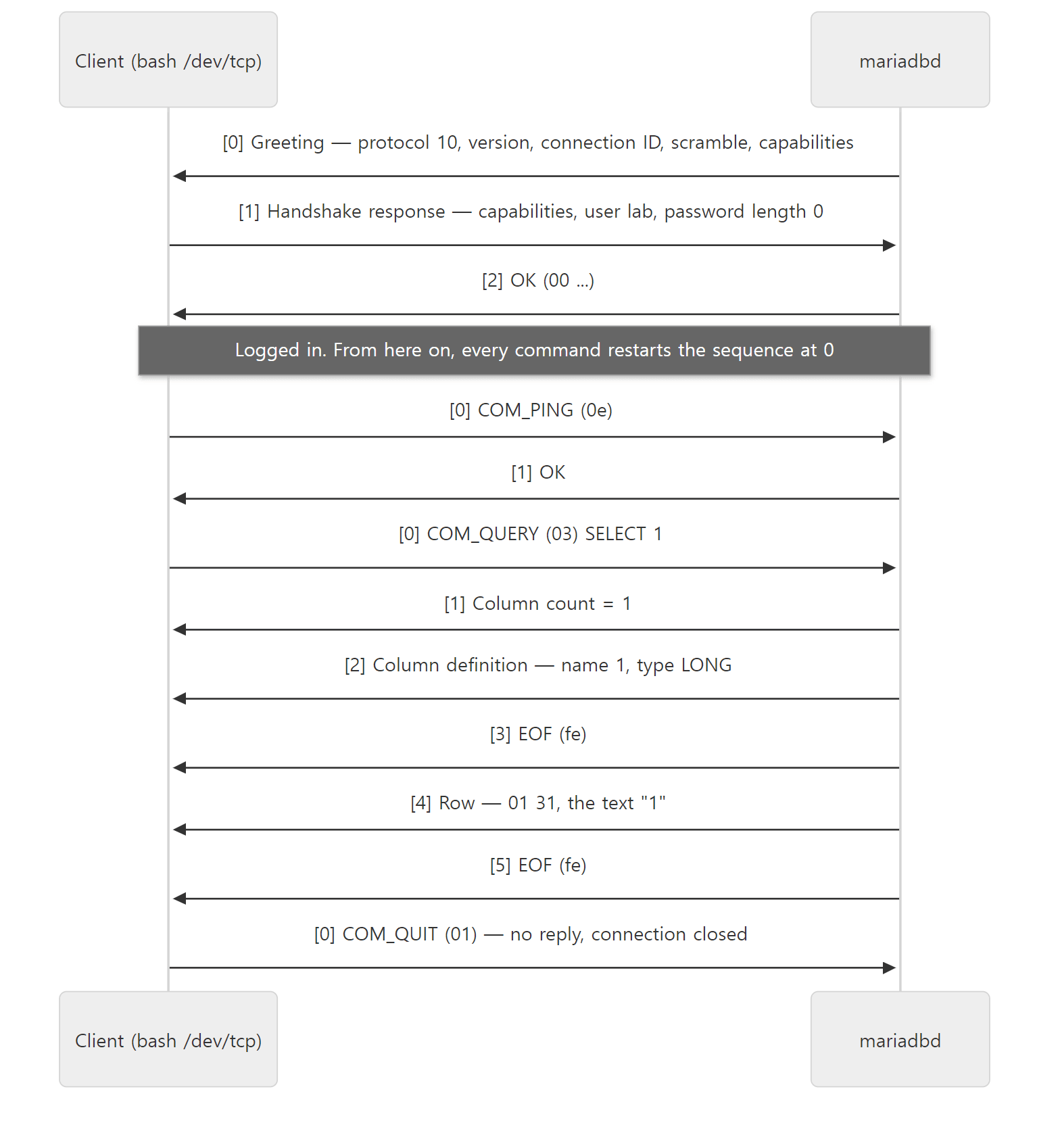 The conversation from Example 2. The numbers in brackets are sequence numbers.
Vio — wrapping the socket in function pointers
my_real_read() does not call recv() on the socket itself; it calls vio_read(). That is not a function but a macro expanding to ((vio)->read)(vio,buf,size) (include/violite.h line 202). The Vio struct holds the function pointers.
  /* function pointers. They are similar for socket/SSL/whatever */
  void    (*viodelete)(Vio*);
  int     (*vioerrno)(Vio*);
  size_t  (*read)(Vio*, uchar *, size_t);
  size_t  (*write)(Vio*, const uchar *, size_t);
  int     (*timeout)(Vio*, uint, my_bool);
include/violite.h lines 255–260
vio_init() in vio/vio.c fills these pointers depending on the kind of connection: vio_read (or the buffered vio_read_buff) for TCP and Unix sockets (vio/vio.c line 159), the functions from vio/viossl.c for SSL, and vio_read_pipe for Windows named pipes. So the NET code does not need to know whether SSL is in use. It is the same "put function pointers in a C struct to imitate polymorphism" technique we saw in httpd Part 2.
For a TCP socket, vio_read() (vio/viosocket.c line 156) reads the socket without blocking when a read timeout is set, and if there is no data (EAGAIN) it waits in vio_socket_io_wait() with poll() until the timeout. The wait_timeout of section 3 reaches all the way down here.
3. do_command — reading one command
The connection thread from Part 4 calls do_command(thd) repeatedly in the while (thd_is_connection_alive(thd)) loop of do_handle_one_connection() (sql/sql_connect.cc lines 1510–1516). In the thread pool, a worker calls the same do_command() (sql/threadpool_common.cc line 438, with blocking=false). Whatever the scheduler, one command = one call to do_command(). Here is its inside, trimmed.
  if (!thd->skip_wait_timeout)
    my_net_set_read_timeout(net, thd->get_net_wait_timeout());
  // ...
  thd->clear_error(1);

  net_new_transaction(net);
  // ...
  packet_length= my_net_read_packet(net, 1);
  // ...
  packet= (char*) net->read_pos;
  // ...
  command= fetch_command(thd, packet);
  // ...
  my_net_set_read_timeout(net, thd->variables.net_read_timeout);

  DBUG_ASSERT(packet_length);
  DBUG_ASSERT(!thd->apc_target.is_enabled());

resume:
  return_value= dispatch_command(command, thd, packet+1,
                                 (uint) (packet_length-1), blocking);
sql/sql_parse.cc lines 1266–1438
(The WITH_WSREP blocks — for Galera clusters — and error handling are trimmed.)
- Before waiting, the timeout is switched to
wait_timeout.thd->get_net_wait_timeout()normally returns the session'swait_timeout, or anidle_transaction_timeout-family value if a transaction is open and idle (sql/sql_class.h lines 6491–6511). - The previous statement's errors and warnings are cleared (
clear_error), and the sequence goes back to 0.net_new_transaction(net)is a one-line macro,((net)->pkt_nr=0)(include/mysql_com.h line 637). That is why every command in the examples started at sequence 0. - The thread sits in
my_net_read_packet(net, 1)until the next command arrives. A connection shown asSleepinSHOW PROCESSLISTis sitting on exactly this line. - When a packet arrives, the first byte is taken as the command (
fetch_command), the timeout goes back tonet_read_timeout, anddispatch_command()receives the command number and the rest with the first byte removed (packet+1,packet_length-1).
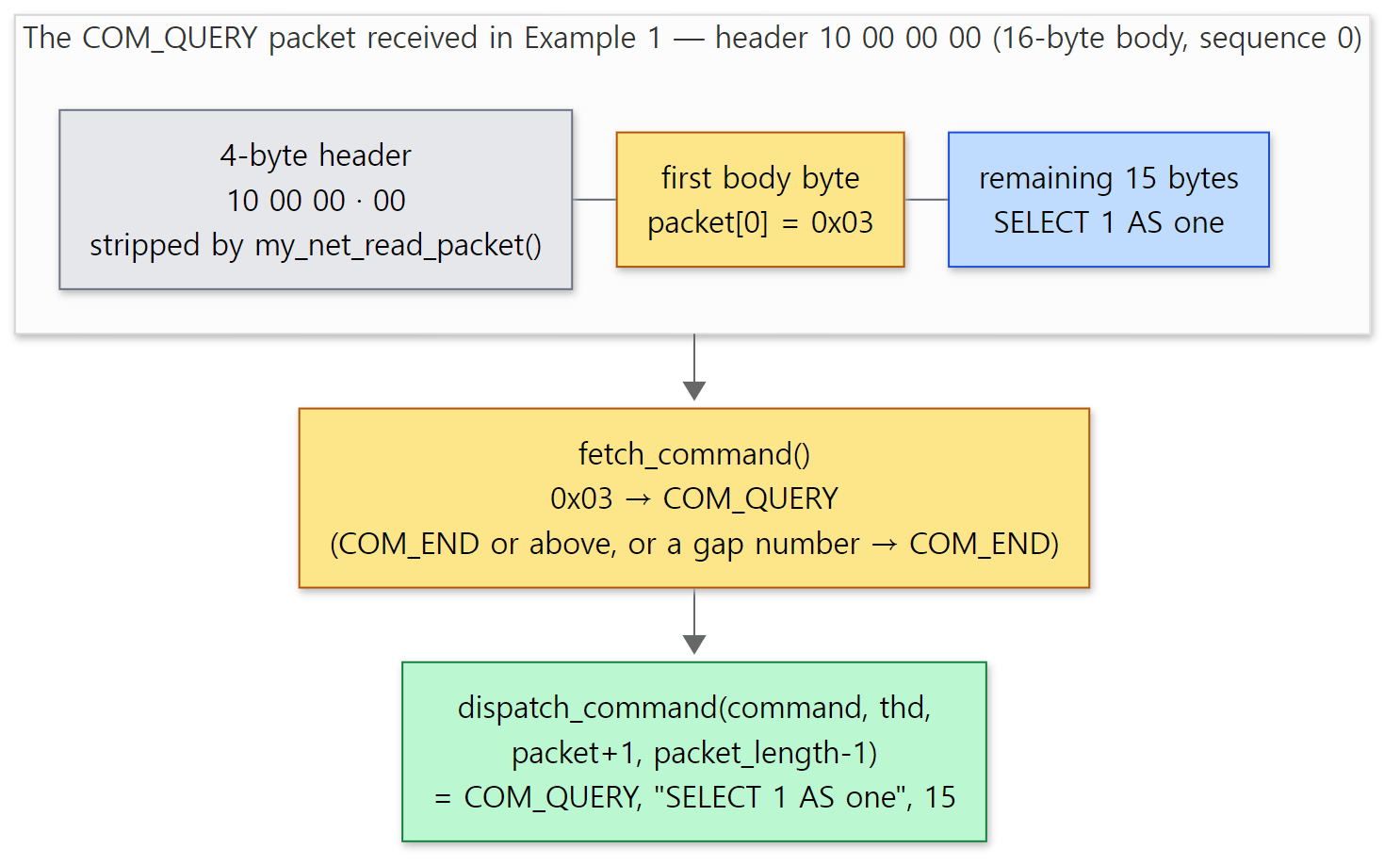 The command number is the single first byte of the body, and dispatch_command() gets the rest with that byte removed. Byte values come from Example 1's actual output (10 00 00 00) and the enum at include/mysql_com.h line 90 (COM_QUERY = 3).
All fetch_command() does is turn out-of-range values into COM_END.
static enum enum_server_command fetch_command(THD *thd, char *packet)
{
  enum enum_server_command
    command= (enum enum_server_command) (uchar) packet[0];
  DBUG_ENTER("fetch_command");

  if (command >= COM_END ||
      (command >= COM_MDB_GAP_BEG && command <= COM_MDB_GAP_END))
    command= COM_END;				// Wrong command
sql/sql_parse.cc lines 1180–1188
Easy to get wrong: wait_timeout counts only "idle time"
If you set a short wait_timeout, will long-running queries be cut off? According to the code above, no. wait_timeout applies only while my_net_read_packet() is waiting for the next command, and as soon as a command arrives the timeout switches to net_read_timeout. Item 5 of the example folder ex/u05-commands confirms it: in a session with wait_timeout=2, a 3-second SLEEP(3) runs to completion, but a statement sent after 4 more idle seconds is cut off.
--- 5. wait_timeout counts only while waiting for the next command
long_query_is_fine
0
--------------
SELECT 'after 4s idle' AS next
--------------

ERROR 2006 (HY000) at line 2: Server has gone away
Variable_name	Value
Aborted_clients	1
Aborted connection 14 to db: 'unconnected' user: 'root' host: 'localhost' (Got timeout reading communication packets)
On the server side, my_real_read() times out and sets ER_NET_READ_INTERRUPTED (vio_was_timeout()), and do_command() returns DISPATCH_COMMAND_CLOSE_CONNECTION, ending the connection loop. Got timeout reading communication packets in the error log is that message (connection ID 14 differs per run).
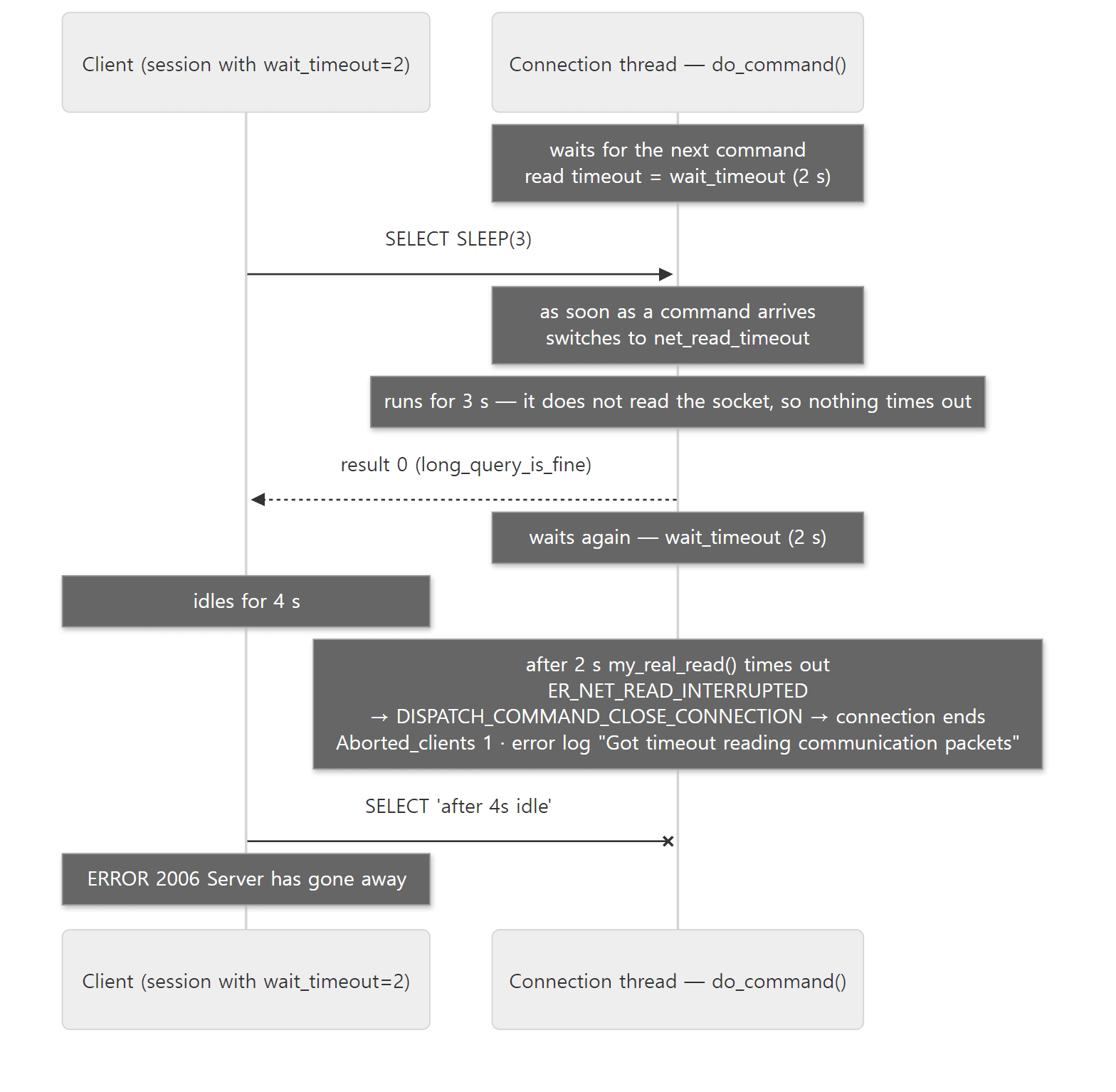 wait_timeout applies only to the idle time between commands. The order and messages are the actual output of step 5 in ex/u05-commands above.
4. dispatch_command — a switch on the command byte
dispatch_command() does the work common to every command, branches in a big switch, and meets again at a label called dispatch_end to clean up.
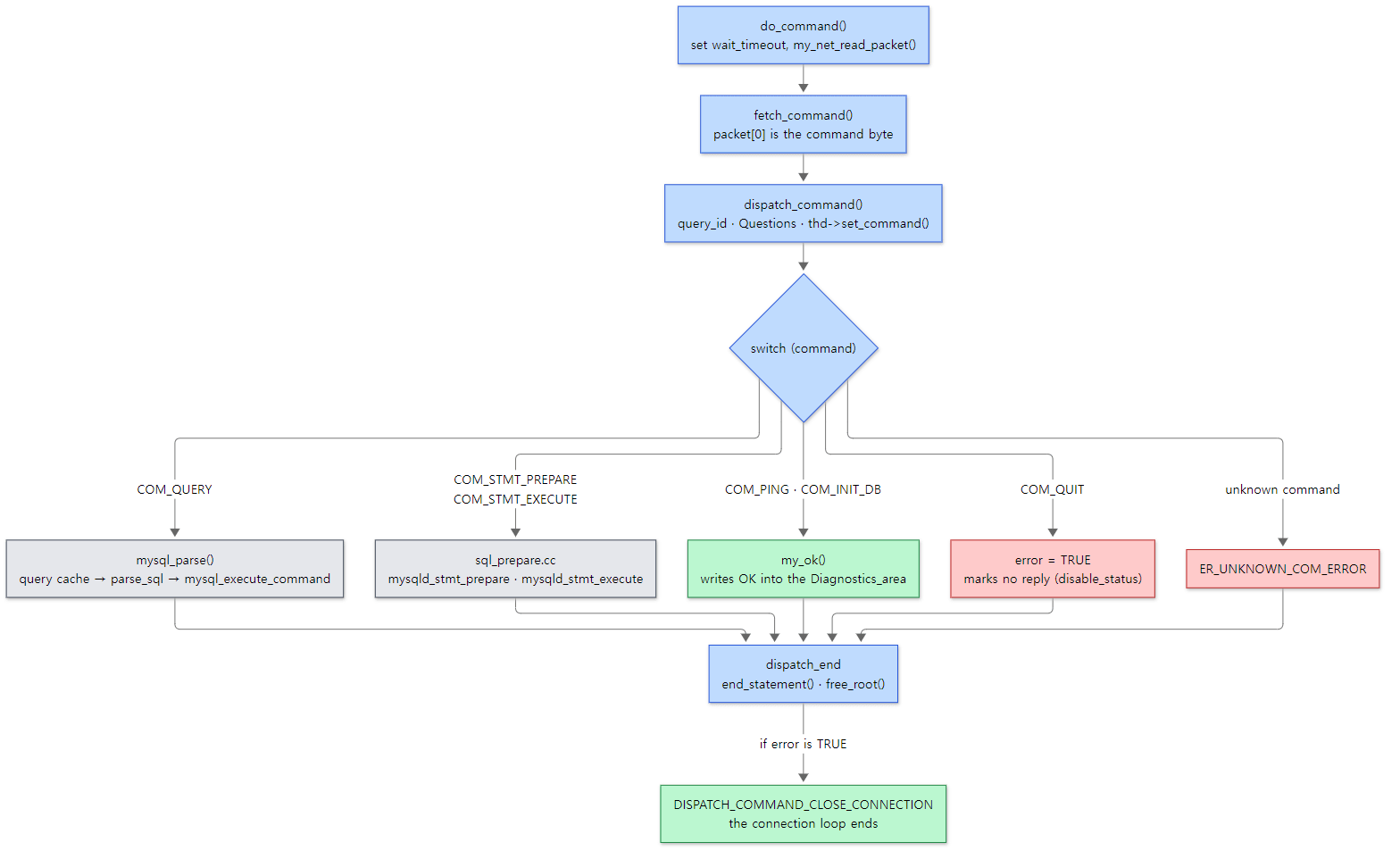 The grey boxes (everything after parsing, and prepared statements) are covered in detail from Part 6 on.
The common head
  if (command != COM_QUERY)
    thd->reset_for_next_command();
  thd->set_command(command);

  thd->enable_slow_log= true;
  thd->query_plan_flags= QPLAN_INIT;
  thd->lex->sql_command= SQLCOM_END; /* to avoid confusing VIEW detectors */
  thd->reset_kill_query();

  DEBUG_SYNC(thd,"dispatch_command_before_set_time");

  thd->set_time();
  if (!(server_command_flags[command] & CF_SKIP_QUERY_ID))
    thd->set_query_id(next_query_id());
  // ...
  if (!(server_command_flags[command] & CF_SKIP_QUESTIONS))
    statistic_increment(thd->status_var.questions, &LOCK_status);
  // ...
  switch (command) {
sql/sql_parse.cc lines 1654–1713
thd->set_command(command)becomes theCommandcolumn ofSHOW PROCESSLIST. The names are in thecommand_name[]array at line 133 ofsql_parse.cc("Sleep","Quit","Init DB","Query"…).query_idis a server-wide number incremented per command, and theQuestionsstatus variable counts the commands clients sent. Both can be skipped based on flags inserver_command_flags[].COM_PINGandCOM_STATISTICScarryCF_SKIP_QUERY_ID | CF_SKIP_QUESTIONS;COM_STMT_PREPARE,COM_STMT_CLOSEandCOM_STMT_RESETcarryCF_SKIP_QUESTIONS(sql/sql_parse.cc lines 485–513).
Short commands: COM_PING, COM_QUIT
  case COM_PING:
    status_var_increment(thd->status_var.com_other);
    my_ok(thd);				// Tell client we are alive
    break;
sql/sql_parse.cc lines 2312–2315
COM_PING has nothing to do. It bumps Com_admin_commands (com_other in the source) and writes OK into the Diagnostics_area with my_ok(), that's all. The sending is done by end_statement() at dispatch_end. This is the command mariadb-admin ping sends (Example 3).
  case COM_QUIT:
    /* Note: We don't calculate statistics for this command */

    /* Ensure that quit works even if max_mem_used is set */
    thd->variables.max_mem_used= LONGLONG_MAX;
    general_log_print(thd, command, NullS);
    net->error=0;				// Don't give 'abort' message
    thd->get_stmt_da()->disable_status();       // Don't send anything back
    error=TRUE;					// End server
    break;
sql/sql_parse.cc lines 2122–2131
COM_QUIT marks "no reply to send" with disable_status() and sets error=TRUE so the connection closes. net->error=0 marks a "clean exit", so connections that leave this way are not counted in Aborted_clients. In Example 2, COM_QUIT got no reply and Aborted_clients stayed at 0 — that is this code.
COM_QUERY — one SQL statement (or several)
  case COM_QUERY:
    // ...
    if (unlikely(alloc_query(thd, packet, packet_length)))
      break;					// fatal error is set
    // ...
    general_log_write(thd, command, thd->query(), thd->query_length());
      // ...
      mysql_parse(thd, thd->query(), thd->query_length(), &parser_state);

    while (!thd->killed && (parser_state.m_lip.found_semicolon != NULL) &&
           ! thd->is_error())
    {
      // ...
      char *beginning_of_next_stmt= (char*) parser_state.m_lip.found_semicolon;
      // ...
      thd->protocol->end_statement();
      // ...
      statistic_increment(thd->status_var.questions, &LOCK_status);
      // ...
      mysql_parse(thd, beginning_of_next_stmt, length, &parser_state);
sql/sql_parse.cc lines 1862–2002
(The WITH_WSREP blocks and performance_schema / DTrace instrumentation are trimmed.)
alloc_query()copies the SQL string from the packet into theTHD's memory.general_log_write(), which writes to the general query log (general_log), also runs here, before parsing. That is why statements with syntax errors still show up in the general log.mysql_parse()parses and executes. We look inside it from Part 6 on.- If one packet holds several statements (like
SELECT 1; SELECT 2— when the client has turned onCLIENT_MULTI_STATEMENTS), the parser leaves the position of the;ending the first statement infound_semicolon. Thewhileloop then sends this statement's answer (end_statement), bumpsQuestionsonce more, and callsmysql_parse()again for the next statement.
Example 3: commands and status variables
The example folder is ex/u05-commands. The mariadb client normally splits statements at each ; and sends them separately, so I switched to DELIMITER // to put three statements in one packet. The general log was turned on with log_output='TABLE' and read from mysql.general_log. Below is part 1 of the SQL inside run.sh (the SELECT that prints the step name and one comment line are left out).
-- Example written for this post (not MariaDB source)
-- ...
FLUSH STATUS;
DELIMITER //
SELECT 1; SELECT 2; DO 3 //
DELIMITER ;
SHOW SESSION STATUS WHERE Variable_name IN ('Com_select','Com_do','Questions');
SELECT command_type, argument FROM mysql.general_log
 WHERE thread_id = CONNECTION_ID() AND argument LIKE 'SELECT 1%';
+---------------+-------+
 Variable_name | Value |
+---------------+-------+
 Com_do        | 1     |
 Com_select    | 2     |
 Questions     | 4     |
+---------------+-------+
+--------------+--------------------------+
 command_type | argument                 |
+--------------+--------------------------+
 Query        | SELECT 1; SELECT 2; DO 3 |
+--------------+--------------------------+
The general log holds all three statements as a single Query entry (line 1875 is outside the loop), while Questions is 4: one for each of the three statements plus SHOW STATUS. The per-statement-type Com_* counters such as Com_select and Com_do are bumped per statement by mysql_execute_command() (sql/sql_parse.cc line 3789).
I also looked at mariadb-admin ping and SHOW PROCESSLIST.
--- 3. mariadb-admin ping sends COM_PING
mysqld is alive
Com_admin_commands: 1 -> 2
--- 4. the Command column of SHOW PROCESSLIST is command_name[]
+----+---------+------------+-----------------+
 ID | COMMAND | STATE      | INFO            |
+----+---------+------------+-----------------+
 11 | Sleep   |            | NULL            |
 12 | Query   | User sleep | SELECT SLEEP(3) |
+----+---------+------------+-----------------+
COM_PING bumps Com_admin_commands; there is no variable like Com_ping. In PROCESSLIST, the connection waiting for its next command is Sleep and the one running SLEEP(3) is Query. The Command column is the name of the protocol command, not the kind of SQL (IDs differ per run).
Example 4: the call stack down to dispatch_command
With gdb, I put a breakpoint on dispatch_command and sent SELECT id FROM t WHERE id >= 2 (example folder ex/u05-gdb). Addresses and arguments are stripped.
=== 1. break dispatch_command
#0  dispatch_command at /usr/src/mariadb/sql/sql_parse.cc:1613
#1  do_command at /usr/src/mariadb/sql/sql_parse.cc:1437
#2  do_handle_one_connection at /usr/src/mariadb/sql/sql_connect.cc:1514
#3  handle_one_connection at /usr/src/mariadb/sql/sql_connect.cc:1426
#4  pfs_spawn_thread at /usr/src/mariadb/storage/perfschema/pfs.cc:2198
#5  ?? () from /lib/x86_64-linux-gnu/libc.so.6
#6  ?? () from /lib/x86_64-linux-gnu/libc.so.6
$1 = COM_QUERY
$2 = 0x778f6c00bde1 "SELECT id FROM t WHERE id >= 2"
handle_one_connection → do_handle_one_connection (line 1514, the while loop above) → do_command (line 1437) → dispatch_command. command is COM_QUERY, and packet is the SQL string as-is with the command byte removed (the address differs per run). This is where the Part 2 map crosses from ① to ②.
Easy to get wrong: SQL PREPARE vs COM_STMT_PREPARE
There are two ways to create a prepared statement: sending the protocol command COM_STMT_PREPARE (a driver's server-side prepared statement), or sending the SQL statement PREPARE s FROM '…' inside a COM_QUERY. They have separate status variables: Com_stmt_prepare for the first and Com_prepare_sql for the second. But SQL PREPARE also ends up calling Prepared_statement::prepare(), and that function always bumps com_stmt_prepare (sql/sql_prepare.cc line 4475; EXECUTE does the same at line 5433). Here is item 2 of Example 3.
+------------------+-------+
 Variable_name    | Value |
+------------------+-------+
 Com_execute_sql  | 1     |
 Com_prepare_sql  | 1     |
 Com_select       | 1     |
 Com_stmt_execute | 1     |
 Com_stmt_prepare | 1     |
+------------------+-------+
One SQL PREPARE/EXECUTE bumped the Com_stmt_* counters too. That is why you cannot conclude "Com_stmt_prepare is non-zero, so the driver uses server-side prepared statements".
5. Sending the result — Protocol and Diagnostics_area
Now the other direction: the path the answer takes out. THD holds two protocol objects, and the protocol pointer points to the one in use.
  NET	  net;				// client connection descriptor
  /** Additional network instrumentation for the server only. */
  NET_SERVER m_net_server_extension;
  scheduler_functions *scheduler;       // Scheduler for this connection
  Protocol *protocol;			// Current protocol
  Protocol_text   protocol_text;	// Normal protocol
  Protocol_binary protocol_binary;	// Binary protocol
sql/sql_class.h lines 3401–3407
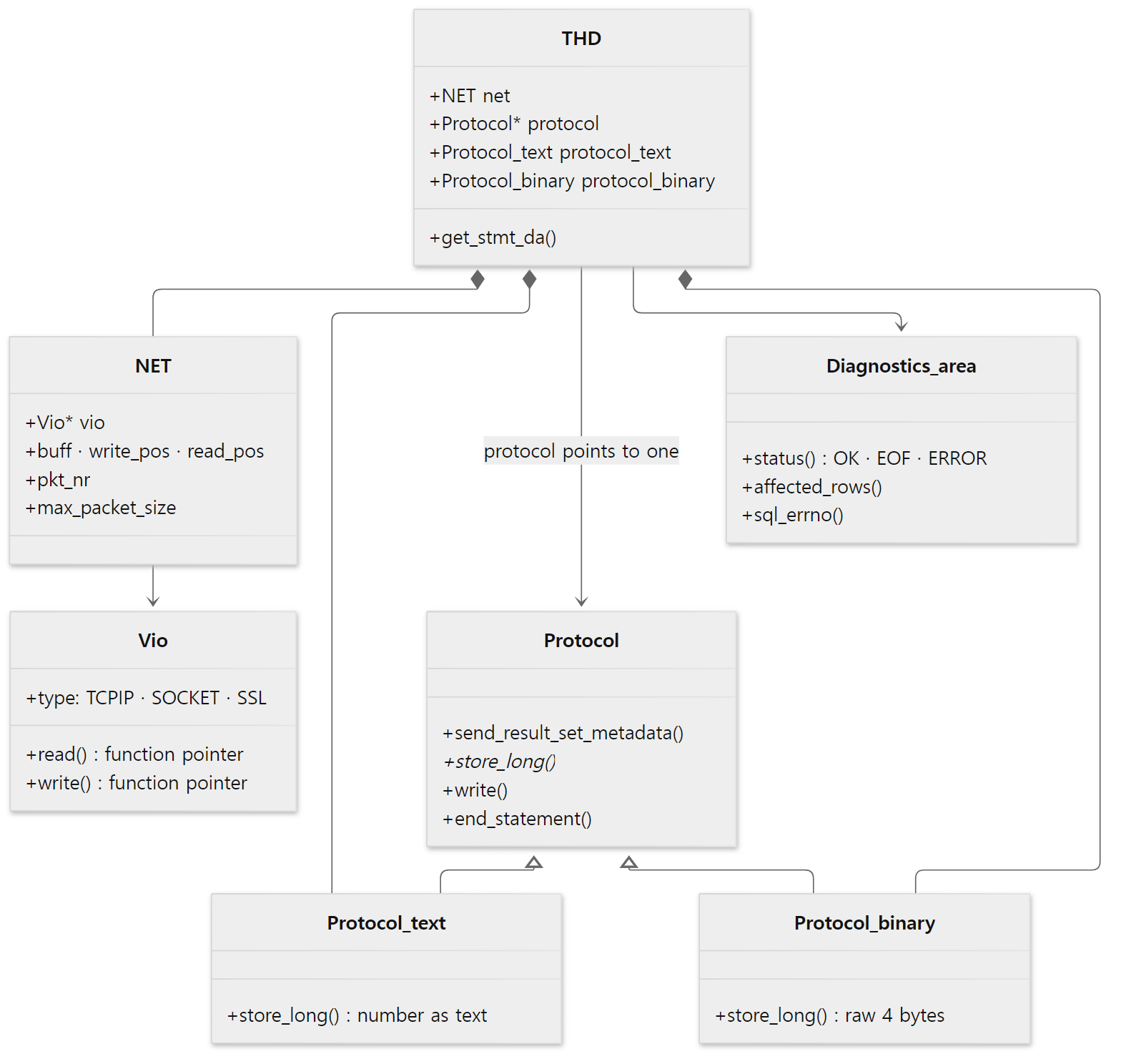 Top to bottom: what to send (
Protocol, Diagnostics_area) → packets (NET) → bytes (Vio).
The default is protocol_text (protocol= &protocol_text; in THD::THD, sql/sql_class.cc line 983). mysqld_stmt_prepare(), which handles COM_STMT_PREPARE, briefly switches to the binary one with thd->protocol= &thd->protocol_binary;, calls stmt->prepare(), and restores save_protocol afterwards (sql/sql_prepare.cc lines 2695–2720).
One row: text and binary
The executor (Part 9) sends result rows by calling select_send::send_data() once per row.
int select_send::send_data(List<Item> &items)
{
  Protocol *protocol= thd->protocol;
  DBUG_ENTER("select_send::send_data");

  protocol->prepare_for_resend();
  if (protocol->send_result_set_row(&items))
  {
    protocol->remove_last_row();
    DBUG_RETURN(TRUE);
  }

  thd->inc_sent_row_count(1);

  /* Don't return error if disconnected, only if write fails */
  if (likely(thd->vio_ok()))
    DBUG_RETURN(protocol->write());

  DBUG_RETURN(0);
}
sql/sql_class.cc lines 3477–3496
send_result_set_row() calls Item::send() for each column, and inside it the store_*() matching the value's type is called. Comparing store_long(), which stores one INT, in the two protocols shows the difference at a glance.
bool Protocol_text::store_long(longlong from)
{
#ifndef DBUG_OFF
  DBUG_ASSERT(valid_handler(field_pos, PROTOCOL_SEND_LONG));
  field_pos++;
#endif
  char buff[22];
  size_t length= (size_t) (int10_to_str((long int)from, buff,
                                        (from < 0) ? - 10 : 10) - buff);
  return store_numeric_string_aux(buff, length);
}
sql/protocol.cc lines 1543–1553
bool Protocol_binary::store_long(longlong from)
{
  field_pos++;
  char *to= packet->prep_append(4, PACKET_BUFFER_EXTRA_ALLOC);
  if (!to)
    return 1;
  int4store(to, from);
  return 0;
}
sql/protocol.cc lines 1779–1787
The text side builds decimal characters with int10_to_str() and appends "length + characters"; the binary side appends the little-endian 4 bytes from int4store() as-is. A binary row also starts with one 00 byte and a NULL bitmap (the comment at protocol.cc lines 1704–1720).
Example 5: the same SELECT 1, text and binary
Continuing Example 2 on the same connection, I prepared SELECT 1 with COM_STMT_PREPARE (0x16) and ran it with COM_STMT_EXECUTE (0x17).
# Example written for this post (not MariaDB source)
# ... (continuing Example 2 on the same connection)
printf '\x09\x00\x00\x00''\x16''SELECT 1' >&3                                       # 5. COM_STMT_PREPARE
dump
printf '\x0a\x00\x00\x00''\x17''\x01\x00\x00\x00''\x00''\x01\x00\x00\x00' >&3      # 6. COM_STMT_EXECUTE
dump                                                                               #    stmt_id=1, flags=0, iterations=1
--- 5. COM_STMT_PREPARE (0x16) 'SELECT 1'
0000000 0c 00 00 01 00 01 00 00 00 01 00 00 00 00 00 00  >................<
0000016 17 00 00 02 03 64 65 66 00 00 00 01 31 00 0c 3f  >.....def....1..?<
0000032 00 01 00 00 00 03 81 00 00 00 00 05 00 00 03 fe  >................<
0000048 00 00 02 00                                      >....<
0000052
--- 6. COM_STMT_EXECUTE (0x17) stmt_id=1, flags=0, iterations=1
0000000 01 00 00 01 01 17 00 00 02 03 64 65 66 00 00 00  >..........def...<
0000016 01 31 00 0c 3f 00 01 00 00 00 03 81 00 00 00 00  >.1..?...........<
0000032 05 00 00 03 fe 00 00 02 00 06 00 00 04 00 00 01  >................<
0000048 00 00 00 05 00 00 05 fe 00 00 02 00              >............<
0000060
--- 7. COM_QUIT (0x01)
0000000
--- 8. counters after:  Aborted_clients=0 Com_admin_commands=2 Com_select=3 Com_stmt_execute=1 Com_stmt_prepare=1
- The first packet of the prepare reply,
0c 00 00 01 | 00 01 00 00 00 01 00 00 00 00 00 00, is built bysend_prep_stmt()(sql/sql_prepare.cc lines 448–454): OK marker00, statement ID01 00 00 00(= 1), 1 column, 0 parameters, 0 warnings. The column definition and an EOF follow. - In the execute reply only the row packet differs. Text (Example 2) was
02 00 00 04 | 01 31; binary is06 00 00 04 | 00 00 01 00 00 00— header00, NULL bitmap00, then the 4-byte integer 1. - The counters on the last line cover Example 2 and this example together. Compared with the "before" line,
Com_admin_commandswent up by 1 (COM_PING) andCom_selectby 2: theSELECT 1inCOM_QUERYand theSELECT 1inCOM_STMT_EXECUTEboth go throughmysql_execute_command(). We ended withCOM_QUIT, soAborted_clientsstayed at 0.
The statement's final answer: Diagnostics_area and end_statement()
Result rows go to the buffer as soon as they are produced, but the statement's last packet (OK, EOF, error) is handled differently. Executing code only writes a status into the Diagnostics_area. The statuses are the seven values of enum_diagnostics_status (sql/sql_error.h lines 1021–1037) — DA_EMPTY at statement start, DA_OK, DA_EOF, DA_OK_BULK and DA_EOF_BULK for bulk execution, DA_ERROR, and DA_DISABLED for cases like COM_STMT_PREPARE that send their reply directly. my_ok() is an inline function that records the affected row count in THD and calls thd->get_stmt_da()->set_ok_status(…) (sql/sql_class.h lines 6710–6717); my_eof() writes DA_EOF and my_error() writes DA_ERROR.
Then, at dispatch_end at the end of dispatch_command(), Protocol::end_statement() looks at that status and sends the matching packet.
  if (do_end_of_statement)
  {
    DBUG_ASSERT(thd->derived_tables == NULL &&
               (thd->open_tables == NULL ||
               (thd->locked_tables_mode == LTM_LOCK_TABLES)));

    thd_proc_info(thd, "Updating status");
    /* Finalize server status flags after executing a command. */
    thd->update_server_status();
    thd->protocol->end_statement();
    query_cache_end_of_result(thd);
  }
  // ...
  thd->lex->m_sql_cmd= NULL;
  free_root(thd->mem_root,MYF(MY_KEEP_PREALLOC));
sql/sql_parse.cc lines 2439–2494
  if (thd->get_stmt_da()->is_sent())
    DBUG_VOID_RETURN;

  switch (thd->get_stmt_da()->status()) {
  case Diagnostics_area::DA_ERROR:
    thd->stop_collecting_unit_results();
    /* The query failed, send error to log and abort bootstrap. */
    error= send_error(thd->get_stmt_da()->sql_errno(),
                      thd->get_stmt_da()->message(),
                      thd->get_stmt_da()->get_sqlstate());
    break;
      // ...
      error= send_ok(thd->server_status,
                   thd->get_stmt_da()->statement_warn_count(),
                   thd->get_stmt_da()->affected_rows(),
                   thd->get_stmt_da()->last_insert_id(),
                   thd->get_stmt_da()->message());
    break;
  case Diagnostics_area::DA_DISABLED:
    break;
(The DA_EOF branch and the branches that send collected bulk-execution results are trimmed. For DA_EOF it calls send_eof().)
Why hold back only the last packet like this? The long comment above end_statement() answers (sql/protocol.cc lines 510–544). Result rows cannot be collected on the server because there may be any number of them, but the final EOF, OK or error is kept in the Diagnostics_area and sent only after execution is completely over — so that if the commit fails or an error occurs during cleanup, the EOF can still be turned into an error. That is why, however many places record a status during execution, the client gets exactly one final answer (if is_sent() is already true, nothing is sent again). The comment notes one more thing: the actual sending is delegated to the virtual functions send_ok(), send_eof() and send_error(), so a protocol that keeps answers in memory instead of sending them can be plugged in. Protocol_discard, which an ANALYZE statement swaps in to throw away result rows (sql/sql_parse.cc line 6257), is one such case. The last line, free_root(thd->mem_root, MYF(MY_KEEP_PREALLOC)), gives back all the memory used during the statement at once — the per-statement lifetime of MEM_ROOT from Part 2 ends here.
The OK packet's payload is built by Protocol::net_send_ok().
  if (is_eof)
  {
    DBUG_ASSERT(thd->client_capabilities & CLIENT_DEPRECATE_EOF);
    store.q_append((char)254);
  }
  else
    store.q_append('\0');

  /* affected rows */
  store.q_net_store_length(affected_rows);

  /* last insert id */
  store.q_net_store_length(id);
  // ...
  error= my_net_write(net, (const unsigned char*)store.ptr(), store.length());
  if (likely(!error))
    error= net_flush(net);
The OK from Example 2, 00 00 00 02 00 00 00, follows exactly this order. Numbers written with net_store_length() are "length-encoded integers": one byte if below 251, otherwise a fc, fd or fe marker followed by 2, 3 or 8 bytes (sql-common/pack.c lines 131–154). The 9 bytes in front of the 20-million-byte value in Example 1 were fe + 8 bytes. Right after writing an OK, it calls net_flush().
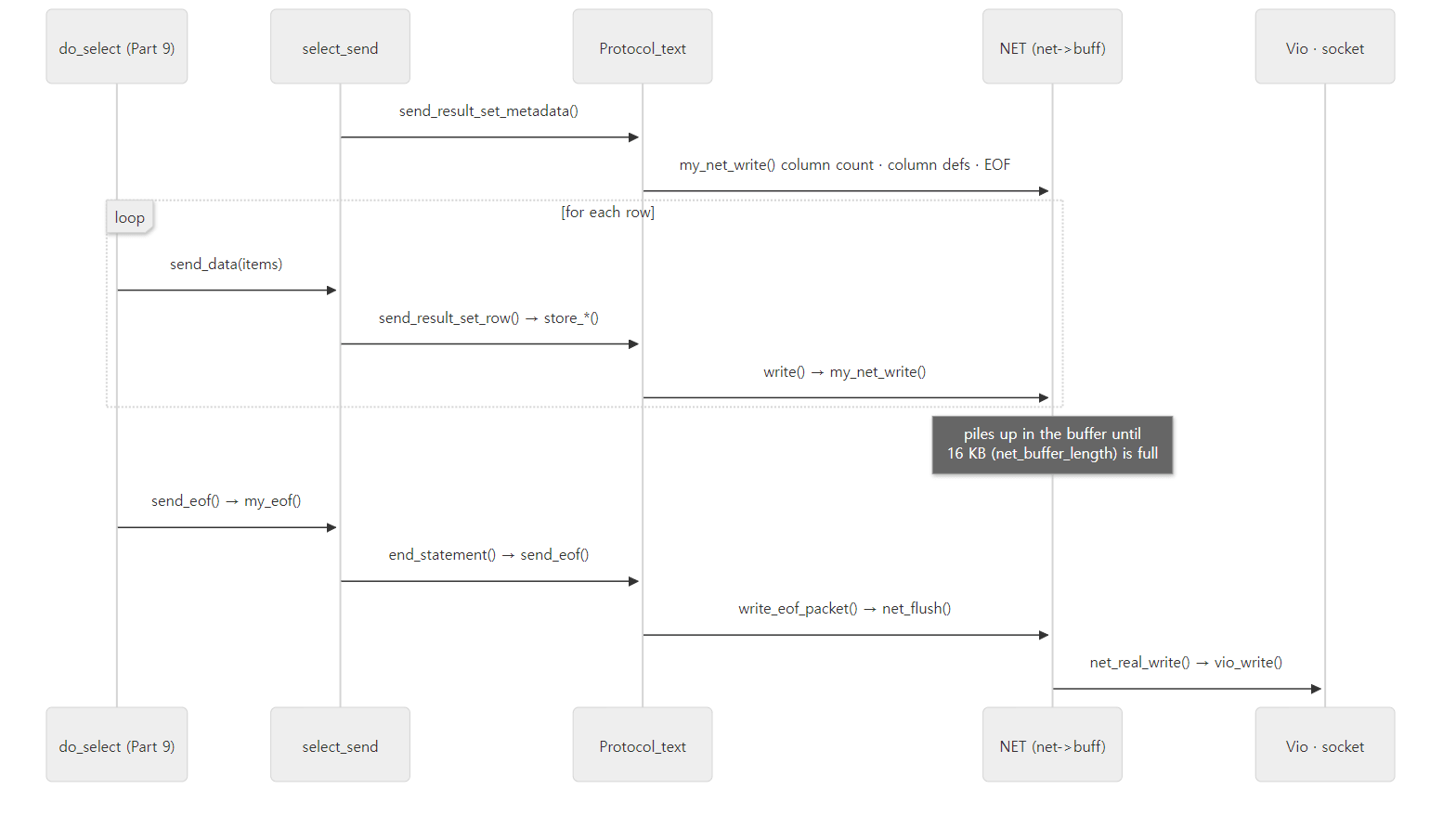 Result packets pile up in the buffer and go out together when the buffer fills or the final EOF is written.
Example 6: where the bytes actually leave
In the same ex/u05-gdb, this time I put a breakpoint on net_real_write and sent the same SELECT once more. The connection and login were done before gdb attached, so the first hit is the reply to this SELECT.
=== 2. break net_real_write (the bytes leave here)
#0  net_real_write at /usr/src/mariadb/sql/net_serv.cc:634
#1  net_flush at /usr/src/mariadb/sql/net_serv.cc:387
#2  Protocol::net_send_eof at /usr/src/mariadb/sql/protocol.cc:347
#3  Protocol::send_eof at /usr/src/mariadb/sql/protocol.cc:678
#4  Protocol::end_statement at /usr/src/mariadb/sql/protocol.cc:614
#5  select_send::send_eof at /usr/src/mariadb/sql/sql_class.cc:3533
#6  do_select at /usr/src/mariadb/sql/sql_select.cc:25141
#7  JOIN::exec_inner at /usr/src/mariadb/sql/sql_select.cc:5147
#8  JOIN::exec at /usr/src/mariadb/sql/sql_select.cc:4935
#9  mysql_select at /usr/src/mariadb/sql/sql_select.cc:5461
#10 handle_select at /usr/src/mariadb/sql/sql_select.cc:652
#11 execute_sqlcom_select at /usr/src/mariadb/sql/sql_parse.cc:6266
#12 mysql_execute_command at /usr/src/mariadb/sql/sql_parse.cc:4038
#13 mysql_parse at /usr/src/mariadb/sql/sql_parse.cc:8005
#14 dispatch_command at /usr/src/mariadb/sql/sql_parse.cc:1903
#15 do_command at /usr/src/mariadb/sql/sql_parse.cc:1437
#16 do_handle_one_connection at /usr/src/mariadb/sql/sql_connect.cc:1514
#17 handle_one_connection at /usr/src/mariadb/sql/sql_connect.cc:1426
#18 pfs_spawn_thread at /usr/src/mariadb/storage/perfschema/pfs.cc:2198
#19 ?? () from /lib/x86_64-linux-gnu/libc.so.6
#20 ?? () from /lib/x86_64-linux-gnu/libc.so.6
$1 = 72
Two things are confirmed.
- The column count, one column definition, EOF, two rows and the final EOF — 72 bytes — left in a single
net_real_write()call (len = 72). All the earlier packets sat innet->buff, andnet_real_write()was called for the first time from thenet_flush()innet_send_eof(), which wrote the EOF. - The EOF is sent inside
do_select().#5 select_send::send_eof(line 3533) calledend_statement()directly. If aSELECTstatement changed no data (!thd->transaction->stmt.is_trx_read_write(); Galera connections excluded),select_send::send_eof()sends the answer first without waiting for cleanup (closing tables, releasing locks) — the comment gives the reason as "Send the result to the client so that it can process the data while the server is doing cleanups" (sql/sql_class.cc lines 3524–3534). After thatis_sent()is true, soend_statement()atdispatch_enddoes nothing.
Easy to get wrong: the EOF after column definitions depends on the client
The replies in the examples had an EOF (fe) after the column definitions. If a client connects with CLIENT_DEPRECATE_EOF on, the server does not send the EOF after the column definitions (send_result_set_metadata(), sql/protocol.cc lines 1250–1261), and instead of the EOF at the end it sends an OK packet starting with fe (net_send_eof() lines 333–339). Example 2 did not set that bit, and the mariadb client in Example 1 received the end as a 5-byte EOF from Protocol::net_send_eof, so it did not set it either. This is an easy place to trip when writing code that parses packets itself.
6. The query cache — before parsing, by string
The query cache stores the result packets of a SELECT keyed by the query string, and when exactly the same string arrives it re-sends the stored packets as-is, with no parsing and no execution. That is why it sits before the parser, at the top of mysql_parse().
  lex_start(thd);
  thd->reset_for_next_command();

  if (query_cache_send_result_to_client(thd, rawbuf, length) <= 0)
  {
    LEX *lex= thd->lex;

    bool err= parse_sql(thd, parser_state, NULL, true);
  // ...
  else
  {
    /* Update statistics for getting the query from the cache */
    thd->lex->sql_command= SQLCOM_SELECT;
    thd->m_statement_psi=
      MYSQL_REFINE_STATEMENT(thd->m_statement_psi,
                             sql_statement_info[SQLCOM_SELECT].m_key);
    status_var_increment(thd->status_var.com_stat[SQLCOM_SELECT]);
sql/sql_parse.cc lines 7950–8038
If query_cache_send_result_to_client() returns 1 (found and sent), neither parse_sql() nor mysql_execute_command() is called. Instead sql_command is set to SQLCOM_SELECT and Com_select is bumped. The long comment just above (lines 7934–7949) admits: "naturally we would check the cache first and set up the parser afterwards, but the cache depends on state reset by lex_start() and reset_for_next_command(), so the lexer is initialised first."
Query_cache::send_result_to_client(), which does the lookup, looks only at the string, without a parser.
  if ((my_toupper(system_charset_info, sql[0]) != 'S' ||
       my_toupper(system_charset_info, sql[1]) != 'E' ||
       my_toupper(system_charset_info, sql[2]) != 'L') &&
      (my_toupper(system_charset_info, sql[0]) != 'W' ||
       my_toupper(system_charset_info, sql[1]) != 'I' ||
       my_toupper(system_charset_info, sql[2]) != 'T'))
  {
    DBUG_PRINT("qcache", ("The statement is not a SELECT; Not cached"));
    goto err;
  }
sql/sql_cache.cc lines 1835–1844
After skipping leading comments, whitespace and an opening parenthesis, it gives up right away if the first three letters are not SEL or WIT (WITH …). Then it builds the key — the query string's bytes + the current database name + a bundle of flags (Query_cache_query_flags). The flags include the client capabilities, the protocol type (text/binary), three character-set settings, sql_mode, the time zone, autocommit, and even the current sequence number (lines 1928–1955). Because results are stored as raw packets, every condition under which the same bytes can safely be returned is part of the key. It then looks up the hash with that key.
  query_block = (Query_cache_block *)  my_hash_search(&queries, (uchar*) sql,
                                                      tot_length);
sql/sql_cache.cc lines 1989–1990
Storing is split across two places. Just before execution, execute_sqlcom_select() calls query_cache_store_query() to say "reserve a slot if this statement can be cached" (sql/sql_parse.cc line 6265), and each time result packets go out to the socket, net_real_write() copies those bytes into the cache.
#if defined(MYSQL_SERVER)
  THD *thd= (THD *)net->thd;
#if defined(USE_QUERY_CACHE)
  query_cache_insert(thd, (char*) packet, len, net->pkt_nr);
#endif
When the result is fully sent, query_cache_end_of_result() in dispatch_command() (line 2449) completes the entry. The key idea of this design is that the cache does not build the result separately — it eavesdrops on outgoing packets and copies them. Re-writing those exact bytes with send_data_in_chunks() on a hit follows from the same idea.
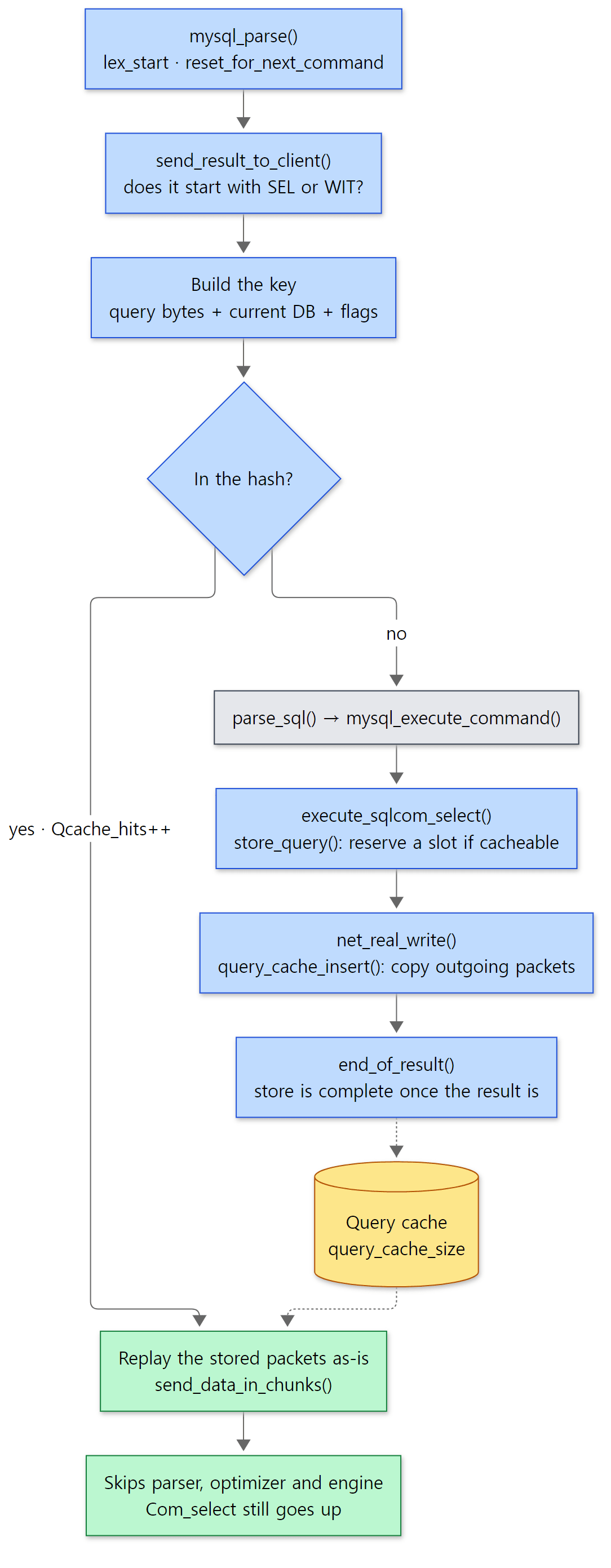 The yellow box is cache memory; the green boxes are the shortcut taken on a hit.
It is off by default.
static Sys_var_enum Sys_query_cache_type(
       "query_cache_type",
       "OFF = Don't cache or retrieve results. ON = Cache all results "
       "except SELECT SQL_NO_CACHE ... queries. DEMAND = Cache only "
       "SELECT SQL_CACHE ... queries",
       NO_SET_STMT SESSION_VAR(query_cache_type), CMD_LINE(REQUIRED_ARG),
       query_cache_type_names, DEFAULT(0), NO_MUTEX_GUARD, NOT_IN_BINLOG,
sql/sys_vars.cc lines 3596–3602
query_cache_type_names[] is { "OFF", "ON", "DEMAND", 0 } (line 3554), so DEFAULT(0) is OFF. The default query_cache_size is 1 MB (DEFAULT(1024*1024), line 3528), and if you set only the size in a config file, startup raises the type to ON (1) for you — the comment reads "if we set size of QC non zero in config then probably we want it ON" (sql/mysqld.cc lines 5228–5234).
Example 7: turning the query cache on and getting hits
The example folder is ex/u05-query-cache. I started the server with defaults, turned the cache on with SET GLOBAL query_cache_type = ON, and printed status variables after each statement.
--- 1. defaults
+--------------------+--------------------+------------------------------+
 @@query_cache_type | @@query_cache_size | @@query_cache_strip_comments |
+--------------------+--------------------+------------------------------+
 OFF                |            1048576 |                            0 |
+--------------------+--------------------+------------------------------+
--- 3. same text twice, then texts that differ only in case / spaces / comments
  Com_select=2 Qcache_hits=0 Qcache_inserts=0 Qcache_queries_in_cache=0
> SELECT name FROM t WHERE id = 2
  Com_select=3 Qcache_hits=0 Qcache_inserts=1 Qcache_queries_in_cache=1
> SELECT name FROM t WHERE id = 2
  Com_select=4 Qcache_hits=1 Qcache_inserts=1 Qcache_queries_in_cache=1
> select name from t where id = 2
  Com_select=5 Qcache_hits=1 Qcache_inserts=2 Qcache_queries_in_cache=2
> SELECT name FROM t WHERE id =  2
  Com_select=6 Qcache_hits=1 Qcache_inserts=3 Qcache_queries_in_cache=3
> SELECT /* hi */ name FROM t WHERE id = 2
  Com_select=7 Qcache_hits=1 Qcache_inserts=4 Qcache_queries_in_cache=4
--- 4. a write to the table invalidates its cached results
> UPDATE t SET name = 'TWO' WHERE id = 2
  Com_select=7 Qcache_hits=1 Qcache_inserts=4 Qcache_queries_in_cache=0
> SELECT name FROM t WHERE id = 2
  Com_select=8 Qcache_hits=1 Qcache_inserts=5 Qcache_queries_in_cache=1
> SELECT name FROM t WHERE id = 2
  Com_select=9 Qcache_hits=2 Qcache_inserts=5 Qcache_queries_in_cache=1
--- 5. not cacheable: NOW(), SQL_NO_CACHE
> SELECT NOW(), name FROM t WHERE id = 1
  Com_select=10 Qcache_hits=2 Qcache_inserts=5 Qcache_queries_in_cache=1
> SELECT NOW(), name FROM t WHERE id = 1
  Com_select=11 Qcache_hits=2 Qcache_inserts=5 Qcache_queries_in_cache=1
> SELECT SQL_NO_CACHE name FROM t WHERE id = 1
  Com_select=12 Qcache_hits=2 Qcache_inserts=5 Qcache_queries_in_cache=1
> SELECT SQL_NO_CACHE name FROM t WHERE id = 1
  Com_select=13 Qcache_hits=2 Qcache_inserts=5 Qcache_queries_in_cache=1
- The default is
OFFand the size is 1 MB. It can be turned on at runtime withSET GLOBAL query_cache_type = ON(the output confirming it is omitted). - The
Com_select=2on the first line comes from the two earlierSELECT @@…statements. Sending the same string a second time madeQcache_hits1.Com_selectwent up even then (line 8038 above). - Statements differing only in letter case, in one extra space, or in a comment were each stored separately (
Qcache_inserts2, 3, 4), because the key is bytes, not a parse result.query_cache_strip_comments, which compares with comments removed, is off by default (Sys_query_cache_strip_comments,DEFAULT(FALSE)). - An
UPDATEon the table dropped all four results that used the table at once (Qcache_queries_in_cache0). Because invalidation is per table, on a frequently written table the cache does little but store and delete. - Statements containing
NOW()andSQL_NO_CACHEstatements were not stored. ForNOW(), the parser's grammar action setsLex->safe_to_cache_query=0(sql/sql_yacc.yy lines 11159–11165); forSQL_NO_CACHE, the parser setssafe_to_cache_query=0to block storing (sql/sql_lex.ccline 10434), and the lookup side also recognizes it as text before parsing withhas_no_cache_directive()(sql_cache.ccline 782) and skips the cache.
Easy to get wrong: everyone shares one query cache lock
Looking up, inserting and deleting cache entries all go through one lock in Query_cache (try_lock(), line 1884). So on a server with many concurrent connections this lock easily becomes a bottleneck, which is the usual explanation for why it is off by default. I did not measure performance in this post, though (numbers from a Debug build would be meaningless). What I confirmed in the source goes only as far as "every connection uses the same lock".
What this post leaves out
- The compressed protocol (
--compress):net->compressandCOMP_HEADER_SIZE—sql/net_serv.cclines 657–685 (writing), theHAVE_COMPRESSside ofmy_net_read_packet_reallen()(reading) - Switching to SSL:
sslaccept()after seeingCLIENT_SSLin the handshake response —sql/sql_acl.cclines 16394–16422,vio/viossl.c - The proxy protocol header:
handle_proxy_header()—sql/net_serv.ccline 752 COM_CHANGE_USERandCOM_RESET_CONNECTION:sql/sql_parse.cclines 1737–1812- Replication commands
COM_BINLOG_DUMPandCOM_REGISTER_SLAVE:sql/sql_parse.ccline 2133 (COM_BINLOG_DUMP) and line 1729 (COM_REGISTER_SLAVE), Part 12 - Cursors and bulk execution
COM_STMT_FETCH/COM_STMT_BULK_EXECUTE, and re-preparing prepared statements:sql/sql_prepare.cc - Session state tracking (
session_track_*): information appended to OK packets,sql/session_tracker.cc DISPATCH_COMMAND_WOULDBLOCK, where the thread pool half-suspends a command while waiting for group commit:sql/sql_parse.cclines 2376–2379, Part 4- Query cache memory-block management and invalidation:
Query_cache::invalidate(),allocate_block()and others insql/sql_cache.cc - The metadata cache
MARIADB_CLIENT_CACHE_METADATA(the 1 byte after the column count):sql/protocol.cclines 1204–1216
Summary
| Concept | One-line summary |
|---|---|
| Packet | 3-byte length + 1-byte sequence + payload. Payload at most 0xffffff; larger is split, and an exact fit gets an extra zero-length packet |
Sequence pkt_nr |
Reset to 0 per command by net_new_transaction() in do_command(). A mismatch is ER_NET_PACKETS_OUT_OF_ORDER |
max_allowed_packet |
The limit for growing the receive buffer (net_realloc()). Exceeding it sets an error and closes the connection. The client has its own |
| Write buffer | Collected up to net_buffer_length (16 KB), then written together in net_flush() / net_real_write() |
Vio |
A layer wrapping sockets, SSL and pipes in function pointers. vio_read() is a macro |
| Handshake | The server speaks first: protocol 10, version, connection ID, scramble, capabilities (with the CLIENT_MYSQL bit off) |
do_command() |
Wait with wait_timeout → read a packet → first byte is the command → switch to net_read_timeout and call dispatch_command() |
dispatch_command() |
Common head (query_id, Questions, Command column) → switch (command) → at dispatch_end, send the answer and free_root() |
COM_QUERY |
alloc_query → general log → mysql_parse(). Statements joined by ; are run one by one in a loop |
COM_PING / COM_QUIT |
Just my_ok() (Com_admin_commands) / close with no reply (not counted in Aborted_clients) |
Protocol_text / Protocol_binary |
The same value as text / in its native format. COM_STMT_* uses binary |
Diagnostics_area |
One slot for the statement's last answer (OK, EOF, error). end_statement() sends it once |
| Early EOF | For a read-only SELECT, select_send::send_eof() sends the answer before cleanup |
| Query cache | Looked up before parsing by bytes + DB + flags; stored by eavesdropping on outgoing packets. Off by default; case and spaces make a different query |
What's next
The SQL string of a COM_QUERY goes into mysql_parse() → parse_sql(). How that string is cut into tokens and goes through the Bison grammar to become LEX, SELECT_LEX and Item trees, and where the "You have an error in your SQL syntax … near '…'" message comes from, is in Part 6: The Parser — How an SQL Statement Becomes LEX and Item Trees. It is exactly the part the query cache in this post "skips".
Compared with earlier series, httpd Part 9 and Tomcat Part 6 cover the same spot. HTTP/1.1 is a text protocol, so it reads the request line and headers by looking for line ends (CRLF), and its limits are measured as "line length and header size"; the MariaDB protocol is binary, so it reads as many bytes as the header says, and its limit is the single max_allowed_packet. On the other hand, what HTTP calls keep-alive — "keep receiving commands on one connection" — is the default in MariaDB: a logged-in connection repeats do_command() until COM_QUIT or a timeout. Collecting results in a buffer and sending them together also resembles Tomcat's response buffer.
From the application side, the JDBC driver called by JdbcTemplate in Spring Part 18 stands in the client's place in this post. Whether a driver sends a PreparedStatement as COM_STMT_PREPARE or builds an SQL string with the values filled in and sends it as COM_QUERY depends on the driver and its settings (I did not verify this against driver source). If you want to know which, remember the "easy to get wrong" note in section 4: don't look at Com_stmt_prepare alone; look at it together with Com_prepare_sql — the number of prepares done through the protocol command is roughly the difference (EXECUTE IMMEDIATE also goes through the same Prepared_statement::prepare() and bumps Com_stmt_prepare, so strictly you would subtract those too).
- Part 2: The Big Picture — the Server Layer, Storage Engines, and the Life of One Query
- Part 4: Connections and Threads — One Thread per Connection, and the Thread Pool
- Part 9: Execution and the Handler API — How the Nested-Loop Join Calls the Engine
- httpd Part 9: Connections and Reading a Request — From a Socket to a request_rec
- Tomcat Part 6: Reading an HTTP/1.1 Request — From Bytes to a coyote Request