What this post covers
"Digging into MariaDB's Source" is a series that reads the source code of the relational database server MariaDB a little at a time, with help from AI, and writes up what is there. It follows the same method as the series already finished — Digging into Spring's Source (27 posts), Digging into Apache httpd's Source (16 posts), Digging into Tomcat's Source (16 posts) — and the one right before it, Digging into nginx's Source. Those series read "servers that take a request and send a response" and "applications that run on top of them". This time we read the other end: the place where the SQL your application sent through JdbcTemplate or an ORM actually lands.
This is the first post, and it gets things ready before any deep reading starts. It tries to answer five questions.
- What is MariaDB, how does it work, and what is it for? (a section for newcomers)
- Which version of the source is being read? How is it different from the LTS releases most people run (11.4, 11.8), and where is the version number written?
- How do you get exactly the same source, submodules included, and how do you build and run it?
- How is a codebase of about 2.59 million lines split into folders, and where should you start?
- Which functions does one
SELECTpass through on its way to InnoDB?
If MariaDB is new to you, start with the "What is MariaDB" section right below. Two diagrams and a 3-minute hands-on run show what MariaDB does, and a short list shows what questions this series answers, before the main part begins. From there on, the reader I have in mind is a developer who has used MariaDB or MySQL from applications and is opening the server's source for the first time. You write SQL, you have added indexes, you know what BEGIN/COMMIT and isolation levels are, and you have looked at EXPLAIN at least once. For C++, knowing that classes, inheritance, virtual functions and pointers exist and being able to read them is enough. I assume you have never opened a database server's source, so words used only inside the server are explained the first time they appear.
| Item | Details |
|---|---|
| Project | MariaDB Server (MariaDB/server) |
| Version | 13.2.0 (main branch, maturity alpha), which builds in Debug mode as 13.2.0-MariaDB-debug |
| Commit | c894d97781 (2026-10-19) |
| Language | C++ and C (built with CMake) |
| Files this post mainly reads | VERSION, cmake/mysql_version.cmake, cmake/submodules.cmake, extra/comp_err.c, sql/sql_connect.cc, sql/sql_parse.cc, sql/sql_select.cc, sql/handler.cc, storage/innobase/handler/ha_innodb.cc |
Every line number and detail in these posts refers to that commit. In other versions the line numbers will differ, and some of the details may too. Since this post is the map for the whole series, it stays with the big picture and leaves the depth to the individual posts.
The series has 12 posts in all.
- How I Read It with AI, and the Map (this post)
- The Big Picture — the Server Layer, Storage Engines, and the Life of One Query
- Startup and Plugins — Until mariadbd Takes Its First Connection
- Connections and Threads — One Thread per Connection, and the Thread Pool
- The Protocol and Command Dispatch — How One Packet Reaches dispatch_command
- The Parser — How an SQL Statement Becomes LEX and Item Trees
- Preparation — Checking Privileges, Opening Tables, Resolving Names
- The Optimizer — JOIN::optimize and Choosing a Plan
- Execution and the Handler API — How the Nested-Loop Join Calls the Engine
- InnoDB Part 1 — Pages, the Buffer Pool and B-trees
- InnoDB Part 2 — Transactions, MVCC, Undo and Locks
- Two Logs — the Redo Log, the Binlog and Crash Recovery, and Wrapping Up
What is MariaDB — how it works and what it is for
Before opening the source, let's see what MariaDB does, with pictures and a quick hands-on run. If you have used MariaDB or MySQL already, you can just skim "Questions this series answers" at the end of this section and move on.
In one sentence — a "table keeper" that many programs share
MariaDB is a server program that keeps data in tables and lets many programs use it at the same time. You set up a table that looks a lot like a spreadsheet, with columns such as "order number, customer, item, price." Programs then ask questions in a language called SQL — "show me all of alice's orders," "give me the total per customer" — and the server finds the answer and sends it back. It differs from a spreadsheet file in three ways: many programs can read and write at the same time without tangling each other up; even with millions of rows it finds just the rows you need, quickly; and once it has said "saved," it does not lose that data, even if the power goes out.
A program like this is called a relational database server (RDBMS). MariaDB was forked from MySQL, so its commands and SQL are still almost the same. This whole series is really the story of how one SQL statement is understood inside the server, how the server decides the way to find the data, and how rows are pulled out of files on disk.
Why you would want this
Imagine a shopping site that writes orders straight into a file. It's simple at first, but problems show up soon.
- If two customers order at the same moment, two programs edit the same file at once, and a line can vanish or get mixed up.
- To find "alice's orders," you have to read the file from start to end. With a million orders, that's a million lines.
- If the program dies halfway between adding an order and lowering the stock count, you are left in a half-done state: the order is in, but the stock didn't change.
- Every time another program needs the same data — a statistics job, an admin screen — they all have to agree on the file format and locking rules.
Put MariaDB in the middle, and programs just send SQL. The server sorts out requests that arrive at the same time with ordering and locks, uses indexes (like the index at the back of a book) to go straight to the rows needed, and uses transactions to bind "add the order + lower the stock" so that either both happen or neither does. How the files are written is the server's job; the programs don't need to know.
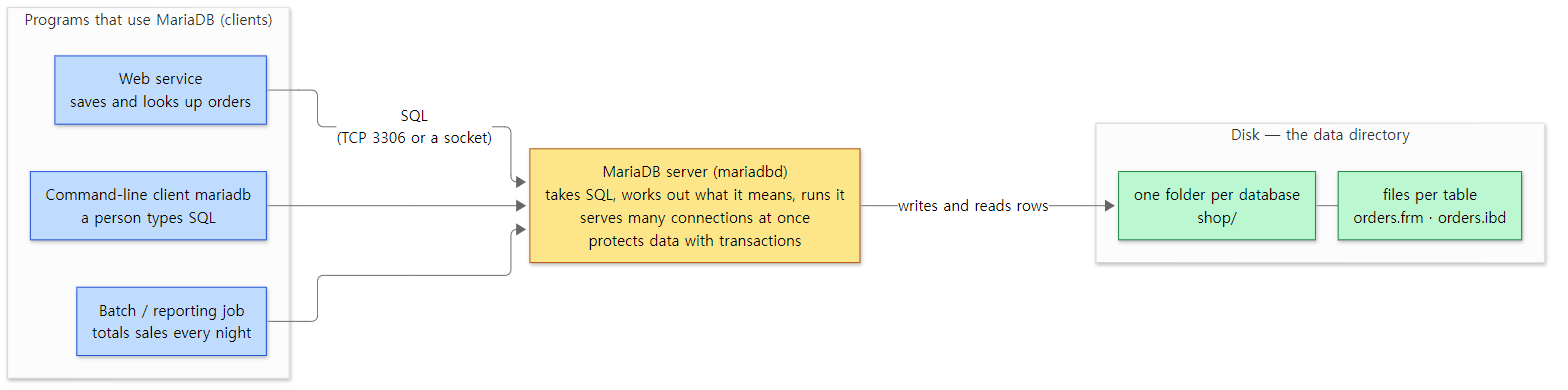 MariaDB in the middle. Programs never touch the files on disk directly; they ask the server in SQL. 3306 is the default TCP port used unless another one is chosen at build time (cmake/mysql_version.cmake line 83).
How it works — in five words
Five words are enough to describe how MariaDB works. The hands-on run and the diagram below show exactly these five.
- Database, table, row — a table is a grid with fixed columns, and a row is one line in it. A database is a name that groups several tables; on disk it is one folder.
- SQL — the language you use to give the server work.
CREATE TABLEmakes a table,INSERTadds rows,SELECTasks questions. The server first takes the statement apart (parsing, part 6), decides how to find the data (optimizing, part 8), and then runs it. - Index — a lookup aid that finds rows quickly by the value of a column. Without one, the server has to scan the table from top to bottom. You can ask the server which method it will use by putting
EXPLAINin front of a query. - Transaction — a unit that binds several statements so that "all of them happen or none do." You open one with
BEGINand confirm it withCOMMIT. Changes not yet confirmed are invisible to other connections. A statement that isn't inside a transaction is committed on its own right away (autocommitis on by default, sql/sys_vars.cc lines 4997–5005). - Storage engine — the part that actually writes rows to disk and reads them back. MariaDB is split into "an upper layer that understands SQL" and "a lower layer that stores rows (the engine)," and you can pick the engine per table. If you pick nothing, you get InnoDB (sql/mysqld.cc lines 4285–4289). Part 2 looks at this split in detail.
The server program is called mariadbd (the trailing d stands for daemon, a program that keeps running in the background), and the command-line program where a person types SQL is mariadb. Anything that connects to the server is a client, and one client attached to the server is a connection.
A 3-minute run — make an orders table, look at it from two connections, add an index
Words only go so far, so let's run it. I ran it on the MariaDB built for this series (the Docker image mariadb-lab:c894d97781 made in section 3), but it only uses plain SQL and the mariadb client, so you can follow the same steps with an official release (I did not run it on an official release myself). The example folder is ex/u01-first-look, and it does this:
- Start the server and ask for its version.
- Create a database
shopand an orders tableorders, and insert 6 orders. The engine is deliberately left out. - Ask in SQL for "number of orders and total per customer."
- Open two connections (A and B). A adds one order inside a transaction, and B counts the orders before and after A commits.
- Add 1000 more orders from other customers, then compare
EXPLAINwith and without an index on thecustomercolumn. - Look inside the
shopfolder in the server's data directory.
Here are just the key parts of steps 2 and 4 (the other steps simply send one or two SQL statements with mariadb -e "…"; the full script is run.sh in the example folder).
-- step 2: no ENGINE= clause
CREATE DATABASE shop;
CREATE TABLE shop.orders (
  id       INT AUTO_INCREMENT PRIMARY KEY,
  customer VARCHAR(20) NOT NULL,
  item     VARCHAR(20) NOT NULL,
  price    INT NOT NULL);
INSERT INTO shop.orders (customer, item, price) VALUES
  ('alice','coffee',4500), ('dave','bagel',3000), ('carol','tea',4000),
  ('alice','muffin',3500), ('dave','juice',5000), ('alice','cookie',2000);

-- step 4: connection A                  -- connection B
BEGIN;
INSERT INTO orders (customer, item, price) VALUES ('bob','cake',6000);
SELECT COUNT(*) FROM orders;              -- (A sees 7)
                                          SELECT COUNT(*) FROM orders;  -- before commit
COMMIT;
                                          SELECT COUNT(*) FROM orders;  -- after commit
The output:
=== 1. the server is up and answers
13.2.0-MariaDB-debug
=== 2. create a table (no ENGINE= given) and insert 6 orders
+------------+--------+
 TABLE_NAME | ENGINE |
+------------+--------+
 orders     | InnoDB |
+------------+--------+
=== 3. ask a question in SQL: orders and total per customer
+----------+--------+-------+
 customer | orders | total |
+----------+--------+-------+
 alice    |      3 | 10000 |
 carol    |      1 |  4000 |
 dave     |      2 |  8000 |
+----------+--------+-------+
=== 4. two connections: A inserts inside a transaction, B looks
A: BEGIN;
A: INSERT INTO orders (customer, item, price) VALUES ('bob','cake',6000);
A: SELECT CONCAT('A sees ', COUNT(*), ' orders') FROM orders;
    A> A sees 7 orders
    B> B sees 6 orders (before A commits)
A: COMMIT;
    B> B sees 7 orders (after A commits)
=== 5. EXPLAIN: how will the server find alice's orders?
--- without an index on customer
+------+-------------+--------+------+---------------+------+---------+------+------+-------------+
 id   | select_type | table  | type | possible_keys | key  | key_len | ref  | rows | Extra       |
+------+-------------+--------+------+---------------+------+---------+------+------+-------------+
    1 | SIMPLE      | orders | ALL  | NULL          | NULL | NULL    | NULL | 1007 | Using where |
+------+-------------+--------+------+---------------+------+---------+------+------+-------------+
--- after CREATE INDEX idx_customer ON orders (customer)
+------+-------------+--------+------+---------------+--------------+---------+-------+------+-----------------------+
 id   | select_type | table  | type | possible_keys | key          | key_len | ref   | rows | Extra                 |
+------+-------------+--------+------+---------------+--------------+---------+-------+------+-----------------------+
    1 | SIMPLE      | orders | ref  | idx_customer  | idx_customer | 82      | const | 3    | Using index condition |
+------+-------------+--------+------+---------------+--------------+---------+-------+------+-----------------------+
=== 6. the table on disk
db.opt
orders.frm
orders.ibd
(In step 4, A: is a statement sent on connection A, A> is a result A got back, and B> is a result B got back. Running it several times gave the same output.)
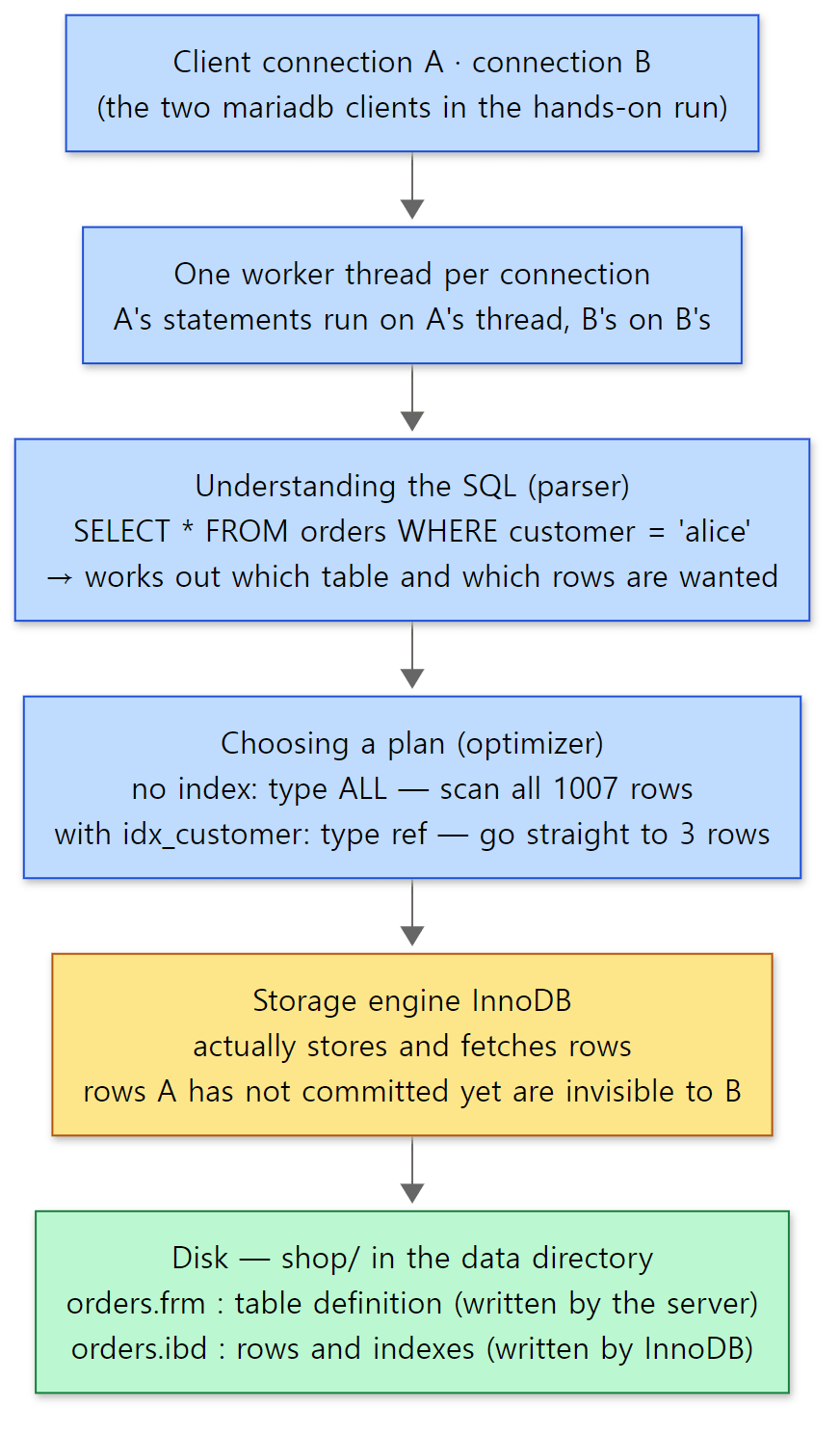 What the hands-on run showed, laid out from top to bottom. The blue boxes are the upper layer that understands SQL (the server layer), the yellow box is the lower layer that stores rows (the engine), and the green box is the disk. A map of the same road by function name is in section 5.
Five things to notice in the output:
- No engine was given, yet InnoDB took the table. In step 2,
information_schema.TABLESshows theENGINEofordersasInnoDB. On a server built with InnoDB, the default value ofdefault_storage_engineis"InnoDB"(sql/mysqld.cc lines 4285–4289). How the server attaches engines as plugins is covered in part 3. - SQL says only "what"; the server decides "how." The question in step 3 says nothing about the order to read things in or how to group them, yet the per-customer totals came out (alice 10000, carol 4000, dave 8000). Taking the statement apart and choosing how to run it happened inside the server, and part 5 through part 9 of this series follow that path step by step.
- Rows not yet committed are invisible to other connections. In step 4, A sees 7 orders, including
bob's that it just added, while at the same moment B sees 6. Only after A runsCOMMITdoes B see 7 too. The default isolation level isREPEATABLE READ(sql/sys_vars.cc lines 4686–4690), and InnoDB hides uncommitted changes from other transactions. How it hides them and keeps old values around is covered in part 11. And A and B can work at the same time because, by default, the server gives each connection its own thread (thread_handlingdefaults toone-thread-per-connection; on Windows it is the thread pool, sql/sys_vars.cc lines 3478–3500, part 4). - An index changes how rows are found. In step 5, without an index
typeisALL(scan the whole table) androws(the estimated number of rows to read) is 1007. After creatingidx_customer,typeisref(use the index to go to matching values),keyisidx_customer, androwsis 3. Not a single character of the SQL changed; only the road the server picked did. The 1000 rows came fromseq_1_to_1000, a virtual table the Sequence engine creates just from its name (storage/sequence/sequence.cc lines 292–294). How the optimizer chooses between the two is covered in part 8. - One table is two files on disk. In step 6, the
shop/folder holdsorders.frmandorders.ibd(db.optis a file that records the database's default character set and collation, sql/sql_db.h line 48, sql/sql_db.cc lines 506–510)..frmis the table definition file written by the server layer (sql/init.cc line 43, sql/table.cc lines 3907–3914), and.ibdis the file where InnoDB keeps the rows and indexes. By default InnoDB makes one.ibdfile per table (storage/innobase/handler/ha_innodb.cc lines 19670–19673). So the split between the upper and lower layers shows up even in the file names. Part 10 opens up what is inside an.ibd.
What it is used for
| Use | What it does | Example |
|---|---|---|
| Storage for web and app services | Keeps a service's core data — members, orders, posts — in tables and reads and writes it on every request | a shop's orders table, a forum's posts table |
| Data that must never get out of step, like money and stock | Binds several changes into a transaction so that all happen or none do | adding an order and lowering stock in one go |
| Data shared by several programs | A service, an admin screen and batch jobs use the same tables at the same time | a support screen and a settlement job looking at the same orders table |
| Lookups and totals | Filters by conditions, groups, and sums; uses indexes to find just the rows needed, quickly | totals per customer, sales per day |
| Spreading reads with replication | Has other servers copy every change so reads can be spread out or a standby server kept ready | read-only replica servers (binlog, part 12) |
There are also places where it doesn't fit. Piling up documents or blobs that have no fixed columns, streaming huge numbers of events per second, or scanning billions of rows at once for analytics are all better handled by stores built for those jobs. If the data is small and only one program uses it, running a separate server may be more trouble than it's worth. MariaDB fits the shape of "data with fixed columns, read and written by many programs at once, without getting out of step."
Questions this series answers
Once you have run the example, questions come up. This series answers them one by one from the source. If a question grabs you, feel free to start with that part.
| What you might wonder | Where the answer is |
|---|---|
| What big pieces is the server made of, and why are the part that understands SQL and the part that stores rows separate? | Part 2: The overall map |
What happens between starting mariadbd and taking the first connection? How does InnoDB get "plugged in"? |
Part 3: Startup and plugins |
| Do connections A and B really get a thread each? With a thousand connections, are there a thousand threads? | Part 4: Connections and threads |
What bytes does one line of SQL from mariadb become on the wire, and where does the server receive it? |
Part 5: Protocol and command dispatch |
| How does the server take a SQL statement apart? Where does "near '…'" in a syntax error come from? | Part 6: The parser |
When does the server work out which table and column the name customer means? When are privileges checked? |
Part 7: The preparation stage |
Who picked ALL or ref in EXPLAIN, and based on what? |
Part 8: The optimizer |
| How does the server tell InnoDB "give me the next row"? | Part 9: Execution and the handler API |
What does the inside of orders.ibd look like, and what is the road the index takes to reach just 3 rows? |
Part 10: InnoDB 1 — pages, the buffer pool, B-trees |
| How are A's uncommitted rows hidden from B? What if both change the same row? | Part 11: InnoDB 2 — transactions, MVCC, undo, locks |
What if the power goes out right after COMMIT returns? How does committed data survive? |
Part 12: The redo log and binlog, crash recovery |
The rest of this post is the preparation for following these questions through the source: which version is read (section 1), how to get and build the source (sections 2 and 3), a map of the folders (section 4), and which functions the SELECT from the run above actually passes through (section 5). If you have no plans to build it yourself, you can skip sections 2 and 3 without missing anything you need later.
Words to know first
The MariaDB source uses, right from the start, names you never had to deal with as a user. Get these six down first and this post reads much more easily.
The server layer and storage engines. MariaDB (and MySQL before the two split) divides the server into two layers. The upper one, the server layer (the sql/ folder), accepts connections, interprets SQL, checks privileges and picks an execution plan. The lower one, the storage engine (the storage/ folder), actually writes rows to and reads them from disk or memory. The ENGINE= in CREATE TABLE … ENGINE=InnoDB is exactly where you pick the lower layer. Why the split exists is the subject of post 2.
handler and handlerton. The contract (interface) between the two layers. handler is a C++ class in sql/handler.h, an object that deals with one open table. The server layer calls "give me the next row" (rnd_next()), "find this key" (index_read_map()), "insert this row" (write_row()) as virtual functions of handler, and InnoDB implements them in its subclass ha_innobase. handlerton is a struct that exists once per engine and holds function pointers for work that belongs to the engine as a whole rather than to one table, such as commit and rollback. The comment in the source describes it as "a singleton structure - one instance per storage engine - to provide access to storage engine functionality that works on the 'global' level (unlike handler class that works on a per-table basis)" (sql/handler.h lines 1514–1519).
THD. class THD in sql/sql_class.h. The comment above the class says "For each client connection we create a separate thread with THD serving as a thread/connection descriptor" (sql/sql_class.h lines 3326–3330). It holds all the state of one client connection (the statement being executed, the current database, session variables, the open transaction, error information …). Almost every function in the server layer takes THD *thd as its first argument. If Tomcat's request object and httpd's request_rec were "one request", THD is "one connection".
Plugins. MariaDB attaches storage engines, authentication methods, information_schema tables, audit logging and the like as plugins. Some are static plugins built into the server binary mariadbd; others are dynamic plugins that sit in separate .so files until you load them with INSTALL SONAME. Engines are plugins too (post 3).
The main branch and LTS. main in the MariaDB repository is the development line for the next release, while the versions we run in production come from release branches such as 11.4 and 11.8. The releases that get fixes for a long time are called LTS (Long Term Support). This series reads main.
Debug build. A build with compiler optimizations off and debugging information included. It is slow, but when gdb (the Linux debugger) stops it, every step of the call chain is visible, and the tracing (DBUG_ENTER, DBUG_PRINT) and checks (DBUG_ASSERT) that MariaDB plants all over its source come alive. Every example in this series runs on a Debug build.
1. Which version — 13.2.0 alpha and the LTS releases
The version number lives in one place: the VERSION file
MariaDB's version number is in a four-line file called VERSION at the top of the repository.
MYSQL_VERSION_MAJOR=13
MYSQL_VERSION_MINOR=2
MYSQL_VERSION_PATCH=0
SERVER_MATURITY=alpha
It is 13.2.0, with a maturity of alpha. MariaDB raises each release's maturity through alpha → beta → gamma → stable, and only stable releases are offered for production. So this commit's version is still at the first stage. Running git log on this file shows that commit a5525ff5ff ("new version of main (3.2)") on 2026-09-09 bumped MYSQL_VERSION_MINOR from 1 to 2. Once 13.1 was split off into its own release branch, main moved on to the next number.
The thing that reads these four lines is CMake (the build configuration tool).
MACRO(GET_MYSQL_VERSION)
  MYSQL_GET_CONFIG_VALUE("MYSQL_VERSION_MAJOR" MAJOR_VERSION)
  MYSQL_GET_CONFIG_VALUE("MYSQL_VERSION_MINOR" MINOR_VERSION)
  MYSQL_GET_CONFIG_VALUE("MYSQL_VERSION_PATCH" PATCH_VERSION)
  MYSQL_GET_CONFIG_VALUE("MYSQL_VERSION_EXTRA" EXTRA_VERSION)
  MYSQL_GET_CONFIG_VALUE("SERVER_MATURITY" SERVER_MATURITY)
# ...
  SET(VERSION "${MAJOR_VERSION}.${MINOR_VERSION}.${PATCH_VERSION}${EXTRA_VERSION}")
  SET(SERVER_VERSION ${VERSION})
  MESSAGE(STATUS "MariaDB ${VERSION}")
cmake/mysql_version.cmake lines 46–65 (omitted parts marked with # ...)
The CMake variable VERSION becomes 13.2.0, and this fills the @VERSION@ slot in the header template include/mysql_version.h.in.
#define MYSQL_SERVER_VERSION "@VERSION@-MariaDB"
include/mysql_version.h.in line 14
So the string "13.2.0-MariaDB" is baked into the built server. Finally, when the server starts, set_server_version() adds a few more suffixes.
char *set_server_version(char *buf, size_t size)
{
  bool is_log= opt_log || global_system_variables.sql_log_slow || opt_bin_log;
  bool is_debug= IF_DBUG(!strstr(MYSQL_SERVER_SUFFIX_STR, "-debug"), 0);
  // ... (setting is_valgrind and is_asan omitted)

  return strxnmov(buf, size - 1,
                  MYSQL_SERVER_VERSION,
                  MYSQL_SERVER_SUFFIX_STR,
                  IF_EMBEDDED("-embedded", ""),
                  is_valgrind,
                  is_asan,
                  is_debug ? "-debug" : "",
                  is_log ? "-log" : "",
                  NullS);
}
sql/mysqld.cc lines 9454–9478 (omitted parts marked with // ...)
IF_DBUG(a, b) is a macro that becomes a in a Debug build and b otherwise. So a Debug build gets -debug, and if the server is started with any of the general query log, the slow query log or the binlog turned on, it also gets -log. If you have ever seen SELECT VERSION() on a production server return something like 10.11.6-MariaDB-log, that tail was added by this function. The server in this series is a Debug build without those logs, so it is 13.2.0-MariaDB-debug (confirmed in the section 3 example).
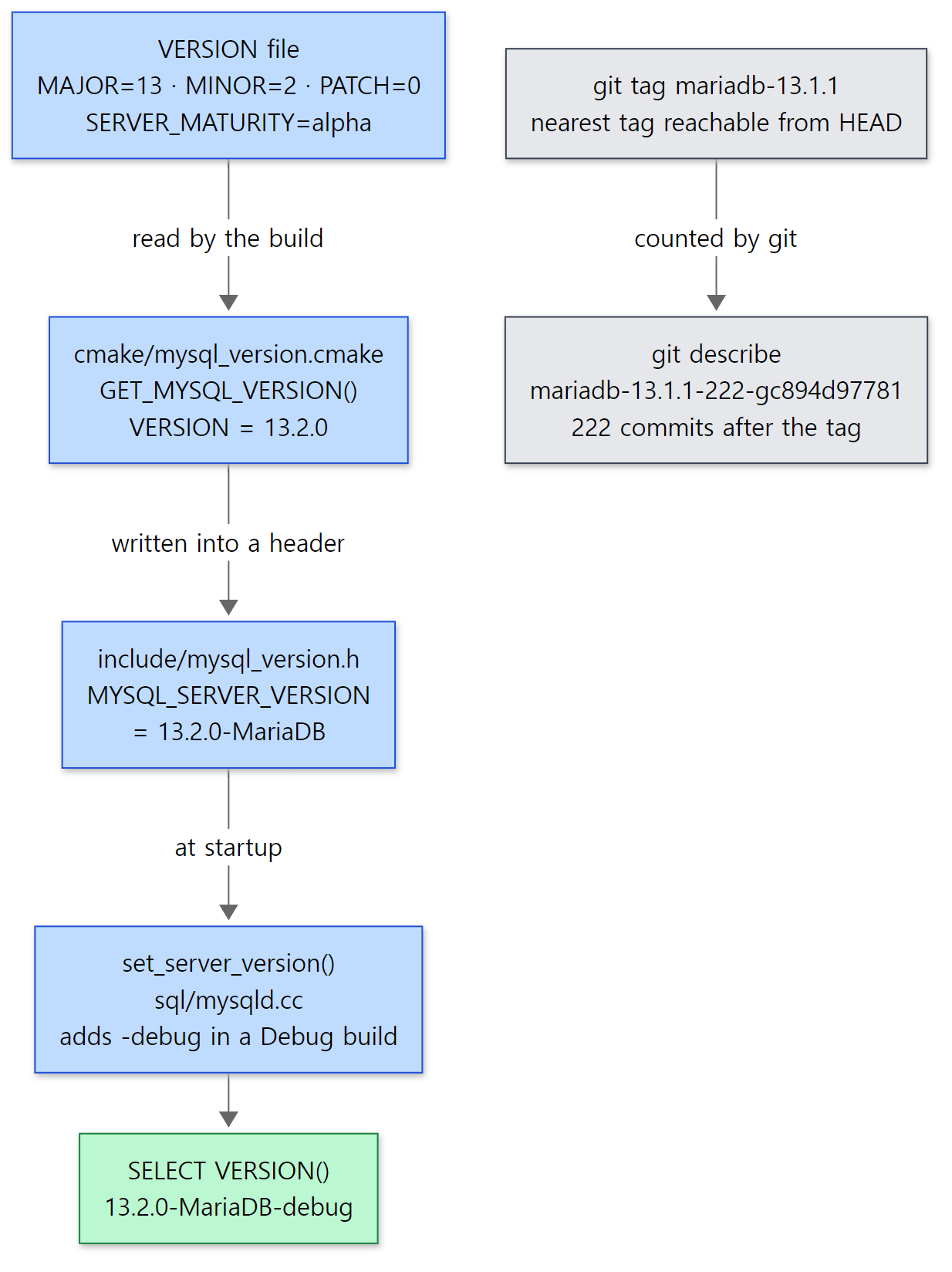 Two roads to a version number. The blue line is the number the server reports about itself; the grey line is the name git gives the commit.
Maturity is also used to choose plugins
SERVER_MATURITY=alpha is more than a label. CMake turns it into a number called SERVER_MATURITY_LEVEL and puts it in a header, and the server uses that number to set the default for "how immature a plugin may be and still be loaded".
export const char *plugin_maturity_names[]=
{ "unknown", "experimental", "alpha", "beta", "gamma", "stable", 0 };
static Sys_var_enum Sys_plugin_maturity(
       "plugin_maturity",
       "The lowest desirable plugin maturity. "
       "Plugins less mature than that will not be installed or loaded",
       READ_ONLY GLOBAL_VAR(plugin_maturity), CMD_LINE(REQUIRED_ARG),
       plugin_maturity_names,
       DEFAULT(SERVER_MATURITY_LEVEL > 0 ?
               SERVER_MATURITY_LEVEL - 1 : SERVER_MATURITY_LEVEL));
sql/sys_vars.cc lines 7098–7107
The default for the plugin_maturity system variable is "one step below the server's maturity". An alpha (2) server loads plugins down to experimental (1). On a stable release the default would be gamma, and anything less mature (experimental, alpha, beta) would not load even with INSTALL SONAME (in the variable's own words, "will not be installed or loaded"). The example below confirms that SELECT @@plugin_maturity returns experimental. How system variables connect to my.cnf and SET GLOBAL is covered in post 3.
main and the release branches
Taking just the VERSION file out of each remote branch of the repository this commit came from (as in git show origin/11.8:VERSION) gives the following (remote branches as fetched around 2026-10-24).
| Branch | VERSION |
Maturity | What it is |
|---|---|---|---|
main (commit c894d97781) |
13.2.0 | alpha | The development line for the next release. What this series reads |
13.1 |
13.1.2 | gamma | A release not yet stable |
13.0 |
13.0.2 | stable | |
12.3 |
12.3.4 | stable | |
11.8 |
11.8.10 | stable | LTS |
11.4 |
11.4.13 | stable | LTS |
The number in VERSION points to "the next release to ship" (for example, the 11.8 branch is preparing 11.8.10). Which releases are LTS is not written anywhere in the repository. That 11.4 and 11.8 are LTS comes from the MariaDB Foundation's announcements and was not confirmed from the source.
Why read main, which is alpha? For the same reason the earlier series read development lines (httpd trunk, Tomcat main). Fixes and new features land in the development line first, and the big road this series follows (connection → parsing → optimizing → executing → handler → InnoDB) does not change much between releases. In return, differences from other releases are only stated when confirmed in the source; otherwise the post only says "at the reference commit it is like this". This commit also contains features added in recent releases, such as a new implementation that keeps the binlog inside InnoDB (storage/innobase/fsp/fsp_binlog.cc) and a new cost model (sql/optimizer_costs.h). Whenever a post covers one of these, it will say that it arrived in a recent release.
Easy to get confused
The version number shows up three different ways. The VERSION file says 13.2.0 and the server calls itself 13.2.0-MariaDB-debug, yet running git describe on this commit gives the odd-looking mariadb-13.1.1-222-gc894d97781. That is because git describe does not read a version number at all: it walks back from HEAD to the nearest tag and adds "that many commits after the tag, plus the current commit hash". The 13.1.1 release tag (mariadb-13.1.1 — the tag itself was made on 2026-09-14 and points to a commit from 2026-09-10) points to a commit on the 13.1 branch, and that commit was merged back into main, so it is an ancestor in main as well. Counting with git rev-list --count mariadb-13.1.1..HEAD really does give 222. There is no 13.2 tag yet, so the commit gets named "the 222nd commit after 13.1.1" (git picks the length of the trailing hash to suit the repository, so on this PC it came out one digit longer, as -gc894d97781b). The name this series uses is 13.2.0, from the VERSION file.
The name MYSQL_ is everywhere. The keys in the VERSION file itself are MYSQL_VERSION_MAJOR and so on, the header is mysql_version.h, and functions in the source are called mysql_parse() and mysql_execute_command(). As the repository's README.md says at the very top, MariaDB began as a fork of MySQL, so many old names were kept as they were. The installed binaries also keep the old names as symbolic links to the new ones, like mysqld -> mariadbd and mysql -> mariadb (checked in /opt/mariadb/bin of the example image). But the same name does not mean the same contents as MySQL. They split long ago, and the optimizer, InnoDB and replication all differ a lot. This series does not explain MariaDB from memories of MySQL.
2. Getting the same source — submodules included
This section and section 3 are for readers who want to run the examples themselves. If you only want to read, feel free to skip to section 4 (the folder map).
Getting the source and pinning the commit
To open the line numbers in these posts yourself, you need the source at the same commit. The steps are the same as in the earlier series.
- Clone the repository. The history is long (it goes back to the MySQL days of the 2000s), so this takes a while.
- Leave the cloned folder (
server) as it is and use git worktree to check out only the reference commit into another folder (mariadb-c894d97781). A worktree lets one repository have different commits checked out in different folders at the same time. Even if yougit pullthe latest source in the original folder, the line numbers in the reference-commit folder do not move. - If the full commit hash comes back, you are pinned correctly.
git clone https://github.com/MariaDB/server.git
cd server
git worktree add --detach ../mariadb-c894d97781 c894d97781b54fbf074677c9d67f81cd60a162ac
git -C ../mariadb-c894d97781 rev-parse HEAD
You can also just read it on the web without downloading anything. This link opens the commit on GitHub, where you will see the same files, and every code link in this series points to this commit.
Seven submodules
The MariaDB repository pulls in other repositories wholesale as submodules (git submodule — a feature that ties a folder to a specific commit of another repository). They are listed in .gitmodules, and at the reference commit there are seven.
| Path | What it is |
|---|---|
libmariadb |
MariaDB Connector/C — the client library written in C. Client programs such as mariadb use it to connect to the server |
storage/rocksdb/rocksdb |
Facebook's RocksDB (the base of the MyRocks engine) |
wsrep-lib |
The wsrep API library used for Galera cluster replication |
extra/wolfssl/wolfssl |
wolfSSL — a TLS library that can be used instead of OpenSSL |
storage/maria/libmarias3 |
A library used by the S3 engine, which keeps Aria tables in S3 |
storage/columnstore/columnstore |
ColumnStore (a column-oriented analytics engine) |
storage/duckdb/third_parties/duckdb |
DuckDB (an embedded analytics database) — the base of the DuckDB engine added in a recent release |
After a plain git clone these folders are empty. Do you need all of them to build? The source says no. Submodules are used through a CMake function ADD_SUBMODULE(), and the places that call it are fixed.
  IF(SUBMODULE_UPDATE_CONFIG_MESSAGE)
    IF(NOT EXISTS ${CMAKE_CURRENT_SOURCE_DIR}/${dir}/${file})
      MESSAGE(FATAL_ERROR "Cannot download ${CMAKE_CURRENT_SOURCE_DIR}/${dir} submodule: ${SUBMODULE_UPDATE_CONFIG_MESSAGE}")
    ENDIF()
  ELSE()
    MESSAGE(STATUS "Downloading ${CMAKE_CURRENT_SOURCE_DIR}/${dir} submodule...")
    SET(UPDATE_SUBMODULES_COMMAND
        "${GIT_EXECUTABLE}" submodule update --init --recursive --depth 1)
cmake/submodules.cmake lines 28–35
With the default (UPDATE_SUBMODULES=ON) and inside a git repository, CMake fetches only the submodules it needs, on the spot, with git submodule update --init --depth 1. When it cannot fetch (you passed -DUPDATE_SUBMODULES=OFF, you are building from an archive without .git, or there is no git), it only checks whether the folder is already populated, and if it is empty it stops with "Cannot download … submodule". So which submodules are "needed"? Searching for the callers of ADD_SUBMODULE with git grep gives this.
 When each submodule becomes necessary. Only the blue box (libmariadb) is always needed; the grey boxes can be switched off with options.
libmariadbis always needed. Line 493 of the top-levelCMakeLists.txtdoesINCLUDE(mariadb_connector_c)unconditionally, and line 48 of that file isADD_SUBMODULE_SUBDIRECTORY(libmariadb)(cmake/mariadb_connector_c.cmake line 48). Even if you only want the server, you cannot leave this submodule out.wsrep-libwhenWITH_WSREPis on. But on Unix the default is ON (cmake/wsrep.cmake lines 23–29). So if you do not use Galera you have to pass-DWITH_WSREP=OFFyourself to build without this submodule.wolfsslwhenWITH_SSL=bundled. The defaultyesmeans "use the OS OpenSSL if present, otherwise the bundled one", so if the OpenSSL development package is installed it is not needed (cmake/ssl.cmake lines 33–38).- The other four (
libmarias3,rocksdb,columnstore,duckdb) are called only when you decide to build that engine. For example,storage/rocksdb/CMakeLists.txtdoesRETURN()right away at lines 3–5 whenPLUGIN_ROCKSDBisNO, and never reachesADD_SUBMODULE(rocksdb)at line 125.
Easy to get confused
A worktree does not bring the submodules along. In a folder checked out with git worktree add, libmariadb/ and wsrep-lib/ are empty. This series only reads the server side, so I left them that way. When the client library needs a look, I fetch the Connector/C commit the reference commit points to (8153da40fe) separately. The server side of reading and writing packets is in the server source, sql/net_serv.cc (post 5).
3. A Debug build in Docker
The Dockerfile actually used
If you only want to read, you do not need to build. But this series actually runs every example it shows, and stops the server in gdb to print the call chain. A downloaded release (11.x) has different line numbers and even different functions, so I built the reference commit as-is, in Debug mode. Here is the actual Dockerfile (comments translated from Korean).
# Image for the "Digging into MariaDB's Source" examples.
# Builds the source of reference commit c894d97781 (main, VERSION 13.2.0 alpha, git describe mariadb-13.1.1-222) as-is.
#   mariadb-c894d97781.tar.gz   : original exported with git -c core.autocrlf=false -c core.eol=lf archive (LF line endings, untouched)
#   libmariadb-8153da40fe.tar.gz: the libmariadb submodule (Connector/C) — GitHub archive of commit 8153da40fe that the reference commit points to
# The other submodules (wsrep-lib, wolfssl, libmarias3, rocksdb, columnstore, duckdb) are for features we don't use, so they are switched off.
#
# The build type is Debug: gdb backtraces are not squashed by inlining, and DBUG tracing (--debug=d,...) and
# DBUG_ASSERT stay alive. That is why SELECT VERSION() reports '13.2.0-MariaDB-debug'.
FROM ubuntu:24.04 AS src

RUN apt-get update && DEBIAN_FRONTEND=noninteractive apt-get install -y --no-install-recommends \
      build-essential cmake ninja-build bison flex pkg-config git ca-certificates \
      libssl-dev zlib1g-dev libncurses-dev libpcre2-dev libxml2-dev liblz4-dev libzstd-dev \
      libaio-dev liburing-dev libsystemd-dev \
      gdb procps psmisc less \
    && rm -rf /var/lib/apt/lists/*

COPY mariadb-c894d97781.tar.gz libmariadb-8153da40fe.tar.gz /usr/src/
WORKDIR /usr/src
RUN tar xzf mariadb-c894d97781.tar.gz \
    && tar xzf libmariadb-8153da40fe.tar.gz \
    && rmdir mariadb/libmariadb \
    && mv mariadb-connector-c-8153da40fe720b1d25db12aa3f993918da15bd3b mariadb/libmariadb \
    && rm -f *.tar.gz

FROM src AS lab
# Keep the source (/usr/src/mariadb) — gdb's list and the file:line in backtraces point to this path.
RUN mkdir /usr/src/build && cd /usr/src/build \
    && cmake ../mariadb -G Ninja \
         -DCMAKE_BUILD_TYPE=Debug \
         -DCMAKE_INSTALL_PREFIX=/opt/mariadb \
         -DMYSQL_MAINTAINER_MODE=WARN \
         -DUPDATE_SUBMODULES=OFF \
         -DWITH_WSREP=OFF -DWITH_SSL=system -DWITH_ZLIB=system -DWITH_PCRE=system \
         -DWITH_UNIT_TESTS=OFF -DWITH_EMBEDDED_SERVER=OFF -DWITH_MARIABACKUP=OFF \
         -DPLUGIN_ROCKSDB=NO -DPLUGIN_MROONGA=NO -DPLUGIN_SPIDER=NO -DPLUGIN_COLUMNSTORE=NO \
         -DPLUGIN_CONNECT=NO -DPLUGIN_OQGRAPH=NO -DPLUGIN_SPHINX=NO -DPLUGIN_S3=NO \
         -DPLUGIN_DUCKDB=NO -DPLUGIN_VIDEX=NO -DPLUGIN_FEDERATED=NO \
         -DPLUGIN_AUTH_GSSAPI=NO -DPLUGIN_AUTH_PAM=NO -DPLUGIN_HASHICORP_KEY_MANAGEMENT=NO \
         -DPLUGIN_AWS_KEY_MANAGEMENT=NO \
    && ninja -j"$(nproc)" \
    && ninja install \
    && cd / && rm -rf /usr/src/build

ENV PATH=/opt/mariadb/bin:/opt/mariadb/scripts:$PATH
COPY my.cnf /etc/my.cnf
COPY lab-init lab-start lab-stop /usr/local/bin/
RUN chmod +x /usr/local/bin/lab-*
WORKDIR /work
CMD ["mariadbd", "--version"]
Here is what it does, step by step.
- It is split into two stages. The
srcstage prepares the compiler, tools and source, and thelabstage builds. With the stages split, rebuilding with different options reuses the first stage from Docker's cache. - It installs build tools and libraries.
cmakeandninja-build(a fast build runner) are the build tools, andbisonturns the SQL grammar filesql/sql_yacc.yyinto a C++ parser (post 6). The-devpackages such aslibssl-dev(OpenSSL),zlib1g-dev(compression) andlibpcre2-dev(for theREGEXPfunctions) are there so the server uses the OS libraries.liburing-devandlibaio-devare for InnoDB's asynchronous disk I/O.gdb,procps(ps) andpsmisc(killall) are there for poking at the server in the examples. - It brings in two pieces of source. The server source is the original exported from the repository with
git archive, andlibmariadbis an archive of the commit the submodule points to, downloaded from GitHub.git archivedoes not include submodule contents, so the emptylibmariadbfolder is removed (rmdir) and the downloaded one is put in its place. As the previous section showed,libmariadbis the one you cannot do without. - It passes CMake options.
-DCMAKE_BUILD_TYPE=Debug— a Debug build.-DUPDATE_SUBMODULES=OFF— the archive has no.git, so do not try to fetch submodules. Sincelibmariadbwas put in by hand, it passesADD_SUBMODULE's "is the folder populated" check.-DWITH_WSREP=OFF,-DWITH_SSL=system— make thewsrep-libandwolfsslsubmodules unnecessary.-DPLUGIN_<name>=NO— switch off engines and plugins this series does not read. Turning off RocksDB, ColumnStore and DuckDB also makes their submodules unnecessary.-DWITH_UNIT_TESTS=OFF -DWITH_EMBEDDED_SERVER=OFF -DWITH_MARIABACKUP=OFF— leave out the unit tests, the embedded library that puts a server inside your program, and the backup tool mariabackup.-DMYSQL_MAINTAINER_MODE=WARN— turn on the developer warnings but do not turn them into errors. The defaultAUTOmeans "warnings are errors in Debug only" (CMakeLists.txt line 135), so this image, which builds in Debug, passesWARNso that a warning does not stop the build.
- It builds with
ninjaand installs into/opt/mariadbwithninja install. On this PC the whole thing took about 16 minutes. The build folder is deleted, but the source (/usr/src/mariadb) is kept. Thefile:linethat gdb prints in backtraces points to this path, and the line numbers match the reference commit.
The resulting image is called mariadb-lab:c894d97781. Here is the build flow on one page.
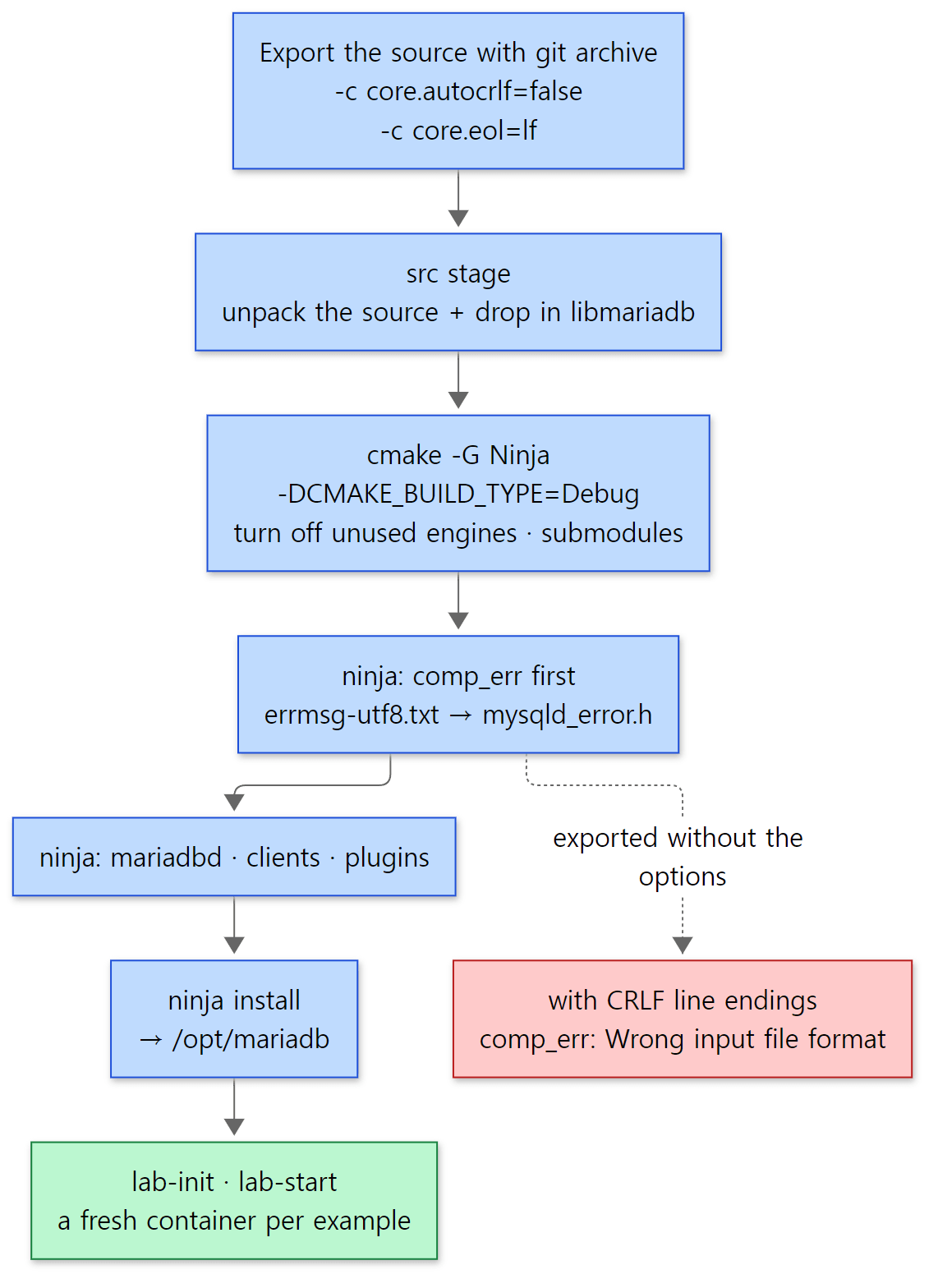 The build flow. The red box is the trap I actually fell into when exporting the source on Windows (see "Easy to get confused" below).
How the examples are run
Each post has one folder per example (like ex/u01-reading-plan) with a run.sh, which a small script (run-example.sh) runs inside a container. The heart of it is one line.
MSYS_NO_PATHCONV=1 docker run --rm --cap-add=SYS_PTRACE --security-opt seccomp=unconfined \
  -v "$(pwd -W 2>/dev/null || pwd)/$dir:/work" -w /work \
  mariadb-lab:c894d97781 bash ./run.sh
It mounts the example folder at /work in the container, runs run.sh, and deletes the container (--rm). Every run starts with an empty data directory, so tables created by an earlier example have no effect. --cap-add=SYS_PTRACE --security-opt seccomp=unconfined grants gdb inside the container permission to attach to the running mariadbd (by default Docker blocks ptrace, which is how one process attaches to another). pwd -W and MSYS_NO_PATHCONV=1 keep Git Bash on Windows from mangling paths (same as in the earlier series).
The container has three helper scripts. lab-init creates an empty data directory with mariadb-install-db, lab-start launches mariadbd in the background and waits until mariadb-admin ping succeeds, and lab-stop shuts it down. The config file /etc/my.cnf does little more than put the socket at /tmp/mariadb.sock and the error log at /tmp/mariadbd.err.
Example: asking the built server directly
This example was run in a Docker container (Ubuntu 24.04) on MariaDB 13.2.0 (13.2.0-MariaDB-debug), built in Debug mode straight from the reference commit (c894d97781). The example folder is ex/u01-reading-plan. It starts the server, prints the first line of the error log, and asks a few questions.
-- An example written for this post (not part of the MariaDB source)
-- 1) The built server's name tag: version string and build info
SELECT VERSION(), @@version_comment, @@version_compile_os, @@version_compile_machine;
-- The server is alpha, so the minimum plugin maturity is one step lower
SELECT @@plugin_maturity;

-- 2) Storage engines this server knows (SUPPORT: DEFAULT/YES/NO)
SELECT ENGINE, SUPPORT, TRANSACTIONS AS TX, XA, SAVEPOINTS AS SP
  FROM information_schema.ENGINES ORDER BY ENGINE;

-- 3) Count plugins by type. PLUGIN_LIBRARY NULL means built into mariadbd (static)
SELECT PLUGIN_TYPE, COUNT(*) AS n,
       SUM(PLUGIN_LIBRARY IS NULL) AS builtin
  FROM information_schema.PLUGINS GROUP BY PLUGIN_TYPE ORDER BY n DESC;

-- 4) Dynamic plugins: on disk but not loaded yet (just a few)
SELECT PLUGIN_NAME, PLUGIN_TYPE, PLUGIN_MATURITY
  FROM information_schema.ALL_PLUGINS
 WHERE PLUGIN_LIBRARY IN ('ha_blackhole.so','ha_archive.so','metadata_lock_info.so','server_audit.so')
 ORDER BY PLUGIN_NAME;

-- 5) Storage engine plugins that are in PLUGINS but not in ENGINES
SELECT PLUGIN_NAME, PLUGIN_STATUS
  FROM information_schema.PLUGINS
 WHERE PLUGIN_TYPE = 'STORAGE ENGINE'
   AND PLUGIN_NAME NOT IN (SELECT ENGINE FROM information_schema.ENGINES);
Here is the output (server_uid changes on every run).
--- 0. error log at startup
Starting MariaDB 13.2.0-MariaDB-debug source revision  server_uid xj1dJ484WHJjVjINDEeK0lMmhKY= as process 72
--- 1. ask the server
+----------------------+---------------------+----------------------+---------------------------+
 VERSION()            | @@version_comment   | @@version_compile_os | @@version_compile_machine |
+----------------------+---------------------+----------------------+---------------------------+
 13.2.0-MariaDB-debug | Source distribution | Linux                | x86_64                    |
+----------------------+---------------------+----------------------+---------------------------+
+-------------------+
 @@plugin_maturity |
+-------------------+
 experimental      |
+-------------------+
+--------------------+---------+------+------+------+
 ENGINE             | SUPPORT | TX   | XA   | SP   |
+--------------------+---------+------+------+------+
 Aria               | YES     | NO   | NO   | NO   |
 CSV                | YES     | NO   | NO   | NO   |
 InnoDB             | DEFAULT | YES  | YES  | YES  |
 MEMORY             | YES     | NO   | NO   | NO   |
 MRG_MyISAM         | YES     | NO   | NO   | NO   |
 MyISAM             | YES     | NO   | NO   | NO   |
 PERFORMANCE_SCHEMA | YES     | NO   | NO   | NO   |
 SEQUENCE           | YES     | YES  | NO   | YES  |
+--------------------+---------+------+------+------+
+--------------------+----+---------+
 PLUGIN_TYPE        | n  | builtin |
+--------------------+----+---------+
 INFORMATION SCHEMA | 42 |      42 |
 FUNCTION           | 13 |      13 |
 STORAGE ENGINE     | 10 |      10 |
 DATA TYPE          |  6 |       6 |
 DAEMON             |  3 |       3 |
 AUTHENTICATION     |  3 |       3 |
+--------------------+----+---------+
+--------------------+--------------------+-----------------+
 PLUGIN_NAME        | PLUGIN_TYPE        | PLUGIN_MATURITY |
+--------------------+--------------------+-----------------+
 ARCHIVE            | STORAGE ENGINE     | Stable          |
 BLACKHOLE          | STORAGE ENGINE     | Stable          |
 METADATA_LOCK_INFO | INFORMATION SCHEMA | Stable          |
 SERVER_AUDIT       | AUDIT              | Stable          |
+--------------------+--------------------+-----------------+
+--------------+---------------+
 PLUGIN_NAME  | PLUGIN_STATUS |
+--------------+---------------+
 SQL_SEQUENCE | ACTIVE        |
 partition    | ACTIVE        |
+--------------+---------------+
Reading from the top:
- The version number comes out as
13.2.0-MariaDB-debugvia the road in section 1, and the first line of the error log shows the same name.plugin_maturityisexperimental, one step below alpha. - There are eight engines, and the default (
DEFAULT) is InnoDB. The only one that supports transactions (TX), XA (two-phase commit) and savepoints (SP) all together is InnoDB. These three columns really show whether functions are filled in on the engine'shandlerton. You can see it directly initer_schema_engines(), which fillsinformation_schema.ENGINES.
  if (!(hton->flags & HTON_HIDDEN))
  {
    LEX_CSTRING *name= plugin_name(plugin);
    if (!(wild && wild[0] &&
          wild_case_compare(scs, name->str,wild)))
    {
      const char *option_name= default_type != hton ? "YES"
                                                    : "DEFAULT";
      // ... (filling the ENGINE, SUPPORT and COMMENT columns omitted)
      table->field[3]->store(
          Show::Yes_or_no::value(hton->commit &&
                                 !(hton->flags & HTON_NO_ROLLBACK)),
          scs);
      table->field[3]->set_notnull();
      table->field[4]->store(Show::Yes_or_no::value(hton->prepare), scs);
      table->field[4]->set_notnull();
      table->field[5]->store(Show::Yes_or_no::value(hton->savepoint_set), scs);
      table->field[5]->set_notnull();
sql/sql_show.cc lines 7023–7045 (omitted parts marked with // ...)
TRANSACTIONS means "there is a commit function (hton->commit) and it is not an engine that cannot roll back", XA means "there is a prepare function (hton->prepare)", and SAVEPOINTS means "there is a savepoint function (hton->savepoint_set)". When we say "InnoDB supports transactions", in source terms it means "InnoDB's handlerton has its commit function pointer filled in and does not carry the 'cannot roll back' flag (HTON_NO_ROLLBACK)". What those functions actually do is the subject of post 11 and post 12.
- There are 77 plugins, all static (
builtinequalsn).ARCHIVE,BLACKHOLE,METADATA_LOCK_INFOandSERVER_AUDITexist only as.sofiles in/opt/mariadb/lib/plugin, so they show up inALL_PLUGINS(which also lists what is on disk) but not inPLUGINS. You have to load them, as inINSTALL SONAME 'ha_blackhole', before you can use them (post 3).
Easy to get confused
ENGINES does not show every engine. In the output above, PLUGINS has 10 storage engines but ENGINES has 8. The last query printed the difference: partition and SQL_SEQUENCE. The first line of the code above, if (!(hton->flags & HTON_HIDDEN)), is the reason. HTON_HIDDEN is a flag commented "Engine does not appear in lists" at line 1943 of sql/handler.h, and it is set by partition, which handles partitioned tables (sql/ha_partition.cc lines 233–235), and by SQL_SEQUENCE, which handles sequence objects created with CREATE SEQUENCE (sql/ha_sequence.cc lines 552–559). Neither is an engine users pick with ENGINE=; both are used internally by the server, so they are hidden from the list. And the SEQUENCE that does appear in ENGINES is, despite the similar name, a different engine: the one in storage/sequence/sequence.cc that provides virtual tables like seq_1_to_10. Keep the difference in mind when looking up the same name in the engine list and the plugin list.
The source exported on Windows broke the build. This actually happened while setting up the example environment. Git on Windows is commonly set to core.autocrlf=true, which converts line endings from Linux-style LF (\n) to Windows-style CRLF (\r\n) when files are checked out. At first I built from source exported that way, and before compilation even started, the build tool comp_err stopped. comp_err is a program that reads the error-message source sql/share/errmsg-utf8.txt (a file with messages in many languages for every error number) and generates the header mysqld_error.h (error number constants such as ER_NO_SUCH_TABLE), which is included all over the server source, plus per-language message files (extra/CMakeLists.txt lines 23–52). 52 files include this header directly, so without it the server cannot be built. I had not kept the log from that time, so while writing this post I recreated the situation (example ex/u01-crlf-comp-err — it builds only comp_err from the source inside the image and feeds it the LF version and a CRLF-converted version in turn).
--- 1. LF (as in git archive with core.autocrlf=false)
exit=0  1394 ER_ macros
--- 2. CRLF (as checked out on Windows with core.autocrlf=true)
Wrong input file format. Stop!
Line:

Failed to parse input file /tmp/errmsg-crlf.txt
exit=1
(I left out the part at the top that dumps the line-ending bytes of the two files with od -c, and the three "Memory report from safemalloc" lines that the Debug build's memory checker appends at the end.) The clue is that the text after Line: looks empty. comp_err's input loop decides what each line is by looking only at its first character, and the check at the very end is this.
    if (*str == '#' || *str == '\n')
      continue;                      	/* skip comment or empty lines */

    fprintf(stderr, "Wrong input file format. Stop!\nLine: %s\n", str);
    DBUG_RETURN(0);
extra/comp_err.c lines 606–610
It assumes an empty line starts with '\n'. In a CRLF file an empty line is "\r\n", whose first character is '\r'; it matches none of the cases and stops with "wrong format". Line 2 of the file is empty, so it stopped almost at the very top. The \r was printed after Line:, which is why nothing was visible.
Then I tripped once more. git -c core.autocrlf=false archive alone does not fix it. The first rule in the repository's .gitattributes is * text=auto (git manages line endings for every text file), and when checking out files marked this way git follows the core.eol setting. The default for core.eol is "the OS's native style" (native), which on Windows is still CRLF. Exporting just errmsg-utf8.txt from the reference commit with git archive and counting the \r characters makes it clear.
git archive options |
Number of \r in the exported errmsg-utf8.txt |
|---|---|
(none, core.autocrlf=true) |
12,431 (same as the file's line count) |
-c core.autocrlf=false |
12,431 |
-c core.autocrlf=false -c core.eol=lf |
0 |
That is why the Dockerfile comment lists both options together. In httpd post 1 the same CRLF turned a shell script into a "file not found"; this time it blew up in a data file read by a C program.
The source revision in the error log is empty. The source revision server_uid in the first output line is not a typo; the value is empty. CMake gets the commit hash with git rev-parse HEAD and stores it in SOURCE_REVISION only when the source folder has a .git (CMakeLists.txt lines 580–588). An archive exported with git archive has no .git, so it is empty. That is why this series identifies the commit by the image name (mariadb-lab:c894d97781) rather than by the revision the server reports.
4. The folder map — where are the 2.59 million lines?
Top-level folders
At the reference commit git tracks 27,587 entries (each of the seven submodules counts as just one entry). Of these, 17,745 — 64% — are under mysql-test/, including 7,031 .test files and 6,991 .result files of expected output. In other words, there are more than seven thousand tests that send SQL to the server and compare the output with a .result file.
Counting only C/C++ sources (.c .cc .h .cpp .ic .inl .yy .hpp) gives 3,145 files and 2,588,458 lines in total (blank lines and comments included). Counted by top-level folder myself (files picked with git ls-files, newline characters counted), it looks like this.
| Folder | What's inside | Files | Lines | Posts |
|---|---|---|---|---|
storage/ |
Storage engines — one subfolder per engine | 1,629 | 1,112,800 | 2·9–12 |
sql/ |
The server layer — connections, parser, optimizer, execution, replication, binlog | 559 | 792,070 | 2–9·11–12 |
strings/ |
Strings, character sets (charsets) and collations | 85 | 334,233 | — |
mysys/ |
The server's common library — files, memory (MEM_ROOT), threads, hashes |
153 | 64,751 | 2 |
extra/ |
Build tools (comp_err etc.) and bundled extras |
118 | 62,618 | — |
plugin/ |
Plugins that are not engines — auth, audit, data types, info tables | 211 | 47,821 | 3 |
client/ |
mariadb, mariadb-dump, mariadb-admin, mariadb-binlog etc. |
26 | 46,663 | — |
include/ |
Shared headers (my_global.h, mysql_com.h, the plugin API) |
177 | 36,311 | — |
vio/ |
Vio, the I/O abstraction over sockets and TLS |
12 | 3,625 | 5 |
tpool/ |
The thread pool and async I/O library used by InnoDB | 12 | 3,141 | 10 |
dbug/ |
The DBUG_ENTER/DBUG_PRINT tracing library |
9 | 2,658 | — |
There are also small folders such as tests/ (client API tests written in C, 27,938 lines), zlib/ (the bundled compression library), unittest/, libmysqld/ (the embedded server) and sql-common/ (code shared by server and client). strings/ is 330,000 lines because it is mostly character set conversion tables. Three files alone — ctype-eucjpms.c (67,744 lines), ctype-ujis.c (67,490 lines) and ctype-uca.c (39,429 lines) — add up to over 170,000 lines. They are more data than code to read.
Inside storage/
Splitting storage/ by engine gives this (the ten largest by line count, plus the sample engine example).
| Folder | Engine | Files | Lines | In this series' build |
|---|---|---|---|---|
storage/innobase |
InnoDB — the default engine; transactions, MVCC, redo | 303 | 314,449 | static (posts 10–12) |
storage/mroonga |
Mroonga — full-text search engine | 447 | 281,907 | off |
storage/connect |
CONNECT — external data (CSV, ODBC …) | 173 | 121,615 | off |
storage/maria |
Aria — successor to MyISAM, used for system tables | 145 | 106,358 | static |
storage/spider |
Spider — sharding | 34 | 75,549 | off |
storage/perfschema |
performance_schema | 255 | 75,470 | static |
storage/myisam |
MyISAM — the old engine without transactions | 72 | 40,819 | static |
storage/rocksdb |
MyRocks (submodule excluded) | 47 | 33,919 | off |
storage/heap |
MEMORY | 41 | 16,030 | static |
storage/duckdb |
DuckDB (submodule excluded) | 40 | 13,187 | off |
storage/example |
ha_example, the smallest sample engine |
2 | 1,385 | dynamic |
InnoDB alone is 310,000 lines, about 40% the size of the server layer (sql/). Among the engines this series reads only InnoDB in depth, and looks at the others only to compare how they implement handler. For anyone who wants to try writing an engine, storage/example/ha_example.cc is the starting point (post 2).
Files this series will spend a lot of time in
| File | Lines | Posts |
|---|---|---|
sql/sql_select.cc |
36,086 | 8·9 (optimizer and execution) |
storage/innobase/handler/ha_innodb.cc |
22,003 | 9–11 (the bridge between the server layer and InnoDB) |
sql/sql_yacc.yy |
21,251 | 6 (SQL grammar) |
sql/opt_range.cc |
17,993 | 8 (range optimizer) |
sql/sql_acl.cc |
17,663 | 4·7 (authentication and privileges) |
sql/log.cc |
15,478 | 12 (binlog) |
sql/mysqld.cc |
10,607 | 3 (startup) |
sql/sql_base.cc |
10,576 | 7 (opening tables) |
sql/sql_parse.cc |
10,472 | 5–7 (command dispatch) |
sql/handler.cc |
9,915 | 9·11 (handler wrappers, transactions) |
sql/sql_class.h |
8,857 | 2 (THD) |
sql/handler.h |
6,210 | 2·9 (handler, handlerton) |
A single 36,000-line file is scary, but any one post reads only a few functions out of it. Compared with the earlier series — httpd was about 350,000 lines of .c/.h, Tomcat about 740,000 lines of .java — MariaDB is more than three times bigger. Then again, about a third of it is engines switched off in this series (Mroonga, CONNECT, Spider, RocksDB …) and character set tables.
Seen as layers
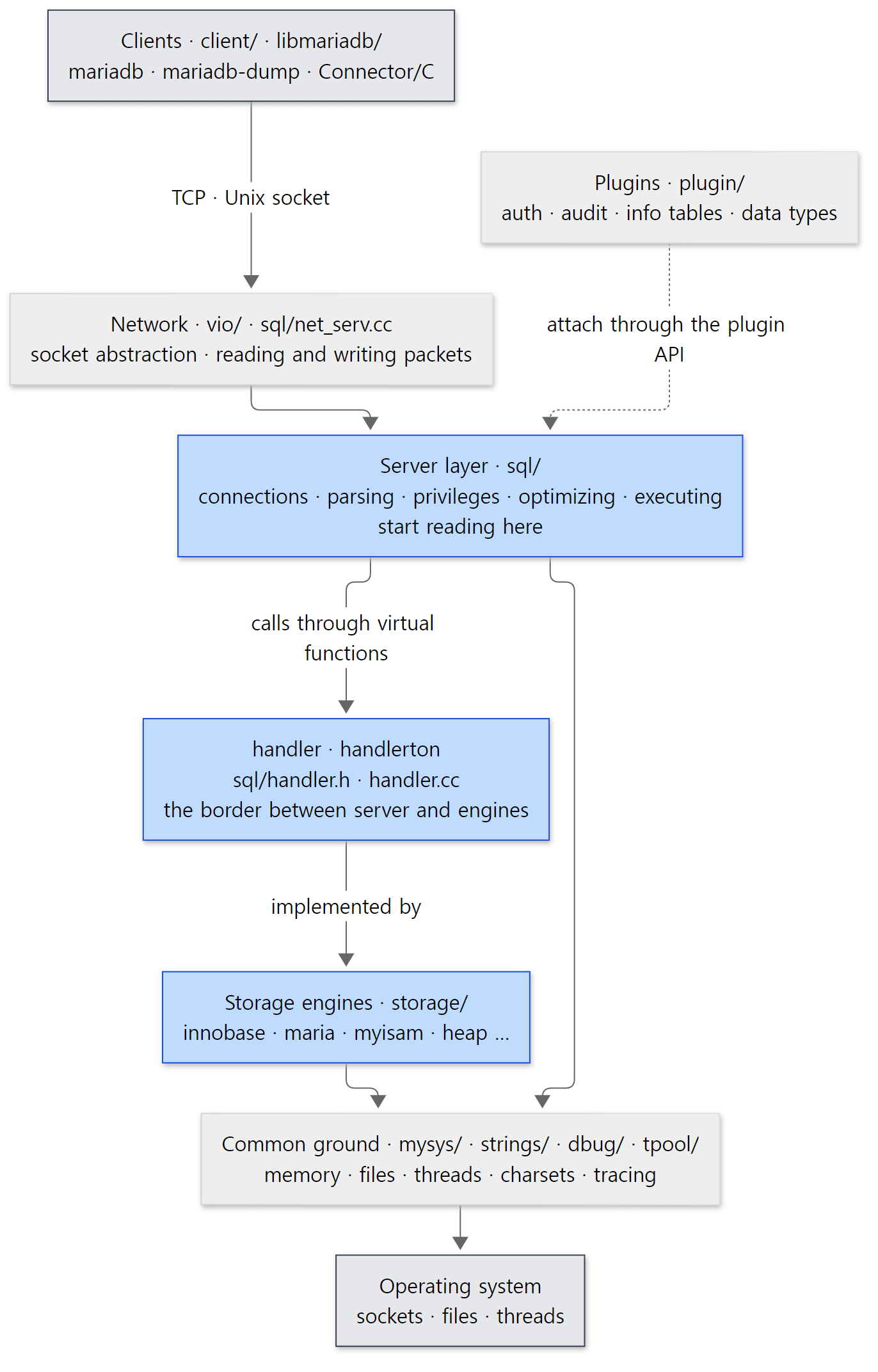 The layers of the MariaDB source. The blue boxes (server layer, handler, engines) are what this series reads; the grey boxes are outside it.
Two things in this picture are worth remembering.
First, the server layer and the engines are connected only through handler. The server layer knows nothing about InnoDB's B-trees or buffer pool; it only calls handler's virtual functions. That is why the same SELECT keeps working when only the engine changes. It is the same design as Tomcat's Coyote and Catalina being connected only through Adapter (Tomcat post 2).
Second, the common ground (mysys/, strings/) is shared by the server layer and the engines. MEM_ROOT, which collects a statement's memory and frees it all at once, is in mysys/ too. It resembles httpd's APR memory pools (httpd post 4) and is covered in post 2.
5. The big road one query travels
On one page
Posts 3 through 9 follow the road one SELECT travels, in order, and posts 10–12 go inside InnoDB at the end of that road. Drawn on one page, the big road looks like this.
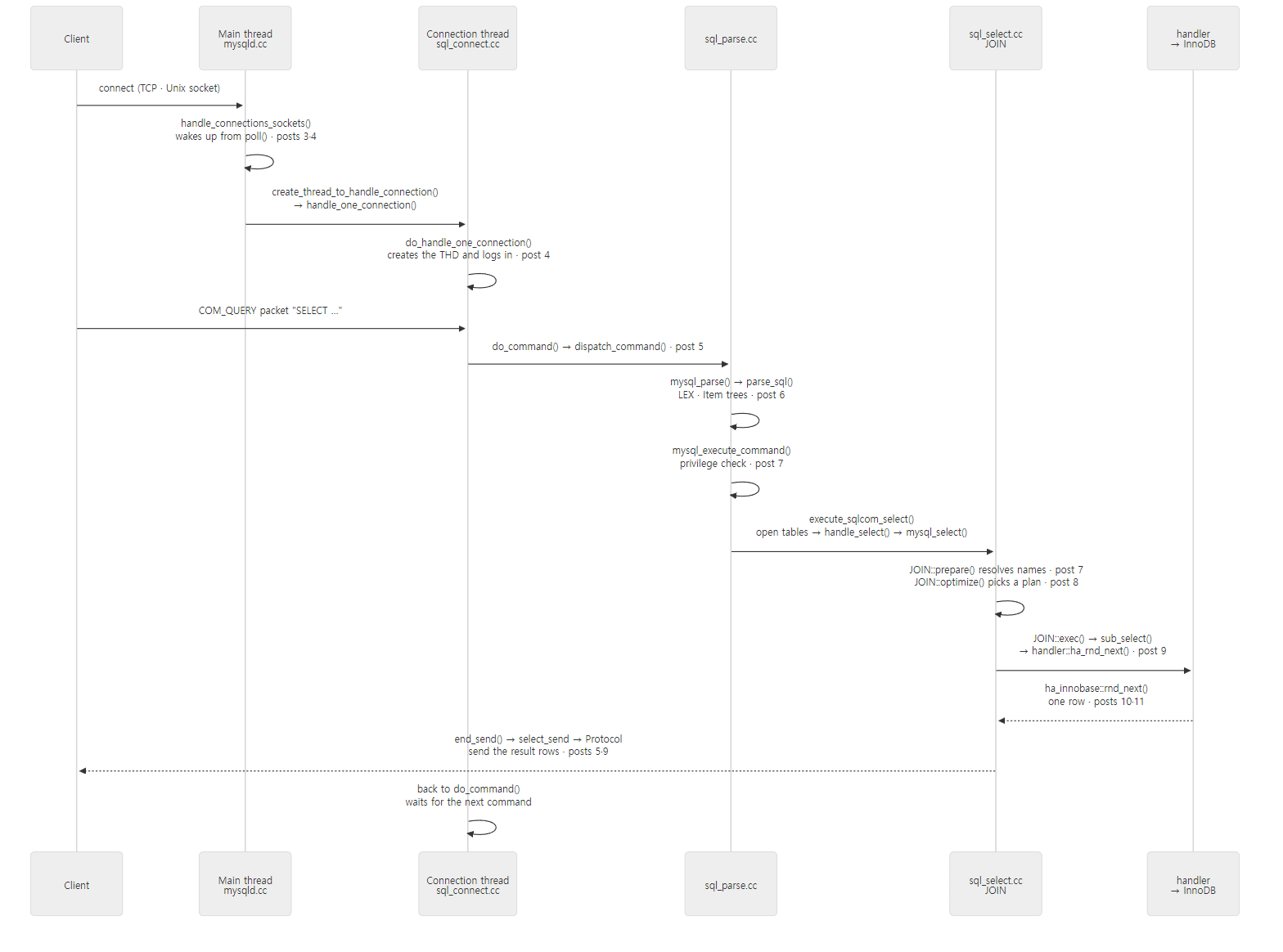 The big road of one
SELECT. Each message is labelled with the post that covers that step. Once the connection thread takes over, one and the same thread does the work all the way to the end.
Connected to what you have seen as a user:
| Step | What you saw as a user | Post |
|---|---|---|
| Startup · plugins | my.cnf, startup messages in the error log, INSTALL SONAME |
3 |
| Connections · threads | SHOW PROCESSLIST, max_connections, thread_handling, thread_cache_size |
4 |
| Packets · commands | Status variables like Com_select, the query cache, max_allowed_packet |
5 |
| Parsing | "You have an error in your SQL syntax … near '…'" | 6 |
| Privileges · opening tables · resolving names | "Unknown column", Waiting for table metadata lock, table_open_cache |
7 |
| Optimizing | EXPLAIN, ANALYZE, optimizer_trace |
8 |
| Execution · handler | Status variables like Handler_read_rnd_next |
9 |
| InnoDB | innodb_buffer_pool_size, SHOW ENGINE INNODB STATUS, isolation levels, deadlocks |
10–12 |
A preview of just four places in the code
One: the connection thread's loop. The thread in charge of one connection finishes logging in inside do_handle_one_connection() and then runs a loop that handles commands one at a time.
    if (thd_prepare_connection(thd))
    {
      create_user= FALSE;
      goto end_thread;
    }

    while (thd_is_connection_alive(thd))
    {
      if (mysql_audit_release_required(thd))
        mysql_audit_release(thd);
      if (do_command(thd))
	break;
    }
    end_connection(thd);
sql/sql_connect.cc lines 1504–1517
thd_prepare_connection() does the handshake and authentication, and after that do_command() repeats for as long as the connection is alive. One call to do_command() is "read one packet, process it, answer it". When the client sends COM_QUIT to disconnect, do_command() returns true and the loop ends. This is the default mode, "one thread per connection" (thread_handling=one-thread-per-connection); the thread pool mode runs this loop differently (post 4).
Two: where commands are split by type. The first byte of the packet do_command() reads is the command type, and the big switch in dispatch_command() splits on it. COM_QUERY, which carries an SQL statement, looks like this.
  case COM_QUERY:
  {
    DBUG_ASSERT(thd->m_digest == NULL);
    thd->m_digest= & thd->m_digest_state;
    thd->m_digest->reset(thd->m_token_array, max_digest_length);

    if (unlikely(alloc_query(thd, packet, packet_length)))
      break;					// fatal error is set
    MYSQL_QUERY_START(thd->query(), thd->thread_id,
                      thd->get_db(),
                      &thd->security_ctx->priv_user[0],
                      (char *) thd->security_ctx->host_or_ip);
    char *packet_end= thd->query() + thd->query_length();
    general_log_write(thd, command, thd->query(), thd->query_length());
    DBUG_PRINT("query",("query_id=%lld, %.*s", thd->query_id, thd->query_length(), thd->query()));
#if defined(ENABLED_PROFILING)
    thd->profiling.set_query_source(thd->query(), thd->query_length());
#endif
    MYSQL_SET_STATEMENT_TEXT(thd->m_statement_psi, thd->query(),
                             thd->query_length());

    Parser_state parser_state;
    if (unlikely(parser_state.init(thd, thd->query(), thd->query_length())))
      break;

// ... (WSREP block omitted)
      mysql_parse(thd, thd->query(), thd->query_length(), &parser_state);
sql/sql_parse.cc lines 1862–1903
alloc_query() copies the SQL string from the packet into the THD, general_log_write() writes the general query log (when general_log=ON), the parser state is prepared, and control passes to mysql_parse(). The all-caps lines such as MYSQL_QUERY_START and MYSQL_SET_STATEMENT_TEXT are instrumentation points that tell DTrace and performance_schema "a statement has started"; you can skip them on a first read. Instrumentation, Galera (WITH_WSREP) and profiling blocks mixed in between the main lines are typical of the MariaDB source, and when this series quotes code it trims such blocks to // ... and says what was left out (post 5).
Three: where parsing meets execution. mysql_parse() checks the query cache first and, if there is nothing there, parses and then executes.
  lex_start(thd);
  thd->reset_for_next_command();

  if (query_cache_send_result_to_client(thd, rawbuf, length) <= 0)
  {
    LEX *lex= thd->lex;

    bool err= parse_sql(thd, parser_state, NULL, true);
    // ...
          int error __attribute__((unused));
          error= mysql_execute_command(thd);
    // ...
    thd->end_statement();
    thd->Item_change_list::rollback_item_tree_changes();
    thd->cleanup_after_query();
sql/sql_parse.cc lines 7950–8029 (omitted parts marked with // ...)
parse_sql() turns the SQL string into a LEX (the result of interpreting one statement — what kind of statement it is, which tables and expressions appear) and Item trees (expressions like WHERE name = 'two' turned into a tree of objects) (post 6), and mysql_execute_command() switches again on the statement type in the LEX (SQLCOM_SELECT, SQLCOM_INSERT …) to execute it (post 7). cleanup_after_query() at the end tidies up what was set up for this one statement. Why the query cache is checked before parsing, and the story behind the long comment above it, are in post 5.
For a SELECT, the path goes through execute_sqlcom_select() → handle_select() to mysql_select(), where preparation, optimization and execution are called in turn.
    if (!(join= new (thd->mem_root) JOIN(thd, fields, select_options, result)))
	DBUG_RETURN(TRUE);
    THD_STAGE_INFO(thd, stage_init);
    thd->lex->used_tables=0;
    if (!join->prepared &&
        (err= join->prepare(tables, conds, og_num, order, false, group, having,
                            proc_param, select_lex, unit)))
    {
      goto err;
    }
  }
  // ...
  if ((err= join->optimize()))
  {
    goto err;					// 1
  }
  // ...
  exec_error= join->exec();
sql/sql_select.cc lines 5427–5461 (omitted parts marked with // ...)
JOIN is the object that holds the execution plan and state of one SELECT (or of each one, if there are subqueries). new (thd->mem_root) JOIN(…) is C++ placement new: it creates the object not on the ordinary heap but in this connection's MEM_ROOT. When the statement ends the whole MEM_ROOT is emptied, so there is no delete for each object (post 2). prepare() expands * into a column list and links column names to actual table columns (post 7), optimize() picks the join order and indexes (post 8), and exec() calls the engine according to that plan (post 9).
Four: where the server layer calls the engine. The execution step asks for rows one at a time by calling handler::ha_rnd_next(). Functions whose names start with ha_ are server-side functions that wrap the virtual functions the engine implements.
  do
  {
    TABLE_IO_WAIT(tracker, PSI_TABLE_FETCH_ROW, MAX_KEY, result,
      { result= rnd_next(buf); })
    if (result != HA_ERR_RECORD_DELETED)
      break;
    status_var_increment(table->in_use->status_var.ha_read_rnd_deleted_count);
  } while (!table->in_use->check_killed(1));

  if (result == HA_ERR_RECORD_DELETED)
    result= HA_ERR_ABORTED_BY_USER;
  else
  {
    if (!result)
    {
      update_rows_read();
      if (table->vfield && buf == table->record[0])
        table->update_virtual_fields(this, VCOL_UPDATE_FOR_READ);
    }
    increment_statistics(&SSV::ha_read_rnd_next_count);
  }
sql/handler.cc lines 4127–4147
The rnd_next(buf) in the middle is the engine's virtual function, and what surrounds it is work the server adds. TABLE_IO_WAIT is a macro that records "waiting on table I/O" in performance_schema, and the increment_statistics(&SSV::ha_read_rnd_next_count) at the end is where the number you saw with SHOW STATUS LIKE 'Handler_read_rnd_next' goes up by one. It is an example of a user-visible status variable mapping straight onto a single line of the source. The InnoDB side looks like this.
int
ha_innobase::rnd_next(
/*==================*/
	uchar*	buf)	/*!< in/out: returns the row in this buffer,
			in MySQL format */
{
	int	error;
	DBUG_ENTER("rnd_next");

	if (m_start_of_scan) {
		error = index_first(buf);

		if (error == HA_ERR_KEY_NOT_FOUND) {
			error = HA_ERR_END_OF_FILE;
		}

		m_start_of_scan = false;
	} else {
		error = general_fetch(buf, ROW_SEL_NEXT, 0);
	}

	DBUG_RETURN(error);
}
storage/innobase/handler/ha_innodb.cc lines 9661–9683
In InnoDB, "read the table from start to finish" (a full scan) is not a separate mechanism; it is walking the clustered index (the B-tree that stores rows in primary-key order) from the front. The first call is index_first(), and each later call fetches the next row with general_fetch(…, ROW_SEL_NEXT, …). That an InnoDB table is its primary-key B-tree is covered in post 10. The indentation is worth a look too: the server layer (sql/) uses two spaces, InnoDB uses tabs, and InnoDB's own style of drawing a /*===*/ line under the function name survives. Knowing that code style differs from folder to folder within the same repository makes storage/innobase/ less strange when you first step in.
Example: does it really go this way?
To check that the picture is right, I stopped the running server with gdb. This is the second half of the same example (ex/u01-reading-plan). It creates an InnoDB table with three rows, attaches gdb to mariadbd with a breakpoint on ha_innobase::rnd_next, and sends a SELECT from the other side.
# An example written for this post (not part of the MariaDB source)
# (part of run.sh — the lab-init, lab-start and demo.sql steps at the top and the lab-stop at the end are omitted)
# Create a table and insert three rows
mariadb -e "CREATE DATABASE lab;
  CREATE TABLE lab.t (id INT PRIMARY KEY, name VARCHAR(20)) ENGINE=InnoDB;
  INSERT INTO lab.t VALUES (1,'one'),(2,'two'),(3,'three');"

echo "--- 2. EXPLAIN: full table scan"
mariadb -t -e "EXPLAIN SELECT * FROM lab.t WHERE name = 'two'"

echo "--- 3. gdb backtrace at ha_innobase::rnd_next"
# Attach gdb to the running mariadbd, stop at the first rnd_next call, print the call stack, then detach
gdb -p "$(cat /tmp/mariadbd.pid)" -batch \
    -ex 'set pagination off' \
    -ex 'break ha_innobase::rnd_next' \
    -ex 'continue' \
    -ex 'bt' \
    -ex 'info threads' \
    -ex 'detach' > /tmp/gdb.out 2>&1 &
gdbpid=$!
# A debug build takes a long time to load symbols — wait until the breakpoint is set
until grep -q "^Breakpoint 1 at" /tmp/gdb.out 2>/dev/null; do sleep 1; done
sleep 3
mariadb -e "SELECT * FROM lab.t WHERE name = 'two'"
wait $gdbpid || true
# Keep only function names and file:line (addresses and argument values differ per run)
grep -E '^#[0-9]+ ' /tmp/gdb.out | sed -E 's/^(#[0-9]+) +(0x[0-9a-f]+ in )?/\1 /; s/ \(.*\) at / at /'
echo "--- threads by name"
grep -E "^[ *] +[0-9]+ +Thread " /tmp/gdb.out | sed -E "s/^[^\"]*\"([^\"]*)\".*/\1/" | sort | uniq -c | sort -rn
The name column has no index, so EXPLAIN shows a full scan (type is ALL). Here is the output. Addresses and argument values were stripped from gdb's backtrace, leaving only function names and file:line.
--- 2. EXPLAIN: full table scan
+------+-------------+-------+------+---------------+------+---------+------+------+-------------+
 id   | select_type | table | type | possible_keys | key  | key_len | ref  | rows | Extra       |
+------+-------------+-------+------+---------------+------+---------+------+------+-------------+
    1 | SIMPLE      | t     | ALL  | NULL          | NULL | NULL    | NULL | 3    | Using where |
+------+-------------+-------+------+---------------+------+---------+------+------+-------------+
--- 3. gdb backtrace at ha_innobase::rnd_next
id	name
2	two
#0 ha_innobase::rnd_next at /usr/src/mariadb/storage/innobase/handler/ha_innodb.cc:9668
#1 handler::ha_rnd_next at /usr/src/mariadb/sql/handler.cc:4129
#2 rr_sequential at /usr/src/mariadb/sql/records.cc:517
#3 READ_RECORD::read_record at /usr/src/mariadb/sql/records.h:77
#4 join_init_read_record at /usr/src/mariadb/sql/sql_select.cc:26694
#5 sub_select at /usr/src/mariadb/sql/sql_select.cc:25572
#6 do_select at /usr/src/mariadb/sql/sql_select.cc:25086
#7 JOIN::exec_inner at /usr/src/mariadb/sql/sql_select.cc:5147
#8 JOIN::exec at /usr/src/mariadb/sql/sql_select.cc:4935
#9 mysql_select at /usr/src/mariadb/sql/sql_select.cc:5461
#10 handle_select at /usr/src/mariadb/sql/sql_select.cc:652
#11 execute_sqlcom_select at /usr/src/mariadb/sql/sql_parse.cc:6266
#12 mysql_execute_command at /usr/src/mariadb/sql/sql_parse.cc:4038
#13 mysql_parse at /usr/src/mariadb/sql/sql_parse.cc:8005
#14 dispatch_command at /usr/src/mariadb/sql/sql_parse.cc:1903
#15 do_command at /usr/src/mariadb/sql/sql_parse.cc:1437
#16 do_handle_one_connection at /usr/src/mariadb/sql/sql_connect.cc:1514
#17 handle_one_connection at /usr/src/mariadb/sql/sql_connect.cc:1426
#18 pfs_spawn_thread at /usr/src/mariadb/storage/perfschema/pfs.cc:2198
#19 ?? () from /lib/x86_64-linux-gnu/libc.so.6
#20 ?? () from /lib/x86_64-linux-gnu/libc.so.6
(The id name / 2 two is the result the SELECT returned once gdb detached and the query finished. It appears above the backtrace because the shell script filters and prints the backtrace afterwards.) A stack is read from the bottom up. I checked every line number in parentheses against the reference commit's source, and the code previewed above shows up exactly. sql_connect.cc:1514 is the loop's if (do_command(thd)), sql_parse.cc:1903 is mysql_parse(…) under COM_QUERY, sql_parse.cc:8005 is error= mysql_execute_command(thd);, sql_select.cc:5461 is exec_error= join->exec();, and handler.cc:4129 is the TABLE_IO_WAIT line that calls rnd_next(buf).
- The start of the thread (libc at
#19·#20,#18 pfs_spawn_thread). The inside of libc has no debugging information, so it prints as??.pfs_spawn_threadis a wrapper performance_schema inserts when creating a thread; it sets up instrumentation and then calls the original function (pfs.cc line 2198). - The connection thread (
#17–#15):handle_one_connection()→ the loop indo_handle_one_connection()→do_command()(post 4, post 5). - Command and statement (
#14–#11):dispatch_command()→mysql_parse()→mysql_execute_command()→execute_sqlcom_select()(posts 5–7). - Executing the
SELECT(#10–#4):handle_select()→mysql_select()→JOIN::exec()→do_select()→sub_select()→join_init_read_record(). The first function that reads a single table isjoin_init_read_record(), which preparesREAD_RECORD, a "read rows one after another" helper, and calls it (post 9). - The border (
#2–#1):rr_sequential()callshandler::ha_rnd_next(). Up to here is the server layer (sql/). - The engine (
#0):ha_innobase::rnd_next(). From here on it isstorage/innobase/(post 10).
I also printed the server's thread list with info threads and counted the threads by name.
--- threads by name
      6 ib_tpool_worker
      3 mariadbd
      1 statement_timer
      1 signal_handler
      1 page_cleaner
      1 one_connection
      1 manager
      1 io_uring_wait
      1 checkpoint_bg
(The number of threads, especially of ib_tpool_worker, changes from run to run; in some runs while writing this post it was 5.) With only one connection there is one one_connection thread, and it is the very thread gdb stopped. The name is set near the top of handle_one_connection(), by my_thread_set_name("one_connection") (sql_connect.cc line 1421). The rest are threads that always run, regardless of connections. signal_handler receives and handles signals (mysqld.cc line 3456), page_cleaner writes InnoDB's dirty pages to disk (buf0flu.cc line 2810), and ib_tpool_worker is a worker thread InnoDB runs on the tpool/ thread pool (srv0srv.cc line 529). Linux shows threads without their own name under the process name (mariadbd), and the main thread sitting in poll() waiting for connections is one of them.
Easy to get confused
The parser and optimizer are not on the stack. The picture has parse_sql(), JOIN::prepare() and JOIN::optimize(), but the stack above has none of them. A call stack shows only the functions open at this very moment. mysql_parse() calls parse_sql(), which builds the whole LEX and returns, and only then does it call mysql_execute_command(); mysql_select() likewise calls exec() only after prepare() and optimize() have finished and returned. By the time the engine is reading rows, the first two are already done. It is the same reason the Mapper was missing from the stack in Tomcat post 1. To see those steps you have to put the breakpoint on parse_sql or JOIN::optimize (posts 6 and 8 do exactly that).
A "full scan" reads an index inside InnoDB. Looking only at EXPLAIN's type: ALL and the server-side rnd_next, it seems to be a read that has nothing to do with indexes, but as shown above InnoDB walks the clustered index from the beginning. InnoDB tells the server this, too: the engine capability flags ha_innobase returns include HA_TABLE_SCAN_ON_INDEX (per its comment in sql/handler.h, "No separate data/index file") (ha_innodb.cc line 3116). The words of the server layer and the words inside the engine can differ, and so the two sides of the handler border have to be read separately — that theme runs through the whole series.
6. How to read it — with AI, but checked against the source
The reading loop
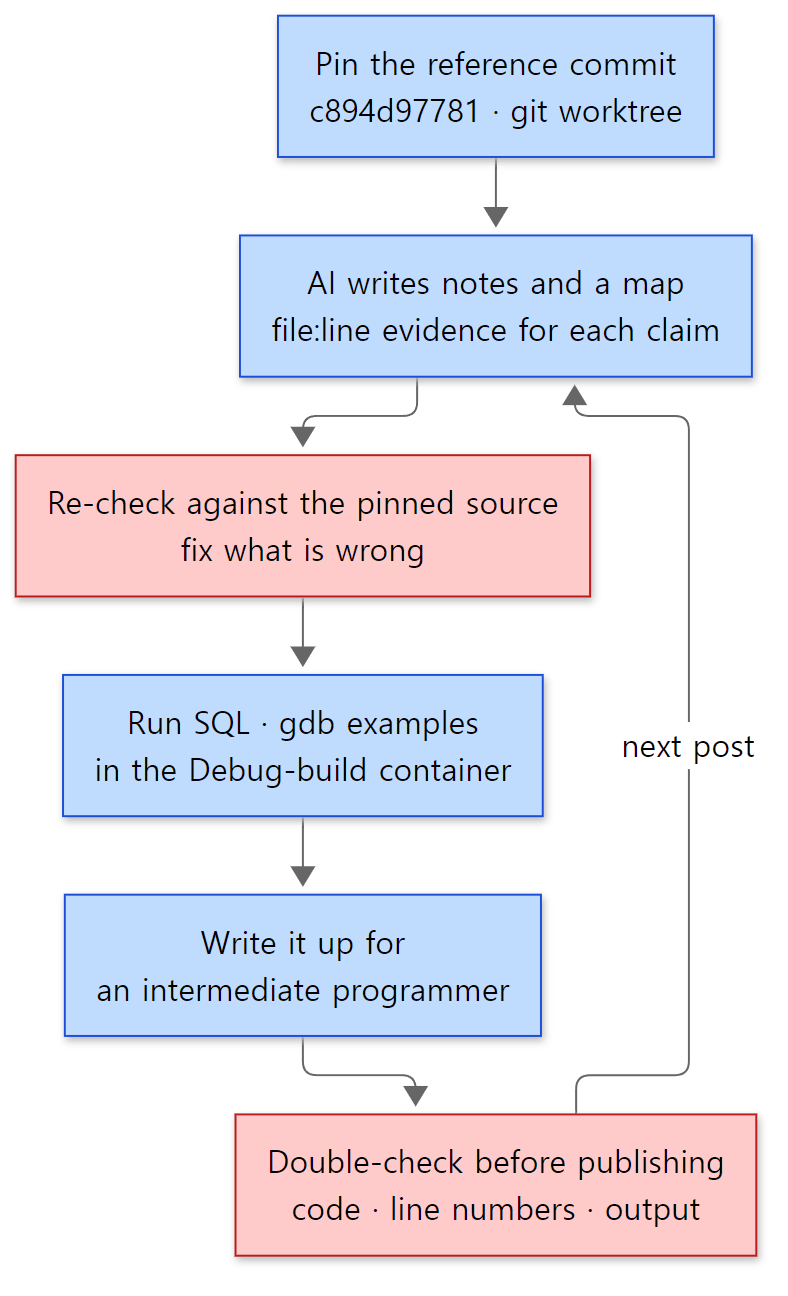 The order in which one post is read and written. Blue boxes are steps; red boxes are where mistakes in what the AI wrote get filtered out.
The principle is the same as in the earlier series. Do not read everything at once; pick one question from the map and read deeply only the code needed to answer it. In this series, one question is one post.
- Pin the reference commit. That is the worktree from section 2. Line numbers must not move, or the evidence an AI cites cannot be verified.
- AI writes the notes and the map. The layout of the 12 posts and the list of starting files and functions for each post were made this way. Each post was handed to its own AI task with the same instructions (what to read, in what format, with what evidence).
- Re-check against the reference commit's source. The functions named in the instructions are only starting points; what goes into a post is only what was confirmed directly in the source. Code is copied from the files as-is, and only line numbers found directly are written down.
- Actually run the examples. As in section 5, a small example that confirms one claim of the post is run in the container, and its output is shown as-is. MariaDB is a server, so SQL results, status variables,
information_schemaand gdb backtraces are the main tools. - Check once more before publishing. When a post is done, a separate AI task compares its code blocks, line numbers, stated facts and example output against the source from the beginning. A post that has not been through this check does not get published.
What the checking caught in this post
Why step 3 is needed showed up while writing this very post.
- The instructions only said "Example: ask for the engine list (
information_schema.ENGINES)". Had I printed onlyENGINES, I would have written "this server has 8 engines". Only after comparing it withPLUGINSdid I find the two hidden engines andHTON_HIDDEN(section 3). - The instructions and the notes from setting up the example environment only said "Windows'
git archiveproduces CRLF, so-c core.autocrlf=false -c core.eol=lfwas needed". Why both options are needed only became clear after opening.gitattributesand counting\rfor each option; whycomp_errstops only became clear after reading the empty-line check incomp_err.cand recreating the situation. - The list of functions on the big road included
parse_sqlandJOIN::prepare/optimize, which is correct. But saying "confirm the big road with one backtrace" makes it sound as if those three would appear on the stack. Printing it shows they do not, and the post had to explain why (section 5).
On the other hand, the "reference numbers" in the instructions — the number of entries (27,587), the C/C++ line count (about 2.59 million) and the line counts of the big files — all matched when recounted. When a check confirms something, it goes in as is; when it differs, the source wins.
AI guidance inside the repository
The MariaDB repository has files written for AI too. The top-level CODING_STANDARDS.md was revised in commit 7fc6fce20d on 2026-06-17 ("update CODING_STANDARDS.md for agent era"), and its preface reads:
This is a concise agent-oriented version, which highlights differences between "default" coding style that an agent would use anyway and MariaDB.
So it is a summary for agents (AI) that points out where MariaDB differs from the "default" style an agent would use anyway, and it says a human-oriented version exists separately. The first rule is "match the surrounding codebase", and it tells you to grep mysys/ and include/ before writing a new utility function. One rule is useful for readers too: assignments are written like a= 1;, with no space before the = ("non-standard but grep-friendly"). Thanks to that, searching with something like grep -n "thd->lex= " sql/*.cc filters out comparisons (==) and finds only the places that assign a value. This series uses it a lot to answer "where is this variable set?".
Commit 9beedae93c on 2026-07-01 ("github copilot review instructions") added .github/copilot-instructions.md. It is the instruction sheet GitHub Copilot reads when reviewing pull requests, and it lists bugs common in MariaDB as a checklist (MEM_ROOT memory lifetime, re-execution of prepared statements, the convention that a bool function returns false on success, the difference between SQL NULL and a C NULL pointer …). Under "Do NOT" there is this line:
- Assert about code outside the diff — ask a question instead. Do not invent API/symbol names; verify against the code shown.
Don't make claims about code you cannot see — ask instead; don't invent API or symbol names — check them against the code shown. It means the project has itself run into AI making up plausible-looking function names, and it is the same principle as this series: check what an AI wrote against the reference commit's source before writing it down. That checklist doubles as this series' reading list: MEM_ROOT is in post 2, prepared statements in post 5, and the bool return convention comes up in almost every post.
7. The series map
Four groups
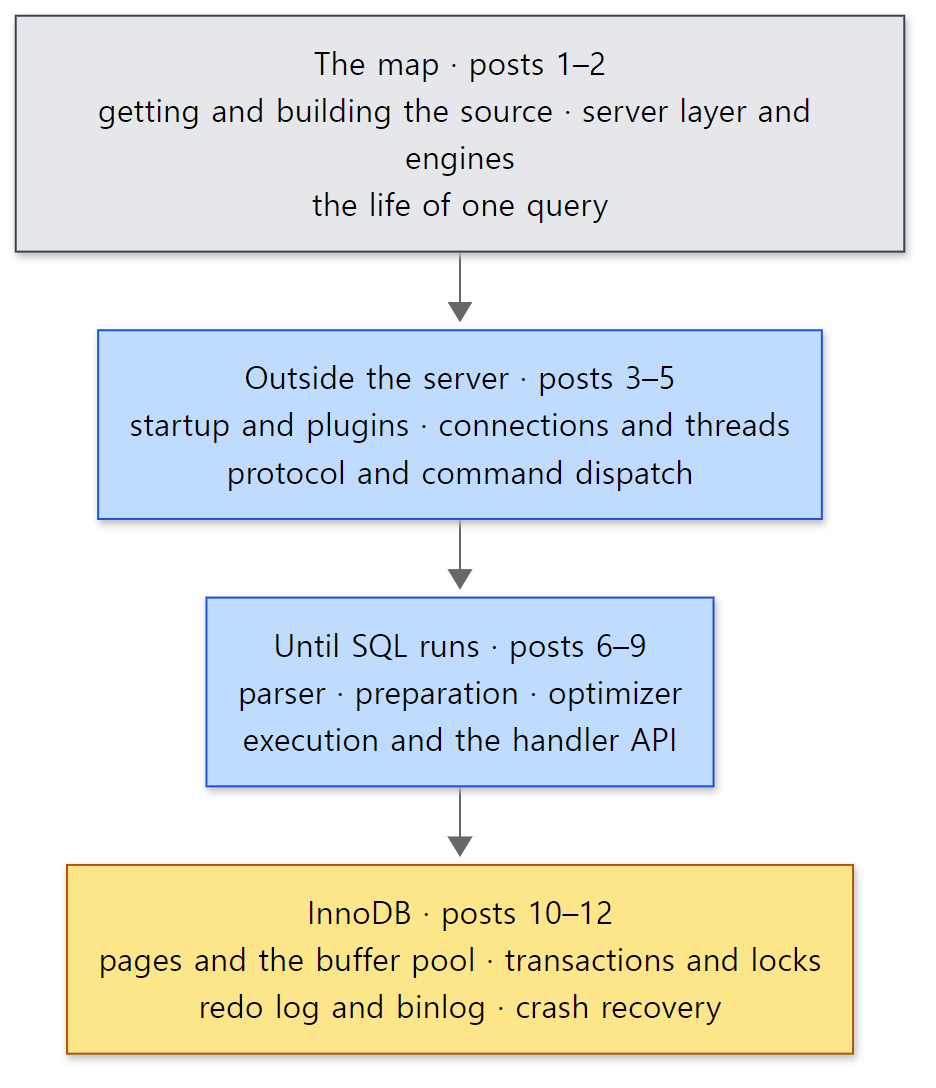 The four groups of the series. The blue boxes are the road through the server layer; the yellow box is InnoDB, which actually stores the data at the end of that road.
| Group | Post | The question it answers |
|---|---|---|
| The map | 1 | Which source, and how to read it (this post) |
| 2 | Why are the server layer and engines split, and which objects (THD, LEX, JOIN, handler) does one query pass through? |
|
| Outside the server | 3 | In what order does mariadbd start, and when do engines and plugins come up? |
| 4 | Which thread takes a connection, and what is different about the thread pool? | |
| 5 | How is one packet read and delivered to dispatch_command(), and how does the result go back? |
|
| Until SQL runs | 6 | How does an SQL string become LEX and Item trees? |
| 7 | Where do privilege checks, opening tables, metadata locks and name resolution happen? | |
| 8 | How does the optimizer choose join order and indexes, and where is EXPLAIN produced? |
|
| 9 | How does the nested-loop join call handler? |
|
| InnoDB | 10 | What do pages, the buffer pool and B-trees look like? |
| 11 | How do transactions, MVCC, undo and locks work? | |
| 12 | How do the redo log and the binlog differ, and what happens when a crashed server comes back? |
Reading order
Just read them in order. Posts 1 and 2 lay out the map, and posts 3–12 each zoom into one region of post 2's map and read it in depth. There are three reasons.
- Read post 2 first.
THD,LEX,TABLE,JOINandhandlerappear in every later post. Post 2 gathers on one page when these objects are created and which one points to which. - Go from the outside in. Starting at startup (post 3), it goes through connections (post 4), packets (post 5) and the parser (post 6) to execution (post 9). That is the same order as reading the backtrace above from the bottom up.
- Read InnoDB last. InnoDB is just one engine that the server layer calls through
handler, but it is the largest and does the most (transactions, locking, recovery) on its own. Only after knowing the road up to thehandlerborder can you read it in terms of "what does the server ask for, and what does InnoDB promise?"
What this post leaves out
- Engines switched off. Mroonga, CONNECT, Spider, RocksDB (MyRocks), ColumnStore, DuckDB, OQGraph, Sphinx, S3 and FEDERATED are neither built nor read in this series (
-DPLUGIN_<name>=NO). - Galera cluster.
wsrep-lib,sql/wsrep_*.ccand the#ifdef WITH_WSREPblocks scattered through the code are not covered. - mariabackup and the embedded server.
extra/mariabackup/andlibmysqld/are left out. - Client programs.
mariadb,mariadb-dumpand the rest inclient/are used in the examples but not read. The same goes for Connector/C (libmariadb). - Character sets and collations. The 330,000 lines of
strings/are not covered. - Tests. The 7,000 tests in
mysql-test/are only used as a reference to confirm behaviour. - The Windows build. Windows branches such as
mysqld_win_main()insql/main.ccandhandle_connections_win()are not read. All examples run in a Linux container.
Summary
| Concept | One-line summary |
|---|---|
| Source read | MariaDB Server 13.2.0 (main, alpha), commit c894d97781 (2026-10-19). 3,145 C/C++ files, about 2.59 million lines |
| Version number | VERSION file → mysql_version.cmake → MYSQL_SERVER_VERSION → set_server_version() adds -debug/-log |
git describe |
Not a version number but the commits (222) after the nearest tag (mariadb-13.1.1). This series calls it 13.2.0 |
| Maturity | On an alpha server the plugin_maturity default is one step lower, experimental |
| Submodules | Of the seven, only libmariadb is always needed. The rest are switched off with options (WITH_WSREP, WITH_SSL, PLUGIN_*) |
| Build | A Debug build with CMake + Ninja in Docker (Ubuntu 24.04) → /opt/mariadb, image mariadb-lab:c894d97781 |
| The CRLF trap | Because of * text=auto, core.autocrlf=false alone is not enough; core.eol=lf is needed too. Otherwise comp_err stops at the empty line "\r\n" |
| Folders | sql/ (server layer) · storage/ (engines, InnoDB is innobase) · mysys/·strings/ (common ground) · plugin/ · vio/ |
| The big road | handle_one_connection → do_command → dispatch_command → mysql_parse → mysql_execute_command → mysql_select → JOIN::exec → handler::ha_rnd_next → ha_innobase::rnd_next |
| How to read | Pin the commit → AI notes → check against the source → run examples → write → double-check |
What's next
The next post is the series map. This post only lined up the functions one SELECT passes through, using a backtrace. The next one looks at the objects that travel along that road: THD, which holds one connection; LEX and SELECT_LEX, made by the parser; TABLE_SHARE, the table definition, and TABLE, one per connection; JOIN, the execution plan; and handler and handlerton, the border between the server layer and the engines. It gathers on one map when each is created and which points to which, and why the server layer and storage engines were split. It also creates the same table with only the engine changed and looks at how the files in the data directory differ.
- Next post: Digging into MariaDB's Source 2: The Big Picture — the Server Layer, Storage Engines, and the Life of One Query
- To jump to connections and threads: Post 4: Connections and Threads — One Thread per Connection, and the Thread Pool
- To jump to InnoDB: Post 10: InnoDB Part 1 — Pages, the Buffer Pool and B-trees
There are many links to the earlier series read the same way. The series right before this one, nginx post 1, along with httpd post 1 and Tomcat post 1, began reading "servers that accept connections and handle requests" with the same principles. MariaDB is also a server that accepts connections: its default "one thread per connection" mode resembles httpd's prefork and worker MPMs (httpd post 8), and its thread pool resembles httpd's event MPM and Tomcat's Poller (Tomcat post 5), which watch connections in an event loop and hand them to worker threads when there is work. That comparison is made in post 4. On the application side, the @Transactional of Spring post 17 ends up sending a COMMIT to this server, and the SQL sent by JdbcTemplate in Spring post 18 arrives as the COM_QUERY in the backtrace above. This series reads what that SQL becomes inside the server.