What this post covers
This is the sixth post in the "Digging into MariaDB's Source" series. In Part 5 we followed one packet from the client until it reached case COM_QUERY in dispatch_command(). At that point all the server holds is one string, something like "SELECT name FROM t WHERE id = 1". This post follows how that string becomes a data structure the server can work with — in other words, parsing.
This post zooms into the ③ Parsing zone of the Part 2 map.
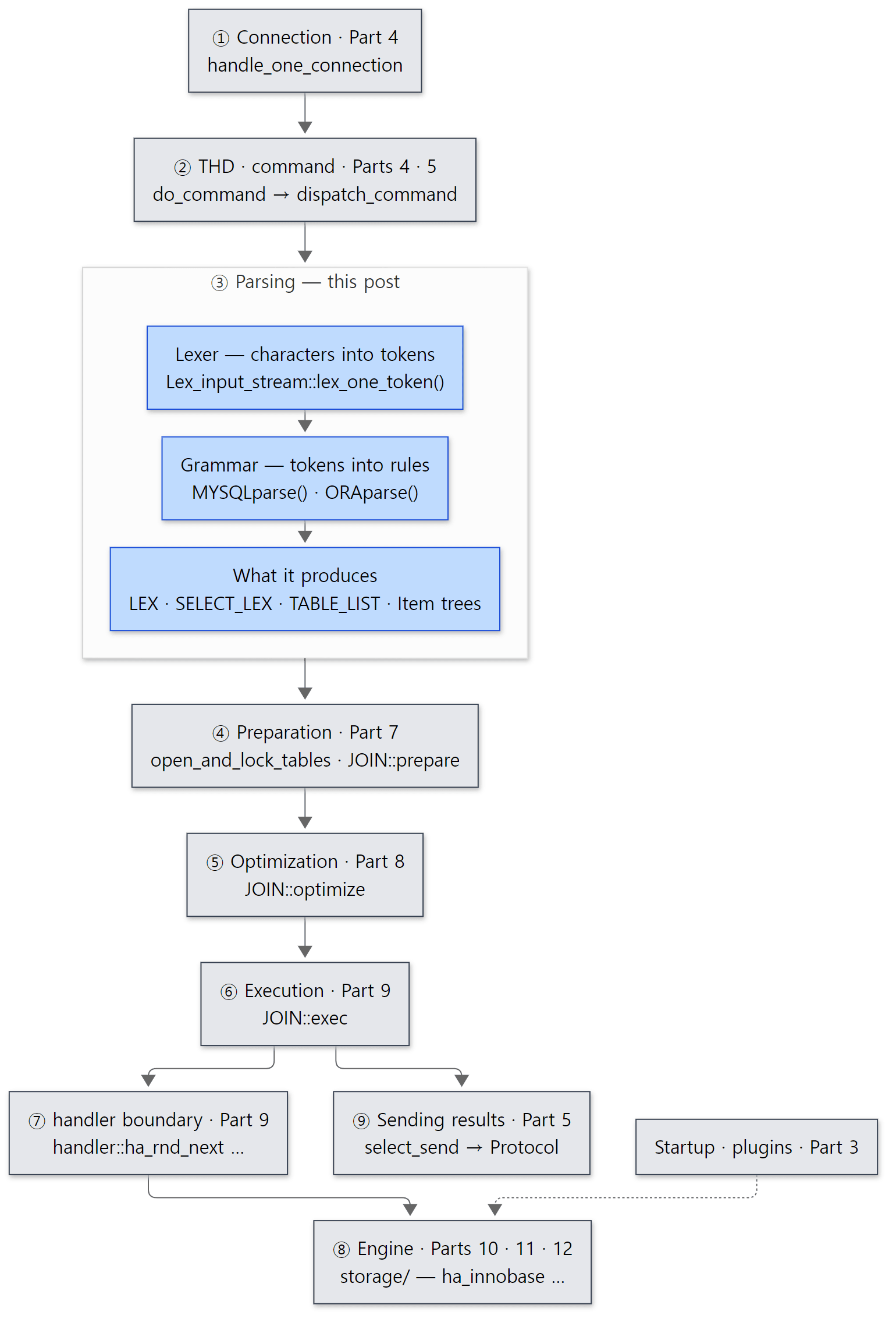 Blue boxes are what this post reads; grey boxes are covered by the posts around it.
There are four questions to answer.
- Whose hands does the string
SELECT …pass through, and what structure does it become? Is the parser hand-written or generated? - Why does the same statement read differently after
sql_mode=ORACLE? - When the parser is done, what is inside
thd->lex, and what is still empty? - In
You have an error in your SQL syntax … near '...' at line 1, why is it exactly that text afternear?
| Item | Value |
|---|---|
| Project | MariaDB Server |
| Version | 13.2.0 (main, alpha) |
| Commit | c894d97781 (2026-10-19) |
| Main files | sql/sql_parse.cc, sql/sql_yacc.yy, sql/sql_lex.cc·sql_lex.h, sql/lex.h, sql/item.h, sql/sql_cmd.h, sql/CMakeLists.txt |
All line numbers in this post refer to that commit. Part 1 shows how to get the same source and build the Docker image used for the examples.
The grammar file sql_yacc.yy is 21,251 lines long, and sql_lex.cc, which holds the lexer, is 14,404 lines. This post picks only the main path one SELECT takes. What was left out is listed by name and location under "What this post leaves out" at the end.
Terms to know first
Lexer and token. A lexer (lexical analyser) is code that cuts a stream of characters into a stream of tokens. After the lexer, SELECT id FROM t becomes four tokens: SELECT_SYM, ID_SYM, FROM, IDENT. A token carries an integer number and, when needed, the original text (t). MariaDB's lexer is the Lex_input_stream class in sql/sql_lex.cc.
Parser, grammar, Bison. A parser (syntax analyser) checks whether a stream of tokens fits the grammar and, if it does, builds a structure. MariaDB does not write its parser by hand. It feeds a file of grammar rules (sql/sql_yacc.yy) to a parser generator called Bison, which generates the C++ code. Bison builds LALR(1) parsers: tokens are pushed onto a stack one by one (shift), and whenever the top of the stack matches the right-hand side of a rule, it is replaced by that rule's name (reduce). The parser decides this by looking ahead at just one next token (the "1").
Rules and actions. A rule in the grammar file can carry C++ code in { … }; this is called an action. The action runs when its rule is completed (when it is reduced). $1, $2 are the values of the pieces on the right-hand side, and $$ is the value this rule builds and passes upward. You could say MariaDB's parser is nothing more than these actions building data structures.
LEX. Everything the parser leaves behind after reading one statement. It is pointed to by thd->lex in the per-connection THD (Part 2). It holds the kind of statement (sql_command — SQLCOM_SELECT, SQLCOM_UPDATE …), every table the statement mentions, and the SELECT_LEX tree below.
SELECT_LEX and SELECT_LEX_UNIT. A SELECT_LEX (the class is called st_select_lex) is one SELECT … FROM … WHERE …. It holds the list of selected columns (item_list), the tables in FROM (table_list) and the WHERE condition (where). A SELECT_LEX_UNIT (st_select_lex_unit) is a unit that groups several SELECTs joined by UNION, or one subquery. With subqueries, the two alternate to form a tree.
TABLE_LIST is a slot pointing at one table in the FROM clause. When the parser creates it, it holds only names — database name, table name, alias. Actually opening the table is the job of Part 7.
Item is an object that represents one expression. The column name id is an Item_field, the constant 1 an Item_int, id = 1 an Item_func_eq, and … AND … an Item_cond_and. Expressions contain expressions, so Items form trees. Every Item is allocated from the connection's memory pool thd->mem_root (the MEM_ROOT from Part 2) and thrown away all at once when the statement ends (this is for an ordinary statement that arrives as COM_QUERY; a prepared statement has its own memory pool, Prepared_statement::main_mem_root, which is freed when that statement is deallocated).
1. The door into the parser — mysql_parse() and parse_sql()
The case COM_QUERY in dispatch_command() we saw in Part 5 creates a Parser_state on the stack to hold the parser's state, initializes it with the received string, and then calls mysql_parse().
    Parser_state parser_state;
    if (unlikely(parser_state.init(thd, thd->query(), thd->query_length())))
      break;
    // ... (WSREP block omitted)
      mysql_parse(thd, thd->query(), thd->query_length(), &parser_state);
sql/sql_parse.cc lines 1883–1903
A Parser_state contains the lexer (Lex_input_stream m_lip) and Bison's stack state (Yacc_state m_yacc) (sql/sql_lex.h lines 5572–5573). It is used only while one statement is being read, so a stack variable is enough.
The beginning of mysql_parse() looks like this.
void mysql_parse(THD *thd, char *rawbuf, uint length,
                 Parser_state *parser_state)
{
  DBUG_ENTER("mysql_parse");
  DBUG_EXECUTE_IF("parser_debug", turn_parser_debug_on_MYSQLparse(););
  DBUG_EXECUTE_IF("parser_debug", turn_parser_debug_on_ORAparse(););
  // ... (a long comment about the query cache and initialization order)
  lex_start(thd);
  thd->reset_for_next_command();

  if (query_cache_send_result_to_client(thd, rawbuf, length) <= 0)
  {
    LEX *lex= thd->lex;

    bool err= parse_sql(thd, parser_state, NULL, true);
sql/sql_parse.cc lines 7927–7957
lex_start()clearsthd->lexfor this statement. TheLEXobject is not created anew for every statement; the one the connection owns is reused.- The query cache is checked first. If the result for the same string is in the cache, parsing is skipped entirely. Why the cache looks things up by string, and that it is off by default, we saw in Part 5.
parse_sql()does the actual parsing. If it succeeds (erris false), a bit further down in the same function control moves on tomysql_execute_command(thd)(line 8005).
The heart of parse_sql() is two lines.
  /* Parse the query. */

  bool mysql_parse_status= thd->variables.sql_mode & MODE_ORACLE
                           ? ORAparse(thd) : MYSQLparse(thd);
sql/sql_parse.cc lines 10398–10401
There are two parser functions. If sql_mode contains ORACLE, ORAparse() is called; otherwise MYSQLparse(). Neither is hand-written — Bison generated both — and each takes only one argument, a THD. That is because the string to read and the place to put the result are both inside thd (thd->m_parser_state, thd->lex). The return value is 0 on success.
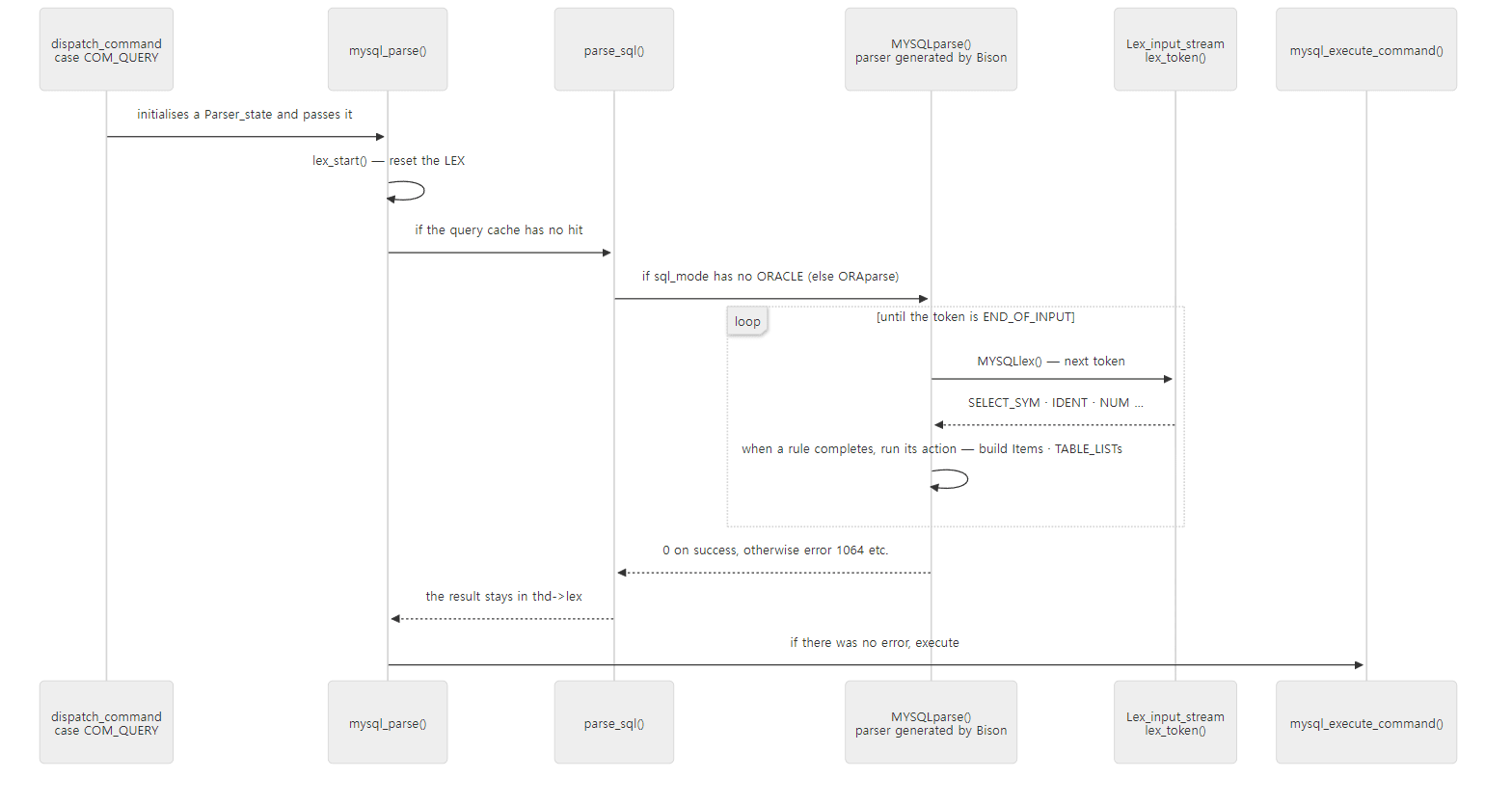 The parser is the one calling the lexer. The lexer does not turn the whole string into an array of tokens up front; the parser asks for one token at a time whenever it needs one.
A successful parse only means the statement fits the grammar. Whether the tables exist, whether the column names are right, whether you have privileges — none of that is checked (we confirm this with an example at the end of section 5).
Easy to confuse: several statements in one packet
If the client turns on CLIENT_MULTI_QUERIES and sends SELECT 1; SELECT 2 in one packet, the parser stops at the first statement's ; and records where the next statement starts in found_semicolon (the query rule, sql_yacc.yy lines 2165–2177). After running the first statement, dispatch_command() calls mysql_parse() again from that position in its while (… parser_state.m_lip.found_semicolon != NULL …) loop (line 1905). One run of the parser always reads exactly one statement.
2. One grammar source, two parsers — sql_yacc.yy and sql_mode=ORACLE
MYSQLparse() and ORAparse() exist nowhere in the repository. They appear at build time, and sql/CMakeLists.txt writes down the steps. First, an ADD_CUSTOM_COMMAND runs the gen_yy_files.cmake script to split sql_yacc.yy into two files in the build folder, yy_oracle.yy and yy_mariadb.yy (sql/CMakeLists.txt lines 77–89). Then each of the two files is fed to Bison.
  BISON_TARGET(gen_mariadb_cc_hh ${CMAKE_CURRENT_BINARY_DIR}/yy_mariadb.yy
                                 ${CMAKE_CURRENT_BINARY_DIR}/yy_mariadb.cc
               COMPILE_FLAGS "-p MYSQL -S ${CMAKE_CURRENT_BINARY_DIR}/myskel.m4")
  BISON_TARGET(gen_oracle_cc_hh ${CMAKE_CURRENT_BINARY_DIR}/yy_oracle.yy
                                ${CMAKE_CURRENT_BINARY_DIR}/yy_oracle.cc
               COMPILE_FLAGS "-p ORA -S ${CMAKE_CURRENT_BINARY_DIR}/myskel.m4")
sql/CMakeLists.txt lines 435–440
Bison's -p option changes the prefix of the generated names. The default names yyparse, yylex, yyerror become MYSQLparse, MYSQLlex, MYSQLerror with -p MYSQL, and ORAparse, ORAlex with -p ORA. That is how two parsers live in one program without their names colliding. Dumping the symbol table of mariadbd in the example image with nm -C shows MYSQLparse(THD*), ORAparse(THD*), MYSQLlex(YYSTYPE*, THD*) and MYSQLerror(THD*, char const*) as separate symbols, and the trace switch is two global variables as well, MYSQLdebug and ORAdebug.
The splitting is done by gen_yy_files.cmake. sql_yacc.yy contains 25 regions that start with %ifdef MARIADB or %ifdef ORACLE and end with %endif, imitating the C preprocessor, and the script reads the file from top to bottom; each time it meets one of these directive lines, it decides which output the following lines go to. The thing to notice is that whenever it writes a line to one file, it writes the same line with every character removed — an empty line — to the other file (string(REGEX REPLACE "[^\n]+" "" line "${line}"), sql/gen_yy_files.cmake lines 30–37). So yy_mariadb.yy and yy_oracle.yy have exactly the same line numbers as the original sql_yacc.yy. Line numbers that show up in compiler errors or in a Bison trace can be looked up directly in the original, and the example in section 4 relies on this.
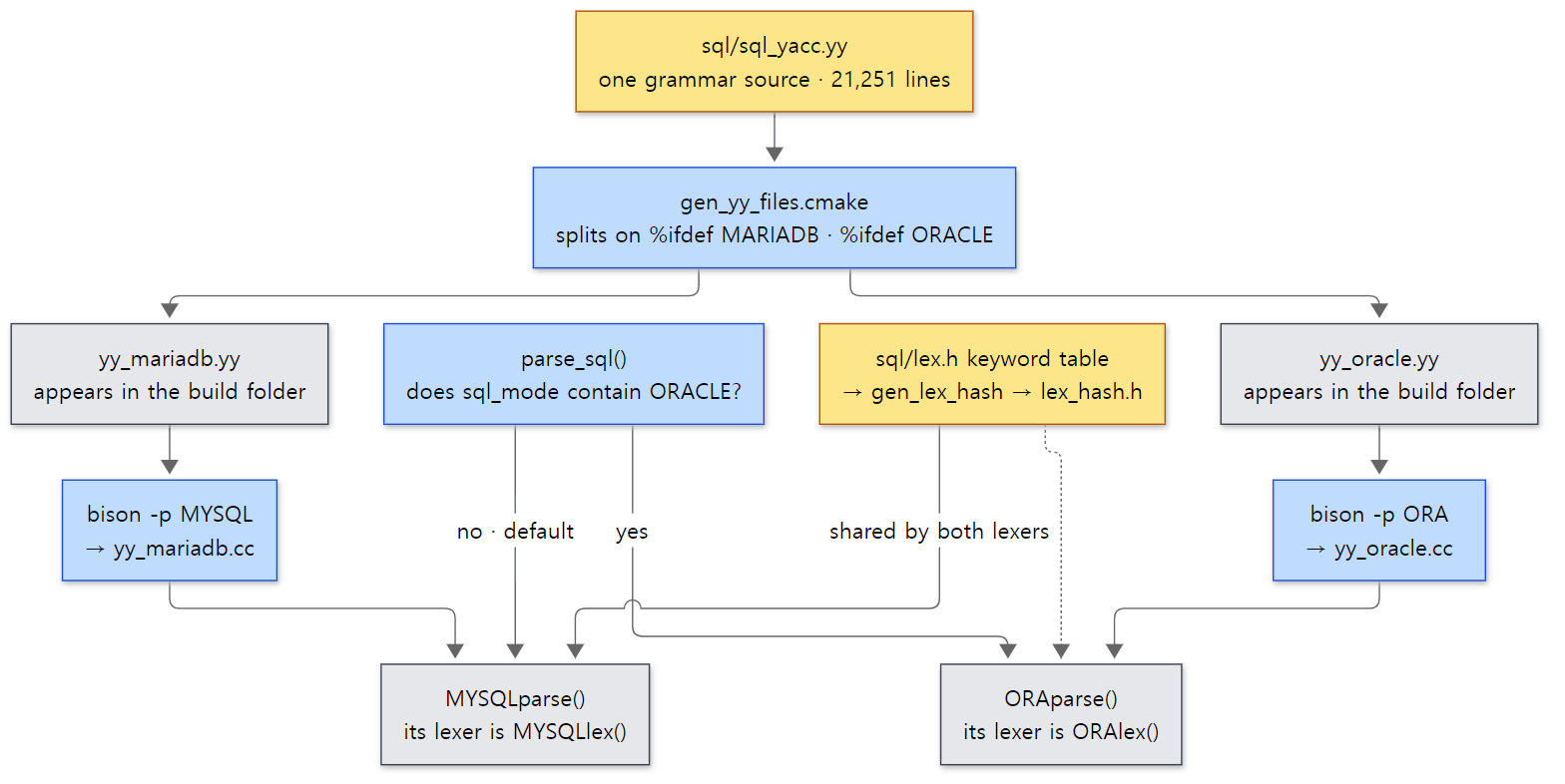 Yellow boxes are sources in the repository; grey boxes are generated at build time.
The head of the grammar file says what kind of parser to build.
%define api.pure                                    /* We have threads */
%parse-param { THD *thd }
%lex-param { THD *thd }
/*
  We should not introduce any further shift/reduce conflicts.
*/

%ifdef MARIADB
%expect 72
%else
%expect 73
%endif
%define api.pureasks for "a parser without global variables". A default Bison parser keeps things like the current token value (yylval) in globals. In a server where every connection runs on its own thread (Part 4), two connections' parses would then overwrite each other. As the comment says: "We have threads".%parse-paramand%lex-paramadd aTHD *thdargument to the parser function and to the lexer function. That is where the shapeMYSQLparse(THD *thd)comes from, and it is also why actions can usethd.%expect 72declares "this grammar has exactly 72 shift/reduce conflicts, and we know about them". If the real number of conflicts differs, Bison stops with an error (I checked this by building a tiny grammar with the Bison 3.8.2 in the example image). The comment above says "do not add any more conflicts". The Oracle grammar has one more, 73.
Example 1: same statement, different grammar
I sent the same statements with a different sql_mode. This example and every other example in this post were run in a Docker container (Ubuntu 24.04) on MariaDB 13.2.0 (13.2.0-MariaDB-debug), a Debug build of the reference commit (c894d97781) as is. The example folder is ex/u06-two-grammars.
-- Example written for this post (not MariaDB source)
-- The same statement is read by a different parser (MYSQLparse / ORAparse) depending on sql_mode.
-- ... (creating table lab.t and inserting ids 1, 2, 3 omitted)
SELECT '--- 1. default sql_mode';
SELECT 'a' || 'b' AS concat_or_or;
SHOW WARNINGS;

SELECT '--- 2. sql_mode=ORACLE';
SET sql_mode = ORACLE;
SELECT @@sql_mode;
SELECT 'a' || 'b' AS concat_or_or;
SELECT id FROM t MINUS SELECT id FROM t WHERE id = 2;
SET sql_mode = DEFAULT;
run.sh sends this file with mariadb -N -B (values only, without table borders or column names), then sends two more statements containing MINUS in the default sql_mode: first SELECT MINUS.id FROM lab.t MINUS WHERE MINUS.id = 1, then the same MINUS statement as above.
--- 1. default sql_mode
0
Warning	1292	Truncated incorrect DOUBLE value: 'a'
Warning	1292	Truncated incorrect DOUBLE value: 'b'
--- 2. sql_mode=ORACLE
PIPES_AS_CONCAT,ANSI_QUOTES,IGNORE_SPACE,ORACLE,NO_KEY_OPTIONS,NO_TABLE_OPTIONS,NO_FIELD_OPTIONS,NO_AUTO_CREATE_USER,SIMULTANEOUS_ASSIGNMENT
ab
1
3
--- 3. MINUS in default sql_mode
1
--------------
SELECT id FROM lab.t MINUS SELECT id FROM lab.t WHERE id = 2
--------------

ERROR 1064 (42000) at line 1: You have an error in your SQL syntax; check the manual that corresponds to your MariaDB server version for the right syntax to use near 'SELECT id FROM lab.t WHERE id = 2' at line 1
||. In the default mode'a' || 'b'is a logical OR, so the two strings are converted to numbers, producing two warnings and 0. InORACLEmode it is string concatenation, givingab.MINUS. InORACLEmode it means the same asEXCEPT, so 1, 2, 3 minus 2 gives 1, 3. In the default mode it is a syntax error — but the error points not atMINUSbut at theSELECTafter it. The reason shows in the statement just before it,SELECT MINUS.id FROM lab.t MINUS WHERE MINUS.id = 1, which succeeded and returned 1. In the default grammarMINUSis a word you may use as a table alias.
This difference is made in two places, the lexer and the grammar. For ||, the lexer finds OR2_SYM in the keyword table and then changes the token according to sql_mode. ORACLE mode includes PIPES_AS_CONCAT (see the output above), so it becomes the concatenation token.
    if ((symbol->tok == OR2_SYM) &&
        (m_thd->variables.sql_mode & MODE_PIPES_AS_CONCAT))
    {
      return (m_thd->variables.sql_mode & MODE_ORACLE) ?
             ORACLE_CONCAT_SYM : MYSQL_CONCAT_SYM;
    }
sql/sql_lex.cc lines 1449–1454
For MINUS, a little higher in the same function, ORACLE mode turns the MINUS_ORACLE_SYM token into EXCEPT_SYM (line 1434). In the default mode the unchanged MINUS_ORACLE_SYM reaches the parser, and in the grammar file that token sits under %ifdef MARIADB in the keyword_func_sp_var_and_label list (sql_yacc.yy lines 17267–17269) — a list of keywords that may be used where a name is expected. So FROM lab.t MINUS is read as "the table with alias MINUS", and the parser gets stuck at the SELECT that follows.
Easy to confuse: ORACLE mode is "another parser", not "one more option"
SET sql_mode=ORACLE does not just change a few tokens in the lexer; it changes the very function parse_sql() calls. So even grammar rules the lexer cannot touch are different. For example, the rec_field_definition rule, which reads record types in stored programs, exists only inside %ifdef ORACLE (sql_yacc.yy line 3688). Flags such as PIPES_AS_CONCAT or IGNORE_SPACE, on the other hand, can be turned on separately with the default parser, and then only the lexer behaves differently.
3. The lexer — characters into tokens
The bodies of MYSQLlex() and ORAlex(), which the parser calls to ask for a token, are both the single line return thd->m_parser_state->m_lip.lex_token(yylval, thd); (sql/sql_lex.cc lines 1879–1888). There is only one lexer. The two names are shells created by Bison's -p, and the differences by sql_mode are made inside the lexer by looking at m_thd->variables.sql_mode (the find_keyword() from the previous section).
The first character picks the branch — state_map
The function that actually reads characters is lex_one_token(). It skips whitespace and decides what to read from the first character of the token.
int Lex_input_stream::lex_one_token(YYSTYPE *yylval, THD *thd)
{
  // ...
  const uchar *const state_map= cs->state_map;
  // ...
  for (;;)
  {
    switch (state) {
    case MY_LEX_OPERATOR_OR_IDENT:        // Next is operator or keyword
    case MY_LEX_START:                    // Start of token
      // Skip starting whitespace
      while(state_map[c= yyPeek()] == MY_LEX_SKIP)
      {
        if (c == '\n')
          yylineno++;

        yySkip();
      }

      /* Start of real token */
      restart_token();
      c= yyGet();
      state= (enum my_lex_states) state_map[c];
      break;
sql/sql_lex.cc lines 2030–2069
state_map is a 256-entry table indexed by character value (0–255), and each entry says "if a token starts with this character, go to this state". There is one table per character set, built when the character sets are first prepared (init_available_charsets() in mysys/charset.c) and stored in cs->state_map. Instead of a long chain of ifs per character, it is one table lookup and a jump through a switch. The code that fills the table shows the branches at a glance.
  for (i=0; i < 256 ; i++)
  {
    if (my_isalpha(cs,i))
      state_map[i]=(uchar) MY_LEX_IDENT;
    else if (my_isdigit(cs,i))
      state_map[i]=(uchar) MY_LEX_NUMBER_IDENT;
    // ...
    else if (my_isspace(cs,i))
      state_map[i]=(uchar) MY_LEX_SKIP;
    else
      state_map[i]=(uchar) MY_LEX_CHAR;
  }
  state_map[(uchar)'_']=state_map[(uchar)'$']=(uchar) MY_LEX_IDENT;
  state_map[(uchar)'\'']=(uchar) MY_LEX_STRING;
  // ...
  state_map[(uchar)'>']=state_map[(uchar)'=']=state_map[(uchar)'!']= (uchar) MY_LEX_CMP_OP;
  // ...
  state_map[(uchar)'-']= (uchar) MY_LEX_MINUS_OR_COMMENT;
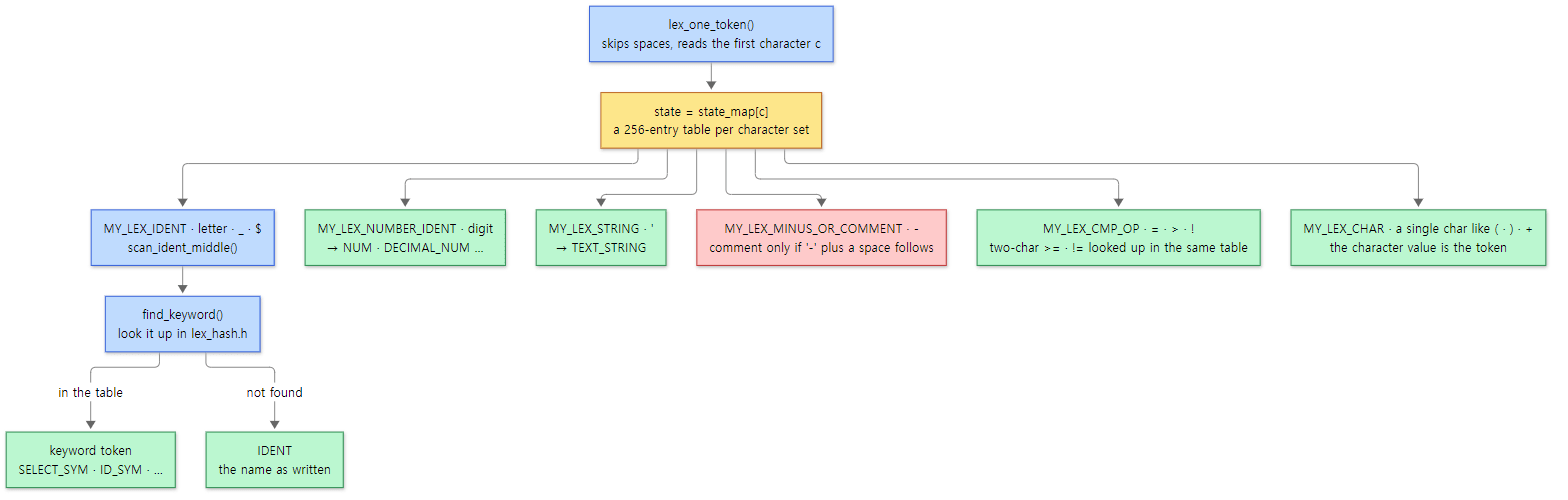 The red box is the branch that actually confuses people in the example below.
Keyword or name? — lex.h and find_keyword()
Once a word starting with a letter has been read, a table decides whether it is a keyword or a plain name (IDENT). The source of that table is sql/lex.h.
SYMBOL symbols[] = {
  { "&&",		SYM(AND_AND_SYM)},
  { "<=",		SYM(LE)},
There are two tables: 700 entries in symbols[] (lines 49–751) and 49 in sql_functions[] (lines 754–804). Notice that symbols[] starts with operators such as && and <= — two-character operators are looked up in the same table. At build time a small program, gen_lex_hash, reads these arrays and generates a fast lookup table, lex_hash.h (sql/CMakeLists.txt line 447 and lines 450–454), which sql_lex.cc #includes (line 685).
Why sql_functions[] is separate shows in this part of scan_ident_middle().
  {                                    // '(' must follow directly if function
    int tokval;
    yyUnget();
    if ((tokval= find_keyword(str, length, c == '(')))
    {
      next_state= MY_LEX_START;        // Allow signed numbers
      return(tokval);                  // Was keyword
    }
    yySkip();                  // next state does a unget
  }
sql/sql_lex.cc lines 2961–2970
The third argument of find_keyword() is "is the character right after the word a (?". get_hash_symbol() in lex_hash.h searches sql_functions[] only when that is true. The 49 words such as NOW, COUNT, MAX, SUBSTR are keywords only when a parenthesis follows immediately; otherwise they are ordinary names. That is why you can have columns called now or count.
Looking two tokens ahead — lex_token()
A Bison parser looks ahead only one token (LALR(1)). But SQL has places where two tokens are needed to decide. In GROUP BY a WITH ROLLUP, the WITH alone does not tell you whether it starts a WITH clause (a CTE) or comes before ROLLUP. MariaDB solves this in the lexer, not in the grammar.
  switch(token) {
  case WITH:
    /*
      Parsing 'WITH' 'ROLLUP' or 'WITH' 'CUBE' requires 2 look ups,
      which makes the grammar LALR(2).
      Replace by a single 'WITH_ROLLUP' or 'WITH_CUBE' token,
      to transform the grammar into a LALR(1) grammar,
      which sql_yacc.yy can process.
    */
    token= lex_one_token(yylval, thd);
    add_digest_token(token, yylval);
    switch(token) {
    // ...
    case ROLLUP_SYM:
      return WITH_ROLLUP_SYM;
    // ...
    default:
      // ...
      lookahead_yylval= yylval;
      lookahead_token= token;
      return WITH;
sql/sql_lex.cc lines 1914–1938
lex_token() wraps lex_one_token(). It reads one more token after WITH, and if that is ROLLUP it returns a single combined WITH_ROLLUP_SYM. Otherwise it parks the token it read in lookahead_token, returns just WITH, and hands out the parked token first on the next call (lines 1896–1907). FOR SYSTEM_TIME, VALUES LESS and VALUES IN are combined the same way. To the parser it looks as if a two-word token existed.
Example 2: how the lexer cuts words
These are the four lexer-related statements in run.sh of ex/u06-lexer-errors. The small function q prints a title and sends one statement with mariadb -N -B -e (values only, without table borders or column names); if there is an error it keeps only the ERROR line.
# Example written for this post (not MariaDB source)
# ... (descriptive comment, lab-start and the definition of function q omitted)
mariadb -e "CREATE DATABASE lab; CREATE TABLE lab.t (id INT PRIMARY KEY, \`select\` INT, now INT, count INT);
            INSERT INTO lab.t VALUES (1, 10, 100, 1000);"
# ... (statements 1-4 are in section 7)
q "5. -- needs a space"    "SELECT 1--1 AS a, 1 -- 1 AS b
"
q "6. reserved word"       "SELECT select FROM lab.t"
q "7. quoted with backticks" "SELECT \`select\` FROM lab.t"
q "8. function names are keywords only before '('" "SELECT now, count, NOW() > '2000-01-01' AS f FROM lab.t"
--- 5. -- needs a space
2	1
--- 6. reserved word
ERROR 1064 (42000) at line 1: You have an error in your SQL syntax; check the manual that corresponds to your MariaDB server version for the right syntax to use near 'select FROM lab.t' at line 1
--- 7. quoted with backticks
10
--- 8. function names are keywords only before '('
100	1000	1
1--1is 2. It is a comment only when-is followed by-and then by a space or a control character (MY_LEX_MINUS_OR_COMMENT, lines 2104–2110).1--1is read as1 - (-1), which is 2. In1 -- 1 AS b, on the other hand, everything after--up to the end of the line becomes a comment, so the second column is just1(had it not been a comment, it would have been 2 as well).selectcannot be used as a name.SELECT_SYMis a reserved word, so it is in none of the grammar's "name" rules. Wrapped in backticks (theMY_LEX_USER_VARIABLE_DELIMITERbranch), the word skips the keyword table and becomesIDENT_QUOTEDdirectly, so it passes.nowandcountare names;NOW()is a function. What decides it is whether a(follows immediately.
Easy to confuse: id and name are keywords too
As the Bison trace in section 4 will show, the id in SELECT id FROM t comes out not as IDENT but as a keyword token called ID_SYM (the "ID" entry on line 290 of lex.h). name is NAME_SYM. They still work fine as column names because the grammar file has separate lists of "keywords allowed where a name is expected" (keyword_ident, keyword_sp_var_and_label …) and ID_SYM is in them. Keywords are split into "reserved words" and "non-reserved keywords", and the split is made by the grammar rules, not by the lexer. MINUS becoming an alias in Example 1 is the same story.
4. Grammar rules and actions — where tokens become Item trees
Now the parser side. The top rule of the grammar file is query (sql_yacc.yy lines 2151–2191). Empty input (END_OF_INPUT) gives SQLCOM_EMPTY_QUERY; otherwise it is one directly_executable_statement followed by ; or the end of input. Going down that directly_executable_statement → statement → verb_clause, you find the kinds of statement listed one per line — alter, delete, insert, select, update … (from line 2205). Following the SELECT side leads to query_specification, which stands for one SELECT.
query_specification_start:
          SELECT_SYM opt_optimizer_hint
          {
            SELECT_LEX *sel;
            LEX *lex= Lex;
            if (!(sel= lex->alloc_select(TRUE)) || lex->push_select(sel))
              MYSQL_YYABORT;
            // ...
          }
          select_options
          {
            Select->parsing_place= SELECT_LIST;
          }
          select_item_list
          // ...
          ;

query_specification:
          query_specification_start
          opt_from_clause
          opt_where_clause
          opt_group_clause
          opt_having_clause
          opt_window_clause
          {
            Lex->handle_parsed_optimizer_hints_in_last_select();
            $$= Lex->pop_select();
          }
        ;
sql/sql_yacc.yy lines 9317–9349
Lex and Select are macros defined at the head of the grammar file, standing for thd->lex and thd->lex->current_select (lines 33–35). Here is how to read it.
- As soon as the
SELECTtoken is read, the action creates aSELECT_LEXwithalloc_select()and pushes it withpush_select()onto the stack of "theSELECTcurrently being built" (current_select). A{ … }placed in the middle of a rule runs before the rule is finished, when parsing has reached that point. - While the column list is being read,
parsing_placeis set toSELECT_LIST. Code that builds expressions uses this value to know whether it is inside theSELECTlist, insideWHEREor insideHAVING. - Once
FROM,WHERE,GROUP BY,HAVINGandWINDOWhave all been read,pop_select()takes it off the stack and the finishedSELECT_LEXis passed upward as$$.
When a subquery comes along, another SELECT_LEX goes onto this stack and comes off when the subquery ends. The stack depth is limited: going past MAX_SELECT_NESTING gives ER_TOO_HIGH_LEVEL_OF_NESTING_FOR_SELECT (sql_lex.h lines 3996–4000).
WHERE looks like this.
opt_where_clause:
          /* empty */  { Select->where= 0; }
 WHERE
          {
            Select->parsing_place= IN_WHERE;
          }
          search_condition
          {
            $3->top_level_item();
            Select->where= normalize_cond(thd, $3);
            Select->parsing_place= NO_MATTER;
          }
        ;
sql/sql_yacc.yy lines 13099–13111
The one Item that search_condition builds and passes up ($3) goes straight into SELECT_LEX::where. Where is that Item built? In the actions of the expression rules. I picked only the ones used by id = 1 AND name = 'one'.
The column name id becomes an Item in the simple_ident rule.
simple_ident:
          ident_cli
          {
            if (unlikely(!($$= Lex->create_item_ident(thd, &$1))))
              MYSQL_YYABORT;
          }
sql/sql_yacc.yy lines 16564–16569
Outside a stored procedure, create_item_ident() goes to create_item_ident_field(), which creates the Item_field.
Item *LEX::create_item_ident_field(THD *thd,
                                   const Lex_ident_sys_st &db,
                                   const Lex_ident_sys_st &table,
                                   const Lex_ident_sys_st &name)
{
  if (check_expr_allows_fields_or_error(thd, name.str))
    return NULL;

  if (current_select->parsing_place != IN_HAVING ||
      current_select->get_in_sum_expr() > 0)
    return new (thd->mem_root) Item_field(thd, current_context(),
                                          db, table, name);

  return new (thd->mem_root) Item_ref(thd, current_context(),
                                      db, table, name);
}
sql/sql_lex.cc lines 9701–9716
All the Item_field receives is names (db, table, name) and "where to look the name up" (current_context()). Which table this column belongs to, and which column of it, is not known yet. This is also where the parsing_place we just saw is used: a column inside HAVING that is outside any aggregate function becomes an Item_ref (an Item that points at another Item) instead of an Item_field.
The constant 1 becomes new (thd->mem_root) Item_int(thd, $1.str, (longlong) my_strtoll10($1.str, NULL, &error), $1.length) in the NUM_literal rule (sql_yacc.yy lines 16328–16338). The text the lexer passed ($1.str) is turned into an integer here, and the original text is passed along too. The string constant 'one' becomes an Item_string in the text_literal rule.
For the comparison id = 1, the comparison-operator rule comp_op picks "the maker" (for '=' it is $$ = &comp_eq_creator;, sql_yacc.yy lines 10434–10441), and the comparison rule uses it to build the Item.
        | boolean_test comp_op predicate %prec '='
          {
            $$= (*$2)(0)->create(thd, $1, $3);
            if (unlikely($$ == NULL))
              MYSQL_YYABORT;
          }
sql/sql_yacc.yy lines 10147–10152
comp_eq_creator(false) returns an Eq_creator object (sql_parse.cc lines 9448–9451), and its create() does new(thd->mem_root) Item_func_eq(thd, a, b) (item_cmpfunc.cc lines 7885–7888). Instead of writing a separate rule for each of the six operators, it passes "the maker object" up as a value and handles all of them with one rule. Passing true for the invert argument gives the maker of the opposite operator (= → <>); that is used by Item_allany_subselect, which builds comparisons like > ALL (subquery) (item_subselect.cc line 1761).
AND becomes an Item_cond_and in the expr rule.
        | expr and expr %prec AND_SYM
          {
            /* See comments in rule expr: expr or expr */
            Item_cond_and *item1;
            Item_cond_and *item3;
            if (is_cond_and($1))
            {
              item1= (Item_cond_and*) $1;
              // ... (if $3 is also an AND, merge the lists; otherwise add $3 to the list)
                /*
                  (X1 AND X2) AND Y ==> AND (X1, X2, Y)
                */
                item1->add($3, thd->mem_root);
                $$ = $1;
              }
            }
            // ... (X AND (Y1 AND Y2) is flattened the same way)
            else
            {
              /* X AND Y */
              $$= new (thd->mem_root) Item_cond_and(thd, $1, $3);
              if (unlikely($$ == NULL))
                MYSQL_YYABORT;
            }
          }
sql/sql_yacc.yy lines 10005–10047
Built literally from the grammar, a AND b AND c would be a stack of two-way nodes like AND(AND(a, b), c). This action, when a side is already an AND, does not create a new Item_cond_and but adds to its list, flattening everything into one AND(a, b, c). A parenthesized X AND (Y1 AND Y2) is flattened too. The condition the optimizer receives is a flat list from the start. OR works the same way (from line 9946).
Example 3: the order of rules, seen through a Bison trace
In a Debug build, Bison's trace facility is compiled in (grammar file line 124, #define YYDEBUG 1). Putting parser_debug into debug_dbug makes the DBUG_EXECUTE_IF("parser_debug", …) at the top of mysql_parse(), which we saw in section 1, set Bison's global variable yydebug to 1, and the parser then writes everything it does to standard error (in this container, the error log /tmp/mariadbd.err). Here is run.sh of ex/u06-parser-trace.
# Example written for this post (not MariaDB source)
# ... (after starting the server and creating lab.t (id, name))
mariadb -e "SET SESSION debug_dbug='+d,parser_debug'; SELECT id FROM lab.t WHERE id = 1 AND name = 'a'"
# ... (grep·awk that cut the first parse out of the error log and pick the token and rule lines omitted)
--- trace lines: 785
--- 1. tokens the parser asked for (one per 'Reading a token')
SELECT_SYM ID_SYM FROM IDENT '.' IDENT WHERE ID_SYM '=' NUM AND_SYM NAME_SYM '=' TEXT_STRING END_OF_INPUT
--- 2. reductions that build something (sql_yacc.yy line: rule)
16565: simple_ident
9847: select_item
12909: table_primary_ident
16565: simple_ident
10435: comp_op
16329: NUM_literal
10147: boolean_test
16565: simple_ident
10435: comp_op
16158: text_literal
10147: boolean_test
10005: expr
9942: search_condition
9339: query_specification
9181: select_no_with_clause_no_parens
2186: query
--- total reductions: 126
One statement produced 785 lines of trace, and 126 of them were reductions. List 2 keeps only the rules that build something (pass-through rules that just hand a value up, like expr → boolean_test, were removed). Three things can be read from it.
- There are 15 tokens. The parser called the lexer 15 times. As section 3 said,
idandnameareID_SYMandNAME_SYM, andlab.tis three tokens,IDENT '.' IDENT. - The line numbers match the original. The 16565 in
16565: simple_identis theident_cliline right belowsimple_ident:insql_yacc.yy;10147is theboolean_test comp_op predicateline we saw above, and10005theexpr and exprline. That is thanks to the "write an empty line" splitting from section 2. - Things are built bottom-up. Leaves first (
simple_ident=Item_field,NUM_literal=Item_int), then the comparisons that contain them (boolean_test), then theAND(expr), and the whole statement (query) last. An LR parser reduces a rule only after it has collected all the pieces on the right-hand side, so the tree the actions build is always built leaves first.
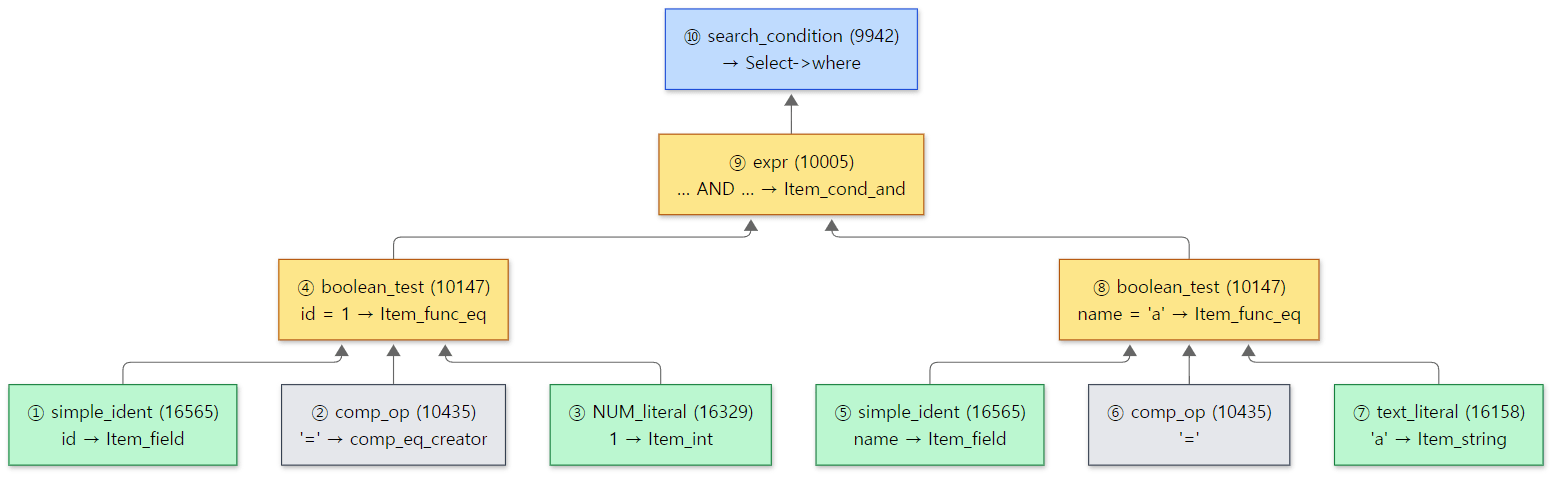 The numbers are the reduction order: leaves (green) first, the root (blue) last. Rule names, line numbers and order are taken from the WHERE part of list 2 in Example 3's actual output.
Easy to confuse: the trace picks up other connections too
On my first run, the trace of a SHOW VARIABLES LIKE … followed right after the SELECT. That statement was sent by mariadb-admin shutdown, which lab-stop uses. debug_dbug was set as a session variable, but the yydebug it switches on is a global variable of the generated parser (its real name is MYSQLdebug) (grammar file lines 195–217), so once it is on, every parse in the whole server is traced. That is why run.sh cuts the log at the Cleanup: popping nterm query line that ends the first parse.
5. What it produces — LEX, SELECT_LEX, TABLE_LIST, Item
Let's start with the structure to see what is left in thd->lex when the parser finishes.
struct LEX: public Query_tables_list
{
  SELECT_LEX_UNIT unit;                         /* most upper unit */
  SELECT_LEX *first_select_lex() { return unit.first_select(); }
  const SELECT_LEX *first_select_lex() const { return unit.first_select(); }

private:
  SELECT_LEX builtin_select;

public:
  /* current SELECT_LEX in parsing */
  SELECT_LEX *current_select;
The top unit unit is not a pointer but an object embedded in LEX. first_select_lex() is that unit's first SELECT_LEX, and current_select is "the SELECT currently being built" from section 4 (parse_sql() sets it back to the first SELECT_LEX when it finishes, line 10413).
The kind of statement, sql_command, lives not in LEX but in its parent class Query_tables_list (sql/sql_lex.h lines 1855–1866). The comment gives the reason: opening and locking tables requires knowing "what this statement is" in order to choose the lock type, so it sits in the same place as the list of every table the statement uses (query_tables). The values of enum_sql_command are in sql/sql_command.h: 162 of them, from SQLCOM_SELECT up to just before SQLCOM_END. For a SELECT statement, LEX::select_finalize(), called by the select_no_with_clause_no_parens action from section 4, sets sql_command= SQLCOM_SELECT (sql_lex.cc lines 12193–12200).
Of what one SELECT_LEX holds, here are only the members this post mentions.
class st_select_lex: public st_select_lex_node
{
public:
  Name_resolution_context context;
  // ...
  Item *where, *having;                         /* WHERE & HAVING clauses */
  // ...
  SQL_I_List<TABLE_LIST>  table_list;
  // ...
  List<Item>          item_list;  /* list of fields & expressions */
  // ...
  enum_parsing_place parsing_place; /* where we are parsing expression */
  // ...
  uint select_number; /* number of select (used for EXPLAIN) */
TABLE_LIST — just names and a "lock request form"
The table_primary_ident rule (line 12908) for FROM lab.t calls SELECT_LEX::add_table_to_list(). Here is the end of that function.
  if (likely(!ptr->sequence))
    table_list.insert(ptr, &ptr->next_local);
  // ...
  /* Link table in global list (all used tables) */
  lex->add_to_query_tables(ptr);

  // Pure table aliases do not need to be locked:
  if (!ptr->is_pure_alias())
  {
    MDL_REQUEST_INIT(&ptr->mdl_request, MDL_key::TABLE, ptr->db.str,
                     ptr->table_name.str, mdl_type, MDL_TRANSACTION);
  }
sql/sql_parse.cc lines 8297–8311
One TABLE_LIST hangs on two chains at once: next_local links the tables in this SELECT (SELECT_LEX::table_list), and next_global links the tables of the whole statement (LEX::query_tables, including those inside subqueries). And it only fills in a metadata lock request (mdl_request); actually acquiring the lock is done by open_and_lock_tables() in Part 7. These members (next_local, next_global, db, table_name, alias), and below them TABLE *table with the comment "opened table", are in sql/table.h lines 2666–2746. When the parser finishes, nobody has opened the table yet, so table is NULL. We check this in Example 4.
The Item tree and memory
Drawn out, the parse result of the example statement SELECT name, qty * 2 FROM lab.t WHERE id = 1 AND name = 'one' looks like this.
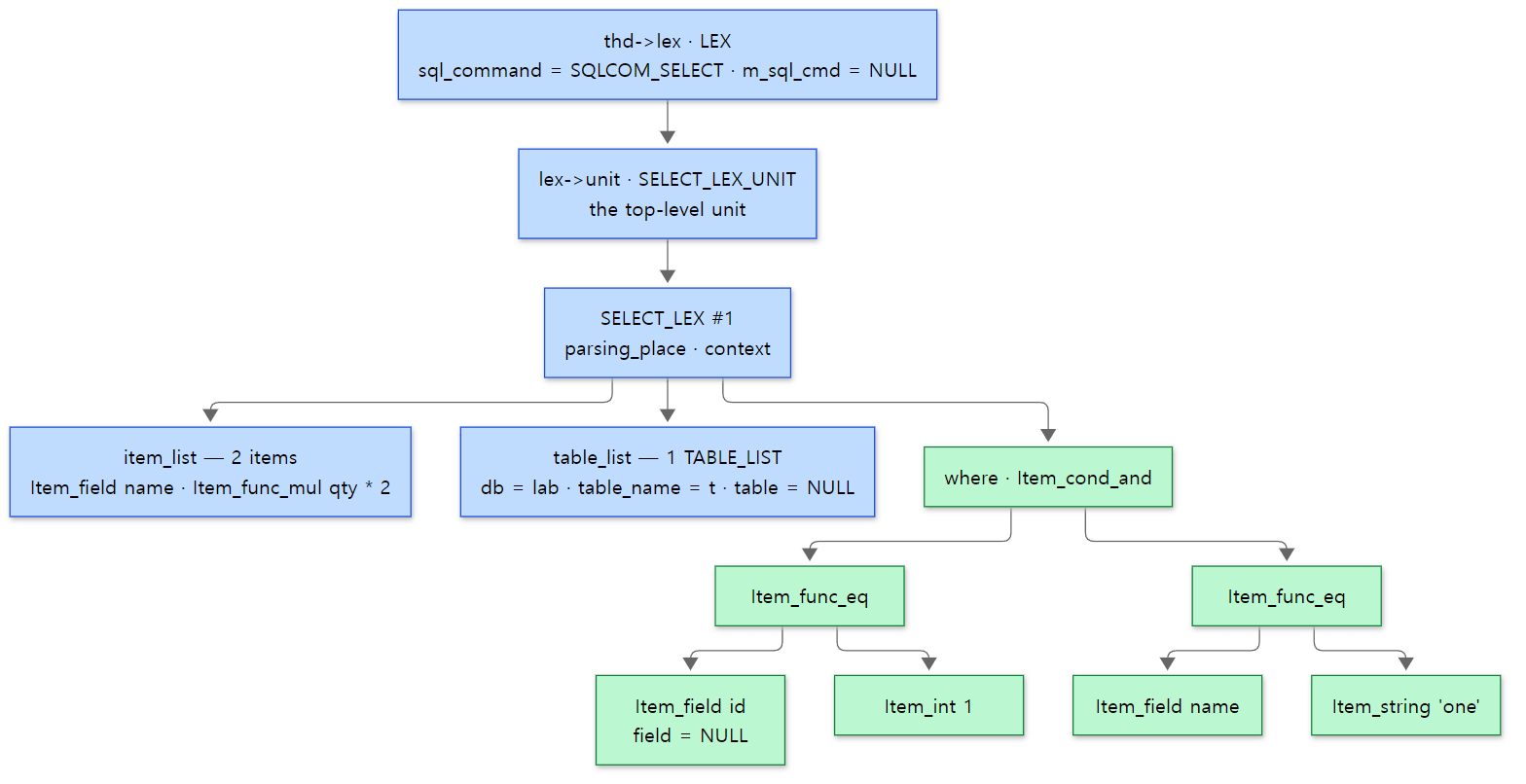 Blue boxes are the skeleton of the statement; green boxes are the
WHERE Item tree. The NULL slots are filled in Part 7.
Here are the classes of those Items as an inheritance diagram.
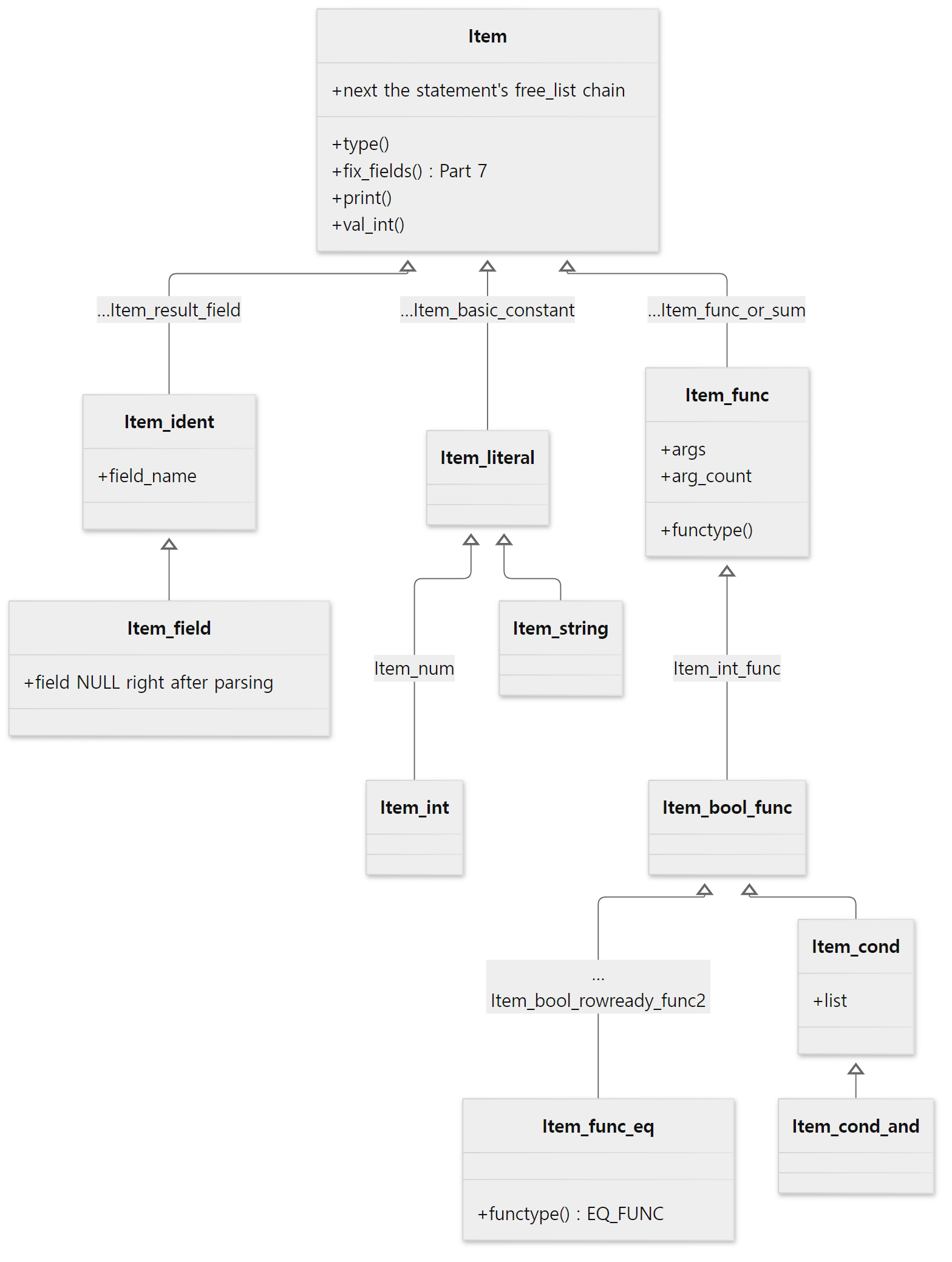 Names on the lines are classes skipped in between (
… means there are more). The real inheritance steps can be counted in item.h, item_func.h and item_cmpfunc.h.
Two things stand out. First, functions and conditions share a root: both id = 1 and … AND … are ultimately Item_funcs, holding their arguments in args (Item_func) or list (Item_cond). Second, the virtual functions that ask for a value (val_int() and so on) are on the root Item. The execution stage calls just where->val_int(), and the call travels down the tree (execution is Part 9).
Every time an Item is constructed, the constructor hooks it onto a chain in the THD.
Item::Item(THD *thd):
  name(null_clex_str), orig_name(null_clex_str), is_expensive_cache(-1)
{
  // ...
  /* Put item in free list so that we can free all items at end */
  next= thd->free_list;
  thd->free_list= this;
The memory comes from the connection's memory pool through new (thd->mem_root), and the objects line up on thd->free_list. When the statement ends, free_items() in THD::cleanup_after_query() walks this chain calling delete_self() (cleanup, then delete this) (sql_class.cc lines 2638–2639). But Item's operator delete does not give memory back; it only does TRASH_FREE() (item.h line 841) — the point is to run the destructors. The memory is returned all at once by free_root(thd->mem_root, …) at the end of dispatch_command() (sql_parse.cc line 2494). It is the same lifetime as the request pool in httpd Part 4: "throw it all away when one statement ends".
Example 4: printing the tree the parser left with gdb
I stopped gdb at the very moment the parser finished — the first line of mysql_execute_command() — and looked into thd->lex. Here is the start of the gdb command file of ex/u06-item-tree.
set pagination off
set print object on
set print pretty off
break mysql_execute_command if thd->lex->sql_command == SQLCOM_UPDATE || (thd->lex->sql_command == SQLCOM_SELECT && thd->lex->current_select->where != 0)
continue
echo --- A. SELECT: what the parser left in thd->lex

p thd->lex->sql_command
p thd->lex->m_sql_cmd
# ... (the counts of item_list and table_list and their first entries)
p thd->lex->current_select->table_list.first->table
set $w = thd->lex->current_select->where
p $w
p dbug_print_item($w)
# ... (lines printing the two children of WHERE and their arguments one by one)
With set print object on, gdb looks at the virtual function table and prints the actual class of a pointer. dbug_print_item() is a helper that exists only in Debug builds; it turns a tree back into SQL text with Item::print() (item.cc line 12000). run.sh attaches gdb to the server and then sends SELECT name, qty * 2 FROM lab.t WHERE id = 1 AND name = 'one'. Addresses differ on every run.
--- A. SELECT: what the parser left in thd->lex
$1 = SQLCOM_SELECT
$2 = (Sql_cmd *) 0x0
$3 = 2
$4 = 1
$5 = (Item_field *) 0x77ec840392b0
$6 = (Item_func_mul *) 0x77ec840395d0
$7 = 0x77ec840396e0 "lab"
$8 = 0x77ec840396f0 "t"
$9 = (TABLE *) 0x0
$10 = (Item_cond_and *) 0x77ec8403a700
$11 = 0x55efb12e70a0 <dbug_item_print_buf> "`id` = 1 and `name` = 'one'"
$12 = 2
$13 = (Item_func_eq *) 0x77ec8403a090
$14 = 0x55efb12e70a0 <dbug_item_print_buf> "`id` = 1"
$15 = (Item_field *) 0x77ec84039ec0
$16 = (Item_int *) 0x77ec8403a000
$17 = (Item_func_eq *) 0x77ec8403a4c0
$18 = (Item_field *) 0x77ec8403a2e0
$19 = (Item_string *) 0x77ec8403a420
$20 = (Field *) 0x0
#0  mysql_execute_command (...) at /usr/src/mariadb/sql/sql_parse.cc:3541
#1  0x000055efaf37081e in mysql_parse (...) at /usr/src/mariadb/sql/sql_parse.cc:8005
#2  0x000055efaf35f338 in dispatch_command (...) at /usr/src/mariadb/sql/sql_parse.cc:1903
#3  0x000055efaf35e07f in do_command (...) at /usr/src/mariadb/sql/sql_parse.cc:1437
#4  0x000055efaf58ec14 in do_handle_one_connection (...) at /usr/src/mariadb/sql/sql_connect.cc:1514
#5  0x000055efaf58e9a0 in handle_one_connection (...) at /usr/src/mariadb/sql/sql_connect.cc:1426
$1,$2— the statement isSQLCOM_SELECT, and there is noSql_cmdobject (section 6).$3–$6— two items in the column list, anItem_field(name) and anItem_func_mul(qty * 2); one table.$7–$9— theTABLE_LISTholds only the nameslabandt, andtableisNULL.$10–$19—WHEREis oneItem_cond_andwith two children, each anItem_func_eq, whose arguments areItem_field·Item_intandItem_field·Item_string. Same as the diagram above.$20— thefieldof theItem_fieldforid(the pointer that will point at the real column of the table) isNULLas well. Filling that slot is the job offix_fields()in Part 7.- The backtrace —
dispatch_command()(line 1903, themysql_parse()call from section 1) →mysql_parse()(line 8005, themysql_execute_command()call) → here. The parser functions have all returned and are no longer on the stack. The parser's result is left not on the stack but inthd->lex.
In this run, the addresses of the WHERE Items grew in the order Item_field id (…39ec0) → Item_int (…3a000) → Item_func_eq (…3a090) → … → Item_cond_and (…3a700). A MEM_ROOT hands out memory front to back within one block, so the "leaves first" order from section 4 is left in the addresses too.
SELECT_LEX_UNIT — the tree of UNIONs and subqueries
I printed a statement with both a subquery and a UNION the same way. The statement is SELECT name FROM lab.t WHERE qty = (SELECT MAX(qty) FROM lab.t) UNION SELECT 'none', and the gdb commands start at thd->lex->unit and follow slave (down) and next (sideways).
--- C. UNION with a subquery: the SELECT_LEX tree
$25 = SQLCOM_SELECT
$26 = 1
$27 = 3
$28 = (st_select_lex_node *) 0x0
$29 = true
$30 = true
$31 = 2
$32 = 0x55efb12e70a0 <dbug_item_print_buf> "qty = (subquery#2)"
$33 = (Item_singlerow_subselect *) 0x77ec8403b590
In order: the first SELECT_LEX has number 1 ($26), the SELECT_LEX next to it number 3 ($27), and there is none after that ($28); the top unit has a fake_select_lex ($29); the master of the unit below the first SELECT_LEX is that first SELECT_LEX ($30); the SELECT_LEX inside that unit has number 2 ($31); and the first SELECT_LEX's WHERE is qty = (subquery#2) with an Item_singlerow_subselect as its right argument ($32, $33).
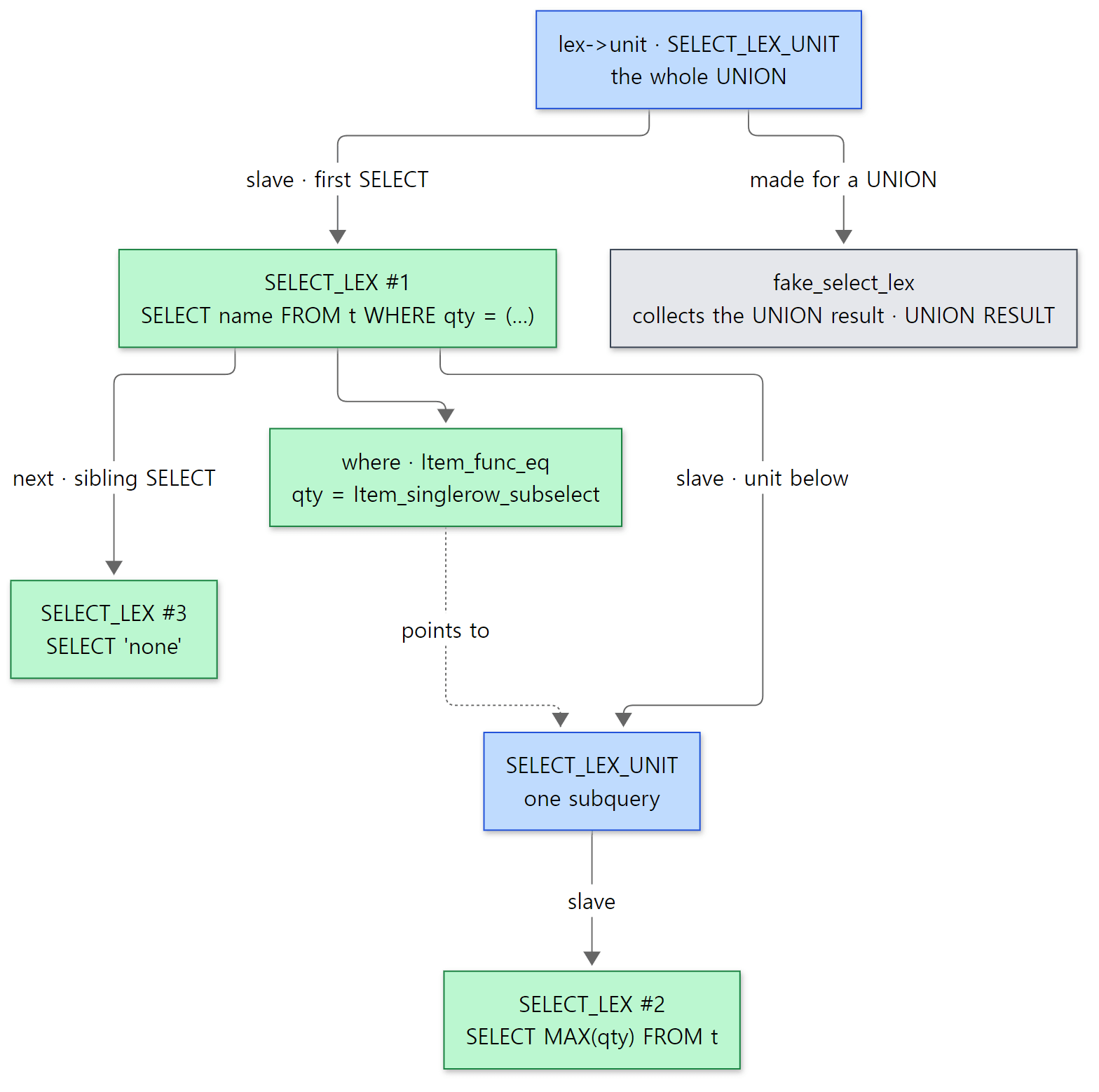 Blue boxes are units (
SELECT_LEX_UNIT), green boxes single SELECTs (SELECT_LEX). Units and SELECTs alternate.
A SELECT_LEX's number is assigned by alloc_select() when it is created, by bumping a per-statement counter.
select_lex->select_number= ++thd->lex->stmt_lex->current_select_number;
The parser reads left to right, so it meets the subquery in parentheses before the SELECT 'none' after UNION. So the subquery is number 2 and the UNION's second SELECT number 3. This number is exactly the id column of EXPLAIN (we see it again as /* select#2 */ in Example 5). The fake_select_lex is created and attached by LEX::create_unit() when a unit has two or more SELECTs, as with UNION (sql_lex.cc lines 6586–6592); it is the UNION RESULT row of EXPLAIN.
Easy to confuse: the parser does catch the odd semantic error
Section 1 said "the parser checks nothing", but errors that can be spotted from names alone are sometimes caught at parse time. add_table_to_list() raises ER_NONUNIQ_TABLE right away when the same alias appears twice in one SELECT (sql_parse.cc lines 8253–8265). I checked it with statements 9 and 10 in the example folder ex/u06-lexer-errors.
--- 9. same alias twice (tables do not exist)
ERROR 1066 (42000) at line 1: Not unique table/alias: 'a'
--- 10. table does not exist
ERROR 1146 (42S02) at line 1: Table 'lab.nosuch' doesn't exist
Neither table in statement 9 exists, yet the error is not "table doesn't exist" (1146) but "alias not unique" (1066). The parser looked at the aliases first and stopped, so the statement never reached the step that checks whether the tables exist (Part 7).
6. What the parser does ahead of time, and Sql_cmd
Removing NOT and flattening AND
Like the AND flattening in section 4, the parser's actions do not just transcribe the tree; they tidy it up a little. NOT is one example.
Item *negate_expression(THD *thd, Item *expr)
{
  Item *negated;
  // ... (handling of NOT(NOT(x)))
  if ((negated= expr->neg_transformer(thd)) != 0)
    return negated;
  return new (thd->mem_root) Item_func_not(thd, expr);
}
sql/sql_parse.cc lines 10021–10043
The NOT_SYM expr rule (lines 10048–10053) calls this function. If the inner expression knows how to negate itself (neg_transformer()), the negated expression is used; only if it does not is it wrapped in an Item_func_not. Comparisons know how — NOT (qty > 10) becomes not Item_func_not(Item_func_gt) but a single Item_func_le, that is, qty <= 10 (Item_func_gt::negated_item(), item_cmpfunc.cc lines 6987–6990). NOT (a AND b) becomes NOT a OR NOT b (item_cmpfunc.cc lines 6908–6914).
With the gdb setup of Example 4 I also printed SELECT id FROM lab.t WHERE NOT (qty > 10) AND (id > 0 AND name <> 'x').
--- B. SELECT with NOT and nested AND
$21 = (Item_cond_and *) 0x77ec8403aa90
$22 = 0x55efb12e70a0 <dbug_item_print_buf> "qty <= 10 and `id` > 0 and `name` <> 'x'"
$23 = 3
$24 = (Item_func_le *) 0x77ec8403a000
Right after parsing, before any optimization, the NOT is already gone and has become an Item_func_le, and the parenthesized inner AND has been flattened, leaving one Item_cond_and with three children.
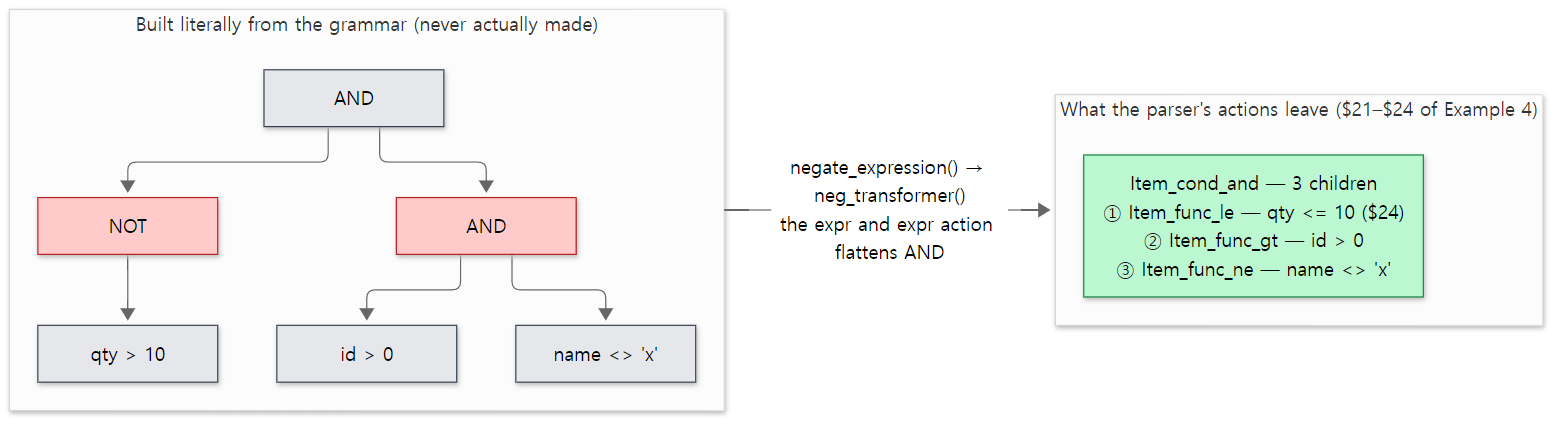 The red boxes (NOT and the inner AND) disappear during parsing. The child count of 3, the first child Item_func_le and the order come from the $21–$24 output of Example 4.
Example 5: the statement as the server prints it back — EXPLAIN EXTENDED
An Item tree can always be turned back into SQL text (Item::print(), st_select_lex::print()). The easiest way to see this from the user's side is SHOW WARNINGS after EXPLAIN EXTENDED. The demo.sql of ex/u06-print-back uses the same table as Example 4, sends EXPLAIN EXTENDED SELECT * FROM t WHERE NOT (qty > 10) AND (id > 0 AND name <> 'x') and EXPLAIN EXTENDED SELECT name FROM t WHERE qty = (SELECT MAX(qty) FROM t) UNION SELECT 'none', and runs SHOW WARNINGS after each.
Only the Message column of SHOW WARNINGS is shown here (the EXPLAIN tables and the step tables were left out).
select `lab`.`t`.`id` AS `id`,`lab`.`t`.`name` AS `name`,`lab`.`t`.`qty` AS `qty` from `lab`.`t` where `lab`.`t`.`qty` <= 10 and `lab`.`t`.`id` > 0 and `lab`.`t`.`name` <> 'x'
/* select#1 */ select `lab`.`t`.`name` AS `name` from `lab`.`t` where `lab`.`t`.`qty` = (/* select#2 */ select max(`lab`.`t`.`qty`) from `lab`.`t`) union /* select#3 */ select 'none' AS `none`
In the first statement, NOT (qty > 10) becoming qty <= 10 and the inner parentheses disappearing are the parser's work, as we just saw. In the second, select#1, select#2, select#3 are the select_numbers.
Easy to confuse: the EXPLAIN EXTENDED statement is not "the statement the parser saw"
The * was expanded into the three columns id, name, qty, and every column got `lab`.`t`. in front. That is not the parser's doing but the name resolution of Part 7 (setup_wild(), fix_fields()). What EXPLAIN EXTENDED prints is the tree after preparation and optimization are finished, so the parser's work and the later stages' work are mixed together. To see the parser's result alone, you have to look at the first line of mysql_execute_command(), as in Example 4. $22 in Example 4 is also the evidence that lets this post say "the parser removed the NOT".
Sql_cmd — a statement as an object
thd->lex->m_sql_cmd was NULL for the SELECT. Sending an UPDATE is different.
--- D. UPDATE: a Sql_cmd object
$34 = SQLCOM_UPDATE
$35 = (Sql_cmd_update *) 0x77ec84039980
The action of the update rule creates a Sql_cmd_update object.
            if (!(lex->m_sql_cmd=
                  new (thd->mem_root) Sql_cmd_update(is_multiupdate)))
              MYSQL_YYABORT;
sql/sql_yacc.yy lines 14590–14592
Sql_cmd is the parent class of "statement objects that know how to execute themselves"; its core is the pure virtual function virtual bool execute(THD *thd) = 0; and sql_command_code(), which returns the kind of statement (sql/sql_cmd.h lines 74–110).
MariaDB mixes two ways of executing a statement. In the older way, the parser fills in sql_command and various slots of LEX, and the giant switch (lex->sql_command) in mysql_execute_command() holds the execution code for each statement. In the newer way, the parser creates an object derived from Sql_cmd, and the switch calls just one line, lex->m_sql_cmd->execute(thd) (lines 4485–4496 for UPDATE and DELETE). In the reference commit, SELECT still uses the older way. The shape of that switch is covered in detail in Part 7.
7. Where "near '...' at line N" comes from
When the Bison-generated parser meets a token that does not fit the grammar, it calls yyerror() and stops. Because of -p MYSQL its real name is MYSQLerror, but it is defined inside the grammar file.
static void yyerror(THD *thd, const char *s)
{
  /* "parse error" changed into "syntax error" between bison 1.75 and 1.875 */
  if (strcmp(s,"parse error") == 0 || strcmp(s,"syntax error") == 0)
    s= ER_THD(thd, ER_SYNTAX_ERROR);
  thd->parse_error(s, 0);
}
It replaces the English phrase Bison passes in, "syntax error", with MariaDB's own message (ER_SYNTAX_ERROR, "You have an error in your SQL syntax; check the manual …") and passes that to THD::parse_error().
  void parse_error(const char *err_text, const char *yytext)
  {
    Lex_input_stream *lip= &m_parser_state->m_lip;
    if (!yytext && !(yytext= lip->get_tok_start()))
        yytext= "";
    /* Push an error into the error stack */
    ErrConvString err(yytext, strlen(yytext), variables.character_set_client);
    my_printf_error(ER_PARSE_ERROR,  ER_THD(this, ER_PARSE_ERROR), MYF(0),
                    err_text, err.ptr(), lip->yylineno);
  }
sql/sql_class.h lines 5759–5768
Without a yytext, it uses the lexer's get_tok_start() — where the token the parser just got stuck on begins. That is a pointer into the string, so everything from there to the end of the statement goes in. The line number is yylineno, which the lexer bumped whenever it counted a \n while skipping whitespace (the top of lex_one_token() in section 3). The message template is the ER_PARSE_ERROR entry in the error message file (from line 1707, one line per language).
eng "%s near '%-.80sT' at line %d"
sql/share/errmsg-utf8.txt line 1711
%-.80sT is a MariaDB-specific format meaning "the string, at most 80 characters, with a mark showing it was cut if it is longer" (the T suffix, strings/my_vsnprintf.c lines 709–711). This error's number is 1064 and its SQLSTATE 42000.
Example 6: reading what comes after near
These are statements 1–4 of ex/u06-lexer-errors.
q "1. typo in FROM"        "SELECT id FORM lab.t WHERE id = 1"
q "2. error on line 3"     "SELECT id
FROM lab.t
WHERE id = = 1"
q "3. long tail is cut"    "SELECT id FROM lab.t WHERE id = 1 ORDER BY BY id, id, id, id, id, id, id, id, id, id, id, id, id, id, id, id, id, id, id, id, id, id, id, id, id"
q "4. missing at the end"  "SELECT id FROM lab.t WHERE"
--- 1. typo in FROM
ERROR 1064 (42000) at line 1: You have an error in your SQL syntax; check the manual that corresponds to your MariaDB server version for the right syntax to use near 'lab.t WHERE id = 1' at line 1
--- 2. error on line 3
ERROR 1064 (42000) at line 1: You have an error in your SQL syntax; check the manual that corresponds to your MariaDB server version for the right syntax to use near '= 1' at line 3
--- 3. long tail is cut
ERROR 1064 (42000) at line 1: You have an error in your SQL syntax; check the manual that corresponds to your MariaDB server version for the right syntax to use near 'BY id, id, id, id, id, id, id, id, id, id, id, id, id, id, id, id, id, id, id...' at line 1
--- 4. missing at the end
ERROR 1064 (42000) at line 1: You have an error in your SQL syntax; check the manual that corresponds to your MariaDB server version for the right syntax to use near '' at line 1
- The typo is
FORM, yet it saysnear 'lab.t …'.FORMis not a keyword, so it is anIDENT, andSELECT id FORMis grammatical as "idwith the aliasFORM" (an alias withoutAS). Where the parser got stuck is thelabafter it. The text afternearis not "where the mistake is" but "where the parser could go no further". The real mistake is usually a little before it. - The line number. It got stuck at the second
=of= =, after passing two line breaks, henceat line 3. Theat line 1added by the client is the line number of the client's own input, which is a different thing from the server's. - It cuts at 80 characters. A
...was added at the end. If the text afternearin a long query looks truncated, this is why. - An empty
near ''. When the input ends before the statement is complete, the token the parser got stuck on isEND_OF_INPUT, so there is no text after it.near ''means "I read to the end and something is missing".
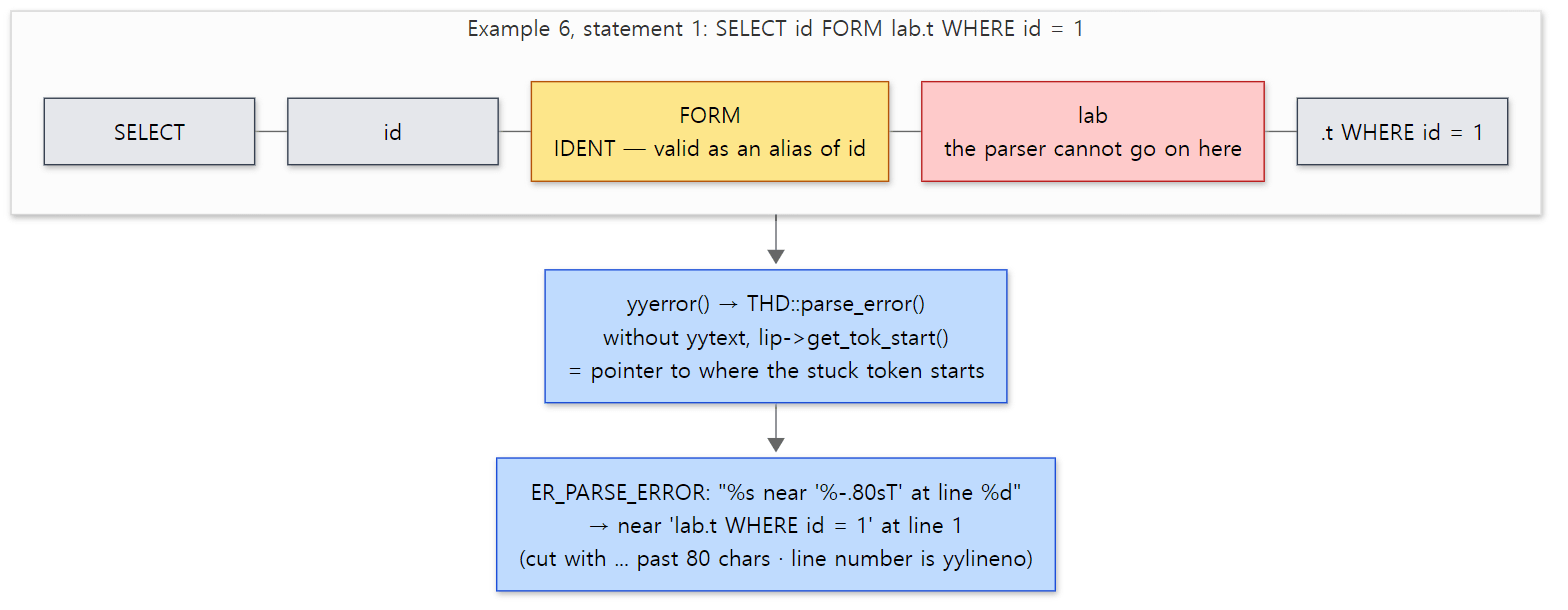 What follows near is not the mistake itself but everything from the token where the parser got stuck to the end of the statement. The message is the actual output of statement 1 in Example 6.
What this post leaves out
- The separate parser for optimizer hints (
/*+ … */):sql/opt_hints_parser.cc, and on the grammar side theopt_optimizer_hintrule (sql_yacc.yy line 9305) - Statement digests (performance_schema grouping statements by replacing constants with
?): the lexer'sadd_digest_token(),sql/sql_digest.cc, andsql/gen_lex_token.cc, which generates the token name table - Parsing stored procedure and trigger bodies:
LEX::sphead,sql/sp_head.cc, and the local variable lookupLEX::create_item_ident_sp()(sql_lex.cc line 9719) - The
?of prepared statements: the lexer'sMY_LEX_PLACEHOLDERandPARAM_MARKER(sql_lex.cc lines 2114–2124),sql/sql_prepare.cc normalize_cond(), which turnsWHERE fintof IS TRUE: sql_parse.cc line 9033my_yyoverflow(), which grows the Bison stack when it runs out, andYYMAXDEPTH 3200: sql_yacc.yy line 32, sql_parse.cc line 7449Lex_input_stream::body_utf8_*, which rewrites view and stored program bodies in UTF-8[name]quoting inMSSQLmode: sql_lex.cc lines 2084–2085- The
parse_vcol_exprrule, which parses only the expression of a generated column orCHECKconstraint, andunpack_vcol_info_from_frm()insql/table.cc
Summary
| Concept | In one line |
|---|---|
mysql_parse() |
lex_start() → query cache → parse_sql() → on success, mysql_execute_command() |
parse_sql() |
ORAparse() if sql_mode contains ORACLE, otherwise MYSQLparse() |
sql_yacc.yy |
One grammar source. gen_yy_files.cmake splits it in two and Bison -p MYSQL/-p ORA builds two parsers |
%define api.pure, %parse-param |
A parser without globals whose only argument is THD *thd — each thread parses on its own |
Lex_input_stream |
The lexer. Picks a branch with state_map[first character] and looks words up in the tables of lex.h (700 + 49) |
sql_functions[] |
The 49 words like NOW and COUNT are keywords only when a ( follows immediately |
lex_token() |
Merges places that need two tokens of lookahead, like WITH ROLLUP, into one token to stay LALR(1) |
| Rule actions | Build Items, TABLE_LISTs and SELECT_LEXs bottom-up. They flatten AND and remove NOT |
LEX |
The result for one statement: sql_command (162 kinds), unit, query_tables, m_sql_cmd |
SELECT_LEX / SELECT_LEX_UNIT |
One SELECT / the unit grouping them. They alternate to form subquery and UNION trees |
TABLE_LIST |
Just names and a lock request form. table is NULL — opening it is Part 7 |
Item |
One expression. Allocated from thd->mem_root, chained on free_list, thrown away together at the end of the statement |
| Error 1064 | yyerror() → THD::parse_error(). After near comes up to 80 characters from the stuck token; the line number is the lexer's count |
What's next
The tree the parser left behind had three empty slots: TABLE_LIST::table, Item_field::field, and the answer to "may this user read this?". In Part 7: Preparation — Checking Privileges, Opening Tables, Resolving Names we see in what order the big switch in mysql_execute_command() fills those slots, why metadata locks make ALTER TABLE wait, and where the "Unknown column" error comes from.
Compared with the earlier series: httpd Part 9 and Tomcat Part 6 cut the HTTP request line and headers apart line by line with hand-written code. An HTTP request has a simple shape, so that is enough. SQL has expressions inside expressions and more than 160 kinds of statement, so the grammar is written down separately and the parser is generated. Still, the two-step shape — "first turn the whole thing into a structure, then execute by walking that structure" — is the same as in httpd Part 7, where httpd.conf was read into a tree and then executed by walking it.
From the application side, the SQL string that JdbcTemplate sends in Spring Part 18 arrives at this post's mysql_parse(). If the grammar is wrong, a 1064 / 42000 goes back from here. If the JDBC driver throws it as an SQLSyntaxErrorException, the default translator we saw in Spring Part 18 turns it into a BadSqlGrammarException (which exception the driver throws was not checked against source in this series).