What this post covers
This is the seventh post in the "Digging into Gradle's Source" series. In post 6 we followed a build.gradle.kts file from compilation to execution, up to the point where both the Kotlin DSL and the Groovy DSL cut out the buildscript {} and plugins {} blocks and run them first, and only then run the body. This post covers what happens in between: how the requests collected by that early plugins {} run become real Plugin.apply() calls.
Going back to the map in post 2 (the "post 2 map" figure), this post zooms into the middle box of area "D, the configuration phase": plugin application (plugins {} → apply()). The box on its left (running the build script) belongs to post 6, and the box on its right (task registration and Providers) to post 8.
We want to answer four questions.
- Where do
plugins { java }andplugins { id("org.example.foo") version "1.0" }take different paths in the source? Where does Gradle look for a plugin? - How does a plugin id (
java) become a class (JavaPlugin)? - Who calls
apply(), and in what order? What happens if you apply the same plugin twice? When exactly doeswithPluginfire? - Why does applying just
javabring in nine plugins, along with blocks likejava { }andsourceSets { }?
| Item | Value |
|---|---|
| Project | Gradle Build Tool |
| Version | 9.10.0 development build (master) |
| Commit | 07ecbf9ead (2026-10-24) |
| Main classes | plugin/use/internal/DefaultPluginRequestApplicator, PluginResolverFactory, plugin/use/resolve/internal/{AlreadyOnClasspath,Core,ArtifactRepositories}PluginResolver, api/internal/plugins/{DefaultPluginManager,DefaultPluginRegistry,DefaultPluginContainer}, internal/extensibility/DefaultExtensionContainer, JavaPlugin·JavaBasePlugin·BasePlugin |
All line numbers in this post refer to this commit. Post 1 explains how to check out the same commit and build the Docker image used for the examples.
The plugin code is spread over platforms/extensibility/plugin-use (resolving requests), api/internal/plugins in subprojects/core (applying them), and dozens of modules for the individual plugins. This post only follows the main path of one plugins {} block. What was left out is listed by name and location in "What this post leaves out" at the end.
Terms to know first
A plugin is a class that implements the Plugin<T> interface. It has a single method, apply(T target), and T is usually Project (there are also plugins for Settings and Gradle). In the end, all a plugin does is add tasks, extensions and configuration to the project inside apply(). Think of it as a box that packages up things you could have written by hand in a build script, so they can be reused.
A plugin id is a dotted name such as org.gradle.java or org.jetbrains.kotlin.jvm. Everything before the last dot is the namespace. All plugins shipped with Gradle live in the org.gradle namespace and are called core plugins. Writing an id without a namespace, as in id("java"), means org.gradle.java (section 3).
A plugin request is one line of the plugins {} block. It becomes a PluginRequestInternal object holding the id, the version, whether it says apply false, and the line number it was written on. A request only says "I want this plugin"; no class has been looked up yet.
Resolution decides where to get the plugin for a request. The objects that do this are resolvers (PluginResolver), and several of them are lined up and asked one after another (section 2).
A marker artifact is an empty shell library in a repository such as the Plugin Portal that says "the plugin with id foo.bar lives in this library". Its coordinates are fixed as foo.bar:foo.bar.gradle.plugin:<version>, so knowing the id is enough to build them.
An extension is a configuration object a plugin attaches to the project. The java { … } and base { … } blocks in a build script configure extensions. They are attached by name to project.extensions (section 6).
A classloader scope (ClassLoaderScope) is a node in the classloader tree that runs settings → buildSrc → root project → subprojects. Plugin jars are loaded into one node of this tree. We saw the tree itself in post 6; here we only look at which node a plugin lands in (sections 1 and 8).
1. The big picture: resolve everything first, then apply
Let's recap post 6. On the Groovy DSL side, DefaultScriptPluginFactory compiles a script twice: first only plugins {} and buildscript {}, then the rest of the body. The star of this post sits between the two.
            // Pass 1, extract plugin requests and plugin repositories and execute buildscript {}, ignoring (i.e. not even compiling) anything else
            CompileOperation<?> initialOperation = compileOperationFactory.getPluginsBlockCompileOperation(initialPassScriptTarget);
            Class<? extends BasicScript> scriptType = initialPassScriptTarget.getScriptClass();
            ScriptRunner<? extends BasicScript, ?> initialRunner = compiler.compile(scriptType, target, baseScope, initialOperation, Actions.doNothing());
            initialRunner.run(target, services);

            PluginManagerInternal pluginManager = topLevelScript ? initialPassScriptTarget.getPluginManager() : null;
            PluginRequests initialPluginRequests = getInitialPluginRequests(initialRunner);
            PluginRequests allPluginRequests = pluginHandler.getAllPluginRequests(initialPluginRequests, target);
            pluginRequestApplicator.applyPlugins(allPluginRequests, scriptHandler, pluginManager, targetScope);
The Kotlin DSL arrives at the same place. The Kotlin interpreter from post 6 runs the plugins {} block, collects the requests and calls applyPluginsTo() (KotlinScriptEvaluator.kt lines 262–269), which goes through PluginRequestsHandler to the same PluginRequestApplicator.applyPlugins() (PluginRequestsHandler.kt lines 43–50). You can see this exact path in the stack trace of the example in section 4.
On both paths, pluginHandler.getAllPluginRequests() steps in once. It adds plugins the user didn't write but that are applied automatically (for example the Develocity plugin that --scan adds to the settings script — for a project build script this list is empty). We won't follow it further here.
DefaultPluginRequestApplicator.applyPlugins(), which receives the request list, is the heart of this post. Here it is, with the cuts marked.
    @Override
    public void applyPlugins(PluginRequests requests, final ScriptHandlerInternal scriptHandler, @Nullable final PluginManagerInternal target, final ClassLoaderScope classLoaderScope) {
        // ... with no requests, only export and lock, then return ...

        PluginArtifactRepositories resolveContext = pluginRepositoriesProvider.createPluginResolveRepositories();
        resolveContext.applyRepositoriesTo(scriptHandler.getRepositories());

        List<ApplyAction> pluginApplyActions = new ArrayList<>();
        CollectingPluginRequestResolutionVisitor pluginDependencies = new CollectingPluginRequestResolutionVisitor();

        // Resolve the plugin requests
        PluginResolver pluginResolver = wrapInAlreadyInClasspathResolver(classLoaderScope, resolveContext);
        for (PluginRequestInternal originalRequest : requests) {
            PluginRequestInternal request = pluginResolutionStrategy.applyTo(originalRequest);
            PluginResolution resolved = resolvePluginRequest(pluginResolver, request);

            resolved.accept(pluginDependencies);

            if (request.isApply()) {
                pluginApplyActions.add(new ApplyAction(request, resolved));
            }
            // ... record the plugin version ...
        }

        // Configure the resolution
        pluginDependencies.getAdditionalDependencies().forEach(scriptHandler::addScriptClassPathDependency);
        // ... module replacement settings ...

        // Perform resolution & configure the classloader
        classLoaderScope.export(scriptHandler.getInstrumentedScriptClassPath());
        pluginDependencies.getAdditionalClassloaders().forEach(classLoaderScope::export);
        classLoaderScope.lock();

        // Apply the plugins
        pluginApplyActions.forEach(action -> action.apply(target));
    }
The four comments are the names of the four stages, and their order matters.
- Resolve — every request is resolved first. At this point Gradle only decides "where to get it" and "what to add to the script classpath". A request with
apply falseis resolved but not added to the apply list (pluginApplyActions). - Configure the resolution — for plugins that come from a repository, the marker artifact is added as a dependency on the script classpath (the same place as
buildscript { dependencies { classpath(…) } }). - Perform resolution & configure the classloader —
getInstrumentedScriptClassPath()actually resolves that classpath into jar files, which areexported into this script's classloader scope, and then the scope islock()ed. After that, no more jars can be added to the scope. - Apply — only now is
ApplyAction.apply()called, in request order.
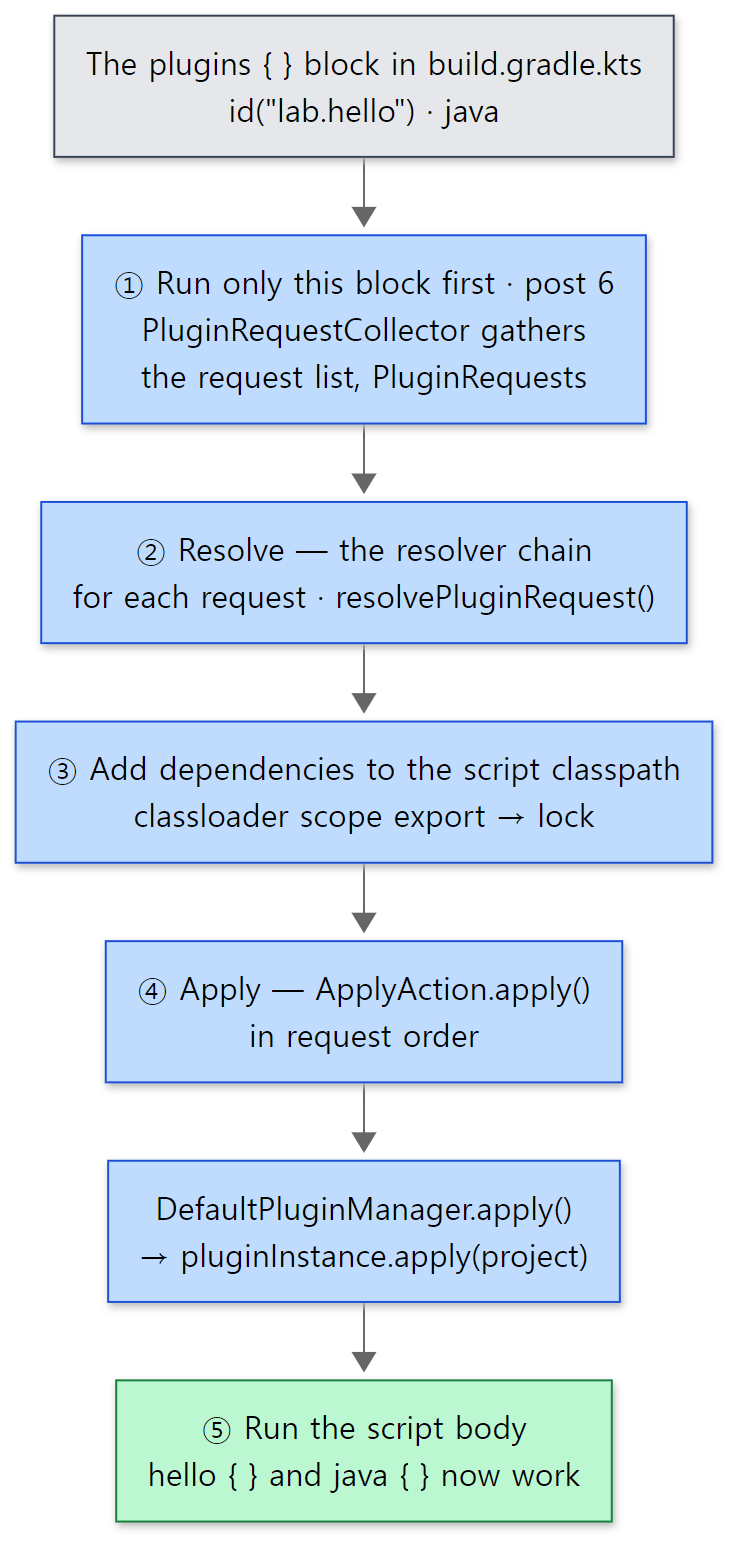 The blue boxes are what this post reads. ① belongs to post 6, and so does running the body in ⑤.
Why "resolve everything, then apply"? The source comments don't state the reason, but two things can be read from the shape of the code. First, all requests' dependencies go into one script classpath that is resolved in one go, so if two plugins want different versions of the same library, dependency conflict resolution (post 12) settles it once. Second, applying (loading plugin classes and calling apply()) only happens after the classloader scope is lock()ed. The ordering itself guarantees that the classpath of that classloader doesn't change while plugin code is running.
Easy to get confused
- You can't write arbitrary code inside
plugins {}. The block runs before the body, on its own (post 6). From this post's point of view, all the block does is record requests inPluginRequestCollector. The source comment even calls this class "The real delegate of the plugins {} block" (PluginRequestCollector.javalines 44–49). - Listing the same id twice in the block fails before any resolution. While collecting requests, they are grouped by id, and if a group has more than one entry it throws
Plugin with id '…' was already requested at line N(PluginRequestCollector.javalines 79–89). Applying twice withapply(plugin = …)in the body, on the other hand, passes silently (section 4). - Even when
requests.isEmpty(), it still doesexportandlock(lines 86–90). A script without aplugins {}block also passes through this method and gets its classloader finalized. That's what the Kotlin DSL'scloseTargetScopeOf()uses it for, calling it with empty requests andtarget = null(KotlinScriptEvaluator.ktlines 276–284).
2. Resolution: the resolver chain asks, front to back
wrapInAlreadyInClasspathResolver() from stage 1 builds the resolver chain. The core of the chain is built by PluginResolverFactory.
    private void addDefaultResolvers(PluginArtifactRepositories pluginResolveContext, List<PluginResolver> resolvers) {
        resolvers.add(new NoopPluginResolver(corePluginRegistry));
        resolvers.add(new CorePluginResolver(documentationRegistry, corePluginRegistry));

        injectedClasspathPluginResolver.collectResolversInto(resolvers);

        pluginResolverContributors.forEach(contributor -> contributor.collectResolversInto(resolvers));
        resolvers.add(pluginResolveContext.getPluginResolver());
    }
The Javadoc just above it (lines 66–82) explains the order: NoopPluginResolver is only for tests, CorePluginResolver handles plugins shipped with Gradle, then comes the classpath of a TestKit test, then "resolvers contributed by this distribution — plugins coming from included builds", and finally the repositories. CompositePluginResolver walks this list with a for loop and returns the first answer that says "found". If nothing is found, it collects each resolver's "not found" reason (CompositePluginResolver.java lines 32–43). Unlike Tomcat valves or Spring interceptors, where each link decides whether to call the next, this is one supervisor asking a queue of resolvers in turn.
Then AlreadyOnClasspathPluginResolver wraps the whole chain once more (DefaultPluginRequestApplicator.java lines 138–143).
    @Override
    public PluginResolutionResult resolve(PluginRequestInternal pluginRequest) {
        PluginId pluginId = pluginRequest.getId();
        if (isCorePlugin(pluginId) || !isPresentOnClasspath(pluginId)) {
            return delegate.resolve(pluginRequest);
        }

        String version = getVersion(pluginRequest);
        if (version == null) {
            return resolveAlreadyOnClasspath(pluginId, null);
        }
        // ... if a version was given, check it matches the one already loaded ...
The classpath in "already on the classpath" is that of the parent classloader scope (the export classloader of classLoaderScope.getParent(), lines 139–140). For the root project's script the parent is buildSrc's scope, so plugins built in buildSrc are found here (section 8). For a subproject the parent is the root project's scope, so plugins already fetched by the root's plugins {} are reused instead of being fetched again.
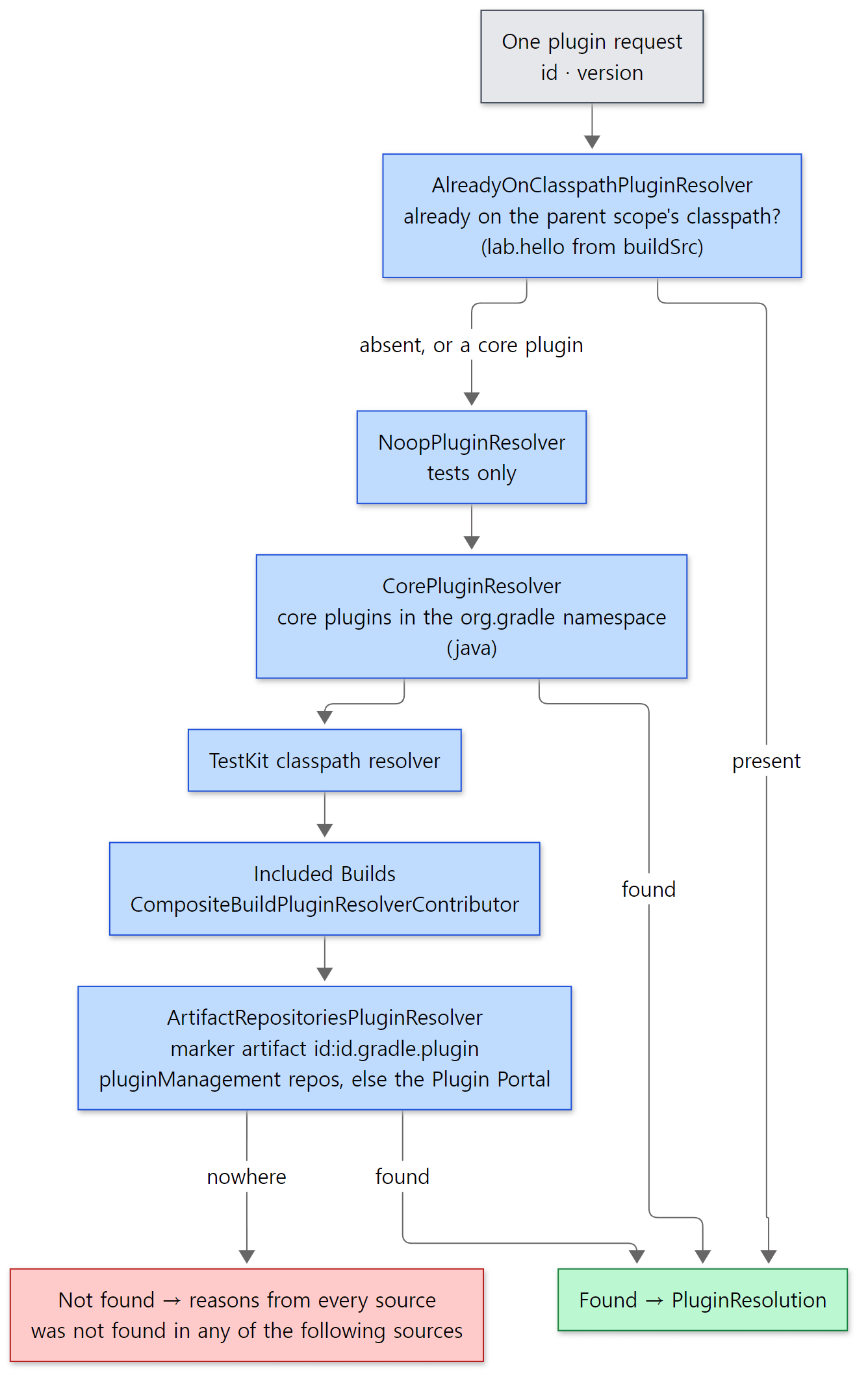 The first resolver to say "found" wins. That also means resolvers earlier in the chain mask the later ones.
Core plugins: filtered by namespace alone
    @Override
    public PluginResolutionResult resolve(PluginRequestInternal pluginRequest) {
        PluginId id = pluginRequest.getId();
        if (!isCorePluginRequest(id)) {
            return PluginResolutionResult.notFound(getDescription(), format("plugin is not in '%s' namespace", CORE_PLUGIN_NAMESPACE));
        }

        PluginImplementation<?> plugin = pluginRegistry.lookup(id);
        if (plugin == null) {
            return PluginResolutionResult.notFound(getDescription(), "not a core plugin. " + documentationRegistry.getDocumentationRecommendationFor("available plugins", "plugin_reference"));
        }

        validate(pluginRequest);
        return PluginResolutionResult.found(new SimplePluginResolution(plugin));
    }
If there's no namespace or it is org.gradle (lines 80–83), it looks in Gradle's own plugin registry. Once found, validate() rejects three things (lines 55–74): core plugins can't have a version, can't name a different implementation artifact, and can't use apply false. Core plugins ship with Gradle and are already on the classpath, so none of the three makes sense.
Repositories: found through marker artifacts
ArtifactRepositoriesPluginResolver, at the end of the chain, builds marker artifact coordinates from the id.
    private ModuleDependency getMarkerDependency(PluginRequestInternal pluginRequest) {
        ComponentSelector selector = pluginRequest.getSelector();
        if (!(selector instanceof ModuleComponentSelector)) {
            String id = pluginRequest.getId().getId();
            return getDependencyFactory().create(id, id + PLUGIN_MARKER_SUFFIX, pluginRequest.getVersion());
        } else {
            // ... when pluginManagement's resolutionStrategy names the module directly ...
        }
    }
PLUGIN_MARKER_SUFFIX is ".gradle.plugin" (line 45). For the id org.jetbrains.kotlin.jvm the coordinates are org.jetbrains.kotlin.jvm:org.jetbrains.kotlin.jvm.gradle.plugin:<version>. Without a version this resolver backs off immediately, saying a version is required (lines 59–62). With a version, it does one resolution to check that the marker really exists in the repositories (exists(), lines 179–187 — the TODO comment in the source admits that "performing resolution here is likely quite inefficient"), and if so returns an ExternalPluginResolution. In stage 2 of section 1, that result adds the marker as a script classpath dependency (lines 122–132). The marker's POM pulls in the real plugin jar as a dependency, so once stage 3's resolution finishes, the real jar is on the classloader.
Which repositories? The constructor of DefaultPluginArtifactRepositories decides (lines 42–49). It wraps each shared repository and adds it, and if the list is still empty afterwards it calls repositoryHandler.gradlePluginPortal(). The shared repositories are the ones written in pluginManagement { repositories { … } } in settings.gradle.kts (DefaultPluginManagementSpec.getRepositories() returns the same list, lines 60–63). If you write none, the Gradle Plugin Portal alone is used.
The first line of this blog's own build.gradle.kts is kotlin("jvm") version "2.3.21". kotlin(…) is a function the Kotlin DSL provides that calls id("org.jetbrains.kotlin.$module") (GenerateKotlinDependencyExtensions.kt lines 120–121). So that line is not in the org.gradle namespace and passes CorePluginResolver by; the blog's settings.gradle.kts has no pluginManagement, so it goes looking for the marker org.jetbrains.kotlin.jvm:org.jetbrains.kotlin.jvm.gradle.plugin:2.3.21 on the Plugin Portal. (This was worked out by following the source, not confirmed in the blog build's logs. The blog uses Gradle 9.5.1 through its wrapper, so it's a different version from our reference source, too.)
Example 1: the chain you see when resolution fails
The easiest way to see the chain is to make it fail on purpose. I made two projects.
// Example written for this post (not part of Gradle's source)
plugins {
    id("java") version "9.10.0"   // what if a core plugin gets a version?
}
[Example ex/u07-resolve-errors/core-with-version/build.gradle.kts]
// Example written for this post (not part of Gradle's source)
plugins {
    id("lab.missing") version "1.0"   // a plugin that exists nowhere
}
[Example ex/u07-resolve-errors/missing-plugin/build.gradle.kts]
This example ran in a Docker container (Eclipse Temurin JDK 25) with the Gradle 9.10.0 development build compiled straight from the reference commit (07ecbf9ead). run.sh runs gradle help --offline --console=plain in both projects and prints only the failure message.
=== core-with-version ===
* What went wrong:
Error resolving plugin [id: 'java', version: '9.10.0']
> Plugin 'java' is a core Gradle plugin, which cannot be specified with a version number. Such plugins are versioned as part of Gradle. Please remove the version number from the declaration.

* Try:
=== missing-plugin ===
* What went wrong:
Plugin [id: 'lab.missing', version: '1.0'] was not found in any of the following sources:

- Gradle Core Plugins (plugin is not in 'org.gradle' namespace)
- Included Builds (No included builds contain this plugin)
- Plugin Repositories (could not resolve plugin artifact 'lab.missing:lab.missing.gradle.plugin:1.0')
  Searched in the following repositories:
    Gradle Central Plugin Repository

* Try:
- The first is the sentence from
CorePluginResolver.validate()word for word (lines 57–59). The outerError resolving plugin …is the wrapper added byDefaultPluginRequestApplicator.resolvePluginRequest()(lines 192–195). - The three lines in the second are the chain, in order.
Gradle Core PluginsisCorePluginResolver.getDescription()(lines 85–87),Included Buildsis the included-build resolver (CompositeBuildPluginResolverContributor.javaline 44 and line 111), andPlugin RepositoriesisArtifactRepositoriesPluginResolver(line 48, withhandleNotFound()on lines 159–168 appending the repository list).NoopPluginResolverand the TestKit resolver left no line. - The marker coordinates
lab.missing:lab.missing.gradle.plugin:1.0were built by the rule above.Gradle Central Plugin Repositoryis the namegradlePluginPortal()gives the repository (DefaultRepositoryHandler.javaline 52). With nopluginManagement, only the portal was searched.
Easy to get confused
- It says "Searched in … Plugin Repository" even though we ran
--offline. Nothing was fetched over the network; the marker simply wasn't in the cache because we're offline, but the message only lists the repositories. Whether you were offline isn't shown separately. id("java")andid("org.gradle.java")are the same.CorePluginResolverfinds both. For a name in theorg.gradlenamespace that doesn't exist (id("org.gradle.foo")),CorePluginResolverdoesn't throw; it just leaves the reason "not a core plugin" and hands over to the next resolver (lines 46–49). An id without a namespace, such asid("foo"), is also tried as a core plugin first and then passed on.
3. From id to class: META-INF/gradle-plugins
When a resolver says "found", what it actually did was turn an id into a class. The rule is surprisingly simple: look for one file on the classpath.
    @Override
    public PluginDescriptor findPluginDescriptor(String pluginId) {
        URL resource = classLoader.getResource("META-INF/gradle-plugins/" + pluginId + ".properties");
        if (resource == null) {
            return null;
        } else {
            return new PluginDescriptor(resource);
        }
    }
This .properties file is called the plugin descriptor. Only one line in it is read, implementation-class (PluginDescriptor.java lines 32–35). The descriptor of the java plugin looks like this.
implementation-class=org.gradle.api.plugins.JavaPlugin
platforms/jvm/plugins-java/src/main/resources/META-INF/gradle-plugins/org.gradle.java.properties
DefaultPluginRegistry.lookup() uses this file to find the class. It's also where an id without a namespace gets org.gradle filled in.
    @Nullable
    private PluginImplementation<?> lookup(PluginId pluginId, ClassLoader classLoader) {
        // Don't go up the parent chain.
        // Don't want to risk classes crossing "scope" boundaries and being non collectible.

        if (pluginId.getNamespace() == null) {
            PluginId qualified = pluginId.withNamespace(DefaultPluginManager.CORE_PLUGIN_NAMESPACE);
            Optional<PluginImplementation<?>> lookup = uncheckedGet(idMappings, new PluginIdLookupCacheKey(qualified, classLoader));
            if (lookup.isPresent()) {
                return lookup.get();
            }
        }

        return uncheckedGet(idMappings, new PluginIdLookupCacheKey(pluginId, classLoader)).orElse(null);
    }
idMappings is a Guava LoadingCache. The first time an (id, classloader) pair is asked for, the loader on lines 55–86 runs: it finds the descriptor, loadClass()es the implementation-class, inspects it with PluginInspector.inspect() ("does it implement Plugin, or is it a rule source?"), and wraps the result as a PluginImplementation. After that it comes from the cache.
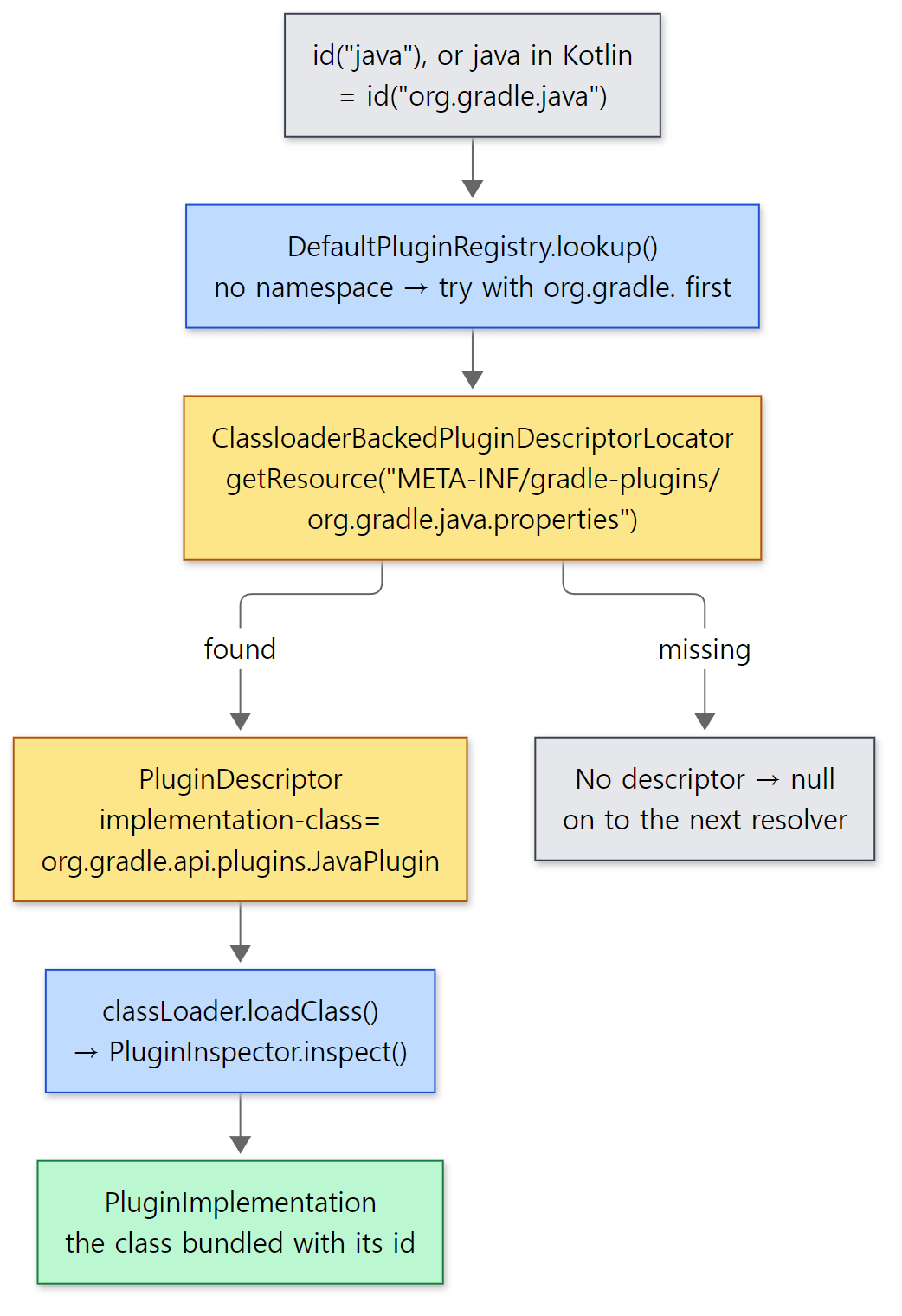 The yellow boxes are files on the classpath. There is no central id → class table anywhere; it is scattered across jars as descriptor files.
Why do it this way? With a central table, every new plugin would require editing that table. With the descriptor inside the jar, putting the jar on the classpath is enough to make the id exist. It's the same idea as Java's ServiceLoader (META-INF/services/…), and Gradle itself uses the ServiceLoader style too (the auto-applied plugins in section 7).
Who writes the descriptor for your own plugin? The pluginDescriptors task of the java-gradle-plugin plugin. For each id in gradlePlugin { plugins { create(…) { id = …; implementationClass = … } } }, it creates <id>.properties with a single implementation-class line (GeneratePluginDescriptors.java lines 95–102). Opening the buildSrc jar from the section 4 example shows the result (the end of ex/u07-plugin-apply/run.sh).
=== plugin descriptor inside the buildSrc jar ===
lab/
lab/HelloExtension.class
lab/HelloPlugin.class
META-INF/gradle-plugins/
META-INF/gradle-plugins/lab.hello.properties
implementation-class=lab.HelloPlugin
What is java in the Kotlin DSL?
The java in plugins { java } is neither a Kotlin keyword nor magic. It is an extension property on PluginDependenciesSpec. While Gradle itself is being built, a code generator in build-logic scans Gradle's jars and creates one property per descriptor, named after the id with org.gradle. removed (PluginIdExtensionsFacade.kt lines 106–113; the code template is on lines 67–75). The generated code ships as source inside the distribution's lib/gradle-kotlin-dsl-extensions-9.10.0.jar, and the same example's run.sh pulls out the relevant part.
=== Kotlin DSL accessor for 'java' inside the distribution ===
inline val org.gradle.plugin.use.PluginDependenciesSpec.`java`: org.gradle.plugin.use.PluginDependencySpec
    get() = id("org.gradle.java")
So plugins { java } is exactly plugins { id("org.gradle.java") }. `java-library` and application are generated the same way.
4. Applying: how DefaultPluginManager gets to apply()
When resolution is done and ApplyAction.apply() from stage 4 of section 1 runs, it calls applyTo(pluginManager) on each resolution result (PluginResolution). For both core plugins (SimplePluginResolution) and buildSrc plugins (ClassPathPluginResolution) it's one line — pluginManager.apply(plugin) (ClassPathPluginResolution.java lines 47–50). One that came from a repository (ExternalPluginResolution) calls pluginManager.apply(id) with the id string (lines 149–156); by now the classloader is finalized, so the id can be looked up.
project.pluginManager is really a DefaultPluginManager, one per project, created as a project-scope service (ProjectScopeServices.java lines 215–249 — service scopes were in post 4). apply(plugin = "…") in a build script body, project.getPluginManager().apply(…) inside a plugin, and the plugins {} block all end up in this object's apply(). There are three apply methods (apply(String), apply(Class), apply(PluginImplementation), lines 144–161), and they — along with addImperativePlugin() (lines 95–105), which project.plugins.apply(…) (PluginContainer) uses — all call doApply().
    private void doApply(final PluginImplementation<?> plugin) {
        PluginId pluginId = plugin.getPluginId();
        final String pluginIdStr = pluginId == null ? null : pluginId.toString();
        final Class<?> pluginClass = plugin.asClass();
        ClassLoader contextClassLoader = Thread.currentThread().getContextClassLoader();
        try {
            Thread.currentThread().setContextClassLoader(pluginClass.getClassLoader());
            if (plugin.getType().equals(PotentialPlugin.Type.UNKNOWN)) {
                throw new InvalidPluginException("'" + pluginClass.getName() + "' is neither a plugin or a rule source and cannot be applied.");
            } else {
                final Runnable adder = addPluginInternal(plugin);
                if (adder != null) {
                    UserCodeApplicationContext.Target appTarget = getApplicationTargetFor(target);
                    UserCodeSource source = new UserCodeSource.Binary(plugin.getDisplayName(), pluginClass.getName(), pluginIdStr);
                    userCodeApplicationContext.apply(source, appTarget, userCodeApplicationId ->
                        buildOperationRunner.run(new AddPluginBuildOperation(adder, plugin, pluginIdStr, pluginClass, userCodeApplicationId))
                    );
                }
            }
        } // ... two catch blocks (wrap in PluginApplicationException), finally (restore the context classloader) ...
    }
Four things to notice.
- It switches the context classloader to the plugin's (line 169), so that libraries inside the plugin that use the context classloader, such as
ServiceLoader, can see the plugin jar. Thefinallyblock restores it. - If
addPluginInternal()returnsnull, nothing happens. It means the plugin is already applied (see below). - The actual application is wrapped in a build operation (a named unit of work that is timed and recorded; see post 5), named
Apply plugin <id or class name>(lines 318–329). userCodeApplicationContext.apply()records "which plugin does the code that's running now belong to". It's used later to report warnings or errors as "something plugin X did" (according to the commit history, per-plugin timing was also moved here in 2026-08).
The guard against applying twice is short.
    @Nullable // if the plugin has already been added
    private Runnable addPluginInternal(final PluginImplementation<?> plugin) {
        final Class<?> pluginClass = plugin.asClass();
        if (plugins.containsKey(pluginClass)) {
            return null;
        }

        plugins.put(pluginClass, plugin);
        return new Runnable() {
            @Override
            public void run() {
                appliedPlugins.add(plugin);
                // ... add this plugin to the id sets that withPlugin is waiting on (section 5) ...
            }
        };
    }
The key is the class, not the id. apply(plugin = "java"), apply(plugin = "org.gradle.java") and apply<JavaPlugin>() are all the same JavaPlugin.class, so it is applied only once. Also, the plugin is put into the plugins map when application starts, while the returned Runnable (the adder) runs after application finishes. That gap is the story of section 5.
addPlugin(), called inside the build operation, does the real work.
    private void addPlugin(Runnable adder, PluginImplementation<?> plugin, String pluginId, Class<?> pluginClass) {
        boolean imperative = plugin.isImperative();
        if (imperative) {
            Plugin<?> pluginInstance = producePluginInstance(pluginClass);

            if (plugin.isHasRules()) {
                target.applyImperativeRulesHybrid(pluginId, pluginInstance, pluginClass);
            } else {
                target.applyImperative(pluginId, pluginInstance);
            }

            // Important not to add until after it has been applied as there can be
            // plugins.withType() callbacks waiting to build on what the plugin did
            instances.put(pluginClass, pluginInstance);
            pluginContainer.pluginAdded(pluginInstance);
        } else {
            target.applyRules(pluginId, pluginClass);
        }

        adder.run();
    }
"Imperative" means an ordinary plugin that implements Plugin. The "rules" side is for rule-based plugins from the old software model, which we skip here.
① Creating the instance. producePluginInstance() ends up calling PluginInstantiator.newInstance().
    @Override
    public <T> T newInstance(Class<? extends T> type, @Nullable Object... parameters) throws ObjectInstantiationException {
        // If the plugin type is abstract, it likely has abstract methods that should be implemented
        // during class generation. In this case, we should use the decorated instantiator to create
        // the plugin instance.  Otherwise, we should use the injected instantiator to create the plugin
        // since some existing plugin types are known to be final.
        if (Modifier.isAbstract(type.getModifiers())) {
            return decoratedInstantiator.newInstance(type, parameters);
        } else {
            return injectedInstantiator.newInstance(type, parameters);
        }
    }
subprojects/core/src/main/java/org/gradle/api/internal/plugins/PluginInstantiator.java lines 41–52
If the plugin class is abstract, the class generator from post 4 creates a …_Decorated subclass that fills in abstract methods such as @Inject getters. If not, an instantiator that only does constructor injection is used. In both cases the constructor's @Inject parameters are filled from project-scope services (withServices(projectScopeServiceRegistry) on lines 240–241 of ProjectScopeServices). That's how JavaBasePlugin's constructor receives JvmPluginServices and PropertyFactory (JavaBasePlugin.java lines 153–158).
② Calling apply(). For a project, target is an ImperativeOnlyPluginTarget wrapped by a RuleBasedPluginTarget (ProjectScopeServices lines 230–235). All its applyImperative() does is cast the plugin to Plugin<T> and call cast.apply(target) (ImperativeOnlyPluginTarget.java lines 48–58). At last, the apply(Project) we wrote. If you apply a Plugin<Settings> in a build script, a ClassCastException happens here, and maybeThrowOnTargetMismatch() reads the generic type argument and turns it into a friendlier sentence such as "The plugin must be applied in a settings script (or to the Settings object), but was applied in a build script (or to the Project object)" (I filled this sentence into the source's template on line 71 and did not run it. Lines 60–78; the phrases come from PluginTargetType.java lines 28–30).
③ Notifying. When apply() returns, pluginContainer.pluginAdded() puts the instance into the project.plugins collection (this is when plugins.withType(…) callbacks fire), and finally adder.run() runs (this is when withPlugin(…) callbacks fire). As the comment says, "important not to add until after it has been applied" — callbacks want to build on top of what the plugin has done.
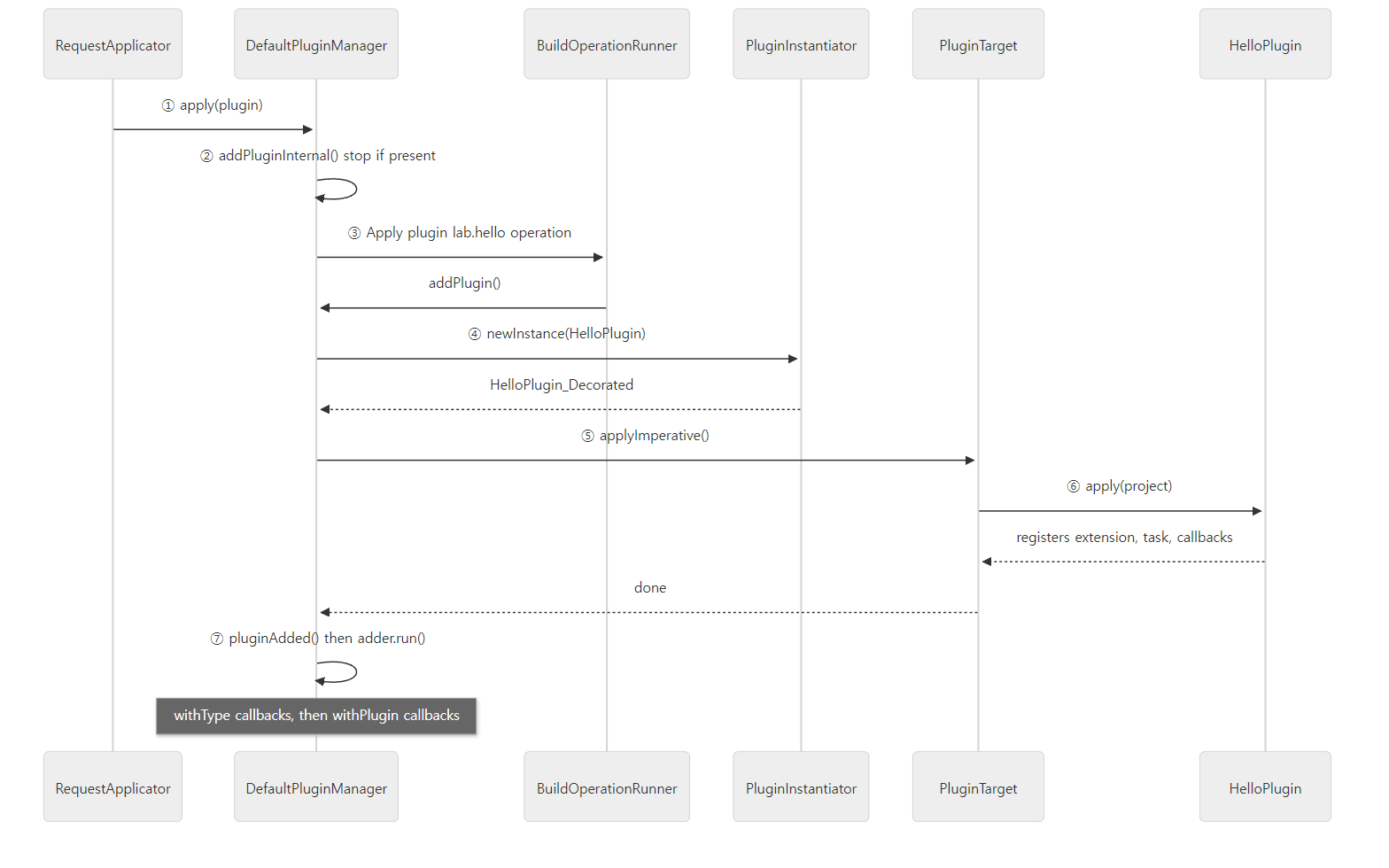 The numbers follow the stack trace in Example 2, read from the bottom up.
Example 2: the call path inside a buildSrc plugin's apply()
I wrote a Java plugin in buildSrc with java-gradle-plugin. Here is buildSrc's build script.
// Example written for this post (not part of Gradle's source)
plugins {
    `java-gradle-plugin`
}

// java-gradle-plugin turns this declaration into META-INF/gradle-plugins/lab.hello.properties
gradlePlugin {
    plugins {
        create("hello") {
            id = "lab.hello"
            implementationClass = "lab.HelloPlugin"
        }
    }
}
[Example ex/u07-plugin-apply/project/buildSrc/build.gradle.kts]
HelloExtension.java is an abstract class with a single public abstract Property<String> getMessage(); (Gradle provides the implementation; section 6). Here is the plugin itself.
// Example written for this post (not part of Gradle's source)
package lab;

import org.gradle.api.Plugin;
import org.gradle.api.Project;
import org.gradle.api.plugins.JavaBasePlugin;

public abstract class HelloPlugin implements Plugin<Project> {

    @Override
    public void apply(Project project) {
        System.out.println("[apply] HelloPlugin.apply(" + project.getPath() + "), class = " + getClass().getName());
        System.out.println("[apply] hasPlugin(\"lab.hello\") = " + project.getPluginManager().hasPlugin("lab.hello"));
        printCallers();

        // 1) Extension: the build script configures it with hello { message = "..." }
        HelloExtension hello = project.getExtensions().create("hello", HelloExtension.class);
        hello.getMessage().convention("Hello from lab.hello");

        // 2) Task: only registered here (post 8)
        project.getTasks().register("hello", task -> {
            task.setGroup("lab");
            task.doLast(t -> System.out.println("[task] " + hello.getMessage().get()));
        });

        // 3) Reacting to other plugins: java isn't here yet, but this fires when it is applied later
        project.getPluginManager().withPlugin("java-base", p ->
            System.out.println("[withPlugin java-base] fired, hasPlugin(\"java\") = "
                + project.getPluginManager().hasPlugin("java")));
        project.getPlugins().withType(JavaBasePlugin.class, p ->
            System.out.println("[withType JavaBasePlugin] fired"));
        project.getPluginManager().withPlugin("java", p ->
            System.out.println("[withPlugin java] fired, id = " + p.getId()));

        System.out.println("[apply] HelloPlugin.apply() done");
    }

    // ... printCallers(): prints only the stack frames related to plugins and scripts ...
}
[Example ex/u07-plugin-apply/project/buildSrc/src/main/java/lab/HelloPlugin.java, with only the body of printCallers() cut]
// Example written for this post (not part of Gradle's source)
plugins {
    id("lab.hello")   // the plugin built in buildSrc
    java              // = id("org.gradle.java")
}

println("[script] body starts")

// Configure the extension the plugin created
hello {
    message = "Hi from build.gradle.kts"
}
println("[script] hello extension class = " + hello.javaClass.name)

// Apply the same plugin once more -> nothing happens
apply(plugin = "lab.hello")

println("[script] plugins applied to this project:")
plugins.forEach { println("    " + it.javaClass.name) }
println("[script] extensions = " + extensions.extensionsSchema.elements.map { it.name })
[Example ex/u07-plugin-apply/project/build.gradle.kts]
run.sh runs gradle hello --offline --console=plain. Here is the first part of the output (the leading === gradle hello === separator and the Welcome to Gradle … banner are left out, and the stack trace is shortened by removing the printCallers() frame itself and two compiler-generated bridge-method frames, with the middle cut to ...).
Starting a Gradle Daemon (subsequent builds will be faster)
Shared read-only dependency cache is an incubating feature.
> Task :buildSrc:compileJava
> Task :buildSrc:compileGroovy NO-SOURCE
> Task :buildSrc:pluginDescriptors
> Task :buildSrc:processResources
> Task :buildSrc:classes
> Task :buildSrc:jar

> Configure project :
[apply] HelloPlugin.apply(:), class = lab.HelloPlugin_Decorated
[apply] hasPlugin("lab.hello") = true
[apply] called through:
    at lab.HelloPlugin.apply:14
    at org.gradle.api.internal.plugins.ImperativeOnlyPluginTarget.applyImperative:53
    at org.gradle.api.internal.plugins.RuleBasedPluginTarget.applyImperative:52
    at org.gradle.api.internal.plugins.DefaultPluginManager.addPlugin:212
    at org.gradle.api.internal.plugins.DefaultPluginManager.access$300:56
    at org.gradle.api.internal.plugins.DefaultPluginManager$AddPluginBuildOperation.run:309
    at org.gradle.api.internal.plugins.DefaultPluginManager.lambda$doApply$0:178
    at org.gradle.api.internal.plugins.DefaultPluginManager.doApply:177
    at org.gradle.api.internal.plugins.DefaultPluginManager.apply:146
    at org.gradle.plugin.use.resolve.internal.ClassPathPluginResolution.applyTo:49
    at org.gradle.plugin.use.internal.DefaultPluginRequestApplicator$ApplyAction.apply:161
    at org.gradle.plugin.use.internal.DefaultPluginRequestApplicator.lambda$applyPlugins$1:135
    at org.gradle.plugin.use.internal.DefaultPluginRequestApplicator.applyPlugins:135
    at org.gradle.kotlin.dsl.provider.PluginRequestsHandler.handle:45
    at org.gradle.kotlin.dsl.provider.StandardKotlinScriptEvaluator$InterpreterHost.applyPluginsTo:263
    at org.gradle.kotlin.dsl.provider.StandardKotlinScriptEvaluator.evaluate:141
    ...
    at org.gradle.configuration.project.BuildScriptProcessor.execute:46
    at org.gradle.configuration.project.ConfigureActionsProjectEvaluator.evaluate:35
    at org.gradle.configuration.project.LifecycleProjectEvaluator$EvaluateProject.lambda$run$0:109
    at org.gradle.configuration.project.LifecycleProjectEvaluator$EvaluateProject.run:100
    at org.gradle.configuration.project.LifecycleProjectEvaluator.evaluate:72
    at org.gradle.execution.TaskPathProjectEvaluator.configureHierarchy:77
[apply] HelloPlugin.apply() done
The Shared read-only dependency cache is an incubating feature. line appears because the example image uses pre-downloaded libraries as a read-only cache (GRADLE_RO_DEP_CACHE). It has nothing to do with the build result.
- Read bottom-up, the stack is exactly this post's path. Post 6's evaluator chain (
LifecycleProjectEvaluator→BuildScriptProcessor) → the Kotlin interpreter'sapplyPluginsToline 263 (cited in section 1) →PluginRequestsHandlerline 45 →applyPluginsline 135 (stage 4, "Apply the plugins") →ApplyAction.applyline 161 →ClassPathPluginResolution.applyToline 49 →DefaultPluginManager.applyline 146 →doApplylines 177–178 (the build operation) →addPluginline 212 (target.applyImperative) →ImperativeOnlyPluginTargetline 53 (cast.apply(target)). The line numbers match the excerpts in this post, and also ①–⑥ in the figure. ClassPathPluginResolutionshows up. That's proof thatlab.hellowas resolved not from a repository but as "already on the classpath" (AlreadyOnClasspathPluginResolverin section 2; section 8).- The class name is
lab.HelloPlugin_Decorated. BecauseHelloPluginis declaredabstract,PluginInstantiatorused a generated subclass. - Inside its own
apply(),hasPlugin("lab.hello")is alreadytrue, because the plugin goes into thepluginsmap when application starts (addPluginInternal()line 114). - Running the same example again with
--infoleaves three lines from the resolution stage:Resolved plugin [id: 'org.gradle.java-gradle-plugin'],Resolved plugin [id: 'lab.hello']andResolved plugin [id: 'org.gradle.java'](theLOGGER.infoon line 191 ofresolvePluginRequest()). The first is buildSrc's ownplugins {}: buildSrc is a separately configured build, so it goes down the same path once first.
Easy to get confused
- The
apply(plugin = "lab.hello")in the body did nothing. The output has only one[apply]block, and the build operation record in section 7 has only oneApply plugin lab.hello.addPluginInternal()saw the class was already there and returnednull. There's no error or warning, so if you meant to "redo" the configuration by applying again, it won't work. - A build script's
plugins {}applies to that project's ownPluginManager. Applyingjavain the root doesn't apply it to subprojects. It only means a subproject resolving it again won't go to the repositories (the "parent classloader scope" in section 2).
5. withPlugin: reacting without relying on order
HelloPlugin in Example 2 was applied before java (it came first in plugins {}). At that point there was no java, so if (hasPlugin("java")) would have been false. The user decides the order of plugins, so plugins must not rely on it. That's why withPlugin(id, action) exists: "call it now if it's there, otherwise when it gets applied later". The implementation just wraps the action and hands it to pluginsForId(id).all(…) (DefaultPluginManager.java lines 280–289).
pluginsForId(id) is a DomainObjectSet created once per id, and all(action) is the domain object collection method that applies an action to "everything in it now and everything added later" (the same principle as configureEach — post 8). What goes into that set, and when, is the crux.
    // Plugins whose application has started, including those still being applied
    private final Map<Class<?>, PluginImplementation<?>> plugins = new LinkedHashMap<>();
    // Plugins whose application has completed; withPlugin() callbacks only see these
    private final List<PluginImplementation<?>> appliedPlugins = new ArrayList<>();
subprojects/core/src/main/java/org/gradle/api/internal/plugins/DefaultPluginManager.java lines 65–68
There are two lists. plugins holds those whose application has started; appliedPlugins holds those that have finished. When pluginsForId() first creates a set it only scans appliedPlugins (lines 254–258), and after that the adder from section 4 fills it each time an application finishes. hasPlugin() (findPlugin(), lines 264–278), on the other hand, looks at plugins. In summary:
| What you ask | List it looks at | For a plugin still being applied |
|---|---|---|
pluginManager.hasPlugin(id) |
plugins (started) |
true |
pluginManager.withPlugin(id) { } |
appliedPlugins → adder |
fires after it finishes |
project.plugins.withType(T) { } |
pluginContainer |
fires at pluginAdded() (after it finishes, just before the adder) |
project.plugins.hasPlugin(id) |
pluginContainer (and pluginsForId) |
false |
The last row is a difference stated directly in the Javadoc of PluginManager.hasPlugin() ("In contrast, withPlugin and PluginContainer#hasPlugin only consider a plugin once its application has completed", PluginManager.java lines 82–84).
Let's see when the three callbacks registered by HelloPlugin in Example 2 fired. These are the lines right after the output above.
[apply] HelloPlugin.apply() done
[withType JavaBasePlugin] fired
[withPlugin java-base] fired, hasPlugin("java") = true
[withPlugin java] fired, id = java
[script] body starts
Here is what happened while java was being applied. The first thing JavaPlugin.apply() does is apply JavaBasePlugin (section 7).
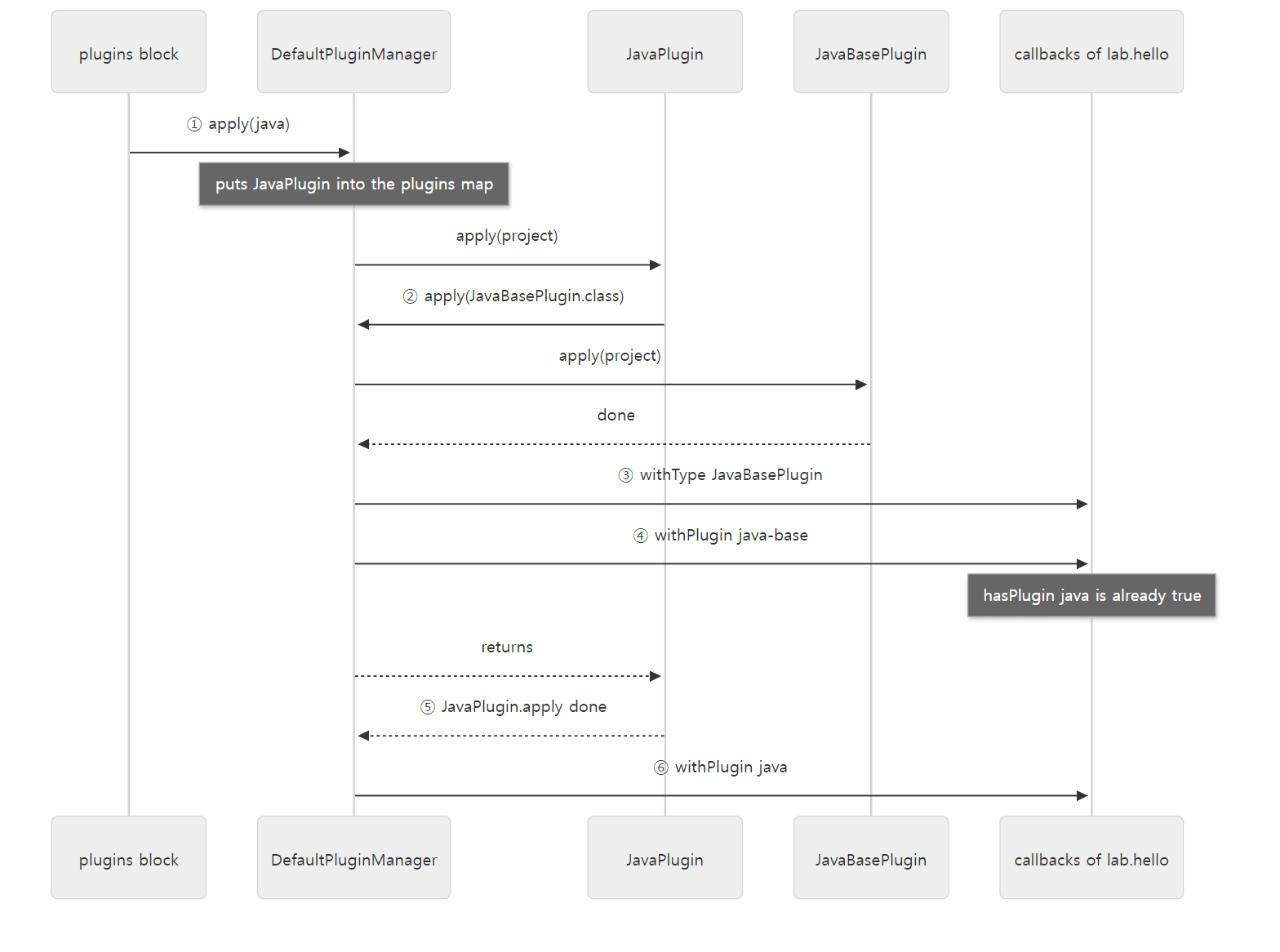
withPlugin("java-base") fires while java is still being applied. At that moment hasPlugin("java") is true, but withPlugin("java") hasn't fired yet.
withTypeprinted beforewithPlugin. InaddPlugin(),pluginContainer.pluginAdded()(line 218) comes beforeadder.run()(line 223).JavaBasePluginwas applied by class, without an id, yetwithPlugin("java-base")fired.JavaPluginapplies it withapply(JavaBasePlugin.class). Still, the adder asksplugin.isAlsoKnownAs(id)for every waiting id, andDefaultPluginRegistry's implementation looks up the descriptor for that id and checks whether it's the same class (DefaultPluginRegistry.javalines 258–266). The descriptor files from section 3 connect ids and classes in both directions.[withPlugin java]comes afterJavaPlugin.apply()finished, and before the body ([script] body starts). All of this happened inside the apply stage of theplugins {}block.
Easy to get confused
- In 9.8.2,
hasPlugincould give a different answer. In 9.8.2,findPlugin()went throughpluginsForId(id), andpluginsForIdscannedplugins(started) when first creating a set. So if someone had registeredwithPlugin("java")earlier, the set already existed, and askinghasPlugin("java")whilejavawas being applied returnedfalse— exactly the situation in the example above. In the reference commit, fixes from 2026-08–09 (commitsec15e5d3db1andb413eeee725, both included inv9.9.0-M2) split it so thathasPluginlooks atpluginsandwithPluginonly sees finished ones. I confirmed this difference from the source at the 9.8.2 tag; I did not run a 9.8.2 distribution. - The order of
project.pluginsis the order in which plugins finished. In the example's list (section 7),BasePlugincomes afterLifecycleBasePlugin.BasePluginstarted first, butLifecycleBasePlugin, which it applied inside, finished first (pluginAdded()is called afterapply()).
6. Extensions: where does the hello { } block come from?
HelloPlugin attached an extension with project.getExtensions().create("hello", HelloExtension.class), and the body configured it with hello { message = "…" }. DefaultExtensionContainer.create() simply creates the instance (instantiate()) and stores it by name together with its public type (DefaultExtensionContainer.java lines 82–87).
instantiate() uses the same class generator as plugins (instanceGenerator on lines 174–175). That's why HelloExtension's abstract method getMessage() gets filled in to return a Property<String>. The example output shows it.
[script] hello extension class = lab.HelloExtension_Decorated
Everything is stored in a single LinkedHashMap in ExtensionsStorage.
    private final Map<String, ExtensionHolder<?>> extensions = new LinkedHashMap<>();

    public <T> void add(TypeOf<T> publicType, String name, T extension) {
        if (hasExtension(name)) {
            throw new IllegalArgumentException(
                format("Cannot add extension with name '%s', as there is an extension already registered with that name.", name));
        }
        extensions.put(name, new ExtensionHolder<>(name, publicType, extension));
    }
The name is the key, and the public type is recorded along with the value. Looking up by type, as in getByType(JavaPluginExtension.class), first tries an exact public type match and then an assignable one (lines 93–118). JavaBasePlugin passes a separate public type in create(JavaPluginExtension.class, "java", DefaultJavaPluginExtension.class, …) so that users only see the interface (JavaBasePlugin.java lines 183–187).
These are the extensions attached to the example project.
[script] extensions = [ext, versionCatalogs, hello, base, sourceSets, reporting, javaToolchains, java, testing]
The first, ext, is the "extra properties" extension that DefaultExtensionContainer's constructor attaches itself (lines 49–52). Everything after hello came from applying java; the figure in section 7 shows who attached which. Since the map is a LinkedHashMap, the order is the order they were added.
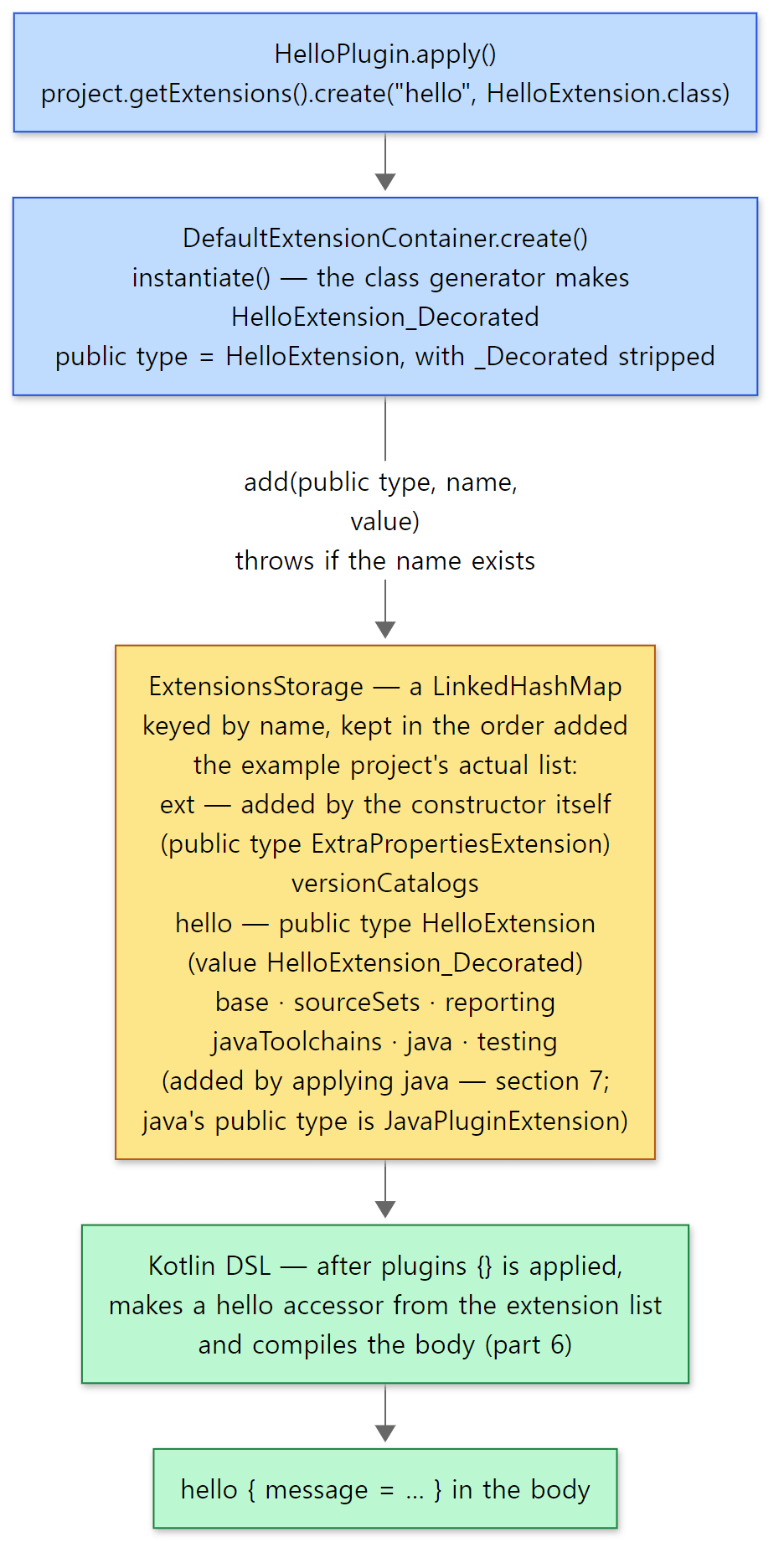 An extension goes into the map with a name and a public type. The list is in exactly the order of the example's actual output.
The reason you can just write hello { } in the body is that the Kotlin DSL looks at the extension list (extensionsSchema) after the plugins {} block has been applied, generates a type-safe accessor called hello, and compiles the body with it. Accessor generation was covered in post 6. If you had applied the plugin only with apply(plugin = "lab.hello") in the body, hello wouldn't exist at compile time, and you'd have to write the<HelloExtension>() or configure<HelloExtension> { } — one big reason to prefer the plugins {} block.
Easy to get confused
- Creating two extensions with the same name fails (lines 38–41 above). Applying a plugin twice is normally fine because the guard in section 4 makes
apply()run once, but two different plugins that want the same extension name collide here. - It's best to keep extension values as
Property. In the example, the plugin only setconvention("Hello from lab.hello"), the body changed the value later, and the task still printed the new value (Hi from build.gradle.kts). A plugin'sapply()runs before the user's configuration, so if it reads the value on the spot, it never sees what the user set. Lazy configuration is covered in post 8.
7. A real case: how one java line becomes nine plugins
This is the plugins list from Example 2.
[script] plugins applied to this project:
    org.gradle.api.plugins.HelpTasksPlugin_Decorated
    org.gradle.api.plugins.SoftwareReportingTasksPlugin_Decorated
    org.gradle.buildinit.plugins.BuildInitPlugin_Decorated
    org.gradle.buildinit.plugins.WrapperPlugin_Decorated
    lab.HelloPlugin_Decorated
    org.gradle.language.base.plugins.LifecycleBasePlugin_Decorated
    org.gradle.api.plugins.BasePlugin_Decorated
    org.gradle.api.plugins.JvmEcosystemPlugin_Decorated
    org.gradle.api.plugins.ReportingBasePlugin_Decorated
    org.gradle.api.plugins.JvmToolchainsPlugin_Decorated
    org.gradle.api.plugins.JavaBasePlugin_Decorated
    org.gradle.testing.base.plugins.TestSuiteBasePlugin_Decorated
    org.gradle.api.plugins.JvmTestSuitePlugin_Decorated
    org.gradle.api.plugins.JavaPlugin_Decorated
    org.gradle.kotlin.dsl.provider.plugins.KotlinScriptBasePlugin_Decorated
I applied two, lab.hello and java, yet there are fifteen. They fall into three groups.
The top four were applied although nobody asked for them. That's why tasks like gradle tasks, gradle help, gradle dependencies, gradle init and gradle wrapper exist in every project. They are applied by PluginsProjectConfigureActions, which runs before the build script (BuildScriptProcessor) in post 6's evaluator chain (BuildModelControllerServices.kt lines 119–123). It gathers the actions registered in META-INF/services/org.gradle.configuration.project.ProjectConfigureAction files through a ServiceLocator and calls them in turn (PluginsProjectConfigureActions.java lines 27–49); one of them, HelpTasksAutoApplyAction, is the single line project.getPluginManager().apply("org.gradle.help-tasks") (HelpTasksAutoApplyAction.java lines 22–27). It's the same "register with a file inside the jar" approach as the descriptors in section 3.
The bottom one, KotlinScriptBasePlugin, is applied by the Kotlin DSL. applyBasePluginsTo() calls it after the plugins {} block has been applied (DefaultKotlinScriptBasePluginsApplicator.kt lines 26–28).
The nine in the middle were all applied by java alone. Here is the start of JavaPlugin.apply().
    @Override
    public void apply(final Project project) {
        if (project.getPluginManager().hasPlugin("java-platform")) {
            throw new IllegalStateException("The \"java\" or \"java-library\" plugin cannot be applied together with the \"java-platform\" plugin. " +
                "A project is either a platform or a library but cannot be both at the same time.");
        }
        final ProjectInternal projectInternal = (ProjectInternal) project;

        project.getPluginManager().apply(JavaBasePlugin.class);
        project.getPluginManager().apply("org.gradle.jvm-test-suite"); // TODO: change to reference plugin class by name after project dependency cycles untangled; this will affect ApplyPluginBuildOperationIntegrationTest (will have to remove id)

        SourceSetContainer sourceSets = project.getExtensions().getByType(JavaPluginExtension.class).getSourceSets();
        // ... the java component and main feature (main source set, jar task), default test suite ...
    }
platforms/jvm/plugins-java/src/main/java/org/gradle/api/plugins/JavaPlugin.java lines 264–298
A plugin applies another plugin exactly the way a user does: pluginManager.apply(). So the machinery from section 4 (the twice-guard, the build operation, the callbacks) applies to the inner plugins as well. JavaBasePlugin.apply() has the same shape.
    @Override
    public void apply(final Project project) {
        project.getPluginManager().apply(BasePlugin.class);
        project.getPluginManager().apply(JvmEcosystemPlugin.class);
        project.getPluginManager().apply(ReportingBasePlugin.class);
        project.getPluginManager().apply(JvmToolchainsPlugin.class);

        DefaultJavaPluginExtension javaPluginExtension = addExtensions(project);

        configureCompileDefaults(project, javaPluginExtension);
        configureSourceSetDefaults(project, javaPluginExtension);
        // ... defaults for javadoc, test, buildNeeded/buildDependents, archives, JavaExec ...
    }
BasePlugin in turn applies LifecycleBasePlugin and attaches the base extension (BasePlugin.java lines 62–70). LifecycleBasePlugin registers clean, assemble, check and build (LifecycleBasePlugin.java lines 73–80). This is also where build is made to depend on assemble and check (lines 115–121).
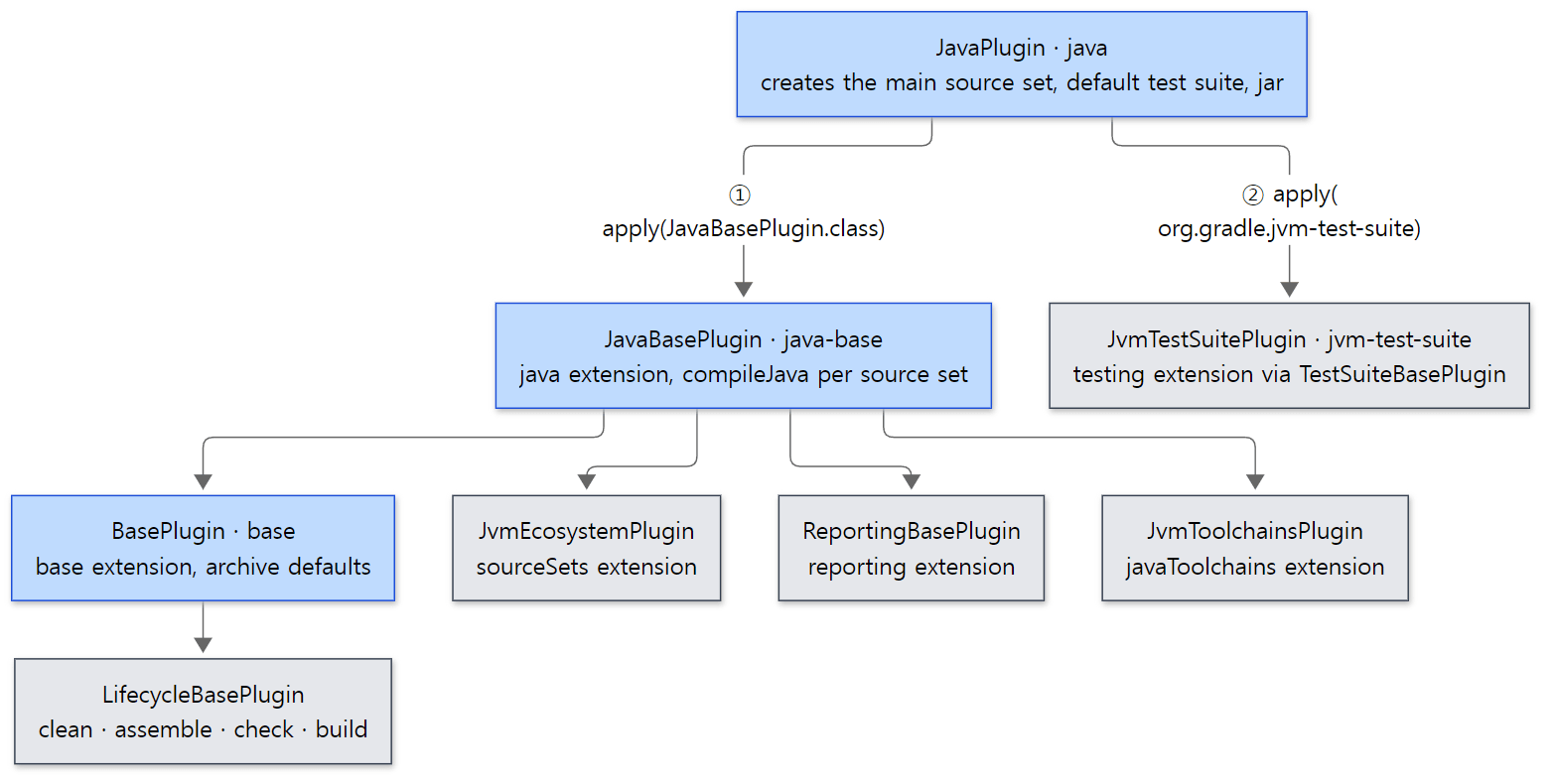 Blue boxes are plugins quoted in this section; grey boxes only give the name and what it does. The extension list in section 6 comes from here.
Running the same example with the build operation trace (-Dorg.gradle.internal.operations.trace=/tmp/trace, post 1) and extracting only the names of the Apply plugin operations shows the order in which they started (run.sh picks the root project's entries out of /tmp/trace-log.txt).
=== build operation trace: Apply plugin (root project) ===
"Apply plugin org.gradle.help-tasks to root project 'plugin-apply'"
"Apply plugin org.gradle.software-reporting-tasks to root project 'plugin-apply'"
"Apply plugin org.gradle.build-init to root project 'plugin-apply'"
"Apply plugin org.gradle.wrapper to root project 'plugin-apply'"
"Apply plugin lab.hello to root project 'plugin-apply'"
"Apply plugin org.gradle.java to root project 'plugin-apply'"
"Apply plugin org.gradle.api.plugins.JavaBasePlugin to root project 'plugin-apply'"
"Apply plugin org.gradle.api.plugins.BasePlugin to root project 'plugin-apply'"
"Apply plugin org.gradle.language.base.plugins.LifecycleBasePlugin to root project 'plugin-apply'"
"Apply plugin org.gradle.api.plugins.JvmEcosystemPlugin to root project 'plugin-apply'"
"Apply plugin org.gradle.api.plugins.ReportingBasePlugin to root project 'plugin-apply'"
"Apply plugin org.gradle.api.plugins.JvmToolchainsPlugin to root project 'plugin-apply'"
"Apply plugin org.gradle.jvm-test-suite to root project 'plugin-apply'"
"Apply plugin org.gradle.testing.base.plugins.TestSuiteBasePlugin to root project 'plugin-apply'"
"Apply plugin org.gradle.kotlin.dsl.provider.plugins.KotlinScriptBasePlugin to root project 'plugin-apply'"
- Plugins applied by id show their id, and plugins applied by class show their class name in the operation name (
DefaultPluginManagerlines 319–325).org.gradle.javawas applied by id fromplugins {}, whileJavaBasePluginwas applied by class fromJavaPlugin. - This list is the start order; the
project.pluginslist above is the finish order. That's whyJavaPlugincomes beforeJavaBasePluginin the trace but last (just before KotlinScriptBasePlugin) in thepluginslist. JvmTestSuitePluginalso appliesJavaBasePlugin, but since it's already applied,JavaBasePluginappears only once in the trace (the twice-guard from section 4).
Why split things so finely? Compare what JavaBasePlugin and JavaPlugin do. JavaBasePlugin only sets up a rule: "whenever a source set appears, register compileJava-style tasks for it".
    private void configureSourceSetDefaults(Project project, final JavaPluginExtension javaPluginExtension) {
        javaPluginExtension.getSourceSets().all(sourceSet -> {

            ConfigurationContainer configurations = project.getConfigurations();

            defineConfigurationsForSourceSet(sourceSet, (RoleBasedConfigurationContainerInternal) configurations);
            definePathsForSourceSet(sourceSet, project);

            createProcessResourcesTask(sourceSet, sourceSet.getResources(), project);
            TaskProvider<JavaCompile> compileTask = createCompileJavaTask(sourceSet, sourceSet.getJava(), project);
            createClassesTask(sourceSet, project);

            configureLibraryElements(compileTask, sourceSet, configurations);
            configureTargetPlatform(compileTask, sourceSet, configurations);
        });
    }
It's JavaPlugin that actually creates the source set (sourceSets.create(SourceSet.MAIN_SOURCE_SET_NAME), JavaPlugin.java line 301). At that moment the all(…) rule above fires and compileJava is registered. In other words, "capability" (the base plugin) is separated from "convention" (the convention plugin). A build that doesn't need the main/test conventions (for example the Kotlin or Groovy plugins, or a build that creates its own source sets) can apply just java-base and borrow the rules.
Easy to get confused
- Applying
javaonly registerscompileJava. It's registered withregister(), so if this build doesn't want that task, the object isn't even created. The difference between registering and realizing is covered in post 8. - The first line of
JavaPluginprevents it from being combined withjava-platform. Because it asks withhasPlugin, it depends on order — ifjava-platformis applied later, this check passes, and the other plugin checks in the opposite direction (I didn't follow theJavaPlatformPluginside in the source).
8. buildSrc and precompiled script plugins
How was lab.hello in Example 2 resolved without any repository? The answer lies before the root project is configured.
    @Override
    public void prepareProjects(GradleInternal gradle) {
        // Setup classloader for root project, all other projects will be derived from this.
        SettingsInternal settings = gradle.getSettings();
        ClassLoaderScope settingsClassLoaderScope = settings.getClassLoaderScope();
        ClassLoaderScope buildSrcClassLoaderScope = settingsClassLoaderScope.createChild("buildSrc[" + gradle.getIdentityPath() + "]", null);
        gradle.setBaseProjectClassLoaderScope(buildSrcClassLoaderScope);
        // ... generate version catalog accessors ...
        // attaches root project
        buildLoader.load(gradle.getSettings(), gradle);
        // ... register included build substitutions ...

        // Build buildSrc and export classpath to root project
        buildBuildSrcAndLockClassloader(gradle, buildSrcClassLoaderScope);

        delegate.prepareProjects(gradle);
        // ...
    }

    private void buildBuildSrcAndLockClassloader(GradleInternal gradle, ClassLoaderScope baseProjectClassLoaderScope) {
        ClassPath buildSrcClassPath = buildSourceBuilder.buildAndGetClassPath(gradle);
        baseProjectClassLoaderScope.export(buildSrcClassPath).lock();
    }
It creates a buildSrc[:] scope as a child of the settings scope and makes it "the base scope for projects". Then BuildSourceBuilder.buildAndGetClassPath() runs buildSrc as a separate build (the Build buildSrc build operation, BuildSourceBuilder.java lines 61–90), and the resulting jar is exported into that scope, which is then locked. The root project's scope root-project[:] is created underneath it (InstantiatingBuildLoader.java lines 38–42), so from the root build.gradle.kts, the buildSrc jar is a classpath that's already in the parent scope. That's where AlreadyOnClasspathPluginResolver from section 2 found META-INF/gradle-plugins/lab.hello.properties. It's also why :buildSrc:jar printed before > Configure project : in the example output.
The buildSrc project gets the java-library and groovy plugins plus the gradleApi() and localGroovy() dependencies without you writing anything. GroovyBuildSrcProjectConfigurationAction is a four-line action that does exactly those four things (lines 27–35). The > Task :buildSrc:compileGroovy NO-SOURCE in the example output is a trace of it: there's no Groovy source, but the groovy plugin is applied, so the task exists.
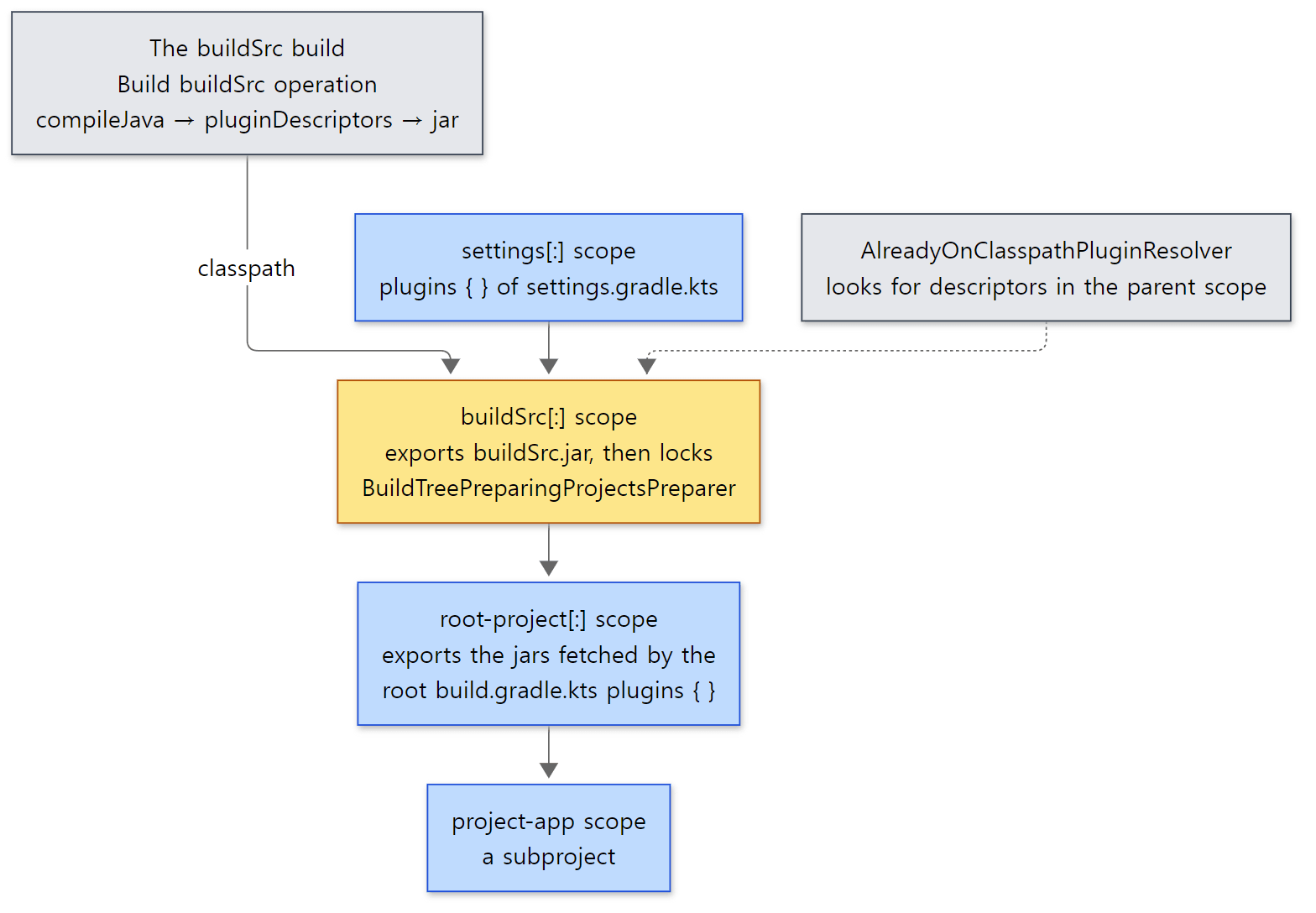 The yellow node is where the buildSrc jar lands. Lower nodes can see the classes of upper nodes, but not the other way round.
This tree resembles the classloader hierarchy in Tomcat post 4. Just as in Tomcat each web app has its own classloader under the common one and web apps can't see each other's classes, in Gradle a subproject sees the root's and buildSrc's plugins but not the jars a sibling project fetched with plugins {}. The difference is direction: Tomcat's web app classloader looks in its own classes first by default (child-first), while the plugin resolution we saw here uses what's already in the parent scope if it's there (AlreadyOnClasspathPluginResolver is at the front of the chain).
Precompiled script plugins: how one script file becomes a plugin
Apply the kotlin-dsl plugin in buildSrc and put a script such as src/main/kotlin/lab.greeting.gradle.kts there, and that one file becomes a plugin with id lab.greeting. This is called a precompiled script plugin. The rule lives in PrecompiledScriptPlugin.
        val simplePluginAdapterClassName = fileNameWithoutScriptExtension
            .kebabCaseToPascalCase()
            .asJavaIdentifier() + "Plugin"
        // ...
            id = packagePrefixed(fileNameWithoutScriptExtension),
            implementationClass = packagePrefixed(simplePluginAdapterClassName),
The file name without .gradle.kts is the id, and that name turned into a Java identifier with Plugin appended is the adapter class. The adapter is a tiny Plugin implementation generated by the generateScriptPluginAdapters task; its apply() only instantiates the compiled script class (GenerateScriptPluginAdapters.kt lines 89–100). It is then declared with gradlePlugin { plugins.create(id) { … } } (DefaultPrecompiledScriptPluginsSupport.kt lines 518–527), so the pluginDescriptors task from section 3 writes its descriptor. In the end it has exactly the same shape as a hand-written plugin.
Example 3: what does lab.greeting.gradle.kts turn into?
buildSrc's build script is just plugins { `kotlin-dsl` } and repositories { gradlePluginPortal() } (example ex/u07-precompiled/project/buildSrc/build.gradle.kts). Here are the script plugin and the root build script that applies it.
// Example written for this post (not part of Gradle's source)
// File name lab.greeting.gradle.kts -> plugin id "lab.greeting"
println("[lab.greeting] script class = " + javaClass.name)

tasks.register("greet") {
    doLast { println("[task] Hello from lab.greeting") }
}
[Example ex/u07-precompiled/project/buildSrc/src/main/kotlin/lab.greeting.gradle.kts]
// Example written for this post (not part of Gradle's source)
plugins {
    id("lab.greeting")   // buildSrc/src/main/kotlin/lab.greeting.gradle.kts
}

println("[script] plugin classes = " + plugins.map { it.javaClass.name }.filter { !it.startsWith("org.gradle") })
[Example ex/u07-precompiled/project/build.gradle.kts]
After gradle greet --offline --console=plain, we look inside the buildSrc jar (the opening banner lines, the list of buildSrc tasks and the end-of-build lines from BUILD SUCCESSFUL on are cut to ...).
...
> Task :buildSrc:generateScriptPluginAdapters
> Task :buildSrc:pluginDescriptors
...
> Configure project :
[lab.greeting] script class = Lab_greeting_gradle
[script] plugin classes = [Lab_greetingPlugin]

> Task :greet
[task] Hello from lab.greeting
...
=== generated plugin adapter and descriptor ===
Lab_greetingPlugin.class
Lab_greeting_gradle$$$result$1$1.class
Lab_greeting_gradle$$$result$1.class
Lab_greeting_gradle.class
META-INF/gradle-plugins/
META-INF/gradle-plugins/lab.greeting.properties
implementation-class=Lab_greetingPlugin
run.sh also prints the generated adapter's source (Lab_greetingPlugin.kt), which is just the template from lines 89–100 of GenerateScriptPluginAdapters.kt linked above with the names filled in — in apply(target) it calls the constructor of Class.forName("Lab_greeting_gradle") with (target, target), and that's all.
- The adapter is named
Lab_greetingPlugin, notLabGreetingPlugin.kebabCaseToPascalCase()only capitalizes the first letter and the letter after each hyphen (-x) (PrecompiledScriptPlugin.ktlines 290–299), andasJavaIdentifier()turns the dot into_(lines 303–307). I first wroterun.shto look forLabGreetingPlugin.kt, got nothing, and fixed it after reading the source. When you see names like…_gradleor…Pluginin a stack trace or error message, remember this rule. - It's not
_Decorated. The generated adapter is an ordinary, non-abstractclass, soPluginInstantiatorfrom section 4 created it without class generation. Compare it withHelloPlugin_Decoratedin Example 2 and you can see that branch. kotlin-dslmakes the first build heavy. This example took three to four minutes (3 min 19 s when re-run for review; mostly buildSrc's Kotlin compilation and accessor generation), while Example 2, with onlyjava-gradle-plugin, took about two (1 min 50 s on the re-run; both measured with a fresh daemon and a fresh user home, so they vary from run to run).
Easy to get confused
- The buildSrc jar is an ancestor of every project scope. So when buildSrc changes, the classpath of every build script below it changes (I didn't measure how that affects post 6's script compilation cache). If several builds share the plugins, or you want to split buildSrc out, you can move them into an included build (
includeBuild("build-logic")), and then theIncluded Buildsresolver in the section 2 chain finds them. I didn't follow the included-build side of resolution in this post (CompositeBuildPluginResolverContributor). plugins { id("…") version "…" apply false }in the root only resolves the plugin and loads its jar into theroot-project[:]scope without applying it (request.isApply()in section 1). Subprojects find the plugin in the parent scope, so they can write justid("…")without a version. If they do give a version,AlreadyOnClasspathPluginResolverchecks that it's the same version and fails if it isn't (lines 86–99).
What this post leaves out
- Rewriting requests with
pluginManagement { resolutionStrategy { eachPlugin { useModule(…) } } }:pluginResolutionStrategy.applyTo(),DefaultPluginRequestApplicator.javaline 101 - Auto-applied plugins (such as Develocity with
--scan):subprojects/core/src/main/java/org/gradle/plugin/management/internal/autoapply/AutoAppliedPluginHandler.java - Plugin version tracking (
PluginVersionTracker) and the "already on the classpath with a different version" error:AlreadyOnClasspathPluginResolver.javalines 86–99 - Rule-source plugins and
RuleBasedPluginTarget:subprojects/core/src/main/java/org/gradle/api/internal/plugins/RuleBasedPluginTarget.java - Settings plugins and init script plugins (the
ImperativeOnlyPluginTargetinSettingsScopeServicesandBuildScopeServices):SettingsScopeServices.javaline 112,BuildScopeServices.javaline 705 - Plugin application in the declarative DSL:
platforms/core-configuration/declarative-dsl-provider/src/main/kotlin/org/gradle/internal/declarativedsl/settings/PluginsInterpretationSequenceStep.kt - Compiling the
plugins {}blocks of precompiled script plugins separately (compilePluginsBlocks,extractPrecompiledScriptPluginPlugins):PrecompiledScriptPlugins.ktlines 61–86 - Which tasks the buildSrc build uses to produce its classpath (
BuildSrcBuildListenerFactory.Listener):BuildSrcBuildListenerFactory.javalines 55–94
Summary
| Concept | One-line summary |
|---|---|
plugins {} block |
Runs on its own before the body and only records requests in PluginRequestCollector. The same id twice fails |
applyPlugins() |
Resolve every request first → add dependencies → export and lock the classloader → then apply in request order |
| Resolver chain | Already on the classpath? → core plugins → TestKit → included builds → repositories. The first to find it wins |
| Core plugins | The org.gradle namespace (or no namespace). A version or apply false is an error |
| Marker artifact | id:id.gradle.plugin:version. Looked up in pluginManagement repositories, otherwise the Plugin Portal |
| Descriptor | implementation-class in META-INF/gradle-plugins/<id>.properties. Written by java-gradle-plugin |
java in Kotlin |
inline val PluginDependenciesSpec.java = id("org.gradle.java"), generated when Gradle is built |
DefaultPluginManager |
Where every application ends up. Guards against applying twice by class and wraps it in an Apply plugin … build operation |
PluginInstantiator |
abstract plugins get a _Decorated subclass; others only get constructor injection |
hasPlugin / withPlugin |
hasPlugin is true even while applying; withPlugin fires after it finishes (since 9.9.0-M2) |
| Callback order | end of apply() → plugins.withType → pluginManager.withPlugin |
| Extensions | extensions.create() makes a generated class and stores it by name in a LinkedHashMap. Duplicate names fail |
The java chain |
JavaPlugin → JavaBasePlugin → BasePlugin → LifecycleBasePlugin, and more. Base plugins give rules, convention plugins give conventions |
| Auto-applied plugins | help-tasks, build-init, wrapper and others are applied to every project by ProjectConfigureActions (ServiceLoader) |
| buildSrc | Built as a separate build before the root project and loaded into the buildSrc[:] scope, so it resolves as "already on the classpath" |
| Precompiled script plugin | a.b.gradle.kts → id a.b, adapter A_bPlugin. In the end, a descriptor plus a Plugin class |
What's next
Most of what plugins did in apply() was registering tasks: LifecycleBasePlugin does register("build"), and JavaBasePlugin does register("compileJava") for each source set. But register() doesn't create the task. When is it created? How does configureEach reach "tasks that will exist later"? Why does wiring an extension's Property into a task input create ordering without dependsOn? That's post 8: Tasks and Lazy Configuration — DefaultTask, TaskContainer and Provider. It also explains how DomainObjectSet.all(), which withPlugin relied on in section 5, works.
The earlier series have similar things. withPlugin answers a question similar to @Conditional in Spring post 9 ("if something else is present, configure it this way"), but differently: Spring's condition is evaluated once when the bean definition is registered, while Gradle's withPlugin is reactive, firing whenever the condition becomes true later. Plugins applying other plugins to build up features also resemble the way modules register hooks in httpd post 6. The difference is that httpd modules come in through LoadModule in the configuration file, while Gradle plugins come in through descriptor files and classloaders.
- Post 6: Projects and Build Scripts — How build.gradle.kts Gets Run
- Post 4: The Service Registry — the DI Container Inside Gradle
- Post 2: The Big Picture — Client and Daemon, Service Scopes, and the Three Build Phases
- Post 12: Dependency Resolution — From One implementation Line to Jar Files, and Wrapping Up the Series
- Tomcat post 4: Class Loaders — Each Web App Sees Its Own Classes
- Spring post 9: @Conditional, @Profile and @Import — Choosing Beans by Condition