What this post covers
"Digging into Kafka's Source" is a series that reads the source code of Apache Kafka (a distributed event streaming platform that keeps messages in logs on disk and lets many consumers read them) a little at a time, with help from AI, and writes up what is there. It follows the same method as the series already finished: Digging into Spring's Source (27 posts), Digging into Apache httpd's Source (16 posts) and Digging into Tomcat's Source (16 posts). Right before this one come the nginx, MariaDB and Gradle series. The Gradle series connects directly to this one, because Kafka is built with Gradle (section 2).
This is the first post, and it gets things ready before any deep reading starts. It tries to answer five questions.
- What is Kafka, how does it work, and what is it for? (a section for newcomers)
- Which version of the source is being read, and how does it relate to the stable 4.4.0 most people use?
- How do you get exactly the same source, and how do you build and run it?
- How is a codebase of about 720,000 lines (main code only) split into modules, and where should you start?
- Which classes does one record sent with
producer.send()pass through on its way to the disk, to the replicas, and back out throughconsumer.poll()?
If Kafka is new to you, start with the "What is Kafka" section right below. Two diagrams and a 3-minute hands-on run show what Kafka does, and a short list shows what questions this series answers, before the main part begins. From there on, the reader I have in mind is a developer who has used Kafka in an app and is opening its source for the first time. You have sent with a producer and received with a consumer, you know what topics, partitions, offsets and consumer groups are, you have touched a few settings like acks or linger.ms, and maybe you have used Spring Kafka (KafkaTemplate, @KafkaListener) or kafka-topics.sh. I assume you can read Java generics, lambdas and threads. Part of the broker is written in Scala; whenever Scala code shows up, I add a line or two on how to read it right there.
| Item | Details |
|---|---|
| Project | Apache Kafka (apache/kafka) |
| Version | 4.5.0-SNAPSHOT (trunk) |
| Commit | ab1e816411 (2026-10-24) |
| Language | Java, with part of the broker (the core module) in Scala 2.13 |
| Build | Gradle 9.8.2 (wrapper ./gradlew) |
| Files this post mainly reads | gradle.properties, build.gradle, settings.gradle, clients/src/main/resources/common/message/ProduceRequest.json, clients/…/producer/KafkaProducer.java, core/…/server/KafkaApis.scala, AGENTS.md |
Every line number and detail in these posts refers to that commit. In other versions the line numbers will differ, and some of the details may too. Since this post is the map for the whole series, it stays with the big picture and leaves the depth to the individual posts.
The series has 12 posts in all.
- How I Read It with AI, and the Map (this post)
- The Big Picture — Clients, Brokers, Controllers and Partitions
- The Wire Protocol — Requests and Responses Generated from JSON Schemas
- The Broker's Network Layer — Acceptors, Processors and Request Handlers
- Inside the Producer — From send() to Batches and the Sender Thread
- How the Broker Accepts Records — The Record Batch Format and the Produce Path
- Log Storage — Segments, Indexes, Retention and Compaction
- The Read Path — Fetch Requests, Long Polling and Zero-Copy
- Replication — The ISR, the High Watermark and the Wait Behind acks=all
- KRaft and Metadata — How the Controller Remembers the Cluster
- The Consumer and the Group Coordinator — Inside poll() and Rebalancing
- Idempotence and Transactions — How Exactly-Once Is Built, and Wrapping Up the Series
What is Kafka — how it works and what it is for
Before opening the source, let's see what Kafka does, with pictures and a quick hands-on run. If you have used Kafka already, you can just skim "Questions this series answers" at the end of this section and move on.
In one sentence — a shared "what happened" notebook
Kafka is a notebook that writes down "what happened," in order. "An order came in," "a user clicked a button," "stock changed" — every time something like that happens, one line is appended to the end. Lines already written are never edited. There are many readers, and each one keeps a bookmark that remembers how far it has read. Whether the shipping service reads right away or the statistics service reads once a day in one go, they don't affect each other.
In software terms, this kind of notebook is called a log. Here "log" doesn't mean a text file for debugging; it means "an ordered list of records that you only ever append to." This whole series is really the story of how Kafka keeps that log fast, keeps it from being lost, and spreads it over several servers.
Why you would want this
When an order service takes an order, there is a lot to do: book shipping, send a confirmation email, bump the dashboard numbers, and put the order into the search index and the data warehouse (a database for analytics). If the order service calls those four directly, one by one, you get problems.
- If the mail server is down for a moment, either the order fails too, or you have to build your own way to retry the failed calls.
- Every time a new receiver is added, the order service's code has to change.
- A slow receiver, like the dashboard, holds back the fast ones.
Put Kafka in the middle, and the order service writes "an order came in" to Kafka once and is done. Each receiver reads from Kafka on its own. If a receiver goes down for a while, the record is still in Kafka, so it picks up from its bookmark when it comes back. Adding a new receiver doesn't change the order service at all.
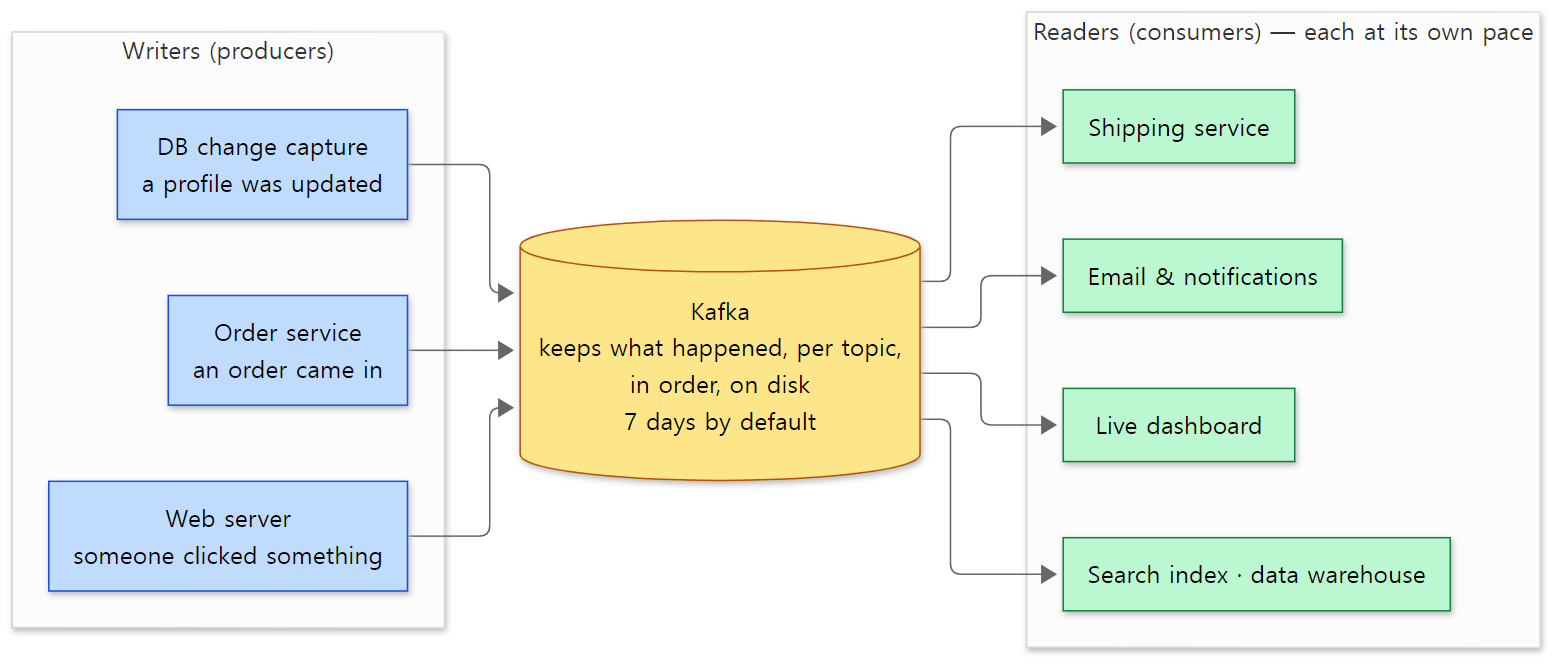 Kafka in the middle. Writers and readers don't know about each other; they only know Kafka. "7 days by default" is the default of the broker setting
log.retention.hours (LogConfig.java line 133).
How it works — in five words
Five words are enough to describe how Kafka works. The hands-on run and the diagram below show exactly these five.
- Record — one line in the notebook. It has a key (for example, a customer name) and a value (for example, what was ordered).
- Topic — the name of a notebook. You make one per subject, like
ordersorclicks. - Partition — a topic split into several lanes. Each lane fills up in its own order, so several servers can hold them and take writes at the same time. Records with the same key always go to the same partition, so one customer's orders stay in order. Across different partitions, though, there is no ordering guarantee.
- Offset — the number a record gets inside its partition (0, 1, 2 …). Bookmarks are placed by this number.
- Consumer group — a set of readers doing the same job. Each group has its own bookmarks, so the
shippinggroup and theemailgroup both read the same records from the start, independently. If a group has several consumers, they split the partitions between them (part 11).
The program that writes is a producer, the program that reads is a consumer, and the Kafka server that holds the notebook is a broker.
A 3-minute run — send 7 orders and let two groups read them
Words only go so far, so let's run it. I ran it on the Kafka built for this series (the Docker image made in section 2), but it only uses the command-line tools that ship with Kafka, so you can follow the same steps with the official distribution (I did not run it on the official distribution myself). The example folder is ex/u01-first-look, and it does this:
- Create a topic
orderswith 3 partitions. - Send 6 records shaped
customer:order. The part before:is the key. - The
shippinggroup reads from the start. - The
emailgroup also reads from the start. - One more order comes in.
- Look at where each group's bookmarks are.
- See where
shippingstarts when it reads again. - Let a new group,
analytics, read from the start. - Peek at the broker's disk.
Here are just the commands for steps 1–3 ($B is the broker address localhost:9092, and $FMT is three --formatter-property options that print the partition, offset and key too; the other steps use the same tools with different options).
kafka-topics.sh --bootstrap-server $B --create --topic orders --partitions 3 --replication-factor 1

printf '%s\n' 'alice:coffee' 'dave:bagel' 'carol:tea' 'alice:muffin' 'dave:juice' 'alice:cookie' \
 kafka-console-producer.sh --bootstrap-server $B --topic orders \
      --reader-property parse.key=true --reader-property key.separator=:

kafka-console-consumer.sh --bootstrap-server $B --topic orders --group shipping --from-beginning \
  $FMT --max-messages 6 2>/dev/null | sort
The output:
=== 1. create topic 'orders' with 3 partitions
Created topic orders.
=== 2. produce 6 orders (key:value)
=== 3. group 'shipping' reads everything
Partition:0	Offset:0	alice	coffee
Partition:0	Offset:1	alice	muffin
Partition:0	Offset:2	alice	cookie
Partition:1	Offset:0	dave	bagel
Partition:1	Offset:1	dave	juice
Partition:2	Offset:0	carol	tea
=== 4. group 'email' reads the same 6 orders, independently
Partition:0	Offset:0	alice	coffee
Partition:0	Offset:1	alice	muffin
Partition:0	Offset:2	alice	cookie
Partition:1	Offset:0	dave	bagel
Partition:1	Offset:1	dave	juice
Partition:2	Offset:0	carol	tea
=== 5. one more order arrives
=== 6. where is each group? (bookmark per partition)
GROUP	TOPIC	PARTITION	CURRENT-OFFSET	LOG-END-OFFSET	LAG
shipping	orders	0	3	3	0
shipping	orders	1	2	2	0
shipping	orders	2	1	2	1
email	orders	0	3	3	0
email	orders	1	2	2	0
email	orders	2	1	2	1
=== 7. 'shipping' continues from its bookmark: only the new order
Partition:2	Offset:1	carol	scone
=== 8. a brand-new group 'analytics' can still read from the start (nothing was deleted)
Partition:0	Offset:0	alice	coffee
Partition:0	Offset:1	alice	muffin
Partition:0	Offset:2	alice	cookie
Partition:1	Offset:0	dave	bagel
Partition:1	Offset:1	dave	juice
Partition:2	Offset:0	carol	tea
Partition:2	Offset:1	carol	scone
=== 9. one folder per partition on the broker's disk
orders-0
orders-1
orders-2
(A consumer receives records from several partitions interleaved, so I sorted them with sort to make them easier to read. For step 6, only the first six columns of kafka-consumer-groups.sh are kept.)
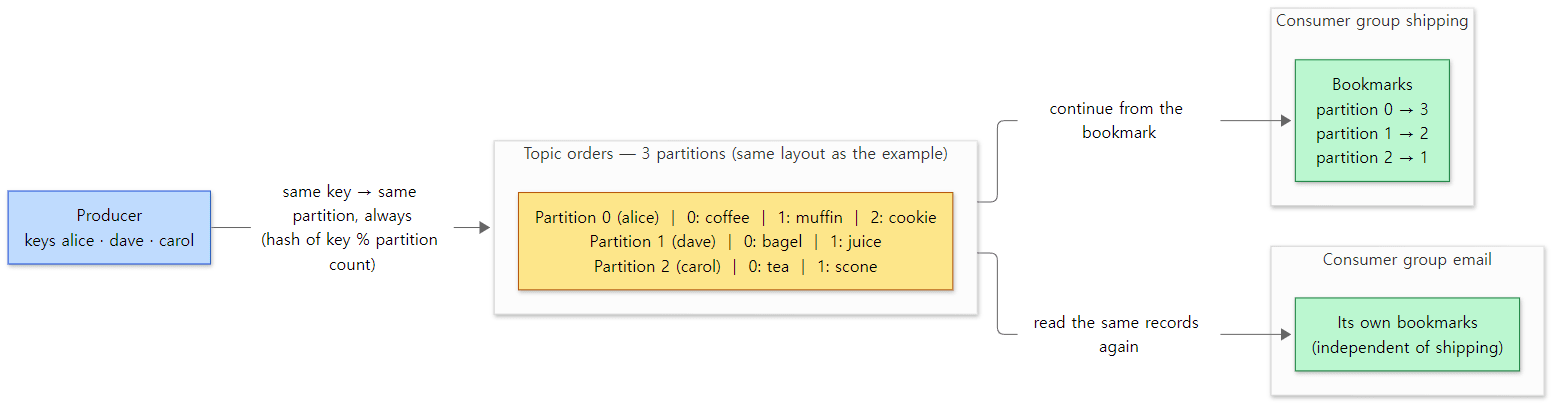 The state at step 6. The yellow box is the log on disk; the green boxes are the bookmarks each group keeps separately.
Five things to notice in the output:
- The same key goes to the same partition. All three of
alice's orders went to partition 0,dave's to 1 andcarol's to 2, and inside a partition they got offsets 0, 1, 2 in the order they were sent. The producer picks a partition by hashing the key and taking the remainder after dividing by the number of partitions (KafkaProducer.java lines 1695–1697, BuiltInPartitioner.java lines 413–415). Same key, same hash, so always the same partition. I picked these three names because they spread evenly over three partitions; other names could all land in one. - Both groups read every record. The output of steps 3 and 4 is identical. It's not a mailbox where a message disappears once someone takes it; the record stays, and each reader reads it for itself.
- Bookmarks exist per group, per partition. In step 6,
CURRENT-OFFSETis the bookmark (the next offset to read),LOG-END-OFFSETis the end of the log (the next offset to write), and the difference isLAG(how many are still unread). Only partition 2 has aLAGof 1, because ofcarol:sconefrom step 5. These bookmarks are stored on the broker in an internal topic called__consumer_offsets(Topic.java line 27) — so even bookmarks are written as records in a Kafka log. Part 11 looks inside. - Reading again resumes from the bookmark. In step 7,
shippingran without--from-beginningand got only the one new order. That's why a consumer can go down, come back and carry on without starting over. - Reading doesn't delete anything. In step 8, the new group
analyticsread all seven records from the start. Records stay on disk, read or not, until the retention time passes (7 days by default) or, if you set one, a size limit is exceeded (there is none by default). Theorders-0toorders-2in step 9 are the broker's per-partition folders on disk. Part 7 opens them up.
What it is used for
| Use | What it does | In the diagram above |
|---|---|---|
| Passing events between services | Something that happened in one service is picked up and handled by several others. The writer doesn't need to know the readers | Order service → shipping, email |
| Collecting logs and metrics | Access logs, errors and metrics from many servers are gathered in one place and handed to storage or analytics systems | Web server → data warehouse |
| Real-time analytics | Streams like clicks or payments are counted and grouped as they arrive, for dashboards or anomaly detection | Web server → live dashboard |
| Spreading DB changes (CDC) | Rows changed in a database are sent out as events to keep a search index, a cache or another DB in sync | DB change capture → search index |
| Buffering | A sudden burst of work is taken in first, then drained at a pace the systems behind can handle | Everything between writers and readers |
There are also places where it doesn't fit. For a small app with two or three services, running a Kafka cluster is more trouble than it saves. Calls that need an answer right away — logging in, approving a payment — suit a request-response style like HTTP. Kafka fits the shape "leave a record of what happened, and let whoever needs it come and get it."
On top of Kafka sit frameworks like Kafka Streams, which processes records as they flow, and Kafka Connect, which moves data to and from other systems. This series reads only the Kafka core underneath them (the broker and the clients).
Questions this series answers
Running the example raises questions. This series answers them one by one from the source. If one of them grabs you, feel free to start with that part.
| What you might wonder | Where the answer is |
|---|---|
What bytes does the line sent by kafka-console-producer.sh turn into on the wire? |
Part 3: the wire protocol |
| How does one broker handle many connections at once? | Part 4: the broker's network layer |
Does calling send() send right away? If not, when? |
Part 5: inside the producer |
How does the broker check and write the records it receives? What is inside the orders-0 folder? |
Part 6, Part 7: log storage |
| How does a consumer wait for new records, and how does the broker send bytes from disk without copying them? | Part 8: the read path and zero copy |
How do records survive a broker dying? What does acks=all wait for? |
Part 9: replication |
| Who remembers the list of topics and partitions? How, without ZooKeeper? | Part 10: KRaft and metadata |
| When more consumers join a group, who hands out the partitions? When are bookmarks saved? | Part 11: consumers and the group coordinator |
| Can you keep the same order from being written twice? How is "exactly once" built? | Part 12: idempotence and transactions |
The rest of this post gets ready to follow these questions through the source: which version is being read (section 1), how to get and build the source (section 2), a map of the folders (section 3), and which classes one record from the run above actually passes through (section 4). If you don't plan to build it yourself, you can skip section 2 without missing anything you need later.
Words to know first
The source keeps using names you never needed when writing an app. Pin down these six first and this post and the next will read much more easily.
Broker and controller are the two roles a Kafka server plays. The broker is the side we always connect to: it receives records, writes them to disk and serves them back. The controller decides and remembers the cluster's metadata (data about data), such as "which topics exist, and which broker leads each partition". One process can do both (most examples in this series run that way), or the roles can run as separate processes. The line process.roles=broker,controller in the config file is that choice.
KRaft is the name for how the controllers keep that metadata in agreement with each other: Kafka plus Raft, a consensus algorithm. In the old days a separate server, ZooKeeper, held the metadata; from 4.x on, only KRaft is left. In this commit's core/src/main, the word ZooKeeper appears in a single comment in TestRaftServer.scala. KRaft is covered in Part 10.
Partition, replica, leader. You already know these words, but here is what they mean in the source. A topic is split into partitions, and each partition is placed on several brokers as replicas (copies). One of them is the leader, which takes writes and reads. The other followers fetch records from the leader and write them to their own disks. The set of replicas that are keeping up with the leader is called the ISR (In-Sync Replicas).
Offset, LEO, high watermark. An offset is the number of a record within a partition (0, 1, 2 …). The LEO (Log End Offset) is "the offset the next record will get", i.e. the end of the log. The high watermark (HW) is the boundary of "what every ISR member has fetched". Consumers can only read records below the high watermark. Even a record the leader has just written stays invisible to consumers until the followers have fetched it (the figure in section 4, and Part 9).
Record batch and segment. Kafka doesn't handle records one at a time. It sends them as record batches (several records bound for the same partition, packed together) and writes those batches to disk as they are. The log on disk is not one file but several files called segments, and each segment has a .log (the records), a .index (offset → file position) and a .timeindex (timestamp → offset). Batches are covered in Part 6, segments in Part 7.
trunk and 4.4 are branch names in the Kafka repository. trunk is the development line for the next release (4.5); the stable releases we download come out of branches like 4.4 as tags (4.4.0). This series reads trunk. The difference is the subject of the next section.
1. Which version — trunk and 4.4.0
The version lives in gradle.properties
Kafka's version is written in gradle.properties at the top of the repository. Gradle (a build tool for Java projects) reads this file at the start of a build and uses its entries as project properties.
group=org.apache.kafka
version=4.5.0-SNAPSHOT
scalaVersion=2.13.18
4.5.0 has -SNAPSHOT attached. In the Maven/Gradle world, SNAPSHOT means "a development build that hasn't been released and keeps changing". So the Kafka built from the base commit calls itself 4.5.0-SNAPSHOT. The example in section 2 checks this directly with kafka-topics.sh --version.
How trunk relates to 4.4.0
Checking directly with git in this repository gives this.
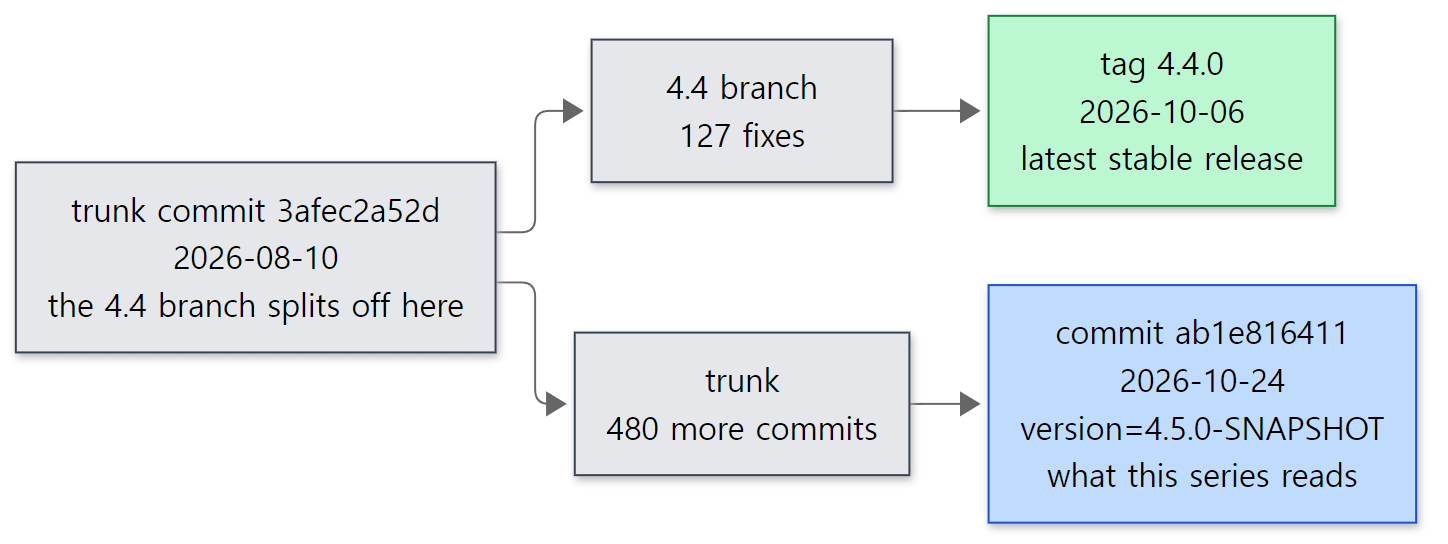 trunk and the 4.4 branch. The green box is the stable release we download; the blue box is the commit this series reads.
| Branch / tag | Version | What it is |
|---|---|---|
trunk (commit ab1e816411, 2026-10-24) |
4.5.0-SNAPSHOT | The development line for the next release. What this series reads |
tag 4.4.0 (commit 1156b2752a, 2026-10-06) |
4.4.0 | The latest stable release, from the 4.4 branch |
Where the two lines split (commit 3afec2a52d, 2026-08-10) |
— | The result of git merge-base 4.4.0 ab1e816411 |
Counting with git rev-list --count, trunk has 480 commits after the split, and the 4.4 branch has 127 more up to 4.4.0. 4.4.0 is not an ancestor of the base commit (git merge-base --is-ancestor says false). Since the split, each line has piled up its own commits.
Why read trunk at all? For the same reason the httpd and Tomcat series read their development lines. Fixes and new features land on the development line first, and the big structure (protocol, network layer, log, replication, KRaft) is the same on both lines. In return, whenever something this series states is different in 4.4.0, I say so. For this post, these are the differences that matter.
- The Gradle version differs. The base commit's
gradle/wrapper/gradle-wrapper.propertiesdownloads Gradle 9.8.2; the same file in 4.4.0 downloads 9.6.1. Both use Scala 2.13.18. - The
mirror-coordinatormodule exists only on trunk. It appeared on 2026-10-12 with commitf329565593("KAFKA-21222: Add broker-level configs for Cluster Mirroring"), and for now it holds a single config class (ClusterMirrorConfigs.java, 110 lines). It isn't in 4.4.0's list of top-level folders. That is whykafka-mirror-coordinator-4.5.0-SNAPSHOT.jarshows up in the jar list of the example below. - The rest of the top-level layout (
clients,core,server,storage,raft,metadata, the coordinators …) is the same. The map in section 3 fits 4.4.0 as well.
Clients on Java 11, servers on Java 17
Which Java the code is compiled for is set at the top of build.gradle.
ext {
  minClientJavaVersion = 11
  minNonClientJavaVersion = 17
  modulesNeedingJava11 = [":clients", ":generator", ":streams", ":streams:test-utils", ":streams:examples", ":streams:streams-scala", ":test-common:test-common-util"]
Modules in modulesNeedingJava11 are compiled with --release 11, everything else with --release 17 (line 120 of the same file: def releaseVersion = modulesNeedingJava11.any { … } ? minClientJavaVersion : minNonClientJavaVersion). clients and streams, which go into applications, still have to run on Java 11, while brokers and controllers only run on Java 17 or later. README.md and AGENTS.md say the build itself uses JDK 17 and 25; the examples in this series were built and run with JDK 25.
Easy to get confused
4.5.0-SNAPSHOT, but the metadata version is 4.4. When the example in section 2 formats storage, it prints Formatting … with metadata.version 4.4-IV2.. metadata.version is not the program's version: it is the version of the format the cluster uses to record metadata and for nodes to talk to each other. Even after you switch the program to a new release, moving the whole cluster to the new format is a separate step. The list of versions lives in the MetadataVersion enum.
    // Add support for controller unregistration (KIP-1312).
    IBP_4_4_IV2(33, "4.4", "IV2", true),

    //
    // NOTE: MetadataVersions after this point are unstable and may be changed.
    // If users attempt to use an unstable MetadataVersion, they will get an error unless
    // they have set the configuration unstable.feature.versions.enable=true.
    // Please move this comment when updating the LATEST_PRODUCTION constant.
    //

    // New version for the Kafka 4.5.0 release.
    IBP_4_5_IV0(34, "4.5", "IV0", false);
server-common/src/main/java/org/apache/kafka/server/common/MetadataVersion.java lines 133–144
A version for 4.5 (IBP_4_5_IV0, feature level 34) already exists, but as the comment says it is "unstable and may be changed". Line 163 of the same file is LATEST_PRODUCTION = IBP_4_4_IV2, and when you format without choosing a version (and without turning on unstable.feature.versions.enable), Formatter uses that latestProduction() (Formatter.java lines 277–292). That is why a 4.5.0-SNAPSHOT program starts with the 4.4-IV2 (feature level 33) format. In this post, "4.5" means the program version and "4.4-IV2" means the metadata format version. Metadata is covered in Part 10.
4.5.0 hasn't been released yet. Listing the repository's tags with git tag -l '4.*' ends at 4.4.0; there is no tag starting with 4.5. What people run in production is the 4.4.0 (or older) stable release.
2. Getting and building the same source
This section is for readers who want to run the examples themselves. If you only want to read, feel free to skip to section 3 (the folder map).
Clone the source and pin the commit
To open the line numbers in these posts yourself, you need the source at the same commit. If you have Git, do it in this order.
- Clone the repository. The history is long, so it takes a while.
- Check out the base commit separately. I left the cloned folder (
kafka) as it was and used git worktree to put just the base commit in another folder (kafka-ab1e816411). A worktree lets one repository have different commits checked out in different folders at the same time. That way, even if yougit pullthe latest source into the original folder, the line numbers in the base-commit folder don't move. - Check that it worked. You should see the full commit hash.
git clone https://github.com/apache/kafka.git
cd kafka
git worktree add --detach ../kafka-ab1e816411 ab1e8164115dba0a6c5ee39945698cbc4efb6f12
git -C ../kafka-ab1e816411 rev-parse HEAD
If a worktree feels like too much, you can move the cloned folder itself to that commit with git checkout ab1e8164115dba0a6c5ee39945698cbc4efb6f12. Git will tell you about a "detached HEAD"; that just means you checked out a specific commit rather than a branch, and it's fine for reading. To compare with 4.4.0, git show 4.4.0:<path> prints a file without changing your checkout.
You can also just read on the web. This link opens the commit on GitHub, and every code link in this series points at that same commit.
One thing to know if you cloned on Windows: because of Git's core.autocrlf=true setting, the checked-out files get CRLF line endings. That's fine for reading, but if you carry those files into Linux (Docker) as they are, the shell scripts won't run (the "where I got stuck" part of httpd Part 1). So the Docker build below uses an archive made with git archive without conversion.
Building in Docker
If you only want to read, you don't need to build. But this series runs every example it shows, so it needs a Kafka built from the base commit. Running the official release (4.4.0) instead would mean different line numbers and even different classes. So I built the base commit as-is inside a Docker container. Here is the Dockerfile I actually use.
# Image for the "Digging into Kafka's Source" examples.
# Builds the source of base commit ab1e816411 (trunk, 4.5.0-SNAPSHOT, 2026-10-24) as-is with Gradle.
# The source is kafka-ab1e816411.tar.gz made with git archive (core.autocrlf=false — LF line endings, untouched original).
#   git -C /d/openSource/kafka-ab1e816411 -c core.autocrlf=false archive --format=tar.gz --prefix=kafka/ \
#       -o kafka-ab1e816411.tar.gz ab1e8164115dba0a6c5ee39945698cbc4efb6f12
# Kafka is built and tested with JDK 17 and 25 (README). This uses 25.
#   docker build -t kafka-lab:ab1e816411 .     (about 10 minutes the first time, needs network)

# ---- stage 1: build the distribution tar.gz from source ----
FROM eclipse-temurin:25-jdk AS build
RUN apt-get update && DEBIAN_FRONTEND=noninteractive apt-get install -y --no-install-recommends curl git \
    && rm -rf /var/lib/apt/lists/*
COPY kafka-ab1e816411.tar.gz /usr/src/
WORKDIR /usr/src
# git archive has no .git, so pass the commit id explicitly (it shows up in the server log and --version).
# On its first run, gradlew downloads gradle-wrapper.jar and the Gradle 9.8.2 distribution.
# releaseTarGz is the task that builds the distribution tar.gz (-x test: don't run the tests).
RUN tar xzf kafka-ab1e816411.tar.gz && cd kafka \
    && ./gradlew --no-daemon -PcommitId=ab1e8164115dba0a6c5ee39945698cbc4efb6f12 releaseTarGz -x test

# core/build/distributions gets two files: the distribution and the docs (…-site-docs.tgz) — unpack only the distribution.
RUN mkdir /opt/kafka \
    && tar xzf /usr/src/kafka/core/build/distributions/kafka_2.13-4.5.0-SNAPSHOT.tgz -C /opt/kafka --strip-components=1

# Collect the Java source generated from JSON schemas during the build (not in the repository), per module → /opt/kafka-generated/<module>/...
RUN cd /usr/src/kafka && for d in $(find . -path "*/build/generated/main/java" -type d); do \
      m=${d#./}; m=${m%/build/generated/main/java}; \
      mkdir -p /opt/kafka-generated/$m && cp -r $d/. /opt/kafka-generated/$m/; \
    done

# ---- stage 2: runtime image ----
FROM eclipse-temurin:25-jdk
RUN apt-get update && DEBIAN_FRONTEND=noninteractive apt-get install -y --no-install-recommends \
      curl procps netcat-openbsd less \
    && rm -rf /var/lib/apt/lists/*
COPY --from=build /opt/kafka /opt/kafka
COPY --from=build /opt/kafka-generated /opt/kafka-generated
ENV KAFKA_HOME=/opt/kafka PATH=/opt/kafka/bin:$PATH
WORKDIR /work
CMD ["kafka-topics.sh", "--version"]
Here is what it does, step by step.
- It starts from an image with JDK 25.
eclipse-temurin:25-jdkis the OpenJDK 25 image made by Eclipse Adoptium. As we saw above, Kafka builds with 17 and 25. - It adds the base commit's source as an archive. It is the original, exported with
core.autocrlf=falseto avoid the CRLF problem mentioned above. - It builds with
./gradlew releaseTarGz.gradlewis the Gradle wrapper: a small script in the repository that, on its first run, downloads the Gradle version written ingradle-wrapper.properties(9.8.2) and uses it. So everyone builds with the same Gradle version without installing Gradle on their machine.releaseTarGzis the task that builds the same distribution archive you download from the Kafka website (bin/,config/,libs/) (build.gradle line 1395).-x testexcludes the test task. - It passes the commit id with
-PcommitId=…. Source exported withgit archivehas no.gitfolder, so the build can't figure out the commit on its own. The build script'sdetermineCommitId()uses-PcommitIdif given,HEADif there is a git repository, andunknownif neither (build.gradle lines 231–240). This value shows up inkafka-version.propertiesand in the server log in the example below. - It unpacks the distribution into
/opt/kafka. WithKAFKA_HOMEandPATHset, you can callkafka-topics.shdirectly inside the container. - It collects the generated source. The Java source produced by
processMessages(coming up next) isn't in the repository, so it is copied to/opt/kafka-generatedwhere it can be read.
On this PC (Docker Desktop on WSL2), the build step reported BUILD SUCCESSFUL in 16m 33s, and the whole image took about 17 minutes. Near the top of the build log is the line Starting build with version 4.5.0-SNAPSHOT (commit id ab1e8164) using Gradle 9.8.2, Java 25 and Scala 2.13.18 (printed by build.gradle line 305).
The step that generates code from JSON — processMessages
Kafka's build has a step you don't often see in other Java projects. Request and response classes are not written by hand; they are generated from JSON files.
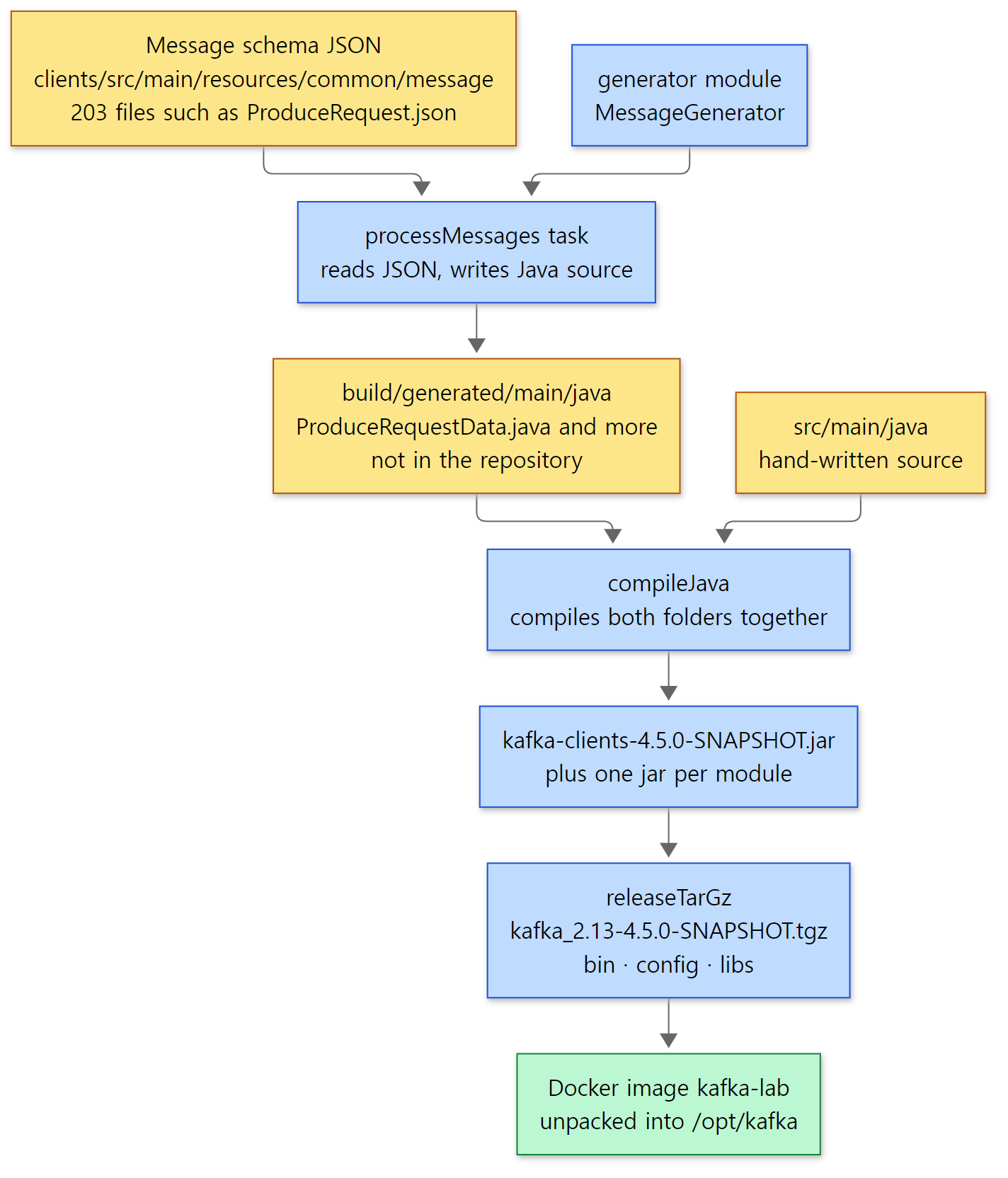 Where code is generated inside the build. Yellow boxes are sources (files), blue boxes are build steps. The generated source is not in the repository.
First, the JSON side. The shape of the Produce request a producer sends is written in this file.
{
  "apiKey": 0,
  "type": "request",
  "listeners": ["broker"],
  "name": "ProduceRequest",
  // ...
  "validVersions": "3-13",
  "flexibleVersions": "9+",
  // ...
  "fields": [
    { "name": "TransactionalId", "type": "string", "versions": "3+", "nullableVersions": "3+", "default": "null", "entityType": "transactionalId",
      "about": "The transactional ID, or null if the producer is not transactional." },
    { "name": "Acks", "type": "int16", "versions": "0+",
      "about": "The number of acknowledgments the producer requires the leader to have received before considering a request complete. Allowed values: 0 for no acknowledgments, 1 for only the leader and -1 for the full ISR." },
    { "name": "TimeoutMs", "type": "int32", "versions": "0+",
      "about": "The timeout to await a response in milliseconds." },
clients/src/main/resources/common/message/ProduceRequest.json lines 16–62 (omitted parts marked // ...)
The acks setting you used in your app appears here as the Acks field (int16, a 2-byte integer). acks=all travels over the wire as -1 ("-1 for the full ISR" in about). validVersions: "3-13" means this request has versions 3 through 13, and each field says from which version it exists, as in "versions": "3+".
The task that turns this JSON into Java is the clients module's processMessages.
  tasks.register('processMessages', JavaExec) {
    mainClass = "org.apache.kafka.message.MessageGenerator"
    classpath = configurations.generator
    args = [ "-p", "org.apache.kafka.common.message",
             "-o", "${projectDir}/build/generated/main/java/org/apache/kafka/common/message",
             "-i", "src/main/resources/common/message",
             "-t", "ApiMessageTypeGenerator",
             "-m", "MessageDataGenerator", "JsonConverterGenerator"
           ]
    inputs.dir("src/main/resources/common/message")
        .withPropertyName("messages")
        .withPathSensitivity(PathSensitivity.RELATIVE)
    outputs.cacheIf { true }
    outputs.dir("${projectDir}/build/generated/main/java/org/apache/kafka/common/message")
  }
JavaExec is "a task that runs one Java program". The program is MessageGenerator from the generator module in the same repository; it reads the JSON in -i and writes Java source into the -o folder (build/generated/main/java/…). Because of compileJava.dependsOn 'processMessages' at line 2199, in the same clients project configuration, this task always runs before compilation. inputs and outputs are declared so that Gradle can "skip regeneration when the JSON hasn't changed". How a task's inputs, outputs and skipping work is covered in the Gradle series.
In the build log, > Task :clients:processMessages is followed by MessageGenerator: processed 203 Kafka message JSON file(s).. And it isn't only clients: the same log shows processMessages for metadata (27 files), group-coordinator (44), share-coordinator (4), storage (5), transaction-coordinator (2), raft (1) and streams (1). The records written to the metadata log and to __consumer_offsets are made the same way.
Here is the generated side: the start of the serialization method in clients/build/generated/main/java/org/apache/kafka/common/message/ProduceRequestData.java, generated from ProduceRequest.json at build time (generated from the base commit, 1,104 lines).
    @Override
    public void write(Writable _writable, ObjectSerializationCache _cache, short _version) {
        int _numTaggedFields = 0;
        if (transactionalId == null) {
            if (_version >= 9) {
                _writable.writeUnsignedVarint(0);
            } else {
                _writable.writeShort((short) -1);
            }
        } else {
            byte[] _stringBytes = _cache.getSerializedValue(transactionalId);
            if (_version >= 9) {
                _writable.writeUnsignedVarint(_stringBytes.length + 1);
            } else {
                _writable.writeShort((short) _stringBytes.length);
            }
            _writable.writeByteArray(_stringBytes);
        }
        _writable.writeShort(acks);
        _writable.writeInt(timeoutMs);
(It's a generated file, so there is no GitHub link. The file starts with // THIS CODE IS AUTOMATICALLY GENERATED. DO NOT EDIT., and the excerpt above is its lines 231–250. It comes from the three fields at ProduceRequest.json lines 57–62.)
It writes TransactionalId → Acks → TimeoutMs in the JSON's field order. The thing to notice is the _version >= 9 fork. The JSON's "flexibleVersions": "9+" turned straight into code: from version 9 on, string lengths are written as variable-length integers (writeUnsignedVarint) instead of fixed 2-byte lengths (writeShort). Writing per-version branches like this by hand for more than 200 messages would invite mistakes, so it's left to a generator. Part 3 looks at this in detail.
The Kafka repository through Gradle's eyes
The Kafka repository is a Gradle multi-project build (one repository holding several subprojects that are built together). The list of subprojects is the include in settings.gradle (settings.gradle lines 76–140). There are 65 of them, and 26 are Streams upgrade-test projects (streams:upgrade-system-tests-0110 … -43). Names map to jars almost one-to-one: the clients project becomes kafka-clients-….jar, server becomes kafka-server-….jar, and so on; only core, which is Scala, adds the Scala version and becomes kafka_2.13-….jar. One place renames: because of project(":storage:api").name = "storage-api" (line 142), the folder storage/api becomes kafka-storage-api-….jar.
includeBuild 'api-checker' at line 22 of the same file is another very Gradle-ish device. api-checker is a separate Gradle build, wired in so that Kafka's build can use that build's plugins by name (a composite build). The comment above it says it was kept separate "so its Maven runtime dependencies don't end up on every developer's main-build classpath". How Gradle itself works (the configuration phase, the task graph, composite builds) belongs to the Gradle series; this series only looks at "what Kafka's build produces".
How the examples are run
Each post's examples live in one folder (like ex/u01-reading-plan) with a run.sh, run inside a container by a small script (run-example.sh). The heart of it is one line.
MSYS_NO_PATHCONV=1 docker run --rm -v "$here/$dir:/work" -v "$here/ex/_lib:/examples-lib:ro" -w /work \
  kafka-lab:ab1e816411 bash ./run.sh
It mounts the example folder at /work in the container, runs run.sh, and deletes the container right away (--rm). Every run starts from a clean server with freshly formatted storage, so topics or logs left by an earlier example can't interfere. No ports are opened on the host, so several examples can run at the same time without clashing. MSYS_NO_PATHCONV=1 stops Git Bash from rewriting arguments like /work into Windows paths (the same approach as the httpd and Tomcat series). The second -v mounts a helper script that starts servers in one line; later posts use it.
Example: asking the built Kafka directly
All examples in this series were run in a Docker container (Eclipse Temurin JDK 25) with Kafka 4.5.0-SNAPSHOT built as-is from the base commit (ab1e816411). The example folder is ex/u01-reading-plan; its run.sh asks for the version, formats storage, starts a server (one process acting as both broker and controller), and then continues with the example in section 4. Here is the first part of the output.
=== version
4.5.0-SNAPSHOT
=== kafka/kafka-version.properties inside kafka-clients jar
commitId=ab1e8164115dba0a6c5ee39945698cbc4efb6f12
version=4.5.0-SNAPSHOT
=== kafka jars in libs/
kafka-clients-4.5.0-SNAPSHOT.jar
kafka-coordinator-common-4.5.0-SNAPSHOT.jar
kafka-group-coordinator-4.5.0-SNAPSHOT.jar
kafka-group-coordinator-api-4.5.0-SNAPSHOT.jar
kafka-metadata-4.5.0-SNAPSHOT.jar
kafka-mirror-coordinator-4.5.0-SNAPSHOT.jar
kafka-raft-4.5.0-SNAPSHOT.jar
kafka-server-4.5.0-SNAPSHOT.jar
kafka-server-common-4.5.0-SNAPSHOT.jar
kafka-share-coordinator-4.5.0-SNAPSHOT.jar
kafka-shell-4.5.0-SNAPSHOT.jar
kafka-storage-4.5.0-SNAPSHOT.jar
kafka-storage-api-4.5.0-SNAPSHOT.jar
kafka-tools-4.5.0-SNAPSHOT.jar
kafka-tools-api-4.5.0-SNAPSHOT.jar
kafka-transaction-coordinator-4.5.0-SNAPSHOT.jar
kafka_2.13-4.5.0-SNAPSHOT.jar
(all jars: 108)
=== format storage
Bootstrap metadata: BootstrapMetadata(records=[ApiMessageAndVersion(FeatureLevelRecord(name='metadata.version', featureLevel=33) at version 0), ApiMessageAndVersion(FeatureLevelRecord(name='eligible.leader.replicas.version', featureLevel=1) at version 0), ApiMessageAndVersion(FeatureLevelRecord(name='group.version', featureLevel=1) at version 0), ApiMessageAndVersion(FeatureLevelRecord(name='share.version', featureLevel=2) at version 0), ApiMessageAndVersion(FeatureLevelRecord(name='streams.version', featureLevel=1) at version 0), ApiMessageAndVersion(FeatureLevelRecord(name='transaction.version', featureLevel=2) at version 0)], metadataVersionLevel=33, source=format command)
Formatting dynamic metadata voter directory /tmp/kraft-combined-logs with metadata.version 4.4-IV2.
=== start server
INFO [KafkaRaftServer nodeId=1] Kafka Server started (kafka.server.KafkaRaftServer)
INFO Kafka version: 4.5.0-SNAPSHOT (org.apache.kafka.common.utils.internals.AppInfoParser)
INFO Kafka commitId: ab1e8164115dba0a6c5ee39945698cbc4efb6f12 (org.apache.kafka.common.utils.internals.AppInfoParser)
(The Connect and Streams jars were filtered out of the jar list with grep, and the timestamps were cut off the server log lines.) Taking it piece by piece:
- Where the
--versionstring comes from.kafka-topics.shcallsorg.apache.kafka.tools.TopicCommandthroughkafka-run-class.sh, and with--version,CommandLineUtils.printVersionAndExit()printsAppInfoParser.getVersion()(CommandLineUtils.java lines 173–174).AppInfoParserreads/kafka/kafka-version.propertiesfrom the classpath (AppInfoParser.java lines 42–51). That file is written into the jar by the build'screateVersionFiletask withversionandcommitId(build.gradle lines 2096–2113). So theversionfromgradle.propertiesand the-PcommitIdfrom the Dockerfile come out unchanged. The server logs the same two values through the same class when it starts. - Jar names are module names. The
settings.gradleprojects we just saw are sitting inlibs/as jars.libs/holds 108 jars in total; the rest are Connect and Streams plus outside libraries (Jackson, Log4j, the compression librarieszstd-jni,lz4-java,snappy-javaand so on). We'll see these names again in section 3's map. - Formatting writes metadata up front.
kafka-storage.sh formatcreates the data folder and prepares the first metadata records (sixFeatureLevelRecords that set feature levels). The4.4-IV2from section 1's "Easy to get confused" comes from here. Why storage has to be formatted before the server starts is covered in Part 2 and Part 10. - The server is named
KafkaRaftServer. The last line ofkafka-server-start.shcallskafka-run-class.sh … kafka.Kafka, and the only serverkafka.Kafkaever builds is aKafkaRaftServer(Kafka.scala lines 65–71). That server turns on the broker and/or controller according toprocess.roles. In the ZooKeeper days there were other server classes too; now there is nothing to choose.
Easy to get confused
The commit id has 40 characters, not 16. determineCommitId() cuts the -PcommitId value to 16 characters with commitId.take(takeFromHash). Yet the kafka-version.properties in the output above holds the full 40 characters passed in by the Dockerfile. That means the commitId read by the subproject's (clients) createVersionFile is not the shortened value the root project stored in ext, but the raw value passed with -P. It looks like a question of how Gradle looks up -P properties (what a subproject sees first), but I did not confirm that in Gradle's source. The commit id ab1e8164 at the top of the build log is line 305 shortening it again with commitId.take(8).
AppInfoParser lives in an internals package. The class name printed in the server log is org.apache.kafka.common.utils.internals.AppInfoParser. In recent years Kafka has been separating "public API" from "internal implementation" by package name, which is why the record format classes (MemoryRecords, DefaultRecordBatch …) are in common/record/internal/ too. Paths in blog posts or in an AI's memory often don't match this commit, so this series checks every class location with git ls-files before writing it down.
3. Folder map — what lives where
Top-level folders
At the base commit git tracks 7,633 files. Of those, 6,529 are .java and .scala sources, 1,734,167 lines in total (blank lines and comments included). Counting only the main code (src/main), not tests, gives 3,933 files and 719,878 lines. Counted module by module, it looks like this (files under src/main selected with git ls-files, newlines counted the same way as wc -l; generated code isn't in the repository, so it isn't counted).
| Folder | What's in it | src/main files |
Lines | Posts |
|---|---|---|---|---|
clients |
Producer, consumer and admin clients, protocol classes, record format, networking (Selector) |
1,356 | 201,082 | 3·5·6·8·11 |
core |
Where the broker's remaining Scala lives — KafkaApis, ReplicaManager, Partition, SocketServer, KafkaRaftServer |
Scala 52 + Java 15 | 25,787 + 8,101 | 2·4·6·8·9·12 |
server |
Broker parts moved to Java — request object (Request), purgatory (DelayedProduce), socket server configs |
172 | 23,510 | 4·6·8·9 |
server-common |
Shared by the server modules — configs, event queue, purgatory base | 150 | 19,721 | 8·10 |
storage (+storage/api) |
Log storage — UnifiedLog, LocalLog, LogSegment, indexes, log cleaning |
123 + 16 | 27,746 + 1,935 | 6·7·8·9 |
raft |
KRaft's Raft implementation — KafkaRaftClient |
91 | 20,803 | 10 |
metadata |
The controller (QuorumController) and the metadata image |
179 | 30,651 | 10 |
group-coordinator (+-api) |
Consumer group coordinator | 112 + 26 | 49,061 + 1,292 | 11 |
coordinator-common |
Runtime shared by the coordinators (CoordinatorRuntime) |
36 | 7,110 | 11 |
transaction-coordinator |
Transaction state (TransactionMetadata etc.) |
21 | 2,002 | 12 |
share-coordinator |
Share groups | 12 | 3,621 | — |
generator |
JSON → Java code generator (MessageGenerator) |
36 | 8,189 | 3 |
tools (+tools-api) |
The command-line tools themselves — TopicCommand, ConsumerGroupCommand … |
81 + 7 | 27,991 + 232 | used in examples |
shell |
kafka-metadata-shell.sh |
23 | 2,776 | 10 |
streams (with submodules) |
Kafka Streams | Java 795 + Scala 24 | 152,374 + 3,925 | — |
connect (with submodules) |
Kafka Connect | 368 | 64,928 | — |
bin/, config/ |
Launch scripts (kafka-server-start.sh …) and sample configs (server.properties …) |
— | — | used in examples |
bin/ and config/ are exactly the folders you saw when you unpacked a release. releaseTarGz copies these two folders in as they are (build.gradle lines 1399–1400). The tests are bigger than the main code: src/test alone is 878,667 lines of Java and 104,397 lines of Scala. When some behavior is confusing, finding the test with the same name (e.g. PartitionTest) often reveals the intent.
The main code I read for the Spring series was about 840,000 lines without tests, and Tomcat was about 740,000 lines including tests, so Kafka's 720,000 lines of main code are close to Spring. But the part this series reads, "the record's path and the cluster", leaves out Streams and Connect (a little over 220,000 lines together) and the admin client and tools.
Generated code isn't counted
The line counts in the table above don't include the generated code from section 2. Counting the source generated by building the base commit gives 391 files and 186,401 lines for clients alone — almost as much as the hand-written clients main code (201,082 lines), appearing anew with every build. Adding group-coordinator (90 files, 21,488 lines), metadata (56 files, 12,668 lines) and the rest gives 568 files and 230,523 lines. If you go looking for a class like ProduceRequestData and stop with "it's not in the repository?", remember that message classes whose names end in Data or …Record are generated.
Java and Scala
Kafka's broker was written in Scala for a long time. Today Scala is 29,712 lines of the main code (src/main), about 4% of it, and it lives in just two places: core (25,787 lines) and streams/streams-scala (3,925 lines, Streams' API for Scala). The folder table in AGENTS.md describes core like this.
Broker runtime, log, replication, request handling (gradually being removed along with Scala code)
And indeed, the log (UnifiedLog, LogSegment) has already moved to Java in storage, and core/…/kafka/log/LogManager.scala (72 lines) is an empty shell. The group coordinator was rewritten in Java in group-coordinator. Still, KafkaApis (4,404 lines), which dispatches requests, ReplicaManager (2,577 lines) and Partition (1,856 lines), which manage partitions, and the network's SocketServer (1,695 lines) are still Scala. The middle of the record's path is Scala, so Scala code keeps showing up in this series. Conversely, core's tests still contain 102,110 lines of Scala, so across the whole repository most of the Scala is tests.
Seen as dependencies
Following what each module uses through implementation project(…) in build.gradle stacks them like this.
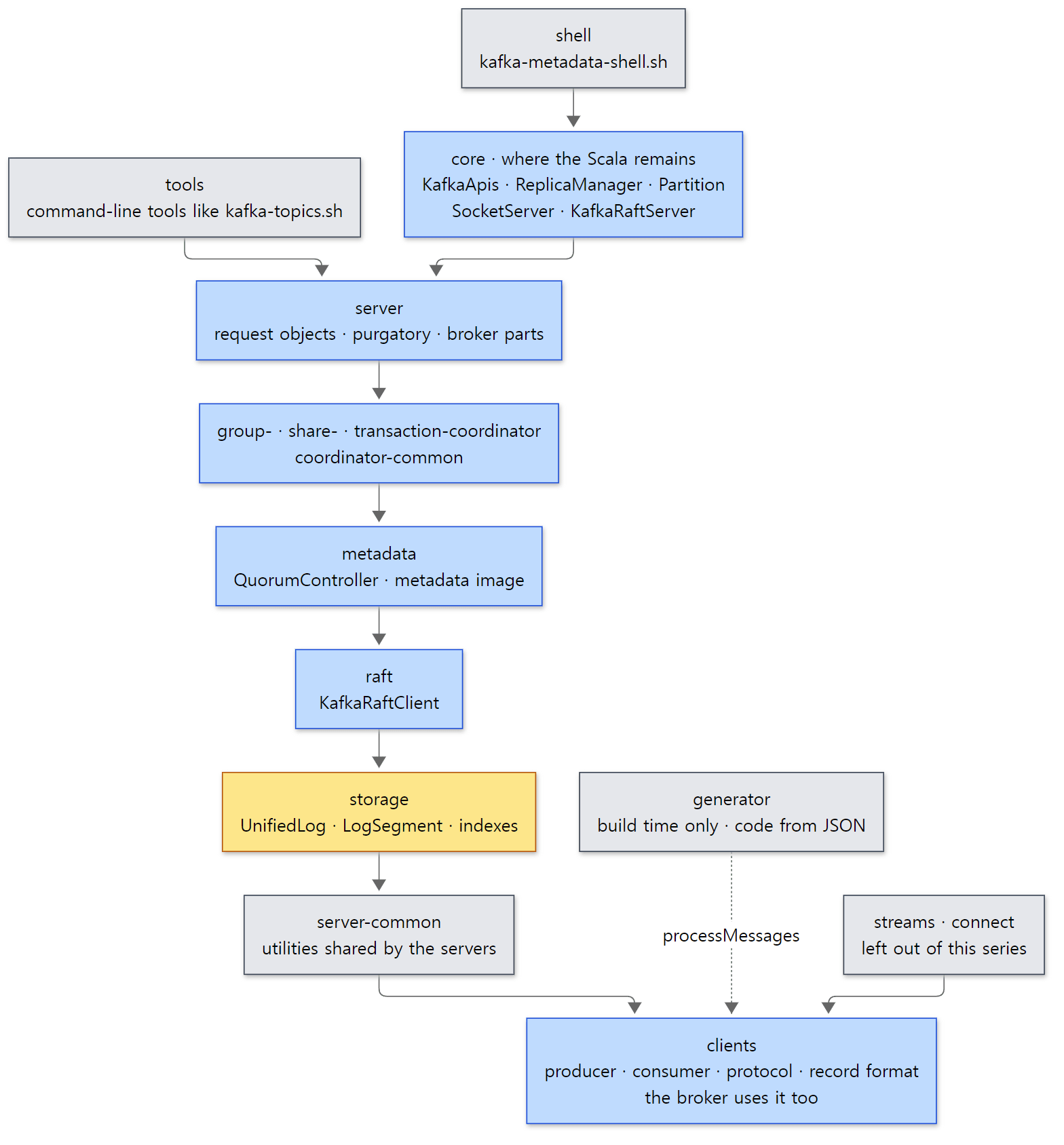 The module map. Arrows show the main direction of "uses" (build dependency). In reality every server-side module uses
clients directly, and many dependencies skip levels.
Two things are worth remembering from this figure.
First, the broker uses clients too. The name makes it look like a client-only library, but the protocol classes (ApiKeys, the generated …Data), the record format (MemoryRecords) and non-blocking networking (Selector, KafkaChannel) all live there, and the broker uses them as they are. That is why the broker reads a producer's batch with the same classes and writes it to disk almost unchanged (Part 6). That the broker's network layer uses the same Selector as the clients is covered in Part 4.
Second, core ties everything together. server, storage, raft, metadata and the coordinators know little about each other, and the work of building them and wiring them up (BrokerServer, ControllerServer) is done by core. What gets built in what order is covered in Part 2.
Files this series will spend a lot of time in
| File | Lines | Posts |
|---|---|---|
clients/…/producer/KafkaProducer.java |
1,837 | 5 |
clients/…/producer/internals/RecordAccumulator.java |
1,500 | 5 |
clients/…/producer/internals/Sender.java |
1,144 | 5 |
core/…/network/SocketServer.scala |
1,695 | 4 |
core/…/server/KafkaApis.scala |
4,404 | 4·6·8 |
core/…/server/ReplicaManager.scala |
2,577 | 6·8·9 |
core/…/cluster/Partition.scala |
1,856 | 6·9 |
storage/…/log/UnifiedLog.java |
2,806 | 6·7·9 |
storage/…/log/LogSegment.java |
902 | 7·8 |
raft/…/raft/KafkaRaftClient.java |
4,185 | 10 |
metadata/…/controller/QuorumController.java |
2,245 | 10 |
group-coordinator/…/group/GroupMetadataManager.java |
10,188 | 11 |
GroupMetadataManager.java is over 10,000 lines in a single file. Files like that aren't read from the top; we start from one behavior you've seen in an app (e.g. "what happens when one more consumer joins?") and follow only that path.
Easy to get confused
Some file names exist twice. core/src/main/scala/kafka/network/SocketServer.scala is the real home of the Acceptor and Processor threads, while server/src/main/java/org/apache/kafka/network/SocketServer.java is a small Java class holding a few constants and helpers. Because code is being moved from Scala to Java, there are several pairs like this. Open a search result by file name alone and you may end up reading the wrong one. Look at the module name in the path (core or server) and the extension together.
Folder names and package names differ. The server module contains packages such as org.apache.kafka.network and org.apache.kafka.server, and the log classes of the storage module are in org.apache.kafka.storage.internals.log. core's Scala uses short packages without org.apache, like kafka.server and kafka.network. In a stack trace, kafka.server.… usually means Scala in core, and org.apache.kafka.… means a Java module.
4. The big road one record travels
Parts 3 through 9 follow the road one record travels, in order. The road is long, so the figure is split in two. First, from sending to writing on disk.
The write road — from send() to the .log file
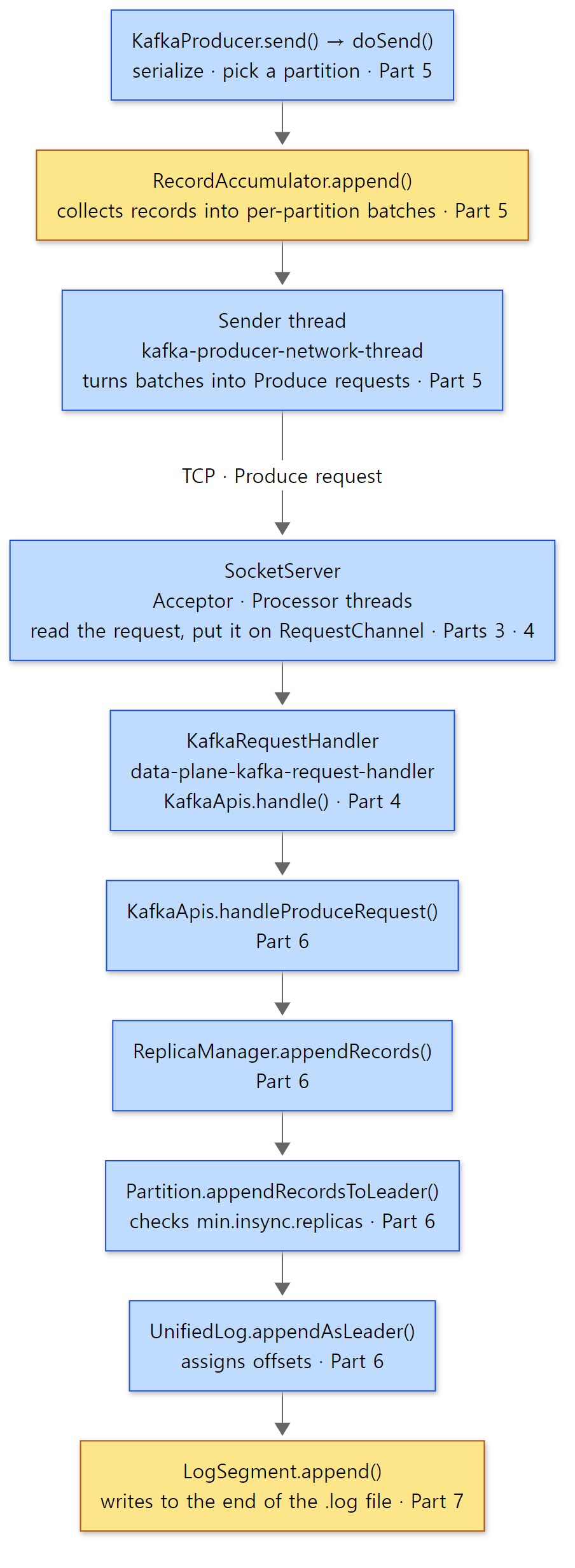 How one record gets written to disk. The top three boxes are inside your app (the client); the rest is the broker. Yellow boxes are where the record rests for a while (a batch in memory, a file on disk).
The figure only shows the big boxes. In reality there is ReplicaManager.handleProduceAppend() between KafkaApis.handleProduceRequest() and ReplicaManager.appendRecords(), ReplicaManager's own appendRecordsToLeader() and appendToLocalLog() between appendRecords() and Partition, and LocalLog.append() between UnifiedLog and LogSegment. Linking it to the settings you know from apps:
| Stage | What you saw in apps and configs | Post |
|---|---|---|
| Shape of requests and responses | acks riding the wire as -1; clients and brokers of different versions still talking |
3 |
| Broker network and request handler threads | num.network.threads, num.io.threads, queued.max.requests |
4 |
| Producer | linger.ms, batch.size, buffer.memory, max.in.flight.requests.per.connection, callbacks |
5 |
| Broker accepts and writes | acks, min.insync.replicas, compression.type |
6 |
| Disk | log.segment.bytes, log.retention.hours, cleanup.policy=compact |
7 |
Replication and reading — past the high watermark to poll()
Writing to disk isn't the end. With acks=all the response waits until the followers have fetched the record, and consumers can only read up to what the followers have fetched.
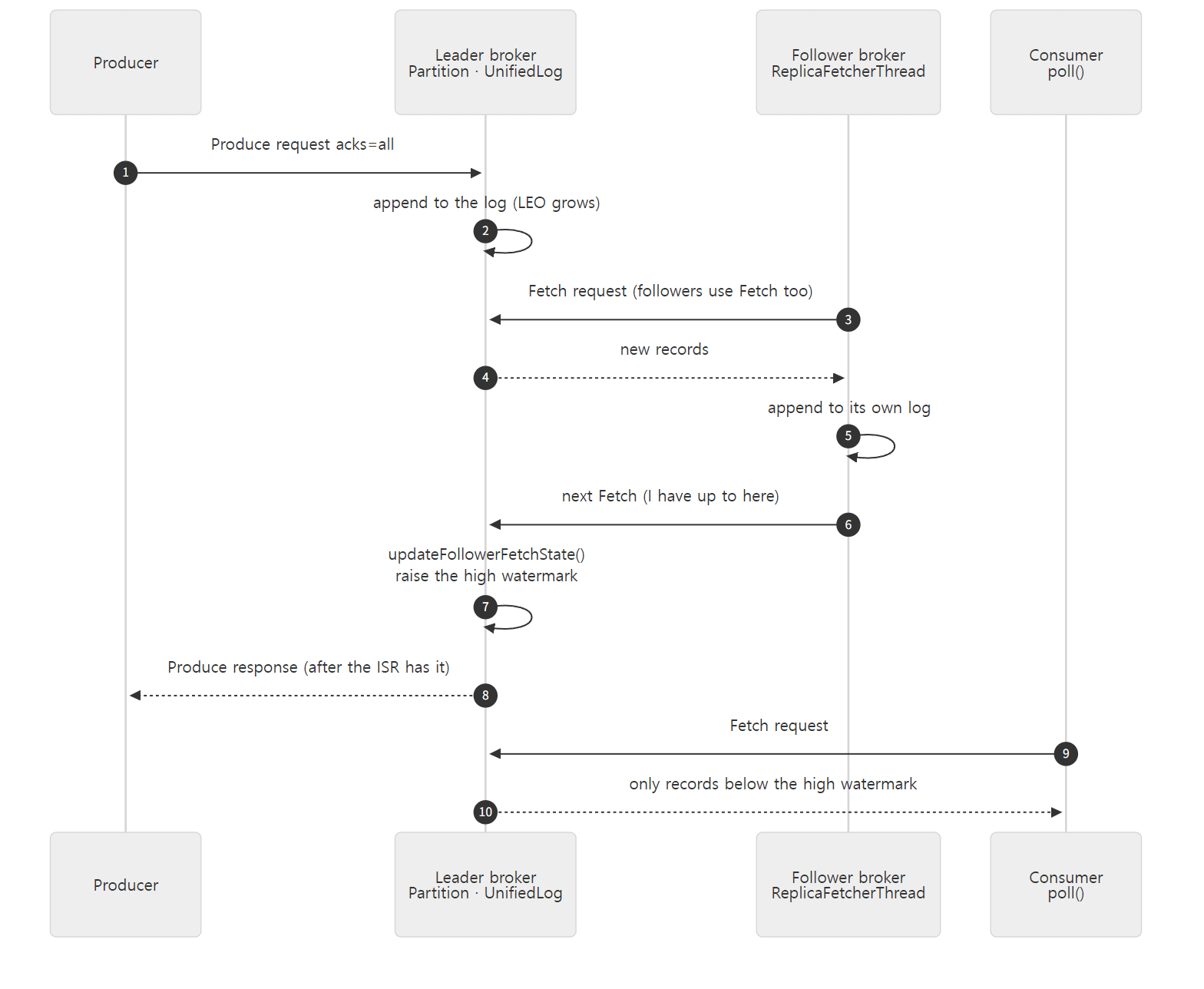 Replication and reading. Followers fetch records with the same Fetch request that consumers use (3, 9).
Here is where each number lives in the source.
- 3, 6 — the follower's Fetch. A follower broker gets a thread named
ReplicaFetcherThread-<number>-<leader broker id>(ReplicaFetcherManager.scala line 42). This thread sends the leader the same Fetch request a consumer would. On the leader,Partition.fetchRecords()checks whether the Fetch came from a follower and, if so, callsupdateFollowerFetchState()after reading (Partition.scala lines 1301–1325). A follower saying "next, give me from offset N" is itself the report "I have everything before N" (Part 9). - 7 — raising the high watermark. Inside
updateFollowerFetchState()the leader checks whether to widen the ISR (maybeExpandIsr) and whether the high watermark can move up (maybeIncrementLeaderHW) (from Partition.scala line 769). - 8 — the wait behind
acks=all. Whether the response can go out is decided byPartition.checkEnoughReplicasReachOffset(), and the condition isleaderLog.highWatermark >= requiredOffset(from Partition.scala line 949). Until the condition holds, the request waits as aDelayedProduceobject in the purgatory (a waiting room that holds requests until their condition is met or their time runs out) (Part 9). - 10 — consumers stop at the high watermark. If the Fetch came from a consumer,
FetchIsolation.of()picksHIGH_WATERMARK(orTXN_COMMITTEDunder theread_committedtransaction isolation); if it came from a follower, it picksLOG_END(FetchIsolation.java lines 31–39). That's why, with the same Fetch, a follower reads to the end of the log and a consumer reads up to the high watermark. The read path is in Part 8, transaction isolation in Part 12.
Underneath all of this is metadata such as "the leader of partition 0 of topic path is broker 1, and the ISR is 1, 2, 3". Deciding and spreading that is the job of the controller and KRaft (Part 10), and letting several consumers share the partitions is the group coordinator's job (Part 11).
A sneak peek at two spots in the code
One: where send() drops off the record. The middle of KafkaProducer.doSend().
            // Append the record to the accumulator.  Note, that the actual partition may be
            // calculated there and can be accessed via appendCallbacks.topicPartition.
            RecordAccumulator.RecordAppendResult result = accumulator.append(record.topic(), partition, timestamp, serializedKey,
                    serializedValue, headers, appendCallbacks, remainingWaitMs, nowMs, cluster);
            assert appendCallbacks.getPartition() != RecordMetadata.UNKNOWN_PARTITION;
            // ...
            if (result.batchIsFull || result.newBatchCreated) {
                log.trace("Waking up the sender since topic {} partition {} is either full or getting a new batch", record.topic(), appendCallbacks.getPartition());
                this.sender.wakeup();
            }
            return result.future;
clients/src/main/java/org/apache/kafka/clients/producer/KafkaProducer.java lines 1233–1251 (omitted parts marked // ...)
send() sends nothing over the network. It puts the serialized key and value into the RecordAccumulator (a memory buffer that stacks up per-partition batches), wakes the Sender thread if the batch is full or a new batch was opened (sender.wakeup()), and returns a Future. The actual sending is done by the kafka-producer-network-thread | <client.id> thread created in the constructor (KafkaProducer.java line 521). Even if a batch isn't full, it is sent once linger.ms has passed; that decision is in RecordAccumulator.ready() (Part 5).
Two: where the broker dispatches requests. A request handler thread takes one request off the queue and calls KafkaApis.handle() (KafkaRequestHandler.scala line 167). This is the series' first Scala code.
  override def handle(request: Request, requestLocal: RequestLocal): Unit = {
    // ...
      request.header.apiKey match {
        case ApiKeys.PRODUCE => handleProduceRequest(request, requestLocal)
        case ApiKeys.FETCH => handleFetchRequest(request)
        case ApiKeys.LIST_OFFSETS => handleListOffsetRequest(request)
        case ApiKeys.METADATA => handleTopicMetadataRequest(request)
        // ...
core/src/main/scala/kafka/server/KafkaApis.scala lines 157–178 (omitted parts marked // ...)
Reading Scala —
def handle(request: Request, …): Unitdeclares a method; parameters are writtenname: Type, and: Unitis Java'svoid(no return value).overrideis the same as Java's@Override.x match { case A => … }is like Java'sswitch: for each value you writecase value => what to do.
If the request header's apiKey is PRODUCE (the "apiKey": 0 from the JSON in section 2), it goes to handleProduceRequest(); if FETCH, to handleFetchRequest(). Produce and Fetch, just these two, are nearly all of the two figures above. The producer, the followers and the consumers all come in through the first two lines of this match.
Example: does a record really take this road?
I checked the figures in two ways. One is threads: which named threads the boxes actually run on, seen from both the client and the server. The other is disk: whether the records really were written to a segment file as a batch. Here is the example client.
// An example written for this post (not part of Kafka's source)
// Sends three records (producer) and reads them back (consumer), printing which thread each step runs on.
import java.time.Duration;
import java.util.List;
import java.util.Properties;
import org.apache.kafka.clients.consumer.ConsumerRecord;
import org.apache.kafka.clients.consumer.KafkaConsumer;
import org.apache.kafka.clients.producer.KafkaProducer;
import org.apache.kafka.clients.producer.ProducerRecord;
import org.apache.kafka.common.TopicPartition;
import org.apache.kafka.common.serialization.StringDeserializer;
import org.apache.kafka.common.serialization.StringSerializer;

public class Path {
    public static void main(String[] args) throws Exception {
        String topic = "path";

        Properties p = new Properties();
        p.put("bootstrap.servers", "localhost:9092");
        p.put("client.id", "path-demo");
        p.put("key.serializer", StringSerializer.class.getName());
        p.put("value.serializer", StringSerializer.class.getName());
        try (KafkaProducer<String, String> producer = new KafkaProducer<>(p)) {
            for (int i = 1; i <= 3; i++) {
                String value = "record-" + i;
                // send() puts the record in a buffer and returns at once — another thread does the actual sending
                producer.send(new ProducerRecord<>(topic, value), (md, e) -> {
                    // callback: called when the broker's response arrives
                    System.out.printf("ack     %s -> offset %d (callback thread: %s)%n",
                            value, md.offset(), Thread.currentThread().getName());
                });
                System.out.printf("send()  %s returned  (caller thread: %s)%n",
                        value, Thread.currentThread().getName());
            }
            producer.flush(); // send everything left in the buffer and wait for the responses
        }

        Properties c = new Properties();
        c.put("bootstrap.servers", "localhost:9092");
        c.put("key.deserializer", StringDeserializer.class.getName());
        c.put("value.deserializer", StringDeserializer.class.getName());
        try (KafkaConsumer<String, String> consumer = new KafkaConsumer<>(c)) {
            // no group: take partition 0 directly and read from the beginning
            TopicPartition tp = new TopicPartition(topic, 0);
            consumer.assign(List.of(tp));
            consumer.seekToBeginning(List.of(tp));
            int got = 0;
            long deadline = System.currentTimeMillis() + 15_000;
            while (got < 3 && System.currentTimeMillis() < deadline) {
                for (ConsumerRecord<String, String> r : consumer.poll(Duration.ofMillis(500))) {
                    System.out.printf("poll()  %s at offset %d (thread: %s)%n",
                            r.value(), r.offset(), Thread.currentThread().getName());
                    got++;
                }
            }
        }
    }
}
run.sh creates a one-partition topic path and runs this file with java -cp "$KAFKA_HOME/libs/*" Path.java (since JDK 11 you can run a single .java file directly without compiling it first). Then it takes a thread dump of the server process with jstack, keeps only the threads that appear in the figures, folds the numbers in their names into N and counts them, and looks at the data folder's files and the segment contents with kafka-dump-log.sh. The output (the Created topic path. line from topic creation and the server shutdown at the end are left out):
=== java client (Path.java)
send()  record-1 returned  (caller thread: main)
send()  record-2 returned  (caller thread: main)
send()  record-3 returned  (caller thread: main)
ack     record-1 -> offset 0 (callback thread: kafka-producer-network-thread | path-demo)
ack     record-2 -> offset 1 (callback thread: kafka-producer-network-thread | path-demo)
ack     record-3 -> offset 2 (callback thread: kafka-producer-network-thread | path-demo)
poll()  record-1 at offset 0 (thread: main)
poll()  record-2 at offset 1 (thread: main)
poll()  record-3 at offset 2 (thread: main)
=== server threads (jstack, numbers folded to N)
      3 data-plane-kafka-network-thread-N-CONTROLLER-PLAINTEXT-N
      3 data-plane-kafka-network-thread-N-PLAINTEXT-PLAINTEXT-N
     16 data-plane-kafka-request-handler-N
      1 data-plane-kafka-socket-acceptor-CONTROLLER-PLAINTEXT-N
      1 data-plane-kafka-socket-acceptor-PLAINTEXT-PLAINTEXT-N
      1 kafka-N-raft-io-thread
      1 quorum-controller-N-event-handler
threads named exactly data-plane-kafka-request-handler-0: 2
=== segment files
10485760 00000000000000000000.index
106 00000000000000000000.log
10485756 00000000000000000000.timeindex
8 leader-epoch-checkpoint
43 partition.metadata
=== dump the log segment (fields trimmed)
baseOffset: 0 lastOffset: 2 count: 3
offset: 0 payload: record-1
offset: 1 payload: record-2
offset: 2 payload: record-3
(Only the needed fields of the kafka-dump-log.sh output were kept with grep. I ran this example several times; only the size of the .log file changed between runs, 106 or 108 bytes, and everything else was the same every time. Each record stores its time difference from the batch's first record (TimestampDelta) as a variable-length integer (DefaultRecord.java line 180), so depending on the gap between send() calls a record can grow by a byte.) Matching it against the figures:
send()returns at once. All threesend()calls return on themainthread before any response (ack) arrives. And the callback runs not onmainbut onkafka-producer-network-thread | path-demo. Of the top three boxes in the figure,send()andRecordAccumulatorare on your thread and the Sender is another thread, and you can see exactly that. Thepath-demoat the end of the thread name is theclient.idsetting.- Threads on the broker. Each listener (
PLAINTEXT9092,CONTROLLER9093) has one Acceptor (data-plane-kafka-socket-acceptor-…) and three Processors (data-plane-kafka-network-thread-…). There are three becausenum.network.threadsis 3 (the config file says 3, and the default at SocketServerConfigs.java line 152 is also 3). The Processor names are given at SocketServer.scala line 746. This structure, which resembles Tomcat's Acceptor, Poller and worker threads (Tomcat Part 5), is covered in Part 4. - KRaft shows up as threads too.
kafka-1-raft-io-thread(the Raft client) andquorum-controller-1-event-handler(the controller's event-processing thread). That the controller runs on one thread on top of an event queue is a topic of Part 10. - One batch, three records. The
.logfile is 106 bytes (sometimes 108, as explained in the note above) and holds one batch withbaseOffset: 0 lastOffset: 2 count: 3. The threesend()calls were packed into a single batch inside the producer, went out in one Produce request, and the broker wrote that batch as it was. At this base commit the defaultlinger.msis 5 (milliseconds) (ProducerConfig.java line 445), so back-to-backsend()calls ended up in one batch. How batches change when you change this setting is in Part 5; the byte layout of a batch is in Part 6. - A segment file is named after its first offset.
00000000000000000000is this segment's first offset, 0, written with 20 digits. When a segment grows and the log rolls to the next file, that file is named after its own first offset (Part 7).
Easy to get confused
There are 16 request handler threads, not 8, and the names collide. num.io.threads is 8 (the default at ServerConfigs.java line 60 is also 8), yet 16 data-plane-kafka-request-handler-N threads show up, and two threads are named exactly …-handler-0. This example's server is both broker and controller: the broker builds a pool for KafkaApis (BrokerServer.scala lines 518–525) and the controller builds a pool for ControllerApis (ControllerServer.scala lines 298–305), each with config.numIoThreads threads. But both pools name their threads "data-plane-kafka-request-handler-" + id (KafkaRequestHandler.scala line 275). You can't tell from the name in a thread dump which pool a thread belongs to; check whether its stack has KafkaApis or ControllerApis.
The .index file is 10 MB and empty. We wrote only three records, yet .index is 10,485,760 bytes and .timeindex 10,485,756 bytes. Index files are allocated at their maximum size from the start (log.index.size.max.bytes, default 10 * 1024 * 1024 — ServerLogConfigs.java line 93) and used through a memory mapping. .timeindex is 4 bytes smaller because each entry is 12 bytes, so the size is rounded down to a multiple of 12 (AbstractIndex.java line 113, TimeIndex.java line 56). They are trimmed to their real size when the segment stops being the active one. This is covered in Part 7.
This example has no followers. With a single server, steps 3–7 of the replication figure don't happen. The ISR is just the leader itself, so the high watermark moves up as soon as a record is written. Followers and a moving ISR with three brokers are covered in Part 2 and Part 9.
5. How to read it — with AI, but checked against the source
The reading loop
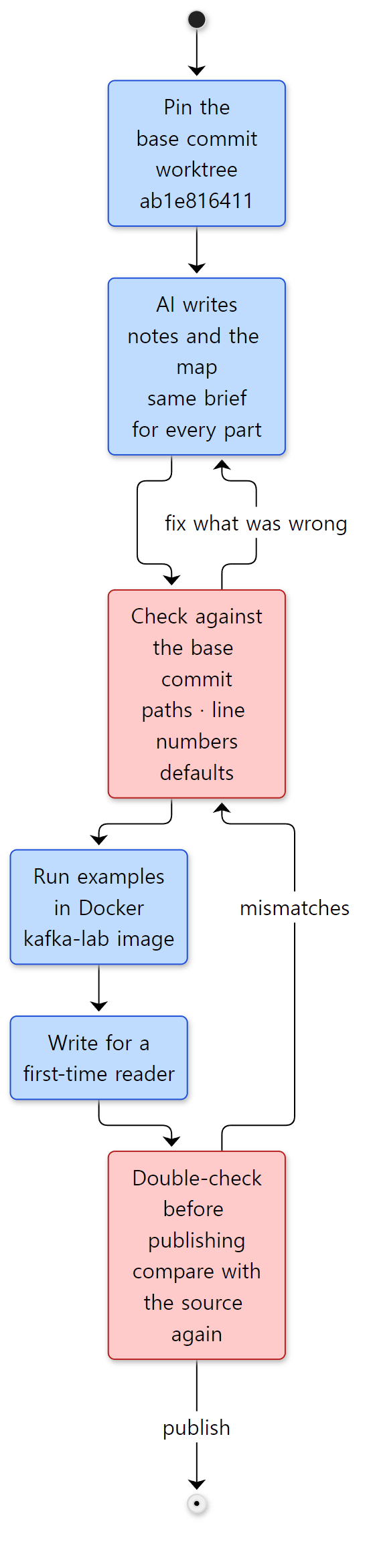 The order in which one post is read and written. Blue boxes are steps; red boxes are where mistakes in AI-written content get filtered out.
The principle is the same as in the Spring, httpd and Tomcat series. Don't read everything at once; pick one question from the map and read deeply only the code needed to answer it. In this series, one question is one post.
- Pin the base commit. That's the worktree from section 2. Line numbers have to stay put for the AI's evidence to be checkable.
- AI writes the notes and the map. The 12-post plan and, for each post, the starting classes and example ideas were made this way. Each post got the same brief (what to read, in what format, with what kind of evidence), and each AI task was given one post.
- Check again against the base commit's source. The classes in the brief are only starting points; what goes into a post is only what I confirmed in the source. Kafka has moved many classes from Scala to Java modules, so paths are looked up with
git ls-filesevery time, and config defaults are read fromdefine(…)in…Config.java. - Actually run the examples. As in section 4, a small example that makes one claim visible is run in a container, and its output goes in as-is.
- Check once more before publishing. When a post is done, the code blocks, line numbers, stated facts and example output are compared against the source again from the start. A post that hasn't gone through this check isn't published.
What the checking caught in this post
Why step 3 matters showed up while writing this very post.
- "204 message schema JSON files." That's what the brief said, but of the 204 files in
clients/src/main/resources/common/message/, one wasREADME.md. There are 203 JSON files, matching the build log'sprocessed 203 Kafka message JSON file(s). Someone had counted the folder's files as-is. - "Only
clientsandstreamscompile for Java 11." OpeningmodulesNeedingJava11inbuild.gradleshows thatgenerator, Streams' submodules andtest-common:test-common-utilare in it too.AGENTS.mdalso says "11+ forclients,generator, andstreams". - What you miss by counting only "without generated code". Section 3's table counts only files in the repository; counting the generated source separately showed over 180,000 lines for
clientsalone. Had I just copied the note's numbers, I'd have written "clients is 200,000 lines" and moved on. - 16 request handler threads. The brief only said to count components by thread name. Actually counting gave twice
num.io.threads, and following the source showed that the broker's and the controller's pools use the same name (section 4's "Easy to get confused"). Without counting for real, I would have written "there arenum.io.threadsrequest handler threads" and left it there.
AI guidance inside the repository
Like Tomcat, the Kafka repository has an AGENTS.md at the top. The git history shows it first appeared on 2026-06-12 as a short file pointing to the security model documents (a5c31c4ac6, "MINOR: A starting point for a formal security model"), grew a folder table, build commands and coding conventions on 2026-06-18 (ca0c503be9, "MINOR: adding AGENTS.md"), and got PR description guidance on 2026-10-10 (3de09ca097). Its first paragraph is almost identical to Tomcat's.
This file is read by automated agents (security scanners, code analyzers, AI assistants) operating on this repository.
Where Tomcat's AGENTS.md was a single link to its security model document, Kafka's is fairly long: a folder table (the core description quoted in section 3 comes from here), build and test commands, coding conventions and security notes. Two lines touch this series directly.
- "Generated code: Do not hand-edit generated RPC/message sources. Regenerate with
processMessages/processTestMessages." (line 136) Don't edit the generated code from section 2; edit the JSON. Put the other way around: if an AI quotes a line number inProduceRequestData.java, that's a line number in a file that isn't in the repository, so first ask where it was generated from. - "AI-Generated Contributions" (line 132) points to the section of the same name in
CONTRIBUTING.md, which asks for aCo-Authored-ByorGenerated-bytrailer on changes made with AI tools. That section cites the ASF's (Apache Software Foundation's) guidance on generative tooling.
As AI reads and writes more code, projects are telling AI up front "what the human-set standard is". This series follows the same principle. What AI writes gets held up against a human-made standard (here, the base commit's source) before it's written down.
6. The series map
Three groups
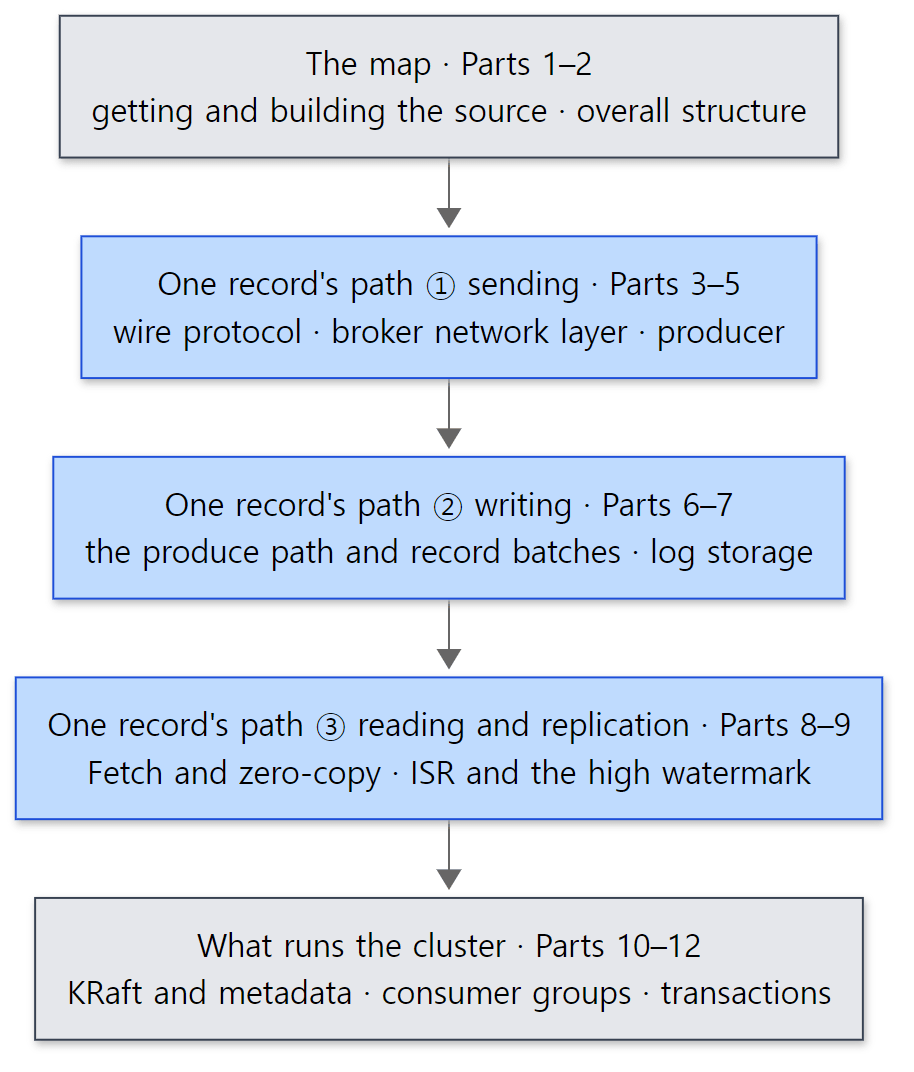 The groups of the series. The blue boxes are the core of the series, following the big road from section 4; the gray boxes are the map before it and what runs the cluster on top of it.
| Group | Part | The question it answers |
|---|---|---|
| The map | 1 | Which source, and how to read it (this post) |
| 2 | What is one server made of, and who decides brokers, controllers and partitions? | |
| One record's path | 3 | What bytes are requests and responses on the wire, and how are they generated from JSON? |
| 4 | Which threads does the broker use to handle connections and requests? | |
| 5 | When, in what batch, and on which thread does a send() record go out? |
|
| 6 | How does the broker check a received batch and write it to the log? | |
| 7 | What files does the log become on disk, and when are they deleted or compacted? | |
| 8 | How does Fetch wait, and how are disk bytes sent without copying? | |
| 9 | How do followers keep up, and what does acks=all wait for? |
|
| What runs the cluster | 10 | How does the controller decide metadata and spread it to the brokers? |
| 11 | What happens inside poll(), and who starts a rebalance? |
|
| 12 | How do the idempotent producer and transactions build "exactly once"? |
Reading order
Just read them in order. Like the earlier series, this one is numbered to follow the big road from section 4, for three reasons.
- The map comes first. Following the record's path, "who built this object?" and "who decided the leader?" keep coming up. Part 2 pins down the server's parts and roles first.
- The record's path goes outside-in, then out again. It starts with the bytes on the wire (Part 3) and the broker's front door (Part 4); the batch built by the producer (Part 5) is written to the broker's disk (Parts 6, 7), read back (Part 8) and replicated to followers (Part 9). That's the order of the two figures above.
- What runs the cluster comes last. Metadata, consumer groups and transactions all ride on the record's path. Metadata is written as records to a log called
__cluster_metadata, group offsets to__consumer_offsets, transaction state to__transaction_state. Once you know the path, you can read them with the eye of "this is just records written to a log, too".
What this post leaves out
- Kafka Streams and Kafka Connect.
streams/(a little over 150,000 lines of Java) andconnect/(nearly 65,000 lines) are separate frameworks on top ofclients, so this series doesn't cover them. The same goes for MirrorMaker (connect/mirror, the newmirror-coordinator). - Share groups. A new feature for sharing records like a queue, in
share-coordinator/,KafkaShareConsumerandcore/src/main/java/kafka/server/share/. - Tiered storage. Moving old segments to remote storage — the
Remote*classes instorage/. - Security and quotas. SASL and TLS authentication, ACLs (
Authorizer) and request quotas (server/…/quota/) aren't covered. All examples run overPLAINTEXT. - The admin client and tools. The
Adminclient and the command-line tools intools/are only used in examples. - Multiple log directories (JBOD) and moving between them (
ReplicaAlterLogDirsThread). - Tests and benchmarks. The 980,000 lines in
src/test,jmh-benchmarks/and the system tests (tests/) are only consulted to confirm behavior.
Summary
| Concept | One-line summary |
|---|---|
| Source read | Apache Kafka 4.5.0-SNAPSHOT (trunk), commit ab1e816411 (2026-10-24). Main code (src/main) 3,933 files, about 720,000 lines |
| trunk and 4.4.0 | trunk is the development line for the next release (4.5); the stable release is tag 4.4.0 on the 4.4 branch. They split on 2026-08-10 |
| Java | clients, generator, streams use --release 11, the rest 17. Build JDK is 17 or 25 |
| Getting the same source | git clone, then pin the commit with git worktree add --detach … ab1e8164… |
| Build | In Docker (Temurin JDK 25), ./gradlew -PcommitId=… releaseTarGz -x test → core/build/distributions/kafka_2.13-4.5.0-SNAPSHOT.tgz |
| Code generation | processMessages turns JSON schemas (203 for clients alone) into …Data classes. clients' generated code is about 190,000 lines |
| Modules | clients (the broker uses it too) · core (Scala, ties it together) · server · storage · raft · metadata · the coordinators |
| Scala | About 4% of the main code, only in core and streams-scala. The middle of the record's path (KafkaApis, ReplicaManager, Partition, SocketServer) is still Scala |
| The big road | send() → RecordAccumulator → Sender → SocketServer → request handler thread → KafkaApis → ReplicaManager → Partition → UnifiedLog → LogSegment → follower Fetch and high watermark → consumer Fetch → poll() |
| How to read | Pin the commit → AI notes → check against the source → run examples → write → double-check |
What's next
The next post is the big picture. In this post we saw that one server starts under the name KafkaRaftServer, and that inside it the Acceptor, Processor and request handler threads, the Raft thread and the controller's event thread all run together — seen through their thread names. Next, starting from main() in kafka.Kafka, we look at how KafkaRaftServer builds a BrokerServer and a ControllerServer according to process.roles, what BrokerServer.startup() builds and in what order, and who decides topics, partitions, leaders and the ISR and how the brokers are told.
- Next post: Digging into Kafka's Source 2: The Big Picture — Clients, Brokers, Controllers and Partitions
- To jump into the producer: Part 5: Inside the Producer — From send() to Batches and the Sender Thread
- To see right away what
acks=allwaits for: Part 9: Replication — The ISR, the High Watermark and the Wait Behind acks=all
There are earlier series read the same way. Digging into Tomcat's Source Part 1 is the first post written in the same frame as this one. Tomcat's structure of separating the threads that accept connections from the threads that process requests (Tomcat Part 5) closely resembles the Kafka broker's Acceptor, Processor and request handler threads, and Part 4 puts the two side by side. A server that handles connections with an event loop is covered in Digging into nginx's Source, and a database that protects its data with a log (the redo log) and replication in Digging into MariaDB's Source. And how tasks like processMessages from section 2 are planned and executed inside Gradle can be read in the series right before this one, Digging into Gradle's Source.