What this post covers
This is the fifteenth post in the "Digging into Tomcat's Source" series. In Part 14 we followed a request past the authentication valve inside the container. Every request we have looked at so far was HTTP/1.1: one request comes in, one response goes out, and the same connection waits for the next request. This time we look at two protocols that change the way the two sides talk on the same TCP connection: HTTP/2 and WebSocket.
There are four questions to answer.
- Where in the source does the single
<UpgradeProtocol>line in server.xml end up, and through which doors does an HTTP/2 connection come in? - Who "swaps" a connection that was being read as HTTP/1.1 over to another protocol, and at what moment?
- How does HTTP/2 carry many requests on one connection at the same time?
- Why is the WebSocket handshake handled in a servlet filter, and where do messages go once the connection has been upgraded?
| Item | Details |
|---|---|
| Target | Apache Tomcat |
| Version | 12.0.0-M1 (main) |
| Commit | 17aa1769b0 (2026-10-23) |
| Classes read most | coyote/UpgradeProtocol, coyote/UpgradeToken, coyote/http11/Http11Processor, coyote/AbstractProtocol, coyote/http2/Http2Protocol·Http2UpgradeHandler·Stream, tomcat/websocket/server/WsSci·WsServerContainer·WsFilter·UpgradeUtil·WsHttpUpgradeHandler |
Every line number in this post refers to that commit. Part 1 explains how to get the source at the same commit and build the Docker image used for the examples.
The coyote/http2 package alone has more than thirty Java files, and Http2UpgradeHandler.java by itself is 2,300 lines. The details of HTTP/2, such as HPACK header compression or priorities, could fill several posts on their own. This post keeps only the main thread that someone seeing the code for the first time can follow: "the spot where a connection moves over to another protocol". What was left out is named, with its location, under "What this post leaves out" at the end.
Words to know first
HTTP upgrade is an agreement in HTTP/1.1 that says "let's switch to another protocol on this connection". The client sends Connection: Upgrade and Upgrade: <protocol name> headers, and if the server agrees it answers 101 Switching Protocols. After that response, bytes that are not HTTP/1.1 travel over the same socket.
HTTP/2 keeps the meaning of HTTP (methods, paths, headers, status codes) and changes only how it is transmitted. Instead of text, the two sides exchange binary chunks called frames, and inside one connection they open many numbered streams, putting one request/response pair on one stream. That way, while waiting for one response, the client can send other requests on the same connection. Streams opened by the client get odd numbers that go up: 1, 3, 5, and so on.
h2 and h2c are names for ways into HTTP/2. h2 is HTTP/2 over TLS (https), chosen during the TLS handshake with ALPN (a TLS extension for picking which protocol to speak). h2c is HTTP/2 without TLS (cleartext), entered either through the HTTP upgrade above or by the prior knowledge method, where the client speaks HTTP/2 from the very first byte. Major browsers use only h2; h2c is mostly used between servers behind a proxy or by tools like curl (this sentence is not something checked in the source).
WebSocket is a protocol that keeps a connection open so either side can send a message at any time. It starts with an HTTP upgrade (Upgrade: websocket), and after the 101, WebSocket frames travel back and forth. Java has a standard server-side API for it (Jakarta WebSocket, @ServerEndpoint), and Tomcat implements it in the org.apache.tomcat.websocket package. In Spring Part 25 we saw that Spring's WebSocket support ends up calling this implementation.
Coyote and Catalina are the two big parts of Tomcat we met in Part 2. Coyote is the connector that reads bytes from a socket and builds a request object; Catalina is the servlet container that sends that request through Engine → Host → Context → Wrapper (the servlet). CoyoteAdapter connects the two (Part 7). The main storyline of this post is that HTTP/2 is decided in Coyote, and WebSocket is decided in Catalina.
A processor is the Coyote object that interprets the bytes of one connection. For HTTP/1.1 it is Http11Processor (Part 6). In source terms, an upgrade means replacing the processor attached to a connection with a different one.
1. One line of configuration: <UpgradeProtocol> and the UpgradeProtocol interface
To turn on HTTP/2 in Tomcat, you put one line inside a connector. The distribution's conf/server.xml even has a commented-out example.
    <!--
    <Connector port="8443" protocol="org.apache.coyote.http11.Http11NioProtocol"
               maxThreads="150" SSLEnabled="true">
        <UpgradeProtocol className="org.apache.coyote.http2.Http2Protocol" />
        <SSLHostConfig>
            <Certificate certificateKeystoreFile="conf/localhost-rsa.jks"
                         certificateKeystorePassword="changeit" type="RSA" />
        </SSLHostConfig>
    </Connector>
    -->
The <UpgradeProtocol> element becomes an object through one of the Digester rules we saw in Part 3. It creates the class named in className, sets the attributes through setters, and hands the object to the parent Connector's addUpgradeProtocol() (startup/Catalina.java lines 582–586). The Connector passes it on to the protocol handler (Http11NioProtocol), which keeps it in a list.
The UpgradeProtocol interface that Http2Protocol implements has only a handful of methods. Keeping just the core, it looks like this.
public interface UpgradeProtocol {

    String getHttpUpgradeName(boolean isSSLEnabled);

    byte[] getAlpnIdentifier();

    String getAlpnName();

    Processor getProcessor(SocketWrapperBase<?> socketWrapper, Adapter adapter);

    InternalHttpUpgradeHandler getInternalUpgradeHandler(SocketWrapperBase<?> socketWrapper, Adapter adapter,
            Request request);

    boolean accept(Request request);
    // ...
}
java/org/apache/coyote/UpgradeProtocol.java lines 26–111 (comments removed)
| Method | Meaning | What Http2Protocol returns |
|---|---|---|
getHttpUpgradeName(isSSLEnabled) |
the name written in the Upgrade: header |
"h2c" without TLS, null with TLS |
getAlpnName() |
the name used when choosing by ALPN | "h2" |
getProcessor(...) |
a processor that starts in this protocol right away, without an upgrade request | UpgradeProcessorInternal |
getInternalUpgradeHandler(...) |
the object that takes over and handles the connection | Http2UpgradeHandler or Http2AsyncUpgradeHandler |
accept(request) |
whether to accept an upgrade request | checks the HTTP2-Settings header |
The three names are constants at the top of Http2Protocol (lines 81–83). Why the upgrade name is null with TLS is explained in the interface comment: "Some protocols (e.g. HTTP/2) only support HTTP upgrade over non-secure connections" (UpgradeProtocol.java lines 31–32). Over TLS, ALPN does the choosing.
    @Override
    public String getHttpUpgradeName(boolean isSSLEnabled) {
        if (isSSLEnabled) {
            return null;
        } else {
            return HTTP_UPGRADE_NAME;
        }
    }
java/org/apache/coyote/http2/Http2Protocol.java lines 141–148
Two tables are built at startup
AbstractHttp11Protocol.init(), the parent of Http11NioProtocol, registers the upgrade protocols before it initializes the endpoint. The comment says why: while preparing TLS, the endpoint needs "the list of protocols to advertise via ALPN" (lines 85–105). The registering function splits the names into two tables.
    private void configureUpgradeProtocol(UpgradeProtocol upgradeProtocol) {
        // HTTP Upgrade
        String httpUpgradeName = upgradeProtocol.getHttpUpgradeName(getEndpoint().isSSLEnabled());
        boolean httpUpgradeConfigured = false;
        if (httpUpgradeName != null && !httpUpgradeName.isEmpty()) {
            httpUpgradeProtocols.put(httpUpgradeName, upgradeProtocol);
            httpUpgradeConfigured = true;
            getLog().info(sm.getString("abstractHttp11Protocol.httpUpgradeConfigured", getName(), httpUpgradeName));
        }


        // ALPN
        String alpnName = upgradeProtocol.getAlpnName();
        if (alpnName != null && !alpnName.isEmpty()) {
            // ALPN is only available with TLS
            if (getEndpoint().isSSLEnabled()) {
                negotiatedProtocols.put(alpnName, upgradeProtocol);
                getEndpoint().addNegotiatedProtocol(alpnName);
                getLog().info(sm.getString("abstractHttp11Protocol.alpnConfigured", getName(), alpnName));
            } else {
                // ...
            }
        }
    }
java/org/apache/coyote/http11/AbstractHttp11Protocol.java lines 864–894
httpUpgradeProtocols— a table looked up by the name in theUpgrade:header (h2c).getUpgradeProtocol(name)reads this table (lines 902–904).negotiatedProtocols— a table looked up by the name chosen through ALPN (h2).getNegotiatedProtocol(name)reads this table (lines 897–899).
Put Http2Protocol in the 8080 connector, which has no TLS, and only the first table gets h2c. In Example 1 we will see a line in the startup log that says so.
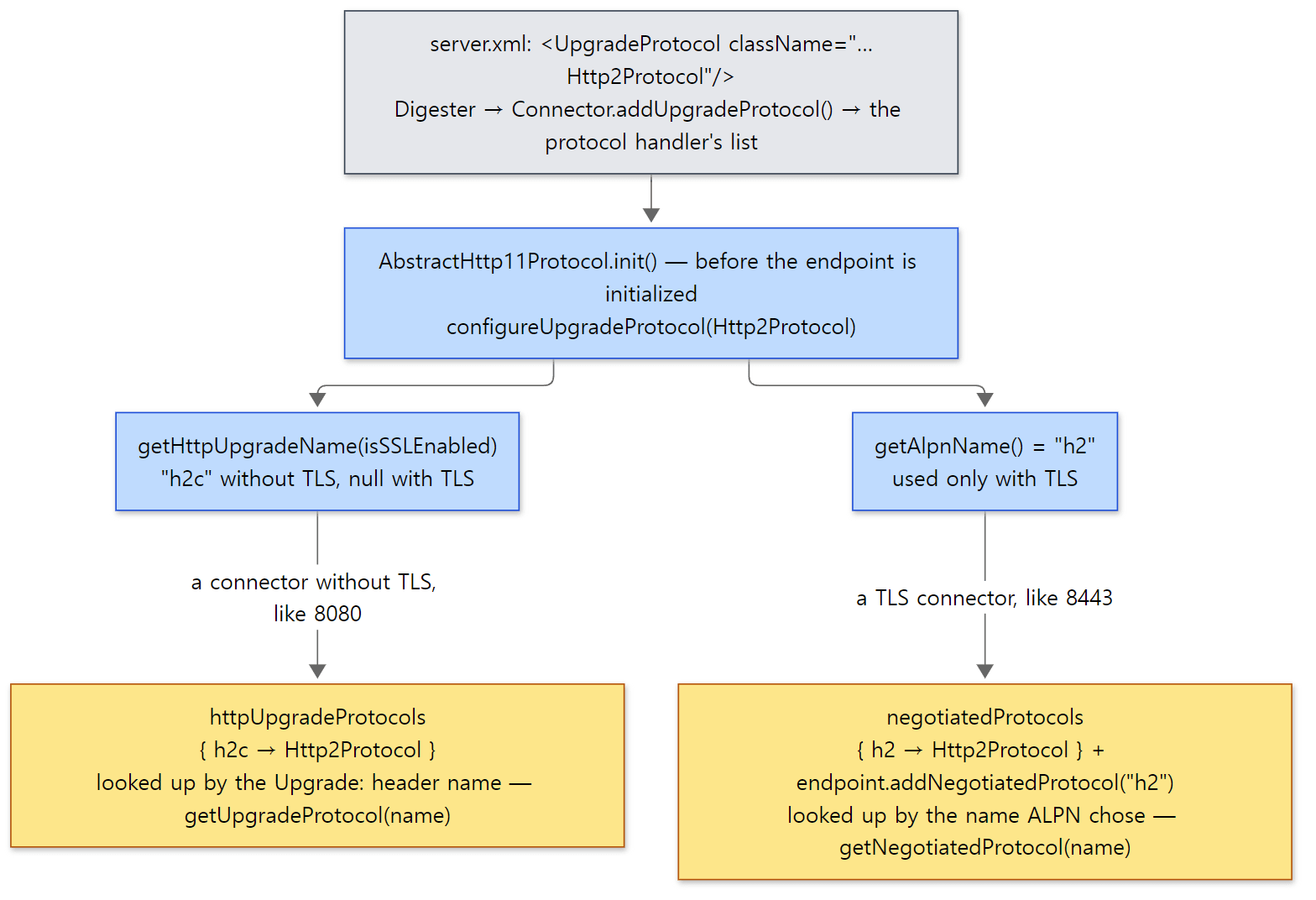 The left path is the one example 1's 8080 connector takes; the right path exists only on a TLS connector.
2. Three doors into HTTP/2
When a new connection arrives, the worker thread we saw in Part 5 calls AbstractProtocol.ConnectionHandler.process(). The road to HTTP/2 splits three ways, inside this function and inside Http11Processor.
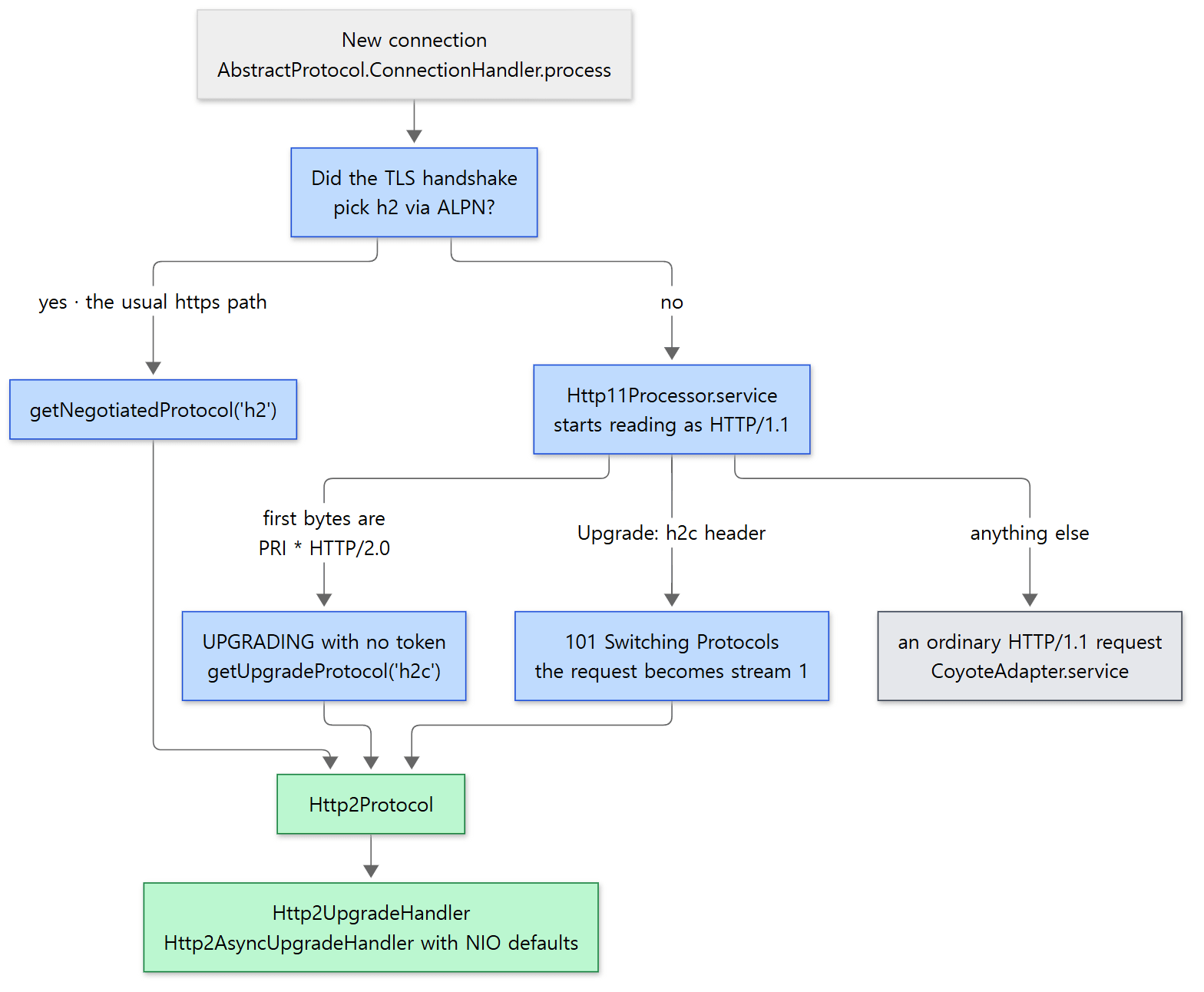 Browsers use only the left door (ALPN). The two in the middle are h2c, without TLS.
Door 1: ALPN (https)
Before creating a processor, the handler first checks whether the socket has a "negotiated protocol".
                if (processor == null) {
                    String negotiatedProtocol = wrapper.getNegotiatedProtocol();
                    // OpenSSL typically returns null whereas JSSE typically
                    // returns "" when no protocol is negotiated
                    if (negotiatedProtocol != null && !negotiatedProtocol.isEmpty()) {
                        UpgradeProtocol upgradeProtocol = getProtocol().getNegotiatedProtocol(negotiatedProtocol);
                        if (upgradeProtocol != null) {
                            processor = upgradeProtocol.getProcessor(wrapper, getProtocol().getAdapter());
java/org/apache/coyote/AbstractProtocol.java lines 1264–1271
If the client and server agreed on h2 during the TLS handshake, an Http11Processor is never even created. Not a single HTTP/1.1 byte is exchanged, so this is less an "upgrade" than HTTP/2 from the start. TLS and ALPN themselves are not covered in this post. The ALPN callback in mod_ssl, which does the same job in httpd, came up briefly in httpd Part 15.
Door 2: prior knowledge — the first bytes are PRI * HTTP/2.0
As soon as it opens a connection, an HTTP/2 client sends a fixed 24 bytes called the connection preface. It was deliberately made to look like an HTTP/1.1 request line. When Http11InputBuffer starts reading the request line, it compares the bytes with it.
                if (!keptAlive && byteBuffer.position() == 0 && byteBuffer.limit() >= CLIENT_PREFACE_START.length) {
                    boolean prefaceMatch = true;
                    for (int i = 0; i < CLIENT_PREFACE_START.length && prefaceMatch; i++) {
                        if (CLIENT_PREFACE_START[i] != byteBuffer.get(i)) {
                            prefaceMatch = false;
                        }
                    }
                    if (prefaceMatch) {
                        // HTTP/2 preface matched
                        parsingRequestLinePhase = -1;
                        return false;
                    }
                }
java/org/apache/coyote/http11/Http11InputBuffer.java lines 348–360
CLIENT_PREFACE_START is "PRI * HTTP/2.0\r\n\r\nSM\r\n\r\n" (lines 54–55). On a match it sets the phase to -1 and returns false. Http11Processor.service() sees that -1 and immediately returns SocketState.UPGRADING (lines 273–277). There is no upgrade token. What happens next is up to the ConnectionHandler we will see in section 3: with no token, it assumes "a connection that came straight in as HTTP/2" and looks up getUpgradeProtocol("h2c") (lines 1326–1333).
Because of the !keptAlive condition, this comparison happens only on the first request of a connection. Exchanging a few HTTP/1.1 requests and then suddenly sending the preface does not get you HTTP/2.
Door 3: the Upgrade: h2c header
The third is the HTTP upgrade in the literal sense. Right after reading the request line and headers, before handing anything to the container, Http11Processor handles it itself.
            // Has an upgrade been requested?
            if (isConnectionToken(request.getMimeHeaders(), "upgrade")) {
                // Check the protocol
                String requestedProtocol = request.getHeader("Upgrade");

                UpgradeProtocol upgradeProtocol = protocol.getUpgradeProtocol(requestedProtocol);
                if (upgradeProtocol != null) {
                    if (upgradeProtocol.accept(request)) {
                        // Create clone of request for upgraded protocol
                        Request upgradeRequest = null;
                        try {
                            upgradeRequest = cloneRequest(request);
                            /*
                             * Make sure any remaining body is swallowed before we start processing the upgraded
                             * protocol.
                             */
                            inputBuffer.endRequest();
                        } catch (ByteChunk.BufferOverflowException ioe) {
                            // ...
                        }

                        if (upgradeRequest != null && !getErrorState().isError()) {
                            // Complete the HTTP/1.1 upgrade process
                            response.setStatus(HttpServletResponse.SC_SWITCHING_PROTOCOLS);
                            response.setHeader("Connection", "Upgrade");
                            response.setHeader("Upgrade", requestedProtocol);
                            action(ActionCode.CLOSE, null);
                            getAdapter().log(request, response, 0);

                            // Continue processing using new protocol
                            InternalHttpUpgradeHandler upgradeHandler = upgradeProtocol
                                    .getInternalUpgradeHandler(socketWrapper, getAdapter(), upgradeRequest);
                            UpgradeToken upgradeToken = new UpgradeToken(upgradeHandler, null, null, requestedProtocol);
                            action(ActionCode.UPGRADE, upgradeToken);
                            return SocketState.UPGRADING;
                        }
                    }
                }
            }
java/org/apache/coyote/http11/Http11Processor.java lines 333–375
Read in order, it goes like this.
- If the
Connectionheader containsupgrade, look up the name from theUpgradeheader in the table from section 1 (httpUpgradeProtocols). If the name is not in the table, nothing happens: the code falls through and handles it as an ordinary request. This is the road WebSocket takes (section 5). - Ask
accept()whether to take it.Http2Protocol.accept()only checks that there is exactly oneHTTP2-Settingsheader and that theConnectionheader containsHTTP2-Settings(lines 175–194). - Clone the request, then read and discard any remaining body.
- Set the status to 101, add the
ConnectionandUpgradeheaders, and close the response (ActionCode.CLOSE). It also writes that 101 as a line in the access log (getAdapter().log(...)). - Create the object that will take over (
Http2UpgradeHandler), put it in anUpgradeToken, record that on the processor withActionCode.UPGRADE, and returnUPGRADING.
getAdapter().service() is below this block (line 404), so an h2c upgrade request never enters the servlet container before the 101 is sent. A servlet sees this request only after the switch to HTTP/2, as "stream 1" (section 4).
UpgradeToken is a single record in this commit. It is a note that says who takes over (httpUpgradeHandler), how to bind the web application's class loader (contextBind), what to create objects with (instanceManager), and the protocol name (protocol).
public record UpgradeToken(HttpUpgradeHandler httpUpgradeHandler, ContextBind contextBind,
        InstanceManager instanceManager, String protocol) {
java/org/apache/coyote/UpgradeToken.java lines 33–34
h2c is finished entirely inside Coyote with no web application involved, so the middle two are null (line 369). For WebSocket they are filled in (section 5).
Example 1: before and after turning on h2c
I sent the same requests before and after adding <UpgradeProtocol> to the 8080 connector in server.xml. The servlet returns the request's protocol, the HTTP/2 stream number, the connection number and the thread name; with ?stack it also prints the Coyote classes that called it, from bottom to top.
// This example was written for this post (it is not part of Tomcat's source)
// Reports which protocol the request came in on, on which stream of which connection, on which thread.
@WebServlet("/info")
public class InfoServlet extends HttpServlet {

    @Override
    protected void doGet(HttpServletRequest req, HttpServletResponse resp) throws IOException {
        // ... with ?sleep=ms, wait that long ...
        resp.setContentType("text/plain");
        PrintWriter out = resp.getWriter();
        // The stream number for HTTP/2. For HTTP/1.1 this commit returns null (the API docs say an empty string)
        String streamId = req.getProtocolRequestId();
        out.println("protocol=" + req.getProtocol()
                + " stream=" + (streamId == null || streamId.isEmpty() ? "-" : streamId)
                + " connection=" + req.getServletConnection().getConnectionId()
                + " thread=" + Thread.currentThread().getName());
        if (req.getParameter("stack") != null) {
            // Print, from bottom to top, only the Coyote (connector) classes among the callers of this servlet
            // ...
        }
    }
}
[Shortened from the example ex/u15-h2c/InfoServlet.java]
This example was run with Tomcat 12.0.0-M1-dev, built as-is from the reference commit (17aa1769b0), in a Docker container (Eclipse Temurin JDK 21). The container's curl is 8.18.0 with nghttp2, so both --http2 (try an upgrade) and --http2-prior-knowledge (HTTP/2 from the start) work. First, with the distribution's server.xml unchanged:
===== [no UpgradeProtocol] curl -sv --http2 http://127.0.0.1:8080/u15/info =====
> GET /u15/info HTTP/1.1
> Upgrade: h2c
> HTTP2-Settings: AAMAAABkAAQAAQAAAAIAAAAA
> Connection: Upgrade, HTTP2-Settings
< HTTP/1.1 200
protocol=HTTP/1.1 stream=- connection=1 thread=http-nio-8080-exec-2
===== [no UpgradeProtocol] curl -sv --http2-prior-knowledge http://127.0.0.1:8080/u15/info =====
* Request completely sent off
* closing connection #0
(curl exit code: 16)
> lines are what curl sent, < lines are what it received. curl asked for an upgrade, but h2c was not in the table, so Tomcat ignored the request and answered in HTTP/1.1. An upgrade is an offer ("may we?"), so turning it down is not an error. The client that spoke HTTP/2 from the start, on the other hand, simply had its connection closed. Tomcat recognised the preface, but getUpgradeProtocol("h2c") was null, so it took the path that ends in SocketState.CLOSED (AbstractProtocol.java lines 1334–1341). curl's exit code 16 means an error in the HTTP/2 layer.
Now I added one line inside the 8080 connector and started it again.
===== server.xml (8080 connector) =====
70:    <Connector port="8080" protocol="HTTP/1.1"
71-               connectionTimeout="20000"
72-               redirectPort="8443">
73-      <UpgradeProtocol className="org.apache.coyote.http2.Http2Protocol" />
74-    </Connector>
===== catalina.out: upgrade configured =====
The ["http-nio-8080"] connector has been configured to support HTTP upgrade to [h2c]
===== curl -sv --http1.1 http://127.0.0.1:8080/u15/info?stack =====
< HTTP/1.1 200
protocol=HTTP/1.1 stream=- connection=1 thread=http-nio-8080-exec-2
  AbstractProtocol$ConnectionHandler.process
  AbstractProcessorLight.process
  Http11Processor.service
  CoyoteAdapter.service
===== curl -sv --http2 http://127.0.0.1:8080/u15/info?stack  (HTTP/1.1 Upgrade: h2c) =====
> GET /u15/info?stack HTTP/1.1
> Upgrade: h2c
> HTTP2-Settings: AAMAAABkAAQAAQAAAAIAAAAA
> Connection: Upgrade, HTTP2-Settings
< HTTP/1.1 101
< Connection: Upgrade
< Upgrade: h2c
< HTTP/2 200
protocol=HTTP/2.0 stream=1 connection=2 thread=http-nio-8080-exec-4
  StreamRunnable.run
  StreamProcessor.process
  AbstractProcessorLight.process
  StreamProcessor.service
  CoyoteAdapter.service
Thread numbers differ from run to run. There are three things to read here.
- The line in the startup log was printed by
configureUpgradeProtocol()from section 1 (there is no ALPN line, because this connector has no TLS). - With
--http2, curl received101and thenHTTP/2 200on the same connection. The request the servlet saw was stream 1 ofHTTP/2.0. - The servlet was called along a different path. For HTTP/1.1 it is
ConnectionHandler.process→Http11Processor.service→CoyoteAdapter.service; for HTTP/2 it isStreamRunnable.run→StreamProcessor.service→CoyoteAdapter.service. FromCoyoteAdapterupward, everything is the same. Valves, the filter chain and the servlet do not know it is HTTP/2. In section 4 we will see where thisStreamRunnablecomes from.
The access log (localhost_access_log) recorded the upgrade request as two lines.
127.0.0.1 - - [time] "GET /u15/info?stack HTTP/1.1" 200 196
127.0.0.1 - - [time] "GET /u15/info?stack HTTP/1.1" 101 -
127.0.0.1 - - [time] "GET /u15/info?stack HTTP/2.0" 200 198
The 101 was written directly by Http11Processor in the upgrade block; the 200 after it was written by the AccessLogValve from Part 8 as stream 1 passed through the container. Timestamps were replaced with [time].
Easy to get confused: getProtocolRequestId() is null on HTTP/1.1
The first time I ran the example, every HTTP/1.1 request came back as 500. The servlet called req.getProtocolRequestId().isEmpty(), and the value was null. The servlet API docs say HTTP/1.x should return an empty string (jakarta/servlet/ServletRequest.java lines 531–551). But Coyote's default implementation returns null (AbstractProcessor.java lines 1124–1126), and the only class that overrides it is HTTP/2's StreamProcessor (the stream number, StreamProcessor.java lines 435–438). Http11Processor does not have this method. In this commit, write your code assuming HTTP/1.1 gives you null. That is why the example servlet checks for both null and the empty string.
3. Where the processor gets swapped: the UPGRADING loop in ConnectionHandler
Two of the three roads in section 2 (prior knowledge and Upgrade: h2c) ended with Http11Processor returning SocketState.UPGRADING. What receives that value is the do–while loop in AbstractProtocol.ConnectionHandler.process().
                SocketState state;
                do {
                    state = processor.process(wrapper, status);

                    if (state == SocketState.UPGRADING) {
                        // Get the HTTP upgrade handler
                        UpgradeToken upgradeToken = processor.getUpgradeToken();
                        // Restore leftover input to the wrapper so the upgrade
                        // processor can process it.
                        ByteBuffer leftOverInput = processor.getLeftoverInput();
                        wrapper.unRead(leftOverInput);
                        if (upgradeToken == null) {
                            // Assume direct HTTP/2 connection
                            UpgradeProtocol upgradeProtocol = getProtocol().getUpgradeProtocol("h2c");
                            if (upgradeProtocol != null) {
                                // Release the Http11 processor to be re-used
                                release(processor);
                                // Create the upgrade processor
                                processor = upgradeProtocol.getProcessor(wrapper, getProtocol().getAdapter());
                            } else {
                                // ...
                                // Exit loop and trigger appropriate clean-up
                                state = SocketState.CLOSED;
                            }
                        } else {
                            HttpUpgradeHandler httpUpgradeHandler = upgradeToken.httpUpgradeHandler();
                            // Release the Http11 processor to be re-used
                            release(processor);
                            // Create the upgrade processor
                            processor = getProtocol().createUpgradeProcessor(wrapper, upgradeToken);
                            // ...
                            if (upgradeToken.instanceManager() == null) {
                                httpUpgradeHandler.init((WebConnection) processor);
                            } else {
                                ClassLoader oldCL = upgradeToken.contextBind().bind(null);
                                try {
                                    httpUpgradeHandler.init((WebConnection) processor);
                                } finally {
                                    upgradeToken.contextBind().unbind(oldCL);
                                }
                            }
                            // ...
                        }
                    }
                } while (state == SocketState.UPGRADING);
java/org/apache/coyote/AbstractProtocol.java lines 1315–1376
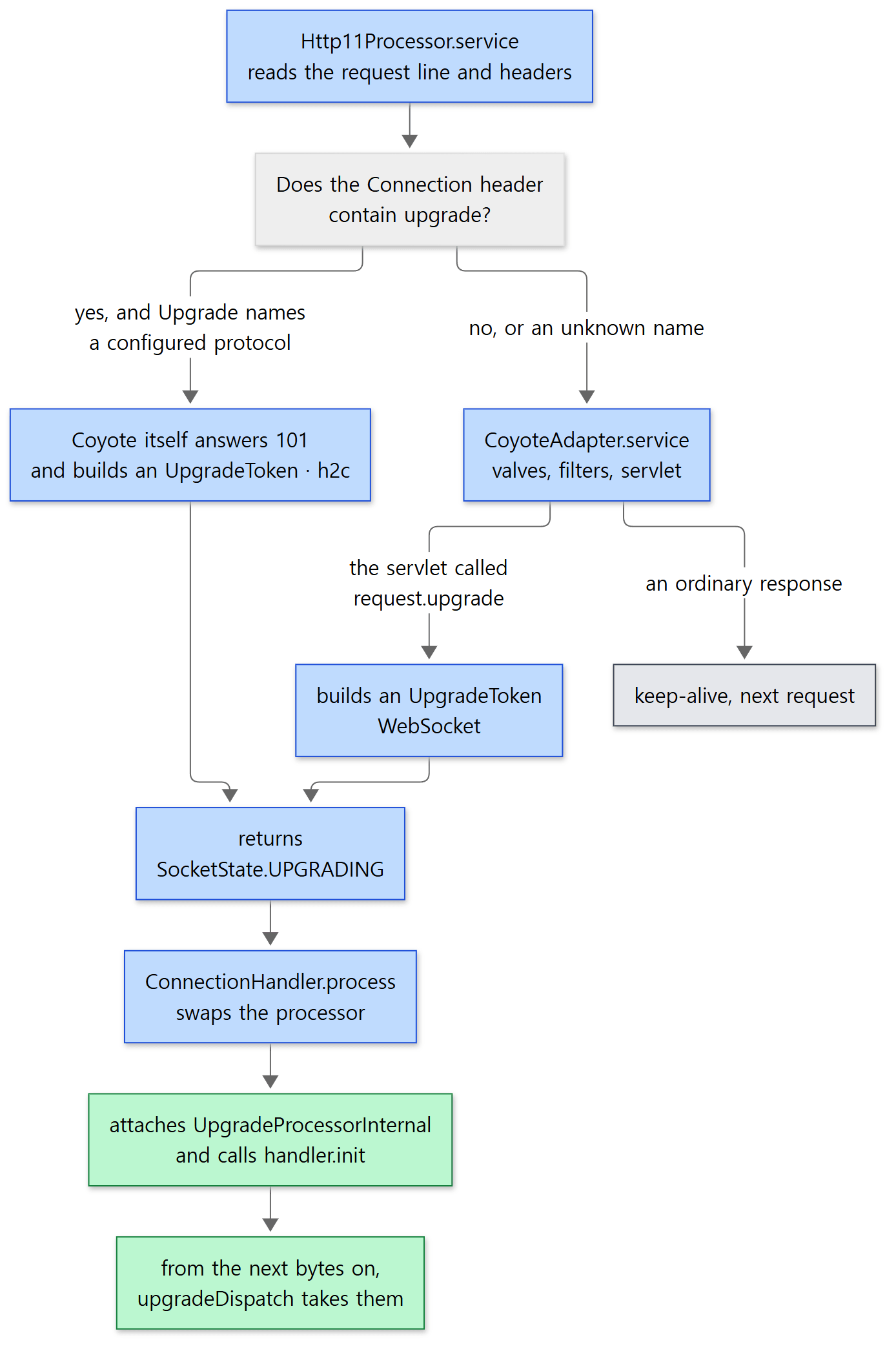 HTTP/2 (left) and WebSocket (middle) differ only in where the token is made; the road after that is the same.
Here is what the loop does.
- It puts back bytes that were not read yet. The rest of what
Http11Processorhad read into its buffer (getLeftoverInput()) goes back to the socket wrapper withunRead(). The HTTP/2 preface or a WebSocket frame that the client sent right after the 101 may already be sitting in the buffer. Throw it away and the new protocol loses its first bytes. - It hands back the
Http11Processor(release(processor)). The HTTP/1.1 processor's job on this connection is done, and it goes back to the recycle list so another connection can reuse it. - It attaches the new processor. With no token (prior knowledge) that is
Http2Protocol.getProcessor(); with a token it iscreateUpgradeProcessor(). The latter picksUpgradeProcessorInternalif the object taking over is Tomcat-internal (InternalHttpUpgradeHandler), andUpgradeProcessorExternalif it is anHttpUpgradeHandlerwritten by the web application (AbstractHttp11Protocol.java lines 1177–1185). HTTP/2 and Tomcat's WebSocket are both internal, so it is the former. - It calls
init(). This is the moment the new protocol takes over the connection and does its first work (sending a settings frame, callingonOpen). If the token has aninstanceManager(a handler created by the web application), it binds the web application's class loader before the call.
On the prior-knowledge road, which has no token, init() is not called and the state is still UPGRADING, so the loop goes round once more. This time the newly attached UpgradeProcessorInternal.process() is called, which calls Http2UpgradeHandler.upgradeDispatch(), whose first line is init(null) (Http2UpgradeHandler.java lines 421–428). null means "there was no earlier HTTP/1.1 request".
From then on, every byte on this connection goes to the new processor. UpgradeProcessorInternal.dispatch() is a one-liner that passes the event straight to the handler's upgradeDispatch() (UpgradeProcessorInternal.java lines 71–74).
Easy to get confused: the word "upgrade" means two things
In the source, the word upgrade is used at two levels.
- HTTP upgrade: the agreement between protocols, made of the
Upgrade:header and the 101 response. - Coyote upgrade: replacing the processor attached to a connection (
SocketState.UPGRADING,UpgradeProcessorInternal).
The two do not always travel together. HTTP/2 arriving through ALPN (door 1) or prior knowledge (door 2) has no 101 and no Upgrade: header, yet in the source it is handled just the same by an "upgrade handler" called Http2UpgradeHandler. The name comes from building HTTP/2's connection handling on top of the upgrade machinery. Do not read the name Http2UpgradeHandler as "handles only connections that came in by upgrading".
4. One connection, many streams: Http2UpgradeHandler
Stream 1 is the upgrade request
If its constructor receives an HTTP/1.1 request, Http2UpgradeHandler registers it as stream 1.
        // Initial HTTP request becomes stream 1.
        if (coyoteRequest != null) {
            if (log.isTraceEnabled()) {
                log.trace(sm.getString("upgradeHandler.upgrade", connectionId));
            }
            Integer key = Integer.valueOf(1);
            Stream stream = new Stream(key, this, coyoteRequest);
            streams.put(key, stream);
            activeRemoteStreamCount.set(1);
            maxProcessedStreamId = 1;
        }
java/org/apache/coyote/http2/Http2UpgradeHandler.java lines 227–237
That is why the upgraded request in Example 1 had stream=1. The HTTP2-Settings header of the upgrade request is the client's first SETTINGS frame written in base64, and init() decodes it and reads it as the client's settings (lines 274–311).
The second half of init() is the order in which the connection is opened.
        // Send the initial settings frame
        writeSettings();

        // Make sure the client has sent a valid connection preface before we
        // send the response to the original request over HTTP/2.
        try {
            parser.readConnectionPreface(webConnection, stream);
        } catch (Http2Exception e) {
            // ...
        }
        // ...

        // Allow streams and connection to determine timeouts
        socketWrapper.setReadTimeout(-1);
        socketWrapper.setWriteTimeout(-1);

        processConnection(webConnection, stream);
    }
java/org/apache/coyote/http2/Http2UpgradeHandler.java lines 313–336
It sends the server's SETTINGS frame first, reads and checks the client's connection preface, and then processConnection() sends a PING (to measure the round-trip time) and, if this was an upgrade, sends stream 1 off to be processed (lines 344–355). The comment gives the reason for the order: the response to stream 1 is not sent before the preface has been checked.
One thread reads frames, many threads process streams
From then on, when data arrives on the socket, upgradeDispatch(OPEN_READ) is called, and inside it parser.readFrame() repeats until there is nothing left to read (lines 448–452). The frame types are in the FrameType enum: DATA (body), HEADERS (headers), SETTINGS, PING, GOAWAY (end the connection), WINDOW_UPDATE (flow control), RST (cancel one stream), and so on (FrameType.java lines 25–36).
A new request comes as a HEADERS frame. Once all its headers have arrived, headersEnd() sends that stream to the container.
            if (endOfStream) {
                receivedEndOfStream(stream);
            }
            if (processStream) {
                processStreamOnContainerThread(stream);
            }
java/org/apache/coyote/http2/Http2UpgradeHandler.java lines 1846–1851
    void processStreamOnContainerThread(StreamProcessor streamProcessor, SocketEvent event) {
        StreamRunnable streamRunnable = new StreamRunnable(streamProcessor, event);
        if (streamConcurrency == null) {
            socketWrapper.execute(streamRunnable);
        } else {
            if (getStreamConcurrency() < protocol.getMaxConcurrentStreamExecution()) {
                increaseStreamConcurrency();
                socketWrapper.execute(streamRunnable);
            } else {
                queuedRunnable.offer(streamRunnable);
            }
        }
    }
java/org/apache/coyote/http2/Http2UpgradeHandler.java lines 393–405
For each stream it creates a StreamProcessor, wraps it in a StreamRunnable, and hands it to the connector's thread pool (http-nio-8080-exec-N from Part 5). That is the StreamRunnable.run at the bottom of the stack in Example 1. The thread reading frames does not wait for the servlet; it goes back to read the next frame, so even if one stream's servlet takes a long time, other streams on the same connection are not blocked.
There are limits on how many streams run at once. One connection accepts at most 100 streams by default (maxConcurrentStreams), and of those at most 20 use a thread at the same time by default (maxConcurrentStreamExecution) (Http2Protocol.java lines 64–68); the rest wait in queuedRunnable. This keeps a single connection from taking over the whole thread pool.
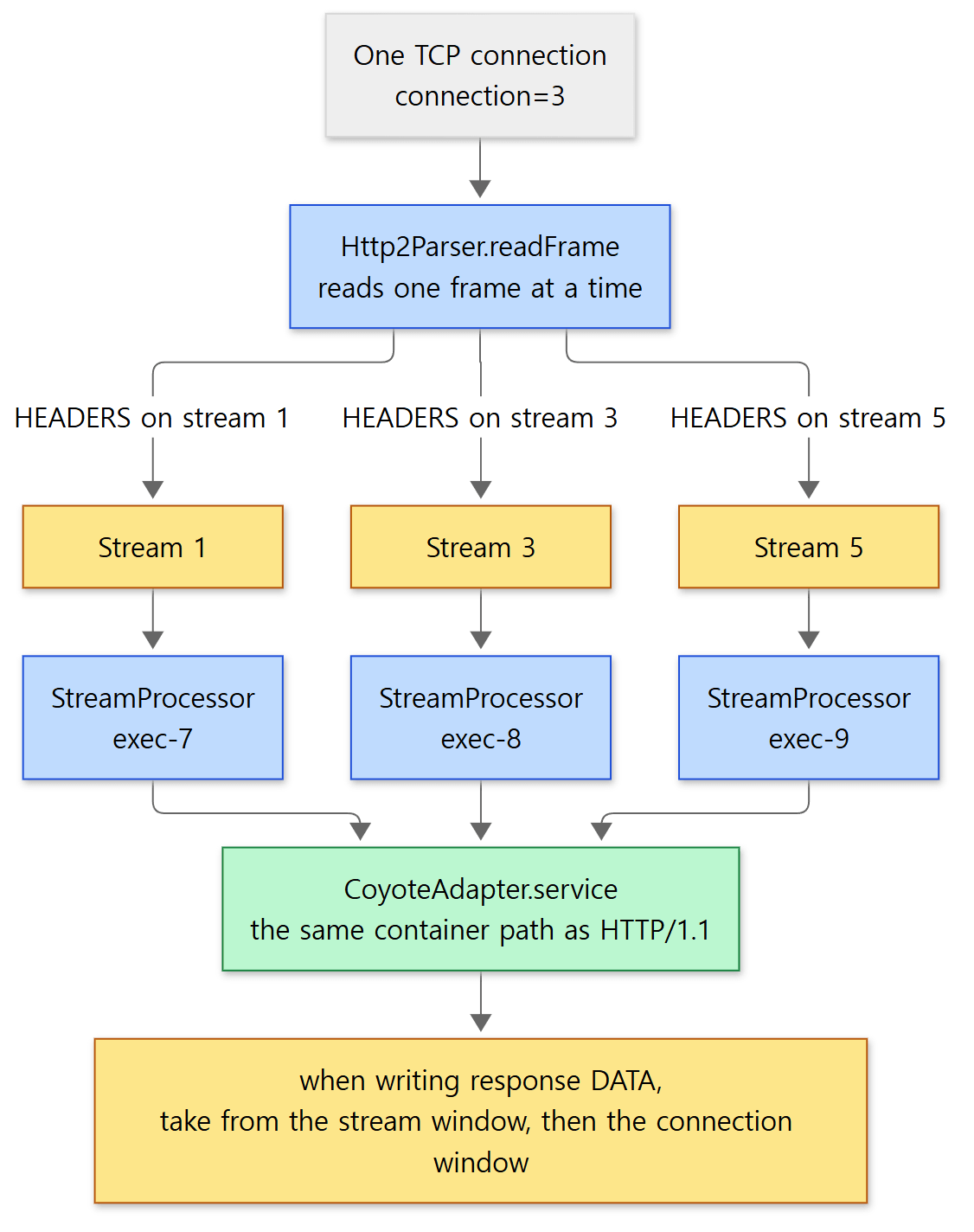 Yellow boxes are state kept inside the connection (streams, flow-control windows). The thread names come from one run of Example 2 below.
Example 2: three requests on one connection
I sent three requests at once with curl --http2-prior-knowledge --parallel. The servlet sleeps 0.5 seconds in each request.
===== curl -s --http2-prior-knowledge --parallel (three requests) =====
protocol=HTTP/2.0 stream=1 connection=3 thread=http-nio-8080-exec-7
protocol=HTTP/2.0 stream=5 connection=3 thread=http-nio-8080-exec-9
protocol=HTTP/2.0 stream=3 connection=3 thread=http-nio-8080-exec-8
All three requests have the same connection number, 3; the stream numbers are 1, 3 and 5 (the odd numbers a client opens), and the three threads are all different. The order of the lines changes from run to run. Three requests on the same connection were processed at the same time on different worker threads without waiting for each other. In HTTP/1.1, responses on one connection must come back one at a time in request order, so getting several at once means opening several connections.
At first I also gave curl --parallel-immediate, and curl then opened three connections, printing stream=1 on connection=3, 4 and 5. That option means "don't wait to multiplex, open new connections right away", so it did not fit this example.
A taste of flow control: two windows
When many streams share one connection, one large response could fill the other side's buffer and starve the other streams. HTTP/2 prevents this with flow-control windows. The receiver says "I can take this much more", and the sender sends only that much DATA, then waits for a WINDOW_UPDATE to open the window again. There is one window per stream and one for the whole connection, and the initial size is 65,535 bytes (ConnectionSettingsBase.java line 44).
The output buffer in Stream, which sends out the response body the servlet wrote, shows the two windows being drawn down in turn.
                int left = buffer.remaining();
                while (left > 0) {
                    if (streamReservation == 0) {
                        streamReservation = reserveWindowSize(left, block);
                        if (streamReservation == 0) {
                            // Must be non-blocking.
                            // Note: Can't add to the writeBuffer here as the write
                            // may originate from the writeBuffer.
                            buffer.compact();
                            return true;
                        }
                    }
                    while (streamReservation > 0) {
                        int connectionReservation = handler.reserveWindowSize(Stream.this, streamReservation, block);
                        if (connectionReservation == 0) {
                            // ...
                            buffer.compact();
                            return true;
                        }
                        // Do the write
                        handler.writeBody(Stream.this, buffer, connectionReservation, !writeInProgress && closed &&
                                left == connectionReservation && coyoteResponse.getTrailerFields() == null);
                        streamReservation -= connectionReservation;
                        left -= connectionReservation;
                    }
                }
java/org/apache/coyote/http2/Stream.java lines 1160–1187
First it reserves the amount to send from the stream window (Stream.reserveWindowSize()), then reserves that amount again from the connection window (Http2UpgradeHandler.reserveWindowSize()), and writes only what it got. If the stream window is 0, a blocking write waits up to streamWriteTimeout for the window to open (Stream.java lines 255–293). If the connection window is short, the stream is put in backLogStreams and given a share when the window opens (from Http2UpgradeHandler.java line 1071). The sharing rules (which take priorities into account) are not covered in this post.
From the servlet's point of view, getOutputStream().write() just pauses for a while; it does not know the windows exist. As with HTTP/1.1, if the other side reads slowly, the worker thread handling that stream waits in the write. To let go of the thread, use the async servlet and WriteListener from Part 12.
Easy to get confused: what actually runs on the NIO connector is Http2AsyncUpgradeHandler
Http2Protocol.getInternalUpgradeHandler() creates the subclass Http2AsyncUpgradeHandler when the socket wrapper supports async I/O (Http2Protocol.java lines 167–172). That check (hasAsyncIO()) is whether the socket wrapper has semaphores (SocketWrapperBase.java lines 1425–1428); the semaphores are created when the endpoint's useAsyncIO is on (lines 159–165), and useAsyncIO defaults to true (AbstractEndpoint.java line 1730). So on a NIO connector with no settings changed, Http2AsyncUpgradeHandler is what runs. It inherits most of the Http2UpgradeHandler methods we read in this post and switches frame reading (Http2AsyncParser), frame writing and sendfile over to async I/O (extends Http2UpgradeHandler, line 46). One difference touches the init() order from earlier: its processConnection() is empty, and the same work (PING, then stream 1) runs from processConnectionCallback() once Http2AsyncParser has finished reading the client preface asynchronously (Http2AsyncUpgradeHandler.java lines 113–120, Http2AsyncParser.java line 124), so the order stays the same. This was confirmed from the conditions in the source; the examples did not print the class name.
5. WebSocket: an upgrade that starts in a servlet filter
Now WebSocket. As we saw in section 2, when Http11Processor receives Upgrade: websocket, there is no UpgradeProtocol named websocket in its table, so it does nothing and passes the request to the container. WebSocket upgrades inside the web application, through the servlet API's HttpServletRequest.upgrade(). Looking at the information it needs shows why: which endpoint class lives at which path, whether to allow an Origin, who the logged-in user is — all of that is known by the web application.
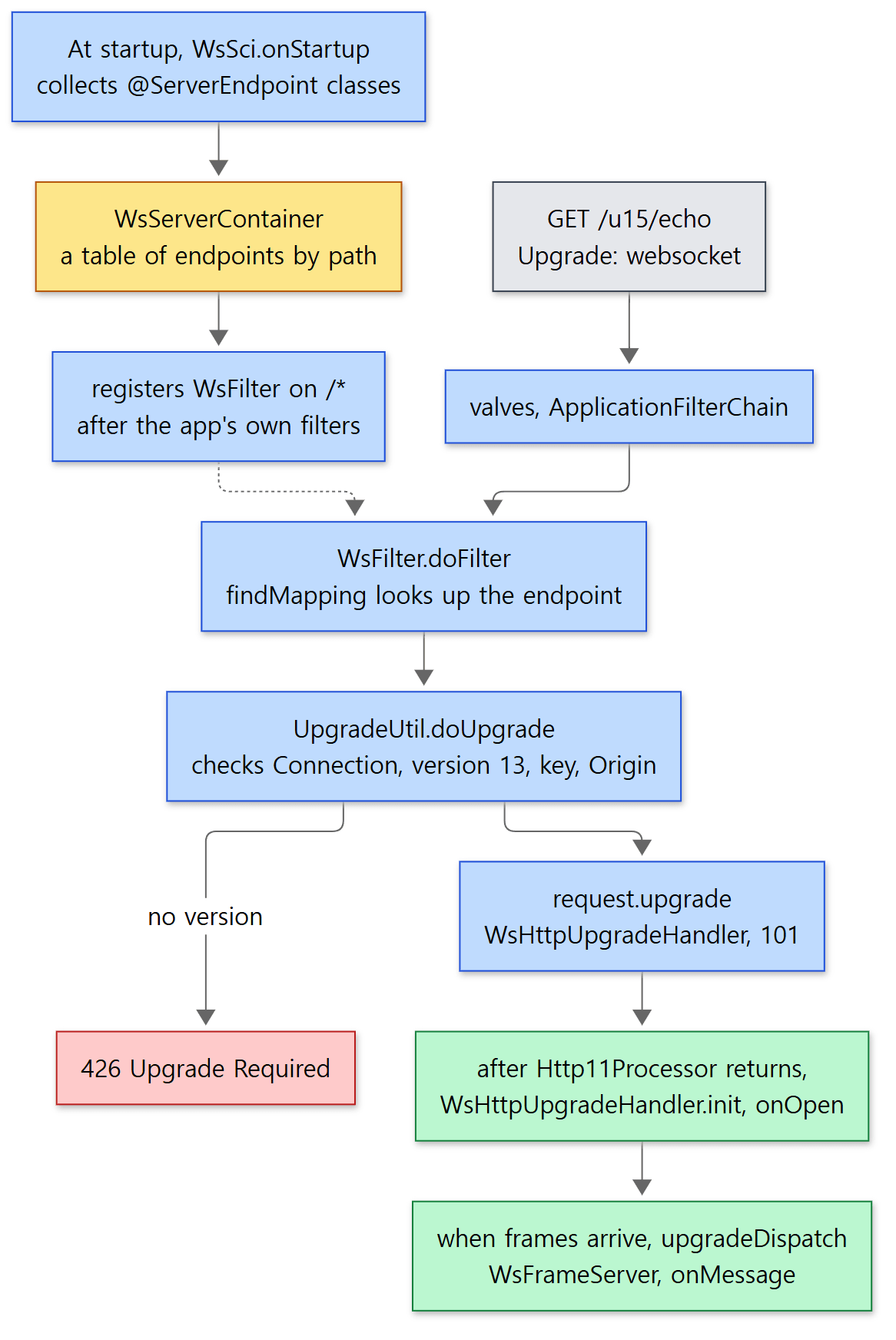 The yellow box is the table built at startup. Everything from the 101 down is no longer an HTTP request.
At startup: WsSci builds the table and the filter
tomcat-websocket.jar contains WsSci, a ServletContainerInitializer. As we saw in Part 10, when a web application starts, the SCIs found in the jars are called, and they receive the classes of the types listed in @HandlesTypes.
@HandlesTypes({ ServerEndpoint.class, ServerApplicationConfig.class, Endpoint.class })
public class WsSci implements ServletContainerInitializer {
java/org/apache/tomcat/websocket/server/WsSci.java lines 38–39
onStartup() first creates a WsServerContainer and stores it as a ServletContext attribute (jakarta.websocket.server.ServerContainer) (lines 134–147), then registers the received classes that carry @ServerEndpoint with sc.addEndpoint() (lines 48–124). In its constructor, WsServerContainer attaches a filter to the web application directly.
        FilterRegistration.Dynamic fr = servletContext.addFilter("Tomcat WebSocket (JSR356) Filter", new WsFilter());
        if (fr != null) {
            fr.setAsyncSupported(true);

            EnumSet<DispatcherType> types = EnumSet.of(DispatcherType.REQUEST, DispatcherType.FORWARD);

            fr.addMappingForUrlPatterns(types, true, "/*");
        }
java/org/apache/tomcat/websocket/server/WsServerContainer.java lines 98–105
The second argument of addMappingForUrlPatterns, true, means "put it after the filters declared in web.xml". Every request (/*) passes this filter, but filters the web application set up itself (such as an authentication filter) run first. The structure in which the filter chain calls an array of filters in turn was covered in Part 9.
When a request arrives: WsFilter → UpgradeUtil.doUpgrade()
    @Override
    public void doFilter(ServletRequest request, ServletResponse response, FilterChain chain)
            throws IOException, ServletException {

        // This filter only needs to handle WebSocket upgrade requests
        if (!sc.areEndpointsRegistered() || !UpgradeUtil.isWebSocketUpgradeRequest(request, response)) {
            chain.doFilter(request, response);
            return;
        }

        // HTTP request with an upgrade header for WebSocket present
        HttpServletRequest req = (HttpServletRequest) request;
        HttpServletResponse resp = (HttpServletResponse) response;

        // Check to see if this WebSocket implementation has a matching mapping
        String path;
        String pathInfo = req.getPathInfo();
        if (pathInfo == null) {
            path = req.getServletPath();
        } else {
            path = req.getServletPath() + pathInfo;
        }
        WsMappingResult mappingResult = sc.findMapping(path);

        if (mappingResult == null) {
            // No endpoint registered for the requested path. Let the
            // application handle it (it might redirect or forward for example)
            chain.doFilter(request, response);
            return;
        }

        UpgradeUtil.doUpgrade(sc, req, resp, mappingResult.config(), mappingResult.pathParams());
    }
java/org/apache/tomcat/websocket/server/WsFilter.java lines 53–85
- If there are no endpoints at all, or the request is not a
GETwithwebsocketin itsUpgradeheader (isWebSocketUpgradeRequest(), UpgradeUtil.java lines 80–86), it just passes the request on. For an ordinary request, this oneifis all the filter does. - It looks up the endpoint by path (
findMapping()— first an exact path match, then templates like{name}compared among those with the same number of segments, WsServerContainer.java lines 293–338), and if one is found, goes todoUpgrade(). Because it does not callchain.doFilter(), the filters and servlet after it are never called. The upgrade ends in the filter.
doUpgrade() checks the headers, builds the response headers, and finally upgrades through the servlet API. Here is the first part of the checks.
        if (!headerContainsToken(req, Constants.CONNECTION_HEADER_NAME, Constants.CONNECTION_HEADER_VALUE)) {
            resp.sendError(HttpServletResponse.SC_BAD_REQUEST);
            return;
        }
        if (!headerContainsToken(req, Constants.WS_VERSION_HEADER_NAME, Constants.WS_VERSION_HEADER_VALUE)) {
            resp.setStatus(HttpServletResponse.SC_UPGRADE_REQUIRED);
            resp.setHeader(Constants.WS_VERSION_HEADER_NAME, Constants.WS_VERSION_HEADER_VALUE);
            return;
        }
        key = req.getHeader(Constants.WS_KEY_HEADER_NAME);
        if (!validateKey(key)) {
            resp.sendError(HttpServletResponse.SC_BAD_REQUEST);
            return;
        }
java/org/apache/tomcat/websocket/server/UpgradeUtil.java lines 107–120
No Connection: upgrade gives 400; no Sec-WebSocket-Version: 13 gives 426 (Upgrade Required) with a header saying "use 13"; a key that is not valid base64 for 16 bytes gives 400. Then come the Origin check (403 on failure, lines 123–128) and sub-protocol and extension negotiation, and the response headers are added (lines 199–209). Sec-WebSocket-Accept is made by appending a fixed string defined by the spec (258EAFA5-..., lines 61–62) to the key the client sent, taking SHA-1 and encoding it in base64 (lines 361–364). The client uses this value to check that the other side really is a server that understands WebSocket. The last two lines are the upgrade itself.
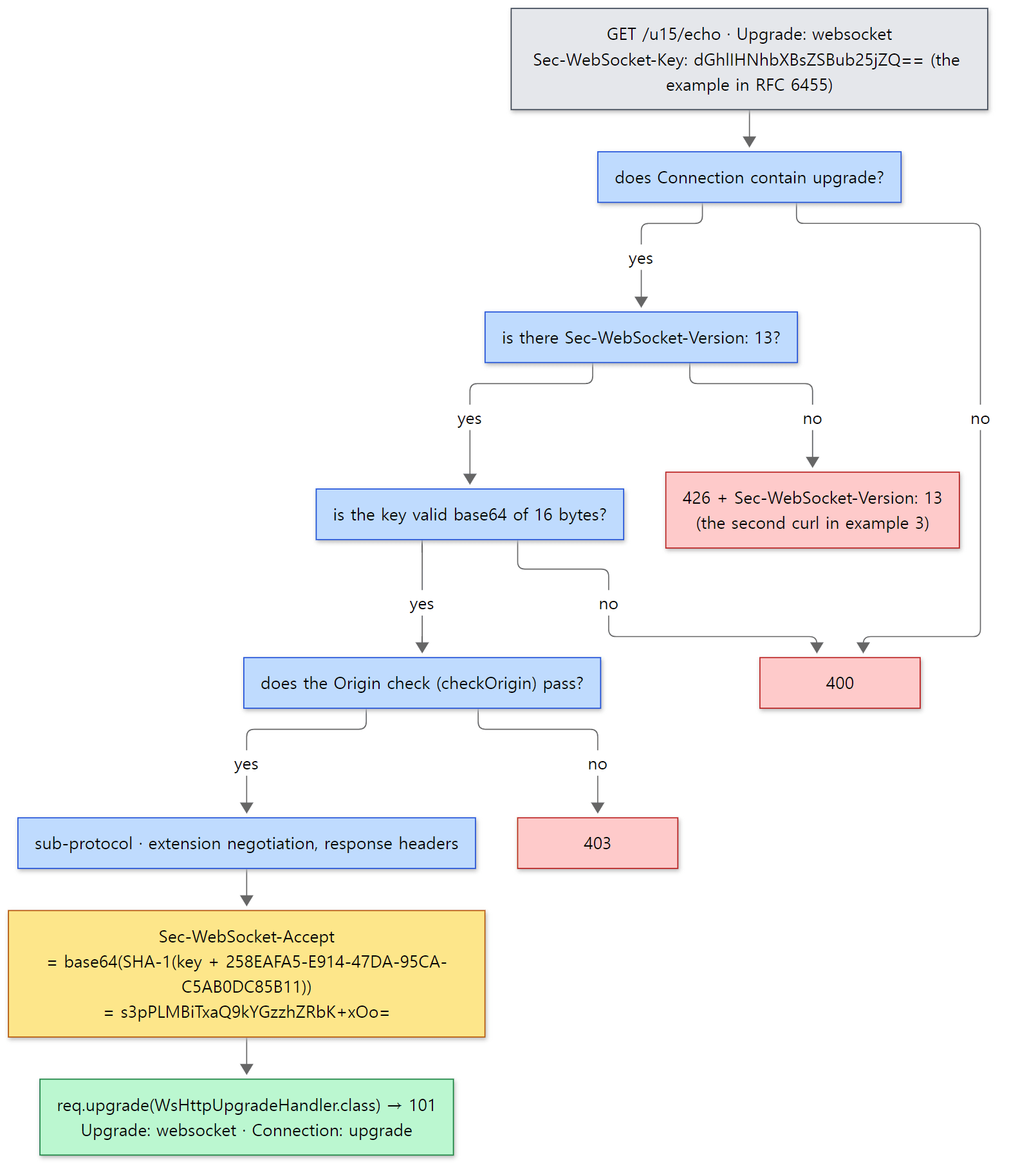 The key, the
Sec-WebSocket-Accept value and the 426 response are the real input and output of example 3.
        WsHttpUpgradeHandler wsHandler = req.upgrade(WsHttpUpgradeHandler.class);
        wsHandler.preInit(perSessionServerEndpointConfig, sc, wsRequest, negotiatedExtensionsPhase2, subProtocol,
                transformation, pathParams, req.isSecure());
java/org/apache/tomcat/websocket/server/UpgradeUtil.java lines 252–254
ServerContainer.upgradeHttpToWebSocket(), which Spring's StandardWebSocketUpgradeStrategy calls, also calls this same doUpgrade() in Tomcat (WsServerContainer.java lines 274–283). This is the spot that Spring Part 25 skipped over by saying "the server does the actual job of turning the connection into WebSocket". With Spring, you reach this function inside DispatcherServlet instead of WsFilter; everything after that is the same.
request.upgrade() — hand over the token and set 101
    public <T extends HttpUpgradeHandler> T upgrade(Class<T> httpUpgradeHandlerClass)
            throws IOException, ServletException {
        T handler;
        InstanceManager instanceManager = null;
        try {
            // Do not go through the instance manager for internal Tomcat classes since they don't
            // need injection
            if (InternalHttpUpgradeHandler.class.isAssignableFrom(httpUpgradeHandlerClass)) {
                handler = httpUpgradeHandlerClass.getConstructor().newInstance();
            } else {
                instanceManager = getContext().getInstanceManager();
                handler = (T) instanceManager.newInstance(httpUpgradeHandlerClass);
            }
        } catch (ReflectiveOperationException | NamingException | IllegalArgumentException | SecurityException e) {
            throw new ServletException(e);
        }
        UpgradeToken upgradeToken = new UpgradeToken(handler, getContext(), instanceManager,
                getUpgradeProtocolName(httpUpgradeHandlerClass));

        coyoteRequest.action(ActionCode.UPGRADE, upgradeToken);

        // Output required by RFC2616. Protocol specific headers should have
        // already been set.
        response.setStatus(HttpServletResponse.SC_SWITCHING_PROTOCOLS);

        return handler;
    }
java/org/apache/catalina/connector/Request.java lines 1913–1939
All Catalina's Request does is create the handler object, build an UpgradeToken and hand it to the Coyote request with ActionCode.UPGRADE, and set the status to 101. ActionCode.UPGRADE goes through the processor's action() (AbstractProcessor.java lines 692–695) to Http11Processor.doHttpUpgrade(), which stores the token in a field and stops HTTP output (Http11Processor.java lines 1353–1358).
The connection has not changed yet. Only after the filter finishes, the valves unwind, and CoyoteAdapter.service() returns, does the loop in Http11Processor stop on its upgradeToken == null condition (line 268), and at the end of the function it sees isUpgrade() and returns UPGRADING (lines 478–479). From there it is exactly the loop from section 3. There is a token, so createUpgradeProcessor() makes an UpgradeProcessorInternal (WsHttpUpgradeHandler implements InternalHttpUpgradeHandler, WsHttpUpgradeHandler.java line 50) and calls init().
WsHttpUpgradeHandler.init() creates a WsSession and a frame reader (WsFrameServer) and calls the endpoint's onOpen (lines 117–167). When data arrives after the connection is open, upgradeDispatch() takes it.
    @Override
    public SocketState upgradeDispatch(SocketEvent status) {
        switch (status) {
            case OPEN_READ:
                try {
                    return wsFrame.notifyDataAvailable();
                } catch (WsIOException ws) {
                    close(ws.getCloseReason());
                } catch (IOException ioe) {
                    onError(ioe);
                    CloseReason cr = new CloseReason(CloseCodes.CLOSED_ABNORMALLY, ioe.getMessage());
                    close(cr);
                }
                return SocketState.CLOSED;
java/org/apache/tomcat/websocket/server/WsHttpUpgradeHandler.java lines 176–189
Example 3: the handshake by hand, then a round trip with the JDK client
I put an endpoint that sends back whatever text it receives into a web application (/u15). At three moments — just before the handshake (modifyHandshake), when the connection opens (onOpen), and when a message arrives (onMessage) — it prints the thread name and call stack to catalina.out. From the stack it picks only Tomcat's connector, container and WebSocket classes, and prints a method only once when it repeats.
// This example was written for this post (it is not part of Tomcat's source)
// A WebSocket endpoint that sends back the text it receives.
// At three moments — handshake, connection open, message received — print who is calling our code.
@ServerEndpoint(value = "/echo", configurator = EchoEndpoint.Printer.class)
public class EchoEndpoint {

    // Called just before the handshake response is built (we are still inside the HTTP request)
    public static class Printer extends ServerEndpointConfig.Configurator {
        @Override
        public void modifyHandshake(ServerEndpointConfig sec, HandshakeRequest request, HandshakeResponse response) {
            trace("modifyHandshake");
        }
    }

    @OnOpen
    public void onOpen(Session session) {
        trace("onOpen (session " + session.getId() + ")");
    }

    @OnMessage
    public String onMessage(String message) {
        trace("onMessage \"" + message + "\"");
        return "echo: " + message;   // the returned value goes straight back to the other side
    }

    // ... trace(): prints the thread name and only the Tomcat classes in the call stack ...
}
[Shortened from the example ex/u15-websocket/EchoEndpoint.java]
There is no web.xml. Just putting @ServerEndpoint on the class is enough for the WsSci we saw above to find and register it. First I sent the handshake by hand with curl. The key is the sample value printed in the body of the WebSocket spec (RFC 6455).
===== curl: plain GET (no Upgrade header) =====
HTTP 404
===== curl: handshake without Sec-WebSocket-Version =====
HTTP/1.1 426
Sec-WebSocket-Version: 13
===== curl: full handshake (key from RFC 6455) =====
HTTP/1.1 101
Upgrade: websocket
Connection: upgrade
Sec-WebSocket-Accept: s3pPLMBiTxaQ9kYGzzhZRbK+xOo=
- An ordinary
GET /u15/echowithout anUpgradeheader was simply passed on byWsFilter, and since no servlet is mapped there, the default servlet answered 404. WebSocket paths are not part of the servlet mapping (the Mapper from Part 7). - Leaving out the version header brought back 426 and
Sec-WebSocket-Version: 13— exactly lines 111–115 above. - With everything in place, 101 came back, and
Sec-WebSocket-Acceptequals the expected value written in RFC 6455,s3pPLMBiTxaQ9kYGzzhZRbK+xOo=.Connection: upgradeis lowercase because Tomcat's constant is"upgrade"(websocket/Constants.java line 121).
Next I connected with the WebSocket client that ships with the JDK (java.net.http.WebSocket) and sent two messages.
// This example was written for this post (it is not part of Tomcat's source)
        WebSocket ws = HttpClient.newHttpClient().newWebSocketBuilder()
                .buildAsync(URI.create(args[0]), listener)
                .get(5, TimeUnit.SECONDS);
        // send two messages, one after the other, on one connection
        ws.sendText("hello", true).get();
        ws.sendText("tomcat", true).get();
        closed.get(5, TimeUnit.SECONDS);
[Shortened from the example ex/u15-websocket/WsClient.java — listener prints the text it receives and closes with sendClose after the second reply]
===== java WsClient.java ws://127.0.0.1:8080/u15/echo =====
client: opened, subprotocol=""
client: received "echo: hello"
client: received "echo: tomcat"
client: closed 1000 "bye"
Here is the server's catalina.out at that time (the curl handshake earlier left the same kind of lines; only those for the second connection, the one made by the client, are shown).
[u15] modifyHandshake  thread=http-nio-8080-exec-6
[u15]     AbstractProtocol$ConnectionHandler.process
[u15]     AbstractProcessorLight.process
[u15]     Http11Processor.service
[u15]     CoyoteAdapter.service
[u15]     StandardWrapperValve.invoke
[u15]     ApplicationFilterChain.doFilter
[u15]     WsFilter.doFilter
[u15]     UpgradeUtil.doUpgrade
[u15] onOpen (session 1)  thread=http-nio-8080-exec-6
[u15]     AbstractProtocol$ConnectionHandler.process
[u15]     WsHttpUpgradeHandler.init
[u15]     PojoEndpointServer.onOpen
[u15]     PojoEndpointBase.doOnOpen
[u15] onMessage "hello"  thread=http-nio-8080-exec-7
[u15]     AbstractProtocol$ConnectionHandler.process
[u15]     AbstractProcessorLight.process
[u15]     UpgradeProcessorInternal.dispatch
[u15]     WsHttpUpgradeHandler.upgradeDispatch
[u15]     WsFrameServer.notifyDataAvailable
[u15]     WsFrameServer.doOnDataAvailable
[u15]     WsFrameServer.onDataAvailable
[u15]     WsFrameBase.processInputBuffer
[u15]     WsFrameBase.processData
[u15]     WsFrameBase.processDataText
[u15]     WsFrameServer.sendMessageText
[u15]     WsFrameBase.sendMessageText
[u15]     PojoMessageHandlerWholeBase.onMessage
[u15] onMessage "tomcat"  thread=http-nio-8080-exec-7
[u15]     ... (same stack as "hello") ...
Thread numbers differ from run to run. Compare the three chunks and this whole section is right there.
modifyHandshake:Http11Processor.service→CoyoteAdapter.service→ a valve (StandardWrapperValve) → the filter chain →WsFilter→UpgradeUtil.doUpgrade. The handshake passes through the container as an ordinary HTTP request. No servlet appears in the stack.onOpen: the same thread (exec-6), but with neitherHttp11ProcessornorCoyoteAdapter; directly aboveConnectionHandler.processisWsHttpUpgradeHandler.init. The loop from section 3 calledinit()after the handshake request had left the container completely.onMessage: for each message,ConnectionHandler.process→UpgradeProcessorInternal.dispatch→WsHttpUpgradeHandler.upgradeDispatch→WsFrameServer. No valves, no filters. Messages after the 101 are not HTTP requests.
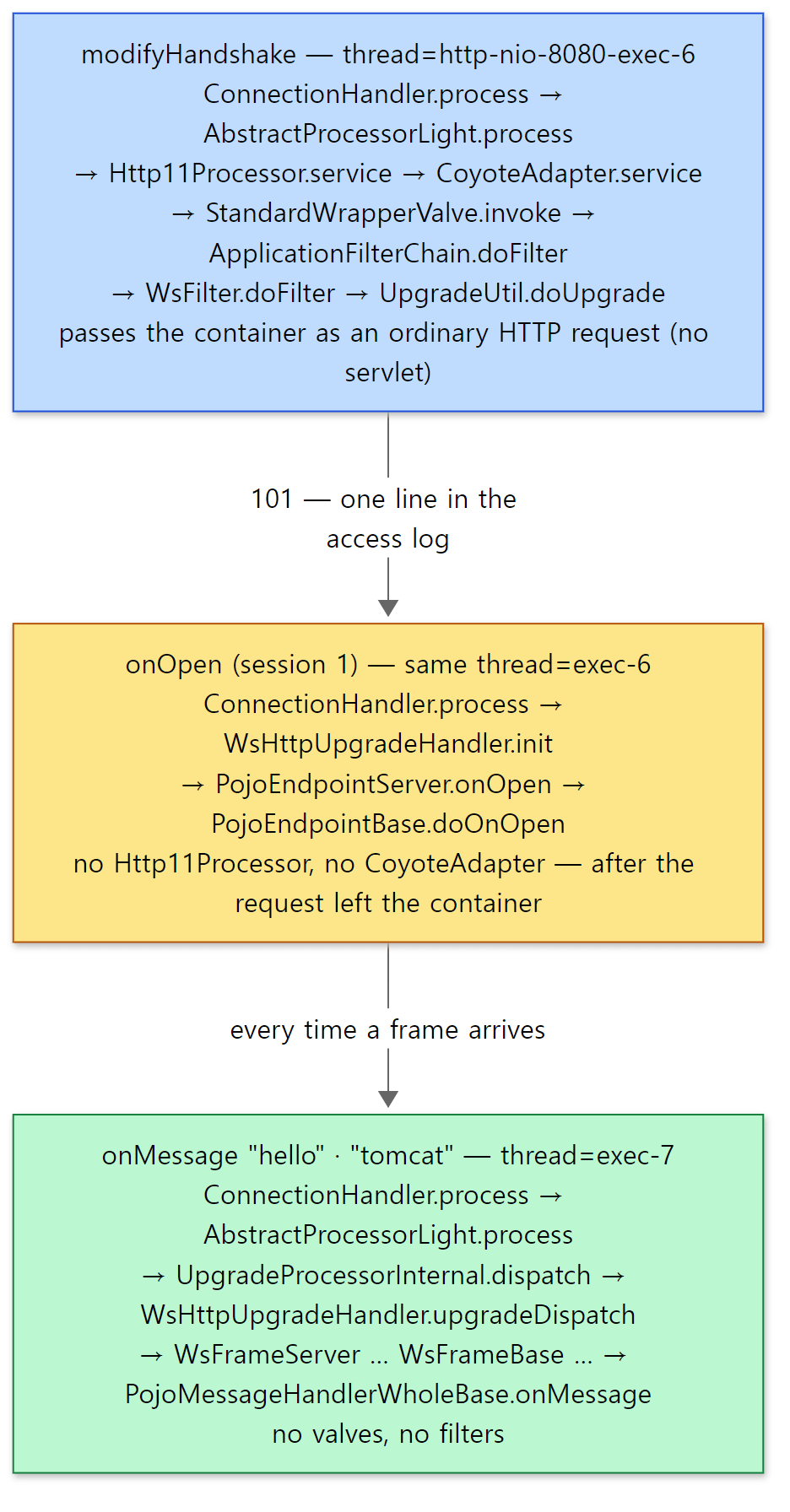 The three blocks of the output above, as they are. The thread numbers come from this run.
The access log has one line per handshake, "GET /u15/echo HTTP/1.1" 101 -, and nothing for the messages after it.
Easy to get confused
- You cannot put a servlet filter on WebSocket messages. The
onMessagestack above is the proof. An authentication filter runs only once, at the handshake. Spring'sHandshakeInterceptorapplying only to the handshake (Spring Part 25) has the same cause. - The web application's class loader is in place for
onOpen, but not because of the token.request.upgrade()does not use theInstanceManagerfor Tomcat-internal classes (InternalHttpUpgradeHandler) (lines 1920–1921), so the token'sinstanceManagerisnull, and the loop from section 3 callsinit()without switching class loaders (lines 1358–1359). Instead,WsHttpUpgradeHandler.init()itself switches the thread's context class loader to the web application's and switches it back afterwards (lines 132–134, line 165). Why each web application has its own class loader was covered in Part 4. - WebSocket over an HTTP/2 connection (RFC 8441) is not supported in this commit. That method turns on the HTTP/2 setting
ENABLE_CONNECT_PROTOCOLand opens with theCONNECTmethod, but when Tomcat receives that setting it ignores it with the comment "Not supported. Ignore it." (ConnectionSettingsBase.java lines 86–90).StreamProcessor, which processes HTTP/2 streams, does not overridedoHttpUpgrade(), so an attempt to upgrade inside a stream would hit the default implementation, which throwsUnsupportedOperationException(AbstractProcessor.java lines 1075–1078). This last behaviour was checked only in the source, not run as an example. So even on a connector with h2c turned on, WebSocket connections open over HTTP/1.1.
6. The two upgrades side by side
| HTTP/2 (h2c upgrade) | WebSocket | |
|---|---|---|
| Where you turn it on | <UpgradeProtocol> inside <Connector> in server.xml |
@ServerEndpoint in the web application (found by WsSci) |
| Layer that decides | Coyote (Http11Processor, before entering the container) |
Catalina (WsFilter, inside the filter chain) |
| Code that sets 101 | Http11Processor.service() line 360 |
Request.upgrade() line 1936 |
contextBind of the UpgradeToken |
null (no web application involved) |
that web application's Context |
| Object that takes over | Http2UpgradeHandler (Http2AsyncUpgradeHandler) |
WsHttpUpgradeHandler |
| How requests are handled afterwards | CoyoteAdapter.service() per stream — through valves, filters and servlet again |
an endpoint method per message — the container is not involved |
| Ways in without an upgrade | ALPN (h2), prior knowledge |
none |
The last two rows are the difference in character between the two protocols. HTTP/2 is HTTP in a different wrapping, so even after taking over the connection it sends each request back into the servlet container. That is why it is handled at the connector level and the web application does not notice the change. WebSocket is a conversation that is not HTTP, so once the handshake is done over HTTP, the web application's endpoint holds the connection directly. That is why the decision sits inside the container, where it can use what the web application knows (paths, endpoints, Origin).
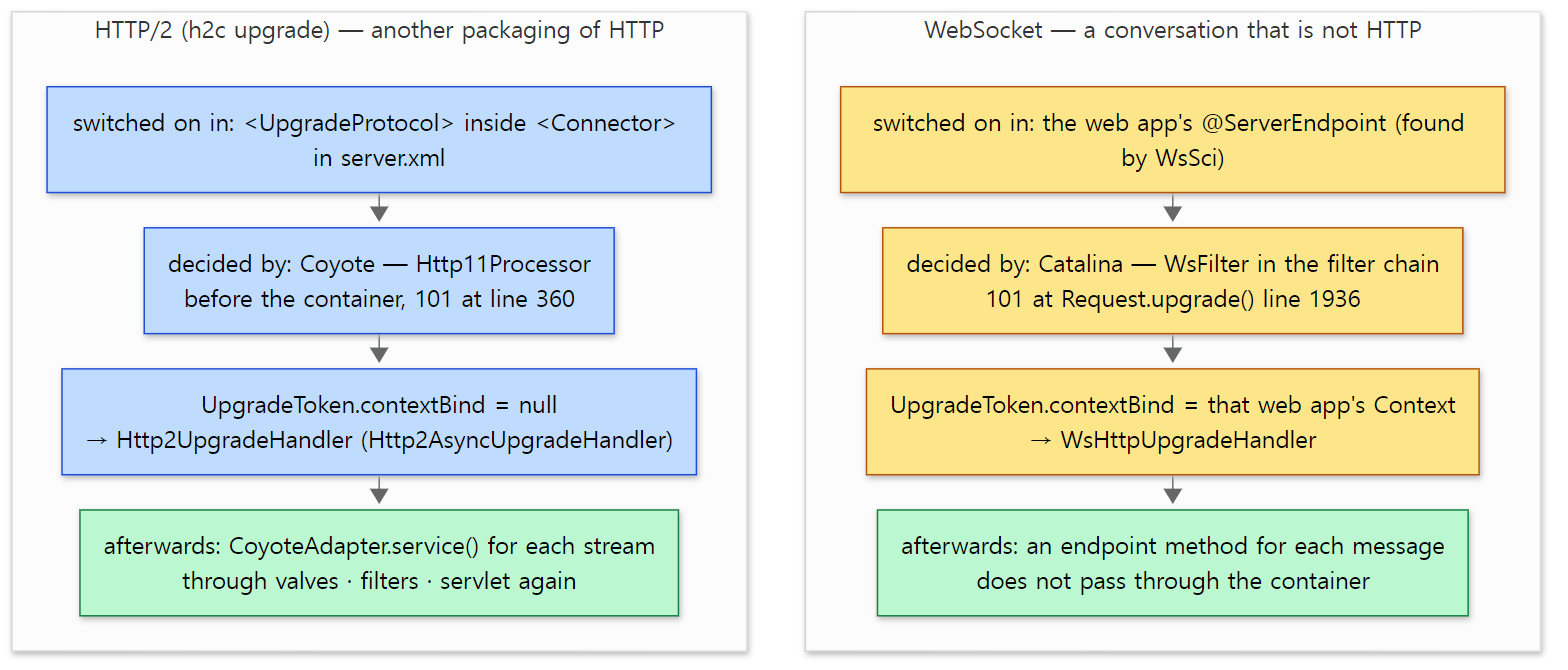 The rows of the table above, laid out top to bottom. The last (green) boxes are where the two protocols part ways.
What this post leaves out
- HPACK header compression:
coyote/http2/HpackDecoder.java,HpackEncoder.java - The details of reading frames:
coyote/http2/Http2Parser.java, and the async versionHttp2AsyncParser.java - The stream state machine (idle → open → half-closed → closed):
coyote/http2/StreamStateMachine.java - Priorities (
PRIORITY_UPDATE) and sharing out the connection window:Http2UpgradeHandler.releaseBackLog()from line 1232 - Defending against misbehaving clients (counting overhead frames,
overheadCountFactor):Http2UpgradeHandler.javalines 1552–1621 - Closing a connection (
GOAWAY,drainTimeout):Http2UpgradeHandler.javafrom line 799 UpgradeProcessorExternal, which wraps anHttpUpgradeHandlerwritten by the web application, andUpgradeServletInputStream·UpgradeServletOutputStream:java/org/apache/coyote/http11/upgrade/- Reading and writing WebSocket frames, and extensions (permessage-deflate):
java/org/apache/tomcat/websocket/WsFrameBase.java,PerMessageDeflate.java - The WebSocket client side (
WsWebSocketContainer) and write timeouts (WsWriteTimeout) - TLS and ALPN configuration (
SSLHostConfig,tomcat/util/net/SSLUtil)
Summary
| Concept | One-line summary |
|---|---|
<UpgradeProtocol> |
Digester passes it to Connector.addUpgradeProtocol(). At startup it goes into the h2c (upgrade) and h2 (ALPN) tables |
| HTTP/2's three doors | ALPN h2, prior knowledge (PRI * HTTP/2.0), Upgrade: h2c. The first two have no 101 |
The upgrade block in Http11Processor |
Right after the headers are read, before the container. If the name is in the table, Coyote sends the 101 itself |
UpgradeToken |
A record holding the handler that takes over, the class loader binding, the InstanceManager and the protocol name |
The UPGRADING loop in ConnectionHandler |
Puts leftover bytes back, hands back the Http11Processor, attaches the new processor and calls init() |
Http2UpgradeHandler |
The upgrade request is stream 1. Frames are read in one place; each stream's StreamRunnable goes to the thread pool |
| Flow control | DATA is written only up to what was reserved from the stream window and then the connection window (initially 65,535 bytes) |
WsSci·WsServerContainer |
At startup, collect @ServerEndpoint classes into a path table and put WsFilter on /* |
WsFilter·UpgradeUtil.doUpgrade() |
Header checks (400·426·403), computing Sec-WebSocket-Accept, request.upgrade() |
WsHttpUpgradeHandler |
After leaving the container, onOpen in init(); onMessage per message in upgradeDispatch() |
What's next
This post ends the story of the road a single request travels through Tomcat. The last post looks at embedded Tomcat (org.apache.catalina.startup.Tomcat), which starts Tomcat directly from Java code, JMX, for looking inside a running Tomcat, and JULI, which gives each web application its own logging configuration, and then wraps up the series. It continues in Part 16: Embedded Tomcat, JMX and Logging — and Wrapping Up the Series.
Compared with the other series: in httpd, a module that handles another protocol raises its hand first on the process_connection hook and takes the whole connection; mod_http2 gets in that way too (httpd Part 9). Tomcat does the same job with "a loop that swaps processors". The idea of changing protocols per connection is the same; the difference is that Tomcat signals with a return value (SocketState.UPGRADING) instead of a hook. The tunnel httpd uses to pass WebSocket on to a back-end server (ap_proxy_tunnel_run()) is only named in httpd Part 14; if that back-end server is Tomcat, the WsFilter in this post receives the handshake at the end of the tunnel. On the Spring side, Spring Part 25 is the layer directly above this post: the upgradeHttpToWebSocket() called there by StandardWebSocketUpgradeStrategy leads into this post's UpgradeUtil.doUpgrade().
- Part 5: The Connector and the NIO Endpoint — Which Threads Take a Connection
- Part 6: Reading an HTTP/1.1 Request — From Bytes to a coyote Request
- Part 9: The Filter Chain and the Servlet Call — Until service() Runs
- Part 12: Async Servlets and Non-Blocking I/O — Letting Go of the Thread
- Spring Part 25: WebSocket and Messaging — How a STOMP Message Flows