이 글에서 다루는 것
"Apache httpd 소스 파헤치기" 연재의 열 번째 글입니다. 9편에서는 소켓에서 요청 줄과 헤더를 읽어 request_rec 하나를 만들고, Host 헤더로 가상 호스트를 고르는 데까지 봤습니다. 이번에는 그 request_rec를 넘겨받아 "이 URL은 디스크의 어느 파일이고, 어떤 설정이 적용되며, 누가 응답을 만들 것인가" 를 정하는 과정을 따라갑니다. 연재 전체에서 가장 중요한 길목입니다.
답하려는 질문은 네 가지입니다.
- 요청 하나는 어떤 단계(phase)를 어떤 순서로 지나고, 각 단계에서 무엇이 정해지는가
- 설정 파일의
<Directory>,<Location>,<Files>,.htaccess는 요청마다 어디서, 어떤 순서로 합쳐지는가 - "핸들러"는 누가 고르고, 아무도 맡지 않으면 어떻게 되는가
DirectoryIndex나ErrorDocument처럼 "다른 URL을 대신 처리하는" 기능은 소스에서 어떻게 구현되어 있는가 (서브요청과 내부 리다이렉트)
| 항목 | 내용 |
|---|---|
| 대상 | Apache httpd |
| 버전 | 2.5.1-dev (trunk) |
| 커밋 | e4af30fe6d (2026-10-24) |
| 주로 읽는 파일 | modules/http/http_request.c, server/request.c, server/config.c, server/core.c, modules/mappers/mod_dir.c |
글에 나오는 줄 번호는 모두 이 커밋 기준입니다. 같은 커밋의 소스를 받고 예제용 도커 이미지를 만드는 방법은 1편에 있습니다.
server/request.c는 2,600줄이 넘는 파일이고, 그중 디렉터리 걷기 함수 하나만 800줄입니다. 이 글은 처음 보는 사람이 따라올 수 있는 큰 줄기만 골랐습니다. 빼놓은 것은 글 끝의 "이 글에서 뺀 것"에 이름과 위치만 적어 두었습니다.
먼저 알아 둘 말
훅(hook)은 "이 시점이 되면 등록된 함수들을 차례로 불러 주겠다"고 코어가 열어 둔 자리입니다. 모듈은 ap_hook_translate_name(내_함수, ...)처럼 자기 함수를 등록해 두고, 코어는 그 시점에 ap_run_translate_name(r)을 불러 등록된 함수들을 돌립니다. 함수를 값처럼 넘기는 함수 포인터는 2편에서, 훅을 만드는 매크로와 순서 정하기는 6편에서 봤습니다.
RUN_FIRST와 RUN_ALL은 훅을 돌리는 두 가지 방식입니다. 훅 함수는 보통 OK(처리했다), DECLINED(내 일이 아니다), 또는 HTTP 오류 코드(예: 404) 가운데 하나를 돌려줍니다.
- RUN_FIRST: 차례로 부르다가
DECLINED가 아닌 답이 처음 나오면 거기서 멈춥니다. "누가 이 일을 맡을래?" 하고 물어 처음 손 든 쪽에게 맡기는 방식입니다(APR-utilapr_hooks.h267–295행). - RUN_ALL:
OK나DECLINED면 계속 다음 함수를 부르고, 오류가 나오면 멈춥니다. "모두 한마디씩 해라, 단 누가 반대하면 끝"인 방식입니다(222–250행).
request_rec 는 요청 하나에 대한 모든 것을 담는 구조체입니다(3편). 이 글에서는 필드 네 개만 따라다닙니다.
| 필드 | 뜻 | 예 |
|---|---|---|
r->uri |
요청한 URL의 경로 부분 | /docs/index.html |
r->filename |
그 URL이 가리키는 디스크 경로 | /tmp/htdocs/docs/index.html |
r->handler |
응답을 만들 핸들러의 이름 | text/html, server-status |
r->per_dir_config |
이 요청에 적용할, 합쳐진 디렉터리 설정 | (모듈별 설정 구조체들의 배열) |
디렉터리 설정(per-dir config)은 <Directory>, <Location>, <Files>, .htaccess 안에 적는 설정입니다. 설정 파일을 읽을 때 섹션마다 따로 만들어 두었다가 요청이 오면 그 요청에 맞는 섹션들을 골라 병합(merge)합니다. 섹션 하나가 C 구조체가 되는 과정과 병합 함수는 7편에서 봤습니다. 이 글은 "요청이 올 때 어떤 섹션을 어떤 순서로 고르나"를 봅니다.
서브요청(subrequest)은 요청을 처리하는 도중에 "이 URL을 요청했다면 어떻게 됐을까"를 미리 알아보려고 만드는 작은 요청입니다. 클라이언트는 모릅니다. 내부 리다이렉트(internal redirect)는 응답을 아예 다른 URL로 바꿔 처음부터 다시 처리하는 것입니다. 브라우저 주소창이 바뀌는 301/302 리다이렉트와 달리, 이것도 서버 안에서만 일어납니다.
1. 큰 그림: 세 함수와 마무리 하나
9편에서 본 연결 처리 루프는 요청을 하나 읽을 때마다 ap_process_async_request()(event MPM처럼 비동기를 쓰는 경우) 또는 ap_process_request()를 부릅니다(modules/http/http_core.c 159행, 212행). 뒤쪽도 안에서 앞쪽을 부르므로(486행) 본론은 ap_process_async_request()에 있습니다. 로그와 통계를 빼면 뼈대는 이렇습니다.
    access_status = ap_run_quick_handler(r, 0);  /* Not a look-up request */
    if (access_status == DECLINED) {
        access_status = ap_process_request_internal(r);
        if (access_status == OK) {
            access_status = ap_invoke_handler(r);
        }
    }
    /* ... */
    ap_die_r(access_status, r, HTTP_OK);

    ap_process_request_after_handler(r);
}
modules/http/http_request.c 447–477행
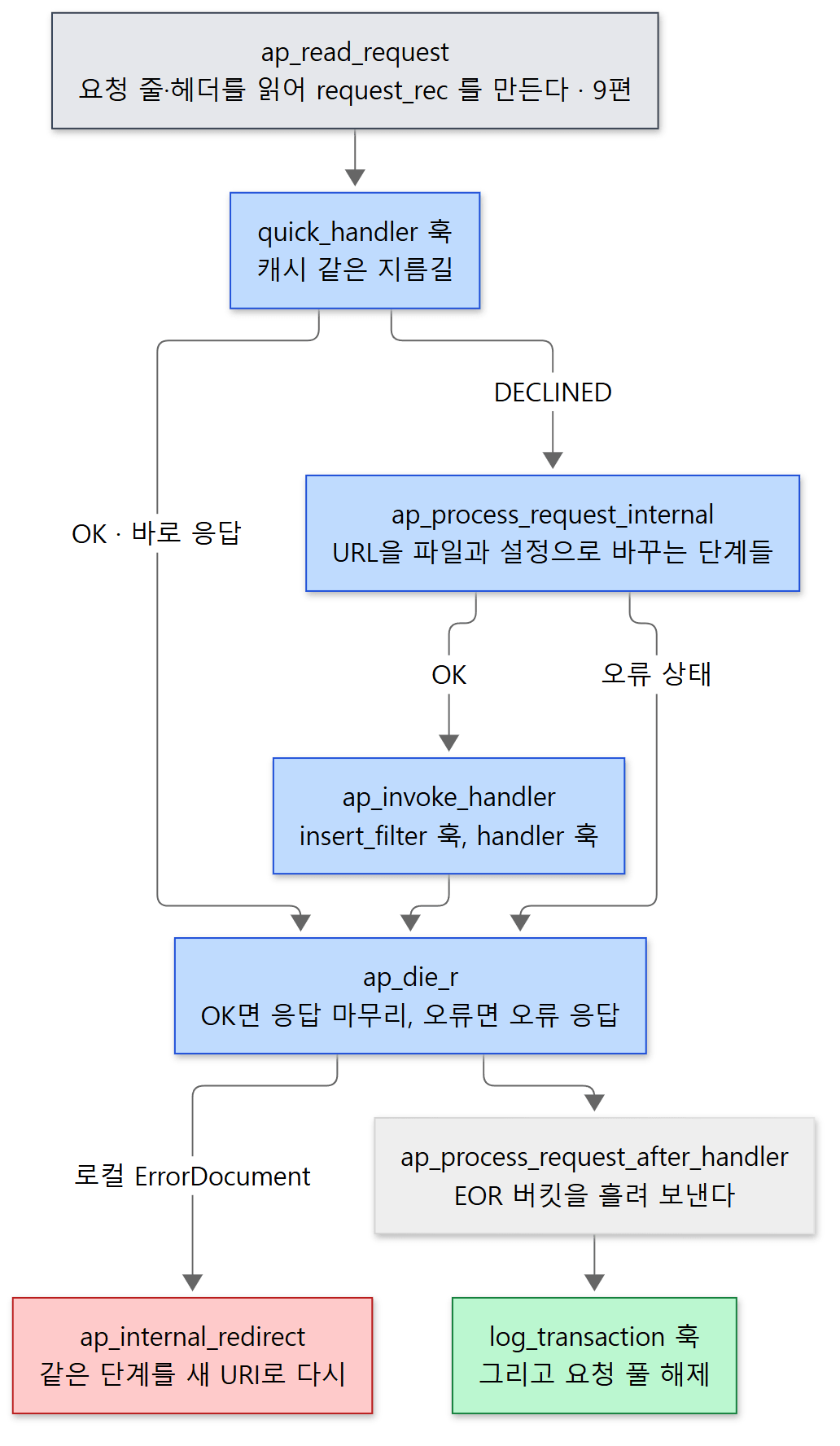 파란 상자가 이 글의 주인공입니다. 빨간 상자는 오류가 났을 때만 가는 길입니다.
quick_handler훅 — 아무 단계도 거치기 전에 "이 요청을 통째로 맡을 사람?" 하고 묻습니다. RUN_FIRST입니다(server/config.c172–173행). URL을 열쇠로 하는 캐시가 쓰라고 만든 자리이고, 실제로mod_cache가 여기에 걸립니다(modules/cache/mod_cache.c2605행). 여기서OK가 나오면 아래 단계를 전부 건너뜁니다. 접근 제어도 건너뛰므로, 소스 주석도 "아주 조심해서 쓰라"고 적어 두었습니다(422–423행).ap_process_request_internal()— URL을 파일로 바꾸고, 설정을 합치고, 접근을 검사하고, 내용 형식을 정합니다. 2절부터 볼 이 글의 중심입니다.ap_invoke_handler()— 응답 본문을 만들 핸들러를 불러냅니다. 5절에서 봅니다.ap_die_r()— 이름과 달리 정상일 때도 지나갑니다.OK나DONE이면ap_finalize_request_protocol()로 응답을 마무리하고 끝납니다(82–85행). 오류 코드면 오류 응답을 보내는데, 그 길에ErrorDocument가 있습니다(6절).
마지막의 ap_process_request_after_handler()는 연결의 출력 필터로 EOR(End Of Request) 버킷을 흘려 보냅니다(336–349행). 이 버킷이 지워질 때 접근 로그를 남기는 log_transaction 훅이 불리고(server/eor_bucket.c 27–46행) 요청 풀이 지워집니다. 버킷과 필터는 11편에서, 로그는 16편에서 봅니다.
예제 1: 핸들러에 닿았을 때의 호출 스택
정말 이 길로 가는지 gdb로 확인했습니다. 정적 파일 하나를 요청하고, 그 파일을 내보내는 코어의 default_handler()에 중단점을 걸어 호출 스택을 찍었습니다.
이 예제는 기준 커밋(e4af30fe6d)을 그대로 빌드한 httpd 2.5.1-dev 로 도커 컨테이너(Ubuntu 24.04)에서 실행했습니다. ex/u10-handler-stack/run.sh의 핵심은 이렇습니다.
# -X: 자식 프로세스를 따로 띄우지 않고 한 프로세스에서 요청을 받는다 (디버깅용)
( sleep 2; curl -s http://127.0.0.1:8080/hello.html >/dev/null ) &
gdb -batch -q \
    -ex "set breakpoint pending on" \
    -ex "break default_handler" \
    -ex "run" \
    -ex "bt" \
    -ex "kill" \
    --args httpd -X -f /tmp/u10s.conf 2>&1 | grep -E "^#|Breakpoint 1,"
Thread 3 "httpd" hit Breakpoint 1, 0x000055beb9cfe8da in default_handler ()
#0  0x000055beb9cfe8da in default_handler ()
#1  0x000055beb9cc484d in ap_run_handler ()
#2  0x000055beb9cc53f9 in ap_invoke_handler ()
#3  0x000055beb9cb6e81 in ap_process_async_request ()
#4  0x000055beb9cafdd5 in ap_process_http_async_connection ()
#5  0x000055beb9cb0003 in ap_process_http_connection ()
#6  0x000055beb9cddc11 in ap_run_process_connection ()
#7  0x00007f05972698b2 in process_socket () from /opt/httpd/modules/mod_mpm_event.so
#8  0x00007f059726dbc7 in worker_thread () from /opt/httpd/modules/mod_mpm_event.so
#9  0x000055beb9cdaff9 in thread_start ()
#10 0x00007f05973c7b84 in ?? () from /lib/x86_64-linux-gnu/libc.so.6
#11 0x00007f0597454cc4 in clone () from /lib/x86_64-linux-gnu/libc.so.6
주소 값은 실행마다 다릅니다. 이 빌드에는 디버그 정보가 없어 파일·줄 번호 없이 함수 이름만 나옵니다. 아래에서 위로 읽으면 event MPM의 작업 스레드(worker_thread, 8편) → 연결 처리(9편) → ap_process_async_request() → ap_invoke_handler() → 핸들러 훅입니다.
헷갈리기 쉬운 곳: 스택에 ap_process_request_internal()이 없습니다
단계들을 다 도는 함수인데 스택에 없습니다. 이 함수는 핸들러를 부르지 않고 OK를 돌려주고 끝나기 때문입니다. 핸들러를 부르는 것은 그다음 줄의 ap_invoke_handler()입니다. "준비하는 함수"와 "실행하는 함수"가 나뉘어 있어서, 뒤에서 볼 서브요청은 준비만 하고 실행은 하지 않을 수 있습니다.
2. ap_process_request_internal()의 단계 순서
함수 머리의 주석이 이 함수의 무게를 말해 줍니다.
This is the master logic for processing requests. Do NOT duplicate this logic elsewhere, or the security model will be broken by future API changes.
(server/request.c 187–191행) 본 요청이든 서브요청이든 내부 리다이렉트든, URL을 해석하는 일은 전부 이 함수 하나를 거칩니다. 그래야 접근 제어를 빠뜨리는 길이 생기지 않습니다.
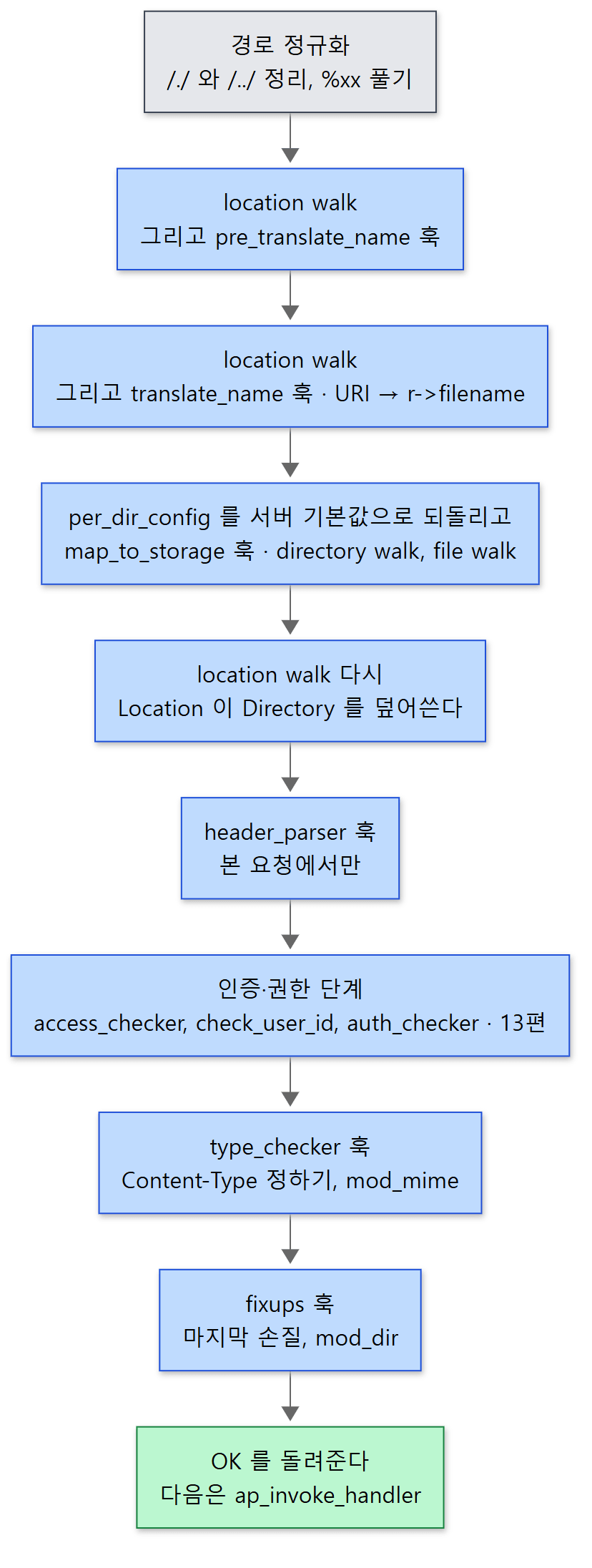 파란 상자 하나하나가 모듈이 끼어들 수 있는 자리입니다.
함수 가운데 토막을 그대로 옮기면 이렇습니다. 위의 그림 3~6번째 상자에 해당합니다.
    /* Same, translate_name is not suited for file subrequests */
    if (!file_req) {
        if ((access_status = walk_location_and_if(r))) {
            return access_status;
        }

        if ((access_status = ap_run_translate_name(r))) {
            return decl_die(access_status, "translate", r);
        }
    }

    /* Reset to the server default config prior to running map_to_storage
     */
    r->per_dir_config = r->server->lookup_defaults;

    if ((access_status = ap_run_map_to_storage(r))) {
        /* This request wasn't in storage (e.g. TRACE) */
        return access_status;
    }

    /* Rerun the location walk, which overrides any map_to_storage config.
     */
    if ((access_status = walk_location_and_if(r))) {
        return access_status;
    }

    if ((access_status = ap_run_post_perdir_config(r))) {
        return access_status;
    }

    /* Only on the main request! */
    if (r->main == NULL) {
        if ((access_status = ap_run_header_parser(r))) {
            return access_status;
        }
    }
모양이 전부 같습니다. 훅을 돌리고, 0(OK)이 아닌 값이 나오면 그 값을 들고 바로 돌아갑니다. 돌려받은 ap_process_async_request()는 그 값을 ap_die_r()에 넘겨 오류 응답을 만듭니다. 어느 단계든 403이나 404를 돌려주면 요청은 거기서 끝난다는 뜻입니다.
전체 단계를 표로 정리합니다. "기본 담당"은 아무 모듈도 맡지 않을 때 코어가 걸어 둔 함수입니다.
| 순서 | 훅 | 방식 | 하는 일 | 기본 담당 / 대표 모듈 |
|---|---|---|---|---|
| 0 | post_read_request |
RUN_ALL | 요청을 다 읽은 직후 (9편의 끝) | mod_setenvif, mod_proxy |
| 1 | quick_handler |
RUN_FIRST | 지름길 | mod_cache |
| 2 | pre_translate_name |
RUN_FIRST | %xx를 풀기 전의 URI를 볼 기회 |
mod_proxy |
| 3 | translate_name |
RUN_FIRST | URI → r->filename |
코어 ap_core_translate(), mod_alias, mod_rewrite |
| 4 | map_to_storage |
RUN_FIRST | 파일에 맞는 설정 고르기 | 코어 core_map_to_storage() |
| 5 | header_parser |
RUN_ALL | 헤더를 보고 할 일 (본 요청만) | mod_setenvif 등 |
| 6 | access_checker 외 |
여러 가지 | 접근·인증·권한 | mod_authz_core 등 (13편) |
| 7 | type_checker |
RUN_FIRST | Content-Type, 핸들러 이름 정하기 |
mod_mime |
| 8 | fixups |
RUN_ALL | 핸들러 직전의 마지막 손질 | mod_dir, mod_alias, mod_rewrite |
훅마다의 방식은 소스에서 직접 확인했습니다(server/request.c 79–108행, server/config.c 85–86행, server/protocol.c 2554–2557행). 코어가 맨 끝(APR_HOOK_REALLY_LAST)에 걸어 두는 함수는 server/core.c 6164–6173행에 있습니다.
왜 RUN_FIRST 훅마다 코어가 맨 끝에 서 있나
translate_name의 결과는 decl_die()를 거칩니다. 이 함수는 모두가 DECLINED했으면 "설정 오류"로 보고 500을 돌려줍니다(115–128행). URL을 파일로 바꾸는 사람이 아무도 없으면 진행할 수 없기 때문입니다. 그래서 코어는 누군가 꼭 답해야 하는 RUN_FIRST 단계마다 맨 마지막 순서로 무조건 답하는 함수를 걸어 둡니다. translate_name에는 ap_core_translate(), map_to_storage에는 core_map_to_storage(), type_checker에는 아무것도 하지 않고 OK만 돌려주는 do_nothing(), 핸들러에는 default_handler()가 그것입니다. 소스 주석도 이 do_nothing들을 언젠가 없애고 싶다고 적어 두었습니다(6172행).
예제 2: 모든 단계에 로그를 찍는 모듈
단계들을 눈으로 보려고, 모든 훅에 같은 함수를 걸어 그 순간의 r->uri, r->filename, r->handler를 찍는 모듈을 만들었습니다. 모든 함수가 DECLINED를 돌려주므로 서버의 동작은 바뀌지 않습니다.
/* 이 글을 위해 쓴 예제입니다 (httpd 의 소스가 아닙니다) */
/* 요청 처리의 모든 단계에 훅을 걸고, 단계마다 r->uri, r->filename, r->handler 를 찍는다. */
/* ... #include 생략 ... */

/* 이 요청이 본 요청인지, 서브요청(r->main)인지, 내부 리다이렉트(r->prev)인지 */
static const char *kind(request_rec *r)
{
    if (r->main) return "sub     ";
    if (r->prev) return "redirect";
    return "main    ";
}

static void trace(request_rec *r, const char *phase)
{
    ap_log_rerror(APLOG_MARK, APLOG_NOTICE, 0, r,
                  "%s %-18s uri=%s filename=%s handler=%s",
                  kind(r), phase, r->uri,
                  r->filename ? r->filename : "(null)",
                  r->handler ? r->handler : "(null)");
}

/* 단계마다 같은 일을 하는 함수를 매크로로 찍어 낸다. 모두 DECLINED 를 돌려준다 —
 * "나는 상관없으니 다음 모듈에게 넘겨라" 라는 뜻이라 서버의 동작은 바뀌지 않는다. */
#define PHASE(name) \
    static int journey_##name(request_rec *r) { trace(r, #name); return DECLINED; }

PHASE(post_read_request)
PHASE(pre_translate_name)
PHASE(translate_name)
/* ... map_to_storage 부터 handler 까지 같은 모양 ... */

static void register_hooks(apr_pool_t *p)
{
    /* 다른 모듈보다 먼저 불리도록 REALLY_FIRST — 그래서 각 줄은 "그 단계에 들어설 때"의 값이다 */
    ap_hook_post_read_request(journey_post_read_request, NULL, NULL, APR_HOOK_REALLY_FIRST);
    ap_hook_quick_handler(journey_quick_handler, NULL, NULL, APR_HOOK_REALLY_FIRST);
    ap_hook_pre_translate_name(journey_pre_translate_name, NULL, NULL, APR_HOOK_REALLY_FIRST);
    ap_hook_translate_name(journey_translate_name, NULL, NULL, APR_HOOK_REALLY_FIRST);
    /* ... 나머지 훅도 같은 방식으로 등록 ... */
}
[예제 ex/u10-request-phases/mod_journey.c에서 줄임]
#name은 매크로 인자를 문자열로 바꾸고 journey_##name은 이름을 이어 붙이는 C 전처리기 문법입니다(2편). 설정은 DocumentRoot /tmp/htdocs, <Directory /tmp/htdocs> 안에 Require all granted, 그리고 ErrorLogFormat "%M"으로 오류 로그에 메시지만 남게 했습니다. /hello.html을 요청한 결과입니다.
===== curl http://127.0.0.1:8080/hello.html =====
HTTP 200  body: hello
main     post_read_request  uri=/hello.html filename=(null) handler=(null)
main     quick_handler      uri=/hello.html filename=(null) handler=(null)
main     pre_translate_name uri=/hello.html filename=(null) handler=(null)
main     translate_name     uri=/hello.html filename=(null) handler=(null)
main     map_to_storage     uri=/hello.html filename=/tmp/htdocs/hello.html handler=(null)
main     header_parser      uri=/hello.html filename=/tmp/htdocs/hello.html handler=(null)
main     access_checker     uri=/hello.html filename=/tmp/htdocs/hello.html handler=(null)
main     type_checker       uri=/hello.html filename=/tmp/htdocs/hello.html handler=(null)
main     fixups             uri=/hello.html filename=/tmp/htdocs/hello.html handler=(null)
main     insert_filter      uri=/hello.html filename=/tmp/htdocs/hello.html handler=(null)
main     handler            uri=/hello.html filename=/tmp/htdocs/hello.html handler=text/html
main     log_transaction    uri=/hello.html status=200
읽을 것이 세 가지 있습니다.
r->filename은translate_name을 지나면서 생깁니다. 내 함수는 맨 앞에서 불리므로translate_name줄에서는 아직(null)이고, 다음 단계인map_to_storage에서는/tmp/htdocs/hello.html입니다. 그 사이에 코어의ap_core_translate()가 채웠습니다(3절).check_user_id와auth_checker가 없습니다.Require all granted만 있는 곳에서는 사용자를 확인할 필요가 없어 그 두 단계를 건너뜁니다. 바로 아래에서 봅니다.r->handler는handler단계에서 처음 값이 생깁니다. 그것도text/html, 곧Content-Type과 같은 문자열입니다. 5절에서 이유를 봅니다.
인증·권한 단계는 순서만
6번 단계는 사실 훅 여러 개입니다. Satisfy All(기본)일 때의 순서는 이렇습니다(339–368행).
token_checker— 토큰(예: Bearer) 인증. trunk에만 있는 훅으로, 2.4.x 브랜치의server/request.c에는 이 훅이 없습니다.access_checker— IP 같은, 사용자와 상관없는 검사. RUN_ALL.access_checker_ex— RUN_FIRST.mod_authz_core가 여기서Require를 판정합니다. 사용자 없이 허가되면OK, 사용자가 필요하면DECLINED입니다.- 3이
DECLINED였을 때만(또는OK였어도force_authn훅이 인증을 요구하면)check_user_id(누구인가, 인증)와auth_checker(그 사람이 되는가, 권한)를 차례로 부릅니다.
예제 2에서 두 단계가 빠진 것은 3번에서 Require all granted가 OK를 냈기 때문입니다. 암호가 걸린 디렉터리(AuthType Basic, Require valid-user)로 요청하면 두 단계가 나타납니다.
===== curl -u alice:wonderland http://127.0.0.1:8080/private/secret.txt =====
HTTP 200  body: secret
main     post_read_request  uri=/private/secret.txt filename=(null) handler=(null)
main     quick_handler      uri=/private/secret.txt filename=(null) handler=(null)
main     pre_translate_name uri=/private/secret.txt filename=(null) handler=(null)
main     translate_name     uri=/private/secret.txt filename=(null) handler=(null)
main     map_to_storage     uri=/private/secret.txt filename=/tmp/htdocs/private/secret.txt handler=(null)
main     header_parser      uri=/private/secret.txt filename=/tmp/htdocs/private/secret.txt handler=(null)
main     access_checker     uri=/private/secret.txt filename=/tmp/htdocs/private/secret.txt handler=(null)
main     check_user_id      uri=/private/secret.txt filename=/tmp/htdocs/private/secret.txt handler=(null)
main     auth_checker       uri=/private/secret.txt filename=/tmp/htdocs/private/secret.txt handler=(null)
main     type_checker       uri=/private/secret.txt filename=/tmp/htdocs/private/secret.txt handler=(null)
main     fixups             uri=/private/secret.txt filename=/tmp/htdocs/private/secret.txt handler=(null)
main     insert_filter      uri=/private/secret.txt filename=/tmp/htdocs/private/secret.txt handler=(null)
main     handler            uri=/private/secret.txt filename=/tmp/htdocs/private/secret.txt handler=text/plain
main     log_transaction    uri=/private/secret.txt status=200
Require 한 줄이 어떻게 판정되는지, Satisfy Any일 때 순서가 어떻게 바뀌는지는 13편에서 봅니다.
헷갈리기 쉬운 곳
- 인증이 설정보다 뒤에 옵니다. 누구에게 무엇을 요구할지는
<Directory>나<Location>안에 적혀 있으므로, 설정을 다 합친 뒤에야 판정할 수 있습니다. 그래서translate_name과map_to_storage가 먼저입니다. - location walk가 세 번 있습니다.
pre_translate_name전(230행),translate_name전(279행),map_to_storage뒤(299행)입니다. 앞의 두 번은 그 훅들이<Location>안의 설정을 볼 수 있게 하려는 것이고, 첫 번째 결과는 바로 버립니다(242–243행 "Throw away pre_trans only merging"). 290행에서r->per_dir_config를 서버 기본값으로 되돌리기 때문에 두 번째 결과도 최종 설정에 남지 않습니다. 최종 설정에 들어가는 것은 세 번째뿐입니다. header_parser는 본 요청에서만 불립니다(307–312행). 서브요청에서는 건너뜁니다. 6절의 예제에서 확인합니다.
3. URL을 파일로: translate_name과 map_to_storage
ap_core_translate() — DocumentRoot에 URI를 붙인다
translate_name의 마지막 담당인 코어 함수의 핵심은 한 호출입니다.
    if ((rv = apr_filepath_merge(&r->filename, ap_document_root(r), path,
                                 APR_FILEPATH_TRUENAME
 APR_FILEPATH_SECUREROOT, r->pool))
                != APR_SUCCESS) {
        ap_log_rerror(APLOG_MARK, APLOG_ERR, rv, r, APLOGNO(00127)
                     "Cannot map %s to file", r->the_request);
        return HTTP_FORBIDDEN;
    }
    r->canonical_filename = r->filename;

    return OK;
DocumentRoot(/tmp/htdocs)와 앞의 /를 떼어 낸 URI(hello.html)를 APR의 경로 합치기 함수로 붙입니다. APR_FILEPATH_SECUREROOT는 결과가 DocumentRoot 밖으로 나가면 실패하게 하는 플래그입니다. 그 앞에서 ap_process_request_internal()이 이미 /../를 정리했지만(209–221행), 여기서 한 번 더 막습니다.
mod_alias와 mod_rewrite가 끼는 자리
Alias /icons/ /usr/share/icons/ 같은 설정은 이 단계에서 코어보다 먼저 답해 버리는 방식으로 동작합니다.
    ap_hook_translate_name(translate_alias_redir,NULL,aszSucc,APR_HOOK_MIDDLE);
    ap_hook_fixups(fixup_redir,NULL,NULL,APR_HOOK_MIDDLE);
modules/mappers/mod_alias.c 788–789행
mod_alias는 MIDDLE, 코어는 REALLY_LAST이므로 mod_alias가 먼저 불립니다. Alias에 맞으면 r->filename을 정하고 OK를 돌려줍니다(690–695행). RUN_FIRST이므로 그 순간 코어의 ap_core_translate()는 불리지 않습니다. Redirect에 맞으면 Location 헤더를 넣고 302 같은 상태 코드를 돌려주는데, 2절에서 본 대로 요청은 그 자리에서 끝나 브라우저에 리다이렉트 응답이 갑니다.
mod_rewrite는 APR_HOOK_FIRST로, 그리고 "mod_proxy.c보다 먼저"라는 조건을 붙여 겁니다(mod_rewrite.c 5765–5769행). 서버 설정의 RewriteRule은 이 translate_name에서 돌고, .htaccess나 <Directory> 안의 RewriteRule은 fixups에서 돕니다. 디렉터리 설정은 map_to_storage가 끝나야 알 수 있기 때문입니다. fixups에서 URL을 바꾼 경우에는 이미 단계를 다 지나왔으므로, r->filename 앞에 redirect:를 붙이고 핸들러를 자기 것으로 바꿔 두었다가(5654–5655행), 핸들러 단계에서 6절의 내부 리다이렉트로 처음부터 다시 돌립니다(5700–5717행). mod_rewrite의 규칙 처리 자체는 이 글에서 다루지 않습니다.
core_map_to_storage() — 걷기 두 번
map_to_storage 단계의 코어 담당은 짧습니다.
static int core_map_to_storage(request_rec *r)
{
    int access_status;

    if ((access_status = ap_directory_walk(r))) {
        return access_status;
    }

    if ((access_status = ap_file_walk(r))) {
        return access_status;
    }

    return OK;
}
이름 그대로 "저장소(디스크)에 맞춰 보는" 단계입니다. 디스크 파일이 아닌 것을 다루는 모듈은 여기서 먼저 답해 디렉터리 걷기를 건너뜁니다. mod_proxy가 APR_HOOK_FIRST로 여기에 거는 것이 그 예입니다(mod_proxy.c 3437행, 14편).
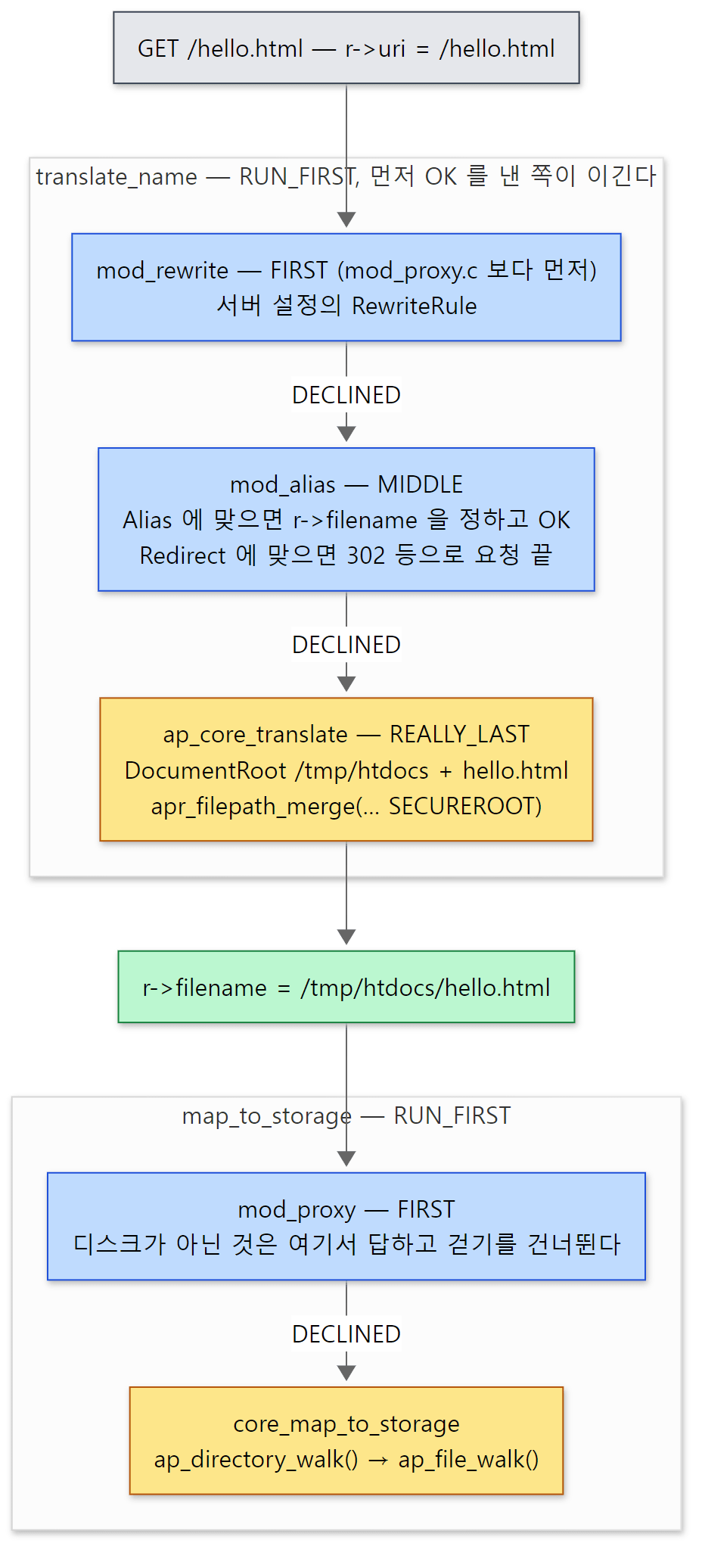 파란 칸은 코어보다 먼저 답할 수 있는 모듈, 노란 칸은 맨 끝에 선 코어입니다. 경로는 예제 2의 map_to_storage 줄에서 가져왔습니다.
4. 세 가지 걷기 — 설정이 합쳐지는 곳
"걷기"(walk)는 설정 파일의 섹션 목록을 처음부터 훑으며 이 요청에 맞는 것을 골라 차례로 병합하는 일입니다. 세 가지가 있고 각각 다른 목록을, 다른 기준으로 봅니다.
| 함수 | 보는 목록 | 무엇과 비교하나 | 위치 |
|---|---|---|---|
ap_directory_walk() |
<Directory>, <DirectoryMatch>, .htaccess |
r->filename의 디렉터리 경로 |
680–1484행 |
ap_file_walk() |
<Files>, <FilesMatch> |
r->filename의 마지막 이름 |
1690행부터 |
ap_location_walk() |
<Location>, <LocationMatch> |
r->uri |
1487–1688행 |
설정 파일을 읽을 때 <Directory> 섹션은 서버 설정의 sec_dir 배열에, <Location>은 sec_url 배열에 하나씩 쌓입니다(server/core.c 639–653행). <Files>는 그것을 감싼 디렉터리 설정의 sec_file에 들어갑니다(655–665행). 걷기 함수들은 이 배열을 훑습니다.
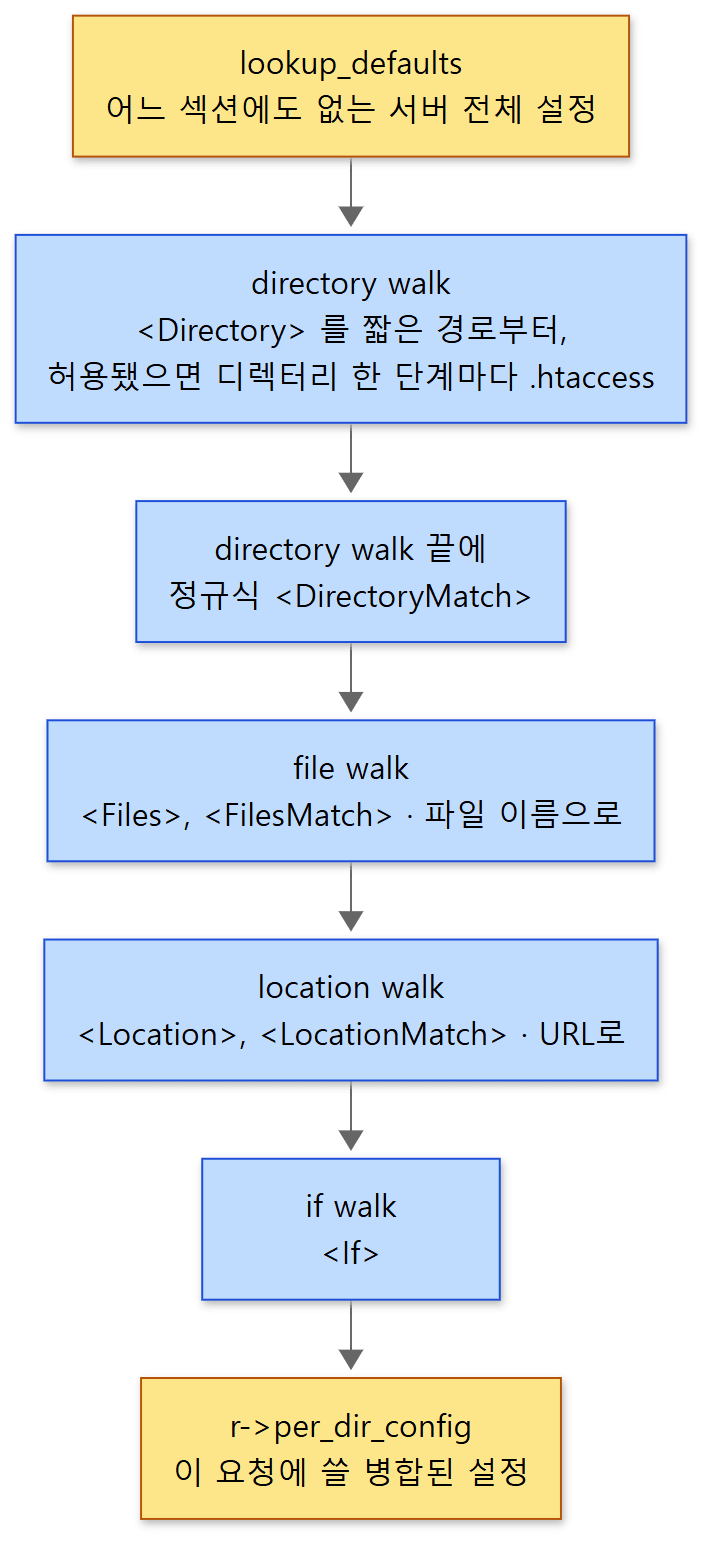 노란 상자가 출발점과 결과, 파란 상자가 차례로 덮어쓰는 걷기입니다. 아래로 갈수록 나중에 합쳐지므로 우선합니다.
directory walk — 디렉터리를 한 단계씩 내려간다
ap_directory_walk()는 /tmp/htdocs/docs/index.html이라면 /, /tmp/, /tmp/htdocs/, /tmp/htdocs/docs/ 순으로 한 단계씩 내려가며, 각 단계에서 두 가지를 합니다.
- 그 깊이에 맞는
<Directory>섹션을 찾아 합칩니다(1018–1084행). 섹션 목록은 설정을 다 읽은 뒤 경로의 마디 수가 적은 것부터, 정규식은 맨 뒤로 정렬해 두었습니다(server/core.c709–741행). 그래서 설정 파일에 적은 순서와 상관없이<Directory />가<Directory /tmp/htdocs>보다 먼저 합쳐집니다. AllowOverride로 허용되어 있으면 그 디렉터리의.htaccess를 읽어 합칩니다(1086–1110행).
정규식 섹션(<DirectoryMatch>, <Directory ~ ...>)은 내려가기가 끝난 뒤 따로 한 번 훑어 합칩니다(1332–1409행). 걷는 동안 디스크에 stat을 해 보면서, 실제 파일 뒤에 남은 부분은 r->path_info로 떼어 냅니다(/script.cgi/extra의 /extra).
location walk — 그리고 마지막에 병합
ap_location_walk()는 디스크를 보지 않고 r->uri 문자열을 섹션의 경로와 비교합니다. 세 걷기 모두 끝부분이 같습니다. 고른 섹션들을 차례로 합친 now_merged를 만든 뒤, 그것을 지금까지의 r->per_dir_config 위에 한 번 더 병합합니다.
    cache->dir_conf_tested = sec_ent;
    cache->dir_conf_merged = r->per_dir_config;

    /* Merge our cache->dir_conf_merged construct with the r->per_dir_configs,
     * and note the end result to (potentially) skip this step next time.
     */
    if (now_merged) {
        r->per_dir_config = ap_merge_per_dir_configs(r->pool,
                                                     r->per_dir_config,
                                                     now_merged);
    }
    cache->per_dir_result = r->per_dir_config;

    return OK;
}
ap_merge_per_dir_configs()가 7편에서 본 그 병합 함수입니다. 모듈마다 등록한 merge_dir_config 함수를 불러 "기존 설정 + 새 설정"을 만듭니다(server/config.c 285행). 2절에서 본 순서 — map_to_storage(디렉터리·파일 걷기) 다음에 location walk — 때문에 <Location>이 <Directory>를 덮어씁니다. 299행의 주석 "Rerun the location walk, which overrides any map_to_storage config"가 바로 이 말입니다. <If> 섹션은 location walk 바로 뒤에 ap_if_walk()가 합칩니다(walk_location_and_if() 166–190행).
cache로 시작하는 줄들은 같은 요청 안에서, 또는 서브요청·내부 리다이렉트가 부모와 같은 섹션을 고르게 될 때 병합을 다시 하지 않으려는 캐시입니다. walk_cache_t라는 구조체로 요청마다 보관합니다(455–468행). 이 글에서는 "있다"는 것만 알아 두고, 6절에서 그 효과 하나를 봅니다.
헷갈리기 쉬운 곳: 파일이 없어도 여기서는 404가 나지 않습니다
ap_directory_walk()는 내려가다 파일이 없으면 걷기를 멈출 뿐 오류를 돌려주지 않습니다(APR_ENOENT일 때 break, 1228–1234행). 없는 파일을 요청해도 단계는 끝까지 갑니다. 404를 정하는 것은 마지막의 default_handler()입니다.
    if (r->method_number == M_GET || r->method_number == M_POST) {
        if (r->finfo.filetype == APR_NOFILE) {
            ap_log_rerror(APLOG_MARK, APLOG_INFO, 0, r, APLOGNO(00128)
                          "File does not exist: %s",
                          apr_pstrcat(r->pool, r->filename, r->path_info, NULL));
            return HTTP_NOT_FOUND;
        }
이렇게 늦게 정하는 데는 이유가 있습니다. 파일이 없더라도 다른 모듈(예: 핸들러가 정해진 <Location>, 6절의 mod_dir)이 그 URL을 맡을 수 있기 때문입니다. 6절의 예제 4에서 AH00128 로그가 handler 단계 다음에 찍히는 것으로 확인합니다.
5. ap_invoke_handler() — 핸들러를 고르고 부른다
ap_process_request_internal()이 OK를 돌려주면 ap_invoke_handler()가 불립니다. 핵심만 옮깁니다.
AP_CORE_DECLARE(int) ap_invoke_handler(request_rec *r)
{
    /* ... */
    ap_run_insert_filter(r);
    /* ... 필터의 초기화 함수 부르기 ... */
    if (!r->handler) {
        if (r->content_type && AP_REQUEST_IS_TRUSTED_CT(r)) {
            handler = r->content_type;
            /* ... "text/html; charset=..." 의 ; 뒤를 잘라 낸다 ... */
        }
        else {
            handler = AP_DEFAULT_HANDLER_NAME;
        }

        r->handler = handler;
    }

    result = ap_run_handler(r);

    r->handler = old_handler;
    /* ... */
    return result == DECLINED ? HTTP_INTERNAL_SERVER_ERROR : result;
}
insert_filter훅 — 이제 진짜 응답을 만들 것이므로, 모듈들이 출력 필터를 끼워 넣을 마지막 기회입니다(405행). 반환값이 없는 VOID 훅입니다(server/request.c97행).- 핸들러 이름 정하기 —
SetHandler나AddHandler로r->handler가 정해져 있으면 그대로 씁니다. 없으면Content-Type을 핸들러 이름으로 씁니다(420–441행). 예제 2에서handler=text/html이 찍힌 이유가 이것입니다.mod_mime이type_checker단계에서.html을 보고Content-Type을text/html로 정했고(믿을 수 있는 값이라는 표시와 함께,mod_mime.c921행), 그것이 핸들러 이름이 되었습니다. 그것도 없으면 빈 문자열(AP_DEFAULT_HANDLER_NAME,include/httpd.h731행)입니다. handler훅 — RUN_FIRST입니다(server/config.c169–170행). 핸들러 모듈들은 대개 맨 앞에서r->handler를 자기 이름과 비교해 다르면DECLINED를 돌려줍니다.mod_status는"server-status"(mod_status.c217–219행),mod_autoindex는 디렉터리 표시용 이름을 봅니다. 아무도 맡지 않은 요청은 맨 끝의default_handler()가 받아 파일을 그대로 보냅니다. 핸들러가text/html이라는 이름을 맡겠다고 나서는 모듈은 없으므로, 예제의/hello.html은default_handler()가 보냈습니다. 예제 1의 스택이 그 증거입니다.- 끝까지
DECLINED면500(469행).
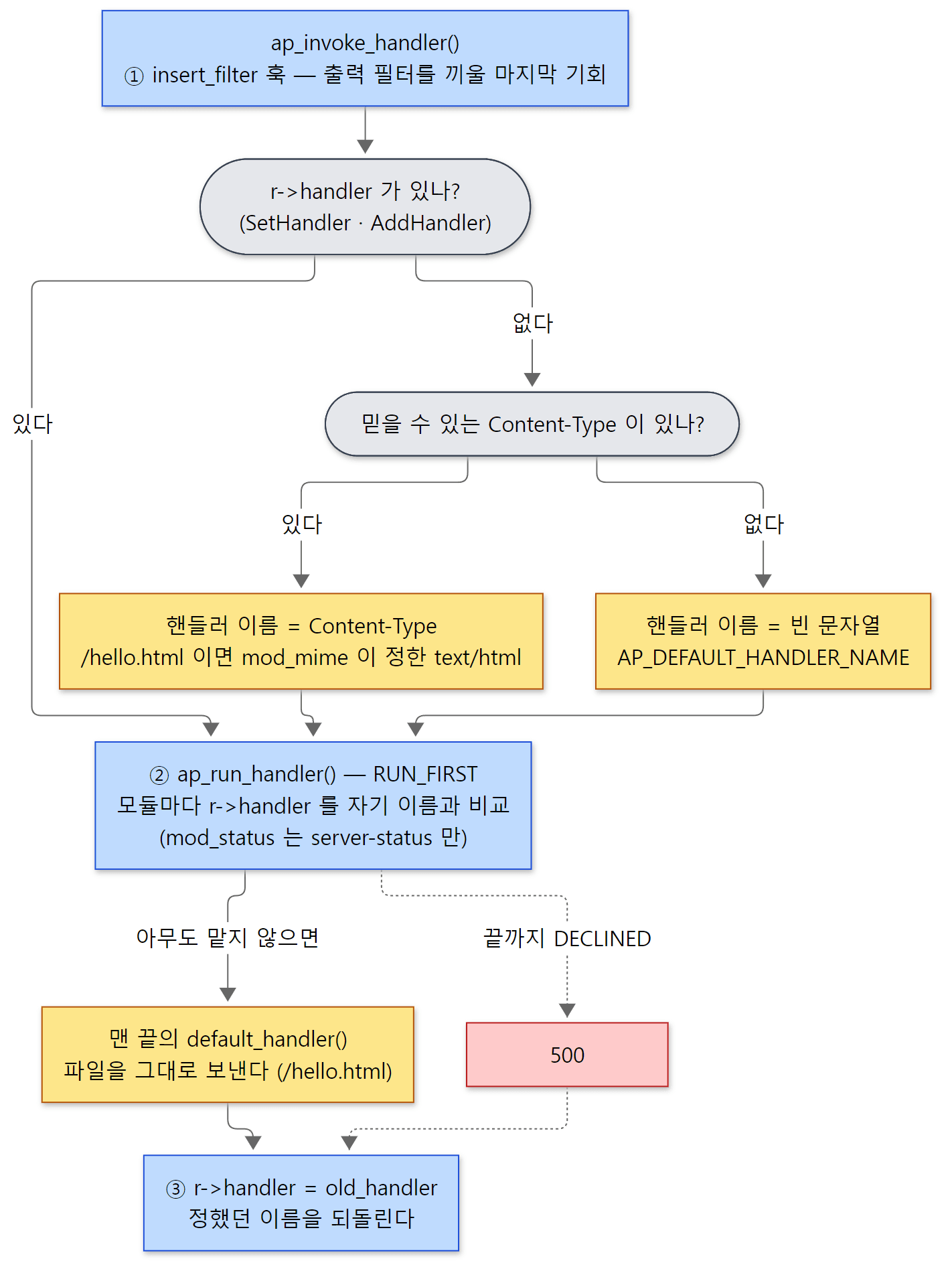 위 목록의 네 항목을 갈림길로 그렸습니다. 노란 칸이 예제의 /hello.html 이 실제로 지난 길입니다.
default_handler()가 파일을 응답으로 바꾸는 과정, mod_mime이 확장자를 해석하는 방법은 12편에서 봅니다.
헷갈리기 쉬운 곳: 핸들러 이름이 끝나면 되돌아갑니다
445행의 r->handler = old_handler;는 이 함수 안에서 정한 기본 핸들러 이름을 핸들러가 끝난 뒤 지웁니다. 그래서 로그 모듈 같은 뒤쪽 코드에서 r->handler를 보면 NULL일 수 있습니다. 핸들러 이름이 Content-Type에서 왔다는 것은 ap_invoke_handler() 안에서만 유효한 사실입니다.
6. 서브요청과 내부 리다이렉트
두 기능 모두 "다른 URL에 대해 2절의 단계를 돌린다"는 점은 같지만, 목적과 결과가 다릅니다.
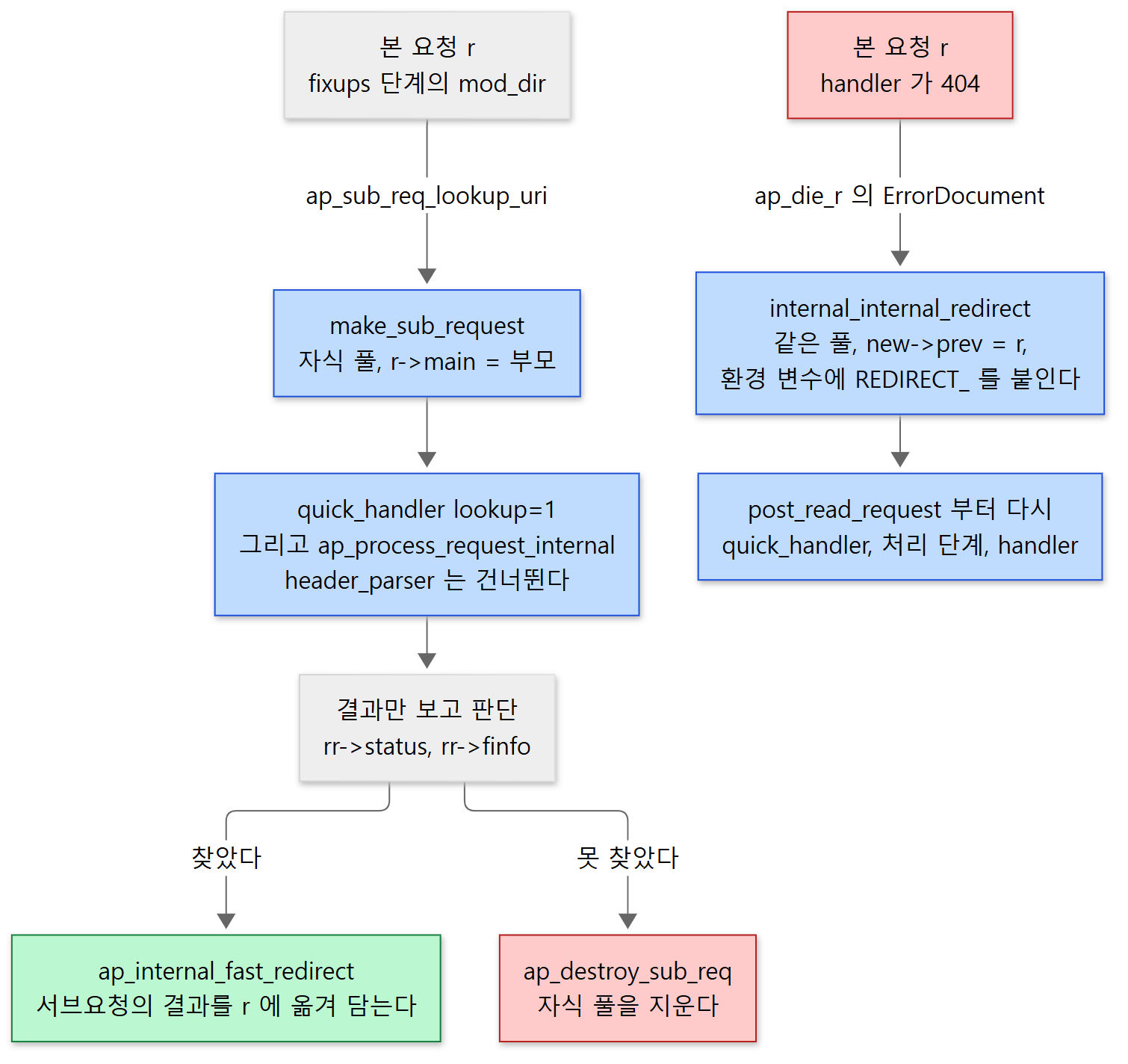 왼쪽은 "알아보기만" 하는 서브요청, 오른쪽은 "다시 처리하는" 내부 리다이렉트입니다.
| 서브요청 | 내부 리다이렉트 | |
|---|---|---|
| 만드는 함수 | ap_sub_req_lookup_uri() → make_sub_request() |
ap_internal_redirect() → internal_internal_redirect() |
| 부모를 가리키는 필드 | r->main |
r->prev (부모 쪽은 r->next) |
| 풀 | 부모 풀의 자식 풀을 새로 만든다 | 부모와 같은 풀을 쓴다 |
| 단계 | ap_process_request_internal()까지만. 실행은 따로 |
post_read_request부터 핸들러까지 전부 |
| 대표 사용처 | mod_dir(DirectoryIndex), mod_autoindex, mod_include |
ErrorDocument, mod_rewrite의 디렉터리 규칙 |
서브요청: "이 URL이면 어떻게 되나" 알아보기
ap_sub_req_lookup_uri()는 메서드를 GET으로 정해 ap_sub_req_method_uri()를 부릅니다(2346–2351행). make_sub_request()가 부모 풀 아래에 "subrequest"라는 자식 풀을 만들어 그 안에 새 request_rec를 두고(2056–2059행), r->main에 부모를 기록합니다(server/protocol.c 1612행). 그다음이 본론입니다.
    if (next_filter) {
        res = ap_run_quick_handler(rnew, 1);
    }
    if (res == DECLINED) {
        res = ap_process_request_internal(rnew);
    }
    if (res) {
        rnew->status = res;
    }

    return rnew;
}
1절의 본 요청과 같은 모양이지만 ap_invoke_handler()가 없습니다. 단계만 돌려 rnew->status, rnew->filename, rnew->finfo(파일 정보) 같은 결과를 담아 돌려줄 뿐입니다. 부르는 쪽은 그 결과를 보고 판단합니다. 실제로 응답을 만들게 하려면 따로 ap_run_sub_req()를 부르고(2577–2594행), 다 쓰면 ap_destroy_sub_req()로 자식 풀째 지웁니다. 풀을 지우면 그 안의 모든 것이 한 번에 사라진다는 것은 4편에서 봤습니다. quick_handler에 넘기는 둘째 인자 1은 "알아보는 중(lookup)"이라는 표시입니다.
DirectoryIndex가 이것으로 구현됩니다. mod_dir은 fixups 단계에서, 요청이 디렉터리를 가리키면 DirectoryIndex에 적힌 이름마다 서브요청을 만들어 봅니다.
        rr = ap_sub_req_lookup_uri(name_ptr, r, r->output_filters);
        /* ... */
        if (rr->status == HTTP_OK
            && (   (rr->handler && !strcmp(rr->handler, "proxy-server"))
| rr->finfo.filetype == APR_REG)) {

            if (ap_is_HTTP_REDIRECT(d->redirect_index)) {
                apr_table_setn(r->headers_out, "Location", ap_construct_url(r->pool, rr->uri, r));
                return d->redirect_index;
            }

            ap_internal_fast_redirect(rr, r);
            return OK;
        }
modules/mappers/mod_dir.c 346–369행
서브요청이 200이고 그것이 보통 파일(APR_REG)이면, ap_internal_fast_redirect()로 서브요청의 결과를 본 요청에 옮겨 담습니다. r->uri, r->filename, r->finfo, r->handler, r->per_dir_config를 서브요청의 것으로 바꿔 끼우는 함수입니다(http_request.c 702–712행). 단계를 다시 돌지 않고 결과만 가져오므로 "fast"입니다.
예제 3: 디렉터리 요청과 mod_dir의 서브요청
/docs/를 요청했습니다. /tmp/htdocs/docs/index.html이 있고, 설정에 DirectoryIndex index.html이 있습니다.
===== curl http://127.0.0.1:8080/docs/ =====
HTTP 200  body: docs index
main     post_read_request  uri=/docs/ filename=(null) handler=(null)
main     quick_handler      uri=/docs/ filename=(null) handler=(null)
main     pre_translate_name uri=/docs/ filename=(null) handler=(null)
main     translate_name     uri=/docs/ filename=(null) handler=(null)
main     map_to_storage     uri=/docs/ filename=/tmp/htdocs/docs/ handler=(null)
main     header_parser      uri=/docs/ filename=/tmp/htdocs/docs/ handler=(null)
main     access_checker     uri=/docs/ filename=/tmp/htdocs/docs/ handler=(null)
main     type_checker       uri=/docs/ filename=/tmp/htdocs/docs/ handler=(null)
main     fixups             uri=/docs/ filename=/tmp/htdocs/docs/ handler=(null)
sub      quick_handler(lookup) uri=/docs/index.html filename=(null) handler=(null)
sub      pre_translate_name uri=/docs/index.html filename=(null) handler=(null)
sub      translate_name     uri=/docs/index.html filename=(null) handler=(null)
sub      map_to_storage     uri=/docs/index.html filename=/tmp/htdocs/docs/index.html handler=(null)
sub      type_checker       uri=/docs/index.html filename=/tmp/htdocs/docs/index.html handler=(null)
sub      fixups             uri=/docs/index.html filename=/tmp/htdocs/docs/index.html handler=(null)
main     insert_filter      uri=/docs/index.html filename=/tmp/htdocs/docs/index.html handler=(null)
main     handler            uri=/docs/index.html filename=/tmp/htdocs/docs/index.html handler=text/html
main     log_transaction    uri=/docs/index.html status=200
소스에서 읽은 것이 하나씩 보입니다.
- 서브요청은 본 요청의
fixups안에서 생깁니다. 내fixups함수(REALLY_FIRST)가 먼저 찍히고, 그 뒤에 불린mod_dir(APR_HOOK_LAST, 433행)이 서브요청을 만들었습니다. - 서브요청에는
post_read_request,header_parser,insert_filter,handler가 없습니다.quick_handler는lookup표시와 함께 불렸습니다. 서브요청은 소켓에서 읽은 것이 아니고,header_parser는 본 요청에서만 불리며(307–312행), 핸들러는 실행하지 않았기 때문입니다. - 서브요청에는
access_checker도 없습니다. 아래 "헷갈리기 쉬운 곳"에서 봅니다. - 그 뒤 본 요청의
uri가/docs/index.html로 바뀌었습니다.ap_internal_fast_redirect()가 옮겨 담은 결과입니다. 본 요청은 단계를 다시 돌지 않고 바로insert_filter와handler로 갑니다. 접근 로그에 찍힐uri도 바뀐 값입니다.
내부 리다이렉트: 처음부터 다시
ErrorDocument 404 /errors/404.html은 ap_die_r() 안에서 처리됩니다. 오류 코드에 대한 사용자 지정 응답이 /로 시작하는 로컬 경로면, 메서드를 GET으로 바꾸고 ap_internal_redirect()를 부릅니다.
            r->method = "GET";
            r->method_number = M_GET;
            ap_internal_redirect(custom_response, r);
            /* preserve ability to see %<m in the access log */
            r->method = original_method;
            r->method_number = original_method_number;
            return;
modules/http/http_request.c 199–205행
ap_internal_redirect()의 본문은 1절과 똑같은 세 줄입니다.
    access_status = ap_run_quick_handler(new, 0);  /* Not a look-up request */
    if (access_status == DECLINED) {
        access_status = ap_process_request_internal(new);
        if (access_status == OK) {
            access_status = ap_invoke_handler(new);
        }
    }
    ap_die(access_status, new);
modules/http/http_request.c 784–791행
그 앞의 internal_internal_redirect()가 새 request_rec를 준비합니다(526–687행). 서브요청과 달리 부모와 같은 풀에 만들고(537–541행), new->prev = r, r->next = new로 둘을 잇고(560–561행), 환경 변수 이름 앞에 REDIRECT_를 붙여 넘깁니다(606행, rename_original_env()). CGI에서 보이는 REDIRECT_STATUS, REDIRECT_URL이 여기서 생깁니다. 그리고 post_read_request 훅을 다시 부릅니다(681행). 주석은 mod_setenvif와 mod_unique_id가 리다이렉트 때도 할 일이 있어서라고 설명합니다.
리다이렉트가 끝없이 이어지지 않도록 ap_is_recursion_limit_exceeded()가 깊이를 셉니다(532행). 기본값은 리다이렉트 10번, 서브요청 깊이 10입니다(include/http_core.h 134–137행). LimitInternalRecursion 디렉티브로 바꿉니다.
예제 4: 없는 파일과 ErrorDocument
/nope.html은 없는 파일입니다. 설정에 ErrorDocument 404 /errors/404.html이 있고, LogLevel core:info로 AH00128이 보이게 했습니다.
===== curl http://127.0.0.1:8080/nope.html =====
HTTP 404  body: custom 404 page
main     post_read_request  uri=/nope.html filename=(null) handler=(null)
main     quick_handler      uri=/nope.html filename=(null) handler=(null)
main     pre_translate_name uri=/nope.html filename=(null) handler=(null)
main     translate_name     uri=/nope.html filename=(null) handler=(null)
main     map_to_storage     uri=/nope.html filename=/tmp/htdocs/nope.html handler=(null)
main     header_parser      uri=/nope.html filename=/tmp/htdocs/nope.html handler=(null)
main     access_checker     uri=/nope.html filename=/tmp/htdocs/nope.html handler=(null)
main     type_checker       uri=/nope.html filename=/tmp/htdocs/nope.html handler=(null)
main     fixups             uri=/nope.html filename=/tmp/htdocs/nope.html handler=(null)
main     insert_filter      uri=/nope.html filename=/tmp/htdocs/nope.html handler=(null)
main     handler            uri=/nope.html filename=/tmp/htdocs/nope.html handler=text/html
AH00128: File does not exist: /tmp/htdocs/nope.html
redirect post_read_request  uri=/errors/404.html filename=(null) handler=(null)
redirect quick_handler      uri=/errors/404.html filename=(null) handler=(null)
redirect pre_translate_name uri=/errors/404.html filename=(null) handler=(null)
redirect translate_name     uri=/errors/404.html filename=(null) handler=(null)
redirect map_to_storage     uri=/errors/404.html filename=/tmp/htdocs/errors/404.html handler=(null)
redirect header_parser      uri=/errors/404.html filename=/tmp/htdocs/errors/404.html handler=(null)
redirect access_checker     uri=/errors/404.html filename=/tmp/htdocs/errors/404.html handler=(null)
redirect type_checker       uri=/errors/404.html filename=/tmp/htdocs/errors/404.html handler=(null)
redirect fixups             uri=/errors/404.html filename=/tmp/htdocs/errors/404.html handler=(null)
redirect insert_filter      uri=/errors/404.html filename=/tmp/htdocs/errors/404.html handler=(null)
redirect handler            uri=/errors/404.html filename=/tmp/htdocs/errors/404.html handler=text/html
main     log_transaction    uri=/nope.html status=404
- 없는 파일인데도
map_to_storage,type_checker(.html이라text/html)를 지나handler까지 갑니다.AH00128은handler다음에 찍힙니다. 4절에서 본 대로404는default_handler()가 정합니다. - 그 뒤
redirect요청이post_read_request부터 모든 단계를 다시 돕니다. 서브요청과 달리header_parser(r->main이NULL이므로)와insert_filter,handler가 모두 있습니다. - 클라이언트가 받은 상태 코드는
404, 본문은custom 404 page입니다. 주소는 바뀌지 않았습니다. log_transaction은 한 번, 그것도 원래 요청(uri=/nope.html)으로 찍힙니다. EOR 버킷은 원래r로 만들기 때문입니다(http_request.c348–357행).
헷갈리기 쉬운 곳: 접근 검사를 건너뛰는 조건
예제 3의 서브요청에는 access_checker가 없었고, 예제 4의 리다이렉트에는 있었습니다. 차이는 이 조건에서 나옵니다.
    if (r->prev && (r->prev->per_dir_config == r->per_dir_config)) {
        r->user = r->prev->user;
        r->ap_auth_type = r->prev->ap_auth_type;
    }
    else if (r->main && (r->main->per_dir_config == r->per_dir_config)) {
        r->user = r->main->user;
        r->ap_auth_type = r->main->ap_auth_type;
    }
    else {
부모(r->main 또는 r->prev)와 병합된 설정이 같은 객체(포인터가 같음)면, 부모가 이미 통과한 검사이므로 사용자 정보만 물려받고 인증·권한 단계 전체를 건너뜁니다. 같은 디렉터리의 index.html을 본 서브요청은 4절의 걷기 캐시 덕분에 부모와 같은 설정 객체를 받았고, 그래서 건너뛰었습니다. /errors/ 디렉터리로 간 리다이렉트는 새로 병합된 객체를 받아 검사를 다시 했습니다. 언제 같은 객체가 나오는지는 걷기 캐시의 세부 조건(auth_internal_per_conf 등, 2176–2212행)에 달려 있어 이 글에서는 더 들어가지 않습니다. 기억할 것은 "설정이 같으면 다시 검사하지 않고, 설정이 바뀌면 반드시 다시 검사한다" 는 원칙입니다(314–318행 주석).
모듈이 "이것이 클라이언트가 보낸 원래 요청인가"를 알고 싶을 때는 ap_is_initial_req()를 씁니다. r->main도 r->prev도 없으면 참입니다(2616–2620행).
이 글에서 뺀 것
- 경로 정규화와
%2F처리(AllowEncodedSlashes,MergeSlashes):server/request.c199–275행 - 파일 서브요청(
ap_sub_req_lookup_dirent,ap_sub_req_lookup_file): 2353행, 2482행부터 - 심볼릭 링크 검사(
Options FollowSymLinks,resolve_symlink()): 552행부터 - 걷기 캐시(
walk_cache_t,prep_walk_cache())의 자세한 동작: 455–520행 <If>걷기(ap_if_walk()): 1887–2032행post_perdir_config,dirwalk_stat,force_authn훅: 79–108행- 핸들러가
SUSPENDED를 돌려 요청을 잠시 놓는 비동기 처리:http_request.c455–469행 - 오류 응답 본문을 만드는
ap_send_error_response():modules/http/http_protocol.c
정리
| 개념 | 한 줄 요약 |
|---|---|
ap_process_async_request() |
quick_handler → ap_process_request_internal() → ap_invoke_handler() → ap_die_r() |
quick_handler |
모든 단계(접근 제어 포함)를 건너뛰는 지름길. 캐시용 |
ap_process_request_internal() |
URL 해석의 유일한 길. 훅을 차례로 돌리고 OK가 아니면 바로 돌아간다 |
translate_name |
URI → r->filename. RUN_FIRST라 mod_alias가 답하면 코어는 불리지 않는다 |
map_to_storage |
코어가 directory walk와 file walk로 설정을 고른다 |
| 걷기와 병합 | Directory(+.htaccess) → DirectoryMatch → Files → Location → If 순으로 덮어쓴다 |
| 인증·권한 | 설정이 정해진 뒤. Require all granted면 check_user_id·auth_checker를 건너뛴다 |
type_checker·fixups |
Content-Type 정하기, 마지막 손질(mod_dir이 여기서 일한다) |
ap_invoke_handler() |
insert_filter 다음 handler. 핸들러 이름이 없으면 Content-Type이 이름이 된다 |
| 404 | 걷기가 아니라 default_handler()가 정한다 |
| 서브요청 | 자식 풀, r->main. 단계만 돌려 결과를 본다. mod_dir은 ap_internal_fast_redirect()로 결과를 가져온다 |
| 내부 리다이렉트 | 같은 풀, r->prev. post_read_request부터 핸들러까지 다시. ErrorDocument, mod_rewrite |
다음에 볼 것
요청이 URL에서 파일과 핸들러까지 가는 길을 봤습니다. 핸들러가 정해졌으면 이제 응답 본문이 만들어져 흘러 나갑니다. 핸들러는 소켓에 직접 쓰지 않고 데이터를 버킷에 담아 필터의 사슬로 넘깁니다. 이 글에서 insert_filter 훅과 EOR 버킷이라고만 하고 넘어간 것들입니다. 11편: 필터와 버킷 브리게이드 — 응답은 어떻게 흘러 나가나에서 이어집니다.
Spring MVC도 같은 문제를 풉니다. Spring 21편의 DispatcherServlet은 getHandler()에서 HandlerMapping 목록에 차례로 물어 처음 답하는 쪽을 쓰는데, httpd의 RUN_FIRST 훅(translate_name, handler)과 같은 발상입니다. 처리 중 생긴 오류를 한곳(processDispatchResult())에서 받아 오류 응답으로 바꾸는 것도 ap_die_r()와 닮았습니다. 다른 점은, Spring은 URL을 자바 메서드로 바꾸고 httpd는 URL을 디스크 경로와 그 경로에 붙은 설정으로 바꾼다는 것입니다. 그래서 httpd에는 Spring에 없는 "걷기"와 설정 병합 단계가 요청마다 있습니다.