이 글에서 다루는 것
"Apache httpd 소스 파헤치기" 연재의 일곱 번째 글입니다. 6편에서는 모듈 하나를 나타내는 module 구조체와, 모듈이 훅으로 서버의 여러 시점에 끼어드는 방법을 봤습니다. 그 구조체에는 훅을 등록하는 함수 말고도 설정에 쓰는 칸이 다섯 개 있었습니다. 설정 구조체를 만드는 함수 둘, 합치는 함수 둘, 그리고 디렉티브 표입니다(include/http_config.h 384–412행). 이번 글은 그 다섯 칸의 이야기입니다.
답하려는 질문은 세 가지입니다.
httpd.conf에 적은 한 줄은 어떤 순서로 읽혀서 모듈의 C 함수까지 가는가... not allowed here같은 오류는 어디서, 무엇과 무엇을 비교해서 나오는가.AllowOverride는 거기에 어떻게 끼는가<Directory>,<Location>,<VirtualHost>안에 적은 값은 어디에 보관되고, 겹치면 어느 값이 이기는가. 그 "합치기"는 언제 일어나는가
| 항목 | 내용 |
|---|---|
| 대상 | Apache httpd |
| 버전 | 2.5.1-dev (trunk) |
| 커밋 | e4af30fe6d (2026-10-24) |
| 주로 읽는 파일 | server/config.c, server/util_cfgtree.c, include/http_config.h, server/core.c, server/request.c(일부) |
글에 나오는 줄 번호는 모두 이 커밋 기준입니다. 같은 커밋의 소스를 받고 예제 컨테이너를 만드는 방법은 1편에 있습니다.
server/config.c만 2,564줄이고 섹션을 처리하는 server/core.c는 6,225줄입니다. 이 글은 httpd 소스를 처음 여는 분이 따라올 수 있는 큰 줄기만 골랐습니다. 뺀 것은 글 끝의 "이 글에서 뺀 것"에 이름과 위치만 적어 두었습니다.
먼저 알아 둘 말
디렉티브(directive)는 설정 파일 한 줄의 맨 앞 낱말입니다. DocumentRoot /var/www에서 DocumentRoot가 디렉티브이고 /var/www가 그 인자(argument)입니다. httpd 코어에는 디렉티브가 거의 없고, 대부분은 모듈이 "나는 이런 이름의 디렉티브를 처리한다"고 등록해 둔 것입니다.
섹션(section, 소스에서는 container라고도 부릅니다)은 <Directory /var/www> … </Directory>처럼 꺾쇠로 열고 닫는 구역입니다. 안에 적은 디렉티브는 그 구역에만 적용됩니다.
서버 설정과 디렉터리 설정. 모듈은 자기 설정 값을 담을 구조체를 직접 정의합니다. 이 구조체에는 두 종류가 있습니다. 서버(주 서버와 <VirtualHost> 하나하나)마다 하나씩 생기는 서버 설정(per-server config), 그리고 <Directory>·<Location>·.htaccess 같은 구역마다 하나씩 생기는 디렉터리 설정(per-directory config)입니다. module 구조체의 create_server_config, create_dir_config가 그 구조체를 만드는 함수이고, merge_server_config, merge_dir_config가 둘을 합치는 함수입니다(include/http_config.h 384–408행). 넷 다 함수 포인터, 곧 "나중에 부를 함수의 주소를 담는 칸"입니다. C의 함수 포인터는 2편에서 설명했습니다.
설정 벡터(config vector)는 모듈마다 칸이 하나씩 있는 void * 배열입니다. httpd 코어는 각 모듈의 설정 구조체가 어떻게 생겼는지 모르기 때문에 "무엇이든 가리킬 수 있는 포인터"인 void *로만 들고 있고, 모듈은 자기 번호(module_index)의 칸에서 자기 구조체를 꺼냅니다. 꺼내는 매크로가 ap_get_module_config()입니다(include/http_config.h 553–554행). 이 설계는 2편에서, 이 벡터를 들고 있는 server_rec·request_rec은 3편에서 봤습니다.
병합(merge)은 위 구역의 설정과 아래 구역의 설정을 합쳐 새 설정을 만드는 일입니다. 무엇이 이기고 무엇이 합쳐지는지는 각 모듈의 병합 함수가 정합니다. 코어는 병합 함수를 부를 뿐입니다.
풀(pool)은 수명이 같은 메모리를 한데 묶어 한꺼번에 버리는 APR의 메모리 관리 방식입니다. 이 글에는 설정이 사는 pconf(설정 풀)와 요청 하나 동안만 사는 r->pool(요청 풀)이 나옵니다. 자세한 것은 4편에 있습니다.
1. 한 줄이 지나가는 길 — 읽기와 걷기
httpd.conf 한 줄은 두 번에 나눠 처리됩니다. 먼저 파일 전체를 읽어 트리(디렉티브 트리)로 만들고, 그다음 그 트리를 처음부터 걸으면서(walk) 디렉티브 하나하나를 실행합니다. 이 둘 사이에 pre_config 훅이 있습니다.
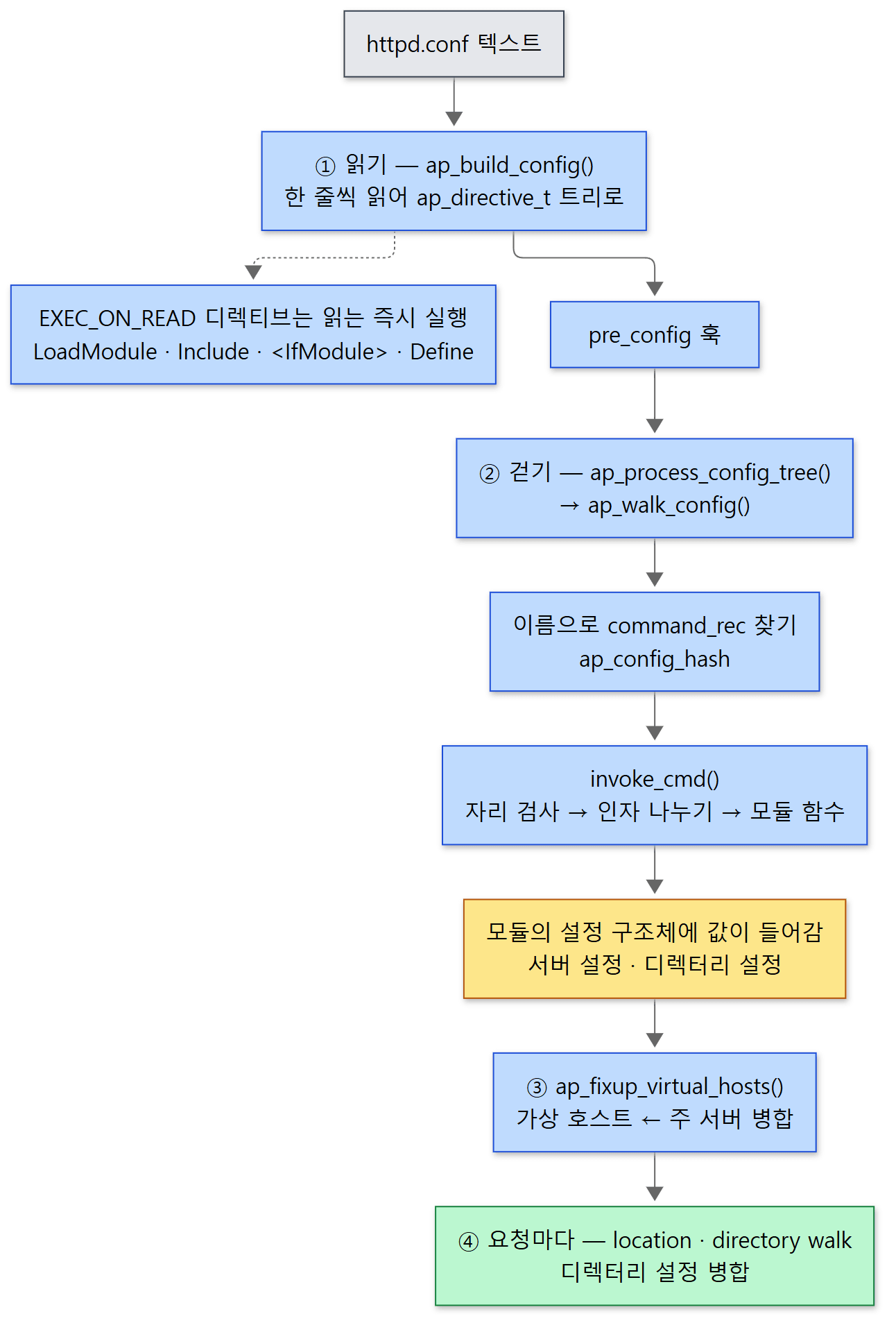 파란색은 절차, 노란색은 값이 쌓이는 곳, 초록색은 요청이 올 때마다 일어나는 일입니다.
소스에서 이 순서는 main()에 그대로 보입니다. 5편에서 본 자리입니다.
- 읽기 —
ap_read_config()(server/main.c721행)가ap_process_resource_config()를 거쳐ap_build_config()를 부릅니다(server/config.c1849–1894행, 1389–1465행). 결과는 전역 변수ap_conftree에 걸린 트리입니다. pre_config훅 — 742행.- 걷기 —
ap_process_config_tree()(748행)가ap_walk_config()로 트리를 걷습니다(server/config.c1961–1989행). - 가상 호스트 마무리 — 걷기가 성공하면 곧바로
ap_fixup_virtual_hosts()가 불립니다(751행). 7절에서 봅니다.
왜 한 번에 실행하지 않고 두 단계로 나눴나
읽는 단계에서도 즉시 실행되는 디렉티브가 있습니다. 디렉티브 표에 EXEC_ON_READ 표시가 붙은 것들입니다. LoadModule(modules/core/mod_so.c 449행), Include, <IfModule>, <IfDefine>, Define, ServerRoot(server/core.c 4747–4781행, 4848행, 4873–4878행)가 그렇습니다. 모두 "설정 파일의 모양 자체를 바꾸는" 것입니다. 다른 파일을 끼워 넣거나, 조건에 따라 몇 줄을 빼거나, 모듈을 실어서 새 디렉티브 이름을 쓸 수 있게 만듭니다.
이것들을 읽기 단계에서 끝내 두면, 걷기를 시작하기 전에 실릴 모듈이 모두 정해집니다. config.c에는 이 사실에 기대는 코드가 있습니다. pre_config 훅 중 가장 마지막(APR_HOOK_REALLY_LAST)에 걸린 함수가 설정 벡터의 길이를 실제 모듈 수에 맞게 줄이는데, 그 주석이 "EXEC_ON_READ 디렉티브가 싣는 모듈은 이제 다 실렸다"로 시작합니다(server/config.c 2276–2299행). 벡터의 칸 수가 정해진 다음에야 그 벡터에 값을 채우는 걷기가 시작되는 순서입니다.
헷갈리기 쉬운 곳: 거짓인 <IfModule> 안의 오타는 아무도 모릅니다
<IfModule>의 조건이 거짓이면 start_cond_section()은 닫는 태그까지 줄을 읽어서 버립니다(server/core.c 2942–2981행). 버리는 함수 ap_soak_end_container()는 열고 닫는 태그의 짝만 맞춰 보고 디렉티브 이름은 보지 않습니다(server/config.c 1631–1680행). 그 줄들은 트리에 들어가지 않으니 걷기 단계의 이름 검사도 받지 않습니다. 아래 5절 예제의 마지막 항목에서 GreetMesage라는 오타를 없는 모듈의 <IfModule> 안에 넣었더니 httpd -t가 Syntax OK를 냈습니다. 모듈을 나중에 실으면 그제야 오류가 드러납니다.
2. 트리 — ap_directive_t
읽기 단계가 만드는 트리의 노드는 이렇게 생겼습니다.
struct ap_directive_t {
    /** The current directive */
    const char *directive;
    /** The arguments for the current directive, stored as a space
     *  separated list */
    const char *args;
    /** The next directive node in the tree */
    struct ap_directive_t *next;
    /** The first child node of this directive */
    struct ap_directive_t *first_child;
    /** The parent node of this directive */
    struct ap_directive_t *parent;

    /* ... */

    /* ### these may go away in the future, but are needed for now */
    /** The name of the file this directive was found in */
    const char *filename;
    /** The line number the directive was on */
    int line_num;

    /* ... */
};
노드 하나가 설정 파일의 한 줄입니다. 디렉티브 이름(directive)과 아직 나누지 않은 인자 문자열(args), 그 줄이 있던 파일 이름과 줄 번호가 들어 있습니다. 나중에 오류 메시지의 Syntax error on line 4 of ...가 이 두 칸에서 나옵니다.
포인터 셋으로 트리를 이룹니다. 같은 높이의 다음 줄은 next, 섹션 안의 첫 줄은 first_child, 거꾸로 올라가는 길은 parent입니다. 이런 설정이라면
ServerName localhost
<Location /a>
    GreetMessage hello-a
    GreetWords a1 a2
</Location>
<VirtualHost *:8081>
    ServerName one.local
    <Location /b>
        GreetShout On
    </Location>
</VirtualHost>
트리는 이렇습니다.
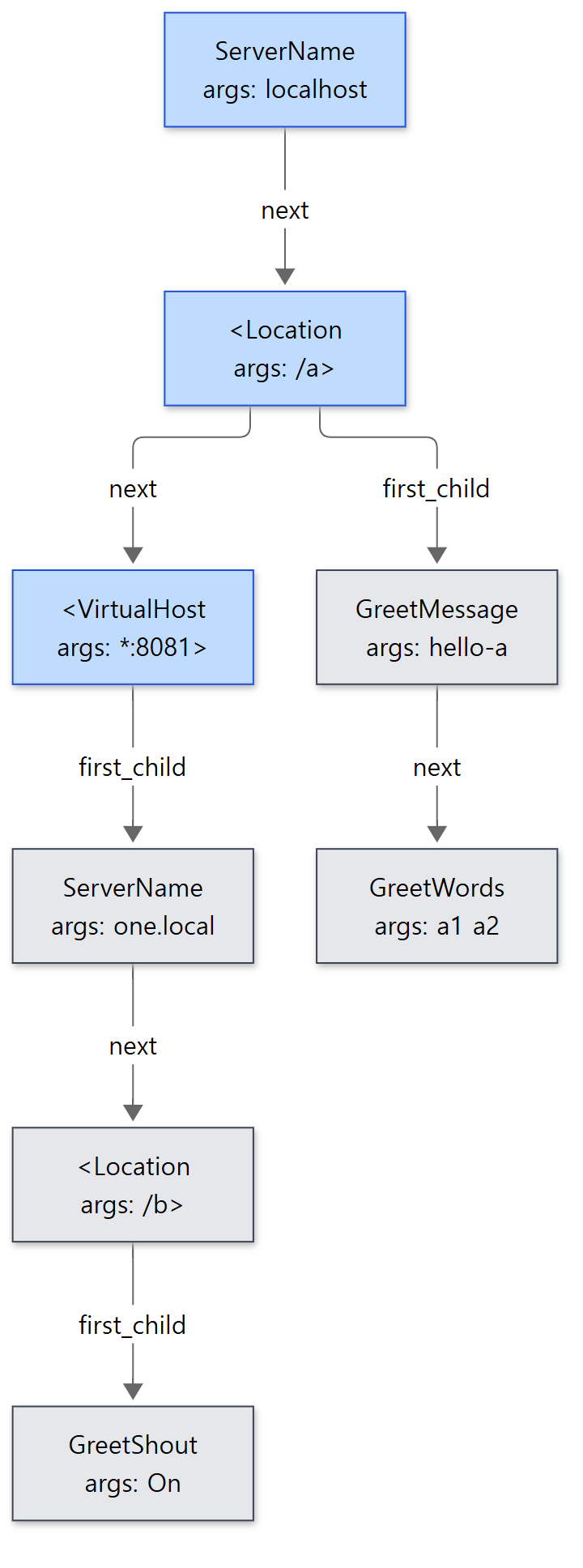 파란 노드가 최상위 줄, 회색 노드가 섹션 안의 줄입니다. 닫는 태그(
</Location>)는 노드가 되지 않습니다.
한 줄을 노드로 만드는 곳은 ap_build_config_sub()입니다.
    cmd_name = ap_getword_conf(temp_pool, &args);
    /* ... */

    newdir = apr_pcalloc(p, sizeof(ap_directive_t));
    newdir->filename = parms->config_file->name;
    newdir->line_num = parms->config_file->line_number;
    newdir->args = apr_pstrdup(p, args);

    lname = apr_pstrdup(temp_pool, cmd_name);
    ap_str_tolower(lname);
    ml = apr_hash_get(ap_config_hash, lname, APR_HASH_KEY_STRING);

    if (ml && (cmd = ml->cmd) != NULL) {
        newdir->directive = cmd->name;
        if (cmd->req_override & EXEC_ON_READ) {
            /* ... */
            return retval;
        }
    }
    else {
        /* No known directive found?  Make a copy of what we have parsed. */
        newdir->directive = apr_pstrdup(p, cmd_name);
    }


    if (cmd_name[0] == '<') {
        if (cmd_name[1] != '/') {
            (*current) = ap_add_node(curr_parent, *current, newdir, 1);
        }
        /* ... */
    }
    else {
        *current = ap_add_node(curr_parent, *current, newdir, 0);
    }
- 첫 낱말을 떼어 디렉티브 이름으로 삼습니다. 나머지는 통째로
args에 들어갑니다. - 이름을 소문자로 바꿔 해시에서 찾아봅니다(3절). 알려진 이름이면 노드에 모듈이 등록한 철자(
cmd->name)를 적고, 모르는 이름이면 적힌 그대로 적어 둡니다. 모르는 이름이어도 여기서는 오류가 나지 않습니다. 오류는 걷기 단계에서 납니다. EXEC_ON_READ디렉티브면 그 자리에서 실행하고 돌아갑니다. 이때 그 디렉티브 자신의 노드는 트리에 붙지 않고, 실행 결과로 생긴 노드(예를 들어Include가 읽은 파일의 내용)만 붙습니다(1168–1199행). 그래서 걷기 단계의 트리에는LoadModule노드가 없습니다.<로 시작하면 섹션의 시작입니다.ap_add_node()의 마지막 인자1은 "이 노드를 부모로 삼고 그 아래로 내려가라"는 뜻입니다(server/util_cfgtree.c20–44행).</로 시작하는 닫는 태그는 이름이 짝과 맞는지 확인하고 한 단계 위로 올라갈 뿐 노드를 만들지 않습니다(1211–1241행).
인자를 나눌 때 쓰는 ap_getword_conf()는 공백으로 낱말을 자르되, 큰따옴표나 작은따옴표로 감싼 부분은 공백이 있어도 한 낱말로 봅니다(server/util.c 835–877행). ErrorDocument 404 "Not here"가 인자 둘이 되는 이유입니다.
헷갈리기 쉬운 곳: <Location /a> 노드의 이름은 <Location입니다
트리 그림에서 섹션 노드의 이름은 <Location이고 인자는 /a>입니다. 첫 낱말을 공백까지 자르니 >가 인자 쪽에 남습니다(낱말 끝에 >가 붙은 경우만 떼어 냅니다, 1147–1155행). 그래서 server/core.c의 섹션 함수들은 모두 인자에서 마지막 >를 찾는 것으로 시작합니다(예: dirsection() 2519행). 디렉티브 표에 등록하는 이름도 "<Directory"처럼 닫는 꺾쇠가 없습니다(6절).
3. 이름으로 함수 찾기 — command_rec과 ap_config_hash
모듈이 내놓는 디렉티브 표
모듈은 자기가 처리할 디렉티브를 command_rec 배열로 내놓습니다.
typedef struct command_struct command_rec;
struct command_struct {
    /** Name of this command */
    const char *name;
    /** The function to be called when this directive is parsed */
    cmd_func func;
    /** Extra data, for functions which implement multiple commands... */
    void *cmd_data;
    /** What overrides need to be allowed to enable this command. */
    int req_override;
    /** What the command expects as arguments */
    enum cmd_how args_how;

    /** 'usage' message, in case of syntax errors */
    const char *errmsg;
};
include/http_config.h 203–218행
| 칸 | 뜻 |
|---|---|
name |
디렉티브 이름 |
func |
그 디렉티브를 만나면 부를 함수 |
cmd_data |
함수에 덤으로 건넬 값. 함수 하나로 디렉티브 여럿을 처리할 때 구분용으로 씁니다 |
req_override |
어디에 써도 되는지를 나타내는 비트 묶음(5절) |
args_how |
인자를 어떻게 나눠서 넘길지(4절) |
errmsg |
도움말. 인자 개수가 틀렸을 때 오류 메시지 뒤에 붙고 httpd -L에도 찍힙니다 |
이 구조체를 직접 채우지 않고 AP_INIT_TAKE1 같은 매크로를 씁니다.
# define AP_INIT_TAKE1(directive, func, mconfig, where, help) \
    { directive, { .take1=func }, mconfig, where, TAKE1, help }
include/http_config.h 128–129행
매크로는 컴파일하기 전에 글자를 바꿔 끼우는 C의 기능입니다. { .take1=func } 부분이 재미있습니다. func 칸의 타입 cmd_func는 공용체(union)로, 인자 방식마다 다른 모양의 함수 포인터를 한 칸에 겹쳐 둔 것입니다(82–101행). TAKE1용 함수는 (cmd_parms *, void *, const char *), FLAG용 함수는 (cmd_parms *, void *, int)를 받습니다. AP_INIT_FLAG를 쓰면 .flag=func로 채워지므로, 함수의 모양이 틀리면 컴파일러가 경고해 줍니다. 예제 컨테이너에서 TAKE1 모양의 함수를 AP_INIT_FLAG에 넣어 apxs -c로 컴파일해 보니 gcc 가 initialization ... from incompatible pointer type 경고를 냈습니다. 지정 초기화(.이름=값)를 지원하지 않는 컴파일러를 위한 대체 정의도 같은 파일에 있습니다(158–197행).
등록 — 소문자 이름을 열쇠로 하는 해시
모듈이 서버에 등록될 때(ap_add_module(), 645행) 디렉티브 표의 줄이 하나씩 해시에 들어갑니다.
    while (cmd && cmd->name) {
        mln = apr_palloc(tpool, sizeof(ap_mod_list));
        mln->cmd = cmd;
        mln->m = m;
        dir = apr_pstrdup(tpool, cmd->name);

        ap_str_tolower(dir);

        mln->next = apr_hash_get(ap_config_hash, dir, APR_HASH_KEY_STRING);
        apr_hash_set(ap_config_hash, dir, APR_HASH_KEY_STRING, mln);
        ++cmd;
    }
열쇠는 소문자로 바꾼 이름, 값은 "어느 모듈의 어느 command_rec인가"를 담은 작은 목록(ap_mod_list)입니다. 같은 이름이 이미 있으면 새 것을 목록 맨 앞에 붙입니다(549–550행). 디렉티브 이름의 대소문자를 가리지 않는 이유가 이 소문자 열쇠입니다. GREETMESSAGE hi라고 적어도 찾아집니다.
걷기 — 노드마다 해시를 한 번 찾는다
걷기 단계의 몸통은 짧습니다. ap_walk_config()는 next를 따라가며 노드마다 ap_walk_config_sub()를 부를 뿐입니다(1362–1387행). 섹션 안으로 들어가는 일은 여기서 하지 않습니다. 그것은 섹션 디렉티브의 함수가 스스로 합니다(6절).
    char *dir = apr_pstrdup(parms->temp_pool, current->directive);

    ap_str_tolower(dir);

    ml = apr_hash_get(ap_config_hash, dir, APR_HASH_KEY_STRING);

    if (ml == NULL) {
        /* ... */
            return apr_pstrcat(parms->pool, "Invalid command '",
                               current->directive,
                               "', perhaps misspelled or defined by a module "
                               "not included in the server configuration",
                               NULL);
        /* ... */
    }

    for ( ; ml != NULL; ml = ml->next) {
        void *dir_config = ap_set_config_vectors(parms->server,
                                                 section_vector,
                                                 parms->path,
                                                 ml->m,
                                                 parms->pool);
        const char *retval;
        cmd = ml->cmd;

        /* Once was enough? */
        if (cmd->req_override & EXEC_ON_READ) {
            continue;
        }

        retval = invoke_cmd(cmd, parms, dir_config, current->args, NULL);

        if (retval != NULL && strcmp(retval, DECLINE_CMD) != 0) {
            /* ... */
            return retval;
        }
    }

    return NULL;
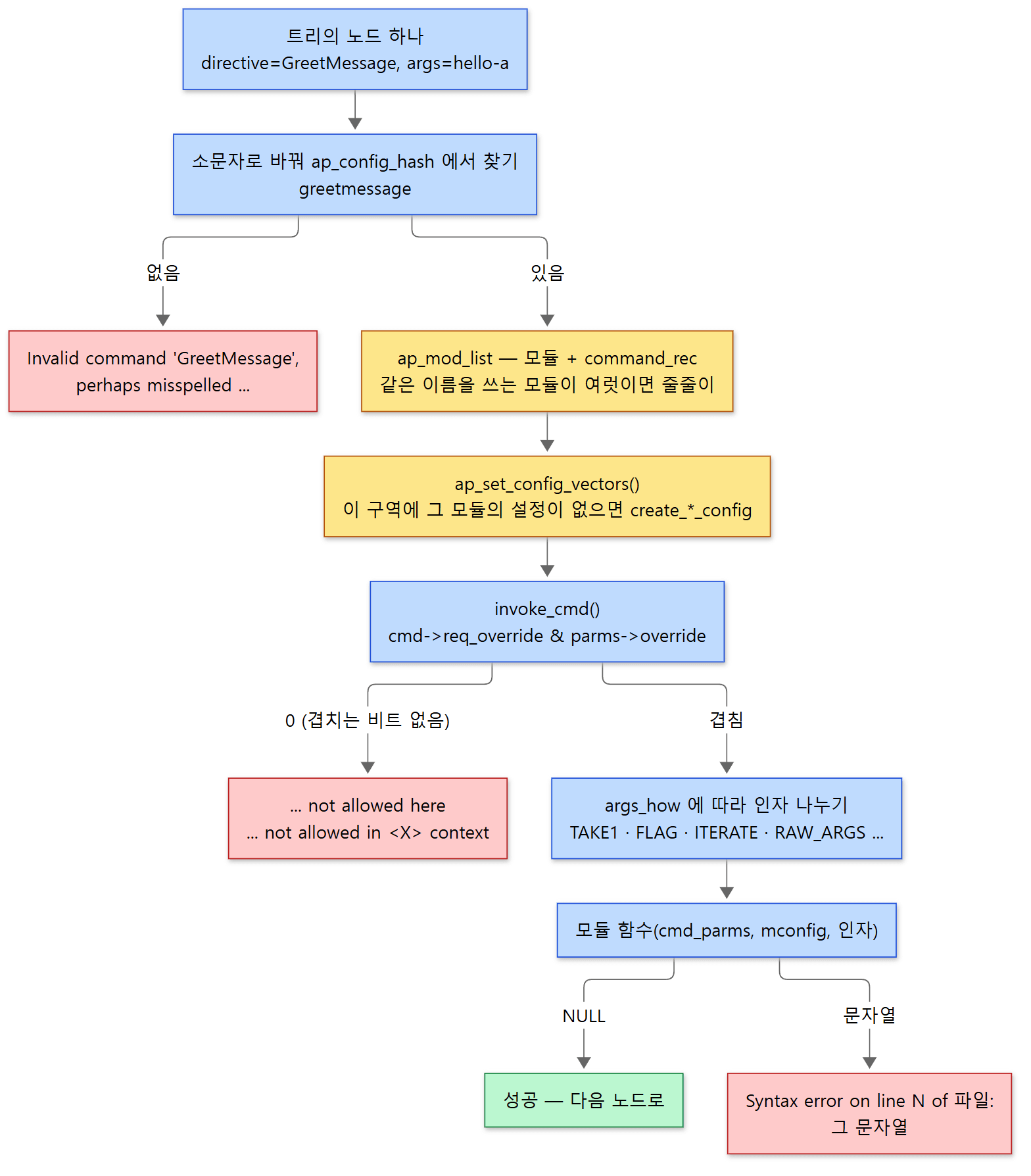 빨간 상자 셋이 설정 오류가 나는 세 자리입니다. 노란 상자는 해시와 설정 벡터, 곧 값이 저장된 곳입니다.
for 안의 ap_set_config_vectors()가 중요합니다. 지금 걷는 구역의 설정 벡터(section_vector)에서 이 모듈의 칸을 꺼내 돌려주는데, 칸이 비어 있으면 그 자리에서 create_dir_config를 불러 채웁니다. 같은 김에 지금 서버의 서버 설정 칸도 비어 있으면 create_server_config로 채웁니다(1084–1104행). 그렇게 얻은 디렉터리 설정이 모듈 함수의 두 번째 인자 mconfig로 넘어갑니다. 모듈 함수 입장에서는 "지금 읽는 구역의 내 디렉터리 설정"을 받는 셈입니다.
헷갈리기 쉬운 곳
- 찾기는 해시 한 번입니다.
config.c에는 모듈 목록을 처음부터 훑는ap_find_command_in_modules()도 있지만(1068–1082행), 이 커밋에서 그것을 부르는 곳은AllowOverrideList의 이름 검사 하나뿐입니다(server/core.c2030행). - 같은 이름을 두 모듈이 등록하면 둘 다 불립니다. 위
for는 함수가 오류를 돌려줄 때만 멈추고, 성공(NULL)이면 목록의 다음 모듈로 넘어갑니다. 함수가 "나는 처리하지 않겠다"고 할 때 돌려주는 특별한 문자열DECLINE_CMD도 오류로 치지 않습니다(include/http_config.h264행). 이 부분은 소스로만 확인했고 예제로 돌려 보지는 않았습니다. EXEC_ON_READ는 걷기에서 건너뜁니다("Once was enough?"). 읽기 단계에서 이미 실행했기 때문입니다.
4. invoke_cmd() — 인자를 나눠 모듈 함수 부르기
해시에서 찾은 command_rec을 실제로 부르는 함수가 invoke_cmd()입니다(853–1053행). 앞부분은 자리 검사(5절)이고, 그 뒤는 args_how에 따라 갈리는 큰 switch입니다. 두 가지만 옮깁니다.
    case TAKE1:
        w = ap_getword_conf(parms->pool, &args);

        if (*w == '\0' || *args != 0)
            return apr_pstrcat(parms->pool, cmd->name, " takes one argument",
                               cmd->errmsg ? ", " : NULL, cmd->errmsg, NULL);

        return cmd->AP_TAKE1(parms, mconfig, w);
    /* ... */
    case FLAG:
        /*
         * This is safe to use temp_pool here, because the 'flag' itself is not
         * forwarded as-is
         */
        w = ap_getword_conf(parms->temp_pool, &args);

        if (*w == '\0' || (ap_cstr_casecmp(w, "on") && ap_cstr_casecmp(w, "off")))
            return apr_pstrcat(parms->pool, cmd->name, " must be On or Off",
                               NULL);

        return cmd->AP_FLAG(parms, mconfig, ap_cstr_casecmp(w, "off") != 0);
인자 개수 검사와 On/Off 검사를 코어가 대신 해 준다는 것이 요점입니다. 모듈 함수는 이미 나뉜 낱말을 받습니다. 줄인 자리에 있는 ITERATE는 낱말마다 같은 함수를 여러 번 부르고(998–1015행), FLAG는 On이면 1, Off면 0을 넘깁니다(대소문자는 가리지 않습니다). 방식은 모두 열세 가지입니다(include/http_config.h 49–67행).
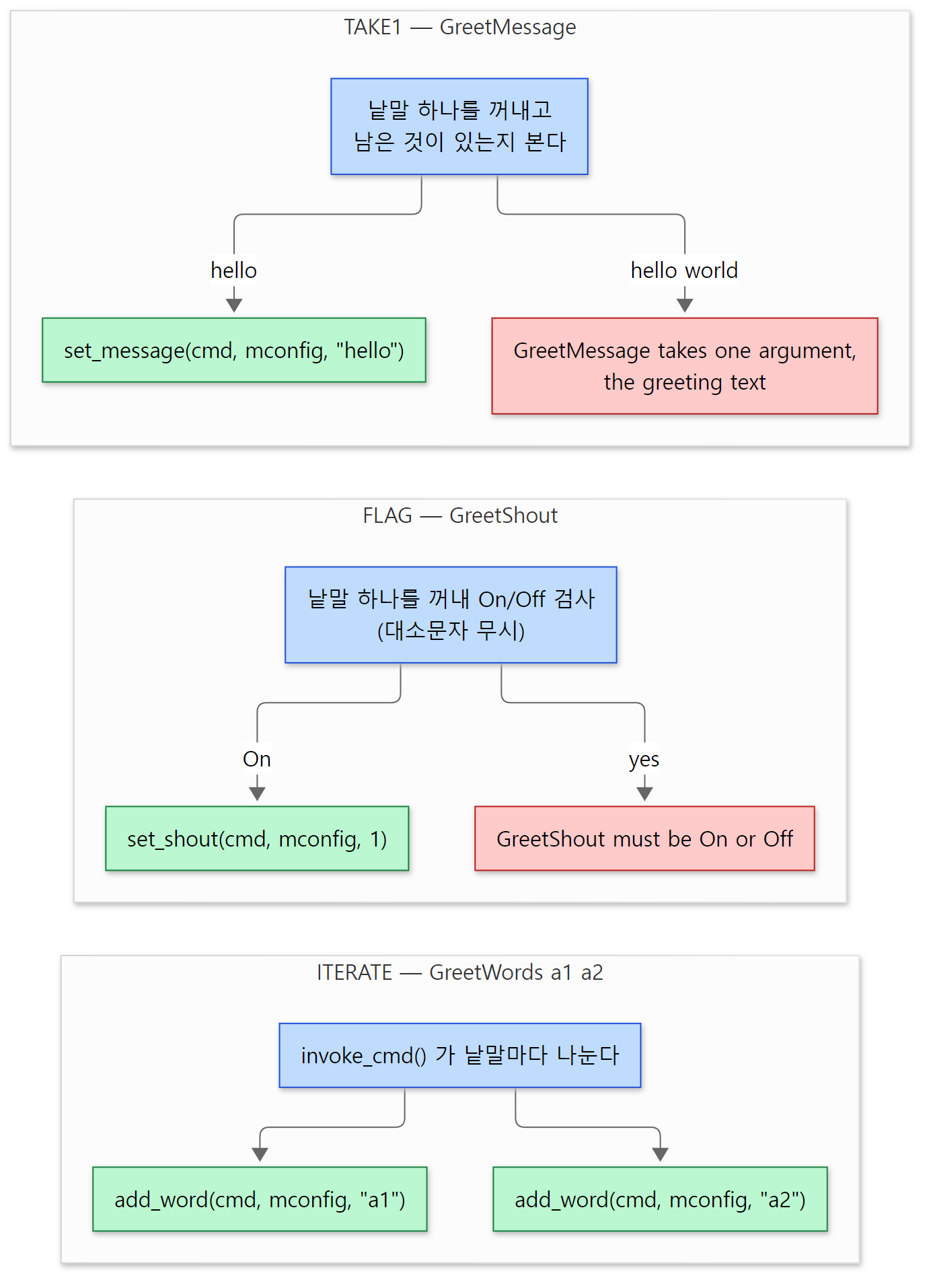 모듈 함수는 이미 나뉘고 검사된 인자만 받습니다. 오류 문장은 5절 예제의 httpd -t 출력 그대로입니다.
args_how |
모듈 함수가 받는 것 | 실제 예 (이 커밋) |
|---|---|---|
RAW_ARGS |
나누지 않은 문자열 그대로 | <Directory, AllowOverride (core.c 4729, 4801) |
TAKE1 |
낱말 하나 | DocumentRoot (core.c 4797) |
TAKE2 / TAKE12 |
낱말 둘 / 하나나 둘 | ErrorDocument (4799), LoadModule (mod_so.c 449) / Define (4778) |
TAKE3, TAKE23, TAKE123, TAKE13 |
낱말 셋까지, 빈 자리는 NULL |
|
ITERATE |
낱말 하나씩, 낱말 수만큼 반복 호출 | LogLevel (4881) |
ITERATE2 |
첫 낱말 + 나머지 낱말 하나씩, 반복 호출 | AddIcon (mod_autoindex.c 571) |
FLAG |
On이면 1, Off면 0 |
KeepAlive (http_core.c 112) |
NO_ARGS |
아무것도 | |
TAKE_ARGV |
argc, argv (최대 64개) |
AllowOverrideList (4804) |
모듈 함수가 받는 cmd_parms
모든 디렉티브 함수의 첫 인자는 cmd_parms *입니다. "지금 어디를 읽고 있는가"를 담은 구조체입니다(include/http_config.h 288–334행). 자주 쓰는 칸만 추립니다.
| 칸 | 담는 것 |
|---|---|
server |
지금 설정 중인 서버. <VirtualHost> 안이면 그 가상 호스트의 server_rec |
path |
<Directory>·<Location> 안이면 그 경로, 바깥이면 NULL |
override |
지금 자리에서 허용되는 비트 묶음(5절) |
directive |
지금 처리 중인 트리 노드 |
pool, temp_pool |
설정 값을 둘 풀(pconf)과 설정이 끝나면 버려지는 임시 풀 |
info |
command_rec의 cmd_data (887행에서 넣어 줌) |
함수는 성공하면 NULL을, 실패하면 오류 메시지 문자열을 돌려줍니다. 예외가 없는 C에서 흔한 약속입니다. 그 문자열이 걷기를 거슬러 올라가 ap_process_config_tree()에서 Syntax error on line %d of %s: 다음 줄로 찍힙니다(1977–1986행). 줄 번호는 2절의 노드에 적어 둔 line_num입니다.
예제: 디렉티브 네 개를 가진 모듈
이 글을 위해 mod_greet이라는 작은 모듈을 만들었습니다. 디렉티브 넷은 각각 다른 방식과 다른 자리 규칙을 갖습니다.
| 디렉티브 | 방식 | 자리(req_override) |
설정 종류 | 병합 규칙 |
|---|---|---|---|---|
GreetMessage |
TAKE1 |
OR_FILEINFO |
디렉터리 | 아래 것이 있으면 아래 것 |
GreetShout |
FLAG |
ACCESS_CONF |
디렉터리 | 아래 것이 있으면 아래 것 |
GreetWords |
ITERATE |
OR_FILEINFO |
디렉터리 | 위 것 뒤에 아래 것을 이어 붙임 |
GreetTag |
TAKE1 |
RSRC_CONF |
서버 | 아래 것이 있으면 아래 것 |
SetHandler greet이 걸린 주소로 요청하면 핸들러가 지금 적용된 값과, 어떤 구역들이 병합됐는지(trail)를 찍어 줍니다. 또 생성·병합 함수가 불릴 때마다 /tmp/greet.trace에 한 줄씩 남기는데, 그때가 기동 중인지 요청 처리 중인지를 ap_state_query()로 구분해 적습니다(boot#1은 첫 번째 설정 읽기, boot#2는 두 번째 읽기, request는 요청 처리 중. 설정을 두 번 읽는 이유는 5편에 있습니다).
/* 이 글을 위해 쓴 예제입니다 (httpd 의 소스가 아닙니다) */
#include "httpd.h"
#include "http_config.h"
#include "http_core.h"
#include "http_protocol.h"
#include "apr_strings.h"
#include <stdio.h>
#include <unistd.h>

module AP_MODULE_DECLARE_DATA greet_module;

/* 디렉터리 설정: <Directory>/<Location>/.htaccess 마다 하나씩 생긴다 */
typedef struct {
    const char *label;          /* 어느 구역에서 만들었나 (create_dir_config 의 dir) */
    const char *message;        /* GreetMessage — NULL 이면 "설정 안 함" */
    int shout;                  /* GreetShout — -1 이면 "설정 안 함" */
    apr_array_header_t *words;  /* GreetWords — 병합할 때 이어 붙인다 */
    const char *trail;          /* 어떤 구역들이 병합됐는지 기록 */
} greet_dir_conf;

/* 서버 설정: 주 서버와 <VirtualHost> 마다 하나씩 */
typedef struct {
    const char *tag;            /* GreetTag */
} greet_srv_conf;

/* ... trace(): /tmp/greet.trace 에 한 줄 남기는 함수 ... */

static void *create_dir(apr_pool_t *p, char *dir)
{
    greet_dir_conf *c = apr_pcalloc(p, sizeof(*c));
    c->label = dir ? apr_pstrdup(p, dir) : "(server)";
    c->shout = -1;
    c->words = apr_array_make(p, 2, sizeof(const char *));
    c->trail = c->label;
    trace("create_dir_config  dir=%s%s", c->label, "");
    return c;
}

static void *merge_dir(apr_pool_t *p, void *basev, void *addv)
{
    greet_dir_conf *base = basev, *add = addv;
    greet_dir_conf *c = apr_pcalloc(p, sizeof(*c));
    c->label = add->label;
    /* 덮어쓰기: 아래 구역(add)에 값이 있으면 그것, 없으면 위(base)의 것 */
    c->message = add->message ? add->message : base->message;
    c->shout = add->shout != -1 ? add->shout : base->shout;
    /* 이어 붙이기: 위의 것 뒤에 아래 것을 붙인다 */
    c->words = apr_array_append(p, base->words, add->words);
    c->trail = apr_pstrcat(p, base->trail, " + ", add->trail, NULL);
    trace("merge_dir_config   base=[%s] add=%s", base->trail, add->label);
    return c;
}

/* ... create_srv(), merge_srv(): 서버 설정용. tag 하나를 같은 방식으로 다룬다 ... */

/* TAKE1: 인자 하나 */
static const char *set_message(cmd_parms *cmd, void *mconfig, const char *arg)
{
    greet_dir_conf *c = mconfig;     /* 지금 읽는 구역의 디렉터리 설정 */
    c->message = arg;
    return NULL;                     /* NULL = 성공, 문자열 = 오류 메시지 */
}

/* FLAG: On 이면 1, Off 면 0 */
static const char *set_shout(cmd_parms *cmd, void *mconfig, int on)
{
    ((greet_dir_conf *)mconfig)->shout = on;
    return NULL;
}

/* ITERATE: 인자 수만큼 이 함수가 여러 번 불린다 */
static const char *add_word(cmd_parms *cmd, void *mconfig, const char *w)
{
    greet_dir_conf *c = mconfig;
    *(const char **)apr_array_push(c->words) = w;
    return NULL;
}

/* 서버 설정은 mconfig 가 아니라 cmd->server 에서 꺼낸다 */
static const char *set_tag(cmd_parms *cmd, void *mconfig, const char *arg)
{
    greet_srv_conf *c = ap_get_module_config(cmd->server->module_config,
                                             &greet_module);
    c->tag = arg;
    return NULL;
}

static const command_rec greet_cmds[] = {
    AP_INIT_TAKE1("GreetMessage", set_message, NULL, OR_FILEINFO,
                  "the greeting text"),
    AP_INIT_FLAG("GreetShout", set_shout, NULL, ACCESS_CONF,
                 "On to print the greeting in upper case"),
    AP_INIT_ITERATE("GreetWords", add_word, NULL, OR_FILEINFO,
                    "one or more extra words"),
    AP_INIT_TAKE1("GreetTag", set_tag, NULL, RSRC_CONF,
                  "a tag for this server"),
    { NULL }
};

static int greet_handler(request_rec *r)
{
    /* ... */
    d = ap_get_module_config(r->per_dir_config, &greet_module);
    s = ap_get_module_config(r->server->module_config, &greet_module);
    /* ... d 와 s 의 값을 text/plain 으로 찍는다 (shout 가 1 이면 message 를 대문자로) ... */
}

/* ... register_hooks(): greet_handler 를 handler 훅에 건다 ... */

AP_DECLARE_MODULE(greet) = {
    STANDARD20_MODULE_STUFF,
    create_dir,      /* create_dir_config */
    merge_dir,       /* merge_dir_config */
    create_srv,      /* create_server_config */
    merge_srv,       /* merge_server_config */
    greet_cmds,      /* 디렉티브 표 */
    register_hooks
};
D:\openSource\httpd-examples\ex\u07-directives\mod_greet.c (/* ... */로 줄인 곳은 기록용 함수, 서버 설정용 생성·병합 함수, 출력 코드입니다)
눈여겨볼 곳은 두 군데입니다. 디렉터리 설정용 함수(set_message 등)는 받은 mconfig에 값을 쓰지만, 서버 설정용 set_tag는 mconfig를 쓰지 않고 cmd->server에서 서버 설정을 직접 꺼냅니다. 코어가 함수에 넘기는 것은 언제나 디렉터리 설정이기 때문입니다(3절의 dir_config). 그리고 "설정하지 않음"을 NULL과 -1로 표시해 두었습니다. 병합 함수가 "아래 구역이 이 값을 정했는가"를 알아야 하기 때문입니다.
이 예제는 기준 커밋(e4af30fe6d)을 그대로 빌드한 httpd 2.5.1-dev 로 도커 컨테이너(Ubuntu 24.04)에서 실행했습니다. run.sh가 apxs -c로 컴파일하고, 아래 설정으로 서버를 띄운 뒤 curl로 요청합니다(/tmp/head.conf에는 LoadModule 줄들과 ServerName localhost 같은 공통 줄이 들어 있습니다).
Include /tmp/head.conf
Listen 8080
Listen 8081
DocumentRoot /tmp/www

GreetMessage hello-from-server
GreetWords s1
GreetTag main-tag

<Location />
    SetHandler greet
</Location>
<Location /a>
    GreetMessage hello-a
    GreetWords a1 a2
</Location>
<Location /a/b>
    GreetMessage hello-b
    GreetShout On
</Location>

<Location /x/y>
    GreetMessage from-x-y
</Location>
<Location /x>
    GreetMessage from-x
</Location>

<Directory /tmp/www/d>
    GreetMessage from-directory
</Directory>
<Directory /tmp/www/ht>
    AllowOverride FileInfo
</Directory>
<Directory /tmp/www/ind>
    AllowOverride Indexes
</Directory>

<VirtualHost *:8081>
    ServerName one.local
    GreetTag one-tag
</VirtualHost>
<VirtualHost *:8081>
    ServerName two.local
</VirtualHost>
먼저 httpd -L입니다. 실린 모듈의 디렉티브 표를 그대로 읽어 찍어 주는 옵션이라(server/config.c 2413–2504행), req_override 비트가 사람 말로 어떻게 읽히는지 볼 수 있습니다.
### httpd -L (Greet only)
GreetMessage (mod_greet.c)
	the greeting text
	Allowed in *.conf anywhere and in .htaccess
	when AllowOverride includes FileInfo
GreetShout (mod_greet.c)
	On to print the greeting in upper case
	Allowed in *.conf only inside <Directory>, <Files>, <Location>, or <If>
GreetWords (mod_greet.c)
	one or more extra words
	Allowed in *.conf anywhere and in .htaccess
	when AllowOverride includes FileInfo
GreetTag (mod_greet.c)
	a tag for this server
	Allowed in *.conf only outside <Directory>, <Files>, <Location>, or <If>
나머지 실행 결과는 5절(오류)과 7절(병합)에서 나눠 봅니다.
5. 어디에 써도 되나 — req_override와 parms->override
비트 두 묶음의 AND
command_rec의 req_override에 들어가는 값은 이런 비트들입니다.
#define OR_NONE 0 /**< *.conf is not available anywhere in this override */
#define OR_LIMIT 1 /**< *.conf inside <Directory> or <Location>
and .htaccess when AllowOverride Limit */
#define OR_OPTIONS 2 /**< *.conf anywhere
and .htaccess when AllowOverride Options */
#define OR_FILEINFO 4 /**< *.conf anywhere
and .htaccess when AllowOverride FileInfo */
#define OR_AUTHCFG 8 /**< *.conf inside <Directory> or <Location>
and .htaccess when AllowOverride AuthConfig */
#define OR_INDEXES 16 /**< *.conf anywhere
and .htaccess when AllowOverride Indexes */
#define OR_UNSET 32 /**< bit to indicate that AllowOverride has not been set */
#define ACCESS_CONF 64 /**< *.conf inside <Directory> or <Location> */
#define RSRC_CONF 128 /**< *.conf outside <Directory> or <Location> */
#define EXEC_ON_READ 256 /**< force directive to execute a command
which would modify the configuration (like including another
file, or IFModule */
/* ... */
/** this directive can be placed anywhere */
#define OR_ALL (OR_LIMIT|OR_OPTIONS|OR_FILEINFO|OR_AUTHCFG|OR_INDEXES)
include/http_config.h 228–255행
(<는 문서 생성 도구용으로 꺾쇠를 적은 것이라 소스에 그대로 있습니다.) 이름의 OR_는 override, 곧 AllowOverride의 낱말들(Limit, Options, FileInfo, AuthConfig, Indexes)과 하나씩 짝입니다.
한편 걷는 쪽은 cmd_parms의 override에 "지금 이 자리에서 허용하는 비트"를 들고 다닙니다. invoke_cmd()가 맨 먼저 하는 일이 이 둘의 비교입니다.
    if ((parms->override & cmd->req_override) == 0 && !override_list_ok) {
        if (parms->override & NONFATAL_OVERRIDE) {
            /* ... */
            return NULL;
        }
        else if (parms->directive && parms->directive->parent) {
            return apr_pstrcat(parms->pool, cmd->name, " not allowed in ",
                               parms->directive->parent->directive, ">",
                               " context", NULL);
        }
        else {
            return apr_pstrcat(parms->pool, cmd->name,
                               " not allowed here", NULL);
        }
    }
비트 AND(&)가 0이면, 곧 겹치는 비트가 하나도 없으면 오류입니다. 하나라도 겹치면 통과입니다. 노드에 부모가 있으면(섹션 안이면) not allowed in <섹션> context, 없으면 not allowed here가 됩니다. 원본에서 /* ... */로 줄인 자리는 경고 로그를 찍는 호출입니다. <Directory>의 AllowOverride에 Nonfatal=Override를 더해 두었을 때, .htaccess의 이 오류를 경고 한 줄로 낮추고 넘어가는 길입니다.
그러면 자리마다 parms->override는 무엇일까요.
| 자리 | parms->override |
근거 |
|---|---|---|
| 설정 파일 최상위 | (RSRC_CONF | OR_ALL) & ~(OR_AUTHCFG | OR_LIMIT) = RSRC_CONF, OR_OPTIONS, OR_FILEINFO, OR_INDEXES |
config.c 1973행 |
<VirtualHost> 안 |
최상위와 같음 (바뀌는 것은 cmd->server뿐) |
core.c 3028–3079행 |
<Directory>·<Location> 안 |
OR_ALL | ACCESS_CONF (RSRC_CONF가 빠짐) |
core.c 2543행, 2659행 |
.htaccess |
그 디렉터리에 적용된 AllowOverride의 비트 |
config.c 2022행 |
이 표로 mod_greet의 디렉티브를 하나씩 대 보면 httpd -L이 찍은 문장이 그대로 나옵니다. GreetTag(RSRC_CONF)는 섹션 안에서 막히고, GreetShout(ACCESS_CONF)는 섹션 밖에서 막히고, GreetMessage(OR_FILEINFO)는 어디서나 통과합니다. 실제 오류를 봅니다. 예제의 run.sh가 문제 있는 설정 파일을 하나씩 만들어 httpd -t로 검사한 결과입니다(왼쪽 숫자는 설정 파일의 줄 번호입니다).
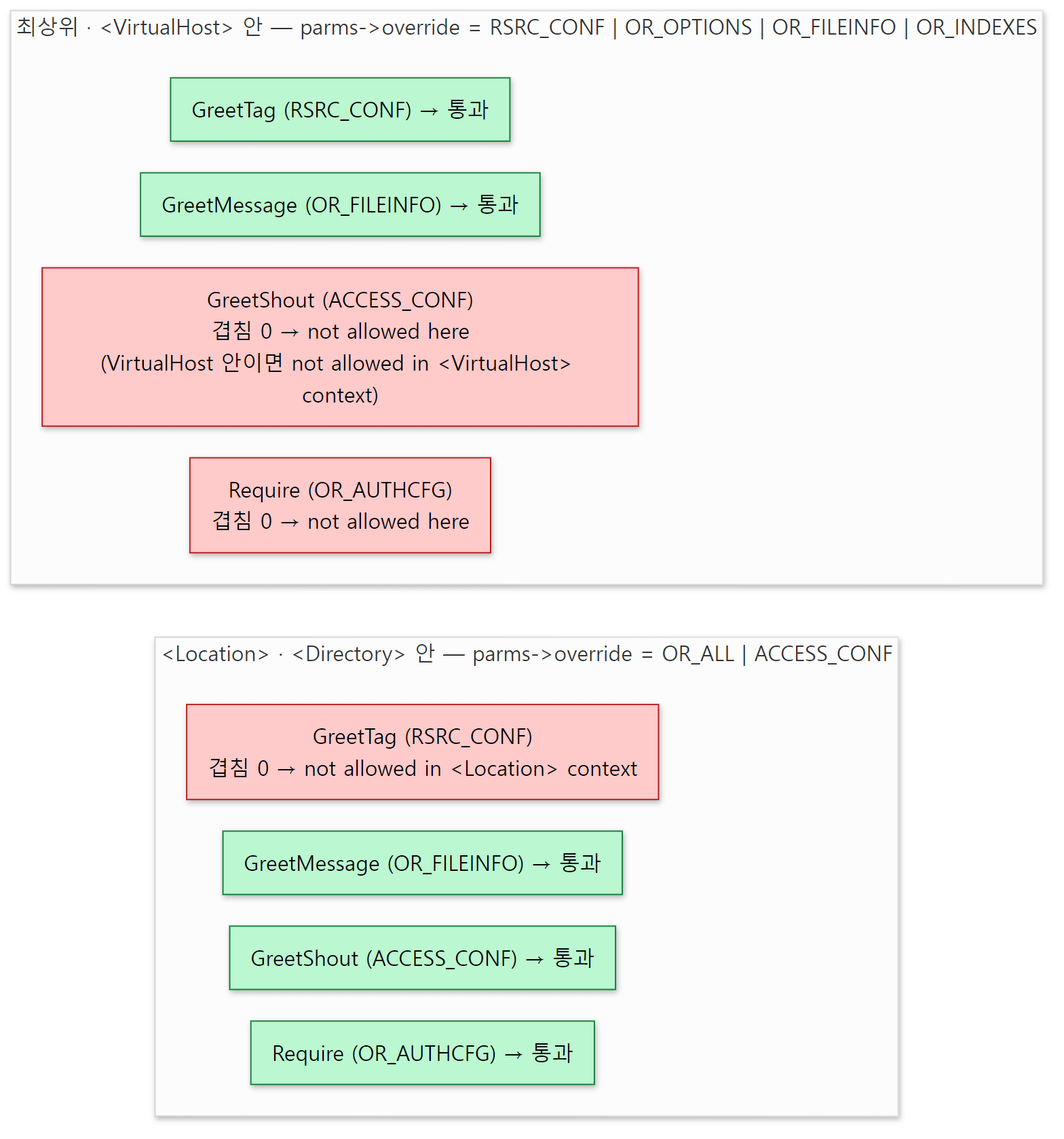 위 표의 자리별 비트와 디렉티브 표의 비트를 맞대 본 것입니다. 오류 문장은 아래 httpd -t 출력에서 가져왔고, Location 안의 Require 는 비트로 따진 결과입니다(OR_ALL 에 OR_AUTHCFG 가 들어 있음).
### Require at the top level (mod_authz_core, OR_AUTHCFG)
     3	Require all granted
AH00526: Syntax error on line 3 of /tmp/bad.conf:
Require not allowed here

### GreetShout at the top level
     3	GreetShout On
AH00526: Syntax error on line 3 of /tmp/bad.conf:
GreetShout not allowed here

### GreetShout inside VirtualHost
     3	<VirtualHost *:8090>
     4	    GreetShout On
     5	</VirtualHost>
AH00526: Syntax error on line 4 of /tmp/bad.conf:
GreetShout not allowed in <VirtualHost> context

### GreetTag inside Location
     3	<Location /a>
     4	    GreetTag t
     5	</Location>
AH00526: Syntax error on line 4 of /tmp/bad.conf:
GreetTag not allowed in <Location> context

### GreetShout yes
     3	<Location /a>
     4	    GreetShout yes
     5	</Location>
AH00526: Syntax error on line 4 of /tmp/bad.conf:
GreetShout must be On or Off

### GreetMessage with two arguments
     3	GreetMessage hello world
AH00526: Syntax error on line 3 of /tmp/bad.conf:
GreetMessage takes one argument, the greeting text

### a typo in the name
     3	GreetMesage hello
AH00526: Syntax error on line 3 of /tmp/bad.conf:
Invalid command 'GreetMesage', perhaps misspelled or defined by a module not included in the server configuration

### a typo inside a false IfModule
     3	<IfModule nosuch_module>
     4	    GreetMesage hello
     5	</IfModule>
Syntax OK
첫 항목은 httpd.conf를 고쳐 본 사람이면 한 번쯤 만나는 오류입니다. Require는 OR_AUTHCFG로 등록되어 있고(modules/aaa/mod_authz_core.c 688행) 최상위의 parms->override에서는 바로 그 비트가 빠져 있습니다. GreetMessage hello world의 메시지 끝에 붙은 the greeting text는 디렉티브 표의 도움말(errmsg)입니다.
두 번째 검사: ap_check_cmd_context()
비트 검사만으로는 "<VirtualHost> 안에서는 안 된다" 같은 규칙을 나타낼 수 없습니다. <VirtualHost> 안의 parms->override가 최상위와 같기 때문입니다. 그런 규칙은 디렉티브 함수가 직접 ap_check_cmd_context()를 불러 확인합니다. NOT_IN_VIRTUALHOST, NOT_IN_DIRECTORY, NOT_IN_LOCATION, NOT_IN_HTACCESS 같은 표시를 넘기면 cmd->server->is_virtual이나 트리의 부모 노드를 보고 판정합니다(server/core.c 1324–1382행, 표시 정의는 include/http_config.h 969–981행). <VirtualHost>는 이 함수에 GLOBAL_ONLY를 넘겨 다른 섹션 안에 오지 못하게 막습니다(3036행).
.htaccess 안인지는 재미있는 방법으로 알아냅니다. cmd->pool == cmd->temp_pool인지를 봅니다(server/core.c 1343행). 아래에서 볼 .htaccess 읽기만 두 풀 자리에 똑같이 요청 풀을 넣기 때문입니다.
AllowOverride는 .htaccess의 parms->override를 정한다
AllowOverride는 그 자체가 ACCESS_CONF 디렉티브라서 섹션 안에만 쓸 수 있습니다(server/core.c 4801행). 그중에서도 의미가 있는 곳은 <Directory>뿐이라, <Location> 안에 쓰면 오류는 아니지만 "Useless use of AllowOverride" 경고를 남깁니다(1884–1887행). 이 디렉티브의 함수 set_override()가 하는 일은 낱말을 비트로 바꿔 코어의 디렉터리 설정에 적는 것뿐입니다. FileInfo면 OR_FILEINFO, All이면 OR_ALL, None이면 OR_NONE(0)입니다(1876–1951행).
요청이 오면 디렉터리를 따라 내려가는 ap_directory_walk()가 그 비트를 들고 ap_parse_htaccess()를 부르고(server/request.c 1096–1105행), ap_parse_htaccess()는 그 비트를 그대로 parms.override에 넣은 뒤 설정 파일과 똑같은 두 단계, ap_build_config()와 ap_walk_config()로 .htaccess를 처리합니다.
            parms.config_file = f;
            errmsg = ap_build_config(&parms, r->pool, r->pool, &temptree);
            if (errmsg == NULL)
                errmsg = ap_walk_config(temptree, &parms, dc);

            ap_cfg_closefile(f);

            if (errmsg) {
                ap_log_rerror(APLOG_MARK, APLOG_ALERT, 0, r,
                              "%s: %s", filename, errmsg);
                return HTTP_INTERNAL_SERVER_ERROR;
            }
.htaccess에서 생기는 오류는 서버를 멈추지 않고 그 요청만 500으로 끝냅니다. 예제에서 세 디렉터리에 똑같이 GreetMessage from-htaccess가 든 .htaccess를 두었습니다.
### curl http://127.0.0.1:8080/ht/
uri=/ht/
message=from-htaccess
words=s1,h1
tag=main-tag
trail=(server) + /tmp/www/ht/

### curl -i http://127.0.0.1:8080/ind/
HTTP/1.1 500 Internal Server Error

### curl -i http://127.0.0.1:8080/none/
HTTP/1.1 500 Internal Server Error
### error_log
[Sat Oct 24 12:17:08.494971 2026] [core:alert] [pid 162:tid 167] [client 127.0.0.1:55322] /tmp/www/ind/.htaccess: GreetMessage not allowed here
[Sat Oct 24 12:17:08.503381 2026] [core:alert] [pid 163:tid 219] [client 127.0.0.1:55336] /tmp/www/none/.htaccess: GreetMessage not allowed here
(run.sh 출력에서 이 세 요청 부분만 모았습니다. 시간, pid, tid, 클라이언트 포트는 실행마다 다릅니다.) /ht/는 AllowOverride FileInfo라서 OR_FILEINFO인 GreetMessage가 통과했습니다(/ht/의 .htaccess에는 GreetWords h1도 한 줄 있습니다). /ind/는 AllowOverride Indexes라서 겹치는 비트가 없습니다. .htaccess의 디렉티브는 부모 노드가 없으므로 메시지는 not allowed here입니다.
헷갈리기 쉬운 곳: AllowOverride를 아예 안 쓰면 None과 같지 않습니다
/none/은 AllowOverride를 어디에도 적지 않은 디렉터리입니다. 그런데도 .htaccess를 읽었고, 그 안의 디렉티브가 전부 거부되어 500이 났습니다. 이유는 코어의 디렉터리 설정 초깃값에 있습니다. create_core_dir_config()는 override를 OR_UNSET|OR_NONE, 곧 32로 시작합니다(server/core.c 170행). 디렉터리를 걷는 쪽은 이 값이 0일 때만 .htaccess를 건너뛰므로(server/request.c 1096–1098행) 32는 "읽기는 하되 아무 디렉티브도 허용하지 않음"이 됩니다. AllowOverride None을 적어야 비로소 0이 되어 파일을 열지도 않습니다. 배포되는 기본 httpd.conf가 <Directory />에 AllowOverride none을 적어 두는 것도 그래서 의미가 있습니다(docs/conf/httpd.conf.in 115–118행). 2.4.x 브랜치의 core.c와 request.c도 같은 자리의 코드가 같습니다(2.4.x 로는 돌려 보지 않았습니다).
6. 섹션 — <Directory>, <Location>, <VirtualHost>는 코어의 디렉티브입니다
섹션도 특별한 문법이 아니라 코어 모듈의 디렉티브 표에 있는 RAW_ARGS 디렉티브입니다.
AP_INIT_RAW_ARGS("<Directory", dirsection, NULL, RSRC_CONF,
  "Container for directives affecting resources located in the specified "
  "directories"),
AP_INIT_RAW_ARGS("<Location", urlsection, NULL, RSRC_CONF,
  "Container for directives affecting resources accessed through the "
  "specified URL paths"),
AP_INIT_RAW_ARGS("<VirtualHost", virtualhost_section, NULL, RSRC_CONF,
  "Container to map directives to a particular virtual host, takes one or "
  "more host addresses"),
세 섹션 모두 RSRC_CONF입니다. 그래서 <Directory> 안에 <Directory>를 넣으면 5절의 비트 검사에서 걸립니다(안에서는 RSRC_CONF가 빠지므로). 섹션 함수가 하는 일은 같은 틀입니다. cmd_parms의 몇 칸을 바꾸고, 자기 노드의 first_child부터 ap_walk_config()를 다시 부르고, 칸을 되돌립니다. 걷기가 재귀로 섹션 안에 들어가는 길이 이것입니다.
static const char *dirsection(cmd_parms *cmd, void *mconfig, const char *arg)
{
    const char *errmsg;
    const char *endp = ap_strrchr_c(arg, '>');
    int old_overrides = cmd->override;
    char *old_path = cmd->path;
    ap_regex_t *old_regex = cmd->regex;
    core_dir_config *conf;
    ap_conf_vector_t *new_dir_conf = ap_create_per_dir_config(cmd->pool);
    const command_rec *thiscmd = cmd->cmd;

    /* ... */

    cmd->path = ap_getword_conf(cmd->pool, &arg);
    cmd->override = OR_ALL|ACCESS_CONF;

    /* ... */

    /* initialize our config and fetch it */
    conf = ap_set_config_vectors(cmd->server, new_dir_conf, cmd->path,
                                 &core_module, cmd->pool);

    errmsg = ap_walk_config(cmd->directive->first_child, cmd, new_dir_conf);
    if (errmsg != NULL)
        return errmsg;

    /* ... */

    ap_add_per_dir_conf(cmd->server, new_dir_conf);

    /* ... */

    cmd->path = old_path;
    cmd->override = old_overrides;
    cmd->regex = old_regex;

    return NULL;
}
- 빈 설정 벡터를 하나 만듭니다(
ap_create_per_dir_config(), 모든 칸이NULL인 배열,server/config.c366–369행). cmd->path에 경로를,cmd->override에 섹션 안의 비트를 넣습니다. 안쪽 디렉티브의create_dir_config(p, dir)에 넘어가는dir이 이path입니다. 예제 기록의create_dir_config dir=/tmp/www/d/가 그것이고, 경로 끝의/는 이 함수가 붙인 것입니다(2587–2588행).- 섹션 안의 노드들을 이 벡터를 대상으로 걷습니다. 안쪽 디렉티브는 모두 이 벡터의 칸에 값을 씁니다.
- 다 채운 벡터를 서버의 코어 설정에 있는 배열
sec_dir에 넣어 둡니다(<Location>이면sec_url, 639–653행). 요청이 오면 이 배열을 훑어 맞는 구역을 고릅니다. - 바꿨던 칸을 되돌립니다. 섹션을 빠져나오면 다시 바깥의 규칙이 적용됩니다.
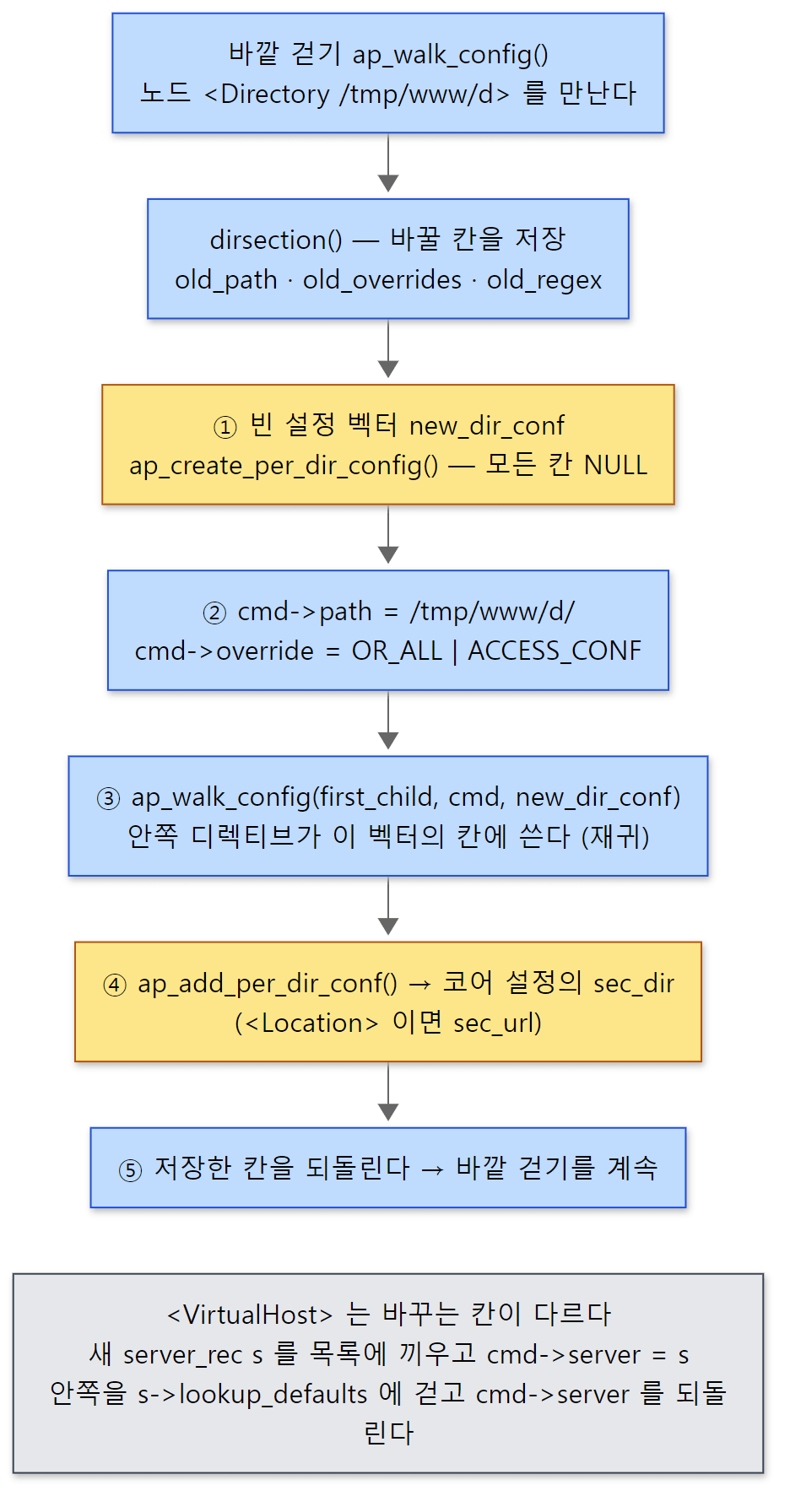 위 다섯 단계를 dirsection() 의 실제 순서대로 이었습니다. 경로는 예제 기록의 create_dir_config dir=/tmp/www/d/ 에서 가져왔습니다.
urlsection()(<Location>)도 거의 같습니다(2633–2709행). 경로를 파일 시스템 경로로 정규화하지 않는다는 점이 다릅니다.
<VirtualHost>는 바꾸는 칸이 다릅니다. ap_init_virtual_host()로 새 server_rec을 만들어 서버 목록에 끼우고, cmd->server를 그것으로 바꾼 뒤 안쪽을 그 서버의 lookup_defaults를 대상으로 걷습니다.
    errmsg = ap_init_virtual_host(p, arg, main_server, &s);
    if (errmsg) {
        return errmsg;
    }

    s->next = main_server->next;
    main_server->next = s;

    s->defn_name = cmd->directive->filename;
    s->defn_line_number = cmd->directive->line_num;

    cmd->server = s;

    errmsg = ap_walk_config(cmd->directive->first_child, cmd,
                            s->lookup_defaults);

    cmd->server = main_server;
lookup_defaults는 server_rec이 가진 "이 서버의 기본 디렉터리 설정" 벡터입니다(include/httpd.h 1424–1426행). 최상위에서 걷기를 시작할 때 넘기는 벡터도 주 서버의 lookup_defaults입니다(1977행). 그래서 섹션 밖에 쓴 GreetMessage hello-from-server는 주 서버의 lookup_defaults에 들어갑니다. 새 가상 호스트의 module_config와 lookup_defaults는 모든 칸이 빈 벡터로 시작합니다(server/config.c 2118–2119행). 주 서버의 값을 언제 물려받는지는 다음 절입니다.
헷갈리기 쉬운 곳: <Location>은 길이가 아니라 적은 순서대로 적용됩니다
예제의 설정에서 <Location /x/y>를 <Location /x>보다 먼저 적었습니다. /x/y/z로 요청하면 둘 다 맞습니다.
### curl http://127.0.0.1:8080/x/y/z
uri=/x/y/z
message=from-x
words=s1
tag=main-tag
trail=(server) + /x/y + /x
더 구체적인 /x/y가 이길 것 같지만 결과는 from-x입니다. trail이 보여 주듯 /x/y를 먼저 병합하고 그 위에 /x를 병합했기 때문입니다. <Directory>는 기동할 때 정렬합니다. 정규식이 아닌 것을 앞에, 그 안에서는 경로의 단계 수(/의 개수)가 적은 것을 앞에 둡니다(ap_core_reorder_directories()와 비교 함수 reorder_sorter(), server/core.c 709–784행). 그런데 이 함수가 정렬하는 것은 sec_dir뿐이고 sec_url은 손대지 않습니다. 요청이 올 때 ap_location_walk()는 배열을 앞에서부터 훑으며 맞는 것을 차례로 병합합니다(server/request.c 1561–1649행). 넓은 <Location>을 위에, 좁은 것을 아래에 적는 습관이 필요한 이유입니다.
7. 병합 — 언제, 누가 하나
만들기: 기동할 때 구역마다
예제 서버를 띄운 직후의 기록입니다.
### 2) startup trace (/tmp/greet.trace)
[boot#1  pid=158] create_server_config  main
[boot#1  pid=158] create_dir_config  dir=(server)
[boot#1  pid=158] create_dir_config  dir=/a
[boot#1  pid=158] create_dir_config  dir=/a/b
[boot#1  pid=158] create_dir_config  dir=/x/y
[boot#1  pid=158] create_dir_config  dir=/x
[boot#1  pid=158] create_dir_config  dir=/tmp/www/d/
[boot#1  pid=158] create_dir_config  dir=(server)
[boot#1  pid=158] create_server_config  vhost
[boot#1  pid=158] merge_server_config  base=main-tag add=one-tag
[boot#1  pid=158] merge_dir_config   base=[(server)] add=(server)
[boot#2  pid=158] create_server_config  main
[boot#2  pid=158] create_dir_config  dir=(server)
[boot#2  pid=159] create_dir_config  dir=/a
[boot#2  pid=159] create_dir_config  dir=/a/b
[boot#2  pid=159] create_dir_config  dir=/x/y
[boot#2  pid=159] create_dir_config  dir=/x
[boot#2  pid=159] create_dir_config  dir=/tmp/www/d/
[boot#2  pid=159] create_dir_config  dir=(server)
[boot#2  pid=159] create_server_config  vhost
[boot#2  pid=159] merge_server_config  base=main-tag add=one-tag
[boot#2  pid=159] merge_dir_config   base=[(server)] add=(server)
(pid 는 실행마다 다릅니다.) 같은 묶음이 boot#1, boot#2로 두 번 나옵니다. 설정을 두 번 읽기 때문입니다(5편). 한 묶음 안을 위에서부터 읽으면 이렇습니다.
- 주 서버의 서버 설정과 기본 디렉터리 설정은 파일을 읽기도 전에 만들어집니다.
init_server_config()가 실린 모든 모듈의create_server_config와create_dir_config(p, NULL)을 부릅니다(server/config.c2262–2263행, 270–283행, 311–322행).dir이NULL이라 예제는(server)로 적었습니다. - 섹션의 디렉터리 설정은 걷는 도중, 그 섹션 안에서 이 모듈의 디렉티브를 처음 만났을 때 만들어집니다(3절의
ap_set_config_vectors()).<Location />은 기록에 없습니다. 그 안에는SetHandler(코어의 디렉티브)뿐이라greet의 칸은 끝까지NULL로 남습니다. - 가상 호스트
one.local안의GreetTag를 만나면, 그 서버의lookup_defaults에 디렉터리 설정(dir=(server))이,module_config에 서버 설정(vhost)이 생깁니다.two.local에는greet의 디렉티브가 없으니 아무것도 생기지 않습니다. - 마지막 두 줄이 기동 때의 병합입니다.
boot#2의 중간에서 pid 가 158에서 159로 바뀝니다. 주 서버의 설정 두 개는 파일을 읽기 전에, 섹션의 설정은 걷는 도중에 만들어지는데, 그 사이의 pre_config 훅에서 event MPM 이 두 번째 기동 때 백그라운드 프로세스로 떨어져 나가기 때문입니다(apr_proc_detach(), server/mpm/event/event.c 4024–4040행). 이 순간은 5편 4절에서 자세히 다뤘습니다. 이 글에서는 "섹션의 설정은 pre_config 뒤, 걷기에서 생긴다"는 증거로만 봐 두면 됩니다.
서버 설정의 병합: 기동할 때 한 번
ap_fixup_virtual_hosts()는 가상 호스트마다 주 서버의 설정을 물려줍니다(server/config.c 2170–2211행). 서버 설정은 merge_server_configs()로, 기본 디렉터리 설정(lookup_defaults)은 ap_merge_per_dir_configs()로 합칩니다(2178–2182행). 서버 설정 쪽 코드입니다.
static void merge_server_configs(apr_pool_t *p, ap_conf_vector_t *base,
                                 server_rec *virt)
{
    /* Can reuse the 'virt' vector for the spine of it, since we don't
     * have to deal with the moral equivalent of .htaccess files here...
     */

    void **base_vector = (void **)base;
    void **virt_vector = (void **)virt->module_config;
    module *modp;

    for (modp = ap_top_module; modp; modp = modp->next) {
        merger_func df = modp->merge_server_config;
        int i = modp->module_index;

        if (!virt_vector[i]) {
            if (df && modp->create_server_config
                   && (ap_get_module_flags(modp) &
                       AP_MODULE_FLAG_ALWAYS_MERGE)) {
                virt_vector[i] = (*modp->create_server_config)(p, virt);
            }
            else {
                virt_vector[i] = base_vector[i];
                df = NULL;
            }
        }
        if (df) {
            virt_vector[i] = (*df)(p, base_vector[i], virt_vector[i]);
        }
    }
}
가상 호스트의 칸이 비어 있으면 병합 함수를 부르지 않고 주 서버의 포인터를 그대로 복사합니다. 모듈이 AP_MODULE_FLAG_ALWAYS_MERGE를 켜 둔 경우만 예외로, 빈 설정을 만들어 병합합니다. 칸이 차 있으면 병합 함수를 부릅니다.
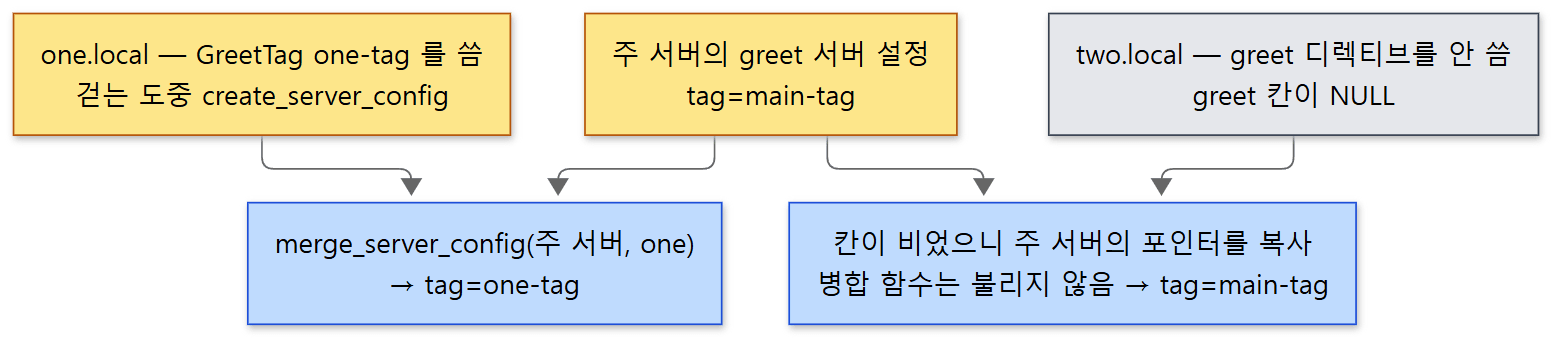 노란 상자가 실제로 만들어진 설정 구조체, 회색 상자가 빈 칸입니다.
예제의 두 가상 호스트에 같은 주소로 요청한 결과입니다.
### curl -H 'Host: one.local' http://127.0.0.1:8081/a/page
uri=/a/page
message=hello-a
words=s1,a1,a2
tag=one-tag
trail=(server) + (server) + /a

### curl -H 'Host: two.local' http://127.0.0.1:8081/a/page
uri=/a/page
message=hello-a
words=s1,a1,a2
tag=main-tag
trail=(server) + /a
기동 기록에서 merge_server_config가 한 번(one.local)만 불렸던 것과 맞습니다. one.local의 trail에 (server)가 두 번 있는 것은 그 가상 호스트의 lookup_defaults가 주 서버의 것과 병합된 흔적입니다(기동 기록의 마지막 줄). two.local은 주 서버의 lookup_defaults 칸을 포인터째 물려받았습니다. 두 호스트 모두 <Location /a>의 값을 받은 것은, 코어 모듈의 서버 설정 병합 함수가 가상 호스트의 <Directory>·<Location> 목록을 주 서버의 목록 뒤에 이어 붙이기 때문입니다(merge_core_server_configs(), server/core.c 552–553행). 코어도 이 글에서 본 "모듈의 병합 함수" 규칙을 똑같이 따르는 모듈 하나입니다.
디렉터리 설정의 병합: 요청마다
디렉터리 설정을 합치는 코어 쪽 함수는 이것 하나입니다.
AP_CORE_DECLARE(ap_conf_vector_t *) ap_merge_per_dir_configs(apr_pool_t *p,
                                           ap_conf_vector_t *base,
                                           ap_conf_vector_t *new_conf)
{
    void **conf_vector = apr_palloc(p, sizeof(void *) * conf_vector_length);
    void **base_vector = (void **)base;
    void **new_vector = (void **)new_conf;
    int i;

    for (i = 0; i < total_modules; i++) {
        if (!new_vector[i]) {
            conf_vector[i] = base_vector[i];
        }
        else {
            const merger_func df = merger_func_cache[i];
            if (df && base_vector[i]) {
                conf_vector[i] = (*df)(p, base_vector[i], new_vector[i]);
            }
            else
                conf_vector[i] = new_vector[i];
        }
    }

    return (ap_conf_vector_t *)conf_vector;
}
모듈마다 세 갈래입니다. 아래 구역(new)의 칸이 비었으면 위의 것을 그대로 쓰고, 둘 다 있으면 모듈의 병합 함수를 부르고, 위가 비었으면 아래 것을 그대로 씁니다. 결과는 새로 할당한 벡터이고 원래의 두 벡터는 건드리지 않습니다. p에는 요청 풀이 넘어오므로 병합 결과는 요청이 끝나면 함께 사라집니다.
이 함수를 부르는 곳은 server/request.c의 walk 함수들입니다. 요청 처리 중에 r->per_dir_config는 서버의 lookup_defaults에서 출발하고(290행), 코어의 map_to_storage 훅이 ap_directory_walk()와 ap_file_walk()로 <Directory>·.htaccess·<Files>를 병합하고(server/core.c 5100–5104행), 그다음 <Location>을 병합합니다(server/request.c 292–301행). <Location>이 <Directory>보다 나중에 병합되므로, 예제처럼 "아래 것이 있으면 아래 것" 규칙을 쓰는 디렉티브라면 같은 값을 두 곳에서 정했을 때 <Location>이 이깁니다. 이 단계들이 요청 처리의 어디에 있는지는 10편에서 자세히 봅니다.
<Location> 병합은 두 번에 나눠 일어납니다. 맞는 구역끼리 먼저 합치고(now_merged), 그 결과를 지금까지의 r->per_dir_config 위에 합칩니다.
            if (now_merged) {
                now_merged = ap_merge_per_dir_configs(r->pool,
                                                      now_merged,
                                                      sec_ent[sec_idx]);
            }
            else {
                now_merged = sec_ent[sec_idx];
            }
    /* ... */
    if (now_merged) {
        r->per_dir_config = ap_merge_per_dir_configs(r->pool,
                                                     r->per_dir_config,
                                                     now_merged);
    }
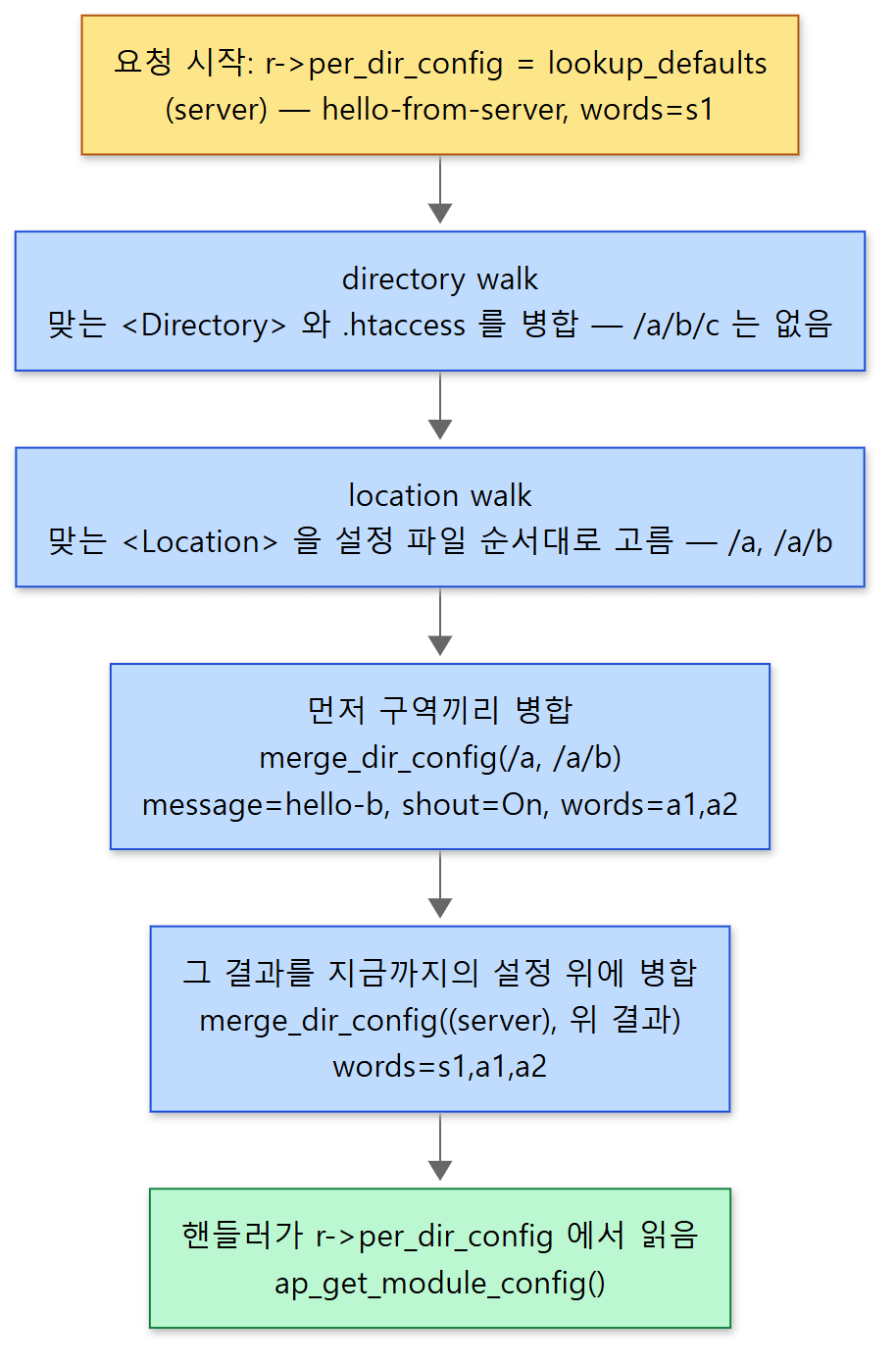 노란 상자는 기동 때 만든 설정, 파란 상자는 요청마다 일어나는 병합입니다.
예제의 요청 결과와 그때의 기록입니다.
### curl http://127.0.0.1:8080/hello
uri=/hello
message=hello-from-server
words=s1
tag=main-tag
trail=(server)

### curl http://127.0.0.1:8080/a/page
uri=/a/page
message=hello-a
words=s1,a1,a2
tag=main-tag
trail=(server) + /a

### curl http://127.0.0.1:8080/a/b/c
uri=/a/b/c
message=HELLO-B
words=s1,a1,a2
tag=main-tag
trail=(server) + /a + /a/b

### curl http://127.0.0.1:8080/d/
uri=/d/
message=from-directory
words=s1
tag=main-tag
trail=(server) + /tmp/www/d/

### 3) trace while serving requests
[request pid=163] merge_dir_config   base=[(server)] add=/a
[request pid=163] merge_dir_config   base=[/a] add=/a/b
[request pid=163] merge_dir_config   base=[(server)] add=/a/b
[request pid=163] merge_dir_config   base=[/x/y] add=/x
[request pid=163] merge_dir_config   base=[(server)] add=/x
[request pid=163] merge_dir_config   base=[(server)] add=/tmp/www/d/
[request pid=163] create_dir_config  dir=/tmp/www/ht/
[request pid=163] merge_dir_config   base=[(server)] add=/tmp/www/ht/

### the same two URLs once more (/a/b/c, /ht/)
[request pid=163] merge_dir_config   base=[/a] add=/a/b
[request pid=163] merge_dir_config   base=[(server)] add=/a/b
[request pid=163] create_dir_config  dir=/tmp/www/ht/
[request pid=163] merge_dir_config   base=[(server)] add=/tmp/www/ht/
(run.sh 출력에서 필요한 부분만 모았습니다. pid 는 실행마다 다르고, 다시 돌렸을 때는 두 번째 /a/b/c 요청이 다른 자식 프로세스로 가기도 했습니다. 어느 쪽이든 병합이 다시 일어나는 것은 같습니다. /x/y/z와 /ht/의 응답은 6절과 5절에 있습니다. "3)"의 기록은 /hello부터 /ht/까지 여섯 요청의 것입니다. 병합된 설정의 label은 아래 구역의 것을 물려받으므로 add=/a/b처럼 보입니다.)
/a/b/c의 두 줄이 위 그림 그대로입니다./a와/a/b를 먼저 합치고(base=[/a] add=/a/b), 그것을(server)위에 합쳤습니다.message는 아래 구역이 이겼고(hello-b,GreetShout On이라 대문자),words는 병합 함수가 이어 붙였으므로s1,a1,a2입니다. 어느 값이 이기는지는 코어가 아니라 모듈의 병합 함수가 정한다는 것이 이 두 값의 차이로 보입니다./hello는 병합 기록이 한 줄도 없습니다.<Location />이 맞기는 했지만 그 벡터의greet칸이NULL이라ap_merge_per_dir_configs()가 병합 함수를 부르지 않고 위의 것을 그대로 썼습니다.- 같은 주소를 다시 요청하면 병합도 다시 일어납니다. 병합 결과는 요청 풀에 있어서 요청이 끝나면 사라지기 때문입니다. walk 함수에 캐시가 있기는 하지만, 그 캐시는 요청 하나에 딸린 자리(
r->request_config의 메모 칸,server/core.c5452–5467행)에 들어 있어서 같은 요청 안에서, 그리고 그 요청의 내부 리다이렉트나 하위 요청에서만 다시 쓰입니다(server/request.c470–520행). .htaccess는 요청마다 다시 읽습니다./ht/를 요청할 때마다create_dir_config dir=/tmp/www/ht/가 다시 찍혔습니다.ap_parse_htaccess()의 캐시(r->htaccess)도 요청 하나에 딸린 것입니다(server/config.c2013–2018행)..htaccess를 고치면 재시작 없이 바로 반영되는 이유이자, 쓰지 않을 때는AllowOverride None으로 꺼 두는 것이 좋은 이유입니다.
헷갈리기 쉬운 곳
- 병합 함수는
base를 고치면 안 됩니다.base로 넘어오는 것은 기동 때 만들어 모든 요청이 같이 쓰는 구조체이거나 다른 병합의 결과입니다. 예제의merge_dir()처럼 새 구조체를 할당해 돌려줘야 합니다. 코어가 결과를 새 벡터에 담는 것(위ap_merge_per_dir_configs()의apr_palloc)도 같은 이유로 읽힙니다. - "설정하지 않음"을 표시할 값이 필요합니다. 예제는
NULL과-1을 썼고, 코어는OR_UNSET같은 별도 비트를 씁니다(server/core.c273–275행). 0을 기본값으로 쓰면 "Off로 정했다"와 "아무것도 안 정했다"를 구분하지 못해 아래 구역의Off가 위의On을 덮지 못하거나, 반대로 아무것도 안 정한 아래 구역이 위의 값을 지우게 됩니다. - 디렉터리 설정의 병합 함수는 기동 때도 불립니다. 가상 호스트의
lookup_defaults를 주 서버의 것과 합칠 때입니다(기동 기록의 마지막 줄). "디렉터리 설정은 요청 때만 병합된다"고 외우면 이 한 줄이 설명되지 않습니다.
이 글에서 뺀 것
큰 줄기를 위해 다음은 이름과 위치만 적어 둡니다. <If>·<ElseIf>·<Else>와 그 병합(ifsection(), ap_if_walk() — server/request.c 2027행부터). <Files>와 ap_file_walk()(server/core.c 2711행, server/request.c 1690행). <Limit>·<LimitExcept>(ap_limit_section()). <Proxy> 안에서만 쓰는 PROXY_CONF 비트(include/http_config.h 252행). 디렉티브 이름 단위로 허용하는 AllowOverrideList와 invoke_cmd()의 override_list 검사(server/core.c 2001행, server/config.c 862–866행). .htaccess의 오류를 경고로 낮추는 AllowOverride Nonfatal=…(NONFATAL_*). Options와 override_opts. 설정 값 안의 ${변수}를 바꿔 끼우는 ap_resolve_env()(1132행). 구조체의 칸 위치(APR_OFFSETOF)만 넘겨 함수를 따로 쓰지 않게 해 주는 ap_set_string_slot()·ap_set_flag_slot() 같은 범용 함수(server/config.c 1471–1564행). 명령줄의 -C·-c로 설정 앞뒤에 줄을 끼우는 process_command_config()(1762행).
2.4.x 브랜치와 비교하면, 이 글에서 본 함수들(ap_walk_config_sub(), ap_merge_per_dir_configs(), merge_server_configs(), ap_fixup_virtual_hosts(), 자리별 override 값)은 같은 코드입니다. trunk 에서는 invoke_cmd()에 parent 인자가, cmd_parms에 parent 칸과 regex 칸이 더해졌고(ap_walk_config_sub()가 invoke_cmd()에 NULL을 하나 더 넘기는 것, 6절 dirsection()의 old_regex 두 줄이 그 흔적입니다), ap_parse_htaccess()가 요청에 ".htaccess의 영향을 받았다"는 표시(r->taint)를 남기는 두 줄이 더해졌습니다.
정리
| 개념 | 한 줄 요약 |
|---|---|
| 두 단계 | 먼저 파일을 ap_directive_t 트리로 읽고(ap_build_config), pre_config 뒤에 트리를 걸으며 실행한다(ap_walk_config) |
EXEC_ON_READ |
LoadModule·Include·<IfModule>처럼 파일의 모양을 바꾸는 디렉티브는 읽는 순간 실행된다 |
command_rec |
모듈이 내놓는 디렉티브 표의 한 줄. 이름, 함수, 자리 비트, 인자 방식, 도움말 |
ap_config_hash |
소문자 이름 → (모듈, command_rec) 목록. 찾기는 해시 한 번 |
args_how |
TAKE1·FLAG·ITERATE·RAW_ARGS 등 13가지. 낱말 나누기와 개수 검사는 코어가 한다 |
cmd_parms |
디렉티브 함수가 받는 "지금 어디를 읽는가" — 서버, 경로, 허용 비트, 노드 |
| 자리 검사 | cmd->req_override & parms->override가 0이면 not allowed here / in <X> context |
AllowOverride |
.htaccess를 걸을 때의 parms->override를 정한다. 아예 안 쓰면 None과 다르다 |
| 섹션 | 코어의 RAW_ARGS 디렉티브. cmd_parms를 바꾸고 first_child부터 다시 걷는다 |
| 서버 설정 병합 | 기동 때 ap_fixup_virtual_hosts()에서. 가상 호스트의 칸이 비면 포인터만 복사한다 |
| 디렉터리 설정 병합 | 요청마다 request.c의 walk 에서. <Directory>·.htaccess 다음에 <Location>. <Location>끼리는 설정 파일에 적은 순서대로 |
| 병합 규칙 | 코어는 칸이 둘 다 있을 때 모듈의 병합 함수를 부를 뿐, 무엇이 이기는지는 모듈이 정한다 |
다음에 볼 것
설정 파일의 한 줄이 모듈의 구조체에 들어가고, 구역마다 생긴 구조체가 요청 때 하나로 합쳐지는 과정을 봤습니다. 이제 서버를 실제로 돌리는 쪽으로 갑니다. StartServers, MaxRequestWorkers, ThreadsPerChild 같은 디렉티브도 이 글에서 본 방식, 곧 MPM 모듈의 디렉티브 표에 있는 AP_INIT_TAKE1 줄을 거쳐 MPM 의 변수에 들어갑니다(server/mpm/event/event.c 4511–4524행). 그 값을 가지고 프로세스와 스레드를 몇 개 띄우고, 들어온 연결을 누구에게 맡기는지가 8편: MPM — prefork, worker, event는 연결을 어떻게 나눠 맡나에서 이어집니다. 이 글에서 "요청마다 병합한다"고만 하고 넘어간 walk 함수들의 자리는 10편에서 봅니다.
Spring과 비교하면 닮은 곳이 두 군데 있습니다. Spring도 설정을 곧바로 객체로 만들지 않고 먼저 설계도(BeanDefinition)로 읽어 등록한 뒤 나중에 객체를 만들며, 부모 설계도와 자식 설계도를 합친 병합본을 따로 만들어 씁니다(Spring 3편). httpd의 디렉티브 트리와 병합된 설정 벡터가 그 두 단계에 해당합니다. 다른 점은 값의 우선순위를 정하는 방식입니다. Spring의 Environment는 출처(PropertySource)의 목록 순서로 이기는 값을 정하고 첫 번째로 찾은 값을 쓰지만(Spring 12편), httpd는 구역이 겹칠 때마다 모듈이 쓴 병합 함수를 불러 모듈마다 다른 규칙(덮어쓰기, 이어 붙이기)을 허용합니다.