이 글에서 다루는 것
"nginx 소스 파헤치기" 연재의 두 번째 글입니다. 1편에서 소스를 받아 빌드하고, 폴더 지도와 요청 하나가 지나는 큰 길을 펴 보았습니다. 이번 글은 코드를 한 줄씩 읽기 전에 펴 놓는 전체 지도입니다. 3편부터 12편까지는 이 글의 지도에서 상자 하나씩을 골라 확대합니다.
nginx를 써 본 사람이라면 ps에서 nginx: master process와 nginx: worker process를 본 적이 있고, nginx.conf에 events {}·http {}·server {}·location {}을 겹겹이 써 보았을 것입니다. 이 글은 그 익숙한 모습을 다리 삼아 다음 질문에 답합니다.
- 마스터와 워커는 소스의 어느 함수이고, 각자 무엇을 기다리며 시간을 보내는가
- "모듈"은 C에서 어떤 모양이고,
events·http·stream블록과 모듈의 종류는 어떻게 이어지는가 - 실행 중인 nginx 하나의 상태를 담는
ngx_cycle_t에는 무엇이 들어 있고, 각 모듈의 설정 구조체는 어디에 매달리는가 proxy_pass를http {}바로 안에 쓰면 왜 "not allowed here"가 나오는가 — 설정 문맥은 소스에서 무엇인가
| 항목 | 내용 |
|---|---|
| 대상 | nginx |
| 버전 | nginx 1.31.9 (master, 개발판) |
| 커밋 | 9a7439fd79 (2026-10-23) |
| 주로 읽는 파일 | src/core/nginx.c, src/os/unix/ngx_process_cycle.c, src/core/ngx_module.h, src/core/ngx_conf_file.[ch], src/core/ngx_cycle.[ch], src/http/ngx_http.c, src/http/ngx_http_config.h, src/event/ngx_event.c |
글에 나오는 줄 번호는 모두 이 커밋 기준입니다. 같은 커밋의 소스를 받고 예제용 도커 이미지를 만드는 방법은 1편에 있습니다. 경로는 저장소 루트에서 시작합니다(src/core/…).
지도를 그리는 글이라 이 글은 큰 줄기만 따라갑니다. 각 부분을 자세히 읽는 글은 절마다 "N편에서 봅니다"로 이어 두었습니다.
먼저 알아 둘 말
마스터 프로세스(master process)는 nginx를 띄우면 남는 첫 프로세스입니다. 보통 root로 돌고, 설정을 읽고, 포트를 열고, 워커를 만들고, 시그널(nginx -s reload 같은 명령)을 받습니다. 요청은 처리하지 않습니다.
워커 프로세스(worker process)는 마스터가 fork()로 만든 자식입니다. worker_processes 값만큼 생기고, 실제 연결을 받아 요청을 처리합니다. 워커 하나는 스레드 하나로 돕니다(2·6절에서 확인합니다).
모듈(module)은 nginx의 기능 단위입니다. HTTP 처리, 로그, gzip, 프록시는 물론이고 "설정 파일의 맨 바깥 디렉티브를 처리하는 코어"와 "epoll을 쓰는 이벤트 처리"도 모듈입니다. C에서는 ngx_module_t 구조체 변수 하나입니다(3절).
cycle(사이클)은 실행 중인 nginx 하나의 상태 전체를 담은 구조체 ngx_cycle_t입니다. 읽은 설정, 열린 리스닝 소켓, 연결 배열, 모듈 목록이 여기 매달립니다. 설정을 다시 읽으면(reload) 새 cycle을 하나 더 만듭니다 — 이름에 "주기"가 들어간 이유입니다(4절).
설정 문맥(configuration context)은 디렉티브가 놓인 자리입니다. 파일 맨 바깥(main), events {}, http {}, server {}, location {} 같은 것입니다. 디렉티브마다 "놓여도 되는 문맥"이 비트 플래그로 정해져 있습니다(5절).
이벤트 루프(event loop)는 "준비된 소켓이 있으면 깨어나 처리하고, 없으면 잠든다"를 끝없이 되풀이하는 반복문입니다. 리눅스에서 nginx는 epoll(소켓 수천 개를 한꺼번에 등록해 두고 읽거나 쓸 수 있게 된 것만 돌려받는 리눅스 시스템 콜)로 잠들어 기다립니다. 소켓은 논블로킹(읽을 데이터가 없으면 기다리지 않고 바로 "지금은 없음"을 돌려주는 모드)으로 다룹니다(6절).
1. 연재 전체의 지도
먼저 한 장으로 보겠습니다. nginx 소스는 크게 세 부분으로 나눠 읽으면 편합니다.
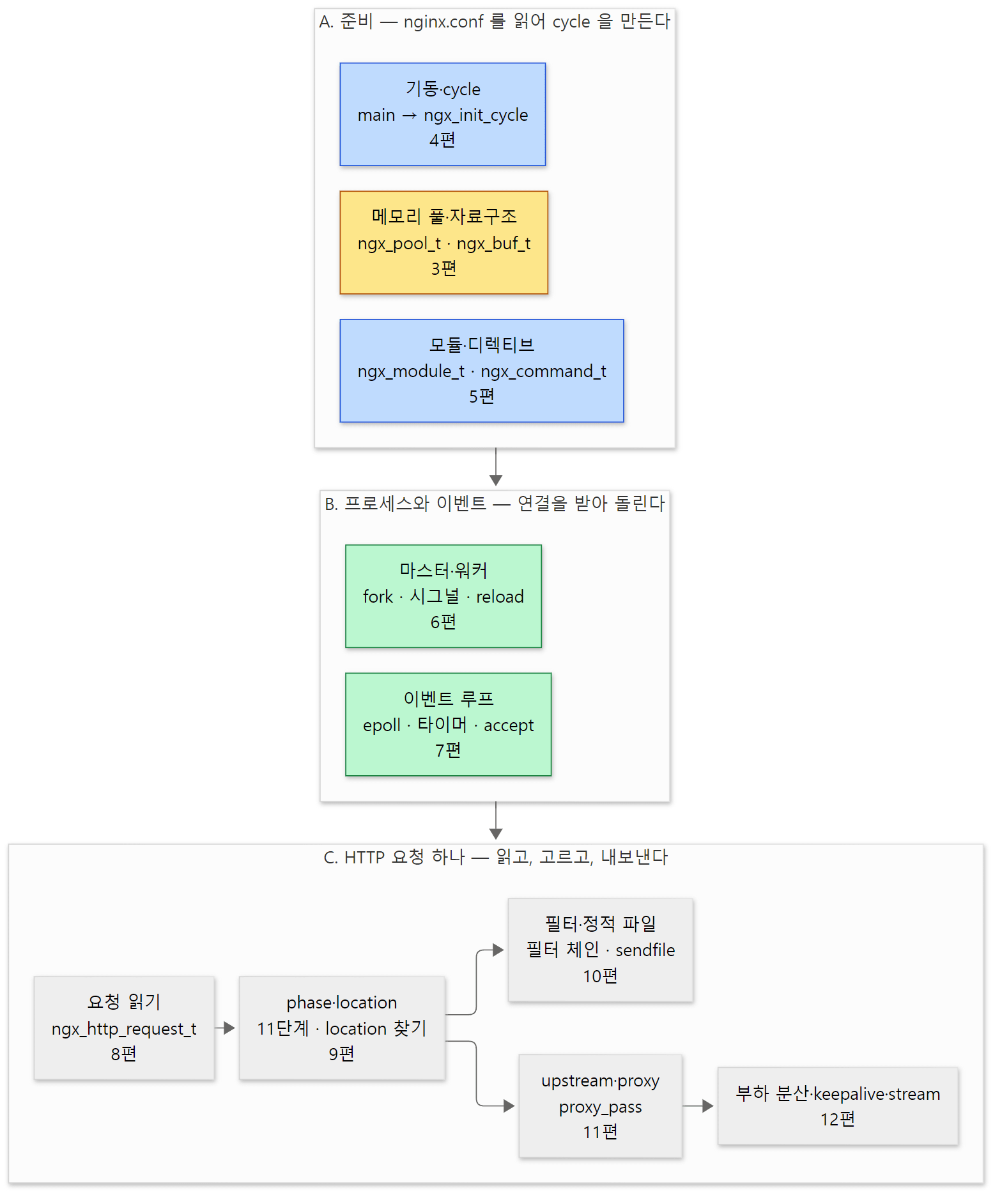 연재의 지도입니다. 3~12편은 이 그림의 상자 이름으로 "2편 지도의 ○○ 부분"을 가리킵니다. 노랑은 메모리, 파랑은 설정, 초록은 프로세스·이벤트, 회색은 요청 처리입니다.
- A. 준비 — nginx가 시작할 때(그리고 reload할 때) 한 번 하는 일입니다.
main()이 nginx.conf를 읽어 모듈마다 설정 구조체를 채우고, 그 결과를 cycle 하나에 모읍니다. 이 모든 메모리는 풀(pool, 한꺼번에 버리는 메모리 묶음)에서 나옵니다. - B. 프로세스와 이벤트 — 준비가 끝나면 마스터가 워커를 만들고, 각 워커는 이벤트 루프를 돌며 연결을 받습니다.
- C. HTTP 요청 하나 — 연결에서 요청을 읽고, 11단계 phase(요청 처리를 순서대로 나눈 단계 — rewrite, 접근 검사, 응답 만들기 같은 것)를 지나며 어느
location인지 고르고, 응답을 필터 체인(응답 헤더와 본문을 차례로 고치고 내보내는 함수들의 사슬)으로 내보내거나 upstream(nginx가 요청을 넘기는 백엔드 서버)으로 프록시합니다.
| 지도의 상자 | 구역 | 주로 읽는 곳 | nginx.conf에서 보던 것 | 글 |
|---|---|---|---|---|
| 메모리 풀·자료구조 | A | src/core/ngx_palloc.c, ngx_buf.h, ngx_string.h |
connection_pool_size, request_pool_size |
3편 |
| 기동·cycle | A | src/core/nginx.c, ngx_cycle.c, ngx_conf_file.c |
nginx -t, -c, -g |
4편 |
| 모듈·디렉티브 | A | src/core/ngx_module.c, src/http/ngx_http.c |
load_module, 모든 디렉티브 |
5편 |
| 마스터·워커 | B | src/os/unix/ngx_process_cycle.c, ngx_process.c |
worker_processes, nginx -s reload |
6편 |
| 이벤트 루프 | B | src/event/ngx_event.c, modules/ngx_epoll_module.c |
events {}, worker_connections |
7편 |
| 요청 읽기 | C | src/http/ngx_http_request.c, ngx_http_parse.c |
server_name, client_header_buffer_size |
8편 |
| phase·location | C | src/http/ngx_http_core_module.c, ngx_http.c |
location, rewrite, allow/deny |
9편 |
| 필터·정적 파일 | C | ngx_http_static_module.c, ngx_http_write_filter_module.c |
root, gzip, sendfile |
10편 |
| upstream·proxy | C | src/http/ngx_http_upstream.c, ngx_http_proxy_module.c |
proxy_pass, proxy_read_timeout |
11편 |
| 부하 분산·keepalive·stream | C | ngx_http_upstream_round_robin.c, src/stream/ |
upstream {}, keepalive, stream {} |
12편 |
이 글의 나머지는 지도 전체에 걸쳐 있는 뼈대 다섯 가지를 차례로 봅니다 — 프로세스(2절), 모듈(3절), cycle(4절), 설정 문맥(5절), 이벤트 루프(6절). 마지막으로 HTTP·stream·mail이 같은 코어 위에 어떻게 서 있는지를 봅니다(7절).
2. 프로세스 — 마스터 하나, 워커 여럿
main()의 끝: 어느 쪽 루프로 들어가나
main()은 설정을 읽어 cycle을 만든 뒤(4편), 마지막에 두 루프 가운데 하나로 들어가 다시 나오지 않습니다.
    if (ngx_process == NGX_PROCESS_SINGLE) {
        ngx_single_process_cycle(cycle);

    } else {
        ngx_master_process_cycle(cycle);
    }

    return 0;
}
어느 쪽인지는 master_process 디렉티브가 정합니다. 바로 위에서 ccf->master가 켜져 있으면 ngx_process를 NGX_PROCESS_MASTER로 바꿉니다(346–348행). 기본값은 켬입니다 — ngx_core_module_init_conf()의 ngx_conf_init_value(ccf->master, 1);(1192행). master_process off;로 두면 프로세스 하나가 이벤트 루프를 직접 돌리는 ngx_single_process_cycle()로 갑니다. gdb로 디버깅할 때 편해서 뒤의 글들에서 가끔 씁니다.
같은 함수에 worker_processes의 기본값도 있습니다. ngx_conf_init_value(ccf->worker_processes, 1);(1196행) — 적지 않으면 워커는 하나입니다.
마스터: 워커를 만들고, 시그널을 기다린다
    ccf = (ngx_core_conf_t *) ngx_get_conf(cycle->conf_ctx, ngx_core_module);

    ngx_start_worker_processes(cycle, ccf->worker_processes,
                               NGX_PROCESS_RESPAWN);
    ngx_start_cache_manager_processes(cycle, 0);
    /* ... */
    for ( ;; ) {
        /* ... */
        ngx_log_debug0(NGX_LOG_DEBUG_EVENT, cycle->log, 0, "sigsuspend");

        sigsuspend(&set);

        ngx_time_update();
        /* ... */
        if (ngx_reconfigure) {
            ngx_reconfigure = 0;
            /* ... */
            ngx_log_error(NGX_LOG_NOTICE, cycle->log, 0, "reconfiguring");

            cycle = ngx_init_cycle(cycle);
            if (cycle == NULL) {
                cycle = (ngx_cycle_t *) ngx_cycle;
                continue;
            }

            ngx_cycle = cycle;
            ccf = (ngx_core_conf_t *) ngx_get_conf(cycle->conf_ctx,
                                                   ngx_core_module);
            ngx_start_worker_processes(cycle, ccf->worker_processes,
                                       NGX_PROCESS_JUST_RESPAWN);
            ngx_start_cache_manager_processes(cycle, 1);

            /* allow new processes to start */
            ngx_msleep(100);

            live = 1;
            ngx_signal_worker_processes(cycle,
                                        ngx_signal_value(NGX_SHUTDOWN_SIGNAL));
        }
src/os/unix/ngx_process_cycle.c 128–266행
마스터가 하는 일은 이것이 전부라고 해도 됩니다.
worker_processes개수만큼 워커를 만듭니다.ngx_start_worker_processes()는 반복문에서ngx_spawn_process(cycle, ngx_worker_process_cycle, …, "worker process", type)을 부르고(358–371행),ngx_spawn_process()안에서socketpair()로 부모·자식 사이의 통신 통로(채널)를 만든 뒤fork()합니다. 자식은 넘겨받은 함수 포인터proc, 곧ngx_worker_process_cycle()을 부릅니다(src/os/unix/ngx_process.c 186–200행).sigsuspend()에서 잠듭니다. 시그널이 오면 깨어납니다.- 시그널 처리기
ngx_signal_handler()는 일을 하지 않고 전역 플래그만 세웁니다 — SIGHUP이면ngx_reconfigure = 1(src/os/unix/ngx_process.c 364–365행), SIGQUIT이면ngx_quit = 1, SIGCHLD(자식이 끝남)면ngx_reap = 1. 깨어난 루프가 플래그를 보고 실제 일을 합니다. 시그널 처리기 안에서는 할 수 있는 일이 매우 제한되기 때문에 쓰는 흔한 방식입니다. - reload(
ngx_reconfigure)라면ngx_init_cycle(cycle)로 옛 cycle을 받아 새 cycle을 만들고, 새 워커를 띄우고, 옛 워커에게 "그만"(NGX_SHUTDOWN_SIGNAL, 곧 QUIT)을 보냅니다.
nginx -s reload를 치면 새로 뜬 nginx 프로세스가 pid 파일에서 마스터의 pid를 읽어 kill(pid, SIGHUP)을 보내고 끝납니다(ngx_signal_process() → ngx_os_signal_process(), src/core/ngx_cycle.c 1097–1145행). 이름(reload)과 시그널(SIGHUP)의 짝은 signals[] 표에 있습니다(src/os/unix/ngx_process.c 39–83행).
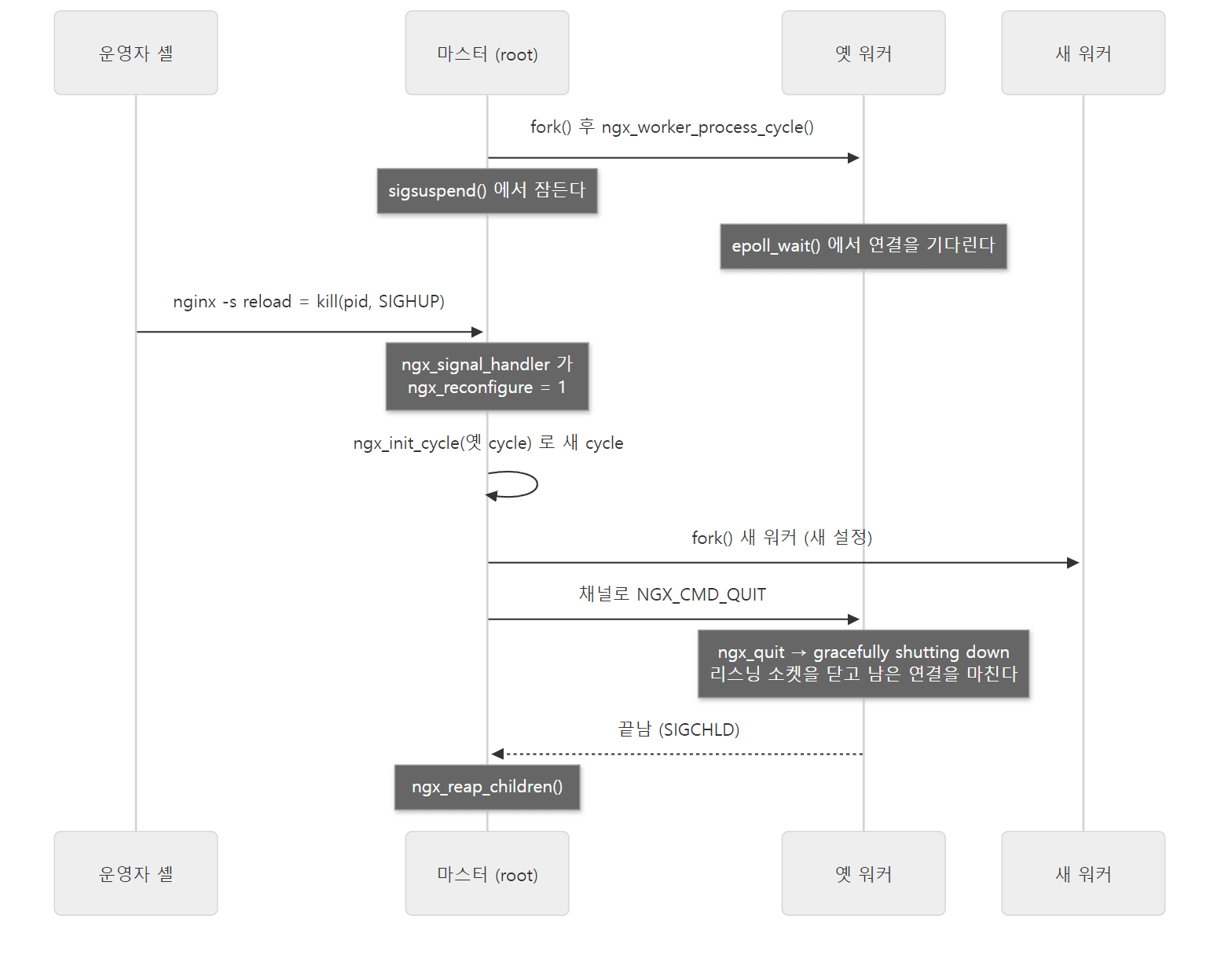 reload 한 번의 큰 순서입니다. 새 워커가 먼저 뜨고 옛 워커가 나중에 끝나므로 받던 연결이 끊기지 않습니다. 자세한 것은 6편에서 봅니다.
마스터가 워커에게 "그만"을 전할 때는 시그널보다 채널을 먼저 씁니다. ngx_signal_worker_processes()는 QUIT을 NGX_CMD_QUIT 명령으로 바꿔 채널에 쓰고(src/os/unix/ngx_process_cycle.c 471행, 519행), 채널에 쓰지 못했을 때만 kill()로 시그널을 보냅니다(534행). 워커 쪽 ngx_channel_handler()가 명령을 읽어 ngx_quit = 1을 세웁니다(1091–1093행). 채널은 워커의 이벤트 루프에 소켓 하나로 등록되어 있으므로, 워커는 "연결이 왔다"와 똑같은 방식으로 "마스터가 말을 걸었다"를 알게 됩니다.
워커: 이벤트 루프를 끝없이 돈다
static void
ngx_worker_process_cycle(ngx_cycle_t *cycle, void *data)
{
    ngx_int_t worker = (intptr_t) data;

    ngx_process = NGX_PROCESS_WORKER;
    ngx_worker = worker;

    ngx_worker_process_init(cycle, worker);

    ngx_setproctitle("worker process");

    for ( ;; ) {

        if (ngx_exiting) {
            if (ngx_event_no_timers_left() == NGX_OK) {
                ngx_log_error(NGX_LOG_NOTICE, cycle->log, 0, "exiting");
                ngx_worker_process_exit(cycle);
            }
        }

        ngx_log_debug0(NGX_LOG_DEBUG_EVENT, cycle->log, 0, "worker cycle");

        ngx_process_events_and_timers(cycle);

        if (ngx_terminate) {
            ngx_log_error(NGX_LOG_NOTICE, cycle->log, 0, "exiting");
            ngx_worker_process_exit(cycle);
        }

        if (ngx_quit) {
            ngx_quit = 0;
            ngx_log_error(NGX_LOG_NOTICE, cycle->log, 0,
                          "gracefully shutting down");
            ngx_setproctitle("worker process is shutting down");

            if (!ngx_exiting) {
                ngx_exiting = 1;
                ngx_set_shutdown_timer(cycle);
                ngx_close_listening_sockets(cycle);
                ngx_close_idle_connections(cycle);
                ngx_event_process_posted(cycle, &ngx_posted_events);
            }
        }
        /* ... */
    }
}
src/os/unix/ngx_process_cycle.c 728–779행
워커의 몸통은 ngx_process_events_and_timers() 한 줄을 끝없이 부르는 반복문입니다. 그 한 줄이 6절의 이벤트 루프 한 바퀴입니다. 바퀴 사이사이에 마스터와 같은 이름의 플래그(ngx_terminate, ngx_quit, ngx_reopen)를 봅니다. ngx_quit을 받으면 곧바로 끝나지 않고 ngx_exiting = 1로 바꾼 뒤, 리스닝 소켓을 닫고 쉬는 연결을 닫고, 남은 일이 없어질 때(ngx_event_no_timers_left())까지 계속 돕니다. 이것이 로그의 "gracefully shutting down"입니다.
그 전에 한 번 부르는 ngx_worker_process_init()은 user 디렉티브의 사용자로 권한을 내리고(그래서 워커는 nobody로 돕니다), 모든 모듈의 init_process 콜백을 부릅니다(934–940행). 이벤트 모듈의 init_process인 ngx_event_process_init()이 여기서 연결 배열을 만들고 리스닝 소켓을 epoll에 등록합니다(6절).
예제 1: ps와 gdb로 두 루프 확인하기
이 글의 예제는 모두 기준 커밋(9a7439fd79)을 그대로 빌드한 nginx 1.31.9로 도커 컨테이너(Debian bookworm, --with-debug)에서 실행했습니다. 실행 스크립트는 ex/u02-architecture/run.sh 하나이고, 출력의 === 줄은 스크립트가 찍은 제목입니다. 설정은 워커 둘에 events·http·server·location을 하나씩 둔 가장 작은 것입니다.
# 이 글을 위해 쓴 예제입니다 (nginx 의 소스가 아닙니다)
# 2편: 마스터 하나 + 워커 둘, events·http·server·location 문맥을 하나씩 둔 가장 작은 설정
worker_processes 2;
error_log /tmp/u02/error.log notice;
pid /tmp/u02/nginx.pid;

events {
    worker_connections 1024;
}

http {
    access_log off;

    server {
        listen 8080;

        location = /hello {
            return 200 "hello from $nginx_version\n";
        }

        location = /status {
            stub_status;
        }
    }
}
기동한 뒤 ps로 프로세스를 보고, 마스터와 워커에 gdb를 붙여 bt(지금 어느 함수에서 멈춰 있는지 호출 순서를 거꾸로 찍는 명령)를 했습니다.
nginx -c /work/nginx.conf
ps -o pid,ppid,user,nlwp,cmd -C nginx
gdb -batch -p "$MASTER" -ex 'bt'
gdb -batch -p "$WORKER" -ex 'bt'
=== 3. start: one master, two workers ===
hello from 1.31.9
    PID    PPID USER     NLWP CMD
     45       1 root        1 nginx: master process nginx -c /work/nginx.conf
     46      45 nobody      1 nginx: worker process
     47      45 nobody      1 nginx: worker process
...
=== 5. where is each process waiting? (gdb bt) ===
--- master (pid 45) ---
#0  0x00007f94ed8482d5 in sigsuspend () from /lib/x86_64-linux-gnu/libc.so.6
#1  0x000055a5987780be in ngx_master_process_cycle (cycle=0x55a599b7d120) at src/os/unix/ngx_process_cycle.c:163
#2  0x000055a59872d1c0 in main (argc=3, argv=0x7ffdcc903668) at src/core/nginx.c:403
--- worker (pid 46) ---
#0  0x00007f94ed914ef3 in epoll_wait () from /lib/x86_64-linux-gnu/libc.so.6
#1  0x000055a59877c608 in ngx_epoll_process_events (cycle=0x55a599b7d120, timer=18446744073709551615, flags=1) at src/event/modules/ngx_epoll_module.c:800
#2  0x000055a5987690b9 in ngx_process_events_and_timers (cycle=0x55a599b7d120) at src/event/ngx_event.c:248
#3  0x000055a598779a4c in ngx_worker_process_cycle (cycle=0x55a599b7d120, data=0x0) at src/os/unix/ngx_process_cycle.c:751
#4  0x000055a598776148 in ngx_spawn_process (cycle=0x55a599b7d120, proc=0x55a598779956 <ngx_worker_process_cycle>, data=0x0, name=0x55a59889af0a "worker process", respawn=-3) at src/os/unix/ngx_process.c:199
#5  0x000055a598778826 in ngx_start_worker_processes (cycle=0x55a599b7d120, n=2, type=-3) at src/os/unix/ngx_process_cycle.c:366
#6  0x000055a598777eef in ngx_master_process_cycle (cycle=0x55a599b7d120) at src/os/unix/ngx_process_cycle.c:130
#7  0x000055a59872d1c0 in main (argc=3, argv=0x7ffdcc903668) at src/core/nginx.c:403
pid와 주소는 실행마다 다릅니다.
- 마스터는 root, 워커 둘은
nobody입니다.NLWP(프로세스 안의 스레드 수)는 셋 다 1입니다. 워커는 스레드 하나로 돕니다. - 마스터는
ngx_process_cycle.c163행 — 위 발췌의sigsuspend(&set);— 에서 잠들어 있습니다. - 워커의 스택을 아래에서 위로 읽으면 이 절이 그대로 나옵니다.
main→ngx_master_process_cycle(130행, 워커를 만드는 줄) →ngx_start_worker_processes→ngx_spawn_process(199행,proc(cycle, data)) →ngx_worker_process_cycle(751행,ngx_process_events_and_timers(cycle)) →ngx_epoll_process_events→epoll_wait. 워커가 마스터의 함수 안에서fork()되었기 때문에, 워커의 스택에도 마스터의 프레임(#5–#7)이 남아 있습니다. timer=18446744073709551615는(ngx_msec_t) -1, 곧NGX_TIMER_INFINITE입니다(src/event/ngx_event_timer.h 17행). 걸린 타이머가 없으니 연결이 올 때까지 끝없이 기다립니다.flags=1은NGX_UPDATE_TIME입니다.
헷갈리기 쉬운 곳: 마스터와 워커의 cycle 주소가 같다
위 출력에서 마스터의 cycle=0x55a599b7d120과 워커의 cycle=0x55a599b7d120이 같습니다. 같은 메모리를 함께 쓰는 것이 아닙니다. fork()는 부모의 주소 공간을 통째로 복사하므로 자식에서도 같은 주소에 같은 내용의 cycle이 있을 뿐이고, 그 뒤 한쪽이 고친 것은 다른 쪽에 보이지 않습니다. 워커들이 정말로 함께 보는 값(upstream_zone, limit_req_zone, accept_mutex 같은 것)은 따로 공유 메모리에 둡니다(3편에서 맛보기, 12편에서 upstream_zone).
3. 모든 것이 모듈이다
모듈 하나 = ngx_module_t 변수 하나
nginx에서 기능을 더하는 단위는 모듈이고, 모듈은 C에서 이 구조체 하나입니다.
struct ngx_module_s {
    ngx_uint_t            ctx_index;
    ngx_uint_t            index;

    char                 *name;

    ngx_uint_t            spare0;
    ngx_uint_t            spare1;

    ngx_uint_t            version;
    const char           *signature;

    void                 *ctx;
    ngx_command_t        *commands;
    ngx_uint_t            type;

    ngx_int_t           (*init_master)(ngx_log_t *log);

    ngx_int_t           (*init_module)(ngx_cycle_t *cycle);

    ngx_int_t           (*init_process)(ngx_cycle_t *cycle);
    ngx_int_t           (*init_thread)(ngx_cycle_t *cycle);
    void                (*exit_thread)(ngx_cycle_t *cycle);
    void                (*exit_process)(ngx_cycle_t *cycle);

    void                (*exit_master)(ngx_cycle_t *cycle);

    uintptr_t             spare_hook0;
    /* ... */
};
src/core/ngx_module.h 223–258행
필드를 세 무리로 나누면 읽기 쉽습니다.
| 무리 | 필드 | 무엇 |
|---|---|---|
| 번호 | index, ctx_index, name |
전체 모듈 배열에서의 번호, 같은 종류 안에서의 번호, 이름. 시작할 때 채워진다 |
| 무엇을 하나 | type, ctx, commands |
모듈의 종류, 종류마다 모양이 다른 모듈 컨텍스트(콜백 묶음), 이 모듈이 처리하는 디렉티브 표 |
| 언제 불리나 | init_master … exit_master |
프로세스의 생애에서 불리는 콜백. 대부분의 모듈은 NULL |
ctx가 void *인 것이 요점입니다. 종류가 CORE인 모듈이면 ngx_core_module_t(이름, create_conf, init_conf)를 가리키고(src/core/ngx_module.h 261–265행), HTTP 모듈이면 ngx_http_module_t(create_loc_conf, merge_loc_conf 등 콜백 8개)를 가리킵니다. 코어는 type을 보고 ctx를 알맞은 구조체로 바꿔 읽습니다. C에는 상속이 없으니 "공통 머리 + void * + 종류 표시"로 다형성을 흉내 내는 것입니다(C의 구조체와 함수 포인터가 낯설다면 httpd 2편이 도움이 됩니다).
모듈의 종류는 네 글자다
type에 들어가는 값은 이렇게 정의되어 있습니다.
| 종류 | 정의 | 값 | 주석 | 정의된 곳 |
|---|---|---|---|---|
| CORE | NGX_CORE_MODULE |
0x45524F43 |
"CORE" |
src/core/ngx_conf_file.h 70행 |
| CONF | NGX_CONF_MODULE |
0x464E4F43 |
"CONF" |
src/core/ngx_conf_file.h 71행 |
| EVENT | NGX_EVENT_MODULE |
0x544E5645 |
"EVNT" |
src/event/ngx_event.h 396행 |
| HTTP | NGX_HTTP_MODULE |
0x50545448 |
"HTTP" |
src/http/ngx_http_config.h 39행 |
| STREAM | NGX_STREAM_MODULE |
0x4d525453 |
"STRM" |
src/stream/ngx_stream.h 315행 |
NGX_MAIL_MODULE |
0x4C49414D |
"MAIL" |
src/mail/ngx_mail.h 355행 |
값을 바이트로 쪼개 보면 아스키 글자입니다. 0x45524F43은 45 52 4F 43 = E R O C이고, x86처럼 작은 쪽부터 저장하는 CPU(리틀 엔디언)의 메모리에는 43 4F 52 45 = C O R E 순서로 놓입니다. 그래서 메모리 덤프에서 모듈 구조체를 보면 "CORE"라는 글자가 그대로 보입니다. 종류를 구분하는 데는 아무 수나 써도 되지만, 이렇게 해 두면 디버거로 메모리를 볼 때 알아보기 쉽습니다.
CORE 모듈이 블록을 열고, 그 안을 다른 종류가 맡는다
http {} 블록은 누가 처리할까요. HTTP 모듈이 아니라 CORE 모듈 ngx_http_module입니다.
static ngx_command_t  ngx_http_commands[] = {

    { ngx_string("http"),
      NGX_MAIN_CONF|NGX_CONF_BLOCK|NGX_CONF_NOARGS,
      ngx_http_block,
      0,
      0,
      NULL },

      ngx_null_command
};


static ngx_core_module_t  ngx_http_module_ctx = {
    ngx_string("http"),
    NULL,
    NULL
};


ngx_module_t  ngx_http_module = {
    NGX_MODULE_V1,
    &ngx_http_module_ctx,                  /* module context */
    ngx_http_commands,                     /* module directives */
    NGX_CORE_MODULE,                       /* module type */
    NULL,                                  /* init master */
    NULL,                                  /* init module */
    NULL,                                  /* init process */
    NULL,                                  /* init thread */
    NULL,                                  /* exit thread */
    NULL,                                  /* exit process */
    NULL,                                  /* exit master */
    NGX_MODULE_V1_PADDING
};
모듈 하나를 정의하는 전형적인 모양입니다. 디렉티브 표(ngx_command_t 배열, ngx_null_command로 끝남), 모듈 컨텍스트, 그리고 그 둘을 묶은 ngx_module_t. 맨 앞의 NGX_MODULE_V1 매크로가 ctx_index·index를 "아직 안 정함"으로, name을 NULL로 채웁니다(src/core/ngx_module.h 216–218행).
이 모듈의 디렉티브는 http 하나이고, 맨 바깥(NGX_MAIN_CONF)에 놓이는 블록(NGX_CONF_BLOCK)이며 인자가 없습니다(NGX_CONF_NOARGS). 설정 파서가 http {를 만나면 ngx_http_block()을 부르고, 이 함수가 HTTP 종류의 모듈들을 세어(ngx_count_modules(cf->cycle, NGX_HTTP_MODULE)) 설정 구조체를 만들게 한 뒤 블록 안을 읽습니다(5절). events {}는 CORE 모듈 ngx_events_module이(src/event/ngx_event.c 84–89행), stream {}은 ngx_stream_module이(src/stream/ngx_stream.c 57–62행), mail {}은 ngx_mail_module이(src/mail/ngx_mail.c 32–37행) 같은 방식으로 엽니다.
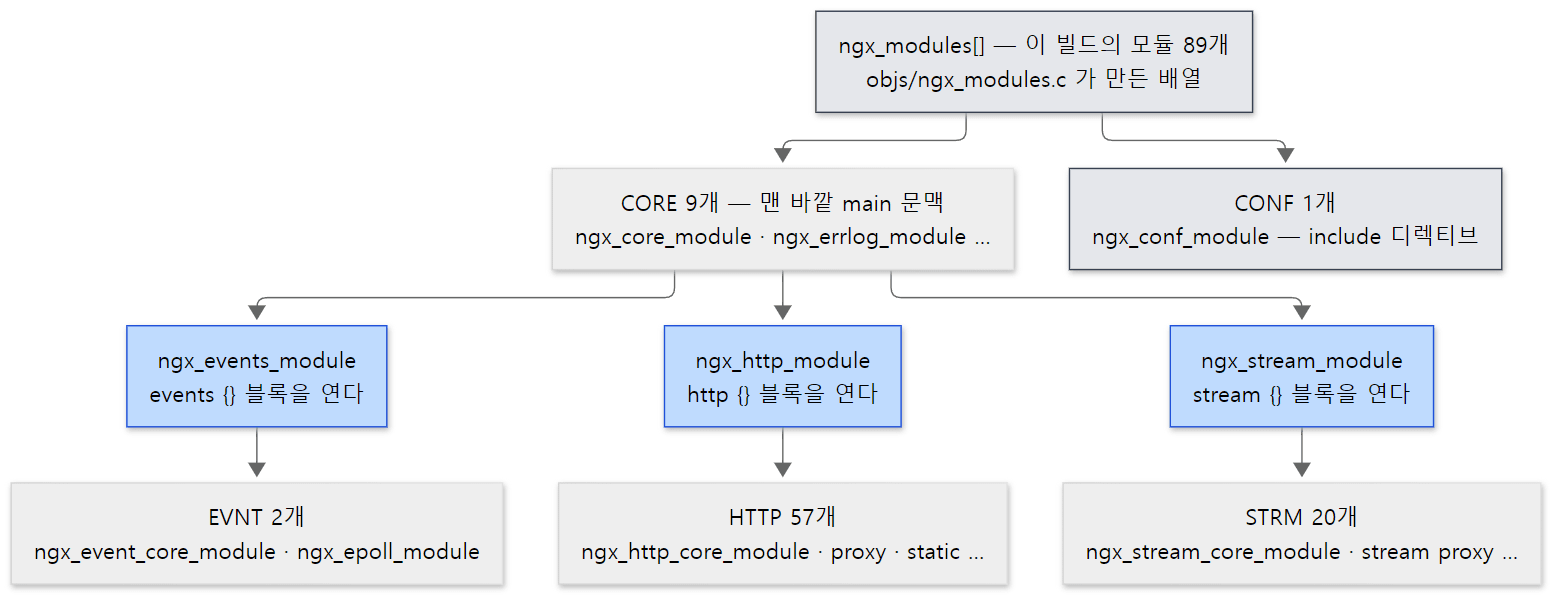 파란 상자가 블록을 여는 CORE 모듈입니다. 블록 안의 디렉티브는 그 블록의 종류에 속한 모듈만 처리합니다. 숫자는 예제 2에서 센 이 빌드의 값입니다.
디렉티브 표 한 줄: ngx_command_t
commands 배열의 원소는 이렇게 생겼습니다.
struct ngx_command_s {
    ngx_str_t             name;
    ngx_uint_t            type;
    char               *(*set)(ngx_conf_t *cf, ngx_command_t *cmd, void *conf);
    ngx_uint_t            conf;
    ngx_uint_t            offset;
    void                 *post;
};
src/core/ngx_conf_file.h 77–84행
| 필드 | 무엇 | http 디렉티브의 값 |
|---|---|---|
name |
디렉티브 이름 | "http" |
type |
놓일 수 있는 문맥 비트 + 인자 개수 비트 + 블록 여부 (5절) | NGX_MAIN_CONF|NGX_CONF_BLOCK|NGX_CONF_NOARGS |
set |
이 디렉티브를 만나면 부를 함수 | ngx_http_block |
conf |
HTTP 같은 블록 안에서, main·srv·loc 가운데 어느 설정 구조체에 쓸지 | 0 |
offset |
그 구조체 안의 어느 필드에 쓸지(offsetof) |
0 |
post |
값 검사 같은 덧붙임 | NULL |
nginx.conf의 한 줄은 결국 "이름이 같은 ngx_command_t를 찾아 set 함수를 부르는 것"입니다. 많은 디렉티브는 set에 ngx_conf_set_flag_slot(on/off), ngx_conf_set_msec_slot(시간) 같은 표준 setter를 쓰고 offset으로 필드 자리만 알려 줍니다. 예를 들어 master_process는 ngx_conf_set_flag_slot과 offsetof(ngx_core_conf_t, master)입니다(src/core/nginx.c 51–56행). 디렉티브 한 줄이 설정 구조체의 필드가 되기까지는 5편에서 자세히 봅니다.
예제 2: 이 빌드에 들어간 모듈을 종류별로 세기
모듈 배열 ngx_modules[]와 이름 배열 ngx_module_names[]는 configure가 만드는 objs/ngx_modules.c에 있습니다(1편). nginx를 실행하지 않은 채 gdb로 바이너리를 열어 배열을 훑었습니다. type의 네 바이트를 작은 쪽부터 글자로 찍습니다.
# 이 글을 위해 쓴 예제입니다 (nginx 의 소스가 아닙니다)
# 실행 전의 nginx 바이너리에서 모듈 배열(objs/ngx_modules.c 가 만든 것)을 훑어
# 순번, 이름(ngx_module_names[]), type 값(16진)과 그 네 바이트를 글자로 찍는다.
set $i = 0
while ngx_modules[$i] != 0
  set $t = ngx_modules[$i]->type
  printf "%2d %-36s 0x%08lx %c%c%c%c\n", $i, ngx_module_names[$i], $t, $t & 0xff, ($t >> 8) & 0xff, ($t >> 16) & 0xff, ($t >> 24) & 0xff
  set $i = $i + 1
end
ex/u02-architecture/modules.gdb이고, gdb -batch -x /work/modules.gdb /opt/nginx/sbin/nginx로 돌립니다.
=== 1. modules compiled into this binary (from ngx_modules[] / ngx_module_names[]) ===
 0 ngx_core_module                      0x45524f43 CORE
 1 ngx_errlog_module                    0x45524f43 CORE
 2 ngx_conf_module                      0x464e4f43 CONF
 3 ngx_openssl_module                   0x45524f43 CORE
 4 ngx_openssl_cache_module             0x45524f43 CORE
 5 ngx_regex_module                     0x45524f43 CORE
 6 ngx_events_module                    0x45524f43 CORE
 7 ngx_event_core_module                0x544e5645 EVNT
 8 ngx_epoll_module                     0x544e5645 EVNT
 9 ngx_thread_pool_module               0x45524f43 CORE
10 ngx_http_module                      0x45524f43 CORE
11 ngx_http_core_module                 0x50545448 HTTP
12 ngx_http_log_module                  0x50545448 HTTP
...
66 ngx_http_range_body_filter_module    0x50545448 HTTP
67 ngx_http_not_modified_filter_module  0x50545448 HTTP
68 ngx_stream_module                    0x45524f43 CORE
69 ngx_stream_core_module               0x4d525453 STRM
70 ngx_stream_log_module                0x4d525453 STRM
...
88 ngx_stream_upstream_zone_module      0x4d525453 STRM
--- count by type ---
     57 HTTP
     20 STRM
      9 CORE
      2 EVNT
      1 CONF
total: 89
- 이 빌드의 모듈은 89개입니다. HTTP 57, STREAM 20, CORE 9, EVENT 2, CONF 1.
--with-mail로 빌드하지 않아서 MAIL은 없습니다. - 배열 순서에 규칙이 보입니다. 블록을 여는 CORE 모듈(
ngx_events_module6번,ngx_http_module10번,ngx_stream_module68번) 바로 뒤에 그 블록의 "core" 모듈(ngx_event_core_module,ngx_http_core_module,ngx_stream_core_module)이 옵니다. HTTP 모듈 안의 순서는 필터 체인의 순서를 정하는 데도 쓰입니다(10편). - 이벤트 모듈은
ngx_epoll_module하나뿐입니다. configure가 리눅스에서 쓸 수 있는 방식을 골라 넣었기 때문입니다(select·poll 모듈은 이 빌드에 들어가지 않았습니다).
헷갈리기 쉬운 곳: 실행 전에는 name이 비어 있다
처음에는 gdb 스크립트에서 ngx_modules[$i]->name을 찍으려 했습니다. 그런데 이 필드는 실행 전에는 NULL입니다. 위에서 본 NGX_MODULE_V1이 name을 NULL로 두고, 실행이 시작되면 ngx_preinit_modules()가 index와 name을 채웁니다.
    for (i = 0; ngx_modules[i]; i++) {
        ngx_modules[i]->index = i;
        ngx_modules[i]->name = ngx_module_names[i];
    }
그래서 예제는 같은 순서로 만들어진 ngx_module_names[]를 읽습니다. index(전체 배열의 번호)도 이때 정해지고, ctx_index(같은 종류 안의 번호)는 http {} 같은 블록을 읽을 때 ngx_count_modules()가 정합니다. 두 번호가 어디에 쓰이는지는 다음 절에서 봅니다.
4. ngx_cycle_t — 실행 중인 nginx의 전부
cycle에 매달린 것
struct ngx_cycle_s {
    void                  ****conf_ctx;
    ngx_pool_t               *pool;

    ngx_log_t                *log;
    ngx_log_t                 new_log;
    /* ... */
    ngx_connection_t         *free_connections;
    ngx_uint_t                free_connection_n;

    ngx_module_t            **modules;
    ngx_uint_t                modules_n;
    /* ... */
    ngx_array_t               listening;
    ngx_array_t               paths;
    /* ... */
    ngx_list_t                open_files;
    ngx_list_t                shared_memory;

    ngx_uint_t                connection_n;
    ngx_uint_t                files_n;

    ngx_connection_t         *connections;
    ngx_event_t              *read_events;
    ngx_event_t              *write_events;

    ngx_cycle_t              *old_cycle;

    ngx_str_t                 conf_file;
    /* ... */
};
| 필드 | 무엇 | nginx.conf와의 관계 | 자세히 |
|---|---|---|---|
conf_ctx |
모든 모듈의 설정 구조체로 가는 길의 뿌리 | 파일 전체 | 아래, 5편 |
pool |
이 cycle이 쓰는 메모리 풀. cycle을 버리면 한꺼번에 사라진다 | 3편 | |
modules, modules_n |
이 cycle의 모듈 목록(load_module로 읽은 동적 모듈 포함) |
load_module |
5편 |
listening |
리스닝 소켓 배열 | listen |
4편, 7편 |
connections, read_events, write_events, connection_n |
워커마다 미리 만들어 두는 연결·이벤트 배열과 그 크기 | worker_connections |
7편 |
free_connections, free_connection_n |
그 가운데 비어 있는 것들의 목록과 개수 | 7편 | |
shared_memory |
워커들이 함께 쓰는 공유 메모리 영역 목록 | *_zone 디렉티브 |
4편 |
old_cycle |
reload 때 이 cycle을 만들 때 받은 옛 cycle | nginx -s reload |
4편 |
현재 cycle은 전역 변수 ngx_cycle이 가리킵니다(2절의 마스터 코드에서 reload 뒤 ngx_cycle = cycle;). 함수 대부분이 cycle을 첫 인자로 받는 것도 이 구조체가 "지금의 nginx" 그 자체이기 때문입니다.
conf_ctx: 포인터 네 겹의 이유
void ****conf_ctx는 nginx 소스에서 가장 유명한 줄일 것입니다. 별이 넷인 것은 이 배열의 칸마다 매달리는 것의 모양이 모듈 종류마다 다르기 때문입니다. 출발점은 ngx_init_cycle()입니다.
cycle->conf_ctx = ngx_pcalloc(pool, ngx_max_module * sizeof(void *));
칸 수는 ngx_max_module(정적 모듈 수 + 동적 모듈 자리 128, src/core/ngx_module.c 36행)이고, 칸 번호는 모듈의 index 입니다. 곧 이어 CORE 모듈의 create_conf를 불러 자기 칸을 채웁니다.
    for (i = 0; cycle->modules[i]; i++) {
        if (cycle->modules[i]->type != NGX_CORE_MODULE) {
            continue;
        }

        module = cycle->modules[i]->ctx;

        if (module->create_conf) {
            rv = module->create_conf(cycle);
            if (rv == NULL) {
                ngx_destroy_pool(pool);
                return NULL;
            }
            cycle->conf_ctx[cycle->modules[i]->index] = rv;
        }
    }
ngx_core_module의 칸(0번)에는 ngx_core_conf_t(worker_processes, user, pid …)가 곧바로 들어갑니다. 그런데 ngx_http_module은 create_conf가 NULL이라(3절 발췌의 ngx_http_module_ctx) 이때는 칸이 비어 있습니다. 그 칸은 설정 파일에서 http {를 만났을 때 ngx_http_block()이 채웁니다. 들어가는 것은 설정 구조체 하나가 아니라 배열 셋을 가리키는 구조체입니다.
typedef struct {
    void        **main_conf;
    void        **srv_conf;
    void        **loc_conf;
} ngx_http_conf_ctx_t;
src/http/ngx_http_config.h 17–21행
세 배열의 칸 수는 HTTP 모듈의 수(ngx_http_max_module)이고, 칸 번호는 모듈의 ctx_index 입니다(src/http/ngx_http.c 150–181행). server {}를 만날 때마다 main_conf는 http의 것을 그대로 가리키고 srv_conf·loc_conf 배열만 새로 만들며(src/http/ngx_http_core_module.c 3037–3048행), location {}도 같은 식으로 자기 loc_conf 배열을 만듭니다. events {}의 칸은 그 중간 모양으로, void * 한 칸이 이벤트 모듈 배열을 가리킵니다(src/event/ngx_event.c 973–983행).
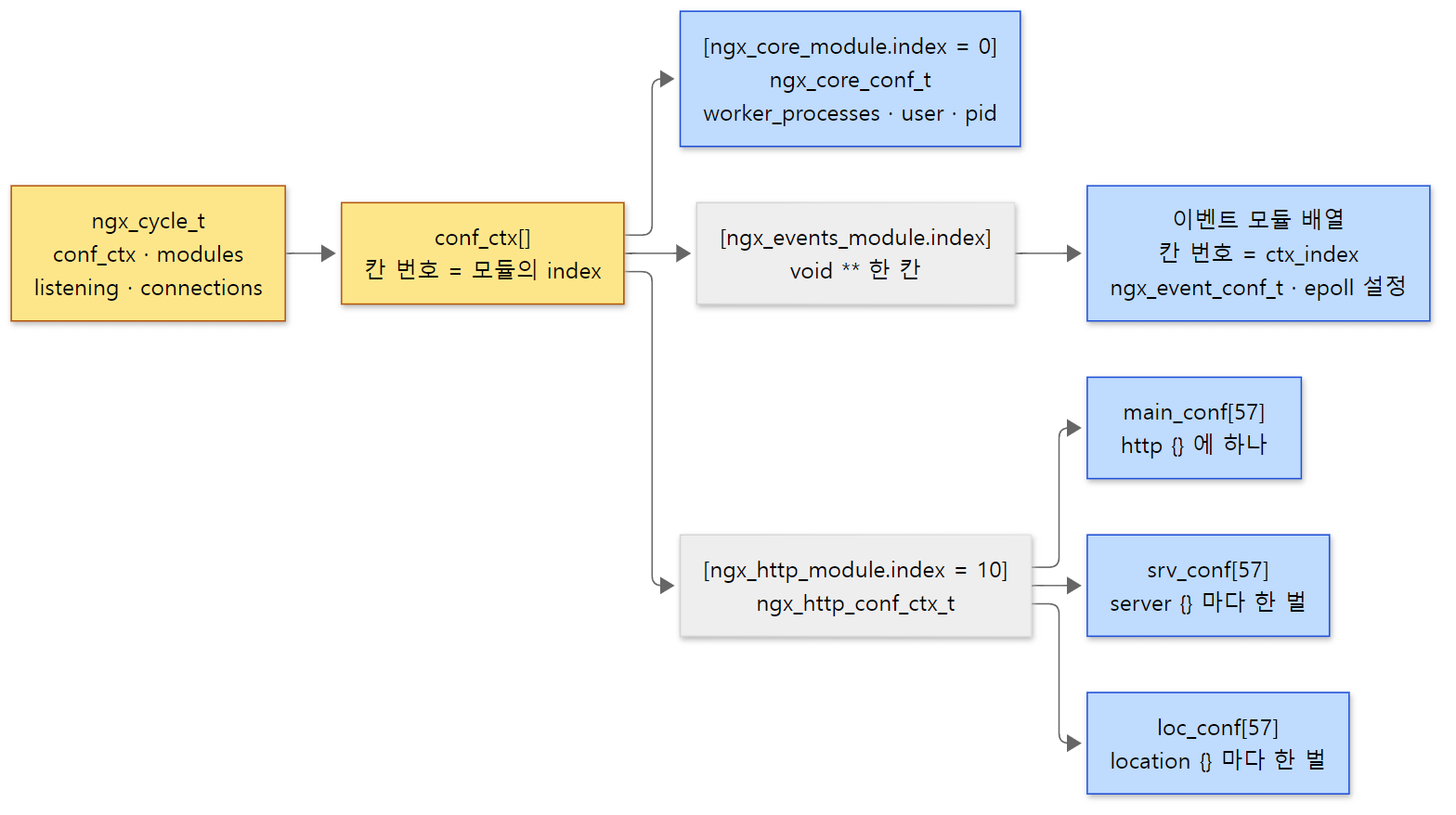 칸 번호가 두 단계라는 것이 요점입니다.
conf_ctx는 index로, 그 아래의 종류별 배열은 ctx_index로 찾습니다. 0·10·57은 예제 3에서 찍은 이 빌드의 값입니다.
그래서 요청을 처리하는 HTTP 모듈은 자기 설정을 이렇게 꺼냅니다.
#define ngx_http_get_module_main_conf(r, module)                             \
    (r)->main_conf[module.ctx_index]
#define ngx_http_get_module_srv_conf(r, module)  (r)->srv_conf[module.ctx_index]
#define ngx_http_get_module_loc_conf(r, module)  (r)->loc_conf[module.ctx_index]
src/http/ngx_http_config.h 55–58행
요청 구조체 r이 "이 요청에 맞는 server·location의 배열"을 들고 있고, 모듈은 자기 ctx_index 칸만 봅니다. 요청이 어느 location에 걸리느냐에 따라 r->loc_conf가 다른 배열을 가리키게 되는 것이 location 찾기의 결과입니다(9편). httpd에서 ap_get_module_config(r->per_dir_config, &my_module)이 모듈 번호로 void * 배열을 찾던 것과 같은 생각입니다(httpd 3편).
예제 3: 워커 안에서 cycle 들여다보기
돌고 있는 워커에 gdb를 붙여 cycle의 필드와 모듈 번호를 찍었습니다.
gdb -batch -p "$WORKER" \
    -ex 'p ngx_cycle->modules_n' \
    -ex 'p ngx_cycle->connection_n' \
    -ex 'p ngx_cycle->free_connection_n' \
    -ex 'p ngx_cycle->listening.nelts' \
    -ex 'p ngx_core_module.index' \
    -ex 'p ((ngx_core_conf_t *) ngx_cycle->conf_ctx[ngx_core_module.index])->worker_processes' \
    -ex 'p ngx_http_module.index' \
    -ex 'p ngx_http_core_module.index' \
    -ex 'p ngx_http_core_module.ctx_index' \
    -ex 'p ngx_http_max_module' \
    -ex 'p ngx_event_max_module'
=== 6. the cycle seen from a worker (gdb print) ===
$1 = 89
$2 = 1024
$3 = 1022
$4 = 1
$5 = 0
$6 = 2
$7 = 10
$8 = 11
$9 = 0
$10 = 57
$11 = 2
| 찍은 것 | 값 | 읽는 법 |
|---|---|---|
modules_n |
89 | 예제 2에서 센 모듈 수와 같다 |
connection_n |
1024 | worker_connections 1024; 그대로 |
free_connection_n |
1022 | 아직 아무도 접속하지 않았는데 2개를 쓰고 있다 — 리스닝 소켓 하나와 마스터와의 채널 하나 |
listening.nelts |
1 | listen 8080; 하나 |
conf_ctx[0]의 worker_processes |
2 | ngx_core_module.index가 0이고, 그 칸의 ngx_core_conf_t에 설정값이 들어 있다 |
ngx_http_module.index / ngx_http_core_module.index |
10 / 11 | 예제 2의 배열 순번과 같다 |
ngx_http_core_module.ctx_index |
0 | HTTP 모듈 가운데 첫째 — main_conf[0]이 core 모듈의 것이다 |
ngx_http_max_module / ngx_event_max_module |
57 / 2 | 종류별 모듈 수 = 종류별 배열의 칸 수 |
free_connection_n이 1022인 이유는 소스에서 확인했습니다. 워커가 시작할 때 ngx_event_process_init()이 리스닝 소켓마다 ngx_get_connection()으로 연결 하나를 쓰고(src/event/ngx_event.c 809행), ngx_add_channel_event()가 채널 소켓에 하나를 씁니다(src/os/unix/ngx_channel.c 215행). nginx에서 "연결"(ngx_connection_t)은 클라이언트 연결만이 아니라 이벤트 루프가 지켜보는 소켓 하나를 뜻합니다. 그래서 worker_connections에는 리스닝 소켓과 프록시할 때의 백엔드 연결도 들어갑니다.
헷갈리기 쉬운 곳: worker_connections의 기본값은 512다
배포판의 기본 nginx.conf에는 흔히 worker_connections 1024;가 적혀 있지만, 적지 않았을 때의 기본값은 512입니다. ngx_event_core_init_conf()가 ngx_conf_init_uint_value(ecf->connections, DEFAULT_CONNECTIONS);로 채우고(src/event/ngx_event.c 1330–1331행), DEFAULT_CONNECTIONS는 512입니다(13행). 같은 함수에서 accept_mutex의 기본값도 꺼짐(ngx_conf_init_value(ecf->accept_mutex, 0);, 1339행)입니다. 옛 글에서 "accept_mutex는 기본으로 켜져 있다"고 본 기억이 있다면 이 판의 소스와 다릅니다. 이것이 연결 분배에 주는 영향은 7편에서 봅니다.
5. 설정 문맥 — main, events, http, server, location
문맥은 두 값의 짝이다
설정 파서는 지금 어느 블록 안을 읽고 있는지를 ngx_conf_t의 두 필드로 압니다.
module_type— 이 블록의 디렉티브를 처리할 모듈 종류 (CORE, EVNT, HTTP …)cmd_type— 이 블록의 문맥 비트 (NGX_MAIN_CONF,NGX_HTTP_SRV_CONF…)
블록을 여는 함수들이 블록 안을 읽기 직전에 이 둘을 바꿉니다.
| 블록 | 바꾸는 곳 | module_type |
cmd_type |
|---|---|---|---|
| 파일 맨 바깥 | ngx_init_cycle() — src/core/ngx_cycle.c 273–274행 |
NGX_CORE_MODULE |
NGX_MAIN_CONF |
events {} |
ngx_events_block() — src/event/ngx_event.c 1003–1004행 |
NGX_EVENT_MODULE |
NGX_EVENT_CONF |
http {} |
ngx_http_block() — src/http/ngx_http.c 238–239행 |
NGX_HTTP_MODULE |
NGX_HTTP_MAIN_CONF |
server {} |
ngx_http_core_server() — src/http/ngx_http_core_module.c 3100행 |
(그대로 HTTP) | NGX_HTTP_SRV_CONF |
location {} |
ngx_http_core_location() — 3358행 |
(그대로 HTTP) | NGX_HTTP_LOC_CONF |
upstream {} |
ngx_http_upstream() — src/http/ngx_http_upstream.c 6502행 |
(그대로 HTTP) | NGX_HTTP_UPS_CONF |
stream {} |
ngx_stream_block() — src/stream/ngx_stream.c 189–190행 |
NGX_STREAM_MODULE |
NGX_STREAM_MAIN_CONF |
문맥 비트는 type 필드의 윗자리 한 바이트에 들어갑니다. ngx_conf_file.h 머리의 주석이 type을 "TT FF AAAA"(문맥 · 플래그 · 인자 개수)로 나눠 설명합니다(src/core/ngx_conf_file.h 16–20행).
#define NGX_HTTP_MAIN_CONF        0x02000000
#define NGX_HTTP_SRV_CONF         0x04000000
#define NGX_HTTP_LOC_CONF         0x08000000
#define NGX_HTTP_UPS_CONF         0x10000000
#define NGX_HTTP_SIF_CONF         0x20000000
#define NGX_HTTP_LIF_CONF         0x40000000
#define NGX_HTTP_LMT_CONF         0x80000000
src/http/ngx_http_config.h 41–47행
SIF는 server 안의 if, LIF는 location 안의 if, LMT는 limit_except 블록입니다. 디렉티브는 놓여도 되는 문맥의 비트를 OR로 모아 둡니다. 몇 가지를 보면 nginx 문서의 "Context:" 줄이 바로 이 비트라는 것을 알 수 있습니다.
| 디렉티브 | type의 문맥 비트 |
문서의 Context | 정의된 곳 |
|---|---|---|---|
worker_processes |
NGX_MAIN_CONF |
main | src/core/nginx.c 79–84행 |
worker_connections |
NGX_EVENT_CONF |
events | src/event/ngx_event.c 123–128행 |
listen |
NGX_HTTP_SRV_CONF |
server | src/http/ngx_http_core_module.c 290–295행 |
keepalive_timeout |
NGX_HTTP_MAIN_CONF|NGX_HTTP_SRV_CONF|NGX_HTTP_LOC_CONF |
http, server, location | src/http/ngx_http_core_module.c 519–524행 |
proxy_pass |
NGX_HTTP_LOC_CONF|NGX_HTTP_LIF_CONF|NGX_HTTP_LMT_CONF |
location, if in location, limit_except | src/http/modules/ngx_http_proxy_module.c 210–215행 |
include |
NGX_ANY_CONF |
any | src/core/ngx_conf_file.c 21–22행 |
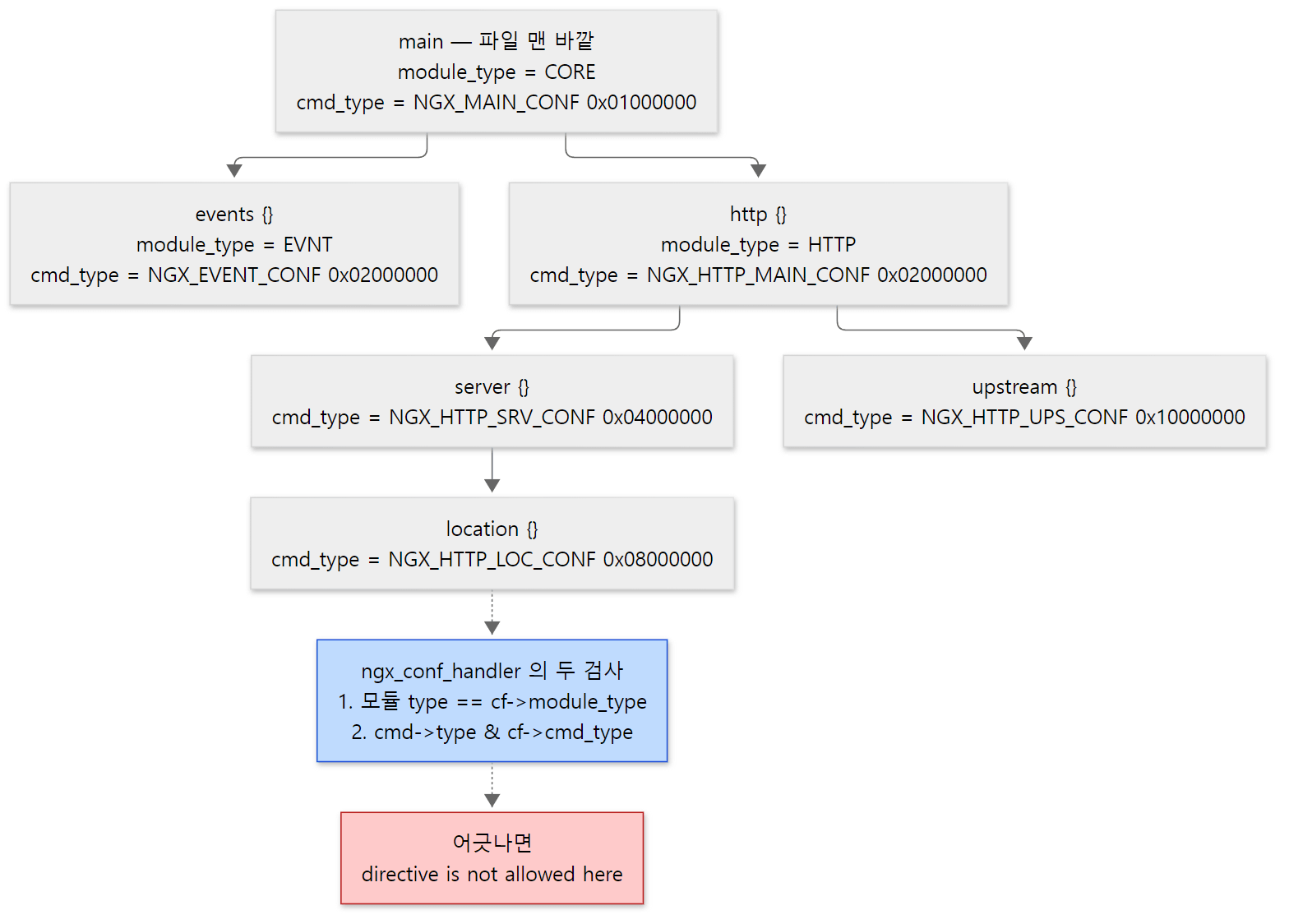 events와 http의 문맥 비트가 같은
0x02000000이라는 데 주목하세요. 비트만으로는 둘을 구별할 수 없어서 모듈 종류를 함께 검사합니다.
검사하는 곳: ngx_conf_handler()
토큰 한 줄(디렉티브 이름과 인자)을 읽을 때마다 ngx_conf_handler()가 불립니다. 예외는 types {}·map {}처럼 블록을 여는 함수가 자기 처리 함수(cf->handler)를 걸어 둔 블록 안으로, 그 안의 줄은 이 검사를 거치지 않고 그 함수로 갑니다(src/core/ngx_conf_file.c 298–325행).
    for (i = 0; cf->cycle->modules[i]; i++) {

        cmd = cf->cycle->modules[i]->commands;
        if (cmd == NULL) {
            continue;
        }

        for ( /* void */ ; cmd->name.len; cmd++) {

            if (name->len != cmd->name.len) {
                continue;
            }

            if (ngx_strcmp(name->data, cmd->name.data) != 0) {
                continue;
            }

            found = 1;

            if (cf->cycle->modules[i]->type != NGX_CONF_MODULE
                && cf->cycle->modules[i]->type != cf->module_type)
            {
                continue;
            }

            /* is the directive's location right ? */

            if (!(cmd->type & cf->cmd_type)) {
                continue;
            }
            /* ... */
            /* set up the directive's configuration context */

            conf = NULL;

            if (cmd->type & NGX_DIRECT_CONF) {
                conf = ((void **) cf->ctx)[cf->cycle->modules[i]->index];

            } else if (cmd->type & NGX_MAIN_CONF) {
                conf = &(((void **) cf->ctx)[cf->cycle->modules[i]->index]);

            } else if (cf->ctx) {
                confp = *(void **) ((char *) cf->ctx + cmd->conf);

                if (confp) {
                    conf = confp[cf->cycle->modules[i]->ctx_index];
                }
            }

            rv = cmd->set(cf, cmd, conf);
            /* ... */
        }
    }

    if (found) {
        ngx_conf_log_error(NGX_LOG_EMERG, cf, 0,
                           "\"%s\" directive is not allowed here", name->data);

        return NGX_ERROR;
    }

    ngx_conf_log_error(NGX_LOG_EMERG, cf, 0,
                       "unknown directive \"%s\"", name->data);
src/core/ngx_conf_file.c 374–494행
- 모든 모듈의 디렉티브 표를 처음부터 훑어 이름이 같은 것을 찾습니다. 해시가 아니라 선형 검색입니다. 설정을 읽을 때 한 번만 하는 일이라 빠를 필요가 없습니다.
- 이름이 같으면
found = 1을 세운 뒤 두 가지를 봅니다. 모듈의 종류가 지금 블록의module_type과 같은가(CONF 모듈은 예외 — 그래서include는 어디서나 됩니다), 디렉티브의type에 지금 블록의cmd_type비트가 있는가. - 통과하면 설정 구조체를 찾아
set함수에 넘깁니다. 여기서 4절의 번호 둘이 쓰입니다. 맨 바깥 디렉티브는conf_ctx[index]를, HTTP 블록 안의 디렉티브는cmd->conf(main·srv·loc 가운데 어느 배열인지의offsetof)로 배열을 고른 뒤[ctx_index]칸을 씁니다. - 끝까지 맞는 것이 없으면, 이름은 있었는지(
found)에 따라 "not allowed here" 또는 "unknown directive"를 냅니다.
예제 4: 문맥이 틀린 디렉티브와 nginx -T
events { }와 server { listen 8081; }만 둔 작은 설정을 만들고, http {} 바로 안(파일의 5행)에 네 가지 디렉티브를 하나씩 넣어 nginx -t(설정 검사만 하고 끝내는 옵션)를 돌렸습니다.
=== 2. directives in the wrong context (nginx -t) ===
--- core directive: http { worker_processes 4; } ---
nginx: [emerg] "worker_processes" directive is not allowed here in /tmp/u02/bad.conf:5
--- event directive: http { worker_connections 512; } ---
nginx: [emerg] "worker_connections" directive is not allowed here in /tmp/u02/bad.conf:5
--- loc directive: http { proxy_pass http://127.0.0.1:9000; } ---
nginx: [emerg] "proxy_pass" directive is not allowed here in /tmp/u02/bad.conf:5
--- typo: http { proxy_pas http://127.0.0.1:9000; } ---
nginx: [emerg] unknown directive "proxy_pas" in /tmp/u02/bad.conf:5
worker_processes는 CORE 모듈의 디렉티브라 HTTP 블록에서 모듈 종류 검사에 걸립니다.worker_connections가 가장 재미있습니다. 이 디렉티브의 문맥 비트NGX_EVENT_CONF(0x02000000)는http {}의cmd_type인NGX_HTTP_MAIN_CONF(0x02000000)와 같은 값이라 비트 검사만 했다면 통과했을 것입니다. 모듈 종류(EVNT ≠ HTTP)가 달라서 걸립니다. 같은 비트를 종류마다 다시 쓰고, 종류 검사로 구별하는 구조이기 때문입니다.proxy_pass는 HTTP 모듈이라 종류 검사는 통과하지만,type에NGX_HTTP_MAIN_CONF비트가 없어 문맥 검사에 걸립니다.- 오타는 이름이 맞는 디렉티브가 하나도 없으니(
found == 0) "unknown directive"입니다. 두 메시지의 차이가 곧found플래그의 차이입니다.
nginx -T는 검사에 더해, 읽은 설정 파일 전체(include한 파일까지)를 # configuration file …: 머리와 함께 그대로 찍습니다. 운영 중인 서버의 "실제로 읽힌 설정"을 볼 때 쓰는 그 옵션입니다.
=== 4. nginx -T (first lines) ===
nginx: the configuration file /work/nginx.conf syntax is ok
nginx: configuration file /work/nginx.conf test is successful
# configuration file /work/nginx.conf:
# 이 글을 위해 쓴 예제입니다 (nginx 의 소스가 아닙니다)
# 2편: 마스터 하나 + 워커 둘, events·http·server·location 문맥을 하나씩 둔 가장 작은 설정
worker_processes 2;
error_log /tmp/u02/error.log notice;
pid /tmp/u02/nginx.pid;
"syntax is ok" 줄은 4절의 ngx_init_cycle()이 ngx_conf_parse()를 마친 직후에 찍습니다(src/core/ngx_cycle.c 292–295행). 파일을 읽어 둔 내용을 덤프하는 장치(cycle->config_dump)와 -t·-T의 처리 순서는 4편에서 봅니다.
헷갈리기 쉬운 곳: http에 적은 값은 server·location으로 "물려받는" 것이 아니다
keepalive_timeout을 http {}에 한 번 적으면 모든 location에 적용됩니다. 이것을 "아래 블록이 위 블록의 값을 들여다본다"고 생각하기 쉽지만, 소스는 그렇게 하지 않습니다. 4절에서 본 것처럼 http {}·server {}·location {}마다 설정 구조체를 따로 만들어 두고, 설정 파일을 다 읽은 뒤 merge_srv_conf·merge_loc_conf 콜백이 "아래 것이 비어 있으면 위 것으로 채운다"를 미리 해 둡니다. 요청을 처리할 때는 위를 들여다보지 않고 자기 loc_conf만 봅니다. 이 merge가 어떻게 도는지는 5편에서 봅니다.
6. 한 워커 안의 이벤트 루프
한 바퀴의 순서
2절의 워커 반복문이 부르던 ngx_process_events_and_timers()입니다.
void
ngx_process_events_and_timers(ngx_cycle_t *cycle)
{
    ngx_uint_t  flags;
    ngx_msec_t  timer, delta;

    if (ngx_timer_resolution) {
        timer = NGX_TIMER_INFINITE;
        flags = 0;

    } else {
        timer = ngx_event_find_timer();
        flags = NGX_UPDATE_TIME;
        /* ... */
    }

    if (ngx_use_accept_mutex) {
        /* ... */
    }

    if (!ngx_queue_empty(&ngx_posted_next_events)) {
        ngx_event_move_posted_next(cycle);
        timer = 0;
    }

    delta = ngx_current_msec;

    (void) ngx_process_events(cycle, timer, flags);

    delta = ngx_current_msec - delta;

    ngx_log_debug1(NGX_LOG_DEBUG_EVENT, cycle->log, 0,
                   "timer delta: %M", delta);

    ngx_event_process_posted(cycle, &ngx_posted_accept_events);

    if (ngx_accept_mutex_held) {
        ngx_shmtx_unlock(&ngx_accept_mutex);
    }

    ngx_event_expire_timers();

    ngx_event_process_posted(cycle, &ngx_posted_events);
}
src/event/ngx_event.c 194–264행
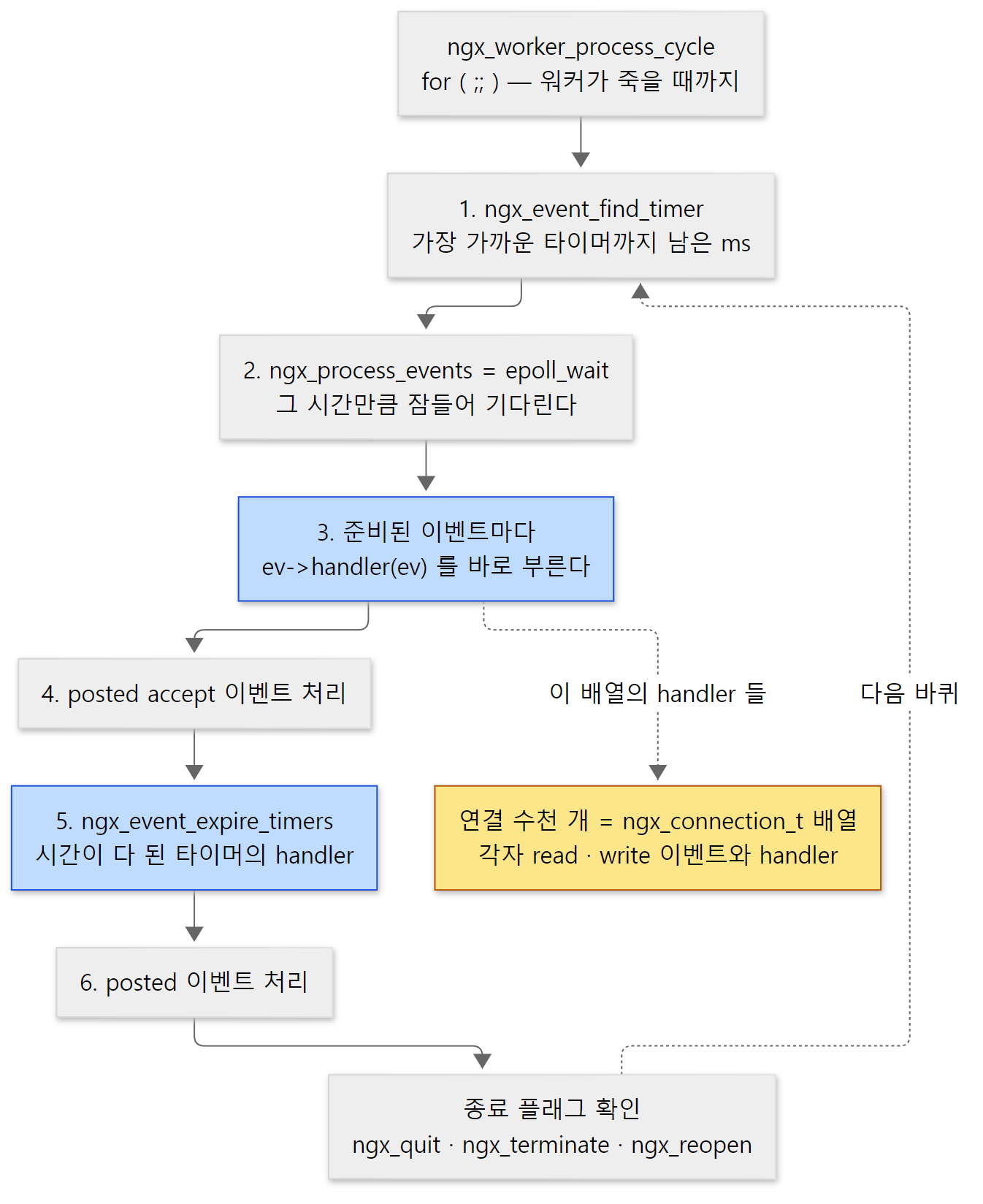 한 워커가 하는 일의 전부입니다. 잠드는 곳은 2번 한 곳뿐이고, 나머지는 모두 잠들지 않고 바로 끝나야 합니다.
- 얼마나 잘까 —
ngx_event_find_timer()가 가장 가까운 타이머(타임아웃)까지 남은 밀리초를 돌려줍니다. 타이머는 레드블랙 트리(넣고 빼고 가장 작은 값을 찾는 것이 모두 빠른 균형 이진 트리)에 들어 있습니다. 예제 1의timer=18446744073709551615는 걸린 타이머가 하나도 없을 때의 값이었습니다. - 기다린다 —
ngx_process_events는 함수가 아니라 매크로로,ngx_event_actions.process_events라는 함수 포인터입니다(src/event/ngx_event.h 371행). epoll 모듈이 초기화될 때ngx_event_actions = ngx_epoll_module_ctx.actions;로 자기 함수들을 꽂아 두므로(src/event/modules/ngx_epoll_module.c 369행), 리눅스에서는ngx_epoll_process_events()→epoll_wait()이 됩니다. FreeBSD에서는 같은 자리에 kqueue 모듈이 꽂힙니다. - 처리한다 — epoll이 돌려준 이벤트마다 그 이벤트의
handler함수 포인터를 부릅니다(rev->handler(rev);, src/event/modules/ngx_epoll_module.c 901행). 리스닝 소켓이면ngx_event_accept, HTTP 연결이면 요청을 읽는 함수가 거기 꽂혀 있습니다(7절).accept_mutex를 쥔 경우에만 바로 부르지 않고 posted 큐(나중에 처리할 이벤트를 모아 두는 줄)에 넣었다가 4·6번에서 처리합니다. - ~6. 뒷정리 — 모아 둔 accept 이벤트, 시간이 다 된 타이머(
proxy_read_timeout같은 것이 여기서 터집니다), 모아 둔 일반 이벤트를 차례로 처리합니다.
핸들러는 절대 오래 붙잡지 않는다는 약속 위에서 이 구조가 돕니다. 읽을 데이터가 아직 없으면 논블로킹 recv()가 EAGAIN을 돌려주고, 핸들러는 "다음에 읽을 수 있게 되면 다시 불러 줘"라고 epoll에 등록한 채 바로 돌아옵니다. 그래서 스레드 하나가 수천 개 연결을 번갈아 처리할 수 있습니다. 반대로 핸들러 하나가 디스크를 오래 읽거나 무거운 계산을 하면 그 워커의 다른 연결이 모두 멈춥니다 — nginx에 aio·스레드 풀(ngx_thread_pool_module, 예제 2의 9번)이 있는 이유입니다. 한 바퀴를 줄 단위로 읽는 것은 7편에서 합니다.
예제 5: 연결 300개, 스레드는 하나
정말 스레드 하나가 연결 수백 개를 쥐고 있는지 보았습니다. 파이썬으로 8080에 TCP 연결 300개를 열고 아무 요청도 보내지 않은 채 붙잡아 둔 다음, stub_status와 각 워커의 스레드 수, 그리고 gdb로 각 워커가 쓰고 있는 연결 수(connection_n - free_connection_n)를 찍었습니다.
# 이 글을 위해 쓴 예제입니다 (nginx 의 소스가 아닙니다)
# 8080 에 TCP 연결을 N 개 열어 둔 채(요청은 보내지 않는다) 기다리다가, stdin 이 닫히면 끝낸다.
import socket, sys

n = int(sys.argv[1])
socks = []
for _ in range(n):
    s = socket.create_connection(("127.0.0.1", 8080))
    socks.append(s)
print("opened %d idle connections" % len(socks), flush=True)
sys.stdin.read()
for s in socks:
    s.close()
=== 7. 300 idle connections, still one thread per worker ===
opened 300 idle connections
Active connections: 301
server accepts handled requests
 303 303 3
Reading: 0 Writing: 1 Waiting: 300
worker 46: threads=1 connections in use=126
worker 47: threads=1 connections in use=178
Active connections: 301은 붙잡아 둔 300개에stub_status를 묻는 curl 연결 하나를 더한 것이고, 그 하나가Writing: 1(응답을 쓰는 중), 300개가Waiting: 300입니다.- 워커 둘 다 스레드 1개입니다. 연결 수와 상관없이 늘지 않습니다.
- 워커가 쓰는 연결은 126 + 178 = 304개입니다. 예제 3에서 본 기본 2개(리스닝 소켓·채널)씩을 빼면 124 + 176 = 300으로 붙잡은 연결 수와 맞습니다.
- 두 워커가 받은 연결 수는 고르지 않았고, 실행마다 달랐습니다(앞선 실행에서는 51 : 249였습니다). 어느 워커가 연결을 받는지는
accept_mutex·reuseport와 함께 7편에서 봅니다.
7. HTTP, stream, mail — 같은 코어 위의 세 층
마지막으로 폴더를 층으로 쌓아 보겠습니다.
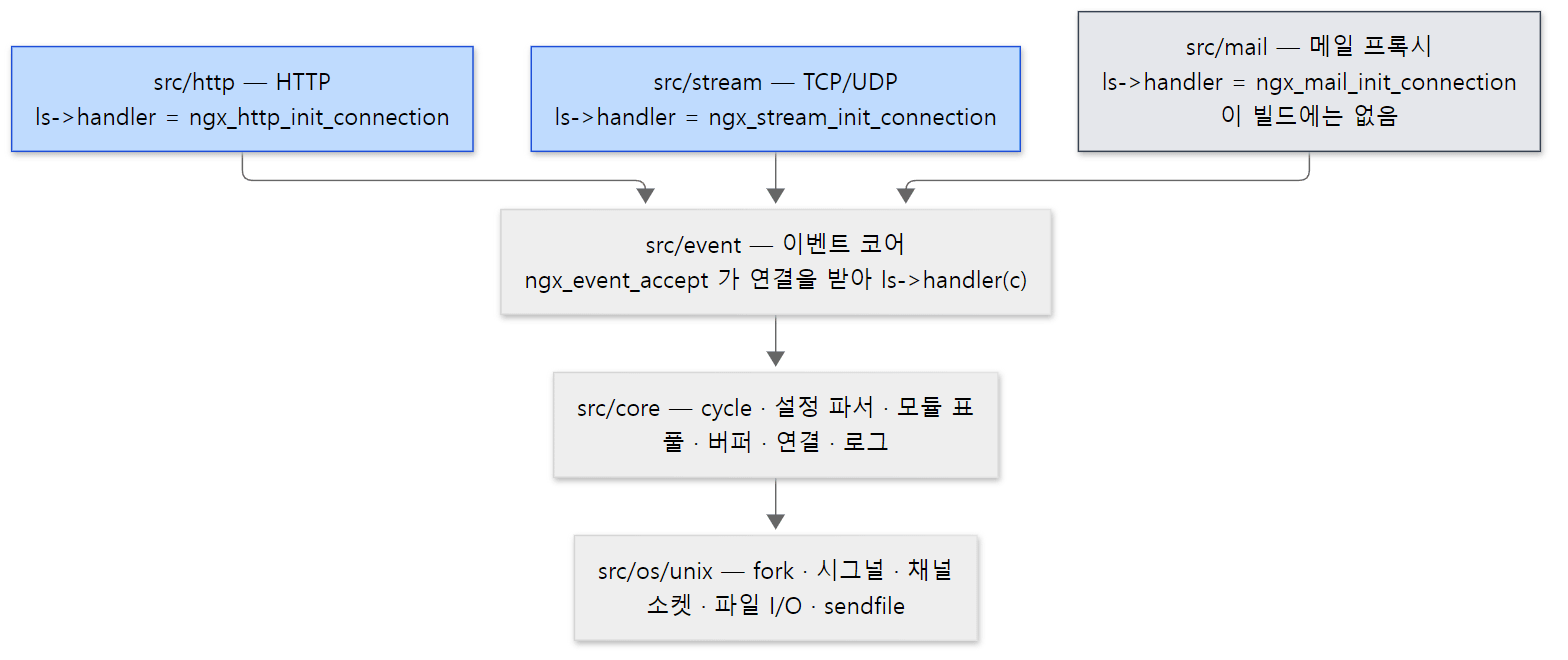 위층은 아래층을 가져다 씁니다. 세 프로토콜이 이벤트 코어와 만나는 곳은 리스닝 소켓의
handler 함수 포인터 하나입니다.
이벤트 코어는 HTTP를 모릅니다. 연결을 받는 ngx_event_accept()는 새 연결을 만든 뒤 리스닝 소켓에 걸린 함수를 부를 뿐입니다.
ls->handler(c);
src/event/ngx_event_accept.c 312행
이 함수 포인터를 채우는 쪽이 각 프로토콜입니다. http {} 안의 listen으로 만든 소켓에는 ls->handler = ngx_http_init_connection;(src/http/ngx_http.c 1882행), stream {} 안의 것에는 ngx_stream_init_connection(src/stream/ngx_stream.c 1002행), mail {}에는 ngx_mail_init_connection(src/mail/ngx_mail.c 326행)이 들어갑니다. 1편의 "요청 하나가 지나는 큰 길"에서 ngx_event_accept 다음이 ngx_http_init_connection이었던 것이 이 한 줄 때문입니다.
HTTP (src/http) |
stream (src/stream) |
mail (src/mail) |
|
|---|---|---|---|
| 블록 | http {} |
stream {} |
mail {} |
| 모듈 종류 | NGX_HTTP_MODULE "HTTP" |
NGX_STREAM_MODULE "STRM" |
NGX_MAIL_MODULE "MAIL" |
| 이 빌드의 모듈 수 | 57 | 20 | 0 (빌드하지 않음) |
| 문맥 | main · srv · loc (+ ups, if, limit_except) | main · srv (+ ups) | main · srv |
| 처리 단계 | phase 11개 (9편) | phase 7개(NGX_STREAM_POST_ACCEPT_PHASE … NGX_STREAM_LOG_PHASE, src/stream/ngx_stream.h 85–91행) |
프로토콜별 상태 기계 |
| 프록시 | upstream (11편) | stream upstream (12편) | — |
stream은 HTTP의 구조를 거의 그대로 TCP/UDP에 옮겨 놓은 것입니다. 문맥 비트도 HTTP처럼 0x02000000부터 다시 씁니다(NGX_STREAM_MAIN_CONF 등, src/stream/ngx_stream.h 317–319행) — 5절의 "같은 비트를 종류 검사로 구별한다"가 여기서도 통합니다. 이 연재는 HTTP를 따라가고, stream은 12편에서 HTTP와 나란히 놓고 봅니다.
헷갈리기 쉬운 곳: httpd의 MPM에 해당하는 것을 찾으면 없다
httpd를 읽은 사람은 "연결을 받는 방식을 갈아 끼우는 MPM 같은 것이 nginx에도 있겠지" 하고 찾게 됩니다. nginx에는 그런 모듈이 없습니다. 프로세스 구조(마스터 하나 + 워커 N개, 워커마다 스레드 하나)는 src/os/unix/ngx_process_cycle.c에 고정되어 있고, 갈아 끼울 수 있는 것은 그 아래의 이벤트 방식(ngx_epoll_module, kqueue 등 — events {}의 use 디렉티브)뿐입니다. httpd의 event MPM이 "쉬는 keep-alive 연결은 epoll에 맡기고 일할 때만 스레드를 붙인다"로 다가간 곳에서, nginx는 처음부터 "모든 연결을 epoll에 맡기고 스레드는 하나"로 출발한 셈입니다.
이 글에서 뺀 것
지도를 한 장으로 유지하려고 뺀 것들입니다.
main()의 앞부분 — 명령줄 옵션(ngx_get_options()), 물려받은 소켓(ngx_add_inherited_sockets()), 데몬화(ngx_daemon()).src/core/nginx.c— 4편ngx_init_cycle()의 나머지 — 공유 메모리, 리스닝 소켓 열기,init_module.src/core/ngx_cycle.c— 4편- 캐시 관리자·캐시 로더 프로세스(
ngx_start_cache_manager_processes(),ngx_cache_manager_process_cycle()).src/os/unix/ngx_process_cycle.c375행, 1139행부터 - 바이너리를 갈아 끼우는 USR2(
ngx_exec_new_binary()), 워커가 죽었을 때 다시 띄우는ngx_reap_children()— 6편 - 동적 모듈(
load_module,ngx_add_module())과 모듈 서명(NGX_MODULE_SIGNATURE).src/core/ngx_module.[ch]— 5편 ngx_http_module_t의 8개 콜백과 merge.src/http/ngx_http_config.h24–36행 — 5편- 설정 토큰을 나누는
ngx_conf_read_token().src/core/ngx_conf_file.c509행부터 — 4편 - QUIC·HTTP/3(
src/event/quic,src/http/v3)과 Windows 판(src/os/win32). 이 연재의 빌드에서는 켜지 않았습니다. - 마스터 루프 안의
#if (NGX_CONTROL_API)블록(ngx_process_cycle.c177–197행). 이 빌드에서 쓰지 않는 기능이라 확인하지 않았습니다.
정리
| 개념 | 한 줄 요약 |
|---|---|
| 지도 | A 준비(3·4·5편) → B 프로세스와 이벤트(6·7편) → C HTTP 요청 하나(8~12편) |
| 마스터 | ngx_master_process_cycle(). 워커를 fork()하고 sigsuspend()에서 잠든다. 시그널 처리기는 플래그만 세우고, reload면 ngx_init_cycle()로 새 cycle → 새 워커 → 옛 워커에 QUIT |
| 워커 | ngx_worker_process_cycle(). 스레드 하나로 ngx_process_events_and_timers()를 끝없이 부른다. 마스터의 명령은 채널(socketpair)로 받는다 |
| 모듈 | ngx_module_t 하나. type(종류) · ctx(종류별 콜백 묶음) · commands(디렉티브 표) |
| 모듈 종류 | "CORE"·"CONF"·"EVNT"·"HTTP"·"STRM"·"MAIL" 네 글자의 아스키 값. 이 빌드는 89개(HTTP 57, STRM 20, CORE 9, EVNT 2, CONF 1) |
| 블록 | events·http·stream·mail 블록은 CORE 모듈의 디렉티브이고, 블록 안은 그 종류의 모듈이 맡는다 |
ngx_command_t |
이름 · 문맥과 인자 비트(type) · set 함수 · 어느 구조체(conf)의 어느 필드(offset) |
ngx_cycle_t |
실행 중인 nginx의 전부. conf_ctx, modules, listening, connections. reload마다 새로 만든다 |
conf_ctx |
index로 찾는 칸 → (HTTP면) ngx_http_conf_ctx_t → ctx_index로 찾는 main·srv·loc 배열 |
| 설정 문맥 | module_type + cmd_type 비트의 짝. ngx_conf_handler()가 종류와 비트를 검사하고 "not allowed here" / "unknown directive"를 낸다 |
| 이벤트 루프 | 타이머 찾기 → epoll_wait → ev->handler() → 타이머 만료 → posted 이벤트. 핸들러는 기다리지 않는다 |
| 프로토콜 층 | 이벤트 코어는 ls->handler(c)만 부른다. HTTP·stream·mail이 그 자리에 자기 함수를 꽂는다 |
다음에 볼 것
지도를 접고, 지도의 모든 상자가 밑에 깔고 있는 것부터 읽습니다. 다음 글은 메모리 풀과 기본 자료구조입니다. 이 글에서 cycle·설정 구조체·연결이 모두 ngx_pcalloc(pool, …)로 만들어지는 것을 보았습니다. 그 풀이 작은 할당과 큰 할당을 어떻게 나눠 받는지, 요청 하나가 끝나면 메모리가 어떻게 한꺼번에 사라지는지, 그리고 이 글에서 몇 번 지나친 ngx_str_t·ngx_array_t·ngx_buf_t·ngx_chain_t가 어떻게 생겼는지를 디버그 로그와 gdb로 확인합니다.
nginx 소스 파헤치기 3: 메모리 풀과 기본 자료구조 — ngx_pool_t, ngx_str_t, ngx_buf_t와 ngx_chain_t
앞서 끝낸 두 연재에서도 같은 자리에 전체 지도를 폈습니다. httpd 3편에서 httpd는 코어가 훅을 정의하고 MPM과 모듈이 거기에 함수를 거는 구조였고, 모듈마다 module 구조체 하나에 설정 생성·병합 함수와 디렉티브 표를 두었습니다. nginx의 ngx_module_t·ngx_command_t는 그것과 아주 닮았지만, 연결을 받는 부분은 갈아 끼우는 MPM이 아니라 고정된 마스터·워커와 이벤트 루프입니다(httpd 8편). Tomcat 2편의 지도에서는 server.xml의 요소가 자바 객체의 부모·자식 나무가 되었습니다. nginx.conf의 블록도 겹겹이 들어가지만, 객체 나무 대신 conf_ctx에서 시작하는 포인터 배열이 됩니다. Tomcat의 NIO 엔드포인트가 셀렉터 하나로 많은 연결을 지켜보다 일할 때 스레드 풀에 넘기는 것과 달리, nginx 워커는 지켜보는 것과 일하는 것을 같은 스레드에서 합니다.