이 글에서 다루는 것
"nginx 소스 파헤치기" 연재의 다섯 번째 글입니다. 4편에서 main() 이 ngx_init_cycle() 을 부르고, 그 안의 ngx_conf_parse() 가 nginx.conf 를 낱말(토큰)로 잘라 읽는 데까지 봤습니다. 이번 글은 그다음입니다. 잘라 낸 greet_message "hi"; 같은 한 줄이 어느 모듈의 어느 함수로 가서, 어느 구조체의 어느 필드에 들어가는지를 따라갑니다.
답하려는 질문은 넷입니다.
- nginx 의 "모듈"은 소스에서 무엇인가. 어떤 모듈이 들어 있는지는 누가 정하나
sendfile on;이라는 이름을 보고 nginx 는 어떻게ngx_http_core_module의 함수를 찾아내나. "unknown directive" 와 "is not allowed here" 는 어떻게 갈리나http {}·server {}·location {}마다 모듈의 설정 구조체가 따로 생긴다는데, 몇 개가 언제 생기나http {}에 적은 값이location {}으로 내려오는 병합은 언제 일어나나. 요청이 올 때마다 하나
| 항목 | 내용 |
|---|---|
| 대상 | nginx |
| 버전 | nginx 1.31.9 (master, 개발판) |
| 커밋 | 9a7439fd79 (2026-10-23) |
| 주로 읽는 파일 | src/core/ngx_module.[ch], src/core/ngx_conf_file.[ch], src/core/nginx.c(load_module), auto/modules, src/http/ngx_http_config.h, src/http/ngx_http.c, src/http/ngx_http_core_module.c |
글에 나오는 줄 번호는 모두 이 커밋 기준입니다. 같은 커밋의 소스를 받고 예제용 도커 이미지를 만드는 방법은 1편에 있습니다. 설정과 모듈에 관한 코드는 HTTP 말고도 events·stream·mail 에 같은 모양으로 되풀이되므로, 이 글은 core 와 HTTP 의 큰 줄기만 골랐습니다. 빼놓은 것은 글 끝의 "더 깊이 들어가면"에 이름과 위치만 적었습니다.
2편의 지도에서 이 글은 A. 준비 구역의 모듈·디렉티브 상자를 확대합니다.
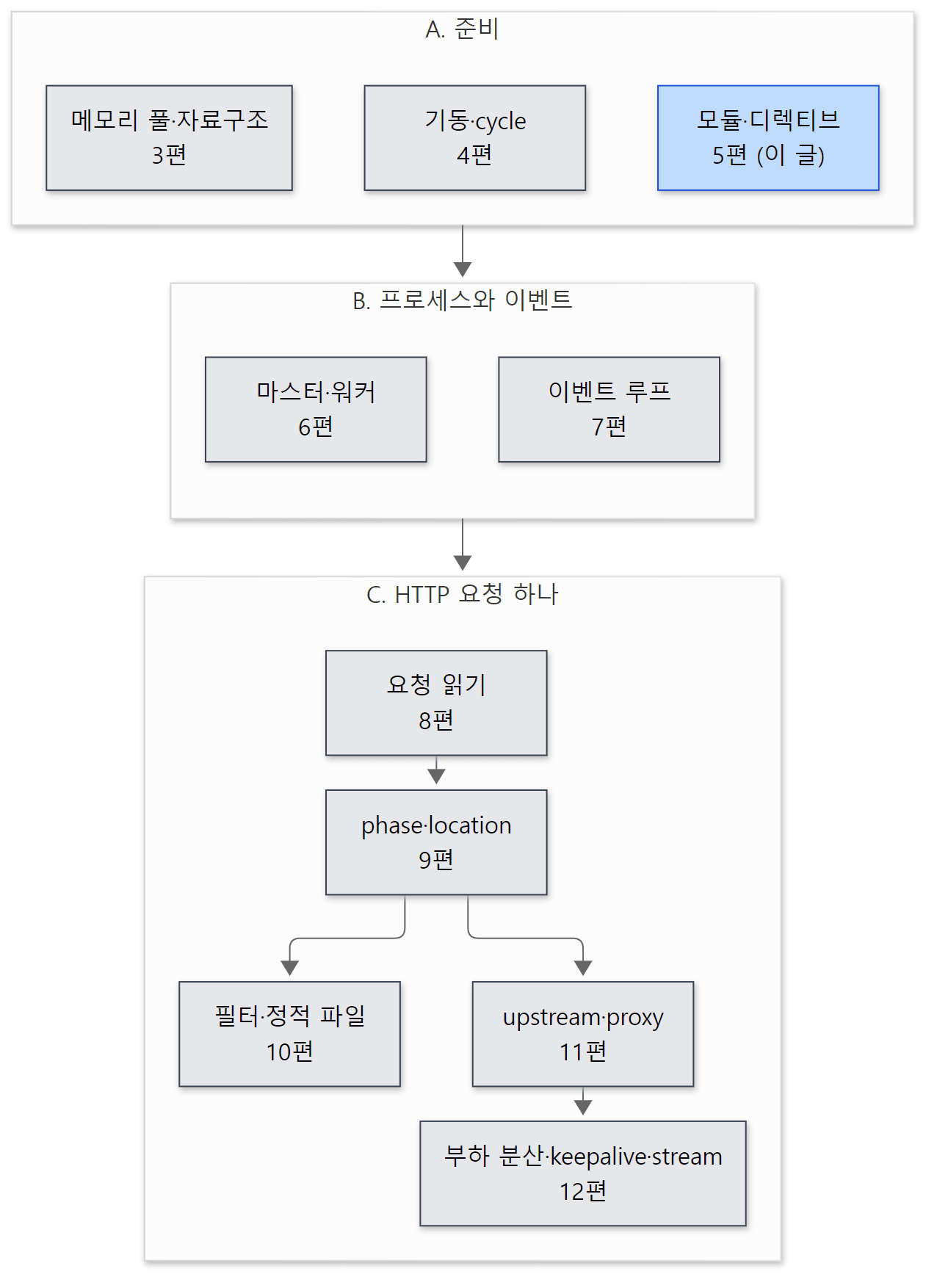 파란 상자가 이 글입니다. 4편이 설정 파일을 "읽는" 쪽이라면, 이 글은 읽은 것을 모듈에 "건네는" 쪽입니다.
먼저 알아 둘 말
모듈(module)은 nginx 의 거의 모든 기능의 단위입니다. HTTP 처리 자체(ngx_http_core_module), 정적 파일(ngx_http_static_module), 프록시(ngx_http_proxy_module), 심지어 events {} 블록과 error_log 디렉티브도 모듈입니다. 소스에서 모듈 하나는 ngx_module_t 라는 구조체 변수 하나입니다. 클래스나 플러그인 객체가 아니라, 함수 포인터와 표를 담은 C 구조체입니다. C 의 구조체·함수 포인터가 낯설면 httpd 2편: C로 짠 서버를 읽기 전에 — 구조체, 함수 포인터, 매크로를 먼저 보면 좋습니다.
모듈 종류(type)는 ngx_module_t 의 type 필드입니다. NGX_CORE_MODULE, NGX_EVENT_MODULE, NGX_HTTP_MODULE, NGX_STREAM_MODULE, NGX_MAIL_MODULE 등이 있고 값은 "CORE", "EVNT", "HTTP" 같은 네 글자를 정수로 읽은 것입니다(2편에서 봤습니다).
모듈 컨텍스트(module context)는 ngx_module_t 의 ctx 필드가 가리키는, 종류별로 모양이 다른 콜백 구조체입니다. HTTP 모듈이면 ngx_http_module_t(콜백 8개), core 모듈이면 ngx_core_module_t(콜백 2개)입니다. nginx 소스에서 "ctx" 는 여러 뜻으로 쓰여서 헷갈리는데, 이 글에서는 이것을 "모듈 컨텍스트", 아래의 ngx_http_conf_ctx_t 를 "설정 문맥 구조체"로 나눠 부릅니다.
디렉티브(directive)는 nginx.conf 의 명령 한 줄(sendfile on;)이나 블록(server { … })입니다. 소스에서는 모듈이 내놓는 ngx_command_t 배열의 한 원소입니다 — 이름, 쓸 수 있는 자리와 인자 개수(비트 플래그), 값을 처리할 함수(set), 값을 넣을 자리(conf, offset).
설정 문맥(context)은 디렉티브가 놓인 자리 — main(파일 맨 위), events {}, http {}, server {}, location {} 등 — 입니다. HTTP 모듈은 문맥마다 설정 구조체를 따로 가질 수 있고, 그 셋을 main_conf·srv_conf·loc_conf 라고 부릅니다.
index 와 ctx_index: 모듈마다 번호가 둘 있습니다. index 는 모든 모듈 사이의 번호, ctx_index 는 같은 종류의 모듈 사이의 번호입니다. 앞의 것은 cycle 전체의 설정 배열에서, 뒤의 것은 HTTP 의 main_conf[]·srv_conf[]·loc_conf[] 배열에서 칸 번호로 쓰입니다.
병합(merge)은 위 문맥에서 적은 값을 아래 문맥이 물려받게 하는 일입니다. http {} 에 sendfile on; 을 적으면 그 아래 모든 location {} 의 sendfile 이 켜지는 것이 병합 덕분입니다. 모듈마다 merge_loc_conf() 같은 콜백으로 직접 구현합니다.
동적 모듈(dynamic module)은 nginx 실행 파일에 넣지 않고 따로 .so 파일로 빌드해, 설정 파일의 load_module 로 읽어 들이는 모듈입니다. 이 글의 예제가 그렇게 만든 모듈입니다.
cycle 과 phase 는 앞 글에서 풀었던 말입니다. cycle(ngx_cycle_t)은 읽은 설정·모듈 목록·연결 배열처럼 실행 중인 nginx 의 상태를 한데 담은 구조체로, reload 때마다 새로 만듭니다(2편). phase 는 nginx 가 HTTP 요청 하나를 처리하는 일을 나눈 단계(접근 검사, 콘텐츠 만들기 …)로, 모듈은 단계마다 함수를 등록해 요청 처리에 낍니다(9편).
1. 모듈은 구조체 하나입니다 — ngx_module_t
struct ngx_module_s {
    ngx_uint_t            ctx_index;
    ngx_uint_t            index;

    char                 *name;

    ngx_uint_t            spare0;
    ngx_uint_t            spare1;

    ngx_uint_t            version;
    const char           *signature;

    void                 *ctx;
    ngx_command_t        *commands;
    ngx_uint_t            type;

    ngx_int_t           (*init_master)(ngx_log_t *log);

    ngx_int_t           (*init_module)(ngx_cycle_t *cycle);

    ngx_int_t           (*init_process)(ngx_cycle_t *cycle);
    ngx_int_t           (*init_thread)(ngx_cycle_t *cycle);
    void                (*exit_thread)(ngx_cycle_t *cycle);
    void                (*exit_process)(ngx_cycle_t *cycle);

    void                (*exit_master)(ngx_cycle_t *cycle);

    /* ... spare_hook0 ~ spare_hook7 ... */
};
src/core/ngx_module.h 223–258행
필드는 세 묶음입니다.
- 번호와 이름표 —
ctx_index,index,name, 그리고 동적 모듈을 읽을 때 검사하는version·signature(2절). - 무엇을 하는 모듈인가 —
type(종류),ctx(종류별 콜백 구조체),commands(디렉티브 표). 이 글의 주인공입니다. - 프로세스 수명 콜백 —
init_module(설정을 다 읽은 뒤 마스터에서),init_process(워커가 뜰 때),exit_process등. 마스터·워커는 6편에서 봅니다.
ctx 가 void * 인 것이 핵심입니다. 모듈 종류마다 필요한 콜백이 다르므로, ngx_module_t 는 "무언가를 가리킨다"고만 하고, 그 무언가를 해석하는 일은 종류를 아는 쪽(HTTP 모듈이면 ngx_http.c)이 type 을 보고 ngx_http_module_t * 로 바꿔 읽습니다. HTTP 모듈의 컨텍스트는 이렇게 생겼습니다.
typedef struct {
    ngx_int_t   (*preconfiguration)(ngx_conf_t *cf);
    ngx_int_t   (*postconfiguration)(ngx_conf_t *cf);

    void       *(*create_main_conf)(ngx_conf_t *cf);
    char       *(*init_main_conf)(ngx_conf_t *cf, void *conf);

    void       *(*create_srv_conf)(ngx_conf_t *cf);
    char       *(*merge_srv_conf)(ngx_conf_t *cf, void *prev, void *conf);

    void       *(*create_loc_conf)(ngx_conf_t *cf);
    char       *(*merge_loc_conf)(ngx_conf_t *cf, void *prev, void *conf);
} ngx_http_module_t;
src/http/ngx_http_config.h 24–36행
create_* 는 "빈 설정 구조체를 하나 만들어 돌려 달라", merge_* 는 "부모(prev)의 값을 자식(conf)에 물려줘라", init_main_conf 는 "http 블록을 다 읽었으니 main 설정의 빈칸을 기본값으로 채워라" 입니다. 앞뒤의 preconfiguration·postconfiguration 은 http 블록을 읽기 직전·직후에 한 번씩 불립니다. 이 여덟 개가 언제 불리는지가 5절의 그림입니다.
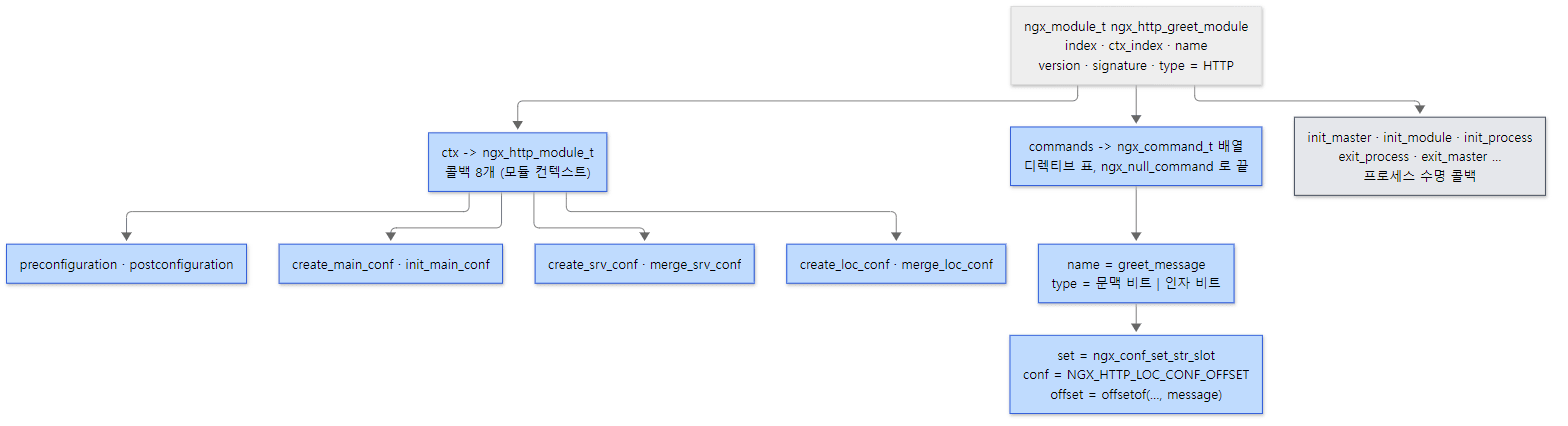 모듈 하나 = 구조체 하나. 파란 상자는 이 글에서 따라가는 것, 회색은 6편에서 보는 프로세스 수명 콜백입니다.
가장 작은 실제 모듈: empty_gif
nginx 에 들어 있는 모듈 가운데 아주 작은 것이 ngx_http_empty_gif_module 입니다(location = /pixel.gif { empty_gif; } 처럼 써서 1×1 투명 GIF 를 돌려줍니다). 디렉티브는 하나, 컨텍스트의 콜백 여덟 칸은 모두 NULL 입니다. 디렉티브 처리 함수는 이렇습니다.
static char *
ngx_http_empty_gif(ngx_conf_t *cf, ngx_command_t *cmd, void *conf)
{
    ngx_http_core_loc_conf_t  *clcf;

    clcf = ngx_http_conf_get_module_loc_conf(cf, ngx_http_core_module);
    clcf->handler = ngx_http_empty_gif_handler;

    return NGX_CONF_OK;
}
src/http/modules/ngx_http_empty_gif_module.c 131–140행
자기 설정 구조체가 없으니 남의 것 — 지금 읽고 있는 location {} 의 core 모듈 loc_conf — 을 꺼내 handler 함수 포인터에 자기 함수를 꽂습니다. 이 location 으로 온 요청은 콘텐츠 단계에서 이 함수가 응답을 만듭니다. proxy_pass(ngx_http_proxy_pass()), fastcgi_pass 도 같은 방법으로 콘텐츠 핸들러를 겁니다. 요청 때 이 handler 가 불리는 자리는 9편의 콘텐츠 phase 에서 봅니다.
모듈 변수 자체(ngx_module_t ngx_http_empty_gif_module = { NGX_MODULE_V1, &ngx_http_empty_gif_module_ctx, ngx_http_empty_gif_commands, NGX_HTTP_MODULE, NULL, … })는 같은 파일 93–106행에 있습니다 — 컨텍스트, 디렉티브 표, 종류를 채우고 프로세스 수명 콜백 일곱 칸은 NULL 입니다.
헷갈리기 쉬운 곳: NGX_MODULE_V1 은 필드 일곱 개를 한 번에 채웁니다
구조체 초기화의 첫 줄 NGX_MODULE_V1 은 매크로입니다.
#define NGX_MODULE_V1                                                         \
    NGX_MODULE_UNSET_INDEX, NGX_MODULE_UNSET_INDEX,                           \
    NULL, 0, 0, nginx_version, NGX_MODULE_SIGNATURE

#define NGX_MODULE_V1_PADDING  0, 0, 0, 0, 0, 0, 0, 0
src/core/ngx_module.h 216–220행
ctx_index·index 를 "아직 없음"((ngx_uint_t) -1)으로, name 을 NULL 로, spare0·spare1 을 0 으로, 그리고 version 과 signature 를 이 모듈을 컴파일할 때의 nginx 버전과 빌드 옵션 문자열로 채웁니다. 그래서 모듈 소스에는 번호도 이름도 적지 않습니다 — 번호는 nginx 가 기동하면서 매깁니다(2절). 끝의 NGX_MODULE_V1_PADDING 은 spare_hook0~7 여덟 칸을 0 으로 채웁니다.
2. 모듈 목록은 어디서 오나
configure 가 만드는 배열: objs/ngx_modules.c
nginx 에 "어떤 모듈이 들어 있나"는 빌드할 때 정해집니다. ./configure --with-http_ssl_module … 을 돌리면 셸 스크립트 auto/modules 가 켜진 모듈 이름을 순서대로 모아 objs/ngx_modules.c 라는 C 파일을 씁니다.
echo                                          >> $NGX_MODULES_C
echo 'ngx_module_t *ngx_modules[] = {'        >> $NGX_MODULES_C

for mod in $modules
do
    echo "    &$mod,"                         >> $NGX_MODULES_C
done
$modules 는 같은 파일 1490–1572행에서 core → event → (스레드 풀) → HTTP → mail → stream → misc 순서로 이어 붙인 목록입니다. 결과는 모듈 변수들의 주소를 담은 배열 ngx_modules[] 와 그 이름 문자열 배열 ngx_module_names[] 입니다. 이 배열의 순서가 곧 모듈의 순서입니다. 디렉티브를 찾을 때도(4절), 콜백을 부를 때도 이 순서로 돕니다. 필터 모듈의 순서가 여기서 정해지는 것은 10편에서 봅니다.
기동할 때: 번호 매기기
main() 은 ngx_init_cycle() 을 부르기 직전에 이 배열을 한 번 훑습니다.
ngx_int_t
ngx_preinit_modules(void)
{
    ngx_uint_t  i;

    for (i = 0; ngx_modules[i]; i++) {
        ngx_modules[i]->index = i;
        ngx_modules[i]->name = ngx_module_names[i];
    }

    ngx_modules_n = i;
    ngx_max_module = ngx_modules_n + NGX_MAX_DYNAMIC_MODULES;

    return NGX_OK;
}
정적 모듈의 index 는 배열 위치 그대로입니다. ngx_max_module 은 정적 모듈 수에 동적 모듈 몫 128 개(NGX_MAX_DYNAMIC_MODULES, 13행)를 더한 값이고, cycle 의 설정 포인터 배열 conf_ctx 를 이 크기로 만듭니다(ngx_cycle.c 200행). 동적 모듈이 나중에 끼어들어도 배열을 다시 만들 필요가 없게 미리 자리를 잡아 두는 것입니다.
그다음 ngx_init_cycle() 안의 ngx_cycle_modules()(ngx_module.c 42–62행)가 ngx_modules[] 를 cycle 마다 따로 cycle->modules 로 복사합니다. 전역 배열을 그대로 쓰지 않는 이유는 동적 모듈 때문입니다 — reload 로 새 cycle 을 만들 때 load_module 줄을 지우거나 더했으면 모듈 목록이 달라지기 때문입니다(cycle 을 새로 만드는 이유는 4편).
load_module: 동적 모듈 끼워 넣기
load_module 은 core 모듈 ngx_core_module 의 디렉티브이고, 처리 함수는 ngx_load_module() 입니다.
    if (cf->cycle->modules_used) {
        return "is specified too late";
    }

    /* ... */

    handle = ngx_dlopen(file.data);

    /* ... */

    modules = ngx_dlsym(handle, "ngx_modules");

    /* ... */

    order = ngx_dlsym(handle, "ngx_module_order");

    for (i = 0; modules[i]; i++) {
        module = modules[i];
        module->name = names[i];

        if (ngx_add_module(cf, &file, module, order) != NGX_OK) {
            return NGX_CONF_ERROR;
        }

        ngx_log_debug2(NGX_LOG_DEBUG_CORE, cf->log, 0, "module: %s i:%ui",
                       module->name, module->index);
    }
.so 를 dlopen() 으로 열고, 그 안에서 똑같은 이름의 배열 ngx_modules 를 dlsym() 으로 찾습니다. 동적 모듈의 .so 에도 configure 가 작은 ngx_modules.c 를 하나 만들어 넣기 때문입니다(예제 1에서 봅니다). 하나하나는 ngx_add_module() 이 받아 검사하고 cycle->modules 에 끼웁니다.
    if (module->version != nginx_version) {
        ngx_conf_log_error(NGX_LOG_EMERG, cf, 0,
                           "module \"%V\" version %ui instead of %ui",
                           file, module->version, (ngx_uint_t) nginx_version);
        return NGX_ERROR;
    }

    if (ngx_strcmp(module->signature, NGX_MODULE_SIGNATURE) != 0) {
        ngx_conf_log_error(NGX_LOG_EMERG, cf, 0,
                           "module \"%V\" is not binary compatible",
                           file);
        return NGX_ERROR;
    }
src/core/ngx_module.c 170–182행
NGX_MODULE_V1 이 모듈에 박아 둔 버전과 서명을, 지금 돌고 있는 nginx 의 것과 비교합니다. 서명(NGX_MODULE_SIGNATURE, ngx_module.h 201–213행)은 포인터 크기 같은 숫자 셋 뒤에 0/1 34자리를 이어 붙인 문자열입니다. 34자리의 대부분은 "epoll 이 있나", "스레드를 켰나", "SSL 을 켰나" 같은 빌드 조건이고, 7자리는 늘 같은 값으로 고정돼 있습니다. 이 조건들은 nginx 의 구조체 모양(필드가 있고 없음)을 바꾸므로, 다르면 같은 구조체를 다르게 읽게 됩니다. 그래서 동적 모듈은 그 nginx 와 같은 버전·같은 configure 옵션으로 빌드해야 합니다. 예제에서 nginx -V 의 configure 인자를 그대로 가져다 쓰는 이유입니다.
검사를 통과하면 아직 쓰이지 않은 가장 작은 번호를 index 로 받고(ngx_module_index(), 279–315행), order 에 적힌 모듈 앞에 끼거나 — 필터 모듈은 순서가 중요하므로 configure 가 ngx_module_order[] 를 함께 만듭니다 — 순서가 없으면 맨 끝에 붙습니다(211–252행).
ctx_index 는 http 블록을 만날 때 매긴다
ctx_index 는 index 와 달리 기동 초기에 매기지 않습니다. http { 를 만나 ngx_http_block() 이 시작될 때 ngx_count_modules(cf->cycle, NGX_HTTP_MODULE) 이 HTTP 모듈만 세면서 0, 1, 2 … 를 붙입니다.
    for (i = 0; cycle->modules[i]; i++) {
        module = cycle->modules[i];

        if (module->type != type) {
            continue;
        }

        /* ... 이미 ctx_index 가 있으면(reload 로 다시 셀 때) 그대로 둔다 ... */

        /* search for some free index */

        module->ctx_index = ngx_module_ctx_index(cycle, type, next);

        if (module->ctx_index > max) {
            max = module->ctx_index;
        }

        next = module->ctx_index + 1;
    }

    /* ... 옛 cycle 의 모듈 번호도 max 에 반영 ... */

    /* prevent loading of additional modules */

    cycle->modules_used = 1;

    return max + 1;
돌려주는 값 max + 1 이 ngx_http_max_module — HTTP 설정 배열 하나의 칸 수 — 이 됩니다. 그리고 끝에서 cycle->modules_used = 1 로 문을 닫습니다. 위에서 본 ngx_load_module() 의 첫 검사가 바로 이 플래그였습니다. load_module 은 http {}·events {} 같은 블록보다 앞에 적어야 하는 이유가 이것입니다. 블록을 읽기 시작하면 모듈 수를 세어 배열 크기를 정해 버렸으므로, 그 뒤에 모듈이 늘면 배열이 모자랍니다. 이벤트 모듈은 events { 에서(ngx_event.c 971행), stream·mail 은 각자의 블록에서 같은 함수를 부릅니다.
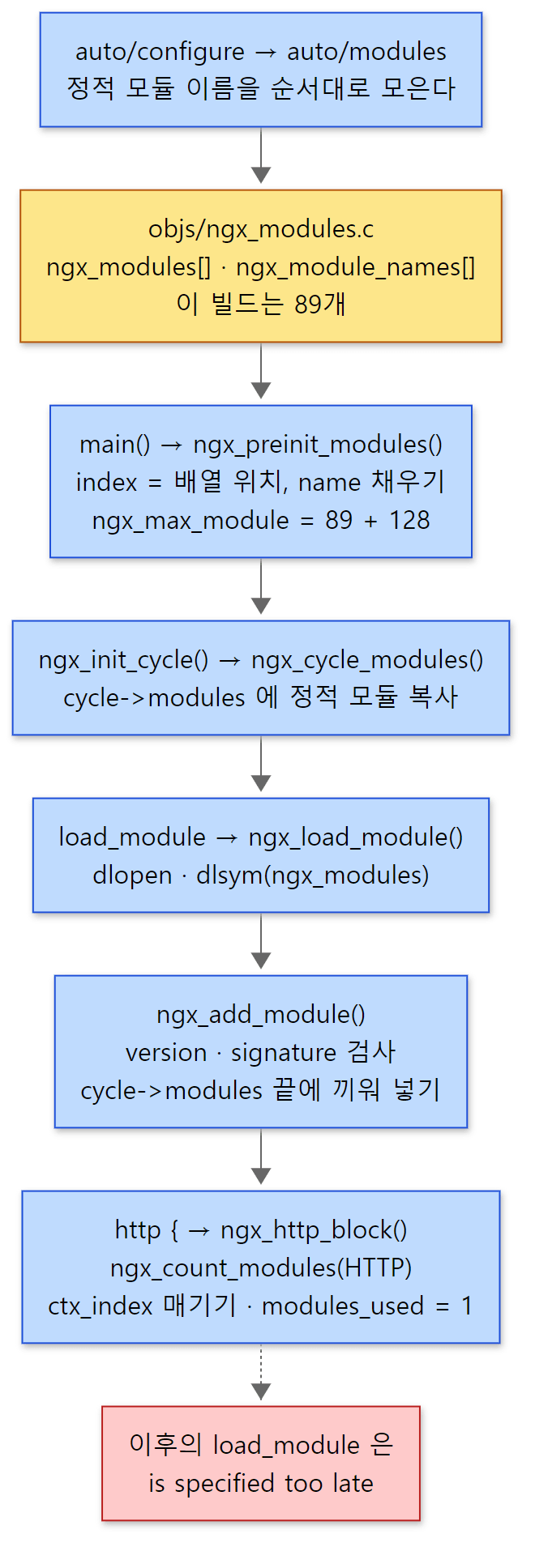 노란 상자는 빌드가 만든 파일, 파란 상자는 기동 중에 도는 함수, 빨간 상자는 그 순서를 어겼을 때입니다.
예제 1: 동적 모듈을 빌드하고 모듈 목록 보기
이 글을 위해 ngx_http_greet_module 이라는 작은 모듈을 만들었습니다. httpd 7편에서 만든 mod_greet 을 nginx 로 옮긴 것입니다. 디렉티브는 넷입니다.
| 디렉티브 | 인자 | 쓸 수 있는 자리 | 저장하는 곳 | 처리 함수 |
|---|---|---|---|---|
greet |
없음 | location | (core 의 clcf->handler 를 바꿈) |
직접 쓴 ngx_http_greet() |
greet_message |
1개 | http, server, location | loc_conf 의 message |
ngx_conf_set_str_slot |
greet_shout |
on/off | http, server, location | loc_conf 의 shout |
ngx_conf_set_flag_slot |
greet_tag |
1개 | http, server | srv_conf 의 tag |
ngx_conf_set_str_slot |
greet; 이 걸린 location 으로 요청하면, 그 요청에 적용된 값과 "그 설정 구조체가 nginx.conf 몇째 줄에서 만들어졌나"를 찍어 줍니다. create·merge 콜백은 불릴 때마다 로그를 한 줄 남깁니다. 모듈 소스와 모듈 설명 파일(config)은 이렇습니다.
# 이 글을 위해 쓴 예제입니다 (nginx 의 소스가 아닙니다)
# configure 가 --add-dynamic-module=/work 로 읽는 모듈 설명 파일
ngx_addon_name=ngx_http_greet_module

ngx_module_type=HTTP
ngx_module_name=ngx_http_greet_module
ngx_module_srcs="$ngx_addon_dir/ngx_http_greet_module.c"

. auto/module
/* 이 글을 위해 쓴 예제입니다 (nginx 의 소스가 아닙니다) */
/* ... 디렉티브 넷을 설명하는 머리 주석 ... */
#include <ngx_config.h>
#include <ngx_core.h>
#include <ngx_http.h>


typedef struct {
    ngx_uint_t   line;      /* 이 구조체를 만들 때 읽고 있던 설정 파일 줄 */
    ngx_str_t    message;   /* greet_message — data == NULL 이면 "안 적음" */
    ngx_flag_t   shout;     /* greet_shout   — NGX_CONF_UNSET 이면 "안 적음" */
} ngx_http_greet_loc_conf_t;


/* ... ngx_http_greet_srv_conf_t (line, tag), 함수 선언 ... */

static ngx_command_t  ngx_http_greet_commands[] = {

    { ngx_string("greet"),
      NGX_HTTP_LOC_CONF|NGX_CONF_NOARGS,
      ngx_http_greet,
      0,
      0,
      NULL },

    { ngx_string("greet_message"),
      NGX_HTTP_MAIN_CONF|NGX_HTTP_SRV_CONF|NGX_HTTP_LOC_CONF|NGX_CONF_TAKE1,
      ngx_conf_set_str_slot,
      NGX_HTTP_LOC_CONF_OFFSET,
      offsetof(ngx_http_greet_loc_conf_t, message),
      NULL },

    { ngx_string("greet_shout"),
      NGX_HTTP_MAIN_CONF|NGX_HTTP_SRV_CONF|NGX_HTTP_LOC_CONF|NGX_CONF_FLAG,
      ngx_conf_set_flag_slot,
      NGX_HTTP_LOC_CONF_OFFSET,
      offsetof(ngx_http_greet_loc_conf_t, shout),
      NULL },

    { ngx_string("greet_tag"),
      NGX_HTTP_MAIN_CONF|NGX_HTTP_SRV_CONF|NGX_CONF_TAKE1,
      ngx_conf_set_str_slot,
      NGX_HTTP_SRV_CONF_OFFSET,
      offsetof(ngx_http_greet_srv_conf_t, tag),
      NULL },

      ngx_null_command
};


/* ... ngx_http_greet_module_ctx: postconfiguration, create/merge_srv_conf, create/merge_loc_conf 만 채움 ... */
/* ... ngx_module_t ngx_http_greet_module = { NGX_MODULE_V1, ... } — empty_gif 와 같은 모양 ... */
/* ... ngx_http_greet_handler(), ngx_http_greet() — empty_gif 와 같은 방식으로 handler 를 건다 ... */
/* ... postconfiguration, srv_conf 쪽 create/merge — 아래 loc_conf 쪽과 같은 모양 ... */

static void *
ngx_http_greet_create_loc_conf(ngx_conf_t *cf)
{
    ngx_http_greet_loc_conf_t  *conf;

    conf = ngx_pcalloc(cf->pool, sizeof(ngx_http_greet_loc_conf_t));
    if (conf == NULL) {
        return NULL;
    }

    conf->line = cf->conf_file->line;
    conf->shout = NGX_CONF_UNSET;

    ngx_conf_log_error(NGX_LOG_NOTICE, cf, 0, "greet create_loc_conf");

    return conf;
}


static char *
ngx_http_greet_merge_loc_conf(ngx_conf_t *cf, void *parent, void *child)
{
    ngx_http_greet_loc_conf_t  *prev = parent;
    ngx_http_greet_loc_conf_t  *conf = child;

    ngx_conf_log_error(NGX_LOG_NOTICE, cf, 0,
                       "greet merge_loc_conf: line %ui -> line %ui, "
                       "message %s, shout %s",
                       prev->line, conf->line,
                       conf->message.data ? "set here" : "inherited",
                       conf->shout != NGX_CONF_UNSET ? "set here" : "inherited");

    ngx_conf_merge_str_value(conf->message, prev->message, "hello");
    ngx_conf_merge_value(conf->shout, prev->shout, 0);

    return NGX_CONF_OK;
}
ngx_conf_log_error() 는 메시지 끝에 "지금 읽고 있는 설정 파일과 줄 번호"(in /work/nginx.conf:12)를 붙여 주는 함수입니다(ngx_conf_file.c 1025–1027행). 콜백이 언제 불렸는지 보기에 딱 좋습니다.
빌드는 컨테이너 안에서 설치된 nginx 의 configure 인자를 그대로 쓰고 --add-dynamic-module 만 더해 make modules 로 합니다. run.sh 의 해당 부분과 출력입니다.
cd /usr/src/nginx
# 설치된 nginx 와 같은 configure 인자 + --add-dynamic-module (서명이 같아야 load_module 이 받아 준다)
eval ./auto/configure $(nginx -V 2>&1 | sed -n 's/^configure arguments: //p') \
    --add-dynamic-module=/work > /tmp/u05/configure.log 2>&1
make modules > /tmp/u05/make.log 2>&1
=== 1. build the dynamic module (configure + make modules) ===
72152 objs/ngx_http_greet_module.so
signature: 8,4,8,0010111111010111001111111111100110
=== 2. objs/ngx_http_greet_module_modules.c (generated by configure) ===

#include <ngx_config.h>
#include <ngx_core.h>

extern ngx_module_t  ngx_http_greet_module;

ngx_module_t *ngx_modules[] = {
    &ngx_http_greet_module,
    NULL
};

char *ngx_module_names[] = {
    "ngx_http_greet_module",
    NULL
};

char *ngx_module_order[] = {
    NULL
};

=== 3. /opt/nginx/ngx_modules.c (static modules of this build) ===
extern lines: 89
entries in ngx_modules[]: 89
     1	    &ngx_core_module,
     2	    &ngx_errlog_module,
     3	    &ngx_conf_module,
     4	    &ngx_openssl_module,
     5	    &ngx_openssl_cache_module,
     6	    &ngx_regex_module,
     7	    &ngx_events_module,
     8	    &ngx_event_core_module,
    11	    &ngx_http_module,
    12	    &ngx_http_core_module,
    16	    &ngx_http_static_module,
    34	    &ngx_http_proxy_module,
    69	    &ngx_stream_module,
    89	    &ngx_stream_upstream_zone_module,
이 예제는 기준 커밋(9a7439fd79)을 그대로 빌드한 nginx 1.31.9 로 도커 컨테이너(Debian bookworm, --with-debug)에서 실행했습니다. .so 크기는 빌드 환경에 따라 다를 수 있습니다.
- 서명 문자열이
.so안에 들어 있습니다.8,4,8,은 포인터·sig_atomic_t·time_t의 크기이고, 뒤의 34자리가 빌드 조건(그 가운데 7자리는 고정값)입니다. 설치된 nginx 와 같은 configure 인자로 빌드했으니ngx_add_module()의strcmp를 통과합니다. - 동적 모듈의
.so에도ngx_modules[]·ngx_module_names[]·ngx_module_order[]가 있습니다.auto/make493–564행이 모듈마다objs/<모듈>_modules.c로 쓰는 파일입니다. 필터가 아닌 보통 HTTP 모듈이라ngx_module_order[]는 비어 있고, 그래서 맨 끝에 붙습니다. - 이 빌드의 정적 모듈은 89개입니다. 앞쪽 core·event 모듈, 11번째
ngx_http_module(core 종류 —http {}블록 디렉티브 하나만 가진 모듈입니다), 12번째ngx_http_core_module부터 HTTP 모듈, 69번째부터 stream 모듈 순서입니다.
헷갈리기 쉬운 곳: ngx_http_module 과 ngx_http_core_module 은 다른 모듈입니다
이름이 비슷하지만 ngx_http_module 은 종류가 NGX_CORE_MODULE 이고 디렉티브는 http 하나뿐입니다(ngx_http.c 86–119행). 파일 맨 위(main 문맥)에서 http { 를 알아보려면 core 모듈이어야 하기 때문입니다. ngx_http_core_module 은 종류가 NGX_HTTP_MODULE 이고 server, location, listen, root, sendfile 같은 HTTP 의 기본 디렉티브를 갖습니다. events 도 ngx_events_module(core 종류, events 블록)과 ngx_event_core_module(event 종류, worker_connections 등)로 똑같이 나뉩니다. 바깥 블록을 여는 모듈과 그 안을 채우는 모듈이 따로 있는 것입니다.
3. 디렉티브 표 — ngx_command_t
struct ngx_command_s {
    ngx_str_t             name;
    ngx_uint_t            type;
    char               *(*set)(ngx_conf_t *cf, ngx_command_t *cmd, void *conf);
    ngx_uint_t            conf;
    ngx_uint_t            offset;
    void                 *post;
};

#define ngx_null_command  { ngx_null_string, 0, NULL, 0, 0, NULL }
src/core/ngx_conf_file.h 77–86행
| 필드 | 뜻 | greet_message 의 값 |
|---|---|---|
name |
디렉티브 이름(ngx_str_t — 길이와 포인터) |
"greet_message" |
type |
쓸 수 있는 문맥 비트 + 인자 개수 비트 | NGX_HTTP_MAIN_CONF|NGX_HTTP_SRV_CONF|NGX_HTTP_LOC_CONF|NGX_CONF_TAKE1 |
set |
값을 처리할 함수 | ngx_conf_set_str_slot |
conf |
문맥 구조체 안에서 어느 배열(main/srv/loc)을 쓸지 — 바이트 오프셋 | NGX_HTTP_LOC_CONF_OFFSET |
offset |
모듈 설정 구조체 안에서 어느 필드에 넣을지 — 바이트 오프셋 | offsetof(ngx_http_greet_loc_conf_t, message) |
post |
값을 넣은 뒤 부를 검사 함수(선택) | NULL |
표는 ngx_null_command(이름 길이가 0 인 원소)로 끝납니다. 찾는 쪽은 cmd->name.len 이 0 이 될 때까지 돕니다.
type — 비트 한 칸이 한 가지 뜻
/*
 *        AAAA  number of arguments
 *      FF      command flags
 *    TT        command type, i.e. HTTP "location" or "server" command
 */

#define NGX_CONF_NOARGS      0x00000001
#define NGX_CONF_TAKE1       0x00000002
#define NGX_CONF_TAKE2       0x00000004
/* ... TAKE3 ~ TAKE7, TAKE12 같은 조합 ... */

#define NGX_CONF_ARGS_NUMBER 0x000000ff
#define NGX_CONF_BLOCK       0x00000100
#define NGX_CONF_FLAG        0x00000200
#define NGX_CONF_ANY         0x00000400
#define NGX_CONF_1MORE       0x00000800
#define NGX_CONF_2MORE       0x00001000

#define NGX_DIRECT_CONF      0x00010000

#define NGX_MAIN_CONF        0x01000000
#define NGX_ANY_CONF         0xFF000000
src/core/ngx_conf_file.h 16–52행
32비트 정수 하나를 셋으로 나눠 씁니다. 아래 두 자리(16진수)는 인자 개수 — TAKE1 은 "정확히 1개", TAKE12 는 "1개 또는 2개"처럼 비트를 OR 해서 허용하는 개수를 모읍니다. 그 위는 모양 — BLOCK({ 로 여는 블록), FLAG(on/off), 1MORE(1개 이상). 맨 위 두 자리는 문맥입니다. HTTP 의 문맥 비트는 ngx_http_config.h 에 있습니다.
#define NGX_HTTP_MODULE           0x50545448   /* "HTTP" */

#define NGX_HTTP_MAIN_CONF        0x02000000
#define NGX_HTTP_SRV_CONF         0x04000000
#define NGX_HTTP_LOC_CONF         0x08000000
#define NGX_HTTP_UPS_CONF         0x10000000
#define NGX_HTTP_SIF_CONF         0x20000000
#define NGX_HTTP_LIF_CONF         0x40000000
#define NGX_HTTP_LMT_CONF         0x80000000


#define NGX_HTTP_MAIN_CONF_OFFSET  offsetof(ngx_http_conf_ctx_t, main_conf)
#define NGX_HTTP_SRV_CONF_OFFSET   offsetof(ngx_http_conf_ctx_t, srv_conf)
#define NGX_HTTP_LOC_CONF_OFFSET   offsetof(ngx_http_conf_ctx_t, loc_conf)
src/http/ngx_http_config.h 39–52행
UPS 는 upstream {} 안, SIF·LIF 는 server·location 안의 if () {}, LMT 는 limit_except {} 안입니다. 예를 들어 sendfile 은 MAIN|SRV|LOC|LIF|FLAG 라서 location 안의 if 블록에도 쓸 수 있습니다(ngx_http_core_module.c 404–410행). nginx 문서의 "Context: http, server, location, if in location" 줄이 바로 이 비트들을 사람 말로 옮긴 것입니다.
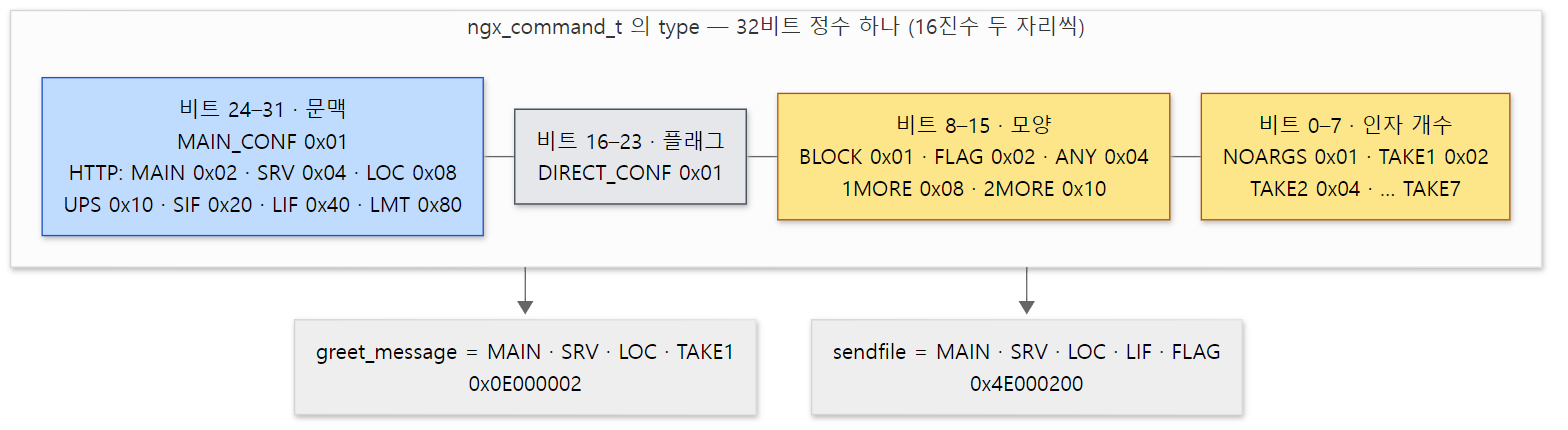 type 한 칸에 문맥·모양·인자 개수가 함께 들어 있습니다. 값은 ngx_conf_file.h 16–52행과 ngx_http_config.h 39–52행의 #define 입니다.
헷갈리기 쉬운 곳: 0x02000000 은 세 가지 뜻입니다
NGX_HTTP_MAIN_CONF 의 값 0x02000000 은 NGX_EVENT_CONF(ngx_event.h 397행), NGX_STREAM_MAIN_CONF(ngx_stream.h 317행), NGX_MAIL_MAIN_CONF(ngx_mail.h 357행)와 같은 값입니다. 맨 위 여덟 비트를 종류마다 다시 쓰는 것입니다. 그래서 문맥 비트만으로는 "http 블록 안"과 "events 블록 안"을 가릴 수 없고, 4절의 ngx_conf_handler() 는 비트 검사 앞에 모듈 종류를 먼저 비교합니다. 예제 3의 첫 번째 오류가 이 경우입니다.
표준 setter — 대부분의 디렉티브는 함수를 새로 쓰지 않습니다
set 에 꽂는 함수는 모듈이 직접 써도 되지만, "문자열 하나", "on/off", "숫자", "크기(8k)", "시간(60s)" 처럼 흔한 모양은 core 가 미리 만들어 둔 함수 — slot 함수 — 를 씁니다(ngx_conf_file.h 284–296행에 12개). on/off 를 받는 것은 이렇습니다.
char *
ngx_conf_set_flag_slot(ngx_conf_t *cf, ngx_command_t *cmd, void *conf)
{
    char  *p = conf;

    ngx_str_t        *value;
    ngx_flag_t       *fp;
    ngx_conf_post_t  *post;

    fp = (ngx_flag_t *) (p + cmd->offset);

    if (*fp != NGX_CONF_UNSET) {
        return "is duplicate";
    }

    value = cf->args->elts;

    if (ngx_strcasecmp(value[1].data, (u_char *) "on") == 0) {
        *fp = 1;

    } else if (ngx_strcasecmp(value[1].data, (u_char *) "off") == 0) {
        *fp = 0;

    } else {
        ngx_conf_log_error(NGX_LOG_EMERG, cf, 0,
                     "invalid value \"%s\" in \"%s\" directive, "
                     "it must be \"on\" or \"off\"",
                     value[1].data, cmd->name.data);
        return NGX_CONF_ERROR;
    }

    if (cmd->post) {
        post = cmd->post;
        return post->post_handler(cf, post, fp);
    }

    return NGX_CONF_OK;
}
src/core/ngx_conf_file.c 1031–1068행
이 함수는 어느 모듈의 어느 구조체인지 전혀 모릅니다. 받은 conf(구조체의 시작 주소)에 cmd->offset 바이트를 더한 곳을 ngx_flag_t 로 보고 값을 쓸 뿐입니다. 구조체의 모양은 ngx_command_t 의 offset 에 offsetof() 로 적어 둔 한 숫자로만 전달됩니다. 그래서 sendfile, tcp_nopush, gzip, 예제의 greet_shout 이 모두 같은 함수 하나를 씁니다.
또 하나 눈여겨볼 곳은 *fp != NGX_CONF_UNSET 이면 "is duplicate" 를 돌려주는 줄입니다. 값이 아직 "안 적음"(-1)이어야 쓸 수 있습니다. 그래서 create_loc_conf() 는 플래그 필드를 반드시 NGX_CONF_UNSET 으로 채워 둬야 합니다 — 예제의 conf->shout = NGX_CONF_UNSET; 이 그 일입니다. 0 으로 두면 0 이 "off 라고 적음"인지 "안 적음"인지 가릴 수 없어서, 6절의 병합도 제대로 되지 않습니다. 문자열은 data == NULL 이 "안 적음"이라 ngx_pcalloc() 의 0 으로 충분합니다(ngx_conf_set_str_slot, 1071–1095행의 if (field->data)).
set 함수가 문자열을 돌려주면 그것이 그대로 오류 메시지 뒷부분이 됩니다. 4절에서 보듯 ngx_conf_handler() 가 "\"%s\" directive %s" 로 앞에 디렉티브 이름을 붙여 줍니다.
4. 이름으로 함수 찾기 — ngx_conf_handler()
4편에서 본 ngx_conf_parse() 는 ngx_conf_read_token() 으로 한 줄의 낱말들을 cf->args 배열에 모은 뒤, ; 나 { 를 만나면 ngx_conf_handler() 를 부릅니다(ngx_conf_file.c 325행). 이름을 찾는 부분입니다.
    for (i = 0; cf->cycle->modules[i]; i++) {

        cmd = cf->cycle->modules[i]->commands;
        if (cmd == NULL) {
            continue;
        }

        for ( /* void */ ; cmd->name.len; cmd++) {

            if (name->len != cmd->name.len) {
                continue;
            }

            if (ngx_strcmp(name->data, cmd->name.data) != 0) {
                continue;
            }

            found = 1;

            if (cf->cycle->modules[i]->type != NGX_CONF_MODULE
                && cf->cycle->modules[i]->type != cf->module_type)
            {
                continue;
            }

            /* is the directive's location right ? */

            if (!(cmd->type & cf->cmd_type)) {
                continue;
            }
src/core/ngx_conf_file.c 374–403행
해시도 트리도 없이 모든 모듈의 모든 디렉티브를 차례로 비교합니다. 길이를 먼저 비교해 대부분을 걸러 냅니다. 이 검색은 설정을 읽는 기동·reload 때만 돌고 요청 처리에는 끼지 않습니다(httpd 는 디렉티브 이름의 해시를 둡니다 — httpd 7편).
이름이 맞으면 found = 1 을 해 두고 두 가지를 봅니다.
- 모듈 종류:
cf->module_type은 "지금 어느 종류의 블록 안인가"입니다. 파일 맨 위에서는NGX_CORE_MODULE,http {안에서는NGX_HTTP_MODULE입니다(5절의ngx_http_block()이 바꿉니다). 예외는NGX_CONF_MODULE—include디렉티브 하나를 가진ngx_conf_module— 로, 어느 블록에서나 통과합니다. - 문맥 비트:
cf->cmd_type은 "블록 안의 어느 층인가"(NGX_HTTP_MAIN_CONF,_SRV_CONF,_LOC_CONF…)이고, 디렉티브의type에 그 비트가 켜져 있어야 합니다.
둘 중 하나라도 어긋나면 continue — 같은 이름의 다른 모듈의 디렉티브가 있을 수 있으니 찾기를 계속합니다. 끝까지 맞는 것이 없으면 found 로 두 오류가 갈립니다(486–496행). 이름조차 없으면 unknown directive, 이름은 있었는데 자리가 안 맞으면 is not allowed here 입니다.
통과하면 인자 개수를 검사하고(405–449행, argument_number[] 표로 "인자 n 개 → TAKEn 비트"를 찾습니다), 이제 set 에 넘길 conf 포인터를 찾습니다.
            /* set up the directive's configuration context */

            conf = NULL;

            if (cmd->type & NGX_DIRECT_CONF) {
                conf = ((void **) cf->ctx)[cf->cycle->modules[i]->index];

            } else if (cmd->type & NGX_MAIN_CONF) {
                conf = &(((void **) cf->ctx)[cf->cycle->modules[i]->index]);

            } else if (cf->ctx) {
                confp = *(void **) ((char *) cf->ctx + cmd->conf);

                if (confp) {
                    conf = confp[cf->cycle->modules[i]->ctx_index];
                }
            }

            rv = cmd->set(cf, cmd, conf);
src/core/ngx_conf_file.c 451–469행
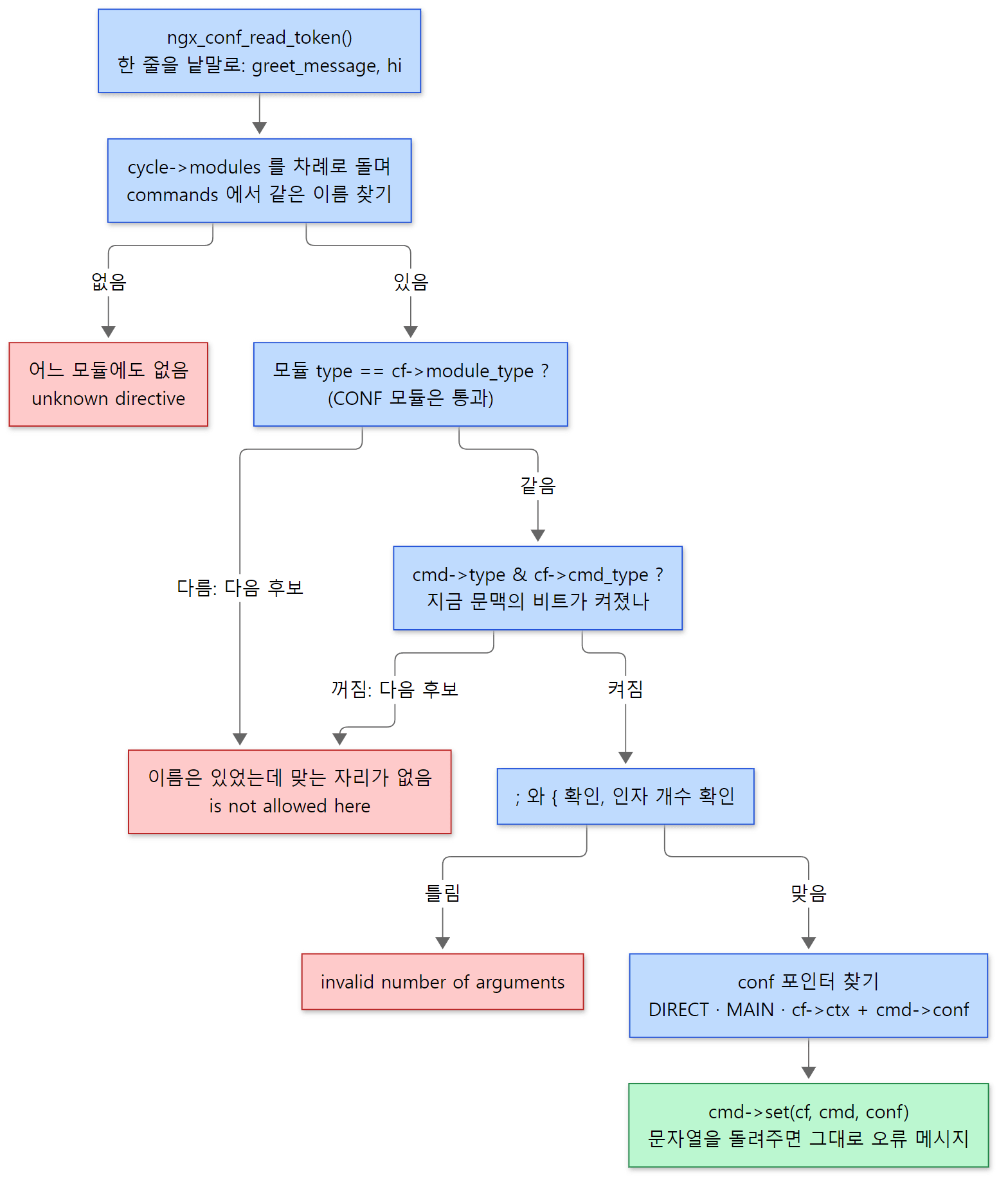 빨간 상자 셋이 nginx -t 에서 가장 자주 보는 오류 메시지입니다. 예제 3에서 하나씩 일으켜 봅니다.
conf 포인터를 찾는 세 갈래
cf->ctx 는 "지금 문맥의 설정 포인터들"입니다. 파일 맨 위에서는 cycle->conf_ctx(모듈 index 로 찾는 void * 배열, ngx_cycle.c 269행)이고, http { 안에서는 ngx_http_conf_ctx_t 입니다.
NGX_DIRECT_CONF— core 모듈의 보통 디렉티브(worker_processes,pid,load_module…).ngx_init_cycle()이 설정을 읽기 전에 core 모듈마다create_conf()를 불러conf_ctx[index]에 구조체를 만들어 두었으므로(ngx_cycle.c 233–248행) 그 구조체를 바로 줍니다.NGX_MAIN_CONF이고 DIRECT 가 아님 —http,events,stream같은 블록 디렉티브. 구조체가 아니라conf_ctx[index]칸의 주소를 줍니다. 칸이 아직 비어 있고, 블록 처리 함수가 자기 문맥 구조체를 만들어 그 칸에 꽂기 때문입니다.ngx_http_block()첫머리의*(ngx_http_conf_ctx_t **) conf = ctx;(ngx_http.c 145행)가 그 일입니다.- 그 밖(HTTP 등 블록 안) —
cf->ctx를char *로 보고cmd->conf바이트를 더해main_conf/srv_conf/loc_conf필드 중 하나를 고르고, 그 배열에서ctx_index칸을 꺼냅니다.NGX_HTTP_LOC_CONF_OFFSET이offsetof(ngx_http_conf_ctx_t, loc_conf)였으니, 결국ctx->loc_conf[ctx_index]입니다.
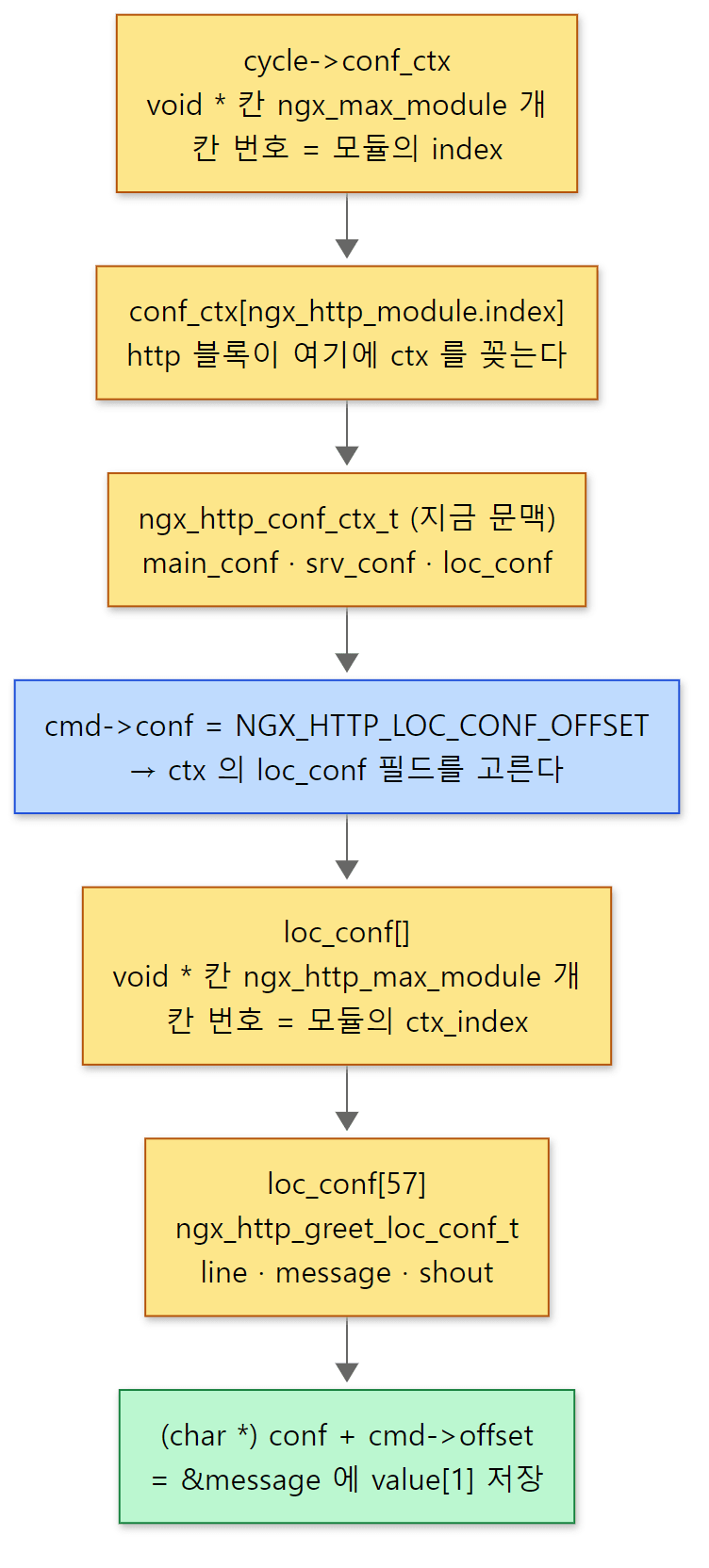 오프셋 두 번(
cmd->conf, cmd->offset)과 번호 두 번(index, ctx_index). 57 은 예제 1의 빌드에서 greet 모듈이 받은 ctx_index 입니다(예제 2).
ngx_conf_handler() 는 HTTP 를 전혀 모릅니다. ngx_http_conf_ctx_t 라는 이름도 쓰지 않고, "문맥 구조체의 몇 바이트째에 있는 void ** 배열"로만 다룹니다. 그래서 stream 과 mail 도 각자의 문맥 구조체(ngx_stream_conf_ctx_t …)를 같은 모양으로 만들어 이 함수를 그대로 씁니다.
예제 3: 오류 메시지는 어느 줄에서 나오나
예제 폴더의 run.sh 마지막 부분은 작은 설정을 바꿔 가며 nginx -t 를 돌립니다. 설정의 뼈대는 이렇습니다(2행이 events, 7행이 location 안).
load_module /tmp/u05/ngx_http_greet_module.so;
events { (2행 — 여기에 넣어 보는 것) }
http {
    server {
        listen 127.0.0.1:8090;
        location / {
            (7행 — 여기에 넣어 보는 것)
        }
    }
}
(11행 — 여기에 넣어 보는 것)
=== 7. directive errors (nginx -t) ===
--- greet_message inside events {}
nginx: [emerg] "greet_message" directive is not allowed here in /tmp/u05/bad.conf:2
nginx: configuration file /tmp/u05/bad.conf test failed
--- greet_tag inside location {}
nginx: [emerg] "greet_tag" directive is not allowed here in /tmp/u05/bad.conf:7
nginx: configuration file /tmp/u05/bad.conf test failed
--- typo in the name
nginx: [emerg] unknown directive "greet_mesage" in /tmp/u05/bad.conf:7
nginx: configuration file /tmp/u05/bad.conf test failed
--- greet_shout maybe
nginx: [emerg] invalid value "maybe" in "greet_shout" directive, it must be "on" or "off" in /tmp/u05/bad.conf:7
nginx: configuration file /tmp/u05/bad.conf test failed
--- greet_message with two arguments
nginx: [emerg] invalid number of arguments in "greet_message" directive in /tmp/u05/bad.conf:7
nginx: configuration file /tmp/u05/bad.conf test failed
--- greet_message twice
nginx: [emerg] "greet_message" directive is duplicate in /tmp/u05/bad.conf:7
nginx: configuration file /tmp/u05/bad.conf test failed
--- greet_message without ;
nginx: [emerg] unexpected "}" in /tmp/u05/bad.conf:8
nginx: configuration file /tmp/u05/bad.conf test failed
--- load_module after http {}
nginx: [emerg] "load_module" directive is specified too late in /tmp/u05/bad.conf:11
nginx: configuration file /tmp/u05/bad.conf test failed
| 넣은 것 | 메시지 | 찍는 곳 |
|---|---|---|
events {} 안의 greet_message |
is not allowed here | 문맥 비트는 같은 0x02000000 이지만 모듈 종류(HTTP ≠ EVENT)에서 걸림 → ngx_conf_file.c 393–397행, 메시지는 486–491행 |
location 안의 greet_tag |
is not allowed here | NGX_HTTP_LOC_CONF 비트가 없음 → 401–403행 |
greet_mesage(오타) |
unknown directive | 어느 모듈에도 그 이름이 없음 → 493–494행 |
greet_shout maybe; |
invalid value … must be "on" or "off" | ngx_conf_set_flag_slot() 이 직접 찍음 → 1055–1059행 |
greet_message a b; |
invalid number of arguments | TAKE1 인데 인자 2개 → 445–448행, 메시지 500–502행 |
같은 location 에 greet_message 두 번 |
is duplicate | ngx_conf_set_str_slot() 이 "is duplicate" 를 돌려주고 ngx_conf_handler() 가 479–480행에서 이름을 붙임 |
; 빠뜨림 |
unexpected "}" | 디렉티브까지 가지 못하고 토큰을 읽다가 걸림 → ngx_conf_read_token() 690–693행(4편) |
http {} 뒤의 load_module |
is specified too late | modules_used 가 이미 1 → nginx.c 1663–1665행 |
is duplicate 처럼 set 함수가 짧은 문자열을 돌려주는 경우와, invalid value … 처럼 set 함수가 직접 ngx_conf_log_error() 로 찍고 NGX_CONF_ERROR 를 돌려주는 경우가 섞여 있습니다. 둘 다 끝에 in 파일:줄 이 붙는 것은 같은 ngx_conf_log_error() 를 거치기 때문입니다.
헷갈리기 쉬운 곳: load_module 을 빠뜨리면 "unknown directive" 입니다
위 표의 두 번째 줄과 세 번째 줄의 차이가 실제로 쓸모 있습니다. 동적 모듈의 디렉티브를 쓰면서 load_module 줄을 빠뜨리면, 그 모듈은 cycle->modules 에 없으므로 found 가 0 인 채로 끝나 unknown directive 가 나옵니다. 오타일 때와 같은 메시지입니다. 반대로 is not allowed here 는 "모듈은 읽혔고 이름도 맞는데 자리가 틀렸다"는 뜻입니다.
5. http 블록 — 문맥마다 설정 구조체 배열
이제 HTTP 쪽으로 갑니다. http { 를 만나면 4절의 두 번째 갈래로 ngx_http_block() 이 불립니다. 이 함수 하나가 HTTP 설정의 처음부터 끝까지를 맡습니다.
문맥 구조체: 포인터 배열 셋
typedef struct {
    void        **main_conf;
    void        **srv_conf;
    void        **loc_conf;
} ngx_http_conf_ctx_t;
src/http/ngx_http_config.h 17–21행
필드 셋은 모두 void * 의 배열입니다. 칸 수는 ngx_http_max_module 이고, k 번째 칸은 ctx_index == k 인 HTTP 모듈의 설정 구조체를 가리킵니다. 구조체의 모양은 모듈마다 다르므로 void * 로 들고 있다가, 꺼내 쓰는 모듈이 자기 타입으로 바꿉니다. 그 일을 하는 매크로가 ngx_http_conf_get_module_loc_conf(cf, module)(설정 때)와 ngx_http_get_module_loc_conf(r, module)(요청 때)입니다(ngx_http_config.h 55–66행).
ngx_http_block() — 만들기, 읽기, 합치기, 마무리
    /* count the number of the http modules and set up their indices */

    ngx_http_max_module = ngx_count_modules(cf->cycle, NGX_HTTP_MODULE);


    /* the http main_conf context, it is the same in the all http contexts */

    ctx->main_conf = ngx_pcalloc(cf->pool,
                                 sizeof(void *) * ngx_http_max_module);
    /* ... */

    /*
     * the http null srv_conf context, it is used to merge
     * the server{}s' srv_conf's
     */

    ctx->srv_conf = ngx_pcalloc(cf->pool, sizeof(void *) * ngx_http_max_module);
    /* ... */

    ctx->loc_conf = ngx_pcalloc(cf->pool, sizeof(void *) * ngx_http_max_module);
    /* ... */

    for (m = 0; cf->cycle->modules[m]; m++) {
        if (cf->cycle->modules[m]->type != NGX_HTTP_MODULE) {
            continue;
        }

        module = cf->cycle->modules[m]->ctx;
        mi = cf->cycle->modules[m]->ctx_index;

        if (module->create_main_conf) {
            ctx->main_conf[mi] = module->create_main_conf(cf);
            /* ... */
        }

        if (module->create_srv_conf) {
            ctx->srv_conf[mi] = module->create_srv_conf(cf);
            /* ... */
        }

        if (module->create_loc_conf) {
            ctx->loc_conf[mi] = module->create_loc_conf(cf);
            /* ... */
        }
    }
http 문맥에서 모듈마다 create_main_conf·create_srv_conf·create_loc_conf 를 셋 다 부릅니다. main 설정은 http 에 하나뿐이니 당연하지만, srv·loc 설정까지 http 층에 만드는 이유는 주석이 말합니다 — "null srv_conf … used to merge the server{}s' srv_conf's". http {} 에 바로 적은 sendfile on; 같은 값을 담아 두었다가 server 들의 병합 부모로 쓰려는 것입니다.
그다음은 이렇게 이어집니다.
    pcf = *cf;
    cf->ctx = ctx;

    for (m = 0; cf->cycle->modules[m]; m++) {
        /* ... HTTP 모듈마다 ... */

        if (module->preconfiguration) {
            if (module->preconfiguration(cf) != NGX_OK) {
                return NGX_CONF_ERROR;
            }
        }
    }

    /* parse inside the http{} block */

    cf->module_type = NGX_HTTP_MODULE;
    cf->cmd_type = NGX_HTTP_MAIN_CONF;
    rv = ngx_conf_parse(cf, NULL);
cf 의 세 필드 — ctx, module_type, cmd_type — 를 바꾸고 ngx_conf_parse(cf, NULL) 을 다시 부릅니다. 파일 이름이 NULL 이면 "지금 읽던 파일에서 이 블록의 } 까지"를 읽는다는 뜻입니다(4편). 4절에서 본 모듈 종류·문맥 비트 검사가 기대는 값이 바로 이 셋입니다. pcf 에 옛 값을 저장해 두었다가 끝에서 *cf = pcf; 로 되돌립니다(326행) — 블록을 들어갈 때 바꾸고 나올 때 되돌리는, 손으로 만든 스택입니다.
server·location 블록 — 공유하는 배열과 새로 만드는 배열
server { 는 ngx_http_core_module 의 디렉티브이고 처리 함수는 ngx_http_core_server() 입니다. 같은 일을 한 층 아래에서 되풀이합니다 — 새 ngx_http_conf_ctx_t 를 만들어 main_conf 는 http 의 것을 포인터째 공유하고(ctx->main_conf = http_ctx->main_conf;), srv_conf·loc_conf 배열은 새로 만들어 HTTP 모듈마다 create_srv_conf·create_loc_conf 를 부릅니다(src/http/ngx_http_core_module.c 3031–3077행).
그다음 cf->cmd_type = NGX_HTTP_SRV_CONF; 로 바꿔 server 블록 안을 읽습니다(3098–3104행). location { 의 ngx_http_core_location() 은 한 층 더 내려가 main_conf 와 srv_conf 를 공유하고 loc_conf 만 새로 만듭니다.
    pctx = cf->ctx;
    ctx->main_conf = pctx->main_conf;
    ctx->srv_conf = pctx->srv_conf;

    ctx->loc_conf = ngx_pcalloc(cf->pool, sizeof(void *) * ngx_http_max_module);
    if (ctx->loc_conf == NULL) {
        return NGX_CONF_ERROR;
    }

    for (i = 0; cf->cycle->modules[i]; i++) {
        if (cf->cycle->modules[i]->type != NGX_HTTP_MODULE) {
            continue;
        }

        module = cf->cycle->modules[i]->ctx;

        if (module->create_loc_conf) {
            ctx->loc_conf[cf->cycle->modules[i]->ctx_index] =
                                                   module->create_loc_conf(cf);
            if (ctx->loc_conf[cf->cycle->modules[i]->ctx_index] == NULL) {
                return NGX_CONF_ERROR;
            }
        }
    }

    clcf = ctx->loc_conf[ngx_http_core_module.ctx_index];
    clcf->loc_conf = ctx->loc_conf;
src/http/ngx_http_core_module.c 3179–3205행
마지막 두 줄이 중요합니다. core 모듈의 location 설정(ngx_http_core_loc_conf_t)이 자기 location 의 loc_conf 배열 전체를 clcf->loc_conf 로 들고 있습니다. 나중에 요청이 이 location 으로 정해지면, 이 포인터 하나만 요청에 옮겨 주면 모든 모듈의 location 설정이 한꺼번에 바뀝니다(6절 끝).
와 loc_conf를 가리킨다. server A 문맥은 자기 srv_conf[] 와 loc_conf[] 를 가리킨다. location /loud/ 문맥은 server A 의 srv_conf[] 를 함께 가리키고 loc_conf[] 만 자기 것이다.](/blog/images/nginx-source-5/ctx-tree@2x.png) 파란 상자가 블록마다 하나씩 생기는
ngx_http_conf_ctx_t, 노란 상자가 모듈 수만큼 칸을 가진 배열입니다. 아래로 갈수록 새로 만드는 배열이 줄어듭니다.
그래서 nginx.conf 의 블록 수만큼 배열이 생깁니다. 예제 설정(아래)은 http 1 + server 2 + location 4 이므로 loc_conf 배열이 7개, srv_conf 배열이 3개, main_conf 배열이 1개이고, 배열마다 HTTP 모듈 수(이 빌드에서 동적 모듈까지 58)만큼 칸이 있습니다. create_loc_conf 가 있는 모듈은 location 블록마다 구조체를 하나씩 만듭니다. 메모리를 블록 수만큼 더 쓰는 대신, 6절에서 보듯 요청 때는 계산할 것이 남지 않습니다.
greet_message 를 server 에 적으면 어디에 들어가나
greet_message 는 NGX_HTTP_SRV_CONF 비트가 켜져 있어 server 블록에도 적을 수 있지만, conf 필드는 NGX_HTTP_LOC_CONF_OFFSET 입니다. 4절의 세 번째 갈래대로라면 server 블록에서 이 디렉티브를 만나면 server 문맥의 loc_conf[] — ngx_http_core_server() 가 만든, server 층의 loc_conf — 에 값이 들어갑니다. srv_conf 가 아닙니다. root, sendfile 처럼 "server 에도 location 에도 적는" 디렉티브는 거의 이렇게 loc_conf 에 살고, server 층의 loc_conf 가 그 server 의 location 들의 병합 부모가 됩니다. 반대로 greet_tag 나 core 의 server_name, listen 처럼 서버 하나에 하나뿐인 값은 srv_conf 에 삽니다.
예제 2: 콜백이 불리는 순서
예제의 nginx.conf 입니다. 줄 번호가 로그에 나오므로 번호를 붙였습니다.
 1  # 이 글을 위해 쓴 예제입니다 (nginx 의 소스가 아닙니다)
 2  load_module /tmp/u05/ngx_http_greet_module.so;
 3  worker_processes 1;
 4  pid /tmp/u05/nginx.pid;
 5  error_log /tmp/u05/error.log notice;
 6  events { worker_connections 64; }
 7
 8  http {
 9      access_log off;
10      greet_message "from http";
11
12      server {
13          listen 127.0.0.1:8080;
14          greet_tag "A";
15
16          location / {
17              greet;
18          }
19
20          location /loud/ {
21              greet_message "from location";
22              greet_shout on;
23              greet;
24
25              location /loud/inner/ {
26                  greet;
27              }
28          }
29      }
30
31      server {
32          listen 127.0.0.1:8081;
33          greet_message "from server 2";
34
35          location / {
36              greet;
37          }
38      }
39  }
nginx -t -e stderr 로 설정만 검사하며 로그를 화면으로 받았습니다(-e stderr 를 쓴 이유는 아래 "헷갈리기 쉬운 곳").
=== 4. nginx -t -e stderr (config-time callbacks) ===
2026/11/07 02:57:37 [notice] 2866#2866: greet create_srv_conf in /work/nginx.conf:8
2026/11/07 02:57:37 [notice] 2866#2866: greet create_loc_conf in /work/nginx.conf:8
2026/11/07 02:57:37 [notice] 2866#2866: greet create_srv_conf in /work/nginx.conf:12
2026/11/07 02:57:37 [notice] 2866#2866: greet create_loc_conf in /work/nginx.conf:12
2026/11/07 02:57:37 [notice] 2866#2866: greet create_loc_conf in /work/nginx.conf:16
2026/11/07 02:57:37 [notice] 2866#2866: greet create_loc_conf in /work/nginx.conf:20
2026/11/07 02:57:37 [notice] 2866#2866: greet create_loc_conf in /work/nginx.conf:25
2026/11/07 02:57:37 [notice] 2866#2866: greet create_srv_conf in /work/nginx.conf:31
2026/11/07 02:57:37 [notice] 2866#2866: greet create_loc_conf in /work/nginx.conf:31
2026/11/07 02:57:37 [notice] 2866#2866: greet create_loc_conf in /work/nginx.conf:35
2026/11/07 02:57:37 [notice] 2866#2866: greet merge_srv_conf: line 8 -> line 12, tag set here in /work/nginx.conf:39
2026/11/07 02:57:37 [notice] 2866#2866: greet merge_loc_conf: line 8 -> line 12, message inherited, shout inherited in /work/nginx.conf:39
2026/11/07 02:57:37 [notice] 2866#2866: greet merge_loc_conf: line 12 -> line 16, message inherited, shout inherited in /work/nginx.conf:39
2026/11/07 02:57:37 [notice] 2866#2866: greet merge_loc_conf: line 12 -> line 20, message set here, shout set here in /work/nginx.conf:39
2026/11/07 02:57:37 [notice] 2866#2866: greet merge_loc_conf: line 20 -> line 25, message inherited, shout inherited in /work/nginx.conf:39
2026/11/07 02:57:37 [notice] 2866#2866: greet merge_srv_conf: line 8 -> line 31, tag inherited in /work/nginx.conf:39
2026/11/07 02:57:37 [notice] 2866#2866: greet merge_loc_conf: line 8 -> line 31, message set here, shout inherited in /work/nginx.conf:39
2026/11/07 02:57:37 [notice] 2866#2866: greet merge_loc_conf: line 31 -> line 35, message inherited, shout inherited in /work/nginx.conf:39
2026/11/07 02:57:37 [notice] 2866#2866: greet postconfiguration: index=89 ctx_index=57 modules_n=90 http modules=58 ngx_http_max_module=58 in /work/nginx.conf:39
nginx: the configuration file /work/nginx.conf syntax is ok
nginx: configuration file /work/nginx.conf test is successful
시각과 pid(2866)는 실행마다 다릅니다.
- 만들기는 블록을 여는 순간입니다. 8행(
http {)에서 srv·loc 하나씩, 12행·31행(server {)에서 srv·loc 하나씩, 16·20·25·35행(location {)에서 loc 하나씩 — 블록 수와 정확히 같습니다. 25행의/loud/inner/처럼 location 안의 location 도 똑같이 하나를 받습니다. - 합치기는 전부 39행, 곧
http {}의 닫는 괄호를 읽은 뒤입니다.ngx_conf_parse()가 블록을 다 읽고 돌아온 다음ngx_http_block()이 병합을 시작하기 때문입니다(아래 6절). 그래서 병합 함수 안에서는 "아래 블록에 무엇이 적혔나"를 이미 다 압니다. - postconfiguration 은 병합보다 뒤입니다. greet 모듈의
index는 89 — 정적 모듈 0~88 다음의 첫 빈 번호 — 이고,ctx_index는 57, HTTP 모듈은 정적 57개 + greet 1개 = 58개,ngx_http_max_module도 58 입니다.
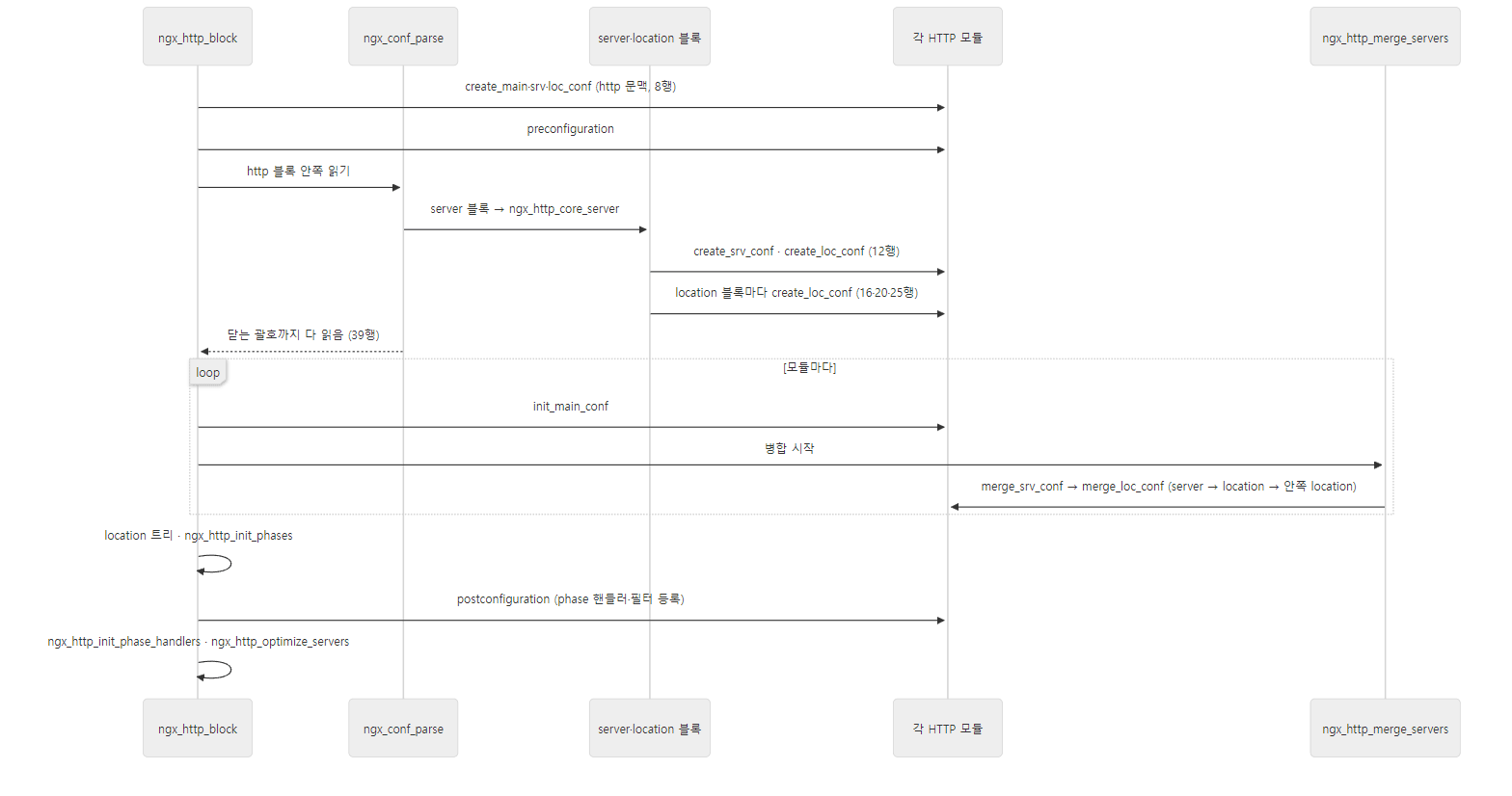 줄 번호는 예제 nginx.conf 의 것입니다. HTTP 모듈의 콜백 8개가 모두 이 그림 안에서, 설정을 읽을 때 한 번씩 불립니다.
postconfiguration 이 늦게 불리는 데는 이유가 있습니다. 많은 모듈이 여기서 phase 핸들러를 등록하거나(예: ngx_http_access_module 이 ACCESS phase 배열에 함수를 넣음) 필터 사슬에 자기를 끼웁니다. 그러려면 phase 배열이 준비돼 있어야 하므로(ngx_http_init_phases(), ngx_http.c 294행) 그 뒤에 불립니다. 등록된 핸들러를 한 줄 배열로 펴는 ngx_http_init_phase_handlers()(329행)는 다시 그 뒤입니다. phase 는 9편, 필터 사슬은 10편에서 봅니다.
gdb 로 확인: 블록이 겹칠수록 ngx_conf_parse() 가 겹칩니다
/loud/inner/ 의 create_loc_conf 는 다섯 번째 호출입니다. 동적 모듈의 함수라 아직 읽히지 않았을 때 걸 수 있게 set breakpoint pending on 을 켜고, 다섯 번째에서 멈춰 호출 스택을 찍었습니다.
gdb -batch -q \
    -ex 'set breakpoint pending on' \
    -ex 'break ngx_http_greet_create_loc_conf' \
    -ex 'run' -ex 'continue 4' \
    -ex 'bt' \
    -ex 'frame 1' \
    -ex 'print ctx->main_conf == pctx->main_conf' \
    -ex 'print ctx->srv_conf == pctx->srv_conf' \
    -ex 'print ctx->loc_conf == pctx->loc_conf' \
    -ex 'print ngx_http_max_module' \
    -ex 'kill' \
    --args nginx -t -q -c /work/nginx.conf 2>&1 \
 grep -v '^\[Thread\|^Using host libthread\|^warning: Error disabling\|^Breakpoint 1 at\|^Make breakpoint pending\|^\[Inferior'
#0  ngx_http_greet_create_loc_conf (cf=0x7fffffffe7f0) at /work/ngx_http_greet_module.c:219
#1  0x00005555555f19c2 in ngx_http_core_location (cf=0x7fffffffe7f0, cmd=0x555555728430 <ngx_http_core_commands+784>, dummy=0x555555799388) at src/http/ngx_http_core_module.c:3197
#2  0x00005555555a4359 in ngx_conf_handler (cf=0x7fffffffe7f0, last=1) at src/core/ngx_conf_file.c:469
#3  0x00005555555a3e89 in ngx_conf_parse (cf=0x7fffffffe7f0, filename=0x0) at src/core/ngx_conf_file.c:325
#4  0x00005555555f20f9 in ngx_http_core_location (cf=0x7fffffffe7f0, cmd=0x555555728430 <ngx_http_core_commands+784>, dummy=0x555555799388) at src/http/ngx_http_core_module.c:3360
#5  0x00005555555a4359 in ngx_conf_handler (cf=0x7fffffffe7f0, last=1) at src/core/ngx_conf_file.c:469
#6  0x00005555555a3e89 in ngx_conf_parse (cf=0x7fffffffe7f0, filename=0x0) at src/core/ngx_conf_file.c:325
#7  0x00005555555f161a in ngx_http_core_server (cf=0x7fffffffe7f0, cmd=0x555555728200 <ngx_http_core_commands+224>, dummy=0x555555786ef0) at src/http/ngx_http_core_module.c:3102
#8  0x00005555555a4359 in ngx_conf_handler (cf=0x7fffffffe7f0, last=1) at src/core/ngx_conf_file.c:469
#9  0x00005555555a3e89 in ngx_conf_parse (cf=0x7fffffffe7f0, filename=0x0) at src/core/ngx_conf_file.c:325
#10 0x00005555555e73ff in ngx_http_block (cf=0x7fffffffe7f0, cmd=0x5555557278a0 <ngx_http_commands>, conf=0x555555785350) at src/http/ngx_http.c:240
#11 0x00005555555a4359 in ngx_conf_handler (cf=0x7fffffffe7f0, last=1) at src/core/ngx_conf_file.c:469
#12 0x00005555555a3e89 in ngx_conf_parse (cf=0x7fffffffe7f0, filename=0x555555784338) at src/core/ngx_conf_file.c:325
#13 0x000055555559fb97 in ngx_init_cycle (old_cycle=0x7fffffffe930) at src/core/ngx_cycle.c:286
#14 0x000055555557ee55 in main (argc=5, argv=0x7fffffffed08) at src/core/nginx.c:300
#1  0x00005555555f19c2 in ngx_http_core_location (cf=0x7fffffffe7f0, cmd=0x555555728430 <ngx_http_core_commands+784>, dummy=0x555555799388) at src/http/ngx_http_core_module.c:3197
3197	                                                   module->create_loc_conf(cf);
$1 = 1
$2 = 1
$3 = 0
$4 = 58
주소는 실행마다 다를 수 있습니다. 앞쪽의 중단점 알림 줄(Breakpoint 1, … 등)과 끝의 Kill the program … 줄은 줄였습니다.
ngx_conf_parse→ngx_conf_handler→ 블록 처리 함수 세 줄이 블록 깊이만큼 되풀이됩니다. 파일(#12,filename이 있음) →http(#10) →server(#7) →location /loud/(#4) →location /loud/inner/(#1). 설정 파서는 재귀로 블록을 따라 내려가고, 블록 처리 함수가 그때마다cf를 바꿔 둡니다. 모든 프레임의cf가 같은 주소(0x7fffffffe7f0)인 것도 보입니다 —ngx_init_cycle()의 지역 변수conf하나를 끝까지 같이 쓰면서 필드만 바꿨다 되돌립니다.- #1 프레임(
ngx_http_core_location)에서 새 문맥ctx와 부모 문맥pctx를 비교하면main_conf와srv_conf는 같은 배열(1),loc_conf만 다른 배열(0)입니다. 위 그림 그대로입니다.
헷갈리기 쉬운 곳: 설정을 읽는 동안의 로그는 설정의 error_log 로 가지 않습니다
처음에는 nginx -t -c /work/nginx.conf 로만 돌렸는데, greet 의 notice 줄이 화면에도 /tmp/u05/error.log 에도 보이지 않았습니다. 설정을 읽는 동안 cf->log 는 ngx_init_cycle() 이 받은 옛 cycle 의 로그(ngx_cycle.c 67·272행)이고, 첫 기동이면 그것은 ngx_log_init() 이 연 기본 로그 — -e 로 주지 않았으면 빌드 때 정한 logs/error.log, 수준은 NGX_LOG_NOTICE — 입니다(ngx_log.c 324–334행 부근). 설정에 적은 error_log /tmp/u05/error.log 는 아직 열리기 전입니다. 그래서 notice 들은 /opt/nginx/logs/error.log 로 갔습니다. [emerg] 오류가 화면에 보이는 것은 WARN 과 그보다 심각한 수준은 파일과 별도로 stderr 에도 쓰기 때문입니다(ngx_log.c 198–199행 부근의 조건). -e stderr 로 기본 로그를 화면으로 돌리면 위처럼 보입니다.
6. 병합 — 설정 때 한 번, 요청 때는 포인터만
병합하는 곳: ngx_http_merge_servers()
병합은 ngx_http_block() 이 블록을 다 읽은 뒤에 시작합니다.
    cmcf = ctx->main_conf[ngx_http_core_module.ctx_index];
    cscfp = cmcf->servers.elts;

    for (m = 0; cf->cycle->modules[m]; m++) {
        if (cf->cycle->modules[m]->type != NGX_HTTP_MODULE) {
            continue;
        }

        module = cf->cycle->modules[m]->ctx;
        mi = cf->cycle->modules[m]->ctx_index;

        /* init http{} main_conf's */

        if (module->init_main_conf) {
            rv = module->init_main_conf(cf, ctx->main_conf[mi]);
            if (rv != NGX_CONF_OK) {
                goto failed;
            }
        }

        rv = ngx_http_merge_servers(cf, cmcf, module, mi);
        if (rv != NGX_CONF_OK) {
            goto failed;
        }
    }
바깥 고리가 모듈입니다. 모듈 하나를 골라 그 모듈의 설정을 모든 server·location 에 걸쳐 끝까지 합친 다음 다음 모듈로 넘어갑니다. server 목록 cmcf->servers 는 ngx_http_core_server() 가 server 블록을 만날 때마다 넣어 둔 배열입니다(ngx_http_core_module.c 3086–3093행).
    cscfp = cmcf->servers.elts;
    ctx = (ngx_http_conf_ctx_t *) cf->ctx;
    saved = *ctx;
    rv = NGX_CONF_OK;

    for (s = 0; s < cmcf->servers.nelts; s++) {

        /* merge the server{}s' srv_conf's */

        ctx->srv_conf = cscfp[s]->ctx->srv_conf;

        if (module->merge_srv_conf) {
            rv = module->merge_srv_conf(cf, saved.srv_conf[ctx_index],
                                        cscfp[s]->ctx->srv_conf[ctx_index]);
            if (rv != NGX_CONF_OK) {
                goto failed;
            }
        }

        if (module->merge_loc_conf) {

            /* merge the server{}'s loc_conf */

            ctx->loc_conf = cscfp[s]->ctx->loc_conf;

            rv = module->merge_loc_conf(cf, saved.loc_conf[ctx_index],
                                        cscfp[s]->ctx->loc_conf[ctx_index]);
            if (rv != NGX_CONF_OK) {
                goto failed;
            }

            /* merge the locations{}' loc_conf's */

            clcf = cscfp[s]->ctx->loc_conf[ngx_http_core_module.ctx_index];

            rv = ngx_http_merge_locations(cf, clcf->locations,
                                          cscfp[s]->ctx->loc_conf,
                                          module, ctx_index);
            if (rv != NGX_CONF_OK) {
                goto failed;
            }
        }
    }

failed:

    *ctx = saved;

    return rv;
server 마다 세 단계입니다.
- http 층의 srv_conf(부모) → 이 server 의 srv_conf(자식):
merge_srv_conf - http 층의 loc_conf(부모) → 이 server 층의 loc_conf(자식):
merge_loc_conf - 이 server 층의 loc_conf(부모) → 그 안의 location 들:
ngx_http_merge_locations()가 location 목록을 돌며merge_loc_conf를 부르고, location 안에 location 이 있으면 자기를 다시 부릅니다(626–667행의 재귀).
예제 2의 merge 로그 순서 — 8 -> 12(srv), 8 -> 12(loc), 12 -> 16, 12 -> 20, 20 -> 25, 그리고 두 번째 server — 가 정확히 이 순서입니다. 부모부터 합치므로, 20 -> 25 를 할 때 20행(/loud/)의 구조체는 이미 위에서 물려받을 것을 다 물려받은 상태입니다. 그래서 한 단계씩만 합쳐도 맨 위의 값이 맨 아래까지 내려갑니다.
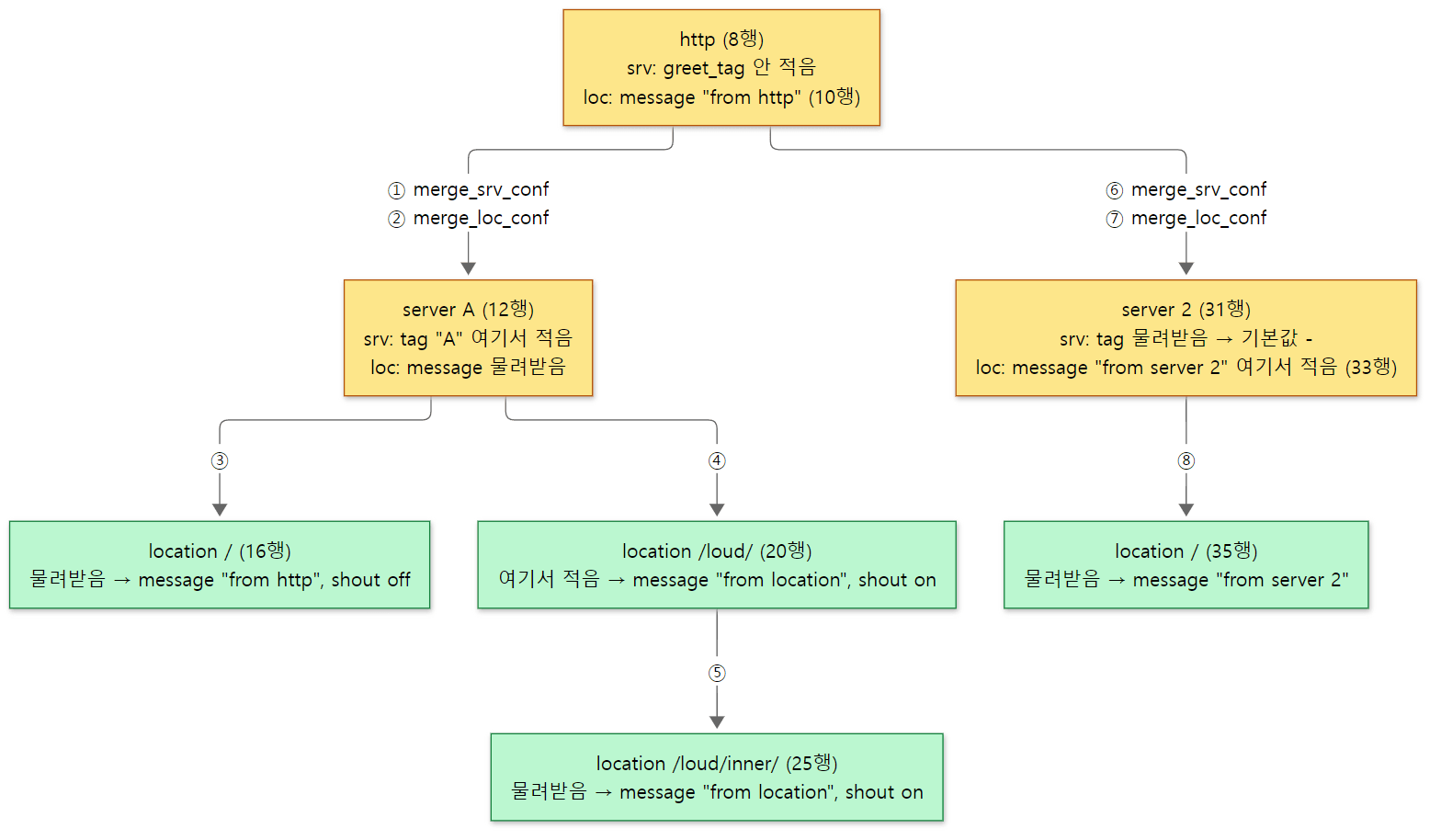 동그라미 번호가 merge 로그의 순서입니다. 칸 안의 '여기서 적음/물려받음'은 merge 로그에서, 최종 값은 아래 curl 출력에서 가져왔습니다.
병합 중에도 ctx->srv_conf·ctx->loc_conf 를 지금 합치는 server·location 의 것으로 바꿔 둡니다(582·596·649행). 병합 함수 안에서 ngx_http_conf_get_module_*_conf(cf, …) 로 다른 모듈의 같은 층 설정을 꺼내 볼 수 있게 하려는 것입니다.
병합 함수의 모양: "안 적었으면 부모 것, 부모도 안 적었으면 기본값"
모듈의 병합 함수는 대부분 매크로 몇 줄입니다.
#define ngx_conf_merge_value(conf, prev, default)                            \
    if (conf == NGX_CONF_UNSET) {                                            \
        conf = (prev == NGX_CONF_UNSET) ? default : prev;                    \
    }
src/core/ngx_conf_file.h 209–212행
3절에서 create_*_conf 가 필드를 NGX_CONF_UNSET 으로 채워 두어야 한다고 한 이유가 여기서 드러납니다. "안 적음"을 알아볼 수 있어야 부모 값을 받을지 정할 수 있습니다. 문자열은 data == NULL 로 판단하는 ngx_conf_merge_str_value(244–253행), 크기·시간·버퍼 수 같은 타입마다 짝이 되는 매크로가 있습니다.
ngx_http_core_module 의 병합 함수 ngx_http_core_merge_loc_conf() 는 3814행부터 4103행까지 300줄 가까이 되는데, 대부분이 이런 줄입니다.
ngx_conf_merge_value(conf->sendfile, prev->sendfile, 0);
src/http/ngx_http_core_module.c 3956행
기본값은 이 줄의 세 번째 인자입니다. 문서를 찾지 않아도 소스에서 기본값을 확인하는 방법이 이것입니다. 몇 개를 뽑아 보면 이렇습니다.
| 디렉티브 | 병합 줄의 기본값 | 위치 | 소스에 든 conf/nginx.conf 에 적힌 값 |
|---|---|---|---|
sendfile |
0 (off) |
ngx_http_core_module.c 3956행 | sendfile on; (27행) |
keepalive_timeout |
75000 ms (75초) |
3988–3989행 | keepalive_timeout 65; (31행) |
root |
"html" (prefix 기준 경로) |
3823–3837행 | location 안에 root html; |
sendfile_max_chunk |
2 * 1024 * 1024 (2MB) |
3957–3958행 | 없음 |
sendfile 이 기본으로 꺼져 있는데도 "nginx 는 sendfile 을 쓴다"고 알려진 것은, 함께 배포되는 예시 설정 파일에 sendfile on; 이 적혀 있기 때문입니다. 설정을 처음부터 손으로 쓰면 꺼진 채로 돕니다. keepalive_timeout 도 예시 파일의 65초는 적어 둔 값이고, 지우면 75초가 됩니다. root 는 단순한 매크로 대신 직접 쓴 코드입니다 — alias 와 변수가 든 경로(root_lengths·root_values)를 한 묶음으로 물려받아야 하고, 부모에도 없으면 "html" 을 prefix 기준 전체 경로로 바꿔 넣기 때문입니다(3823–3837행).
예제 2 이어서: 요청이 받은 값
같은 설정으로 nginx 를 띄우고 location 마다 요청했습니다.
=== 5. curl: merged values per location ===
http://127.0.0.1:8080/               tag=A (srv_conf from line 12), message="from http" shout=off (loc_conf from line 16)
http://127.0.0.1:8080/loud/          TAG=A (SRV_CONF FROM LINE 12), MESSAGE="FROM LOCATION" SHOUT=ON (LOC_CONF FROM LINE 20)
http://127.0.0.1:8080/loud/inner/    TAG=A (SRV_CONF FROM LINE 12), MESSAGE="FROM LOCATION" SHOUT=ON (LOC_CONF FROM LINE 25)
http://127.0.0.1:8081/               tag=- (srv_conf from line 31), message="from server 2" shout=off (loc_conf from line 35)
/(16행)는 아무것도 적지 않았지만 10행의"from http"를 받았습니다. 8행(http) → 12행(server A 층) → 16행 두 단계를 거쳐 내려왔습니다./loud/inner/(25행)도 아무것도 적지 않았지만/loud/에 적은"from location"과shout on을 받았습니다. location 안의 location 은 바깥 location 을 부모로 합칩니다.- 8081 의
/는 33행 — server 블록에 적은greet_message— 를 받았습니다. 위에서 말한 대로 그 값은 server 층의 loc_conf 에 들어가 있다가 35행 location 으로 내려왔습니다.greet_tag는 http 에도 이 server 에도 없어 기본값"-"입니다.
shout 이 켜진 곳은 줄 전체를 대문자로 바꿔 찍게 만들었습니다(예제 모듈의 동작입니다).
요청 때는 병합하지 않습니다
요청이 어느 location 으로 갈지 정해지면 nginx 는 그 location 의 이미 합쳐진 배열을 요청에 걸 뿐입니다. 요청 구조체를 만들 때는 기본 server 의 배열을 걸고(ngx_http_request.c 601–603행), location 을 찾은 뒤에는 찾은 location 의 것으로 바꿉니다.
        if (len == (size_t) node->len) {

            if (node->exact) {
                r->loc_conf = node->exact->loc_conf;
                return NGX_OK;

            } else {
                r->loc_conf = node->inclusive->loc_conf;
                return NGX_AGAIN;
            }
        }
src/http/ngx_http_core_module.c 1598–1608행
node->exact->loc_conf 는 5절에서 본 clcf->loc_conf = ctx->loc_conf; 로 저장해 둔 그 배열입니다. 포인터 하나를 바꾸는 것으로 모든 모듈의 location 설정이 한꺼번에 바뀝니다. 그 뒤 모듈은 ngx_http_get_module_loc_conf(r, 모듈) — r->loc_conf[모듈.ctx_index] — 로 자기 값을 꺼냅니다. 예제의 ngx_http_greet_handler() 가 그렇게 했습니다. location 을 찾는 트리와 이 함수 자체는 9편에서 자세히 봅니다.
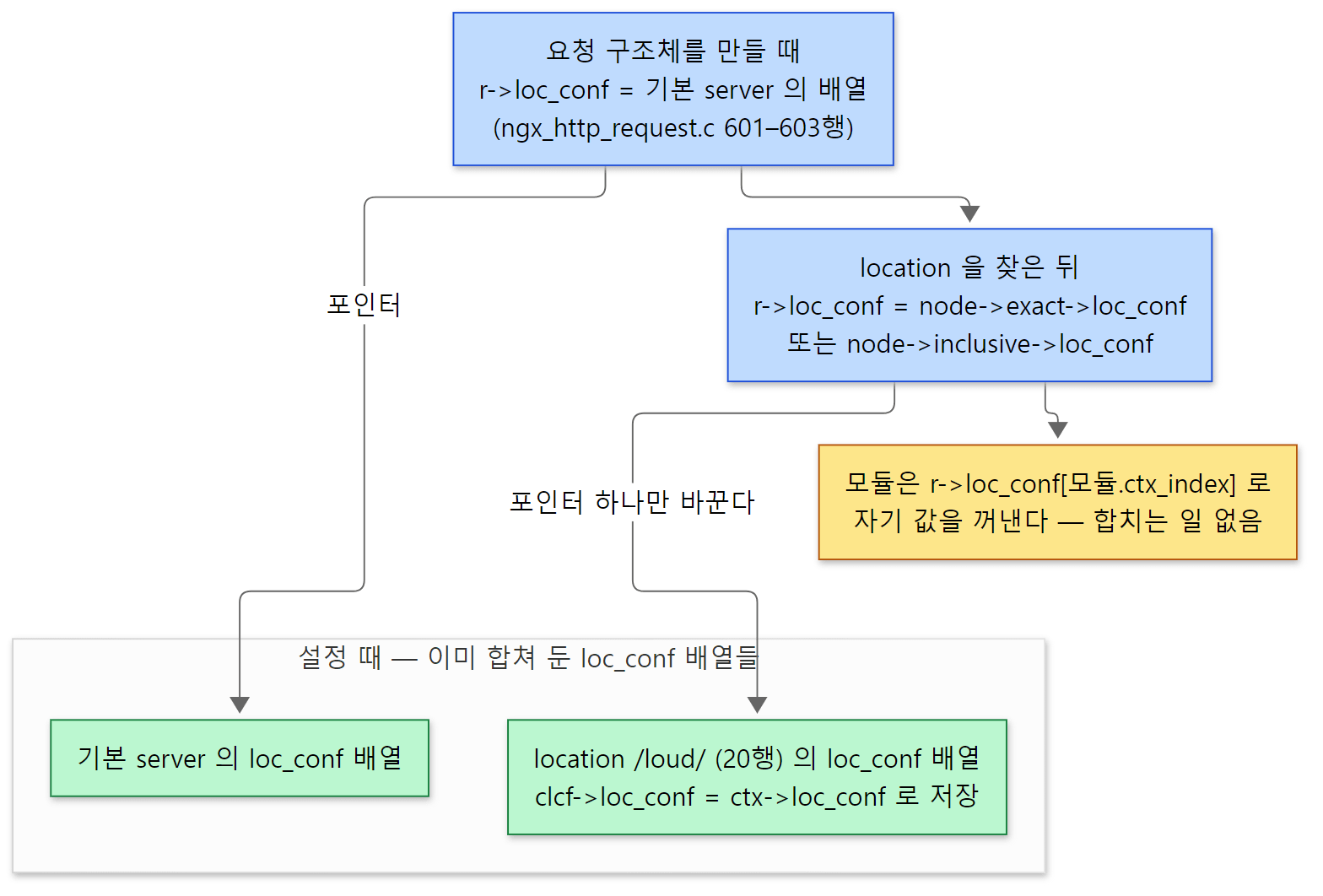 요청은 합쳐진 배열을 가리키는 포인터만 바꿉니다. /loud/ 는 예제 2의 location 을 예로 든 것입니다.
헷갈리기 쉬운 곳: httpd 는 요청 때도 합칩니다
httpd 7편에서 본 httpd 는 서버 설정은 기동 때 합치지만, 디렉터리 설정(<Directory>·<Location>·.htaccess)은 요청마다 ap_merge_per_dir_configs() 로 합칩니다. 어느 구역들이 걸리는지가 요청 경로에 따라 여러 개 겹치고, .htaccess 는 요청 때 읽기 때문입니다. nginx 의 location 은 요청 하나에 하나만 고르고(겹쳐 적용하지 않음), 중첩은 설정 파일의 블록 구조로만 생기므로, 모든 경우의 병합 결과를 기동 때 미리 만들어 둘 수 있습니다. 대신 nginx 에는 .htaccess 같은 "요청 때 읽는 설정"이 없습니다. 같은 이유로, 디렉티브 값을 바꾸면 reload 로 새 cycle 을 만들어 병합을 처음부터 다시 해야 합니다(6편).
더 깊이 들어가면
- events·stream·mail 의 블록 처리:
ngx_events_block()(src/event/ngx_event.c, 971행 부근ngx_count_modules),ngx_stream_block()(src/stream/ngx_stream.c117행 부근),ngx_mail_block()(src/mail/ngx_mail.c94행 부근). 모양은ngx_http_block()과 같습니다. ngx_conf_t의handler/handler_conf—types {}블록처럼 디렉티브 표 대신 함수 하나가 모든 줄을 받는 경우: ngx_conf_file.c 298–322행- 나머지 slot 함수(
ngx_conf_set_size_slot,_msec_slot,_enum_slot,_bitmask_slot,_keyval_slot…)와post검사(ngx_conf_check_num_bounds,ngx_conf_deprecated):src/core/ngx_conf_file.c1098행부터 include와-g로 준 설정:ngx_conf_include(),ngx_conf_param()— 4편- 변수가 든 디렉티브 값(
ngx_http_complex_value_t,ngx_http_set_complex_value_slot):src/http/ngx_http_script.c— 스크립트 엔진은 9편 - location 을 트리로 만드는
ngx_http_init_locations()·ngx_http_init_static_location_trees(): ngx_http.c 670행부터 — 9편 upstream {}블록과 그 안의 문맥 비트NGX_HTTP_UPS_CONF:ngx_http_upstream()(src/http/ngx_http_upstream.c) — 11편
정리
| 개념 | 한 줄 요약 |
|---|---|
| 모듈 | ngx_module_t 구조체 변수 하나. type 으로 종류, ctx 로 종류별 콜백, commands 로 디렉티브 표를 가리킨다 |
objs/ngx_modules.c |
configure 가 쓰는 모듈 주소 배열. 이 순서가 디렉티브 검색·콜백 호출의 순서. 이 빌드는 정적 모듈 89개 |
index / ctx_index |
모든 모듈 사이의 번호(cycle->conf_ctx 칸) / 같은 종류 사이의 번호(main_conf[]·srv_conf[]·loc_conf[] 칸) |
load_module |
dlopen 한 .so 의 ngx_modules[] 를 ngx_add_module() 로 끼운다. 버전·서명이 같아야 하고, 블록보다 앞에 적어야 한다(modules_used) |
ngx_command_t |
이름, 문맥·인자 비트(type), 처리 함수(set), 배열 고르기(conf), 필드 고르기(offset) |
| slot 함수 | ngx_conf_set_flag_slot 등. 구조체를 모른 채 conf + offset 에 쓴다. 필드가 UNSET 이 아니면 "is duplicate" |
ngx_conf_handler() |
모든 모듈의 디렉티브를 차례로 비교. 모듈 종류 → 문맥 비트 → 인자 개수 → conf 포인터 → set |
ngx_http_conf_ctx_t |
main_conf·srv_conf·loc_conf 세 포인터 배열. 블록마다 하나. 아래 블록은 위 배열을 공유하고 자기 층 것만 새로 만든다 |
| 콜백 순서 | 블록을 열 때 create → } 까지 다 읽고 init_main_conf·merge → postconfiguration |
| 병합 | 설정 때 모듈마다 server → location → 안쪽 location 순으로 한 단계씩. 기본값은 ngx_conf_merge_* 의 세 번째 인자 |
| 요청 때 | 병합하지 않는다. 찾은 location 의 clcf->loc_conf 배열을 r->loc_conf 에 걸 뿐 |
다음에 볼 것
설정을 다 읽은 nginx 는 이제 마스터 프로세스가 되어 워커들을 띄웁니다. 이 글에서 "프로세스 수명 콜백"으로 지나친 init_process 가 불리는 자리, nginx -s reload 가 이 글의 병합까지를 새 cycle 에서 처음부터 다시 하고 옛 워커를 조용히 내리는 순서를 봅니다. 6편: 마스터와 워커 — 프로세스, 시그널, 무중단 reload에서 이어집니다.
httpd 연재의 6편: 모듈과 훅과 7편: 설정 파일과 디렉티브는 같은 문제의 다른 답입니다. 모듈이 구조체 하나라는 점, 디렉티브 표(command_rec ↔ ngx_command_t)와 문맥별 설정 생성·병합 콜백을 둔다는 점은 놀랄 만큼 닮았습니다. 다른 곳은 둘입니다. httpd 는 모듈이 훅에 함수를 거는 방식으로 요청 처리에 끼고, nginx 는 postconfiguration 에서 phase 배열과 필터 사슬에 직접 끼웁니다(9·10편). 그리고 httpd 는 디렉터리 설정을 요청 때 합치고, nginx 는 기동 때 모두 합쳐 둡니다.