이 글에서 다루는 것
"MariaDB 소스 파헤치기" 연재의 세 번째 글입니다. 2편에서는 서버 계층(sql/)과 스토리지 엔진(storage/)이 handler·handlerton 이라는 경계로 나뉘고, 쿼리 하나가 연결 → THD(연결 하나의 모든 상태를 담는 객체) → 파싱 → 준비 → 최적화 → 실행 → handler → 엔진을 지나간다는 지도를 그렸습니다. 이번 글은 2편 지도의 맨 앞, 쿼리가 오기도 전의 구역을 확대합니다. mariadbd 를 켜고 오류 로그에 ready for connections. 가 찍히기까지, 그리고 mariadb-admin shutdown 으로 꺼지기까지입니다. 지도 맨 아래 칸인 엔진이 서버에 붙는 순간(handlerton 이 채워지는 순간)도 여기서 봅니다.
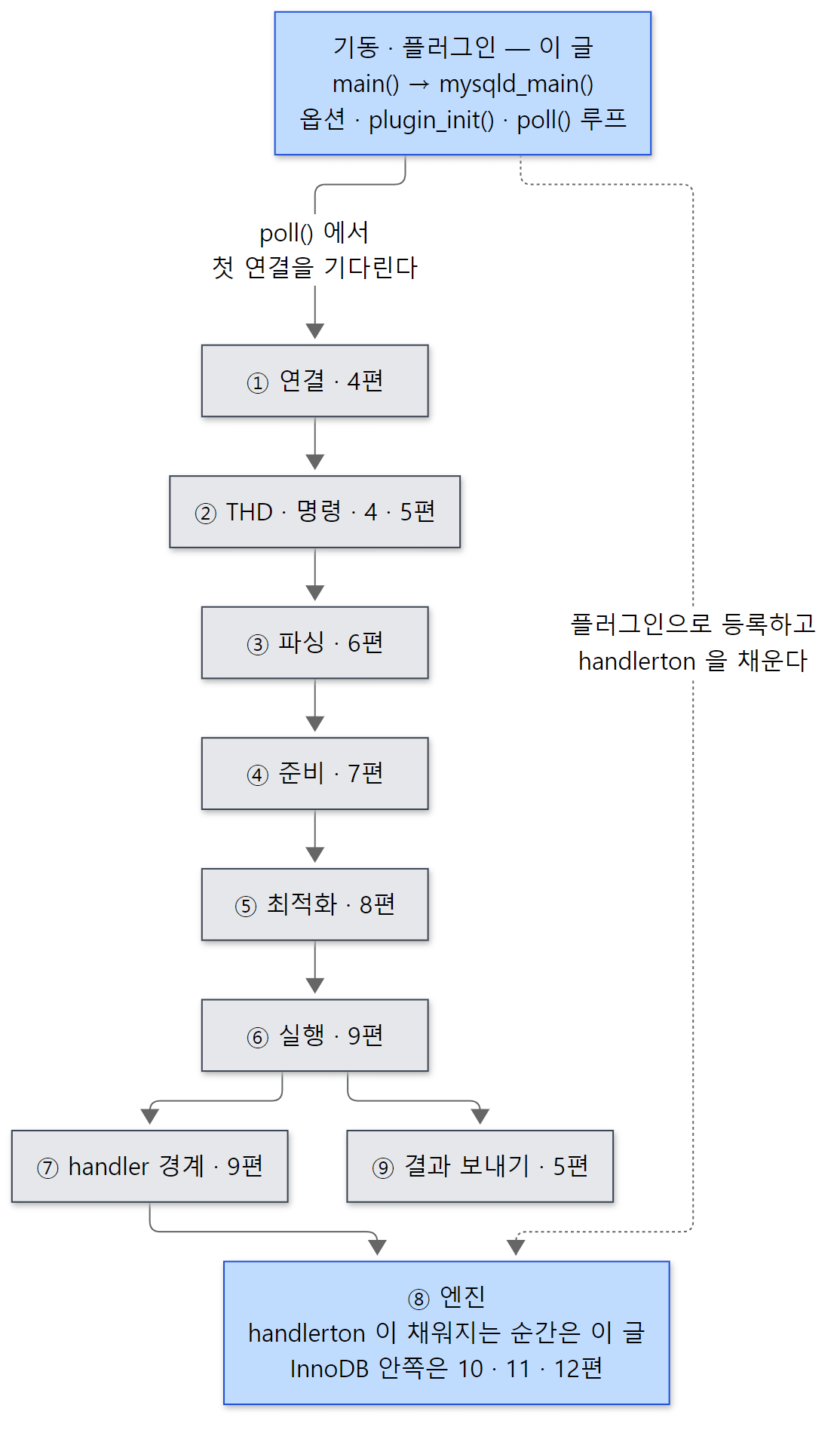 파란 칸이 이 글의 범위입니다. 2편 지도에서 회색이던 기동·플러그인 칸을 이번에 확대합니다. 회색 칸은 4편부터 차례로 확대합니다.
답하려는 질문은 네 가지입니다.
mariadbd를 켜면 어떤 순서로 무엇이 준비되고, 왜 그 순서인가my.cnf의 한 줄, 명령줄의--max-connections=200,SET GLOBAL은 소스의 어디서 같은 변수에 닿는가- InnoDB 도 "플러그인"이라는데, 플러그인은 무엇이고 서버는 그것을 어떻게 찾아 초기화하는가
- 엔진은
handlerton을 어디서 채우고, 종료할 때는 어떤 순서로 정리되는가
| 항목 | 내용 |
|---|---|
| 대상 | MariaDB Server |
| 버전 | 13.2.0 (main, alpha) |
| 커밋 | c894d97781 (2026-10-19) |
| 주로 읽는 파일 | sql/main.cc, sql/mysqld.cc, sql/sql_plugin.cc, sql/handler.cc, sql/set_var.cc, sql/sys_vars.cc, include/mysql/plugin.h, storage/innobase/handler/ha_innodb.cc |
글에 나오는 줄 번호는 모두 이 커밋 기준입니다. 같은 커밋의 소스를 받고 예제용 도커 이미지를 만드는 방법은 1편에 있습니다. sql/mysqld.cc 는 10,607줄, sql/sql_plugin.cc 는 4,646줄입니다. 이 글은 기동과 플러그인의 큰 줄기만 따라갑니다. 빼놓은 것은 글 끝의 "이 글에서 뺀 것"에 이름과 위치만 적어 두었습니다.
먼저 알아 둘 말
mysqld_main() 은 서버의 진짜 main 입니다. sql/main.cc 의 main() 은 이 함수를 부르기만 합니다. 서버 본체(sql/ 의 거의 모든 파일)는 라이브러리로 묶이고 main.cc 만 따로 실행 파일이 되기 때문입니다. 실행 파일 이름은 mariadbd 지만 소스 파일과 함수 이름에는 옛 이름 mysqld 가 그대로 남아 있습니다.
옵션 그룹과 load_defaults. my.cnf 는 [mysqld], [mariadbd], [client-server] 같은 대괄호 그룹으로 나뉩니다. load_defaults 는 서버가 읽을 그룹의 줄을 모아 명령줄 인자(argv)처럼 --socket=/tmp/mariadb.sock 꼴로 바꿔 진짜 명령줄 앞에 끼워 넣는 mysys/ 의 함수입니다. 그래서 서버 안에서는 설정 파일과 명령줄을 같은 코드(handle_options())로 읽습니다.
시스템 변수(sys_var) 는 SHOW VARIABLES 에 나오는 max_connections, innodb_buffer_pool_size 같은 것입니다. 서버의 것은 sql/sys_vars.cc 에 Sys_var_ulong, Sys_var_enum 같은 클래스의 전역 객체로 하나씩 선언되어 있고, 플러그인의 것은 플러그인이 올라올 때 만들어집니다. 변수 하나가 곧 명령줄 옵션 하나입니다(2절).
플러그인은 서버 실행 파일을 고치지 않고 끼워 넣을 수 있는 부품입니다. 스토리지 엔진, information_schema 테이블, 인증 방식, 감사(audit) 로그, 자료형, SQL 함수가 모두 플러그인입니다. 플러그인은 st_maria_plugin 이라는 구조체 하나로 자신을 소개합니다. mariadbd 안에 처음부터 묶인 정적(built-in) 플러그인과, .so 파일로 있다가 INSTALL SONAME 이나 --plugin-load-add 로 올라오는 동적 플러그인이 있습니다.
handlerton 은 2편에서 본 대로 스토리지 엔진 하나당 하나 있는 구조체로, 그 엔진의 commit·rollback·create(테이블을 여는 handler 객체 만들기) 같은 함수 포인터의 표입니다. 이 글에서는 그 표가 누가 만들고 누가 채우는지를 봅니다. 엔진도 플러그인이므로 "엔진 플러그인을 초기화한다" = "handlerton 을 만들어 엔진에게 채우게 한다" 입니다.
오류 로그는 log-error 로 정한 파일(이 연재의 예제에서는 /tmp/mariadbd.err)입니다. 이름과 달리 오류만이 아니라 기동·종료 과정이 [Note] 로 찍힙니다. 이 글에서는 이 로그의 줄 하나하나를 소스의 자리와 이어 봅니다.
1. main() 에서 첫 연결까지 — 한눈에 보는 순서
main() 은 정말로 한 줄짜리입니다.
int main(int argc, char **argv)
{
#ifdef _WIN32
  return mysqld_win_main(argc, argv);
#else
  return mysqld_main(argc, argv);
#endif
}
mysqld_main() 은 sql/mysqld.cc 의 6181–6634행, 450줄쯤 됩니다. 순서를 그림으로 먼저 봅니다.
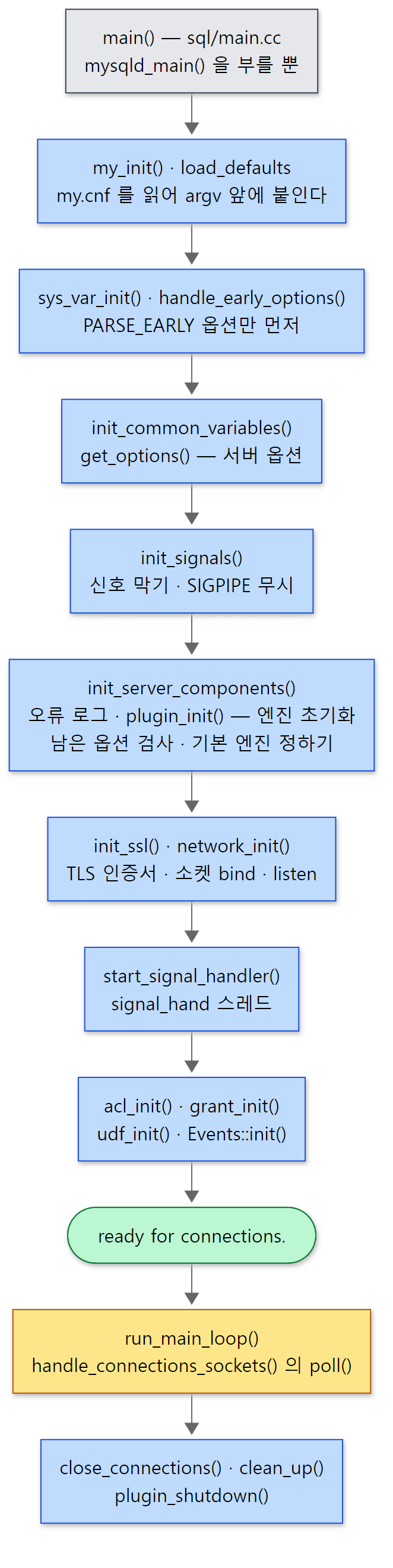 파란 상자가 준비 단계, 노란 상자에서 main 스레드가 서버가 사는 내내 머뭅니다.
가운데 토막을 소스로 보면 이렇습니다. 앞쪽의 init_common_variables()(6354행)와 init_signals()(6357행)를 지나 엔진을 켜는 곳부터입니다.
  if (init_server_components())
    unireg_abort(1);

  init_ssl();
  network_init();
  // ... (WSREP 복구 블록 생략)
  /*
    init signals
    After this we can't quit by a simple unireg_abort
  */
  start_signal_handler();                               // Creates pidfile

  if (mysql_rm_tmp_tables() || acl_init(opt_noacl) ||
      my_tz_init((THD *)0, default_tz_name, opt_bootstrap))
    unireg_abort(1);

  if (!opt_noacl)
    (void) grant_init();

  udf_init();
unireg_abort(1) 은 "기동을 포기하고 끝낸다"는 뜻입니다(오류 로그에 [ERROR] Aborting 이 찍히는 곳). 이 토막에서 읽을 수 있는 순서는 다음과 같습니다.
init_server_components()— 오류 로그 파일을 열고(5266–5299행), 메타데이터 잠금·테이블 정의 캐시 같은 서버 부품을 만들고,plugin_init()으로 모든 플러그인을 초기화합니다. InnoDB 의 버퍼 풀 할당과 크래시 복구가 여기서 끝납니다(4·5절).init_ssl(),network_init()— TLS 를 준비하고 3306 포트와 유닉스 소켓을bind()·listen()합니다.start_signal_handler()—SIGTERM·SIGHUP을 받아 줄 전용 스레드를 띄웁니다(6절). 주석대로 이 뒤로는unireg_abort()로 간단히 끝낼 수 없습니다.acl_init(),grant_init()— 권한 테이블(mysql.global_priv등)을 메모리로 읽습니다. 7편에서 이 메모리를 씁니다. 이어udf_init(),Events::init()(6477행)이 돕니다.
그다음 6543–6560행에서 ready for connections. 를 찍고, 6590행의 run_main_loop() 에서 handle_connections_sockets() 의 poll() 로 들어갑니다. 끄라는 신호가 와서 이 함수가 돌아오면 6605행부터 정리가 시작됩니다(7절).
예제 1: 오류 로그로 기동 순서 보기
이 글의 예제는 모두 기준 커밋(c894d97781)을 그대로 Debug 빌드한 MariaDB 13.2.0(13.2.0-MariaDB-debug)으로 도커 컨테이너(Ubuntu 24.04)에서 실행했습니다. 빈 데이터 디렉터리를 만들고 서버를 띄운 뒤 오류 로그를 그대로 찍었습니다. 컨테이너 안의 도우미 lab-init·lab-start·lab-stop 은 1편에서 설명했습니다.
# 이 글을 위해 쓴 예제입니다 (MariaDB 의 소스가 아닙니다)
set -e
lab-init
lab-start
echo "===== 1. error log right after startup ====="
cat /tmp/mariadbd.err
echo "===== 2. TLS is on, with a certificate made at startup ====="
mariadb -t -e "SELECT @@have_ssl, @@ssl_cert, @@ssl_key;
               SHOW GLOBAL STATUS WHERE Variable_name IN ('Ssl_server_not_before','Ssl_server_not_after')"
echo "===== 3. shutdown with mariadb-admin (COM_SHUTDOWN) ====="
lab-stop
sed -n '/Normal shutdown/,$p' /tmp/mariadbd.err
echo "===== 4. shutdown with kill -TERM (signal_hand thread) ====="
lab-start
kill -TERM "$(cat /tmp/mariadbd.pid)"
while [ -e /tmp/mariadbd.pid ] && kill -0 "$(cat /tmp/mariadbd.pid)" 2>/dev/null; do sleep 0.2; done
sed -n '/Normal shutdown/,$p' /tmp/mariadbd.err
[예제 ex/u03-startup-log/run.sh]
1번 묶음의 출력입니다. InnoDB 등의 [Note] 줄 몇 개를 ... 로 줄였습니다.
===== 1. error log right after startup =====
2026-11-07  3:43:21 0 [Note] Starting MariaDB 13.2.0-MariaDB-debug source revision  server_uid vBnYwkGsBSVPH/FWuKqBU0vfwIc= as process 68
2026-11-07  3:43:21 0 [Note] Help others discover MariaDB. Star it on GitHub: https://github.com/MariaDB/server
...
2026-11-07  3:43:21 0 [Note] InnoDB: innodb_buffer_pool_size_max=8388608m, innodb_buffer_pool_size=128m
2026-11-07  3:43:21 0 [Note] InnoDB: Completed initialization of buffer pool
2026-11-07  3:43:21 0 [Note] InnoDB: Buffered log writes (block size=512 bytes)
2026-11-07  3:43:21 0 [Note] InnoDB: End of log at LSN=52261
...
2026-11-07  3:43:21 0 [Note] InnoDB: log sequence number 52261; transaction id 14
2026-11-07  3:43:21 0 [Note] InnoDB: Loading buffer pool(s) from /var/lib/mariadb-lab/ib_buffer_pool
2026-11-07  3:43:21 0 [Note] Plugin 'FEEDBACK' is disabled.
2026-11-07  3:43:21 0 [Note] InnoDB: Buffer pool(s) load completed at 261107  3:43:21
2026-11-07  3:43:26 0 [Note] Server socket created on IP: '0.0.0.0', port: '3306'.
2026-11-07  3:43:26 0 [Note] Server socket created on IP: '::', port: '3306'.
2026-11-07  3:43:26 0 [Note] mariadbd: Event Scheduler: Loaded 0 events
2026-11-07  3:43:26 0 [Note] mariadbd: ready for connections.
Version: '13.2.0-MariaDB-debug'  socket: '/tmp/mariadb.sock'  port: 3306  Source distribution
시각, server_uid, 프로세스 번호, LSN(52261 — redo 로그에 쓴 위치를 나타내는 번호, 12편)은 실행마다 다를 수 있습니다. 줄마다 소스의 자리를 붙이면 다음과 같습니다.
| 오류 로그 | 찍는 곳 | 1절의 단계 |
|---|---|---|
Starting MariaDB 13.2.0-MariaDB-debug … |
init_server_components() — 오류 로그를 연 직후(5313–5316행) |
1 |
Help others discover MariaDB … |
바로 아래 5317–5320행. SERVER_MATURITY_LEVEL 이 stable 보다 낮을 때만 — 이 커밋은 alpha 라서 찍힙니다 |
1 |
InnoDB: … 여러 줄, 끝의 log sequence number 52261; transaction id 14 |
plugin_init() → InnoDB 의 innodb_init() → srv_start(). 마지막 줄은 srv_start() 의 끝(srv0start.cc 2010–2017행) |
1 |
Plugin 'FEEDBACK' is disabled. |
플러그인 옵션을 읽는 test_plugin_options()(sql_plugin.cc 4393–4398행) |
1 |
Server socket created on IP: … |
network_init() → activate_tcp_port()(2591행) |
2 |
Event Scheduler: Loaded 0 events |
Events::init() 이 부르는 Events::load_events_from_db()(events.cc 1288행) |
4 |
ready for connections. |
mysqld_main() 6543–6560행, 메시지 틀은 ER_STARTUP |
끝 |
순서가 1절의 그림과 그대로 맞습니다. 특히 InnoDB 의 줄이 전부 Server socket created 보다 먼저 나옵니다.
헷갈리기 쉬운 곳: 크래시 복구 중에는 포트가 아직 없습니다
소켓을 만드는 network_init() 은 init_server_components() 가 끝난 뒤에 불립니다. InnoDB 의 크래시 복구(12편)는 srv_start() 안, 즉 init_server_components() 안에서 돌기 때문에, 복구가 오래 걸리는 동안 3306 포트는 열려 있지 않습니다. 이때 클라이언트가 붙으면 "기다려 달라"는 응답이 아니라 연결 자체가 거절됩니다(포트가 없으니까요). 반대로 listen() 뒤부터 ready for connections. 까지(권한 테이블 읽기 등)는 포트가 열려 있지만 아직 accept() 하는 루프가 돌지 않으므로, 그 사이의 연결은 커널의 대기열(back_log)에서 기다립니다. 모니터링에서 "포트가 열렸다"를 "서버가 준비됐다"로 쓰면 이 짧은 틈이 생깁니다.
헷갈리기 쉬운 곳: 로그의 몇 초 공백은 TLS 키를 만드는 시간입니다
위 로그에서 Buffer pool(s) load completed(3:43:21)와 Server socket created(3:43:26) 사이가 5초 비어 있습니다. 공백의 길이는 실행마다 다릅니다(다시 돌렸을 때는 2초, 4초였습니다). 처음에는 Debug 빌드가 느려서인 줄 알았는데, 같은 이미지에서 TLS 를 끄는 --skip-ssl 로 띄우면 두 줄이 같은 초에 찍혀 공백이 사라졌습니다. 이 판의 서버는 opt_use_ssl 의 기본값이 1이고(mysqld.cc 1672행), 인증서·키 파일을 주지 않으면 기동할 때마다 4096비트 RSA 키와 자기 서명 인증서를 새로 만듭니다.
  if (!cert_file && !key_file)
  {
    if (!is_client)
    {
      EVP_PKEY *pkey;
      X509 *x509;
      if (!(pkey= vio_keygen()) || SSL_CTX_use_PrivateKey(ctx, pkey) < 1)
      {
        *error= SSL_INITERR_KEY;
        fprintf(stderr, "SSL error: %s\n", sslGetErrString(*error));
        DBUG_RETURN(1);
      }

      if (!(x509= vio_gencert(pkey)) || SSL_CTX_use_certificate(ctx, x509) < 1)
vio/viosslfactories.c 115–128행
vio_keygen()(50–70행)이 RSA 키를, vio_gencert()(72–105행)가 CN=MariaDB Server, 유효기간 10년(60*60*24*365*10초)짜리 인증서를 만듭니다. RSA 키 생성은 소수를 찾는 일이라 시간이 들쭉날쭉합니다. 예제 1의 2번 묶음에서 확인할 수 있습니다.
===== 2. TLS is on, with a certificate made at startup =====
+------------+------------+-----------+
 @@have_ssl | @@ssl_cert | @@ssl_key |
+------------+------------+-----------+
 YES        | NULL       | NULL      |
+------------+------------+-----------+
+-----------------------+--------------------------+
 Variable_name         | Value                    |
+-----------------------+--------------------------+
 Ssl_server_not_after  | Nov  4 03:43:26 2036 GMT |
 Ssl_server_not_before | Nov  7 03:43:26 2026 GMT |
+-----------------------+--------------------------+
ssl_cert·ssl_key 를 주지 않았는데 have_ssl 이 YES 이고, 인증서의 시작 시각이 바로 그 기동 시각이며 끝은 정확히 10년(3,650일) 뒤입니다. 운영에서 인증서 파일을 지정하면 이 시간은 파일을 읽는 시간으로 줄어듭니다.
2. 옵션과 시스템 변수 — my.cnf 한 줄이 전역 변수가 되기까지
load_defaults — 설정 파일을 명령줄로 바꾸기
mysqld_main() 의 맨 앞입니다.
  orig_argc= argc;
  orig_argv= argv;
  my_defaults_mark_files= TRUE;
  load_defaults_or_exit(MYSQL_CONFIG_NAME, load_default_groups, &argc, &argv);
  // ...
  sys_var_init();
  // ...
  int ho_error= handle_early_options();
load_defaults_or_exit() 가 load_default_groups 의 그룹들 — include/mysqld_default_groups.h 의 "mysqld", "server", "mariadb", "mariadbd", "client-server" 와 판 번호가 붙은 그룹들 — 을 my.cnf 에서 찾아 argv 앞에 붙입니다. my_defaults_mark_files= TRUE 는 "어느 줄이 어느 파일에서 왔는지 표시를 끼워 달라"는 뜻입니다. 정말 그런지 gdb 로 sys_var_init() 에 멈춰 argv 를 찍어 봤습니다(예제 5의 일부, 예제 전체는 5절에서 봅니다).
Breakpoint 1, sys_var_init () at /usr/src/mariadb/sql/set_var.cc:64
64	  DBUG_ENTER("sys_var_init");
#1  0x0000555555f9633d in mysqld_main (argc=11, argv=0x5555589d3f60) at /usr/src/mariadb/sql/mysqld.cc:6224
6224	  sys_var_init();
$1 = 11
$2 = {0x7fffffffef06 "/opt/mariadb/bin/mariadbd", 0x55555773cad0 "----file-marker----", 0x5555589d3e70 "/etc/my.cnf", 0x5555589d3e80 "--socket=/tmp/mariadb.sock", 0x5555589d3ea0 "--port=3306", 0x5555589d3eb0 "--user=root", 0x5555589d3ec0 "--datadir=/var/lib/mariadb-lab", 0x5555589d3ee0 "--log-error=/tmp/mariadbd.err", 0x5555589d3f00 "--pid-file=/tmp/mariadbd.pid", 0x55555773cad0 "----file-marker----", 0x55555773cb3f ""}
main() 에는 인자 없이(argc=1) 띄웠는데 mysqld_main() 의 argc 는 11이 되었습니다. /etc/my.cnf 의 여섯 줄이 --socket=… 꼴로 들어왔고, 그 앞뒤에 ----file-marker---- 와 파일 이름이 끼어 있습니다. 마지막 ----file-marker---- 다음의 빈 문자열("")은 "여기부터는 진짜 명령줄"이라는 표시입니다(my_default.c 48–53행, 470–474행). 이 표시 덕분에 뒤에서 "이 값은 my.cnf 에서 왔다"를 알 수 있습니다.
옵션은 네 번에 나눠 읽습니다
이렇게 만든 argv 는 한 번에 읽히지 않습니다.
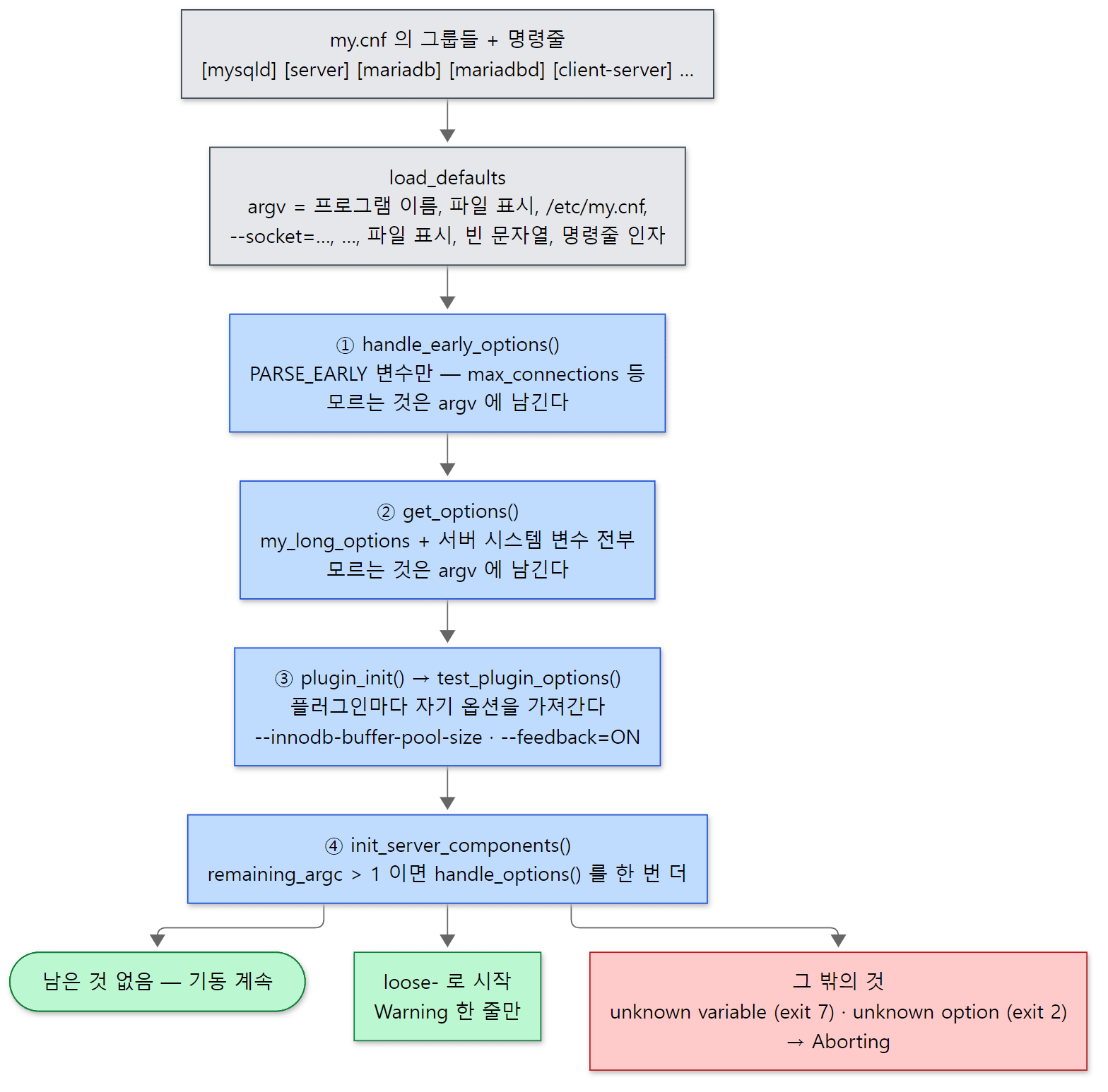 단계마다 모르는 옵션을 버리지 않고
argv 에 남겨 다음 단계로 넘깁니다. 마지막까지 남은 것만 오류입니다.
handle_early_options()(6981행) —PARSE_EARLY표시가 붙은 변수만 읽습니다.performance_schema의 메모리 크기를 정하려면max_connections같은 값을 다른 것보다 먼저 알아야 하기 때문입니다(6252–6270행).get_options()(9188행,init_common_variables()의 4331행에서 부름) —my_long_options[]표와 서버 시스템 변수 전부를 읽습니다. 9203–9204행의 주석이 이유를 말합니다. "Skip unknown options so that they may be processed later by plugins".test_plugin_options()—plugin_init()안에서 플러그인마다 불립니다(4절). InnoDB 가 초기화되기 직전에--innodb-…옵션이 여기서 읽힙니다.- 마지막으로
init_server_components()가 남은 것을 검사합니다.
  /* we do want to exit if there are any other unknown options */
  if (remaining_argc > 1)
  {
    int ho_error;
    struct my_option removed_opts[]=
    // ... (removed_opts[] — 옛 판에서 없어진 옵션 표 생략)
    if ((ho_error= handle_options(&remaining_argc, &remaining_argv, removed_opts,
                                  mysqld_get_one_option))) {
#ifdef WITH_WSREP
      Wsrep_server_state::instance().disable_node_reset();
#endif

      unireg_abort(ho_error);
    }
removed_opts[] 는 MySQL 5.6 이나 옛 MariaDB 에 있다가 없어진 옵션(innodb-file-format, 13.0 에서 없어진 secure-auth 등)의 표입니다. 이 표의 옵션은 오류 대신 경고로 넘어가고, 표에도 없는 것이 남아 있으면 handle_options() 가 unknown variable 오류를 냅니다(my_getopt.c 412–421행). 값이 붙은 옵션(= 이 있는 것)은 EXIT_UNKNOWN_VARIABLE(7), 값 없는 옵션은 unknown option 과 EXIT_UNKNOWN_OPTION(2)으로 끝납니다. 앞에 loose- 를 붙이면 같은 자리에서 오류 대신 경고만 남깁니다(415–419행).
예제 2: 옵션 이름을 틀리면 — InnoDB 는 이미 켜진 뒤입니다
innodb-buffer-pool-size 를 sise 로 잘못 친 경우, 같은 오타에 loose- 를 붙이고 --validate-config(설정 검사만 하고 끝내기)를 준 경우, 그리고 InnoDB 를 끄는 --skip-innodb 를 줬을 때를 비교했습니다.
# 이 글을 위해 쓴 예제입니다 (MariaDB 의 소스가 아닙니다)
lab-init
try() {
  echo "===== mariadbd $* ====="
  rm -f /tmp/mariadbd.err
  timeout 120 mariadbd "$@" > /tmp/out.txt 2>&1
  echo "exit code: $?"
  cat /tmp/mariadbd.err /tmp/out.txt 2>/dev/null | sed -E 's/^[0-9-]+ +[0-9:]+ [0-9]+ //' | grep -v "^\[Note\] InnoDB: \(!!!\|Compressed\|Number of\|Using\|Setting file\|File './ibtmp1'\|Buffer pool(s) load\|Loading buffer\|Opened 3\|128 rollback\|Completed init\|Buffered log\|End of log\)\|O_TMPFILE\|Help others" | head -20
}
try --innodb-buffer-pool-sise=64M
try --loose-innodb-buffer-pool-sise=64M --validate-config
try --skip-innodb
[예제 ex/u03-options/run.sh]
===== mariadbd --innodb-buffer-pool-sise=64M =====
exit code: 7
[Note] Starting MariaDB 13.2.0-MariaDB-debug source revision  server_uid Qpcwx0GWB78W6kgk4K2JAgHnRoI= as process 75
[Note] InnoDB: innodb_buffer_pool_size_max=8388608m, innodb_buffer_pool_size=128m
[Note] InnoDB: log sequence number 52261; transaction id 14
[Note] Plugin 'FEEDBACK' is disabled.
[ERROR] mariadbd: unknown variable 'innodb-buffer-pool-sise=64M'
[ERROR] Aborting
===== mariadbd --loose-innodb-buffer-pool-sise=64M --validate-config =====
exit code: 0
[Warning] mariadbd: unknown variable 'loose-innodb-buffer-pool-sise=64M'
Configuration is valid, but warnings were reported; see above.
===== mariadbd --skip-innodb =====
exit code: 1
[Note] Starting MariaDB 13.2.0-MariaDB-debug source revision  server_uid Qpcwx0GWB78W6kgk4K2JAgHnRoI= as process 100
[Note] Plugin 'InnoDB' is disabled.
[Note] Plugin 'FEEDBACK' is disabled.
[ERROR] Unknown/unsupported storage engine: InnoDB
[ERROR] Aborting
InnoDB 의 잡다한 [Note] 줄은 grep -v 로 지웠습니다. server_uid, 프로세스 번호, LSN 은 실행마다 다를 수 있습니다.
- 오타(첫 묶음):
unknown variable오류보다 InnoDB 의log sequence number … transaction id줄이 먼저 나옵니다. 4단계 검사가plugin_init()뒤에 있으므로, 버퍼 풀을 잡고 redo 로그를 읽은 뒤에야 오타를 알아챕니다. 종료 코드 7 은 위에서 본EXIT_UNKNOWN_VARIABLE입니다. 데이터가 큰 서버에서my.cnf를 고친 뒤 재시작했다가 오타로 실패하면, 복구 시간만큼 기다린 끝에 실패하는 셈입니다. loose-+--validate-config(둘째 묶음): 경고 한 줄로 끝나고 종료 코드는 0 입니다.--validate-config이면get_options()가opt_abort= 1로 바꾸고(9211–9214행),plugin_init()이PLUGIN_INIT_SKIP_INITIALIZATION표시를 받아 옵션만 읽고 초기화는 하지 않습니다(5618–5620행). 그래서 InnoDB 줄이 하나도 없습니다.my.cnf를 고친 뒤에는 이 옵션으로 먼저 검사하는 편이 빠릅니다. 다만loose-가 붙으면 검사도 경고로만 끝나므로, 오타를 잡으려면loose-없이 검사해야 합니다.--skip-innodb(셋째 묶음):Plugin 'InnoDB' is disabled.뒤에Unknown/unsupported storage engine: InnoDB로 실패합니다. 4절에서 봅니다.
시스템 변수 객체 하나 = 옵션 하나 = 전역 변수 하나
sql/sys_vars.cc 의 max_connections 선언입니다.
// Default max_connections of 151 is larger than Apache's default max
// children, to avoid "too many connections" error in a common setup
static Sys_var_on_access_global<Sys_var_ulong,
                                PRIV_SET_SYSTEM_GLOBAL_VAR_MAX_CONNECTIONS>
Sys_max_connections(
       "max_connections", "The number of simultaneous clients allowed",
       PARSED_EARLY GLOBAL_VAR(max_connections), CMD_LINE(REQUIRED_ARG),
       VALID_RANGE(10, 100000),
       DEFAULT(MAX_CONNECTIONS_DEFAULT), BLOCK_SIZE(1), NO_MUTEX_GUARD,
       NOT_IN_BINLOG, ON_CHECK(0), ON_UPDATE(fix_max_connections));
변수 이름, 설명, 범위(10~100000), 기본값(MAX_CONNECTIONS_DEFAULT = 151, sql/sql_const.h 168행), 그리고 GLOBAL_VAR(max_connections) — 값이 들어 있는 C++ 전역 변수 — 를 한꺼번에 적습니다. 위의 주석이 기본값 151 의 이유를 말하는데, Apache httpd 의 기본 자식 프로세스 수보다 커서 흔한 구성에서 "too many connections" 가 나지 않게 하려는 것입니다. httpd 의 자식 프로세스 수는 httpd 8편에서 본 MPM 이 정합니다.
이 객체의 생성자(부모 클래스 sys_var 의 생성자)가 하는 일이 핵심입니다.
  bzero(&option, sizeof(option));
  option.name= name_arg;
  option.id= getopt_id;
  option.comment= comment;
  option.arg_type= getopt_arg_type;
  option.value= (uchar **)global_var_ptr();
  option.def_value= def_val;
  option.app_type= this;
  option.var_type= flags & AUTO_SET ? GET_AUTO : 0;
  option.deprecation_substitute= substitute;
  // ...
  if (chain->last)
    chain->last->next= this;
  else
    chain->first= this;
  chain->last= this;
- 명령줄 옵션 하나(
my_option)를 직접 채웁니다.option.value가 가리키는 곳이global_var_ptr()— 바로 그 전역 변수max_connections입니다.handle_options()가--max-connections=200을 읽으면 그 주소에 200 을 씁니다. - 자신을 전역 연결 리스트
all_sys_vars에 붙입니다(193–197행).sys_var_init()이 이 리스트를 해시에 넣고,get_options()의sys_var_add_options()가 리스트를 돌며 옵션 표를 만듭니다(set_var.cc 89–107행).
SET GLOBAL max_connections=300 도 결국 sys_var::update() → global_update() 로 같은 전역 변수를 바꾸고, SELECT @@max_connections 도 같은 곳을 읽습니다. 설정 파일, 명령줄, SQL 이 같은 메모리 한 칸을 쓰는 셈입니다.
헷갈리기 쉬운 곳: 이 객체들은 main() 보다 먼저 만들어집니다
Sys_max_connections 는 static 전역 객체이므로 생성자가 main() 이 시작되기도 전에, C++ 런타임이 전역 객체를 초기화할 때 돕니다. 그래서 mysqld_main() 6224행의 sys_var_init() 이 불릴 때 all_sys_vars 리스트는 이미 다 차 있습니다. "어디서 이 변수를 등록하지?" 하고 함수 호출을 찾으면 찾을 수 없는 이유입니다. 플러그인의 변수(innodb_buffer_pool_size 등)는 다릅니다. 이것은 4절의 test_plugin_options() 가 플러그인을 올릴 때 <플러그인 이름>_<변수 이름> 으로 이름을 붙여 sys_var_pluginvar 객체를 실행 중에 만듭니다(sql_plugin.cc 4318–4331행). 옵션으로는 --innodb-buffer-pool-size 와 --plugin-innodb-buffer-pool-size 두 이름이 생깁니다(4281행의 주석).
값이 어디서 왔는지 서버가 기억합니다
옵션을 읽을 때마다 불리는 mysqld_get_one_option() 입니다.
  if (opt->app_type)
  {
    sys_var *var= (sys_var*) opt->app_type;
    // ...
    if (*filename)
    {
      var->origin_filename= filename;
      var->value_origin= sys_var::CONFIG;
    }
    else
      var->value_origin= sys_var::COMMAND_LINE;
filename 이 비어 있지 않으면 — 앞에서 본 파일 표시 덕분입니다 — CONFIG, 비어 있으면 COMMAND_LINE 으로 적습니다. 서버가 크기를 알아서 정한 값은 AUTO, SET GLOBAL 로 바꾸면 sys_var::update() 가 SQL 로 바꿉니다(set_var.cc 244행). 이것이 information_schema.SYSTEM_VARIABLES 의 GLOBAL_VALUE_ORIGIN 열입니다.
예제 3: 값의 출처와 SET GLOBAL
--max-connections=200 을 명령줄로 주고 띄운 뒤 몇 가지 변수의 출처를 물었습니다.
-- 이 글을 위해 쓴 예제입니다 (MariaDB 의 소스가 아닙니다)
-- 1. 값이 어디서 왔나: 컴파일 기본값 / my.cnf / 명령줄 / 자동 계산
SELECT '--- 1. where did each value come from' AS step;
SELECT VARIABLE_NAME, GLOBAL_VALUE, GLOBAL_VALUE_ORIGIN, DEFAULT_VALUE, READ_ONLY
  FROM information_schema.SYSTEM_VARIABLES
 WHERE VARIABLE_NAME IN ('MAX_CONNECTIONS','SOCKET','PORT','THREAD_HANDLING',
                         'INNODB_BUFFER_POOL_SIZE','TABLE_DEFINITION_CACHE','DEFAULT_STORAGE_ENGINE')
 ORDER BY VARIABLE_NAME;
SELECT VARIABLE_NAME, GLOBAL_VALUE_PATH
  FROM information_schema.SYSTEM_VARIABLES WHERE GLOBAL_VALUE_ORIGIN='CONFIG' ORDER BY VARIABLE_NAME;

-- 2. SET GLOBAL 은 같은 전역 변수를 바꾸고, 출처는 SQL 이 된다
SELECT '--- 2. SET GLOBAL' AS step;
SET GLOBAL max_connections = 300;
SELECT VARIABLE_NAME, GLOBAL_VALUE, GLOBAL_VALUE_ORIGIN
  FROM information_schema.SYSTEM_VARIABLES WHERE VARIABLE_NAME='MAX_CONNECTIONS';
[예제 ex/u03-sysvars/demo.sql — run.sh 는 lab-start --max-connections=200 으로 띄워 이것을 돌리고, 마지막에 SET GLOBAL thread_handling=… 을 한 번 시도합니다]
출력의 일부입니다.
+-------------------------+---------------------------+---------------------+---------------------------+-----------+
 VARIABLE_NAME           | GLOBAL_VALUE              | GLOBAL_VALUE_ORIGIN | DEFAULT_VALUE             | READ_ONLY |
+-------------------------+---------------------------+---------------------+---------------------------+-----------+
 DEFAULT_STORAGE_ENGINE  | InnoDB                    | COMPILE-TIME        | InnoDB                    | NO        |
 INNODB_BUFFER_POOL_SIZE | 134217728                 | COMPILE-TIME        | 134217728                 | NO        |
 MAX_CONNECTIONS         | 200                       | COMMAND-LINE        | 151                       | NO        |
 PORT                    | 3306                      | CONFIG              | 0                         | YES       |
 SOCKET                  | /tmp/mariadb.sock         | CONFIG              |                           | YES       |
 TABLE_DEFINITION_CACHE  | 400                       | AUTO                | 400                       | NO        |
 THREAD_HANDLING         | one-thread-per-connection | COMPILE-TIME        | one-thread-per-connection | YES       |
+-------------------------+---------------------------+---------------------+---------------------------+-----------+
...
 DATADIR       | /etc/my.cnf       |
 LOG_ERROR     | /etc/my.cnf       |
 PID_FILE      | /etc/my.cnf       |
 PORT          | /etc/my.cnf       |
 SOCKET        | /etc/my.cnf       |
...
 MAX_CONNECTIONS | 300          | SQL                 |
...
ERROR 1238 (HY000) at line 1: Variable 'thread_handling' is a read only variable
MAX_CONNECTIONS는COMMAND-LINE,/etc/my.cnf에 적은PORT·SOCKET은CONFIG이고GLOBAL_VALUE_PATH에 파일 이름까지 남습니다.TABLE_DEFINITION_CACHE는AUTO입니다.mysqld_main()6247–6250행이 다른 값을 보고 크기를 다시 정한 결과입니다(SYSVAR_AUTOSIZE).SET GLOBAL뒤에는SQL이 됩니다.thread_handling은READ_ONLY라서SET GLOBAL이 오류 1238 로 거절됩니다. 연결을 어떤 스레드 모델로 받을지는 기동할 때 한 번 정하고 바꿀 수 없다는 뜻이고, 이 변수가 정하는 스레드 모델은 4편에서 봅니다.
3. 플러그인이란 — 선언 하나, 빌드하는 두 가지 방법
플러그인과 관련된 구조체는 넷입니다.
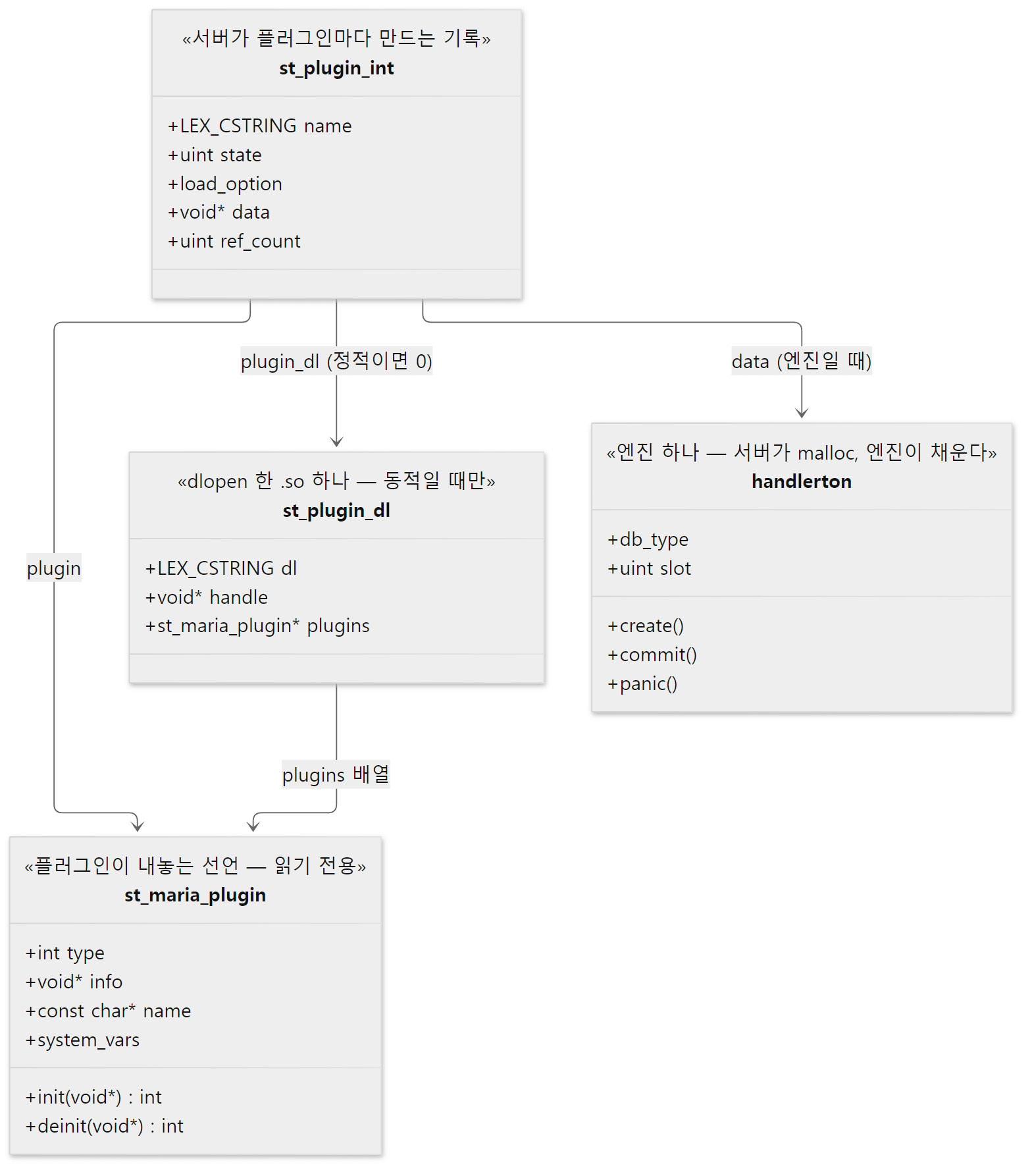 플러그인이 쓰는 것은 아래의
st_maria_plugin 하나뿐입니다. 나머지 셋은 서버가 만듭니다.
st_maria_plugin(include/mysql/plugin.h567–588행) — 플러그인이 내놓는 선언입니다. 종류(type), 종류별 정보(info), 이름,init/deinit함수, 시스템 변수 표 등.st_plugin_int(sql/sql_plugin.h109–123행) — 서버가 플러그인마다 하나씩 만드는 기록입니다. 상태(state), 켜는 방식(load_option), 그리고 종류별 데이터data— 엔진이면handlerton— 를 가집니다.st_plugin_dl(94–105행) —dlopen()한.so하나입니다. 정적 플러그인이면st_plugin_int::plugin_dl이 0입니다. 4절의 예제에서UNINSTALL이 "Built-in plugins cannot be deleted" 를 내는 판단이 바로 이 0인지 보는 것입니다(sql_plugin.cc 2433–2437행).handlerton— 엔진일 때만. 5절에서 봅니다.
maria_declare_plugin — 같은 소스가 두 가지로 컴파일됩니다
InnoDB 의 선언입니다. 파일의 거의 맨 끝에 있습니다.
maria_declare_plugin(innobase)
{
  MYSQL_STORAGE_ENGINE_PLUGIN,
  &innobase_storage_engine,
  innobase_hton_name,
  plugin_author,
  "Supports transactions, row-level locking, foreign keys and encryption for tables",
  PLUGIN_LICENSE_GPL,
  innodb_init, /* Plugin Init */
  NULL, /* Plugin Deinit */
  MYSQL_VERSION_MAJOR << 8 | MYSQL_VERSION_MINOR,
  innodb_status_variables_export,/* status variables             */
  innobase_system_variables, /* system variables */
  PACKAGE_VERSION,
  MariaDB_PLUGIN_MATURITY_STABLE /* maturity */
},
i_s_innodb_trx,
i_s_innodb_locks,
// ... (i_s_innodb_lock_waits 부터 i_s_innodb_sys_virtual 까지 26개 생략)
i_s_innodb_tablespaces_encryption
maria_declare_plugin_end;
storage/innobase/handler/ha_innodb.cc 20762–20807행
중괄호 하나가 st_maria_plugin 하나입니다. 첫 원소가 스토리지 엔진 InnoDB 이고(init 자리에 innodb_init), 그 뒤로 i_s_innodb_trx 부터 i_s_innodb_tablespaces_encryption 까지 29개가 더 붙어 배열 하나에 플러그인 30개가 들어 있습니다. 뒤의 29개는 information_schema.INNODB_TRX·INNODB_LOCKS·INNODB_BUFFER_PAGE 같은 테이블을 만드는 INFORMATION_SCHEMA 플러그인입니다. 11편에서 쓰는 INNODB_TRX 테이블도 InnoDB 가 플러그인으로 내놓은 것입니다.
maria_declare_plugin 매크로는 빌드 방식에 따라 다르게 펼쳐집니다.
#ifndef MYSQL_DYNAMIC_PLUGIN
// ...
#define MARIA_DECLARE_PLUGIN__(NAME, VERSION, PSIZE, DECLS)                   \
MYSQL_PLUGIN_EXPORT int VERSION;                                              \
int VERSION= MARIA_PLUGIN_INTERFACE_VERSION;                                  \
MYSQL_PLUGIN_EXPORT int PSIZE;                                                \
int PSIZE= sizeof(struct st_maria_plugin);                                    \
MYSQL_PLUGIN_EXPORT struct st_maria_plugin DECLS[];                           \
struct st_maria_plugin DECLS[]= {
#else
// ... (mysql_ 판 매크로 생략)
#define MARIA_DECLARE_PLUGIN__(NAME, VERSION, PSIZE, DECLS)                    \
MYSQL_PLUGIN_EXPORT int _maria_plugin_interface_version_;                      \
int _maria_plugin_interface_version_= MARIA_PLUGIN_INTERFACE_VERSION;          \
MYSQL_PLUGIN_EXPORT int _maria_sizeof_struct_st_plugin_;                       \
int _maria_sizeof_struct_st_plugin_= sizeof(struct st_maria_plugin);           \
MYSQL_PLUGIN_EXPORT struct st_maria_plugin _maria_plugin_declarations_[];      \
struct st_maria_plugin _maria_plugin_declarations_[]= {

#endif
include/mysql/plugin.h 136–167행
- 정적으로 묶을 때(
MYSQL_DYNAMIC_PLUGIN이 없을 때) 배열 이름은builtin_maria_innobase_plugin처럼 플러그인마다 다릅니다. 한 실행 파일 안에 여러 플러그인이 있어도 이름이 부딪치지 않게 하려는 것입니다. .so로 만들 때는 배열 이름이 언제나_maria_plugin_declarations_입니다. 서버가dlopen()한 뒤 이 이름 하나만dlsym()으로 찾으면 되기 때문입니다(sql_plugin.cc 169–170행,plugin_dl_add()의 783행dlopen(dlpath, RTLD_NOW), 685행read_maria_plugin_info()안의dlsym()).
어느 쪽으로 만들지는 CMake 가 정합니다. cmake/plugin.cmake 의 MYSQL_ADD_PLUGIN() 은 정적일 때 MYSQL_DYNAMIC_PLUGIN 없이 서버에 링크하고 이름을 목록에 더하며(255–268행), 동적일 때는 MYSQL_DYNAMIC_PLUGIN 을 정의해 MODULE 라이브러리로 만듭니다(269–280행). 그 목록이 들어가는 틀이 sql/sql_builtin.cc.in 입니다. 이 파일의 37–47행에 mysql_optional_plugins[] 와 mysql_mandatory_plugins[] 두 배열이 있고, 배열 안의 @mysql_optional_plugins@ 자리에 CMake 가 builtin_maria_innobase_plugin, 같은 줄을 채워 빌드 폴더에 sql_builtin.cc 를 만듭니다. 필수 배열의 맨 앞 셋(binlog, mysql_password, mhnsw)은 틀에 직접 적혀 있습니다. 저장소에는 없는 생성 파일이라, 예제 이미지(빌드 폴더를 남기지 않았습니다)에서는 gdb 로 실행 파일 안의 배열을 직접 찍어 봤습니다. 프로세스를 띄우지 않고 실행 파일만 읽은 것입니다.
===== 0. built-in plugin arrays generated at build time (no process) =====
0x294daa0 <mysql_mandatory_plugins>:	0x29487a0 <builtin_maria_binlog_plugin>	0x291f020 <builtin_maria_mysql_password_plugin>
0x294dab0 <mysql_mandatory_plugins+16>:	0x2948c20 <builtin_maria_mhnsw_plugin>	0x2954220 <builtin_maria_csv_plugin>
...
0x294db20 <mysql_mandatory_plugins+128>:	0x294dca0 <builtin_maria_online_alter_log_plugin>	0x0
0x294da40 <mysql_optional_plugins>:	0x2956560 <builtin_maria_innobase_plugin>	0x2950860 <builtin_maria_perfschema_plugin>
0x294da50 <mysql_optional_plugins+16>:	0x2b635a0 <builtin_maria_sequence_plugin>	0x2b636c0 <builtin_maria_auth_socket_plugin>
...
0x294da70 <mysql_optional_plugins+48>:	0x2b652a0 <builtin_maria_thread_pool_info_plugin>	0x2950460 <builtin_maria_partition_plugin>
0x294da80 <mysql_optional_plugins+64>:	0x0
주소는 빌드마다 다르고, 가운데 줄은 ... 로 줄였습니다. 필수(mandatory) 배열에 17개, 선택(optional) 배열에 8개가 있고 둘 다 0 으로 끝납니다. 원소 하나는 위에서 본 "플러그인 배열 하나"이므로 플러그인 수는 이보다 많습니다(InnoDB 배열 하나만 30개). InnoDB 와 perfschema, partition 이 선택 쪽에 있다는 것을 기억해 두면 4절의 LOAD_OPTION 이 이해됩니다. httpd 6편에서 본 ap_prelinked_modules[] 도 빌드가 만들어 내는 modules.c 의 배열이었습니다. 정적 모듈을 실행 파일에 넣는 방식이 두 서버에서 거의 같습니다.
4. plugin_init() — 등록하고, 종류 순서대로 켜고, mysql.plugin 을 읽는다
init_server_components() 의 5618행에서 불리는 plugin_init()(1619–1890행)이 하는 일을 그림으로 먼저 봅니다.
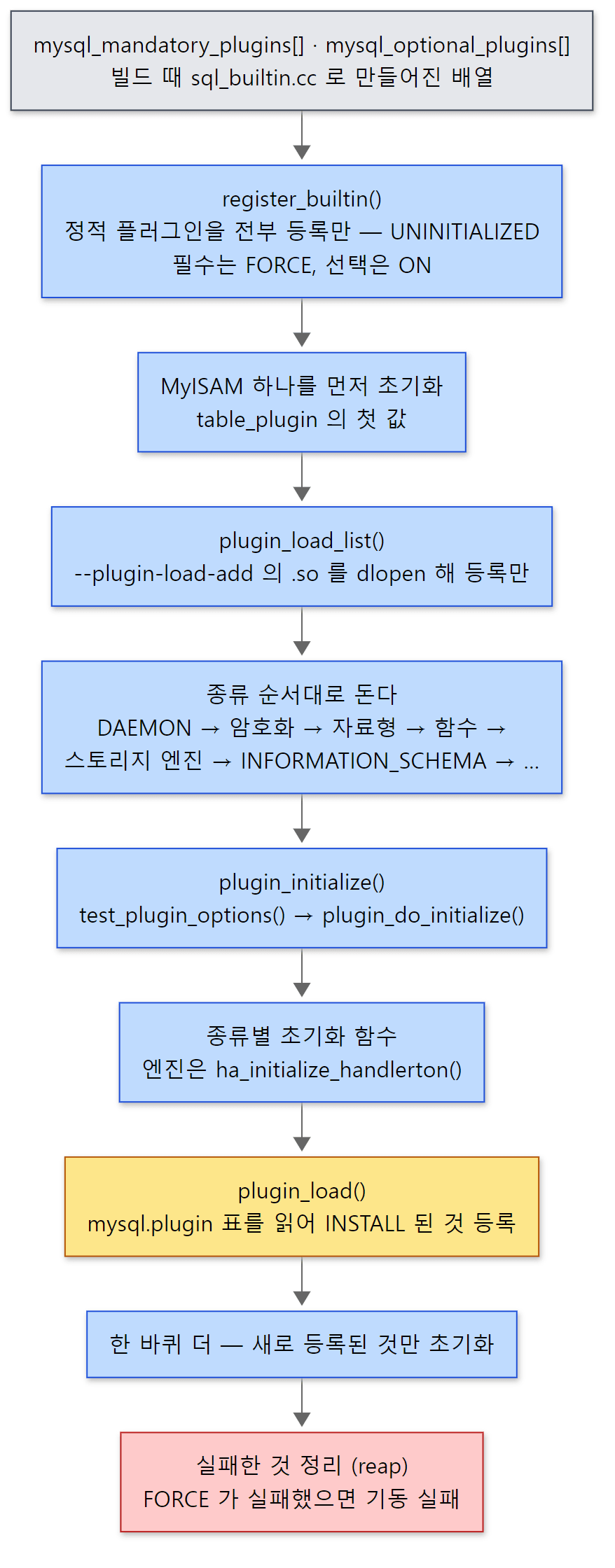 노란 상자에서 서버는 자기 테이블(
mysql.plugin)을 읽습니다. 그러려면 그 테이블의 엔진이 먼저 켜져 있어야 합니다.
먼저 전부 등록만 합니다
  for (builtins= mysql_mandatory_plugins; *builtins || mandatory; builtins++)
  {
    if (!*builtins)
    {
      builtins= mysql_optional_plugins;
      mandatory= false;
      if (!*builtins)
        break;
    }
    for (plugin= *builtins; plugin->info; plugin++)
    {
      // ... (InnoDB 를 건너뛰는 옵션 처리 생략)
      bzero(&tmp, sizeof(tmp));
      tmp.plugin= plugin;
      tmp.name= tmp_plugin_name;
      tmp.state= 0;
      tmp.load_option= mandatory ? PLUGIN_FORCE : PLUGIN_ON;
      // ... (override_plugin_load_policy 적용 생략)
      tmp.state= PLUGIN_IS_UNINITIALIZED;
      if (register_builtin(plugin, &tmp, &plugin_ptr))
        goto err_unlock;
    }
  }
두 배열을 차례로 돌며 register_builtin() 으로 plugin_array 와 종류별 해시 plugin_hash[type] 에 넣기만 합니다(1893–1913행). 상태는 PLUGIN_IS_UNINITIALIZED 이고, 필수 배열에서 온 것은 PLUGIN_FORCE, 선택 배열에서 온 것은 PLUGIN_ON 입니다(1705행). 생략한 1709–1716행은 예외 표 override_plugin_load_policy(213–234행)를 적용하는데, 이 표가 performance_schema 를 FORCE 로, feedback 을 OFF 로 바꿉니다. 예제 1의 Plugin 'FEEDBACK' is disabled. 가 여기서 시작됩니다.
그다음 1724–1744행은 MyISAM 하나만 먼저 초기화해 global_system_variables.table_plugin(기본 엔진)의 첫 값으로 둡니다. 주석은 "that should almost always succeed" 라고 이유를 적습니다. 진짜 기본 엔진인 InnoDB 로 바꾸는 것은 plugin_init() 이 끝난 뒤 init_default_storage_engine()(mysqld.cc 5871행)입니다. 1747–1751행은 --plugin-load-add 로 준 .so 를 plugin_load_list() 로 열어 등록만 합니다.
종류 순서대로 초기화하고, mysql.plugin 을 읽고, 한 바퀴 더
  for(;;)
  {
    int error;
    for (i=0; i < MYSQL_MAX_PLUGIN_TYPE_NUM; i++)
    {
      HASH *hash= plugin_hash + plugin_type_initialization_order[i];
      for (uint idx= 0; idx < hash->records; idx++)
      {
        plugin_ptr= (struct st_plugin_int *) my_hash_element(hash, idx);
        if (plugin_ptr->state == PLUGIN_IS_UNINITIALIZED)
        {
          bool plugin_table_engine= lex_string_eq(&plugin_table_engine_name,
                                                  &plugin_ptr->name);
          bool opts_only= flags & PLUGIN_INIT_SKIP_INITIALIZATION &&
                         (flags & PLUGIN_INIT_SKIP_PLUGIN_TABLE ||
                          !plugin_table_engine);
          error= plugin_initialize(&tmp_root, plugin_ptr, argc, argv,
                                   opts_only);
    // ... (실패하면 reap 목록에, HA_ERR_RETRY_INIT 면 다시 시도 목록에 — 생략)
    /* load and init plugins from the plugin table (unless done already) */
    if (flags & PLUGIN_INIT_SKIP_PLUGIN_TABLE ||
        plugin_table_engine_name.length == 0)
      break;

    mysql_mutex_unlock(&LOCK_plugin);
    plugin_load(&tmp_root);
    flags|= PLUGIN_INIT_SKIP_PLUGIN_TABLE;
    mysql_mutex_lock(&LOCK_plugin);
  }
- 바깥
for(;;)안에서 종류 순서표plugin_type_initialization_order[]를 따라 종류마다 해시를 돌며, 아직UNINITIALIZED인 것을plugin_initialize()합니다. 순서표(142–156행)는 DAEMON → 암호화 → 자료형 → 함수 → 스토리지 엔진 → INFORMATION_SCHEMA → 전문 검색 파서 → 인증 → 비밀번호 검사 → 감사 → 복제 → UDF 입니다. 암호화 키 플러그인(MariaDB_ENCRYPTION_PLUGIN)이 엔진보다 먼저 와야 InnoDB 가 암호화된 테이블스페이스를 열 수 있고, 엔진이INFORMATION_SCHEMA보다 먼저 와야INNODB_TRX같은 테이블이 엔진에 기댈 수 있습니다. - 실패한 플러그인은
reap목록에 모읍니다. 의존하는 다른 플러그인이 아직 없어HA_ERR_RETRY_INIT를 돌려준 것은 따로 모아 다시 시도합니다(1805–1849행). - 한 바퀴가 끝나면
plugin_load()가mysql.plugin테이블을 읽어INSTALL SONAME으로 올렸던 플러그인을 등록하고,PLUGIN_INIT_SKIP_PLUGIN_TABLE표시를 켠 뒤 한 바퀴 더 돕니다. 두 번째 바퀴에서는 새로 등록된 것만UNINITIALIZED이므로 그것들만 초기화됩니다. - 끝에서
reap목록을 정리합니다. 그중FORCE인 것이 있으면plugin_init()이 실패하고 기동이 멈춥니다(1865–1879행).
mysql.plugin 을 첫 바퀴 뒤에 읽는 이유는 이것이 서버의 보통 테이블이기 때문입니다. plugin_load() 는 new THD(0) 로 연결 없는 THD 를 하나 만들고 open_and_lock_tables() 로 테이블을 열어 READ_RECORD 로 한 줄씩 읽습니다(1933–2042행). 테이블을 열려면 그 테이블의 엔진이 켜져 있어야 하므로, 첫 바퀴에서 정적 엔진들을 먼저 켜야 합니다. 1753–1760행이 mysql/plugin.frm 에서 엔진 이름을 미리 읽어 두는 것도 그 때문입니다. 아래 예제에서 보듯 이 테이블의 엔진은 Aria 입니다.
plugin_initialize() 와 plugin_do_initialize()
plugin_initialize()(1523–1555행)는 test_plugin_options() 로 그 플러그인의 옵션을 먼저 읽고(2절의 3단계), 꺼져 있지 않으면 plugin_do_initialize() 를 부릅니다.
static int plugin_do_initialize(struct st_plugin_int *plugin, uint &state)
{
  DBUG_ENTER("plugin_do_initialize");
  mysql_mutex_assert_not_owner(&LOCK_plugin);
  plugin_type_init init= plugin_type_initialize[plugin->plugin->type];
  if (!init)
    init= plugin->plugin->init;
  if (init)
  {
    if (int ret= init(plugin))
    {
      /* Plugin init failed and did not requested a retry */
      if (ret != HA_ERR_RETRY_INIT)
        print_init_failed_error(plugin);
      DBUG_RETURN(ret);
    }
  }
  state= PLUGIN_IS_READY; // plugin->init() succeeded
1487행이 핵심입니다. 종류별 초기화 함수가 표에 있으면 그것을, 없으면 플러그인 자신의 init 을 부릅니다. 표는 이렇습니다.
plugin_type_init plugin_type_initialize[MYSQL_MAX_PLUGIN_TYPE_NUM]=
{
  0, ha_initialize_handlerton, 0, 0,initialize_schema_table,
  initialize_audit_plugin, 0, 0, 0, initialize_encryption_plugin,
  initialize_data_type_plugin, 0
};
자리 번호가 include/mysql/plugin.h 의 종류 번호입니다. 1번(MYSQL_STORAGE_ENGINE_PLUGIN)이 ha_initialize_handlerton, 4번(MYSQL_INFORMATION_SCHEMA_PLUGIN)이 initialize_schema_table, 5번(감사)과 9번(암호화), 10번(자료형)에도 함수가 있습니다. 0인 자리(데몬, 인증 등)는 플러그인의 init 을 바로 부릅니다. 엔진 플러그인의 init(InnoDB 의 innodb_init)은 서버가 직접 부르지 않고 ha_initialize_handlerton() 이 handlerton 을 준비한 뒤 부릅니다. 5절의 주제입니다. 성공하면 상태가 PLUGIN_IS_READY 가 되고 플러그인의 상태 변수(SHOW STATUS 의 Innodb_…)가 등록됩니다(1500–1519행).
예제 4: 플러그인 목록, INSTALL SONAME, 재기동
-- 이 글을 위해 쓴 예제입니다 (MariaDB 의 소스가 아닙니다)
-- 1. 기동 직후: 플러그인 종류별 개수 (PLUGIN_LIBRARY 가 NULL 이면 mariadbd 에 정적으로 들어 있는 것)
SELECT '--- 1. plugins right after startup' AS step;
SELECT PLUGIN_TYPE, COUNT(*) AS n, SUM(PLUGIN_LIBRARY IS NULL) AS builtin, SUM(PLUGIN_STATUS='ACTIVE') AS active
  FROM information_schema.PLUGINS GROUP BY PLUGIN_TYPE ORDER BY n DESC, PLUGIN_TYPE;
SELECT PLUGIN_NAME, PLUGIN_STATUS, PLUGIN_TYPE, LOAD_OPTION
  FROM information_schema.PLUGINS
 WHERE PLUGIN_TYPE='STORAGE ENGINE' OR PLUGIN_STATUS<>'ACTIVE' ORDER BY PLUGIN_TYPE, PLUGIN_NAME;
-- mysql.plugin 테이블 자체는 어느 엔진에 있나
SELECT TABLE_NAME, ENGINE FROM information_schema.TABLES
 WHERE TABLE_SCHEMA='mysql' AND TABLE_NAME='plugin';

-- 2. 동적 플러그인 올리기: plugin_dir 의 .so 를 dlopen 한다
SELECT '--- 2. INSTALL SONAME' AS step;
SELECT @@plugin_dir;
INSTALL SONAME 'metadata_lock_info';
SELECT PLUGIN_NAME, PLUGIN_STATUS, PLUGIN_TYPE, PLUGIN_LIBRARY, LOAD_OPTION
  FROM information_schema.PLUGINS WHERE PLUGIN_LIBRARY IS NOT NULL;
SELECT * FROM mysql.plugin;
-- 이제 information_schema 에 새 테이블이 생겼다
SELECT COUNT(*) AS locks_held FROM information_schema.METADATA_LOCK_INFO;
[예제 ex/u03-install-soname/demo1.sql]
run.sh 는 이것을 돌린 뒤 서버를 껐다 켜서 3번(PLUGIN_LIBRARY IS NOT NULL 인 것만 다시 묻기), 4번(UNINSTALL PLUGIN InnoDB), 그리고 lab-start --plugin-load-add=ha_blackhole 로 다시 띄워 5번을 찍습니다. 출력은 일부만 실었습니다(... 자리에서 단계 제목 표와 표의 머리줄을 뺐고, 2·3·5번은 결과 줄만 남겼습니다).
+--------------------+----+---------+--------+
 PLUGIN_TYPE        | n  | builtin | active |
+--------------------+----+---------+--------+
 INFORMATION SCHEMA | 42 |      42 |     41 |
 FUNCTION           | 13 |      13 |     13 |
 STORAGE ENGINE     | 10 |      10 |     10 |
 DATA TYPE          |  6 |       6 |      6 |
 AUTHENTICATION     |  3 |       3 |      3 |
 DAEMON             |  3 |       3 |      3 |
+--------------------+----+---------+--------+
+--------------------+---------------+--------------------+-------------+
 PLUGIN_NAME        | PLUGIN_STATUS | PLUGIN_TYPE        | LOAD_OPTION |
+--------------------+---------------+--------------------+-------------+
 FEEDBACK           | DISABLED      | INFORMATION SCHEMA | OFF         |
 Aria               | ACTIVE        | STORAGE ENGINE     | FORCE       |
 CSV                | ACTIVE        | STORAGE ENGINE     | FORCE       |
 InnoDB             | ACTIVE        | STORAGE ENGINE     | ON          |
 MEMORY             | ACTIVE        | STORAGE ENGINE     | FORCE       |
 MRG_MyISAM         | ACTIVE        | STORAGE ENGINE     | FORCE       |
 MyISAM             | ACTIVE        | STORAGE ENGINE     | FORCE       |
 partition          | ACTIVE        | STORAGE ENGINE     | ON          |
 PERFORMANCE_SCHEMA | ACTIVE        | STORAGE ENGINE     | FORCE       |
 SEQUENCE           | ACTIVE        | STORAGE ENGINE     | ON          |
 SQL_SEQUENCE       | ACTIVE        | STORAGE ENGINE     | FORCE       |
+--------------------+---------------+--------------------+-------------+
+------------+--------+
 TABLE_NAME | ENGINE |
+------------+--------+
 plugin     | Aria   |
+------------+--------+
...
 METADATA_LOCK_INFO | ACTIVE        | INFORMATION SCHEMA | metadata_lock_info.so | ON          |
...
 METADATA_LOCK_INFO | ACTIVE        | metadata_lock_info.so | ON          |
...
ERROR 1619 (HY000) at line 1: Built-in plugins cannot be deleted
...
 BLACKHOLE          | ACTIVE        | ha_blackhole.so       | ON          |
 METADATA_LOCK_INFO | ACTIVE        | metadata_lock_info.so | ON          |
- 기동 직후 플러그인은 77개이고 전부 정적(
builtin=n)입니다. 비활성은 하나,FEEDBACK의LOAD_OPTION이OFF입니다 — 앞에서 본override_plugin_load_policy그대로입니다. - 엔진의
LOAD_OPTION이 둘로 갈립니다. Aria·CSV·MEMORY·MyISAM·MRG_MyISAM·SQL_SEQUENCE 는 필수 배열에서 와서FORCE, InnoDB·partition·SEQUENCE 는 선택 배열에서 와서ON입니다.PERFORMANCE_SCHEMA는 선택 배열에 있지만 예외 표가FORCE로 바꿨습니다. INSTALL SONAME 'metadata_lock_info'는mysql_install_plugin()(2326–2416행)으로 갑니다.plugin_add()가plugin_dir의.so를dlopen()해 등록하고,finalize_install()이plugin_initialize()로 초기화한 뒤mysql.plugin에 한 줄을 씁니다(2314–2316행의ha_write_row()). 그 결과information_schema.METADATA_LOCK_INFO테이블이 생겼습니다. 이 테이블은 7편에서 메타데이터 잠금을 볼 때 씁니다.- 재기동한 뒤(3번)에도 그대로 있는 것은
plugin_load()가mysql.plugin을 읽었기 때문입니다. --plugin-load-add=ha_blackhole(5번)로 올린 BLACKHOLE 은 목록에는 있지만mysql.plugin에는 없습니다.plugin_load_list()는 등록만 하고 테이블에 쓰지 않으므로, 다음 기동에 옵션을 빼면 사라집니다. 이번 기동에만 쓸 것은 옵션으로, 계속 쓸 것은INSTALL로 — 두 길의 차이가 여기서 납니다.
헷갈리기 쉬운 곳: FORCE 와 ON — 왜 --skip-innodb 는 되고 --skip-aria 는 안 되나
test_plugin_options() 는 플러그인마다 이름과 같은 옵션(--innodb, --feedback …)을 하나 더 만들어 켤지 끌지를 받습니다. 그런데 이 값을 쓰는 곳은 if (!plugin_is_forced(tmp)) 로 감싸여 있습니다.
    if (!plugin_is_forced(tmp))
    {
      plugin_load_option= (enum_plugin_load_option) *(ulong*) opts[0].value;
      disable_plugin= (plugin_load_option == PLUGIN_OFF);
      tmp->load_option= plugin_load_option;
    }
  // ...
  if (disable_plugin)
  {
    if (global_system_variables.log_warnings && !opt_help)
      sql_print_information("Plugin '%s' is disabled.",
                            tmp->name.str);
    goto err;
FORCE 인 플러그인은 이 옵션의 영향을 받지 않으므로 --skip-aria 로 끌 수 없습니다. InnoDB 는 ON 이라 --skip-innodb 로 꺼지고, 예제 2의 셋째 묶음처럼 Plugin 'InnoDB' is disabled. 가 찍힙니다. 그런데 기본 엔진(default_storage_engine)의 기본값이 "InnoDB" 라서(mysqld.cc 4285–4286행) plugin_init() 뒤의 init_default_storage_engine() 이 엔진을 찾지 못하고 Unknown/unsupported storage engine: InnoDB 로 기동을 멈춥니다(5091–5096행). InnoDB 를 끄려면 --default-storage-engine 도 함께 바꿔야 합니다.
5. ha_initialize_handlerton() — 엔진이 handlerton 을 채우는 자리
엔진 플러그인 하나가 초기화되는 길을 시퀀스로 그리면 이렇습니다.
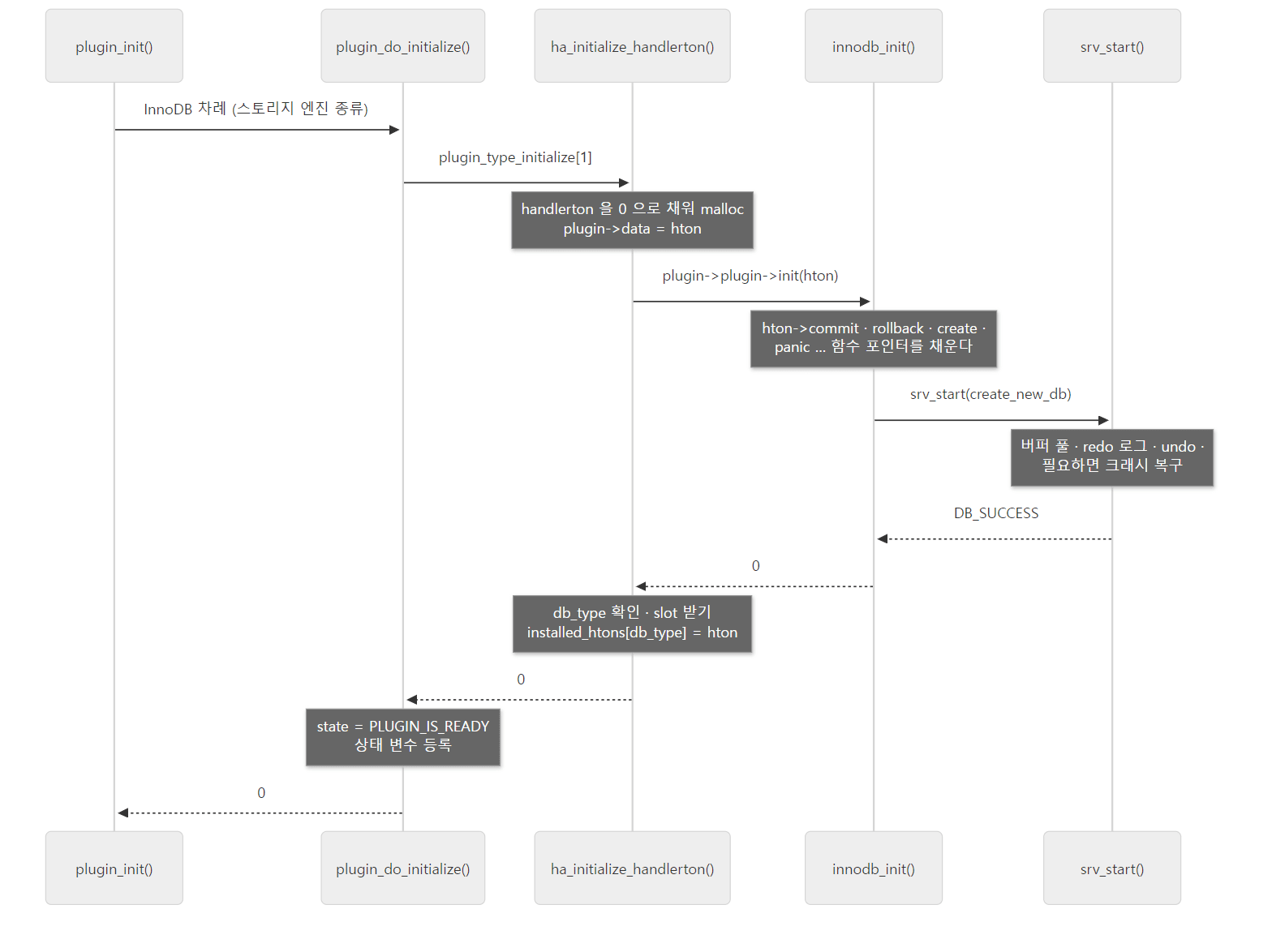
handlerton 을 malloc 하는 것은 서버, 채우는 것은 엔진입니다.
서버 쪽: 빈 표를 만들어 건넨다
  hton= (handlerton *)my_malloc(key_memory_handlerton, sizeof(handlerton),
                                MYF(MY_WME | MY_ZEROFILL));
  // ... (메모리 부족 처리 생략)
  hton->tablefile_extensions= hton_no_exts;
  hton->discover_table_names= hton_ext_based_table_discovery;
  hton->drop_table= hton_drop_table;

  hton->slot= HA_SLOT_UNDEF;
  /* Historical Requirement */
  plugin->data= hton; // shortcut for the future
  if (plugin->plugin->init && (ret= plugin->plugin->init(hton)))
    goto err;
  // ... (발견 함수 기본값, db_type 겹침 검사 생략)
  if ((ret= setup_transaction_participant(plugin)))
    goto err_deinit;

  installed_htons[hton->db_type]= hton;
- 0 으로 채운
handlerton을malloc하고 몇 칸에 기본값을 넣습니다(725–739행). 0 으로 채우는 것이 중요합니다. 엔진이 채우지 않은 함수 포인터는NULL로 남고, 서버는 쓰기 전에NULL인지 봅니다(예:ha_finalize_handlerton()의if (hton->panic)). plugin->data= hton으로st_plugin_int에 걸어 두고,plugin->plugin->init(hton)— 엔진의init— 을 부릅니다(741–743행).init의 인자는void *지만 엔진 플러그인에게는handlerton *가 갑니다.- 돌아오면 엔진이 고른
db_type이 겹치지 않는지 보고, 겹치거나 없으면 빈 번호를 줍니다(767–787행).db_type은.frm파일에 적히는 옛 엔진 번호입니다. setup_transaction_participant()(674–715행)가slot을 줍니다.slot은THD안의 엔진별 칸(thd->ha_data[slot]) 번호로, InnoDB 는 이 칸에 연결마다의 트랜잭션 객체trx_t를 둡니다(ha_innodb.cc 1810행thd_get_ha_data(thd, innodb_hton_ptr)). 엔진에prepare가 있으면 2단계 커밋에 참여하는 엔진 수(total_ha_2pc)도 늘립니다 — 12편의 XA 이야기와 이어집니다.installed_htons[db_type]= hton으로 번호표에 올립니다.
엔진 쪽: 가장 작은 예와 InnoDB
엔진이 하는 일이 얼마나 단순한지는 CREATE SEQUENCE 를 맡는 내부 엔진 SQL_SEQUENCE 의 init 을 보면 압니다.
static int sequence_initialize(void *p)
{
  handlerton *local_sequence_hton= (handlerton *)p;
  DBUG_ENTER("sequence_initialize");

  local_sequence_hton->db_type= DB_TYPE_SEQUENCE;
  local_sequence_hton->create= sequence_create_handler;
  local_sequence_hton->panic= sequence_end;
  local_sequence_hton->flags= (HTON_NOT_USER_SELECTABLE |
                               // ... (나머지 HTON_ 표시들 생략)
                               HTON_NO_PARTITION);
  DBUG_RETURN(0);
}
받은 handlerton 에 번호와 함수 포인터 둘(create, panic)과 성질 표시(flags)를 넣고 끝입니다. HTON_HIDDEN·HTON_NOT_USER_SELECTABLE 이 있어서 사용자가 ENGINE=SQL_SEQUENCE 로 고를 수는 없습니다.
InnoDB 의 innodb_init() 은 같은 일을 훨씬 많이 합니다.
static int innodb_init(void* p)
{
        DBUG_ENTER("innodb_init");
        handlerton* innobase_hton= static_cast<handlerton*>(p);
        innodb_hton_ptr = innobase_hton;

        innobase_hton->db_type = DB_TYPE_INNODB;
        // ...
        innobase_hton->commit = innobase_commit;
        innobase_hton->rollback = innobase_rollback;
        innobase_hton->prepare = innobase_xa_prepare;
        // ... (… 함수 포인터 수십 개, innodb_init_params(), performance_schema 등록 생략)
        bool    create_new_db = false;

        /* Check whether the data files exist. */
        dberr_t err = srv_sys_space.check_file_spec(&create_new_db, 5U << 20);
        // ...
        err = srv_start(create_new_db);

        if (err != DB_SUCCESS) {
                if (!recv_sys.rpo) {
                        recv_sys.rpo = srv_read_only_mode;
                }
                innodb_shutdown();
                goto init_abort;
        }

        srv_was_started = true;
storage/innobase/handler/ha_innodb.cc 4295–4475행
앞부분(4301–4390행)은 전부 innobase_hton->… = … 입니다. commit 에 innobase_commit, rollback 에 innobase_rollback, prepare 에 innobase_xa_prepare, 테이블을 열 handler 를 만드는 create 에 innobase_create_handler, 그리고 panic 에 innobase_end(종료 때 불릴 함수, 7절). 최근 판에 들어온 binlog 를 InnoDB 안에 두는 기능(binlog_storage_engine)의 함수 포인터도 여기 줄지어 있습니다(4365–4390행, 12편).
뒷부분에서 innodb_init_params() 로 innodb_… 변수를 정리하고(4416행), 데이터 파일이 있는지 보고(4451행), srv_start() 를 부릅니다(4465행). srv_start()(srv0start.cc 1303행)가 버퍼 풀을 만들고(1383행 buf_pool.create()), redo 로그를 준비하고(1390행), 체크포인트부터 redo 를 읽고 필요하면 다시 적용합니다(1570행 recv_recovery_from_checkpoint_start()). 예제 1의 InnoDB: Completed initialization of buffer pool, End of log at LSN=52261 이 이 안에서 찍힌 줄입니다. 버퍼 풀은 10편, redo 와 복구는 12편에서 자세히 봅니다. srv_start() 가 실패하면 innodb_shutdown() 으로 정리하고 오류를 돌려주며, InnoDB 는 ON 이라 FORCE 가 아니므로 InnoDB 없이 계속 가려다 — 앞에서 본 대로 — 기본 엔진을 못 찾아 멈춥니다.
예제 5: gdb 로 ha_initialize_handlerton 에 멈춰 엔진 이름 찍기
gdb 로 mariadbd 를 띄우면서 ha_initialize_handlerton 에 dprintf(멈추지 않고 한 줄 찍기)를 걸어 엔진 이름을 찍고, srv_start 에서 한 번 멈춰 백트레이스를 봤습니다. 이어서 handle_connections_sockets 에서 멈춰 스레드 목록을 찍고(6절), 두 번째 실행에서는 종료할 때 innodb_shutdown 에서 멈췄습니다(7절).
# 이 글을 위해 쓴 예제입니다 (MariaDB 의 소스가 아닙니다)
set pagination off
set print thread-events off
break sys_var_init
dprintf ha_initialize_handlerton,"ha_initialize_handlerton: %s\n", ((st_plugin_int*)plugin_)->name.str
break srv_start
break handle_connections_sockets
run
up
print argc
print *argv@argc
continue
bt
continue
info threads
kill
[예제 ex/u03-gdb-handlerton/gdb-start.cmds — run.sh 는 lab-init 뒤 gdb -batch -x gdb-start.cmds --args /opt/mariadb/bin/mariadbd 를 돌리고, 스레드가 생길 때마다 찍히는 [New Thread …] 줄은 grep -v 로 지웁니다. 종료용 gdb-stop.cmds 는 break innodb_shutdown 을 걸고 run, bt, continue 하는 짧은 파일이고, 그 gdb 를 뒤에서 돌리는 동안 mariadb-admin shutdown 을 보냅니다]
엔진 이름과 백트레이스 부분입니다.
ha_initialize_handlerton: MyISAM
ha_initialize_handlerton: MEMORY
ha_initialize_handlerton: CSV
ha_initialize_handlerton: PERFORMANCE_SCHEMA
ha_initialize_handlerton: Aria
ha_initialize_handlerton: MRG_MyISAM
ha_initialize_handlerton: partition
ha_initialize_handlerton: InnoDB

Thread 1 "mariadbd" hit Breakpoint 3, srv_start (create_new_db=false) at /usr/src/mariadb/storage/innobase/srv/srv0start.cc:1304
1304	{
#0  srv_start (create_new_db=false) at /usr/src/mariadb/storage/innobase/srv/srv0start.cc:1304
#1  0x0000555556a6a9c8 in innodb_init (p=0x5555589d7230) at /usr/src/mariadb/storage/innobase/handler/ha_innodb.cc:4465
#2  0x000055555661ec05 in ha_initialize_handlerton (plugin_=0x555558c6d3b0) at /usr/src/mariadb/sql/handler.cc:742
#3  0x00005555561b7762 in plugin_do_initialize (plugin=0x555558c6d3b0, state=@0x7fffffffb7a8: 4) at /usr/src/mariadb/sql/sql_plugin.cc:1492
#4  0x00005555561b7b09 in plugin_initialize (tmp_root=0x7fffffffbe00, plugin=0x555558c6d3b0, argc=0x5555580c26d0 <remaining_argc>, argv=0x5555589d3f60, options_only=false) at /usr/src/mariadb/sql/sql_plugin.cc:1546
#5  0x00005555561b892a in plugin_init (argc=0x5555580c26d0 <remaining_argc>, argv=0x5555589d3f60, flags=0) at /usr/src/mariadb/sql/sql_plugin.cc:1790
#6  0x0000555555f94dbd in init_server_components () at /usr/src/mariadb/sql/mysqld.cc:5618
#7  0x0000555555f967e1 in mysqld_main (argc=11, argv=0x5555589d3f60) at /usr/src/mariadb/sql/mysqld.cc:6425
#8  0x0000555555f88d2d in main (argc=1, argv=0x7fffffffed38) at /usr/src/mariadb/sql/main.cc:34
ha_initialize_handlerton: SQL_SEQUENCE
ha_initialize_handlerton: SEQUENCE
주소와 인자 값은 환경에 따라 다릅니다(gdb 는 주소 무작위화를 끄고 프로그램을 띄우므로, 같은 이미지에서 다시 돌렸을 때는 같은 값이 나왔습니다).
- 백트레이스를 아래에서 위로 읽으면 이 글의 1·4·5절이 한 줄로 이어집니다.
main→mysqld_main(6425행init_server_components()호출) →init_server_components(5618행plugin_init()) →plugin_init(1790행) →plugin_initialize(1546행) →plugin_do_initialize(1492행init(plugin)) →ha_initialize_handlerton(742행plugin->plugin->init(hton)) →innodb_init(4465행) →srv_start. - 엔진 중 MyISAM 이 맨 처음입니다. 앞에서 본 "MyISAM 하나를 먼저"(1724–1744행) 그대로입니다.
- 나머지의 순서(MEMORY, CSV, PERFORMANCE_SCHEMA, Aria, …)는 코드가 정해 둔 순서가 아닙니다(같은 이미지로 다시 돌렸을 때는 같은 순서였습니다). 같은 종류 안에서는 해시
plugin_hash[type]의 원소 순서로 돌기 때문입니다(1780–1782행my_hash_element(hash, idx)). 엔진끼리 서로 기대는 코드를 쓴다면 이 순서에 기대면 안 되고, 기다려야 하면HA_ERR_RETRY_INIT를 돌려 다시 불러 달라고 해야 합니다. SQL_SEQUENCE·SEQUENCE줄이 InnoDB 백트레이스 뒤에 찍힌 것은srv_start에서 멈췄다가continue한 다음 같은 루프가 이어졌기 때문입니다.
헷갈리기 쉬운 곳: InnoDB 의 deinit 은 NULL 입니다
InnoDB 선언(20762–20777행)의 deinit 자리는 NULL 입니다. 그러면 InnoDB 는 어디서 꺼질까요? innodb_init() 이 innobase_hton->panic = innobase_end 를 걸어 두었고(4329행), 엔진의 종류별 정리 함수 ha_finalize_handlerton() 이 hton->panic(hton, HA_PANIC_CLOSE) 을 부릅니다. 엔진의 끄는 길은 플러그인의 deinit 이 아니라 handlerton 의 함수 포인터로 나 있습니다. 7절의 백트레이스로 확인합니다.
6. 첫 연결을 기다리기 — 신호 스레드와 poll() 루프
신호는 전용 스레드 하나가 받습니다
init_signals()(3349–3419행)는 SIGTERM·SIGHUP·SIGQUIT·SIGPIPE, 그리고 --gdb 로 띄우지 않았다면 SIGINT·SIGTSTP 까지 집합에 넣고 sigprocmask()·pthread_sigmask() 로 막아(block) 둡니다(3385–3417행). 이 뒤에 만드는 스레드는 모두 이 마스크를 물려받으므로, 어느 연결 스레드도 이 신호들에 끊기지 않습니다. 그리고 start_signal_handler() 가 띄운 signal_hand 스레드 하나가 그 신호들을 sigwait 로 기다려서 받습니다.
    while ((error= my_sigwait(&set, &sig, &origin)) == EINTR) /* no-op */;

    if (abort_loop)
      break;

    switch (sig) {
    case SIGTERM:
    case SIGQUIT:
#ifdef EXTRA_DEBUG
      sql_print_information("Got signal %d to shutdown server",sig);
#endif
      /* switch to the old log message processing */
      logger.set_handlers(global_system_variables.sql_log_slow ? LOG_FILE:LOG_NONE,
                          opt_log ? LOG_FILE:LOG_NONE);

      break_connect_loop();
      DBUG_ASSERT(abort_loop);
      break;
    case SIGHUP:
      // ... (SIGHUP: reload_acl_and_cache() 와 로그 다시 열기 생략)
      break;
SIGTERM·SIGQUIT 이면 break_connect_loop()(7절)로 main 스레드의 루프를 깨우고, SIGHUP 이면 로그를 다시 열고 권한·테이블 캐시를 비웁니다(reload_acl_and_cache(), FLUSH LOGS 와 비슷한 일). 신호 처리기(signal handler) 안에서는 할 수 있는 일이 극히 적은데, 이렇게 보통 스레드에서 sigwait 로 받으면 잠금을 잡고 무거운 일을 해도 됩니다. 이 스레드는 pid 파일도 씁니다(3474–3476행 create_pid_file()). 그래서 /tmp/mariadbd.pid 가 생기는 시점은 start_signal_handler() 이후입니다. httpd 5편의 httpd 는 신호를 받으면 main() 의 루프를 한 바퀴 더 돌려 설정을 다시 읽었지만, MariaDB 의 SIGHUP 은 설정 파일을 다시 읽지 않습니다. 위 코드의 reload_acl_and_cache() 에 넘기는 표시들도 로그·테이블·권한·스레드·호스트 캐시뿐입니다.
poll() 루프
run_main_loop() 가 부르는 handle_connections_sockets() 입니다.
  int termination_fds[2];
  if (pipe(termination_fds))
  // ... (파이프 만들기 실패 처리 생략)
  struct pollfd event_fd;
  event_fd.fd= termination_fds[0];
  event_fd.events= POLLIN;
  fds.push(event_fd);

  sd_notify(0, "READY=1\n"
            "STATUS=Taking your SQL requests now...\n");

  DBUG_PRINT("general",("Waiting for connections."));
  while (!abort_loop)
  {
    retval= poll(fds.get_pos(0), fds.size(), -1);
      // ... (poll() 오류 처리, 어느 소켓인지 찾기 생략)
      new_sock= mysql_socket_accept(key_socket_client_connection, sock,
                                    (struct sockaddr *)(&cAddr),
                                    &length);
      if (mysql_socket_getfd(new_sock) != INVALID_SOCKET)
        handle_accepted_socket(new_sock, sock);
network_init()이 만든 듣기 소켓들(TCP IPv4·IPv6, 유닉스 소켓)을pollfd배열에 넣습니다(6856–6864행).- 파이프 하나를 더 만들어 읽는 쪽을 같은 배열에 넣습니다(6865–6882행). 끄라는 요청이 오면 누군가 이 파이프에 쓰고, 그러면
poll()이 깨어납니다(7절). systemd에READY=1을 알립니다(6884–6885행).systemctl start mariadb가 돌아오는 시점이 여기입니다.poll(…, -1)— 시간 제한 없이 기다립니다. 소켓에 새 연결이 오면accept()하고handle_accepted_socket()에 넘깁니다. 그 뒤 연결마다 스레드를 붙이는 일은 4편에서 봅니다.
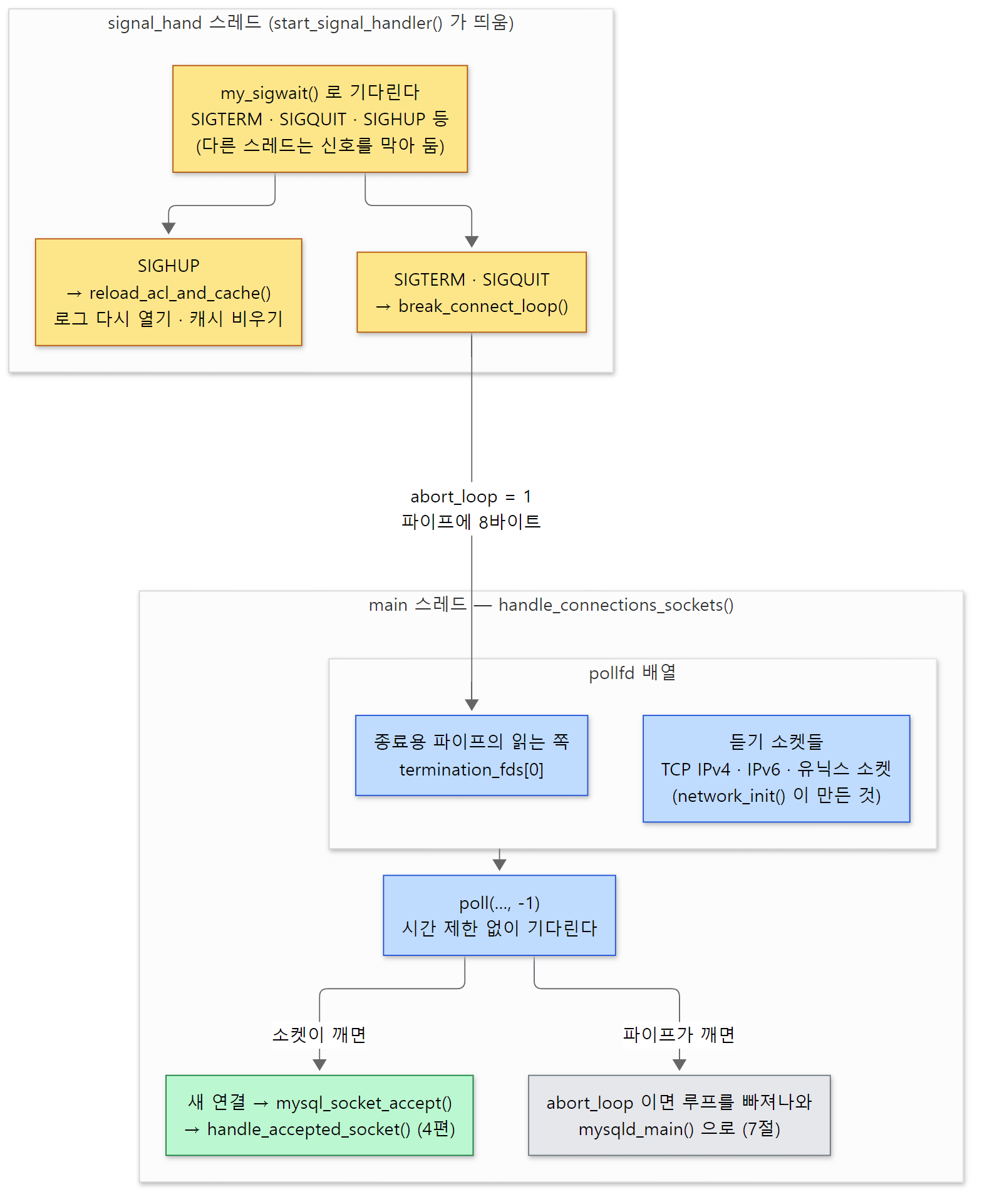 신호를 받는 스레드와 연결을 기다리는 스레드는 따로이고, 둘을 잇는 것은 파이프 하나입니다. 기다리는 신호 목록은 signal_hand 의 sigaddset(mysqld.cc 3466–3472행)에서 확인했습니다.
main 스레드는 서버가 사는 내내 이 루프에 머뭅니다. 예제 5에서 handle_connections_sockets 에 멈췄을 때의 스레드 목록입니다.
Thread 1 "mariadbd" hit Breakpoint 4, handle_connections_sockets () at /usr/src/mariadb/sql/mysqld.cc:6846
6846	{
  Id   Target Id                                         Frame
* 1    Thread 0x7ffff6fe2a00 (LWP 94) "mariadbd"         handle_connections_sockets () at /usr/src/mariadb/sql/mysqld.cc:6846
  2    Thread 0x7ffff63e86c0 (LWP 97) "statement_timer"  0x00007ffff730ae51 in ?? () from /lib/x86_64-linux-gnu/libc.so.6
  3    Thread 0x7fffe1d8e6c0 (LWP 98) "checkpoint_bg"    0x00007ffff730ae51 in ?? () from /lib/x86_64-linux-gnu/libc.so.6
  4    Thread 0x7fffe118c6c0 (LWP 99) "io_uring_wait"    0x00007ffff7edfab0 in ?? () from /lib/x86_64-linux-gnu/liburing.so.2
  5    Thread 0x7fffe098b6c0 (LWP 100) "ib_tpool_worker" 0x00007ffff730ae51 in ?? () from /lib/x86_64-linux-gnu/libc.so.6
  6    Thread 0x77ffdbfff6c0 (LWP 101) "page_cleaner"    0x00007ffff730ae51 in ?? () from /lib/x86_64-linux-gnu/libc.so.6
...
  11   Thread 0x7ffff41aa6c0 (LWP 106) "manager"         0x00007ffff730ae51 in ?? () from /lib/x86_64-linux-gnu/libc.so.6
  12   Thread 0x7ffff41596c0 (LWP 107) "signal_handler"  0x00007ffff72b7fc8 in sigtimedwait () from /lib/x86_64-linux-gnu/libc.so.6
  13   Thread 0x7ffff410e6c0 (LWP 108) "mariadbd"        0x00007ffff730ae51 in ?? () from /lib/x86_64-linux-gnu/libc.so.6
LWP 번호와 일부 스레드의 주소는 실행마다 다르고, 같은 이름이 되풀이되는 줄은 ... 로 줄였습니다. 첫 연결이 오기 전인데도 스레드가 13개입니다. 1번이 main 스레드(지금 handle_connections_sockets), 12번 signal_handler 가 위의 signal_hand 로 sigtimedwait 에서 기다리고 있습니다. my_sigwait()(include/my_pthread.h 176–187행)는 HAVE_SIGWAITINFO 이면 sigwaitinfo() 를 부르는데, 백트레이스에 sigtimedwait 가 보이는 것은 C 라이브러리(glibc) 안에서 그렇게 구현된 것으로 보입니다(glibc 소스로 확인한 것은 아닙니다). page_cleaner, ib_tpool_worker, io_uring_wait, checkpoint_bg 는 srv_start() 가 띄운 InnoDB 의 스레드, manager 는 서버의 관리 스레드입니다. 연결 스레드는 아직 하나도 없습니다. 연결마다 스레드가 생기는 모습은 4편에서 이 목록과 비교합니다.
7. 종료 — 기동의 거꾸로
끄는 길은 두 갈래로 들어와 한 함수에서 만납니다.
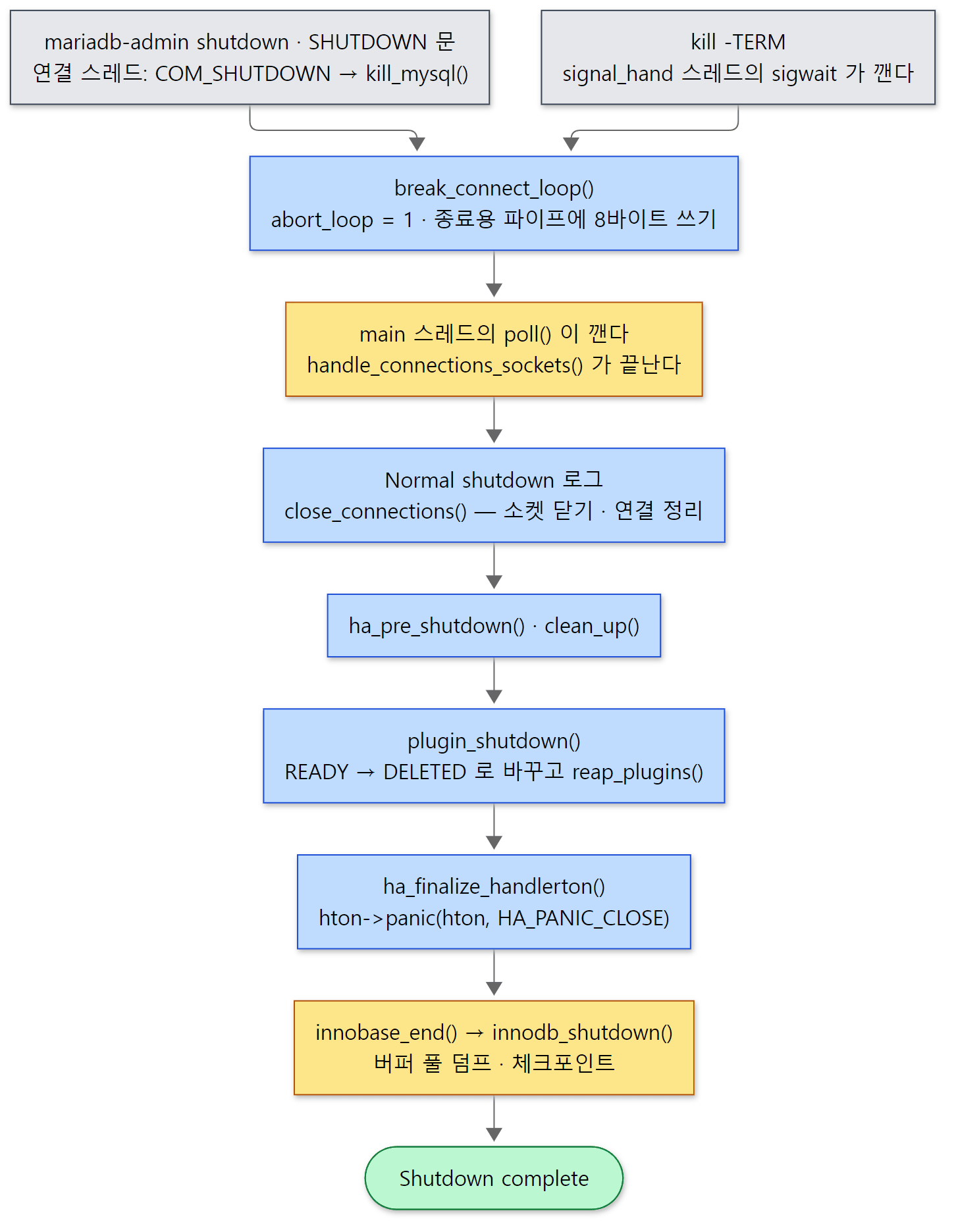 두 입구(회색)가
break_connect_loop() 에서 만납니다. 실제 정리는 언제나 main 스레드가 합니다.
break_connect_loop() — 표시 하나와 8바이트
static void break_connect_loop()
{
  abort_loop= 1;
  // ... (Windows 판 생략)
  mysql_mutex_lock(&LOCK_start_thread);
  if (termination_event_fd >= 0)
  {
    uint64_t u= 1;
    if(write(termination_event_fd, &u, sizeof(uint64_t)) < 0)
    {
      sql_print_error("Couldn't send event to terminate listen loop");
      abort();
    }
  }
  mysql_mutex_unlock(&LOCK_start_thread);
#endif /* _WIN32 */
}
abort_loop= 1 을 세우고, 6절의 파이프에 8바이트(uint64_t 하나)를 씁니다. 하는 일은 그것뿐이고, 함수 위의 주석(1845–1847행)도 "Shutdown as such is supposed to be performed by main thread itself" 라고 못 박습니다. 이 함수를 부르는 곳은 셋입니다. signal_hand 의 SIGTERM·SIGQUIT(3513행), kill_mysql()(1914행), 그리고 --gdb 로 띄웠을 때 ^C 를 받는 end_mysqld_signal()(3066행)입니다. kill_mysql() 은 mariadb-admin shutdown 이 보내는 COM_SHUTDOWN 명령(sql_parse.cc 2241–2268행)과 SQL 문 SHUTDOWN(5517–5523행)이 부르는데, 둘 다 먼저 SHUTDOWN 권한을 확인합니다. kill_mysql() 은 누가 껐는지(shutdown_user)도 적어 둡니다(1886–1895행).
파이프에 쓰인 바이트 때문에 main 스레드의 poll() 이 깨고, abort_loop 를 보고 루프를 빠져나와 mysqld_main() 으로 돌아갑니다.
  run_main_loop();

  /* Shutdown requested */
  {
    char *user= shutdown_user.load(std::memory_order_relaxed);
    sql_print_information(ER_DEFAULT(ER_NORMAL_SHUTDOWN), my_progname,
                          user ? user : "unknown");
  }
  // ... (WSREP 블록 생략)
  close_connections();

termination:
  my_free(shutdown_user.load(std::memory_order_relaxed));
  /*
    The signal thread can use server resources, e.g. when processing SIGHUP,
    and it must end gracefully before clean_up()
  */
  wait_for_signal_thread_to_end();

  ha_pre_shutdown();
  clean_up(1, true);
Normal shutdown로그를 찍습니다.initiated by:뒤에kill_mysql()이 적어 둔 사용자가 들어가고, 신호로 껐으면unknown입니다.close_connections()(1918행~) — 듣기 소켓을 닫고 유닉스 소켓 파일을 지운 뒤(1928–1944행), 연결 스레드마다 끝내라고 알리고(1954행kill_thread_phase_1) 최대 1000번 × 20ms = 20초 기다립니다(1987–1992행). 주석이 "From 10.0, we increase this to 1000 rounds / 20 seconds" 라고 이유를 적어 둡니다.wait_for_signal_thread_to_end()로 신호 스레드를 기다리고,ha_pre_shutdown()으로 엔진에 미리 알린 뒤,clean_up()이 서버 부품을 거꾸로 정리합니다. 그 가운데 2183행이plugin_shutdown()입니다.
plugin_shutdown() — 쓰는 사람이 없는 것부터
    while (reap_needed && (count= plugin_array.elements))
    {
      reap_plugins();
      for (i= 0; i < count; i++)
      {
        plugin= *dynamic_element(&plugin_array, i, struct st_plugin_int **);
        if (plugin->state == PLUGIN_IS_READY)
        {
          plugin->state= PLUGIN_IS_DELETED;
          reap_needed= true;
        }
      }
      if (!reap_needed)
      {
        /*
          release any plugin references held.
        */
        unlock_variables(NULL, &global_system_variables);
        unlock_variables(NULL, &max_system_variables);
      }
    }
READY 인 플러그인을 모두 DELETED 로 표시하고 reap_plugins() 를 부르는 일을 되풀이합니다. reap_plugins()(1348–1390행)는 ref_count 가 0인 것만 골라 plugin_deinitialize() 합니다. 누군가 아직 붙잡고 있는 플러그인은 다음 바퀴로 밀립니다. 대표적인 것이 기본 엔진입니다. global_system_variables.table_plugin 이 InnoDB 를 잠가(lock) 두고 있으므로, 다른 것이 다 정리된 뒤 2177–2178행의 unlock_variables() 로 놓아준 다음 바퀴에 정리됩니다. 주석(2153–2158행)의 "reasonable order" 가 이것입니다.
plugin_deinitialize() 는 plugin_do_initialize() 의 거울입니다. 종류별 정리 함수(plugin_type_deinitialize[], 130–135행)가 있으면 그것을 — 엔진이면 ha_finalize_handlerton() 을 — 부릅니다(1307–1311행). 그리고 5절에서 본 대로 ha_finalize_handlerton() 이 hton->panic 을 부릅니다.
  if (installed_htons[hton->db_type] == hton)
    installed_htons[hton->db_type]= NULL;

  if (hton->panic)
    hton->panic(hton, HA_PANIC_CLOSE);

  if (plugin->plugin->deinit)
    deinit_status= plugin->plugin->deinit(NULL);
예제 6: 두 가지 종료와 백트레이스
예제 1의 3·4번 묶음은 같은 서버를 mariadb-admin shutdown 과 kill -TERM 으로 한 번씩 끈 것입니다. 가운데의 같은 줄들은 ... 로 줄였습니다.
===== 3. shutdown with mariadb-admin (COM_SHUTDOWN) =====
2026-11-07  3:43:27 0 [Note] mariadbd (initiated by: root[root] @ localhost []): Normal shutdown
2026-11-07  3:43:27 0 [Note] InnoDB: FTS optimize thread exiting.
2026-11-07  3:43:27 0 [Note] InnoDB: Starting shutdown...
...
2026-11-07  3:43:27 0 [Note] Shutdown completed; log sequence number 52261; transaction id 15
2026-11-07  3:43:27 0 [Note] mariadbd: Shutdown complete
===== 4. shutdown with kill -TERM (signal_hand thread) =====
2026-11-07  3:43:29 0 [Note] mariadbd (initiated by: unknown): Normal shutdown
...
2026-11-07  3:43:29 0 [Note] Shutdown completed; log sequence number 52261; transaction id 15
2026-11-07  3:43:29 0 [Note] mariadbd: Shutdown complete
두 로그는 첫 줄의 initiated by: 만 다릅니다. COM_SHUTDOWN 은 root[root] @ localhost [] 를, 신호는 unknown 을 남깁니다. 그 뒤는 똑같습니다 — 두 입구가 break_connect_loop() 에서 만난 뒤로는 같은 길이기 때문입니다. InnoDB: Starting shutdown... 은 innodb_shutdown() 이 부르는 logs_empty_and_mark_files_at_shutdown()(log0log.cc 2106–2112행)에서 찍히고, 버퍼 풀 덤프도 이 함수가 2129행의 buf_dump_start() 로 시작시킵니다(덤프 메시지 자체는 buf/buf0dump.cc 의 buf_dump() 가 찍습니다). 이 함수의 주석은 "Make a checkpoint at the latest lsn on shutdown" 입니다. 정상 종료 뒤 다음 기동에서 복구할 것이 없는 이유이고, kill -9 로 이 단계를 건너뛰면 무슨 일이 생기는지는 12편에서 봅니다.
예제 5의 두 번째 실행에서 innodb_shutdown 에 멈춘 백트레이스입니다.
Thread 1 "mariadbd" hit Breakpoint 1, innodb_shutdown () at /usr/src/mariadb/storage/innobase/srv/srv0start.cc:2105
2105		ut_ad(!srv_read_only_mode || recv_sys.rpo);
#0  innodb_shutdown () at /usr/src/mariadb/storage/innobase/srv/srv0start.cc:2105
#1  0x0000555556a6ab83 in innobase_end () at /usr/src/mariadb/storage/innobase/handler/ha_innodb.cc:4542
#2  0x000055555661e4a2 in ha_finalize_handlerton (plugin_=0x555558c6d3b0) at /usr/src/mariadb/sql/handler.cc:603
#3  0x00005555561b6a07 in plugin_deinitialize (plugin=0x555558c6d3b0, ref_check=true) at /usr/src/mariadb/sql/sql_plugin.cc:1311
#4  0x00005555561b6f4b in reap_plugins () at /usr/src/mariadb/sql/sql_plugin.cc:1382
#5  0x00005555561b9d68 in plugin_shutdown () at /usr/src/mariadb/sql/sql_plugin.cc:2162
#6  0x0000555555f8cb02 in clean_up (print_message=true, use_dummy_thd=true) at /usr/src/mariadb/sql/mysqld.cc:2183
#7  0x0000555555f96e20 in mysqld_main (argc=11, argv=0x5555589d3f60) at /usr/src/mariadb/sql/mysqld.cc:6616
#8  0x0000555555f88d2d in main (argc=1, argv=0x7fffffffed38) at /usr/src/mariadb/sql/main.cc:34
아래에서 위로 mysqld_main(6616행 clean_up()) → clean_up(2183행 plugin_shutdown()) → plugin_shutdown(2162행 reap_plugins()) → reap_plugins → plugin_deinitialize(1311행) → ha_finalize_handlerton(603행 hton->panic) → innobase_end → innodb_shutdown 입니다. 5절의 기동 백트레이스(plugin_init → plugin_do_initialize → ha_initialize_handlerton → innodb_init)와 짝이 맞습니다.
이 글에서 뺀 것
mysqld_main()앞쪽의performance_schema초기화(pre_initialize_performance_schema(),initialize_performance_schema()): mysqld.cc 6199–6314행--bootstrap모드(mariadb-install-db가 시스템 테이블을 만들 때 쓰는 길)와--init-file: 6512–6539행,bootstrap()은sql/sql_parse.cc- 루트로 시작해
user=로 내려가기(check_user(),set_user()): 6391–6399행 ddl_log_initialize()와 DDL 복구, 그리고signal_ddl_recovery_done: mysqld.cc 5602–5603행,sql/ddl_log.cc- binlog 와
tc_log(2단계 커밋 조정자) 열기:init_server_components()5342–5590행 근처와 5897행 이후 — 12편 - 복제 시작(
init_slave()): 6530–6533행 — 12편 - Windows 의 시작 경로(
mysqld_win_main(),handle_connections_win()):sql/winmain.cc,sql/handle_connections_win.cc UNINSTALL PLUGIN(mysql_uninstall_plugin())과 플러그인 잠금(plugin_lock()/plugin_unlock(),ref_count):sql/sql_plugin.cc- 플러그인 서비스(
list_of_services, 플러그인이 서버 함수를 부르는 표):sql/sql_plugin_services.inl,plugin_dl_add()816–837행 - 스레드 풀 같은 스케줄러의 초기화(
network_init()2918행의thread_scheduler->init): 4편
정리
| 개념 | 한 줄 요약 |
|---|---|
main() |
mysqld_main() 을 부를 뿐. 서버 본체는 라이브러리 |
| 기동 순서 | 옵션 → 신호 막기 → init_server_components()(오류 로그, plugin_init(), 남은 옵션 검사) → TLS·소켓 → 신호 스레드 → 권한 → ready for connections. → poll() |
load_defaults |
my.cnf 의 그룹들을 --x=y 꼴로 argv 앞에 끼운다. 파일 표시로 출처를 남긴다 |
| 옵션 네 단계 | early → get_options() → 플러그인마다 test_plugin_options() → 남은 것 검사. 모르는 옵션은 끝까지 넘겨 본다 |
| 오타의 대가 | 남은 옵션 검사가 plugin_init() 뒤라, InnoDB 를 다 켠 뒤에야 unknown variable 로 멈춘다. --validate-config 가 빠르다 |
sys_var |
전역 객체 하나 = 옵션 하나 = 전역 변수 하나. my.cnf·명령줄·SET GLOBAL 이 같은 메모리를 쓴다 |
st_maria_plugin |
플러그인의 선언. maria_declare_plugin 이 정적이면 builtin_maria_<이름>_plugin, 동적이면 _maria_plugin_declarations_ 로 펼쳐진다 |
plugin_init() |
전부 등록 → MyISAM 먼저 → 종류 순서대로 초기화 → mysql.plugin 읽기 → 한 바퀴 더 → 실패 정리 |
FORCE/ON |
필수 배열은 FORCE(끌 수 없음), 선택 배열은 ON(--skip-<이름> 으로 끔) |
ha_initialize_handlerton() |
서버가 0으로 채운 handlerton 을 만들고 엔진의 init(hton) 이 함수 포인터를 채운다. slot·db_type 은 서버가 준다 |
innodb_init() |
hton 을 채우고 srv_start() — 버퍼 풀·redo·복구가 여기서, 소켓이 열리기 전에 |
| 신호 | 모든 스레드에서 막아 두고 signal_hand 하나가 sigwait 로 받는다 |
| 종료 | break_connect_loop() 가 파이프로 poll() 을 깨우면 main 스레드가 연결 정리 → plugin_shutdown() → hton->panic 순으로 거꾸로 정리 |
다음에 볼 것
이번 글의 끝에서 main 스레드는 poll() 에서 첫 연결을 기다리고 있었습니다. 연결이 오면 accept() 한 소켓은 handle_accepted_socket() 을 거쳐 스레드 하나를 받거나(기본값 one-thread-per-connection), 스레드 풀의 그룹에 들어갑니다. 연결마다 THD 가 만들어지고, 인증 플러그인이 비밀번호를 확인합니다. 4편: 연결과 스레드 — 연결마다 스레드 하나, 그리고 스레드 풀에서 이어집니다.
앞 연재와 비교하면, httpd 5편의 httpd 는 main() 안에서 설정 파일을 두 번 읽고, 재시작을 "설정을 처음부터 다시 읽는 루프 한 바퀴"로 처리했습니다. MariaDB 는 설정을 한 번 읽고, 재시작이라는 개념 없이 바꿀 수 있는 것만 SET GLOBAL 로 바꿉니다. httpd 6편의 모듈과 비교하면 닮은 점이 많습니다. 빌드가 만든 정적 목록(ap_prelinked_modules[] ↔ mysql_mandatory_plugins[]), 나중에 .so 를 여는 길(LoadModule ↔ INSTALL SONAME·--plugin-load-add), 그리고 모듈이 register_hooks() 에서 훅 배열에 함수를 거는 것과 엔진이 init() 에서 handlerton 의 함수 포인터를 채우는 것. 다른 점은 httpd 의 훅은 여러 모듈이 한 자리에 줄을 서는 배열이고, handlerton 은 엔진마다 한 장씩 있는 표라는 것입니다. Tomcat 3편은 모든 부품이 Lifecycle 상태 기계를 따르고 8005 포트로 종료 명령을 받았는데, MariaDB 의 플러그인 상태(UNINITIALIZED → READY → DELETED → DYING)는 그보다 훨씬 단순하고, 종료 명령은 SQL 연결(COM_SHUTDOWN)이나 유닉스 신호로 받습니다.